A new article has been published at prMac.
KidloLand App For Kids Crosses 4 Million Downloads - Published on 05/27/16
Internet Design Zone today announced that their KidloLand Nursery Rhymes For Kids app has officially crossed the 4 Million downloads milestone. One of the best apps for kids with over 95 interactive nursery rhymes and educational songs, KidloLand offers more than 165 original educational songs to introduce kids to fruits, animals, vegetables, birds, water animals, ABC alphabet and much more. In over two years, KidloLand app has evolved into a complete toddler and preschool package.
Mumbai, India - Internet Design Zone, developer of KidloLand Nursery Rhymes For Kids, is pleased to announce that the app KidloLand has crossed the milestone 4 Million downloads. In May 2016, the app crossed 2 Million downloads each on iOS and Google Play. In over two years, KidloLand app has evolved into a complete toddler and preschool package. It also won the Spring 2016 Academics' Choice Smart Media Award this May.
KidloLand (Nursery Rhymes for Kids) has been on the appstores since 2012 and has been a favorite with little kids and babies. Old MacDonald remains the most played song in the app having been played over 35 million times, followed by Itsy Bitsy Spider having been played over 17 million times.
Over 25 Expert Moms have given it a thumbs up in their reviews. This is what Chelsea, a Mom blogger staying in United States writes in her app review, "I love it! More importantly, my kids love it! My daughter is 1.5 and she loves the songs. My son is 3 and he sits and plays on the app for hours if we let him. There are tons of songs and activities and so many things to choose from. There is something for every kid at every learning level." Yosh from Mommy OutNumbered in Canada writes, "I think this is a great app for every parent to have on their phone for on the go; it is a perfect distraction / entertainment for a road trip, airplane ride, a grocery shopping trip, etc, if your toddlers get too bored."
The app has now been updated with educational games and hundreds of activities. Jenni, who stays in UK and blogs at Chilling With Lucas writes, "The educational activities encourage cognitive growth through games using hand eye coordination." After the app moved to a subscription model, new content has been added every month to benefit the subscribers. Currently, the app has over 260 nursery rhymes and songs and over 100 preschool games and educational activities. The app developers plan to add a lot of new content including phonics, stories, games, more nursery rhymes and songs. This will make KidloLand the ideal preschool companion for little ones.
Device Requirements:
* iPhone, iPad, and iPod touch
* Requires iOS 7.0 or later
* 188 MB
Pricing and Availability:
KidloLand 14.8 is Free (with in-app purchases) and available worldwide through the App Store in the Education category. There is also an Android version available on Google Play. KidloLand is also available on the Amazon Appstore and has seen over 300k downloads there. KidloLand app is available free for underserved schools, autism institutes and NGOs.
KidloLand 14.8: http://www.kidloland.com
Download from iTunes: https://itunes.apple.com/app/kidloland-nursery-rhymes-for/id533412119
Download from Google Play: https://play.google.com/store/apps/details?id=com.internetdesignzone.nurseryrhymes
Reviews By Mom Bloggers: http://www.kidloland.com/reviews.php
Screenshot: http://a3.mzstatic.com/us/r30/Purple20/v4/1d/cf/e6/1dcfe606-5634-fd79-87d2-5bacfd72892c/screen480x480.jpeg
App Icon: http://a5.mzstatic.com/us/r30/Purple20/v4/39/76/65/397665b3-2624-b2f1-7be2-1c543be08d22/icon175x175.png
Founded in 2004 in Mumbai, India, Internet Design Zone has been developing websites and mobile applications. It has developed more than 60 iPhone/iPod touch and iPad apps. The company is currently developing educational apps for kids on the iOS platform. Copyright (C) 2004-2016 Internet Design Zone. All Rights Reserved. Apple, the Apple logo, iPhone, iPod and iPad are registered trademarks of Apple Inc. in the U.S. and/or other countries.
*******
Link To Article: http://prmac.com/release-id-79577.htm
*******
---------------------------------------------------------------------------------
Note that you can alter delivered distributions at any time.
Login to your account on prMac to alter your channel selection, or to opt-out at any time.


Folx 5.0 released for OS X - New Features and a Redesigned Interface
A new article has been published at prMac.
Folx 5.0 released for OS X - New Features and a Redesigned Interface - Published on 05/27/16
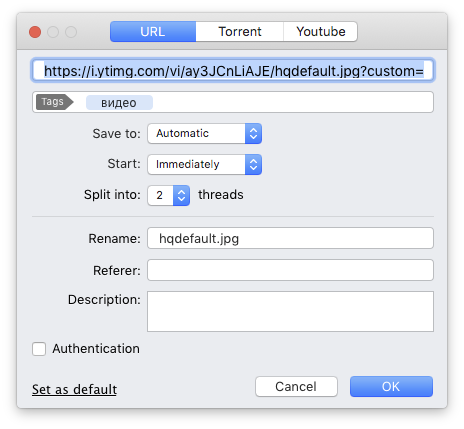
Eltima Software today announces Folx 5.0, an update to their popular download manager for Mac OS X. Offering download management, smart files organization, and much more, version 5.0 offers a new interface design, supported by reworked features and new desirable options. Downloading from websites requiring authentication just got easier with password manager. Also, the new Folx Smart Speed Adjustment feature became even smarter and more flexible. Lots of other perks have been added.
Frankfurt, Germany - Eltima Software is thrilled to announce the release of new version of Folx 5.0, their popular download manager for Mac OS X. Folx 5.0 features revised interface and lots of newly added options. Retina displays are supported as well as the latest Mac OS X versions. There are two editions of Folx - Free and PRO.
Free Folx is rich with features offering convenient downloads management, smart files organization, quick search for once downloaded files, etc. Free Folx allows splitting downloads in threads, resuming interrupted downloads, adjusting download speed, tagging downloads for convenience, and more.
PRO version of Folx broadens the spectrum of what one can do. Splitting of downloads in up to ten threads, scheduling the downloads, searching for torrents directly from the application, downloading from YouTube, integration with iTunes, and so on.
Folx PRO updates add a lot more to download management. Password manager was added to Folx PRO with the ability to automatically save and fill in the passwords on websites you are downloading from. Free version of Folx allows saving login data for two first websites, PRO version is unlimited.
Smart Speed feature now can follow the schedule set up in Folx and will limit the upload/download speed accordingly.
Folx as a torrent client got some new options and improvements too. For example Folx PRO now allows narrowing down torrent search results by sorting and filtering them. Also Folx can be set as a default torrent client for files and magnet links.
Pricing and Availability:
Folx PRO costs $19.95 (USD) and offers tons of handy features: splitting the downloads in up to 10 threads for faster downloading; scheduling the download tasks; password manager; automatic speed adjustment for equal Internet traffic allocation; sending the downloaded videos and music directly to iTunes playlists.
Free Folx can be downloaded from developer's website. Upgrade to PRO version by entering an activation code in free Folx. You will receive the activation code in your email after purchasing a license. All registered users of Folx 4.0 PRO can upgrade to new Folx 5.0 PRO with 50% discount. There is a grace period available and the upgrade is free for those who have Lifetime Upgrades Guarantee. Free activation code for a review is available upon request. Contact Anna Brooks for more information.
Eltima Software: http://mac.eltima.com/
Folx 5.0: http://mac.eltima.com/download-manager.html
Download Folx: http://mac.eltima.com/download/downloader_mac.dmg
Purchase Folx PRO: http://mac.eltima.com/downloader.html
Screenshot: http://www.mac-downloader.com/images/screenshots/folx5_screen.png
Application Icon: http://mac.eltima.com/imgnew/products/folx/folx.png
Eltima Software is a global software development company, specializing in system and multimedia solutions for Mac OS X, Windows, Linux, iOS, Android and web. Eltima Software delivers top-notch solutions having a friendly team of 40 professionals. Copyright (C) 2016 Eltima Software. All Rights Reserved. Apple, the Apple logo and Macintosh are registered trademarks of Apple Inc. in the U.S. and/or other countries.
*******
Link To Article: http://prmac.com/release-id-79576.htm
*******
---------------------------------------------------------------------------------
Note that you can alter delivered distributions at any time.
Login to your account on prMac to alter your channel selection, or to opt-out at any time.
Folx 5.0 released for OS X - New Features and a Redesigned Interface - Published on 05/27/16
Eltima Software today announces Folx 5.0, an update to their popular download manager for Mac OS X. Offering download management, smart files organization, and much more, version 5.0 offers a new interface design, supported by reworked features and new desirable options. Downloading from websites requiring authentication just got easier with password manager. Also, the new Folx Smart Speed Adjustment feature became even smarter and more flexible. Lots of other perks have been added.
Frankfurt, Germany - Eltima Software is thrilled to announce the release of new version of Folx 5.0, their popular download manager for Mac OS X. Folx 5.0 features revised interface and lots of newly added options. Retina displays are supported as well as the latest Mac OS X versions. There are two editions of Folx - Free and PRO.
Free Folx is rich with features offering convenient downloads management, smart files organization, quick search for once downloaded files, etc. Free Folx allows splitting downloads in threads, resuming interrupted downloads, adjusting download speed, tagging downloads for convenience, and more.
PRO version of Folx broadens the spectrum of what one can do. Splitting of downloads in up to ten threads, scheduling the downloads, searching for torrents directly from the application, downloading from YouTube, integration with iTunes, and so on.
Folx PRO updates add a lot more to download management. Password manager was added to Folx PRO with the ability to automatically save and fill in the passwords on websites you are downloading from. Free version of Folx allows saving login data for two first websites, PRO version is unlimited.
Smart Speed feature now can follow the schedule set up in Folx and will limit the upload/download speed accordingly.
Folx as a torrent client got some new options and improvements too. For example Folx PRO now allows narrowing down torrent search results by sorting and filtering them. Also Folx can be set as a default torrent client for files and magnet links.
Pricing and Availability:
Folx PRO costs $19.95 (USD) and offers tons of handy features: splitting the downloads in up to 10 threads for faster downloading; scheduling the download tasks; password manager; automatic speed adjustment for equal Internet traffic allocation; sending the downloaded videos and music directly to iTunes playlists.
Free Folx can be downloaded from developer's website. Upgrade to PRO version by entering an activation code in free Folx. You will receive the activation code in your email after purchasing a license. All registered users of Folx 4.0 PRO can upgrade to new Folx 5.0 PRO with 50% discount. There is a grace period available and the upgrade is free for those who have Lifetime Upgrades Guarantee. Free activation code for a review is available upon request. Contact Anna Brooks for more information.
Eltima Software: http://mac.eltima.com/
Folx 5.0: http://mac.eltima.com/download-manager.html
Download Folx: http://mac.eltima.com/download/downloader_mac.dmg
Purchase Folx PRO: http://mac.eltima.com/downloader.html
Screenshot: http://www.mac-downloader.com/images/screenshots/folx5_screen.png
Application Icon: http://mac.eltima.com/imgnew/products/folx/folx.png

Eltima Software is a global software development company, specializing in system and multimedia solutions for Mac OS X, Windows, Linux, iOS, Android and web. Eltima Software delivers top-notch solutions having a friendly team of 40 professionals. Copyright (C) 2016 Eltima Software. All Rights Reserved. Apple, the Apple logo and Macintosh are registered trademarks of Apple Inc. in the U.S. and/or other countries.
*******
Link To Article: http://prmac.com/release-id-79576.htm
*******
---------------------------------------------------------------------------------
Note that you can alter delivered distributions at any time.
Login to your account on prMac to alter your channel selection, or to opt-out at any time.
Game Studio Tycoon 3 - The Ultimate Gaming Business Simulation
A new article has been published at prMac.
Game Studio Tycoon 3 - The Ultimate Gaming Business Simulation - Published on 05/27/16
Independent developer, Michael Sherwin today introduces Game Studio Tycoon 3 - The Ultimate Gaming Business Simulation 1.0.0, the latest entry in his game development series for iPhone, iPad and iPod touch devices. Simulate a fully functional game development studio! Begin as a small startup in the gaming industry and work your way up to owning 7 locations and managing 50 employees. Compete against 7 AI studios in your quest to become the biggest studio in the industry.
Eden Prairie, Minnesota - Independent developer, Michael Sherwin today is proud to announce the release of Game Studio Tycoon 3 - The Ultimate Gaming Business Simulation 1.0.0, his new game title developed for iPhone, iPad and iPod touch. Game Studio Tycoon 3 is the most in-depth business simulation of the gaming industry that you will ever play.
It's a dream of every amateur and pro gamer to have their own personal game studio where they can hire the best developers, create awesome video games and sell them for a huge profit! Game Studio Tycoon 3 gives you the chance to simulate a fully functional game development studio! Begin with a single employee and work your way to owning 7 unique locations and managing 50 employees!
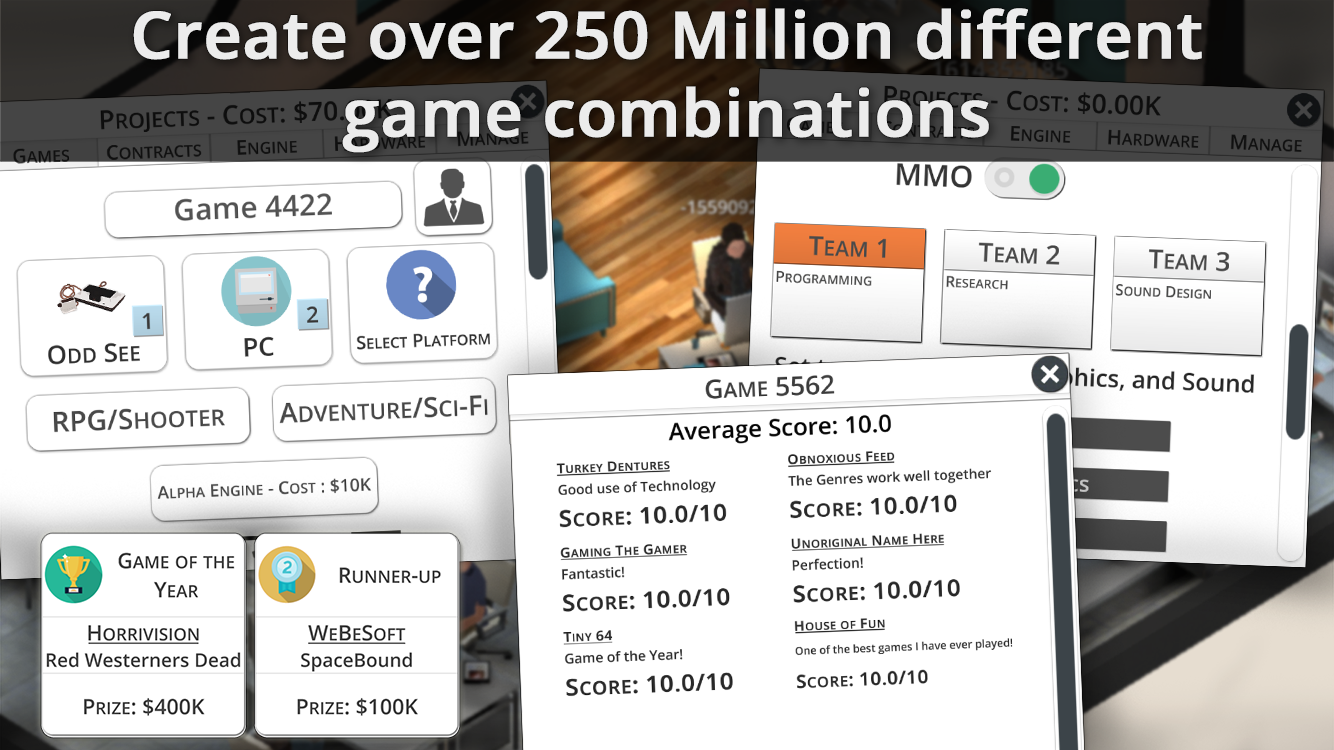
Create over 250 million different game combinations on over 50 platforms. Players can also create their own consoles, handheld, and mobile devices to create games on! Run advertising campaigns for your products and even pay other studios to make games on your devices. Do you have what it takes to beat the competition and become the best studio in the industry?
Features:
* Start on your own in a small office, and grow your gaming business to owning 7 buildings and managing 50 employees while tasking 3 independent teams of game developers to produce different projects at the same time!
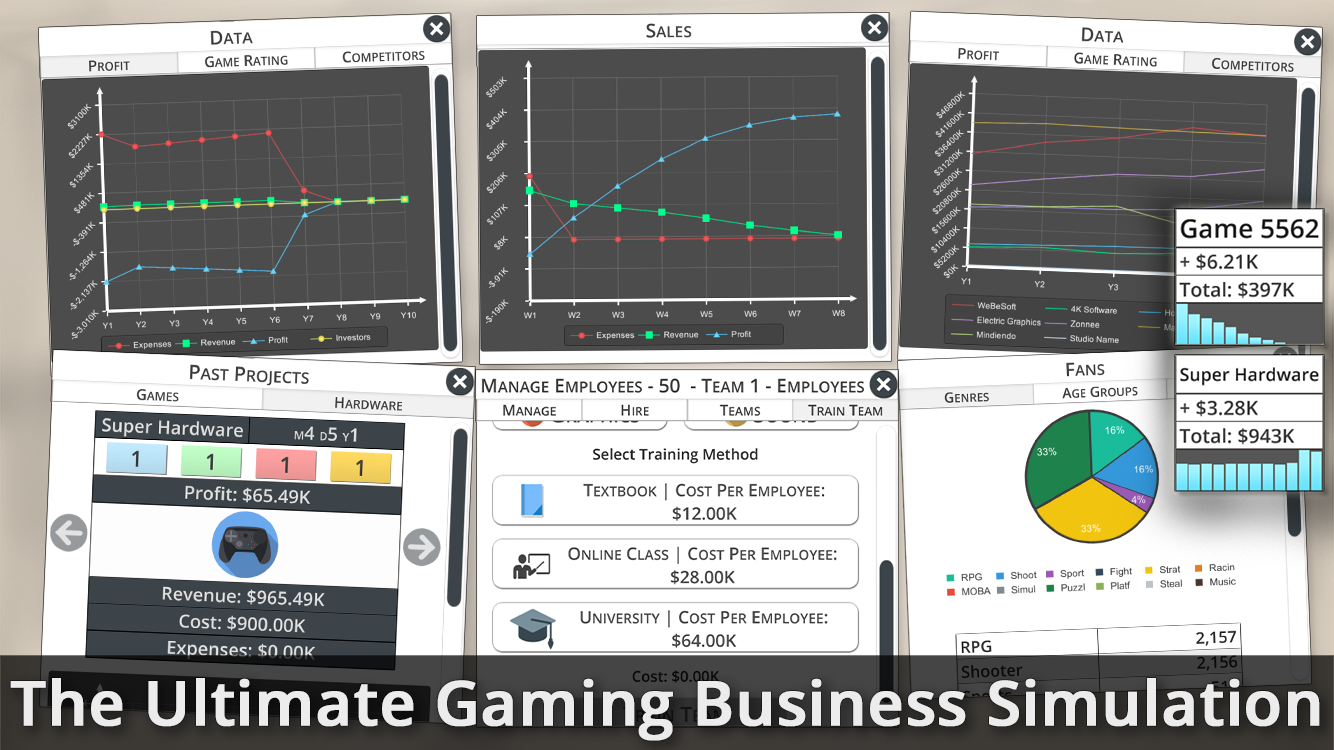
* Analyze and strategize! Pour over various charts and graphs to determine what games you should make and decide what direction to take your company in.
* Incredibly complex fan and user system. Each fan has a genre preference, and platform preference, and an age. On top of that, your fans will grow older as the game progresses!
* Plan your game projects and hardware ahead of time. You can queue up to 3 projects for each team to work on for a total of 9 projects. This means when a team is done with their current project, they will move on to the next one right away!
* Create your own video games and even MMO's! Determine the level of support for your MMO games, create updates, and run advertisement campaigns to attract new users!
* Create your own hardware! You can create a traditional console, handheld device, or even a mobile device (tablet/phone). Once your hardware is released you can try to increase your market share by investing in third party developers to produce games for your hardware.
* Set the price for your games and hardware. Lower priced products tend to sell more, but turn less of a profit - find the right balance to capitalize!
* Build your video gaming business alone, or try to get help from investors. A unique investor system allows you to sell off part of your company for money when you're in a pinch!
* Compare your studio against 7 AI studios and compete for yearly awards.
* Take a gamble and make games for big publishers!
* Certify your employees in 8 different technical fields to help improve their performance.
Device Requirements:
* iPhone 4S/5/5C/5S/6/6S, iPod touch (5th generation), and iPad
* Requires iOS 9.1 or later
* 154 MB
Pricing and Availability:
Game Studio Tycoon 3 - The Ultimate Gaming Business 1.0.5 costs $4.99 (USD) and is available worldwide through the App Store in the Games category.
Game Studio Tycoon 3 - The Ultimate Gaming Business Simulation 1.0.5: http://msherwin.com/app/game-studio-tycoon-3-ultimate-gaming-business-simulation/
Purchase and Download: https://itunes.apple.com/app/game-studio-tycoon-3-ultimate/id1074068315
Screenshot 1: http://msherwin.com/gst3promo/1-6.png
Screenshot 2: http://msherwin.com/gst3promo/3-6.png
Screenshot 3: http://msherwin.com/gst3promo/2-6.png
App Icon: http://msherwin.com/gst3promo/logo.png
Michael Sherwin is an independent developer based in Minnesota and started developing apps in 2012. All Material and Software (C) Copyright 2016 Michael Sherwin. All Rights Reserved. Apple, the Apple logo, iPhone, iPod and iPad are registered trademarks of Apple Inc. in the U.S. and/or other countries. Other trademarks and registered trademarks may be the property of their respective owners.
*******
Link To Article: http://prmac.com/release-id-79575.htm
*******
---------------------------------------------------------------------------------
Note that you can alter delivered distributions at any time.
Login to your account on prMac to alter your channel selection, or to opt-out at any time.
Game Studio Tycoon 3 - The Ultimate Gaming Business Simulation - Published on 05/27/16
Independent developer, Michael Sherwin today introduces Game Studio Tycoon 3 - The Ultimate Gaming Business Simulation 1.0.0, the latest entry in his game development series for iPhone, iPad and iPod touch devices. Simulate a fully functional game development studio! Begin as a small startup in the gaming industry and work your way up to owning 7 locations and managing 50 employees. Compete against 7 AI studios in your quest to become the biggest studio in the industry.
Eden Prairie, Minnesota - Independent developer, Michael Sherwin today is proud to announce the release of Game Studio Tycoon 3 - The Ultimate Gaming Business Simulation 1.0.0, his new game title developed for iPhone, iPad and iPod touch. Game Studio Tycoon 3 is the most in-depth business simulation of the gaming industry that you will ever play.
It's a dream of every amateur and pro gamer to have their own personal game studio where they can hire the best developers, create awesome video games and sell them for a huge profit! Game Studio Tycoon 3 gives you the chance to simulate a fully functional game development studio! Begin with a single employee and work your way to owning 7 unique locations and managing 50 employees!
Create over 250 million different game combinations on over 50 platforms. Players can also create their own consoles, handheld, and mobile devices to create games on! Run advertising campaigns for your products and even pay other studios to make games on your devices. Do you have what it takes to beat the competition and become the best studio in the industry?
Features:
* Start on your own in a small office, and grow your gaming business to owning 7 buildings and managing 50 employees while tasking 3 independent teams of game developers to produce different projects at the same time!
* Analyze and strategize! Pour over various charts and graphs to determine what games you should make and decide what direction to take your company in.
* Incredibly complex fan and user system. Each fan has a genre preference, and platform preference, and an age. On top of that, your fans will grow older as the game progresses!
* Plan your game projects and hardware ahead of time. You can queue up to 3 projects for each team to work on for a total of 9 projects. This means when a team is done with their current project, they will move on to the next one right away!
* Create your own video games and even MMO's! Determine the level of support for your MMO games, create updates, and run advertisement campaigns to attract new users!
* Create your own hardware! You can create a traditional console, handheld device, or even a mobile device (tablet/phone). Once your hardware is released you can try to increase your market share by investing in third party developers to produce games for your hardware.
* Set the price for your games and hardware. Lower priced products tend to sell more, but turn less of a profit - find the right balance to capitalize!
* Build your video gaming business alone, or try to get help from investors. A unique investor system allows you to sell off part of your company for money when you're in a pinch!
* Compare your studio against 7 AI studios and compete for yearly awards.
* Take a gamble and make games for big publishers!
* Certify your employees in 8 different technical fields to help improve their performance.
Device Requirements:
* iPhone 4S/5/5C/5S/6/6S, iPod touch (5th generation), and iPad
* Requires iOS 9.1 or later
* 154 MB
Pricing and Availability:
Game Studio Tycoon 3 - The Ultimate Gaming Business 1.0.5 costs $4.99 (USD) and is available worldwide through the App Store in the Games category.
Game Studio Tycoon 3 - The Ultimate Gaming Business Simulation 1.0.5: http://msherwin.com/app/game-studio-tycoon-3-ultimate-gaming-business-simulation/
Purchase and Download: https://itunes.apple.com/app/game-studio-tycoon-3-ultimate/id1074068315
Screenshot 1: http://msherwin.com/gst3promo/1-6.png

Screenshot 2: http://msherwin.com/gst3promo/3-6.png
Screenshot 3: http://msherwin.com/gst3promo/2-6.png
App Icon: http://msherwin.com/gst3promo/logo.png

Michael Sherwin is an independent developer based in Minnesota and started developing apps in 2012. All Material and Software (C) Copyright 2016 Michael Sherwin. All Rights Reserved. Apple, the Apple logo, iPhone, iPod and iPad are registered trademarks of Apple Inc. in the U.S. and/or other countries. Other trademarks and registered trademarks may be the property of their respective owners.
*******
Link To Article: http://prmac.com/release-id-79575.htm
*******
---------------------------------------------------------------------------------
Note that you can alter delivered distributions at any time.
Login to your account on prMac to alter your channel selection, or to opt-out at any time.
New Release of iFotosoft's Photo Montage for Mac OS X
A new article has been published at prMac.
New Release of iFotosoft's Photo Montage for Mac OS X - Published on 05/26/16
Leading imaging technologies and applications provider iFotosoft Ltd. announces Photo Montage 2.0.1017 for Mac OS X. Now every Mac user can make gorgeous, professional looking montage photos. The app's advanced tiling techniques and special effects empower users to create photo collage in shape with ease. Anyone can also perfect the montage photo with micro-image pattern, repetition, grid and border options and other splendid features.
Hangzhou, China - Just looking for some photo collage templates or mosaic photos? Need to make gorgeous montage photos as profession. iFotosoft Photo Montage is a special photo montage maker designed to create stunning mosaic photo with many tile-images. The advanced tiling techniques and special effects empower you to create photo collage in shape with ease. And you can also perfect the montage photo with micro-image pattern, repetition, grid and border options and other splendid features.
As a versatile photo montage maker, the program can make stunning photo mosaic with thousands of images in high resolution, design photo collages in shape according to any provided templates, support photo mosaic, tile mosaic, shape mosaic and other photo mosaic types.
Before you make montage photos, you can add special effects to create montage photos. There are provided funny frames to make your photo mosaic special. And then you can adjust the columns of the tiles or pixels of the tiles to make a photo mosaic in a certain size. When you want to create photo collages in shape, you can use match color to remove the color of the background image.
How about the output of the photo mosaics? The program can combine more than 2,000 mosaic tiles in a breathtaking result, up to 16,000 pixels wide with unlimited pixels height for montage photos, the mosaic photo or photo collage can be used for mural, banner, desktop or even wallpaper. What's more, the program applies minimal colorization to closely match the original image and proper placement of tile images to present the optimal result.
Key Features:
* Make stunning photo mosaic with thousand of images in high resolution.
* Design shape photo collages with any provides photo collage template.
* Support photo mosaic, tile mosaic, shape mosaic and other photo mosaic types.
* Create different types of montage photos with few clicks.
* Apply different effects to the original image to create desired montage photos.
* Customize columns and pixels of tiles to adjust the size of the output file.
* Choose funny frames to make your photo mosaic special.
* Match color to design photo collage without considering the color of background image.
* Combine more than 2,000 mosaic tiles with a breathtaking result.
* Up to 16,000 pixels wide with unlimited pixels height for montage photos.
* Minimal colorization to closely match the original images.
* Output photo mosaic or photo collage for mural, banner, desktop or even wallpaper.
* Proper placement of tile images to present the best result.
* Save mosaic photos or photo collage to PNG, JPEG and TIFF formats.
* Share photo to Facebook, Twitter and other social media websites.
* Connect mosaic photos to Email, Messages, Photos, Airdrop and other methods of system.
* Support multiple photo formats even RAW files as the tile images for making montage photos.
Just share the montage photos to Facebook, Twitter, Flickr or other social media site. And you can also send the files via Email, Messages or AirDrop, there are multiple sharing methods for you to enjoy the gorgeous montage photos with others.
System Requirements:
* OS X 10.6.6 or later
* 64-bit processor
* 1.0 MB
Pricing and Availability:
Photo Montage 2.0.1017 is just $19.99 USD (or an equivalent amount in other currencies) and is available worldwide in the Mac App Store in the Photography category. The app is also available from the iFotosoft website. A trial version is available for download form the iFotosoft website.
iFotosoft : http://www.ifotosoft.com
Photo Montage 2.0.1017: http://www.ifotosoft.com/photomontage.html
Download Trial: http://download.ifotosoft.com/pro/Photo_Montage.dmg
Purchase and Download (MAS): https://itunes.apple.com/app/ifoto-montage/id1090716776
Screenshot: http://www.ifotosoft.com/wp-content/uploads/2016/05/ifotomontageinitial.jpg
Application Icon: http://www.ifotosoft.com/wp-content/uploads/2016/04/Montage.png
iFotosoft builds world class image technologies and applications. Our team is committed to developing easy-to-use software solutions for photography tools. Streamlined with a number of social media channels, iFoto's exponentially growing user base is comprised of hundreds of millions of users across the globe. For further details, visit the iFotosoft website. All Material and Software (C) Copyright 2016 iFotosoft. All Rights Reserved. Apple, the Apple logo, Macintosh and Mac OS X are registered trademarks of Apple Inc. in the U.S. and/or other countries. Other trademarks and registered trademarks may be the property of their respective owners.
*******
Link To Article: http://prmac.com/release-id-79574.htm
*******
---------------------------------------------------------------------------------
Note that you can alter delivered distributions at any time.
Login to your account on prMac to alter your channel selection, or to opt-out at any time.
New Release of iFotosoft's Photo Montage for Mac OS X - Published on 05/26/16
Leading imaging technologies and applications provider iFotosoft Ltd. announces Photo Montage 2.0.1017 for Mac OS X. Now every Mac user can make gorgeous, professional looking montage photos. The app's advanced tiling techniques and special effects empower users to create photo collage in shape with ease. Anyone can also perfect the montage photo with micro-image pattern, repetition, grid and border options and other splendid features.
Hangzhou, China - Just looking for some photo collage templates or mosaic photos? Need to make gorgeous montage photos as profession. iFotosoft Photo Montage is a special photo montage maker designed to create stunning mosaic photo with many tile-images. The advanced tiling techniques and special effects empower you to create photo collage in shape with ease. And you can also perfect the montage photo with micro-image pattern, repetition, grid and border options and other splendid features.
As a versatile photo montage maker, the program can make stunning photo mosaic with thousands of images in high resolution, design photo collages in shape according to any provided templates, support photo mosaic, tile mosaic, shape mosaic and other photo mosaic types.
Before you make montage photos, you can add special effects to create montage photos. There are provided funny frames to make your photo mosaic special. And then you can adjust the columns of the tiles or pixels of the tiles to make a photo mosaic in a certain size. When you want to create photo collages in shape, you can use match color to remove the color of the background image.
How about the output of the photo mosaics? The program can combine more than 2,000 mosaic tiles in a breathtaking result, up to 16,000 pixels wide with unlimited pixels height for montage photos, the mosaic photo or photo collage can be used for mural, banner, desktop or even wallpaper. What's more, the program applies minimal colorization to closely match the original image and proper placement of tile images to present the optimal result.
Key Features:
* Make stunning photo mosaic with thousand of images in high resolution.
* Design shape photo collages with any provides photo collage template.
* Support photo mosaic, tile mosaic, shape mosaic and other photo mosaic types.
* Create different types of montage photos with few clicks.
* Apply different effects to the original image to create desired montage photos.
* Customize columns and pixels of tiles to adjust the size of the output file.
* Choose funny frames to make your photo mosaic special.
* Match color to design photo collage without considering the color of background image.
* Combine more than 2,000 mosaic tiles with a breathtaking result.
* Up to 16,000 pixels wide with unlimited pixels height for montage photos.
* Minimal colorization to closely match the original images.
* Output photo mosaic or photo collage for mural, banner, desktop or even wallpaper.
* Proper placement of tile images to present the best result.
* Save mosaic photos or photo collage to PNG, JPEG and TIFF formats.
* Share photo to Facebook, Twitter and other social media websites.
* Connect mosaic photos to Email, Messages, Photos, Airdrop and other methods of system.
* Support multiple photo formats even RAW files as the tile images for making montage photos.
Just share the montage photos to Facebook, Twitter, Flickr or other social media site. And you can also send the files via Email, Messages or AirDrop, there are multiple sharing methods for you to enjoy the gorgeous montage photos with others.
System Requirements:
* OS X 10.6.6 or later
* 64-bit processor
* 1.0 MB
Pricing and Availability:
Photo Montage 2.0.1017 is just $19.99 USD (or an equivalent amount in other currencies) and is available worldwide in the Mac App Store in the Photography category. The app is also available from the iFotosoft website. A trial version is available for download form the iFotosoft website.
iFotosoft : http://www.ifotosoft.com
Photo Montage 2.0.1017: http://www.ifotosoft.com/photomontage.html
Download Trial: http://download.ifotosoft.com/pro/Photo_Montage.dmg
Purchase and Download (MAS): https://itunes.apple.com/app/ifoto-montage/id1090716776
Screenshot: http://www.ifotosoft.com/wp-content/uploads/2016/05/ifotomontageinitial.jpg

Application Icon: http://www.ifotosoft.com/wp-content/uploads/2016/04/Montage.png

iFotosoft builds world class image technologies and applications. Our team is committed to developing easy-to-use software solutions for photography tools. Streamlined with a number of social media channels, iFoto's exponentially growing user base is comprised of hundreds of millions of users across the globe. For further details, visit the iFotosoft website. All Material and Software (C) Copyright 2016 iFotosoft. All Rights Reserved. Apple, the Apple logo, Macintosh and Mac OS X are registered trademarks of Apple Inc. in the U.S. and/or other countries. Other trademarks and registered trademarks may be the property of their respective owners.
*******
Link To Article: http://prmac.com/release-id-79574.htm
*******
---------------------------------------------------------------------------------
Note that you can alter delivered distributions at any time.
Login to your account on prMac to alter your channel selection, or to opt-out at any time.
Nepal Keyboard 2.5 for iOS Offers Customizable Nepali Text Entry
A new article has been published at prMac.
Nepal Keyboard 2.5 for iOS Offers Customizable Nepali Text Entry - Published on 05/26/16
LastThink today announces Nepal Keyboard 2.5, an important update to their highly customizable keyboard application for iOS devices. Nepal Keyboard offers users a third-party keyboard for use with iOS apps that allows anyone to modify it to their individual taste. Users can modify the order of the keyboard for more convenient usage. The update includes the ability to save specific words for later use, emoticons, paragraph formatting, word prediction, and more.
Yerevan, Armenia - LastThink is proud to announce the release of Nepal Keyboard 2.5, an important update to their highly customizable keyboard application for iPhone, iPad, and iPod touch devices. The Nepal Keyboard's customization features allow anyone to create the keyboard layout that is perfect for their needs. Features include the ability to change the size, shape, and order of characters; the ability to save specific words for later use; emoticons, word prediction, and more.
Users can change the order of the keyboard's letter layout, and even create handy shortcuts to allow entering words or even entire sentences with just a few keystrokes. The keyboard's Swipe feature allows users to swipe their finger around the keyboard to select letters and form words. The app intelligently predicts what the user intends to enter, greatly enhancing typing speed.
What's New in Version 2.5:
* Change the size, and place, as well as the shape of characters and keyboard separately
* Save any words that are used frequently in the active vocabulary for later use
* Express emotions with emoji characters (emoticons) which will correspond to entered words
* Paragraph formatting: Adjust alignment, line spacing, margins, bullets and numbering
* Optional smart auto correction: Intelligent spell checking for even the sloppiest typing
* Style: Customize the look of the keyboard. Change the color of the keys and background
* Word prediction: The keyboard guesses and displays the appropriate word as the user types
* Share text via Facebook, Twitter, email, Dropbox, and more
"When we set out to create the Nepali Keyboard, we knew we wanted to create a customizable keyboard that would offer users the ability to modify it to their individual tastes," says LastThink founder Grigori Jlavyan. Our keyboard allows Nepali speaking users to easily enter their text messages, emails, and other types of texts via a comprehensive interface, making their day-to-day communications more convenient than ever."
The Nepal Keyboard also offers handy paragraph formatting options, allowing users to adjust the alignment of their text, while also offering the ability to set line spacing, adjust margins, even add bulleted or numbered lists. Optional smart correction makes even the sloppiest speller's text entry become correct. The keyboard also offers a downloadable Nepali font for use with iOS devices, making text entry, editing, and display even more convenient.
Belarusian Keyboard emphasizes the user's security above all, and while many third-party iOS keyboard apps require "Full Access" - with the ability to send back keystrokes and other information back to their developer - the Nepal Keyboard does not, protecting the text entry and sensitive user information, keeping their personal information safe from prying eyes.
Device Requirements:
* iPhone, iPad, and iPod touch
* Optimized for iPhone 5, iPhone 6/6 Plus
* Universal Application
* Requires iOS 6.1 or later
* 9.2 MB
Pricing and Availability:
Nepal Keyboard 2.5 is free of charge and available worldwide exclusively through the App Store in the Utilities category. Review codes are available upon request.
LastThink: http://lastthink.com/
Nepal Keyboard 2.5: https://www.facebook.com/pages/Nepal-Keyboard/620628221293989
Download from iTunes: https://itunes.apple.com/app/nepal-keyboard/id688795893
Screenshot: http://a2.mzstatic.com/us/r30/Purple/v4/f8/b9/5a/f8b95a13-9500-5cf0-b873-502fde1484f4/screen568x568.jpeg
App Icon: http://a3.mzstatic.com/us/r30/Purple/v4/d5/4c/96/d54c9695-0dde-568c-98fc-eb1c00c343d7/icon175x175.jpeg
LastThink is an IT company with a focus on mobile development. It has extended its list of services since 2012 to offer high-end business process management, system integration, as well as up-to-date communication solutions. LastThink's mission is to deliver maximum business value to its customers by designing, developing, implementing and maintaining efficient and high quality software solutions aligned with their most essential business needs. Their team will always do its best to meet client expectations. Copyright (C) 2016 LastThink LLC. All Rights Reserved. Apple, the Apple logo, iPhone, iPad and iPod are registered trademarks of Apple Inc. in the U.S. and/or other countries.
*******
Link To Article: http://prmac.com/release-id-79573.htm
*******
---------------------------------------------------------------------------------
Note that you can alter delivered distributions at any time.
Login to your account on prMac to alter your channel selection, or to opt-out at any time.
Nepal Keyboard 2.5 for iOS Offers Customizable Nepali Text Entry - Published on 05/26/16
LastThink today announces Nepal Keyboard 2.5, an important update to their highly customizable keyboard application for iOS devices. Nepal Keyboard offers users a third-party keyboard for use with iOS apps that allows anyone to modify it to their individual taste. Users can modify the order of the keyboard for more convenient usage. The update includes the ability to save specific words for later use, emoticons, paragraph formatting, word prediction, and more.
Yerevan, Armenia - LastThink is proud to announce the release of Nepal Keyboard 2.5, an important update to their highly customizable keyboard application for iPhone, iPad, and iPod touch devices. The Nepal Keyboard's customization features allow anyone to create the keyboard layout that is perfect for their needs. Features include the ability to change the size, shape, and order of characters; the ability to save specific words for later use; emoticons, word prediction, and more.
Users can change the order of the keyboard's letter layout, and even create handy shortcuts to allow entering words or even entire sentences with just a few keystrokes. The keyboard's Swipe feature allows users to swipe their finger around the keyboard to select letters and form words. The app intelligently predicts what the user intends to enter, greatly enhancing typing speed.
What's New in Version 2.5:
* Change the size, and place, as well as the shape of characters and keyboard separately
* Save any words that are used frequently in the active vocabulary for later use
* Express emotions with emoji characters (emoticons) which will correspond to entered words
* Paragraph formatting: Adjust alignment, line spacing, margins, bullets and numbering
* Optional smart auto correction: Intelligent spell checking for even the sloppiest typing
* Style: Customize the look of the keyboard. Change the color of the keys and background
* Word prediction: The keyboard guesses and displays the appropriate word as the user types
* Share text via Facebook, Twitter, email, Dropbox, and more
"When we set out to create the Nepali Keyboard, we knew we wanted to create a customizable keyboard that would offer users the ability to modify it to their individual tastes," says LastThink founder Grigori Jlavyan. Our keyboard allows Nepali speaking users to easily enter their text messages, emails, and other types of texts via a comprehensive interface, making their day-to-day communications more convenient than ever."
The Nepal Keyboard also offers handy paragraph formatting options, allowing users to adjust the alignment of their text, while also offering the ability to set line spacing, adjust margins, even add bulleted or numbered lists. Optional smart correction makes even the sloppiest speller's text entry become correct. The keyboard also offers a downloadable Nepali font for use with iOS devices, making text entry, editing, and display even more convenient.
Belarusian Keyboard emphasizes the user's security above all, and while many third-party iOS keyboard apps require "Full Access" - with the ability to send back keystrokes and other information back to their developer - the Nepal Keyboard does not, protecting the text entry and sensitive user information, keeping their personal information safe from prying eyes.
Device Requirements:
* iPhone, iPad, and iPod touch
* Optimized for iPhone 5, iPhone 6/6 Plus
* Universal Application
* Requires iOS 6.1 or later
* 9.2 MB
Pricing and Availability:
Nepal Keyboard 2.5 is free of charge and available worldwide exclusively through the App Store in the Utilities category. Review codes are available upon request.
LastThink: http://lastthink.com/
Nepal Keyboard 2.5: https://www.facebook.com/pages/Nepal-Keyboard/620628221293989
Download from iTunes: https://itunes.apple.com/app/nepal-keyboard/id688795893
Screenshot: http://a2.mzstatic.com/us/r30/Purple/v4/f8/b9/5a/f8b95a13-9500-5cf0-b873-502fde1484f4/screen568x568.jpeg

App Icon: http://a3.mzstatic.com/us/r30/Purple/v4/d5/4c/96/d54c9695-0dde-568c-98fc-eb1c00c343d7/icon175x175.jpeg

LastThink is an IT company with a focus on mobile development. It has extended its list of services since 2012 to offer high-end business process management, system integration, as well as up-to-date communication solutions. LastThink's mission is to deliver maximum business value to its customers by designing, developing, implementing and maintaining efficient and high quality software solutions aligned with their most essential business needs. Their team will always do its best to meet client expectations. Copyright (C) 2016 LastThink LLC. All Rights Reserved. Apple, the Apple logo, iPhone, iPad and iPod are registered trademarks of Apple Inc. in the U.S. and/or other countries.
*******
Link To Article: http://prmac.com/release-id-79573.htm
*******
---------------------------------------------------------------------------------
Note that you can alter delivered distributions at any time.
Login to your account on prMac to alter your channel selection, or to opt-out at any time.
Boris FX Ships Major Plug-in Update for Blackmagic DaVinci Resolve 12.5
A new article has been published at prMac.
Boris FX Ships Major Plug-in Update for Blackmagic DaVinci Resolve 12.5 - Published on 05/26/16
Boris FX(TM) and Imagineer Systems, leading developers of award-winning visual effects tools and post-production software, announce advanced support for the DaVinci Resolve 12.5. The merged Boris FX / Imagineer group worked closely with the Resolve development team to ensure a timely release and add the OFX functionality required to support 3rd party temporal frame access.
Boston, Massachusetts - Boris FX(TM) and Imagineer Systems, leading developers of award-winning visual effects tools and post-production software, announce Continuum Complete 10.0.2 offers advanced support for the DaVinci Resolve 12.5. The merged Boris FX / Imagineer group worked closely with the Resolve development team to ensure a timely release and add the OFX functionality required to support 3rd party temporal frame access.
"Beyond professional color grading, DaVinci Resolve is now being used for editorial, effects and finishing" states Boris FX CEO, Boris Yamnitsky. "BCC 10 brings many plug-in tools to Resolve that are necessary for high-end finishing projects, including 3D titling/graphics tools and hundreds of stylize, transition and lighting effects.
Now with Resolve 12.5 and the new BCC update, users can access a highly requested feature: integrated mocha/PixelChooser tools inside of every BCC effect. These tools combined with popular BCC 10 tools such as Beauty Studio, 3D Lens Flare, Title Studio and many more continue to make DaVinci Resolve Studio that much stronger for visual effects."
New in BCC 10 for OFX:
* Mocha's Academy Award-winning planar tracking & masking tools are now integrated inside every BCC filter. (Requires DaVinci Resolve Studio 12.5 currently in public beta)
* Beauty Studio: A state-of-the-art skin retouching and digital makeup tool to make your talent look perfect without losing clarity and detail.
* Title Studio: Next generation 2D/3D titling and motion graphics tool for designing and animating at any resolution. Includes Maxon C4D model support and creative title templates.
* New Image Restoration Tools: Remover, Dropout Fixer, and Reframer
* New Effects: Light Leaks & Video Glitch
* New Transitions: Cross Glitch, Cross Melt, Light Leak Dissolve, and Cross Zoom
* Host Support: BCC 10 for OFX is now available for Blackmagic Resolve and Sony Vegas Pro with upcoming support for NUKE, Fusion, and more.
BCC 10 for OFX: Pricing & Availability:
* Full license ($695 USD MSRP)
* Upgrade ($195 USD MSRP)
BCC Multi-host Option 1 (Adobe, Avid, OFX, Apple)
* Full license ($1995)
* Upgrade ($695)
* Annual Subscription ($595)
BCC Multi-host Option 2 (Adobe, OFX, Apple)
* Full license ($1295)
* Upgrade ($495)
BCC 10 for OFX is now available and compatible with DaVinci Resolve 12.5 and Sony Vegas Pro 13-10.
Live Webinar Event: Thursday, June 14, 2016, 12pm EDT/9am PDT - Join Boris FX & special guest presenter Dan Harvey for an one hour training session on the new BCC 10 for OFX features. Register for the webinar now.
Boris FX: http://www.borisfx.com
Continuum Complete 10.0.2: https://www.borisfx.com/products/continuum-complete/?host=resolveHost
Download Link: https://www.borisfx.com/support/downloads/?action=esd_bccofx
Purchase Link: https://www.borisfx.com/store/products/bcc/continuum-complete/
Screenshot: https://d1rz3ijuaj8bbs.cloudfront.net/wp-content/uploads/2016/05/18164935/BCC1002_Resolve_PR.png
Boris FX is a leading developer of visual effects, titling, video editing, and workflow tools for broadcast, post-production, and film professionals. Boris FX products have grown to serve over a million artists worldwide. The company's success lies in its ability to tightly integrate and leverage technologies through strong partnerships with Adobe, Apple, Avid, Blackmagic, Grass Valley, Nexidia, Sony, Quantel and other leading developers of video editing software. In 2014, Boris FX acquired Imagineer Systems, the Academy Award-winning developer of mocha planar tracking software. All Material and Software (C) Copyright 2016 Boris FX. All Rights Reserved. Apple, the Apple logo, Macintosh and Mac OS X are registered trademarks of Apple Inc. in the U.S. and/or other countries. Other trademarks and registered trademarks may be the property of their respective owners.
*******
Link To Article: http://prmac.com/release-id-79572.htm
*******
---------------------------------------------------------------------------------
Note that you can alter delivered distributions at any time.
Login to your account on prMac to alter your channel selection, or to opt-out at any time.
Boris FX Ships Major Plug-in Update for Blackmagic DaVinci Resolve 12.5 - Published on 05/26/16
Boris FX(TM) and Imagineer Systems, leading developers of award-winning visual effects tools and post-production software, announce advanced support for the DaVinci Resolve 12.5. The merged Boris FX / Imagineer group worked closely with the Resolve development team to ensure a timely release and add the OFX functionality required to support 3rd party temporal frame access.
Boston, Massachusetts - Boris FX(TM) and Imagineer Systems, leading developers of award-winning visual effects tools and post-production software, announce Continuum Complete 10.0.2 offers advanced support for the DaVinci Resolve 12.5. The merged Boris FX / Imagineer group worked closely with the Resolve development team to ensure a timely release and add the OFX functionality required to support 3rd party temporal frame access.
"Beyond professional color grading, DaVinci Resolve is now being used for editorial, effects and finishing" states Boris FX CEO, Boris Yamnitsky. "BCC 10 brings many plug-in tools to Resolve that are necessary for high-end finishing projects, including 3D titling/graphics tools and hundreds of stylize, transition and lighting effects.
Now with Resolve 12.5 and the new BCC update, users can access a highly requested feature: integrated mocha/PixelChooser tools inside of every BCC effect. These tools combined with popular BCC 10 tools such as Beauty Studio, 3D Lens Flare, Title Studio and many more continue to make DaVinci Resolve Studio that much stronger for visual effects."
New in BCC 10 for OFX:
* Mocha's Academy Award-winning planar tracking & masking tools are now integrated inside every BCC filter. (Requires DaVinci Resolve Studio 12.5 currently in public beta)
* Beauty Studio: A state-of-the-art skin retouching and digital makeup tool to make your talent look perfect without losing clarity and detail.
* Title Studio: Next generation 2D/3D titling and motion graphics tool for designing and animating at any resolution. Includes Maxon C4D model support and creative title templates.
* New Image Restoration Tools: Remover, Dropout Fixer, and Reframer
* New Effects: Light Leaks & Video Glitch
* New Transitions: Cross Glitch, Cross Melt, Light Leak Dissolve, and Cross Zoom
* Host Support: BCC 10 for OFX is now available for Blackmagic Resolve and Sony Vegas Pro with upcoming support for NUKE, Fusion, and more.
BCC 10 for OFX: Pricing & Availability:
* Full license ($695 USD MSRP)
* Upgrade ($195 USD MSRP)
BCC Multi-host Option 1 (Adobe, Avid, OFX, Apple)
* Full license ($1995)
* Upgrade ($695)
* Annual Subscription ($595)
BCC Multi-host Option 2 (Adobe, OFX, Apple)
* Full license ($1295)
* Upgrade ($495)
BCC 10 for OFX is now available and compatible with DaVinci Resolve 12.5 and Sony Vegas Pro 13-10.
Live Webinar Event: Thursday, June 14, 2016, 12pm EDT/9am PDT - Join Boris FX & special guest presenter Dan Harvey for an one hour training session on the new BCC 10 for OFX features. Register for the webinar now.
Boris FX: http://www.borisfx.com
Continuum Complete 10.0.2: https://www.borisfx.com/products/continuum-complete/?host=resolveHost
Download Link: https://www.borisfx.com/support/downloads/?action=esd_bccofx
Purchase Link: https://www.borisfx.com/store/products/bcc/continuum-complete/
Screenshot: https://d1rz3ijuaj8bbs.cloudfront.net/wp-content/uploads/2016/05/18164935/BCC1002_Resolve_PR.png

Boris FX is a leading developer of visual effects, titling, video editing, and workflow tools for broadcast, post-production, and film professionals. Boris FX products have grown to serve over a million artists worldwide. The company's success lies in its ability to tightly integrate and leverage technologies through strong partnerships with Adobe, Apple, Avid, Blackmagic, Grass Valley, Nexidia, Sony, Quantel and other leading developers of video editing software. In 2014, Boris FX acquired Imagineer Systems, the Academy Award-winning developer of mocha planar tracking software. All Material and Software (C) Copyright 2016 Boris FX. All Rights Reserved. Apple, the Apple logo, Macintosh and Mac OS X are registered trademarks of Apple Inc. in the U.S. and/or other countries. Other trademarks and registered trademarks may be the property of their respective owners.
*******
Link To Article: http://prmac.com/release-id-79572.htm
*******
---------------------------------------------------------------------------------
Note that you can alter delivered distributions at any time.
Login to your account on prMac to alter your channel selection, or to opt-out at any time.
Speed Tracker is now available for Apple Watch
A new article has been published at prMac.
Speed Tracker is now available for Apple Watch - Published on 05/26/16
AppAnnex LLC today announces Speed Tracker. GPS Speedometer and Trip Computer 5.3, an update to its popular iOS app. Speed Tracker combines a GPS speedometer, Trip Log and Trip computer into one unique application. The app automatically records your location, speed, time, distance and much more. Version 5.2 now supports Apple Watch. Speed Tracker is on sale for 75% off the regular price. The promotional price will be in effect until May 31th, 2016.
Southampton, Pennsylvania - AppAnnex LLC today is very proud to announce the availability of its popular application "Speed Tracker. GPS Speedometer and Trip Computer" for Apple Watch. Speed Tracker does a great job by combining GPS speedometer, Trip Log and Trip computer into one unique application. There is no more need for maintaining an endless list of applications on your iPhone and iPad. Just take Speed Tracker along with you and record automatically your location, speed, time, distance and more.
With the available extension for Apple Watch, you can start/stop trip recording and check your speed, distance traveled and other trip stats right from your wrist.
Speed Tracker features stunning graphics, offering a great user experience with improved ergonomics and usability and provides GPS tracking with the best in class accuracy. The app has lot of built-in features that help you to gather all the necessary trip statistics while driving. Before going on a trip, start the application and enjoy. Speed Tracker will do all the automatic calculations and save all your stats.
Build-in GPS navigator will help you not to get lost. You can always switch to navigation mode and check your current position on the map together with the whole distance you've already covered.
And with Trip Log and Trip Computer you will always have the access too all you trips. View your trips, compare them, export your data and even share with friends and family via Facebook, Twitter or email.
Device requirements:
* Compatible with iPhone, iPad with Cellular
* Requires iOS 7.0 or later
* Universal app optimized for display on all iOS devices
* 43.4 MB
Pricing ad Availability:
Speed Tracker 5.3 is available worldwide at a special price of $0.99 (70% off regular price of $3.99) for the duration of memorial Day weekend. Take advantage of this incredible offer and downoload Speed Tracker now on App Store.
AppAnnex: http://www.appannex.com/
Speed Tracker. GPS Speedometer and Trip Computer 5.3: http://www.appannex.com/speed-tracker-gps-speedometer-and-trip-computer/
Purchace and Download: https://itunes.apple.com/app/speed-tracker.-gps-speedometer/id405239907
YouTube Video: http://www.youtube.com/watch?v=lYS1oHbOca0
Promotional Image: http://www.appannex.com/wp-content/uploads/Apple-Watch2.png
Press Kit (Zip): http://www.appannex.com/wp-content/uploads/SpeedTracker_Kit.zip
AppAnnex was founded in 2010 by group of seasoned developers who decided to open new horizons in mobile world. With more than 30 years of total development experience and hundreds of projects done, our main mission is to bring to the market most innovative and entertaining mobile applications and games to enhance user's mobile experience. Copyright (C) 2016 AppAnnex LLC. All Rights Reserved. Apple, the Apple logo, Apple Watch, iPhone, iPod and iPad are registered trademarks of Apple Inc. in the U.S. and/or other countries.
*******
Link To Article: http://prmac.com/release-id-79568.htm
*******
---------------------------------------------------------------------------------
Note that you can alter delivered distributions at any time.
Login to your account on prMac to alter your channel selection, or to opt-out at any time.
Speed Tracker is now available for Apple Watch - Published on 05/26/16
AppAnnex LLC today announces Speed Tracker. GPS Speedometer and Trip Computer 5.3, an update to its popular iOS app. Speed Tracker combines a GPS speedometer, Trip Log and Trip computer into one unique application. The app automatically records your location, speed, time, distance and much more. Version 5.2 now supports Apple Watch. Speed Tracker is on sale for 75% off the regular price. The promotional price will be in effect until May 31th, 2016.
Southampton, Pennsylvania - AppAnnex LLC today is very proud to announce the availability of its popular application "Speed Tracker. GPS Speedometer and Trip Computer" for Apple Watch. Speed Tracker does a great job by combining GPS speedometer, Trip Log and Trip computer into one unique application. There is no more need for maintaining an endless list of applications on your iPhone and iPad. Just take Speed Tracker along with you and record automatically your location, speed, time, distance and more.
With the available extension for Apple Watch, you can start/stop trip recording and check your speed, distance traveled and other trip stats right from your wrist.
Speed Tracker features stunning graphics, offering a great user experience with improved ergonomics and usability and provides GPS tracking with the best in class accuracy. The app has lot of built-in features that help you to gather all the necessary trip statistics while driving. Before going on a trip, start the application and enjoy. Speed Tracker will do all the automatic calculations and save all your stats.
Build-in GPS navigator will help you not to get lost. You can always switch to navigation mode and check your current position on the map together with the whole distance you've already covered.
And with Trip Log and Trip Computer you will always have the access too all you trips. View your trips, compare them, export your data and even share with friends and family via Facebook, Twitter or email.
Device requirements:
* Compatible with iPhone, iPad with Cellular
* Requires iOS 7.0 or later
* Universal app optimized for display on all iOS devices
* 43.4 MB
Pricing ad Availability:
Speed Tracker 5.3 is available worldwide at a special price of $0.99 (70% off regular price of $3.99) for the duration of memorial Day weekend. Take advantage of this incredible offer and downoload Speed Tracker now on App Store.
AppAnnex: http://www.appannex.com/
Speed Tracker. GPS Speedometer and Trip Computer 5.3: http://www.appannex.com/speed-tracker-gps-speedometer-and-trip-computer/
Purchace and Download: https://itunes.apple.com/app/speed-tracker.-gps-speedometer/id405239907
YouTube Video: http://www.youtube.com/watch?v=lYS1oHbOca0
Promotional Image: http://www.appannex.com/wp-content/uploads/Apple-Watch2.png

Press Kit (Zip): http://www.appannex.com/wp-content/uploads/SpeedTracker_Kit.zip
AppAnnex was founded in 2010 by group of seasoned developers who decided to open new horizons in mobile world. With more than 30 years of total development experience and hundreds of projects done, our main mission is to bring to the market most innovative and entertaining mobile applications and games to enhance user's mobile experience. Copyright (C) 2016 AppAnnex LLC. All Rights Reserved. Apple, the Apple logo, Apple Watch, iPhone, iPod and iPad are registered trademarks of Apple Inc. in the U.S. and/or other countries.
*******
Link To Article: http://prmac.com/release-id-79568.htm
*******
---------------------------------------------------------------------------------
Note that you can alter delivered distributions at any time.
Login to your account on prMac to alter your channel selection, or to opt-out at any time.
Subscribe to:
Posts (Atom)