A new article has been published at prMac.
Softpress introduces Chroma for Mac - Complementary Color Palettes - Published on 05/30/16
UK based Softpress today introduces Chroma for Mac, an innovative app that generates well-balanced and complementary color palettes from images. Designed exclusively for OS X Yosemite and El Capitan, Chroma emulates the way the human eye perceives color to create natural looking palettes. Individual colors from palettes can be copied or dragged in various formats, or entire palettes can be exported and integrated with most major design applications and the built-in system color picker.
Oxford, United Kingdom - Softpress today is proud to announce the release of Chroma for Mac, an innovative app that generates well-balanced and complementary color palettes from images. Designed exclusively for OS X Yosemite and El Capitan, Chroma emulates the way the human eye perceives color to create natural looking palettes. Individual colors from palettes can be copied or dragged in various formats, or entire palettes can be exported and integrated with most major design applications and the built-in system color picker.
Chroma's design is strikingly simple. Colors can be copied in web, Objective-C and Swift formats with just a single click. New palettes can be created by selecting new colors or images. Chroma will appeal to professional designers and developers as well as casual users creating presentations or word processing documents.
Along with Exhibeo 2, a photo gallery app also released today, Chroma adds to Softpress' stable of cutting-edge design software. Both apps have been selected by Apple as featured applications on their App Store.
Apple's decision to feature the two apps is the latest in a series of accolades for Softpress. Managing Director, Joe Billings, says: "It's exciting enough to have two new apps launched on the App Store, but to have both featured by Apple is unprecedented! We've been working incredibly hard on Chroma for months, and this recognition is a huge achievement for the team."
Chroma is available to buy on the App Store and featured until Thursday (June 2 2016).
Chroma: https://www.softpress.com/chroma
Media Assets: https://www.softpress.com/chroma/press.html
Softpress is a long-established British technology company that produces innovative design software for Mac. With an uncompromising commitment to accessible web design, Softpress has a track record of building powerful and highly-usable tools for creatives. Copyright (C) 2016 Softpress. All Rights Reserved. Apple, the Apple logo, Mac OS X, and Macintosh are registered trademarks of Apple Inc. in the U.S. and/or other countries.
*******
Link To Article: http://prmac.com/release-id-79590.htm
*******
---------------------------------------------------------------------------------
Note that you can alter delivered distributions at any time.
Login to your account on prMac to alter your channel selection, or to opt-out at any time.

Henry The Little Fish 4.0 for iOS - Now With Page Tuning Effect and More
A new article has been published at prMac.
Henry The Little Fish 4.0 for iOS - Now With Page Tuning Effect and More - Published on 05/30/16
Toronto based Pipit Press releases Henry The Little Fish 4.0.0, an update to their popular interactive storybook app for iOS devices. Follow Henry as he encounters a variety of other fish. Henry shows them his special treasure, and makes many new friends along the way. As well as an updated and expanded storyline, version 4.0 includes a completely new user interface with pages that turn like a real book. Children can choose to read the story themselves, or have the narrator read to them.
Toronto, Canada - Pipit Press is pleased to announce the release of Henry The Little Fish 4.0.0, an update to their popular interactive storybook app for iPhone, iPad and iPod touch devices. Henry is a little fish with a big family. When he finds something special, Henry wants to share his discovery with everyone he meets. This interactive storybook app follows Henry as he encounters a variety of other fish. Henry shows them his special treasure, and makes many new friends along the way. Finally, Henry is able to show his discovery to his family - and they enjoy it just as much as he does.
The storyline of this app focuses on friendship and family. As Henry travels through his underwater world, he meets several different kinds of fish. As young children often do, Henry becomes instant friends with the fish he meets, despite their differences. Henry then shares his discovery, and the new friends marvel at it together. This pattern is repeated for each new fish Henry meets, allowing young children to see a pattern and predict the outcome. Finally, Henry is able to share his discovery with his family. The story concludes with all of his new friends joining Henry and his family in a wonderful celebration.
Henry The Little Fish is designed for children under five years of age. It is filled with bright and colorful seascapes, as well as familiar marine life such as a starfish, a crab, an octopus, and many other sea creatures. The art and animation styles are simple and easily accessible to young children. Each page contains a noticeable sparkle for the child to click. Each click begins a new animation, until all of the animations for that page have been viewed.
Readers can enjoy the story in two different ways:
* Read & Play - Each page includes interactive elements with a noticeable sparkle in the same place on every page, so that young readers always know where to click. Or:
* Read To Me - Full narration allows young readers to become immersed in the story. The interactive fun begins on each page just as the narrator finishes reading.
Features:
* Family friendly storybook app
* Pages turn just like a real book
* Interactive - with a click, the reader can trigger animations on each page
* Clearly narrated, but readers can also choose the non-narrated version
* No in-app purchases (IAP)
* No ads
* Bright, colorful seascapes, rich in detail
* The story focuses on friends and family
* The repetitive pattern provides comfort and predictability
As well as an updated and expanded storyline, version 4.0.0 includes a completely new user interface with pages that turn like a real book. Children can choose to read the story themselves, or have the narrator read to them. As the story unfolds, children can tap on each page to make fun animations and sounds occur. This version also includes bug fixes and behind the scenes improvements.
"Creating positive and entertaining children's books is what we love to do. But when you add interactivity through digital media, well - then it becomes downright fun," explained Erica Rodriguez, president of Toronto based Pipit Press Inc. "We really like the page turning effect in this newest update. It creates the perfect blend between book and app. We have a 4 1/2 star rating on the US App Store, so it's been great to know our users agree!"
Device Requirements:
* iPhone, iPad, and iPod touch
* Requires iOS 8.4 or later
* Universal Application
* 32.7 MB
Pricing and Availability:
Henry The Little Fish 4.0.0 is $2.99 USD (or equivalent amount in other currencies) and available worldwide exclusively through the App Store in the Entertainment category.
Pipit Press: http://www.pipitpress.com
Henry The Little Fish 4.0.0: http://www.pipitpress.com/henry_the_little_fish.html
Purchase and Download: https://itunes.apple.com/app/henry-little-fish-interactive/id911142336
Screenshot 1: http://www.pipitpress.com/images_media/Henry_pg2_1366x768.jpg
Screenshot 2: http://www.pipitpress.com/images_media/Henry_pg3_1366x768.jpg
App Icon: http://www.pipitpress.com/images_media/app_icon_rounded_SM.png
Located just outside Toronto, Ontario, Canada, Pipit Press Inc. was founded in 2013 by Erica Rodriguez. Pipit Press is a small, independent, app development company. Their goal is to produce exceptional apps that amaze and delight our users. Their primary interest is in apps for young people that combine education with fun and wonder. Erica moved into app development from traditional educational publishing. Prior to that she spent ten years as a teacher and school principal, focusing on curriculum development. All Material and Software (C) 2016 Pipit Press Inc. All Rights Reserved. Apple, the Apple logo, iPhone, iPod and iPad are registered trademarks of Apple Inc. in the U.S. and/or other countries. Other trademarks and registered trademarks may be the property of their respective owners.
*******
Link To Article: http://prmac.com/release-id-79589.htm
*******
---------------------------------------------------------------------------------
Note that you can alter delivered distributions at any time.
Login to your account on prMac to alter your channel selection, or to opt-out at any time.
Henry The Little Fish 4.0 for iOS - Now With Page Tuning Effect and More - Published on 05/30/16
Toronto based Pipit Press releases Henry The Little Fish 4.0.0, an update to their popular interactive storybook app for iOS devices. Follow Henry as he encounters a variety of other fish. Henry shows them his special treasure, and makes many new friends along the way. As well as an updated and expanded storyline, version 4.0 includes a completely new user interface with pages that turn like a real book. Children can choose to read the story themselves, or have the narrator read to them.
Toronto, Canada - Pipit Press is pleased to announce the release of Henry The Little Fish 4.0.0, an update to their popular interactive storybook app for iPhone, iPad and iPod touch devices. Henry is a little fish with a big family. When he finds something special, Henry wants to share his discovery with everyone he meets. This interactive storybook app follows Henry as he encounters a variety of other fish. Henry shows them his special treasure, and makes many new friends along the way. Finally, Henry is able to show his discovery to his family - and they enjoy it just as much as he does.
The storyline of this app focuses on friendship and family. As Henry travels through his underwater world, he meets several different kinds of fish. As young children often do, Henry becomes instant friends with the fish he meets, despite their differences. Henry then shares his discovery, and the new friends marvel at it together. This pattern is repeated for each new fish Henry meets, allowing young children to see a pattern and predict the outcome. Finally, Henry is able to share his discovery with his family. The story concludes with all of his new friends joining Henry and his family in a wonderful celebration.
Henry The Little Fish is designed for children under five years of age. It is filled with bright and colorful seascapes, as well as familiar marine life such as a starfish, a crab, an octopus, and many other sea creatures. The art and animation styles are simple and easily accessible to young children. Each page contains a noticeable sparkle for the child to click. Each click begins a new animation, until all of the animations for that page have been viewed.
Readers can enjoy the story in two different ways:
* Read & Play - Each page includes interactive elements with a noticeable sparkle in the same place on every page, so that young readers always know where to click. Or:
* Read To Me - Full narration allows young readers to become immersed in the story. The interactive fun begins on each page just as the narrator finishes reading.
Features:
* Family friendly storybook app
* Pages turn just like a real book
* Interactive - with a click, the reader can trigger animations on each page
* Clearly narrated, but readers can also choose the non-narrated version
* No in-app purchases (IAP)
* No ads
* Bright, colorful seascapes, rich in detail
* The story focuses on friends and family
* The repetitive pattern provides comfort and predictability
As well as an updated and expanded storyline, version 4.0.0 includes a completely new user interface with pages that turn like a real book. Children can choose to read the story themselves, or have the narrator read to them. As the story unfolds, children can tap on each page to make fun animations and sounds occur. This version also includes bug fixes and behind the scenes improvements.
"Creating positive and entertaining children's books is what we love to do. But when you add interactivity through digital media, well - then it becomes downright fun," explained Erica Rodriguez, president of Toronto based Pipit Press Inc. "We really like the page turning effect in this newest update. It creates the perfect blend between book and app. We have a 4 1/2 star rating on the US App Store, so it's been great to know our users agree!"
Device Requirements:
* iPhone, iPad, and iPod touch
* Requires iOS 8.4 or later
* Universal Application
* 32.7 MB
Pricing and Availability:
Henry The Little Fish 4.0.0 is $2.99 USD (or equivalent amount in other currencies) and available worldwide exclusively through the App Store in the Entertainment category.
Pipit Press: http://www.pipitpress.com
Henry The Little Fish 4.0.0: http://www.pipitpress.com/henry_the_little_fish.html
Purchase and Download: https://itunes.apple.com/app/henry-little-fish-interactive/id911142336
Screenshot 1: http://www.pipitpress.com/images_media/Henry_pg2_1366x768.jpg

Screenshot 2: http://www.pipitpress.com/images_media/Henry_pg3_1366x768.jpg

App Icon: http://www.pipitpress.com/images_media/app_icon_rounded_SM.png

Located just outside Toronto, Ontario, Canada, Pipit Press Inc. was founded in 2013 by Erica Rodriguez. Pipit Press is a small, independent, app development company. Their goal is to produce exceptional apps that amaze and delight our users. Their primary interest is in apps for young people that combine education with fun and wonder. Erica moved into app development from traditional educational publishing. Prior to that she spent ten years as a teacher and school principal, focusing on curriculum development. All Material and Software (C) 2016 Pipit Press Inc. All Rights Reserved. Apple, the Apple logo, iPhone, iPod and iPad are registered trademarks of Apple Inc. in the U.S. and/or other countries. Other trademarks and registered trademarks may be the property of their respective owners.
*******
Link To Article: http://prmac.com/release-id-79589.htm
*******
---------------------------------------------------------------------------------
Note that you can alter delivered distributions at any time.
Login to your account on prMac to alter your channel selection, or to opt-out at any time.
Design Luscinia announces revolutionary word cloud video generation app
A new article has been published at prMac.
Design Luscinia announces revolutionary word cloud video generation app - Published on 05/30/16
Design Luscinia today announced the up and coming release of Word Dance, their new cloud word generator developed exclusively for iPhone, iPad, and iPod touch. Featuring a sophisticated layout engine, Word Dance will allow anyone to create videos of word clouds that morph between shapes. Its resulting videos can be used standalone, and can also serve as great intros or intermezzos for video blogs and presentations. Word Dance will be available June 5, 2016.
Knegsel, Netherlands - Design Luscinia, a trailblazing app development company with a flare for creating revolutionary and practical apps, this week officially announced they will launch their next app product June 5, 2016. Word Dance, a cloud word generator that creates videos of word clouds that morph between shapes, will be available for download on iPhone, iPad, and iPod touch (iOS 9.0 or later required).
"Word Dance explores the possibilities of when design, video effects, and language all collide for one visual product," said Jack Goossen, CEO of Design Luscinia. "It is primarily targeted to younger audiences who are able to absorb information and visual impressions through video-generated content today. The easy to use app is incredibly entertaining and mesmerizing for any viewer."
Word Dance's resulting videos can be used standalone, but are also great intros or intermezzos for video blogs and presentations. The app uses the same word cloud layout engine as Design Luscinia's previous app creation: Phoetic. From tapping into the sophisticated layout engine as their other successful apps, Word Dance is able to generate the most detailed word clouds on iOS.
"Word Dance is also compatible with our app, Fonteer, so users can use whichever font they prefer for the resulting world cloud," said Goossen. "Jump into today's digital revolution and watch your words come to life with our new creative app!"
Pricing and Availability:
Word Dance will be $2.99 (USD), with no add-ins, in-app purchases or additional costs. Design Luscinia has provided an app demonstration video for interested viewers to behold on YouTube.
Design Luscinia: http://design-luscinia.nl
Word Dance: http://design-luscinia.nl/worddance
YouTube Video (iPhone Preview): https://www.youtube.com/watch?v=87uRmsBhZVE
YouTube Video (iPad Preview): https://www.youtube.com/watch?v=1ZOTS_Ol3G4
Design Luscinia is a Dutch mobile software development company founded in 2012 by Jack Goossen. The company provides quality apps for content creation on iPhone, iPad, and iPod touch. Design Luscinia is best known for "Phoetic - The Amazing Photo Word Cloud Generator." Copyright (C) 2012-2016 Design Luscinia. All Rights Reserved. Apple, the Apple logo, iPhone, iPad and iPod are registered trademarks of Apple Inc. in the U.S. and/or other countries.
*******
Link To Article: http://prmac.com/release-id-79585.htm
*******
---------------------------------------------------------------------------------
Note that you can alter delivered distributions at any time.
Login to your account on prMac to alter your channel selection, or to opt-out at any time.
Design Luscinia announces revolutionary word cloud video generation app - Published on 05/30/16
Design Luscinia today announced the up and coming release of Word Dance, their new cloud word generator developed exclusively for iPhone, iPad, and iPod touch. Featuring a sophisticated layout engine, Word Dance will allow anyone to create videos of word clouds that morph between shapes. Its resulting videos can be used standalone, and can also serve as great intros or intermezzos for video blogs and presentations. Word Dance will be available June 5, 2016.
Knegsel, Netherlands - Design Luscinia, a trailblazing app development company with a flare for creating revolutionary and practical apps, this week officially announced they will launch their next app product June 5, 2016. Word Dance, a cloud word generator that creates videos of word clouds that morph between shapes, will be available for download on iPhone, iPad, and iPod touch (iOS 9.0 or later required).
"Word Dance explores the possibilities of when design, video effects, and language all collide for one visual product," said Jack Goossen, CEO of Design Luscinia. "It is primarily targeted to younger audiences who are able to absorb information and visual impressions through video-generated content today. The easy to use app is incredibly entertaining and mesmerizing for any viewer."
Word Dance's resulting videos can be used standalone, but are also great intros or intermezzos for video blogs and presentations. The app uses the same word cloud layout engine as Design Luscinia's previous app creation: Phoetic. From tapping into the sophisticated layout engine as their other successful apps, Word Dance is able to generate the most detailed word clouds on iOS.
"Word Dance is also compatible with our app, Fonteer, so users can use whichever font they prefer for the resulting world cloud," said Goossen. "Jump into today's digital revolution and watch your words come to life with our new creative app!"
Pricing and Availability:
Word Dance will be $2.99 (USD), with no add-ins, in-app purchases or additional costs. Design Luscinia has provided an app demonstration video for interested viewers to behold on YouTube.
Design Luscinia: http://design-luscinia.nl
Word Dance: http://design-luscinia.nl/worddance
YouTube Video (iPhone Preview): https://www.youtube.com/watch?v=87uRmsBhZVE
YouTube Video (iPad Preview): https://www.youtube.com/watch?v=1ZOTS_Ol3G4
Design Luscinia is a Dutch mobile software development company founded in 2012 by Jack Goossen. The company provides quality apps for content creation on iPhone, iPad, and iPod touch. Design Luscinia is best known for "Phoetic - The Amazing Photo Word Cloud Generator." Copyright (C) 2012-2016 Design Luscinia. All Rights Reserved. Apple, the Apple logo, iPhone, iPad and iPod are registered trademarks of Apple Inc. in the U.S. and/or other countries.
*******
Link To Article: http://prmac.com/release-id-79585.htm
*******
---------------------------------------------------------------------------------
Note that you can alter delivered distributions at any time.
Login to your account on prMac to alter your channel selection, or to opt-out at any time.
min:60 introduces Vernissage 1.0 for Mac OS X - Context for your Screen
A new article has been published at prMac.
min:60 introduces Vernissage 1.0 for Mac OS X - Context for your Screen - Published on 05/30/16
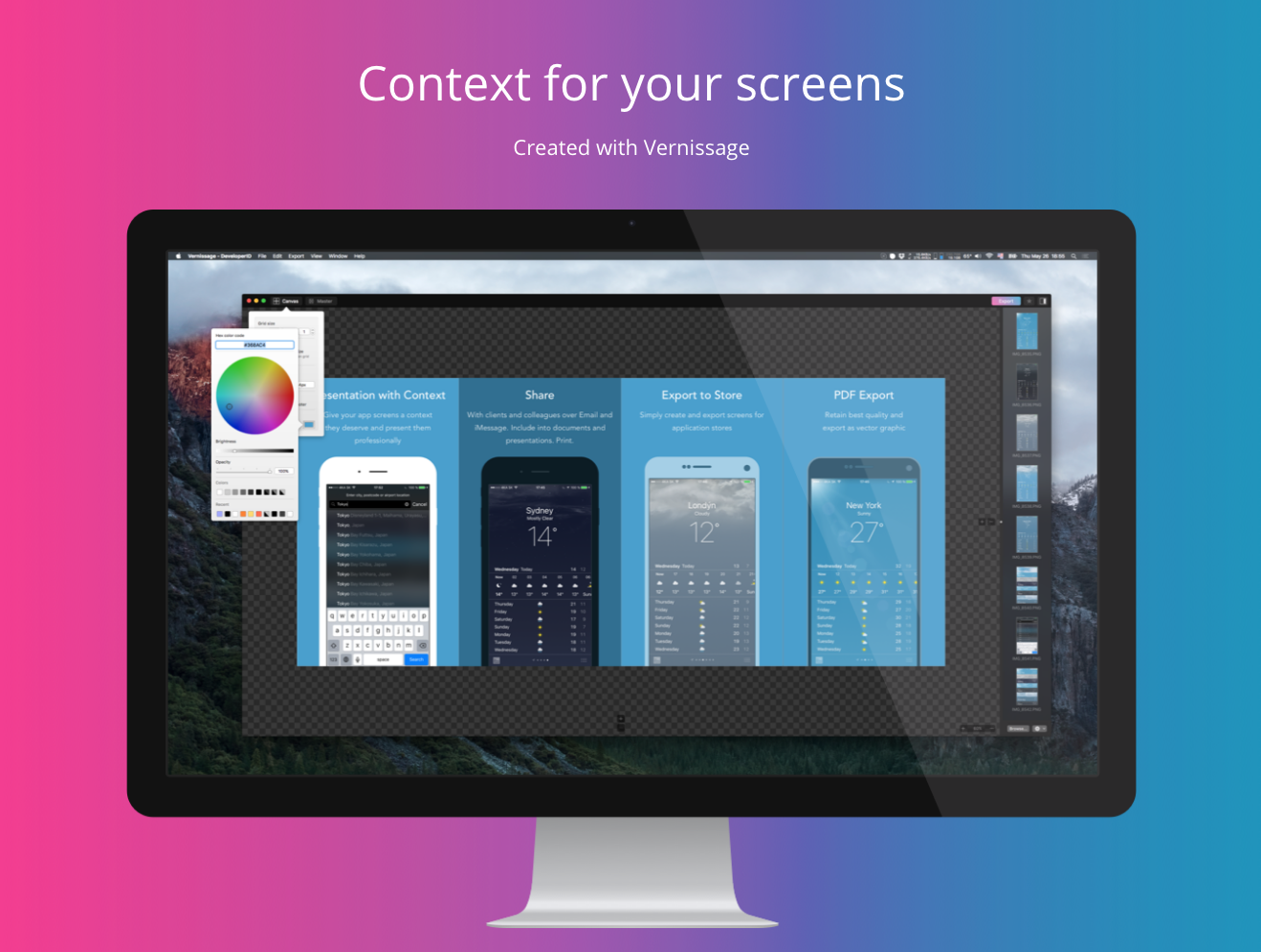
OSX development company, min:60 today introduces Vernissage 1.0.0, its new vector based tool for Mac OS X. Vernissage makes it easy for anyone to create great looking app presentations and App Store presentations. Results can be instantly shared, added to documents, presentations or printed. The vector engine makes it possible to create PDF documents with infinite scaling or export to images of any resolution. The app also includes a Macintosh 128k (circa 1984) device.
Bratislava, Slovakia - min:60 today is pleased to announce the release and immediate availability of Vernissage 1.0.0 for Mac OS X. Available now as a free download (with In-App Purchases) on the Mac App Store. Vernissage is a new vector based tool, that makes it easy for anyone, to create great looking app presentations and App Store presentations absolute easy and straightforward. It gives you the ability to add context to your plain app or webpage screens. Results can be instantly shared via email, iMessage, added to documents, presentations or printed. This new tool can also be used to create presentation screens for online applications stores, such as the iOS and Mac App Store.
The device library features 7 essential vector drawn devices, for the mobile, tablet and desktop platform. All devices come with different styling options from flat to realistic style, black and white, portrait and landscape, which makes more than 100 styles possible. Also included is a universal screen device and a Macintosh 128k device (which also converts the screens to match the pixel size and dithering of this legendary 1984 device).
Vernissage's vector engine, makes it possible to create .PDF documents with infinite scaling. When combined with .PDF screens, the document is completely resolution independent. Additionally, you can export to raster images of any resolution.
Vernissage is the right tool for:
* Adding context to your plain screens
* Exporting screen to online application stores
* Sharing new app designs or previews with your clients or colleagues
* Creating a mockup matrix for technical specification
* Putting app screens into your presentations
* Creating UI/UX screen overviews
* Text annotating your screens
* Printing
* Suitable for mockups, app screens, app designs and webpages
* A "must have" for any app related workflow
Other Features:
* Image backgrounds, with easy blur and vibrancy adjustment
* Add text and titles, header and footer
* Style each cell individually or all cells at once
* Flexible grid (up to 49 devices at once)
* Image browser, to conveniently add screens to your devices
* Document support for saving your files
System Requirements:
* OS X 10.11 (El Capitan) or later
Pricing and Availability:
Vernissage 1.0.0 is available on Mac App Store for free in the Developer Tools category. The free version lets you explore base functionality, but excludes features which you can find in In-App Purchases:
Extended Features 19.99 Euro:
* Edit individual cell styles
* Use all devices and device styles
* Edit canvas header and footer
* Up to 7x7 grid
* Save and create templates
* Use device shadows
Advanced Export 19.99 Euro:
* Export in vectors to .PDF
* Create screenshots for Mac and iOS App Store
* Printing
Genius Bundle 29.99 Euro:
* Extended Features + Advanced Export + All future In-App Purchases
Vernissage 1.0.0: http://vernissageapp.com
Download from Mac App Store: https://itunes.apple.com/app/id1115272969
Available Devices and Sample Styles (PDF): http://www.vernissageapp.com/wp-content/uploads/2016/05/alldevices.pdf
Screenshot: http://www.vernissageapp.com/wp-content/uploads/2016/05/screenshot.png
Application Icon: http://www.vernissageapp.com/wp-content/uploads/2016/05/appicon4_1024.png
min:60 is a small mobile and OSX development company based in Bratislava, Slovakia. Its clients are mostly startups in the mobile app segment and media. All Material and Software (C) Copyright 2016 / min60 s.r.o. All Rights Reserved. Apple, the Apple logo, Mac OS X, iPhone, iPod, iPad and Macintosh are registered trademarks of Apple Inc. in the U.S. and/or other countries. Other trademarks and registered trademarks may be the property of their respective owners.
*******
Link To Article: http://prmac.com/release-id-79588.htm
*******
---------------------------------------------------------------------------------
Note that you can alter delivered distributions at any time.
Login to your account on prMac to alter your channel selection, or to opt-out at any time.
min:60 introduces Vernissage 1.0 for Mac OS X - Context for your Screen - Published on 05/30/16
OSX development company, min:60 today introduces Vernissage 1.0.0, its new vector based tool for Mac OS X. Vernissage makes it easy for anyone to create great looking app presentations and App Store presentations. Results can be instantly shared, added to documents, presentations or printed. The vector engine makes it possible to create PDF documents with infinite scaling or export to images of any resolution. The app also includes a Macintosh 128k (circa 1984) device.
Bratislava, Slovakia - min:60 today is pleased to announce the release and immediate availability of Vernissage 1.0.0 for Mac OS X. Available now as a free download (with In-App Purchases) on the Mac App Store. Vernissage is a new vector based tool, that makes it easy for anyone, to create great looking app presentations and App Store presentations absolute easy and straightforward. It gives you the ability to add context to your plain app or webpage screens. Results can be instantly shared via email, iMessage, added to documents, presentations or printed. This new tool can also be used to create presentation screens for online applications stores, such as the iOS and Mac App Store.
The device library features 7 essential vector drawn devices, for the mobile, tablet and desktop platform. All devices come with different styling options from flat to realistic style, black and white, portrait and landscape, which makes more than 100 styles possible. Also included is a universal screen device and a Macintosh 128k device (which also converts the screens to match the pixel size and dithering of this legendary 1984 device).
Vernissage's vector engine, makes it possible to create .PDF documents with infinite scaling. When combined with .PDF screens, the document is completely resolution independent. Additionally, you can export to raster images of any resolution.
Vernissage is the right tool for:
* Adding context to your plain screens
* Exporting screen to online application stores
* Sharing new app designs or previews with your clients or colleagues
* Creating a mockup matrix for technical specification
* Putting app screens into your presentations
* Creating UI/UX screen overviews
* Text annotating your screens
* Printing
* Suitable for mockups, app screens, app designs and webpages
* A "must have" for any app related workflow
Other Features:
* Image backgrounds, with easy blur and vibrancy adjustment
* Add text and titles, header and footer
* Style each cell individually or all cells at once
* Flexible grid (up to 49 devices at once)
* Image browser, to conveniently add screens to your devices
* Document support for saving your files
System Requirements:
* OS X 10.11 (El Capitan) or later
Pricing and Availability:
Vernissage 1.0.0 is available on Mac App Store for free in the Developer Tools category. The free version lets you explore base functionality, but excludes features which you can find in In-App Purchases:
Extended Features 19.99 Euro:
* Edit individual cell styles
* Use all devices and device styles
* Edit canvas header and footer
* Up to 7x7 grid
* Save and create templates
* Use device shadows
Advanced Export 19.99 Euro:
* Export in vectors to .PDF
* Create screenshots for Mac and iOS App Store
* Printing
Genius Bundle 29.99 Euro:
* Extended Features + Advanced Export + All future In-App Purchases
Vernissage 1.0.0: http://vernissageapp.com
Download from Mac App Store: https://itunes.apple.com/app/id1115272969
Available Devices and Sample Styles (PDF): http://www.vernissageapp.com/wp-content/uploads/2016/05/alldevices.pdf
Screenshot: http://www.vernissageapp.com/wp-content/uploads/2016/05/screenshot.png
Application Icon: http://www.vernissageapp.com/wp-content/uploads/2016/05/appicon4_1024.png
min:60 is a small mobile and OSX development company based in Bratislava, Slovakia. Its clients are mostly startups in the mobile app segment and media. All Material and Software (C) Copyright 2016 / min60 s.r.o. All Rights Reserved. Apple, the Apple logo, Mac OS X, iPhone, iPod, iPad and Macintosh are registered trademarks of Apple Inc. in the U.S. and/or other countries. Other trademarks and registered trademarks may be the property of their respective owners.
*******
Link To Article: http://prmac.com/release-id-79588.htm
*******
---------------------------------------------------------------------------------
Note that you can alter delivered distributions at any time.
Login to your account on prMac to alter your channel selection, or to opt-out at any time.
Back to the 80s with Famicam 64 - 8-bit RetroGaming-style Camera Suite
A new article has been published at prMac.
Back to the 80s with Famicam 64 - 8-bit RetroGaming-style Camera Suite - Published on 05/30/16
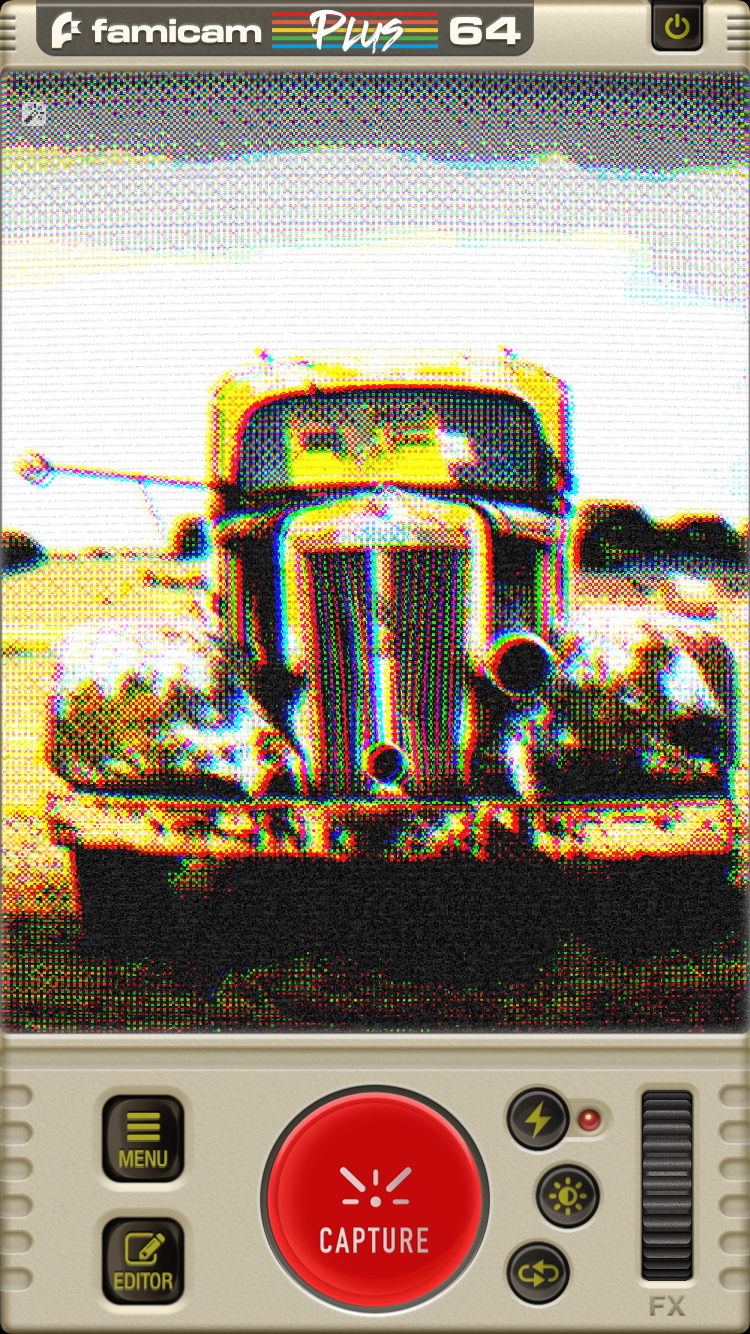
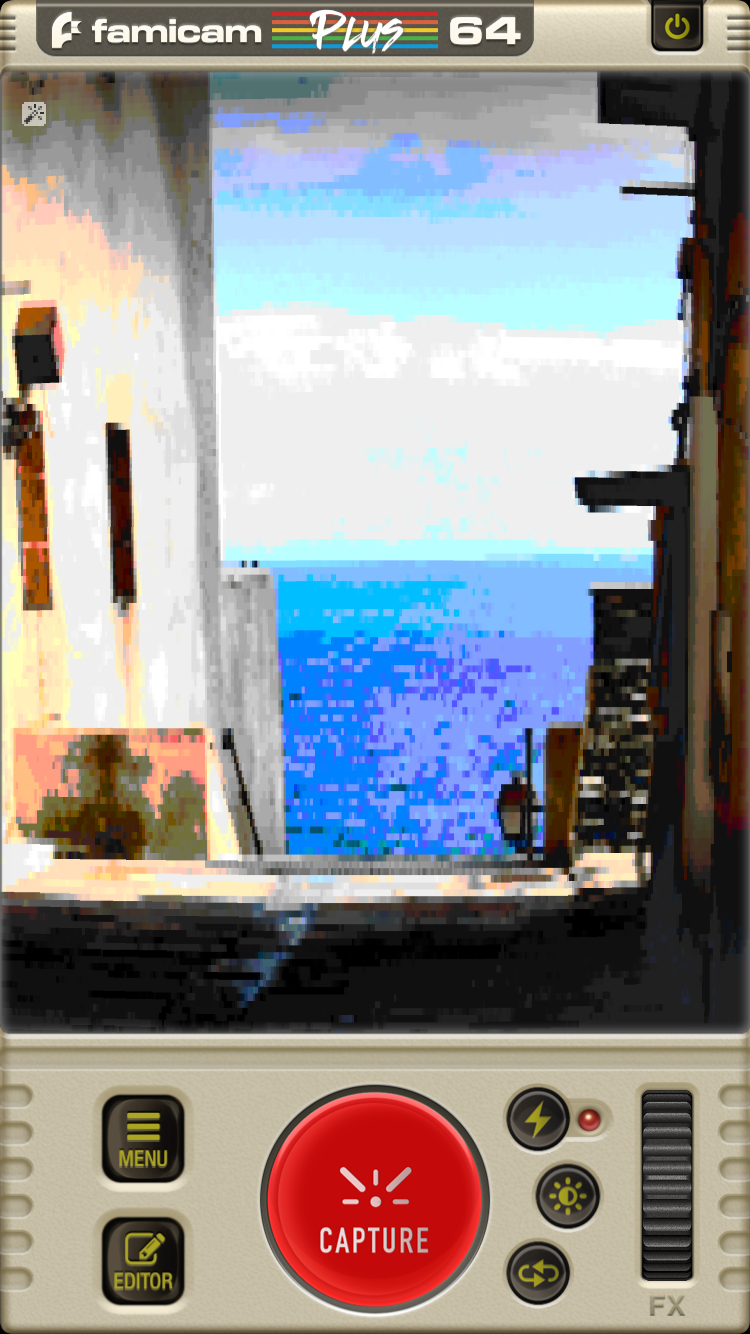
pxl:Artificer today introduces Famicam 64 v1.0, a free and full-featured 8-bit retrogaming-style camera & photo editing suite for iOS devices. With more than 40 real-time, non-destructive, and fully adjustable filters, Famicam 64 lets you recreate the most iconic styles of the early computers and videogames. A Pixel Caption Engine, a Sprite library with more than 350 8-bit stickers, Custom Vintage Frames, and a complete Pixel Editor complete the most powerful 8-bit Photo Editing App for iOS.
Tokyo, Japan - pxl:Artificer today is proud to announce the release of Famicam 64 (v1.0), the free and full-featured 8-bit retrogaming-style camera & photo editing suite for iPhone, iPad and iPod touch devices. With more than 40 real-time, non-destructive, and fully adjustable filters, Famicam 64 lets you recreate the most iconic retro palettes and styles of the early computers and video games.
Famicam 64 is a complete 8bit Photo Editing Suite with a set of modules to enhance your photos including:
* Draw - a pixel editor to sketch on your photo with different colors, effects, and retro brushes
* Text - a pixel-font text engine to add captions with awesome 8-bit and retro fonts
* Sprites - more than 350 8-bit retro-inspired Stickers
* Custom Frames - vintage retro frames to turn your photos into old game covers or an old CRT screen
If you grew up loading games from floppies (or through a tape recorder) and you're nostalgic for your childhood, or just love the fantastic pixelated aesthetics and colors of the era, this is the app you can't miss.
Features:
* A retro-inspired user interface in the Classic yellowed computer plastic
* More than 40 non-destructive real-time filters, with fully adjustable custom parameters, inspired by the most iconic retro computers, consoles, and games - From "Tennis for Two" oscilloscope experiments and text-based adventures to the last home computers and handheld consoles
* Drawing module to pixel-sketch your photo with different colors, effects, retro brushes, color selector and picker
* 350 8bit Sprites, divided into categories (emoticons, monsters, weapons, objects, etc.) to enhance your image and create awesome retro-gaming visual stories to share with your friends
* Awesome Custom Frames simulating retro game covers, magazines, floppy, cartridges or CRT screens
* Pixelated and nostalgic fonts and styles to caption your moments
* iOS Native Share to instantly send your creation to any app you use (Facebook, WhatsApp, Snapchat, Tumblr and wherever else you like
Filters Available:
CGA, EGA, VGA, Hercules Gray, Tendy, Asteroids, Another World, Famicam, NES, Commodore, Ascii-Art, Oscilloscopes, and much more.
Device Requirements:
* iPhone, iPad, and iPod touch
* Requires iOS 6.0 or later
* 51.1 MB
Pricing and Availability:
Famicam 64 (v1.0) is Free and available worldwide exclusively through the App Store in the Photo & Video category. Be proud of the origins of computing. Famicam 64 re-starts the 8-bit revolution!
Famicam 64 (v1.0): http://www.famicam64.com
Download from iTunes: https://itunes.apple.com/app/famicam-64-8-bit-retro-camera/id1109188591
Screenshot 1: http://www.famicam64.com/pr/1.png
Screenshot 2: http://www.famicam64.com/pr/2.png
Screenshot 3: http://www.famicam64.com/pr/3.png
App Icon: http://www.famicam64.com/pr/iconbig.png
Based in Tokyo, pxl:Artificer focuses on hi-quality, innovative utility apps for iOS and Android. Previous projects include well received, AppStore Top-100 titles like Events For Destiny, PipClock, Minu Timer, Alchemy Guide - Skyrim, Zombie Tools, and Snaxee. Copyright (C) 2016 PXL:Artificer. All Rights Reserved. Apple, the Apple logo, iPhone, iPod and iPad are registered trademarks of Apple Inc. in the U.S. and/or other countries.
*******
Link To Article: http://prmac.com/release-id-79587.htm
*******
---------------------------------------------------------------------------------
Note that you can alter delivered distributions at any time.
Login to your account on prMac to alter your channel selection, or to opt-out at any time.
Back to the 80s with Famicam 64 - 8-bit RetroGaming-style Camera Suite - Published on 05/30/16
pxl:Artificer today introduces Famicam 64 v1.0, a free and full-featured 8-bit retrogaming-style camera & photo editing suite for iOS devices. With more than 40 real-time, non-destructive, and fully adjustable filters, Famicam 64 lets you recreate the most iconic styles of the early computers and videogames. A Pixel Caption Engine, a Sprite library with more than 350 8-bit stickers, Custom Vintage Frames, and a complete Pixel Editor complete the most powerful 8-bit Photo Editing App for iOS.
Tokyo, Japan - pxl:Artificer today is proud to announce the release of Famicam 64 (v1.0), the free and full-featured 8-bit retrogaming-style camera & photo editing suite for iPhone, iPad and iPod touch devices. With more than 40 real-time, non-destructive, and fully adjustable filters, Famicam 64 lets you recreate the most iconic retro palettes and styles of the early computers and video games.
Famicam 64 is a complete 8bit Photo Editing Suite with a set of modules to enhance your photos including:
* Draw - a pixel editor to sketch on your photo with different colors, effects, and retro brushes
* Text - a pixel-font text engine to add captions with awesome 8-bit and retro fonts
* Sprites - more than 350 8-bit retro-inspired Stickers
* Custom Frames - vintage retro frames to turn your photos into old game covers or an old CRT screen
If you grew up loading games from floppies (or through a tape recorder) and you're nostalgic for your childhood, or just love the fantastic pixelated aesthetics and colors of the era, this is the app you can't miss.
Features:
* A retro-inspired user interface in the Classic yellowed computer plastic
* More than 40 non-destructive real-time filters, with fully adjustable custom parameters, inspired by the most iconic retro computers, consoles, and games - From "Tennis for Two" oscilloscope experiments and text-based adventures to the last home computers and handheld consoles
* Drawing module to pixel-sketch your photo with different colors, effects, retro brushes, color selector and picker
* 350 8bit Sprites, divided into categories (emoticons, monsters, weapons, objects, etc.) to enhance your image and create awesome retro-gaming visual stories to share with your friends
* Awesome Custom Frames simulating retro game covers, magazines, floppy, cartridges or CRT screens
* Pixelated and nostalgic fonts and styles to caption your moments
* iOS Native Share to instantly send your creation to any app you use (Facebook, WhatsApp, Snapchat, Tumblr and wherever else you like
Filters Available:
CGA, EGA, VGA, Hercules Gray, Tendy, Asteroids, Another World, Famicam, NES, Commodore, Ascii-Art, Oscilloscopes, and much more.
Device Requirements:
* iPhone, iPad, and iPod touch
* Requires iOS 6.0 or later
* 51.1 MB
Pricing and Availability:
Famicam 64 (v1.0) is Free and available worldwide exclusively through the App Store in the Photo & Video category. Be proud of the origins of computing. Famicam 64 re-starts the 8-bit revolution!
Famicam 64 (v1.0): http://www.famicam64.com
Download from iTunes: https://itunes.apple.com/app/famicam-64-8-bit-retro-camera/id1109188591
Screenshot 1: http://www.famicam64.com/pr/1.png
Screenshot 2: http://www.famicam64.com/pr/2.png
Screenshot 3: http://www.famicam64.com/pr/3.png

App Icon: http://www.famicam64.com/pr/iconbig.png

Based in Tokyo, pxl:Artificer focuses on hi-quality, innovative utility apps for iOS and Android. Previous projects include well received, AppStore Top-100 titles like Events For Destiny, PipClock, Minu Timer, Alchemy Guide - Skyrim, Zombie Tools, and Snaxee. Copyright (C) 2016 PXL:Artificer. All Rights Reserved. Apple, the Apple logo, iPhone, iPod and iPad are registered trademarks of Apple Inc. in the U.S. and/or other countries.
*******
Link To Article: http://prmac.com/release-id-79587.htm
*******
---------------------------------------------------------------------------------
Note that you can alter delivered distributions at any time.
Login to your account on prMac to alter your channel selection, or to opt-out at any time.
iAppsTechnology releases Meet Me 1.0 for iOS - Powerful Meeting Manager
A new article has been published at prMac.
iAppsTechnology releases Meet Me 1.0 for iOS - Powerful Meeting Manager - Published on 05/30/16
iAppsTechnology introduces Meet Me - Powerful Meeting Manager 1.0, its new social networking and business app for iOS devices. Effortlessly schedule and manage any formal meetings in your workplace with your peers or customers. MeetMe helps people in creating meetings with their contacts on any device. Easily set reminders for any meeting to receive notifications. To follow up, the app also allows the user to send messages and emails to the person they are going to meet.
Kuala Lumpur, Malaysia - iAppsTechnology is proud to announce the release of Meet Me - Powerful Meeting Manager 1.0, its amazing social networking and business app developed for iOS devices. MeetMe is very user friendly app that help people in creating meetings with their contacts on iOS phones. Set reminders for the meetings and get notifications for the reminders. Send messages and emails to the person you are going to meet and follow ups
This app will ease your life by giving you below benefits and added values:
1. Schedule and manage any formal meetings in your workplace with your peers or customers
2. Set up hang outs with loved one, good friends or buddies on the go
3. Manage any kind of appointments or meeting be it formal or informal
4. Handy app for social networking and building better relationships
This awesome app has the following amazing features:
*Auto Sync option for Contact list
* Different coloured badges makes it easy to sort the list of meetings
* Its extensive search option makes searching of an important meeting a task of seconds
* Display of meeting locations over a full screen integrated google map give MeetMe an extensive hand as a meeting manager
* Show all contacts in user's address book under contact tab
* Categorise user contacts using pins
* By using the colour of pin, user gets idea about the meetings with their contact (future meet, todays meet, past meet)
* On a just single touch on "Today's Meets" button, user can see the contacts that today's meetings with him
* Check number of meetings that shown in the badge on the contact name
* Search contact by using name and meeting
* See contact details by touching the contact name
* Send messages and mails to the contact to update the person about meeting
* See all meetings with the person by just touching on the badge on the name of contact and can edit and delete the meeting
* Create the new meetings and set alarm and notification also
* See the location of the contact on the map. If having future meeting than app shows location with green and red pin
* As user location changes, map also updates the user location in map and shows contacts that are in a certain area so that he can manage the meetings with the person near by him. This search area can be manage in the settings section of app
* On touching the pin in map, user can see the contact details and also manage the meetings
* App shows status of Wifi and GPS also so that map section update automatically
* App send the notification on the alert time to the local notification centre and shows an alert that updates the user about meeting time and meet person
* App also shows badge on the app icon that shows app having notification to the user
* Change the meeting alert in the setting section
* Choose the type of map (standard and Hybrid)
* App always sync with the contact address book and any change in contact address book also reflect in the app also as app become active
* App optimise to the level that requires minimum hardware resources. As GPS on only when it really requires and also optimise to drain minimum energy
Meet Me has been featured on the top review site AppMart UK.
Customer feedback:
"MeetMe has completely changed the way I manage my meetings and appointments. I can now plan and my daily tasks and activities in a very organised manner with this simple but powerful meeting management tool" - Brian Moss, General Manager at Smart Home Broker
Device Requirements:
* iPhone and iPad
* Optimised for iPhone 5, iPhone 6/6 Plus
* Requires iOS 6.0 or later
* Universal Application
* 15.5 MB
Pricing and Availability:
Meet Me - Powerful Meeting Manager 1.0 is Free and is available worldwide exclusively through the App Store in the Social Networking category. Grab a copy today to better manage all your meetings and appointments with just a single tool in your palm.
iAppsTechnology: http://www.FreeApps2All.com
Meet Me - Powerful Meeting Manager 1.0: http://freeapps2all.com/meetme/
Purchase and Download: https://itunes.apple.com/app/meet-me-powerful-meeting-manager/id1114309282
YouTube Video (Trailer): https://www.youtube.com/watch?v=wci_C_KIp-4
Promotional Banner: http://i.imgur.com/FBYoPjX.jpg
App Icon : http://i.imgur.com/dt8zoV3.png
iAppsTechnology is an app development company located in Kuala Lumpur, Malaysia. The company has released close to 300 free and paid apps available in App Store. We pride ourselves as the pioneer in developing eCard App for all kinds of events and occasions. We have also launched a lot of games, utilities, kids and an Islamic apps. All Material and Software (C) Copyright 2016 iAppsTechnology. All Rights Reserved. Apple, the Apple logo, iPhone, iPod and iPad are registered trademarks of Apple Inc. in the U.S. and/or other countries. Other trademarks and registered trademarks may be the property of their respective owners.
*******
Link To Article: http://prmac.com/release-id-79586.htm
*******
---------------------------------------------------------------------------------
Note that you can alter delivered distributions at any time.
Login to your account on prMac to alter your channel selection, or to opt-out at any time.
iAppsTechnology releases Meet Me 1.0 for iOS - Powerful Meeting Manager - Published on 05/30/16
iAppsTechnology introduces Meet Me - Powerful Meeting Manager 1.0, its new social networking and business app for iOS devices. Effortlessly schedule and manage any formal meetings in your workplace with your peers or customers. MeetMe helps people in creating meetings with their contacts on any device. Easily set reminders for any meeting to receive notifications. To follow up, the app also allows the user to send messages and emails to the person they are going to meet.
Kuala Lumpur, Malaysia - iAppsTechnology is proud to announce the release of Meet Me - Powerful Meeting Manager 1.0, its amazing social networking and business app developed for iOS devices. MeetMe is very user friendly app that help people in creating meetings with their contacts on iOS phones. Set reminders for the meetings and get notifications for the reminders. Send messages and emails to the person you are going to meet and follow ups
This app will ease your life by giving you below benefits and added values:
1. Schedule and manage any formal meetings in your workplace with your peers or customers
2. Set up hang outs with loved one, good friends or buddies on the go
3. Manage any kind of appointments or meeting be it formal or informal
4. Handy app for social networking and building better relationships
This awesome app has the following amazing features:
*Auto Sync option for Contact list
* Different coloured badges makes it easy to sort the list of meetings
* Its extensive search option makes searching of an important meeting a task of seconds
* Display of meeting locations over a full screen integrated google map give MeetMe an extensive hand as a meeting manager
* Show all contacts in user's address book under contact tab
* Categorise user contacts using pins
* By using the colour of pin, user gets idea about the meetings with their contact (future meet, todays meet, past meet)
* On a just single touch on "Today's Meets" button, user can see the contacts that today's meetings with him
* Check number of meetings that shown in the badge on the contact name
* Search contact by using name and meeting
* See contact details by touching the contact name
* Send messages and mails to the contact to update the person about meeting
* See all meetings with the person by just touching on the badge on the name of contact and can edit and delete the meeting
* Create the new meetings and set alarm and notification also
* See the location of the contact on the map. If having future meeting than app shows location with green and red pin
* As user location changes, map also updates the user location in map and shows contacts that are in a certain area so that he can manage the meetings with the person near by him. This search area can be manage in the settings section of app
* On touching the pin in map, user can see the contact details and also manage the meetings
* App shows status of Wifi and GPS also so that map section update automatically
* App send the notification on the alert time to the local notification centre and shows an alert that updates the user about meeting time and meet person
* App also shows badge on the app icon that shows app having notification to the user
* Change the meeting alert in the setting section
* Choose the type of map (standard and Hybrid)
* App always sync with the contact address book and any change in contact address book also reflect in the app also as app become active
* App optimise to the level that requires minimum hardware resources. As GPS on only when it really requires and also optimise to drain minimum energy
Meet Me has been featured on the top review site AppMart UK.
Customer feedback:
"MeetMe has completely changed the way I manage my meetings and appointments. I can now plan and my daily tasks and activities in a very organised manner with this simple but powerful meeting management tool" - Brian Moss, General Manager at Smart Home Broker
Device Requirements:
* iPhone and iPad
* Optimised for iPhone 5, iPhone 6/6 Plus
* Requires iOS 6.0 or later
* Universal Application
* 15.5 MB
Pricing and Availability:
Meet Me - Powerful Meeting Manager 1.0 is Free and is available worldwide exclusively through the App Store in the Social Networking category. Grab a copy today to better manage all your meetings and appointments with just a single tool in your palm.
iAppsTechnology: http://www.FreeApps2All.com
Meet Me - Powerful Meeting Manager 1.0: http://freeapps2all.com/meetme/
Purchase and Download: https://itunes.apple.com/app/meet-me-powerful-meeting-manager/id1114309282
YouTube Video (Trailer): https://www.youtube.com/watch?v=wci_C_KIp-4
Promotional Banner: http://i.imgur.com/FBYoPjX.jpg

App Icon : http://i.imgur.com/dt8zoV3.png

iAppsTechnology is an app development company located in Kuala Lumpur, Malaysia. The company has released close to 300 free and paid apps available in App Store. We pride ourselves as the pioneer in developing eCard App for all kinds of events and occasions. We have also launched a lot of games, utilities, kids and an Islamic apps. All Material and Software (C) Copyright 2016 iAppsTechnology. All Rights Reserved. Apple, the Apple logo, iPhone, iPod and iPad are registered trademarks of Apple Inc. in the U.S. and/or other countries. Other trademarks and registered trademarks may be the property of their respective owners.
*******
Link To Article: http://prmac.com/release-id-79586.htm
*******
---------------------------------------------------------------------------------
Note that you can alter delivered distributions at any time.
Login to your account on prMac to alter your channel selection, or to opt-out at any time.
Persian Keypad 2.5 for iOS Offers Customizable Persian Entry
A new article has been published at prMac.
Persian Keypad 2.5 for iOS Offers Customizable Persian Entry - Published on 05/29/16
LastThink today announces Persian Keypad 2.5, an important update to their highly customizable keyboard application for iOS devices. Persian Keypad offers users a third-party keyboard for use with iOS apps that allows anyone to modify it to their individual taste. Users can modify the order of the keyboard for more convenient usage. The update includes the ability to save specific words for later use, emoticons, paragraph formatting, word prediction, and more.
Yerevan, Armenia - LastThink is proud to announce the release of Persian Keypad 2.5, an important update to their highly customizable keyboard application for iPhone, iPad, and iPod touch devices. The Persian Keypad's customization features allow anyone to create the keyboard layout that is perfect for their needs. Features include the ability to change the size, shape, and order of characters; the ability to save specific words for later use; emoticons, word prediction, and more.
Users can change the order of the keyboard's letter layout, and even create handy shortcuts to allow entering words or even entire sentences with just a few keystrokes. The keyboard's Swipe feature allows users to swipe their finger around the keyboard to select letters and form words. The app intelligently predicts what the user intends to enter, greatly enhancing typing speed.
What's New in Version 2.5:
* Change the size, and place, as well as the shape of characters and keyboard separately
* Save any words that are used frequently in the active vocabulary for later use
* Express emotions with emoji characters (emoticons) which will correspond to entered words
* Paragraph formatting: Adjust alignment, line spacing, margins, bullets and numbering
* Optional smart auto correction: Intelligent spell checking for even the sloppiest typing
* Style: Customize the look of the keyboard. Change the color of the keys and background
* Word prediction: The keyboard guesses and displays the appropriate word as the user types
* Share text via Facebook, Twitter, email, Dropbox, and more
"When we set out to create the Persian Keypad, we knew we wanted to create a customizable keyboard that would offer users the ability to modify it to their individual tastes," says LastThink founder Grigori Jlavyan. Our keyboard allows Persian speaking users to easily enter their text messages, emails, and other types of texts via a comprehensive interface, making their day-to-day communications more convenient than ever."
The Persian Keypad also offers handy paragraph formatting options, allowing users to adjust the alignment of their text, while also offering the ability to set line spacing, adjust margins, even add bulleted or numbered lists. Optional smart correction makes even the sloppiest speller's text entry become correct. The keyboard also offers a downloadable Persian font for use with iOS devices, making text entry, editing, and display even more convenient.
Persian Keypad emphasizes the user's security above all, and while many third-party iOS keyboard apps require "Full Access" - with the ability to send back keystrokes and other information back to their developer - the Persian Keypad does not, protecting the text entry and sensitive user information, keeping their personal information safe from prying eyes.
Device Requirements:
* iPhone, iPad, and iPod touch
* Optimized for iPhone 5, iPhone 6/6 Plus
* Universal Application
* Requires iOS 6.1 or later
* 9.1 MB
Pricing and Availability:
Persian Keypad 2.5 is free of charge and available worldwide exclusively through the App Store in the Utilities category. Review codes are available upon request.
LastThink: http://lastthink.com/
Persian Keypad 2.5: https://www.facebook.com/pages/Persian-Keyboard/375518749218044
Download from iTunes: https://itunes.apple.com/app/persian-keypad/id688780134
Screenshot: http://a1.mzstatic.com/us/r30/Purple6/v4/36/7e/d0/367ed051-43c2-0287-5816-fb7caccfe7e4/screen568x568.jpeg
App Icon: http://a2.mzstatic.com/us/r30/Purple/v4/e9/06/aa/e906aa2f-ca82-69b7-746f-404834d61d80/icon175x175.png
LastThink is an IT company with a focus on mobile development. It has extended its list of services since 2012 to offer high-end business process management, system integration, as well as up-to-date communication solutions. LastThink's mission is to deliver maximum business value to its customers by designing, developing, implementing and maintaining efficient and high quality software solutions aligned with their most essential business needs. Their team will always do its best to meet client expectations. All Material and Software Copyright (C) 2016 LastThink LLC. All Rights Reserved. Apple, the Apple logo, iPhone, iPad and iPod are registered trademarks of Apple Inc. in the U.S. and/or other countries.
*******
Link To Article: http://prmac.com/release-id-79584.htm
*******
---------------------------------------------------------------------------------
Note that you can alter delivered distributions at any time.
Login to your account on prMac to alter your channel selection, or to opt-out at any time.
Persian Keypad 2.5 for iOS Offers Customizable Persian Entry - Published on 05/29/16
LastThink today announces Persian Keypad 2.5, an important update to their highly customizable keyboard application for iOS devices. Persian Keypad offers users a third-party keyboard for use with iOS apps that allows anyone to modify it to their individual taste. Users can modify the order of the keyboard for more convenient usage. The update includes the ability to save specific words for later use, emoticons, paragraph formatting, word prediction, and more.
Yerevan, Armenia - LastThink is proud to announce the release of Persian Keypad 2.5, an important update to their highly customizable keyboard application for iPhone, iPad, and iPod touch devices. The Persian Keypad's customization features allow anyone to create the keyboard layout that is perfect for their needs. Features include the ability to change the size, shape, and order of characters; the ability to save specific words for later use; emoticons, word prediction, and more.
Users can change the order of the keyboard's letter layout, and even create handy shortcuts to allow entering words or even entire sentences with just a few keystrokes. The keyboard's Swipe feature allows users to swipe their finger around the keyboard to select letters and form words. The app intelligently predicts what the user intends to enter, greatly enhancing typing speed.
What's New in Version 2.5:
* Change the size, and place, as well as the shape of characters and keyboard separately
* Save any words that are used frequently in the active vocabulary for later use
* Express emotions with emoji characters (emoticons) which will correspond to entered words
* Paragraph formatting: Adjust alignment, line spacing, margins, bullets and numbering
* Optional smart auto correction: Intelligent spell checking for even the sloppiest typing
* Style: Customize the look of the keyboard. Change the color of the keys and background
* Word prediction: The keyboard guesses and displays the appropriate word as the user types
* Share text via Facebook, Twitter, email, Dropbox, and more
"When we set out to create the Persian Keypad, we knew we wanted to create a customizable keyboard that would offer users the ability to modify it to their individual tastes," says LastThink founder Grigori Jlavyan. Our keyboard allows Persian speaking users to easily enter their text messages, emails, and other types of texts via a comprehensive interface, making their day-to-day communications more convenient than ever."
The Persian Keypad also offers handy paragraph formatting options, allowing users to adjust the alignment of their text, while also offering the ability to set line spacing, adjust margins, even add bulleted or numbered lists. Optional smart correction makes even the sloppiest speller's text entry become correct. The keyboard also offers a downloadable Persian font for use with iOS devices, making text entry, editing, and display even more convenient.
Persian Keypad emphasizes the user's security above all, and while many third-party iOS keyboard apps require "Full Access" - with the ability to send back keystrokes and other information back to their developer - the Persian Keypad does not, protecting the text entry and sensitive user information, keeping their personal information safe from prying eyes.
Device Requirements:
* iPhone, iPad, and iPod touch
* Optimized for iPhone 5, iPhone 6/6 Plus
* Universal Application
* Requires iOS 6.1 or later
* 9.1 MB
Pricing and Availability:
Persian Keypad 2.5 is free of charge and available worldwide exclusively through the App Store in the Utilities category. Review codes are available upon request.
LastThink: http://lastthink.com/
Persian Keypad 2.5: https://www.facebook.com/pages/Persian-Keyboard/375518749218044
Download from iTunes: https://itunes.apple.com/app/persian-keypad/id688780134
Screenshot: http://a1.mzstatic.com/us/r30/Purple6/v4/36/7e/d0/367ed051-43c2-0287-5816-fb7caccfe7e4/screen568x568.jpeg

App Icon: http://a2.mzstatic.com/us/r30/Purple/v4/e9/06/aa/e906aa2f-ca82-69b7-746f-404834d61d80/icon175x175.png

LastThink is an IT company with a focus on mobile development. It has extended its list of services since 2012 to offer high-end business process management, system integration, as well as up-to-date communication solutions. LastThink's mission is to deliver maximum business value to its customers by designing, developing, implementing and maintaining efficient and high quality software solutions aligned with their most essential business needs. Their team will always do its best to meet client expectations. All Material and Software Copyright (C) 2016 LastThink LLC. All Rights Reserved. Apple, the Apple logo, iPhone, iPad and iPod are registered trademarks of Apple Inc. in the U.S. and/or other countries.
*******
Link To Article: http://prmac.com/release-id-79584.htm
*******
---------------------------------------------------------------------------------
Note that you can alter delivered distributions at any time.
Login to your account on prMac to alter your channel selection, or to opt-out at any time.
Subscribe to:
Posts (Atom)