A new article has been published at prMac.
MailButler Allows You to Schedule Emails in Apple Mail - Published on 05/31/16
Feingeist Software GmbH presents MailButler, the productivity boosting add-on for Apple Mail. MailButler allows its users to schedule an email to be sent at a specific date and time. This functionality helps to fulfill lots of tasks beforehand by writing several emails at once and letting MailButler secure their scheduled delivery later. With its ten various functions, MailButler simplifies, optimizes and streamlines working with emails in Apple Mail in one's daily life.
Berlin, Germany - Feingeist Software GmbH is proud to announce the release of MailButler, the productivity boosting add-on for Apple Mail. MailButler allows its users to schedule an email to be sent at a specific date and time. This functionality helps to fulfill lots of tasks beforehand by writing several emails at once and letting MailButler secure their scheduled delivery later. For example, birthday emails can be composed way ahead of the actual date and sent by MailButler on the exact date that is defined by the user.
MailButler is a personal assistant for efficient and productive work with Apple Mail. With its 10 various functions, it simplifies, optimizes and streamlines working with emails in one's daily life. MailButler already offers such features as:
* Email Tracking: allows to know if the recipient has actually opened your email
* Follow-Up: allows to schedule a follow-up reminder that will notify you when there is no response to a particular email
* Emails To Notes: allows to easily convert emails into notes
* Upload to Cloud: allows to effortlessly send attachments independent of their size
* Signatures: allows to create beautiful and professionally looking email signatures
The developers at Feingeist Software promise that more new features are planned and will be added to MailButler in future.
Feingeist Software: https://www.feingeist.io/?utm_source=Release%20Scheduling%20&utm_medium=prmac&utm_campaign=Release%20Scheduling%20Homepage
MailButler: https://www.feingeist.io/mailbutler/?utm_source=Release%20Scheduling%20&utm_medium=prmac&utm_campaign=Release%20Scheduling%20Product
Download MailButler: https://feingeist.io/files/MailButler.zip
Screenshot: https://www.feingeist.io/wp-content/uploads/2016/01/MailButler_Screenshot.png
Application Icon: https://www.feingeist.io/wp-content/uploads/2016/01/MailButler_Logo_256x256.png
Based in Berlin, Germany, Feingeist develops useful software for Mac OS X. The company was founded with the vision to make the life of Mac users easier, and help them complete their daily tasks in the most convenient and elegant way. The developers perceive security, privacy and productivity as the most important modern problems with their main products particularly target these problems. Their software includes an Apple Mail assistant MailButler, and a VPN client Shimo. They have one target: to simplify life and optimize one's daily productivity. All Material and Software (C) Copyright 2016 Feingeist Software GmbH. All Rights Reserved. Apple, the Apple logo, Macintosh and Mac OS X are registered trademarks of Apple Inc. in the U.S. and/or other countries.
*******
Link To Article: http://prmac.com/release-id-79597.htm
*******
---------------------------------------------------------------------------------
Note that you can alter delivered distributions at any time.
Login to your account on prMac to alter your channel selection, or to opt-out at any time.


Softpress releases Exhibeo 2 - Photo Gallery and Slideshow Creation Tool
A new article has been published at prMac.
Softpress releases Exhibeo 2 - Photo Gallery and Slideshow Creation Tool - Published on 05/31/16
UK based Softpress today releases Exhibeo 2, an important update to their popular photo gallery and slideshow creation tool for Mac. Designed exclusively for OS X Yosemite and El Capitan, Exhibeo 2 allows web designers and creatives to quickly and easily generate HTML5 image presentations using a range of beautifully designed and highly customizable themes. Its features include seven customizable gallery designs, fine control while editing images & thumbnails, image metadata, and so much more.
Oxford, United Kingdom - Softpress today is pleased to announce the release of Exhibeo 2, an important update to their popular photo gallery and slideshow creation tool for Mac. Designed exclusively for OS X Yosemite and El Capitan, Exhibeo 2's features include seven customizable gallery designs; even greater control while editing images and thumbnails; a new "metadata view" for adding image metadata; simplified output code for embedding galleries in websites; and much more.
Exhibeo 2 has an all-new design and the result is a cleaner, speedier, and more usable application. New and updated gallery themes give a modern feel, and the new metadata view and import options make adding image information easier than ever. A standout addition to Exhibeo 2 has been to streamline the output code, making it incredibly easy to add galleries to any website.
Along with Chroma, a color palette generation app also released today, Exhibeo 2 adds to Softpress' stable of cutting-edge design software. Both apps have been selected by Apple as featured applications on their App Store.
Apple's decision to feature the two apps is the latest in a series of accolades for Softpress. "We've always intended Exhibeo to be a cost-effective, straightforward, yet powerful photo gallery tool and Exhibeo 2 is no different," said Softpress Managing Director, Joe Billings. "For it to be featured on the App Store is thrilling and a huge achievement for the team."
Exhibeo 2 is available to buy on the App Store and featured until Thursday (June 2 2016).
Exhibeo 2: https://www.softpress.com/exhibeo/
Media Assets: https://www.softpress.com/exhibeo/press.html
Softpress is a long-established British technology company that produces innovative design software for Mac. With an uncompromising commitment to accessible web design, Softpress has a track record of building powerful and highly-usable tools for creatives. Copyright (C) 2016 Softpress. All Rights Reserved. Apple, the Apple logo, Mac OS X, and Macintosh are registered trademarks of Apple Inc. in the U.S. and/or other countries.
*******
Link To Article: http://prmac.com/release-id-79596.htm
*******
---------------------------------------------------------------------------------
Note that you can alter delivered distributions at any time.
Login to your account on prMac to alter your channel selection, or to opt-out at any time.
Softpress releases Exhibeo 2 - Photo Gallery and Slideshow Creation Tool - Published on 05/31/16
UK based Softpress today releases Exhibeo 2, an important update to their popular photo gallery and slideshow creation tool for Mac. Designed exclusively for OS X Yosemite and El Capitan, Exhibeo 2 allows web designers and creatives to quickly and easily generate HTML5 image presentations using a range of beautifully designed and highly customizable themes. Its features include seven customizable gallery designs, fine control while editing images & thumbnails, image metadata, and so much more.
Oxford, United Kingdom - Softpress today is pleased to announce the release of Exhibeo 2, an important update to their popular photo gallery and slideshow creation tool for Mac. Designed exclusively for OS X Yosemite and El Capitan, Exhibeo 2's features include seven customizable gallery designs; even greater control while editing images and thumbnails; a new "metadata view" for adding image metadata; simplified output code for embedding galleries in websites; and much more.
Exhibeo 2 has an all-new design and the result is a cleaner, speedier, and more usable application. New and updated gallery themes give a modern feel, and the new metadata view and import options make adding image information easier than ever. A standout addition to Exhibeo 2 has been to streamline the output code, making it incredibly easy to add galleries to any website.
Along with Chroma, a color palette generation app also released today, Exhibeo 2 adds to Softpress' stable of cutting-edge design software. Both apps have been selected by Apple as featured applications on their App Store.
Apple's decision to feature the two apps is the latest in a series of accolades for Softpress. "We've always intended Exhibeo to be a cost-effective, straightforward, yet powerful photo gallery tool and Exhibeo 2 is no different," said Softpress Managing Director, Joe Billings. "For it to be featured on the App Store is thrilling and a huge achievement for the team."
Exhibeo 2 is available to buy on the App Store and featured until Thursday (June 2 2016).
Exhibeo 2: https://www.softpress.com/exhibeo/
Media Assets: https://www.softpress.com/exhibeo/press.html
Softpress is a long-established British technology company that produces innovative design software for Mac. With an uncompromising commitment to accessible web design, Softpress has a track record of building powerful and highly-usable tools for creatives. Copyright (C) 2016 Softpress. All Rights Reserved. Apple, the Apple logo, Mac OS X, and Macintosh are registered trademarks of Apple Inc. in the U.S. and/or other countries.
*******
Link To Article: http://prmac.com/release-id-79596.htm
*******
---------------------------------------------------------------------------------
Note that you can alter delivered distributions at any time.
Login to your account on prMac to alter your channel selection, or to opt-out at any time.
Records 1.2 for Mac Adds French, Spanish and Stability Fixes
A new article has been published at prMac.
Records 1.2 for Mac Adds French, Spanish and Stability Fixes - Published on 05/31/16
Records Team today announces the release of Records 1.2 for Mac, a major update to their popular personal database application for OS X. Records for Mac allows anyone to collect and organize their information, from favorite movies, to customer invoices, to home inventory, and more. The app offers the perfect balance between ease of use and powerful features. Version 1.2 introduces the French, Spanish localizations, stability fixes with many new improvements.
Bologna, Italy - Records Team today is proud to announce the release of Records 1.2 for Mac, a major update to their popular and easy to use personal database application for OS X. Records for Mac is built exclusively for the Mac, and offers an excellent balance between ease of use and powerful features. The app offers any Mac user the ability to create custom databases as easily as dragging and dropping 15 fully-configurable fields into place on a form.
The Records canvas editor allows users to customize the layout and design of their forms, designing and building a database template in minutes. The intelligent drag-and-drop editor will have users up and running in no time at all. Configurable form fields ensure the correct data is entered where it should be entered. Properties such as text case, date format, and image scale make your data attractive and presentable.
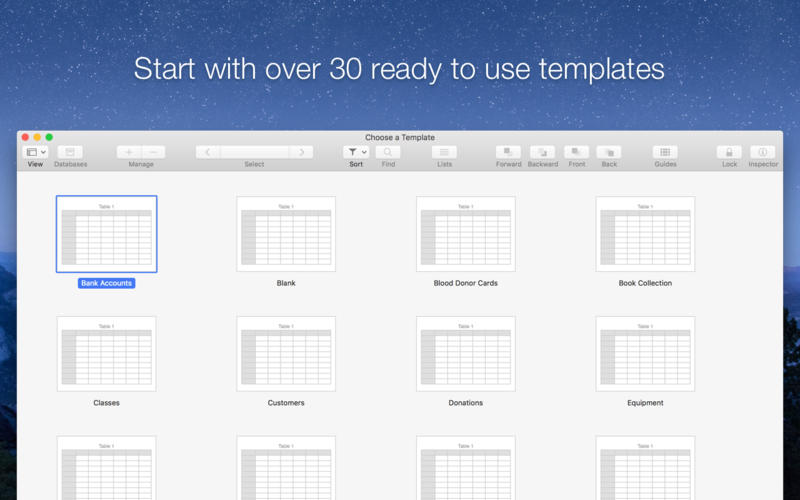
Records for Mac's Visual Editor also includes stunning themes that offer several beautiful colors to choose from. Pre-filled lists offer an easy way to add and use lists on the database forms, saving time and effort. Records includes 30 ready to use templates to start using the app in just a few seconds and are also shareable. With just a few clicks, users can share their database templates with friends, family and colleagues.
Easy setup and design isn't all that Records for Mac has to offer. A database isn't worth the silicon it's written to if the application used to access the data can't offer a fast and easy way to find needed information from the data stored inside it. Records offers full text search, which allows anyone to quickly enter a search query and easily search the entire database to find exactly the data they need.
As well as being easy to setup and maintain, Records for Mac is scalable. Records supports databases with tens of thousands of records, so now there is no need to compromise when it comes to storing and accessing important data. Users also don't have to fear slowdowns when dealing with large amount of records. The application also allows easy importing, exporting and backup of data, so there is never a need to worry about losing data in case of a hard drive crash.
Records is built exclusively for the Mac, and uses a number of modern OS X features and technologies, including: Cocoa, Core Data, Quartz, Grand Central Dispatch, 64-bit, Full-Screen, Calendar, Contacts and more. The Records user interface has been fully optimized to take advantage of Macs with Retina displays, including the new iMacs and MacBook Pros.
Records for Mac is an innovative data collection and management tool that any Mac user can easily make use of to safely and efficiently store their personal and business-related data. Records Team will continually work to enhance and improve Records for Mac.
"There has always been a real need for a personal database app that would allow users to create and maintain databases to store their information," says Andrea Gelati, founder of Records Team. "With Records for Mac, we've brought that capability to Mac users, allowing them to store the information they need to access without the need for any prior coding or database design knowledge."
Here's What Reviewers Say About Records for Mac:
"Records looks fantastic. I can't imagine all the hard work you guys put into this app - the icon alone is just stunning." - Shawn Blanc
"Records is a powerful, customizable, easy to use database app for Mac." - Peter Cohen, iMore
"Wow, Records for Mac looks really great!" - Christina Warren, Mashable
"Records is an impressively nimble piece of Mac software that makes personal databases insanely simple to create and use." - J. R. Bookwalter, Mac|Life - 4 stars
"Records for Mac makes creating a personal database very simple." - MacFormat - 4 stars
Top-notch features
* Incredibly easy, drag & drop form and database creation
* Canvas editor lets you customize the layout and design of your forms
* Table view lets you display, edit and sort data in a single view
* 30 templates ready to use lets you start using Records in seconds
* 15 fully-configurable form fields, including images, contacts, URLs and ratings
* Powerful alignment guides help you design visually appealing forms
* Use one of several pre-filled lists, such as countries, currencies, or credit card vendors
* Build your own forms and choose your favorite eye-candy color theme
* Full text search help to find instantly your data
* Easily import, export and backup your data in CSV/TSV formats (Bento's users are welcome)
* Import, export and share templates with friends, family and colleagues
* No prior database design or coding knowledge required
* Localized in English, French, German, Italian, Japanese and Spanish
What's New in Version 1.2
* Adds the French and Spanish language localizations
* Improves the Text field that correctly maintains the scroll position without focus
* Improves the Table view that correctly save and restore the size of each column
* Improves the Table view that loads and displays data faster and smoothly
* Improves the Contact field that correctly handles Address Book contacts marked as Company
* Improves the CSV Importer speed while importing large data files
* Improves the CSV Importer that allows to import data into existing fields
* Fixes an issue that could cause the Inspector panel to incorrectly restore the original position
* Fixes an issue that could cause the Lists Editor to incorrectly save the value for new items
* Various improvements and performance enhancements
System Requirements:
* OS X 10.10 Yosemite or later
* 64-bit processor
* 5.9 MB
Pricing and Availability:
Records 1.2 for Mac is only $34.99 USD (or equivalent amount in other currencies) and is available worldwide through the Mac App Store in the Business category and through the Records Team website. Review copies are available upon request.
Records 1.2: http://records.team
Purchase and Download (MAS): https://itunes.apple.com/app/records/id946833065
Download Trial (ZIP): http://records.team/s/records-trial.zip
Screenshot 1: http://a3.mzstatic.com/us/r30/Purple18/v4/ee/b0/76/eeb07663-b549-fded-b8f0-230b48b9e5fe/screen800x500.jpeg
Screenshot 2: http://a4.mzstatic.com/us/r30/Purple18/v4/a3/37/6c/a3376c31-0a8d-93d3-3223-7b2b2ee9db37/screen800x500.jpeg
Press Kit (ZIP): http://records.team/s/records-presskit.zip
Records Team was founded in early 2012 by Andrea Gelati with the goal to create Records, a full-featured and powerful personal database app for the Mac. (C) 2012-2016 Records Team. All Rights Reserved. Apple, the Apple logo, Macintosh and Mac OS X are registered trademarks of Apple Inc. in the U.S. and/or other countries. Other trademarks and registered trademarks may be the property of their respective owners.
*******
Link To Article: http://prmac.com/release-id-79595.htm
*******
---------------------------------------------------------------------------------
Note that you can alter delivered distributions at any time.
Login to your account on prMac to alter your channel selection, or to opt-out at any time.
Records 1.2 for Mac Adds French, Spanish and Stability Fixes - Published on 05/31/16
Records Team today announces the release of Records 1.2 for Mac, a major update to their popular personal database application for OS X. Records for Mac allows anyone to collect and organize their information, from favorite movies, to customer invoices, to home inventory, and more. The app offers the perfect balance between ease of use and powerful features. Version 1.2 introduces the French, Spanish localizations, stability fixes with many new improvements.
Bologna, Italy - Records Team today is proud to announce the release of Records 1.2 for Mac, a major update to their popular and easy to use personal database application for OS X. Records for Mac is built exclusively for the Mac, and offers an excellent balance between ease of use and powerful features. The app offers any Mac user the ability to create custom databases as easily as dragging and dropping 15 fully-configurable fields into place on a form.
The Records canvas editor allows users to customize the layout and design of their forms, designing and building a database template in minutes. The intelligent drag-and-drop editor will have users up and running in no time at all. Configurable form fields ensure the correct data is entered where it should be entered. Properties such as text case, date format, and image scale make your data attractive and presentable.
Records for Mac's Visual Editor also includes stunning themes that offer several beautiful colors to choose from. Pre-filled lists offer an easy way to add and use lists on the database forms, saving time and effort. Records includes 30 ready to use templates to start using the app in just a few seconds and are also shareable. With just a few clicks, users can share their database templates with friends, family and colleagues.
Easy setup and design isn't all that Records for Mac has to offer. A database isn't worth the silicon it's written to if the application used to access the data can't offer a fast and easy way to find needed information from the data stored inside it. Records offers full text search, which allows anyone to quickly enter a search query and easily search the entire database to find exactly the data they need.
As well as being easy to setup and maintain, Records for Mac is scalable. Records supports databases with tens of thousands of records, so now there is no need to compromise when it comes to storing and accessing important data. Users also don't have to fear slowdowns when dealing with large amount of records. The application also allows easy importing, exporting and backup of data, so there is never a need to worry about losing data in case of a hard drive crash.
Records is built exclusively for the Mac, and uses a number of modern OS X features and technologies, including: Cocoa, Core Data, Quartz, Grand Central Dispatch, 64-bit, Full-Screen, Calendar, Contacts and more. The Records user interface has been fully optimized to take advantage of Macs with Retina displays, including the new iMacs and MacBook Pros.
Records for Mac is an innovative data collection and management tool that any Mac user can easily make use of to safely and efficiently store their personal and business-related data. Records Team will continually work to enhance and improve Records for Mac.
"There has always been a real need for a personal database app that would allow users to create and maintain databases to store their information," says Andrea Gelati, founder of Records Team. "With Records for Mac, we've brought that capability to Mac users, allowing them to store the information they need to access without the need for any prior coding or database design knowledge."
Here's What Reviewers Say About Records for Mac:
"Records looks fantastic. I can't imagine all the hard work you guys put into this app - the icon alone is just stunning." - Shawn Blanc
"Records is a powerful, customizable, easy to use database app for Mac." - Peter Cohen, iMore
"Wow, Records for Mac looks really great!" - Christina Warren, Mashable
"Records is an impressively nimble piece of Mac software that makes personal databases insanely simple to create and use." - J. R. Bookwalter, Mac|Life - 4 stars
"Records for Mac makes creating a personal database very simple." - MacFormat - 4 stars
Top-notch features
* Incredibly easy, drag & drop form and database creation
* Canvas editor lets you customize the layout and design of your forms
* Table view lets you display, edit and sort data in a single view
* 30 templates ready to use lets you start using Records in seconds
* 15 fully-configurable form fields, including images, contacts, URLs and ratings
* Powerful alignment guides help you design visually appealing forms
* Use one of several pre-filled lists, such as countries, currencies, or credit card vendors
* Build your own forms and choose your favorite eye-candy color theme
* Full text search help to find instantly your data
* Easily import, export and backup your data in CSV/TSV formats (Bento's users are welcome)
* Import, export and share templates with friends, family and colleagues
* No prior database design or coding knowledge required
* Localized in English, French, German, Italian, Japanese and Spanish
What's New in Version 1.2
* Adds the French and Spanish language localizations
* Improves the Text field that correctly maintains the scroll position without focus
* Improves the Table view that correctly save and restore the size of each column
* Improves the Table view that loads and displays data faster and smoothly
* Improves the Contact field that correctly handles Address Book contacts marked as Company
* Improves the CSV Importer speed while importing large data files
* Improves the CSV Importer that allows to import data into existing fields
* Fixes an issue that could cause the Inspector panel to incorrectly restore the original position
* Fixes an issue that could cause the Lists Editor to incorrectly save the value for new items
* Various improvements and performance enhancements
System Requirements:
* OS X 10.10 Yosemite or later
* 64-bit processor
* 5.9 MB
Pricing and Availability:
Records 1.2 for Mac is only $34.99 USD (or equivalent amount in other currencies) and is available worldwide through the Mac App Store in the Business category and through the Records Team website. Review copies are available upon request.
Records 1.2: http://records.team
Purchase and Download (MAS): https://itunes.apple.com/app/records/id946833065
Download Trial (ZIP): http://records.team/s/records-trial.zip
Screenshot 1: http://a3.mzstatic.com/us/r30/Purple18/v4/ee/b0/76/eeb07663-b549-fded-b8f0-230b48b9e5fe/screen800x500.jpeg

Screenshot 2: http://a4.mzstatic.com/us/r30/Purple18/v4/a3/37/6c/a3376c31-0a8d-93d3-3223-7b2b2ee9db37/screen800x500.jpeg
Press Kit (ZIP): http://records.team/s/records-presskit.zip
Records Team was founded in early 2012 by Andrea Gelati with the goal to create Records, a full-featured and powerful personal database app for the Mac. (C) 2012-2016 Records Team. All Rights Reserved. Apple, the Apple logo, Macintosh and Mac OS X are registered trademarks of Apple Inc. in the U.S. and/or other countries. Other trademarks and registered trademarks may be the property of their respective owners.
*******
Link To Article: http://prmac.com/release-id-79595.htm
*******
---------------------------------------------------------------------------------
Note that you can alter delivered distributions at any time.
Login to your account on prMac to alter your channel selection, or to opt-out at any time.
ART Teknika releases M/S Proc 1.0 for iOS - Mid/Side Level and EQ
A new article has been published at prMac.
ART Teknika releases M/S Proc 1.0 for iOS - Mid/Side Level and EQ - Published on 05/31/16
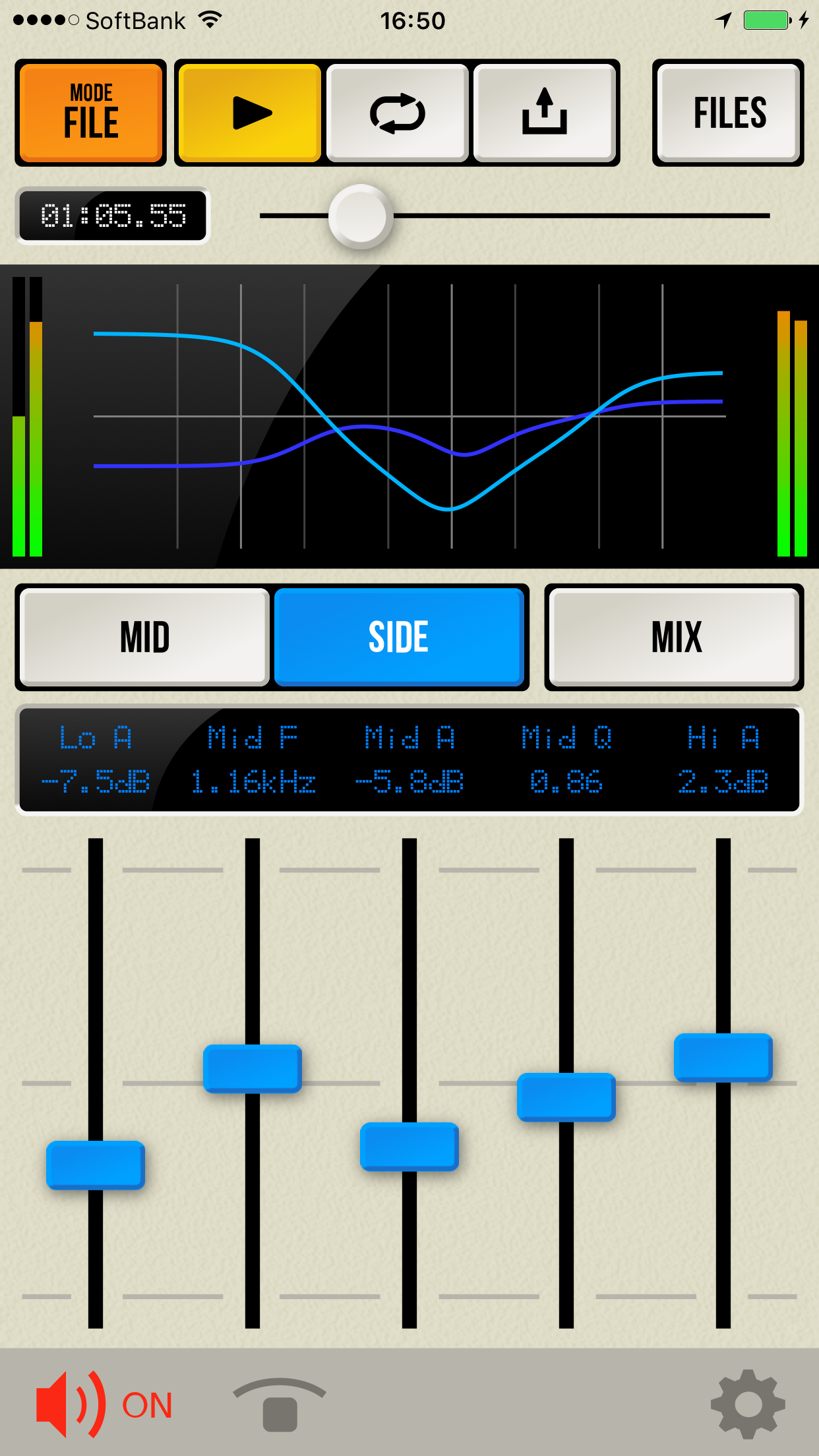
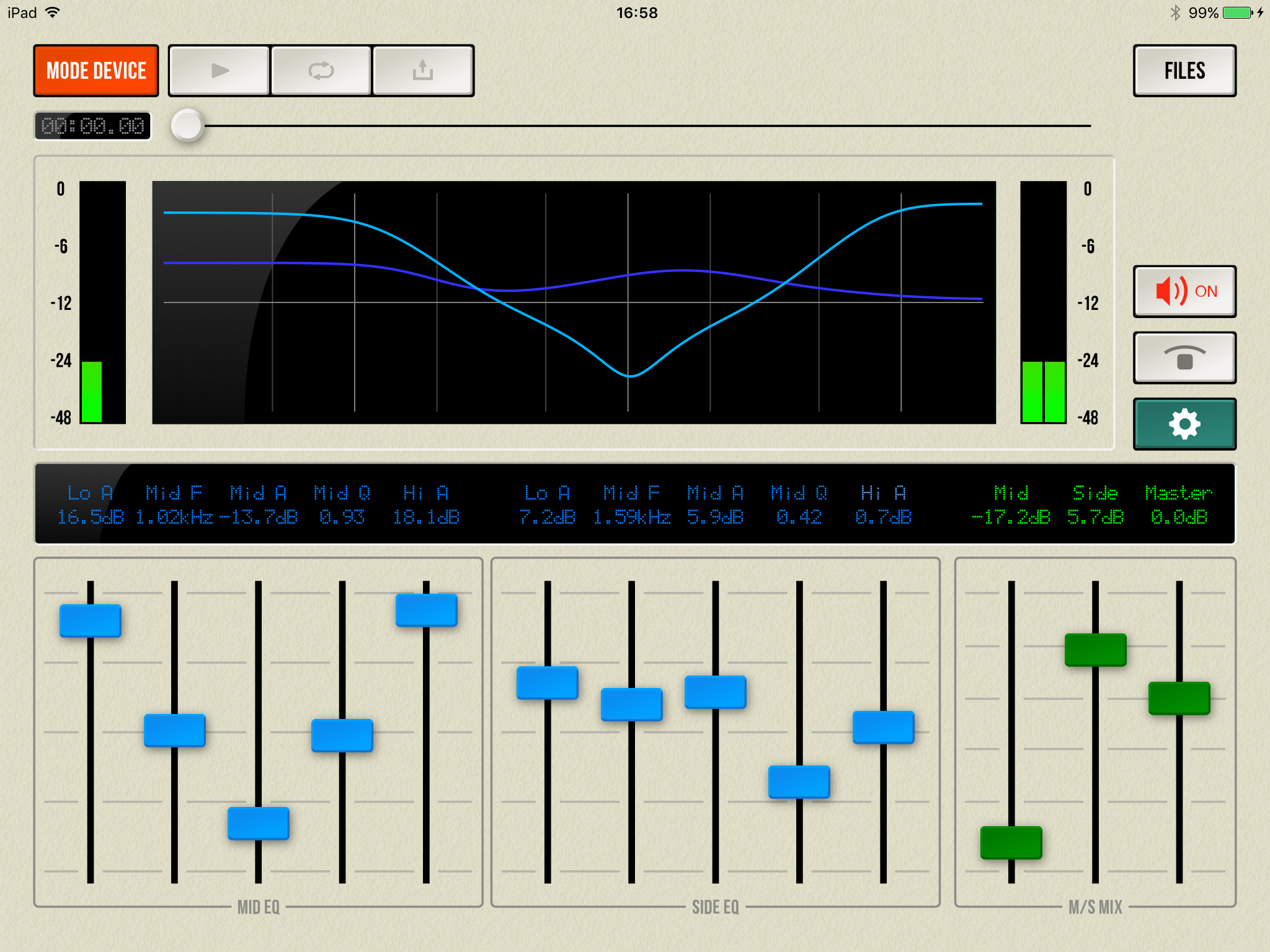
Tokyo based ART Teknika Inc. today introduces M/S Proc 1.0.0, their new Mid/Side Level & EQ app developed exclusively for iPhone, iPad and iPod touch devices. M/S Proc is a tool for M/S Processing that allows individual level adjustment and EQ processing for Mid and Side channels. With full control of high, mid and low bands, users can adjust the effect of the centrally located vocals or make nuanced changes to the width of the mix. The mid operates as a parametric equalizer.
Tokyo, Japan - ART Teknika Inc., a software and content provider, today is very pleased to announce the release and immediate availability of M/S Proc 1.0.0, their new Mid/Side Level & EQ app developed exclusively for iPhone, iPad and iPod touch devices. M/S Proc is a tool for M/S Processing that enables Mid/Side level adjustments and EQ.
What is M/S Processing?
While standard audio processing is done through the Left and Right channels, M/S processing divides elements into those at the center(Mid) and those on the left or right(Side). For example, it allows you to adjust the effect of the centrally located vocals or make nuanced changes to the width of the mix. In addition, tracks with sound pressure levels raised to the maximum in stereo processing can often be found to have additional headroom in the Sides when separated into M/S elements. This means you can increase the sound pressure just by enhancing the Sides. M/S Proc allows individual level adjustment and EQ processing for Mid and Side channels.
Main features:
* Mid/Side level adjustment
* Mid/Side EQ control with three bands (High, Mid, Low) - The Mid is a parametric equalizer
* In addition to standalone usage, compatible with Audiobus and Inter-App Audio. Can be combined with other apps
* Can adjust sounds brought in from external devices and apps
* Also works with WAV/AIFF formats - If applying to files, you can export your processed tracks as a WAV file
* Exported files can be exported to other apps using the "Open In" function
* Also lets you import files from other apps ("Open In" function)
* You can also import tracks from your Music Library
* Presets allow you to save your parameter settings in the file
* A universal app that can be used with both iPhone/iPad
Other Uses:
Although M/S processing is most often used for mastering, in principle by lowering the Mid you can apply a "center cancel." In this way you can prepare tracks for karaoke or "learning by ear." We also recommend sending your file to mimiCopy, our "learning by ear" music player app.
Device Requirements:
* iPhone, iPad, and iPod touch
* Requires iOS 7.0 or later
* Universal Application
* 5.9 MB
Pricing and Availability:
For a limited time, M/S Proc 1.0.0 is $2.99 USD (50% off) or equivalent amount in other currencies, and available worldwide exclusively through the App Store in the Music category.
M/S Proc 1.0.0: http://audiosuite.artteknika.com/index_en.html
Purchase and Download: https://itunes.apple.com/app/m-s-proc-mid-side-level-eq/id1062761979
Screenshot (iPhone): http://audiosuite.artteknika.com/MS_Proc_iPhone_1.png
Screenshot (iPad): http://audiosuite.artteknika.com/MS_Proc_iPad_1.png
App Icon: http://a3.mzstatic.com/us/r30/Purple7/v4/2b/66/21/2b6621bd-5970-ecbb-f81d-8101967828da/icon175x175.jpeg
Founded in 1994. Under the motto of "Computing power for Audio, Visual and Communications", ART Teknika has experience in a wide variety of fields, from technical development in audiovisual fields and content production. Also involved in development and proposal of systems utilizing iPhones and iPads. Copyright (C) 1994-2016 ART Teknika. All Rights Reserved. Apple, the Apple logo, iPhone, iPod and iPad are registered trademarks of Apple Inc. in the U.S. and/or other countries.
*******
Link To Article: http://prmac.com/release-id-79594.htm
*******
---------------------------------------------------------------------------------
Note that you can alter delivered distributions at any time.
Login to your account on prMac to alter your channel selection, or to opt-out at any time.
ART Teknika releases M/S Proc 1.0 for iOS - Mid/Side Level and EQ - Published on 05/31/16
Tokyo based ART Teknika Inc. today introduces M/S Proc 1.0.0, their new Mid/Side Level & EQ app developed exclusively for iPhone, iPad and iPod touch devices. M/S Proc is a tool for M/S Processing that allows individual level adjustment and EQ processing for Mid and Side channels. With full control of high, mid and low bands, users can adjust the effect of the centrally located vocals or make nuanced changes to the width of the mix. The mid operates as a parametric equalizer.
Tokyo, Japan - ART Teknika Inc., a software and content provider, today is very pleased to announce the release and immediate availability of M/S Proc 1.0.0, their new Mid/Side Level & EQ app developed exclusively for iPhone, iPad and iPod touch devices. M/S Proc is a tool for M/S Processing that enables Mid/Side level adjustments and EQ.
What is M/S Processing?
While standard audio processing is done through the Left and Right channels, M/S processing divides elements into those at the center(Mid) and those on the left or right(Side). For example, it allows you to adjust the effect of the centrally located vocals or make nuanced changes to the width of the mix. In addition, tracks with sound pressure levels raised to the maximum in stereo processing can often be found to have additional headroom in the Sides when separated into M/S elements. This means you can increase the sound pressure just by enhancing the Sides. M/S Proc allows individual level adjustment and EQ processing for Mid and Side channels.
Main features:
* Mid/Side level adjustment
* Mid/Side EQ control with three bands (High, Mid, Low) - The Mid is a parametric equalizer
* In addition to standalone usage, compatible with Audiobus and Inter-App Audio. Can be combined with other apps
* Can adjust sounds brought in from external devices and apps
* Also works with WAV/AIFF formats - If applying to files, you can export your processed tracks as a WAV file
* Exported files can be exported to other apps using the "Open In" function
* Also lets you import files from other apps ("Open In" function)
* You can also import tracks from your Music Library
* Presets allow you to save your parameter settings in the file
* A universal app that can be used with both iPhone/iPad
Other Uses:
Although M/S processing is most often used for mastering, in principle by lowering the Mid you can apply a "center cancel." In this way you can prepare tracks for karaoke or "learning by ear." We also recommend sending your file to mimiCopy, our "learning by ear" music player app.
Device Requirements:
* iPhone, iPad, and iPod touch
* Requires iOS 7.0 or later
* Universal Application
* 5.9 MB
Pricing and Availability:
For a limited time, M/S Proc 1.0.0 is $2.99 USD (50% off) or equivalent amount in other currencies, and available worldwide exclusively through the App Store in the Music category.
M/S Proc 1.0.0: http://audiosuite.artteknika.com/index_en.html
Purchase and Download: https://itunes.apple.com/app/m-s-proc-mid-side-level-eq/id1062761979
Screenshot (iPhone): http://audiosuite.artteknika.com/MS_Proc_iPhone_1.png
Screenshot (iPad): http://audiosuite.artteknika.com/MS_Proc_iPad_1.png
App Icon: http://a3.mzstatic.com/us/r30/Purple7/v4/2b/66/21/2b6621bd-5970-ecbb-f81d-8101967828da/icon175x175.jpeg

Founded in 1994. Under the motto of "Computing power for Audio, Visual and Communications", ART Teknika has experience in a wide variety of fields, from technical development in audiovisual fields and content production. Also involved in development and proposal of systems utilizing iPhones and iPads. Copyright (C) 1994-2016 ART Teknika. All Rights Reserved. Apple, the Apple logo, iPhone, iPod and iPad are registered trademarks of Apple Inc. in the U.S. and/or other countries.
*******
Link To Article: http://prmac.com/release-id-79594.htm
*******
---------------------------------------------------------------------------------
Note that you can alter delivered distributions at any time.
Login to your account on prMac to alter your channel selection, or to opt-out at any time.
The Game's Name Says It All With The Addictive New Annoying Brain App
A new article has been published at prMac.
The Game's Name Says It All With The Addictive New Annoying Brain App - Published on 05/30/16
The Annoying Brain 1.3 free game for iOS and Android devices, challenges a player's brain to the tee and trains it to be more focused. It is a game of patience, focus and concentration. Blink an eye lid and find yourself starting again - 3 seconds is all it takes to reach the next level or start from the beginning again. The app is easy to download, and easy to use, but game play itself is deceptively simple.
Davao, Philippines - If you're looking for a new brain-teaser challenge, look no further than Annoying Brain, which promises to do exactly that to your gray matter - and delivers on that promise with an almost deviate combination of fun and frustration. Annoying Brain users say they're totally hooked on a game that makes them want to throw their phones against the wall, drives them straight up that same wall, and at the same time develops the patience, focus and endurance that makes the game their favorite!
"With so many games in the world to choose from, we knew that people were looking for something that would truly engage them," said Restie John Quibod, spokesman for the Annoying Brain team in the Philippines. "That means thinking long and hard about what kind of experience so many players want, and how to create one that truly differentiates itself from thousands of other offerings. We've achieved that with Annoying Brain, and the success we've seen to date tells us we've made the right choices."
Players looking for a new challenge can make that choice too. The app is easy to download, and easy to use, but game play itself is deceptively simple. Players have three seconds to respond to color-coded cues - and that starts out easy - but it doesn't take long before choosing the right answer becomes far more complicated. That's especially true as the cues deliver conflicting or mismatched information and players have to decide what choice is the winner, which is exactly what Annoying Brain designers intend. That's precisely how the game app improves logic comprehension and the ability to act under pressure.
Version 1.3 for iOS devices includes minor fixes to improve the user experience.
Features:
* Fast paced game play, with appealing graphics and high-quality sound
* Competitive options to challenge family and friends via email or SMS
* Three-second decisions create challenges in never-ending combinations
* In-app purchase available to remove ads and to buy different themes
Device Requirements:
* iPhone, iPad, and iPod touch
* Requires iOS 7.0 or later
* Universal Application
* 36.5 MB
Pricing and Availability:
Annoying Brain is free, and is available worldwide through the App Store in the Games category. Annoying Brain is also available for Android through the Google Play Store in the Educational Category.
Annoying Brain 1.3: http://annoyingbrain.com/
Download from iTunes: https://itunes.apple.com/app/annoying-brain-new-competitive/id1063297744
Download from Google Play: https://play.google.com/store/apps/details?id=com.regexsoft.annoyingbrainagain&hl=en
Screenshot 1: http://a1.mzstatic.com/us/r30/Purple5/v4/3a/06/41/3a064175-acde-7b38-ba9c-dcfcdf9a4e98/screen322x572.jpeg
Screenshot 2: http://a5.mzstatic.com/us/r30/Purple69/v4/5c/07/da/5c07dae3-fd4e-4386-112e-af49eb3325bb/screen322x572.jpeg
App Icon: http://a2.mzstatic.com/us/r30/Purple49/v4/25/d3/22/25d32297-71d1-040f-6c83-66e6416cd802/icon175x175.png
Davao, Philippines-based business man Restie John Quibod and his Co-Founder Mark Ian Saclot are relative newcomers to the gaming business, but their mission first and foremost is to make quality, highly addictive games that will challenge and delight players of all ages. Restie was 22 years old when he decided to create his first game. Copyright (C) 2016 Restie Quibod. All Rights Reserved. Apple, the Apple logo, iPhone and iPod are registered trademarks of Apple Inc. in the U.S. and/or other countries.
*******
Link To Article: http://prmac.com/release-id-79593.htm
*******
---------------------------------------------------------------------------------
Note that you can alter delivered distributions at any time.
Login to your account on prMac to alter your channel selection, or to opt-out at any time.
The Game's Name Says It All With The Addictive New Annoying Brain App - Published on 05/30/16
The Annoying Brain 1.3 free game for iOS and Android devices, challenges a player's brain to the tee and trains it to be more focused. It is a game of patience, focus and concentration. Blink an eye lid and find yourself starting again - 3 seconds is all it takes to reach the next level or start from the beginning again. The app is easy to download, and easy to use, but game play itself is deceptively simple.
Davao, Philippines - If you're looking for a new brain-teaser challenge, look no further than Annoying Brain, which promises to do exactly that to your gray matter - and delivers on that promise with an almost deviate combination of fun and frustration. Annoying Brain users say they're totally hooked on a game that makes them want to throw their phones against the wall, drives them straight up that same wall, and at the same time develops the patience, focus and endurance that makes the game their favorite!
"With so many games in the world to choose from, we knew that people were looking for something that would truly engage them," said Restie John Quibod, spokesman for the Annoying Brain team in the Philippines. "That means thinking long and hard about what kind of experience so many players want, and how to create one that truly differentiates itself from thousands of other offerings. We've achieved that with Annoying Brain, and the success we've seen to date tells us we've made the right choices."
Players looking for a new challenge can make that choice too. The app is easy to download, and easy to use, but game play itself is deceptively simple. Players have three seconds to respond to color-coded cues - and that starts out easy - but it doesn't take long before choosing the right answer becomes far more complicated. That's especially true as the cues deliver conflicting or mismatched information and players have to decide what choice is the winner, which is exactly what Annoying Brain designers intend. That's precisely how the game app improves logic comprehension and the ability to act under pressure.
Version 1.3 for iOS devices includes minor fixes to improve the user experience.
Features:
* Fast paced game play, with appealing graphics and high-quality sound
* Competitive options to challenge family and friends via email or SMS
* Three-second decisions create challenges in never-ending combinations
* In-app purchase available to remove ads and to buy different themes
Device Requirements:
* iPhone, iPad, and iPod touch
* Requires iOS 7.0 or later
* Universal Application
* 36.5 MB
Pricing and Availability:
Annoying Brain is free, and is available worldwide through the App Store in the Games category. Annoying Brain is also available for Android through the Google Play Store in the Educational Category.
Annoying Brain 1.3: http://annoyingbrain.com/
Download from iTunes: https://itunes.apple.com/app/annoying-brain-new-competitive/id1063297744
Download from Google Play: https://play.google.com/store/apps/details?id=com.regexsoft.annoyingbrainagain&hl=en
Screenshot 1: http://a1.mzstatic.com/us/r30/Purple5/v4/3a/06/41/3a064175-acde-7b38-ba9c-dcfcdf9a4e98/screen322x572.jpeg

Screenshot 2: http://a5.mzstatic.com/us/r30/Purple69/v4/5c/07/da/5c07dae3-fd4e-4386-112e-af49eb3325bb/screen322x572.jpeg

App Icon: http://a2.mzstatic.com/us/r30/Purple49/v4/25/d3/22/25d32297-71d1-040f-6c83-66e6416cd802/icon175x175.png

Davao, Philippines-based business man Restie John Quibod and his Co-Founder Mark Ian Saclot are relative newcomers to the gaming business, but their mission first and foremost is to make quality, highly addictive games that will challenge and delight players of all ages. Restie was 22 years old when he decided to create his first game. Copyright (C) 2016 Restie Quibod. All Rights Reserved. Apple, the Apple logo, iPhone and iPod are registered trademarks of Apple Inc. in the U.S. and/or other countries.
*******
Link To Article: http://prmac.com/release-id-79593.htm
*******
---------------------------------------------------------------------------------
Note that you can alter delivered distributions at any time.
Login to your account on prMac to alter your channel selection, or to opt-out at any time.
Impala Studios Takes New Game to the App Stores
A new article has been published at prMac.
Impala Studios Takes New Game to the App Stores - Published on 05/30/16
Impala Studios today introduces Solitaire Free 1.0.0, the classic card game available on the iOS App Store, Google Play and Amazon Appstore. Solitaire Free features easy-to-read cards, subtle sounds and a beautiful design. Players can smoothly move cards around the table with a drag of their finger, or conveniently tap the card they want to place. The game can be played in either portrait or landscape mode, and there is no need for an internet connection to play.
Haarlem, Netherlands - Available from today on the App Store, Google Play and Amazon Appstore, Solitaire Free is the latest app from the developer Impala Studios. Solitaire Free is their response to people who love the classic card game and want to play it on their mobile device.
The game stands out for its design, intuitive usage and a variety of options like draw one or three cards and tapping or dragging the cards. Solitaire Free is optimized for all devices, both phone and tablet. The game can be played in either portrait or landscape mode, and there is no need for an internet connection to play.
Solitaire Free is Impala Studios� first multiplatform app, developed for both iOS and Android by a team of talented developers and designers. The app was built using the Cocos2d-x engine, and coded in C++.
The team managing the project not only perfected their knowledge of Cocos2d-x and C++, they also managed to get around problems and wrote platform specific code to solve these problems. The result is a unique app that is perfect for both iOS and Android and gives users what they want.
Device Requirements:
* iPhone, iPad, and iPod touch
* Requires iOS 8.0 or later
* 19.9 MB
Pricing and Availability:
Solitaire Free 1.0.0 is available worldwide through the App Store in the Games category. Solitaire Free is also available on Google Play and Amazon App Stores. Please visit Impala Studios for more information about Solitaire Free and our other apps like The Calculator, Weather , Alarm Clock HD and Video Tube.
Solitaire Free 1.0.0: https://impalastudios.com/apps/Solitaire
Download from iTunes: https://itunes.apple.com/app/solitaire-free-best-classic/id1101622812
Download from Google Play: https://play.google.com/store/apps/details?id=com.impalastudios.solitairefree
Download from Amazon: http://www.amazon.com/Solitaire-Free-Best-Classic-Card/dp/B01G3YTD9U?ie=UTF8&keywords=solitaire%20free%20impala%20studios&qid=14
Screenshot: http://a3.mzstatic.com/us/r30/Purple30/v4/97/56/09/975609d7-2829-3b70-af15-2636a5d9c3e9/screen480x480.jpeg
App Icon: http://a5.mzstatic.com/us/r30/Purple60/v4/bf/29/7c/bf297cde-f312-2b31-e379-f7e8224302fd/icon175x175.png
Based in Haarlem, the Netherlands, Impala Studios is a mobile development studio of twenty international developers. The company's slogan is "Creating Usability," emphasizing the core values of Quality, Design and Utility. The founders have worked together since 1998 and still own the company - Frank List, an iOS programmer, is the CTO and Peter Schotvanger, graphical designer, is the CCO. Impala Studios develops for App stores only, delivering to Apple's App Store, Google Play and Amazon. Specializing in utility- and content browsing apps with a few games in portfolio, their products are some of the most popular in-category, with regular no.1 listings. Copyright (C) 2016 Impala Studios BV. All Rights Reserved. Apple, the Apple logo, iPhone, iPad and iPod are registered trademarks of Apple Inc. in the U.S. and/or other countries. Other trademarks and registered trademarks may be the property of their respective owners.
*******
Link To Article: http://prmac.com/release-id-79592.htm
*******
---------------------------------------------------------------------------------
Note that you can alter delivered distributions at any time.
Login to your account on prMac to alter your channel selection, or to opt-out at any time.
Impala Studios Takes New Game to the App Stores - Published on 05/30/16
Impala Studios today introduces Solitaire Free 1.0.0, the classic card game available on the iOS App Store, Google Play and Amazon Appstore. Solitaire Free features easy-to-read cards, subtle sounds and a beautiful design. Players can smoothly move cards around the table with a drag of their finger, or conveniently tap the card they want to place. The game can be played in either portrait or landscape mode, and there is no need for an internet connection to play.
Haarlem, Netherlands - Available from today on the App Store, Google Play and Amazon Appstore, Solitaire Free is the latest app from the developer Impala Studios. Solitaire Free is their response to people who love the classic card game and want to play it on their mobile device.
The game stands out for its design, intuitive usage and a variety of options like draw one or three cards and tapping or dragging the cards. Solitaire Free is optimized for all devices, both phone and tablet. The game can be played in either portrait or landscape mode, and there is no need for an internet connection to play.
Solitaire Free is Impala Studios� first multiplatform app, developed for both iOS and Android by a team of talented developers and designers. The app was built using the Cocos2d-x engine, and coded in C++.
The team managing the project not only perfected their knowledge of Cocos2d-x and C++, they also managed to get around problems and wrote platform specific code to solve these problems. The result is a unique app that is perfect for both iOS and Android and gives users what they want.
Device Requirements:
* iPhone, iPad, and iPod touch
* Requires iOS 8.0 or later
* 19.9 MB
Pricing and Availability:
Solitaire Free 1.0.0 is available worldwide through the App Store in the Games category. Solitaire Free is also available on Google Play and Amazon App Stores. Please visit Impala Studios for more information about Solitaire Free and our other apps like The Calculator, Weather , Alarm Clock HD and Video Tube.
Solitaire Free 1.0.0: https://impalastudios.com/apps/Solitaire
Download from iTunes: https://itunes.apple.com/app/solitaire-free-best-classic/id1101622812
Download from Google Play: https://play.google.com/store/apps/details?id=com.impalastudios.solitairefree
Download from Amazon: http://www.amazon.com/Solitaire-Free-Best-Classic-Card/dp/B01G3YTD9U?ie=UTF8&keywords=solitaire%20free%20impala%20studios&qid=14
Screenshot: http://a3.mzstatic.com/us/r30/Purple30/v4/97/56/09/975609d7-2829-3b70-af15-2636a5d9c3e9/screen480x480.jpeg

App Icon: http://a5.mzstatic.com/us/r30/Purple60/v4/bf/29/7c/bf297cde-f312-2b31-e379-f7e8224302fd/icon175x175.png

Based in Haarlem, the Netherlands, Impala Studios is a mobile development studio of twenty international developers. The company's slogan is "Creating Usability," emphasizing the core values of Quality, Design and Utility. The founders have worked together since 1998 and still own the company - Frank List, an iOS programmer, is the CTO and Peter Schotvanger, graphical designer, is the CCO. Impala Studios develops for App stores only, delivering to Apple's App Store, Google Play and Amazon. Specializing in utility- and content browsing apps with a few games in portfolio, their products are some of the most popular in-category, with regular no.1 listings. Copyright (C) 2016 Impala Studios BV. All Rights Reserved. Apple, the Apple logo, iPhone, iPad and iPod are registered trademarks of Apple Inc. in the U.S. and/or other countries. Other trademarks and registered trademarks may be the property of their respective owners.
*******
Link To Article: http://prmac.com/release-id-79592.htm
*******
---------------------------------------------------------------------------------
Note that you can alter delivered distributions at any time.
Login to your account on prMac to alter your channel selection, or to opt-out at any time.
Shoplog 2.7 Shopping Comparison Engine for Shopping Fanatics
A new article has been published at prMac.
Shoplog 2.7 Shopping Comparison Engine for Shopping Fanatics - Published on 05/30/16
Bluewave Solutions today announces Shoplog 2.7 for iOS and Shoplog 2.0 for Android, developed to help anyone to maximize their shopping experience. When users find something that they like, they Snap it, Log it, Compare it and Buy it. All these actions are the main ingredients to the Shoplog application. ShopLog represents a new system for comparison shopping engines, and originated from the passion of the shopping hunt for the perfect cloth, or the missing furniture.
Dubai, United Arab Emirates - Bluewave Solutions Fz. LLC. today is very pleased to announce the release of Shoplog 2.7, an important update to their ultimate shopping companion developed for iOS and Android devices. Previously in the older version, shoppers were able to build their own databases for any item they are interested in buying. The more expensive it is, the more time users need to take buying decision, the bigger database they need to make to check all options. In version 2.7 we are getting to the consumer and gamifying the shopping experience. In addition to that the company has upgraded the Android version to 2.0 where it has better layout, and more sharing features with your friends and family.
New Features:
Shopping experience brings a lot of Fun to people, so what SHOPLOG is trying to do is to quantify "The Fun Factor" with a concept of "Shopping Index" by creating an ecosystem to count the wishlist saved in , so the consumer can go shopping and the more he checks products with Shoplog, the more Shopping Index he gets. In Addition to that, we have modified the layout to be more iOS 9 compatible.
In addition to that all the previous features that shoplog had, this is why we have created this application in order to help the users to remember all the products and goods that they saw and examined, to be able to make better judgement about the comparison between all of them in terms of prices, colors, dimensions and whatever the user wants to add of comments, are still available in better format and user interface. This application simply provide instant aid to the normal procedure for shoppers.
The user will like something (sofa, chair, shorts, shirt, skirt, bag, pants, etc.):
* Take a photo with Shoplog
* Log the price
* Name of the shop
* Store location on the map
* Which size or dimensions
* Store phone number
* Store email
* Store website
* Any comments that the user want to add
* It will save automatically the date where the user logged this item
Secondly if the Application enables the users to share their findings with someone special:
* Parents/children
* Husband/wife
* Best friends
* Social Integration with Facebook, Twitter to share with all their Friends
The Value Added:
Once The user have done the field search in the shops in his/her shopping district/mall for whatever he/she wants to buy. The user can also look for the best option on-line, so we have added a feature to enable him/her to search in the most common online shopping sites like:
* Amazon
* The Fancy
* E-Bay
* Google
* Yahoo buy
* Rakuten (for The Japanese Market)
* Taobao (for The Chinese Market)
The Mosaic Trends view - We have added in a previous version a trend view where users can follow all the new trends in the fashion and home decor world. The beauty of this application it simplify the shopping process into 3 main steps:
1. Product Search
2. Define Priority & Rating for Each Product
3. Make the Buy Decision
What's New in Shoplog 2.7 IOS
* Added a new Tab for the new Trends in Fashion & Furniture
* Complete Change in Layout for Easier Navigation
What's New in Shoplog 2.0 Android
* Complete Change in Layout for Easier Navigation
* Bette Sharing Procedure with Friends and Family
Device Requirements:
* iPhone 4S/5/5s/5c/6/6S , iPod touch (5th generation), and iPad
* Requires iOS 9.0 or later
* Universal app optimized for display on all iOS devices
* Android Devices for Google Play version
* 7.5 MB
Pricing and Availability:
Shoplog 2.7 is free for 3 Catalogs only and available worldwide exclusively through the App Store in the Shopping category. If the User needs more there is a premium $1.99 USD (or equivalent amount in other currencies) to open an unlimited number of Catalogs.
Shoplog 2.7: http://bluewavesolutions.net/Home1/shoplog
Download from iTunes: https://itunes.apple.com/us/app/apple-store/id557686446?pt=399301&ct=prmac&mt=8
Download from Google Play : https://play.google.com/store/apps/details?id=com.springmoon.shoplog
Screenshot: http://a2.mzstatic.com/us/r30/Purple3/v4/cf/89/72/cf89722f-0bc9-81ff-a2fb-9ccf0572bc02/screen480x480.jpeg
App Icon: http://a5.mzstatic.com/us/r30/Purple3/v4/4c/03/be/4c03becd-3482-0efd-8dec-0e283603f546/icon175x175.jpeg
Based in Dubai, U.A.E, at Bluewave Solutions we have a target to deliver the best quality application to cover all tastes, all domains. We cover the application development cycle from end to end, from the concept phase to the marketing phase. Copyright (C) 2016 Bluewave Solutions FZ LLC. All Rights Reserved. Apple, the Apple logo, iPhone, iPod and iPad are registered trademarks of Apple Inc. in the U.S. and/or other countries. Other trademarks and registered trademarks may be the property of their respective owners.
*******
Link To Article: http://prmac.com/release-id-79591.htm
*******
---------------------------------------------------------------------------------
Note that you can alter delivered distributions at any time.
Login to your account on prMac to alter your channel selection, or to opt-out at any time.
Shoplog 2.7 Shopping Comparison Engine for Shopping Fanatics - Published on 05/30/16
Bluewave Solutions today announces Shoplog 2.7 for iOS and Shoplog 2.0 for Android, developed to help anyone to maximize their shopping experience. When users find something that they like, they Snap it, Log it, Compare it and Buy it. All these actions are the main ingredients to the Shoplog application. ShopLog represents a new system for comparison shopping engines, and originated from the passion of the shopping hunt for the perfect cloth, or the missing furniture.
Dubai, United Arab Emirates - Bluewave Solutions Fz. LLC. today is very pleased to announce the release of Shoplog 2.7, an important update to their ultimate shopping companion developed for iOS and Android devices. Previously in the older version, shoppers were able to build their own databases for any item they are interested in buying. The more expensive it is, the more time users need to take buying decision, the bigger database they need to make to check all options. In version 2.7 we are getting to the consumer and gamifying the shopping experience. In addition to that the company has upgraded the Android version to 2.0 where it has better layout, and more sharing features with your friends and family.
New Features:
Shopping experience brings a lot of Fun to people, so what SHOPLOG is trying to do is to quantify "The Fun Factor" with a concept of "Shopping Index" by creating an ecosystem to count the wishlist saved in , so the consumer can go shopping and the more he checks products with Shoplog, the more Shopping Index he gets. In Addition to that, we have modified the layout to be more iOS 9 compatible.
In addition to that all the previous features that shoplog had, this is why we have created this application in order to help the users to remember all the products and goods that they saw and examined, to be able to make better judgement about the comparison between all of them in terms of prices, colors, dimensions and whatever the user wants to add of comments, are still available in better format and user interface. This application simply provide instant aid to the normal procedure for shoppers.
The user will like something (sofa, chair, shorts, shirt, skirt, bag, pants, etc.):
* Take a photo with Shoplog
* Log the price
* Name of the shop
* Store location on the map
* Which size or dimensions
* Store phone number
* Store email
* Store website
* Any comments that the user want to add
* It will save automatically the date where the user logged this item
Secondly if the Application enables the users to share their findings with someone special:
* Parents/children
* Husband/wife
* Best friends
* Social Integration with Facebook, Twitter to share with all their Friends
The Value Added:
Once The user have done the field search in the shops in his/her shopping district/mall for whatever he/she wants to buy. The user can also look for the best option on-line, so we have added a feature to enable him/her to search in the most common online shopping sites like:
* Amazon
* The Fancy
* E-Bay
* Yahoo buy
* Rakuten (for The Japanese Market)
* Taobao (for The Chinese Market)
The Mosaic Trends view - We have added in a previous version a trend view where users can follow all the new trends in the fashion and home decor world. The beauty of this application it simplify the shopping process into 3 main steps:
1. Product Search
2. Define Priority & Rating for Each Product
3. Make the Buy Decision
What's New in Shoplog 2.7 IOS
* Added a new Tab for the new Trends in Fashion & Furniture
* Complete Change in Layout for Easier Navigation
What's New in Shoplog 2.0 Android
* Complete Change in Layout for Easier Navigation
* Bette Sharing Procedure with Friends and Family
Device Requirements:
* iPhone 4S/5/5s/5c/6/6S , iPod touch (5th generation), and iPad
* Requires iOS 9.0 or later
* Universal app optimized for display on all iOS devices
* Android Devices for Google Play version
* 7.5 MB
Pricing and Availability:
Shoplog 2.7 is free for 3 Catalogs only and available worldwide exclusively through the App Store in the Shopping category. If the User needs more there is a premium $1.99 USD (or equivalent amount in other currencies) to open an unlimited number of Catalogs.
Shoplog 2.7: http://bluewavesolutions.net/Home1/shoplog
Download from iTunes: https://itunes.apple.com/us/app/apple-store/id557686446?pt=399301&ct=prmac&mt=8
Download from Google Play : https://play.google.com/store/apps/details?id=com.springmoon.shoplog
Screenshot: http://a2.mzstatic.com/us/r30/Purple3/v4/cf/89/72/cf89722f-0bc9-81ff-a2fb-9ccf0572bc02/screen480x480.jpeg

App Icon: http://a5.mzstatic.com/us/r30/Purple3/v4/4c/03/be/4c03becd-3482-0efd-8dec-0e283603f546/icon175x175.jpeg

Based in Dubai, U.A.E, at Bluewave Solutions we have a target to deliver the best quality application to cover all tastes, all domains. We cover the application development cycle from end to end, from the concept phase to the marketing phase. Copyright (C) 2016 Bluewave Solutions FZ LLC. All Rights Reserved. Apple, the Apple logo, iPhone, iPod and iPad are registered trademarks of Apple Inc. in the U.S. and/or other countries. Other trademarks and registered trademarks may be the property of their respective owners.
*******
Link To Article: http://prmac.com/release-id-79591.htm
*******
---------------------------------------------------------------------------------
Note that you can alter delivered distributions at any time.
Login to your account on prMac to alter your channel selection, or to opt-out at any time.
Subscribe to:
Posts (Atom)