A new article has been published at prMac.
Asking for Direction is One of the Main Obstacles When Traveling Abroad - Published on 06/01/16
Transn announces TAKEASY 5.1.3, an important update for their translation app for iOS and Android devices. TAKEASY is the world's first remote on-line real-time & instant live human translator & interpreter, a personal secretary & assistant helps to translate different languages for travel, study or work throughout the world! TAKEASY supports 11 languages including: English, Japanese, Korean, Chinese, French, German, Russian, Spanish, Portuguese, Thai, Italian. More languages are on their way.
Wuhan, China - Transn is proud to announce the release of TAKEASY 5.1.3, the important update to their translation app for iPhone, iPad, iPod touch, and Android devices. Takeasy can help users solve problems with guiding directions when traveling abroad. With 9 languages in Takeasy, anyone can overcome obstacles in traveling by human translation.
In March 2016, A group of foreigners participated in a questionnaire about the issues of traveling abroad in Shanghai, Beijing and Guangzhou, China. According to the results of the survey, tour route is one of the biggest concerns when traveling abroad.
Nowadays, with the development of electronic devices, more and more people tend to deal with route problems with electronic maps and translation machines. However, these tools do not completely address the demands people have. Guiding directions remains a major obstacle to people because of language barriers.
Not being able to communicate can not only be frustrating, but also sometimes even be a bit scary. But don't let the fear of language keep you from traveling. Since language barriers is the main reason causing this frustration, translation proves to be an effective solution to deal with this problem. There is a better way to use human translation services with Takeasy.
Different from general machine translation, Takeasy is a translation app, supporting 9 languages for session translation, including: English, Simplified Chinese, Traditional Chinese, Japanese, Korean, French, German, Russian, Spanish, Portuguese. For someone who really wants to travel with ease, Takeasy will be your best travel assistant during your trip.
If you get lost, register with Takeasy, choose original and targeted Languages, connect translators through online calls, so you can solve the problem with your native language. During the call, you can also send pictures and texts to our translators. Signage, the name of the landmark buildings, anything you're unable to understand, you can send pictures of it to our translators to translate.
If you do not know where you are, find a local person around you and let translators communicate with him/her directly, then the translators will translate information into your native language to convey to you.
What's more, accommodation, ordering food, shopping, making friends, anything you have problems in languages, you can take it easy with Takeasy, a human translation application. Install Takeasy on your phone, remove language obstacles when traveling with an accompanied translator. Good news is that the first order and free trial are total free, try it now!
To deal with the emergencies resulting from language barriers, SOS service is offered particularly in a future version. Once experiencing emergencies during your trip, just call SOS on Takeasy and our translators will get you out in seconds. The first SOS service is free and without time limited.
Device Requirements:
* iPhone, iPad, and iPod touch
* Requires iOS 7.0 or later
* 36.0 MB
Pricing and Availability:
TAKEASY 5.1.3 is free, and is available worldwide through the App Store in the Utilities category. An Android version of the app is available through Google Play.
TAKEASY 5.1.3: http://itakeeasy.com
Download from iTunes: https://itunes.apple.com/app/id935607375
Download from Google Play: https://play.google.com/store/apps/details?id=com.iol8.te
Screenshot: http://a4.mzstatic.com/us/r30/Purple49/v4/19/c1/f9/19c1f908-1d6a-f052-a170-10d26ee62244/screen322x572.jpeg
App Icon: http://a2.mzstatic.com/us/r30/Purple18/v4/00/4b/d7/004bd77b-59e0-2b65-5955-dc65aa260f1b/icon175x175.png
Transn is a new-type Internet & IT-based language service supplier as well as a language service provider ranking 3th in Asia and 19rd in the world. We are committed to becoming a virtual language department (VLD) and multilingual work platform for customers, enabling them to directly communicate with the world in their native languages, sharpening their international competitiveness, and boosting the globalization of Chinese enterprises. All Material and Software (C) Copyright 2016 Transn. All Rights Reserved. Apple, the Apple logo, iPhone, iPod and iPad are registered trademarks of Apple Inc. in the U.S. and/or other countries. Other trademarks and registered trademarks may be the property of their respective owners.
*******
Link To Article: http://prmac.com/release-id-79605.htm
*******
---------------------------------------------------------------------------------
Note that you can alter delivered distributions at any time.
Login to your account on prMac to alter your channel selection, or to opt-out at any time.


Ditch My Car and see how much money you could be saving
A new article has been published at prMac.
Ditch My Car and see how much money you could be saving - Published on 06/01/16
California based Linear Blue Inc. today introduces Ditch My Car 1.0.1, its new lifestyle app for iOS devices. Ditch My Car allows you to rapidly compare the costs of running a car against the costs of alternative transport, allowing you to see how much money you're saving. Just enter some basic information on the 'theoretical' car you would buy and this then becomes your monthly budget for spending on alternative transport. View monthly and yearly charts to see how much money you're saving.
San Francisco, California - Linear Blue Inc. today is very pleased to announce the release of Ditch My Car 1.0.1, the company's new lifestyle app developed for iOS devices. Ditch My Car offers iPhone users a way to view their savings by using alternative transport to their car. Owning your own car in an urban environment may not be your most cost-effective option considering the ever increasing and accessible public transport options and car hire services. Ditch My Car is a practical app which allows you to compare the costs of running a car against the costs of alternative transport, allowing you to see how much money you're saving.
First you select your local currency choice and input the details of the car you realistically would buy, along with some basic information of miles per year, average mpg of that car, finance costs, insurance, etc. This in turn will calculate an average monthly cost that you would be spending on that car.
Then whenever you spend money on alternative transport, whether it's a bus trip or taxi, or perhaps purchasing a bicycle or renting a car for a weekend getaway, you input that cost into 'Ditch My Car.' Every time you log in, the home screen will tell you how much money you are saving each month and a yearly saving too, alternatively it could tell you that you'd be better off buying that car.
The Trip List screen will allow you to filter by date, method of transport or by the 'Personal / Business' category, and an export option will let you send all your data via email in a CSV data format. Each month you can also update the price of fuel for 'Ditch My Car' to more accurately show your savings.
Device Requirements:
* iPhone, iPad, and iPod touch
* Requires iOS 8.1 or later
* 46.8 MB
Pricing and Availability:
Ditch My Car 1.0.1 is Free and available worldwide (in English) exclusively through the App Store in the Lifestyle category.
Linear Blue: https://www.linearblue.com/
Ditch My Car 1.0.1: https://www.linearblue.com/products/ditch-my-car/
Download from iTunes: https://itunes.apple.com/app/ditch-my-car/id1112346010
Screenshot 1: http://a5.mzstatic.com/us/r30/Purple20/v4/1d/99/2d/1d992d03-aa30-a1b9-d461-b7bb4b31624d/screen322x572.jpeg
Screenshot 2: http://a4.mzstatic.com/us/r30/Purple60/v4/99/87/e9/9987e99f-21d3-3cb1-c2f8-74ab98e22863/screen322x572.jpeg
App Icon: http://a4.mzstatic.com/us/r30/Purple18/v4/7e/56/ca/7e56ca64-996b-2fea-d145-e67924f12655/icon175x175.png
Linear Blue was founded in April 2000 as a cross-platform consulting company, specializing in custom software development of desktop, web and iOS applications. To ensure the support of this development, the company also provides web design services, hosting and infrastructure management. Linear Blue enables organizations to create flexible, cost-effective and integrated solutions to efficiently run your business. All Material and Software (C) Copyright 2000-2016 Linear Blue Inc. All Rights Reserved. Apple, the Apple logo, iPhone, iPod and iPad are registered trademarks of Apple Inc. in the U.S. and/or other countries. Other trademarks and registered trademarks may be the property of their respective owners.
*******
Link To Article: http://prmac.com/release-id-79603.htm
*******
---------------------------------------------------------------------------------
Note that you can alter delivered distributions at any time.
Login to your account on prMac to alter your channel selection, or to opt-out at any time.
Ditch My Car and see how much money you could be saving - Published on 06/01/16
California based Linear Blue Inc. today introduces Ditch My Car 1.0.1, its new lifestyle app for iOS devices. Ditch My Car allows you to rapidly compare the costs of running a car against the costs of alternative transport, allowing you to see how much money you're saving. Just enter some basic information on the 'theoretical' car you would buy and this then becomes your monthly budget for spending on alternative transport. View monthly and yearly charts to see how much money you're saving.
San Francisco, California - Linear Blue Inc. today is very pleased to announce the release of Ditch My Car 1.0.1, the company's new lifestyle app developed for iOS devices. Ditch My Car offers iPhone users a way to view their savings by using alternative transport to their car. Owning your own car in an urban environment may not be your most cost-effective option considering the ever increasing and accessible public transport options and car hire services. Ditch My Car is a practical app which allows you to compare the costs of running a car against the costs of alternative transport, allowing you to see how much money you're saving.
First you select your local currency choice and input the details of the car you realistically would buy, along with some basic information of miles per year, average mpg of that car, finance costs, insurance, etc. This in turn will calculate an average monthly cost that you would be spending on that car.
Then whenever you spend money on alternative transport, whether it's a bus trip or taxi, or perhaps purchasing a bicycle or renting a car for a weekend getaway, you input that cost into 'Ditch My Car.' Every time you log in, the home screen will tell you how much money you are saving each month and a yearly saving too, alternatively it could tell you that you'd be better off buying that car.
The Trip List screen will allow you to filter by date, method of transport or by the 'Personal / Business' category, and an export option will let you send all your data via email in a CSV data format. Each month you can also update the price of fuel for 'Ditch My Car' to more accurately show your savings.
Device Requirements:
* iPhone, iPad, and iPod touch
* Requires iOS 8.1 or later
* 46.8 MB
Pricing and Availability:
Ditch My Car 1.0.1 is Free and available worldwide (in English) exclusively through the App Store in the Lifestyle category.
Linear Blue: https://www.linearblue.com/
Ditch My Car 1.0.1: https://www.linearblue.com/products/ditch-my-car/
Download from iTunes: https://itunes.apple.com/app/ditch-my-car/id1112346010
Screenshot 1: http://a5.mzstatic.com/us/r30/Purple20/v4/1d/99/2d/1d992d03-aa30-a1b9-d461-b7bb4b31624d/screen322x572.jpeg

Screenshot 2: http://a4.mzstatic.com/us/r30/Purple60/v4/99/87/e9/9987e99f-21d3-3cb1-c2f8-74ab98e22863/screen322x572.jpeg

App Icon: http://a4.mzstatic.com/us/r30/Purple18/v4/7e/56/ca/7e56ca64-996b-2fea-d145-e67924f12655/icon175x175.png

Linear Blue was founded in April 2000 as a cross-platform consulting company, specializing in custom software development of desktop, web and iOS applications. To ensure the support of this development, the company also provides web design services, hosting and infrastructure management. Linear Blue enables organizations to create flexible, cost-effective and integrated solutions to efficiently run your business. All Material and Software (C) Copyright 2000-2016 Linear Blue Inc. All Rights Reserved. Apple, the Apple logo, iPhone, iPod and iPad are registered trademarks of Apple Inc. in the U.S. and/or other countries. Other trademarks and registered trademarks may be the property of their respective owners.
*******
Link To Article: http://prmac.com/release-id-79603.htm
*******
---------------------------------------------------------------------------------
Note that you can alter delivered distributions at any time.
Login to your account on prMac to alter your channel selection, or to opt-out at any time.
Dzongkha Keyboard for iPhone and iPad 1.0 Offers Customizable Text Entry
A new article has been published at prMac.
Dzongkha Keyboard for iPhone and iPad 1.0 Offers Customizable Text Entry - Published on 06/01/16
LastThink today announces Dzongkha Keyboard for iPhone and iPad 1.0, their highly customizable keyboard application for iOS devices. Dzongkha Keyboard offers users a third-party keyboard for use with iOS apps that allows anyone to modify it to their individual taste. Users can modify the order of the keyboard for more convenient usage. The app includes the ability to save specific words for later use, emoticons, paragraph formatting, word prediction, and more.
Yerevan, Armenia - LastThink is proud to announce the release of Dzongkha Keyboard for iPhone and iPad 1.0, their highly customizable keyboard application for iPhone, iPad, and iPod touch devices. The Dzongkha Keyboard's customization features allow anyone to create the keyboard layout that is perfect for their needs. Features include the ability to change the size, shape, and order of characters; the ability to save specific words for later use; emoticons, word prediction, and more.
Users can change the order of the keyboard's letter layout, and even create handy shortcuts to allow entering words or even entire sentences with just a few keystrokes. The keyboard's Swipe feature allows users to swipe their finger around the keyboard to select letters and form words. The app intelligently predicts what the user intends to enter, greatly enhancing typing speed.
What's in Version 1.0:
* Change the size, and place, as well as the shape of characters and keyboard separately
* Save any words that are used frequently in the active vocabulary for later use
* Express emotions with emoji characters (emoticons) which will correspond to entered words
* Paragraph formatting: Adjust alignment, line spacing, margins, bullets and numbering
* Optional smart auto correction: Intelligent spell checking for even the sloppiest typing
* Style: Customize the look of the keyboard. Change the color of the keys and background
* Word prediction: The keyboard guesses and displays the appropriate word as the user types
* Share text via Facebook, Twitter, email, Dropbox, and more
"When we set out to create the Dzongkha Keyboard, we knew we wanted to create a customizable keyboard that would offer users the ability to modify it to their individual tastes," says LastThink founder Grigori Jlavyan. Our keyboard allows Dzonka speaking users to easily enter their text messages, emails, and other types of texts via a comprehensive interface, making their day-to-day communications more convenient than ever."
The Dzongkha Keyboard also offers handy paragraph formatting options, allowing users to adjust the alignment of their text, while also offering the ability to set line spacing, adjust margins, even add bulleted or numbered lists. Optional smart correction makes even the sloppiest speller's text entry become correct. The keyboard also offers a downloadable Dzongkha font for use with iOS devices, making text entry, editing, and display even more convenient.
Dzongkha Keyboard emphasizes the user's security above all, and while many third-party iOS keyboard apps require "Full Access" - with the ability to send back keystrokes and other information back to their developer - the Dzongkha Keyboard does not, protecting the text entry and sensitive user information, keeping their personal information safe from prying eyes.
Device Requirements:
* iPhone, iPad, and iPod touch
* Optimized for iPhone 5, iPhone 6/6 Plus
* Universal Application
* Requires iOS 7.0 or later
* 9.3 MB
Pricing and Availability:
Dzongkha Keyboard for iPhone and iPad 1.0 is free, and is available worldwide exclusively through the App Store in the Utilities category.
LastThink: http://lastthink.com/
Dzongkha Keyboard for iPhone and iPad 1.0: https://www.facebook.com/pages/IosRegion/688324511213130
Direct Download Link: https://itunes.apple.com/app/dzongkha-keyboard-for-iphone/id844069919
Screenshot: http://a4.mzstatic.com/us/r30/Purple6/v4/b0/2f/75/b02f7506-af4a-98fb-a0cc-c8a0b2eae9b0/screen568x568.jpeg
App Icon: http://a5.mzstatic.com/us/r30/Purple6/v4/0a/16/44/0a164463-af87-4be1-7590-90486360c463/icon175x175.png
LastThink is an IT company with a focus on mobile development. It has extended its list of services since 2012 to offer high-end business process management, system integration, as well as up-to-date communication solutions. LastThink's mission is to deliver maximum business value to its customers by designing, developing, implementing and maintaining efficient and high quality software solutions aligned with their most essential business needs. Their team will always do its best to meet client expectations. All Material and Software Copyright (C) 2016 LastThink LLC. All Rights Reserved. Apple, the Apple logo, iPhone, iPad and iPod are registered trademarks of Apple Inc. in the U.S. and/or other countries.
*******
Link To Article: http://prmac.com/release-id-79601.htm
*******
---------------------------------------------------------------------------------
Note that you can alter delivered distributions at any time.
Login to your account on prMac to alter your channel selection, or to opt-out at any time.
Dzongkha Keyboard for iPhone and iPad 1.0 Offers Customizable Text Entry - Published on 06/01/16
LastThink today announces Dzongkha Keyboard for iPhone and iPad 1.0, their highly customizable keyboard application for iOS devices. Dzongkha Keyboard offers users a third-party keyboard for use with iOS apps that allows anyone to modify it to their individual taste. Users can modify the order of the keyboard for more convenient usage. The app includes the ability to save specific words for later use, emoticons, paragraph formatting, word prediction, and more.
Yerevan, Armenia - LastThink is proud to announce the release of Dzongkha Keyboard for iPhone and iPad 1.0, their highly customizable keyboard application for iPhone, iPad, and iPod touch devices. The Dzongkha Keyboard's customization features allow anyone to create the keyboard layout that is perfect for their needs. Features include the ability to change the size, shape, and order of characters; the ability to save specific words for later use; emoticons, word prediction, and more.
Users can change the order of the keyboard's letter layout, and even create handy shortcuts to allow entering words or even entire sentences with just a few keystrokes. The keyboard's Swipe feature allows users to swipe their finger around the keyboard to select letters and form words. The app intelligently predicts what the user intends to enter, greatly enhancing typing speed.
What's in Version 1.0:
* Change the size, and place, as well as the shape of characters and keyboard separately
* Save any words that are used frequently in the active vocabulary for later use
* Express emotions with emoji characters (emoticons) which will correspond to entered words
* Paragraph formatting: Adjust alignment, line spacing, margins, bullets and numbering
* Optional smart auto correction: Intelligent spell checking for even the sloppiest typing
* Style: Customize the look of the keyboard. Change the color of the keys and background
* Word prediction: The keyboard guesses and displays the appropriate word as the user types
* Share text via Facebook, Twitter, email, Dropbox, and more
"When we set out to create the Dzongkha Keyboard, we knew we wanted to create a customizable keyboard that would offer users the ability to modify it to their individual tastes," says LastThink founder Grigori Jlavyan. Our keyboard allows Dzonka speaking users to easily enter their text messages, emails, and other types of texts via a comprehensive interface, making their day-to-day communications more convenient than ever."
The Dzongkha Keyboard also offers handy paragraph formatting options, allowing users to adjust the alignment of their text, while also offering the ability to set line spacing, adjust margins, even add bulleted or numbered lists. Optional smart correction makes even the sloppiest speller's text entry become correct. The keyboard also offers a downloadable Dzongkha font for use with iOS devices, making text entry, editing, and display even more convenient.
Dzongkha Keyboard emphasizes the user's security above all, and while many third-party iOS keyboard apps require "Full Access" - with the ability to send back keystrokes and other information back to their developer - the Dzongkha Keyboard does not, protecting the text entry and sensitive user information, keeping their personal information safe from prying eyes.
Device Requirements:
* iPhone, iPad, and iPod touch
* Optimized for iPhone 5, iPhone 6/6 Plus
* Universal Application
* Requires iOS 7.0 or later
* 9.3 MB
Pricing and Availability:
Dzongkha Keyboard for iPhone and iPad 1.0 is free, and is available worldwide exclusively through the App Store in the Utilities category.
LastThink: http://lastthink.com/
Dzongkha Keyboard for iPhone and iPad 1.0: https://www.facebook.com/pages/IosRegion/688324511213130
Direct Download Link: https://itunes.apple.com/app/dzongkha-keyboard-for-iphone/id844069919
Screenshot: http://a4.mzstatic.com/us/r30/Purple6/v4/b0/2f/75/b02f7506-af4a-98fb-a0cc-c8a0b2eae9b0/screen568x568.jpeg

App Icon: http://a5.mzstatic.com/us/r30/Purple6/v4/0a/16/44/0a164463-af87-4be1-7590-90486360c463/icon175x175.png

LastThink is an IT company with a focus on mobile development. It has extended its list of services since 2012 to offer high-end business process management, system integration, as well as up-to-date communication solutions. LastThink's mission is to deliver maximum business value to its customers by designing, developing, implementing and maintaining efficient and high quality software solutions aligned with their most essential business needs. Their team will always do its best to meet client expectations. All Material and Software Copyright (C) 2016 LastThink LLC. All Rights Reserved. Apple, the Apple logo, iPhone, iPad and iPod are registered trademarks of Apple Inc. in the U.S. and/or other countries.
*******
Link To Article: http://prmac.com/release-id-79601.htm
*******
---------------------------------------------------------------------------------
Note that you can alter delivered distributions at any time.
Login to your account on prMac to alter your channel selection, or to opt-out at any time.
BookMacster, Synkmark, Markster 2.2 now make bookmarks secure and clean
A new article has been published at prMac.
BookMacster, Synkmark, Markster 2.2 now make bookmarks secure and clean - Published on 06/01/16
Sheep Systems has published version 2.2 of its bookmarks management applications: BookMacster, Synkmark and Markster. BookMacster can sort, verify, consolidate folders, normalize URLs, and more. Version 2.2 adds three new features for power users to maintain their bookmarks, including Upgrade Insecure Bookmarks, Remove URL Cruft, and Find/Replace Text. Also, this version will be needed for users to continue syncing with Firefox 47, which Mozilla has slated to roll out on June 7.
San Jose, California - Sheep Systems has published version 2.2 of bookmarks management applications BookMacster, Synkmark and Markster. This version adds three new features: Upgrade Insecure Bookmarks, Remove URL Cruft, and Find/Replace Text. Also, Version 2.2 is needed for users to continue syncing with Firefox 47, which Mozilla has slated to roll out on June 7.
Upgrade Insecure Bookmarks. Many websites are now secured with SSL certificates, but people are still using the old "http" protocol instead of https. The new "Upgrade Insecure Bookmarks" command visits all of a user's http bookmarks, trying https instead of http. Those whose pages load successfully are permanently changed to https.
Replace URL Cruft. URLs linked on the internet sometimes contain extra key/value pairs in the query portion which are not necessary to load the page. They may be there, for example, to tell the site operator where the visitor is coming from. The new "Remove URL Cruft" command in Version 2.2 empowers users to define such undesired keys, using regular expressions if desired, search for the cruft defined by these keys, display the cruft, and then delete the selected cruft.
Find/Replace Text. Also in Version 2.2, the Find command has been upgraded to Find/Replace Text. It can operate on any text attribute of bookmarks or folders: Name, URL, Shortcut or Comments. In addition, it now supports Regular Expression matching.
Sheep Systems has published a two-minute video which demonstrates these three new features.
Included in the Version 2.2 package is Version 329 of Sheep Systems Sync Extension for Firefox. Extension Version 329 will be necessary for users who are syncing with Firefox to continue to do so with Firefox 47. Mozilla is scheduled to begin rolling out Firefox 47 to users on June 7. Current users who are syncing with Firefox will be prompted to install Extension Version 329 the first time that they launch Version 2.2 of BookMacster or Synkmark.
System Requirements:
BookMacster, Synkmark and Markster Version 2.2 require OS X 10.10 or later.
Pricing and Availability:
BookMacster, priced at $22.95 USD, is the do-it-all application for web browser bookmarks management in OS X. In addition to the new features released today, BookMacster can Sort (alphabetize), Verify, Consolidate Folders, Normalize URLs, and aid manual management (that is, finding and moving stuff around) with a full-featured user interface. When configured for Syncing, its Agent watches for web browser bookmarks changes in the background and syncs changes to other browsers. BookMacster can also be configured for Direct Bookmarking, providing a menu extra, keyboard shortcut, and/or button or menu items in Chrome and/or Firefox. These controls empower the user to add bookmarks from browsers to BookMacster directly, and visit bookmarks from BookMacster directly. Some users configure BookMacster for both Syncing and Direct Bookmarking.
Synkmark and Markster, each priced at $16.95 USD, are simplified builds of BookMacster which are each focused on one specific use case. They thus offer simpler configuration for non-power users. Synkmark is focused on Syncing among Safari, Firefox and Google Chrome. Markster is focused on Direct Bookmarking.
Bookmarks Manager Selection Guide: https://sheepsystems.com/products/bkmx.html
Two-Minute Video: https://www.sheepsystems.com/files/products/bkmx/new-feats-2-2.html
Media Assets: http://sheepsystems.com/press/
Download BookMacster: https://sheepsystems.com/bookmacster/BookMacster.zip
Download Synkmark: https://sheepsystems.com/synkmark/Synkmark.zip
Download Markster: https://sheepsystems.com/markster/Markster.zip
Located in San Jose, California, Sheep Systems is the solo operation of developer Jerry Krinock. Sheep Systems develops and supports bookmarks manager apps for OS X, beginning with Bookdog in 2005. Bookdog was replaced with BookMacster in 2010, and in April 2014 BookMacster was joined by Synkmark, Markster and Smarky. Copyright (C) 2016 Sheep Systems. All Rights Reserved. Apple, the Apple logo, Mac OS X and Macintosh are registered trademarks of Apple Inc. in the U.S. and/or other countries.
*******
Link To Article: http://prmac.com/release-id-79602.htm
*******
---------------------------------------------------------------------------------
Note that you can alter delivered distributions at any time.
Login to your account on prMac to alter your channel selection, or to opt-out at any time.
BookMacster, Synkmark, Markster 2.2 now make bookmarks secure and clean - Published on 06/01/16
Sheep Systems has published version 2.2 of its bookmarks management applications: BookMacster, Synkmark and Markster. BookMacster can sort, verify, consolidate folders, normalize URLs, and more. Version 2.2 adds three new features for power users to maintain their bookmarks, including Upgrade Insecure Bookmarks, Remove URL Cruft, and Find/Replace Text. Also, this version will be needed for users to continue syncing with Firefox 47, which Mozilla has slated to roll out on June 7.
San Jose, California - Sheep Systems has published version 2.2 of bookmarks management applications BookMacster, Synkmark and Markster. This version adds three new features: Upgrade Insecure Bookmarks, Remove URL Cruft, and Find/Replace Text. Also, Version 2.2 is needed for users to continue syncing with Firefox 47, which Mozilla has slated to roll out on June 7.
Upgrade Insecure Bookmarks. Many websites are now secured with SSL certificates, but people are still using the old "http" protocol instead of https. The new "Upgrade Insecure Bookmarks" command visits all of a user's http bookmarks, trying https instead of http. Those whose pages load successfully are permanently changed to https.
Replace URL Cruft. URLs linked on the internet sometimes contain extra key/value pairs in the query portion which are not necessary to load the page. They may be there, for example, to tell the site operator where the visitor is coming from. The new "Remove URL Cruft" command in Version 2.2 empowers users to define such undesired keys, using regular expressions if desired, search for the cruft defined by these keys, display the cruft, and then delete the selected cruft.
Find/Replace Text. Also in Version 2.2, the Find command has been upgraded to Find/Replace Text. It can operate on any text attribute of bookmarks or folders: Name, URL, Shortcut or Comments. In addition, it now supports Regular Expression matching.
Sheep Systems has published a two-minute video which demonstrates these three new features.
Included in the Version 2.2 package is Version 329 of Sheep Systems Sync Extension for Firefox. Extension Version 329 will be necessary for users who are syncing with Firefox to continue to do so with Firefox 47. Mozilla is scheduled to begin rolling out Firefox 47 to users on June 7. Current users who are syncing with Firefox will be prompted to install Extension Version 329 the first time that they launch Version 2.2 of BookMacster or Synkmark.
System Requirements:
BookMacster, Synkmark and Markster Version 2.2 require OS X 10.10 or later.
Pricing and Availability:
BookMacster, priced at $22.95 USD, is the do-it-all application for web browser bookmarks management in OS X. In addition to the new features released today, BookMacster can Sort (alphabetize), Verify, Consolidate Folders, Normalize URLs, and aid manual management (that is, finding and moving stuff around) with a full-featured user interface. When configured for Syncing, its Agent watches for web browser bookmarks changes in the background and syncs changes to other browsers. BookMacster can also be configured for Direct Bookmarking, providing a menu extra, keyboard shortcut, and/or button or menu items in Chrome and/or Firefox. These controls empower the user to add bookmarks from browsers to BookMacster directly, and visit bookmarks from BookMacster directly. Some users configure BookMacster for both Syncing and Direct Bookmarking.
Synkmark and Markster, each priced at $16.95 USD, are simplified builds of BookMacster which are each focused on one specific use case. They thus offer simpler configuration for non-power users. Synkmark is focused on Syncing among Safari, Firefox and Google Chrome. Markster is focused on Direct Bookmarking.
Bookmarks Manager Selection Guide: https://sheepsystems.com/products/bkmx.html
Two-Minute Video: https://www.sheepsystems.com/files/products/bkmx/new-feats-2-2.html
Media Assets: http://sheepsystems.com/press/
Download BookMacster: https://sheepsystems.com/bookmacster/BookMacster.zip
Download Synkmark: https://sheepsystems.com/synkmark/Synkmark.zip
Download Markster: https://sheepsystems.com/markster/Markster.zip
Located in San Jose, California, Sheep Systems is the solo operation of developer Jerry Krinock. Sheep Systems develops and supports bookmarks manager apps for OS X, beginning with Bookdog in 2005. Bookdog was replaced with BookMacster in 2010, and in April 2014 BookMacster was joined by Synkmark, Markster and Smarky. Copyright (C) 2016 Sheep Systems. All Rights Reserved. Apple, the Apple logo, Mac OS X and Macintosh are registered trademarks of Apple Inc. in the U.S. and/or other countries.
*******
Link To Article: http://prmac.com/release-id-79602.htm
*******
---------------------------------------------------------------------------------
Note that you can alter delivered distributions at any time.
Login to your account on prMac to alter your channel selection, or to opt-out at any time.
Introducing dropdrop, an App That Will Change How we Communicate Locally
A new article has been published at prMac.
Introducing dropdrop, an App That Will Change How we Communicate Locally - Published on 05/31/16
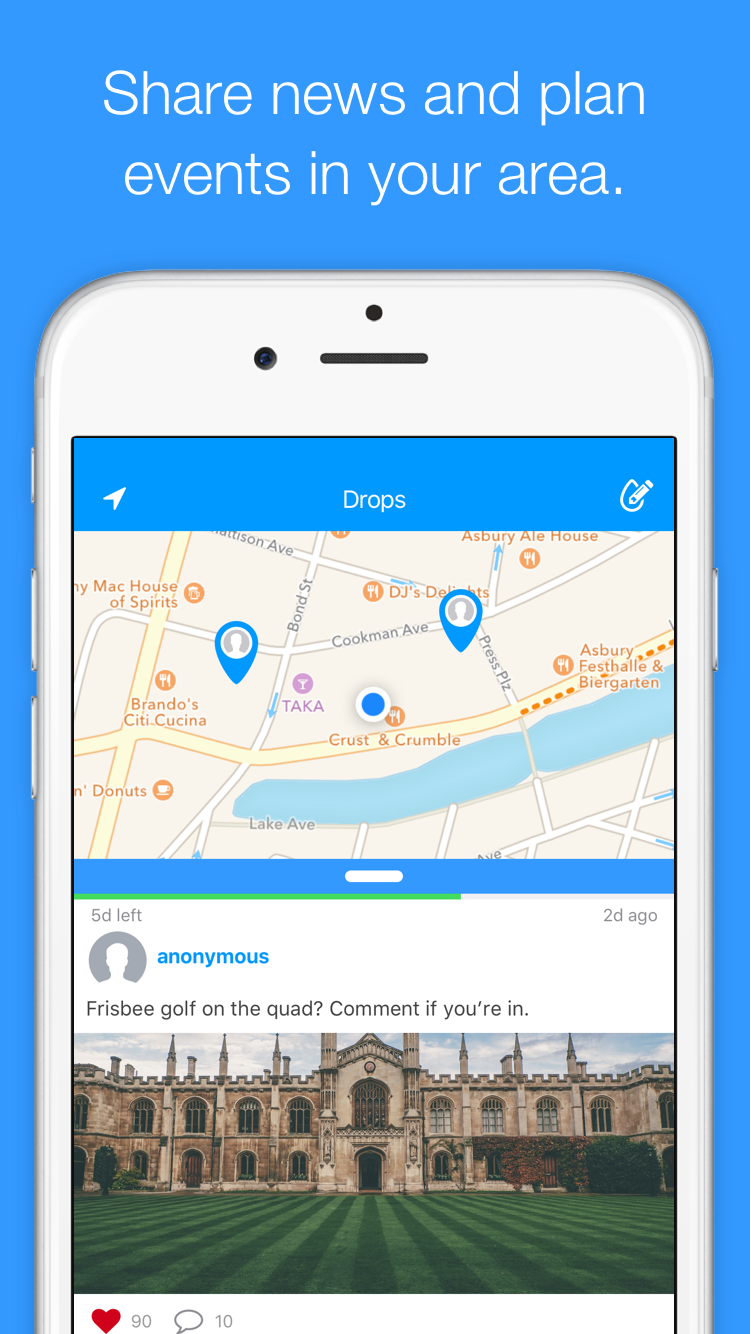
Available today, dropdrop, a new iPhone app, lets you leave drops where you travel for others to discover. A drop is a message or photo placed at a specific location in the real world. Missed that cute stranger on the train platform? Leave an anonymous drop for them to find when they return. Want to plan a pickup game in your area? Create a drop, set its size to your neighborhood, and see who responds. You determine the size of the drop, its duration, and who can see it.
Asbury Park, New Jersey - Six Overground is proud to announce the release of dropdrop 1.1 their new iPhone app that lets you leave drops where you travel for others to discover. A drop is a message or photo placed at a specific location in the real world. Missed that cute stranger on the train platform? Leave an anonymous drop for them to find when they return. Want to plan a pickup game in your area? Create a drop, set its size to your neighborhood, and see who responds. Have something to sell that you need picked up? Take a photo, leave a drop that covers a reasonable driving distance, and anyone in range will see your listing. New to the area and need some local tips? Look for drops around you for ideas.
You determine the size of the drop, its duration, and who can see it. Don't want anyone to know who left it? Spend stamps and leave an anonymous drop. Everything on dropdrop is centered around location, so drops are relevant and timely. Drops don't last forever, so the conversation stays fresh.
When creating a drop, it's placed exactly at your current location. You can set drops to cover the size of a room, a building, a neighborhood, or a city. Drops can be set to last between one day and 60 days. After that, the drop is gone forever. You can also select from a list of your friends so that the drop is only visible to them. When a friend approaches the edge of a drop, they'll receive a notification on their phone that a drop is in their immediate vicinity. Drops can also be left anonymously by spending stamps (currency that can be rewarded or purchased in the app).
Device Requirements:
* iPhone, iPad, and iPod touch
* Requires iOS 8.4 or later
* 23.4 MB
Pricing and Availability:
dropdrop 1.1 is free, and is available worldwide exclusively through the App Store in the Social Networking category. An Android version of the app will be released this summer.
dropdrop 1.1: http://dropdrop.it
Download from iTunes: https://itunes.apple.com/app/id1084919075
Screenshot: http://dropdrop.it/images/press/ios/device/dropdrop-exploring-device.png
App Icon: http://dropdrop.it/images/press/dropdrop-large-icon.png
Six Overground is a boutique digital agency located in Asbury Park, NJ. Our location uniquely allows us to service our clients in two major cities, New York and Philadelphia. Contrary to most larger digital agencies, we have a laser-focused approach to project work, with a highly specialized team of experts. We excel in building platforms for our clients. People come to us with an idea, and we provide all the tools and service required to make it happen. We are one of the few digital agencies that can take a concept completely end-to-end. Need an app? We will build the server to back it, architect a robust API, design and build the apps and landing page, and market and test the final result. We work in an agile environment which lets us focus on the prioritized needs of our clients in a nimble, fast paced, and flexible manner. We are experts in the digital field and provide a premium quality product, be it web based, mobile, or desktop. Want something more tangible? We love the
Internet of Things. If your project has a digital component, we're interested in making it happen. We build displays, installations, and network connected physical objects. Bring us your idea and we will make it a reality. All Material and Software Copyright (C) 2016 Six Overground. All Rights Reserved. Apple, the Apple logo, iPhone, iPad and iPod are registered trademarks of Apple Inc. in the U.S. and/or other countries.
*******
Link To Article: http://prmac.com/release-id-79600.htm
*******
---------------------------------------------------------------------------------
Note that you can alter delivered distributions at any time.
Login to your account on prMac to alter your channel selection, or to opt-out at any time.
Introducing dropdrop, an App That Will Change How we Communicate Locally - Published on 05/31/16
Available today, dropdrop, a new iPhone app, lets you leave drops where you travel for others to discover. A drop is a message or photo placed at a specific location in the real world. Missed that cute stranger on the train platform? Leave an anonymous drop for them to find when they return. Want to plan a pickup game in your area? Create a drop, set its size to your neighborhood, and see who responds. You determine the size of the drop, its duration, and who can see it.
Asbury Park, New Jersey - Six Overground is proud to announce the release of dropdrop 1.1 their new iPhone app that lets you leave drops where you travel for others to discover. A drop is a message or photo placed at a specific location in the real world. Missed that cute stranger on the train platform? Leave an anonymous drop for them to find when they return. Want to plan a pickup game in your area? Create a drop, set its size to your neighborhood, and see who responds. Have something to sell that you need picked up? Take a photo, leave a drop that covers a reasonable driving distance, and anyone in range will see your listing. New to the area and need some local tips? Look for drops around you for ideas.
You determine the size of the drop, its duration, and who can see it. Don't want anyone to know who left it? Spend stamps and leave an anonymous drop. Everything on dropdrop is centered around location, so drops are relevant and timely. Drops don't last forever, so the conversation stays fresh.
When creating a drop, it's placed exactly at your current location. You can set drops to cover the size of a room, a building, a neighborhood, or a city. Drops can be set to last between one day and 60 days. After that, the drop is gone forever. You can also select from a list of your friends so that the drop is only visible to them. When a friend approaches the edge of a drop, they'll receive a notification on their phone that a drop is in their immediate vicinity. Drops can also be left anonymously by spending stamps (currency that can be rewarded or purchased in the app).
Device Requirements:
* iPhone, iPad, and iPod touch
* Requires iOS 8.4 or later
* 23.4 MB
Pricing and Availability:
dropdrop 1.1 is free, and is available worldwide exclusively through the App Store in the Social Networking category. An Android version of the app will be released this summer.
dropdrop 1.1: http://dropdrop.it
Download from iTunes: https://itunes.apple.com/app/id1084919075
Screenshot: http://dropdrop.it/images/press/ios/device/dropdrop-exploring-device.png
App Icon: http://dropdrop.it/images/press/dropdrop-large-icon.png

Six Overground is a boutique digital agency located in Asbury Park, NJ. Our location uniquely allows us to service our clients in two major cities, New York and Philadelphia. Contrary to most larger digital agencies, we have a laser-focused approach to project work, with a highly specialized team of experts. We excel in building platforms for our clients. People come to us with an idea, and we provide all the tools and service required to make it happen. We are one of the few digital agencies that can take a concept completely end-to-end. Need an app? We will build the server to back it, architect a robust API, design and build the apps and landing page, and market and test the final result. We work in an agile environment which lets us focus on the prioritized needs of our clients in a nimble, fast paced, and flexible manner. We are experts in the digital field and provide a premium quality product, be it web based, mobile, or desktop. Want something more tangible? We love the
Internet of Things. If your project has a digital component, we're interested in making it happen. We build displays, installations, and network connected physical objects. Bring us your idea and we will make it a reality. All Material and Software Copyright (C) 2016 Six Overground. All Rights Reserved. Apple, the Apple logo, iPhone, iPad and iPod are registered trademarks of Apple Inc. in the U.S. and/or other countries.
*******
Link To Article: http://prmac.com/release-id-79600.htm
*******
---------------------------------------------------------------------------------
Note that you can alter delivered distributions at any time.
Login to your account on prMac to alter your channel selection, or to opt-out at any time.
The New Edition of ConceptDraw AWS Architecture Diagrams Solution
A new article has been published at prMac.
The New Edition of ConceptDraw AWS Architecture Diagrams Solution - Published on 05/31/16
California based CS Odessa today announces an update to their AWS Architecture Diagrams solution in ConceptDraw Solution Park. The AWS Architecture Diagrams solution features a collection of library objects, templates, and example drawings for ConceptDraw PRO. This plugin makes short work of describing any business' cloud implementation with an updated set of graphic elements. The new version includes new libraries, samples, and templates.
San Jose, California - CS Odessa's newest addition to ConceptDraw Solution Park, "AWS Architecture Diagrams" updates the previous release with new libraries, samples, and templates. This collection of library objects, templates, and example drawings for ConceptDraw PRO makes short work of describing any business' cloud implementation with an updated set of graphic elements. The "AWS Architecture Diagrams" solution is available at no charge to users of ConceptDraw PRO v10 and ConceptDraw Office v3, via Solution Park. ConceptDraw PRO and ConceptDraw Office support the latest versions of both Apple OS X and Microsoft Windows.
ConceptDraw PRO is well-known for its ability to exchange documents with Microsoft Visio - the de facto standard in business graphics documents. ConceptDraw PRO can open and save documents that can be used by Visio users. It is supported by the powerful business solutions located in ConceptDraw Solution Park, and retails for only $199 per end user license.
ConceptDraw Office v3 is the third generation suite of ConceptDraw products that uses ConceptDraw InGyre3 integration technology to share data between its applications, allowing user to switch gears for different tasks more quickly. ConceptDraw Office v3 includes ConceptDraw MINDMAP v8, ConceptDraw PROJECT v7, ConceptDraw PRO v10, and the ConceptDraw Solution Park with more than 150 Solutions to power user through difficult and time consuming asks. ConceptDraw Office retails for $499 and can be purchased directly from CS Odessa or their resellers. The ConceptDraw Office suite is designed for knowledge workers, project managers, managers, and academics. ConceptDraw Office works with the latest versions of both Apple OS X and Microsoft Windows.
ConceptDraw Office v3: http://www.conceptdraw.com/products/office
AWS Architecture Diagrams Solution: http://www.conceptdraw.com/solution-park/computer-networks-aws
ConceptDraw PRO v10: http://www.conceptdraw.com/products/drawing-tool
ConceptDraw MINDMAP v8: http://www.conceptdraw.com/products/mind-map
ConceptDraw PROJECT v7: http://www.conceptdraw.com/products/project-management-software
ConceptDraw Diagram Viewer: https://itunes.apple.com/app/diagram-viewer/id981531525
Founded in 1993, Computer Systems Odessa supplies cross-platform productivity tools and graphic technologies to professional and corporate users around the world. With headquarters in Odessa, Ukraine, and an U.S. office in San Jose, California, CS Odessa sells products internationally through resellers in over 30 countries. The ConceptDraw line of products has won numerous awards and is used by hundreds of thousands of people all over the world. ConceptDraw is a registered trademark, and ConceptDraw Office, ConceptDraw Solution Park, ConceptDraw PRO, ConceptDraw MINDMAP, ConceptDraw PROJECT, and ConceptDraw Solution Browser are trademarks of CS Odessa. All other trademarks and registered trademarks are the properties of their respective owners.
*******
Link To Article: http://prmac.com/release-id-79599.htm
*******
---------------------------------------------------------------------------------
Note that you can alter delivered distributions at any time.
Login to your account on prMac to alter your channel selection, or to opt-out at any time.
The New Edition of ConceptDraw AWS Architecture Diagrams Solution - Published on 05/31/16
California based CS Odessa today announces an update to their AWS Architecture Diagrams solution in ConceptDraw Solution Park. The AWS Architecture Diagrams solution features a collection of library objects, templates, and example drawings for ConceptDraw PRO. This plugin makes short work of describing any business' cloud implementation with an updated set of graphic elements. The new version includes new libraries, samples, and templates.
San Jose, California - CS Odessa's newest addition to ConceptDraw Solution Park, "AWS Architecture Diagrams" updates the previous release with new libraries, samples, and templates. This collection of library objects, templates, and example drawings for ConceptDraw PRO makes short work of describing any business' cloud implementation with an updated set of graphic elements. The "AWS Architecture Diagrams" solution is available at no charge to users of ConceptDraw PRO v10 and ConceptDraw Office v3, via Solution Park. ConceptDraw PRO and ConceptDraw Office support the latest versions of both Apple OS X and Microsoft Windows.
ConceptDraw PRO is well-known for its ability to exchange documents with Microsoft Visio - the de facto standard in business graphics documents. ConceptDraw PRO can open and save documents that can be used by Visio users. It is supported by the powerful business solutions located in ConceptDraw Solution Park, and retails for only $199 per end user license.
ConceptDraw Office v3 is the third generation suite of ConceptDraw products that uses ConceptDraw InGyre3 integration technology to share data between its applications, allowing user to switch gears for different tasks more quickly. ConceptDraw Office v3 includes ConceptDraw MINDMAP v8, ConceptDraw PROJECT v7, ConceptDraw PRO v10, and the ConceptDraw Solution Park with more than 150 Solutions to power user through difficult and time consuming asks. ConceptDraw Office retails for $499 and can be purchased directly from CS Odessa or their resellers. The ConceptDraw Office suite is designed for knowledge workers, project managers, managers, and academics. ConceptDraw Office works with the latest versions of both Apple OS X and Microsoft Windows.
ConceptDraw Office v3: http://www.conceptdraw.com/products/office
AWS Architecture Diagrams Solution: http://www.conceptdraw.com/solution-park/computer-networks-aws
ConceptDraw PRO v10: http://www.conceptdraw.com/products/drawing-tool
ConceptDraw MINDMAP v8: http://www.conceptdraw.com/products/mind-map
ConceptDraw PROJECT v7: http://www.conceptdraw.com/products/project-management-software
ConceptDraw Diagram Viewer: https://itunes.apple.com/app/diagram-viewer/id981531525
Founded in 1993, Computer Systems Odessa supplies cross-platform productivity tools and graphic technologies to professional and corporate users around the world. With headquarters in Odessa, Ukraine, and an U.S. office in San Jose, California, CS Odessa sells products internationally through resellers in over 30 countries. The ConceptDraw line of products has won numerous awards and is used by hundreds of thousands of people all over the world. ConceptDraw is a registered trademark, and ConceptDraw Office, ConceptDraw Solution Park, ConceptDraw PRO, ConceptDraw MINDMAP, ConceptDraw PROJECT, and ConceptDraw Solution Browser are trademarks of CS Odessa. All other trademarks and registered trademarks are the properties of their respective owners.
*******
Link To Article: http://prmac.com/release-id-79599.htm
*******
---------------------------------------------------------------------------------
Note that you can alter delivered distributions at any time.
Login to your account on prMac to alter your channel selection, or to opt-out at any time.
Persian Keyboard for iPhone and iPad 2.0
A new article has been published at prMac.
Persian Keyboard for iPhone and iPad 2.0 - Published on 05/31/16
LastThink today announces Persian Keyboard for iPhone and iPad 2.0, an important update to their highly customizable keyboard application for iOS devices. Persian Keyboard offers users a third-party keyboard for use with iOS apps that allows anyone to modify it to their individual taste. Users can modify the order of the keyboard for more convenient usage. The update includes the ability to save specific words for later use, emoticons, paragraph formatting, word prediction, and more.
Yerevan, Armenia - LastThink is proud to announce the release of Persian Keyboard for iPhone and iPad 2.0, an important update to their highly customizable keyboard application for iPhone, iPad, and iPod touch devices. The Persian Keyboard's customization features allow anyone to create the keyboard layout that is perfect for their needs. Features include the ability to change the size, shape, and order of characters; the ability to save specific words for later use; emoticons, word prediction, and more.
Users can change the order of the keyboard's letter layout, and even create handy shortcuts to allow entering words or even entire sentences with just a few keystrokes. The keyboard's Swipe feature allows users to swipe their finger around the keyboard to select letters and form words. The app intelligently predicts what the user intends to enter, greatly enhancing typing speed.
What's New in Version 2.0:
* Change the size, and place, as well as the shape of characters and keyboard separately
* Save any words that are used frequently in the active vocabulary for later use
* Express emotions with emoji characters (emoticons) which will correspond to entered words
* Paragraph formatting: Adjust alignment, line spacing, margins, bullets and numbering
* Optional smart auto correction: Intelligent spell checking for even the sloppiest typing
* Style: Customize the look of the keyboard. Change the color of the keys and background
* Word prediction: The keyboard guesses and displays the appropriate word as the user types
* Share text via Facebook, Twitter, email, Dropbox, and more
"When we set out to create the Persian Keyboard, we knew we wanted to create a customizable keyboard that would offer users the ability to modify it to their individual tastes," says LastThink founder Grigori Jlavyan. Our keyboard allows Persian speaking users to easily enter their text messages, emails, and other types of texts via a comprehensive interface, making their day-to-day communications more convenient than ever."
The Persian Keyboard also offers handy paragraph formatting options, allowing users to adjust the alignment of their text, while also offering the ability to set line spacing, adjust margins, even add bulleted or numbered lists. Optional smart correction makes even the sloppiest speller's text entry become correct. The keyboard also offers a downloadable Persian font for use with iOS devices, making text entry, editing, and display even more convenient.
Persian Keyboard emphasizes the user's security above all, and while many third-party iOS keyboard apps require "Full Access" - with the ability to send back keystrokes and other information back to their developer - the Persian Keyboard does not, protecting the text entry and sensitive user information, keeping their personal information safe from prying eyes.
Device Requirements:
* iPhone, iPad, and iPod touch
* Optimized for iPhone 5, iPhone 6/6 Plus
* Universal Application
* Requires iOS 6.1 or later
* 9.0 MB
Pricing and Availability:
Persian Keyboard for iPhone and iPad 2.0 is $1.99 and available worldwide exclusively through the App Store in the Utilities category. Review codes are available upon request.
LastThink: http://lastthink.com/
Persian Keyboard for iPhone and iPad 2.0: https://www.facebook.com/pages/Persian-Keyboard/375518749218044
Purchase and Download from iTunes: https://itunes.apple.com/app/persian-keyboard-ios8/id924480672
Screenshot: http://a2.mzstatic.com/us/r30/Purple7/v4/fc/46/f5/fc46f50c-78b3-04a3-fa70-59fdf80c6901/screen322x572.jpeg
App Icon: http://a5.mzstatic.com/us/r30/Purple5/v4/eb/a5/05/eba5053b-40b0-60fe-f0b8-664a2246b05f/icon175x175.jpeg
LastThink is an IT company with a focus on mobile development. It has extended its list of services since 2012 to offer high-end business process management, system integration, as well as up-to-date communication solutions. LastThink's mission is to deliver maximum business value to its customers by designing, developing, implementing and maintaining efficient and high quality software solutions aligned with their most essential business needs. Their team will always do its best to meet client expectations. All Material and Software Copyright (C) 2016 LastThink LLC. All Rights Reserved. Apple, the Apple logo, iPhone, iPad and iPod are registered trademarks of Apple Inc. in the U.S. and/or other countries.
*******
Link To Article: http://prmac.com/release-id-79598.htm
*******
---------------------------------------------------------------------------------
Note that you can alter delivered distributions at any time.
Login to your account on prMac to alter your channel selection, or to opt-out at any time.
Persian Keyboard for iPhone and iPad 2.0 - Published on 05/31/16
LastThink today announces Persian Keyboard for iPhone and iPad 2.0, an important update to their highly customizable keyboard application for iOS devices. Persian Keyboard offers users a third-party keyboard for use with iOS apps that allows anyone to modify it to their individual taste. Users can modify the order of the keyboard for more convenient usage. The update includes the ability to save specific words for later use, emoticons, paragraph formatting, word prediction, and more.
Yerevan, Armenia - LastThink is proud to announce the release of Persian Keyboard for iPhone and iPad 2.0, an important update to their highly customizable keyboard application for iPhone, iPad, and iPod touch devices. The Persian Keyboard's customization features allow anyone to create the keyboard layout that is perfect for their needs. Features include the ability to change the size, shape, and order of characters; the ability to save specific words for later use; emoticons, word prediction, and more.
Users can change the order of the keyboard's letter layout, and even create handy shortcuts to allow entering words or even entire sentences with just a few keystrokes. The keyboard's Swipe feature allows users to swipe their finger around the keyboard to select letters and form words. The app intelligently predicts what the user intends to enter, greatly enhancing typing speed.
What's New in Version 2.0:
* Change the size, and place, as well as the shape of characters and keyboard separately
* Save any words that are used frequently in the active vocabulary for later use
* Express emotions with emoji characters (emoticons) which will correspond to entered words
* Paragraph formatting: Adjust alignment, line spacing, margins, bullets and numbering
* Optional smart auto correction: Intelligent spell checking for even the sloppiest typing
* Style: Customize the look of the keyboard. Change the color of the keys and background
* Word prediction: The keyboard guesses and displays the appropriate word as the user types
* Share text via Facebook, Twitter, email, Dropbox, and more
"When we set out to create the Persian Keyboard, we knew we wanted to create a customizable keyboard that would offer users the ability to modify it to their individual tastes," says LastThink founder Grigori Jlavyan. Our keyboard allows Persian speaking users to easily enter their text messages, emails, and other types of texts via a comprehensive interface, making their day-to-day communications more convenient than ever."
The Persian Keyboard also offers handy paragraph formatting options, allowing users to adjust the alignment of their text, while also offering the ability to set line spacing, adjust margins, even add bulleted or numbered lists. Optional smart correction makes even the sloppiest speller's text entry become correct. The keyboard also offers a downloadable Persian font for use with iOS devices, making text entry, editing, and display even more convenient.
Persian Keyboard emphasizes the user's security above all, and while many third-party iOS keyboard apps require "Full Access" - with the ability to send back keystrokes and other information back to their developer - the Persian Keyboard does not, protecting the text entry and sensitive user information, keeping their personal information safe from prying eyes.
Device Requirements:
* iPhone, iPad, and iPod touch
* Optimized for iPhone 5, iPhone 6/6 Plus
* Universal Application
* Requires iOS 6.1 or later
* 9.0 MB
Pricing and Availability:
Persian Keyboard for iPhone and iPad 2.0 is $1.99 and available worldwide exclusively through the App Store in the Utilities category. Review codes are available upon request.
LastThink: http://lastthink.com/
Persian Keyboard for iPhone and iPad 2.0: https://www.facebook.com/pages/Persian-Keyboard/375518749218044
Purchase and Download from iTunes: https://itunes.apple.com/app/persian-keyboard-ios8/id924480672
Screenshot: http://a2.mzstatic.com/us/r30/Purple7/v4/fc/46/f5/fc46f50c-78b3-04a3-fa70-59fdf80c6901/screen322x572.jpeg

App Icon: http://a5.mzstatic.com/us/r30/Purple5/v4/eb/a5/05/eba5053b-40b0-60fe-f0b8-664a2246b05f/icon175x175.jpeg
LastThink is an IT company with a focus on mobile development. It has extended its list of services since 2012 to offer high-end business process management, system integration, as well as up-to-date communication solutions. LastThink's mission is to deliver maximum business value to its customers by designing, developing, implementing and maintaining efficient and high quality software solutions aligned with their most essential business needs. Their team will always do its best to meet client expectations. All Material and Software Copyright (C) 2016 LastThink LLC. All Rights Reserved. Apple, the Apple logo, iPhone, iPad and iPod are registered trademarks of Apple Inc. in the U.S. and/or other countries.
*******
Link To Article: http://prmac.com/release-id-79598.htm
*******
---------------------------------------------------------------------------------
Note that you can alter delivered distributions at any time.
Login to your account on prMac to alter your channel selection, or to opt-out at any time.
Subscribe to:
Posts (Atom)