A new article has been published at prMac.
Smoky Cat Software Ltd. releases native Apple Watch app for Heart Graph - Published on 06/06/16
Oxford-based Smoky Cat Software Ltd. today announced that Heart Graph version 4.0 with Apple Watch app is now available to download on the App Store. Heart Graph plots high resolution graphs of heart rate and allows comparison of those graphs and other workout statistics between sessions. The new app will allow Apple Watch users to see the time spent in different heart rate zones while exercising, as well as a graph of up to 12 hours of recent heart rate data.
Oxford, United Kingdom - Smoky Cat Software Ltd. today announced that Heart Graph version 4.0 is now available on the App Store for iPhone(R), iPad(R) and iPod touch(R). Heart Graph lets users see graphically how their heart rate behaves during exercise or other periods of time, and supports comparison and analysis of the heart rate graph and other statistics across sessions. New with v4.0 Apple Watch(R) users can use the native WatchOS Heart Graph app to graph their heart rate on their wrist while they exercise, see time spent in different heart rate zones, or review up to 12 hours of heart rate data recorded by the Apple Watch. Existing data stored in the Health app can also be imported, and the new "Zone Totals" feature can be used to analyse time spent in different heart rate zones across sessions on a daily, weekly or monthly basis.
"The essence of Heart Graph is providing users the ability to assess the way their body is responding to training over time" says Thomas Wright, Director of Smoky Cat Software Ltd. "The Apple Watch is bringing heart rate monitoring to a huge number of people who didn't have access to such information previously, and being able to make sense of that data is vital for making the most of exercising. Being able to see time spent in different heart rate zones rate during workouts gives another piece of the puzzle, and is another example of how Heart Graph can support users in maximising the benefits of their workouts."
Features of Heart Graph include:
* Display a graph of heart rate against time during workouts or for other periods of activity
* See a graph of heart rate on your Apple Watch while exercising
* Review up to 12 hours of recent heart rate data acquired by the Apple Watch
* Import heart rate data for Workouts in Health (e.g., from Apple Watch or other device)
* Review all workouts offline (e.g., to spot trends in training)
* Add textual notes to each workout (e.g., to record details of a particular session, sets, reps, general health etc.) and search for workouts based on the notes entered
* Share workout data with friends via email or Facebook
* Device rotation to landscape for iPhone and iPod touch maximises screen area for graphs
Beyond the basics, a single $2.99 (USD) In-App Purchase will enable the Premium Features of the app, giving users access to more in-depth comparison and additional features to support their workouts or health monitoring:
* Enable heart rate zone display for summarising workout intensity into five configurable zones
* Record resting heart rate
* Compare workout statistics (such as resting, max and mean heart rate) over time to look for trends in training
* Analysis of heart rate zone totals across sessions on a daily, weekly or monthly basis
* Compare heart rate graphs directly from one session to another
* Import heart rate data from the Health app for a custom time period of up to 24 hours
* Calculate calories burned during each workout
* Import and export workout data from other apps or your computer using Garmin TCX format files
* Export data to CSV file for further analysis in software such as Excel
* Save workouts to Dropbox as TCX or CSV files
* Attach an image of the heart rate graph and heart rate zone summary to emails or Facebook posts for sharing with others
Heart Graph can be used for general health monitoring and all types of aerobic exercise including running, cycling, rowing or gym work. For those users with Bluetooth sensors providing real-time data, optimised features for gym-based activities such as kettlebells, weights and circuits provide support while working out, including:
* Compare heart rate from a "reference set" in a previous workout to the current session
* Create pre-planned training sessions that the app will automatically execute - no need to remember what's coming up next
* Share pre-planned training sessions with friends and other Heart Graph users
* Audible alarm when heart rate changes zone or reaches a preset maximum value
* Audio rep counting (never lose count) - simply make a noise every time a rep is completed and the app indicates when all reps complete
* Automatic timer for time-based sets to indicate when the work is done
* Side-by-side comparison of the reference set graphs from multiple selected workouts
App Requirements:
* iOS 9 and WatchOS 2.2 (Apple Watch) or iOS version 7.0 (Bluetooth sensors)
* iPhone, iPod touch or iPad
* A compatible heart rate sensor: Apple Watch, low-energy bluetooth (BTLE), ANT+ connected using the Wahoo Fitness Key, or any sensor that writes data to the Health app.
Heart Graph 4.0 is free to download worldwide, exclusively through the App Store in the Health and Fitness category. Supported languages are English, Russian, and both simplified and traditional Chinese.
Smoky Cat Software: http://smokycatsoftware.co.uk/
Heart Graph 4.0: http://smokycatsoftware.co.uk/pub/heart-graph-guide/
Apple Watch Summary: http://smokycatsoftware.co.uk/pub/heart-graph-on-apple-watch/
Download from iTunes: http://itunes.apple.com/app/heart-graph/id591655999
Screenshot (Heart Rate History): http://smokycatsoftware.co.uk/Images/Watch_History.png
Screenshot (Heart Rate Zones): http://smokycatsoftware.co.uk/Images/Watch_Zones.png
Located in Oxford, United Kingdom, Smoky Cat Software was founded in 2012 by Dr Thomas Wright, DPhil and incorporated in 2016. All Material and Software Copyright (C) 2016 Smoky Cat Software Ltd. / All Rights Reserved. Apple, iPhone, iPad, iPod touch and Apple Watch are trademarks of Apple Inc., registered in the U.S. and other countries. App Store is a service mark of Apple Inc.
*******
Link To Article: http://prmac.com/release-id-79632.htm
*******
---------------------------------------------------------------------------------
Note that you can alter delivered distributions at any time.
Login to your account on prMac to alter your channel selection, or to opt-out at any time.


The World's First Online Audio Mastering Solution on iPads and Tablets
A new article has been published at prMac.
The World's First Online Audio Mastering Solution on iPads and Tablets - Published on 06/05/16
MASTERLIZER is the powerful online audio mastering service that has developed the world's first solution for real-time mastering on tablets. Now musicians, producers, artists and bands can conveniently polish the sound of their recordings and demos on their tablets to finish them for promotion, distribution and selling. The idea for MASTERLIZER was created in a small basement studio by musicians, inspired by the amazing music from dozens of other musicians worldwide.
London, United Kingdom - MASTERLIZER is the powerful online audio mastering service that has developed the world's first solution for real-time mastering on tablets. The experience allows creators to audition a complete track - verse, bridge and chorus (not only a short preview) in realtime - while testing their style through sound tweaks, intensity levels and more on their iPads and Android tablets.
"Our approach transforms a complex technical process into a musical experience to unveil the most important question: How will my whole track sound?" says Maximilian Kamenar, CEO and Co-Founder of MASTERLIZER.
Create an account at the MASTERLIZER website, connect your Dropbox and SoundCloud accounts or select a file from an app on your tablet (i.e. Google Drive, iCloud) and select the song you want to master. Completed masters are saved in your My Files library and can be shared to SoundCloud, YouTube as a video and emailed to fans and friends.
The idea for MASTERLIZER was created in a small basement studio by musicians, inspired by the amazing music from dozens of other musicians worldwide who produced songs for the Remixinhambane project. We needed a quick and cost-efficient solution to master all these wonderful tracks and decided that we should develop a tool that would not only help us, but also other musicians around the planet to finish and master their music without having to worry about technical details.
Our concept of mastering is different - we call it masterlizing. Professional mastering services are great and experienced mastering engineers can make the sound of your music really stand out with their years of expertise. MASTERLIZER is NOT a professional mastering service, our approach is different. Our vision is to offer a contemporary alternative to musicians and creatives who maybe cannot afford traditional mastering or don't have the time or expertise to do it themselves. We want to make this process easy for everybody.
What can you expect from MASTERLIZER?
We designed the service for our needs as musicians - to get good results instantly without having to worry too much about settings or technical details of the sound optimization process. One of the coolest things about MASTERLIZER is that it can handle a variety of material (genres, mix style, levels, etc). We are constantly striving to make MASTERLIZER better everyday, simply hear how it sounds and judge for yourself how good it is.
MASTERLIZER: https://www.masterlizer.com
MASTERLIZER Blog: http://blog.masterlizer.com/
MASTERLIZER is based in London, UK and Vienna, Austria and is currently running in free Beta 3.0, open to everyone. All Material and Software (C) Copyright 2016 MASTERLIZER. All Rights Reserved. Apple, the Apple logo, Macintosh and Mac OS X are registered trademarks of Apple Inc. in the U.S. and/or other countries. Other trademarks and registered trademarks may be the property of their respective owners.
*******
Link To Article: http://prmac.com/release-id-79629.htm
*******
---------------------------------------------------------------------------------
Note that you can alter delivered distributions at any time.
Login to your account on prMac to alter your channel selection, or to opt-out at any time.
The World's First Online Audio Mastering Solution on iPads and Tablets - Published on 06/05/16
MASTERLIZER is the powerful online audio mastering service that has developed the world's first solution for real-time mastering on tablets. Now musicians, producers, artists and bands can conveniently polish the sound of their recordings and demos on their tablets to finish them for promotion, distribution and selling. The idea for MASTERLIZER was created in a small basement studio by musicians, inspired by the amazing music from dozens of other musicians worldwide.
London, United Kingdom - MASTERLIZER is the powerful online audio mastering service that has developed the world's first solution for real-time mastering on tablets. The experience allows creators to audition a complete track - verse, bridge and chorus (not only a short preview) in realtime - while testing their style through sound tweaks, intensity levels and more on their iPads and Android tablets.
"Our approach transforms a complex technical process into a musical experience to unveil the most important question: How will my whole track sound?" says Maximilian Kamenar, CEO and Co-Founder of MASTERLIZER.
Create an account at the MASTERLIZER website, connect your Dropbox and SoundCloud accounts or select a file from an app on your tablet (i.e. Google Drive, iCloud) and select the song you want to master. Completed masters are saved in your My Files library and can be shared to SoundCloud, YouTube as a video and emailed to fans and friends.
The idea for MASTERLIZER was created in a small basement studio by musicians, inspired by the amazing music from dozens of other musicians worldwide who produced songs for the Remixinhambane project. We needed a quick and cost-efficient solution to master all these wonderful tracks and decided that we should develop a tool that would not only help us, but also other musicians around the planet to finish and master their music without having to worry about technical details.
Our concept of mastering is different - we call it masterlizing. Professional mastering services are great and experienced mastering engineers can make the sound of your music really stand out with their years of expertise. MASTERLIZER is NOT a professional mastering service, our approach is different. Our vision is to offer a contemporary alternative to musicians and creatives who maybe cannot afford traditional mastering or don't have the time or expertise to do it themselves. We want to make this process easy for everybody.
What can you expect from MASTERLIZER?
We designed the service for our needs as musicians - to get good results instantly without having to worry too much about settings or technical details of the sound optimization process. One of the coolest things about MASTERLIZER is that it can handle a variety of material (genres, mix style, levels, etc). We are constantly striving to make MASTERLIZER better everyday, simply hear how it sounds and judge for yourself how good it is.
MASTERLIZER: https://www.masterlizer.com
MASTERLIZER Blog: http://blog.masterlizer.com/
MASTERLIZER is based in London, UK and Vienna, Austria and is currently running in free Beta 3.0, open to everyone. All Material and Software (C) Copyright 2016 MASTERLIZER. All Rights Reserved. Apple, the Apple logo, Macintosh and Mac OS X are registered trademarks of Apple Inc. in the U.S. and/or other countries. Other trademarks and registered trademarks may be the property of their respective owners.
*******
Link To Article: http://prmac.com/release-id-79629.htm
*******
---------------------------------------------------------------------------------
Note that you can alter delivered distributions at any time.
Login to your account on prMac to alter your channel selection, or to opt-out at any time.
Telugu Keypad 2.5 for iOS Offers Customizable Telugu Text Entry
A new article has been published at prMac.
Telugu Keypad 2.5 for iOS Offers Customizable Telugu Text Entry - Published on 06/05/16
LastThink today announces Telugu Keypad 2.5, an important update to their highly customizable keyboard application for iOS devices. Telugu Keyboard offers users a third-party keyboard for use with iOS apps that allows anyone to modify it to their individual taste. Users can modify the order of the keyboard for more convenient usage. The update includes the ability to save specific words for later use, emoticons, paragraph formatting, word prediction, and more.
Yerevan, Armenia - LastThink is proud to announce the release of Telugu Keypad 2.5, an important update to their highly customizable keyboard application for iPhone, iPad, and iPod touch devices. The Telugu Keypad's customization features allow anyone to create the keyboard layout that is perfect for their needs. Features include the ability to change the size, shape, and order of characters; the ability to save specific words for later use; emoticons, word prediction, and more.
Users can change the order of the keyboard's letter layout, and even create handy shortcuts to allow entering words or even entire sentences with just a few keystrokes. The keyboard's Swipe feature allows users to swipe their finger around the keyboard to select letters and form words. The app intelligently predicts what the user intends to enter, greatly enhancing typing speed.
What's New in Version 2.5:
* Change the size, and place, as well as the shape of characters and keyboard separately
* Save any words that are used frequently in the active vocabulary for later use
* Express emotions with emoji characters (emoticons) which will correspond to entered words
* Paragraph formatting: Adjust alignment, line spacing, margins, bullets and numbering
* Optional smart auto correction: Intelligent spell checking for even the sloppiest typing
* Style: Customize the look of the keyboard. Change the color of the keys and background
* Word prediction: The keyboard guesses and displays the appropriate word as the user types
* Share text via Facebook, Twitter, email, Dropbox, and more
"When we set out to create the Telugu Keyboard, we knew we wanted to create a customizable keyboard that would offer users the ability to modify it to their individual tastes," says LastThink founder Grigori Jlavyan. Our keyboard allows Telugu speaking users to easily enter their text messages, emails, and other types of texts via a comprehensive interface, making their day-to-day communications more convenient than ever."
The Telugu Keypad also offers handy paragraph formatting options, allowing users to adjust the alignment of their text, while also offering the ability to set line spacing, adjust margins, even add bulleted or numbered lists. Optional smart correction makes even the sloppiest speller's text entry become correct. The keyboard also offers a downloadable Telugu font for use with iOS devices, making text entry, editing, and display even more convenient.
Telugu Keypad emphasizes the user's security above all, and while many third-party iOS keyboard apps require "Full Access" - with the ability to send back keystrokes and other information back to their developer - the Telugu Keyboard does not, protecting the text entry and sensitive user information, keeping their personal information safe from prying eyes.
Device Requirements:
* iPhone, iPad, and iPod touch
* Optimized for iPhone 5, iPhone 6/6 Plus
* Universal Application
* Requires iOS 6.1 or later
* 12.9 MB
Pricing and Availability:
Telugu Keypad 2.5 is free of charge and available worldwide exclusively through the App Store in the Utilities category. Review codes are available upon request.
LastThink: http://lastthink.com/
Telugu Keypad 2.5: https://www.facebook.com/TeluguLanguageAppStore
Download from iTunes: https://itunes.apple.com/app/telugu-keypad/id680160818
Screenshot: http://a1.mzstatic.com/us/r30/Purple4/v4/d2/61/51/d2615125-f593-a6a1-5252-1524e3aa8bb6/screen568x568.jpeg
App Icon: http://a1.mzstatic.com/us/r30/Purple6/v4/15/2b/cc/152bcc8f-6a30-163e-098d-c2329a6f8ead/icon175x175.png
LastThink is an IT company with a focus on mobile development. It has extended its list of services since 2012 to offer high-end business process management, system integration, as well as up-to-date communication solutions. LastThink's mission is to deliver maximum business value to its customers by designing, developing, implementing and maintaining efficient and high quality software solutions aligned with their most essential business needs. Their team will always do its best to meet client expectations. All Material and Software Copyright (C) 2016 LastThink LLC. All Rights Reserved. Apple, the Apple logo, iPhone, iPad and iPod are registered trademarks of Apple Inc. in the U.S. and/or other countries.
*******
Link To Article: http://prmac.com/release-id-79628.htm
*******
---------------------------------------------------------------------------------
Note that you can alter delivered distributions at any time.
Login to your account on prMac to alter your channel selection, or to opt-out at any time.
Telugu Keypad 2.5 for iOS Offers Customizable Telugu Text Entry - Published on 06/05/16
LastThink today announces Telugu Keypad 2.5, an important update to their highly customizable keyboard application for iOS devices. Telugu Keyboard offers users a third-party keyboard for use with iOS apps that allows anyone to modify it to their individual taste. Users can modify the order of the keyboard for more convenient usage. The update includes the ability to save specific words for later use, emoticons, paragraph formatting, word prediction, and more.
Yerevan, Armenia - LastThink is proud to announce the release of Telugu Keypad 2.5, an important update to their highly customizable keyboard application for iPhone, iPad, and iPod touch devices. The Telugu Keypad's customization features allow anyone to create the keyboard layout that is perfect for their needs. Features include the ability to change the size, shape, and order of characters; the ability to save specific words for later use; emoticons, word prediction, and more.
Users can change the order of the keyboard's letter layout, and even create handy shortcuts to allow entering words or even entire sentences with just a few keystrokes. The keyboard's Swipe feature allows users to swipe their finger around the keyboard to select letters and form words. The app intelligently predicts what the user intends to enter, greatly enhancing typing speed.
What's New in Version 2.5:
* Change the size, and place, as well as the shape of characters and keyboard separately
* Save any words that are used frequently in the active vocabulary for later use
* Express emotions with emoji characters (emoticons) which will correspond to entered words
* Paragraph formatting: Adjust alignment, line spacing, margins, bullets and numbering
* Optional smart auto correction: Intelligent spell checking for even the sloppiest typing
* Style: Customize the look of the keyboard. Change the color of the keys and background
* Word prediction: The keyboard guesses and displays the appropriate word as the user types
* Share text via Facebook, Twitter, email, Dropbox, and more
"When we set out to create the Telugu Keyboard, we knew we wanted to create a customizable keyboard that would offer users the ability to modify it to their individual tastes," says LastThink founder Grigori Jlavyan. Our keyboard allows Telugu speaking users to easily enter their text messages, emails, and other types of texts via a comprehensive interface, making their day-to-day communications more convenient than ever."
The Telugu Keypad also offers handy paragraph formatting options, allowing users to adjust the alignment of their text, while also offering the ability to set line spacing, adjust margins, even add bulleted or numbered lists. Optional smart correction makes even the sloppiest speller's text entry become correct. The keyboard also offers a downloadable Telugu font for use with iOS devices, making text entry, editing, and display even more convenient.
Telugu Keypad emphasizes the user's security above all, and while many third-party iOS keyboard apps require "Full Access" - with the ability to send back keystrokes and other information back to their developer - the Telugu Keyboard does not, protecting the text entry and sensitive user information, keeping their personal information safe from prying eyes.
Device Requirements:
* iPhone, iPad, and iPod touch
* Optimized for iPhone 5, iPhone 6/6 Plus
* Universal Application
* Requires iOS 6.1 or later
* 12.9 MB
Pricing and Availability:
Telugu Keypad 2.5 is free of charge and available worldwide exclusively through the App Store in the Utilities category. Review codes are available upon request.
LastThink: http://lastthink.com/
Telugu Keypad 2.5: https://www.facebook.com/TeluguLanguageAppStore
Download from iTunes: https://itunes.apple.com/app/telugu-keypad/id680160818
Screenshot: http://a1.mzstatic.com/us/r30/Purple4/v4/d2/61/51/d2615125-f593-a6a1-5252-1524e3aa8bb6/screen568x568.jpeg

App Icon: http://a1.mzstatic.com/us/r30/Purple6/v4/15/2b/cc/152bcc8f-6a30-163e-098d-c2329a6f8ead/icon175x175.png

LastThink is an IT company with a focus on mobile development. It has extended its list of services since 2012 to offer high-end business process management, system integration, as well as up-to-date communication solutions. LastThink's mission is to deliver maximum business value to its customers by designing, developing, implementing and maintaining efficient and high quality software solutions aligned with their most essential business needs. Their team will always do its best to meet client expectations. All Material and Software Copyright (C) 2016 LastThink LLC. All Rights Reserved. Apple, the Apple logo, iPhone, iPad and iPod are registered trademarks of Apple Inc. in the U.S. and/or other countries.
*******
Link To Article: http://prmac.com/release-id-79628.htm
*******
---------------------------------------------------------------------------------
Note that you can alter delivered distributions at any time.
Login to your account on prMac to alter your channel selection, or to opt-out at any time.
Excel Software Ships MacA&D 5 and MacTranslator 4 to Software Developers
A new article has been published at prMac.
Excel Software Ships MacA&D 5 and MacTranslator 4 to Software Developers - Published on 06/04/16
MacA&D 5 and MacTranslator 4 add design, code generation and reengineering features for the Apple Swift programming language. Major enhancements and new manuals support UML, BPM, data flow diagrams and other methods. MacA&D is for requirements management and software design. The companion MacTranslator tool generates design models from source code for procedural, object-oriented and SQL languages.
Henderson, Nevada - Excel Software has released major enhancements to MacA&D for requirements management and software design. The companion MacTranslator tool generates design models from source code for procedural, object-oriented and SQL languages. Both tools are now Cocoa applications that add design, code generation and reengineering features for the Apple Swift programming language.
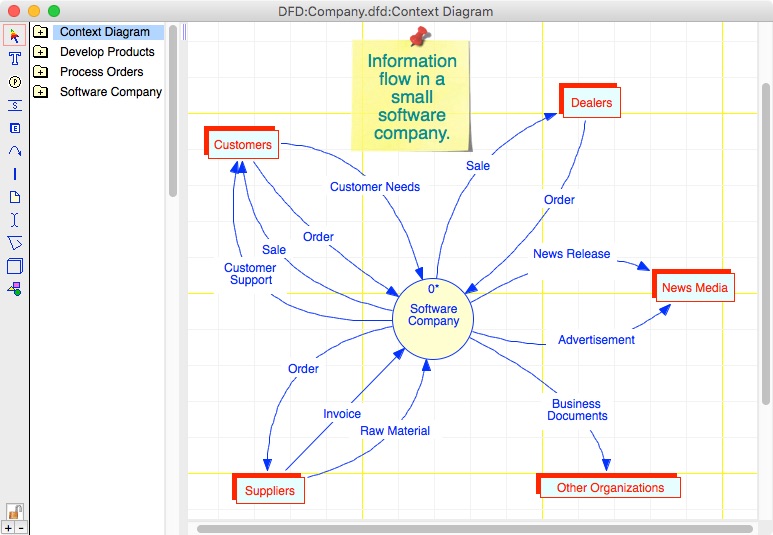
MacA&D 5 supports flow charts, the full 14-diagram UML 2.2 notation for object-oriented design, structured analysis & design, data models, Business Process Models (BPMN 2.0), screen prototypes, system models with simulation and real-time, multi-task design. The integrated environment includes data dictionary, requirements management, code generation, reengineering, design namespaces and scriptable reports.
MacA&D includes model editors for process, data, class, state, screen, structure, object and task models. All model editors support multiple diagram levels, table of contents, multiple diagram notations, configurable color schemes, scaling, rich customization and navigational features plus extensive verification and balancing reports of information flow and consistency between diagrams.
MacTranslator 4 scans source code to extract design information into text files that are imported into MacA&D. The entire process from code to design is fully automated.
When a developer selects the code folders, language and options, MacTranslator generates a project file of commands to extract the design information. That data is imported into MacA&D to populate the data dictionary and generate a stack of diagrams that reflect the code structure. Selectable features control code organization into diagrams, presentations options or identification of execution threads for representation on separate diagrams.
MacA&D and MacTranslator support design, code generation and reengineering for most popular programing languages:
* UML Class Models to and from Xojo, Swift, C , Objective-C, PHP, Java or Delphi
* Rich Data Models to and from SQL Schema with Indexes, Triggers, Primary and Foreign Keys
* Structure Charts to and from procedural C, Pascal, Basic, PHP or Fortran
With many years of continuous development and real-world experience by thousands of developers, MacA&D and MacTranslator support almost all popular design methods and have been applied to desktop, mainframe, embedded, mobile and web applications.
MacA&D 5 and MacTranslator 4 run on Mac OS X 10.7 or newer computers. Both tools are available in Single User and Site License editions. MacA&D is scalable from a single user to a large development team with capabilities like design namespaces, powerful import and export features and multi-user team documents.
Pricing and Availability:
MacA&D comes in a Standard edition at $495, Desktop edition at $995 and Developer edition at $1595. Each product includes 4 manuals, the Setup & Tutorials Guide, Modeling Guide, User Guide and Code & Reports Guide plus integrated help and online resource including white papers and demonstration videos. MacTranslator at $495 includes a User Guide with tutorials and online support.
Excel Software: http://www.excelsoftware.com
MacA&D 5: http://www.excelsoftware.com/maca&dproducts
Purchase: http://www.excelsoftware.com/priceandordering
Screenshot: http://www.excelsoftware.com/image/maca&d3screen.jpg
App Icon: http://www.excelsoftware.com/image/a&d_icon_128x128.gif
Established in 1985, Excel Software provides Windows and Mac OS X software products to thousands of users worldwide. Capabilities include system modeling & simulation, requirements management, software design, code generation, reengineering, bug tracking, help authoring, software license management, document protection and internet marketing automation. All Material and Software (C) Copyright 2016 Excel Software. All Rights Reserved. Apple, the Apple logo, Macintosh and Mac OS X are registered trademarks of Apple Inc. in the U.S. and/or other countries. Other trademarks and registered trademarks may be the property of their respective owners.
*******
Link To Article: http://prmac.com/release-id-79627.htm
*******
---------------------------------------------------------------------------------
Note that you can alter delivered distributions at any time.
Login to your account on prMac to alter your channel selection, or to opt-out at any time.
Excel Software Ships MacA&D 5 and MacTranslator 4 to Software Developers - Published on 06/04/16
MacA&D 5 and MacTranslator 4 add design, code generation and reengineering features for the Apple Swift programming language. Major enhancements and new manuals support UML, BPM, data flow diagrams and other methods. MacA&D is for requirements management and software design. The companion MacTranslator tool generates design models from source code for procedural, object-oriented and SQL languages.
Henderson, Nevada - Excel Software has released major enhancements to MacA&D for requirements management and software design. The companion MacTranslator tool generates design models from source code for procedural, object-oriented and SQL languages. Both tools are now Cocoa applications that add design, code generation and reengineering features for the Apple Swift programming language.
MacA&D 5 supports flow charts, the full 14-diagram UML 2.2 notation for object-oriented design, structured analysis & design, data models, Business Process Models (BPMN 2.0), screen prototypes, system models with simulation and real-time, multi-task design. The integrated environment includes data dictionary, requirements management, code generation, reengineering, design namespaces and scriptable reports.
MacA&D includes model editors for process, data, class, state, screen, structure, object and task models. All model editors support multiple diagram levels, table of contents, multiple diagram notations, configurable color schemes, scaling, rich customization and navigational features plus extensive verification and balancing reports of information flow and consistency between diagrams.
MacTranslator 4 scans source code to extract design information into text files that are imported into MacA&D. The entire process from code to design is fully automated.
When a developer selects the code folders, language and options, MacTranslator generates a project file of commands to extract the design information. That data is imported into MacA&D to populate the data dictionary and generate a stack of diagrams that reflect the code structure. Selectable features control code organization into diagrams, presentations options or identification of execution threads for representation on separate diagrams.
MacA&D and MacTranslator support design, code generation and reengineering for most popular programing languages:
* UML Class Models to and from Xojo, Swift, C , Objective-C, PHP, Java or Delphi
* Rich Data Models to and from SQL Schema with Indexes, Triggers, Primary and Foreign Keys
* Structure Charts to and from procedural C, Pascal, Basic, PHP or Fortran
With many years of continuous development and real-world experience by thousands of developers, MacA&D and MacTranslator support almost all popular design methods and have been applied to desktop, mainframe, embedded, mobile and web applications.
MacA&D 5 and MacTranslator 4 run on Mac OS X 10.7 or newer computers. Both tools are available in Single User and Site License editions. MacA&D is scalable from a single user to a large development team with capabilities like design namespaces, powerful import and export features and multi-user team documents.
Pricing and Availability:
MacA&D comes in a Standard edition at $495, Desktop edition at $995 and Developer edition at $1595. Each product includes 4 manuals, the Setup & Tutorials Guide, Modeling Guide, User Guide and Code & Reports Guide plus integrated help and online resource including white papers and demonstration videos. MacTranslator at $495 includes a User Guide with tutorials and online support.
Excel Software: http://www.excelsoftware.com
MacA&D 5: http://www.excelsoftware.com/maca&dproducts
Purchase: http://www.excelsoftware.com/priceandordering
Screenshot: http://www.excelsoftware.com/image/maca&d3screen.jpg
App Icon: http://www.excelsoftware.com/image/a&d_icon_128x128.gif

Established in 1985, Excel Software provides Windows and Mac OS X software products to thousands of users worldwide. Capabilities include system modeling & simulation, requirements management, software design, code generation, reengineering, bug tracking, help authoring, software license management, document protection and internet marketing automation. All Material and Software (C) Copyright 2016 Excel Software. All Rights Reserved. Apple, the Apple logo, Macintosh and Mac OS X are registered trademarks of Apple Inc. in the U.S. and/or other countries. Other trademarks and registered trademarks may be the property of their respective owners.
*******
Link To Article: http://prmac.com/release-id-79627.htm
*******
---------------------------------------------------------------------------------
Note that you can alter delivered distributions at any time.
Login to your account on prMac to alter your channel selection, or to opt-out at any time.
Restaurants Driving Sales with Maclocks New Mobile iPad POS Kiosk
A new article has been published at prMac.
Restaurants Driving Sales with Maclocks New Mobile iPad POS Kiosk - Published on 06/04/16
Maclocks announces the release of the Vader iPad POS Kiosk, a ruggedized high-grade aluminum enclosure with an integrated stand (that doubles as a handle) for use with an iPad in portrait or landscape mode. Turn any iPad into a touchscreen register or card payment terminal with this secured and stylish mobile POS kiosk. The Maclocks POS Kiosk provides access to all the ports with credit card reader compatibility through the audio jack and an external universal mount.
Pflugerville, Texas - Mobile based POS systems are now the optimal choice for businesses of every scale, with both small and large retail stores choosing tablets as their main transaction portal. Hardware manufacturer Compulocks, the global leader of secure iPad POS Kiosk solutions, recently released their most versatile and practical retail option yet, providing a stylish lockable display stand for most iPad models under their premiere Maclocks brand.
Designed for mobility, the Vader iPad POS Kiosk is a ruggedized high-grade aluminum enclosure with an integrated stand (that doubles as a handle) for use in portrait or landscape mode. The lightweight frame fits around a rugged Edge Band for a drop-resistant armored case for full protection when moving the device around any high-traffic environment, such as restaurants, bars and food markets.
Maclocks POS Kiosk provides access to all the ports with credit card reader compatibility through the audio jack and an external universal mount. Add a magnetic card reader with TDES encryption and DUKPT key management injected to match your software and payment processor for a secure mobile payment system.
One of the best features of the Vader iPad Kiosk is its ability to pair with multiple add-ons from Compulocks top selling Grip and Dock system allowing each store to customize it to best fit their specific needs. Compatible add-ons include an ergonomic hand-grip, tilting dock stand for counter or wall mounting, shoulder strap, security cable lock, and even a matching SlideDock(TM) EMV mount to create an innovative and distinctive customer engagement tool.
"We wanted to provide a rugged POS option that also had the mobility aspect to allow our clients a versatile solution compatible with all major mobile POS providers with the ability to close sales on the spot." Alexander Gad CTO said, "the feedback we are receiving from a few select retailers is extremely positive."
The base price of $99.95 makes it a high quality yet cost effective solution that fits every level of retail.
Maclocks: https://www.maclocks.com
Vader - Secure iPad Kiosk: https://www.maclocks.com/vader-secure-mobile-ipad-ruggedized-enclosure-ipad-air-ipad-pro-9-7-stand.html
Purchase Link: https://www.maclocks.com/vader-secure-mobile-ipad-ruggedized-enclosure-ipad-air-ipad-pro-9-7-stand.html
Product Shot: https://www.maclocks.com/media/catalog/product/cache/4/image/9df78eab33525d08d6e5fb8d27136e95/i/m/img-20160503-wa0015.jpg
Maclocks is a worldwide leader in designing and manufacturing innovative security and display solutions for Apple devices. Maclocks mission is to provide the highest, most designed and easy to use security solutions for any market (Retail/B2B) such as: cases, locks, enclosures, cables, stands, kiosks and carts for any Apple device on the market. Copyright (C) 2016 Maclocks. All Rights Reserved. Apple, the Apple logo, iPhone, iPad and iPod are registered trademarks of Apple Inc. in the U.S. and/or other countries.
*******
Link To Article: http://prmac.com/release-id-79624.htm
*******
---------------------------------------------------------------------------------
Note that you can alter delivered distributions at any time.
Login to your account on prMac to alter your channel selection, or to opt-out at any time.
Restaurants Driving Sales with Maclocks New Mobile iPad POS Kiosk - Published on 06/04/16
Maclocks announces the release of the Vader iPad POS Kiosk, a ruggedized high-grade aluminum enclosure with an integrated stand (that doubles as a handle) for use with an iPad in portrait or landscape mode. Turn any iPad into a touchscreen register or card payment terminal with this secured and stylish mobile POS kiosk. The Maclocks POS Kiosk provides access to all the ports with credit card reader compatibility through the audio jack and an external universal mount.
Pflugerville, Texas - Mobile based POS systems are now the optimal choice for businesses of every scale, with both small and large retail stores choosing tablets as their main transaction portal. Hardware manufacturer Compulocks, the global leader of secure iPad POS Kiosk solutions, recently released their most versatile and practical retail option yet, providing a stylish lockable display stand for most iPad models under their premiere Maclocks brand.
Designed for mobility, the Vader iPad POS Kiosk is a ruggedized high-grade aluminum enclosure with an integrated stand (that doubles as a handle) for use in portrait or landscape mode. The lightweight frame fits around a rugged Edge Band for a drop-resistant armored case for full protection when moving the device around any high-traffic environment, such as restaurants, bars and food markets.
Maclocks POS Kiosk provides access to all the ports with credit card reader compatibility through the audio jack and an external universal mount. Add a magnetic card reader with TDES encryption and DUKPT key management injected to match your software and payment processor for a secure mobile payment system.
One of the best features of the Vader iPad Kiosk is its ability to pair with multiple add-ons from Compulocks top selling Grip and Dock system allowing each store to customize it to best fit their specific needs. Compatible add-ons include an ergonomic hand-grip, tilting dock stand for counter or wall mounting, shoulder strap, security cable lock, and even a matching SlideDock(TM) EMV mount to create an innovative and distinctive customer engagement tool.
"We wanted to provide a rugged POS option that also had the mobility aspect to allow our clients a versatile solution compatible with all major mobile POS providers with the ability to close sales on the spot." Alexander Gad CTO said, "the feedback we are receiving from a few select retailers is extremely positive."
The base price of $99.95 makes it a high quality yet cost effective solution that fits every level of retail.
Maclocks: https://www.maclocks.com
Vader - Secure iPad Kiosk: https://www.maclocks.com/vader-secure-mobile-ipad-ruggedized-enclosure-ipad-air-ipad-pro-9-7-stand.html
Purchase Link: https://www.maclocks.com/vader-secure-mobile-ipad-ruggedized-enclosure-ipad-air-ipad-pro-9-7-stand.html
Product Shot: https://www.maclocks.com/media/catalog/product/cache/4/image/9df78eab33525d08d6e5fb8d27136e95/i/m/img-20160503-wa0015.jpg

Maclocks is a worldwide leader in designing and manufacturing innovative security and display solutions for Apple devices. Maclocks mission is to provide the highest, most designed and easy to use security solutions for any market (Retail/B2B) such as: cases, locks, enclosures, cables, stands, kiosks and carts for any Apple device on the market. Copyright (C) 2016 Maclocks. All Rights Reserved. Apple, the Apple logo, iPhone, iPad and iPod are registered trademarks of Apple Inc. in the U.S. and/or other countries.
*******
Link To Article: http://prmac.com/release-id-79624.htm
*******
---------------------------------------------------------------------------------
Note that you can alter delivered distributions at any time.
Login to your account on prMac to alter your channel selection, or to opt-out at any time.
Triposo Launches Walter - The World's First Travel Compass App
A new article has been published at prMac.
Triposo Launches Walter - The World's First Travel Compass App - Published on 06/04/16
Amsterdam and Berlin based start-up, Triposo, known for its popular travel guide apps with over 10 million downloads to date, recently launched Walter, the world's first travel compass app for iOS devices. Walter is a smart travel compass that shows you where things are. When you launch the app you automatically get a radar view of what's around you. Walter displays four bands of color representing sights, shops, restaurants and nightlife.
Amsterdam, Netherlands - Triposo announces the release of Walter 1.0, their travel app for iPhone, iPad, and iPod touch devices. Walter is a smart travel compass that shows you where things are. When you launch the app you automatically get a radar view of what's around you. Walter displays four bands of color representing sights, shops, restaurants and nightlife. The wider the band, the more things in that direction. All you need to do is point your phone and start walking. Walter's clean interface is insanely simple to use and is ideal for spontaneous travelers. There is no signup page, no login and no settings. Like Triposo's signature travel guides, Walter works offline and works anywhere in the world.
"The idea of a travel compass popped up at our quarterly Jamboree in Berlin - a much anticipated week of brainstorming, coding and exploring," says Douwe Osinga, CEO and Founder at Triposo. "We were sitting on the couch, sipping German beer and chatting about innovative ways to improve travel experiences, when a new idea arose: let's create a beer radar. We quickly realized the world not only needed a beer radar, it also needed a simpler tool to find nearby hotspots and Walter was born".
"Walter borrows heavily from Triposo's impressive algorithms to build its location and contextual awareness," explains Douwe. Triposo's technology platform crawls through gigabytes of open source data, parses it, extracts information, matches sources and ranks relevance to create a comprehensive database for 50,000 destinations worldwide. "We are really excited about Walter, and hope this will be the first of many such innovations from Triposo this year," adds Douwe. Interested parties can learn more about Walter by downloaded it in the iTunes App Store or visiting the Triposo blog.
Device Requirements:
* iPhone, iPad, and iPod touch
* Requires iOS 9.2 or later
* 37.2 MB
Pricing and Availability:
Walter 1.0 is free, and is available worldwide exclusively through the App Store in the Travel category.
Walter 1.0: http://triposo.com/walter
Download from iTunes: http://itunes.apple.com/app/walter-your-smart-travel-compass/id1116133721
Screenshot: http://a3.mzstatic.com/us/r30/Purple30/v4/8f/47/91/8f4791b7-3530-b3fa-b06b-182f8683d24d/screen322x572.jpeg
App Icon: http://a2.mzstatic.com/us/r30/Purple20/v4/c5/c2/cb/c5c2cbe6-76ec-3621-7420-b9a09408a8e7/icon175x175.jpeg
Triposo was founded in 2011 by ex-Googlers Douwe Osinga and Jon Tirsen and diplomat-turned-entrepreneur, Richard Osinga. It was kickstarted with a $700K round of seed funding from marquee investors such as Chris Sacca, Lars Rasmussen and Crunchfund, followed by two rounds led by InterWest partners: $3.5 million in July 2012 and $3.1 million in December 2015. The latest round of funding is expected to drive innovation for in-destination travel experiences in the mobile space. All Material and Software Copyright (C) 2016 Triposo. All Rights Reserved. Apple, the Apple logo, iPhone, iPad and iPod are registered trademarks of Apple Inc. in the U.S. and/or other countries.
*******
Link To Article: http://prmac.com/release-id-79626.htm
*******
---------------------------------------------------------------------------------
Note that you can alter delivered distributions at any time.
Login to your account on prMac to alter your channel selection, or to opt-out at any time.
Triposo Launches Walter - The World's First Travel Compass App - Published on 06/04/16
Amsterdam and Berlin based start-up, Triposo, known for its popular travel guide apps with over 10 million downloads to date, recently launched Walter, the world's first travel compass app for iOS devices. Walter is a smart travel compass that shows you where things are. When you launch the app you automatically get a radar view of what's around you. Walter displays four bands of color representing sights, shops, restaurants and nightlife.
Amsterdam, Netherlands - Triposo announces the release of Walter 1.0, their travel app for iPhone, iPad, and iPod touch devices. Walter is a smart travel compass that shows you where things are. When you launch the app you automatically get a radar view of what's around you. Walter displays four bands of color representing sights, shops, restaurants and nightlife. The wider the band, the more things in that direction. All you need to do is point your phone and start walking. Walter's clean interface is insanely simple to use and is ideal for spontaneous travelers. There is no signup page, no login and no settings. Like Triposo's signature travel guides, Walter works offline and works anywhere in the world.
"The idea of a travel compass popped up at our quarterly Jamboree in Berlin - a much anticipated week of brainstorming, coding and exploring," says Douwe Osinga, CEO and Founder at Triposo. "We were sitting on the couch, sipping German beer and chatting about innovative ways to improve travel experiences, when a new idea arose: let's create a beer radar. We quickly realized the world not only needed a beer radar, it also needed a simpler tool to find nearby hotspots and Walter was born".
"Walter borrows heavily from Triposo's impressive algorithms to build its location and contextual awareness," explains Douwe. Triposo's technology platform crawls through gigabytes of open source data, parses it, extracts information, matches sources and ranks relevance to create a comprehensive database for 50,000 destinations worldwide. "We are really excited about Walter, and hope this will be the first of many such innovations from Triposo this year," adds Douwe. Interested parties can learn more about Walter by downloaded it in the iTunes App Store or visiting the Triposo blog.
Device Requirements:
* iPhone, iPad, and iPod touch
* Requires iOS 9.2 or later
* 37.2 MB
Pricing and Availability:
Walter 1.0 is free, and is available worldwide exclusively through the App Store in the Travel category.
Walter 1.0: http://triposo.com/walter
Download from iTunes: http://itunes.apple.com/app/walter-your-smart-travel-compass/id1116133721
Screenshot: http://a3.mzstatic.com/us/r30/Purple30/v4/8f/47/91/8f4791b7-3530-b3fa-b06b-182f8683d24d/screen322x572.jpeg

App Icon: http://a2.mzstatic.com/us/r30/Purple20/v4/c5/c2/cb/c5c2cbe6-76ec-3621-7420-b9a09408a8e7/icon175x175.jpeg

Triposo was founded in 2011 by ex-Googlers Douwe Osinga and Jon Tirsen and diplomat-turned-entrepreneur, Richard Osinga. It was kickstarted with a $700K round of seed funding from marquee investors such as Chris Sacca, Lars Rasmussen and Crunchfund, followed by two rounds led by InterWest partners: $3.5 million in July 2012 and $3.1 million in December 2015. The latest round of funding is expected to drive innovation for in-destination travel experiences in the mobile space. All Material and Software Copyright (C) 2016 Triposo. All Rights Reserved. Apple, the Apple logo, iPhone, iPad and iPod are registered trademarks of Apple Inc. in the U.S. and/or other countries.
*******
Link To Article: http://prmac.com/release-id-79626.htm
*******
---------------------------------------------------------------------------------
Note that you can alter delivered distributions at any time.
Login to your account on prMac to alter your channel selection, or to opt-out at any time.
Saving iPhone iPod Music Back on Mac with PrimoMusic for Mac Giveaway
A new article has been published at prMac.
Saving iPhone iPod Music Back on Mac with PrimoMusic for Mac Giveaway - Published on 06/04/16
PrimoSync, a start-up company focusing on iPhone, iPad, and iPod related software development, today announces the New Release & Giveaway Promo on its first iPhone, iPad and iPod media content manager software - PrimoMusic. As an iTunes alternative for the media files management on Apple devices, this simple and flexible Music Manager software allows users to copy iPhone, iPad and iPod music back to iTunes on a Mac computer.
Chengdu, China - PrimoSync, a start-up company focusing on iPhone, iPad, and iPod related software development, today announces the New Release & Giveaway Promo on its first iPhone, iPad and iPod media content manager software - PrimoMusic. As an iTunes alternative for the media files management on Apple devices, this simple and flexible Music Manager software allows users to copy iPhone, iPad and iPod music back to iTunes on Mac computer; adding new media items to an iDevice without overwriting previous content and even without iTunes; saving iPhone purchases to iTunes library on any computer, etc.
"Despite people rely much more on music streaming subscription services in recent years, Apple mobile devices like iPhone and iPod remain one of the most popular storage media for holding users music, similar to Mac computers and iTunes match" said by Kelly Woods, marketing manager at PrimoSync. "In case users will need rescue plans on their music collection, we designed our PrimoMusic, which allows an option to copying music from iPhone, iPod and iPad back to their Mac computer. We believe its ultra simplicity and super efficiency will make its ways in this competitive market."
The Highlights of PrimoMusic:
#1 - Bring The Lost Music from iPhone / iPod Back to Mac - In case users just got recovered from a system failure, or switched to a new computer, and they would like to rebuild your music collection, PrimoMusic can rescue their Music, Playlists, Movies, TV Shows, Books, Audiobooks, Tones and iTunes U, instantly from iPhone, iPad, or iPod to Mac computer.
#2 - Put Music on iPhone iPod without iTunes - Many users have their favorite music saved on multiple computers, but the iPod, or iPhone, can only be synced with one of them. PrimoMusic helps to transfer music, movies, TV shows, podcasts, and more, right onto Apple devices, without the bother of iTunes. This way, they won't worry about original media content on iPhone, iPad or iPod, get overwritten.
#3 - Rebuild iTunes Library with Playlists, Ratings and More - iTunes probably is the best way to organize and enjoy podcasts, movies, and TV shows, especially music with personalized playlists, ratings and play counts. In case any unexpected "disaster" happens to users' iTunes library, PrimoMusic brings two simple and effective solutions to help you rebuild it up: Smart Transfer (Automatically detects what're the differences between the media library on iPhone / iPod and on iTunes) and Manual Transfer (Allows to select only desired content to transfer).
PrimoSync Software: https://www.primosync.com/
PrimoMusic for Mac: https://www.primosync.com/primomusic/
PrimoMusic for Mac Free Download: https://www.primosync.com/primomusic/download.htm
Quick User Guide: How to Transfer Music from iPhone to Mac: https://www.primosync.com/support/how-to-transfer-music-from-iphone-to-mac.htm
PrimoSync is a young software developing and marketing team comes to deliver the simple and beautiful photos, music, apps, messages, and other iPhone iPad related software products with passion and love. All Material and Software (C) Copyright 2016 PrimoSync. All Rights Reserved. Apple, the Apple logo, Macintosh and Mac OS X are registered trademarks of Apple Inc. in the U.S. and/or other countries. Other trademarks and registered trademarks may be the property of their respective owners.
*******
Link To Article: http://prmac.com/release-id-79622.htm
*******
---------------------------------------------------------------------------------
Note that you can alter delivered distributions at any time.
Login to your account on prMac to alter your channel selection, or to opt-out at any time.
Saving iPhone iPod Music Back on Mac with PrimoMusic for Mac Giveaway - Published on 06/04/16
PrimoSync, a start-up company focusing on iPhone, iPad, and iPod related software development, today announces the New Release & Giveaway Promo on its first iPhone, iPad and iPod media content manager software - PrimoMusic. As an iTunes alternative for the media files management on Apple devices, this simple and flexible Music Manager software allows users to copy iPhone, iPad and iPod music back to iTunes on a Mac computer.
Chengdu, China - PrimoSync, a start-up company focusing on iPhone, iPad, and iPod related software development, today announces the New Release & Giveaway Promo on its first iPhone, iPad and iPod media content manager software - PrimoMusic. As an iTunes alternative for the media files management on Apple devices, this simple and flexible Music Manager software allows users to copy iPhone, iPad and iPod music back to iTunes on Mac computer; adding new media items to an iDevice without overwriting previous content and even without iTunes; saving iPhone purchases to iTunes library on any computer, etc.
"Despite people rely much more on music streaming subscription services in recent years, Apple mobile devices like iPhone and iPod remain one of the most popular storage media for holding users music, similar to Mac computers and iTunes match" said by Kelly Woods, marketing manager at PrimoSync. "In case users will need rescue plans on their music collection, we designed our PrimoMusic, which allows an option to copying music from iPhone, iPod and iPad back to their Mac computer. We believe its ultra simplicity and super efficiency will make its ways in this competitive market."
The Highlights of PrimoMusic:
#1 - Bring The Lost Music from iPhone / iPod Back to Mac - In case users just got recovered from a system failure, or switched to a new computer, and they would like to rebuild your music collection, PrimoMusic can rescue their Music, Playlists, Movies, TV Shows, Books, Audiobooks, Tones and iTunes U, instantly from iPhone, iPad, or iPod to Mac computer.
#2 - Put Music on iPhone iPod without iTunes - Many users have their favorite music saved on multiple computers, but the iPod, or iPhone, can only be synced with one of them. PrimoMusic helps to transfer music, movies, TV shows, podcasts, and more, right onto Apple devices, without the bother of iTunes. This way, they won't worry about original media content on iPhone, iPad or iPod, get overwritten.
#3 - Rebuild iTunes Library with Playlists, Ratings and More - iTunes probably is the best way to organize and enjoy podcasts, movies, and TV shows, especially music with personalized playlists, ratings and play counts. In case any unexpected "disaster" happens to users' iTunes library, PrimoMusic brings two simple and effective solutions to help you rebuild it up: Smart Transfer (Automatically detects what're the differences between the media library on iPhone / iPod and on iTunes) and Manual Transfer (Allows to select only desired content to transfer).
PrimoSync Software: https://www.primosync.com/
PrimoMusic for Mac: https://www.primosync.com/primomusic/
PrimoMusic for Mac Free Download: https://www.primosync.com/primomusic/download.htm
Quick User Guide: How to Transfer Music from iPhone to Mac: https://www.primosync.com/support/how-to-transfer-music-from-iphone-to-mac.htm
PrimoSync is a young software developing and marketing team comes to deliver the simple and beautiful photos, music, apps, messages, and other iPhone iPad related software products with passion and love. All Material and Software (C) Copyright 2016 PrimoSync. All Rights Reserved. Apple, the Apple logo, Macintosh and Mac OS X are registered trademarks of Apple Inc. in the U.S. and/or other countries. Other trademarks and registered trademarks may be the property of their respective owners.
*******
Link To Article: http://prmac.com/release-id-79622.htm
*******
---------------------------------------------------------------------------------
Note that you can alter delivered distributions at any time.
Login to your account on prMac to alter your channel selection, or to opt-out at any time.
Subscribe to:
Posts (Atom)