A new article has been published at prMac.
Shade Combo 1.03 is out with Two New Modes - Game about Ducks and Combos - Published on 06/13/16
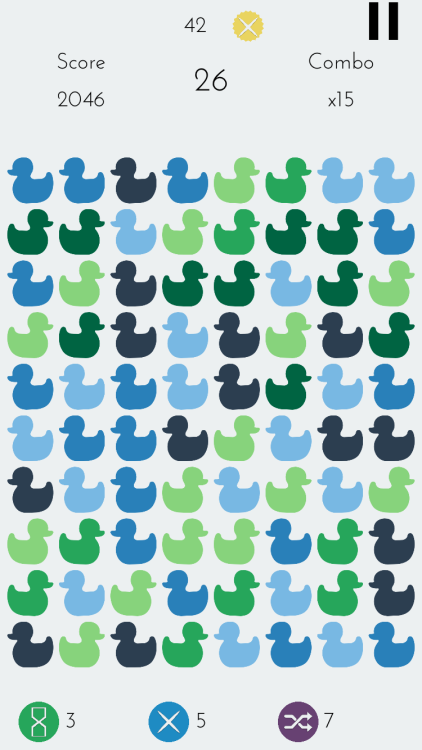
Independent developer, Yusuf Turk today announces Shade Combo 1.03, an update to his fast paced puzzle game developed for iPhone, iPad and iPod touch devices. In Shade Combo, players combine lighter shade ducks to turn them into darker shades and combine darkest ducks to make them disappear. Combining them rapidly in a row starts the combo counter. The faster you play without a wrong move, higher your score gets. Version 1.03 introduces 100 Moves Mode and Hard Mode.
Istanbul, Turkey - Independent developer, Yusuf Turk today is proud to announce the new update of Shade Combo, a game about ducks and combos for iPhone, iPad and iPod touch. 100 Moves Mode and Hard Mode is introduced on this version. Shade Combo is a new type of puzzle game for those tired of classic match-3 games.
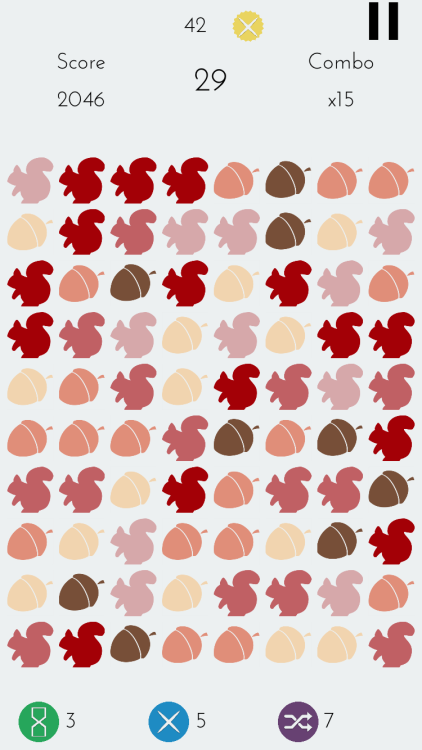
Players combine lighter shade ducks (or other objects) to turn them into darker shades and combine darkest ducks to make them disappear. Combining them rapidly in a row starts the combo counter. The score for each move is multiplied by your combo. Faster you play without a wrong move, higher your score gets. Every 10x combo earns the player a Combo Point which they can use to unlock more colors, shapes and power-ups. Power-ups give player opportunities to make even higher combos.
Features :
* 100+ items to unlock
* Timed Mode: Race against time
* Endless Mode: No time limit and unlimited shuffles
* 100 Moves Mode: Get the highest score in 100 moves
* Hard Mode: 3 items and 60 seconds
* Game Center integration
Language Support:
Shade Combo supports English, German, French, Spanish, Portuguese, Turkish, Chinese (Simplified), Chinese (Traditional), Japanese, Korean, Arabic and Russian languages.
Device Requirements:
* iPhone, iPad, and iPod touch
* Requires iOS 8.0 or later
* 26.9 MB
Shade Combo 1.03 is Free and available worldwide exclusively through the App Store in the Games category.
Shade Combo 1.03: http://www.shadecombo.com
Download from iTunes: https://itunes.apple.com/app/shade-combo/id1072766326
YouTube Video (App Preview): https://www.youtube.com/watch?v=QGg0cU-5sCY
Screenshot 1: http://62.media.tumblr.com/b9e77d11f3245e9d3c906a5159d5512f/tumblr_inline_o306dwbS3X1u1cuxt_500.png
Screenshot 2: http://62.media.tumblr.com/1591dbfbec17507691c04c9fcd8bfe99/tumblr_inline_o306fbI6w61u1cuxt_500.png
Media Assets: https://www.dropbox.com/sh/bqfi7hokmp9pdnp/AACdtaqak4HtXSNmxLOZnlzja?dl=0
Located in Istanbul, Turkey, Yusuf Turk is an independent game developer. Developing games since 2014, Yusuf released several titles such as XEZI: A Silk Road Adventure, F1V3, and Insane Red Ball. All Material and Software (C) Copyright 2016 Yusuf Turk. All Rights Reserved. Apple, the Apple logo, iPhone, iPod and iPad are registered trademarks of Apple Inc. in the U.S. and/or other countries. Other trademarks and registered trademarks may be the property of their respective owners.
*******
Link To Article: http://prmac.com/release-id-79685.htm
*******
---------------------------------------------------------------------------------
Note that you can alter delivered distributions at any time.
Login to your account on prMac to alter your channel selection, or to opt-out at any time.

LinkOptimizer for InDesign Improves Sharpening Filter Application
A new article has been published at prMac.
LinkOptimizer for InDesign Improves Sharpening Filter Application - Published on 06/13/16
Zevrix Solutions announces LinkOptimizer 4.9.62, a maintenance update to its workflow automation solution for Adobe InDesign. LinkOptimizer lets users reduce the size of InDesign links by eliminating excess image data according to their final size and target resolution. The app can also perform essential image adjustments and convert colors and file formats. The new version improves the reliability of Photoshop sharpening filters application and addresses some image format conversion issues.
Toronto (ON) Canada - Zevrix Solutions today is proud to announce the release of LinkOptimizer 4.9.62, a maintenance update to its workflow automation solution for Adobe InDesign. LinkOptimizer helps users automate complex repetitive image manipulation tasks and easily repurpose InDesign documents for web and mobile devices with just a click of a button.
The new version addresses an issue in which the user defined automatic application of the Sharpen More filter in Photoshop could be omitted under certain condition. This issue didn't affect the action of the Unsharp Mask and Sharpen commands. The update also improves the reliability of GIF image conversion and fixes some minor UI glitches
"LinkOptimizer is the one product no creative studio can live without," says Wayne Guy from Edge Graphics studio in Lake Balboa, California. "It saves hours of time, tediously replacing linked images, resizing, batch processing... If you're a designer or production artist, you need this."
LinkOptimizer works automatically with Adobe Photoshop to eliminate the excess image data of InDesign links, perform essential image adjustments and convert image formats:
* Resize links to match their InDesign dimensions at a target resolution
* Reduce link size by eliminating excess image data
* Convert image colors and apply ICC profile
* Convert image formats
* Merge layers and delete hidden ones
* Run a Photoshop Action on each image
* Optimize files for web and mobile devices
As a result users can save gigabytes of disk space and hours of optimizing images manually, accelerate document output, reduce job turnaround and cut costs through faster processing.
Pricing and Availability:
LinkOptimizer can be purchased from Zevrix website for $259.95 USD (Light version: $179.95) as well as from authorized resellers. Trial is also available for download. The update is free for LinkOptimizer 4.x users and $130 to upgrade from previous versions. LinkOptimizer requires Mac OS X 10.6-10.11 and Adobe InDesign/Photoshop CS3-CC 2015.
Zevrix Solutions: http://zevrix.com
LinkOptimizer 4.9.62: http://zevrix.com/LinkOptimizer.php
Download LinkOptimizer: http://zevrix.com/LinkOptimizer.dmg
Purchase: http://zevrix.com/store.php
Screenshot: http://zevrix.com/screenshots/lo4/res-win-ysmt.gif
Located in Toronto, Canada, Zevrix Solutions provides automation and productivity solutions for Adobe Creative Cloud and Creative Suite software, PDF workflows, graphic file diagnostics and Microsoft Office output on Mac OS. Zevrix is dedicated to help professionals increase their profits through automating everyday tasks, producing error-free documents, saving disk space and cutting production costs. For more information, visit their website. Copyright (C) 2016 Zevrix Solutions. All Rights Reserved. Other trademarks and registered trademarks may be the property of their respective owners.
*******
Link To Article: http://prmac.com/release-id-79682.htm
*******
---------------------------------------------------------------------------------
Note that you can alter delivered distributions at any time.
Login to your account on prMac to alter your channel selection, or to opt-out at any time.
LinkOptimizer for InDesign Improves Sharpening Filter Application - Published on 06/13/16
Zevrix Solutions announces LinkOptimizer 4.9.62, a maintenance update to its workflow automation solution for Adobe InDesign. LinkOptimizer lets users reduce the size of InDesign links by eliminating excess image data according to their final size and target resolution. The app can also perform essential image adjustments and convert colors and file formats. The new version improves the reliability of Photoshop sharpening filters application and addresses some image format conversion issues.
Toronto (ON) Canada - Zevrix Solutions today is proud to announce the release of LinkOptimizer 4.9.62, a maintenance update to its workflow automation solution for Adobe InDesign. LinkOptimizer helps users automate complex repetitive image manipulation tasks and easily repurpose InDesign documents for web and mobile devices with just a click of a button.
The new version addresses an issue in which the user defined automatic application of the Sharpen More filter in Photoshop could be omitted under certain condition. This issue didn't affect the action of the Unsharp Mask and Sharpen commands. The update also improves the reliability of GIF image conversion and fixes some minor UI glitches
"LinkOptimizer is the one product no creative studio can live without," says Wayne Guy from Edge Graphics studio in Lake Balboa, California. "It saves hours of time, tediously replacing linked images, resizing, batch processing... If you're a designer or production artist, you need this."
LinkOptimizer works automatically with Adobe Photoshop to eliminate the excess image data of InDesign links, perform essential image adjustments and convert image formats:
* Resize links to match their InDesign dimensions at a target resolution
* Reduce link size by eliminating excess image data
* Convert image colors and apply ICC profile
* Convert image formats
* Merge layers and delete hidden ones
* Run a Photoshop Action on each image
* Optimize files for web and mobile devices
As a result users can save gigabytes of disk space and hours of optimizing images manually, accelerate document output, reduce job turnaround and cut costs through faster processing.
Pricing and Availability:
LinkOptimizer can be purchased from Zevrix website for $259.95 USD (Light version: $179.95) as well as from authorized resellers. Trial is also available for download. The update is free for LinkOptimizer 4.x users and $130 to upgrade from previous versions. LinkOptimizer requires Mac OS X 10.6-10.11 and Adobe InDesign/Photoshop CS3-CC 2015.
Zevrix Solutions: http://zevrix.com
LinkOptimizer 4.9.62: http://zevrix.com/LinkOptimizer.php
Download LinkOptimizer: http://zevrix.com/LinkOptimizer.dmg
Purchase: http://zevrix.com/store.php
Screenshot: http://zevrix.com/screenshots/lo4/res-win-ysmt.gif

Located in Toronto, Canada, Zevrix Solutions provides automation and productivity solutions for Adobe Creative Cloud and Creative Suite software, PDF workflows, graphic file diagnostics and Microsoft Office output on Mac OS. Zevrix is dedicated to help professionals increase their profits through automating everyday tasks, producing error-free documents, saving disk space and cutting production costs. For more information, visit their website. Copyright (C) 2016 Zevrix Solutions. All Rights Reserved. Other trademarks and registered trademarks may be the property of their respective owners.
*******
Link To Article: http://prmac.com/release-id-79682.htm
*******
---------------------------------------------------------------------------------
Note that you can alter delivered distributions at any time.
Login to your account on prMac to alter your channel selection, or to opt-out at any time.
Anti-Screenshot and Nuke Features Released by DatChat
A new article has been published at prMac.
Anti-Screenshot and Nuke Features Released by DatChat - Published on 06/13/16
DatChat Inc. announces the official launch of DatChat Messenger 1.4.2, the company's social networking app for iOS devices. DatChat Messenger offers an unprecedented level of privacy control for both individual and group messages. Featuring unlimited message control, this app provides the option to dictate how long sent messages are accessible on the recipient's phone. It is also offers a Nuke option, which will erase both sides of a conversation on both the sender and recipient's devices.
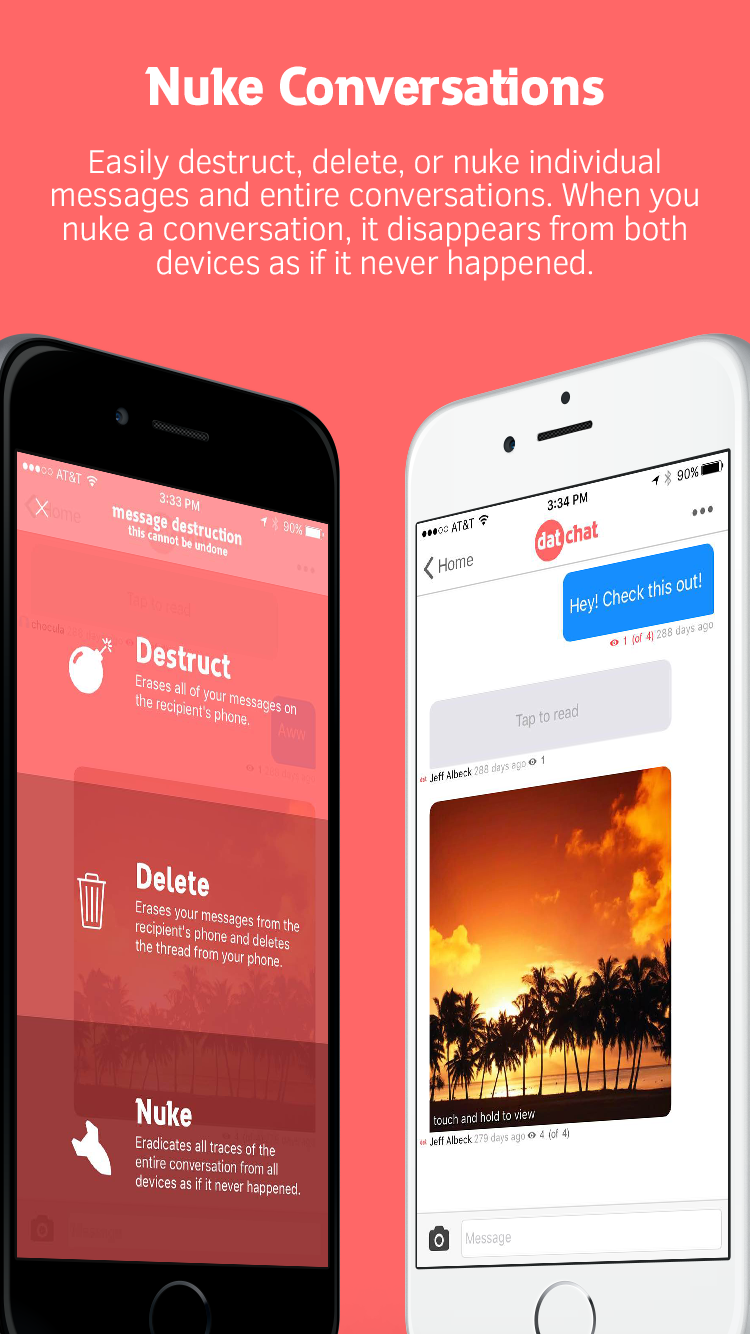
New Brunswick, New Jersey - DatChat Inc. is pleased to announce the availability of DatChat Messenger 1.4.2 for iOS, offering an unprecedented level of privacy control for both individual and group messages. DatChat Messenger is the first privacy messaging app that provides the option to dictate how long sent messages are accessible on the recipient's phone. It is also the first to offer a "Nuke" option, which will erase both sides of a conversation on both the sender and recipient's devices.
DatChat Messenger gives senders a new level of privacy and control through its customizable messaging settings. Senders can set a message to last forever, or automatically self-destruct after a certain number of views. At any time a sender can wipe texts off a recipient's phone or give the recipient more time to view the message. Senders can choose to change the rights to a single message or destruct all of their messages at once. Additional features include the ability to remain anonymous, prevent screenshots and hide pictures behind preview images on the camera roll and in the messaging stream.
"Whether online dating or texting a colleague, we've all had those moments when we've regretted sending a message or we simply want to make sure it isn't seen by the wrong person," said Darin Myman, co-founder and CEO of DatChat Inc. "In addition to DatChat's unique privacy features, users don't have to deal with the annoyance of having a conversation one disappearing message at a time. DatChat offers a traditional messaging experience without giving up control of shared messages and pictures."
DatChat Messenger includes the following features:
* Self-Destructing Messages:
The sender decides how many times pictures or messages can be viewed before they self-destruct. Also, the sender can dictate how many views are left or erase the content at any time. Users can even opt to Nuke messages, which erases both sides of the conversation on both the sender and recipient's devices.
* Hide in Plain Sight:
Senders can hide pictures and information on the camera roll, hidden and encrypted behind other pictures. Only the cover photo can be seen in plain sight.
* Screenshot Protection:
DatChat features a protection mode which makes it nearly impossible to screenshot a secret message. Also, the sender receives notifications when someone attempts to screenshot protected or regular self-destructing messages.
* Without a Trace:
Messages vanish without a trace when they reach a view limit or are manually destructed, and are deleted forever. DatChat Inc. employees can never access messages.
* Powerful Privacy:
Every message sent is double encrypted and can only be viewed by the sender and the intended recipient.
* Fast, Safe and Easy:
It is easy to send and control messages. Camraflage is DatChat's patent-pending technology that hides a message behind a decoy cover photo. Camraflage messages can be sent via encrypted messages using the direct messaging built into DatChat, iMessage or email.
* Message Security:
Only the sender and intended recipients can view messages - they cannot be forwarded to anyone else. While on the DatChat servers, they cannot be viewed by anyone because only the sender has the key.
* Multiple Accounts:
Senders can have multiple accounts with friends, messages and secret pictures only visible when logged in to that respective account.
* Anonymity:
No phone number, email or personal information required. All users need is a screen name to send a message.
Device Requirements:
* iPhone, iPad, and iPod touch
* Requires iOS 8.1 or later
* 8.5 MB
Pricing and Availability:
DatChat Messenger 1.4.2 is Free and available worldwide exclusively through the App Store in the Social Networking category.
DatChat Messenger 1.4.2: http://www.datchat.net
Download from iTunes: https://itunes.apple.com/app/datchat/id999516973
Darin Myman: http://darinmyman.blogspot.com/
Screenshot: http://datchat.net/img/iphone5-4.png
App Icon: http://datchat.net/img/icon-master_1024.png
DatChat Inc. was founded in 2015 by a team dedicated to creating a messaging platform that always provides privacy, control and security.
All Material and Software (C) Copyright 2016 DatChat, Inc. All Rights Reserved. Apple, the Apple logo, iPhone, iPod and iPad are registered trademarks of Apple Inc. in the U.S. and/or other countries. Other trademarks and registered trademarks may be the property of their respective owners.
*******
Link To Article: http://prmac.com/release-id-79678.htm
*******
---------------------------------------------------------------------------------
Note that you can alter delivered distributions at any time.
Login to your account on prMac to alter your channel selection, or to opt-out at any time.
Anti-Screenshot and Nuke Features Released by DatChat - Published on 06/13/16
DatChat Inc. announces the official launch of DatChat Messenger 1.4.2, the company's social networking app for iOS devices. DatChat Messenger offers an unprecedented level of privacy control for both individual and group messages. Featuring unlimited message control, this app provides the option to dictate how long sent messages are accessible on the recipient's phone. It is also offers a Nuke option, which will erase both sides of a conversation on both the sender and recipient's devices.
New Brunswick, New Jersey - DatChat Inc. is pleased to announce the availability of DatChat Messenger 1.4.2 for iOS, offering an unprecedented level of privacy control for both individual and group messages. DatChat Messenger is the first privacy messaging app that provides the option to dictate how long sent messages are accessible on the recipient's phone. It is also the first to offer a "Nuke" option, which will erase both sides of a conversation on both the sender and recipient's devices.
DatChat Messenger gives senders a new level of privacy and control through its customizable messaging settings. Senders can set a message to last forever, or automatically self-destruct after a certain number of views. At any time a sender can wipe texts off a recipient's phone or give the recipient more time to view the message. Senders can choose to change the rights to a single message or destruct all of their messages at once. Additional features include the ability to remain anonymous, prevent screenshots and hide pictures behind preview images on the camera roll and in the messaging stream.
"Whether online dating or texting a colleague, we've all had those moments when we've regretted sending a message or we simply want to make sure it isn't seen by the wrong person," said Darin Myman, co-founder and CEO of DatChat Inc. "In addition to DatChat's unique privacy features, users don't have to deal with the annoyance of having a conversation one disappearing message at a time. DatChat offers a traditional messaging experience without giving up control of shared messages and pictures."
DatChat Messenger includes the following features:
* Self-Destructing Messages:
The sender decides how many times pictures or messages can be viewed before they self-destruct. Also, the sender can dictate how many views are left or erase the content at any time. Users can even opt to Nuke messages, which erases both sides of the conversation on both the sender and recipient's devices.
* Hide in Plain Sight:
Senders can hide pictures and information on the camera roll, hidden and encrypted behind other pictures. Only the cover photo can be seen in plain sight.
* Screenshot Protection:
DatChat features a protection mode which makes it nearly impossible to screenshot a secret message. Also, the sender receives notifications when someone attempts to screenshot protected or regular self-destructing messages.
* Without a Trace:
Messages vanish without a trace when they reach a view limit or are manually destructed, and are deleted forever. DatChat Inc. employees can never access messages.
* Powerful Privacy:
Every message sent is double encrypted and can only be viewed by the sender and the intended recipient.
* Fast, Safe and Easy:
It is easy to send and control messages. Camraflage is DatChat's patent-pending technology that hides a message behind a decoy cover photo. Camraflage messages can be sent via encrypted messages using the direct messaging built into DatChat, iMessage or email.
* Message Security:
Only the sender and intended recipients can view messages - they cannot be forwarded to anyone else. While on the DatChat servers, they cannot be viewed by anyone because only the sender has the key.
* Multiple Accounts:
Senders can have multiple accounts with friends, messages and secret pictures only visible when logged in to that respective account.
* Anonymity:
No phone number, email or personal information required. All users need is a screen name to send a message.
Device Requirements:
* iPhone, iPad, and iPod touch
* Requires iOS 8.1 or later
* 8.5 MB
Pricing and Availability:
DatChat Messenger 1.4.2 is Free and available worldwide exclusively through the App Store in the Social Networking category.
DatChat Messenger 1.4.2: http://www.datchat.net
Download from iTunes: https://itunes.apple.com/app/datchat/id999516973
Darin Myman: http://darinmyman.blogspot.com/
Screenshot: http://datchat.net/img/iphone5-4.png
App Icon: http://datchat.net/img/icon-master_1024.png

DatChat Inc. was founded in 2015 by a team dedicated to creating a messaging platform that always provides privacy, control and security.
All Material and Software (C) Copyright 2016 DatChat, Inc. All Rights Reserved. Apple, the Apple logo, iPhone, iPod and iPad are registered trademarks of Apple Inc. in the U.S. and/or other countries. Other trademarks and registered trademarks may be the property of their respective owners.
*******
Link To Article: http://prmac.com/release-id-79678.htm
*******
---------------------------------------------------------------------------------
Note that you can alter delivered distributions at any time.
Login to your account on prMac to alter your channel selection, or to opt-out at any time.
Leawo Prof. Media Mac 7.5.0 Debut with Improved HD Screen Compatibility
A new article has been published at prMac.
Leawo Prof. Media Mac 7.5.0 Debut with Improved HD Screen Compatibility - Published on 06/13/16
Leawo Software today releases Prof. Media for Mac 7.5.0, its all-in-one Mac media converter suite. Prof. Media for Mac handles media conversions between Blu-ray, DVD, video and audio files on Mac. The new version brings full-scale improvements in both program functions and user experience. Key upgrades include: improved HD screen compatibility, fixed video and audio out-of-sync problem, optimized subtitle display and 3D effect applying, promoted video conversion success rate, and more.
Shenzhen, China - For better user experience, Leawo Software officially released Prof. Media for Mac 7.5.0, its all-in-one Mac media converter suite. The new version brings full-scale improvements in both program functions and user experience. Key upgrades include: improved HD screen compatibility, fixed video and audio out-of-sync problem, optimized subtitle display and 3D effect applying, promoted video conversion success rate, etc.
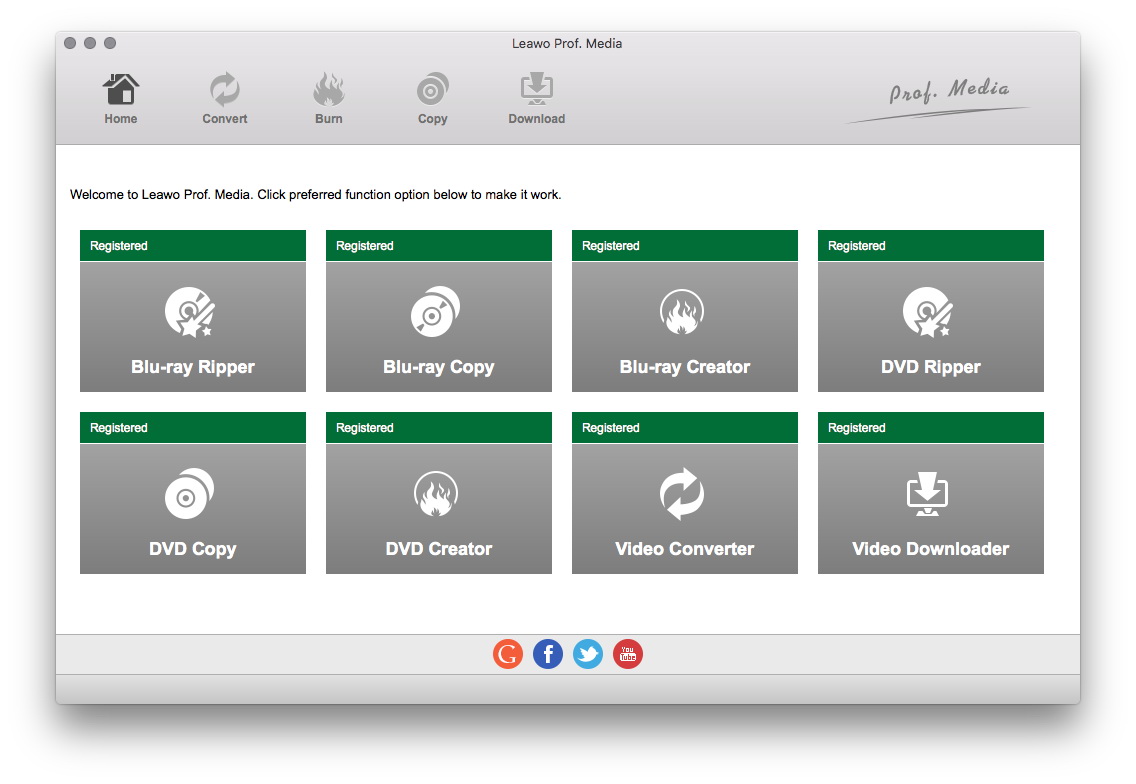
Leawo Prof. Media for Mac is a media converter suite for Mac computer owners to handle media conversions between Blu-ray, DVD, video and audio files on Mac. It includes multiple function modules: Mac video converter, Mac Blu-ray converter, Mac Blu-ray copy, Mac Blu-ray creator, Mac video downloader, Mac DVD copy, Mac DVD creator, Mac DVD ripper, Mac photo slideshow maker and burner, 2D to 3D movie converter, etc. It is the flagship of Leawo product line.
As the total media converter suite for Mac, Leawo Prof. Media for Mac gets frequent update according to people�s feedback. In this V7.5.0 Mac media converter update, Leawo tech team successfully fixed several vital errors to deliver better UI experience and more wonderful functions.
HD screen compatibility means the ability to automatically adapt HD screens like 4K and 1080P screen displays. Poor HD screen compatibility often results in interface and text distortion on large 4K screens. In this Mac media converter update, Leawo improved Prof. Media for Mac�s HD screen compatibility so as to let the program automatically change program interface and text size to adapt 4K and 1080P large screens.
Video and audio synchronization means a lot to movie enjoyment. According to feedback, previously, when people tried to burn AVI/MP4 to Blu-ray disc, or convert AVI video to H.265 MKV format, the video and audio in output content is out of sync. In this update, Leawo successfully fixed this error and ensured people with well synchronized video and audio in output file.
ASS, SSA and SRT subtitles could be added within this Mac media converter suite to let people enjoy movies in familiar language. However, due to the origins of subtitle files, some ASS and SSA subtitles may not display, and some SRT subtitle might contain illegal characters in previous version. Through this upgrade, these problems have been perfectly solved. People could now freely add external subtitles for either burning video to DVD/Blu-ray or converting between different video formats.
Leawo Prof. Media for Mac enables people to create 3D movies through the internal 2D to 3D converter, which offers 6 different 3D effects and enables changing 3D Depth. In this upgrade, Leawo tech team optimized the internal 2D to 3D converter so as to avoid program crash while applying 3D effect.
The internal Blu-ray creator allows people to burn Blu-ray/DVD disc from various video files. However, due to the difference of common video format and Blu-ray format, some burned discs stuck or blur screen during playback. With advanced tech planted, this upgrade fixed this error and ensured smooth playback of burned discs.
Through this upgrade, video conversion success rate has been promoted to 100%, no matter which kind of conversion it is. Currently, Leawo Prof. Media for Mac is available on Leawo�s official website. Anyone can download Prof. Media for Mac to experience these new features. For more information, please visit Leawo Software online.
Leawo Software: http://www.leawo.org/
Prof. Media for Mac 7.5.0: http://www.leawo.org/total-media-converter-ultimate-mac/
Download Trial: http://www.leawo.org/downloads/total-media-converter-ultimate-mac.html
Purchase: http://www.leawo.org/buy-mac/index.html?pro=mac-total-media-converter-ultimate
Screenshot: http://www.leawo.org/images/tutorial/total-media-converter-ultimate-mac/tmcum.jpg
Leawo Software is a multimedia software developer dedicated to providing practical and useful software products and services to worldwide media fans. Leawo Software products range from Blu-ray HTPC player, Blu-ray Ripper, Blu-ray Creator, Music Recorder, iTunes Cleaner, DVD Ripper, DVD Creator, Video Converter, iTransfer to other utilities on Win or Mac platform. Copyright (C) 2016 Leawo Software. All Rights Reserved. Apple, the Apple logo and Mac OS X platform are trademarks of Apple Inc. in the U.S. and/or other countries.
*******
Link To Article: http://prmac.com/release-id-79683.htm
*******
---------------------------------------------------------------------------------
Note that you can alter delivered distributions at any time.
Login to your account on prMac to alter your channel selection, or to opt-out at any time.
Leawo Prof. Media Mac 7.5.0 Debut with Improved HD Screen Compatibility - Published on 06/13/16
Leawo Software today releases Prof. Media for Mac 7.5.0, its all-in-one Mac media converter suite. Prof. Media for Mac handles media conversions between Blu-ray, DVD, video and audio files on Mac. The new version brings full-scale improvements in both program functions and user experience. Key upgrades include: improved HD screen compatibility, fixed video and audio out-of-sync problem, optimized subtitle display and 3D effect applying, promoted video conversion success rate, and more.
Shenzhen, China - For better user experience, Leawo Software officially released Prof. Media for Mac 7.5.0, its all-in-one Mac media converter suite. The new version brings full-scale improvements in both program functions and user experience. Key upgrades include: improved HD screen compatibility, fixed video and audio out-of-sync problem, optimized subtitle display and 3D effect applying, promoted video conversion success rate, etc.
Leawo Prof. Media for Mac is a media converter suite for Mac computer owners to handle media conversions between Blu-ray, DVD, video and audio files on Mac. It includes multiple function modules: Mac video converter, Mac Blu-ray converter, Mac Blu-ray copy, Mac Blu-ray creator, Mac video downloader, Mac DVD copy, Mac DVD creator, Mac DVD ripper, Mac photo slideshow maker and burner, 2D to 3D movie converter, etc. It is the flagship of Leawo product line.
As the total media converter suite for Mac, Leawo Prof. Media for Mac gets frequent update according to people�s feedback. In this V7.5.0 Mac media converter update, Leawo tech team successfully fixed several vital errors to deliver better UI experience and more wonderful functions.
HD screen compatibility means the ability to automatically adapt HD screens like 4K and 1080P screen displays. Poor HD screen compatibility often results in interface and text distortion on large 4K screens. In this Mac media converter update, Leawo improved Prof. Media for Mac�s HD screen compatibility so as to let the program automatically change program interface and text size to adapt 4K and 1080P large screens.
Video and audio synchronization means a lot to movie enjoyment. According to feedback, previously, when people tried to burn AVI/MP4 to Blu-ray disc, or convert AVI video to H.265 MKV format, the video and audio in output content is out of sync. In this update, Leawo successfully fixed this error and ensured people with well synchronized video and audio in output file.
ASS, SSA and SRT subtitles could be added within this Mac media converter suite to let people enjoy movies in familiar language. However, due to the origins of subtitle files, some ASS and SSA subtitles may not display, and some SRT subtitle might contain illegal characters in previous version. Through this upgrade, these problems have been perfectly solved. People could now freely add external subtitles for either burning video to DVD/Blu-ray or converting between different video formats.
Leawo Prof. Media for Mac enables people to create 3D movies through the internal 2D to 3D converter, which offers 6 different 3D effects and enables changing 3D Depth. In this upgrade, Leawo tech team optimized the internal 2D to 3D converter so as to avoid program crash while applying 3D effect.
The internal Blu-ray creator allows people to burn Blu-ray/DVD disc from various video files. However, due to the difference of common video format and Blu-ray format, some burned discs stuck or blur screen during playback. With advanced tech planted, this upgrade fixed this error and ensured smooth playback of burned discs.
Through this upgrade, video conversion success rate has been promoted to 100%, no matter which kind of conversion it is. Currently, Leawo Prof. Media for Mac is available on Leawo�s official website. Anyone can download Prof. Media for Mac to experience these new features. For more information, please visit Leawo Software online.
Leawo Software: http://www.leawo.org/
Prof. Media for Mac 7.5.0: http://www.leawo.org/total-media-converter-ultimate-mac/
Download Trial: http://www.leawo.org/downloads/total-media-converter-ultimate-mac.html
Purchase: http://www.leawo.org/buy-mac/index.html?pro=mac-total-media-converter-ultimate
Screenshot: http://www.leawo.org/images/tutorial/total-media-converter-ultimate-mac/tmcum.jpg
Leawo Software is a multimedia software developer dedicated to providing practical and useful software products and services to worldwide media fans. Leawo Software products range from Blu-ray HTPC player, Blu-ray Ripper, Blu-ray Creator, Music Recorder, iTunes Cleaner, DVD Ripper, DVD Creator, Video Converter, iTransfer to other utilities on Win or Mac platform. Copyright (C) 2016 Leawo Software. All Rights Reserved. Apple, the Apple logo and Mac OS X platform are trademarks of Apple Inc. in the U.S. and/or other countries.
*******
Link To Article: http://prmac.com/release-id-79683.htm
*******
---------------------------------------------------------------------------------
Note that you can alter delivered distributions at any time.
Login to your account on prMac to alter your channel selection, or to opt-out at any time.
iOS Region Releases iCheckMate 3.0 for iOS - Classic Board Game
A new article has been published at prMac.
iOS Region Releases iCheckMate 3.0 for iOS - Classic Board Game - Published on 06/12/16
iOS Region announces iCheckMate 3.0, an update to their popular chess game developed for iOS devices. iCheckMate provides a rich experience of this classic board game. Featuring superb graphics and sound effects, iCheckMate supports both 1 player and 2 player gameplay, so you can play against friends or test your skills against a challenging computer opponent. Featuring an all new iOS7 design, version 3.0 offers UI and Logic improvements.
Yerevan, Armenia - iOS Region is pleased to announce the release of iCheckMate 3.0, an update to their popular chess game developed for iPhone, iPad and iPod touch devices. iCheckMate offers a rich experience of this popular board game. There are levels for beginners and masters. The game supports both 1 player and 2 player gameplay, so you can play against friends or test your skills against a challenging computer opponent. Featuring superb graphic and great design with sound effects, iCheckMate is sure to please serious as well as casual players alike.
Chess has always been considered to be one of the smartest games ever. The game itself is not just an idle amusement but also a great strengthening sport for our mind. iCheckMate is not only fun and enjoyable, but also promotes good mental health and social skills. It helps teach patience, enhanced memory, analytical abilities, and learning to think outside the box. All you need is 10 minutes to enjoy playing chess every day.
Features:
* Levels for beginners and masters
* Nice sound effects add a little more fun to the game
* Supports both 1 player and 2 player game play
* Superb graphic and great design
Version 3.0 introduces an all new design IOS 7 style with general improvements to game play as well as minor bug fixes. This new and updated version mixes amusement with thinking and is for anyone who is fond of intelligent and interesting games.
If you have any suggestions please contact to our Facebook page. Our team is always ready to listen to your new ideas and suggestions to make them reality. We are looking forward to your messages.
Device Requirements:
* iPhone, iPad, and iPod touch
* Requires iOS 7.0 or later
* 42.4 MB
Pricing and Availability:
iCheckMate 3.0 is free, and is available worldwide exclusively through the App Store in the Games category.
LastThink: http://lastthink.com/
iCheckMate 3.0: https://www.facebook.com/IphoneRegion
Download from iTunes: https://itunes.apple.com/app/icheckmate/id581729683
Screenshot: http://a1.mzstatic.com/us/r30/Purple30/v4/4e/37/82/4e3782d1-132d-1aa2-735e-2479554ced75/screen322x572.jpeg
App Icon: http://a3.mzstatic.com/us/r30/Purple30/v4/f0/c4/2c/f0c42c09-8fc0-39e5-a4e3-07c2fda6eaed/icon175x175.png
Located in Yerevan, Armenia, iOS Region is a software development company, specializing in iPhone and iPad application development. Most of the apps developed by iOS Region are games, radio apps and keyboards. All Material and Software (C) Copyright 2016 iOS Region. All Rights Reserved. Apple, the Apple logo, iPhone, iPod and iPad are registered trademarks of Apple Inc. in the U.S. and/or other countries. Other trademarks and registered trademarks may be the property of their respective owners.
*******
Link To Article: http://prmac.com/release-id-79681.htm
*******
---------------------------------------------------------------------------------
Note that you can alter delivered distributions at any time.
Login to your account on prMac to alter your channel selection, or to opt-out at any time.
iOS Region Releases iCheckMate 3.0 for iOS - Classic Board Game - Published on 06/12/16
iOS Region announces iCheckMate 3.0, an update to their popular chess game developed for iOS devices. iCheckMate provides a rich experience of this classic board game. Featuring superb graphics and sound effects, iCheckMate supports both 1 player and 2 player gameplay, so you can play against friends or test your skills against a challenging computer opponent. Featuring an all new iOS7 design, version 3.0 offers UI and Logic improvements.
Yerevan, Armenia - iOS Region is pleased to announce the release of iCheckMate 3.0, an update to their popular chess game developed for iPhone, iPad and iPod touch devices. iCheckMate offers a rich experience of this popular board game. There are levels for beginners and masters. The game supports both 1 player and 2 player gameplay, so you can play against friends or test your skills against a challenging computer opponent. Featuring superb graphic and great design with sound effects, iCheckMate is sure to please serious as well as casual players alike.
Chess has always been considered to be one of the smartest games ever. The game itself is not just an idle amusement but also a great strengthening sport for our mind. iCheckMate is not only fun and enjoyable, but also promotes good mental health and social skills. It helps teach patience, enhanced memory, analytical abilities, and learning to think outside the box. All you need is 10 minutes to enjoy playing chess every day.
Features:
* Levels for beginners and masters
* Nice sound effects add a little more fun to the game
* Supports both 1 player and 2 player game play
* Superb graphic and great design
Version 3.0 introduces an all new design IOS 7 style with general improvements to game play as well as minor bug fixes. This new and updated version mixes amusement with thinking and is for anyone who is fond of intelligent and interesting games.
If you have any suggestions please contact to our Facebook page. Our team is always ready to listen to your new ideas and suggestions to make them reality. We are looking forward to your messages.
Device Requirements:
* iPhone, iPad, and iPod touch
* Requires iOS 7.0 or later
* 42.4 MB
Pricing and Availability:
iCheckMate 3.0 is free, and is available worldwide exclusively through the App Store in the Games category.
LastThink: http://lastthink.com/
iCheckMate 3.0: https://www.facebook.com/IphoneRegion
Download from iTunes: https://itunes.apple.com/app/icheckmate/id581729683
Screenshot: http://a1.mzstatic.com/us/r30/Purple30/v4/4e/37/82/4e3782d1-132d-1aa2-735e-2479554ced75/screen322x572.jpeg

App Icon: http://a3.mzstatic.com/us/r30/Purple30/v4/f0/c4/2c/f0c42c09-8fc0-39e5-a4e3-07c2fda6eaed/icon175x175.png

Located in Yerevan, Armenia, iOS Region is a software development company, specializing in iPhone and iPad application development. Most of the apps developed by iOS Region are games, radio apps and keyboards. All Material and Software (C) Copyright 2016 iOS Region. All Rights Reserved. Apple, the Apple logo, iPhone, iPod and iPad are registered trademarks of Apple Inc. in the U.S. and/or other countries. Other trademarks and registered trademarks may be the property of their respective owners.
*******
Link To Article: http://prmac.com/release-id-79681.htm
*******
---------------------------------------------------------------------------------
Note that you can alter delivered distributions at any time.
Login to your account on prMac to alter your channel selection, or to opt-out at any time.
Apple TV Finally Gets a Rhythm Game & It's Epic (Epic Orchestra Launch)
A new article has been published at prMac.
Apple TV Finally Gets a Rhythm Game & It's Epic (Epic Orchestra Launch) - Published on 06/11/16
Independent Developer, Nick Culbertson announces the release of Epic Orchestra 1.0, a swipe-based rhythm game designed specifically for Apple TV. The developer created this game to combine his two passions: music and retro games. Epic Orchestra excels at connecting the player to the music, having ultra-responsive swipe controls, and being easy to play, and hard to master. Players will conduct the orchestra as they perform music from legendary composers such as Grieg, Beethoven, Mozart, and more.
Dallas, Texas - Independent Developer, Nick Culbertson is proud to announce the release of Epic Orchestra 1.0, a swipe-based rhythm game designed specifically for Apple TV. The developer created this game to combine his two passions: music and retro games. Epic Orchestra excels at connecting the player to the music, having ultra-responsive swipe controls, and being easy to play, hard to master.
You're the Maestro conducting the orchestra as they perform music from legendary composers such as Grieg, Beethoven, Mozart, and more. Feel the beat as you progress your way through various rhythmic challenges. With Epic Orchestra, you'll connect to these classic tunes like never before as you swipe your pixel baton left, right, up, and down.
Features:
* Works on Apple TV w/ Siri Remote
* Game Center Leaderboards
* 27 Game Center Achievements
* 15 levels (5 free/10 IAP)
* Variable difficulty (easy, normal, hard)
* Full classical music score
* Power-ups & quirky animations
Epic Songs Included:
* Gymnopedie no.1- Erik Satie
* Puck - Edvard Grieg
* Canon in D - Johann Pachelbel
* Prelude in G minor - S. Rachmaninoff
* Maple Leaf Rag - Scott Joplin
Plus 10 more with IAP:
* Morning Mood - Edvard Grieg
* Partita in A minor - J.S. Bach
* Pathetique - Ludwig Von Beethoven
* Cello Suite no.1 - J.S. Bach
* Etude Opus 10 no.12 - Frederic Chopin
* Dr. Gradus Ad Parnassus - C. Debussy
* Moonlight Sonata 3rd - L. Beethoven
* Turkish March - Amadeus Mozart
* Golliwogg's Cakewalk - C. Debussy
* Prelude no.1 - J.S. Bach
Device Requirements:
* Fourth-Generation Apple TV
* tvOS 9.0 or later
Pricing and Availability:
Epic Orchestra 1.0 is free, and is available worldwide exclusively through the tvOS App Store. A convenient $1.99 in-app purchase is available to unlock all songs.
Epic Orchestra 1.0: http://www.mobypixel.com/epicorchestra
Download from iTunes: https://itunes.apple.com/app/epic-orchestra/id1063781546
YouTube Preview Video: https://www.youtube.com/watch?v=YAEeBYGjIz4
Screenshot 1: http://www.mobypixel.com/epicscreen1.png
Screenshot 2: http://www.mobypixel.com/epicscreen2.png
App Icon: http://www.mobypixel.com/epicicon.png
Moby Pixel is a mobile app development studio in Dallas, Texas. The journey began in 2010 when I got the iPad 1, my first mobile device. At the time, the App Store was pretty sparse. I kept searching for apps that didn't exist--so I decided to start making them! Over the years, our catalog has continued to grow with new ideas while maintaining and updating our existing body of work. The name itself is intended to embody our adventurous mindset for creating and sharing digital things. Thanks for joining us on this journey. All Material and Software Copyright (C) 2016 Moby Pixel. All Rights Reserved. Apple, the Apple logo, iPhone, iPad, iPod, and Apple TV are registered trademarks of Apple Inc. in the U.S. and/or other countries.
*******
Link To Article: http://prmac.com/release-id-79680.htm
*******
---------------------------------------------------------------------------------
Note that you can alter delivered distributions at any time.
Login to your account on prMac to alter your channel selection, or to opt-out at any time.
Apple TV Finally Gets a Rhythm Game & It's Epic (Epic Orchestra Launch) - Published on 06/11/16
Independent Developer, Nick Culbertson announces the release of Epic Orchestra 1.0, a swipe-based rhythm game designed specifically for Apple TV. The developer created this game to combine his two passions: music and retro games. Epic Orchestra excels at connecting the player to the music, having ultra-responsive swipe controls, and being easy to play, and hard to master. Players will conduct the orchestra as they perform music from legendary composers such as Grieg, Beethoven, Mozart, and more.
Dallas, Texas - Independent Developer, Nick Culbertson is proud to announce the release of Epic Orchestra 1.0, a swipe-based rhythm game designed specifically for Apple TV. The developer created this game to combine his two passions: music and retro games. Epic Orchestra excels at connecting the player to the music, having ultra-responsive swipe controls, and being easy to play, hard to master.
You're the Maestro conducting the orchestra as they perform music from legendary composers such as Grieg, Beethoven, Mozart, and more. Feel the beat as you progress your way through various rhythmic challenges. With Epic Orchestra, you'll connect to these classic tunes like never before as you swipe your pixel baton left, right, up, and down.
Features:
* Works on Apple TV w/ Siri Remote
* Game Center Leaderboards
* 27 Game Center Achievements
* 15 levels (5 free/10 IAP)
* Variable difficulty (easy, normal, hard)
* Full classical music score
* Power-ups & quirky animations
Epic Songs Included:
* Gymnopedie no.1- Erik Satie
* Puck - Edvard Grieg
* Canon in D - Johann Pachelbel
* Prelude in G minor - S. Rachmaninoff
* Maple Leaf Rag - Scott Joplin
Plus 10 more with IAP:
* Morning Mood - Edvard Grieg
* Partita in A minor - J.S. Bach
* Pathetique - Ludwig Von Beethoven
* Cello Suite no.1 - J.S. Bach
* Etude Opus 10 no.12 - Frederic Chopin
* Dr. Gradus Ad Parnassus - C. Debussy
* Moonlight Sonata 3rd - L. Beethoven
* Turkish March - Amadeus Mozart
* Golliwogg's Cakewalk - C. Debussy
* Prelude no.1 - J.S. Bach
Device Requirements:
* Fourth-Generation Apple TV
* tvOS 9.0 or later
Pricing and Availability:
Epic Orchestra 1.0 is free, and is available worldwide exclusively through the tvOS App Store. A convenient $1.99 in-app purchase is available to unlock all songs.
Epic Orchestra 1.0: http://www.mobypixel.com/epicorchestra
Download from iTunes: https://itunes.apple.com/app/epic-orchestra/id1063781546
YouTube Preview Video: https://www.youtube.com/watch?v=YAEeBYGjIz4
Screenshot 1: http://www.mobypixel.com/epicscreen1.png

Screenshot 2: http://www.mobypixel.com/epicscreen2.png

App Icon: http://www.mobypixel.com/epicicon.png

Moby Pixel is a mobile app development studio in Dallas, Texas. The journey began in 2010 when I got the iPad 1, my first mobile device. At the time, the App Store was pretty sparse. I kept searching for apps that didn't exist--so I decided to start making them! Over the years, our catalog has continued to grow with new ideas while maintaining and updating our existing body of work. The name itself is intended to embody our adventurous mindset for creating and sharing digital things. Thanks for joining us on this journey. All Material and Software Copyright (C) 2016 Moby Pixel. All Rights Reserved. Apple, the Apple logo, iPhone, iPad, iPod, and Apple TV are registered trademarks of Apple Inc. in the U.S. and/or other countries.
*******
Link To Article: http://prmac.com/release-id-79680.htm
*******
---------------------------------------------------------------------------------
Note that you can alter delivered distributions at any time.
Login to your account on prMac to alter your channel selection, or to opt-out at any time.
Online Mauritius Tv 1.5 for iOS
A new article has been published at prMac.
Online Mauritius Tv 1.5 for iOS - Published on 06/11/16
LastThink announces the release of Online Mauritius Tv 1.5, the important update to their highly customizable TV application for iOS devices. Anyone can directly access their favorite TV channel and watch diverse films, news, programs from their iPad, iPhone and iPod touch anywhere and anytime. Vibes are smart TV and movie playlists. Users can easily record their favorite films, news, talk shows, programs and more. Users can also share what they are watching via social networks.
Yerevan, Armenia - LastThink is proud to announce the release of Online Mauritius Tv 1.5, the important update to their highly customizable TV application developed for iPad and iPhone devices. Users can directly access their favorite TV channel and watch diverse films, news, programs from their iPad, iPhone and iPod touch anywhere and anytime.
Features:
* Navigating album photos by sliding your finger right or left on the screen
* Change the device you are streaming the picture to, by taping on the Play button in the upper right corner of your iPad's screen and selecting a desired device
* Screening and shooting any moment of your preferred TV program or film you like
* Altering the boring parts and moving straight to the best part at once - Filter by HD-only and favorite channels
* Rotating channels easily by a mere touch on your screen
* Organize your favorite TV shows, sport teams, movies, and actors and find where you can watch them - on TV and on demand
* Recording your favorite films, news, Talk Shows, programs and etc.
* Sharing what you're watching via Facebook, Twitter, YouTube, Dropbox, email and more - Vibes are smart TV and movie playlists
* The highest quality even with the lowest Internet and HD quality with the normal Internet - You can watch TV channels in HD level
* Editing and cropping videos into smaller parts. In addition to, you can take videos of your favorite program
* Capturing the funniest and most interesting moments of what you are watching with the trim tool
* Searching the content across streaming and broadcast services
* Discovering more than 100 channels of great entertainment beyond the Mauritius Online TV app right on your device's touchscreen interface
If you however experience any issues, please do not hesitate to contact us if you'd like to share your experience with live TV channels, or provide suggestions on how we could improve the product further. We will be more than happy to get in touch.
NOTE: We have selected data from the internet and if any assembly or constitution doesn't want us to show the content of the unit, please recommend us to remove it. We follow TV regulations and adjustments and we select original TV content data without artificial editions.
Device Requirements:
* iPhone, iPad, and iPod touch
* Optimized for iPhone 5, iPhone 6, and iPhone 6 Plus
* Requires iOS 6.0 or later
* Universal Application
* 33.2 MB
Pricing and Availability:
Online Mauritius Tv 1.5 is free and is available worldwide exclusively through the App Store in the Entertainment category.
LastThink: http://lastthink.com/
Online Mauritius Tv 1.5: https://www.facebook.com/Online-Mauritius-TV-Community-216296838710063
Direct Download Link: https://itunes.apple.com/app/online-mauritius-tv/id1074214695
Screenshot: http://a4.mzstatic.com/us/r30/Purple69/v4/30/2c/f2/302cf2d3-f261-a851-f58d-6b1da609406d/screen322x572.jpeg
App Icon: http://a3.mzstatic.com/us/r30/Purple69/v4/23/a4/5b/23a45b2d-6534-1941-e6d6-3c79a928b338/icon175x175.jpeg
LastThink is an IT company with a focus on mobile development. It has extended its list of services since 2012 to offer high-end business process management, system integration, as well as up-to-date communication solutions. LastThink's mission is to deliver maximum business value to its customers by designing, developing, implementing and maintaining efficient and high quality software solutions aligned with their most essential business needs. Their team will always do its best to meet client expectations. Copyright (C) 2016 LastThink LLC. All Rights Reserved. Apple, the Apple logo, iPhone, iPad and iPod are registered trademarks of Apple Inc. in the U.S. and/or other countries.
*******
Link To Article: http://prmac.com/release-id-79679.htm
*******
---------------------------------------------------------------------------------
Note that you can alter delivered distributions at any time.
Login to your account on prMac to alter your channel selection, or to opt-out at any time.
Online Mauritius Tv 1.5 for iOS - Published on 06/11/16
LastThink announces the release of Online Mauritius Tv 1.5, the important update to their highly customizable TV application for iOS devices. Anyone can directly access their favorite TV channel and watch diverse films, news, programs from their iPad, iPhone and iPod touch anywhere and anytime. Vibes are smart TV and movie playlists. Users can easily record their favorite films, news, talk shows, programs and more. Users can also share what they are watching via social networks.
Yerevan, Armenia - LastThink is proud to announce the release of Online Mauritius Tv 1.5, the important update to their highly customizable TV application developed for iPad and iPhone devices. Users can directly access their favorite TV channel and watch diverse films, news, programs from their iPad, iPhone and iPod touch anywhere and anytime.
Features:
* Navigating album photos by sliding your finger right or left on the screen
* Change the device you are streaming the picture to, by taping on the Play button in the upper right corner of your iPad's screen and selecting a desired device
* Screening and shooting any moment of your preferred TV program or film you like
* Altering the boring parts and moving straight to the best part at once - Filter by HD-only and favorite channels
* Rotating channels easily by a mere touch on your screen
* Organize your favorite TV shows, sport teams, movies, and actors and find where you can watch them - on TV and on demand
* Recording your favorite films, news, Talk Shows, programs and etc.
* Sharing what you're watching via Facebook, Twitter, YouTube, Dropbox, email and more - Vibes are smart TV and movie playlists
* The highest quality even with the lowest Internet and HD quality with the normal Internet - You can watch TV channels in HD level
* Editing and cropping videos into smaller parts. In addition to, you can take videos of your favorite program
* Capturing the funniest and most interesting moments of what you are watching with the trim tool
* Searching the content across streaming and broadcast services
* Discovering more than 100 channels of great entertainment beyond the Mauritius Online TV app right on your device's touchscreen interface
If you however experience any issues, please do not hesitate to contact us if you'd like to share your experience with live TV channels, or provide suggestions on how we could improve the product further. We will be more than happy to get in touch.
NOTE: We have selected data from the internet and if any assembly or constitution doesn't want us to show the content of the unit, please recommend us to remove it. We follow TV regulations and adjustments and we select original TV content data without artificial editions.
Device Requirements:
* iPhone, iPad, and iPod touch
* Optimized for iPhone 5, iPhone 6, and iPhone 6 Plus
* Requires iOS 6.0 or later
* Universal Application
* 33.2 MB
Pricing and Availability:
Online Mauritius Tv 1.5 is free and is available worldwide exclusively through the App Store in the Entertainment category.
LastThink: http://lastthink.com/
Online Mauritius Tv 1.5: https://www.facebook.com/Online-Mauritius-TV-Community-216296838710063
Direct Download Link: https://itunes.apple.com/app/online-mauritius-tv/id1074214695
Screenshot: http://a4.mzstatic.com/us/r30/Purple69/v4/30/2c/f2/302cf2d3-f261-a851-f58d-6b1da609406d/screen322x572.jpeg

App Icon: http://a3.mzstatic.com/us/r30/Purple69/v4/23/a4/5b/23a45b2d-6534-1941-e6d6-3c79a928b338/icon175x175.jpeg

LastThink is an IT company with a focus on mobile development. It has extended its list of services since 2012 to offer high-end business process management, system integration, as well as up-to-date communication solutions. LastThink's mission is to deliver maximum business value to its customers by designing, developing, implementing and maintaining efficient and high quality software solutions aligned with their most essential business needs. Their team will always do its best to meet client expectations. Copyright (C) 2016 LastThink LLC. All Rights Reserved. Apple, the Apple logo, iPhone, iPad and iPod are registered trademarks of Apple Inc. in the U.S. and/or other countries.
*******
Link To Article: http://prmac.com/release-id-79679.htm
*******
---------------------------------------------------------------------------------
Note that you can alter delivered distributions at any time.
Login to your account on prMac to alter your channel selection, or to opt-out at any time.
Subscribe to:
Posts (Atom)