A new article has been published at prMac.
Activity Tracker: Pedometer and Step Counter for iPhone & Apple Watch - Published on 06/13/16
Bits&Coffee announces Step Counter & Pedometer by Activity Tracker 2.0, their activity tracking app for the iPhone and Apple Watch. The app empowers users to quantify their daily activity without draining their smartphone's battery and without wearing yet another fitness gadget. It records all-day activity without using the GPS and as a result without draining the battery. The app tracks steps taken, distance walked, daily active calorie burn, active time, and flights of stairs climbed.
Craiova, Romania - Bits&Coffee are proud to announce the release of Step Counter & Pedometer by Activity Tracker 2.0, their activity tracking app for the iPhone 5S or later and Apple Watch. Many gadgets that track the daily activity, such as steps taken, distance walked and so on, have appeared in the last few years. The only problem is that users need to wear those gadgets everywhere and not forget to charge them, sometimes even daily. Yet, most people already carry a multi-functional gadget, perfectly capable of quantifying their daily activity: their smartphone!
Most activity tracker apps (like Facebook's Move app) use the GPS for tracking, which gives accurate results but quickly drains the already short-lived iPhone's battery. Thanks to the new motion processors available in iPhone 5s or newer, Activity Tracker records all-day activity without using the GPS and as a result without draining the battery.
Activity Tracker will keep track of steps taken, distance walked, daily active calorie burn, active time, and flights of stairs climber effortlessly, when the users have their smartphone with them. The app offers accurate measurements by taking into account the users' gender, weight, and height.
Since not all days are the same, Activity Tracker helps the users be more active by setting a weekly target for steps taken, that will be broken into daily goals for a day-by-day overview.
The app is designed with great attention to details. In the main view, an overview of today and the current week can be seen, with a big animated wheel indicating the day's progress. The app offers accurate statistics, from a fine grained hour-by-hour breakdown for the last 7 days to an overview of monthly activity.
Additionally, Activity Tracker offers an Apple Watch app and a Today extension for a quick glance at today's progress.
Changes in version 2: Completely revamped user interface with new fonts & icons, a new monthly activity view, updated daily and weekly views, improved startup time, updated interface for Watch app, and many bug fixes.
Device Requirements:
* iPhone, iPad, iPod touch, and Apple Watch
* Requires iOS 8.4 or later
* 5.9 MB
Pricing and Availability:
Step Counter & Pedometer by Activity Tracker 2.0 is free, and is available worldwide exclusively through the App Store in the Health and Fitness category. It also has advanced features locked under a single in-app purchase (US$2.99).
Step Counter & Pedometer by Activity Tracker 2.0: http://activitytrackerapp.com/
Download from iTunes: https://itunes.apple.com/app/step-counter-pedometer-by/id993667592
Screenshot: http://a2.mzstatic.com/us/r30/Purple30/v4/f3/17/50/f3175036-116a-e74d-e92c-325a744cbf6c/screen322x572.jpeg
App Icon: http://a4.mzstatic.com/us/r30/Purple30/v4/b6/94/aa/b694aa49-3a61-fafe-3190-88f7686de9c6/icon175x175.png
Since 2007, Bits&Coffee has been developing and marketing apps on iOS, Mac, and Windows. In addition to ActivityTracker for iOS the company also offers PhotoVideoCollage, PhotoMarks, VideoSound, Rainbow, and BatchPhoto, PhotoMarks for Mac/Win. All Material and Software (C) Copyright 2016 Bits&Coffee. All Rights Reserved. Apple, the Apple logo, iPhone, iPod and iPad are registered trademarks of Apple Inc. in the U.S. and/or other countries. Other trademarks and registered trademarks may be the property of their respective owners.
*******
Link To Article: http://prmac.com/release-id-79688.htm
*******
---------------------------------------------------------------------------------
Note that you can alter delivered distributions at any time.
Login to your account on prMac to alter your channel selection, or to opt-out at any time.


Storyfab augmented reality - Use your desk as a Hollywood Studio
A new article has been published at prMac.
Storyfab augmented reality - Use your desk as a Hollywood Studio - Published on 06/13/16
Swiss based startup, Spooklight Studio today launches a Kickstarter campaign for Storyfab, its new video creation app for iOS devices. Storyfab is a free app that will allow you to produce a short 45-second-film using augmented reality. The app gives you all the tools to create short films using virtual actors, decors and visual effects and share them with everyone. You can also use Storyfab to make video greeting cards and postcards or simply send a quick message to your friends.
Geneve, Switzerland - Starting today, Spooklight Studio, a Swiss based startup, launches a Kickstarter campaign for its new app. Storyfab reinvents video storytelling by giving you all the tools to create short films using virtual actors, decors and visual effects and share them with everyone. With Storyfab, "All the world's a stage"; you'll only need some imagination and your phone. You can also use Storyfab to make video greeting cards and postcards or simply send a quick message to your friends!
Augmented Reality is not a new concept, but has struggled to lead to products with a long term value for the user. The concept of Storyfab is unique and a rare non-gadget use of AR that leverage existing devices. Using the user's environment and augmenting it with virtual elements, Storyfab transforms anyone's desk or living room into a movie studio. The 'Moodies', the little virtual actors, are just fun to watch acting as you direct them to make your movie. In the future, new devices focusing on augmented reality, like the HoloLens or Magic Leap, will become platforms to create such content; Storyfab is a first step in that direction.
Storyfab will be available for free on the App Store after the Kickstarter campaign. Users will be able to purchase resources packages based on the kind of movies they want to create. For now, the Kickstarter campaign offers a Kickstarter-only-offer with unlimited access to all the resources and features for 30$. The company's plan is to continuously release new features and content for the upcoming months.
Please visit our Kickstarter page for more information, including a video that presents our campaign in great details. You can access more photos, gifs and videos directly in our press kit.
Storyfab: http://www.story-fab.com
Kickstarter Campaign: http://bit.ly/storyfab-kickstarter
Screenshot Gallery: https://drive.google.com/folderview?id=0B3CJI-JK68MlaG95aEdaZDlrZlE&usp=sharing
App Icons: https://drive.google.com/folderview?id=0B3CJI-JK68MlVWIzMzZGeEx5aHM&usp=sharing
Media Assets: https://drive.google.com/folderview?id=0B3CJI-JK68MlX1puYTRxV0FzdHM&usp=drive_web
Spooklight Studio is a Swiss startup, based in Geneva and founded in 2015 by a team of designers and developers passionated about virtual reality, augmented reality, 3D animation and video games. All Material and Software (C) Copyright 2013 Spooklight Studio. All Rights Reserved. Apple, the Apple logo, iPhone, iPod and iPad are registered trademarks of Apple Inc. in the U.S. and/or other countries. Other trademarks and registered trademarks may be the property of their respective owners.
*******
Link To Article: http://prmac.com/release-id-79686.htm
*******
---------------------------------------------------------------------------------
Note that you can alter delivered distributions at any time.
Login to your account on prMac to alter your channel selection, or to opt-out at any time.
Storyfab augmented reality - Use your desk as a Hollywood Studio - Published on 06/13/16
Swiss based startup, Spooklight Studio today launches a Kickstarter campaign for Storyfab, its new video creation app for iOS devices. Storyfab is a free app that will allow you to produce a short 45-second-film using augmented reality. The app gives you all the tools to create short films using virtual actors, decors and visual effects and share them with everyone. You can also use Storyfab to make video greeting cards and postcards or simply send a quick message to your friends.
Geneve, Switzerland - Starting today, Spooklight Studio, a Swiss based startup, launches a Kickstarter campaign for its new app. Storyfab reinvents video storytelling by giving you all the tools to create short films using virtual actors, decors and visual effects and share them with everyone. With Storyfab, "All the world's a stage"; you'll only need some imagination and your phone. You can also use Storyfab to make video greeting cards and postcards or simply send a quick message to your friends!
Augmented Reality is not a new concept, but has struggled to lead to products with a long term value for the user. The concept of Storyfab is unique and a rare non-gadget use of AR that leverage existing devices. Using the user's environment and augmenting it with virtual elements, Storyfab transforms anyone's desk or living room into a movie studio. The 'Moodies', the little virtual actors, are just fun to watch acting as you direct them to make your movie. In the future, new devices focusing on augmented reality, like the HoloLens or Magic Leap, will become platforms to create such content; Storyfab is a first step in that direction.
Storyfab will be available for free on the App Store after the Kickstarter campaign. Users will be able to purchase resources packages based on the kind of movies they want to create. For now, the Kickstarter campaign offers a Kickstarter-only-offer with unlimited access to all the resources and features for 30$. The company's plan is to continuously release new features and content for the upcoming months.
Please visit our Kickstarter page for more information, including a video that presents our campaign in great details. You can access more photos, gifs and videos directly in our press kit.
Storyfab: http://www.story-fab.com
Kickstarter Campaign: http://bit.ly/storyfab-kickstarter
Screenshot Gallery: https://drive.google.com/folderview?id=0B3CJI-JK68MlaG95aEdaZDlrZlE&usp=sharing
App Icons: https://drive.google.com/folderview?id=0B3CJI-JK68MlVWIzMzZGeEx5aHM&usp=sharing
Media Assets: https://drive.google.com/folderview?id=0B3CJI-JK68MlX1puYTRxV0FzdHM&usp=drive_web
Spooklight Studio is a Swiss startup, based in Geneva and founded in 2015 by a team of designers and developers passionated about virtual reality, augmented reality, 3D animation and video games. All Material and Software (C) Copyright 2013 Spooklight Studio. All Rights Reserved. Apple, the Apple logo, iPhone, iPod and iPad are registered trademarks of Apple Inc. in the U.S. and/or other countries. Other trademarks and registered trademarks may be the property of their respective owners.
*******
Link To Article: http://prmac.com/release-id-79686.htm
*******
---------------------------------------------------------------------------------
Note that you can alter delivered distributions at any time.
Login to your account on prMac to alter your channel selection, or to opt-out at any time.
Shade Combo 1.03 is out with Two New Modes - Game about Ducks and Combos
A new article has been published at prMac.
Shade Combo 1.03 is out with Two New Modes - Game about Ducks and Combos - Published on 06/13/16
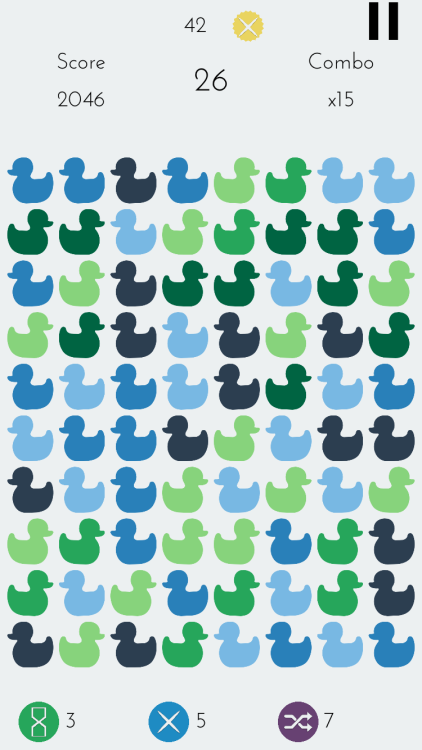
Independent developer, Yusuf Turk today announces Shade Combo 1.03, an update to his fast paced puzzle game developed for iPhone, iPad and iPod touch devices. In Shade Combo, players combine lighter shade ducks to turn them into darker shades and combine darkest ducks to make them disappear. Combining them rapidly in a row starts the combo counter. The faster you play without a wrong move, higher your score gets. Version 1.03 introduces 100 Moves Mode and Hard Mode.
Istanbul, Turkey - Independent developer, Yusuf Turk today is proud to announce the new update of Shade Combo, a game about ducks and combos for iPhone, iPad and iPod touch. 100 Moves Mode and Hard Mode is introduced on this version. Shade Combo is a new type of puzzle game for those tired of classic match-3 games.
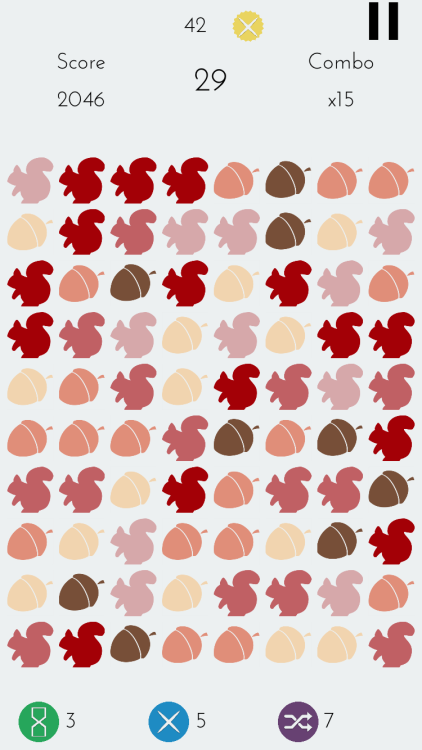
Players combine lighter shade ducks (or other objects) to turn them into darker shades and combine darkest ducks to make them disappear. Combining them rapidly in a row starts the combo counter. The score for each move is multiplied by your combo. Faster you play without a wrong move, higher your score gets. Every 10x combo earns the player a Combo Point which they can use to unlock more colors, shapes and power-ups. Power-ups give player opportunities to make even higher combos.
Features :
* 100+ items to unlock
* Timed Mode: Race against time
* Endless Mode: No time limit and unlimited shuffles
* 100 Moves Mode: Get the highest score in 100 moves
* Hard Mode: 3 items and 60 seconds
* Game Center integration
Language Support:
Shade Combo supports English, German, French, Spanish, Portuguese, Turkish, Chinese (Simplified), Chinese (Traditional), Japanese, Korean, Arabic and Russian languages.
Device Requirements:
* iPhone, iPad, and iPod touch
* Requires iOS 8.0 or later
* 26.9 MB
Shade Combo 1.03 is Free and available worldwide exclusively through the App Store in the Games category.
Shade Combo 1.03: http://www.shadecombo.com
Download from iTunes: https://itunes.apple.com/app/shade-combo/id1072766326
YouTube Video (App Preview): https://www.youtube.com/watch?v=QGg0cU-5sCY
Screenshot 1: http://62.media.tumblr.com/b9e77d11f3245e9d3c906a5159d5512f/tumblr_inline_o306dwbS3X1u1cuxt_500.png
Screenshot 2: http://62.media.tumblr.com/1591dbfbec17507691c04c9fcd8bfe99/tumblr_inline_o306fbI6w61u1cuxt_500.png
Media Assets: https://www.dropbox.com/sh/bqfi7hokmp9pdnp/AACdtaqak4HtXSNmxLOZnlzja?dl=0
Located in Istanbul, Turkey, Yusuf Turk is an independent game developer. Developing games since 2014, Yusuf released several titles such as XEZI: A Silk Road Adventure, F1V3, and Insane Red Ball. All Material and Software (C) Copyright 2016 Yusuf Turk. All Rights Reserved. Apple, the Apple logo, iPhone, iPod and iPad are registered trademarks of Apple Inc. in the U.S. and/or other countries. Other trademarks and registered trademarks may be the property of their respective owners.
*******
Link To Article: http://prmac.com/release-id-79685.htm
*******
---------------------------------------------------------------------------------
Note that you can alter delivered distributions at any time.
Login to your account on prMac to alter your channel selection, or to opt-out at any time.
Shade Combo 1.03 is out with Two New Modes - Game about Ducks and Combos - Published on 06/13/16
Independent developer, Yusuf Turk today announces Shade Combo 1.03, an update to his fast paced puzzle game developed for iPhone, iPad and iPod touch devices. In Shade Combo, players combine lighter shade ducks to turn them into darker shades and combine darkest ducks to make them disappear. Combining them rapidly in a row starts the combo counter. The faster you play without a wrong move, higher your score gets. Version 1.03 introduces 100 Moves Mode and Hard Mode.
Istanbul, Turkey - Independent developer, Yusuf Turk today is proud to announce the new update of Shade Combo, a game about ducks and combos for iPhone, iPad and iPod touch. 100 Moves Mode and Hard Mode is introduced on this version. Shade Combo is a new type of puzzle game for those tired of classic match-3 games.
Players combine lighter shade ducks (or other objects) to turn them into darker shades and combine darkest ducks to make them disappear. Combining them rapidly in a row starts the combo counter. The score for each move is multiplied by your combo. Faster you play without a wrong move, higher your score gets. Every 10x combo earns the player a Combo Point which they can use to unlock more colors, shapes and power-ups. Power-ups give player opportunities to make even higher combos.
Features :
* 100+ items to unlock
* Timed Mode: Race against time
* Endless Mode: No time limit and unlimited shuffles
* 100 Moves Mode: Get the highest score in 100 moves
* Hard Mode: 3 items and 60 seconds
* Game Center integration
Language Support:
Shade Combo supports English, German, French, Spanish, Portuguese, Turkish, Chinese (Simplified), Chinese (Traditional), Japanese, Korean, Arabic and Russian languages.
Device Requirements:
* iPhone, iPad, and iPod touch
* Requires iOS 8.0 or later
* 26.9 MB
Shade Combo 1.03 is Free and available worldwide exclusively through the App Store in the Games category.
Shade Combo 1.03: http://www.shadecombo.com
Download from iTunes: https://itunes.apple.com/app/shade-combo/id1072766326
YouTube Video (App Preview): https://www.youtube.com/watch?v=QGg0cU-5sCY
Screenshot 1: http://62.media.tumblr.com/b9e77d11f3245e9d3c906a5159d5512f/tumblr_inline_o306dwbS3X1u1cuxt_500.png
Screenshot 2: http://62.media.tumblr.com/1591dbfbec17507691c04c9fcd8bfe99/tumblr_inline_o306fbI6w61u1cuxt_500.png
Media Assets: https://www.dropbox.com/sh/bqfi7hokmp9pdnp/AACdtaqak4HtXSNmxLOZnlzja?dl=0
Located in Istanbul, Turkey, Yusuf Turk is an independent game developer. Developing games since 2014, Yusuf released several titles such as XEZI: A Silk Road Adventure, F1V3, and Insane Red Ball. All Material and Software (C) Copyright 2016 Yusuf Turk. All Rights Reserved. Apple, the Apple logo, iPhone, iPod and iPad are registered trademarks of Apple Inc. in the U.S. and/or other countries. Other trademarks and registered trademarks may be the property of their respective owners.
*******
Link To Article: http://prmac.com/release-id-79685.htm
*******
---------------------------------------------------------------------------------
Note that you can alter delivered distributions at any time.
Login to your account on prMac to alter your channel selection, or to opt-out at any time.
LinkOptimizer for InDesign Improves Sharpening Filter Application
A new article has been published at prMac.
LinkOptimizer for InDesign Improves Sharpening Filter Application - Published on 06/13/16
Zevrix Solutions announces LinkOptimizer 4.9.62, a maintenance update to its workflow automation solution for Adobe InDesign. LinkOptimizer lets users reduce the size of InDesign links by eliminating excess image data according to their final size and target resolution. The app can also perform essential image adjustments and convert colors and file formats. The new version improves the reliability of Photoshop sharpening filters application and addresses some image format conversion issues.
Toronto (ON) Canada - Zevrix Solutions today is proud to announce the release of LinkOptimizer 4.9.62, a maintenance update to its workflow automation solution for Adobe InDesign. LinkOptimizer helps users automate complex repetitive image manipulation tasks and easily repurpose InDesign documents for web and mobile devices with just a click of a button.
The new version addresses an issue in which the user defined automatic application of the Sharpen More filter in Photoshop could be omitted under certain condition. This issue didn't affect the action of the Unsharp Mask and Sharpen commands. The update also improves the reliability of GIF image conversion and fixes some minor UI glitches
"LinkOptimizer is the one product no creative studio can live without," says Wayne Guy from Edge Graphics studio in Lake Balboa, California. "It saves hours of time, tediously replacing linked images, resizing, batch processing... If you're a designer or production artist, you need this."
LinkOptimizer works automatically with Adobe Photoshop to eliminate the excess image data of InDesign links, perform essential image adjustments and convert image formats:
* Resize links to match their InDesign dimensions at a target resolution
* Reduce link size by eliminating excess image data
* Convert image colors and apply ICC profile
* Convert image formats
* Merge layers and delete hidden ones
* Run a Photoshop Action on each image
* Optimize files for web and mobile devices
As a result users can save gigabytes of disk space and hours of optimizing images manually, accelerate document output, reduce job turnaround and cut costs through faster processing.
Pricing and Availability:
LinkOptimizer can be purchased from Zevrix website for $259.95 USD (Light version: $179.95) as well as from authorized resellers. Trial is also available for download. The update is free for LinkOptimizer 4.x users and $130 to upgrade from previous versions. LinkOptimizer requires Mac OS X 10.6-10.11 and Adobe InDesign/Photoshop CS3-CC 2015.
Zevrix Solutions: http://zevrix.com
LinkOptimizer 4.9.62: http://zevrix.com/LinkOptimizer.php
Download LinkOptimizer: http://zevrix.com/LinkOptimizer.dmg
Purchase: http://zevrix.com/store.php
Screenshot: http://zevrix.com/screenshots/lo4/res-win-ysmt.gif
Located in Toronto, Canada, Zevrix Solutions provides automation and productivity solutions for Adobe Creative Cloud and Creative Suite software, PDF workflows, graphic file diagnostics and Microsoft Office output on Mac OS. Zevrix is dedicated to help professionals increase their profits through automating everyday tasks, producing error-free documents, saving disk space and cutting production costs. For more information, visit their website. Copyright (C) 2016 Zevrix Solutions. All Rights Reserved. Other trademarks and registered trademarks may be the property of their respective owners.
*******
Link To Article: http://prmac.com/release-id-79682.htm
*******
---------------------------------------------------------------------------------
Note that you can alter delivered distributions at any time.
Login to your account on prMac to alter your channel selection, or to opt-out at any time.
LinkOptimizer for InDesign Improves Sharpening Filter Application - Published on 06/13/16
Zevrix Solutions announces LinkOptimizer 4.9.62, a maintenance update to its workflow automation solution for Adobe InDesign. LinkOptimizer lets users reduce the size of InDesign links by eliminating excess image data according to their final size and target resolution. The app can also perform essential image adjustments and convert colors and file formats. The new version improves the reliability of Photoshop sharpening filters application and addresses some image format conversion issues.
Toronto (ON) Canada - Zevrix Solutions today is proud to announce the release of LinkOptimizer 4.9.62, a maintenance update to its workflow automation solution for Adobe InDesign. LinkOptimizer helps users automate complex repetitive image manipulation tasks and easily repurpose InDesign documents for web and mobile devices with just a click of a button.
The new version addresses an issue in which the user defined automatic application of the Sharpen More filter in Photoshop could be omitted under certain condition. This issue didn't affect the action of the Unsharp Mask and Sharpen commands. The update also improves the reliability of GIF image conversion and fixes some minor UI glitches
"LinkOptimizer is the one product no creative studio can live without," says Wayne Guy from Edge Graphics studio in Lake Balboa, California. "It saves hours of time, tediously replacing linked images, resizing, batch processing... If you're a designer or production artist, you need this."
LinkOptimizer works automatically with Adobe Photoshop to eliminate the excess image data of InDesign links, perform essential image adjustments and convert image formats:
* Resize links to match their InDesign dimensions at a target resolution
* Reduce link size by eliminating excess image data
* Convert image colors and apply ICC profile
* Convert image formats
* Merge layers and delete hidden ones
* Run a Photoshop Action on each image
* Optimize files for web and mobile devices
As a result users can save gigabytes of disk space and hours of optimizing images manually, accelerate document output, reduce job turnaround and cut costs through faster processing.
Pricing and Availability:
LinkOptimizer can be purchased from Zevrix website for $259.95 USD (Light version: $179.95) as well as from authorized resellers. Trial is also available for download. The update is free for LinkOptimizer 4.x users and $130 to upgrade from previous versions. LinkOptimizer requires Mac OS X 10.6-10.11 and Adobe InDesign/Photoshop CS3-CC 2015.
Zevrix Solutions: http://zevrix.com
LinkOptimizer 4.9.62: http://zevrix.com/LinkOptimizer.php
Download LinkOptimizer: http://zevrix.com/LinkOptimizer.dmg
Purchase: http://zevrix.com/store.php
Screenshot: http://zevrix.com/screenshots/lo4/res-win-ysmt.gif

Located in Toronto, Canada, Zevrix Solutions provides automation and productivity solutions for Adobe Creative Cloud and Creative Suite software, PDF workflows, graphic file diagnostics and Microsoft Office output on Mac OS. Zevrix is dedicated to help professionals increase their profits through automating everyday tasks, producing error-free documents, saving disk space and cutting production costs. For more information, visit their website. Copyright (C) 2016 Zevrix Solutions. All Rights Reserved. Other trademarks and registered trademarks may be the property of their respective owners.
*******
Link To Article: http://prmac.com/release-id-79682.htm
*******
---------------------------------------------------------------------------------
Note that you can alter delivered distributions at any time.
Login to your account on prMac to alter your channel selection, or to opt-out at any time.
Anti-Screenshot and Nuke Features Released by DatChat
A new article has been published at prMac.
Anti-Screenshot and Nuke Features Released by DatChat - Published on 06/13/16
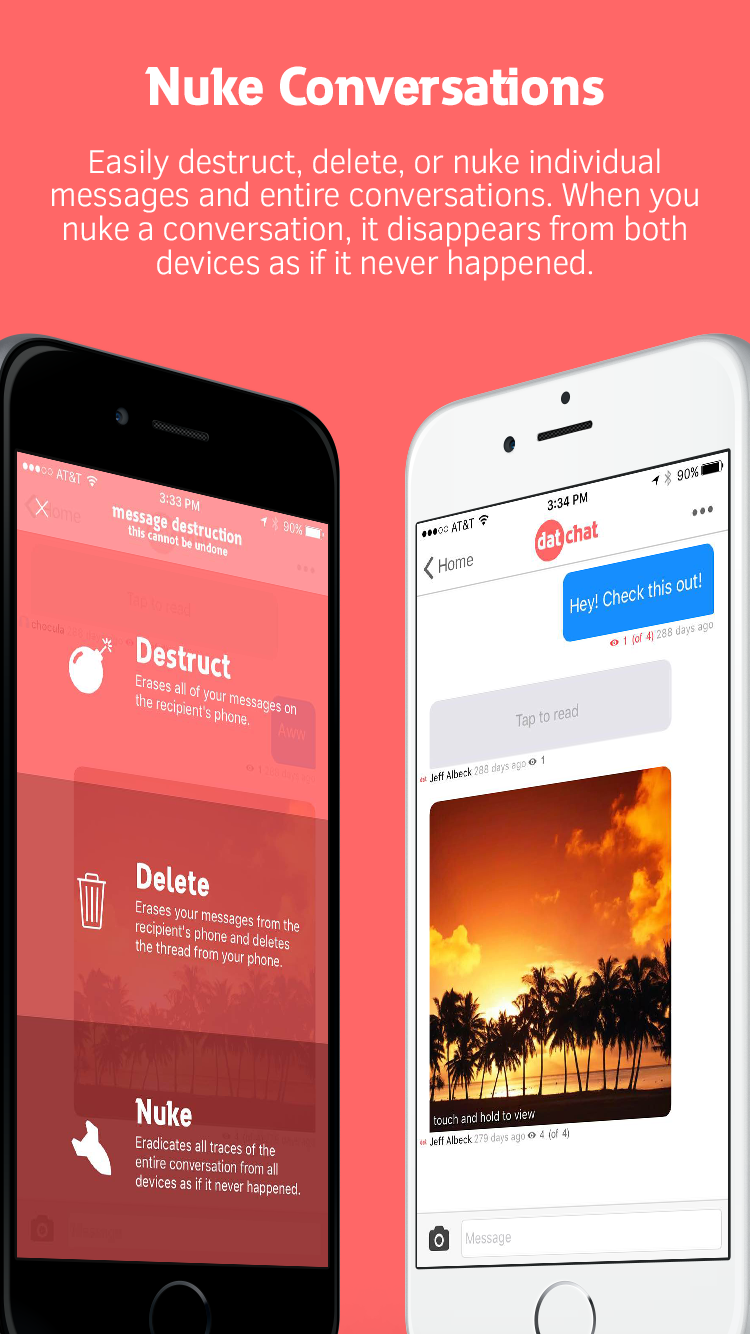
DatChat Inc. announces the official launch of DatChat Messenger 1.4.2, the company's social networking app for iOS devices. DatChat Messenger offers an unprecedented level of privacy control for both individual and group messages. Featuring unlimited message control, this app provides the option to dictate how long sent messages are accessible on the recipient's phone. It is also offers a Nuke option, which will erase both sides of a conversation on both the sender and recipient's devices.
New Brunswick, New Jersey - DatChat Inc. is pleased to announce the availability of DatChat Messenger 1.4.2 for iOS, offering an unprecedented level of privacy control for both individual and group messages. DatChat Messenger is the first privacy messaging app that provides the option to dictate how long sent messages are accessible on the recipient's phone. It is also the first to offer a "Nuke" option, which will erase both sides of a conversation on both the sender and recipient's devices.
DatChat Messenger gives senders a new level of privacy and control through its customizable messaging settings. Senders can set a message to last forever, or automatically self-destruct after a certain number of views. At any time a sender can wipe texts off a recipient's phone or give the recipient more time to view the message. Senders can choose to change the rights to a single message or destruct all of their messages at once. Additional features include the ability to remain anonymous, prevent screenshots and hide pictures behind preview images on the camera roll and in the messaging stream.
"Whether online dating or texting a colleague, we've all had those moments when we've regretted sending a message or we simply want to make sure it isn't seen by the wrong person," said Darin Myman, co-founder and CEO of DatChat Inc. "In addition to DatChat's unique privacy features, users don't have to deal with the annoyance of having a conversation one disappearing message at a time. DatChat offers a traditional messaging experience without giving up control of shared messages and pictures."
DatChat Messenger includes the following features:
* Self-Destructing Messages:
The sender decides how many times pictures or messages can be viewed before they self-destruct. Also, the sender can dictate how many views are left or erase the content at any time. Users can even opt to Nuke messages, which erases both sides of the conversation on both the sender and recipient's devices.
* Hide in Plain Sight:
Senders can hide pictures and information on the camera roll, hidden and encrypted behind other pictures. Only the cover photo can be seen in plain sight.
* Screenshot Protection:
DatChat features a protection mode which makes it nearly impossible to screenshot a secret message. Also, the sender receives notifications when someone attempts to screenshot protected or regular self-destructing messages.
* Without a Trace:
Messages vanish without a trace when they reach a view limit or are manually destructed, and are deleted forever. DatChat Inc. employees can never access messages.
* Powerful Privacy:
Every message sent is double encrypted and can only be viewed by the sender and the intended recipient.
* Fast, Safe and Easy:
It is easy to send and control messages. Camraflage is DatChat's patent-pending technology that hides a message behind a decoy cover photo. Camraflage messages can be sent via encrypted messages using the direct messaging built into DatChat, iMessage or email.
* Message Security:
Only the sender and intended recipients can view messages - they cannot be forwarded to anyone else. While on the DatChat servers, they cannot be viewed by anyone because only the sender has the key.
* Multiple Accounts:
Senders can have multiple accounts with friends, messages and secret pictures only visible when logged in to that respective account.
* Anonymity:
No phone number, email or personal information required. All users need is a screen name to send a message.
Device Requirements:
* iPhone, iPad, and iPod touch
* Requires iOS 8.1 or later
* 8.5 MB
Pricing and Availability:
DatChat Messenger 1.4.2 is Free and available worldwide exclusively through the App Store in the Social Networking category.
DatChat Messenger 1.4.2: http://www.datchat.net
Download from iTunes: https://itunes.apple.com/app/datchat/id999516973
Darin Myman: http://darinmyman.blogspot.com/
Screenshot: http://datchat.net/img/iphone5-4.png
App Icon: http://datchat.net/img/icon-master_1024.png
DatChat Inc. was founded in 2015 by a team dedicated to creating a messaging platform that always provides privacy, control and security.
All Material and Software (C) Copyright 2016 DatChat, Inc. All Rights Reserved. Apple, the Apple logo, iPhone, iPod and iPad are registered trademarks of Apple Inc. in the U.S. and/or other countries. Other trademarks and registered trademarks may be the property of their respective owners.
*******
Link To Article: http://prmac.com/release-id-79678.htm
*******
---------------------------------------------------------------------------------
Note that you can alter delivered distributions at any time.
Login to your account on prMac to alter your channel selection, or to opt-out at any time.
Anti-Screenshot and Nuke Features Released by DatChat - Published on 06/13/16
DatChat Inc. announces the official launch of DatChat Messenger 1.4.2, the company's social networking app for iOS devices. DatChat Messenger offers an unprecedented level of privacy control for both individual and group messages. Featuring unlimited message control, this app provides the option to dictate how long sent messages are accessible on the recipient's phone. It is also offers a Nuke option, which will erase both sides of a conversation on both the sender and recipient's devices.
New Brunswick, New Jersey - DatChat Inc. is pleased to announce the availability of DatChat Messenger 1.4.2 for iOS, offering an unprecedented level of privacy control for both individual and group messages. DatChat Messenger is the first privacy messaging app that provides the option to dictate how long sent messages are accessible on the recipient's phone. It is also the first to offer a "Nuke" option, which will erase both sides of a conversation on both the sender and recipient's devices.
DatChat Messenger gives senders a new level of privacy and control through its customizable messaging settings. Senders can set a message to last forever, or automatically self-destruct after a certain number of views. At any time a sender can wipe texts off a recipient's phone or give the recipient more time to view the message. Senders can choose to change the rights to a single message or destruct all of their messages at once. Additional features include the ability to remain anonymous, prevent screenshots and hide pictures behind preview images on the camera roll and in the messaging stream.
"Whether online dating or texting a colleague, we've all had those moments when we've regretted sending a message or we simply want to make sure it isn't seen by the wrong person," said Darin Myman, co-founder and CEO of DatChat Inc. "In addition to DatChat's unique privacy features, users don't have to deal with the annoyance of having a conversation one disappearing message at a time. DatChat offers a traditional messaging experience without giving up control of shared messages and pictures."
DatChat Messenger includes the following features:
* Self-Destructing Messages:
The sender decides how many times pictures or messages can be viewed before they self-destruct. Also, the sender can dictate how many views are left or erase the content at any time. Users can even opt to Nuke messages, which erases both sides of the conversation on both the sender and recipient's devices.
* Hide in Plain Sight:
Senders can hide pictures and information on the camera roll, hidden and encrypted behind other pictures. Only the cover photo can be seen in plain sight.
* Screenshot Protection:
DatChat features a protection mode which makes it nearly impossible to screenshot a secret message. Also, the sender receives notifications when someone attempts to screenshot protected or regular self-destructing messages.
* Without a Trace:
Messages vanish without a trace when they reach a view limit or are manually destructed, and are deleted forever. DatChat Inc. employees can never access messages.
* Powerful Privacy:
Every message sent is double encrypted and can only be viewed by the sender and the intended recipient.
* Fast, Safe and Easy:
It is easy to send and control messages. Camraflage is DatChat's patent-pending technology that hides a message behind a decoy cover photo. Camraflage messages can be sent via encrypted messages using the direct messaging built into DatChat, iMessage or email.
* Message Security:
Only the sender and intended recipients can view messages - they cannot be forwarded to anyone else. While on the DatChat servers, they cannot be viewed by anyone because only the sender has the key.
* Multiple Accounts:
Senders can have multiple accounts with friends, messages and secret pictures only visible when logged in to that respective account.
* Anonymity:
No phone number, email or personal information required. All users need is a screen name to send a message.
Device Requirements:
* iPhone, iPad, and iPod touch
* Requires iOS 8.1 or later
* 8.5 MB
Pricing and Availability:
DatChat Messenger 1.4.2 is Free and available worldwide exclusively through the App Store in the Social Networking category.
DatChat Messenger 1.4.2: http://www.datchat.net
Download from iTunes: https://itunes.apple.com/app/datchat/id999516973
Darin Myman: http://darinmyman.blogspot.com/
Screenshot: http://datchat.net/img/iphone5-4.png
App Icon: http://datchat.net/img/icon-master_1024.png

DatChat Inc. was founded in 2015 by a team dedicated to creating a messaging platform that always provides privacy, control and security.
All Material and Software (C) Copyright 2016 DatChat, Inc. All Rights Reserved. Apple, the Apple logo, iPhone, iPod and iPad are registered trademarks of Apple Inc. in the U.S. and/or other countries. Other trademarks and registered trademarks may be the property of their respective owners.
*******
Link To Article: http://prmac.com/release-id-79678.htm
*******
---------------------------------------------------------------------------------
Note that you can alter delivered distributions at any time.
Login to your account on prMac to alter your channel selection, or to opt-out at any time.
Leawo Prof. Media Mac 7.5.0 Debut with Improved HD Screen Compatibility
A new article has been published at prMac.
Leawo Prof. Media Mac 7.5.0 Debut with Improved HD Screen Compatibility - Published on 06/13/16
Leawo Software today releases Prof. Media for Mac 7.5.0, its all-in-one Mac media converter suite. Prof. Media for Mac handles media conversions between Blu-ray, DVD, video and audio files on Mac. The new version brings full-scale improvements in both program functions and user experience. Key upgrades include: improved HD screen compatibility, fixed video and audio out-of-sync problem, optimized subtitle display and 3D effect applying, promoted video conversion success rate, and more.
Shenzhen, China - For better user experience, Leawo Software officially released Prof. Media for Mac 7.5.0, its all-in-one Mac media converter suite. The new version brings full-scale improvements in both program functions and user experience. Key upgrades include: improved HD screen compatibility, fixed video and audio out-of-sync problem, optimized subtitle display and 3D effect applying, promoted video conversion success rate, etc.
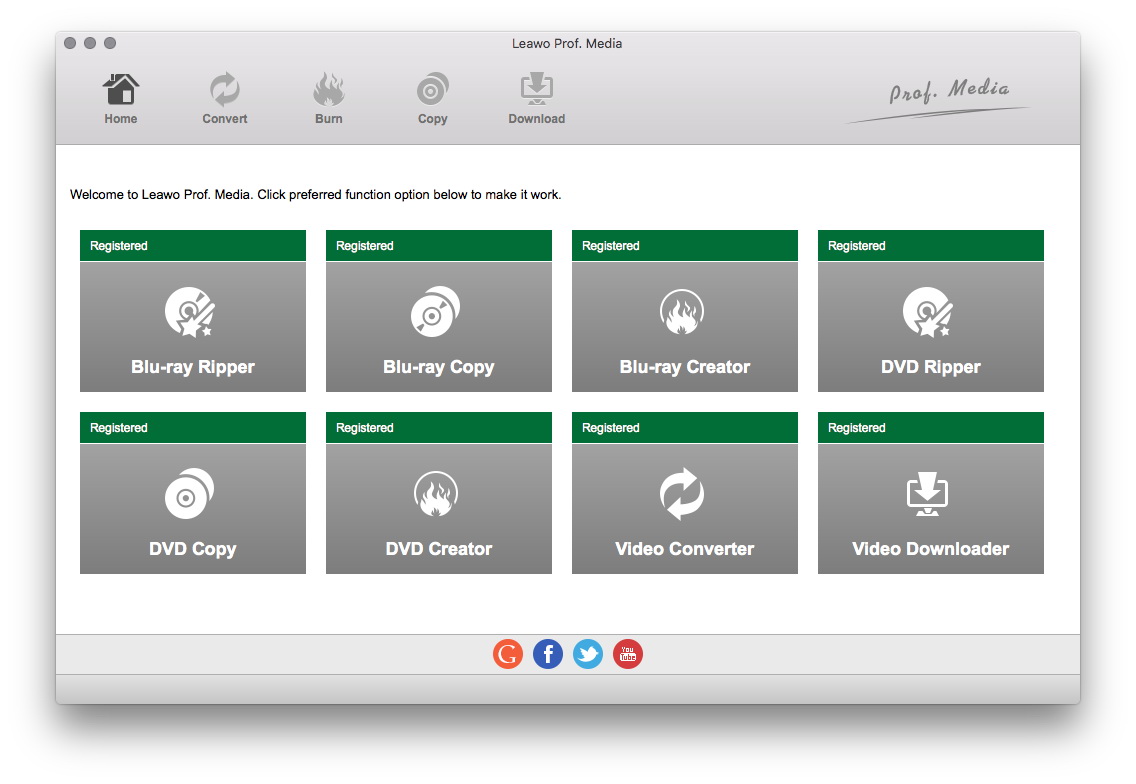
Leawo Prof. Media for Mac is a media converter suite for Mac computer owners to handle media conversions between Blu-ray, DVD, video and audio files on Mac. It includes multiple function modules: Mac video converter, Mac Blu-ray converter, Mac Blu-ray copy, Mac Blu-ray creator, Mac video downloader, Mac DVD copy, Mac DVD creator, Mac DVD ripper, Mac photo slideshow maker and burner, 2D to 3D movie converter, etc. It is the flagship of Leawo product line.
As the total media converter suite for Mac, Leawo Prof. Media for Mac gets frequent update according to people�s feedback. In this V7.5.0 Mac media converter update, Leawo tech team successfully fixed several vital errors to deliver better UI experience and more wonderful functions.
HD screen compatibility means the ability to automatically adapt HD screens like 4K and 1080P screen displays. Poor HD screen compatibility often results in interface and text distortion on large 4K screens. In this Mac media converter update, Leawo improved Prof. Media for Mac�s HD screen compatibility so as to let the program automatically change program interface and text size to adapt 4K and 1080P large screens.
Video and audio synchronization means a lot to movie enjoyment. According to feedback, previously, when people tried to burn AVI/MP4 to Blu-ray disc, or convert AVI video to H.265 MKV format, the video and audio in output content is out of sync. In this update, Leawo successfully fixed this error and ensured people with well synchronized video and audio in output file.
ASS, SSA and SRT subtitles could be added within this Mac media converter suite to let people enjoy movies in familiar language. However, due to the origins of subtitle files, some ASS and SSA subtitles may not display, and some SRT subtitle might contain illegal characters in previous version. Through this upgrade, these problems have been perfectly solved. People could now freely add external subtitles for either burning video to DVD/Blu-ray or converting between different video formats.
Leawo Prof. Media for Mac enables people to create 3D movies through the internal 2D to 3D converter, which offers 6 different 3D effects and enables changing 3D Depth. In this upgrade, Leawo tech team optimized the internal 2D to 3D converter so as to avoid program crash while applying 3D effect.
The internal Blu-ray creator allows people to burn Blu-ray/DVD disc from various video files. However, due to the difference of common video format and Blu-ray format, some burned discs stuck or blur screen during playback. With advanced tech planted, this upgrade fixed this error and ensured smooth playback of burned discs.
Through this upgrade, video conversion success rate has been promoted to 100%, no matter which kind of conversion it is. Currently, Leawo Prof. Media for Mac is available on Leawo�s official website. Anyone can download Prof. Media for Mac to experience these new features. For more information, please visit Leawo Software online.
Leawo Software: http://www.leawo.org/
Prof. Media for Mac 7.5.0: http://www.leawo.org/total-media-converter-ultimate-mac/
Download Trial: http://www.leawo.org/downloads/total-media-converter-ultimate-mac.html
Purchase: http://www.leawo.org/buy-mac/index.html?pro=mac-total-media-converter-ultimate
Screenshot: http://www.leawo.org/images/tutorial/total-media-converter-ultimate-mac/tmcum.jpg
Leawo Software is a multimedia software developer dedicated to providing practical and useful software products and services to worldwide media fans. Leawo Software products range from Blu-ray HTPC player, Blu-ray Ripper, Blu-ray Creator, Music Recorder, iTunes Cleaner, DVD Ripper, DVD Creator, Video Converter, iTransfer to other utilities on Win or Mac platform. Copyright (C) 2016 Leawo Software. All Rights Reserved. Apple, the Apple logo and Mac OS X platform are trademarks of Apple Inc. in the U.S. and/or other countries.
*******
Link To Article: http://prmac.com/release-id-79683.htm
*******
---------------------------------------------------------------------------------
Note that you can alter delivered distributions at any time.
Login to your account on prMac to alter your channel selection, or to opt-out at any time.
Leawo Prof. Media Mac 7.5.0 Debut with Improved HD Screen Compatibility - Published on 06/13/16
Leawo Software today releases Prof. Media for Mac 7.5.0, its all-in-one Mac media converter suite. Prof. Media for Mac handles media conversions between Blu-ray, DVD, video and audio files on Mac. The new version brings full-scale improvements in both program functions and user experience. Key upgrades include: improved HD screen compatibility, fixed video and audio out-of-sync problem, optimized subtitle display and 3D effect applying, promoted video conversion success rate, and more.
Shenzhen, China - For better user experience, Leawo Software officially released Prof. Media for Mac 7.5.0, its all-in-one Mac media converter suite. The new version brings full-scale improvements in both program functions and user experience. Key upgrades include: improved HD screen compatibility, fixed video and audio out-of-sync problem, optimized subtitle display and 3D effect applying, promoted video conversion success rate, etc.
Leawo Prof. Media for Mac is a media converter suite for Mac computer owners to handle media conversions between Blu-ray, DVD, video and audio files on Mac. It includes multiple function modules: Mac video converter, Mac Blu-ray converter, Mac Blu-ray copy, Mac Blu-ray creator, Mac video downloader, Mac DVD copy, Mac DVD creator, Mac DVD ripper, Mac photo slideshow maker and burner, 2D to 3D movie converter, etc. It is the flagship of Leawo product line.
As the total media converter suite for Mac, Leawo Prof. Media for Mac gets frequent update according to people�s feedback. In this V7.5.0 Mac media converter update, Leawo tech team successfully fixed several vital errors to deliver better UI experience and more wonderful functions.
HD screen compatibility means the ability to automatically adapt HD screens like 4K and 1080P screen displays. Poor HD screen compatibility often results in interface and text distortion on large 4K screens. In this Mac media converter update, Leawo improved Prof. Media for Mac�s HD screen compatibility so as to let the program automatically change program interface and text size to adapt 4K and 1080P large screens.
Video and audio synchronization means a lot to movie enjoyment. According to feedback, previously, when people tried to burn AVI/MP4 to Blu-ray disc, or convert AVI video to H.265 MKV format, the video and audio in output content is out of sync. In this update, Leawo successfully fixed this error and ensured people with well synchronized video and audio in output file.
ASS, SSA and SRT subtitles could be added within this Mac media converter suite to let people enjoy movies in familiar language. However, due to the origins of subtitle files, some ASS and SSA subtitles may not display, and some SRT subtitle might contain illegal characters in previous version. Through this upgrade, these problems have been perfectly solved. People could now freely add external subtitles for either burning video to DVD/Blu-ray or converting between different video formats.
Leawo Prof. Media for Mac enables people to create 3D movies through the internal 2D to 3D converter, which offers 6 different 3D effects and enables changing 3D Depth. In this upgrade, Leawo tech team optimized the internal 2D to 3D converter so as to avoid program crash while applying 3D effect.
The internal Blu-ray creator allows people to burn Blu-ray/DVD disc from various video files. However, due to the difference of common video format and Blu-ray format, some burned discs stuck or blur screen during playback. With advanced tech planted, this upgrade fixed this error and ensured smooth playback of burned discs.
Through this upgrade, video conversion success rate has been promoted to 100%, no matter which kind of conversion it is. Currently, Leawo Prof. Media for Mac is available on Leawo�s official website. Anyone can download Prof. Media for Mac to experience these new features. For more information, please visit Leawo Software online.
Leawo Software: http://www.leawo.org/
Prof. Media for Mac 7.5.0: http://www.leawo.org/total-media-converter-ultimate-mac/
Download Trial: http://www.leawo.org/downloads/total-media-converter-ultimate-mac.html
Purchase: http://www.leawo.org/buy-mac/index.html?pro=mac-total-media-converter-ultimate
Screenshot: http://www.leawo.org/images/tutorial/total-media-converter-ultimate-mac/tmcum.jpg
Leawo Software is a multimedia software developer dedicated to providing practical and useful software products and services to worldwide media fans. Leawo Software products range from Blu-ray HTPC player, Blu-ray Ripper, Blu-ray Creator, Music Recorder, iTunes Cleaner, DVD Ripper, DVD Creator, Video Converter, iTransfer to other utilities on Win or Mac platform. Copyright (C) 2016 Leawo Software. All Rights Reserved. Apple, the Apple logo and Mac OS X platform are trademarks of Apple Inc. in the U.S. and/or other countries.
*******
Link To Article: http://prmac.com/release-id-79683.htm
*******
---------------------------------------------------------------------------------
Note that you can alter delivered distributions at any time.
Login to your account on prMac to alter your channel selection, or to opt-out at any time.
iOS Region Releases iCheckMate 3.0 for iOS - Classic Board Game
A new article has been published at prMac.
iOS Region Releases iCheckMate 3.0 for iOS - Classic Board Game - Published on 06/12/16
iOS Region announces iCheckMate 3.0, an update to their popular chess game developed for iOS devices. iCheckMate provides a rich experience of this classic board game. Featuring superb graphics and sound effects, iCheckMate supports both 1 player and 2 player gameplay, so you can play against friends or test your skills against a challenging computer opponent. Featuring an all new iOS7 design, version 3.0 offers UI and Logic improvements.
Yerevan, Armenia - iOS Region is pleased to announce the release of iCheckMate 3.0, an update to their popular chess game developed for iPhone, iPad and iPod touch devices. iCheckMate offers a rich experience of this popular board game. There are levels for beginners and masters. The game supports both 1 player and 2 player gameplay, so you can play against friends or test your skills against a challenging computer opponent. Featuring superb graphic and great design with sound effects, iCheckMate is sure to please serious as well as casual players alike.
Chess has always been considered to be one of the smartest games ever. The game itself is not just an idle amusement but also a great strengthening sport for our mind. iCheckMate is not only fun and enjoyable, but also promotes good mental health and social skills. It helps teach patience, enhanced memory, analytical abilities, and learning to think outside the box. All you need is 10 minutes to enjoy playing chess every day.
Features:
* Levels for beginners and masters
* Nice sound effects add a little more fun to the game
* Supports both 1 player and 2 player game play
* Superb graphic and great design
Version 3.0 introduces an all new design IOS 7 style with general improvements to game play as well as minor bug fixes. This new and updated version mixes amusement with thinking and is for anyone who is fond of intelligent and interesting games.
If you have any suggestions please contact to our Facebook page. Our team is always ready to listen to your new ideas and suggestions to make them reality. We are looking forward to your messages.
Device Requirements:
* iPhone, iPad, and iPod touch
* Requires iOS 7.0 or later
* 42.4 MB
Pricing and Availability:
iCheckMate 3.0 is free, and is available worldwide exclusively through the App Store in the Games category.
LastThink: http://lastthink.com/
iCheckMate 3.0: https://www.facebook.com/IphoneRegion
Download from iTunes: https://itunes.apple.com/app/icheckmate/id581729683
Screenshot: http://a1.mzstatic.com/us/r30/Purple30/v4/4e/37/82/4e3782d1-132d-1aa2-735e-2479554ced75/screen322x572.jpeg
App Icon: http://a3.mzstatic.com/us/r30/Purple30/v4/f0/c4/2c/f0c42c09-8fc0-39e5-a4e3-07c2fda6eaed/icon175x175.png
Located in Yerevan, Armenia, iOS Region is a software development company, specializing in iPhone and iPad application development. Most of the apps developed by iOS Region are games, radio apps and keyboards. All Material and Software (C) Copyright 2016 iOS Region. All Rights Reserved. Apple, the Apple logo, iPhone, iPod and iPad are registered trademarks of Apple Inc. in the U.S. and/or other countries. Other trademarks and registered trademarks may be the property of their respective owners.
*******
Link To Article: http://prmac.com/release-id-79681.htm
*******
---------------------------------------------------------------------------------
Note that you can alter delivered distributions at any time.
Login to your account on prMac to alter your channel selection, or to opt-out at any time.
iOS Region Releases iCheckMate 3.0 for iOS - Classic Board Game - Published on 06/12/16
iOS Region announces iCheckMate 3.0, an update to their popular chess game developed for iOS devices. iCheckMate provides a rich experience of this classic board game. Featuring superb graphics and sound effects, iCheckMate supports both 1 player and 2 player gameplay, so you can play against friends or test your skills against a challenging computer opponent. Featuring an all new iOS7 design, version 3.0 offers UI and Logic improvements.
Yerevan, Armenia - iOS Region is pleased to announce the release of iCheckMate 3.0, an update to their popular chess game developed for iPhone, iPad and iPod touch devices. iCheckMate offers a rich experience of this popular board game. There are levels for beginners and masters. The game supports both 1 player and 2 player gameplay, so you can play against friends or test your skills against a challenging computer opponent. Featuring superb graphic and great design with sound effects, iCheckMate is sure to please serious as well as casual players alike.
Chess has always been considered to be one of the smartest games ever. The game itself is not just an idle amusement but also a great strengthening sport for our mind. iCheckMate is not only fun and enjoyable, but also promotes good mental health and social skills. It helps teach patience, enhanced memory, analytical abilities, and learning to think outside the box. All you need is 10 minutes to enjoy playing chess every day.
Features:
* Levels for beginners and masters
* Nice sound effects add a little more fun to the game
* Supports both 1 player and 2 player game play
* Superb graphic and great design
Version 3.0 introduces an all new design IOS 7 style with general improvements to game play as well as minor bug fixes. This new and updated version mixes amusement with thinking and is for anyone who is fond of intelligent and interesting games.
If you have any suggestions please contact to our Facebook page. Our team is always ready to listen to your new ideas and suggestions to make them reality. We are looking forward to your messages.
Device Requirements:
* iPhone, iPad, and iPod touch
* Requires iOS 7.0 or later
* 42.4 MB
Pricing and Availability:
iCheckMate 3.0 is free, and is available worldwide exclusively through the App Store in the Games category.
LastThink: http://lastthink.com/
iCheckMate 3.0: https://www.facebook.com/IphoneRegion
Download from iTunes: https://itunes.apple.com/app/icheckmate/id581729683
Screenshot: http://a1.mzstatic.com/us/r30/Purple30/v4/4e/37/82/4e3782d1-132d-1aa2-735e-2479554ced75/screen322x572.jpeg

App Icon: http://a3.mzstatic.com/us/r30/Purple30/v4/f0/c4/2c/f0c42c09-8fc0-39e5-a4e3-07c2fda6eaed/icon175x175.png

Located in Yerevan, Armenia, iOS Region is a software development company, specializing in iPhone and iPad application development. Most of the apps developed by iOS Region are games, radio apps and keyboards. All Material and Software (C) Copyright 2016 iOS Region. All Rights Reserved. Apple, the Apple logo, iPhone, iPod and iPad are registered trademarks of Apple Inc. in the U.S. and/or other countries. Other trademarks and registered trademarks may be the property of their respective owners.
*******
Link To Article: http://prmac.com/release-id-79681.htm
*******
---------------------------------------------------------------------------------
Note that you can alter delivered distributions at any time.
Login to your account on prMac to alter your channel selection, or to opt-out at any time.
Subscribe to:
Posts (Atom)