A new article has been published at prMac.
Maintain Releases Cocktail 9.3.1 (El Capitan Edition) - Published on 06/15/16
Maintain today announces Cocktail 9.3.1 (El Capitan Edition), the latest maintenance update for users running OS X El Capitan 10.11. Cocktail is a general purpose utility for OS X that lets users clean, repair and optimize their Macs. This version adds ability to change number of Recent Places in the Open/Save dialogs and contains significant improvements on the "Clear applications caches" procedure. It also resolves a number of minor issues discovered in the previous release.
Ekero, Sweden - Maintain today is pleased to announce the release of Cocktail 9.3.1 (El Capitan Edition), the latest maintenance update for users running OS X El Capitan 10.11. The update is highly recommended for all users of Cocktail (El Capitan Edition).
What's New:
* Added ability to change number of Recent Places in the Open and Save dialogs (Interface - General)
* Significant improvements on the "Clear applications caches" procedure
* Resolves a number of minor issues discovered in the previous release
* Updated Automator actions
* Updated Help files
Cocktail is a general purpose utility for OS X that lets you clean, repair and optimize your Mac. The application serves up a perfect mix of maintenance tools and tweaks, all accessible through a clean and easy to use interface. Cocktail's features are arranged into five categories that helps you manage various aspects of your computer. It also comes with an automatic Pilot mode that allows you to simply press a button and relax, knowing that Cocktail will take care of the rest.
Disk:
* Automatically check S.M.A.R.T. status of disks
* Enable or disable journaling
* Repair disk permissions
* Reset home directory permissions and ACLs
* Set disk sleep (spindown) time
* Modify standby delay
* Change other disk sleep settings
* Force eject CD/DVD
System:
* Run periodic maintenance scripts
* Purge inactive memory and optimize virtual memory usage
* Manage Spotlight indexing
* Erase Spotlight indexes
* Modify Time Machine settings
* Rebuild Launch Services and Help databases
* Rebuild Mail's Envelope Index
* Update locate and whatis databases
* Force empty the Trash
* Change startup mode or set startup delay
* Disable startup sound
* Disable Notification Center and App Nap
Files:
* Clear system caches
* Clear user caches
* Clear font caches
* Clear virtual memory swap files
* Clear temporary files
* Clear Internet caches
* Clear cookies, download lists, form values and history files
* Clear Adobe Flash Player caches and cookies
* Clear applications caches
* Search for corrupted preference files
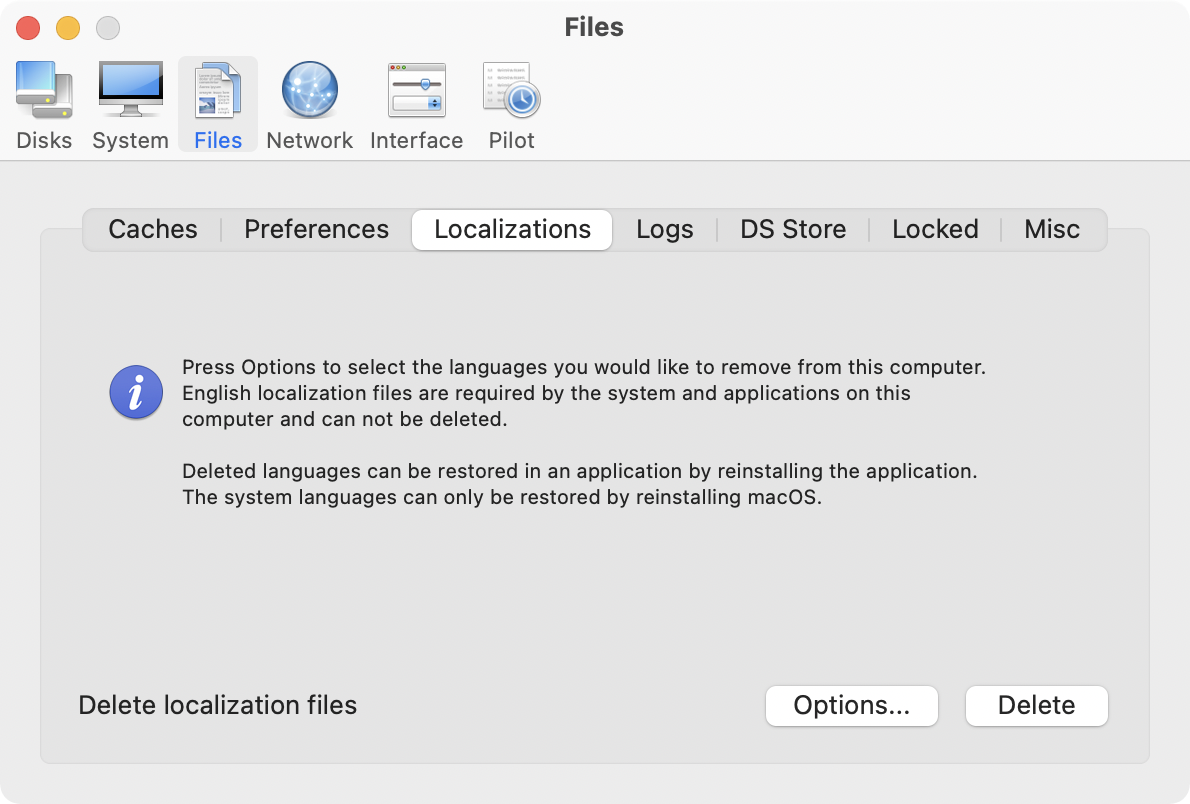
* Delete unnecessary localization (language resources) files
* Clear and manage (view, print and save) log files
* Delete invisible DS Store files
* Delete locked or inaccessible items
Network:
* Change speed, duplex and MTU of network cards
* Easily optimize network settings for common connection types
* Modify IP configuration parameters
* Configure File Sharing settings
Interface:
* Customize look and features of Finder, Dock, login window and other system services
* Modify hidden settings of Safari, QuickTime X and iTunes
Pilot:
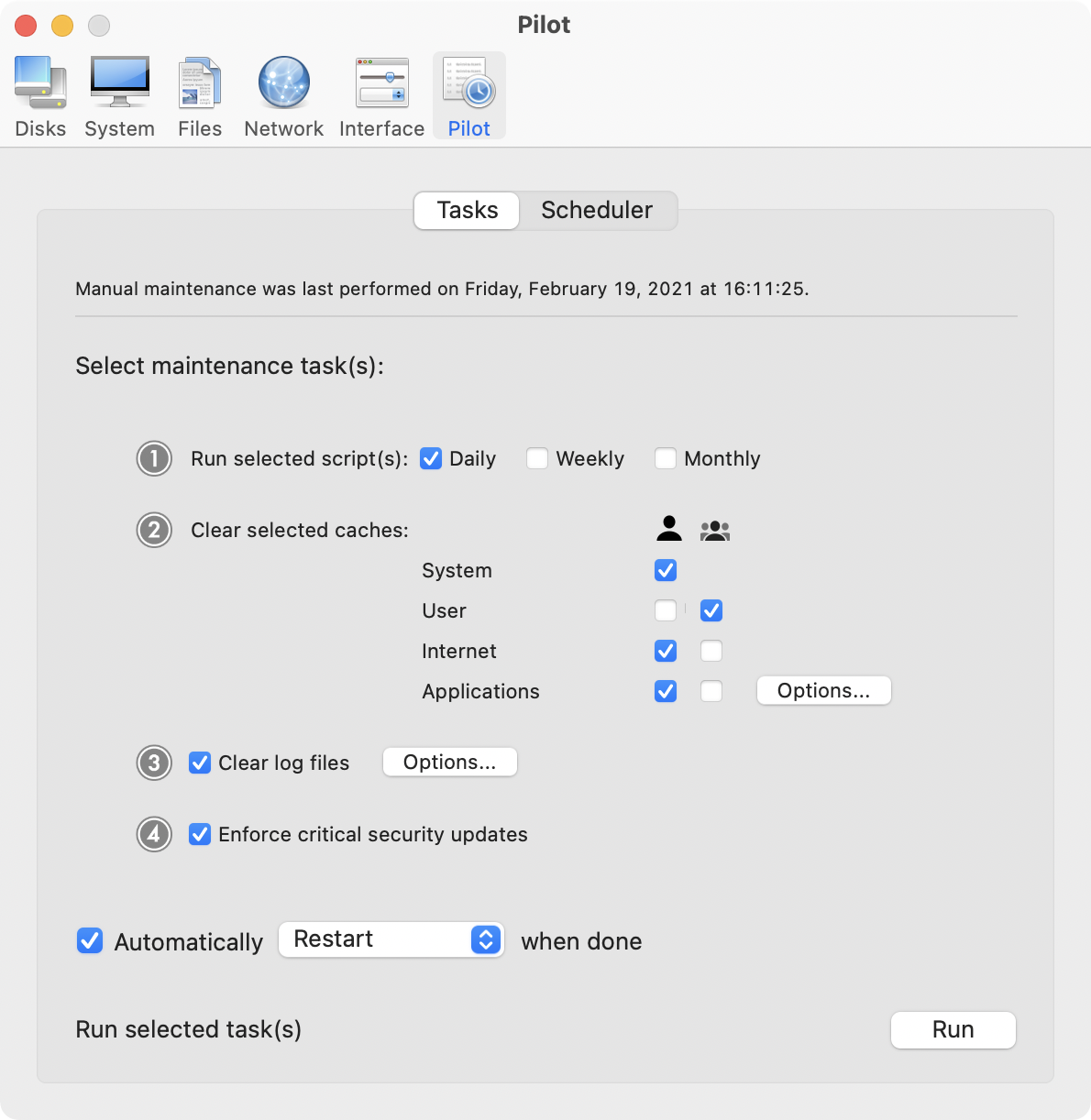
* Clean, repair and optimize your system with one click of the button
* Schedule clearing of caches and log files as well as permissions repair and run of periodic maintenance scripts
System Requirements:
Cocktail 9.3.1 (El Capitan Edition) requires OS X El Capitan 10.11 to run. Cocktail (Yosemite Edition) for OS X 10.10, Cocktail (Mavericks Edition) for OS X 10.9, Cocktail (Mountain Lion Edition) for OS X 10.8 and Cocktail (Lion Edition) for OS X 10.7 are available for download from Maintain website.
Pricing and Availability:
Cocktail is $19.00 (USD) for a single user license and available for purchase from the Maintain website. When unregistered, Cocktail runs in demo mode and will expire after the tenth launch.
Cocktail 9.3.1 (El Capitan Edition): http://www.maintain.se/cocktail
Download Cocktail 9.3.1 (El Capitan Edition): http://usa.maintain.se/Cocktail9ECE.dmg
Vimeo Video: https://vimeo.com/109816714
Screenshot 1: http://www.maintain.se/downloads/screenshots/screenshot1.png
Screenshot 2: http://www.maintain.se/downloads/screenshots/screenshot2.png
Application Icon: http://www.maintain.se/downloads/screenshots/icon.png
Maintain develops tailored applications for Mac users. We work towards creating technical solutions which maintain your computer and make it as efficient and easy to use as possible. In addition, we offer comprehensive consultancy and support services which cover everything from operation of existing systems to purchase and implementation of new technical solutions. Among our clients are: Major League Baseball, Puma, The New York Times, Sony Pictures, Ericsson, Fortum, The City Of Calgary, Peak Performance, Loreal, Harvard University, Los Angeles Times, Swedish Film Institute, Weber, ESPN, Business Week, Swedish National Police Board, Norwegian Broadcasting Corporation, Getty Images, University of Texas, South Park Studios, CompUSA, bwin, Lockheed Martin, Defense Intelligence Agency, University of Michigan and hundred of thousands of Mac users around the world. Copyright (C) 2016 Maintain. All Rights Reserved. Apple, the Apple logo and Mac are registered trademarks of Apple Inc. in
the U.S. and/or other countries.
*******
Link To Article: http://prmac.com/release-id-79704.htm
*******
---------------------------------------------------------------------------------
Note that you can alter delivered distributions at any time.
Login to your account on prMac to alter your channel selection, or to opt-out at any time.


Tropical Software releases TopXNotes 1.8.2
A new article has been published at prMac.
Tropical Software releases TopXNotes 1.8.2 - Published on 06/15/16
Tropical Software today announces TopXNotes 1.8.2, an update to their award-winning, full-featured personal information manager developed exclusively for macOS. With TopXNotes, you drag and drop to create notes from any other text application or drag to import text and/or RTF documents. Once the information is created, TopXNotes' category system can be used to create categories that meet your needs or file them in folder-like groups. Version 1.8.2 provides performance enhancements and bug fixes.
Atlantic Beach, Florida - Tropical Software has announced that TopXNotes for Mac, an app that allows you to create a note by typing, dragging, or importing, has been updated to version 1.8.2. The upgrade provides performance enhancements and bug fixes. You can now display the name of the iOS app being synced with, as well as the device name. Plus, you can now add a "Find" button to the toolbar items default set using the magnifying glass icon.
With TopXNotes you drag and drop to create notes from any other text application or drag to import text and/or RTF documents. You can also cut and paste from other applications. Once the information is created, TopXNotes' category system can be used to create categories that meet your needs or file them in folder-like groups. For example, you can have one for home, one for office, and one for school.
The app allows you to build your own categories (with names, icons and colors). The NoteOrganizer feature lets you filter your notes by name, note page number, date created, date modified or category.
TopXNotes' MultiView feature allows you to view more than one note at once in adjacent views. While you work, TopXNotes' sliding Text toolbar automatically hovers right above where you are typing.
Once you have your notes organized, you can prioritize them with TopXNotes' QuickNotes feature, then use password protection to protect them from prying eyes. Finally, you can use TopXNotes for Mac and its mobile partner, TopXNotes iOS (for iPhone, iPad and iPod) to take your notes with you.
Pricing and Availability:
TopXNotes 1.8.2 is available for $39.95 (US) from the Tropical Software website, the Mac App Store, Amazon, and other select Mac software resellers. It's a free update to customers who have already purchased version 1.5 or later. Existing customers with an older version (before 1.5) can upgrade to version 1.8.2 for $19.95 from the Tropical Software website.
TopXNotes 1.8.2: http://www.tropic4.com/topxnotes.html
TopXNotes Anatomy: http://www.tropic4.com/anatomy.html
Download Free Trial (zip): http://www.tropic4.com/download/TopXNotes.zip
Purchase: http://sites.fastspring.com/tropic4/product/TopXNotes
Macworld and Other Reviews: http://www.tropic4.com/products/topxnotes/reviews.html
App Icon: http://www.tropic4.com/images/GetOrganizedNoReflect.png
Tropical Software makes the award-winning TopXNotes, a modern personal note manager with state of the art proprietary encryption technology for the ultimate in securing personal information. Located in Atlantic Beach, Florida, Tropical Software is owned and operated by former Apple employee James Lee, and is dedicated to improving the lives of its customers by offering easy to use productivity software for Macs and Apple touch devices including iPhone, iPod touch and iPad. Copyright (C) 2016 Tropical Software. All Rights Reserved. Apple, the Apple logo, iPhone, iPod, iPad and Macintosh are registered trademarks of Apple Inc. in the U.S. and/or other countries.
*******
Link To Article: http://prmac.com/release-id-79703.htm
*******
---------------------------------------------------------------------------------
Note that you can alter delivered distributions at any time.
Login to your account on prMac to alter your channel selection, or to opt-out at any time.
Tropical Software releases TopXNotes 1.8.2 - Published on 06/15/16
Tropical Software today announces TopXNotes 1.8.2, an update to their award-winning, full-featured personal information manager developed exclusively for macOS. With TopXNotes, you drag and drop to create notes from any other text application or drag to import text and/or RTF documents. Once the information is created, TopXNotes' category system can be used to create categories that meet your needs or file them in folder-like groups. Version 1.8.2 provides performance enhancements and bug fixes.
Atlantic Beach, Florida - Tropical Software has announced that TopXNotes for Mac, an app that allows you to create a note by typing, dragging, or importing, has been updated to version 1.8.2. The upgrade provides performance enhancements and bug fixes. You can now display the name of the iOS app being synced with, as well as the device name. Plus, you can now add a "Find" button to the toolbar items default set using the magnifying glass icon.
With TopXNotes you drag and drop to create notes from any other text application or drag to import text and/or RTF documents. You can also cut and paste from other applications. Once the information is created, TopXNotes' category system can be used to create categories that meet your needs or file them in folder-like groups. For example, you can have one for home, one for office, and one for school.
The app allows you to build your own categories (with names, icons and colors). The NoteOrganizer feature lets you filter your notes by name, note page number, date created, date modified or category.
TopXNotes' MultiView feature allows you to view more than one note at once in adjacent views. While you work, TopXNotes' sliding Text toolbar automatically hovers right above where you are typing.
Once you have your notes organized, you can prioritize them with TopXNotes' QuickNotes feature, then use password protection to protect them from prying eyes. Finally, you can use TopXNotes for Mac and its mobile partner, TopXNotes iOS (for iPhone, iPad and iPod) to take your notes with you.
Pricing and Availability:
TopXNotes 1.8.2 is available for $39.95 (US) from the Tropical Software website, the Mac App Store, Amazon, and other select Mac software resellers. It's a free update to customers who have already purchased version 1.5 or later. Existing customers with an older version (before 1.5) can upgrade to version 1.8.2 for $19.95 from the Tropical Software website.
TopXNotes 1.8.2: http://www.tropic4.com/topxnotes.html
TopXNotes Anatomy: http://www.tropic4.com/anatomy.html
Download Free Trial (zip): http://www.tropic4.com/download/TopXNotes.zip
Purchase: http://sites.fastspring.com/tropic4/product/TopXNotes
Macworld and Other Reviews: http://www.tropic4.com/products/topxnotes/reviews.html
App Icon: http://www.tropic4.com/images/GetOrganizedNoReflect.png

Tropical Software makes the award-winning TopXNotes, a modern personal note manager with state of the art proprietary encryption technology for the ultimate in securing personal information. Located in Atlantic Beach, Florida, Tropical Software is owned and operated by former Apple employee James Lee, and is dedicated to improving the lives of its customers by offering easy to use productivity software for Macs and Apple touch devices including iPhone, iPod touch and iPad. Copyright (C) 2016 Tropical Software. All Rights Reserved. Apple, the Apple logo, iPhone, iPod, iPad and Macintosh are registered trademarks of Apple Inc. in the U.S. and/or other countries.
*******
Link To Article: http://prmac.com/release-id-79703.htm
*******
---------------------------------------------------------------------------------
Note that you can alter delivered distributions at any time.
Login to your account on prMac to alter your channel selection, or to opt-out at any time.
Text-based AAC app Proloquo4Text improved with user feedback
A new article has been published at prMac.
Text-based AAC app Proloquo4Text improved with user feedback - Published on 06/15/16
AssistiveWare today announces Proloquo4Text 3.0 for iOS, an important update to its text-based augmentative and alternative communication (AAC) app. Proloquo4Text gives a voice to literate children and adults who have difficulty speaking or have lost their voice completely. Version 3.0 brings many enhancements and new features to improve the user's experience, and adds ten new voices for English, German, Swedish, French and Norwegian that are available as a free download from within the app.
Amsterdam, Netherlands - Today AssistiveWare updates its text-based Augmentative and Alternative (AAC) app, Proloquo4Text. The app gives a voice to literate children and adults who have difficulty speaking or have lost their voice completely. Version 3.0 brings many enhancements and new features to improve the user's experience.
AssistiveWare works closely together with users to ensure the usability and usefulness of their products. All the new features and enhancements introduced in this major update are based on feedback from the user community.
Proloquo4Text now supports iPad Pro, and Apple's new multitasking functionality. To speed up communication changes have also been made to the Text Pad. The Play button is larger and easier to tap for users with fine-motor challenges. When having a conversation in a noisy environment, users can now show what they typed thanks to the new full screen view and flip text features. And, to have a full and unobstructed view of the Text Pad, the Quick Blocks can be hidden with just one tap.
"With Proloquo4Text we want to enable users to communicate with minimal effort and actively participate in society," CEO of AssistiveWare, David Niemeijer explained. "Through user feedback we learned that many of our users don't speak their text in Proloquo4Text, but show the screen to their communication partner. The new full screen and flip text features makes that significantly easier, both for the user as for the communication partner."
To simplify and enhance the use of Proloquo4Text, the Edit Mode has been streamlined and the help interface is more intuitive than ever. A wider range of colors is now available when choosing background and highlight colors. Proloquo4Text 3.0 also adds ten new voices for English, German, Swedish, French and Norwegian that are available as a free download from within the app.
Device Requirements:
* iPhone, iPad, and iPod touch
* Requires iOS 9.3 or later
* 253 MB
Pricing and Availability
Proloquo4Text 3.0 is $119.99 (USD) and available worldwide exclusively through the App Store in the Education category and includes over 100 free Text to Speech voices in 18 languages. The update is free for existing users.
AssistiveWare: http://www.assistiveware.com
Proloquo4Text 3.0: http://www.assistiveware.com/product/proloquo4text
Purchase and Download: https://itunes.apple.com/app/proloquo4text/id751646884
Improving Proloquo4Text by collaborating with users: http://www.assistiveware.com/peek-behind-scenes-improving-proloquo4text-collaborating-users
Media Assets: http://www.assistiveware.com/media-resources#Proloquo4Text
Founded in 2000, AssistiveWare(R) has established itself as the worldwide leader in innovative assistive technology software for iOS and Mac OS X. AssistiveWare works in close collaboration with end users and professionals to offer a portfolio of award-winning solutions for individuals with physical, vision, communication, and reading impairments. In 2009, AssistiveWare was the first company to release a full-featured Augmentative and Alternative Communication solution for iOS - the award-winning app, Proloquo2Go. Together with Acapela Group, AssistiveWare was also the first to create genuine children's Text to Speech voices. All Material and Software (C) Copyright 2016 AssistiveWare. All Rights Reserved. Apple, the Apple logo, Mac OS X, iPhone, iPod and iPad are registered trademarks of Apple Inc. in the U.S. and/or other countries. Other trademarks and registered trademarks may be the property of their respective owners.
*******
Link To Article: http://prmac.com/release-id-79702.htm
*******
---------------------------------------------------------------------------------
Note that you can alter delivered distributions at any time.
Login to your account on prMac to alter your channel selection, or to opt-out at any time.
Text-based AAC app Proloquo4Text improved with user feedback - Published on 06/15/16
AssistiveWare today announces Proloquo4Text 3.0 for iOS, an important update to its text-based augmentative and alternative communication (AAC) app. Proloquo4Text gives a voice to literate children and adults who have difficulty speaking or have lost their voice completely. Version 3.0 brings many enhancements and new features to improve the user's experience, and adds ten new voices for English, German, Swedish, French and Norwegian that are available as a free download from within the app.
Amsterdam, Netherlands - Today AssistiveWare updates its text-based Augmentative and Alternative (AAC) app, Proloquo4Text. The app gives a voice to literate children and adults who have difficulty speaking or have lost their voice completely. Version 3.0 brings many enhancements and new features to improve the user's experience.
AssistiveWare works closely together with users to ensure the usability and usefulness of their products. All the new features and enhancements introduced in this major update are based on feedback from the user community.
Proloquo4Text now supports iPad Pro, and Apple's new multitasking functionality. To speed up communication changes have also been made to the Text Pad. The Play button is larger and easier to tap for users with fine-motor challenges. When having a conversation in a noisy environment, users can now show what they typed thanks to the new full screen view and flip text features. And, to have a full and unobstructed view of the Text Pad, the Quick Blocks can be hidden with just one tap.
"With Proloquo4Text we want to enable users to communicate with minimal effort and actively participate in society," CEO of AssistiveWare, David Niemeijer explained. "Through user feedback we learned that many of our users don't speak their text in Proloquo4Text, but show the screen to their communication partner. The new full screen and flip text features makes that significantly easier, both for the user as for the communication partner."
To simplify and enhance the use of Proloquo4Text, the Edit Mode has been streamlined and the help interface is more intuitive than ever. A wider range of colors is now available when choosing background and highlight colors. Proloquo4Text 3.0 also adds ten new voices for English, German, Swedish, French and Norwegian that are available as a free download from within the app.
Device Requirements:
* iPhone, iPad, and iPod touch
* Requires iOS 9.3 or later
* 253 MB
Pricing and Availability
Proloquo4Text 3.0 is $119.99 (USD) and available worldwide exclusively through the App Store in the Education category and includes over 100 free Text to Speech voices in 18 languages. The update is free for existing users.
AssistiveWare: http://www.assistiveware.com
Proloquo4Text 3.0: http://www.assistiveware.com/product/proloquo4text
Purchase and Download: https://itunes.apple.com/app/proloquo4text/id751646884
Improving Proloquo4Text by collaborating with users: http://www.assistiveware.com/peek-behind-scenes-improving-proloquo4text-collaborating-users
Media Assets: http://www.assistiveware.com/media-resources#Proloquo4Text
Founded in 2000, AssistiveWare(R) has established itself as the worldwide leader in innovative assistive technology software for iOS and Mac OS X. AssistiveWare works in close collaboration with end users and professionals to offer a portfolio of award-winning solutions for individuals with physical, vision, communication, and reading impairments. In 2009, AssistiveWare was the first company to release a full-featured Augmentative and Alternative Communication solution for iOS - the award-winning app, Proloquo2Go. Together with Acapela Group, AssistiveWare was also the first to create genuine children's Text to Speech voices. All Material and Software (C) Copyright 2016 AssistiveWare. All Rights Reserved. Apple, the Apple logo, Mac OS X, iPhone, iPod and iPad are registered trademarks of Apple Inc. in the U.S. and/or other countries. Other trademarks and registered trademarks may be the property of their respective owners.
*******
Link To Article: http://prmac.com/release-id-79702.htm
*******
---------------------------------------------------------------------------------
Note that you can alter delivered distributions at any time.
Login to your account on prMac to alter your channel selection, or to opt-out at any time.
Output Factory for Adobe InDesign Now Supports InCopy Workflow
A new article has been published at prMac.
Output Factory for Adobe InDesign Now Supports InCopy Workflow - Published on 06/15/16
Zevrix Solutions announces Output Factory 1.5.55, a feature update to its output automation solution for Adobe InDesign. Output Factory automates printing, exporting and preflighting from InDesign. The software offers an array of time saving options such batch processing, export as single pages, layer versioning, variable file names, multi-format output and much more. The new version now fully supports the editorial InCopy workflow by allowing to auto-update links in imported InCopy documents.
Toronto (ON) Canada - Zevrix Solutions today is proud to announce the release of Output Factory 1.5.55, a feature update to its solution to automate printing, exporting, preflighting and file delivery from Adobe InDesign. With Output Factory, printers, ad agencies and publishing houses worldwide can automate and simplify their output workflow and easily repurpose InDesign files for the web and mobile devices.
The new version now fully supports the editorial InCopy workflow that lets writers, editors, and designers work simultaneously on the same InDesign document, without overwriting each other's work. The update addresses an issue which prevented Output Factory from processing InDesign documents with modified links in imported InCopy files.
"Output Factory has been the single biggest time-saver I've encountered in years of print production," says Mike Agate, Production Manager of Which?, Europe's largest consumer rights organization. "With the reduction in head count and efficiency savings, it must have paid for itself 500 times over."
Under the Output Factory workflow users only need to select InDesign files, adjust output settings, and the software will do the rest automatically. Built-in preflighting ensures that no output errors will be left unnoticed. The program supports all popular output formats and offers the following key features:
* Batch output of InDesign files
* Supports print, PDF, PostScript, EPS, TIFF, HTML and other formats
* Export as single pages
* Layer versioning: export layer combinations as single files
* Variable output file names
* Output to several formats at once
* Automatic preflight
Pricing and Availability:
Output Factory 1.5.55 can be purchased from Zevrix website for $169.95 USD (Light version $120, Server $700), as well as from authorized resellers and Adobe Exchange. Trial is also available for download. BatchOutput users can upgrade to Output Factory for $85. Output Factory requires Mac OS X 10.6-10.11 and Adobe InDesign CS3-CC 2015.
Zevrix Solutions: http://zevrix.com
Output Factory 1.5.55: http://zevrix.com/OutputFactory.php
Download Output Factory: http://zevrix.com/OutputFactory.dmg
Purchase: http://zevrix.com/store.php
Screenshot: http://zevrix.com/screenshots/of1/gen-pdf-ysmt.png
Located in Toronto, Canada, Zevrix Solutions provides automation and productivity solutions for Adobe Creative Cloud and Creative Suite software, PDF workflows, graphic file diagnostics and Microsoft Office output on Mac OS. Zevrix is dedicated to help professionals increase their profits through automating everyday tasks, producing error-free documents, saving disk space and cutting production costs. For more information, visit their website. Copyright (C) 2016 Zevrix Solutions. All Rights Reserved. Other trademarks and registered trademarks may be the property of their respective owners.
*******
Link To Article: http://prmac.com/release-id-79701.htm
*******
---------------------------------------------------------------------------------
Note that you can alter delivered distributions at any time.
Login to your account on prMac to alter your channel selection, or to opt-out at any time.
Output Factory for Adobe InDesign Now Supports InCopy Workflow - Published on 06/15/16
Zevrix Solutions announces Output Factory 1.5.55, a feature update to its output automation solution for Adobe InDesign. Output Factory automates printing, exporting and preflighting from InDesign. The software offers an array of time saving options such batch processing, export as single pages, layer versioning, variable file names, multi-format output and much more. The new version now fully supports the editorial InCopy workflow by allowing to auto-update links in imported InCopy documents.
Toronto (ON) Canada - Zevrix Solutions today is proud to announce the release of Output Factory 1.5.55, a feature update to its solution to automate printing, exporting, preflighting and file delivery from Adobe InDesign. With Output Factory, printers, ad agencies and publishing houses worldwide can automate and simplify their output workflow and easily repurpose InDesign files for the web and mobile devices.
The new version now fully supports the editorial InCopy workflow that lets writers, editors, and designers work simultaneously on the same InDesign document, without overwriting each other's work. The update addresses an issue which prevented Output Factory from processing InDesign documents with modified links in imported InCopy files.
"Output Factory has been the single biggest time-saver I've encountered in years of print production," says Mike Agate, Production Manager of Which?, Europe's largest consumer rights organization. "With the reduction in head count and efficiency savings, it must have paid for itself 500 times over."
Under the Output Factory workflow users only need to select InDesign files, adjust output settings, and the software will do the rest automatically. Built-in preflighting ensures that no output errors will be left unnoticed. The program supports all popular output formats and offers the following key features:
* Batch output of InDesign files
* Supports print, PDF, PostScript, EPS, TIFF, HTML and other formats
* Export as single pages
* Layer versioning: export layer combinations as single files
* Variable output file names
* Output to several formats at once
* Automatic preflight
Pricing and Availability:
Output Factory 1.5.55 can be purchased from Zevrix website for $169.95 USD (Light version $120, Server $700), as well as from authorized resellers and Adobe Exchange. Trial is also available for download. BatchOutput users can upgrade to Output Factory for $85. Output Factory requires Mac OS X 10.6-10.11 and Adobe InDesign CS3-CC 2015.
Zevrix Solutions: http://zevrix.com
Output Factory 1.5.55: http://zevrix.com/OutputFactory.php
Download Output Factory: http://zevrix.com/OutputFactory.dmg
Purchase: http://zevrix.com/store.php
Screenshot: http://zevrix.com/screenshots/of1/gen-pdf-ysmt.png

Located in Toronto, Canada, Zevrix Solutions provides automation and productivity solutions for Adobe Creative Cloud and Creative Suite software, PDF workflows, graphic file diagnostics and Microsoft Office output on Mac OS. Zevrix is dedicated to help professionals increase their profits through automating everyday tasks, producing error-free documents, saving disk space and cutting production costs. For more information, visit their website. Copyright (C) 2016 Zevrix Solutions. All Rights Reserved. Other trademarks and registered trademarks may be the property of their respective owners.
*******
Link To Article: http://prmac.com/release-id-79701.htm
*******
---------------------------------------------------------------------------------
Note that you can alter delivered distributions at any time.
Login to your account on prMac to alter your channel selection, or to opt-out at any time.
Cu Parachute Available on the Apple App Store
A new article has been published at prMac.
Cu Parachute Available on the Apple App Store - Published on 06/14/16
Developer Bradley McCarthy announces Cu Parachute 1.1 for iOS devices. Cu (Copper) Parachute is a Monte Carlo simulation based retirement income calculator for iPhone. Whether currently working or already in retirement, Cu Parachute can be used to help plan for retirement success. Cu Parachute will estimate a retirement income plan success probability by performing a Monte Carlo simulation of up to 100,000 complete retirement scenarios.
Tucson, Arizona - Independent developer Bradley McCarthy is proud to announce the release of Cu Parachute 1.1 for iPhone, iPad, and iPod touch devices. Cu Parachute is a tool users can use to continuously monitor their retirement income plan status by updating their personalized inputs and re-evaluating their plan. Sensitivity analyses can easily be performed to better understand how to increase a plan's probability of success (i.e. how does putting off retirement 2 years affect my plan's success, how does saving an extra $1,000 a year affect my plan's success, etc.).
A successful retirement income plan will be a balance between not running out of money and living too frugally in retirement. The target success probability in Cu Parachute is between 85% and 100% and will be highlighted with a copper colored background. An 85% probability target would be for those who would like to use all of their money during retirement. A 100% probability target would be for those wanting to leave most of their money to their heirs. Your own probability of success goal may be something different depending on your risk tolerance.
App features include:
* Random selection of annual real (inflation adjusted) returns for stocks (S&P 500 Index since 1928) and bonds (10-Year Treasury Bonds from 1928-1975, US Aggregate Bond Index after 1975)
* Monte Carlo Simulation with up to 100,000 iterations of complete retirement scenarios
* Extensive sensitivity analysis capabilities
* Results screen with simulation results, inputs, and time stamp
* Ability to save full resolution screen captures of results for future reference
Cu Parachute works like this:
1. You set the 14 customizable inputs to create your initial retirement income plan and press the "Simulate" button.
2. For each of the years in your retirement plan (years to retirement years in retirement), the app randomly selects a yearly real (inflation adjusted) return for your stock and bond portfolios and computes the ending balance for that year taking into account all of the 14 inputs you have selected.
3. The app runs through each year to the end of your retirement and determines your final ending balance if there is one.
4. This process will be repeated up to 100,000 times (100,000 complete retirement scenarios).
5. The number of iterations that the ending balance did not go to $0 will determine the probability of your plan's success.
6. Modify your inputs as often as your portfolio value changes, or other parts of your plan change and re-run the simulation.
Device Requirements:
* iPhone, iPad, and iPod touch
* Requires iOS 9.0 or later
* 3.2 MB
Pricing and Availability:
Cu Parachute 1.1 is just $2.99 USD (or an equivalent amount in other currencies), and is available worldwide exclusively through the App Store in the Finance category.
Cu Parachute 1.1: http://176.32.230.51/cu-parachute.com/
Purchase and Download from iTunes: https://itunes.apple.com/WebObjects/MZStore.woa/wa/viewSoftware?id=1107319741&mt=8
YouTube Product Video - Millennial Retirement: https://www.youtube.com/watch?v=RjXwHn9dzfw
YouTube Product Video - Three vs Four Percent Withdrawal: https://www.youtube.com/watch?v=-fY1nE-HFU4
Screenshot: https://www.facebook.com/CuParachute/photos/pb.1094074840659399.-2207520000.1465681926./1094764180590465/?type=3&theater
App Icon: https://www.facebook.com/CuParachute/photos/a.1108464295887120.1073741830.1094074840659399/1108466029220280/?type=3&theater
Bradley McCarthy is an independent iOS developer. All Material and Software (C) 2016 Bradley McCarthy / All Rights Reserved. Apple, the Apple logo, iPod, the iPod logo, are registered trademarks of Apple Computer in the U.S. and/or other countries.
*******
Link To Article: http://prmac.com/release-id-79700.htm
*******
---------------------------------------------------------------------------------
Note that you can alter delivered distributions at any time.
Login to your account on prMac to alter your channel selection, or to opt-out at any time.
Cu Parachute Available on the Apple App Store - Published on 06/14/16
Developer Bradley McCarthy announces Cu Parachute 1.1 for iOS devices. Cu (Copper) Parachute is a Monte Carlo simulation based retirement income calculator for iPhone. Whether currently working or already in retirement, Cu Parachute can be used to help plan for retirement success. Cu Parachute will estimate a retirement income plan success probability by performing a Monte Carlo simulation of up to 100,000 complete retirement scenarios.
Tucson, Arizona - Independent developer Bradley McCarthy is proud to announce the release of Cu Parachute 1.1 for iPhone, iPad, and iPod touch devices. Cu Parachute is a tool users can use to continuously monitor their retirement income plan status by updating their personalized inputs and re-evaluating their plan. Sensitivity analyses can easily be performed to better understand how to increase a plan's probability of success (i.e. how does putting off retirement 2 years affect my plan's success, how does saving an extra $1,000 a year affect my plan's success, etc.).
A successful retirement income plan will be a balance between not running out of money and living too frugally in retirement. The target success probability in Cu Parachute is between 85% and 100% and will be highlighted with a copper colored background. An 85% probability target would be for those who would like to use all of their money during retirement. A 100% probability target would be for those wanting to leave most of their money to their heirs. Your own probability of success goal may be something different depending on your risk tolerance.
App features include:
* Random selection of annual real (inflation adjusted) returns for stocks (S&P 500 Index since 1928) and bonds (10-Year Treasury Bonds from 1928-1975, US Aggregate Bond Index after 1975)
* Monte Carlo Simulation with up to 100,000 iterations of complete retirement scenarios
* Extensive sensitivity analysis capabilities
* Results screen with simulation results, inputs, and time stamp
* Ability to save full resolution screen captures of results for future reference
Cu Parachute works like this:
1. You set the 14 customizable inputs to create your initial retirement income plan and press the "Simulate" button.
2. For each of the years in your retirement plan (years to retirement years in retirement), the app randomly selects a yearly real (inflation adjusted) return for your stock and bond portfolios and computes the ending balance for that year taking into account all of the 14 inputs you have selected.
3. The app runs through each year to the end of your retirement and determines your final ending balance if there is one.
4. This process will be repeated up to 100,000 times (100,000 complete retirement scenarios).
5. The number of iterations that the ending balance did not go to $0 will determine the probability of your plan's success.
6. Modify your inputs as often as your portfolio value changes, or other parts of your plan change and re-run the simulation.
Device Requirements:
* iPhone, iPad, and iPod touch
* Requires iOS 9.0 or later
* 3.2 MB
Pricing and Availability:
Cu Parachute 1.1 is just $2.99 USD (or an equivalent amount in other currencies), and is available worldwide exclusively through the App Store in the Finance category.
Cu Parachute 1.1: http://176.32.230.51/cu-parachute.com/
Purchase and Download from iTunes: https://itunes.apple.com/WebObjects/MZStore.woa/wa/viewSoftware?id=1107319741&mt=8
YouTube Product Video - Millennial Retirement: https://www.youtube.com/watch?v=RjXwHn9dzfw
YouTube Product Video - Three vs Four Percent Withdrawal: https://www.youtube.com/watch?v=-fY1nE-HFU4
Screenshot: https://www.facebook.com/CuParachute/photos/pb.1094074840659399.-2207520000.1465681926./1094764180590465/?type=3&theater
App Icon: https://www.facebook.com/CuParachute/photos/a.1108464295887120.1073741830.1094074840659399/1108466029220280/?type=3&theater
Bradley McCarthy is an independent iOS developer. All Material and Software (C) 2016 Bradley McCarthy / All Rights Reserved. Apple, the Apple logo, iPod, the iPod logo, are registered trademarks of Apple Computer in the U.S. and/or other countries.
*******
Link To Article: http://prmac.com/release-id-79700.htm
*******
---------------------------------------------------------------------------------
Note that you can alter delivered distributions at any time.
Login to your account on prMac to alter your channel selection, or to opt-out at any time.
Professional Business Analysis with Process Workflow Diagrams Solution
A new article has been published at prMac.
Professional Business Analysis with Process Workflow Diagrams Solution - Published on 06/14/16
CS Odessa today releases the Business Process Workflow Diagrams Solution in ConceptDraw Solution Park. To make easier the study and analysis of business processes and for presenting them in a simple visual manner, the Business Process Workflow Diagrams Solution allows users of ConceptDraw PRO to better describe and manage work scenarios by using the business process workflow methodology. New libraries and samples make it easier to describe the steps related to this popular workflow process.
San Jose, California - CS Odessa has added a new expanded solution to ConceptDraw Solution Park that allows users of ConceptDraw PRO to better describe and manage work scenarios by using the business process workflow methodology. New libraries and samples make it easier to describe the steps related to this popular workflow process. The new Business Process Workflow Diagrams Solution retails for US$49.
A Business Process Workflow Diagrams solution makes it easy to represent the transferring of data, documents, and tasks during performance of a business process. It is a rather sophisticated task to trace the path of an action or a document. To make easier the study and analysis of business processes and for presenting them in a simple visual manner, workflow diagrams are often used. With the help of a workflow diagram it is possible to see the path of the task in as it relates to the overall process, the person who is responsible for execution at each stage, which documents are associated with the task and identified resources that are required for implementation. Knowing this it is becomes possible to optimize a business workflow and to discover its inherent weak points.
ConceptDraw PRO is well-known for its ability to exchange documents with Microsoft Visio � the de facto standard in business graphics documents. ConceptDraw PRO can open and save documents that can be used by Visio users. It is supported by the powerful business solutions located in ConceptDraw Solution Park, and retails for only $199 per end user license.
ConceptDraw Office v3 is the third generation suite of ConceptDraw products that uses ConceptDraw InGyre3 integration technology to share data between its applications, allowing user to switch gears for different tasks more quickly. ConceptDraw Office v3 includes ConceptDraw MINDMAP v8, ConceptDraw PROJECT v7, ConceptDraw PRO v10, and the ConceptDraw Solution Park with more than 150 Solutions to power user through difficult and time consuming asks. ConceptDraw Office retails for $499 and can be purchased directly from CS Odessa or their resellers. The ConceptDraw Office suite is designed for knowledge workers, project managers, managers, and academics. ConceptDraw Office works with the latest versions of both Apple OS X and Microsoft Windows.
ConceptDraw Productivity Line
ConceptDraw Office 3: http://www.conceptdraw.com/products/office
Business Process Workflow Diagrams Solution: http://www.conceptdraw.com/solution-park/business-processes-workflow-diagrams
ConceptDraw PRO v10: http://www.conceptdraw.com/products/drawing-tool
ConceptDraw MINDMAP v8: http://www.conceptdraw.com/products/mind-map
ConceptDraw PROJECT v7: http://www.conceptdraw.com/products/project-management-software
ConceptDraw Diagram Viewe: https://itunes.apple.com/app/diagram-viewer/id981531525
Founded in 1993, Computer Systems Odessa supplies cross-platform productivity tools and graphic technologies to professional and corporate users around the world. With headquarters in Odessa, Ukraine, and an U.S. office in San Jose, California, CS Odessa sells products internationally through resellers in over 30 countries. The ConceptDraw line of products has won numerous awards and is used by hundreds of thousands of people all over the world. ConceptDraw is a registered trademark, and ConceptDraw Office, ConceptDraw Solution Park, ConceptDraw PRO, ConceptDraw MINDMAP, ConceptDraw PROJECT, and ConceptDraw Solution Browser are trademarks of CS Odessa. All other trademarks and registered trademarks are the properties of their respective owners.
*******
Link To Article: http://prmac.com/release-id-79699.htm
*******
---------------------------------------------------------------------------------
Note that you can alter delivered distributions at any time.
Login to your account on prMac to alter your channel selection, or to opt-out at any time.
Professional Business Analysis with Process Workflow Diagrams Solution - Published on 06/14/16
CS Odessa today releases the Business Process Workflow Diagrams Solution in ConceptDraw Solution Park. To make easier the study and analysis of business processes and for presenting them in a simple visual manner, the Business Process Workflow Diagrams Solution allows users of ConceptDraw PRO to better describe and manage work scenarios by using the business process workflow methodology. New libraries and samples make it easier to describe the steps related to this popular workflow process.
San Jose, California - CS Odessa has added a new expanded solution to ConceptDraw Solution Park that allows users of ConceptDraw PRO to better describe and manage work scenarios by using the business process workflow methodology. New libraries and samples make it easier to describe the steps related to this popular workflow process. The new Business Process Workflow Diagrams Solution retails for US$49.
A Business Process Workflow Diagrams solution makes it easy to represent the transferring of data, documents, and tasks during performance of a business process. It is a rather sophisticated task to trace the path of an action or a document. To make easier the study and analysis of business processes and for presenting them in a simple visual manner, workflow diagrams are often used. With the help of a workflow diagram it is possible to see the path of the task in as it relates to the overall process, the person who is responsible for execution at each stage, which documents are associated with the task and identified resources that are required for implementation. Knowing this it is becomes possible to optimize a business workflow and to discover its inherent weak points.
ConceptDraw PRO is well-known for its ability to exchange documents with Microsoft Visio � the de facto standard in business graphics documents. ConceptDraw PRO can open and save documents that can be used by Visio users. It is supported by the powerful business solutions located in ConceptDraw Solution Park, and retails for only $199 per end user license.
ConceptDraw Office v3 is the third generation suite of ConceptDraw products that uses ConceptDraw InGyre3 integration technology to share data between its applications, allowing user to switch gears for different tasks more quickly. ConceptDraw Office v3 includes ConceptDraw MINDMAP v8, ConceptDraw PROJECT v7, ConceptDraw PRO v10, and the ConceptDraw Solution Park with more than 150 Solutions to power user through difficult and time consuming asks. ConceptDraw Office retails for $499 and can be purchased directly from CS Odessa or their resellers. The ConceptDraw Office suite is designed for knowledge workers, project managers, managers, and academics. ConceptDraw Office works with the latest versions of both Apple OS X and Microsoft Windows.
ConceptDraw Productivity Line
ConceptDraw Office 3: http://www.conceptdraw.com/products/office
Business Process Workflow Diagrams Solution: http://www.conceptdraw.com/solution-park/business-processes-workflow-diagrams
ConceptDraw PRO v10: http://www.conceptdraw.com/products/drawing-tool
ConceptDraw MINDMAP v8: http://www.conceptdraw.com/products/mind-map
ConceptDraw PROJECT v7: http://www.conceptdraw.com/products/project-management-software
ConceptDraw Diagram Viewe: https://itunes.apple.com/app/diagram-viewer/id981531525
Founded in 1993, Computer Systems Odessa supplies cross-platform productivity tools and graphic technologies to professional and corporate users around the world. With headquarters in Odessa, Ukraine, and an U.S. office in San Jose, California, CS Odessa sells products internationally through resellers in over 30 countries. The ConceptDraw line of products has won numerous awards and is used by hundreds of thousands of people all over the world. ConceptDraw is a registered trademark, and ConceptDraw Office, ConceptDraw Solution Park, ConceptDraw PRO, ConceptDraw MINDMAP, ConceptDraw PROJECT, and ConceptDraw Solution Browser are trademarks of CS Odessa. All other trademarks and registered trademarks are the properties of their respective owners.
*******
Link To Article: http://prmac.com/release-id-79699.htm
*******
---------------------------------------------------------------------------------
Note that you can alter delivered distributions at any time.
Login to your account on prMac to alter your channel selection, or to opt-out at any time.
newMacgadgets Introduces their iPad Professional Desk Mount Line
A new article has been published at prMac.
newMacgadgets Introduces their iPad Professional Desk Mount Line - Published on 06/14/16
California based newMacgadets today introduces their new line of iPad Professional Desk Mounts targeted for any business that wants to combine security and elegance all-in-one. The iPad Professional Desk Mounts offer a high-end solution for businesses looking for the best way to display their iPad's in a retail or business setting. The stunning all-acrylic design enhances any professional presentation and offers a sleeker look over the bulky metal alternatives currently available.
San Diego, California - newMacgadets has just introduced their new line of iPad Professional Desk Mounts targeted for any business that wants to combine security and elegance all-in-one. The stunning all-acrylic design enhances any professional presentation and offers a sleeker look over the bulky metal alternatives currently available.
The new iPad Professional Desk Mounts complement newMacgadgets full-line of iPad and iPhone acrylic accessories and offer a high-end solution for businesses looking for the best way to display their iPad's in a retail or business setting.
Depending on the users preference the unique two-piece design allows you to mount the iPad in either the landscape or portrait position. The 2" tapered acrylic pedestal can secure to any desktop with screws or clear adhesive strips (both included). The iPad is secured within the base with miniature stainless steel clips and tamper-proof screws. newMacgadgets has also included an optional home-button guard bracket. Slots are provided for the charging cable, earphones and the on/off switch.
Pricing and Availability:
The Secure iPad Mounts work with the iPad Air models 1 and 2, iPad mini models 1,2, 3 and 4 and the iPad Pro models 12.9 and 9.7. Pricing ranges between $99 and $129 (USD), depending on model. newMacgadgets iPad Professional Desk Mounts are ideal for trade-shows, hotel lobbies, reception desks, conference rooms, medical and dental offices, retailers, museums, exhibits and much more. Visit newMacgadgets for additional details and ordering.
newMacgadgets: http://newpcgadgets.com/
iPad Professional Desk Mounts: http://newpcgadgets.com/products/ipad_pedestal/
Image (iPad Pro Desk Mount): http://newpcgadgets.com/products/ipad_pedestal/images/ipad-pro-desk-mount-3.jpg
Image (iPad Air Desk Mount): http://newpcgadgets.com/products/ipad_pedestal/images/ipad-pro-desk-mount-2.jpg
image (Locking Desk Mount iPad Stand): http://newpcgadgets.com/products/ipad_pedestal/images/ipad-pro-desk-mount.jpg
Image (iPad Desk Mount Tapered Acrylic Design): http://newpcgadgets.com/products/ipad_pedestal/images/ipad-pro-desk-mount-1.jpg
newMacgadgets a division of newPCgadgets, designs innovative products and accessories for Apple and PC computers, laptops and mobile devices. With over 20 years of experience they have designed over 150 products for large companies like Apple, IBM and Epson. Copyright (C) 2016 newMacgadgets. All Rights Reserved. Apple, the Apple logo, iPhone, iPod and iPad are registered trademarks of Apple Inc. in the U.S. and/or other countries.
*******
Link To Article: http://prmac.com/release-id-79698.htm
*******
---------------------------------------------------------------------------------
Note that you can alter delivered distributions at any time.
Login to your account on prMac to alter your channel selection, or to opt-out at any time.
newMacgadgets Introduces their iPad Professional Desk Mount Line - Published on 06/14/16
California based newMacgadets today introduces their new line of iPad Professional Desk Mounts targeted for any business that wants to combine security and elegance all-in-one. The iPad Professional Desk Mounts offer a high-end solution for businesses looking for the best way to display their iPad's in a retail or business setting. The stunning all-acrylic design enhances any professional presentation and offers a sleeker look over the bulky metal alternatives currently available.
San Diego, California - newMacgadets has just introduced their new line of iPad Professional Desk Mounts targeted for any business that wants to combine security and elegance all-in-one. The stunning all-acrylic design enhances any professional presentation and offers a sleeker look over the bulky metal alternatives currently available.
The new iPad Professional Desk Mounts complement newMacgadgets full-line of iPad and iPhone acrylic accessories and offer a high-end solution for businesses looking for the best way to display their iPad's in a retail or business setting.
Depending on the users preference the unique two-piece design allows you to mount the iPad in either the landscape or portrait position. The 2" tapered acrylic pedestal can secure to any desktop with screws or clear adhesive strips (both included). The iPad is secured within the base with miniature stainless steel clips and tamper-proof screws. newMacgadgets has also included an optional home-button guard bracket. Slots are provided for the charging cable, earphones and the on/off switch.
Pricing and Availability:
The Secure iPad Mounts work with the iPad Air models 1 and 2, iPad mini models 1,2, 3 and 4 and the iPad Pro models 12.9 and 9.7. Pricing ranges between $99 and $129 (USD), depending on model. newMacgadgets iPad Professional Desk Mounts are ideal for trade-shows, hotel lobbies, reception desks, conference rooms, medical and dental offices, retailers, museums, exhibits and much more. Visit newMacgadgets for additional details and ordering.
newMacgadgets: http://newpcgadgets.com/
iPad Professional Desk Mounts: http://newpcgadgets.com/products/ipad_pedestal/
Image (iPad Pro Desk Mount): http://newpcgadgets.com/products/ipad_pedestal/images/ipad-pro-desk-mount-3.jpg

Image (iPad Air Desk Mount): http://newpcgadgets.com/products/ipad_pedestal/images/ipad-pro-desk-mount-2.jpg

image (Locking Desk Mount iPad Stand): http://newpcgadgets.com/products/ipad_pedestal/images/ipad-pro-desk-mount.jpg

Image (iPad Desk Mount Tapered Acrylic Design): http://newpcgadgets.com/products/ipad_pedestal/images/ipad-pro-desk-mount-1.jpg

newMacgadgets a division of newPCgadgets, designs innovative products and accessories for Apple and PC computers, laptops and mobile devices. With over 20 years of experience they have designed over 150 products for large companies like Apple, IBM and Epson. Copyright (C) 2016 newMacgadgets. All Rights Reserved. Apple, the Apple logo, iPhone, iPod and iPad are registered trademarks of Apple Inc. in the U.S. and/or other countries.
*******
Link To Article: http://prmac.com/release-id-79698.htm
*******
---------------------------------------------------------------------------------
Note that you can alter delivered distributions at any time.
Login to your account on prMac to alter your channel selection, or to opt-out at any time.
Subscribe to:
Posts (Atom)