A new article has been published at prMac.
MAG Technologies launches the Sayfe (Safe) App - Published on 06/22/16
Dallas based MAG Technologies today announces Sayfe 2.9.1 for iOS, and the results from their user survey of April 2016. The survey highlights the demand for a safe and secure texting environment from users aged 19-29 in the United States. Sayfe App is the only messaging app that gives users full control through its ability to revive expired text and multimedia messages. Over 52% of respondents stated that deleting messages from sender and receiver's device was very important.
Dallas, Texas - MAG Technologies LLC launches the Sayfe (Safe) App in response to teens and millennials' need for a safe and secure texting environment. In recent surveys, over 45% of users responded that security is extremely important in their day-to-day texting. Sayfe App, the secure end-to end encrypted messaging app, reported results from their user survey of April 2016. The survey highlights the demand for a safe and secure texting environment from users aged 19-29 in the United States.
Sayfe App is the only messaging app that gives users full control through its ability to revive expired text and multimedia messages. This feature is unique only to Sayfe App. Additionally; the application enables users to silently delete messages from both sender and receiver's sides and allows them the flexibility to show whether they can be seen online while using the app.
Over 52% of respondents stated that deleting messages from sender and receiver's device was very important. "Our encrypted messaging platform gives users the control and flexibility to customize the degree of privacy they prefer within their everyday chat experience," said Mr. Maher Abughazaleh, CEO of MAG Technologies LLC. "We believe privacy isn't a luxury, and control over your content is a necessity."
Device Requirements:
* iPhone, iPad, and iPod touch
* Requires iOS 8.0 or later
* 73.8 MB
Pricing and Availability:
Sayfe 2.9.1 is Free and available worldwide through the App Store in the Social Networking category. There is also an Android version available on Google Play.
Sayfe 2.9.1: http://www.sayfeapp.com
Download from iTunes: https://itunes.apple.com/app/sayfe-secure-private-messenger/id1050787926
Screenshot 1: http://a2.mzstatic.com/us/r30/Purple60/v4/ee/4f/4c/ee4f4c45-abba-7175-dc57-599ff832065c/screen322x572.jpeg
Screenshot 2: http://a2.mzstatic.com/us/r30/Purple60/v4/57/d8/33/57d833d8-5c72-4fde-b68f-c66b43e57847/screen322x572.jpeg
App Icon: https://www.dropbox.com/s/aj4ineoknkxwvk3/SayfeLogo.png?dl=0
Maher Abughazaleh is the CEO and primary shareholder of MAG Technologies and has personally invested in a number of technology startups alongside blue chip firms like Google Ventures, Sequoia Capital, Artis Ventures, and Oryx Ventures. MAG Technologies is gearing up for an upcoming first round of funding to support Sayfe's global expansion. All Material and Software (C) Copyright 2016 MAG Technologies LLC. All Rights Reserved. Apple, the Apple logo, iPhone, iPod and iPad are registered trademarks of Apple Inc. in the U.S. and/or other countries. Other trademarks and registered trademarks may be the property of their respective owners.
*******
Link To Article: http://prmac.com/release-id-79733.htm
*******
---------------------------------------------------------------------------------
Note that you can alter delivered distributions at any time.
Login to your account on prMac to alter your channel selection, or to opt-out at any time.


AstralPad brings multi-tasking to Office documents via new iPhone App
A new article has been published at prMac.
AstralPad brings multi-tasking to Office documents via new iPhone App - Published on 06/22/16
California based AstralPad, Inc. today introduces AstralPad 1.0, the iPhone version of their award-winning, free document editing app. Now mobile professionals can do all of their office document editing from the iPhone. AstralPad enables working on multiple office documents at the same time. AstralPad is feature rich, allowing complex tasks from sorting, filtering and pivoting data in a spreadsheet, to creating and embedding detailed charts and tables in documents and presentations.
Cupertino, California - AstralPad, the versatile and feature rich office app for the iPad, announced today that it is bringing its award-winning, free document editing app to the iPhone. With AstralPad's iPhone App, mobile professionals can do all of their office document editing from the iPhone. AstralPad enables working on multiple office documents at the same time - an AstralPad user can, for example, open a financial spreadsheet and a marketing presentation at the same time, and copy and paste tables and charts across open documents. You can simultaneously edit your documents from dropbox, google drive or email with an interface that's familiar to all iOS users.
AstralPad's iPhone app is feature rich, allowing complex tasks from sorting, filtering and pivoting data in a spreadsheet, to creating and embedding detailed charts and tables in documents and presentations. All you need is your iPhone.
"Mobile professionals need a truly versatile Office solution for their iPhone, and the new AstralPad iPhone app is built to handle their toughest demands", said Sushmita Patra, President and Co-founder of AstralPad. "AstralPad is the first Office app that lets professionals leave their laptops behind and do all their document editing on the iPhone."
AstralPad supports Microsoft Office Word, Excel, and PowerPoint documents, in addition to Google Apps documents, spreadsheets, and presentations. Users can open multiple documents at the same time from Dropbox, Google Drive or their iPad, and copy and paste rich text content, such as a chart or image from a spreadsheet to a presentation.
Device Requirements:
* iPhone, iPad, and iPod touch
* Requires iOS 6.0 or later
* 24.5 MB
Pricing and Availability:
For a limited time, AstralPad 1.0 is Free and available worldwide exclusively through the App Store in the Business category. For more information, please contact Sushmita Patra.
AstralPad 1.0: http://www.astralpad.com/
Download from iTunes: https://itunes.apple.com/app/astralpad-office-collaboration/id1055217432
Screenshot 1: http://a5.mzstatic.com/us/r30/Purple49/v4/3b/dd/24/3bdd24c2-0d4a-0bde-ff87-8183e249c1ea/screen322x572.jpeg
Screenshot 2: http://a5.mzstatic.com/us/r30/Purple49/v4/51/0b/01/510b01ed-276d-ad19-6ad8-06ab67d9bfb1/screen322x572.jpeg
App Icon: http://a1.mzstatic.com/us/r30/Purple69/v4/52/06/30/520630a1-ae9e-7c6a-adc2-de59f772b192/icon175x175.png
Founded in 2011, AstralPad was created by a team of mobile enthusiasts and pragmatic professionals who wanted to get work done on the go without having to carry their laptops everywhere. AstralPad is based in Cupertino, California. All Material and Software (C) Copyright 2011-2016 AstralPad, Inc. All Rights Reserved. Apple, the Apple logo, iPhone, iPod and iPad are registered trademarks of Apple Inc. in the U.S. and/or other countries. Other trademarks and registered trademarks may be the property of their respective owners.
*******
Link To Article: http://prmac.com/release-id-79732.htm
*******
---------------------------------------------------------------------------------
Note that you can alter delivered distributions at any time.
Login to your account on prMac to alter your channel selection, or to opt-out at any time.
AstralPad brings multi-tasking to Office documents via new iPhone App - Published on 06/22/16
California based AstralPad, Inc. today introduces AstralPad 1.0, the iPhone version of their award-winning, free document editing app. Now mobile professionals can do all of their office document editing from the iPhone. AstralPad enables working on multiple office documents at the same time. AstralPad is feature rich, allowing complex tasks from sorting, filtering and pivoting data in a spreadsheet, to creating and embedding detailed charts and tables in documents and presentations.
Cupertino, California - AstralPad, the versatile and feature rich office app for the iPad, announced today that it is bringing its award-winning, free document editing app to the iPhone. With AstralPad's iPhone App, mobile professionals can do all of their office document editing from the iPhone. AstralPad enables working on multiple office documents at the same time - an AstralPad user can, for example, open a financial spreadsheet and a marketing presentation at the same time, and copy and paste tables and charts across open documents. You can simultaneously edit your documents from dropbox, google drive or email with an interface that's familiar to all iOS users.
AstralPad's iPhone app is feature rich, allowing complex tasks from sorting, filtering and pivoting data in a spreadsheet, to creating and embedding detailed charts and tables in documents and presentations. All you need is your iPhone.
"Mobile professionals need a truly versatile Office solution for their iPhone, and the new AstralPad iPhone app is built to handle their toughest demands", said Sushmita Patra, President and Co-founder of AstralPad. "AstralPad is the first Office app that lets professionals leave their laptops behind and do all their document editing on the iPhone."
AstralPad supports Microsoft Office Word, Excel, and PowerPoint documents, in addition to Google Apps documents, spreadsheets, and presentations. Users can open multiple documents at the same time from Dropbox, Google Drive or their iPad, and copy and paste rich text content, such as a chart or image from a spreadsheet to a presentation.
Device Requirements:
* iPhone, iPad, and iPod touch
* Requires iOS 6.0 or later
* 24.5 MB
Pricing and Availability:
For a limited time, AstralPad 1.0 is Free and available worldwide exclusively through the App Store in the Business category. For more information, please contact Sushmita Patra.
AstralPad 1.0: http://www.astralpad.com/
Download from iTunes: https://itunes.apple.com/app/astralpad-office-collaboration/id1055217432
Screenshot 1: http://a5.mzstatic.com/us/r30/Purple49/v4/3b/dd/24/3bdd24c2-0d4a-0bde-ff87-8183e249c1ea/screen322x572.jpeg

Screenshot 2: http://a5.mzstatic.com/us/r30/Purple49/v4/51/0b/01/510b01ed-276d-ad19-6ad8-06ab67d9bfb1/screen322x572.jpeg

App Icon: http://a1.mzstatic.com/us/r30/Purple69/v4/52/06/30/520630a1-ae9e-7c6a-adc2-de59f772b192/icon175x175.png

Founded in 2011, AstralPad was created by a team of mobile enthusiasts and pragmatic professionals who wanted to get work done on the go without having to carry their laptops everywhere. AstralPad is based in Cupertino, California. All Material and Software (C) Copyright 2011-2016 AstralPad, Inc. All Rights Reserved. Apple, the Apple logo, iPhone, iPod and iPad are registered trademarks of Apple Inc. in the U.S. and/or other countries. Other trademarks and registered trademarks may be the property of their respective owners.
*******
Link To Article: http://prmac.com/release-id-79732.htm
*******
---------------------------------------------------------------------------------
Note that you can alter delivered distributions at any time.
Login to your account on prMac to alter your channel selection, or to opt-out at any time.
Remotix 4.0 Offers Powerful Remote Access to Any Computer from the Mac
A new article has been published at prMac.
Remotix 4.0 Offers Powerful Remote Access to Any Computer from the Mac - Published on 06/22/16
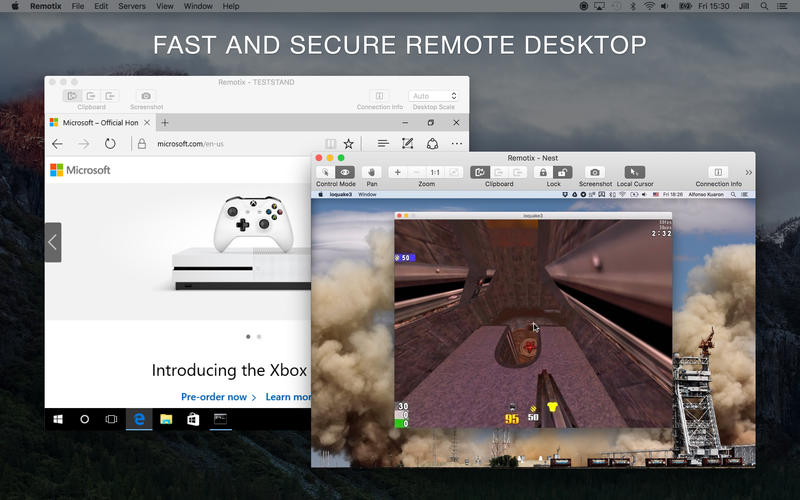
Perm based developer, Nulana LTD today announces Remotix 4.0, an important update to their powerful remote control application for macOS. Remotix allows users to quickly and easily connect with and remotely control any Mac or PC, directly from their own Mac desktop. The app offers screen sharing, file transfer, complete SSH tunneling support and more. Version 4.0 brings the ability to view several remote machines at once, RD gateway capabilities, and more.
Perm, Russian Federation - Nulana LTD today is proud to announce the release and immediate availability of Remotix 4.0, the important update to their powerful and easy to use remote control application for macOS. Remotix allows users to quickly and easily connect to and remotely control any Mac or PC, directly from their own Mac machine. The app offers complete remote control capabilities, including screen sharing, file transfers, automatic Bonjour server discovery, complete SSH tunneling support, and more.
Remotix 4.0 offers an easy way for anyone to quickly access and control any remote Windows or Mac computer. The app is powerful enough to meet the needs of network administrators, desktop support professionals, and other IT pros, while its ease of use also makes it perfect for the home and hobbyist user. Remotix makes it possible to support an unlimited number of Macs or PCs no matter where they're located.
Features:
* Complete Apple Screen Sharing support - OS X login, clipboard sync, multiple display configurations, file transfer via drag and drop and more
* Advanced RDP implementation with RD Gateway, clipboard sync, bidirectional sound, file system and printer redirection
* Automatic Bonjour server discovery and network scanners makes it easy to find and connect to other machines
* Complete SSH tunneling support with public-key and password authentication
* Quick-access icon in Mac OS X menu allows instant access to all stored servers
* Remotix Cloud - allows users to access all their computers from anywhere.
"Users, particularly desktop support professionals, often need to remotely access other computers for support and training purposes. Until Remotix, the only available solutions were either too simplified for professional users, or too complicated for use by casual users," says Nulana PR Specialist Natalia Egorkina. "Now, with the release of version 4.0, Remotix offers even more features that are perfect for the desktop support specialist or IT Administrator, while keeping the app easy to use for more casual users."
What's New in Version 4.0
Remotix 4.0's multiple computer observer makes it possible for users to view several remote machines on the screen at once. Its new RD Gateway feature is the most long-awaited RDP feature for business users, now allowing them to access their corporate machines on the go.
The new automatic reconnect feature ensures that if a network connection is lost, Remotix transparently reconnects to the machine. Another new feature is "Superzoom", it allows users to overzoom the remote screen even if the remote resolution is low. RDP Live Resolution & Scale Change automatically fits remote resolution upon entering fullscreen or changing window size. The scale of the elements can be changed on the fly, without leaving the viewer. Note: Resolution and scale change only works on non-server Windows editions, starting from 8.1.
The new Load-Balancing Configurations adds another great feature for business users, as the app now supports RDP redirection, which is used in RD farm configurations. Better RDP network speed adaptivity means Remotix now performs periodic network speed checks while connected, in order to automatically tune RDP features for the best performance.
The Connection Information Panel now offers a HUD display of current connection parameters, including current rate, total bytes used, and total time connected. The new VeNCrypt TLS Authentication feature means Remotix is currently the only Mac VNC client, (as far as we know), that supports TLS VeNCrypt, the authentication used by ProxMox, TurboVNC and others.
Mac App Store Users Love Remotix:
"This app is very fast and has already saved me a couple of times, because I have left something on the wrong computer. Love it, well worth the money." - Mark.L13
"I have been looking for a VNC client that works this well for the longest time, finally found it and this is it. It is simply the best thing I have ever used." - Hubble1912
"This is a fantastic app that works flawlessly, I'm super happy with it so far. I can connect it to all of my external Macs, including my Mac Mini home theatre and control it from my MacBook Air. It's perfect, speedy and works every time!" - fielding10
Remotix is compatible with any RDP server, Apple Screen Sharing, RealVNC, x11vnc, UltraVNC, TigerVNC, TightVNC, and VMWare, allowing even more flexibility for any user's remote control requirements. The handy Remotix Cloud feature offers the ability to access any computer from anywhere, allowing users to manage computers and send messages, all via the handy Remotix Cloud web interface.
System Requirements:
* OS X 10.6.6 or later
* 64-bit processor
* 14.9 MB
Pricing and Availability:
Remotix 4.0 is only $39.99 USD (or an equivalent amount in other currencies) for a personal license, and is available worldwide through the App Store in the Business category, as well as through the Remotix website. Also available is the Professional license for $79.99, the Site license, which permits unlimited number of users and installations on a single site for $799, and a Multisite license, which permits unlimited users and installations on multiple sites for $2399. Remotix is also available for iOS and Android devices, and Windows PCs. For more information, visit the Remotix website. Review copies are available upon request.
Nulana: http://nulana.com/
Remotix for Mac 4.0: http://nulana.com/remotix-mac/
Purchase and Download (MAS): https://itunes.apple.com/app/remotix-vnc-rdp/id466261145
YouTube Video: https://www.youtube.com/watch?v=LRgxOC5nCfk
Screenshot: http://a1.mzstatic.com/us/r30/Purple18/v4/25/21/35/2521357d-837e-1d23-5dbb-193c93175a30/screen800x500.jpeg
App Icon: http://a1.mzstatic.com/us/r30/Purple18/v4/33/8a/49/338a4964-2215-2ae0-d084-338b8f03c032/icon256.png
Nulana LTD, a privately held software company located in the Russian Federation, was founded in 2008. The company is focused on creating great apps for the Mac OS X and iOS platforms. Nulana is made up of a small team of thinkers, highly experienced in software craftsmanship. They make their own products, in addition to making their customers ideas come to life. From the very beginning Nulana has tried to create life-changing applications that will make people more productive and happy. All software comes from unresolved problems. If we see the problem and feel we can do it the way people love, we try to solve it. All Material and Software (C) Copyright 2016 Nulana LTD. All Rights Reserved. Apple, the Apple logo, Macintosh and Mac OS X are registered trademarks of Apple Inc. in the U.S. and/or other countries. Other trademarks and registered trademarks may be the property of their respective owners.
*******
Link To Article: http://prmac.com/release-id-79731.htm
*******
---------------------------------------------------------------------------------
Note that you can alter delivered distributions at any time.
Login to your account on prMac to alter your channel selection, or to opt-out at any time.
Remotix 4.0 Offers Powerful Remote Access to Any Computer from the Mac - Published on 06/22/16
Perm based developer, Nulana LTD today announces Remotix 4.0, an important update to their powerful remote control application for macOS. Remotix allows users to quickly and easily connect with and remotely control any Mac or PC, directly from their own Mac desktop. The app offers screen sharing, file transfer, complete SSH tunneling support and more. Version 4.0 brings the ability to view several remote machines at once, RD gateway capabilities, and more.
Perm, Russian Federation - Nulana LTD today is proud to announce the release and immediate availability of Remotix 4.0, the important update to their powerful and easy to use remote control application for macOS. Remotix allows users to quickly and easily connect to and remotely control any Mac or PC, directly from their own Mac machine. The app offers complete remote control capabilities, including screen sharing, file transfers, automatic Bonjour server discovery, complete SSH tunneling support, and more.
Remotix 4.0 offers an easy way for anyone to quickly access and control any remote Windows or Mac computer. The app is powerful enough to meet the needs of network administrators, desktop support professionals, and other IT pros, while its ease of use also makes it perfect for the home and hobbyist user. Remotix makes it possible to support an unlimited number of Macs or PCs no matter where they're located.
Features:
* Complete Apple Screen Sharing support - OS X login, clipboard sync, multiple display configurations, file transfer via drag and drop and more
* Advanced RDP implementation with RD Gateway, clipboard sync, bidirectional sound, file system and printer redirection
* Automatic Bonjour server discovery and network scanners makes it easy to find and connect to other machines
* Complete SSH tunneling support with public-key and password authentication
* Quick-access icon in Mac OS X menu allows instant access to all stored servers
* Remotix Cloud - allows users to access all their computers from anywhere.
"Users, particularly desktop support professionals, often need to remotely access other computers for support and training purposes. Until Remotix, the only available solutions were either too simplified for professional users, or too complicated for use by casual users," says Nulana PR Specialist Natalia Egorkina. "Now, with the release of version 4.0, Remotix offers even more features that are perfect for the desktop support specialist or IT Administrator, while keeping the app easy to use for more casual users."
What's New in Version 4.0
Remotix 4.0's multiple computer observer makes it possible for users to view several remote machines on the screen at once. Its new RD Gateway feature is the most long-awaited RDP feature for business users, now allowing them to access their corporate machines on the go.
The new automatic reconnect feature ensures that if a network connection is lost, Remotix transparently reconnects to the machine. Another new feature is "Superzoom", it allows users to overzoom the remote screen even if the remote resolution is low. RDP Live Resolution & Scale Change automatically fits remote resolution upon entering fullscreen or changing window size. The scale of the elements can be changed on the fly, without leaving the viewer. Note: Resolution and scale change only works on non-server Windows editions, starting from 8.1.
The new Load-Balancing Configurations adds another great feature for business users, as the app now supports RDP redirection, which is used in RD farm configurations. Better RDP network speed adaptivity means Remotix now performs periodic network speed checks while connected, in order to automatically tune RDP features for the best performance.
The Connection Information Panel now offers a HUD display of current connection parameters, including current rate, total bytes used, and total time connected. The new VeNCrypt TLS Authentication feature means Remotix is currently the only Mac VNC client, (as far as we know), that supports TLS VeNCrypt, the authentication used by ProxMox, TurboVNC and others.
Mac App Store Users Love Remotix:
"This app is very fast and has already saved me a couple of times, because I have left something on the wrong computer. Love it, well worth the money." - Mark.L13
"I have been looking for a VNC client that works this well for the longest time, finally found it and this is it. It is simply the best thing I have ever used." - Hubble1912
"This is a fantastic app that works flawlessly, I'm super happy with it so far. I can connect it to all of my external Macs, including my Mac Mini home theatre and control it from my MacBook Air. It's perfect, speedy and works every time!" - fielding10
Remotix is compatible with any RDP server, Apple Screen Sharing, RealVNC, x11vnc, UltraVNC, TigerVNC, TightVNC, and VMWare, allowing even more flexibility for any user's remote control requirements. The handy Remotix Cloud feature offers the ability to access any computer from anywhere, allowing users to manage computers and send messages, all via the handy Remotix Cloud web interface.
System Requirements:
* OS X 10.6.6 or later
* 64-bit processor
* 14.9 MB
Pricing and Availability:
Remotix 4.0 is only $39.99 USD (or an equivalent amount in other currencies) for a personal license, and is available worldwide through the App Store in the Business category, as well as through the Remotix website. Also available is the Professional license for $79.99, the Site license, which permits unlimited number of users and installations on a single site for $799, and a Multisite license, which permits unlimited users and installations on multiple sites for $2399. Remotix is also available for iOS and Android devices, and Windows PCs. For more information, visit the Remotix website. Review copies are available upon request.
Nulana: http://nulana.com/
Remotix for Mac 4.0: http://nulana.com/remotix-mac/
Purchase and Download (MAS): https://itunes.apple.com/app/remotix-vnc-rdp/id466261145
YouTube Video: https://www.youtube.com/watch?v=LRgxOC5nCfk
Screenshot: http://a1.mzstatic.com/us/r30/Purple18/v4/25/21/35/2521357d-837e-1d23-5dbb-193c93175a30/screen800x500.jpeg
App Icon: http://a1.mzstatic.com/us/r30/Purple18/v4/33/8a/49/338a4964-2215-2ae0-d084-338b8f03c032/icon256.png

Nulana LTD, a privately held software company located in the Russian Federation, was founded in 2008. The company is focused on creating great apps for the Mac OS X and iOS platforms. Nulana is made up of a small team of thinkers, highly experienced in software craftsmanship. They make their own products, in addition to making their customers ideas come to life. From the very beginning Nulana has tried to create life-changing applications that will make people more productive and happy. All software comes from unresolved problems. If we see the problem and feel we can do it the way people love, we try to solve it. All Material and Software (C) Copyright 2016 Nulana LTD. All Rights Reserved. Apple, the Apple logo, Macintosh and Mac OS X are registered trademarks of Apple Inc. in the U.S. and/or other countries. Other trademarks and registered trademarks may be the property of their respective owners.
*******
Link To Article: http://prmac.com/release-id-79731.htm
*******
---------------------------------------------------------------------------------
Note that you can alter delivered distributions at any time.
Login to your account on prMac to alter your channel selection, or to opt-out at any time.
SecuritySpy 4.0: Major Update to Mac OS X CCTV Software
A new article has been published at prMac.
SecuritySpy 4.0: Major Update to Mac OS X CCTV Software - Published on 06/21/16
UK based Ben Software today announces SecuritySpy 4.0, a major update to the premier multi-camera video surveillance software for macOS. With powerful recording features, remote monitoring and configuration, highly optimised code, and intuitive user interface, SecuritySpy can effortlessly handle demanding CCTV applications. Version 4.0 has a long list of improvements including 64-bit support, massive speed improvements, new capture features and a brand new user interface.
London, United Kingdom - Ben Software today is proud to announce the release of SecuritySpy 4.0, a major update to the premier multi-camera video surveillance software for macOS. With powerful recording features, remote monitoring and configuration, highly optimised code, and intuitive user interface, SecuritySpy can effortlessly handle demanding CCTV applications. Version 4.0 has a long list of improvements including 64-bit support, massive speed improvements, new capture features and a brand new user interface.
"SecuritySpy version 4.0 is packed with new features and performance enhancements that will provide huge improvements to the capability of CCTV systems based on SecuritySpy," said Ben Bird, the developer of SecuritySpy. "Combined with Mac OS X, the rock-solid operating system from Apple, SecuritySpy offers unsurpassed functionality, stability and ease of use."
The main features of SecuritySpy are as follows:
* Displays and records multiple cameras simultaneously
* Powerful capture features, with motion-detection capture and notifications
* Built-in secure web server for remote monitoring and administration
* Pan/Tilt/Zoom (PTZ) support
* Secure off-site backup of captured footage
* Browser feature for synchronised multi-camera playback of captured footage
* Supports all major brands of IP camera as well as ONVIF-compatible cameras
* Supports all industry-standard media formats (JPEG, MPEG-4, MxPEG, H.264, AAC)
* Extensively threaded and optimised to take full advantage of multi-core computers
* Hardware-accelerated video compression and decompression
SecuritySpy supports virtually all IP cameras on the market, including the popular Axis, Dahua, Canon, Sony, Foscam, Hikvision and Vivotek ranges. SecuritySpy features advanced motion detection, which can be used to trigger recordings as well as email alerts, audio alarms, iOS push notifications and external devices. The built-in secure web server allows remote monitoring of live feeds and captured footage, as well as configuration of the software, from over the Internet using a web browser or mobile device such as an iPhone or iPad.
The full list of improvements in version 4.0 are as follows:
* 64-bit application, for significantly improved speed and memory capacity
* Completely re-written Cocoa user interface
* New consolidated Preferences window that contains all settings
* New Camera Info window containing a wealth of live camera information
* Hardware-accelerated video compression and decompression for big speed increases
* Multi-threading improvements to take more advantage of multiple CPU cores
* Two-way audio support for certain IP cameras
* Continuous Capture, Motion Capture and Actions can now be scheduled independently
* Major web server speed improvements
* Web server access can now be limited by time of day
* Web server now supports H.264 RTSP streaming
* Web server can now impose a minimum TLS version, for enhanced security
* HTTP Live Streaming for live audio/video in Safari and iOS
* Support for SFTP (SSH File Transfer Protocol) for secure off-site backup
* New option for one camera to trigger others upon motion detection
* Many further optimisations and efficiency improvements
Pricing and Availability:
Pricing is in British Pounds, Euros or US Dollars and depends on the number of cameras used, ranging from GBP 29.90 (approx. USD $45) for the single-camera version, to GBP 649.00 (approx. USD $990) for the unlimited-camera version. SecuritySpy supports any Mac running OS X 10.7 "Lion" through 10.11 "El Capitan." SecuritySpy can be tested for 30 days before purchase, with no demo limitations whatsoever.
Ben Software: http://www.bensoftware.com/
SecuritySpy 4.0: http://www.bensoftware.com/securityspy/
Download SecuritySpy: http://www.bensoftware.com/securityspy/SecuritySpy.dmg
Purchase: http://www.bensoftware.com/purchase/
Screenshot: http://www.bensoftware.com/img/ss-v4-composition.jpg
Application Icon: http://www.bensoftware.com/img/ss-icon-256.png
Ben Software is an independent software development house focused on providing high-quality video-related software for the Mac. Copyright (C) 2016 Ben Software. All Rights Reserved. Apple, the Apple logo, Mac OS X, and Macintosh are registered trademarks of Apple Inc. in the U.S. and/or other countries.
*******
Link To Article: http://prmac.com/release-id-79730.htm
*******
---------------------------------------------------------------------------------
Note that you can alter delivered distributions at any time.
Login to your account on prMac to alter your channel selection, or to opt-out at any time.
SecuritySpy 4.0: Major Update to Mac OS X CCTV Software - Published on 06/21/16
UK based Ben Software today announces SecuritySpy 4.0, a major update to the premier multi-camera video surveillance software for macOS. With powerful recording features, remote monitoring and configuration, highly optimised code, and intuitive user interface, SecuritySpy can effortlessly handle demanding CCTV applications. Version 4.0 has a long list of improvements including 64-bit support, massive speed improvements, new capture features and a brand new user interface.
London, United Kingdom - Ben Software today is proud to announce the release of SecuritySpy 4.0, a major update to the premier multi-camera video surveillance software for macOS. With powerful recording features, remote monitoring and configuration, highly optimised code, and intuitive user interface, SecuritySpy can effortlessly handle demanding CCTV applications. Version 4.0 has a long list of improvements including 64-bit support, massive speed improvements, new capture features and a brand new user interface.
"SecuritySpy version 4.0 is packed with new features and performance enhancements that will provide huge improvements to the capability of CCTV systems based on SecuritySpy," said Ben Bird, the developer of SecuritySpy. "Combined with Mac OS X, the rock-solid operating system from Apple, SecuritySpy offers unsurpassed functionality, stability and ease of use."
The main features of SecuritySpy are as follows:
* Displays and records multiple cameras simultaneously
* Powerful capture features, with motion-detection capture and notifications
* Built-in secure web server for remote monitoring and administration
* Pan/Tilt/Zoom (PTZ) support
* Secure off-site backup of captured footage
* Browser feature for synchronised multi-camera playback of captured footage
* Supports all major brands of IP camera as well as ONVIF-compatible cameras
* Supports all industry-standard media formats (JPEG, MPEG-4, MxPEG, H.264, AAC)
* Extensively threaded and optimised to take full advantage of multi-core computers
* Hardware-accelerated video compression and decompression
SecuritySpy supports virtually all IP cameras on the market, including the popular Axis, Dahua, Canon, Sony, Foscam, Hikvision and Vivotek ranges. SecuritySpy features advanced motion detection, which can be used to trigger recordings as well as email alerts, audio alarms, iOS push notifications and external devices. The built-in secure web server allows remote monitoring of live feeds and captured footage, as well as configuration of the software, from over the Internet using a web browser or mobile device such as an iPhone or iPad.
The full list of improvements in version 4.0 are as follows:
* 64-bit application, for significantly improved speed and memory capacity
* Completely re-written Cocoa user interface
* New consolidated Preferences window that contains all settings
* New Camera Info window containing a wealth of live camera information
* Hardware-accelerated video compression and decompression for big speed increases
* Multi-threading improvements to take more advantage of multiple CPU cores
* Two-way audio support for certain IP cameras
* Continuous Capture, Motion Capture and Actions can now be scheduled independently
* Major web server speed improvements
* Web server access can now be limited by time of day
* Web server now supports H.264 RTSP streaming
* Web server can now impose a minimum TLS version, for enhanced security
* HTTP Live Streaming for live audio/video in Safari and iOS
* Support for SFTP (SSH File Transfer Protocol) for secure off-site backup
* New option for one camera to trigger others upon motion detection
* Many further optimisations and efficiency improvements
Pricing and Availability:
Pricing is in British Pounds, Euros or US Dollars and depends on the number of cameras used, ranging from GBP 29.90 (approx. USD $45) for the single-camera version, to GBP 649.00 (approx. USD $990) for the unlimited-camera version. SecuritySpy supports any Mac running OS X 10.7 "Lion" through 10.11 "El Capitan." SecuritySpy can be tested for 30 days before purchase, with no demo limitations whatsoever.
Ben Software: http://www.bensoftware.com/
SecuritySpy 4.0: http://www.bensoftware.com/securityspy/
Download SecuritySpy: http://www.bensoftware.com/securityspy/SecuritySpy.dmg
Purchase: http://www.bensoftware.com/purchase/
Screenshot: http://www.bensoftware.com/img/ss-v4-composition.jpg

Application Icon: http://www.bensoftware.com/img/ss-icon-256.png

Ben Software is an independent software development house focused on providing high-quality video-related software for the Mac. Copyright (C) 2016 Ben Software. All Rights Reserved. Apple, the Apple logo, Mac OS X, and Macintosh are registered trademarks of Apple Inc. in the U.S. and/or other countries.
*******
Link To Article: http://prmac.com/release-id-79730.htm
*******
---------------------------------------------------------------------------------
Note that you can alter delivered distributions at any time.
Login to your account on prMac to alter your channel selection, or to opt-out at any time.
Scramble for iPhone Lets You Communicate With Secret Message Puzzles
A new article has been published at prMac.
Scramble for iPhone Lets You Communicate With Secret Message Puzzles - Published on 06/21/16
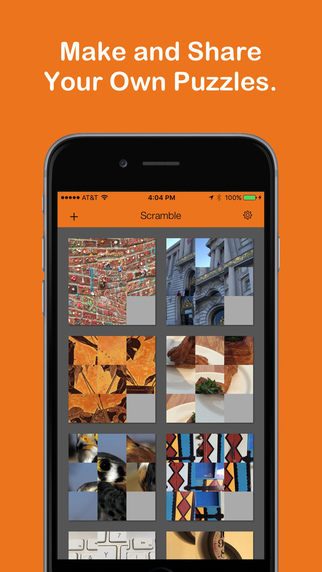
Qrayon announces Scramble: Sliding Tile Puzzle Maker 1.0 for iOS devices. Scramble allows users to create visual sliding tile puzzles from their photos and share them with their friends. Just pick a photo, add an optional message, and share. The recipient will have to solve the puzzle to see the message. Build up a library of puzzles with friends and family. Perfect for Valentine's Day messages, party invitations, or just sharing a special moment with someone.
Seattle, Washington - Qrayon is proud to announce the release of Scramble: Sliding Tile Puzzle Maker 1.0 for iPhone, iPad, and iPod touch devices. Scramble lets you create visual sliding tile puzzles from your photos and share them with your friends. Just pick a photo, add an optional message, and share. Your friends will have to solve the puzzle to see the message. Perfect for Valentine's Day messages, party invitations, or just sharing a special moment with someone.
Build up a library of puzzles with your friends. They are also a great way to exercise your brain in the morning, and to experience your photos in a whole new way. You'll notice new details, and relive memories with the people you care about.
In a world that is over-saturated with images, Scramble offers an easy way to share more intimate and engaging experiences. Solving a simple puzzle lets the recipient invest in the exchange, and makes the message more meaningful when they solve it.
Key Features:
* Instantly create an interactive sliding puzzle from any saved photo
* Optionally add a secret message that is only shown when the puzzle is solved
* Share puzzles with friends via email
* Get a subtle hint when a piece is in the right position
* Hard mode: Turn off hints
Device Requirements:
* iPhone, iPad, and iPod touch
* Requires iOS 9.0 or later
* 5.3 MB
Pricing and Availability:
Scramble: Sliding Tile Puzzle Maker 1.0 is free, and is available worldwide exclusively through the App Store in the Games category.
Qrayon: http://www.qrayon.com
Scramble: Sliding Tile Puzzle Maker 1.0: https://geo.itunes.apple.com/us/app/scramble-sliding-tile-puzzle/id1115072780?ls=1&mt=8&at=11l4CP
Screenshot: http://a2.mzstatic.com/us/r30/Purple18/v4/2b/aa/1c/2baa1c8f-0916-1f48-8a2e-a44eeb3dfcee/screen322x572.jpeg
App Icon: http://a2.mzstatic.com/us/r30/Purple18/v4/4c/24/b1/4c24b16b-f718-ec4a-7248-92a971f1e279/icon175x175.jpeg
Based in Seattle, Washington, Qrayon is a pioneering developer of productivity and education Apps for the iPad and iPhone. Their Apps have been featured by Apple numerous times, and are currently being used in classrooms and offices all over the world. All Material and Software Copyright (C) 2016 Qrayon, LLC. All Rights Reserved. Apple, the Apple logo, iPhone, iPod and iPad are registered trademarks of Apple Inc. in the U.S. and/or other countries. Other trademarks and registered trademarks may be the property of their respective owners.
*******
Link To Article: http://prmac.com/release-id-79725.htm
*******
---------------------------------------------------------------------------------
Note that you can alter delivered distributions at any time.
Login to your account on prMac to alter your channel selection, or to opt-out at any time.
Scramble for iPhone Lets You Communicate With Secret Message Puzzles - Published on 06/21/16
Qrayon announces Scramble: Sliding Tile Puzzle Maker 1.0 for iOS devices. Scramble allows users to create visual sliding tile puzzles from their photos and share them with their friends. Just pick a photo, add an optional message, and share. The recipient will have to solve the puzzle to see the message. Build up a library of puzzles with friends and family. Perfect for Valentine's Day messages, party invitations, or just sharing a special moment with someone.
Seattle, Washington - Qrayon is proud to announce the release of Scramble: Sliding Tile Puzzle Maker 1.0 for iPhone, iPad, and iPod touch devices. Scramble lets you create visual sliding tile puzzles from your photos and share them with your friends. Just pick a photo, add an optional message, and share. Your friends will have to solve the puzzle to see the message. Perfect for Valentine's Day messages, party invitations, or just sharing a special moment with someone.
Build up a library of puzzles with your friends. They are also a great way to exercise your brain in the morning, and to experience your photos in a whole new way. You'll notice new details, and relive memories with the people you care about.
In a world that is over-saturated with images, Scramble offers an easy way to share more intimate and engaging experiences. Solving a simple puzzle lets the recipient invest in the exchange, and makes the message more meaningful when they solve it.
Key Features:
* Instantly create an interactive sliding puzzle from any saved photo
* Optionally add a secret message that is only shown when the puzzle is solved
* Share puzzles with friends via email
* Get a subtle hint when a piece is in the right position
* Hard mode: Turn off hints
Device Requirements:
* iPhone, iPad, and iPod touch
* Requires iOS 9.0 or later
* 5.3 MB
Pricing and Availability:
Scramble: Sliding Tile Puzzle Maker 1.0 is free, and is available worldwide exclusively through the App Store in the Games category.
Qrayon: http://www.qrayon.com
Scramble: Sliding Tile Puzzle Maker 1.0: https://geo.itunes.apple.com/us/app/scramble-sliding-tile-puzzle/id1115072780?ls=1&mt=8&at=11l4CP
Screenshot: http://a2.mzstatic.com/us/r30/Purple18/v4/2b/aa/1c/2baa1c8f-0916-1f48-8a2e-a44eeb3dfcee/screen322x572.jpeg
App Icon: http://a2.mzstatic.com/us/r30/Purple18/v4/4c/24/b1/4c24b16b-f718-ec4a-7248-92a971f1e279/icon175x175.jpeg

Based in Seattle, Washington, Qrayon is a pioneering developer of productivity and education Apps for the iPad and iPhone. Their Apps have been featured by Apple numerous times, and are currently being used in classrooms and offices all over the world. All Material and Software Copyright (C) 2016 Qrayon, LLC. All Rights Reserved. Apple, the Apple logo, iPhone, iPod and iPad are registered trademarks of Apple Inc. in the U.S. and/or other countries. Other trademarks and registered trademarks may be the property of their respective owners.
*******
Link To Article: http://prmac.com/release-id-79725.htm
*******
---------------------------------------------------------------------------------
Note that you can alter delivered distributions at any time.
Login to your account on prMac to alter your channel selection, or to opt-out at any time.
Predict 2016 All-Europe Football Tournament Champion to Win DVDFab Prize
A new article has been published at prMac.
Predict 2016 All-Europe Football Tournament Champion to Win DVDFab Prize - Published on 06/21/16
Fengtao Software today officially rolls out its 2016 All-Europe Football Tournament promotion. New customers can receive a 25% discount on its blockbuster DVDFab All-In-One Lifetime Gift. Don't miss the chance to join the champion prediction quiz to win decent prizes, including a 1-year license for any user-selected single product, a $20 Amazon Gift Card, and nicely designed commemorative edition of our DVDFab T-shirt. The special promotion starts today and ends on July 10.
Beijing, China - Fengtao Software, the industry leader in the field of DVD, Blu-ray and video backup solutions, today rolls out its themed promotion about the currently in full swing 2016 All-Europe Football Tournament, offering all the customers 25% discount applicable on its blockbuster DVDFab All-In-One Lifetime Gift (includes a $20 Amazon Gift Card for free), an exceptional chance to join the champion prediction quiz to win decent prizes including 1-year license for any user selected single product, $20 Amazon Gift Card, and nicely designed commemorative edition of DVDFab T-shirt. Also, there's another 30% off coupon offered for buying some specified products. The special promotion starts today and ends on July 10.
Top Deal: 25% off DVDFab All-In-One Lifetime $20 Amazon Gift Card:
As the company's No.1 bestseller of all time, DVDFab All-In-One Lifetime Gift includes the lifetime versions of all its Copy, Ripper, Converter and Creator modules, which are everything people need to copy or convert DVDs & Blu-rays, produce homemade DVDs & Blu-rays, convert Blu-rays to DVDs, or convert videos for other purposes. Before the deal expires on July 10, everyone who interested in this lifetime package can get it by saving 25%, and in the meantime, receive a $20 Amazon Gift Card totally for free. Chance is great, however, it's your call to seize it or watch it slip through your fingers.
Prediction Quiz: Forecast Champion to Win Premium Gifts:
As a loyal fan, wouldn't you feel so proud if your favorite team finally secures the championship? During the special promotion, you can participate in our hot champion forecast quiz to guess whether or not your liked team can eventually take the throne this time. It is exceedingly easy to join in, all that required is to pick up your winner and submit the result with a valid e-mail address. All the participants will in return have the chance to win decent prizes including 1-year license for any user selected single product (the iOS data recovery software and PC backup software not included), $20 Amazon Gift Card, and nicely designed commemorative edition of DVDFab T-shirt. Again, the champion forecast quiz is valid till July 10, only the early birds catch the worms.
Special Deals: 30% Discount on Some Specified Products:
During the DVDFab 2016 All-Europe Football Tournament Promotion, there are also some selected single products and bundles offered at amazingly 30% off, which include the DVD Copy software, Blu-ray copy software, DVD copy and DVD ripper software as a bundle, and Blu-ray copy Blu-ray ripper software as a bundle. In case you are interested in any of those great offers, do make your resolution before the special promotion ends on July 10.
For the terms and conditions of DVDFab 2016 All-Europe Football Tournament Promotion, don't hesitate to visit DVDFab Software online.
DVDFab Software: http://dvdfab.cn/
DVD Ripper for Mac: http://www.dvdfab.cn/dvd_ripper-for-mac.htm
Blu ray Ripper for Mac: http://www.dvdfab.cn/blu-ray-ripper-for-mac.htm
Download DVDFab Software: http://www.dvdfab.cn/download.htm
iOS Data Recovery Software: http://www.dvdfab.cn/ifonerestore-for-mac.htm
Fengtao Software Inc., a professional multimedia software provider, has been dedicated to working on DVD cloner, DVD copy, Blu-ray copy, DVD ripper, DVD/Blu-ray conversion, video converter, DVD creator, Blu-ray creator, Blu-ray media player, etc. for more than 11 years with its well known DVDFab software. It has more than 50 million global users. All Material and Software (C) Copyright 2016 Fengtao Software Inc. All Rights Reserved. Apple, the Apple logo, Mac OS X, iPhone, iPad, iPod and Macintosh are registered trademarks of Apple Inc. in the U.S. and/or other countries. Other trademarks and registered trademarks may be the property of their respective owners.
*******
Link To Article: http://prmac.com/release-id-79729.htm
*******
---------------------------------------------------------------------------------
Note that you can alter delivered distributions at any time.
Login to your account on prMac to alter your channel selection, or to opt-out at any time.
Predict 2016 All-Europe Football Tournament Champion to Win DVDFab Prize - Published on 06/21/16
Fengtao Software today officially rolls out its 2016 All-Europe Football Tournament promotion. New customers can receive a 25% discount on its blockbuster DVDFab All-In-One Lifetime Gift. Don't miss the chance to join the champion prediction quiz to win decent prizes, including a 1-year license for any user-selected single product, a $20 Amazon Gift Card, and nicely designed commemorative edition of our DVDFab T-shirt. The special promotion starts today and ends on July 10.
Beijing, China - Fengtao Software, the industry leader in the field of DVD, Blu-ray and video backup solutions, today rolls out its themed promotion about the currently in full swing 2016 All-Europe Football Tournament, offering all the customers 25% discount applicable on its blockbuster DVDFab All-In-One Lifetime Gift (includes a $20 Amazon Gift Card for free), an exceptional chance to join the champion prediction quiz to win decent prizes including 1-year license for any user selected single product, $20 Amazon Gift Card, and nicely designed commemorative edition of DVDFab T-shirt. Also, there's another 30% off coupon offered for buying some specified products. The special promotion starts today and ends on July 10.
Top Deal: 25% off DVDFab All-In-One Lifetime $20 Amazon Gift Card:
As the company's No.1 bestseller of all time, DVDFab All-In-One Lifetime Gift includes the lifetime versions of all its Copy, Ripper, Converter and Creator modules, which are everything people need to copy or convert DVDs & Blu-rays, produce homemade DVDs & Blu-rays, convert Blu-rays to DVDs, or convert videos for other purposes. Before the deal expires on July 10, everyone who interested in this lifetime package can get it by saving 25%, and in the meantime, receive a $20 Amazon Gift Card totally for free. Chance is great, however, it's your call to seize it or watch it slip through your fingers.
Prediction Quiz: Forecast Champion to Win Premium Gifts:
As a loyal fan, wouldn't you feel so proud if your favorite team finally secures the championship? During the special promotion, you can participate in our hot champion forecast quiz to guess whether or not your liked team can eventually take the throne this time. It is exceedingly easy to join in, all that required is to pick up your winner and submit the result with a valid e-mail address. All the participants will in return have the chance to win decent prizes including 1-year license for any user selected single product (the iOS data recovery software and PC backup software not included), $20 Amazon Gift Card, and nicely designed commemorative edition of DVDFab T-shirt. Again, the champion forecast quiz is valid till July 10, only the early birds catch the worms.
Special Deals: 30% Discount on Some Specified Products:
During the DVDFab 2016 All-Europe Football Tournament Promotion, there are also some selected single products and bundles offered at amazingly 30% off, which include the DVD Copy software, Blu-ray copy software, DVD copy and DVD ripper software as a bundle, and Blu-ray copy Blu-ray ripper software as a bundle. In case you are interested in any of those great offers, do make your resolution before the special promotion ends on July 10.
For the terms and conditions of DVDFab 2016 All-Europe Football Tournament Promotion, don't hesitate to visit DVDFab Software online.
DVDFab Software: http://dvdfab.cn/
DVD Ripper for Mac: http://www.dvdfab.cn/dvd_ripper-for-mac.htm
Blu ray Ripper for Mac: http://www.dvdfab.cn/blu-ray-ripper-for-mac.htm
Download DVDFab Software: http://www.dvdfab.cn/download.htm
iOS Data Recovery Software: http://www.dvdfab.cn/ifonerestore-for-mac.htm
Fengtao Software Inc., a professional multimedia software provider, has been dedicated to working on DVD cloner, DVD copy, Blu-ray copy, DVD ripper, DVD/Blu-ray conversion, video converter, DVD creator, Blu-ray creator, Blu-ray media player, etc. for more than 11 years with its well known DVDFab software. It has more than 50 million global users. All Material and Software (C) Copyright 2016 Fengtao Software Inc. All Rights Reserved. Apple, the Apple logo, Mac OS X, iPhone, iPad, iPod and Macintosh are registered trademarks of Apple Inc. in the U.S. and/or other countries. Other trademarks and registered trademarks may be the property of their respective owners.
*******
Link To Article: http://prmac.com/release-id-79729.htm
*******
---------------------------------------------------------------------------------
Note that you can alter delivered distributions at any time.
Login to your account on prMac to alter your channel selection, or to opt-out at any time.
Markable - Search for Clothing and Accessories by Uploading a Photo
A new article has been published at prMac.
Markable - Search for Clothing and Accessories by Uploading a Photo - Published on 06/21/16
Chicago based Markable, Inc. today announces Markable 2.3.0, its popular lifestyle app for iPhone, iPod touch, and iPad devices. By leveraging its patent-pending visual search technology, anyone can search for clothing and accessories by uploading a photo and Markable will find exact or similar items in different price ranges. Users can purchase items found from product results, search a personal news feed of images, or they can upload a picture of their choosing.
Chicago, Illinois - Markable, Inc., the leader in visual search technology, today is pleased to announce the public launch of Markable 2.3.0, the company's new lifestyle app developed for iPhone, iPod touch, and iPad devices. After a successful beta test, Markable has created a mobile experience that allows its users to shop any photo(TM).
Hoping to change the way people shop online, Markable helps users find and purchase their favorite clothes, accessories, and shoes by using its patent-pending visual search technology. Users can search for clothing and accessories by uploading a photo and Markable's visual search technology will find exact or similar items in different price ranges. With the app; users can purchase items found from product results, search a personal news feed of images, or they can upload a picture of their choosing.
The Markable app features:
* Advanced marking system allows users to search for specific items
* Edit keywords to narrow or broaden search results
* Free shipping for items purchased via Markable app
* Over 800 brands featured; New brands added daily
* Wishlist functionality
* Explore and discover what other users are marking through the newsfeed
* Ability to like and mark other users' photos
* Sort results by price
* Social media integration, share photos and search results straight from the app
"I love fashion, and I was having a hard time tracking down clothes that I saw on Pinterest or my favorite fashion blogs," said Joy Tang, CEO, and founder of Markable. "It's awkward to write a comment saying, 'Hey, where did you get that from?' because I didn't want to sound like a copycat! It was then that I decided to come up with the technology to find my favorite looks."
Version 2.3.0 includes:
* No password required
* Purchases available
* Order list available
* Match results improvements
* UI improvements
* Bug Fixes
Device Requirements:
* iPhone, iPad, and iPod touch
* Requires iOS 8.0 or later
* 66.3 MB
Pricing and Availability:
Markable 2.3.0 is Free (with in-app purchases) and available worldwide exclusively through the App Store in the Lifestyle category. To learn more about Markable and to shop your favorite photos, visit their website.
Markable 2.3.0: http://www.markable.us
Download from iTunes: https://itunes.apple.com/app/markable/id808010887
Screenshot 1: http://markable.us/mediakit/App_ScreenShots/01_Markable_DiscoverPage.jpg
Screenshot 2: http://markable.us/mediakit/App_ScreenShots/02_Markable_AddMarkPage.jpg
Screenshot 3: http://markable.us/mediakit/App_ScreenShots/03_Markable_MatchResult.png
App Icon: http://markable.us/wp-content/uploads/2015/04/markable-App-icon-v1-1024.png
Markable Inc. was founded in Chicago, IL, by Joy Tang and Fiona Wang in 2014. Currently, Markable has offices in Madison, Wisconsin, and Chicago, Illinois. Markable is a leader in visual search technology, connects people to photos and products. All Material and Software (C) Copyright 2014-2016 Markable Inc. All Rights Reserved. Apple, the Apple logo, iPhone, iPod and iPad are registered trademarks of Apple Inc. in the U.S. and/or other countries. Other trademarks and registered trademarks may be the property of their respective owners.
*******
Link To Article: http://prmac.com/release-id-79728.htm
*******
---------------------------------------------------------------------------------
Note that you can alter delivered distributions at any time.
Login to your account on prMac to alter your channel selection, or to opt-out at any time.
Markable - Search for Clothing and Accessories by Uploading a Photo - Published on 06/21/16
Chicago based Markable, Inc. today announces Markable 2.3.0, its popular lifestyle app for iPhone, iPod touch, and iPad devices. By leveraging its patent-pending visual search technology, anyone can search for clothing and accessories by uploading a photo and Markable will find exact or similar items in different price ranges. Users can purchase items found from product results, search a personal news feed of images, or they can upload a picture of their choosing.
Chicago, Illinois - Markable, Inc., the leader in visual search technology, today is pleased to announce the public launch of Markable 2.3.0, the company's new lifestyle app developed for iPhone, iPod touch, and iPad devices. After a successful beta test, Markable has created a mobile experience that allows its users to shop any photo(TM).
Hoping to change the way people shop online, Markable helps users find and purchase their favorite clothes, accessories, and shoes by using its patent-pending visual search technology. Users can search for clothing and accessories by uploading a photo and Markable's visual search technology will find exact or similar items in different price ranges. With the app; users can purchase items found from product results, search a personal news feed of images, or they can upload a picture of their choosing.
The Markable app features:
* Advanced marking system allows users to search for specific items
* Edit keywords to narrow or broaden search results
* Free shipping for items purchased via Markable app
* Over 800 brands featured; New brands added daily
* Wishlist functionality
* Explore and discover what other users are marking through the newsfeed
* Ability to like and mark other users' photos
* Sort results by price
* Social media integration, share photos and search results straight from the app
"I love fashion, and I was having a hard time tracking down clothes that I saw on Pinterest or my favorite fashion blogs," said Joy Tang, CEO, and founder of Markable. "It's awkward to write a comment saying, 'Hey, where did you get that from?' because I didn't want to sound like a copycat! It was then that I decided to come up with the technology to find my favorite looks."
Version 2.3.0 includes:
* No password required
* Purchases available
* Order list available
* Match results improvements
* UI improvements
* Bug Fixes
Device Requirements:
* iPhone, iPad, and iPod touch
* Requires iOS 8.0 or later
* 66.3 MB
Pricing and Availability:
Markable 2.3.0 is Free (with in-app purchases) and available worldwide exclusively through the App Store in the Lifestyle category. To learn more about Markable and to shop your favorite photos, visit their website.
Markable 2.3.0: http://www.markable.us
Download from iTunes: https://itunes.apple.com/app/markable/id808010887
Screenshot 1: http://markable.us/mediakit/App_ScreenShots/01_Markable_DiscoverPage.jpg

Screenshot 2: http://markable.us/mediakit/App_ScreenShots/02_Markable_AddMarkPage.jpg

Screenshot 3: http://markable.us/mediakit/App_ScreenShots/03_Markable_MatchResult.png

App Icon: http://markable.us/wp-content/uploads/2015/04/markable-App-icon-v1-1024.png

Markable Inc. was founded in Chicago, IL, by Joy Tang and Fiona Wang in 2014. Currently, Markable has offices in Madison, Wisconsin, and Chicago, Illinois. Markable is a leader in visual search technology, connects people to photos and products. All Material and Software (C) Copyright 2014-2016 Markable Inc. All Rights Reserved. Apple, the Apple logo, iPhone, iPod and iPad are registered trademarks of Apple Inc. in the U.S. and/or other countries. Other trademarks and registered trademarks may be the property of their respective owners.
*******
Link To Article: http://prmac.com/release-id-79728.htm
*******
---------------------------------------------------------------------------------
Note that you can alter delivered distributions at any time.
Login to your account on prMac to alter your channel selection, or to opt-out at any time.
Subscribe to:
Posts (Atom)