A new article has been published at prMac.
Find the Perfect Investment Property With the Foreclosures Canada App - Published on 06/24/16
Tapp App announces Foreclosure Canada 2.7.1 for iOS devices, the important update to their must-have tool for property investors. The app offers a lot more than a few user interface tweaks. Foreclosure Canada delivers the best data available when you're seeking a new home or property investment, but facing stiff competition for those deals in a market where you need to be precise, focused, and keep your options at your fingertips.
Alberta,Canada - The Foreclosures Canada app has new updates, but this must-have tool for property investors offers a lot more than a few user interface tweaks. Foreclosure Canada 2.7.1 for iOS devices delivers the best data available when you're seeking a new home or property investment, but facing stiff competition for those deals in a market where you need to be precise, focused, and keep your options at your fingertips.
The app lists bank foreclosures, estate and probate sales, tax sales and other below-market offerings priced to save you money - and priced to go fast! With Foreclosures Canada, users can identify property across the country in a searchable database that's accessible to members looking for all the real deals.
"We've designed the Foreclosures Canada app so that with a few simple taps on your mobile, you can see the most up-to-date listings that matter where you are, or where you want to be," said Rachel Gee, operations manager for the company. "Users apply the filters they need to create a list of properties, locations, price and features to make the next discovery simple while saving investors time and money."
In addition to GPS-activated searches and carefully tailored lists, the app and Foreclosures Canada membership offer maps, property photos and interior views, street views of neighborhoods, satellite images and more. Searches are easy to save, or to email to others when you find the perfect property.
Features:
* GPS-activated property search finds foreclosures near you
* Exceptional graphics with maps, photos, satellite images, street views
* Search by property type, location, price, listing type and more
* Easy search saves to your own list, or email to a friend
* Full property details and contact info available
Device Requirements:
* iPhone, iPad, and iPod touch
* iOS 8.0 or later
* 26.5MB
Pricing and Availability:
Foreclosure Canada 2.7.1 is free, and is available worldwide exclusively through the App Store in the Finance category. Convenient in-app purchases are available.
Foreclosures Canada 2.7.1: http://www.foreclosuresearch.ca/
Download from iTunes: https://itunes.apple.com/app/id548227953
Screenshot 1: http://a2.mzstatic.com/us/r30/Purple1/v4/c6/28/ba/c628bab7-bc53-2e40-34f9-7de662e0ee2a/screen322x572.jpeg
Screenshot 2: http://a1.mzstatic.com/us/r30/Purple1/v4/5a/f5/0c/5af50cbe-2ae6-6ec8-c072-fb891c07a0c2/screen322x572.jpeg
App Icon: http://a3.mzstatic.com/us/r30/Purple60/v4/b6/75/fa/b675fae5-9f2c-6eb1-ac77-5d429b3eac28/icon175x175.png
Tapp App is a leading software developer for finance and business apps and was established in 2012 and located in Alberta, Canada. They specialize in creating apps for real estate investors and business professionals that are simple, helpful and time saving. All Material and Software Copyright (C) 2016 Tapp App. All Rights Reserved. Apple, the Apple logo, iPhone, iPod and iPad are registered trademarks of Apple Inc. in the U.S. and/or other countries. Other trademarks and registered trademarks may be the property of their respective owners.
*******
Link To Article: http://prmac.com/release-id-79750.htm
*******
---------------------------------------------------------------------------------
Note that you can alter delivered distributions at any time.
Login to your account on prMac to alter your channel selection, or to opt-out at any time.




The New Ancient Greek Gods Deluxe Casino goes on Sale
A new article has been published at prMac.
The New Ancient Greek Gods Deluxe Casino goes on Sale - Published on 06/24/16
London based Apps Genie Limited today announced a price drop for The New Ancient Greek Gods Deluxe Casino, premium casino app recently released on the App Store. The New Ancient Greek Gods Deluxe Casino brings an authentic Vegas casino experience on-the-go, exhilarating slot game action right at your fingertips. The app allows users to choose from several action-packed mini-games from Slots, Blackjack, Roulette and Video Poker. For a limited time only the game will be available for Free.
London, England - Apps Genie Limited, an established mobile application developer focused on designing innovative games & apps for the mobile marketplace, today announced announces a sale on The New Ancient Greek Gods Deluxe Casino that will see the game's price reduced from $0.99 to Free for a limited time only. Premium casino app recently released on the App Store The New Ancient Greek Gods Deluxe Casino brings an authentic Vegas casino experience on-the-go, exhilarating Slot game action right at your fingertips. For a limited time only game will be available for Free on the App Store in the Games category.
An eloquently straightforward casino game that's as addicting as it is engaging, The New Ancient Greek Gods Deluxe Casino is designed specifically to put challenge and distract players. The app allows users to choose from several action-packed mini-games from Slots, Blackjack, Roulette and Video Poker - the possibilities are endless. This unique game allows players to experience fun and excitement of real Vegas Slots & Casino anytime & anywhere they want, without typical casino distractions. Bet a little or go all in and try to hit the biggest jackpot, reach the highest achievements and win Free Spins, Wilds & Bonuses. Enjoy the stimulating adrenaline rush of virtual games with The New Ancient Greek Gods Deluxe Casino on your iPhone, iPad or iPod touch.
Focused on providing a well polished, well rounded, and thoroughly enjoyable playing experience, The New Ancient Greek Gods Deluxe Casino features responsive and intuitive controls that allow users set up auto spin, make bets, see Progressive Jackpot and much more just with one finger. Run out of coins? Don't worry as games offers 1000+, 3000+ and even 5000+ coins via in-app purchase. For users that are keen on recording their stats, game offers a high score leaderboard to track the best results. By mixing Vegas Slots together with Roulette and Poker game elements, The New Ancient Greek Gods Deluxe Casino has manages to become a game that is equal to more than the sum of its parts.
Device Requirements:
* iPhone, iPad, and iPod touch
* Requires iOS 7.0 or later
* 90.0 MB
Pricing and Availability:
For a limited time, The New Ancient Greek Gods Deluxe Casino 1.0 is Free (Reg $0.99 USD) and available worldwide exclusively through the App Store in the Games category.
The New Ancient Greek Gods Deluxe Casino 1.0: http://ancientgreekcasino.com/
Download from iTunes: https://itunes.apple.com/app/the-new-ancient-greek-gods-deluxe-casino/id1098184320
Screenshot: http://a5.mzstatic.com/us/r30/Purple49/v4/93/8d/ba/938dbae0-98b5-a966-1736-5093c885b2ee/screen322x572.jpeg
App Icon: http://a2.mzstatic.com/us/r30/Purple49/v4/2b/63/23/2b6323b1-3be0-0e1d-73f5-df926f8e185c/icon175x175.png
Located in London, Apps Genie Limited is mobile application development studio focused on providing mobile enthusiasts with valuable and informative mobile solutions across a variety of disciplines and focuses. Apps Genie Limited has stayed continuously committed to providing mobile audiences with applications that are well structured and effective. (C) Apps Genie Limited 2016. All Rights Reserved. Apple, the Apple logo, iPhone, iPod and iPad are registered trademarks of Apple Inc. in the U.S. and/or other countries.
*******
Link To Article: http://prmac.com/release-id-79748.htm
*******
---------------------------------------------------------------------------------
Note that you can alter delivered distributions at any time.
Login to your account on prMac to alter your channel selection, or to opt-out at any time.
The New Ancient Greek Gods Deluxe Casino goes on Sale - Published on 06/24/16
London based Apps Genie Limited today announced a price drop for The New Ancient Greek Gods Deluxe Casino, premium casino app recently released on the App Store. The New Ancient Greek Gods Deluxe Casino brings an authentic Vegas casino experience on-the-go, exhilarating slot game action right at your fingertips. The app allows users to choose from several action-packed mini-games from Slots, Blackjack, Roulette and Video Poker. For a limited time only the game will be available for Free.
London, England - Apps Genie Limited, an established mobile application developer focused on designing innovative games & apps for the mobile marketplace, today announced announces a sale on The New Ancient Greek Gods Deluxe Casino that will see the game's price reduced from $0.99 to Free for a limited time only. Premium casino app recently released on the App Store The New Ancient Greek Gods Deluxe Casino brings an authentic Vegas casino experience on-the-go, exhilarating Slot game action right at your fingertips. For a limited time only game will be available for Free on the App Store in the Games category.
An eloquently straightforward casino game that's as addicting as it is engaging, The New Ancient Greek Gods Deluxe Casino is designed specifically to put challenge and distract players. The app allows users to choose from several action-packed mini-games from Slots, Blackjack, Roulette and Video Poker - the possibilities are endless. This unique game allows players to experience fun and excitement of real Vegas Slots & Casino anytime & anywhere they want, without typical casino distractions. Bet a little or go all in and try to hit the biggest jackpot, reach the highest achievements and win Free Spins, Wilds & Bonuses. Enjoy the stimulating adrenaline rush of virtual games with The New Ancient Greek Gods Deluxe Casino on your iPhone, iPad or iPod touch.
Focused on providing a well polished, well rounded, and thoroughly enjoyable playing experience, The New Ancient Greek Gods Deluxe Casino features responsive and intuitive controls that allow users set up auto spin, make bets, see Progressive Jackpot and much more just with one finger. Run out of coins? Don't worry as games offers 1000+, 3000+ and even 5000+ coins via in-app purchase. For users that are keen on recording their stats, game offers a high score leaderboard to track the best results. By mixing Vegas Slots together with Roulette and Poker game elements, The New Ancient Greek Gods Deluxe Casino has manages to become a game that is equal to more than the sum of its parts.
Device Requirements:
* iPhone, iPad, and iPod touch
* Requires iOS 7.0 or later
* 90.0 MB
Pricing and Availability:
For a limited time, The New Ancient Greek Gods Deluxe Casino 1.0 is Free (Reg $0.99 USD) and available worldwide exclusively through the App Store in the Games category.
The New Ancient Greek Gods Deluxe Casino 1.0: http://ancientgreekcasino.com/
Download from iTunes: https://itunes.apple.com/app/the-new-ancient-greek-gods-deluxe-casino/id1098184320
Screenshot: http://a5.mzstatic.com/us/r30/Purple49/v4/93/8d/ba/938dbae0-98b5-a966-1736-5093c885b2ee/screen322x572.jpeg

App Icon: http://a2.mzstatic.com/us/r30/Purple49/v4/2b/63/23/2b6323b1-3be0-0e1d-73f5-df926f8e185c/icon175x175.png

Located in London, Apps Genie Limited is mobile application development studio focused on providing mobile enthusiasts with valuable and informative mobile solutions across a variety of disciplines and focuses. Apps Genie Limited has stayed continuously committed to providing mobile audiences with applications that are well structured and effective. (C) Apps Genie Limited 2016. All Rights Reserved. Apple, the Apple logo, iPhone, iPod and iPad are registered trademarks of Apple Inc. in the U.S. and/or other countries.
*******
Link To Article: http://prmac.com/release-id-79748.htm
*******
---------------------------------------------------------------------------------
Note that you can alter delivered distributions at any time.
Login to your account on prMac to alter your channel selection, or to opt-out at any time.
MOSO Releases Xmplify XML Editor for Mac OS X Version 1.8.0
A new article has been published at prMac.
MOSO Releases Xmplify XML Editor for Mac OS X Version 1.8.0 - Published on 06/24/16
Brisbane based MOSO today announces Xmplify XML Editor 1.8.0, an important update to their powerful XML editor built specifically for Mac OS X 10.7 and higher. Xmplify XML Editor provides a fully XML-aware editing environment with DTD and XML Schema-based auto-completion, automatic document validation, XSLT and XPath support, live HTML preview and much more. Version 1.8.0 adds improved support for auto-completions, plus fixes and other improvements.
Brisbane, Australia - MOSO today is proud to announce the release of version 1.8.0 of the Xmplify XML Editor for Mac OS X. Xmplify is a powerful XML editor built specifically for Mac OS X 10.7+, and provides a fully XML-aware editing environment with DTD and XML Schema-based auto-completion, automatic document validation, XSLT and XPath support, live HTML preview and much more. Version 1.8.0 adds improved support for auto-completions, plus fixes and other improvements.
Xmplify Features:
Xmplify XML Editor is a 64-bit native Mac app built from the ground up for Mac OS X, and provides a number of powerful features to make working with and manipulating XML simple and intuitive:
Fully XML-Aware Editing Environment:
Xmplify analyses your XML as you type, and maintains a rich set of meta-data so it can provide intelligent editing aids and suggestions according to your document's content and the current editing context.
See Your Document's Structure At a Glance:
Xmplify provides an Outline view of your document that shows its structure, and automatically keeps the Outline up to date to reflect the latest edits.
Automatic Document Verification:
If your document specifies a DTD or XML Schema, Xmplify automatically uses that to verify your document's content. The verification results are automatically kept up to date as your edit your document.
Auto-Complete XML Based on its DTD or XML Schema:
Xmplify uses its knowledge of your document's current structure and its definition (DTD or XML Schema) to provide intelligent auto-completion suggestions. Xmplify's auto-completion pop-up also displays displays documentation relevant to each auto-completion, putting all the information you need to create and edit semantically correct documents at your fingertips.
Node documentation:
Xmplify scans for and displays any documentation provided by your documents' XSDs for whatever node you're currently editing, providing you with full details of the current context no matter where you are in your document. If your document specifies a DTD, Xmplify displays documentation based on the DTD specification for the current node. And if your document doesn't specify an XSD or a DTD, Xmplify displays documentation based on the XSD it automatically derives for you.
And of course, like everything else in Xmplify, node documentation is automatically kept up to date as you move around in and edit your document - or its specification.
Automatic Schema Derivation:
If your document doesn't specify a DTD or XML Schema Xmplify automatically derives one and seamlessly uses the derived schema for providing intelligent auto-completion suggestions. Xmplify updates the derived schema as you edit your document, so it can always offer accurate suggestions.
Xmplify can also derive a Schema from multiple source XML documents, so you don't need to compile a "master" source XML document with all possible cases in order to derive a comprehensive Schema.
Navigate Quickly to Element Definitions:
Xmplify's Goto Specification feature allows you to quickly jump to the location in your document's DTD or XML Schema that defines the elements you're working with. If your document doesn't have an explicit DTD or schema, Goto Specification will take you to the relevant entries in the schema that Xmplify has automatically derived for your document.
XSL Transformations:
Xmplify makes applying XSLTs and working with their transformations easy, and with Xmplify's Web Preview features you can easily check the output of XSLTs that produce (X)HTML.
Xmplify includes a built-in XSLT 1.0 processor, libxslt, and supports external XSLT processors (including XSLT 2.0 and 3.0 processors), such as Saxon and Xalan.
Web Preview:
Xmplify's Web Preview feature provides a preview of (X)HTML documents. Previews are automatically kept up to date as you edit your document.
Powerful searching by both XPath and Regular Expressions:
Incremental search with regex support is built-in, and Xmplify makes it easy to run XPath queries and select matching nodes in your document.
Built from the ground up for Mac OS X:
Xmplify is a 64-bit native Mac app, designed and built from the ground up to leverage the power and elegance of Mac OS X.
In good company:
Xmplify is used by a diverse range of leading businesses, educational & research institutions and individuals in nearly 60 countries around the world.
Pricing and Availability:
Xmplify is available for $59.00 (USD), and both volume and educational discounts are available. Version 1.8.0 is a free upgrade for Xmplify 1.x users. Please visit Xmplify online for more information, including screenshots and an introductory video.
Xmplify XML Editor 1.8.0: http://xmplifyapp.com/
Download Xmplify XML Editor 1.8.0: http://xmplifyapp.com/releases/Xmplify-1.8.0.dmg
Purchase Xmplify XML Editor: http://xmplifyapp.com/store?source=prMac
Screenshot 1: http://xmplifyapp.com/images/press/Xmplify-Editor.png
Screenshot 2: http://xmplifyapp.com/images/press/Xmplify-Auto-Completion.png
Application Icon: http://xmplifyapp.com/images/press/Xmplify.256x256.png
MOSO is based in Brisbane, Australia. MOSO released Xmplify 1.0 in early 2011. All Material and Software Copyright (C) 2016 MOSO. All Rights Reserved. Apple, the Apple logo, Mac OS X, and Macintosh are registered trademarks of Apple Inc. in the U.S. and/or other countries. Other trademarks and registered trademarks may be the property of their respective owners.
*******
Link To Article: http://prmac.com/release-id-79743.htm
*******
---------------------------------------------------------------------------------
Note that you can alter delivered distributions at any time.
Login to your account on prMac to alter your channel selection, or to opt-out at any time.
MOSO Releases Xmplify XML Editor for Mac OS X Version 1.8.0 - Published on 06/24/16
Brisbane based MOSO today announces Xmplify XML Editor 1.8.0, an important update to their powerful XML editor built specifically for Mac OS X 10.7 and higher. Xmplify XML Editor provides a fully XML-aware editing environment with DTD and XML Schema-based auto-completion, automatic document validation, XSLT and XPath support, live HTML preview and much more. Version 1.8.0 adds improved support for auto-completions, plus fixes and other improvements.
Brisbane, Australia - MOSO today is proud to announce the release of version 1.8.0 of the Xmplify XML Editor for Mac OS X. Xmplify is a powerful XML editor built specifically for Mac OS X 10.7+, and provides a fully XML-aware editing environment with DTD and XML Schema-based auto-completion, automatic document validation, XSLT and XPath support, live HTML preview and much more. Version 1.8.0 adds improved support for auto-completions, plus fixes and other improvements.
Xmplify Features:
Xmplify XML Editor is a 64-bit native Mac app built from the ground up for Mac OS X, and provides a number of powerful features to make working with and manipulating XML simple and intuitive:
Fully XML-Aware Editing Environment:
Xmplify analyses your XML as you type, and maintains a rich set of meta-data so it can provide intelligent editing aids and suggestions according to your document's content and the current editing context.
See Your Document's Structure At a Glance:
Xmplify provides an Outline view of your document that shows its structure, and automatically keeps the Outline up to date to reflect the latest edits.
Automatic Document Verification:
If your document specifies a DTD or XML Schema, Xmplify automatically uses that to verify your document's content. The verification results are automatically kept up to date as your edit your document.
Auto-Complete XML Based on its DTD or XML Schema:
Xmplify uses its knowledge of your document's current structure and its definition (DTD or XML Schema) to provide intelligent auto-completion suggestions. Xmplify's auto-completion pop-up also displays displays documentation relevant to each auto-completion, putting all the information you need to create and edit semantically correct documents at your fingertips.
Node documentation:
Xmplify scans for and displays any documentation provided by your documents' XSDs for whatever node you're currently editing, providing you with full details of the current context no matter where you are in your document. If your document specifies a DTD, Xmplify displays documentation based on the DTD specification for the current node. And if your document doesn't specify an XSD or a DTD, Xmplify displays documentation based on the XSD it automatically derives for you.
And of course, like everything else in Xmplify, node documentation is automatically kept up to date as you move around in and edit your document - or its specification.
Automatic Schema Derivation:
If your document doesn't specify a DTD or XML Schema Xmplify automatically derives one and seamlessly uses the derived schema for providing intelligent auto-completion suggestions. Xmplify updates the derived schema as you edit your document, so it can always offer accurate suggestions.
Xmplify can also derive a Schema from multiple source XML documents, so you don't need to compile a "master" source XML document with all possible cases in order to derive a comprehensive Schema.
Navigate Quickly to Element Definitions:
Xmplify's Goto Specification feature allows you to quickly jump to the location in your document's DTD or XML Schema that defines the elements you're working with. If your document doesn't have an explicit DTD or schema, Goto Specification will take you to the relevant entries in the schema that Xmplify has automatically derived for your document.
XSL Transformations:
Xmplify makes applying XSLTs and working with their transformations easy, and with Xmplify's Web Preview features you can easily check the output of XSLTs that produce (X)HTML.
Xmplify includes a built-in XSLT 1.0 processor, libxslt, and supports external XSLT processors (including XSLT 2.0 and 3.0 processors), such as Saxon and Xalan.
Web Preview:
Xmplify's Web Preview feature provides a preview of (X)HTML documents. Previews are automatically kept up to date as you edit your document.
Powerful searching by both XPath and Regular Expressions:
Incremental search with regex support is built-in, and Xmplify makes it easy to run XPath queries and select matching nodes in your document.
Built from the ground up for Mac OS X:
Xmplify is a 64-bit native Mac app, designed and built from the ground up to leverage the power and elegance of Mac OS X.
In good company:
Xmplify is used by a diverse range of leading businesses, educational & research institutions and individuals in nearly 60 countries around the world.
Pricing and Availability:
Xmplify is available for $59.00 (USD), and both volume and educational discounts are available. Version 1.8.0 is a free upgrade for Xmplify 1.x users. Please visit Xmplify online for more information, including screenshots and an introductory video.
Xmplify XML Editor 1.8.0: http://xmplifyapp.com/
Download Xmplify XML Editor 1.8.0: http://xmplifyapp.com/releases/Xmplify-1.8.0.dmg
Purchase Xmplify XML Editor: http://xmplifyapp.com/store?source=prMac
Screenshot 1: http://xmplifyapp.com/images/press/Xmplify-Editor.png
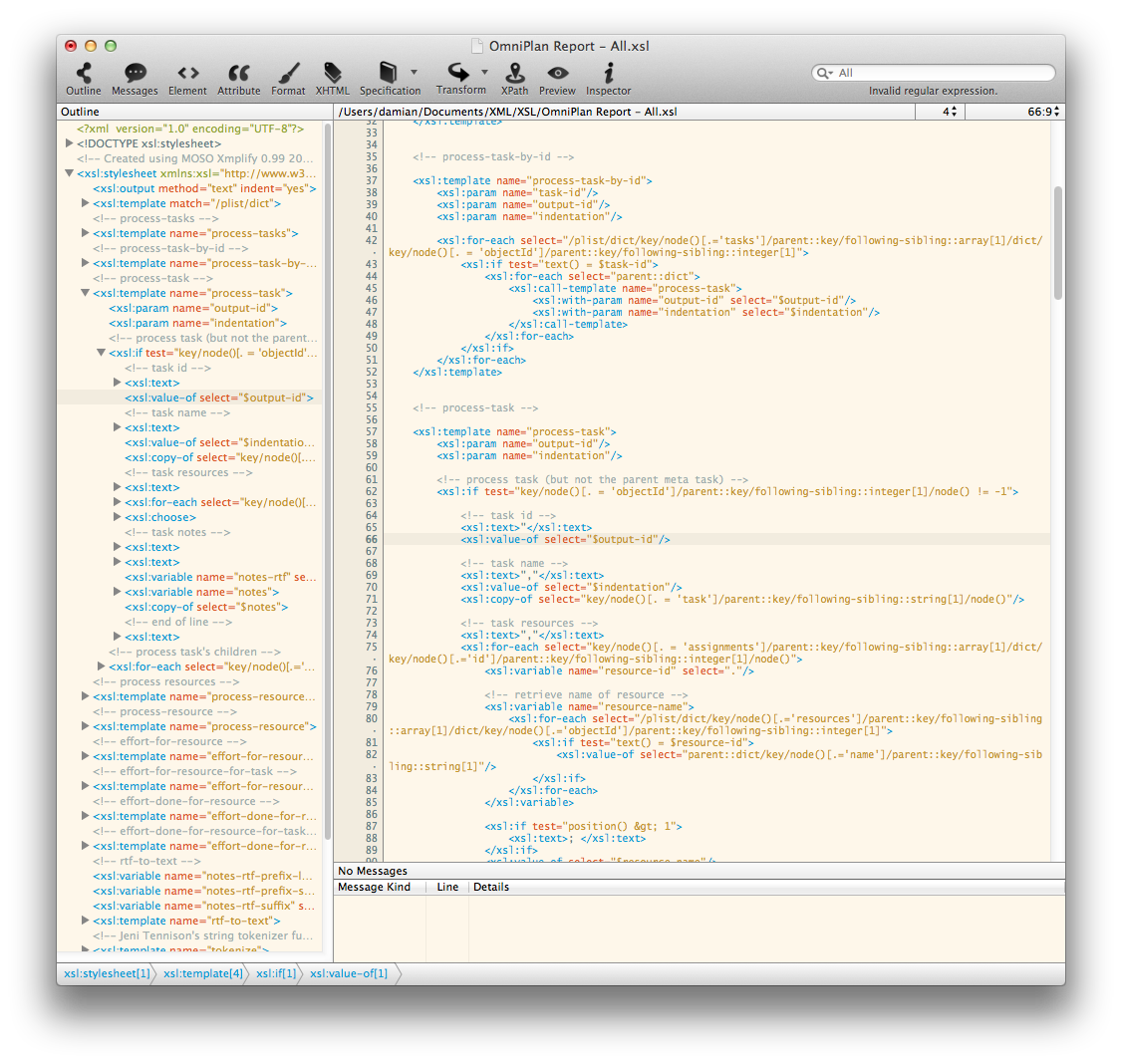
Screenshot 2: http://xmplifyapp.com/images/press/Xmplify-Auto-Completion.png

Application Icon: http://xmplifyapp.com/images/press/Xmplify.256x256.png

MOSO is based in Brisbane, Australia. MOSO released Xmplify 1.0 in early 2011. All Material and Software Copyright (C) 2016 MOSO. All Rights Reserved. Apple, the Apple logo, Mac OS X, and Macintosh are registered trademarks of Apple Inc. in the U.S. and/or other countries. Other trademarks and registered trademarks may be the property of their respective owners.
*******
Link To Article: http://prmac.com/release-id-79743.htm
*******
---------------------------------------------------------------------------------
Note that you can alter delivered distributions at any time.
Login to your account on prMac to alter your channel selection, or to opt-out at any time.
PCI Releases PDF Manipulator DC Edition for Adobe Acrobat Pro DC
A new article has been published at prMac.
PCI Releases PDF Manipulator DC Edition for Adobe Acrobat Pro DC - Published on 06/23/16
PCI is proud to announce the release of PDF Manipulator DC Edition version 1.0.0.0 for Windows and Mac computers, a new plug-in for FileMaker Pro and Adobe Acrobat Pro. This plug-in allows users to insert or extract data from PDF form fields and FileMaker Pro. PDF Manipulator DC is the first of PCI's products to feature an installer package for both Mac and Windows downloads, making it even easier to install, register, and uninstall the plug-in.
San Marcos, California - Productive Computing, Inc., a Platinum member of the FileMaker(R) Business Alliance, is proud to announce the release of PDF Manipulator DC Edition version 1.0.0.0 for Macintosh and Windows computers. PDF Manipulator DC is compatible with FileMaker 14-15 for Windows (32-bit and 64-bit), FileMaker 15 for Mac (64-bit), FileMaker 14 for Mac (32-bit and 64-bit), Windows 8/10, Mac OS X 10.10-10.11, and Adobe(R) Acrobat Pro DC.
With PDF Manipulator DC, you can:
* Insert or extract data from PDF form fields and FileMaker Pro
* Extract text content and metadata from a PDF document directly into your FileMaker solution
* Combine and delete multiple PDF documents into a single PDF from within your FileMaker solution
* Add any number of PDF pages anywhere into an existing PDF document
* Delete individual or multiple pages from a PDF document
* Browse for PDF documents or folders from your FileMaker solution
* Access, open, and save PDF documents to specific folder locations
PDF Manipulator DC offers:
* More efficient processing with a fully redesigned plug-in
* Enhanced consistency for cross-platform development
* Added 64-bit compatibility for both Windows and Mac
* The ability to show and hide Acrobat Pro (Windows only)
This plug-in's release also marks PCI's transition from downloadable zipped files to installer packages. PDF Manipulator DC is the first of PCI's products to feature an installer package for both Mac and Windows downloads, making it even easier to install, register, and uninstall the plug-in.
The PDF Manipulator DC plug-in starts at an annual subscription basis of $80 per user/per year with 5, 10, and 25 user packages available. Existing PDF Manipulator users are eligible for a 35% discount the first year. There are no scripting rewrites needed to convert from PDF Manipulator to PDF Manipulator DC. Please note that use of this plug-in requires either a full version of Acrobat Professional or an active subscription of Adobe DC. Please visit the PDF Manipulator DC Edition website for additional pricing information.
Please contact Sales via email or phone for additional questions.
Productive Computing, Inc.: http://www.productivecomputing.com
PDF Manipulator DC Edition 1.0: http://www.pdfmanipulatordc.com
Since 1996, Productive Computing, Inc. has been helping its customers become more efficient and profitable by implementing custom software solutions using FileMaker Pro. Utilizing FileMaker Pro as a rapid application development tool, their certified FileMaker developers can create custom applications that a business can run on their Windows or Macintosh desktop computers, in a web browser, on an iPad or iPhone or shared simultaneously on all of these platforms. All Material and Software (C) Copyright 2016 Productive Computing, Inc. All Rights Reserved. Apple, the Apple logo, Macintosh and Mac OS X are registered trademarks of Apple Inc. in the U.S. and/or other countries. Other trademarks and registered trademarks may be the property of their respective owners.
*******
Link To Article: http://prmac.com/release-id-79747.htm
*******
---------------------------------------------------------------------------------
Note that you can alter delivered distributions at any time.
Login to your account on prMac to alter your channel selection, or to opt-out at any time.
PCI Releases PDF Manipulator DC Edition for Adobe Acrobat Pro DC - Published on 06/23/16
PCI is proud to announce the release of PDF Manipulator DC Edition version 1.0.0.0 for Windows and Mac computers, a new plug-in for FileMaker Pro and Adobe Acrobat Pro. This plug-in allows users to insert or extract data from PDF form fields and FileMaker Pro. PDF Manipulator DC is the first of PCI's products to feature an installer package for both Mac and Windows downloads, making it even easier to install, register, and uninstall the plug-in.
San Marcos, California - Productive Computing, Inc., a Platinum member of the FileMaker(R) Business Alliance, is proud to announce the release of PDF Manipulator DC Edition version 1.0.0.0 for Macintosh and Windows computers. PDF Manipulator DC is compatible with FileMaker 14-15 for Windows (32-bit and 64-bit), FileMaker 15 for Mac (64-bit), FileMaker 14 for Mac (32-bit and 64-bit), Windows 8/10, Mac OS X 10.10-10.11, and Adobe(R) Acrobat Pro DC.
With PDF Manipulator DC, you can:
* Insert or extract data from PDF form fields and FileMaker Pro
* Extract text content and metadata from a PDF document directly into your FileMaker solution
* Combine and delete multiple PDF documents into a single PDF from within your FileMaker solution
* Add any number of PDF pages anywhere into an existing PDF document
* Delete individual or multiple pages from a PDF document
* Browse for PDF documents or folders from your FileMaker solution
* Access, open, and save PDF documents to specific folder locations
PDF Manipulator DC offers:
* More efficient processing with a fully redesigned plug-in
* Enhanced consistency for cross-platform development
* Added 64-bit compatibility for both Windows and Mac
* The ability to show and hide Acrobat Pro (Windows only)
This plug-in's release also marks PCI's transition from downloadable zipped files to installer packages. PDF Manipulator DC is the first of PCI's products to feature an installer package for both Mac and Windows downloads, making it even easier to install, register, and uninstall the plug-in.
The PDF Manipulator DC plug-in starts at an annual subscription basis of $80 per user/per year with 5, 10, and 25 user packages available. Existing PDF Manipulator users are eligible for a 35% discount the first year. There are no scripting rewrites needed to convert from PDF Manipulator to PDF Manipulator DC. Please note that use of this plug-in requires either a full version of Acrobat Professional or an active subscription of Adobe DC. Please visit the PDF Manipulator DC Edition website for additional pricing information.
Please contact Sales via email or phone for additional questions.
Productive Computing, Inc.: http://www.productivecomputing.com
PDF Manipulator DC Edition 1.0: http://www.pdfmanipulatordc.com
Since 1996, Productive Computing, Inc. has been helping its customers become more efficient and profitable by implementing custom software solutions using FileMaker Pro. Utilizing FileMaker Pro as a rapid application development tool, their certified FileMaker developers can create custom applications that a business can run on their Windows or Macintosh desktop computers, in a web browser, on an iPad or iPhone or shared simultaneously on all of these platforms. All Material and Software (C) Copyright 2016 Productive Computing, Inc. All Rights Reserved. Apple, the Apple logo, Macintosh and Mac OS X are registered trademarks of Apple Inc. in the U.S. and/or other countries. Other trademarks and registered trademarks may be the property of their respective owners.
*******
Link To Article: http://prmac.com/release-id-79747.htm
*******
---------------------------------------------------------------------------------
Note that you can alter delivered distributions at any time.
Login to your account on prMac to alter your channel selection, or to opt-out at any time.
Steamkraft - A Beautiful Endless Running Game Released by Telehorse
A new article has been published at prMac.
Steamkraft - A Beautiful Endless Running Game Released by Telehorse - Published on 06/23/16
Telehorse announces Steamkraft - steampunk voyages inspired by Jules Verne 1.0, their new mobile game for iOS devices. The game is an endless runner with beautiful steampunk graphics. Players drive, fly and sail using different steampunk machines. The goal is to get as far as possible while trying to evade moving and stationary objects. There are four challenging levels and Telehorse intends to develop six more until the end of 2016. They are working on an Apple TV version as well.
Warszawa, Poland - Telehorse has released a new mobile game for both iPad and iPhone. It's called Steamkraft - Steampunk voyages inspired by Jules Verne 1.0. The game is an endless runner with beautiful steampunk graphics. It is free and it's already available in the App Store.
Steamkraft is the second game developed by Telehorse. It is an endless runner, which means it goes on until you run out of lives, eventually. You drive, fly and sail using different steampunk machines. The goal is to get as far as possible while trying to evade moving and stationary objects.
The subtitle "Steampunk Voyages Inspired by Jules Verne" clearly points at the inspiration behind the vehicles, vessels and locations used in the game. The game is set in locations known from such Jules Verne novels as Twenty Thousand Leagues Under the Sea, Five Weeks in a Balloon or From the Earth to the Moon. By the end of 2016 Telehorse will have developed more levels with new vehicles and locations related to other novels of the French literary genius. A version for Apple TV will be released as well.
Appadvice: "Steamkraft is a distinctive adventure with its Jules Verne inspired machines and fascinating worlds. The graphics are impressive and the music has a nice, movie soundtrack feel. While the game currently has only four levels, more are on the way this year. For a very different type of endless journey, Steamkraft is definitely one to explore."
Features:
* Beautiful steampunk graphics
* Four challenging levels in four incredible locations
* Six more levels coming up until the end of 2016
* Simple, easy to use controls
* Game Center Achievements to challenge your friends
* Original music for enhanced experience
Device Requirements:
* iPhone, iPad, and iPod touch
* Requires iOS 6.0 or later
* Universal Application
* 114 MB
Pricing and Availability:
Steamkraft - Steampunk voyages inspired by Jules Verne 1.0 is free, and is available worldwide exclusively through the App Store in the Games category. An in-app purchase is available to unlock all levels of the game.
Telehorse: http://www.telehorse.pl
Steamkraft � Steampunk voyages inspired by Jules Verne 1.0: http://steamkraftgame.com/
Download from iTunes: http://itunes.apple.com/app/steamkraft-steampunk-voyages/id1103674844
YouTube Trailer: http://www.youtube.com/watch?v=FQiTWEGj-44
Screenshots: http://steamkraftgame.com/screens/
Telehorse is a Warsaw-based independent studio established in 2013 by Mariusz Szypura. In 2014 Telehorse released an adventure game called Steampunker which has won several awards in Poland and abroad. The second game, Steamkraft, was relreased on May 27, 2016. At the moment they are developing Steamburg, which has already won a prize at White Nights in Helsinki. The release is planned for the autumn of 2016. In 2016 Telehorse will also develop several new levels of Steamkraft. All Material and Software Copyright (C) 2016 Telehorse. All Rights Reserved. Apple, the Apple logo, iPhone, iPod and iPad are registered trademarks of Apple Inc. in the U.S. and/or other countries. Other trademarks and registered trademarks may be the property of their respective owners.
*******
Link To Article: http://prmac.com/release-id-79746.htm
*******
---------------------------------------------------------------------------------
Note that you can alter delivered distributions at any time.
Login to your account on prMac to alter your channel selection, or to opt-out at any time.
Steamkraft - A Beautiful Endless Running Game Released by Telehorse - Published on 06/23/16
Telehorse announces Steamkraft - steampunk voyages inspired by Jules Verne 1.0, their new mobile game for iOS devices. The game is an endless runner with beautiful steampunk graphics. Players drive, fly and sail using different steampunk machines. The goal is to get as far as possible while trying to evade moving and stationary objects. There are four challenging levels and Telehorse intends to develop six more until the end of 2016. They are working on an Apple TV version as well.
Warszawa, Poland - Telehorse has released a new mobile game for both iPad and iPhone. It's called Steamkraft - Steampunk voyages inspired by Jules Verne 1.0. The game is an endless runner with beautiful steampunk graphics. It is free and it's already available in the App Store.
Steamkraft is the second game developed by Telehorse. It is an endless runner, which means it goes on until you run out of lives, eventually. You drive, fly and sail using different steampunk machines. The goal is to get as far as possible while trying to evade moving and stationary objects.
The subtitle "Steampunk Voyages Inspired by Jules Verne" clearly points at the inspiration behind the vehicles, vessels and locations used in the game. The game is set in locations known from such Jules Verne novels as Twenty Thousand Leagues Under the Sea, Five Weeks in a Balloon or From the Earth to the Moon. By the end of 2016 Telehorse will have developed more levels with new vehicles and locations related to other novels of the French literary genius. A version for Apple TV will be released as well.
Appadvice: "Steamkraft is a distinctive adventure with its Jules Verne inspired machines and fascinating worlds. The graphics are impressive and the music has a nice, movie soundtrack feel. While the game currently has only four levels, more are on the way this year. For a very different type of endless journey, Steamkraft is definitely one to explore."
Features:
* Beautiful steampunk graphics
* Four challenging levels in four incredible locations
* Six more levels coming up until the end of 2016
* Simple, easy to use controls
* Game Center Achievements to challenge your friends
* Original music for enhanced experience
Device Requirements:
* iPhone, iPad, and iPod touch
* Requires iOS 6.0 or later
* Universal Application
* 114 MB
Pricing and Availability:
Steamkraft - Steampunk voyages inspired by Jules Verne 1.0 is free, and is available worldwide exclusively through the App Store in the Games category. An in-app purchase is available to unlock all levels of the game.
Telehorse: http://www.telehorse.pl
Steamkraft � Steampunk voyages inspired by Jules Verne 1.0: http://steamkraftgame.com/
Download from iTunes: http://itunes.apple.com/app/steamkraft-steampunk-voyages/id1103674844
YouTube Trailer: http://www.youtube.com/watch?v=FQiTWEGj-44
Screenshots: http://steamkraftgame.com/screens/
Telehorse is a Warsaw-based independent studio established in 2013 by Mariusz Szypura. In 2014 Telehorse released an adventure game called Steampunker which has won several awards in Poland and abroad. The second game, Steamkraft, was relreased on May 27, 2016. At the moment they are developing Steamburg, which has already won a prize at White Nights in Helsinki. The release is planned for the autumn of 2016. In 2016 Telehorse will also develop several new levels of Steamkraft. All Material and Software Copyright (C) 2016 Telehorse. All Rights Reserved. Apple, the Apple logo, iPhone, iPod and iPad are registered trademarks of Apple Inc. in the U.S. and/or other countries. Other trademarks and registered trademarks may be the property of their respective owners.
*******
Link To Article: http://prmac.com/release-id-79746.htm
*******
---------------------------------------------------------------------------------
Note that you can alter delivered distributions at any time.
Login to your account on prMac to alter your channel selection, or to opt-out at any time.
Fonts Manager 3 - Display & Activate your Fonts by File or Full Folders
A new article has been published at prMac.
Fonts Manager 3 - Display & Activate your Fonts by File or Full Folders - Published on 06/23/16
Wilmington based Match Software today announces Fonts Manager 3 for Apple OS X El Capitan and macOS Sierra. Fonts Manager is a complete font management system for users who need to manage large font collections. It supports instant activation of single fonts or entire folders, support of iCloud Drive, DropBox and Google Drive, and compatible with Adobe Creative Cloud and QuarkXPress. Each font can be visualized in continuous sizes 8-500 with the user own phrases.
Wilmington, Delaware - Match Software(TM) today is very pleased to announce the release of Fonts Manager 3, a complete font management system for users who need to manage large font collections. Fonts are managed by folder, which is especially useful in graphic or publishing projects to pass all the fonts in that folder to typesetters or printers. They can reside locally, or in cloud drives. Each font can be visualized in continuous sizes 8-500 with the user own phrases. This includes all the fonts already installed in the system.
Fonts Manager 3 manages very large collections with no noticeable slow down. It has been tested with over 100,000 fonts. Immediate access by the initial (like in iOS Contacts), as well as fast search with the partial or complete name of a font. For instance, " Bold" will show all the Bold fonts. Fonts can be added from the menu, or simply dragged over the application.
Fonts Manager comes with 57 fonts from the FontMenu collection to start playing right away. All current font formats are supported, including TrueType TTF, OpenType PostScript OTF, TrueType font collections TTC, and Apple dFont. For legacy projects, complete support for Mac OS 7.5-9.xx (Classic) TrueType and PostScript font suitcases are supported.
Fonts Manager is compatible with all standard applications such as Apple (Pages, Numbers, Keynote), Microsoft Office 2016, as well as high end professional tools like QuarkXPress or the applications of Adobe Creative Cloud.
Pricing and Availability:
Fonts Manager 3 list price is $19.99 (USD) for download delivery. Fonts Manager 3 is immediately available in the Mac App Store, as well as on the Fonts-Manager site, where users can download a fully functional 30 days evaluation copy. Fonts Manager is offered in English, French and Spanish.
Fonts Manager 3: http://Fonts-Manager.com
Match Software Font Collection: http://FontMenu.com
Fonts for Teaching and Learning Handwriting: http://SchoolFonts.com
Fonts for Printing Checks Magnetic Ink: http://MICR-Fonts.com
Screenshot: http://fonts-manager.com/images/MainScreen.png
Match Software was founded in 1987 by Michel Bujardet, with the goal of providing fonts and fonts utilities to both PC and Mac users. It is located in Wilmington, Delaware. Match Software offers a collection of exclusive fonts for handwriting, calligraphy, dingbats, decorative, and pure typography. The School Fonts division supplies fine fonts to teach and learn handwriting for D'Nealian and Zaner-Bloser methods. Numerous schools from around the world are using them. Match Software also supplies especially crafted MICR fonts to print magnetic information at the bottom of checks as well as calibration software, and MICR verification and positioning gauges. The MICR E13B and CMC-7 fonts have been selected by national and regional banks throughout the world. All Material and Software (C) Copyright 2016 Match Software. All Rights Reserved. Apple, the Apple logo, macOS and Macintosh are registered trademarks of Apple Inc. in the U.S. and/or other countries. Other trademarks and
registered trademarks may be the property of their respective owners.
*******
Link To Article: http://prmac.com/release-id-79744.htm
*******
---------------------------------------------------------------------------------
Note that you can alter delivered distributions at any time.
Login to your account on prMac to alter your channel selection, or to opt-out at any time.
Fonts Manager 3 - Display & Activate your Fonts by File or Full Folders - Published on 06/23/16
Wilmington based Match Software today announces Fonts Manager 3 for Apple OS X El Capitan and macOS Sierra. Fonts Manager is a complete font management system for users who need to manage large font collections. It supports instant activation of single fonts or entire folders, support of iCloud Drive, DropBox and Google Drive, and compatible with Adobe Creative Cloud and QuarkXPress. Each font can be visualized in continuous sizes 8-500 with the user own phrases.
Wilmington, Delaware - Match Software(TM) today is very pleased to announce the release of Fonts Manager 3, a complete font management system for users who need to manage large font collections. Fonts are managed by folder, which is especially useful in graphic or publishing projects to pass all the fonts in that folder to typesetters or printers. They can reside locally, or in cloud drives. Each font can be visualized in continuous sizes 8-500 with the user own phrases. This includes all the fonts already installed in the system.
Fonts Manager 3 manages very large collections with no noticeable slow down. It has been tested with over 100,000 fonts. Immediate access by the initial (like in iOS Contacts), as well as fast search with the partial or complete name of a font. For instance, " Bold" will show all the Bold fonts. Fonts can be added from the menu, or simply dragged over the application.
Fonts Manager comes with 57 fonts from the FontMenu collection to start playing right away. All current font formats are supported, including TrueType TTF, OpenType PostScript OTF, TrueType font collections TTC, and Apple dFont. For legacy projects, complete support for Mac OS 7.5-9.xx (Classic) TrueType and PostScript font suitcases are supported.
Fonts Manager is compatible with all standard applications such as Apple (Pages, Numbers, Keynote), Microsoft Office 2016, as well as high end professional tools like QuarkXPress or the applications of Adobe Creative Cloud.
Pricing and Availability:
Fonts Manager 3 list price is $19.99 (USD) for download delivery. Fonts Manager 3 is immediately available in the Mac App Store, as well as on the Fonts-Manager site, where users can download a fully functional 30 days evaluation copy. Fonts Manager is offered in English, French and Spanish.
Fonts Manager 3: http://Fonts-Manager.com
Match Software Font Collection: http://FontMenu.com
Fonts for Teaching and Learning Handwriting: http://SchoolFonts.com
Fonts for Printing Checks Magnetic Ink: http://MICR-Fonts.com
Screenshot: http://fonts-manager.com/images/MainScreen.png

Match Software was founded in 1987 by Michel Bujardet, with the goal of providing fonts and fonts utilities to both PC and Mac users. It is located in Wilmington, Delaware. Match Software offers a collection of exclusive fonts for handwriting, calligraphy, dingbats, decorative, and pure typography. The School Fonts division supplies fine fonts to teach and learn handwriting for D'Nealian and Zaner-Bloser methods. Numerous schools from around the world are using them. Match Software also supplies especially crafted MICR fonts to print magnetic information at the bottom of checks as well as calibration software, and MICR verification and positioning gauges. The MICR E13B and CMC-7 fonts have been selected by national and regional banks throughout the world. All Material and Software (C) Copyright 2016 Match Software. All Rights Reserved. Apple, the Apple logo, macOS and Macintosh are registered trademarks of Apple Inc. in the U.S. and/or other countries. Other trademarks and
registered trademarks may be the property of their respective owners.
*******
Link To Article: http://prmac.com/release-id-79744.htm
*******
---------------------------------------------------------------------------------
Note that you can alter delivered distributions at any time.
Login to your account on prMac to alter your channel selection, or to opt-out at any time.
Checklist Pro for Mac OS X - ToDo, Tasks Manager
A new article has been published at prMac.
Checklist Pro for Mac OS X - ToDo, Tasks Manager - Published on 06/23/16
iLifeTouch announces Checklist Pro 1.1.5, their task management app for Mac OS X. Checklist Pro provides users with full access to every tool they need in a to-do app to accomplish their tasks effectively. It can be used as a task manager, which will let users know about their pending tasks through the reminder. The intuitive app design makes it very easy to use. It will provide users with full access to every tool they need in a to-do app.
Kolkata, India - iLifeTouch is proud to announce the release of Checklist Pro 1.1.5, their task management app for Mac OS X. Checklist Pro possesses some of the salient features that makes it an ideal to-do manager. It can be used as a task manager, which will let you know about your pending tasks through the reminder. The intuitive app design makes it very easy to use. It will provide you with full access to every tool you need in a to-do app.
Key Features:
* Add or update notes
* Intuitive app interface
* Change the color of date and background
* Get weather updates with nice animation
* Add reminder with simple steps
* Browse with categories
* Move pending tasks to next day
Users can customize Checklist Pro the way they want. It comes with huge customizing options. It gives users weather updates so that plans can be made beneficially. Create different categories and add notes, memos, tasks. Mark any item as Favorite to have quick access to them. So, plan your daily events with this easy to-do app. Never miss a thing!
System Requirements:
* OS X 10.8 or later
* 64-bit processor
* 1.9 MB
Pricing and Availability:
Checklist Pro 1.0 is just $0.99 USD (or an equivalent amount in other currencies) for a limited time, (regular price being $9.99) and is available worldwide exclusively through the Mac App Store in the Business category.
iLifeTouch: http://www.ilifetouch.com
Checklist Pro - ToDo, Tasks Manager 1.1.5: http://www.ilifetouch.com/Checklist-Pro-Todo-Tasks-Manager
Purchase and Download (MAS): https://itunes.apple.com/app/checklist-pro-todo-tasks-manager/id1124942990
Screenshot: http://a3.mzstatic.com/us/r30/Purple20/v4/64/1f/21/641f2128-c2f9-ae2d-99a6-ed4e2b86e5b0/screen800x500.jpeg
Application Icon: http://a1.mzstatic.com/us/r30/Purple60/v4/70/64/9a/70649ac0-2b49-93dd-97db-b60f8e2ccbe5/icon128-2x.png
iLifeTouch treats all their apps as if they belonged to the end users. Not only do they hope for feedback, they actively encourage users to tell them what they want and to inform them if they are missing something they would love to see built into their apps. They are eagerly awaiting your input and they are here to make your lives easier using their apps. All Material and Software (C) Copyright 2016 iLifeTouch. All Rights Reserved. Apple, the Apple logo, Macintosh and Mac OS X are registered trademarks of Apple Inc. in the U.S. and/or other countries. Other trademarks and registered trademarks may be the property of their respective owners.
*******
Link To Article: http://prmac.com/release-id-79745.htm
*******
---------------------------------------------------------------------------------
Note that you can alter delivered distributions at any time.
Login to your account on prMac to alter your channel selection, or to opt-out at any time.
Checklist Pro for Mac OS X - ToDo, Tasks Manager - Published on 06/23/16
iLifeTouch announces Checklist Pro 1.1.5, their task management app for Mac OS X. Checklist Pro provides users with full access to every tool they need in a to-do app to accomplish their tasks effectively. It can be used as a task manager, which will let users know about their pending tasks through the reminder. The intuitive app design makes it very easy to use. It will provide users with full access to every tool they need in a to-do app.
Kolkata, India - iLifeTouch is proud to announce the release of Checklist Pro 1.1.5, their task management app for Mac OS X. Checklist Pro possesses some of the salient features that makes it an ideal to-do manager. It can be used as a task manager, which will let you know about your pending tasks through the reminder. The intuitive app design makes it very easy to use. It will provide you with full access to every tool you need in a to-do app.
Key Features:
* Add or update notes
* Intuitive app interface
* Change the color of date and background
* Get weather updates with nice animation
* Add reminder with simple steps
* Browse with categories
* Move pending tasks to next day
Users can customize Checklist Pro the way they want. It comes with huge customizing options. It gives users weather updates so that plans can be made beneficially. Create different categories and add notes, memos, tasks. Mark any item as Favorite to have quick access to them. So, plan your daily events with this easy to-do app. Never miss a thing!
System Requirements:
* OS X 10.8 or later
* 64-bit processor
* 1.9 MB
Pricing and Availability:
Checklist Pro 1.0 is just $0.99 USD (or an equivalent amount in other currencies) for a limited time, (regular price being $9.99) and is available worldwide exclusively through the Mac App Store in the Business category.
iLifeTouch: http://www.ilifetouch.com
Checklist Pro - ToDo, Tasks Manager 1.1.5: http://www.ilifetouch.com/Checklist-Pro-Todo-Tasks-Manager
Purchase and Download (MAS): https://itunes.apple.com/app/checklist-pro-todo-tasks-manager/id1124942990
Screenshot: http://a3.mzstatic.com/us/r30/Purple20/v4/64/1f/21/641f2128-c2f9-ae2d-99a6-ed4e2b86e5b0/screen800x500.jpeg

Application Icon: http://a1.mzstatic.com/us/r30/Purple60/v4/70/64/9a/70649ac0-2b49-93dd-97db-b60f8e2ccbe5/icon128-2x.png

iLifeTouch treats all their apps as if they belonged to the end users. Not only do they hope for feedback, they actively encourage users to tell them what they want and to inform them if they are missing something they would love to see built into their apps. They are eagerly awaiting your input and they are here to make your lives easier using their apps. All Material and Software (C) Copyright 2016 iLifeTouch. All Rights Reserved. Apple, the Apple logo, Macintosh and Mac OS X are registered trademarks of Apple Inc. in the U.S. and/or other countries. Other trademarks and registered trademarks may be the property of their respective owners.
*******
Link To Article: http://prmac.com/release-id-79745.htm
*******
---------------------------------------------------------------------------------
Note that you can alter delivered distributions at any time.
Login to your account on prMac to alter your channel selection, or to opt-out at any time.
Subscribe to:
Posts (Atom)