A new article has been published at prMac.
App Promotion Summit London Announces Biggest Ever Speaker Lineup - Published on 06/25/16
App Promotion Summit returns to London on 7th July 2016, with a mission to unlock growth for mobile apps and games. The London-based event enters its fourth year with Facebook, Twitter and Google set to deliver expert workshops and masterclasses. Industry leaders from companies such as Mallzee, 8fit, Space Ape Games, App Annie, eBay and MoneySuperMarket.com will be delivering presentations to 300 guests from across the app and game marketing landscape.
London - App Promotion Summit is returning to London on 7th July 2016 with a mission to unlock growth for mobile apps and games. Industry leaders from companies such as Mallzee, 8fit, Space Ape Games, App Annie, eBay and MoneySuperMarket.com will be delivering presentations to 300 guests from across the app and game marketing landscape including Ford of Britain, Bookatable, Square Enix, Job Today, HolidayPirates, Suddeutsche Zeitung, Paddy Power Betfair, HERE, FEO Media, TodayTix, PokerStars, Metro, Pixum, Hostelworld and Zurich Insurance.
Now in its fourth year, the event has grown to become the UK's primary conference for executives to come together and discuss the core issues facing app professionals today, including marketing, user acquisition & retention, media buying and video promotion. The 2016 edition will feature exclusive workshops and masterclasses from Google, Twitter and Facebook, ensuring that delegates are able to perfect their app success strategies with the help of industry leaders.
Taking place at the larger venue of the London Marriott Hotel Grosvenor Square to accommodate growing demand, APS London will once again unite developers, media companies, app studios and brands together with leading mobile ad networks, cross promotion exchanges, software providers and agencies. The event has retained its unique and well-received format of delivering focused content in short bursts and driving interaction between peers in order to maximise value for delegates.
App Promotion Summit has been described as "the best way to improve your app marketing and anticipate trends" (Marie-Laure Gama, Mobile Product Manager, Betclic Everest) and "inspiring and motivating" (Barbara Figl, Marketing Manager, Ulmon).
"The app environment is an extremely competitive and progressive space and one that is maturing rapidly," said Andrew Mowbray, Communications Director for App Promotion Summit. "It's crucial for publishers, brands and online retailers that their apps stand out in the crowded marketplaces, and we make sure that APS London delivers the tools that enable growth and retention."
Schedule, speakers, interactive roundtable format and venue information: http://apppromotionsummit.com/LONDON/2016/
App Promotion Summit is the world's leading app marketing conference. The event covers all aspects of app and mobile game marketing from App Store Optimization (ASO) to mobile growth hacking and app advertising, along with emerging issues such as retargeting and engagement. All Material and Software Copyright (C) 2016 App Promotion Summit. All Rights Reserved. Apple, the Apple logo, iPhone, iPod and iPad are registered trademarks of Apple Inc. in the U.S. and/or other countries. Other trademarks and registered trademarks may be the property of their respective owners.
*******
Link To Article: http://prmac.com/release-id-79754.htm
*******
---------------------------------------------------------------------------------
Note that you can alter delivered distributions at any time.
Login to your account on prMac to alter your channel selection, or to opt-out at any time.

York Burkhardt Releases Football Pocket Manager 1.05 for iOS
A new article has been published at prMac.
York Burkhardt Releases Football Pocket Manager 1.05 for iOS - Published on 06/25/16
Indie developer, York Burkhardt announces Football Pocket Manager (U.S.: Soccer Pocket Manager) 1.05, his football manager simulation for iOS devices. In this football manager game the player's mission is to work their way up to the top, by making football history. The game is lots of fun and easy to learn. In contrast to other games, it can be played fully offline and isn't overload with in-app purchases.
Hanover, Germany - Indie developer, York Burkhardt is pleased to announce the release and immediate availability of the game Football Pocket Manager (U.S.: Soccer Pocket Manager) 1.05. This game is developed for iPhone and iPad devices. In this football manager game your mission is to work your way up to the top making football history. It is lots of fun and easy to learn. In contrast to other games, it can be played fully offline. You start at the bottom of the division and by taking care of your team, your sponsors, fans and stadium, you will reach your dream: The championship!
Features:
* Tutorial
* Easy to learn football manager simulation
* Take care of your team, your sponsors, fans and stadium
* Extend your stadium: Upgrade your stadium
* League System with 4 leagues and 2 cups
* 4 different countries
More content will be added in the next releases.
Device Requirements:
* iPhone, iPad, and iPod touch
* Requires iOS 7.0 or later
* Universal Application
* 17.1 MB
Pricing and Availability:
Football Pocket Manager is free, and is available worldwide through the App Store in the Games category. The game offers in-app purchases. Users can purchase the "Pro-Mode" to disable ads and enable new features, the "Game-Editor" to edit player and team names, or the "Fullversion" to unlock all features! Furthermore the player can purchase In game money or the Co-Trainer to automate the training and the formation.
Soccer Pocket Manager 1.05: http://www.pucupo-games.com
Download from iTunes: https://itunes.apple.com/app/id1123450541
Screenshot 1: http://media.pucupo-games.com/footballpocketmanager/Screenshots_EN/Screen1.png
Screenshot 2: http://media.pucupo-games.com/footballpocketmanager/Screenshots_EN/Screen2.png
Screenshot 3: http://media.pucupo-games.com/footballpocketmanager/Screenshots_EN/Screen3.png
App Icon: http://media.pucupo-games.com/footballpocketmanager/Screenshots_EN/Icon1024.png
Located in Hanover, Germany, York Burkhardt developed games for mobile since 2011 with the goal to make beautifully fun games for lovely people. All Material and Software (C) 2011-2016 York Burkhardt. All Rights Reserved. Apple, the Apple logo, iPhone, iPod and iPad are registered trademarks of Apple Inc. in the U.S. and/or other countries. Other trademarks and registered trademarks may be the property of their respective owners.
*******
Link To Article: http://prmac.com/release-id-79753.htm
*******
---------------------------------------------------------------------------------
Note that you can alter delivered distributions at any time.
Login to your account on prMac to alter your channel selection, or to opt-out at any time.
York Burkhardt Releases Football Pocket Manager 1.05 for iOS - Published on 06/25/16
Indie developer, York Burkhardt announces Football Pocket Manager (U.S.: Soccer Pocket Manager) 1.05, his football manager simulation for iOS devices. In this football manager game the player's mission is to work their way up to the top, by making football history. The game is lots of fun and easy to learn. In contrast to other games, it can be played fully offline and isn't overload with in-app purchases.
Hanover, Germany - Indie developer, York Burkhardt is pleased to announce the release and immediate availability of the game Football Pocket Manager (U.S.: Soccer Pocket Manager) 1.05. This game is developed for iPhone and iPad devices. In this football manager game your mission is to work your way up to the top making football history. It is lots of fun and easy to learn. In contrast to other games, it can be played fully offline. You start at the bottom of the division and by taking care of your team, your sponsors, fans and stadium, you will reach your dream: The championship!
Features:
* Tutorial
* Easy to learn football manager simulation
* Take care of your team, your sponsors, fans and stadium
* Extend your stadium: Upgrade your stadium
* League System with 4 leagues and 2 cups
* 4 different countries
More content will be added in the next releases.
Device Requirements:
* iPhone, iPad, and iPod touch
* Requires iOS 7.0 or later
* Universal Application
* 17.1 MB
Pricing and Availability:
Football Pocket Manager is free, and is available worldwide through the App Store in the Games category. The game offers in-app purchases. Users can purchase the "Pro-Mode" to disable ads and enable new features, the "Game-Editor" to edit player and team names, or the "Fullversion" to unlock all features! Furthermore the player can purchase In game money or the Co-Trainer to automate the training and the formation.
Soccer Pocket Manager 1.05: http://www.pucupo-games.com
Download from iTunes: https://itunes.apple.com/app/id1123450541
Screenshot 1: http://media.pucupo-games.com/footballpocketmanager/Screenshots_EN/Screen1.png

Screenshot 2: http://media.pucupo-games.com/footballpocketmanager/Screenshots_EN/Screen2.png

Screenshot 3: http://media.pucupo-games.com/footballpocketmanager/Screenshots_EN/Screen3.png

App Icon: http://media.pucupo-games.com/footballpocketmanager/Screenshots_EN/Icon1024.png

Located in Hanover, Germany, York Burkhardt developed games for mobile since 2011 with the goal to make beautifully fun games for lovely people. All Material and Software (C) 2011-2016 York Burkhardt. All Rights Reserved. Apple, the Apple logo, iPhone, iPod and iPad are registered trademarks of Apple Inc. in the U.S. and/or other countries. Other trademarks and registered trademarks may be the property of their respective owners.
*******
Link To Article: http://prmac.com/release-id-79753.htm
*******
---------------------------------------------------------------------------------
Note that you can alter delivered distributions at any time.
Login to your account on prMac to alter your channel selection, or to opt-out at any time.
Magical Alphabet for iOS - Explore the Adventurous World of ABCs
A new article has been published at prMac.
Magical Alphabet for iOS - Explore the Adventurous World of ABCs - Published on 06/25/16
SkySafe Studios announces Magical Alphabet - Letters, Phonics, Spellings and ABC Videos for preschoolers and toddlers 1.0 for iOS devices. Magical Alphabet is an English letters learning app for toddlers and preschoolers where they learn letters, phonics and spellings through hilarious 3D Magic show videos and puzzle games. 26 funny story based 3D Magic show movies will help kids learn 26 letters and 52 words in a most entertaining way.
New Delhi, India - SkySafe Studios is pleased to announce the release and immediate availability of Magical Alphabet - Letters, Phonics, Spellings and ABC Videos for preschoolers and toddlers 1.0 for iPhone, iPad and iPod touch devices. Magical Alphabet is an English letters learning app for toddlers and preschoolers where they learn letters, phonics and spellings through hilarious 3D Magic show videos and puzzle games. Kids learn 52 words through these animated videos.
See Pom Pom the Magician turning the alphabets into exciting objects and animals. See him turning letter B into a bunch of balloons and then flying up with them. Or, changing the letter L into a hungry Lion by mistake and then running away from lion as fast as he could to save his himself, or even changing the letter P into Penguins who will be dancing on the tunes of Piano. See the letter M getting changed into a mischievous Monkey who steels his hat and climbs up the tree.
Features Include:
* 26 funny story based 3D Magic show movies which will help kids learn 26 letters and 52 words in a most entertaining way
* 52 Spelling pages where kids drag letters in place to spell the words while listening to their names and phonic sounds along with delightful animations
* There is no goal, no wrong or right, it's a fail-safe app where kids enjoy playing with animals
Device Requirements:
* iPhone, iPad, and iPod touch
* Requires iOS 7.0 or later
* Universal Application
* 302 MB
Pricing and Availability:
Magical Alphabet 1.0 is just $1.99 USD (or an equivalent amount in other currencies), and is available worldwide exclusively through the App Store in the Education category. A free "lite" version of the app is also available through the App Store.
Magical Alphabet 1.0: http://www.skysafestudios.com/apps/magical-alphabet/
Purchase and Download from iTunes: https://itunes.apple.com/app/magical-alphabet-letters-phonics/id1040130713
Download Lite Version from iTunes: https://itunes.apple.com/app/magical-alphabet-letters-phonics/id1084387063
YouTube Video: https://www.youtube.com/watch?v=AttoSBjkEEY
Screenshot 01: https://s32.postimg.org/dlcdapzvp/Movies1.jpg
Press Kit (ZIP): https://www.dropbox.com/s/ocnqki6t4mu642c/Magical_Aphabet_Press_Kit.7z?dl=0
SkySafe Studios is mobile apps development studios founded in 2014 and based in New Delhi, India. We love making innovative fun learning apps for kids and families. We firmly believe that adding a pinch of fun and entertainment in learning makes it an interesting and a joyful experience for kids and this what we love doing. All Material and Software (C) Copyright 2016 SkySafe Studios. All Rights Reserved. Apple, the Apple logo, iPhone, iPod and iPad are registered trademarks of Apple Inc. in the U.S. and/or other countries.
*******
Link To Article: http://prmac.com/release-id-79752.htm
*******
---------------------------------------------------------------------------------
Note that you can alter delivered distributions at any time.
Login to your account on prMac to alter your channel selection, or to opt-out at any time.
Magical Alphabet for iOS - Explore the Adventurous World of ABCs - Published on 06/25/16
SkySafe Studios announces Magical Alphabet - Letters, Phonics, Spellings and ABC Videos for preschoolers and toddlers 1.0 for iOS devices. Magical Alphabet is an English letters learning app for toddlers and preschoolers where they learn letters, phonics and spellings through hilarious 3D Magic show videos and puzzle games. 26 funny story based 3D Magic show movies will help kids learn 26 letters and 52 words in a most entertaining way.
New Delhi, India - SkySafe Studios is pleased to announce the release and immediate availability of Magical Alphabet - Letters, Phonics, Spellings and ABC Videos for preschoolers and toddlers 1.0 for iPhone, iPad and iPod touch devices. Magical Alphabet is an English letters learning app for toddlers and preschoolers where they learn letters, phonics and spellings through hilarious 3D Magic show videos and puzzle games. Kids learn 52 words through these animated videos.
See Pom Pom the Magician turning the alphabets into exciting objects and animals. See him turning letter B into a bunch of balloons and then flying up with them. Or, changing the letter L into a hungry Lion by mistake and then running away from lion as fast as he could to save his himself, or even changing the letter P into Penguins who will be dancing on the tunes of Piano. See the letter M getting changed into a mischievous Monkey who steels his hat and climbs up the tree.
Features Include:
* 26 funny story based 3D Magic show movies which will help kids learn 26 letters and 52 words in a most entertaining way
* 52 Spelling pages where kids drag letters in place to spell the words while listening to their names and phonic sounds along with delightful animations
* There is no goal, no wrong or right, it's a fail-safe app where kids enjoy playing with animals
Device Requirements:
* iPhone, iPad, and iPod touch
* Requires iOS 7.0 or later
* Universal Application
* 302 MB
Pricing and Availability:
Magical Alphabet 1.0 is just $1.99 USD (or an equivalent amount in other currencies), and is available worldwide exclusively through the App Store in the Education category. A free "lite" version of the app is also available through the App Store.
Magical Alphabet 1.0: http://www.skysafestudios.com/apps/magical-alphabet/
Purchase and Download from iTunes: https://itunes.apple.com/app/magical-alphabet-letters-phonics/id1040130713
Download Lite Version from iTunes: https://itunes.apple.com/app/magical-alphabet-letters-phonics/id1084387063
YouTube Video: https://www.youtube.com/watch?v=AttoSBjkEEY
Screenshot 01: https://s32.postimg.org/dlcdapzvp/Movies1.jpg

Press Kit (ZIP): https://www.dropbox.com/s/ocnqki6t4mu642c/Magical_Aphabet_Press_Kit.7z?dl=0
SkySafe Studios is mobile apps development studios founded in 2014 and based in New Delhi, India. We love making innovative fun learning apps for kids and families. We firmly believe that adding a pinch of fun and entertainment in learning makes it an interesting and a joyful experience for kids and this what we love doing. All Material and Software (C) Copyright 2016 SkySafe Studios. All Rights Reserved. Apple, the Apple logo, iPhone, iPod and iPad are registered trademarks of Apple Inc. in the U.S. and/or other countries.
*******
Link To Article: http://prmac.com/release-id-79752.htm
*******
---------------------------------------------------------------------------------
Note that you can alter delivered distributions at any time.
Login to your account on prMac to alter your channel selection, or to opt-out at any time.
iFFmpeg 6 for Mac Converts Multimedia Files Between Formats
A new article has been published at prMac.
iFFmpeg 6 for Mac Converts Multimedia Files Between Formats - Published on 06/25/16
iFFmpeg 6 for the Mac is a comprehensive media tool to convert movie, audio and media files between formats. The FFmpeg command line instructions can be very hard to master/understand, so iFFmpeg does all the hard work for you. This allows you to use FFmpeg without detailed command-line knowledge. Focused on simplicity, iFFmpeg brings a fresh approach to use FFmpeg, to create ultra high quality movies without the need to write one single command-line code.
Schelle, Belgium - Focused on simplicity, iFFmpeg 6 for the Mac brings a fresh approach to use FFmpeg, to create ultra high quality movies without the need to write one single command-line code. iFFmpeg converts and processes many media files with high level quality using FFmpeg with no required knowledge. Advanced users are not left out in the cold as the app offers many of options to work with.
The app offers support for many codecs and containers like MPEG4, H264, H265 HEVC, Matroska, PRORES, DNxHD, DVVideo, MPEG TS, MPEG PS, XAVS, FLV, Theora, AVI, OGG, VP8 & VP9 (.webm), Animated GIF, VOB, MXF, GFX and many more. Merging media file sis a snap, as iFFmpeg can stitch unlimited files into one file. Two methods : Concat passthru (blistering fast) and Complex Filter.
Subtitles support offers both hardburn subtitles and soft subtitles are supported (external or embedded). A number of video presets are included by default: iPod, iPad, iPhone, Apple TV, PS4, Xbox One, Wii-U, Android, YouTube, Facebook, Vimeo and many more. Plus, iFFmpeg can encode multiple files at once, up to 8 in a batch at the same time.
300 advanced options offer users the ability to convert with control and power. The app's 40 Video filters include: add watermark, timecode rendering, padding and cropping, rotating, video stabilization, sharpen, blurring, sharpening, deinterlace and many more. Audio Filters offer: Adjust Volume, Fade In/Out, Earwax, Audio Tempo, Bauer stereo, and more. Watch Folders offer the ability to drag and drop a media file into a watch folder and iFFmpeg will automatically encode it.
iFFmpeg's chapter editing abilities, allow users to add chapters with ease for MP4, MOV and MKV formats. Trimming movies is easy, as the app allows users to cut start and endings with ease. The app export movies to images, with support for .png, .bmp & .jpg. The images to movies feature converts .png, .bmp & .jpg images to any movie format.
Pricing and Availability:
iFFmpeg 6 is 18 Euro (or an equivalent amount in other currencies, and is available through the iFFmpeg website. A trial download is available through the iFFmpeg website.
iFFmpeg: http://www.iffmpeg.com
Direct Download Link: http://www.iffmpeg.com/iFFmpeg.dmg
Purchase Link: https://www.paypal.com/cgi-bin/webscr?cmd=_s-xclick&hosted_button_id=RJ2SDP7NL8JWY
Screenshot: http://www.iffmpeg.com/img/macBook2.jpg
OSXBytes is an independent Mac OS X and iOS coder located in Belgium. All Material and Software (C) Copyright 2016 OSXBytes. All Rights Reserved. Apple, the Apple logo, Macintosh and Mac OS X are registered trademarks of Apple Inc. in the U.S. and/or other countries. Other trademarks and registered trademarks may be the property of their respective owners.
*******
Link To Article: http://prmac.com/release-id-79751.htm
*******
---------------------------------------------------------------------------------
Note that you can alter delivered distributions at any time.
Login to your account on prMac to alter your channel selection, or to opt-out at any time.
iFFmpeg 6 for Mac Converts Multimedia Files Between Formats - Published on 06/25/16
iFFmpeg 6 for the Mac is a comprehensive media tool to convert movie, audio and media files between formats. The FFmpeg command line instructions can be very hard to master/understand, so iFFmpeg does all the hard work for you. This allows you to use FFmpeg without detailed command-line knowledge. Focused on simplicity, iFFmpeg brings a fresh approach to use FFmpeg, to create ultra high quality movies without the need to write one single command-line code.
Schelle, Belgium - Focused on simplicity, iFFmpeg 6 for the Mac brings a fresh approach to use FFmpeg, to create ultra high quality movies without the need to write one single command-line code. iFFmpeg converts and processes many media files with high level quality using FFmpeg with no required knowledge. Advanced users are not left out in the cold as the app offers many of options to work with.
The app offers support for many codecs and containers like MPEG4, H264, H265 HEVC, Matroska, PRORES, DNxHD, DVVideo, MPEG TS, MPEG PS, XAVS, FLV, Theora, AVI, OGG, VP8 & VP9 (.webm), Animated GIF, VOB, MXF, GFX and many more. Merging media file sis a snap, as iFFmpeg can stitch unlimited files into one file. Two methods : Concat passthru (blistering fast) and Complex Filter.
Subtitles support offers both hardburn subtitles and soft subtitles are supported (external or embedded). A number of video presets are included by default: iPod, iPad, iPhone, Apple TV, PS4, Xbox One, Wii-U, Android, YouTube, Facebook, Vimeo and many more. Plus, iFFmpeg can encode multiple files at once, up to 8 in a batch at the same time.
300 advanced options offer users the ability to convert with control and power. The app's 40 Video filters include: add watermark, timecode rendering, padding and cropping, rotating, video stabilization, sharpen, blurring, sharpening, deinterlace and many more. Audio Filters offer: Adjust Volume, Fade In/Out, Earwax, Audio Tempo, Bauer stereo, and more. Watch Folders offer the ability to drag and drop a media file into a watch folder and iFFmpeg will automatically encode it.
iFFmpeg's chapter editing abilities, allow users to add chapters with ease for MP4, MOV and MKV formats. Trimming movies is easy, as the app allows users to cut start and endings with ease. The app export movies to images, with support for .png, .bmp & .jpg. The images to movies feature converts .png, .bmp & .jpg images to any movie format.
Pricing and Availability:
iFFmpeg 6 is 18 Euro (or an equivalent amount in other currencies, and is available through the iFFmpeg website. A trial download is available through the iFFmpeg website.
iFFmpeg: http://www.iffmpeg.com
Direct Download Link: http://www.iffmpeg.com/iFFmpeg.dmg
Purchase Link: https://www.paypal.com/cgi-bin/webscr?cmd=_s-xclick&hosted_button_id=RJ2SDP7NL8JWY
Screenshot: http://www.iffmpeg.com/img/macBook2.jpg

OSXBytes is an independent Mac OS X and iOS coder located in Belgium. All Material and Software (C) Copyright 2016 OSXBytes. All Rights Reserved. Apple, the Apple logo, Macintosh and Mac OS X are registered trademarks of Apple Inc. in the U.S. and/or other countries. Other trademarks and registered trademarks may be the property of their respective owners.
*******
Link To Article: http://prmac.com/release-id-79751.htm
*******
---------------------------------------------------------------------------------
Note that you can alter delivered distributions at any time.
Login to your account on prMac to alter your channel selection, or to opt-out at any time.
Find the Perfect Investment Property With the Foreclosures Canada App
A new article has been published at prMac.
Find the Perfect Investment Property With the Foreclosures Canada App - Published on 06/24/16
Tapp App announces Foreclosure Canada 2.7.1 for iOS devices, the important update to their must-have tool for property investors. The app offers a lot more than a few user interface tweaks. Foreclosure Canada delivers the best data available when you're seeking a new home or property investment, but facing stiff competition for those deals in a market where you need to be precise, focused, and keep your options at your fingertips.
Alberta,Canada - The Foreclosures Canada app has new updates, but this must-have tool for property investors offers a lot more than a few user interface tweaks. Foreclosure Canada 2.7.1 for iOS devices delivers the best data available when you're seeking a new home or property investment, but facing stiff competition for those deals in a market where you need to be precise, focused, and keep your options at your fingertips.
The app lists bank foreclosures, estate and probate sales, tax sales and other below-market offerings priced to save you money - and priced to go fast! With Foreclosures Canada, users can identify property across the country in a searchable database that's accessible to members looking for all the real deals.
"We've designed the Foreclosures Canada app so that with a few simple taps on your mobile, you can see the most up-to-date listings that matter where you are, or where you want to be," said Rachel Gee, operations manager for the company. "Users apply the filters they need to create a list of properties, locations, price and features to make the next discovery simple while saving investors time and money."
In addition to GPS-activated searches and carefully tailored lists, the app and Foreclosures Canada membership offer maps, property photos and interior views, street views of neighborhoods, satellite images and more. Searches are easy to save, or to email to others when you find the perfect property.
Features:
* GPS-activated property search finds foreclosures near you
* Exceptional graphics with maps, photos, satellite images, street views
* Search by property type, location, price, listing type and more
* Easy search saves to your own list, or email to a friend
* Full property details and contact info available
Device Requirements:
* iPhone, iPad, and iPod touch
* iOS 8.0 or later
* 26.5MB
Pricing and Availability:
Foreclosure Canada 2.7.1 is free, and is available worldwide exclusively through the App Store in the Finance category. Convenient in-app purchases are available.
Foreclosures Canada 2.7.1: http://www.foreclosuresearch.ca/
Download from iTunes: https://itunes.apple.com/app/id548227953
Screenshot 1: http://a2.mzstatic.com/us/r30/Purple1/v4/c6/28/ba/c628bab7-bc53-2e40-34f9-7de662e0ee2a/screen322x572.jpeg
Screenshot 2: http://a1.mzstatic.com/us/r30/Purple1/v4/5a/f5/0c/5af50cbe-2ae6-6ec8-c072-fb891c07a0c2/screen322x572.jpeg
App Icon: http://a3.mzstatic.com/us/r30/Purple60/v4/b6/75/fa/b675fae5-9f2c-6eb1-ac77-5d429b3eac28/icon175x175.png
Tapp App is a leading software developer for finance and business apps and was established in 2012 and located in Alberta, Canada. They specialize in creating apps for real estate investors and business professionals that are simple, helpful and time saving. All Material and Software Copyright (C) 2016 Tapp App. All Rights Reserved. Apple, the Apple logo, iPhone, iPod and iPad are registered trademarks of Apple Inc. in the U.S. and/or other countries. Other trademarks and registered trademarks may be the property of their respective owners.
*******
Link To Article: http://prmac.com/release-id-79750.htm
*******
---------------------------------------------------------------------------------
Note that you can alter delivered distributions at any time.
Login to your account on prMac to alter your channel selection, or to opt-out at any time.
Find the Perfect Investment Property With the Foreclosures Canada App - Published on 06/24/16
Tapp App announces Foreclosure Canada 2.7.1 for iOS devices, the important update to their must-have tool for property investors. The app offers a lot more than a few user interface tweaks. Foreclosure Canada delivers the best data available when you're seeking a new home or property investment, but facing stiff competition for those deals in a market where you need to be precise, focused, and keep your options at your fingertips.
Alberta,Canada - The Foreclosures Canada app has new updates, but this must-have tool for property investors offers a lot more than a few user interface tweaks. Foreclosure Canada 2.7.1 for iOS devices delivers the best data available when you're seeking a new home or property investment, but facing stiff competition for those deals in a market where you need to be precise, focused, and keep your options at your fingertips.
The app lists bank foreclosures, estate and probate sales, tax sales and other below-market offerings priced to save you money - and priced to go fast! With Foreclosures Canada, users can identify property across the country in a searchable database that's accessible to members looking for all the real deals.
"We've designed the Foreclosures Canada app so that with a few simple taps on your mobile, you can see the most up-to-date listings that matter where you are, or where you want to be," said Rachel Gee, operations manager for the company. "Users apply the filters they need to create a list of properties, locations, price and features to make the next discovery simple while saving investors time and money."
In addition to GPS-activated searches and carefully tailored lists, the app and Foreclosures Canada membership offer maps, property photos and interior views, street views of neighborhoods, satellite images and more. Searches are easy to save, or to email to others when you find the perfect property.
Features:
* GPS-activated property search finds foreclosures near you
* Exceptional graphics with maps, photos, satellite images, street views
* Search by property type, location, price, listing type and more
* Easy search saves to your own list, or email to a friend
* Full property details and contact info available
Device Requirements:
* iPhone, iPad, and iPod touch
* iOS 8.0 or later
* 26.5MB
Pricing and Availability:
Foreclosure Canada 2.7.1 is free, and is available worldwide exclusively through the App Store in the Finance category. Convenient in-app purchases are available.
Foreclosures Canada 2.7.1: http://www.foreclosuresearch.ca/
Download from iTunes: https://itunes.apple.com/app/id548227953
Screenshot 1: http://a2.mzstatic.com/us/r30/Purple1/v4/c6/28/ba/c628bab7-bc53-2e40-34f9-7de662e0ee2a/screen322x572.jpeg

Screenshot 2: http://a1.mzstatic.com/us/r30/Purple1/v4/5a/f5/0c/5af50cbe-2ae6-6ec8-c072-fb891c07a0c2/screen322x572.jpeg

App Icon: http://a3.mzstatic.com/us/r30/Purple60/v4/b6/75/fa/b675fae5-9f2c-6eb1-ac77-5d429b3eac28/icon175x175.png

Tapp App is a leading software developer for finance and business apps and was established in 2012 and located in Alberta, Canada. They specialize in creating apps for real estate investors and business professionals that are simple, helpful and time saving. All Material and Software Copyright (C) 2016 Tapp App. All Rights Reserved. Apple, the Apple logo, iPhone, iPod and iPad are registered trademarks of Apple Inc. in the U.S. and/or other countries. Other trademarks and registered trademarks may be the property of their respective owners.
*******
Link To Article: http://prmac.com/release-id-79750.htm
*******
---------------------------------------------------------------------------------
Note that you can alter delivered distributions at any time.
Login to your account on prMac to alter your channel selection, or to opt-out at any time.
The New Ancient Greek Gods Deluxe Casino goes on Sale
A new article has been published at prMac.
The New Ancient Greek Gods Deluxe Casino goes on Sale - Published on 06/24/16
London based Apps Genie Limited today announced a price drop for The New Ancient Greek Gods Deluxe Casino, premium casino app recently released on the App Store. The New Ancient Greek Gods Deluxe Casino brings an authentic Vegas casino experience on-the-go, exhilarating slot game action right at your fingertips. The app allows users to choose from several action-packed mini-games from Slots, Blackjack, Roulette and Video Poker. For a limited time only the game will be available for Free.
London, England - Apps Genie Limited, an established mobile application developer focused on designing innovative games & apps for the mobile marketplace, today announced announces a sale on The New Ancient Greek Gods Deluxe Casino that will see the game's price reduced from $0.99 to Free for a limited time only. Premium casino app recently released on the App Store The New Ancient Greek Gods Deluxe Casino brings an authentic Vegas casino experience on-the-go, exhilarating Slot game action right at your fingertips. For a limited time only game will be available for Free on the App Store in the Games category.
An eloquently straightforward casino game that's as addicting as it is engaging, The New Ancient Greek Gods Deluxe Casino is designed specifically to put challenge and distract players. The app allows users to choose from several action-packed mini-games from Slots, Blackjack, Roulette and Video Poker - the possibilities are endless. This unique game allows players to experience fun and excitement of real Vegas Slots & Casino anytime & anywhere they want, without typical casino distractions. Bet a little or go all in and try to hit the biggest jackpot, reach the highest achievements and win Free Spins, Wilds & Bonuses. Enjoy the stimulating adrenaline rush of virtual games with The New Ancient Greek Gods Deluxe Casino on your iPhone, iPad or iPod touch.
Focused on providing a well polished, well rounded, and thoroughly enjoyable playing experience, The New Ancient Greek Gods Deluxe Casino features responsive and intuitive controls that allow users set up auto spin, make bets, see Progressive Jackpot and much more just with one finger. Run out of coins? Don't worry as games offers 1000+, 3000+ and even 5000+ coins via in-app purchase. For users that are keen on recording their stats, game offers a high score leaderboard to track the best results. By mixing Vegas Slots together with Roulette and Poker game elements, The New Ancient Greek Gods Deluxe Casino has manages to become a game that is equal to more than the sum of its parts.
Device Requirements:
* iPhone, iPad, and iPod touch
* Requires iOS 7.0 or later
* 90.0 MB
Pricing and Availability:
For a limited time, The New Ancient Greek Gods Deluxe Casino 1.0 is Free (Reg $0.99 USD) and available worldwide exclusively through the App Store in the Games category.
The New Ancient Greek Gods Deluxe Casino 1.0: http://ancientgreekcasino.com/
Download from iTunes: https://itunes.apple.com/app/the-new-ancient-greek-gods-deluxe-casino/id1098184320
Screenshot: http://a5.mzstatic.com/us/r30/Purple49/v4/93/8d/ba/938dbae0-98b5-a966-1736-5093c885b2ee/screen322x572.jpeg
App Icon: http://a2.mzstatic.com/us/r30/Purple49/v4/2b/63/23/2b6323b1-3be0-0e1d-73f5-df926f8e185c/icon175x175.png
Located in London, Apps Genie Limited is mobile application development studio focused on providing mobile enthusiasts with valuable and informative mobile solutions across a variety of disciplines and focuses. Apps Genie Limited has stayed continuously committed to providing mobile audiences with applications that are well structured and effective. (C) Apps Genie Limited 2016. All Rights Reserved. Apple, the Apple logo, iPhone, iPod and iPad are registered trademarks of Apple Inc. in the U.S. and/or other countries.
*******
Link To Article: http://prmac.com/release-id-79748.htm
*******
---------------------------------------------------------------------------------
Note that you can alter delivered distributions at any time.
Login to your account on prMac to alter your channel selection, or to opt-out at any time.
The New Ancient Greek Gods Deluxe Casino goes on Sale - Published on 06/24/16
London based Apps Genie Limited today announced a price drop for The New Ancient Greek Gods Deluxe Casino, premium casino app recently released on the App Store. The New Ancient Greek Gods Deluxe Casino brings an authentic Vegas casino experience on-the-go, exhilarating slot game action right at your fingertips. The app allows users to choose from several action-packed mini-games from Slots, Blackjack, Roulette and Video Poker. For a limited time only the game will be available for Free.
London, England - Apps Genie Limited, an established mobile application developer focused on designing innovative games & apps for the mobile marketplace, today announced announces a sale on The New Ancient Greek Gods Deluxe Casino that will see the game's price reduced from $0.99 to Free for a limited time only. Premium casino app recently released on the App Store The New Ancient Greek Gods Deluxe Casino brings an authentic Vegas casino experience on-the-go, exhilarating Slot game action right at your fingertips. For a limited time only game will be available for Free on the App Store in the Games category.
An eloquently straightforward casino game that's as addicting as it is engaging, The New Ancient Greek Gods Deluxe Casino is designed specifically to put challenge and distract players. The app allows users to choose from several action-packed mini-games from Slots, Blackjack, Roulette and Video Poker - the possibilities are endless. This unique game allows players to experience fun and excitement of real Vegas Slots & Casino anytime & anywhere they want, without typical casino distractions. Bet a little or go all in and try to hit the biggest jackpot, reach the highest achievements and win Free Spins, Wilds & Bonuses. Enjoy the stimulating adrenaline rush of virtual games with The New Ancient Greek Gods Deluxe Casino on your iPhone, iPad or iPod touch.
Focused on providing a well polished, well rounded, and thoroughly enjoyable playing experience, The New Ancient Greek Gods Deluxe Casino features responsive and intuitive controls that allow users set up auto spin, make bets, see Progressive Jackpot and much more just with one finger. Run out of coins? Don't worry as games offers 1000+, 3000+ and even 5000+ coins via in-app purchase. For users that are keen on recording their stats, game offers a high score leaderboard to track the best results. By mixing Vegas Slots together with Roulette and Poker game elements, The New Ancient Greek Gods Deluxe Casino has manages to become a game that is equal to more than the sum of its parts.
Device Requirements:
* iPhone, iPad, and iPod touch
* Requires iOS 7.0 or later
* 90.0 MB
Pricing and Availability:
For a limited time, The New Ancient Greek Gods Deluxe Casino 1.0 is Free (Reg $0.99 USD) and available worldwide exclusively through the App Store in the Games category.
The New Ancient Greek Gods Deluxe Casino 1.0: http://ancientgreekcasino.com/
Download from iTunes: https://itunes.apple.com/app/the-new-ancient-greek-gods-deluxe-casino/id1098184320
Screenshot: http://a5.mzstatic.com/us/r30/Purple49/v4/93/8d/ba/938dbae0-98b5-a966-1736-5093c885b2ee/screen322x572.jpeg

App Icon: http://a2.mzstatic.com/us/r30/Purple49/v4/2b/63/23/2b6323b1-3be0-0e1d-73f5-df926f8e185c/icon175x175.png

Located in London, Apps Genie Limited is mobile application development studio focused on providing mobile enthusiasts with valuable and informative mobile solutions across a variety of disciplines and focuses. Apps Genie Limited has stayed continuously committed to providing mobile audiences with applications that are well structured and effective. (C) Apps Genie Limited 2016. All Rights Reserved. Apple, the Apple logo, iPhone, iPod and iPad are registered trademarks of Apple Inc. in the U.S. and/or other countries.
*******
Link To Article: http://prmac.com/release-id-79748.htm
*******
---------------------------------------------------------------------------------
Note that you can alter delivered distributions at any time.
Login to your account on prMac to alter your channel selection, or to opt-out at any time.
MOSO Releases Xmplify XML Editor for Mac OS X Version 1.8.0
A new article has been published at prMac.
MOSO Releases Xmplify XML Editor for Mac OS X Version 1.8.0 - Published on 06/24/16
Brisbane based MOSO today announces Xmplify XML Editor 1.8.0, an important update to their powerful XML editor built specifically for Mac OS X 10.7 and higher. Xmplify XML Editor provides a fully XML-aware editing environment with DTD and XML Schema-based auto-completion, automatic document validation, XSLT and XPath support, live HTML preview and much more. Version 1.8.0 adds improved support for auto-completions, plus fixes and other improvements.
Brisbane, Australia - MOSO today is proud to announce the release of version 1.8.0 of the Xmplify XML Editor for Mac OS X. Xmplify is a powerful XML editor built specifically for Mac OS X 10.7+, and provides a fully XML-aware editing environment with DTD and XML Schema-based auto-completion, automatic document validation, XSLT and XPath support, live HTML preview and much more. Version 1.8.0 adds improved support for auto-completions, plus fixes and other improvements.
Xmplify Features:
Xmplify XML Editor is a 64-bit native Mac app built from the ground up for Mac OS X, and provides a number of powerful features to make working with and manipulating XML simple and intuitive:
Fully XML-Aware Editing Environment:
Xmplify analyses your XML as you type, and maintains a rich set of meta-data so it can provide intelligent editing aids and suggestions according to your document's content and the current editing context.
See Your Document's Structure At a Glance:
Xmplify provides an Outline view of your document that shows its structure, and automatically keeps the Outline up to date to reflect the latest edits.
Automatic Document Verification:
If your document specifies a DTD or XML Schema, Xmplify automatically uses that to verify your document's content. The verification results are automatically kept up to date as your edit your document.
Auto-Complete XML Based on its DTD or XML Schema:
Xmplify uses its knowledge of your document's current structure and its definition (DTD or XML Schema) to provide intelligent auto-completion suggestions. Xmplify's auto-completion pop-up also displays displays documentation relevant to each auto-completion, putting all the information you need to create and edit semantically correct documents at your fingertips.
Node documentation:
Xmplify scans for and displays any documentation provided by your documents' XSDs for whatever node you're currently editing, providing you with full details of the current context no matter where you are in your document. If your document specifies a DTD, Xmplify displays documentation based on the DTD specification for the current node. And if your document doesn't specify an XSD or a DTD, Xmplify displays documentation based on the XSD it automatically derives for you.
And of course, like everything else in Xmplify, node documentation is automatically kept up to date as you move around in and edit your document - or its specification.
Automatic Schema Derivation:
If your document doesn't specify a DTD or XML Schema Xmplify automatically derives one and seamlessly uses the derived schema for providing intelligent auto-completion suggestions. Xmplify updates the derived schema as you edit your document, so it can always offer accurate suggestions.
Xmplify can also derive a Schema from multiple source XML documents, so you don't need to compile a "master" source XML document with all possible cases in order to derive a comprehensive Schema.
Navigate Quickly to Element Definitions:
Xmplify's Goto Specification feature allows you to quickly jump to the location in your document's DTD or XML Schema that defines the elements you're working with. If your document doesn't have an explicit DTD or schema, Goto Specification will take you to the relevant entries in the schema that Xmplify has automatically derived for your document.
XSL Transformations:
Xmplify makes applying XSLTs and working with their transformations easy, and with Xmplify's Web Preview features you can easily check the output of XSLTs that produce (X)HTML.
Xmplify includes a built-in XSLT 1.0 processor, libxslt, and supports external XSLT processors (including XSLT 2.0 and 3.0 processors), such as Saxon and Xalan.
Web Preview:
Xmplify's Web Preview feature provides a preview of (X)HTML documents. Previews are automatically kept up to date as you edit your document.
Powerful searching by both XPath and Regular Expressions:
Incremental search with regex support is built-in, and Xmplify makes it easy to run XPath queries and select matching nodes in your document.
Built from the ground up for Mac OS X:
Xmplify is a 64-bit native Mac app, designed and built from the ground up to leverage the power and elegance of Mac OS X.
In good company:
Xmplify is used by a diverse range of leading businesses, educational & research institutions and individuals in nearly 60 countries around the world.
Pricing and Availability:
Xmplify is available for $59.00 (USD), and both volume and educational discounts are available. Version 1.8.0 is a free upgrade for Xmplify 1.x users. Please visit Xmplify online for more information, including screenshots and an introductory video.
Xmplify XML Editor 1.8.0: http://xmplifyapp.com/
Download Xmplify XML Editor 1.8.0: http://xmplifyapp.com/releases/Xmplify-1.8.0.dmg
Purchase Xmplify XML Editor: http://xmplifyapp.com/store?source=prMac
Screenshot 1: http://xmplifyapp.com/images/press/Xmplify-Editor.png
Screenshot 2: http://xmplifyapp.com/images/press/Xmplify-Auto-Completion.png
Application Icon: http://xmplifyapp.com/images/press/Xmplify.256x256.png
MOSO is based in Brisbane, Australia. MOSO released Xmplify 1.0 in early 2011. All Material and Software Copyright (C) 2016 MOSO. All Rights Reserved. Apple, the Apple logo, Mac OS X, and Macintosh are registered trademarks of Apple Inc. in the U.S. and/or other countries. Other trademarks and registered trademarks may be the property of their respective owners.
*******
Link To Article: http://prmac.com/release-id-79743.htm
*******
---------------------------------------------------------------------------------
Note that you can alter delivered distributions at any time.
Login to your account on prMac to alter your channel selection, or to opt-out at any time.
MOSO Releases Xmplify XML Editor for Mac OS X Version 1.8.0 - Published on 06/24/16
Brisbane based MOSO today announces Xmplify XML Editor 1.8.0, an important update to their powerful XML editor built specifically for Mac OS X 10.7 and higher. Xmplify XML Editor provides a fully XML-aware editing environment with DTD and XML Schema-based auto-completion, automatic document validation, XSLT and XPath support, live HTML preview and much more. Version 1.8.0 adds improved support for auto-completions, plus fixes and other improvements.
Brisbane, Australia - MOSO today is proud to announce the release of version 1.8.0 of the Xmplify XML Editor for Mac OS X. Xmplify is a powerful XML editor built specifically for Mac OS X 10.7+, and provides a fully XML-aware editing environment with DTD and XML Schema-based auto-completion, automatic document validation, XSLT and XPath support, live HTML preview and much more. Version 1.8.0 adds improved support for auto-completions, plus fixes and other improvements.
Xmplify Features:
Xmplify XML Editor is a 64-bit native Mac app built from the ground up for Mac OS X, and provides a number of powerful features to make working with and manipulating XML simple and intuitive:
Fully XML-Aware Editing Environment:
Xmplify analyses your XML as you type, and maintains a rich set of meta-data so it can provide intelligent editing aids and suggestions according to your document's content and the current editing context.
See Your Document's Structure At a Glance:
Xmplify provides an Outline view of your document that shows its structure, and automatically keeps the Outline up to date to reflect the latest edits.
Automatic Document Verification:
If your document specifies a DTD or XML Schema, Xmplify automatically uses that to verify your document's content. The verification results are automatically kept up to date as your edit your document.
Auto-Complete XML Based on its DTD or XML Schema:
Xmplify uses its knowledge of your document's current structure and its definition (DTD or XML Schema) to provide intelligent auto-completion suggestions. Xmplify's auto-completion pop-up also displays displays documentation relevant to each auto-completion, putting all the information you need to create and edit semantically correct documents at your fingertips.
Node documentation:
Xmplify scans for and displays any documentation provided by your documents' XSDs for whatever node you're currently editing, providing you with full details of the current context no matter where you are in your document. If your document specifies a DTD, Xmplify displays documentation based on the DTD specification for the current node. And if your document doesn't specify an XSD or a DTD, Xmplify displays documentation based on the XSD it automatically derives for you.
And of course, like everything else in Xmplify, node documentation is automatically kept up to date as you move around in and edit your document - or its specification.
Automatic Schema Derivation:
If your document doesn't specify a DTD or XML Schema Xmplify automatically derives one and seamlessly uses the derived schema for providing intelligent auto-completion suggestions. Xmplify updates the derived schema as you edit your document, so it can always offer accurate suggestions.
Xmplify can also derive a Schema from multiple source XML documents, so you don't need to compile a "master" source XML document with all possible cases in order to derive a comprehensive Schema.
Navigate Quickly to Element Definitions:
Xmplify's Goto Specification feature allows you to quickly jump to the location in your document's DTD or XML Schema that defines the elements you're working with. If your document doesn't have an explicit DTD or schema, Goto Specification will take you to the relevant entries in the schema that Xmplify has automatically derived for your document.
XSL Transformations:
Xmplify makes applying XSLTs and working with their transformations easy, and with Xmplify's Web Preview features you can easily check the output of XSLTs that produce (X)HTML.
Xmplify includes a built-in XSLT 1.0 processor, libxslt, and supports external XSLT processors (including XSLT 2.0 and 3.0 processors), such as Saxon and Xalan.
Web Preview:
Xmplify's Web Preview feature provides a preview of (X)HTML documents. Previews are automatically kept up to date as you edit your document.
Powerful searching by both XPath and Regular Expressions:
Incremental search with regex support is built-in, and Xmplify makes it easy to run XPath queries and select matching nodes in your document.
Built from the ground up for Mac OS X:
Xmplify is a 64-bit native Mac app, designed and built from the ground up to leverage the power and elegance of Mac OS X.
In good company:
Xmplify is used by a diverse range of leading businesses, educational & research institutions and individuals in nearly 60 countries around the world.
Pricing and Availability:
Xmplify is available for $59.00 (USD), and both volume and educational discounts are available. Version 1.8.0 is a free upgrade for Xmplify 1.x users. Please visit Xmplify online for more information, including screenshots and an introductory video.
Xmplify XML Editor 1.8.0: http://xmplifyapp.com/
Download Xmplify XML Editor 1.8.0: http://xmplifyapp.com/releases/Xmplify-1.8.0.dmg
Purchase Xmplify XML Editor: http://xmplifyapp.com/store?source=prMac
Screenshot 1: http://xmplifyapp.com/images/press/Xmplify-Editor.png
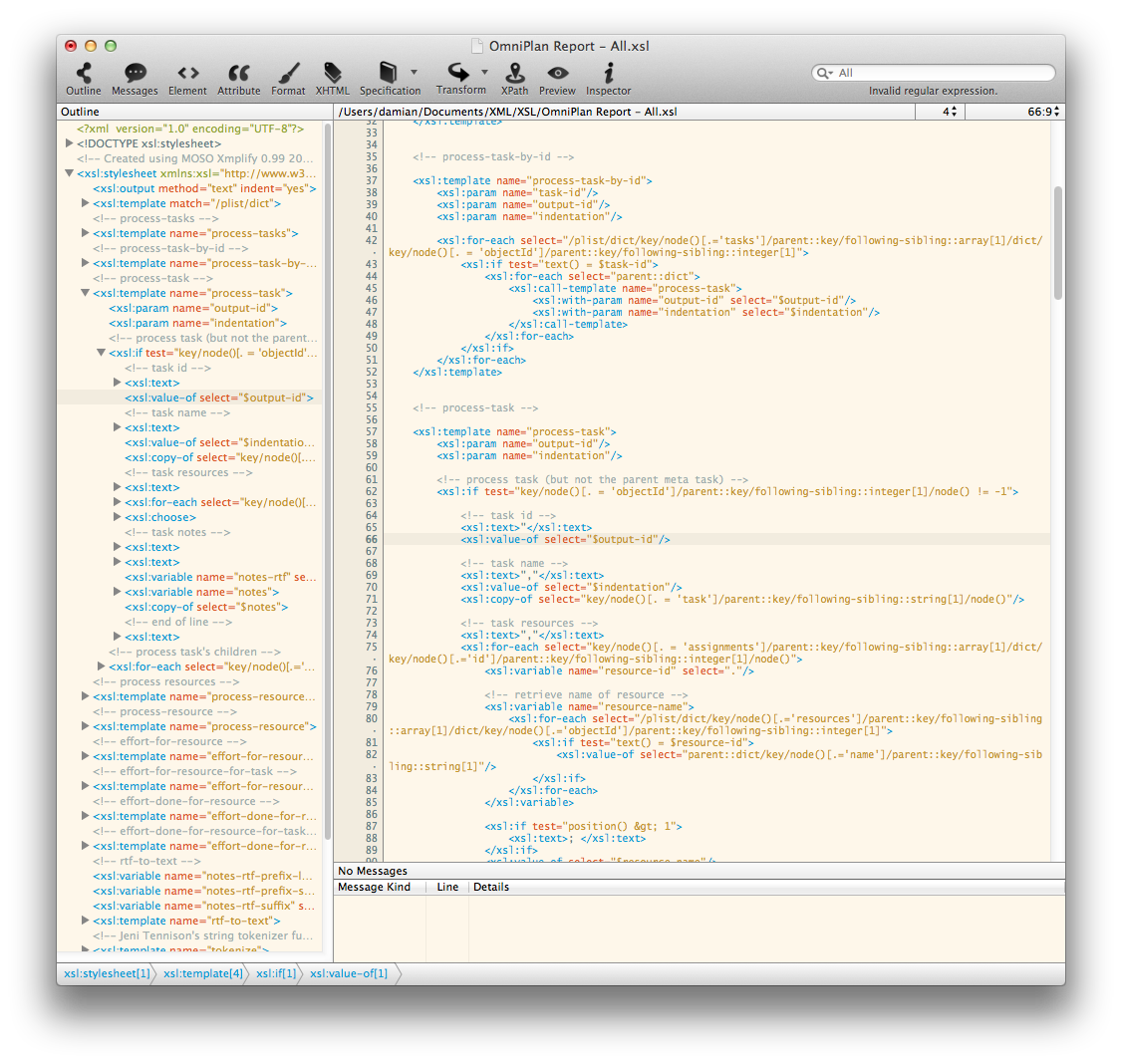
Screenshot 2: http://xmplifyapp.com/images/press/Xmplify-Auto-Completion.png

Application Icon: http://xmplifyapp.com/images/press/Xmplify.256x256.png

MOSO is based in Brisbane, Australia. MOSO released Xmplify 1.0 in early 2011. All Material and Software Copyright (C) 2016 MOSO. All Rights Reserved. Apple, the Apple logo, Mac OS X, and Macintosh are registered trademarks of Apple Inc. in the U.S. and/or other countries. Other trademarks and registered trademarks may be the property of their respective owners.
*******
Link To Article: http://prmac.com/release-id-79743.htm
*******
---------------------------------------------------------------------------------
Note that you can alter delivered distributions at any time.
Login to your account on prMac to alter your channel selection, or to opt-out at any time.
Subscribe to:
Posts (Atom)