A new article has been published at prMac.
The Handlers Rolls out Same Day Delivery Service & Customer Convenience - Published on 06/27/16
Simplifying day-to-day life with services is just a tap away, The Handlers rolled out a new feature, Same Day Delivery. Their app not only helps you deliver everything with ease, but also brings best deals right at your doorsteps. While people will be able to enjoy their precious time with their family and friends, the products that they have assigned to the Handlers for delivery will reach on time.
New Delhi, India - Simplifying day-to-day life with services is just a tap away, The Handlers rolled out a new feature, Same Day Delivery. Taking same day delivery services to the next level, The Handlers looks forward to making people's life stress-free. Now customers can send documents, gifts, goodies and corporate items single or in bulk from one place to another in just a few taps. Convenient logistics redefined with The Handlers' same day delivery services.
Known for helping people as a personal assistant-cum-buddy, the app allows customers send gifts and products from one place to another. Not just it helps in delivering products, but also enables its users to chat and take an appointment whenever required to a health-care specialist.
Impacting the lives for the better:
Consuming no time and understanding the hassles people go through in their day-to-day life, the Handlers transcends all traditional barriers and brings everything to your reach. The app is the invention of today's technology, modern lifestyle needs and inventiveness. The prompt and right response is what users expect from an app like this. Having an app that responses all your requirements promptly is taking the market by storm. Apps like The Handlers have a firm grip over users' lives and that's for a good reason of course.
Under the Same Day Delivery facility, the Handlers helps customers send flowers, food, grocery, bakery, parcel, electronic appliances, cash, clothes, sweets, documents and more.
Delivery at your convenience and command:
One of the representatives while explaining the core features of the app said, "We all experience inconvenient situations due to the fast-paced lifestyle that causes stress as well. This hustle and bustle of our lifestyle calls for convenience logistics so as to ease our busy schedules. This led us introduce the Handlers app focused on making every delivery of the product successful with optimum satisfaction level."
It not just helps you deliver everything with ease, but also brings best deals right at your doorsteps. While people will be able to enjoy their precious time with their family and friends, the products that they have assigned to the Handlers for delivery will reach on time.
Offering immense convenience with their logistics services, the Handlers look forward to exceeding its users' experience with the introduction of new and latest features on a regular interval.
Device Requirements:
* iPhone, iPad, and iPod touch
* Requires iOS 9.0 or later
* 14.7 MB
Pricing and Availability:
The Handlers 1.5 is free, and is available worldwide through the App Store in the Productivity category. An Android version of the app is available through Google Play.
The Handlers 1.5: http://www.thehandlers.in/
Download from iTunes: https://itunes.apple.com/app/the-handlers/id1094678042
Download from Google Play: https://play.google.com/store/apps/details?id=info.handlers.app
Screenshot: http://a1.mzstatic.com/us/r30/Purple49/v4/8f/ba/4c/8fba4ca2-d5ab-047d-c920-9c167d6d0346/screen322x572.jpeg
App Icon: http://a1.mzstatic.com/us/r30/Purple20/v4/f1/2c/6f/f12c6fbd-8c7f-256c-daa4-5843e76de1e4/icon175x175.jpeg
Being the brainchild of two young minds belonging to Delhi, The Handlers is a name synonymous with quality, punctuality, and convenience. The android based app strives to make people's life easier via a range of same-day delivery services under which customers can send documents, groceries, bakery items, sweets, flowers, gifts and corporate items easily. The app is transforming the way things are done in a convenient way. People need not embark on mundane or time-consuming tasks as The Handlers takes on those tasks effortlessly hence giving people ample time to focus on other aspects of life. Whether one has to take an appointment with a doctor or has to send some important documents same day, The Handlers carries out everything with sheer professionalism. All Material and Software (C) 2016 The Handlers. All Rights Reserved. Apple, the Apple logo, iPod, the iPod logo, are registered trademarks of Apple Computer in the U.S. and/or other countries.
*******
Link To Article: http://prmac.com/release-id-79767.htm
*******
---------------------------------------------------------------------------------
Note that you can alter delivered distributions at any time.
Login to your account on prMac to alter your channel selection, or to opt-out at any time.


Storage Made Easy introduces support for HTML5 PDF Annotations
A new article has been published at prMac.
Storage Made Easy introduces support for HTML5 PDF Annotations - Published on 06/27/16
UK based Storage Made Easy today releases its own HTML5-based PDF Annotation editor that enables the ability annotate documents directly from the browser and across their desktop and mobile apps. The workflow of using the PDF Annotation feature is very straightforward. Users are provided with a version of the same PDF in the browser, which can then be annotated with stamps, notes, highlighting, redaction, text and a signature tool. Annotations can be saved and also burnt into a new PDF document.
London, United Kingdom - Storage Made Easy today announced that they have built a fully fledged PDF Annotation suite into their self-hosted enterprise file sync and share fabric product. The workflow of using the PDF Annotation feature is very straightforward. Users upload or choose a PDF from the private/public cloud of their choice (SME supports over 50 connectors).
Users are provided with a version of the same PDF in the browser, which can then be annotated with stamps, notes, highlighting, redaction, text, and a signature tool. Annotations can be saved and also burnt into a new PDF document. If the PDF is in a team folder then users will see, and can work against annotations from other users, which are clearly marked as to whom the annotations were made from. Also when annotations are made, or deleted, this is recorded in the SME Audit Log, available to Administrators, for governance purposes.
SME CEO Jim Liddle said, "Other companies that provide this functionality normally provided it stand alone and use a Flash viewer which many enterprise companies prevent from being used in the browser. Storage Made Easy has made this easily available using HTML5, within its enterprise sync and share product and which is available for OEM integration in addition to direct corporate and service provider use."
The feature is immediately available for testing with a free hosted business trial account and is also available in Enterprise on-premises Appliance versions 3.2.x and up.
Storage Made Easy: http://www.storagemadeeasy.com
Screenshot: https://storagemadeeasy.com/files/546a0d418021d6dc5d3a479e9ef0e00f.jpg
App Icon: https://storagemadeeasy.com/templates/sme/nd/press_kit/SME_logo_128.png
Storage Made Easy is wholly owned by Vehera Ltd., a private London-based limited company. Storage Made Easy provides a cloud service data broker platform and related services either as SaaS or a hybrid on-premise solution. Storage Made Easy unites cloud and data services into a single environment, guaranteeing file access no matter the location or device while providing the highest levels of management, security, compliance, audit, and access services. All Material and Software (C) Copyright 2016 Storage Made Easy. All Rights Reserved. Apple, the Apple logo, Macintosh and macOS are registered trademarks of Apple Inc. in the U.S. and/or other countries. Other trademarks and registered trademarks may be the property of their respective owners.
*******
Link To Article: http://prmac.com/release-id-79766.htm
*******
---------------------------------------------------------------------------------
Note that you can alter delivered distributions at any time.
Login to your account on prMac to alter your channel selection, or to opt-out at any time.
Storage Made Easy introduces support for HTML5 PDF Annotations - Published on 06/27/16
UK based Storage Made Easy today releases its own HTML5-based PDF Annotation editor that enables the ability annotate documents directly from the browser and across their desktop and mobile apps. The workflow of using the PDF Annotation feature is very straightforward. Users are provided with a version of the same PDF in the browser, which can then be annotated with stamps, notes, highlighting, redaction, text and a signature tool. Annotations can be saved and also burnt into a new PDF document.
London, United Kingdom - Storage Made Easy today announced that they have built a fully fledged PDF Annotation suite into their self-hosted enterprise file sync and share fabric product. The workflow of using the PDF Annotation feature is very straightforward. Users upload or choose a PDF from the private/public cloud of their choice (SME supports over 50 connectors).
Users are provided with a version of the same PDF in the browser, which can then be annotated with stamps, notes, highlighting, redaction, text, and a signature tool. Annotations can be saved and also burnt into a new PDF document. If the PDF is in a team folder then users will see, and can work against annotations from other users, which are clearly marked as to whom the annotations were made from. Also when annotations are made, or deleted, this is recorded in the SME Audit Log, available to Administrators, for governance purposes.
SME CEO Jim Liddle said, "Other companies that provide this functionality normally provided it stand alone and use a Flash viewer which many enterprise companies prevent from being used in the browser. Storage Made Easy has made this easily available using HTML5, within its enterprise sync and share product and which is available for OEM integration in addition to direct corporate and service provider use."
The feature is immediately available for testing with a free hosted business trial account and is also available in Enterprise on-premises Appliance versions 3.2.x and up.
Storage Made Easy: http://www.storagemadeeasy.com
Screenshot: https://storagemadeeasy.com/files/546a0d418021d6dc5d3a479e9ef0e00f.jpg

App Icon: https://storagemadeeasy.com/templates/sme/nd/press_kit/SME_logo_128.png

Storage Made Easy is wholly owned by Vehera Ltd., a private London-based limited company. Storage Made Easy provides a cloud service data broker platform and related services either as SaaS or a hybrid on-premise solution. Storage Made Easy unites cloud and data services into a single environment, guaranteeing file access no matter the location or device while providing the highest levels of management, security, compliance, audit, and access services. All Material and Software (C) Copyright 2016 Storage Made Easy. All Rights Reserved. Apple, the Apple logo, Macintosh and macOS are registered trademarks of Apple Inc. in the U.S. and/or other countries. Other trademarks and registered trademarks may be the property of their respective owners.
*******
Link To Article: http://prmac.com/release-id-79766.htm
*******
---------------------------------------------------------------------------------
Note that you can alter delivered distributions at any time.
Login to your account on prMac to alter your channel selection, or to opt-out at any time.
Sale Announced on The Old Win Downtown Casino on iOS
A new article has been published at prMac.
Sale Announced on The Old Win Downtown Casino on iOS - Published on 06/27/16
London based Apps Genie Limited today announces a promotion for The Old Win Downtown Casino - Classic Vegas Games & Slots to Play! Created to provide users an authentic retro Vegas Slots machine experience this game is compatible with the iPhone, iPad and iPod touch devices. The app features vibrantly designed user interface, highlighted by its extremely responsive and straightforward game controls. Throughout next week app shoppers will be able to get The Old Win Downtown Casino for Free.
London, United Kingdom - Apps Genie Limited, an established mobile application developer focused on designing innovative games & apps for the mobile marketplace, today announced a promotion for The Old Win Downtown Casino - Classic Vegas Games & Slots to Play! Created to provide users an authentic Vegas Slots machine experience this game is compatible with the iPhone, iPad and iPod touch devices running on iOS 7.0 or later.
This unique game offers players the chance to experience classic Old Vegas times Casino & Slots, diving you into the golden era of gambling. The Old Win Downtown Casino features Old Mechanical Reel Slot Machines, Option to Play Only with 3 Pay Lines, Amazing Retro Classic Fortune Wheel, detailed explanations of game rules for novice players and much more. The app features vibrantly designed user interface, highlighted by its extremely responsive and straightforward game controls. If you run out of coins you can purchase them via Coin Store as it offers 1000, 4000 and even 350,000 coins.
The Old Win Downtown Casino is a full featured Old Vegas Casino & Slots game title that is designed to not only engage users with its uniquely addictive gameplay but with to fully engross them within its richly themed environment. A perfect synthesis of the timeless Vegas Casino, old fashioned sound effects & symbols together with modern mobile technology to make it a fully interactive and user engaged game experience for all iOS shoppers.
Device Requirements:
* iPhone, iPad, and iPod touch
* Requires iOS 7.0 or later
* 68.2 MB
Pricing and Availability:
Throughout next week app shoppers will be able to get The Old Win Downtown Casino at a substantial savings. The game is currently Free and available worldwide exclusively through the App Store in the Games category.
The Old Win Downtown Casino - Classic Vegas Games & Slots to Play! 1.1: http://vegasslotsgame.com/
Download from iTunes: https://itunes.apple.com/app/the-old-win-downtown-casino/id1082679040
Screenshot: http://a4.mzstatic.com/us/r30/Purple69/v4/66/f2/33/66f23328-32ed-b9ba-48a3-b35c03fa8122/screen322x572.jpeg
App Icon: http://a1.mzstatic.com/us/r30/Purple1/v4/bf/5c/76/bf5c76bd-06bf-a405-3126-177791b1b0ab/icon175x175.jpeg
Located in London, Apps Genie Limited is mobile application development studio focused on providing mobile enthusiasts with valuable and informative mobile solutions across a variety of disciplines and focuses. Apps Genie Limited has stayed continuously committed to providing mobile audiences with applications that are well structured and effective. (C) Apps Genie Limited 2016. All Rights Reserved. Apple, the Apple logo, iPhone, iPod and iPad are registered trademarks of Apple Inc. in the U.S. and/or other countries.
*******
Link To Article: http://prmac.com/release-id-79765.htm
*******
---------------------------------------------------------------------------------
Note that you can alter delivered distributions at any time.
Login to your account on prMac to alter your channel selection, or to opt-out at any time.
Sale Announced on The Old Win Downtown Casino on iOS - Published on 06/27/16
London based Apps Genie Limited today announces a promotion for The Old Win Downtown Casino - Classic Vegas Games & Slots to Play! Created to provide users an authentic retro Vegas Slots machine experience this game is compatible with the iPhone, iPad and iPod touch devices. The app features vibrantly designed user interface, highlighted by its extremely responsive and straightforward game controls. Throughout next week app shoppers will be able to get The Old Win Downtown Casino for Free.
London, United Kingdom - Apps Genie Limited, an established mobile application developer focused on designing innovative games & apps for the mobile marketplace, today announced a promotion for The Old Win Downtown Casino - Classic Vegas Games & Slots to Play! Created to provide users an authentic Vegas Slots machine experience this game is compatible with the iPhone, iPad and iPod touch devices running on iOS 7.0 or later.
This unique game offers players the chance to experience classic Old Vegas times Casino & Slots, diving you into the golden era of gambling. The Old Win Downtown Casino features Old Mechanical Reel Slot Machines, Option to Play Only with 3 Pay Lines, Amazing Retro Classic Fortune Wheel, detailed explanations of game rules for novice players and much more. The app features vibrantly designed user interface, highlighted by its extremely responsive and straightforward game controls. If you run out of coins you can purchase them via Coin Store as it offers 1000, 4000 and even 350,000 coins.
The Old Win Downtown Casino is a full featured Old Vegas Casino & Slots game title that is designed to not only engage users with its uniquely addictive gameplay but with to fully engross them within its richly themed environment. A perfect synthesis of the timeless Vegas Casino, old fashioned sound effects & symbols together with modern mobile technology to make it a fully interactive and user engaged game experience for all iOS shoppers.
Device Requirements:
* iPhone, iPad, and iPod touch
* Requires iOS 7.0 or later
* 68.2 MB
Pricing and Availability:
Throughout next week app shoppers will be able to get The Old Win Downtown Casino at a substantial savings. The game is currently Free and available worldwide exclusively through the App Store in the Games category.
The Old Win Downtown Casino - Classic Vegas Games & Slots to Play! 1.1: http://vegasslotsgame.com/
Download from iTunes: https://itunes.apple.com/app/the-old-win-downtown-casino/id1082679040
Screenshot: http://a4.mzstatic.com/us/r30/Purple69/v4/66/f2/33/66f23328-32ed-b9ba-48a3-b35c03fa8122/screen322x572.jpeg

App Icon: http://a1.mzstatic.com/us/r30/Purple1/v4/bf/5c/76/bf5c76bd-06bf-a405-3126-177791b1b0ab/icon175x175.jpeg

Located in London, Apps Genie Limited is mobile application development studio focused on providing mobile enthusiasts with valuable and informative mobile solutions across a variety of disciplines and focuses. Apps Genie Limited has stayed continuously committed to providing mobile audiences with applications that are well structured and effective. (C) Apps Genie Limited 2016. All Rights Reserved. Apple, the Apple logo, iPhone, iPod and iPad are registered trademarks of Apple Inc. in the U.S. and/or other countries.
*******
Link To Article: http://prmac.com/release-id-79765.htm
*******
---------------------------------------------------------------------------------
Note that you can alter delivered distributions at any time.
Login to your account on prMac to alter your channel selection, or to opt-out at any time.
Late Night Software Launches Script Debugger 6
A new article has been published at prMac.
Late Night Software Launches Script Debugger 6 - Published on 06/27/16
Late Night Software Ltd. today releases Script Debugger 6, the latest version of its award-winning AppleScript development software. Script Debugger has a 20+ year history, and during that time has been widely recognized for its excellence as an AppleScript development environment. The upgrade includes 25 new features and a raft of other tweaks and improvements, making it even easier to work on large projects, and to take advantage of new AppleScript features.
Victoria, Canada - Late Night Software Ltd. today is proud to announce the release of Script Debugger 6, the latest version of its award-winning AppleScript development software. The upgrade includes 25 new features and a raft of other tweaks and improvements, making it even easier to work on large projects, and to take advantage of new AppleScript features.
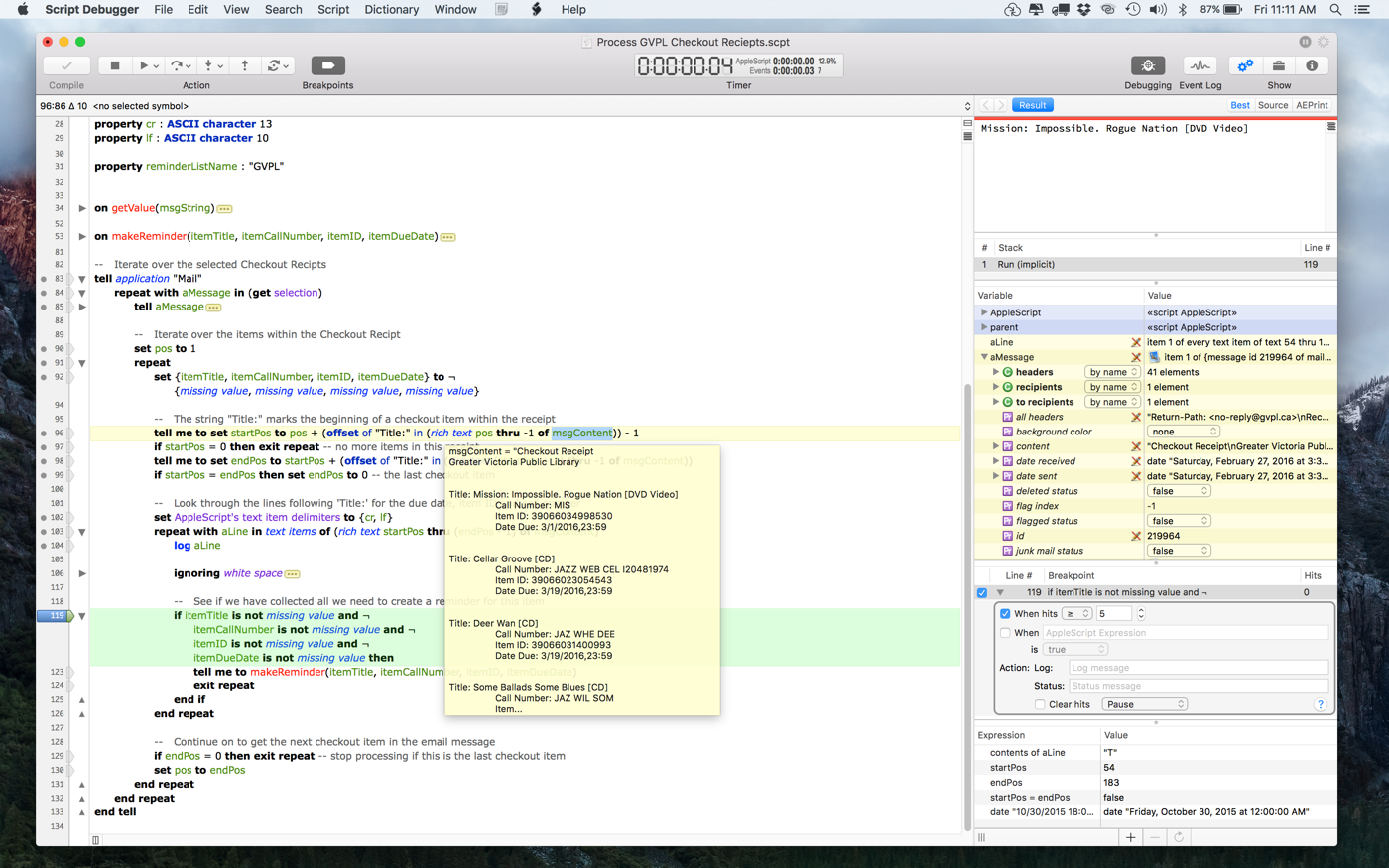
Script Debugger 6 includes users' previously most requested feature, code folding. Users can now collapse and hide blocks of code to focus on code that matters. This feature makes working on long scripts much simpler. Script Debugger 6 also lifts the veil on AppleScriptObjC. The introduction of code completion makes it far easier to write, and users can see what's happening every step of the way with the new debugging features.
Another new feature in version 6 is that of script library and framework pickers - popup menus for entering names. Users can, for example, see at a glance what script libraries are installed where, and users will never need to type - or mis-type - one of their names again. Enhancements to Script Debugger's clippings feature include the ability display pickers, and to link multiple placeholders. Clippings are also now fully searchable.
Script Debugger 6 also supports always-on code signing. Once it is turned on for a script, signing happens with every save - there is no more need for a separate export stage.
"With version 6, features like Code Folding make Script Debugger an even more valuable development tool for experienced scripters," says Developer and AppleScript Teacher, Ray Robertson. "For those new to AppleScript, my advice remains the same: Buy Script Debugger now. The step-by-step debugging feature alone will save you hours of time in the learning process."
Script Debugger has a 20+ year history, and during that time has been widely recognized for its excellence as an AppleScript development environment. In 2000, Script Debugger 2.0 was honoured with a MacWorld Editors Choice award for Best Development Software. Script Debugger 3.0 was nominated for the 2002 MacUser Award in the category of Utility and Enabling. Script Debugger has long been the go-to tool for professional and hobbyist AppleScript users alike, and Script Debugger 6 improves upon that heritage.
System Requirements:
Script Debugger 6 requires Mac OS X 10.10 (Yosemite) or later, with Mac OS X 10.11 (El Capitan) recommended for AppleScriptObjC usage.
Pricing and Availability:
Script Debugger 6 is available now, and retails for $99.99 USD, with upgrades from Script Debugger 5 for $49.99 USD. A free demo version is fully functional for 20 days. Volume and educational discounts apply.
Script Debugger 6: http://www.latenightsw.com
Download Free Trial: http://www.latenightsw.com/free-trial
Purchase Script Debugger: http://www.latenightsw.com/buy-now
Screenshot: http://www.latenightsw.com/archives/Press/SD6Debugging.png
Screenshot@2x: http://www.latenightsw.com/archives/Press/SD6Debugging@2x.png
Application Icon: http://www.latenightsw.com/archives/Press/SDAppIcon512x512.png
Late Night Software Ltd., established in 1995, is a privately held company that specializes in the development of award-winning Macintosh scripting tools. Copyright 1995-2016 Late Night Software Ltd. All Rights Reserved. Apple, the Apple logo, macOS and AppleScript are registered trademarks of Apple Computer Inc. in the U.S. and/or other countries.
*******
Link To Article: http://prmac.com/release-id-79764.htm
*******
---------------------------------------------------------------------------------
Note that you can alter delivered distributions at any time.
Login to your account on prMac to alter your channel selection, or to opt-out at any time.
Late Night Software Launches Script Debugger 6 - Published on 06/27/16
Late Night Software Ltd. today releases Script Debugger 6, the latest version of its award-winning AppleScript development software. Script Debugger has a 20+ year history, and during that time has been widely recognized for its excellence as an AppleScript development environment. The upgrade includes 25 new features and a raft of other tweaks and improvements, making it even easier to work on large projects, and to take advantage of new AppleScript features.
Victoria, Canada - Late Night Software Ltd. today is proud to announce the release of Script Debugger 6, the latest version of its award-winning AppleScript development software. The upgrade includes 25 new features and a raft of other tweaks and improvements, making it even easier to work on large projects, and to take advantage of new AppleScript features.
Script Debugger 6 includes users' previously most requested feature, code folding. Users can now collapse and hide blocks of code to focus on code that matters. This feature makes working on long scripts much simpler. Script Debugger 6 also lifts the veil on AppleScriptObjC. The introduction of code completion makes it far easier to write, and users can see what's happening every step of the way with the new debugging features.
Another new feature in version 6 is that of script library and framework pickers - popup menus for entering names. Users can, for example, see at a glance what script libraries are installed where, and users will never need to type - or mis-type - one of their names again. Enhancements to Script Debugger's clippings feature include the ability display pickers, and to link multiple placeholders. Clippings are also now fully searchable.
Script Debugger 6 also supports always-on code signing. Once it is turned on for a script, signing happens with every save - there is no more need for a separate export stage.
"With version 6, features like Code Folding make Script Debugger an even more valuable development tool for experienced scripters," says Developer and AppleScript Teacher, Ray Robertson. "For those new to AppleScript, my advice remains the same: Buy Script Debugger now. The step-by-step debugging feature alone will save you hours of time in the learning process."
Script Debugger has a 20+ year history, and during that time has been widely recognized for its excellence as an AppleScript development environment. In 2000, Script Debugger 2.0 was honoured with a MacWorld Editors Choice award for Best Development Software. Script Debugger 3.0 was nominated for the 2002 MacUser Award in the category of Utility and Enabling. Script Debugger has long been the go-to tool for professional and hobbyist AppleScript users alike, and Script Debugger 6 improves upon that heritage.
System Requirements:
Script Debugger 6 requires Mac OS X 10.10 (Yosemite) or later, with Mac OS X 10.11 (El Capitan) recommended for AppleScriptObjC usage.
Pricing and Availability:
Script Debugger 6 is available now, and retails for $99.99 USD, with upgrades from Script Debugger 5 for $49.99 USD. A free demo version is fully functional for 20 days. Volume and educational discounts apply.
Script Debugger 6: http://www.latenightsw.com
Download Free Trial: http://www.latenightsw.com/free-trial
Purchase Script Debugger: http://www.latenightsw.com/buy-now
Screenshot: http://www.latenightsw.com/archives/Press/SD6Debugging.png
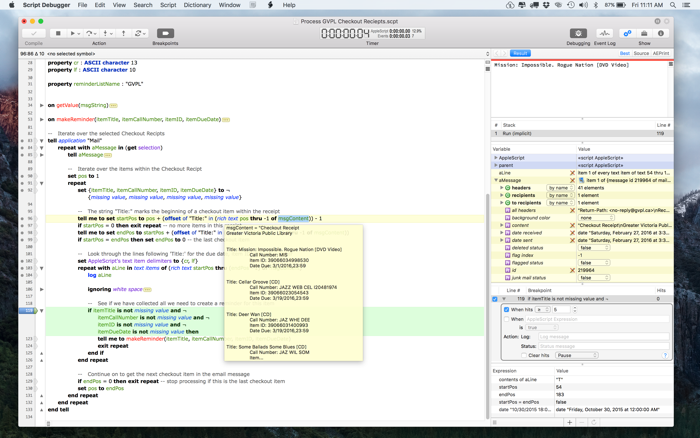
Screenshot@2x: http://www.latenightsw.com/archives/Press/SD6Debugging@2x.png
Application Icon: http://www.latenightsw.com/archives/Press/SDAppIcon512x512.png

Late Night Software Ltd., established in 1995, is a privately held company that specializes in the development of award-winning Macintosh scripting tools. Copyright 1995-2016 Late Night Software Ltd. All Rights Reserved. Apple, the Apple logo, macOS and AppleScript are registered trademarks of Apple Computer Inc. in the U.S. and/or other countries.
*******
Link To Article: http://prmac.com/release-id-79764.htm
*******
---------------------------------------------------------------------------------
Note that you can alter delivered distributions at any time.
Login to your account on prMac to alter your channel selection, or to opt-out at any time.
Reggie Ashworth releases AppDelete 4.2.6 - Uninstall Anything
A new article has been published at prMac.
Reggie Ashworth releases AppDelete 4.2.6 - Uninstall Anything - Published on 06/27/16
Independent software developer, Reggie Ashworth today announces AppDelete 4.2.6, an update to his popular application deletion utility for Mac OS X. With a simple Drag & Drop, AppDelete will uninstall anything along with all of the associated items. Mac users will no longer have to hunt through their system to find and delete these items manually. AppDelete is a must-have utility for beta testers and casual users alike, and the perfect companion to any Mac fanatic's toolbox.
Anaheim, California - Independent software developer, Reggie Ashworth today is proud to announce the release of AppDelete 4.2.6, an update to his very popular application deletion utility for Mac OS X. With a simple Drag & Drop, AppDelete will uninstall anything along with all of the associated items. Mac users will no longer have to hunt through their system to find and delete these items manually.
You can drag any item that can be uninstalled onto AppDelete: Applications, Widgets, Preference Panes, Plugins, Screensavers, etc. You can also activate AppDelete in many ways: dragging items onto main window, onto dock icon, selecting in menu, right-clicking using AppDelete workflow, dragging from Launchpad, and throwing items in the trash. When the preview screen appears you can uncheck any items you would like to exclude.
You also have several choices: delete the items, log only the items, or archive (copy) the items to a .zip file for safekeeping or reinstall at a later date. The items you delete will be moved to the trash and arranged in a folder so that you can see exactly what was deleted and you know exactly where it came from. The items will not be removed from your computer until you empty them from your trash. You can also undo the last delete if you choose.
Version 4 has been 100% redesigned and updated and just one look will show you that this is an entirely new AppDelete. AppDelete Version 4.2.6 will run on Lion, Mountain Lion, Mavericks, Yosemite, and El Capitan, and here are a few of the new features included:
New in Version 4.2:
* Optimized for El Capitan (still backwards compatible with Lion/Mountain Lion/Mavericks/Yosemite)
* New refreshed UI and graphics for El Capitan
* New app icon for all OS versions
* Improved and more efficient search algorithm
* Now possible to copy/paste from log
* Fixed issue where menu bar icon wouldn't appear in dark mode (El Capitan)
* Miscellaneous bug-fixes and optimizations throughout
* And new website...
Feature Highlights:
* Search filters to find items for deletion fast (including old PPC apps)
* Finds associated items that are invisible or hidden
* Trash monitoring so that simply throwing an app in the trash triggers AppDelete
* Archive/Install from Archive feature for safekeeping and transferring items to another Mac
* Password requested only once if needed instead of multiple requests
* Keeps a Log of all activities and has the ability to Undo a deletion
* Moves items into an organized deleted package in your trash
* Force Empty Trash for stubborn to remove items
There are various options to make your AppDelete experience complete: Quick search filters to help choose items for deletion, Force Empty Trash, an Orphans feature to search and delete orphaned files, Install from Archive even for another Mac, various options in Preferences, and more. AppDelete is a must-have utility for software tinkerers, beta testers, casual users, and the perfect companion to any Mac fanatic's toolbox.
AppDelete Version 4.2.6 improves the Undo from Folder option, and includes other fixes and improvements. For full Release Notes see Changelog.
Support Languages:
AppDelete supports language in U.S. English, Chinese, Czech, Danish, Dutch, Finnish, French, German, Italian, Japanese, Korean, Portuguese (Brazilian), Russian, Spanish and Swedish.
System Requirements:
* Mac OS X Version 10.7 Lion or later (El Capitan compatible)
* Intel only
* 13.3 MB Hard Drive space
Pricing and Availability:
AppDelete 4.2.6 is only $7.99 (USD) for a single user license. Upgrades from Version 2/AppDelete Lite are only $3.99 (USD). A full-featured demo is available. Note: Version 3 licenses without a serial number are also eligible for the upgrade.
AppDelete 4.2.6: http://www.reggieashworth.com/appdelete
Changelog: http://www.reggieashworth.com/appdeletenotes
Download AppDelete: http://www.reggieashworth.com/downloads/AppDelete.dmg
YouTube Channel (Tutorials): http://www.youtube.com/user/ReggieAshworth
Screenshot One (Tiff): http://www.reggieashworth.com/img/picOneCropped2.tiff
Screenshot Two (Tiff): http://www.reggieashworth.com/img/picTwoCropped2.tiff
Based in sunny Anaheim, California, Reggie Ashworth is an independent software developer whose passion for the Mac platform is only exceeded by his aim to craft simple, yet useful utilities. He is fanatical about total customer satisfaction. Copyright 2006-2016 Reggie Ashworth. All Rights Reserved. Apple, the Apple logo, and Macintosh are registered trademarks of Apple Computer in the U.S. and/or other countries.
*******
Link To Article: http://prmac.com/release-id-79763.htm
*******
---------------------------------------------------------------------------------
Note that you can alter delivered distributions at any time.
Login to your account on prMac to alter your channel selection, or to opt-out at any time.
Reggie Ashworth releases AppDelete 4.2.6 - Uninstall Anything - Published on 06/27/16
Independent software developer, Reggie Ashworth today announces AppDelete 4.2.6, an update to his popular application deletion utility for Mac OS X. With a simple Drag & Drop, AppDelete will uninstall anything along with all of the associated items. Mac users will no longer have to hunt through their system to find and delete these items manually. AppDelete is a must-have utility for beta testers and casual users alike, and the perfect companion to any Mac fanatic's toolbox.
Anaheim, California - Independent software developer, Reggie Ashworth today is proud to announce the release of AppDelete 4.2.6, an update to his very popular application deletion utility for Mac OS X. With a simple Drag & Drop, AppDelete will uninstall anything along with all of the associated items. Mac users will no longer have to hunt through their system to find and delete these items manually.
You can drag any item that can be uninstalled onto AppDelete: Applications, Widgets, Preference Panes, Plugins, Screensavers, etc. You can also activate AppDelete in many ways: dragging items onto main window, onto dock icon, selecting in menu, right-clicking using AppDelete workflow, dragging from Launchpad, and throwing items in the trash. When the preview screen appears you can uncheck any items you would like to exclude.
You also have several choices: delete the items, log only the items, or archive (copy) the items to a .zip file for safekeeping or reinstall at a later date. The items you delete will be moved to the trash and arranged in a folder so that you can see exactly what was deleted and you know exactly where it came from. The items will not be removed from your computer until you empty them from your trash. You can also undo the last delete if you choose.
Version 4 has been 100% redesigned and updated and just one look will show you that this is an entirely new AppDelete. AppDelete Version 4.2.6 will run on Lion, Mountain Lion, Mavericks, Yosemite, and El Capitan, and here are a few of the new features included:
New in Version 4.2:
* Optimized for El Capitan (still backwards compatible with Lion/Mountain Lion/Mavericks/Yosemite)
* New refreshed UI and graphics for El Capitan
* New app icon for all OS versions
* Improved and more efficient search algorithm
* Now possible to copy/paste from log
* Fixed issue where menu bar icon wouldn't appear in dark mode (El Capitan)
* Miscellaneous bug-fixes and optimizations throughout
* And new website...
Feature Highlights:
* Search filters to find items for deletion fast (including old PPC apps)
* Finds associated items that are invisible or hidden
* Trash monitoring so that simply throwing an app in the trash triggers AppDelete
* Archive/Install from Archive feature for safekeeping and transferring items to another Mac
* Password requested only once if needed instead of multiple requests
* Keeps a Log of all activities and has the ability to Undo a deletion
* Moves items into an organized deleted package in your trash
* Force Empty Trash for stubborn to remove items
There are various options to make your AppDelete experience complete: Quick search filters to help choose items for deletion, Force Empty Trash, an Orphans feature to search and delete orphaned files, Install from Archive even for another Mac, various options in Preferences, and more. AppDelete is a must-have utility for software tinkerers, beta testers, casual users, and the perfect companion to any Mac fanatic's toolbox.
AppDelete Version 4.2.6 improves the Undo from Folder option, and includes other fixes and improvements. For full Release Notes see Changelog.
Support Languages:
AppDelete supports language in U.S. English, Chinese, Czech, Danish, Dutch, Finnish, French, German, Italian, Japanese, Korean, Portuguese (Brazilian), Russian, Spanish and Swedish.
System Requirements:
* Mac OS X Version 10.7 Lion or later (El Capitan compatible)
* Intel only
* 13.3 MB Hard Drive space
Pricing and Availability:
AppDelete 4.2.6 is only $7.99 (USD) for a single user license. Upgrades from Version 2/AppDelete Lite are only $3.99 (USD). A full-featured demo is available. Note: Version 3 licenses without a serial number are also eligible for the upgrade.
AppDelete 4.2.6: http://www.reggieashworth.com/appdelete
Changelog: http://www.reggieashworth.com/appdeletenotes
Download AppDelete: http://www.reggieashworth.com/downloads/AppDelete.dmg
YouTube Channel (Tutorials): http://www.youtube.com/user/ReggieAshworth
Screenshot One (Tiff): http://www.reggieashworth.com/img/picOneCropped2.tiff
Screenshot Two (Tiff): http://www.reggieashworth.com/img/picTwoCropped2.tiff
Based in sunny Anaheim, California, Reggie Ashworth is an independent software developer whose passion for the Mac platform is only exceeded by his aim to craft simple, yet useful utilities. He is fanatical about total customer satisfaction. Copyright 2006-2016 Reggie Ashworth. All Rights Reserved. Apple, the Apple logo, and Macintosh are registered trademarks of Apple Computer in the U.S. and/or other countries.
*******
Link To Article: http://prmac.com/release-id-79763.htm
*******
---------------------------------------------------------------------------------
Note that you can alter delivered distributions at any time.
Login to your account on prMac to alter your channel selection, or to opt-out at any time.
Cu Parachute 1.1 released for iOS - Plan for Retirement Success
A new article has been published at prMac.
Cu Parachute 1.1 released for iOS - Plan for Retirement Success - Published on 06/27/16
Indie developer, Bradley McCarthy announces Cu Parachute 1.1 for iOS devices. Cu (Copper) Parachute is a Monte Carlo simulation based retirement income calculator for iPhone. Whether currently working or already in retirement, Cu Parachute can be used to help plan for retirement success. Cu Parachute will estimate a retirement income plan success probability by performing a Monte Carlo simulation of up to 100,000 complete retirement scenarios.
Tucson, Arizona - Independent developer, Bradley McCarthy is proud to announce the release of Cu Parachute 1.1 for iPhone, iPad, and iPod touch devices. Cu Parachute is a tool users can use to continuously monitor their retirement income plan status by updating their personalized inputs and re-evaluating their plan. Sensitivity analyses can easily be performed to better understand how to increase a plan's probability of success (i.e. how does putting off retirement 2 years affect my plan's success, how does saving an extra $1,000 a year affect my plan's success, etc.).
A successful retirement income plan will be a balance between not running out of money and living too frugally in retirement. The target success probability in Cu Parachute is between 85% and 100% and will be highlighted with a copper colored background. An 85% probability target would be for those who would like to use all of their money during retirement. A 100% probability target would be for those wanting to leave most of their money to their heirs. Your own probability of success goal may be something different depending on your risk tolerance.
App features include:
* Random selection of annual real (inflation adjusted) returns for stocks (S&P 500 Index since 1928) and bonds (10-Year Treasury Bonds from 1928-1975, US Aggregate Bond Index after 1975)
* Monte Carlo Simulation with up to 100,000 iterations of complete retirement scenarios
* Extensive sensitivity analysis capabilities
* Results screen with simulation results, inputs, and time stamp
* Ability to save full resolution screen captures of results for future reference
Cu Parachute works like this:
1. You set the 14 customizable inputs to create your initial retirement income plan and press the "Simulate" button.
2. For each of the years in your retirement plan (years to retirement years in retirement), the app randomly selects a yearly real (inflation adjusted) return for your stock and bond portfolios and computes the ending balance for that year taking into account all of the 14 inputs you have selected.
3. The app runs through each year to the end of your retirement and determines your final ending balance if there is one.
4. This process will be repeated up to 100,000 times (100,000 complete retirement scenarios).
5. The number of iterations that the ending balance did not go to $0 will determine the probability of your plan's success.
6. Modify your inputs as often as your portfolio value changes, or other parts of your plan change and re-run the simulation.
Device Requirements:
* iPhone, iPad, and iPod touch
* Requires iOS 9.0 or later
* 3.2 MB
Pricing and Availability:
Cu Parachute 1.1 is just $2.99 USD (or an equivalent amount in other currencies), and is available worldwide exclusively through the App Store in the Finance category.
Cu Parachute 1.1: http://176.32.230.51/cu-parachute.com/
Purchase and Download: https://itunes.apple.com/app/cu-parachute/id1107319741
YouTube Video (Millennial Retirement): https://www.youtube.com/watch?v=RjXwHn9dzfw
YouTube Video (Three vs Four Percent Withdrawal): https://www.youtube.com/watch?v=-fY1nE-HFU4
Screenshots: https://www.facebook.com/CuParachute/photos/pb.1094074840659399.-2207520000.1465681926./1094764180590465/?type=3&theater
App Icon: https://www.facebook.com/CuParachute/photos/a.1108464295887120.1073741830.1094074840659399/1108466029220280/?type=3&theater
Based in Tucson, Arizona, Bradley McCarthy is an independent developer whose focus is on the iOS platform. All Material and Software (C) 2016 Bradley McCarthy / All Rights Reserved. Apple, the Apple logo, iPod, the iPod logo, are registered trademarks of Apple Computer in the U.S. and/or other countries.
*******
Link To Article: http://prmac.com/release-id-79759.htm
*******
---------------------------------------------------------------------------------
Note that you can alter delivered distributions at any time.
Login to your account on prMac to alter your channel selection, or to opt-out at any time.
Cu Parachute 1.1 released for iOS - Plan for Retirement Success - Published on 06/27/16
Indie developer, Bradley McCarthy announces Cu Parachute 1.1 for iOS devices. Cu (Copper) Parachute is a Monte Carlo simulation based retirement income calculator for iPhone. Whether currently working or already in retirement, Cu Parachute can be used to help plan for retirement success. Cu Parachute will estimate a retirement income plan success probability by performing a Monte Carlo simulation of up to 100,000 complete retirement scenarios.
Tucson, Arizona - Independent developer, Bradley McCarthy is proud to announce the release of Cu Parachute 1.1 for iPhone, iPad, and iPod touch devices. Cu Parachute is a tool users can use to continuously monitor their retirement income plan status by updating their personalized inputs and re-evaluating their plan. Sensitivity analyses can easily be performed to better understand how to increase a plan's probability of success (i.e. how does putting off retirement 2 years affect my plan's success, how does saving an extra $1,000 a year affect my plan's success, etc.).
A successful retirement income plan will be a balance between not running out of money and living too frugally in retirement. The target success probability in Cu Parachute is between 85% and 100% and will be highlighted with a copper colored background. An 85% probability target would be for those who would like to use all of their money during retirement. A 100% probability target would be for those wanting to leave most of their money to their heirs. Your own probability of success goal may be something different depending on your risk tolerance.
App features include:
* Random selection of annual real (inflation adjusted) returns for stocks (S&P 500 Index since 1928) and bonds (10-Year Treasury Bonds from 1928-1975, US Aggregate Bond Index after 1975)
* Monte Carlo Simulation with up to 100,000 iterations of complete retirement scenarios
* Extensive sensitivity analysis capabilities
* Results screen with simulation results, inputs, and time stamp
* Ability to save full resolution screen captures of results for future reference
Cu Parachute works like this:
1. You set the 14 customizable inputs to create your initial retirement income plan and press the "Simulate" button.
2. For each of the years in your retirement plan (years to retirement years in retirement), the app randomly selects a yearly real (inflation adjusted) return for your stock and bond portfolios and computes the ending balance for that year taking into account all of the 14 inputs you have selected.
3. The app runs through each year to the end of your retirement and determines your final ending balance if there is one.
4. This process will be repeated up to 100,000 times (100,000 complete retirement scenarios).
5. The number of iterations that the ending balance did not go to $0 will determine the probability of your plan's success.
6. Modify your inputs as often as your portfolio value changes, or other parts of your plan change and re-run the simulation.
Device Requirements:
* iPhone, iPad, and iPod touch
* Requires iOS 9.0 or later
* 3.2 MB
Pricing and Availability:
Cu Parachute 1.1 is just $2.99 USD (or an equivalent amount in other currencies), and is available worldwide exclusively through the App Store in the Finance category.
Cu Parachute 1.1: http://176.32.230.51/cu-parachute.com/
Purchase and Download: https://itunes.apple.com/app/cu-parachute/id1107319741
YouTube Video (Millennial Retirement): https://www.youtube.com/watch?v=RjXwHn9dzfw
YouTube Video (Three vs Four Percent Withdrawal): https://www.youtube.com/watch?v=-fY1nE-HFU4
Screenshots: https://www.facebook.com/CuParachute/photos/pb.1094074840659399.-2207520000.1465681926./1094764180590465/?type=3&theater
App Icon: https://www.facebook.com/CuParachute/photos/a.1108464295887120.1073741830.1094074840659399/1108466029220280/?type=3&theater
Based in Tucson, Arizona, Bradley McCarthy is an independent developer whose focus is on the iOS platform. All Material and Software (C) 2016 Bradley McCarthy / All Rights Reserved. Apple, the Apple logo, iPod, the iPod logo, are registered trademarks of Apple Computer in the U.S. and/or other countries.
*******
Link To Article: http://prmac.com/release-id-79759.htm
*******
---------------------------------------------------------------------------------
Note that you can alter delivered distributions at any time.
Login to your account on prMac to alter your channel selection, or to opt-out at any time.
Banana Cloud 1.0.3 released for iOS - Collect as many bananas as you can
A new article has been published at prMac.
Banana Cloud 1.0.3 released for iOS - Collect as many bananas as you can - Published on 06/27/16
Independent developer, Evgeny Radokhlebov today announces Banana Cloud 1.0.3, his entertaining game for iOS devices. A challenging game with unique mechanics and a minimalist look, Banana Cloud is an infinite side-scroller based on physics. The objective is to control the cute monkey, and collect as many bananas as you can. But this is not as simple as it seems. Version 1.0.3 offers a new tutorial, includes new achievements as well as items as rewards.
Novosibirsk, Russian Federation - Independent developer, Evgeny Radokhlebov today is proud to announce the release of Banana Cloud 1.0.3, his entertaining game for iOS devices. A challenging game with unique mechanics and a minimalist look, Banana Cloud is an infinite side-scroller based on physics. The objective is to control monkey, collect as many bananas as you can.
A jungle is a beautiful place, but at the same time can be dangerous. You play as a dweller of the jungle who likes bananas very much. Your task is to collect as many of them as possible. Jump on the trees and catch them. For every banana collected earns one point. But this is not as simple as it seems.
In the jungle, you are not alone. There still is a bird that flies towards you. If you come across, you will have to start over. Use the buttons at the right time to jump to the next tree with bananas and do not face a bird. This Monkey swings like a rag doll back and forth. Only her strong hands protect her from falling.
The game has a nice minimalistic style, motion system based on physics with support for Game Center. You can compare the results with other players, experiencing the ability of gameplay. Version 1.0.3 offers a new tutorial, includes new achievements as well as items as rewards.
"In the last update, I added the achievement of 'Deal with it,'" said indie developer, Evgeny Radokhlebov. "If you collect more than 10,000 bananas you can put your monkey in pixel sunglasses. If you know what I mean. In order to test their skills in agility, you need an iOS device."
Device Requirements:
* iPhone, iPad, and iPod touch
* Requires iOS 6.0 or later
* 34.3 MB
Pricing and Availability:
Banana Cloud 1.0.3 is $2.99 USD (or equivalent amount in other currencies) and available worldwide exclusively through the App Store in the Games category. It has no built-in advertising and in-app purchases.
Banana Cloud 1.0.3: http://radokhlebov.ru/bananacloud/index.php
Purchase and Download: https://itunes.apple.com/app/banana-cloud/id1110362556
YouTube Video (Game Trailer): https://www.youtube.com/watch?v=7AuP_S-71iU
Screenshot: http://a5.mzstatic.com/us/r30/Purple18/v4/c5/c6/d0/c5c6d0e5-e3e5-985d-3c1c-c4ec9e58eab6/screen480x480.jpeg
App Icon: http://a2.mzstatic.com/us/r30/Purple60/v4/c5/0d/4d/c50d4da2-176e-8824-a149-476073b2036a/icon175x175.jpeg
Independent developer, Evgeny Radokhlebov is based in Russia, Siberia. Evgeny started playing games when he was a small child. He played ZX Spectrum games. He spent a lot of hours playing different games and platforms but always wanted to make them as well. His previous job was as a system administrator, then he decided to become an indie game developer. So he quit his job and started learning programming and development in early 2015. All Material and Software (C) Copyright 2016 Evgeny Radokhlebov. All Rights Reserved. Apple, the Apple logo, iPhone, iPod and iPad are registered trademarks of Apple Inc. in the U.S. and/or other countries. Other trademarks and registered trademarks may be the property of their respective owners.
*******
Link To Article: http://prmac.com/release-id-79760.htm
*******
---------------------------------------------------------------------------------
Note that you can alter delivered distributions at any time.
Login to your account on prMac to alter your channel selection, or to opt-out at any time.
Banana Cloud 1.0.3 released for iOS - Collect as many bananas as you can - Published on 06/27/16
Independent developer, Evgeny Radokhlebov today announces Banana Cloud 1.0.3, his entertaining game for iOS devices. A challenging game with unique mechanics and a minimalist look, Banana Cloud is an infinite side-scroller based on physics. The objective is to control the cute monkey, and collect as many bananas as you can. But this is not as simple as it seems. Version 1.0.3 offers a new tutorial, includes new achievements as well as items as rewards.
Novosibirsk, Russian Federation - Independent developer, Evgeny Radokhlebov today is proud to announce the release of Banana Cloud 1.0.3, his entertaining game for iOS devices. A challenging game with unique mechanics and a minimalist look, Banana Cloud is an infinite side-scroller based on physics. The objective is to control monkey, collect as many bananas as you can.
A jungle is a beautiful place, but at the same time can be dangerous. You play as a dweller of the jungle who likes bananas very much. Your task is to collect as many of them as possible. Jump on the trees and catch them. For every banana collected earns one point. But this is not as simple as it seems.
In the jungle, you are not alone. There still is a bird that flies towards you. If you come across, you will have to start over. Use the buttons at the right time to jump to the next tree with bananas and do not face a bird. This Monkey swings like a rag doll back and forth. Only her strong hands protect her from falling.
The game has a nice minimalistic style, motion system based on physics with support for Game Center. You can compare the results with other players, experiencing the ability of gameplay. Version 1.0.3 offers a new tutorial, includes new achievements as well as items as rewards.
"In the last update, I added the achievement of 'Deal with it,'" said indie developer, Evgeny Radokhlebov. "If you collect more than 10,000 bananas you can put your monkey in pixel sunglasses. If you know what I mean. In order to test their skills in agility, you need an iOS device."
Device Requirements:
* iPhone, iPad, and iPod touch
* Requires iOS 6.0 or later
* 34.3 MB
Pricing and Availability:
Banana Cloud 1.0.3 is $2.99 USD (or equivalent amount in other currencies) and available worldwide exclusively through the App Store in the Games category. It has no built-in advertising and in-app purchases.
Banana Cloud 1.0.3: http://radokhlebov.ru/bananacloud/index.php
Purchase and Download: https://itunes.apple.com/app/banana-cloud/id1110362556
YouTube Video (Game Trailer): https://www.youtube.com/watch?v=7AuP_S-71iU
Screenshot: http://a5.mzstatic.com/us/r30/Purple18/v4/c5/c6/d0/c5c6d0e5-e3e5-985d-3c1c-c4ec9e58eab6/screen480x480.jpeg

App Icon: http://a2.mzstatic.com/us/r30/Purple60/v4/c5/0d/4d/c50d4da2-176e-8824-a149-476073b2036a/icon175x175.jpeg

Independent developer, Evgeny Radokhlebov is based in Russia, Siberia. Evgeny started playing games when he was a small child. He played ZX Spectrum games. He spent a lot of hours playing different games and platforms but always wanted to make them as well. His previous job was as a system administrator, then he decided to become an indie game developer. So he quit his job and started learning programming and development in early 2015. All Material and Software (C) Copyright 2016 Evgeny Radokhlebov. All Rights Reserved. Apple, the Apple logo, iPhone, iPod and iPad are registered trademarks of Apple Inc. in the U.S. and/or other countries. Other trademarks and registered trademarks may be the property of their respective owners.
*******
Link To Article: http://prmac.com/release-id-79760.htm
*******
---------------------------------------------------------------------------------
Note that you can alter delivered distributions at any time.
Login to your account on prMac to alter your channel selection, or to opt-out at any time.
Subscribe to:
Posts (Atom)