A new article has been published at prMac.
Mobilizing the EV Revolution - Published on 06/29/16
Electric Car Insider magazine announced today the development of an interactive mobile EV Buyers Guide app for IOS tablets and mobile devices. The app helps people interested in electric cars learn about electric vehicle technology and find a car that fits their budget and lifestyle. The new multimedia app version of the EV Buyers Guide has instructional video, audio podcasts, interviews and image gallery slide shows providing views and details not possible to include in print.
San Diego, California - Electric Car Insider magazine announced today the development of an interactive mobile EV Buyers Guide app for IOS tablets and mobile devices. The app helps people interested in electric cars learn about electric vehicle technology and find a car that fits their budget and lifestyle. The new multimedia app version of the EV Buyers Guide has instructional video, audio podcasts, interviews and image gallery slide shows providing views and details not possible to include in print.
Publisher Christopher Alan explained that the motivation for creating the app was to increase awareness and education of electric cars and other electric vehicles. "A majority of drivers in North America are not aware of the benefits of driving electric cars despite the fact that electric cars are substantially less expensive to operate than cars that use gas. EVs cost less for fuel and maintenance, and with tax and other incentives, actually cost less to purchase or lease than gas cars."
Alan estimated that the digital app will help tens of thousands of people interested in driving zero emission vehicles to make the switch from gasoline to electric transportation. "More electric cars on the road will improve air quality and reduce the nation's dependence on foreign oil" he said.
The company is taking advance orders on the Kickstarter website. Backers of the Kickstarter campaign gain early and discounted access to the product and other rewards which are listed on the project's Kickstarter web page.
The 2016 Kickstarter campaign is the second for Electric Car Insider magazine. In the 4th quarter of 2014, the company held a successful campaign to fund the development of the print edition of the 2015 EV Buyers Guide, raising nearly $12,000 to distribute the magazine through Barnes & Noble in the US and Chapters/Indigo in Canada.
Device Requirements:
* iPhone, iPad, and iPod touch
* Requires iOS 7.0 or later
* 10.1 MB
Pricing and Availability:
Electric Car Insider 2.0 is free (with in-app purchases) with a $19.99 subscription, and available worldwide through the App Store in the Magazines & Newspapers category. There are also digital tablet and mobile editions available on Google Play. The price includes four quarterly issues covering electric cars, motorcycles, bicycles, EV chargers and solar charging systems.
Electric Car Insider 2.0: http://www.electric-car-insider.com/eci-mobile-app-project-on-kickstarter-at-25-percent-of-goal.php
Download from iTunes: https://itunes.apple.com/app/electric-car-insider/id1061399060
Kickstarter Campaign: https://www.kickstarter.com/projects/electric-car-insider/electric-car-insider-interactive-app-for-mobile-an?utm_source=prmac&utm_medium=pr&utm_content=press-release&utm_campaign=2016_Kickstarter
Image (Tame Editorial Product): https://www.dropbox.com/s/w10u0mrh2sc04ls/Mobilize%20the%20EV%20Revolution%20600x600.jpg?dl=0
Image (Vibrant Product): https://www.dropbox.com/s/evwfgqkr43spzae/Rising%20Sun%20EV%20Guide%20Poster.jpg?dl=0
App Icon: https://www.dropbox.com/s/wcst0pw0hk2xpsq/RisingSunAdFinal.jpg?dl=0
Electric Car Insider publishes a quarterly review and Buyers Guide of electric vehicles and related technology. The print magazine is distributed through Ingram Periodicals to over a thousand retailers throughout North America including Barnes and Noble in the US and Chapters/Indigo in Canada. All Material and Software (C) Copyright 2016 Electric Car Insider. All Rights Reserved. Apple, the Apple logo, iPhone, iPod and iPad are registered trademarks of Apple Inc. in the U.S. and/or other countries. Other trademarks and registered trademarks may be the property of their respective owners.
*******
Link To Article: http://prmac.com/release-id-79775.htm
*******
---------------------------------------------------------------------------------
Note that you can alter delivered distributions at any time.
Login to your account on prMac to alter your channel selection, or to opt-out at any time.


KeyCue 8.1 integrates with Typinator to display and insert snippets
A new article has been published at prMac.
KeyCue 8.1 integrates with Typinator to display and insert snippets - Published on 06/29/16
Ergonis Software today releases KeyCue 8.1, a new version of their highly acclaimed keyboard shortcut cheat sheet. KeyCue's elegantly simple solution displays an instant overview of the currently available keyboard shortcuts; application-specific menu shortcuts as well as system-wide hotkeys and user-defined shortcut descriptions. Version 8.1 now closely integrates with Typinator, and allows Typinator users to quickly show snippets in a head-up display and insert them with a click.
Perg, Austria - Ergonis Software today released KeyCue 8.1, a new version of the company's highly acclaimed keyboard shortcut cheat sheet. KeyCue 8 introduced a new way to define a wide variety of triggers, which can be used to perform different actions, taking KeyCue to a whole new level. Based on this technique, KeyCue 8.1 now closely integrates with Typinator, Ergonis Software's popular text expander, and allows Typinator users to quickly show snippets in a head-up display and insert them with a click.
"We are excited about this integration of KeyCue and Typinator - our products now jointly boost our customers' productivity to a new level." said Christoph Reichenberger, founder and CEO of Ergonis Software. "To celebrate this new liaison between Typinator and KeyCue, we are offering a 30% discount on both products, to make it easier for our customers to get the missing link." Any order for Typinator and KeyCue placed on Ergonis Software's online store before July 10th 2016 will receive a 30% discount with coupon code "KCandTY". The discount cannot be applied to upgrade orders.
The new version also improves integration with Keyboard Maestro and iKey and omits macro groups whose names end with a minus sign. Further enhancements include the "walking line" feedback during menu scanning and an improved technique for locating the configuration file for the URL collection, now supporting aliases. Finally, KeyCue 8.1 adds further enhancements that improve overall stability and speed. Visit Ergonis Software's website to learn more about the changes in this release and to download and try the new version.
The productivity paradox of keyboard shortcuts is that shortcuts were designed to increase productivity. However, productivity actually decreases when applications provide large numbers of shortcuts, in particular when the shortcuts are defined inconsistently across applications. KeyCue's elegantly simple solution is to display an instant overview of currently available keyboard shortcuts - application-specific menu shortcuts as well as system-wide hotkeys and user-defined shortcut descriptions. Over time, KeyCue users will automatically remember frequently used shortcuts and start working more efficiently.
KeyCue has already received many awards, including a 4.5-Mice award from MacWorld magazine.
System Requirements:
* KeyCue 8.1 requires Mac OS X 10.6 or newer and is fully compatible with OS X El Capitan (10.11)
* Integration of KeyCue and Typinator requires KeyCue 8.1 or newer and Typinator 6.9 or newer
Availability and Ordering:
The upgrade to KeyCue 8.1 is free for anyone who owns a license for KeyCue 8 or purchased a license for KeyCue 7 on or after March 1st 2015. Upgrade paths are available for owners of older licenses. For information about purchases, including enterprise licenses, volume discounts, and upgrade pricing offers, see the company's web site.
Ergonis Software: http://www.ergonis.com
KeyCue 8.0: http://www.ergonis.com/products/keycue
KeyCue Features: http://www.ergonis.com/products/keycue/features.html
Download KeyCue: http://www.ergonis.com/downloads/keycue-install.dmg
Purchase: https://store.ergonis.com/products/keycue
Media Assets: http://www.ergonis.com/press
Headquartered in Perg, Austria, Ergonis Software Gmbh is a privately held software development company founded in 2002. With a focus on innovation, Ergonis develops ergonomic and intuitive software that boosts the productivity of Mac and PC users alike. Copyright 2002-2016 Ergonis Software Gmbh. All Rights Reserved. Ergonis products are either registered trademarks or trademarks of Ergonis Software GmbH. Other company and product names may be trademarks of their respective owners.
*******
Link To Article: http://prmac.com/release-id-79778.htm
*******
---------------------------------------------------------------------------------
Note that you can alter delivered distributions at any time.
Login to your account on prMac to alter your channel selection, or to opt-out at any time.
KeyCue 8.1 integrates with Typinator to display and insert snippets - Published on 06/29/16
Ergonis Software today releases KeyCue 8.1, a new version of their highly acclaimed keyboard shortcut cheat sheet. KeyCue's elegantly simple solution displays an instant overview of the currently available keyboard shortcuts; application-specific menu shortcuts as well as system-wide hotkeys and user-defined shortcut descriptions. Version 8.1 now closely integrates with Typinator, and allows Typinator users to quickly show snippets in a head-up display and insert them with a click.
Perg, Austria - Ergonis Software today released KeyCue 8.1, a new version of the company's highly acclaimed keyboard shortcut cheat sheet. KeyCue 8 introduced a new way to define a wide variety of triggers, which can be used to perform different actions, taking KeyCue to a whole new level. Based on this technique, KeyCue 8.1 now closely integrates with Typinator, Ergonis Software's popular text expander, and allows Typinator users to quickly show snippets in a head-up display and insert them with a click.
"We are excited about this integration of KeyCue and Typinator - our products now jointly boost our customers' productivity to a new level." said Christoph Reichenberger, founder and CEO of Ergonis Software. "To celebrate this new liaison between Typinator and KeyCue, we are offering a 30% discount on both products, to make it easier for our customers to get the missing link." Any order for Typinator and KeyCue placed on Ergonis Software's online store before July 10th 2016 will receive a 30% discount with coupon code "KCandTY". The discount cannot be applied to upgrade orders.
The new version also improves integration with Keyboard Maestro and iKey and omits macro groups whose names end with a minus sign. Further enhancements include the "walking line" feedback during menu scanning and an improved technique for locating the configuration file for the URL collection, now supporting aliases. Finally, KeyCue 8.1 adds further enhancements that improve overall stability and speed. Visit Ergonis Software's website to learn more about the changes in this release and to download and try the new version.
The productivity paradox of keyboard shortcuts is that shortcuts were designed to increase productivity. However, productivity actually decreases when applications provide large numbers of shortcuts, in particular when the shortcuts are defined inconsistently across applications. KeyCue's elegantly simple solution is to display an instant overview of currently available keyboard shortcuts - application-specific menu shortcuts as well as system-wide hotkeys and user-defined shortcut descriptions. Over time, KeyCue users will automatically remember frequently used shortcuts and start working more efficiently.
KeyCue has already received many awards, including a 4.5-Mice award from MacWorld magazine.
System Requirements:
* KeyCue 8.1 requires Mac OS X 10.6 or newer and is fully compatible with OS X El Capitan (10.11)
* Integration of KeyCue and Typinator requires KeyCue 8.1 or newer and Typinator 6.9 or newer
Availability and Ordering:
The upgrade to KeyCue 8.1 is free for anyone who owns a license for KeyCue 8 or purchased a license for KeyCue 7 on or after March 1st 2015. Upgrade paths are available for owners of older licenses. For information about purchases, including enterprise licenses, volume discounts, and upgrade pricing offers, see the company's web site.
Ergonis Software: http://www.ergonis.com
KeyCue 8.0: http://www.ergonis.com/products/keycue
KeyCue Features: http://www.ergonis.com/products/keycue/features.html
Download KeyCue: http://www.ergonis.com/downloads/keycue-install.dmg
Purchase: https://store.ergonis.com/products/keycue
Media Assets: http://www.ergonis.com/press
Headquartered in Perg, Austria, Ergonis Software Gmbh is a privately held software development company founded in 2002. With a focus on innovation, Ergonis develops ergonomic and intuitive software that boosts the productivity of Mac and PC users alike. Copyright 2002-2016 Ergonis Software Gmbh. All Rights Reserved. Ergonis products are either registered trademarks or trademarks of Ergonis Software GmbH. Other company and product names may be trademarks of their respective owners.
*******
Link To Article: http://prmac.com/release-id-79778.htm
*******
---------------------------------------------------------------------------------
Note that you can alter delivered distributions at any time.
Login to your account on prMac to alter your channel selection, or to opt-out at any time.
iMobie Upgrades PhoneRescue to Recover iOS Lost Files Directly to iPhone
A new article has been published at prMac.
iMobie Upgrades PhoneRescue to Recover iOS Lost Files Directly to iPhone - Published on 06/29/16
iMobie Inc. today announces PhoneRescue 3, an important update to their flagship iOS recovery solution for macOS. PhoneRescue is the most extensive and convenient recovery mode to market. This application can help users bring back 25 types of misdeleted, damaged or lost data files on iPhone and iPad. PhoneRescue has expanded the recovering power from specific data to the whole iOS system. When an iOS device runs into a system crash, it can be fully fixed within a single click.
Chengdu, China - iMobie Inc. today is proud to announce the newly upgraded flagship product PhoneRescue 3 - the only iOS data recovery solution available that can help users find back 25 types of misdeleted, damaged or lost data on iPhone and iPad. PhoneRescue leaps past most rivals by bringing the most extensive and convenient recovery mode to market. At the same time, it features one of the most requested ability to import regained data directly back to an iPhone, which makes it the most recommended data recovery software for iOS devices.
"With more and more iPhone users applying iCloud to back up data nowadays, it's a vital and efficient resource to find back lost iOS data," said Frank Kong, CEO of iMobie. "And to help users recover more needed info, PhoneRescue now allows users to browse through iCloud content and safely export any piece of information inside to an iPhone without erasing any of the current data. Besides, we've added tons of more new features in PhoneRescue 3, all to save iOS users from data disaster."
The updated PhoneRescue introduces the exclusive feature - Smart Compare and Finder, which allows users to quickly pinpoint needed items from thousands of options. Meanwhile, all enhanced and added recovering abilities will relax users' anxiety mind to a large extent.
Integrated iOS Repairing Tools:
PhoneRescue has expanded the recovering power from specific data to the whole iOS system. When an iOS device runs into a system crash, it can be fully fixed within a single click.
Improved Undelete Abilities:
PhoneRescue has been improved both in efficiency and success. The recovery rate of mistaken deletion achieves 98 percent, and the data analysis time is shorten to 65 percent.
Improved UI and UE:
The new PhoneRescue design fully meets the beginner's need to suggest scenarios about different recovery methods for a more successful result.
Pricing and Availability:
PhoneRescue is available for Windows and Mac computers. A personal license for $49.99 (USD) and family license for $69.99 from iMobie online store. To facilitate reviews for members of the press, iMobie has prepared a comprehensive media page with a detailed introduction of PhoneRescue 3 and a handful of hi-def graphics you may need.
PhoneRescue 3: https://www.imobie.com/phonerescue/
Download PhoneRescue: https://www.imobie.com/phonerescue/download.htm
Retrieve Deleted Text Messages on iPhone: https://www.imobie.com/support/retrieve-deleted-text-messages-on-iphone.htm
Recover Deleted Photos from iPhone: https://www.imobie.com/support/recover-deleted-photos-from-iphone.htm
Purchase PhoneRescue: https://www.imobie.com/phonerescue/buy.htm
Media Assets: https://www.imobie.com/phonerescue/resource.htm
iMobie Inc. was established at the end of 2011, and located in Tianfu Software Park, one of the biggest software engineering zones in China. The brand name iMobie is from I'M Optimistic, Brave, Independent and Efficient, which represents the main characters of their teammates. On the early stage of iMobie, they focus on developing iPhone, iPod, iPad transfer, manager and maintenance software for making users' Mobile Digital Life easier. All Material and Software (C) Copyright 2016 iMobie Inc. All Rights Reserved. Apple, the Apple logo, Mac OS X, iPhone, iPod, iPad and Macintosh are registered trademarks of Apple Inc. in the U.S. and/or other countries. Other trademarks and registered trademarks may be the property of their respective owners.
*******
Link To Article: http://prmac.com/release-id-79777.htm
*******
---------------------------------------------------------------------------------
Note that you can alter delivered distributions at any time.
Login to your account on prMac to alter your channel selection, or to opt-out at any time.
iMobie Upgrades PhoneRescue to Recover iOS Lost Files Directly to iPhone - Published on 06/29/16
iMobie Inc. today announces PhoneRescue 3, an important update to their flagship iOS recovery solution for macOS. PhoneRescue is the most extensive and convenient recovery mode to market. This application can help users bring back 25 types of misdeleted, damaged or lost data files on iPhone and iPad. PhoneRescue has expanded the recovering power from specific data to the whole iOS system. When an iOS device runs into a system crash, it can be fully fixed within a single click.
Chengdu, China - iMobie Inc. today is proud to announce the newly upgraded flagship product PhoneRescue 3 - the only iOS data recovery solution available that can help users find back 25 types of misdeleted, damaged or lost data on iPhone and iPad. PhoneRescue leaps past most rivals by bringing the most extensive and convenient recovery mode to market. At the same time, it features one of the most requested ability to import regained data directly back to an iPhone, which makes it the most recommended data recovery software for iOS devices.
"With more and more iPhone users applying iCloud to back up data nowadays, it's a vital and efficient resource to find back lost iOS data," said Frank Kong, CEO of iMobie. "And to help users recover more needed info, PhoneRescue now allows users to browse through iCloud content and safely export any piece of information inside to an iPhone without erasing any of the current data. Besides, we've added tons of more new features in PhoneRescue 3, all to save iOS users from data disaster."
The updated PhoneRescue introduces the exclusive feature - Smart Compare and Finder, which allows users to quickly pinpoint needed items from thousands of options. Meanwhile, all enhanced and added recovering abilities will relax users' anxiety mind to a large extent.
Integrated iOS Repairing Tools:
PhoneRescue has expanded the recovering power from specific data to the whole iOS system. When an iOS device runs into a system crash, it can be fully fixed within a single click.
Improved Undelete Abilities:
PhoneRescue has been improved both in efficiency and success. The recovery rate of mistaken deletion achieves 98 percent, and the data analysis time is shorten to 65 percent.
Improved UI and UE:
The new PhoneRescue design fully meets the beginner's need to suggest scenarios about different recovery methods for a more successful result.
Pricing and Availability:
PhoneRescue is available for Windows and Mac computers. A personal license for $49.99 (USD) and family license for $69.99 from iMobie online store. To facilitate reviews for members of the press, iMobie has prepared a comprehensive media page with a detailed introduction of PhoneRescue 3 and a handful of hi-def graphics you may need.
PhoneRescue 3: https://www.imobie.com/phonerescue/
Download PhoneRescue: https://www.imobie.com/phonerescue/download.htm
Retrieve Deleted Text Messages on iPhone: https://www.imobie.com/support/retrieve-deleted-text-messages-on-iphone.htm
Recover Deleted Photos from iPhone: https://www.imobie.com/support/recover-deleted-photos-from-iphone.htm
Purchase PhoneRescue: https://www.imobie.com/phonerescue/buy.htm
Media Assets: https://www.imobie.com/phonerescue/resource.htm
iMobie Inc. was established at the end of 2011, and located in Tianfu Software Park, one of the biggest software engineering zones in China. The brand name iMobie is from I'M Optimistic, Brave, Independent and Efficient, which represents the main characters of their teammates. On the early stage of iMobie, they focus on developing iPhone, iPod, iPad transfer, manager and maintenance software for making users' Mobile Digital Life easier. All Material and Software (C) Copyright 2016 iMobie Inc. All Rights Reserved. Apple, the Apple logo, Mac OS X, iPhone, iPod, iPad and Macintosh are registered trademarks of Apple Inc. in the U.S. and/or other countries. Other trademarks and registered trademarks may be the property of their respective owners.
*******
Link To Article: http://prmac.com/release-id-79777.htm
*******
---------------------------------------------------------------------------------
Note that you can alter delivered distributions at any time.
Login to your account on prMac to alter your channel selection, or to opt-out at any time.
Focus Matrix for Mac: Personal Organizer Based on the Eisenhower Method
A new article has been published at prMac.
Focus Matrix for Mac: Personal Organizer Based on the Eisenhower Method - Published on 06/29/16
XwaveSoft today announces Focus Matrix 1.0, their smart task organizer app for macOS. Focus Matrix's organizational system is based on the "Eisenhower Box," a productivity strategy created by U.S. President Dwight Eisenhower. The app offers an easy-to-follow priority matrix that breaks tasks down into four groups based on their urgency and importance. This allows anyone to easily focus on the tasks that really matter, without getting caught up in those that can be delegated, or dealt with later.
Odessa, Ukraine - XwaveSoft today is proud to announce the release and immediate availability of Focus Matrix 1.0, their smart personal organizer app for macOS. Focus Matrix's organizational process is based on the so-called "Eisenhower Box," which is a personal productivity strategy created by the 34th U.S. President Dwight Eisenhower. The app makes use of a special priority matrix that efficiently breaks a user's tasks into one of four groups depending on their urgency and importance. This allows anyone to work their way through their daily agenda in the most efficient way possible.
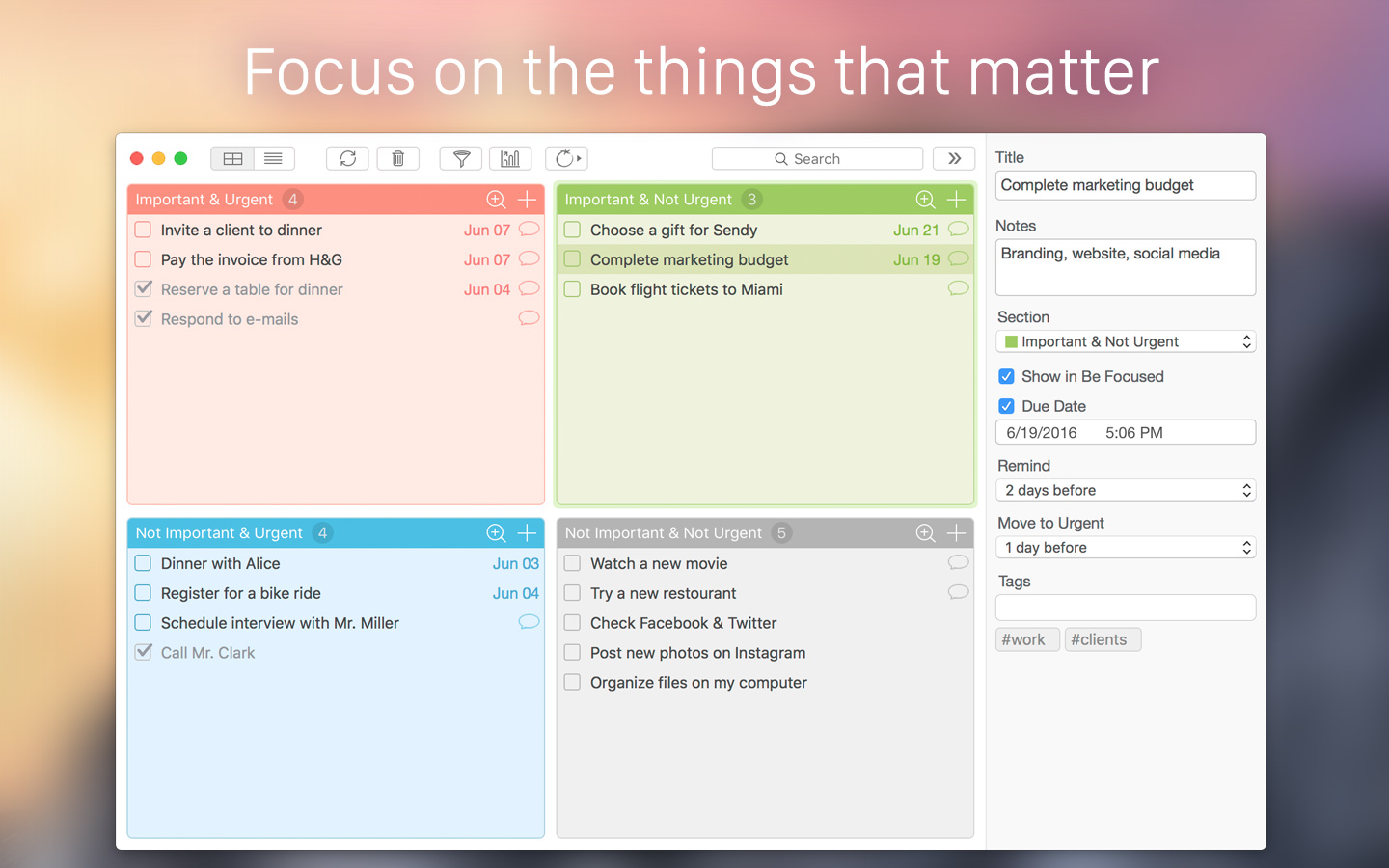
Using the Eisenhower Box method, Focus Matrix breaks tasks into one of four groups: "Important & Urgent," "Important & Not Urgent," "Not Important & Urgent," and "Not Important & Not Urgent." The color-coded four-square matrix layout of the app offers users a quick snapshot showing which tasks need to be completed immediately, and which can be pushed back until later, or safely delegated to someone else.
"President Dwight Eisenhower was known as one of the most productive presidents in history. His methods for time management, task management, and productivity have been studied by many people," shares XwaveSoft owner Denys Yevenko. "When I created Focus Matrix, I knew the Eisenhower Box method was the process I should use for the app. No other method so easily makes identifying pressing tasks at a glance, making any user's productivity increase almost immediately!"
Focus Matrix helps anyone focus on what tasks need to be completed immediately, and also identify which tasks can be delegated to others, or simply postponed until there is enough spare time to work on them. By making use of the four-square matrix, the app ensures a user's important pressing tasks are completed, without using up precious time working on tasks that can wait until later, or can be delegated to others.
The app allows users to quickly assign an importance level to any task, and to quickly change the priority of a task when needed, via a simple drag-and-drop of the task into another part of the matrix. Tasks can also be delegated to others, via email, iMessage, reminders, or even popular social networks such as Facebook, Twitter, and LinkedIn.
Features:
* Offers two views: Matrix and List of Sections
* Quickly move tasks between sections using drag-and-drop
* Maximize any section with a double-click to get a closer look at its content
* Assign due dates to tasks
* Set reminders, so important deadlines are never missed
* Tasks approaching their due dates are automatically move from the "Not Urgent" to the "Urgent" category
* Automatic notification when tasks are moved between categories
* Easily delegate tasks via email, messages, and reminders
* Quickly share task lists to Facebook, Twitter, and LinkedIn
* Edit multiple tasks at once
* Easily copy and paste tasks, both within Focus Matrix, and to/from other applications
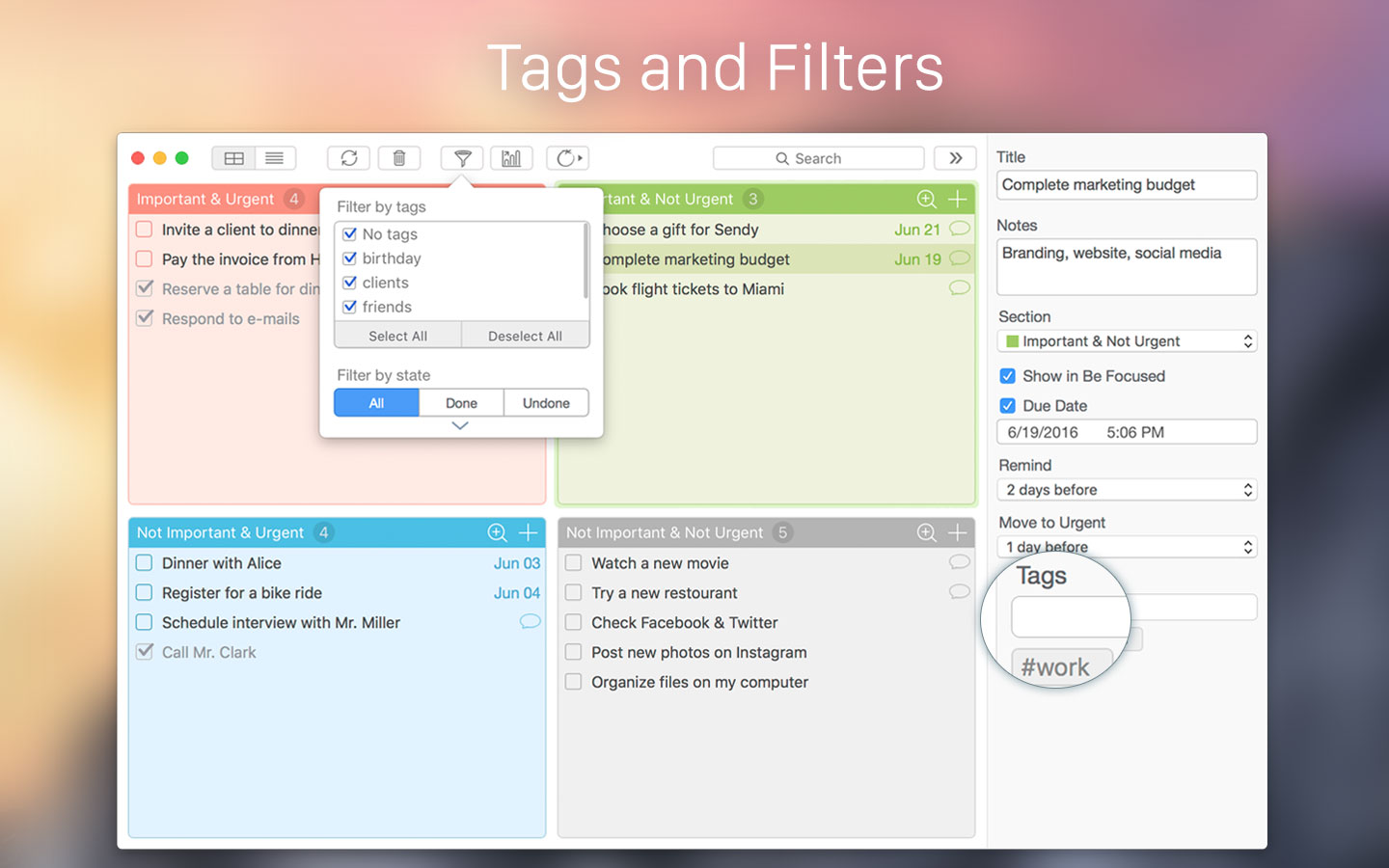
* Comprehensive search and tags support
* Filter all tasks by tags and status. (Completed/Uncompleted)
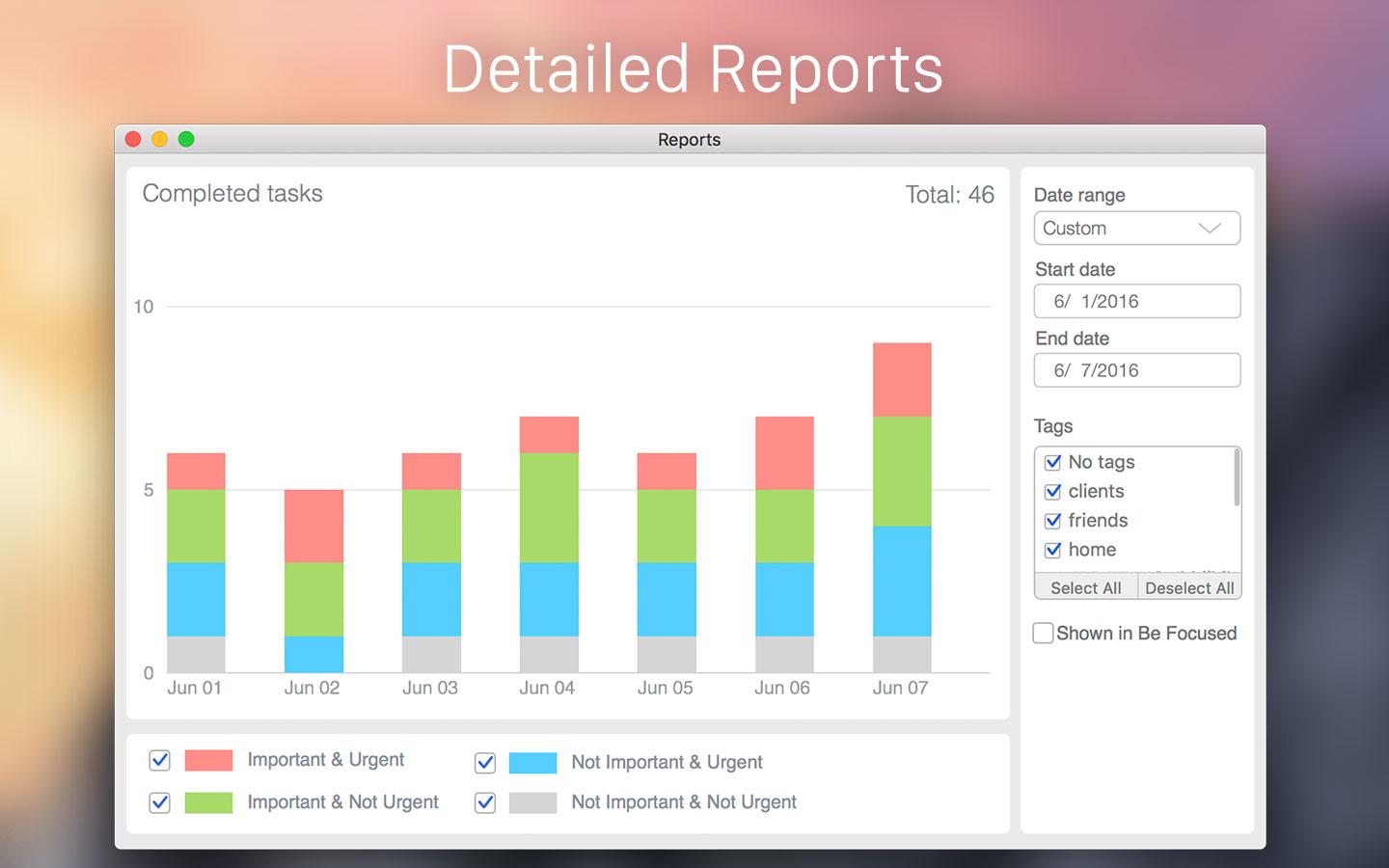
* Configurable statistics and reports for completed tasks
* Password protection
* Also available for iOS devices
Pro version features include:
* Synchronize all tasks across iPhone, iPad, and Mac
* Seamlessly integrate with Calendar application. (Synchronization of tasks, due and remind dates)
* Integration with Be Focused* includes synchronization of tasks and their statuses, and start a timer in Be Focused right from Focus Matrix
* Be Focused is a productivity app from XwaveSoft that helps users get things done by breaking up individual tasks among discrete intervals. The app is available for both Mac and iOS devices in the App Store.
Focus Matrix allows users to focus on the task at hand, instead of working on keeping their task lists straight. Easy color coding, and drag-and-drop ordering of tasks and their urgencies allow anyone to keep their tasks straight, ensuring they need never miss an important deadline ever again.
System Requirements:
* OS X 10.9 or later
* 64-bit processor
* 9.3 MB
Pricing and Availability:
Focus Matrix 1.0 is free, and is available worldwide exclusively through the Mac App Store in the Productivity category. An upgrade to the Pro version is $4.99 USD (or an equivalent amount in other currencies), and is available via a convenient in-app purchase. As a special limited-time app launch offer, users can upgrade to Pro at a 30% discount, for $2.99 USD.
Focus Matrix 1.0: http://xwavesoft.com/focus-matrix-for-iphone-ipad-mac.html
Download from the Mac App Store: https://itunes.apple.com/app/id1087284172
Screenshot 1: http://xwavesoft.com/focus-matrix/mac/focus-matrix-mac-s1.jpg
Screenshot 2: http://xwavesoft.com/focus-matrix/mac/focus-matrix-mac-s2.jpg
Screenshot 3: http://xwavesoft.com/focus-matrix/mac/focus-matrix-mac-s3.jpg
Press Kit (ZIP): http://xwavesoft.com/press/focus-matrix/press-kit-focus-matrix.zip
Based in Odessa, Ukraine, XwaveSoft is a privately owned software development company. Founded in 2009 by Denys Yevenko, XwaveSoft is focused on developing high-quality iOS and OS X applications. Long-term experience and professional expertise of the company's management and personnel guarantee the high quality of its products. All Material and Software (C) Copyright 2016 XwaveSoft. All Rights Reserved. Apple, the Apple logo, Macintosh and Mac OS X are registered trademarks of Apple Inc. in the U.S. and/or other countries. Other trademarks and registered trademarks may be the property of their respective owners.
*******
Link To Article: http://prmac.com/release-id-79774.htm
*******
---------------------------------------------------------------------------------
Note that you can alter delivered distributions at any time.
Login to your account on prMac to alter your channel selection, or to opt-out at any time.
Focus Matrix for Mac: Personal Organizer Based on the Eisenhower Method - Published on 06/29/16
XwaveSoft today announces Focus Matrix 1.0, their smart task organizer app for macOS. Focus Matrix's organizational system is based on the "Eisenhower Box," a productivity strategy created by U.S. President Dwight Eisenhower. The app offers an easy-to-follow priority matrix that breaks tasks down into four groups based on their urgency and importance. This allows anyone to easily focus on the tasks that really matter, without getting caught up in those that can be delegated, or dealt with later.
Odessa, Ukraine - XwaveSoft today is proud to announce the release and immediate availability of Focus Matrix 1.0, their smart personal organizer app for macOS. Focus Matrix's organizational process is based on the so-called "Eisenhower Box," which is a personal productivity strategy created by the 34th U.S. President Dwight Eisenhower. The app makes use of a special priority matrix that efficiently breaks a user's tasks into one of four groups depending on their urgency and importance. This allows anyone to work their way through their daily agenda in the most efficient way possible.
Using the Eisenhower Box method, Focus Matrix breaks tasks into one of four groups: "Important & Urgent," "Important & Not Urgent," "Not Important & Urgent," and "Not Important & Not Urgent." The color-coded four-square matrix layout of the app offers users a quick snapshot showing which tasks need to be completed immediately, and which can be pushed back until later, or safely delegated to someone else.
"President Dwight Eisenhower was known as one of the most productive presidents in history. His methods for time management, task management, and productivity have been studied by many people," shares XwaveSoft owner Denys Yevenko. "When I created Focus Matrix, I knew the Eisenhower Box method was the process I should use for the app. No other method so easily makes identifying pressing tasks at a glance, making any user's productivity increase almost immediately!"
Focus Matrix helps anyone focus on what tasks need to be completed immediately, and also identify which tasks can be delegated to others, or simply postponed until there is enough spare time to work on them. By making use of the four-square matrix, the app ensures a user's important pressing tasks are completed, without using up precious time working on tasks that can wait until later, or can be delegated to others.
The app allows users to quickly assign an importance level to any task, and to quickly change the priority of a task when needed, via a simple drag-and-drop of the task into another part of the matrix. Tasks can also be delegated to others, via email, iMessage, reminders, or even popular social networks such as Facebook, Twitter, and LinkedIn.
Features:
* Offers two views: Matrix and List of Sections
* Quickly move tasks between sections using drag-and-drop
* Maximize any section with a double-click to get a closer look at its content
* Assign due dates to tasks
* Set reminders, so important deadlines are never missed
* Tasks approaching their due dates are automatically move from the "Not Urgent" to the "Urgent" category
* Automatic notification when tasks are moved between categories
* Easily delegate tasks via email, messages, and reminders
* Quickly share task lists to Facebook, Twitter, and LinkedIn
* Edit multiple tasks at once
* Easily copy and paste tasks, both within Focus Matrix, and to/from other applications
* Comprehensive search and tags support
* Filter all tasks by tags and status. (Completed/Uncompleted)
* Configurable statistics and reports for completed tasks
* Password protection
* Also available for iOS devices
Pro version features include:
* Synchronize all tasks across iPhone, iPad, and Mac
* Seamlessly integrate with Calendar application. (Synchronization of tasks, due and remind dates)
* Integration with Be Focused* includes synchronization of tasks and their statuses, and start a timer in Be Focused right from Focus Matrix
* Be Focused is a productivity app from XwaveSoft that helps users get things done by breaking up individual tasks among discrete intervals. The app is available for both Mac and iOS devices in the App Store.
Focus Matrix allows users to focus on the task at hand, instead of working on keeping their task lists straight. Easy color coding, and drag-and-drop ordering of tasks and their urgencies allow anyone to keep their tasks straight, ensuring they need never miss an important deadline ever again.
System Requirements:
* OS X 10.9 or later
* 64-bit processor
* 9.3 MB
Pricing and Availability:
Focus Matrix 1.0 is free, and is available worldwide exclusively through the Mac App Store in the Productivity category. An upgrade to the Pro version is $4.99 USD (or an equivalent amount in other currencies), and is available via a convenient in-app purchase. As a special limited-time app launch offer, users can upgrade to Pro at a 30% discount, for $2.99 USD.
Focus Matrix 1.0: http://xwavesoft.com/focus-matrix-for-iphone-ipad-mac.html
Download from the Mac App Store: https://itunes.apple.com/app/id1087284172
Screenshot 1: http://xwavesoft.com/focus-matrix/mac/focus-matrix-mac-s1.jpg
Screenshot 2: http://xwavesoft.com/focus-matrix/mac/focus-matrix-mac-s2.jpg
Screenshot 3: http://xwavesoft.com/focus-matrix/mac/focus-matrix-mac-s3.jpg
Press Kit (ZIP): http://xwavesoft.com/press/focus-matrix/press-kit-focus-matrix.zip
Based in Odessa, Ukraine, XwaveSoft is a privately owned software development company. Founded in 2009 by Denys Yevenko, XwaveSoft is focused on developing high-quality iOS and OS X applications. Long-term experience and professional expertise of the company's management and personnel guarantee the high quality of its products. All Material and Software (C) Copyright 2016 XwaveSoft. All Rights Reserved. Apple, the Apple logo, Macintosh and Mac OS X are registered trademarks of Apple Inc. in the U.S. and/or other countries. Other trademarks and registered trademarks may be the property of their respective owners.
*******
Link To Article: http://prmac.com/release-id-79774.htm
*******
---------------------------------------------------------------------------------
Note that you can alter delivered distributions at any time.
Login to your account on prMac to alter your channel selection, or to opt-out at any time.
PIN Locker 3.0.1 released - Password Manager Revamped with More Features
A new article has been published at prMac.
PIN Locker 3.0.1 released - Password Manager Revamped with More Features - Published on 06/29/16
Mooee Company Limited today is proud to announce the release of PIN Locker 3.0.1, an important update to its popular pasword utility for iPhone, iPad and iPod touch devices. PIN Locker is a very simple yet highly secure password manager. Version 3.0.1 has been redesigned from the ground up to support the latest features of iOS 9, iPhone and iPad. Uses Touch ID and include iCloud Sync. Still remained is a nicely designed, simple to use yet strongly secured password protection App.
Kowloon, Hong Kong - Mooee Company Limited today is proud to announce the release of PIN Locker 3.0.1, an important update to its popular pasword utility for iPhone, iPad and iPod touch devices. PIN Locker has been redesigned from the ground up to support the latest features of iOS 9, iPhone and iPad. Uses Touch ID and include iCloud Sync. Still remained is a nicely designed, simple to use yet strongly secured password protection App.
New Features:
* iCloud Sync. You can now use your PIN Locker on your iPhones and iPads and they will be automatically synced under the same Apple ID
* Newly designed for the iPad and support Split View
* Supports Touch ID to unlock or you can continue to use your master password to unlock
* Use the highest level of encryption available
* Hide or show your password on demand
Other Features Highlight
* Simple one click on the website address to go to the web browser immediately
* Copy function to both password and user name, no need to remember them in order to enter into the web browser
* Customize the labels anytime so the wordings match those of the websites'
* PIN Locker will remember the last password before change, in case users need their old passwords again
* Most frequently used passwords - uses a Top Ten list to quickly locate the most frequently used passwords
* More flexible entries - Some sites require 2 passwords instead of one. PIN Locker has a dedicated field to allow user to keep a second password
Supported Languages:
* English and Chinese
Device Requirements:
* iPhone, iPad, and iPod touch
* Requires iOS 9.0 or later
* 51.7 MB
Pricing and Availability:
PIN Locker 3.0.1 for iPhone/iPad is only $5.99 (USD) and available exclusively through the App Store in the Utilities category.
Mooee: http://www.mooee.com
PIN Locker 3.0.1: http://pinlocker.mooee.com/pinlocker/
Purchase and Download: http://itunes.apple.com/app/id346671710
Screenshot (iPad): http://pinlocker.mooee.com/images/v3.0.0/ipad_screenshot_en_04.png
Screenshot (iPhone): http://pinlocker.mooee.com/images/v3.0.0/4.7_screenshot_en_01.png
App Icon: http://pinlocker.mooee.com/images/v3.0.0/LargeAppIcon.png
Located in Kowloon, Hong Kong, Mooee Company Limited is a privately funded software firm. With a focus on the iPhone platform, Mooee's mission is to develop inexpensive, user-friendly software for all consumers. Mooee's team has more than 22 years of experience in software development and more than 24 years of experience in business management relating to software marketing and development. Copyright (C) 2016 Mooee Company Limited. All Rights Reserved. Apple, the Apple logo, iPhone, iPad and iPod are registered trademarks of Apple Computer in the U.S. and/or other countries.
*******
Link To Article: http://prmac.com/release-id-79776.htm
*******
---------------------------------------------------------------------------------
Note that you can alter delivered distributions at any time.
Login to your account on prMac to alter your channel selection, or to opt-out at any time.
PIN Locker 3.0.1 released - Password Manager Revamped with More Features - Published on 06/29/16
Mooee Company Limited today is proud to announce the release of PIN Locker 3.0.1, an important update to its popular pasword utility for iPhone, iPad and iPod touch devices. PIN Locker is a very simple yet highly secure password manager. Version 3.0.1 has been redesigned from the ground up to support the latest features of iOS 9, iPhone and iPad. Uses Touch ID and include iCloud Sync. Still remained is a nicely designed, simple to use yet strongly secured password protection App.
Kowloon, Hong Kong - Mooee Company Limited today is proud to announce the release of PIN Locker 3.0.1, an important update to its popular pasword utility for iPhone, iPad and iPod touch devices. PIN Locker has been redesigned from the ground up to support the latest features of iOS 9, iPhone and iPad. Uses Touch ID and include iCloud Sync. Still remained is a nicely designed, simple to use yet strongly secured password protection App.
New Features:
* iCloud Sync. You can now use your PIN Locker on your iPhones and iPads and they will be automatically synced under the same Apple ID
* Newly designed for the iPad and support Split View
* Supports Touch ID to unlock or you can continue to use your master password to unlock
* Use the highest level of encryption available
* Hide or show your password on demand
Other Features Highlight
* Simple one click on the website address to go to the web browser immediately
* Copy function to both password and user name, no need to remember them in order to enter into the web browser
* Customize the labels anytime so the wordings match those of the websites'
* PIN Locker will remember the last password before change, in case users need their old passwords again
* Most frequently used passwords - uses a Top Ten list to quickly locate the most frequently used passwords
* More flexible entries - Some sites require 2 passwords instead of one. PIN Locker has a dedicated field to allow user to keep a second password
Supported Languages:
* English and Chinese
Device Requirements:
* iPhone, iPad, and iPod touch
* Requires iOS 9.0 or later
* 51.7 MB
Pricing and Availability:
PIN Locker 3.0.1 for iPhone/iPad is only $5.99 (USD) and available exclusively through the App Store in the Utilities category.
Mooee: http://www.mooee.com
PIN Locker 3.0.1: http://pinlocker.mooee.com/pinlocker/
Purchase and Download: http://itunes.apple.com/app/id346671710
Screenshot (iPad): http://pinlocker.mooee.com/images/v3.0.0/ipad_screenshot_en_04.png

Screenshot (iPhone): http://pinlocker.mooee.com/images/v3.0.0/4.7_screenshot_en_01.png

App Icon: http://pinlocker.mooee.com/images/v3.0.0/LargeAppIcon.png

Located in Kowloon, Hong Kong, Mooee Company Limited is a privately funded software firm. With a focus on the iPhone platform, Mooee's mission is to develop inexpensive, user-friendly software for all consumers. Mooee's team has more than 22 years of experience in software development and more than 24 years of experience in business management relating to software marketing and development. Copyright (C) 2016 Mooee Company Limited. All Rights Reserved. Apple, the Apple logo, iPhone, iPad and iPod are registered trademarks of Apple Computer in the U.S. and/or other countries.
*******
Link To Article: http://prmac.com/release-id-79776.htm
*******
---------------------------------------------------------------------------------
Note that you can alter delivered distributions at any time.
Login to your account on prMac to alter your channel selection, or to opt-out at any time.
SuperTab for Mac receives upgrade to version 2.1 and a 50%-off Sale
A new article has been published at prMac.
SuperTab for Mac receives upgrade to version 2.1 and a 50%-off Sale - Published on 06/29/16
California based SpriTec Software today announces SuperTab 2.1, a major update to its powerful utility application for OS X. SuperTab is a powerful utility application for macOS that greatly enhances and extends the Mac's built-in Command-Tab Application Switcher. Version 2.1 introduces with three new features that focus on the folder, including the new "Clutter Free Folders" feature. SuperTab 2.1 is available at a special 50%-off sale good now through August 15, 2016.
San Diego, California - SpriTec Software is proud to announce the release of SuperTab version 2.1, a significant upgrade to its Macintosh utility application that greatly enhances and extends the Mac's built-in Command-Tab Application Switcher.
"The App that does what Apple should have Done!"
SuperTab builds upon the Mac's built-in Command-Tab App Switcher to provide users with instant access to much more than just their Active Apps. For example, SuperTab extends the Mac's App Switcher to let users quickly access their:
* Active Apps
* Recent Apps
* Recent Documents
* Dock Contents
* Dropbox Contents
* Folder Contents
* Application Windows
* Any Files, Folders or Apps
* Clipboard History
* Web Site Bookmarks
* Screen Shots
* Multiple Clipboards
* Saved Spotlight Searches
* Display Configurations
* Tagged Items
* Finder Sidebar Items
By giving Mac users such instant "Command-Tab" access to so much, SuperTab has quickly become one of the most powerful launchers in the Mac market. And now this new version 2.1 of SuperTab adds several key features that "Focus on the Folder" to make working with Finder Folders much easier, faster and efficient!
* Clutter Free Folders:
For users whose Desktop is cluttered with icons or whose Downloads Folder is a confusing mess, SuperTab 2.1 now offers a new and powerful "Clutter Free Folders" feature. Clutter Free Folders will automatically keep the Desktop, Downloads - or any folder - free of clutter by automatically moving unimportant files into a "Safe Keeping" folder yet still keeping important files in place.
Users decide which folders to keep Clutter Free. And they have full control over which files remain, which are moved, and when. SuperTab even makes it easy to access the moved files so users get the best of both words: zero clutter and yet full access to their moved files. Keeping a Clutter Free Desktop makes finding important files on the Desktop easier, makes working on the Mac more pleasant, and leaves users at ease knowing that they finally have their Desktop Insanity under control.
And Keeping a Clutter Free Downloads folder means finding the the file you just downloaded a snap! Clutter Free Folders can also automatically move items directly to the trash if users prefer. As well, it can automatically delete items in the Trash after they've been in there for a user-specified time.
* Trash Folder Support:
SuperTab 2.1 now lets users add the Trash folder directly to SuperTab. The Trash in SuperTab acts just like the System Trash: It shows as full or empty. Users can open it, empty it, and drag files and folders from the Finder to it. Users can also access the individual items in the Trash directly from within SuperTab, set a Hot Key to open the System Trash and even configure SuperTab to automatically delete items in the Trash after they've been in there for a user-specified time.
* Enhanced Folder Contents Access:
SuperTab has always enabled users to quickly access the contents of any Folder simply by right-clicking on the Folder in SuperTab. With SuperTab 2.1, however, users now have more control and flexibility than ever. SuperTab 2.1 now provides immediate access to users' Recently Accessed Items and Recently Moved Items (moved by Clutter Free Folders).
And when accessing the full contents of a folder, users can now specify the Sort Order, Sort Criteria and even the Grouping of the folder's contents to group them by Files first, Folders first, or as naturally occurring. Users can customize each of their folders exactly as they wish, tailoring their Mac to perfectly suit their working style, not cramp it.
System Requirements:
SuperTab 2.1 is compatible with the following versions of macOS:
* "El Capitan" (10.11)
* "Yosemite" (10.10)
* "Mavericks" (10.9)
* "Mountain Lion" (10.8)
Pricing and Availability:
SuperTab 2.1 is free to download and install and is fully-functional for 30 days. After 30 days, it remains fully-functional but will occasionally ask users to register. Users can take advantage of a special 50%-off sale price of only $10, which is good now through August 15, 2016. SuperTab 2.1 is a free upgrade for SuperTab 2.0 users. Users of earlier 1.x versions of SuperTab can upgrade to 2.1 for $2.99 (USD).
SuperTab 2.1: http://www.supertab.me/SuperTab.html
2.1 Overview: http://www.supertab.me/TwoPointOneRelease.html
Download SuperTab: http://www.supertab.me/Download.html
Upgrade SuperTab: http://www.supertab.me/UpgradeFork.html
Purchase: http://www.supertab.me/Register.html
Media Assets: http://www.supertab.me/SuperTabScreenShots.html
Located in San Diego, California, SpriTec Software creates apps for the macOS platform. SpriTec Software is helmed by Ando Sonenblick, an Apple/GoPro/Adobe/DivX veteran with over 30 years of development experience. Copyright (C) 2016 SpriTec Software. All Rights Reserved. Apple, the Apple logo, Mac OS X, macOS, and Macintosh are registered trademarks of Apple Inc. in the U.S. and/or other countries. All other trademarks and trade names are the property of their respective owners.
*******
Link To Article: http://prmac.com/release-id-79773.htm
*******
---------------------------------------------------------------------------------
Note that you can alter delivered distributions at any time.
Login to your account on prMac to alter your channel selection, or to opt-out at any time.
SuperTab for Mac receives upgrade to version 2.1 and a 50%-off Sale - Published on 06/29/16
California based SpriTec Software today announces SuperTab 2.1, a major update to its powerful utility application for OS X. SuperTab is a powerful utility application for macOS that greatly enhances and extends the Mac's built-in Command-Tab Application Switcher. Version 2.1 introduces with three new features that focus on the folder, including the new "Clutter Free Folders" feature. SuperTab 2.1 is available at a special 50%-off sale good now through August 15, 2016.
San Diego, California - SpriTec Software is proud to announce the release of SuperTab version 2.1, a significant upgrade to its Macintosh utility application that greatly enhances and extends the Mac's built-in Command-Tab Application Switcher.
"The App that does what Apple should have Done!"
SuperTab builds upon the Mac's built-in Command-Tab App Switcher to provide users with instant access to much more than just their Active Apps. For example, SuperTab extends the Mac's App Switcher to let users quickly access their:
* Active Apps
* Recent Apps
* Recent Documents
* Dock Contents
* Dropbox Contents
* Folder Contents
* Application Windows
* Any Files, Folders or Apps
* Clipboard History
* Web Site Bookmarks
* Screen Shots
* Multiple Clipboards
* Saved Spotlight Searches
* Display Configurations
* Tagged Items
* Finder Sidebar Items
By giving Mac users such instant "Command-Tab" access to so much, SuperTab has quickly become one of the most powerful launchers in the Mac market. And now this new version 2.1 of SuperTab adds several key features that "Focus on the Folder" to make working with Finder Folders much easier, faster and efficient!
* Clutter Free Folders:
For users whose Desktop is cluttered with icons or whose Downloads Folder is a confusing mess, SuperTab 2.1 now offers a new and powerful "Clutter Free Folders" feature. Clutter Free Folders will automatically keep the Desktop, Downloads - or any folder - free of clutter by automatically moving unimportant files into a "Safe Keeping" folder yet still keeping important files in place.
Users decide which folders to keep Clutter Free. And they have full control over which files remain, which are moved, and when. SuperTab even makes it easy to access the moved files so users get the best of both words: zero clutter and yet full access to their moved files. Keeping a Clutter Free Desktop makes finding important files on the Desktop easier, makes working on the Mac more pleasant, and leaves users at ease knowing that they finally have their Desktop Insanity under control.
And Keeping a Clutter Free Downloads folder means finding the the file you just downloaded a snap! Clutter Free Folders can also automatically move items directly to the trash if users prefer. As well, it can automatically delete items in the Trash after they've been in there for a user-specified time.
* Trash Folder Support:
SuperTab 2.1 now lets users add the Trash folder directly to SuperTab. The Trash in SuperTab acts just like the System Trash: It shows as full or empty. Users can open it, empty it, and drag files and folders from the Finder to it. Users can also access the individual items in the Trash directly from within SuperTab, set a Hot Key to open the System Trash and even configure SuperTab to automatically delete items in the Trash after they've been in there for a user-specified time.
* Enhanced Folder Contents Access:
SuperTab has always enabled users to quickly access the contents of any Folder simply by right-clicking on the Folder in SuperTab. With SuperTab 2.1, however, users now have more control and flexibility than ever. SuperTab 2.1 now provides immediate access to users' Recently Accessed Items and Recently Moved Items (moved by Clutter Free Folders).
And when accessing the full contents of a folder, users can now specify the Sort Order, Sort Criteria and even the Grouping of the folder's contents to group them by Files first, Folders first, or as naturally occurring. Users can customize each of their folders exactly as they wish, tailoring their Mac to perfectly suit their working style, not cramp it.
System Requirements:
SuperTab 2.1 is compatible with the following versions of macOS:
* "El Capitan" (10.11)
* "Yosemite" (10.10)
* "Mavericks" (10.9)
* "Mountain Lion" (10.8)
Pricing and Availability:
SuperTab 2.1 is free to download and install and is fully-functional for 30 days. After 30 days, it remains fully-functional but will occasionally ask users to register. Users can take advantage of a special 50%-off sale price of only $10, which is good now through August 15, 2016. SuperTab 2.1 is a free upgrade for SuperTab 2.0 users. Users of earlier 1.x versions of SuperTab can upgrade to 2.1 for $2.99 (USD).
SuperTab 2.1: http://www.supertab.me/SuperTab.html
2.1 Overview: http://www.supertab.me/TwoPointOneRelease.html
Download SuperTab: http://www.supertab.me/Download.html
Upgrade SuperTab: http://www.supertab.me/UpgradeFork.html
Purchase: http://www.supertab.me/Register.html
Media Assets: http://www.supertab.me/SuperTabScreenShots.html
Located in San Diego, California, SpriTec Software creates apps for the macOS platform. SpriTec Software is helmed by Ando Sonenblick, an Apple/GoPro/Adobe/DivX veteran with over 30 years of development experience. Copyright (C) 2016 SpriTec Software. All Rights Reserved. Apple, the Apple logo, Mac OS X, macOS, and Macintosh are registered trademarks of Apple Inc. in the U.S. and/or other countries. All other trademarks and trade names are the property of their respective owners.
*******
Link To Article: http://prmac.com/release-id-79773.htm
*******
---------------------------------------------------------------------------------
Note that you can alter delivered distributions at any time.
Login to your account on prMac to alter your channel selection, or to opt-out at any time.
Red Giant Universe 2.0 Expands its Creative Force with Major Updates
A new article has been published at prMac.
Red Giant Universe 2.0 Expands its Creative Force with Major Updates - Published on 06/28/16
Portland based Red Giant today releases Red Giant Universe 2.0, a major update to the company's GPU-accelerated plugins for editors and motion graphics artists. With more than 60 tools that run in Adobe Premiere Pro CC, Adobe After Effects CC, Apple Final Cut Pro X, Apple Motion, Blackmagic DaVinci Resolve, HitFilm and Sony Vegas, this update includes four new and 29 updated plugins, plus a brand new user experience that makes it easy to preview and apply effects.
Portland, Oregon - Red Giant today released Red Giant Universe 2.0, a major update to the company's GPU-accelerated plugins for editors and motion graphics artists. With more than 60 tools that run in Adobe(R) Premiere(R) Pro CC, Adobe After Effects(R) CC, Apple Final Cut Pro X, Apple Motion, Blackmagic DaVinci Resolve, HitFilm and Sony Vegas, the Red Giant Universe 2.0 update includes four new and 29 updated plugins, plus a brand new user experience that makes it easy to preview and apply effects. And for the first time ever, the Red Giant Universe is coming to the Volume Licensing Program, making it easier than ever for large organizations to take advantage of the massive collection of Red Giant Universe plugins. This update also brings support for the just-released Adobe Creative Cloud(TM) 2015.3 to Universe.
What's new in Red Giant Universe 2.0
A Focus on Motion Graphics - This major update to Red Giant Universe features a special focus on motion graphics plugins, including the following new tools and updates to:
* HUD Components: Instantly create Heads-Up Display elements for use in motion graphics; this tool is packed with tons of presets, element shapes and behaviors for creating a variety of HUD effects.
* Line: Easily generate a line between two points to simulate flight paths, travel indicators on a map, and a variety of additional motion graphics; draw it as a curving bezier path or a straight line, change the color and style of the line, as well as the start and end points and how they animate over time.
* Logo Motion: Instantly make logos and text more interesting and dynamic by animating imagery on and off the screen with a hinge style swing, slide on, or a slightly eased in and out "pop."
* Color Stripe: Create a transition that uses layered blocks of color wiping across the screen to reveal a second layer.
A New User Experience:
Red Giant has updated the user experience on 22 Universe tools with a new visual preset browser that makes previewing effects easier than ever. Users can view an animated preview of the effect simply by hovering over the effect in the browser window, then apply it instantly by clicking on the image of the desired preset.
New Features - Along with the new user experience, 18 Red Giant Universe tools have been updated with additional new features, including:
* Holomatrix II, which now includes new distortion effects based on holographic imagery from films like "Star Wars: The Force Awakens" and "The Hunger Games: Mockingjay."
* Camera Shake, which has been redesigned and enhanced to make it simple to quickly achieve a variety of realistic camera shakes with little to no effort - great for enhancing action sequences, and for simulating various camera setups and scenarios - such as filming with a car mount, on a boat, and even in an earthquake.
* Unmult, which now offers additional controls to help users precisely remove black backgrounds from footage and create an alpha channel, a useful tool for compositing footage of fire, smoke, water and more.
As Seen on TV:
Red Giant Universe has been used on "Saturday Night Live," "Portlandia," "Documentary Now," "Kung Fury," and much more.
The Red Pledge
Red Pledge is Red Giant commitment to customer happiness, with no purchasing hassles.
Update to Red Giant Universe 2.0:
As an existing Universe customer, you can download the latest version of Red Giant Link and update to Universe 2.0 in Link's Universe panel. Link can also be updated within the app, by using the "Check for Updates Now" menu item.
How to Purchase:
New Red Giant Universe customers can purchase a subscription or download a free trial via the Universe product page. To learn more about Red Giant products, please visit the product page on the Red Giant website.
Now Available in the Red Giant Volume Program:
For the first time ever, Red Giant Universe is available in Red Giant's Volume Program, the flexible and affordable solution for customers who need 5 or more floating licenses.
Request a Review Kit:
Members of the media are invited to review any plug-ins from Red Giant Universe. For more information or to request a product review kit, please contact Anya Nelson.
Red Giant Universe 2.0: http://www.redgiant.com/universe/
Universe 2.0 New Features: http://www.youtube.com/watch?v=2LsPXro0APY
Red Giant automated software updates: http://www.redgiant.com/link/?utm_source=Red+Giant+Software+Email+List&utm_campaign=fe1d3a8c11-07_07_15_Universe_1-5&utm_medium=email&utm_term=0_ff8ed2ae13-fe1d3a8c11-
Red Giant floating license program: http://www.redgiant.com/volume/
Red Giant Quality Commitment : http://www.redgiant.com/company/red-pledge/
Red Giant is a software company made up of talented artists and technologists who collaborate to create unique tools for filmmakers, editors, VFX artists, and motion designers. Our company culture is focused on finding balance between work and life - we call it "the double bottom line" - this philosophy helps us ignore complexity in favor of building simple tools that yield giant results. Over the last decade, our products (like Magic Bullet, Trapcode and PluralEyes) have become the standard in film and broadcast post-production. With over 200,000 users, it's nearly impossible to watch 20 minutes of TV without seeing our software in use. From our experiences as artists and filmmakers, we aspire to not only provide tools for artists, but inspiration as well. Watch our films, learn from over 200 free tutorials, or try our software on our website. All Material and Software (C) Copyright 2016 Red Giant. All Rights Reserved. Apple, the Apple logo, and OS X are registered trademarks of
Apple Inc. in the U.S. and/or other countries. Other trademarks and registered trademarks may be the property of their respective owners.
*******
Link To Article: http://prmac.com/release-id-79772.htm
*******
---------------------------------------------------------------------------------
Note that you can alter delivered distributions at any time.
Login to your account on prMac to alter your channel selection, or to opt-out at any time.
Red Giant Universe 2.0 Expands its Creative Force with Major Updates - Published on 06/28/16
Portland based Red Giant today releases Red Giant Universe 2.0, a major update to the company's GPU-accelerated plugins for editors and motion graphics artists. With more than 60 tools that run in Adobe Premiere Pro CC, Adobe After Effects CC, Apple Final Cut Pro X, Apple Motion, Blackmagic DaVinci Resolve, HitFilm and Sony Vegas, this update includes four new and 29 updated plugins, plus a brand new user experience that makes it easy to preview and apply effects.
Portland, Oregon - Red Giant today released Red Giant Universe 2.0, a major update to the company's GPU-accelerated plugins for editors and motion graphics artists. With more than 60 tools that run in Adobe(R) Premiere(R) Pro CC, Adobe After Effects(R) CC, Apple Final Cut Pro X, Apple Motion, Blackmagic DaVinci Resolve, HitFilm and Sony Vegas, the Red Giant Universe 2.0 update includes four new and 29 updated plugins, plus a brand new user experience that makes it easy to preview and apply effects. And for the first time ever, the Red Giant Universe is coming to the Volume Licensing Program, making it easier than ever for large organizations to take advantage of the massive collection of Red Giant Universe plugins. This update also brings support for the just-released Adobe Creative Cloud(TM) 2015.3 to Universe.
What's new in Red Giant Universe 2.0
A Focus on Motion Graphics - This major update to Red Giant Universe features a special focus on motion graphics plugins, including the following new tools and updates to:
* HUD Components: Instantly create Heads-Up Display elements for use in motion graphics; this tool is packed with tons of presets, element shapes and behaviors for creating a variety of HUD effects.
* Line: Easily generate a line between two points to simulate flight paths, travel indicators on a map, and a variety of additional motion graphics; draw it as a curving bezier path or a straight line, change the color and style of the line, as well as the start and end points and how they animate over time.
* Logo Motion: Instantly make logos and text more interesting and dynamic by animating imagery on and off the screen with a hinge style swing, slide on, or a slightly eased in and out "pop."
* Color Stripe: Create a transition that uses layered blocks of color wiping across the screen to reveal a second layer.
A New User Experience:
Red Giant has updated the user experience on 22 Universe tools with a new visual preset browser that makes previewing effects easier than ever. Users can view an animated preview of the effect simply by hovering over the effect in the browser window, then apply it instantly by clicking on the image of the desired preset.
New Features - Along with the new user experience, 18 Red Giant Universe tools have been updated with additional new features, including:
* Holomatrix II, which now includes new distortion effects based on holographic imagery from films like "Star Wars: The Force Awakens" and "The Hunger Games: Mockingjay."
* Camera Shake, which has been redesigned and enhanced to make it simple to quickly achieve a variety of realistic camera shakes with little to no effort - great for enhancing action sequences, and for simulating various camera setups and scenarios - such as filming with a car mount, on a boat, and even in an earthquake.
* Unmult, which now offers additional controls to help users precisely remove black backgrounds from footage and create an alpha channel, a useful tool for compositing footage of fire, smoke, water and more.
As Seen on TV:
Red Giant Universe has been used on "Saturday Night Live," "Portlandia," "Documentary Now," "Kung Fury," and much more.
The Red Pledge
Red Pledge is Red Giant commitment to customer happiness, with no purchasing hassles.
Update to Red Giant Universe 2.0:
As an existing Universe customer, you can download the latest version of Red Giant Link and update to Universe 2.0 in Link's Universe panel. Link can also be updated within the app, by using the "Check for Updates Now" menu item.
How to Purchase:
New Red Giant Universe customers can purchase a subscription or download a free trial via the Universe product page. To learn more about Red Giant products, please visit the product page on the Red Giant website.
Now Available in the Red Giant Volume Program:
For the first time ever, Red Giant Universe is available in Red Giant's Volume Program, the flexible and affordable solution for customers who need 5 or more floating licenses.
Request a Review Kit:
Members of the media are invited to review any plug-ins from Red Giant Universe. For more information or to request a product review kit, please contact Anya Nelson.
Red Giant Universe 2.0: http://www.redgiant.com/universe/
Universe 2.0 New Features: http://www.youtube.com/watch?v=2LsPXro0APY
Red Giant automated software updates: http://www.redgiant.com/link/?utm_source=Red+Giant+Software+Email+List&utm_campaign=fe1d3a8c11-07_07_15_Universe_1-5&utm_medium=email&utm_term=0_ff8ed2ae13-fe1d3a8c11-
Red Giant floating license program: http://www.redgiant.com/volume/
Red Giant Quality Commitment : http://www.redgiant.com/company/red-pledge/
Red Giant is a software company made up of talented artists and technologists who collaborate to create unique tools for filmmakers, editors, VFX artists, and motion designers. Our company culture is focused on finding balance between work and life - we call it "the double bottom line" - this philosophy helps us ignore complexity in favor of building simple tools that yield giant results. Over the last decade, our products (like Magic Bullet, Trapcode and PluralEyes) have become the standard in film and broadcast post-production. With over 200,000 users, it's nearly impossible to watch 20 minutes of TV without seeing our software in use. From our experiences as artists and filmmakers, we aspire to not only provide tools for artists, but inspiration as well. Watch our films, learn from over 200 free tutorials, or try our software on our website. All Material and Software (C) Copyright 2016 Red Giant. All Rights Reserved. Apple, the Apple logo, and OS X are registered trademarks of
Apple Inc. in the U.S. and/or other countries. Other trademarks and registered trademarks may be the property of their respective owners.
*******
Link To Article: http://prmac.com/release-id-79772.htm
*******
---------------------------------------------------------------------------------
Note that you can alter delivered distributions at any time.
Login to your account on prMac to alter your channel selection, or to opt-out at any time.
Subscribe to:
Posts (Atom)