A new article has been published at prMac.
InPreflight Pro for InDesign Is Now Available for Sale on MacUpdate - Published on 07/11/16
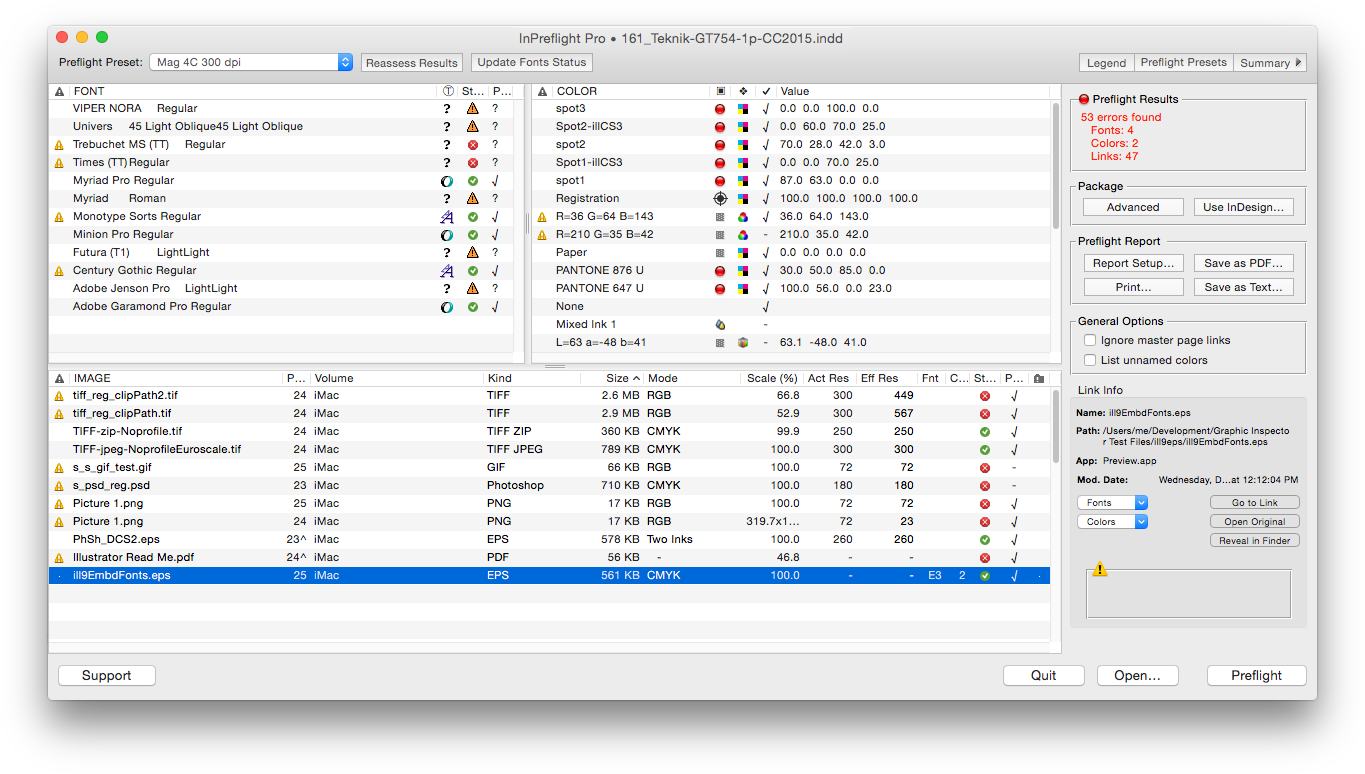
Zevrix Solutions announces that InPreflight Pro, its document preparation solution for Adobe InDesign, is now available for direct purchase on MacUpdate under its Enhanced Product Pages program. Described as "delightfully simple to use" by Macworld magazine, InPreflight is an all-in-one solution to check InDesign documents for errors, automatically collect multiple files for output and ship them to final destination. Users can now buy the app directly from its existing MacUpdate listing.
Toronto (ON) Canada - Zevrix Solutions today is pleased to announce that InPreflight Pro, its document preparation solution for Adobe InDesign, is now available for direct purchase on MacUpdate under its Enhanced Product Pages program. InPreflight is a powerful all-in-one solution to check InDesign documents for errors, collect them for output and ship to final destination.
The new Enhanced Product Pages Program creates an easy way for MacUpdate members to purchase InPreflight Pro in just one click directly from its existing MacUpdate listing. MacUpdate began in 1996 as a forum for Mac enthusiasts to discuss and track Mac software updates and releases. Now, over a million users discover, discuss, try and purchase over 40,000 apps from over 6,000 developers.
"InPreflight provides excellent display of document's elements with full control over preflighting and file collection," says Michael Anikst of Anikst Design in London, UK. "I am designing very big books on art, and InPreflight lets me keep all my documents in perfect order."
InPreflight Pro provides a complete document preparation solution for printers, prepress shops, ad agencies and publishing houses. The software can package multiple InDesign jobs automatically with the option to collect all files into one folder. It eliminates the need to collect the same links multiple times for each design saving users gigabytes of disk space and hours of production time. In addition, the collected jobs can be sent automatically over the Internet and locally.
As a quality control tool, InPreflight quickly checks InDesign documents for common problems, as well as for hidden issues such as TIFF and EPS compression, embedded fonts and illegal link locations.
Pricing and Availability:
InPreflight Pro can be purchased from MacUpdate for $99.95 (USD), as well as from Zevrix website and authorized resellers. Trial version is available for download. InPreflight requires Mac OS X 10.6-10.11 and Adobe InDesign CS3-CC 2015.
Zevrix Solutions: http://zevrix.com
InPreflight Pro: https://www.macupdate.com/app/mac/23099/inpreflight-pro
Download InPreflight Pro: http://zevrix.com/InPreflight.dmg
Screenshot: http://zevrix.com/screenshots/ipf2/ipf2-main-no-doc.png
Located in Toronto, Canada, Zevrix Solutions provides automation and productivity solutions for Adobe Creative Cloud and Creative Suite software, PDF workflows, graphic file diagnostics and Microsoft Office output on Mac OS. Zevrix is dedicated to help professionals increase their profits through automating everyday tasks, producing error-free documents, saving disk space and cutting production costs. For more information, visit their website. Copyright (C) 2016 Zevrix Solutions. All Rights Reserved. Other trademarks and registered trademarks may be the property of their respective owners.
*******
Link To Article: http://prmac.com/release-id-79843.htm
*******
---------------------------------------------------------------------------------
Note that you can alter delivered distributions at any time.
Login to your account on prMac to alter your channel selection, or to opt-out at any time.

Telly Genius 1.2 - The Complete Entertainment Guide for Television Fans
A new article has been published at prMac.
Telly Genius 1.2 - The Complete Entertainment Guide for Television Fans - Published on 07/11/16
Indie developer Renniksoft today announces Telly Genius 1.2, an important update to their popular television viewing recommendation app for iOS devices. Built on the same powerful technology used in the company's popular Movie Genius app, Telly Genius offers viewers intelligent viewing recommendations for all ages and genres. Version 1.2 brings improved functionality, and a number of fixes to enhance the user experience.
Bath, United Kingdom - Renniksoft today is proud to announce the release and immediate availability of Telly Genius 1.2, an important update to their popular television viewing recommendation app for iPhone, iPad, and iPod touch devices. Telly Genius is built on the same powerful technology as is used in Renniksoft's popular Movie Genius app, offering a complete entertainment discovery platform for viewers of all ages.
Telly Genius is a breakthrough app that features a powerful recommendation engine that allows anyone to discover hundreds of television shows they may not otherwise have heard of. The app offers show recommendations based on a user's likes and dislikes, the television shows they browse in the various categories available in the app, and other users' ratings. The app then compares those ratings to available storylines and audience ratings, and suggests television series and specials that offer similar subject matter, are of a similar genre, or star the same actors. Telly Genius' suggestions are similar to those someone might receive from a fellow avid television fan.
"When we released Movie Genius, it was extremely well received by movie fans everywhere. The app offered moviegoers the fastest, most reliable, and most comprehensive way for them to find just the right movie to watch," says app developer Clive Skinner. "One of the most common requests we received from users was for us to take the same technology and apply it to television shows. Never let it be said we don't listen to our customers!"
Features Include:
* Intelligent recommendations based on matching themes and plots
* The app learns a user's likes and dislikes. The more you use it, the smarter it gets
* Quickly search for favorite shows to rate, and Telly Genius will find similar shows
* Save personal lists of shows to discover and see
* Get all the latest TV news, right in the app
* See which shows are currently airing
* Discover the most popular shows of the moment
* View TV show trailers and clips with just a tap
* IMDb - Link straight through to IMDb pages
* View show cast and crew lists, pictures and biographies
* Share your show recommendations with friends and family via Twitter, Facebook, or email
Telly Genius not only recommends shows that are carried on the major over-the-air networks, but also those found on premium cable channels, such as Showtime, HBO, Starz, and more. Parents will find it's easy to control which television shows their young ones can search for via the app, as they can filter the content according to the standard TV ratings of TV-Y, TV-G, TV-PG, TV-14, and TV-MA. This protects young eyes from viewing material that may be too mature for them.
What's New in Version 1.2:
* Blank movie details screen now fixed
* Results will only update when you refresh, making them easier to read
* Rated movies are now excluded from results to make new recommendations easier to see
* News images are now displayed properly
In addition to being available as a single app purchase, Telly Genius is also available in a two-app specially priced bundle with Movie Genius. The convenient bundle is available for $4.99 USD, marking a substantial savings from the usual $6.98 it would cost to buy the apps separately.
"When users have Telly Genius installed on their iOS device, they'll always be able to find a television series or a particular show that they'll know they'll enjoy viewing," continues Clive. "Now they'll never be faced with the age-old problem of 'there's nothing good to watch on TV.'"
Device Requirements:
* iPhone, iPad, and iPod touch
* Requires iOS 9.0 or later
* Universal Application
* 18.3 MB
Pricing and Availability:
Telly Genius 1.2 is only $2.99 USD (or an equivalent amount on other currencies), and is available worldwide exclusively through the App Store in the Entertainment category. The app is also available in a convenient bundle with Movie Genius 5.6, for $4.99 USD. Review copies are available upon request.
Telly Genius 1.2: http://www.renniksoft.com
Purchase and Download: https://itunes.apple.com/app/telly-genius-tv-show-recommendations/id1113982468
Purchase Bundled with Movie Genius 5.6: https://itunes.apple.com/app-bundle/movie-telly-genius-film-tv/id1121208477
Media Assets: https://renniksoft.com/media/
Based in the historic city of Bath in the United Kingdom, Renniksoft was founded in 2011 to develop innovative and original apps exclusively for the Apple iPhone, iPad and iPod touch devices. All Material and Software (C) Copyright 2016 Renniksoft. All Rights Reserved. Apple, the Apple logo, iPhone, iPod and iPad are registered trademarks of Apple Inc. in the U.S. and/or other countries. Other trademarks and registered trademarks may be the property of their respective owners.
*******
Link To Article: http://prmac.com/release-id-79837.htm
*******
---------------------------------------------------------------------------------
Note that you can alter delivered distributions at any time.
Login to your account on prMac to alter your channel selection, or to opt-out at any time.
Telly Genius 1.2 - The Complete Entertainment Guide for Television Fans - Published on 07/11/16
Indie developer Renniksoft today announces Telly Genius 1.2, an important update to their popular television viewing recommendation app for iOS devices. Built on the same powerful technology used in the company's popular Movie Genius app, Telly Genius offers viewers intelligent viewing recommendations for all ages and genres. Version 1.2 brings improved functionality, and a number of fixes to enhance the user experience.
Bath, United Kingdom - Renniksoft today is proud to announce the release and immediate availability of Telly Genius 1.2, an important update to their popular television viewing recommendation app for iPhone, iPad, and iPod touch devices. Telly Genius is built on the same powerful technology as is used in Renniksoft's popular Movie Genius app, offering a complete entertainment discovery platform for viewers of all ages.
Telly Genius is a breakthrough app that features a powerful recommendation engine that allows anyone to discover hundreds of television shows they may not otherwise have heard of. The app offers show recommendations based on a user's likes and dislikes, the television shows they browse in the various categories available in the app, and other users' ratings. The app then compares those ratings to available storylines and audience ratings, and suggests television series and specials that offer similar subject matter, are of a similar genre, or star the same actors. Telly Genius' suggestions are similar to those someone might receive from a fellow avid television fan.
"When we released Movie Genius, it was extremely well received by movie fans everywhere. The app offered moviegoers the fastest, most reliable, and most comprehensive way for them to find just the right movie to watch," says app developer Clive Skinner. "One of the most common requests we received from users was for us to take the same technology and apply it to television shows. Never let it be said we don't listen to our customers!"
Features Include:
* Intelligent recommendations based on matching themes and plots
* The app learns a user's likes and dislikes. The more you use it, the smarter it gets
* Quickly search for favorite shows to rate, and Telly Genius will find similar shows
* Save personal lists of shows to discover and see
* Get all the latest TV news, right in the app
* See which shows are currently airing
* Discover the most popular shows of the moment
* View TV show trailers and clips with just a tap
* IMDb - Link straight through to IMDb pages
* View show cast and crew lists, pictures and biographies
* Share your show recommendations with friends and family via Twitter, Facebook, or email
Telly Genius not only recommends shows that are carried on the major over-the-air networks, but also those found on premium cable channels, such as Showtime, HBO, Starz, and more. Parents will find it's easy to control which television shows their young ones can search for via the app, as they can filter the content according to the standard TV ratings of TV-Y, TV-G, TV-PG, TV-14, and TV-MA. This protects young eyes from viewing material that may be too mature for them.
What's New in Version 1.2:
* Blank movie details screen now fixed
* Results will only update when you refresh, making them easier to read
* Rated movies are now excluded from results to make new recommendations easier to see
* News images are now displayed properly
In addition to being available as a single app purchase, Telly Genius is also available in a two-app specially priced bundle with Movie Genius. The convenient bundle is available for $4.99 USD, marking a substantial savings from the usual $6.98 it would cost to buy the apps separately.
"When users have Telly Genius installed on their iOS device, they'll always be able to find a television series or a particular show that they'll know they'll enjoy viewing," continues Clive. "Now they'll never be faced with the age-old problem of 'there's nothing good to watch on TV.'"
Device Requirements:
* iPhone, iPad, and iPod touch
* Requires iOS 9.0 or later
* Universal Application
* 18.3 MB
Pricing and Availability:
Telly Genius 1.2 is only $2.99 USD (or an equivalent amount on other currencies), and is available worldwide exclusively through the App Store in the Entertainment category. The app is also available in a convenient bundle with Movie Genius 5.6, for $4.99 USD. Review copies are available upon request.
Telly Genius 1.2: http://www.renniksoft.com
Purchase and Download: https://itunes.apple.com/app/telly-genius-tv-show-recommendations/id1113982468
Purchase Bundled with Movie Genius 5.6: https://itunes.apple.com/app-bundle/movie-telly-genius-film-tv/id1121208477
Media Assets: https://renniksoft.com/media/
Based in the historic city of Bath in the United Kingdom, Renniksoft was founded in 2011 to develop innovative and original apps exclusively for the Apple iPhone, iPad and iPod touch devices. All Material and Software (C) Copyright 2016 Renniksoft. All Rights Reserved. Apple, the Apple logo, iPhone, iPod and iPad are registered trademarks of Apple Inc. in the U.S. and/or other countries. Other trademarks and registered trademarks may be the property of their respective owners.
*******
Link To Article: http://prmac.com/release-id-79837.htm
*******
---------------------------------------------------------------------------------
Note that you can alter delivered distributions at any time.
Login to your account on prMac to alter your channel selection, or to opt-out at any time.
Automaticard is a Must-Have Solution for Automatic Credit Card Billing
A new article has been published at prMac.
Automaticard is a Must-Have Solution for Automatic Credit Card Billing - Published on 07/11/16
Zapporoo and Dianna Story today introduce Automatic Card 1.0, their new financial app for iOS devices. Automaticard provides users with a simple and easy way to manage all of the automatic charges made on their credit cards, as well as quickly find account/contact numbers if their credit cards are lost or stolen. All users have to do is enter some basic information, and Automaticard goes to work by automatically sending a reminder when a credit card is about to be charged.
Miami, Florida - The millions of people around the world who have their credit card automatically billed should do themselves a big favor, and potentially avoid losing money and wasting time in the future, by heading to the App Store, and grabbing the must-have new app Automaticard. Created by Zapporoo and available from the App Store at no-cost, Automatic Card 1.0 provides users with a simple and easy way to manage all of the automatic charges made on their credit cards, such as those from utility companies, cellular providers, fitness clubs, online services, charities, and so on.
All users have to do is enter some basic information (e.g. company name, credit card number, charge amount, frequency, etc.), and Automaticard goes to work by automatically sending a reminder when a credit card is about to be charged. As a result:
* Users can spot billing errors and take immediate action.
* It's much easier for users to track expenses and stay within budget as automatic charges aren't forgotten about - and their credit card isn't rejected upon use because the maximum spending limit has been reached.
* Users won't forget to update an expired credit card, which means they'll avoid billing interruptions or possible service disruptions/cancellations.
Plus, if users lose their credit cards or have their wallet/purse stolen, they don't have to waste time surfing the web or searching for old bills to find contact and account numbers. They simply launch the app, get the number they need, call and cancel. In the same way, they can assign a different credit card to their pending or upcoming bill, call their merchant or bank, and complete the update.
"Many people have signed-up for automatic credit card billing because it's simple, easy and convenient, or sometimes just because the company they are dealing with demands it," commented Ron Medlin of Zapporoo. "Unfortunately however, this set-it-and-forget-it approach can lead to all kinds of problems, such as billing errors, rejected payments due to expired credit cards, and major headaches when credit cards are lost or stolen. Fortunately, that's where Automaticard enters the picture and delivers a much-needed, long overdue solution!"
Device Requirements:
* iPhone, iPad, and iPod touch
* Requires iOS 9.1 or later
* 7.9 MB
Pricing and Availability:
Automatic Card 1.0 is Free and available worldwide exclusively through the App Store in the Finance category.
Zapporoo: http://www.zapporoo.com
Automatic Card 1.0: https://itunes.apple.com/app/automatic-card/id1094138241
Screenshot: http://a1.mzstatic.com/us/r30/Purple49/v4/cf/6d/77/cf6d7746-60d3-bf34-f3ba-f8ecf1d0bd4c/screen322x572.jpeg
App Icon: http://a3.mzstatic.com/us/r30/Purple69/v4/69/78/36/697836c8-43e3-36f0-4fcf-0011f708f957/icon175x175.png
Zapporoo is an iOS/Android mobile app developer with two U.S. based locations in Miami, FL and Atlanta, GA. Our unique 3-phase system of app creation has been designed to give our customers the easiest and most convenient manner to create, design and launch their app. All Material and Software (C) Copyright 2016 Zapporoo. All Rights Reserved. Apple, the Apple logo, iPhone, iPod and iPad are registered trademarks of Apple Inc. in the U.S. and/or other countries. Other trademarks and registered trademarks may be the property of their respective owners.
*******
Link To Article: http://prmac.com/release-id-79842.htm
*******
---------------------------------------------------------------------------------
Note that you can alter delivered distributions at any time.
Login to your account on prMac to alter your channel selection, or to opt-out at any time.
Automaticard is a Must-Have Solution for Automatic Credit Card Billing - Published on 07/11/16
Zapporoo and Dianna Story today introduce Automatic Card 1.0, their new financial app for iOS devices. Automaticard provides users with a simple and easy way to manage all of the automatic charges made on their credit cards, as well as quickly find account/contact numbers if their credit cards are lost or stolen. All users have to do is enter some basic information, and Automaticard goes to work by automatically sending a reminder when a credit card is about to be charged.
Miami, Florida - The millions of people around the world who have their credit card automatically billed should do themselves a big favor, and potentially avoid losing money and wasting time in the future, by heading to the App Store, and grabbing the must-have new app Automaticard. Created by Zapporoo and available from the App Store at no-cost, Automatic Card 1.0 provides users with a simple and easy way to manage all of the automatic charges made on their credit cards, such as those from utility companies, cellular providers, fitness clubs, online services, charities, and so on.
All users have to do is enter some basic information (e.g. company name, credit card number, charge amount, frequency, etc.), and Automaticard goes to work by automatically sending a reminder when a credit card is about to be charged. As a result:
* Users can spot billing errors and take immediate action.
* It's much easier for users to track expenses and stay within budget as automatic charges aren't forgotten about - and their credit card isn't rejected upon use because the maximum spending limit has been reached.
* Users won't forget to update an expired credit card, which means they'll avoid billing interruptions or possible service disruptions/cancellations.
Plus, if users lose their credit cards or have their wallet/purse stolen, they don't have to waste time surfing the web or searching for old bills to find contact and account numbers. They simply launch the app, get the number they need, call and cancel. In the same way, they can assign a different credit card to their pending or upcoming bill, call their merchant or bank, and complete the update.
"Many people have signed-up for automatic credit card billing because it's simple, easy and convenient, or sometimes just because the company they are dealing with demands it," commented Ron Medlin of Zapporoo. "Unfortunately however, this set-it-and-forget-it approach can lead to all kinds of problems, such as billing errors, rejected payments due to expired credit cards, and major headaches when credit cards are lost or stolen. Fortunately, that's where Automaticard enters the picture and delivers a much-needed, long overdue solution!"
Device Requirements:
* iPhone, iPad, and iPod touch
* Requires iOS 9.1 or later
* 7.9 MB
Pricing and Availability:
Automatic Card 1.0 is Free and available worldwide exclusively through the App Store in the Finance category.
Zapporoo: http://www.zapporoo.com
Automatic Card 1.0: https://itunes.apple.com/app/automatic-card/id1094138241
Screenshot: http://a1.mzstatic.com/us/r30/Purple49/v4/cf/6d/77/cf6d7746-60d3-bf34-f3ba-f8ecf1d0bd4c/screen322x572.jpeg

App Icon: http://a3.mzstatic.com/us/r30/Purple69/v4/69/78/36/697836c8-43e3-36f0-4fcf-0011f708f957/icon175x175.png

Zapporoo is an iOS/Android mobile app developer with two U.S. based locations in Miami, FL and Atlanta, GA. Our unique 3-phase system of app creation has been designed to give our customers the easiest and most convenient manner to create, design and launch their app. All Material and Software (C) Copyright 2016 Zapporoo. All Rights Reserved. Apple, the Apple logo, iPhone, iPod and iPad are registered trademarks of Apple Inc. in the U.S. and/or other countries. Other trademarks and registered trademarks may be the property of their respective owners.
*******
Link To Article: http://prmac.com/release-id-79842.htm
*******
---------------------------------------------------------------------------------
Note that you can alter delivered distributions at any time.
Login to your account on prMac to alter your channel selection, or to opt-out at any time.
System Info for iOS - Update with Virus and Anomaly Detection Released
A new article has been published at prMac.
System Info for iOS - Update with Virus and Anomaly Detection Released - Published on 07/11/16
B-Eng today announces System Info 1.1.1, an update to their security and system info app for iOS devices. System Info delivers insight in both hardware and software of iOS devices it is installed on. The app allows the user to check for anomalies on their device like viruses and other applications that may harm the devices security. Recommended actions vary from simply rebooting the device to re-installing the complete iOS, while specific steps to locate the harnful applications are outlined.
Fehraltorf, Switzerland - Bachmann Engineering (short B-Eng) is proud to announce the release of System Info 1.1.1, an update to their popular security and system info app developed for iPhone, iPad and iPod touch devices. System Info delivers insight in both hardware and software of iOS devices it is installed on. Furthermore it allows the user to check for anomalies on their device like viruses and other applications that may harm the devices security.
Tapping the "Report" button starts a check routine, which at the end either tells the customer that no threats were found or recommends specific actions to solve the issue. The recommended actions vary from simply rebooting the device to re-installing the complete iOS, while specific steps to locate the harnful applications are outlined.
"Threats in the digital world do not stop at the door of specific devices or OS, cyber crime is meanwhile present everywhere. Adequate countermeasures are therefore a must. We took a unique approach that ensure that the System Info app is an important and helpful tool for this purpose." states Christian Schaffner, General Manager at B-Eng.
The System Info app presents several screens that display< CPU load in real time, memory use, disk use, a list with detailed device informations and the main screen with condensed informations from all the other screens. The main screen also contains the buttons for the kernel where you have access to findings if your OS is compromised and the report button which starts a check routine for the free diskspace, the battery and the filesystem. If an error is found during this check, the screen will turn red and recommmended actions are listed.
Device Requirements:
* iPhone, iPad, and iPod touch
* Requires iOS 7.0 or later
* 8.0 MB
Pricing and Availability:
System Info 1.1.1 is only $0.99 USD (or equivalent amount in other currencies) and available worldwide exclusively through the App Store in the Utilities category.
B-Eng: http://b-eng.ch
System Info 1.1.1: https://itunes.apple.com/app/system-info-device-information/id1113432947
Screenshot: http://a5.mzstatic.com/us/r30/Purple30/v4/d5/a8/08/d5a80826-348d-cbc9-41ea-e3ad87f5e734/screen322x572.jpeg
App Icon: http://a5.mzstatic.com/us/r30/Purple20/v4/26/d6/2b/26d62b05-d227-5104-805e-6a64d18a72fa/icon175x175.jpeg
Located in Fehraltorf, Switzerland, Bachmann Engineering (or B-Eng) is an independant swiss company, specialized in custom electronis and software. Founded in 2003 by Harry Bachmann, the company is very strong in development of custom algorithms for special purposes, adaptive software and prototype design. All Material and Software (C) 2006-2016 B-Eng / All Rights Reserved. Apple, the Apple logo, iPod, the iPod logo, are registered trademarks of Apple Computer in the U.S. and/or other countries.
*******
Link To Article: http://prmac.com/release-id-79841.htm
*******
---------------------------------------------------------------------------------
Note that you can alter delivered distributions at any time.
Login to your account on prMac to alter your channel selection, or to opt-out at any time.
System Info for iOS - Update with Virus and Anomaly Detection Released - Published on 07/11/16
B-Eng today announces System Info 1.1.1, an update to their security and system info app for iOS devices. System Info delivers insight in both hardware and software of iOS devices it is installed on. The app allows the user to check for anomalies on their device like viruses and other applications that may harm the devices security. Recommended actions vary from simply rebooting the device to re-installing the complete iOS, while specific steps to locate the harnful applications are outlined.
Fehraltorf, Switzerland - Bachmann Engineering (short B-Eng) is proud to announce the release of System Info 1.1.1, an update to their popular security and system info app developed for iPhone, iPad and iPod touch devices. System Info delivers insight in both hardware and software of iOS devices it is installed on. Furthermore it allows the user to check for anomalies on their device like viruses and other applications that may harm the devices security.
Tapping the "Report" button starts a check routine, which at the end either tells the customer that no threats were found or recommends specific actions to solve the issue. The recommended actions vary from simply rebooting the device to re-installing the complete iOS, while specific steps to locate the harnful applications are outlined.
"Threats in the digital world do not stop at the door of specific devices or OS, cyber crime is meanwhile present everywhere. Adequate countermeasures are therefore a must. We took a unique approach that ensure that the System Info app is an important and helpful tool for this purpose." states Christian Schaffner, General Manager at B-Eng.
The System Info app presents several screens that display< CPU load in real time, memory use, disk use, a list with detailed device informations and the main screen with condensed informations from all the other screens. The main screen also contains the buttons for the kernel where you have access to findings if your OS is compromised and the report button which starts a check routine for the free diskspace, the battery and the filesystem. If an error is found during this check, the screen will turn red and recommmended actions are listed.
Device Requirements:
* iPhone, iPad, and iPod touch
* Requires iOS 7.0 or later
* 8.0 MB
Pricing and Availability:
System Info 1.1.1 is only $0.99 USD (or equivalent amount in other currencies) and available worldwide exclusively through the App Store in the Utilities category.
B-Eng: http://b-eng.ch
System Info 1.1.1: https://itunes.apple.com/app/system-info-device-information/id1113432947
Screenshot: http://a5.mzstatic.com/us/r30/Purple30/v4/d5/a8/08/d5a80826-348d-cbc9-41ea-e3ad87f5e734/screen322x572.jpeg

App Icon: http://a5.mzstatic.com/us/r30/Purple20/v4/26/d6/2b/26d62b05-d227-5104-805e-6a64d18a72fa/icon175x175.jpeg

Located in Fehraltorf, Switzerland, Bachmann Engineering (or B-Eng) is an independant swiss company, specialized in custom electronis and software. Founded in 2003 by Harry Bachmann, the company is very strong in development of custom algorithms for special purposes, adaptive software and prototype design. All Material and Software (C) 2006-2016 B-Eng / All Rights Reserved. Apple, the Apple logo, iPod, the iPod logo, are registered trademarks of Apple Computer in the U.S. and/or other countries.
*******
Link To Article: http://prmac.com/release-id-79841.htm
*******
---------------------------------------------------------------------------------
Note that you can alter delivered distributions at any time.
Login to your account on prMac to alter your channel selection, or to opt-out at any time.
Neoappz Introduces Text Extractor & Translator 1.0 for iOS
A new article has been published at prMac.
Neoappz Introduces Text Extractor & Translator 1.0 for iOS - Published on 07/11/16
Mobile application development company, Neoappz today introduces Text Extractor & Translator 1.0, their new travel app for iOS devices. Text Extractor & Translator is a useful app which instantly extracts, translates and reads text from printed material. It is useful for travellers to understand text written in foreign languages on printed material such as restaurant menus, ads or road side bill boards. It is also useful for extracting ,saving and sharing articles from books or magazines.
Colombo, Sri Lanka - Neoappz, a mobile application development company, today is proud to announce the release and immediate availability of Text Extractor & Translator 1.0, their new travel app for iPhone, iPad and iPod touch devices. Text Extractor & Translator is a user-friendly application which allows users to instantly extract ,translate and read text from any printed material such as magazines,books, ads and road side billboards. It is helpful while traveling and also in day-today activities.
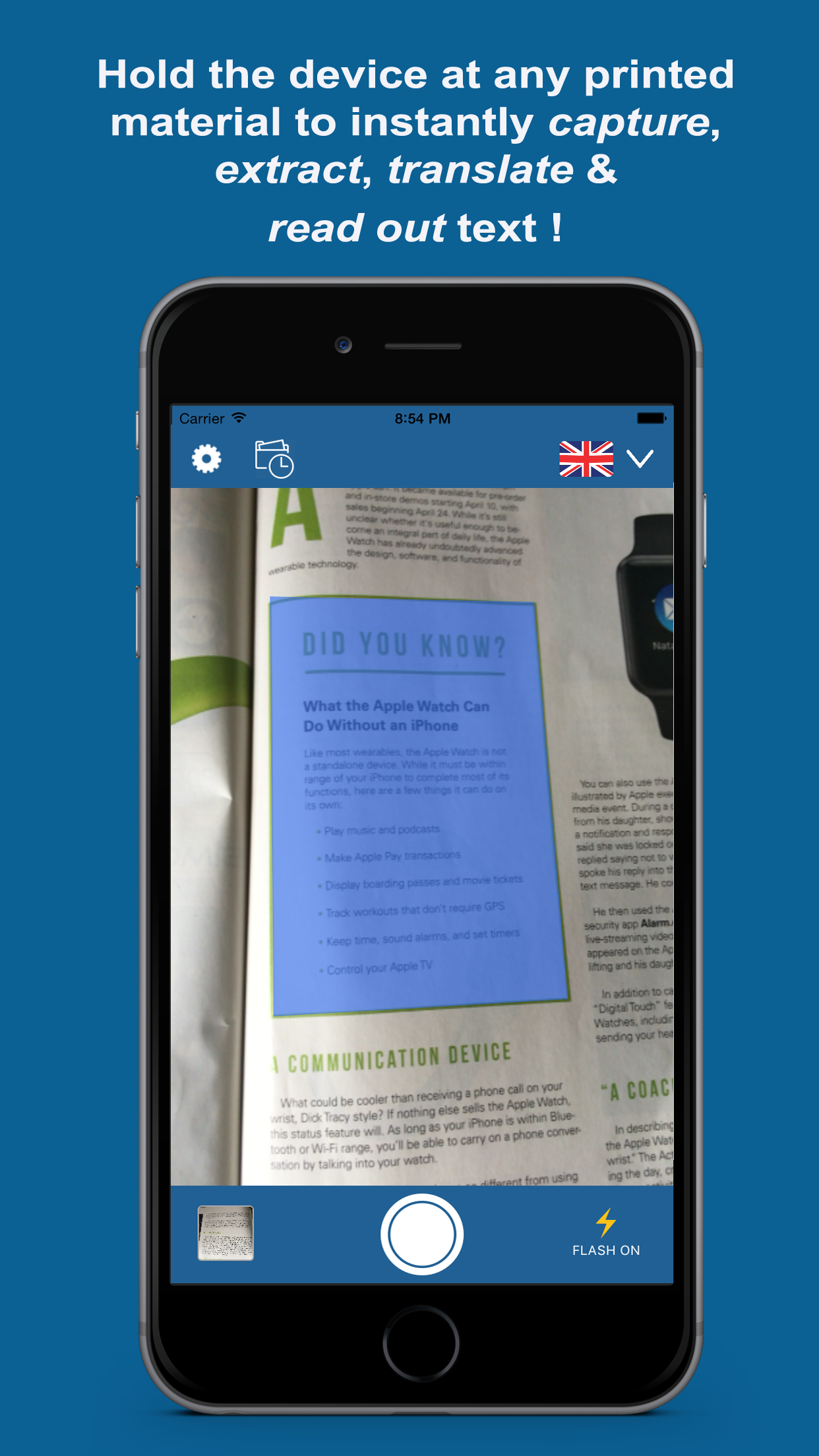
The app's auto capture and auto read features allows users to instantly get any printed text captured, extracted, translated and read out by just holding the app at any printed material. The app is very useful while traveling , as it can instantly translate text written in a foreign language on printed material such as restaurant menus, road side bill boards and even ads.
Text Extractor & Translator is helpful to extract text from magazines, news papers or books. The extracted text can be saved for later use or shared via email, sms or social media. The app also keeps track of history.
The app is also useful for people with low vision , who are unable to read small text. Users can hold the app at any text and the app will instantly capture, extract and read out the text.
Text Extractor & Translator supports over 20 recognition languages and over 90 translation languages.
Device Requirements:
* iPhone, iPad, and iPod touch
* Requires iOS 8.0 or later
* 5.0 MB
Pricing and Availability:
Text Extractor & Translator 1.0 is Free and available worldwide exclusively through the App Store in the Travel category. Text Extractor & Translator Pro 1.0 is also available for for $4.99 (USD).
Text Extractor & Translator 1.0: http://www.neoappz.com/text-extractor.html
Download from iTunes: https://itunes.apple.com/app/text-extractor-translator/id1099289127
Purchase and Download: https://itunes.apple.com/app/text-extractor-translator/id1118766156
Screenshot: http://neoappz.com/external_images/textextractor_screenshot.png
App Icon: http://neoappz.com/external_images/text_extractor_icon.png
Press Kit (zip) : http://www.neoappz.com/text_extractor_and_translator_media_pack.zip
Based in Sri Lanka, Neoappz is a mobile application development company which specializes in developing applications for the iPhone and iPad mobile platforms. Copyright (C) 2016 Shrae Attanayake. All Rights Reserved. Apple, the Apple logo, iPhone, iPod and iPad are registered trademarks of Apple Inc. in the U.S. and/or other countries.
*******
Link To Article: http://prmac.com/release-id-79839.htm
*******
---------------------------------------------------------------------------------
Note that you can alter delivered distributions at any time.
Login to your account on prMac to alter your channel selection, or to opt-out at any time.
Neoappz Introduces Text Extractor & Translator 1.0 for iOS - Published on 07/11/16
Mobile application development company, Neoappz today introduces Text Extractor & Translator 1.0, their new travel app for iOS devices. Text Extractor & Translator is a useful app which instantly extracts, translates and reads text from printed material. It is useful for travellers to understand text written in foreign languages on printed material such as restaurant menus, ads or road side bill boards. It is also useful for extracting ,saving and sharing articles from books or magazines.
Colombo, Sri Lanka - Neoappz, a mobile application development company, today is proud to announce the release and immediate availability of Text Extractor & Translator 1.0, their new travel app for iPhone, iPad and iPod touch devices. Text Extractor & Translator is a user-friendly application which allows users to instantly extract ,translate and read text from any printed material such as magazines,books, ads and road side billboards. It is helpful while traveling and also in day-today activities.
The app's auto capture and auto read features allows users to instantly get any printed text captured, extracted, translated and read out by just holding the app at any printed material. The app is very useful while traveling , as it can instantly translate text written in a foreign language on printed material such as restaurant menus, road side bill boards and even ads.
Text Extractor & Translator is helpful to extract text from magazines, news papers or books. The extracted text can be saved for later use or shared via email, sms or social media. The app also keeps track of history.
The app is also useful for people with low vision , who are unable to read small text. Users can hold the app at any text and the app will instantly capture, extract and read out the text.
Text Extractor & Translator supports over 20 recognition languages and over 90 translation languages.
Device Requirements:
* iPhone, iPad, and iPod touch
* Requires iOS 8.0 or later
* 5.0 MB
Pricing and Availability:
Text Extractor & Translator 1.0 is Free and available worldwide exclusively through the App Store in the Travel category. Text Extractor & Translator Pro 1.0 is also available for for $4.99 (USD).
Text Extractor & Translator 1.0: http://www.neoappz.com/text-extractor.html
Download from iTunes: https://itunes.apple.com/app/text-extractor-translator/id1099289127
Purchase and Download: https://itunes.apple.com/app/text-extractor-translator/id1118766156
Screenshot: http://neoappz.com/external_images/textextractor_screenshot.png
App Icon: http://neoappz.com/external_images/text_extractor_icon.png

Press Kit (zip) : http://www.neoappz.com/text_extractor_and_translator_media_pack.zip
Based in Sri Lanka, Neoappz is a mobile application development company which specializes in developing applications for the iPhone and iPad mobile platforms. Copyright (C) 2016 Shrae Attanayake. All Rights Reserved. Apple, the Apple logo, iPhone, iPod and iPad are registered trademarks of Apple Inc. in the U.S. and/or other countries.
*******
Link To Article: http://prmac.com/release-id-79839.htm
*******
---------------------------------------------------------------------------------
Note that you can alter delivered distributions at any time.
Login to your account on prMac to alter your channel selection, or to opt-out at any time.
Copwise Protects People Against Potentially Illegal Police Questioning
A new article has been published at prMac.
Copwise Protects People Against Potentially Illegal Police Questioning - Published on 07/11/16
Zapporoo and Brian Cumby today introduce Copwise 1.0, their new multi-functional app utility for iOS and Android devices. Copwise is a multi-functional app that includes an audio responsive system, an audio evidence recorder and a document recovery tool for use during any kind of police questioning. The audio response system features 10 pre-programmed responses that will literally speak to police officers on a user's behalf if they're too nervous or anxious to respond.
Miami, Florida - When the framers of the US Constitution crafted the 4th Amendment (prohibiting unreasonable searches/seizures) and 5th Amendment (the right not to answer police questions while in custody/court), they obviously couldn't have imagined that a few centuries later both of these inalienable rights would get trampled on during traffic stops and a variety of other law enforcement encounters.
However, that is precisely what is happening across the nation on a daily basis, and it's also why absolutely everyone - from students to seniors - should download the unique new app "Copwise." Developed by Zapporoo and currently available for iOS and Android devices, Copwise 1.0 is a multi-functional app that includes an audio responsive system, an audio evidence recorder, and a document recovery tool for use during any kind of police questioning.
Audio Response System:
The audio response system features 10 pre-programmed responses that will literally speak to police officers on a user's behalf if they're too nervous or anxious to respond, or if they're fearful that they may incriminate themselves by saying something seemingly innocuous, or agreeing to something that they are not legally obligated to accept (such as a sobriety test, answering further questions without their lawyer present, and so on).
Audio Evidence Recorder:
The audio evidence recorder automatically captures audio of the interaction (i.e. the audio starts when the app launches and stops when it's closed). Users can share the audio with their attorney - which is often far more accurate than relying on memory - and they can also use the recording to hold police officers accountable if their recollection of events "veers away" from what was actually said and by whom. They can also upload the audio to social media to spread awareness.
Document Recovery Tool:
The clever document recovery tool lets users store digital copies of their driver's license, registration, and insurance card in the event that they are requested by the police, but the original documents aren't available. Using this feature is optional, and images can be deleted/replaced in a matter of seconds.
Other special Copwise features include:
* An excellent and easy-to-understand Resources section that offers tips on how to handle traffic stops and other law enforcement encounters.
* A setting that translates all text into Spanish, which is ideal for users who speak English as a second language.
* A clear, uncluttered interface that makes finding information or choosing responses easy and fast - which is important during law enforcement encounters, which are inherently stressful.
"There is nothing at all anti-police about Copwise, and it's not designed just for people whose lifestyle may have them being questioned by the police more often," commented Ron Medlin of Zapporoo. "Everyone needs to know what's at stake, because the playing field is not level. The web is full of articles and blog posts from criminal defense lawyers who all point out that a vast number of cases are not won or lost at trial, but during police questioning. And a YouTube video featuring law school professor and former criminal defense attorney James Duane urging people never to talk to the police has over 6 million views and 65,000 likes. Clearly, this is a big concern, and Copwise is there to help when it's needed most!"
Device Requirements:
* iPhone, iPad, and iPod touch
* Requires iOS 7.1 or later
* 2.3 MB
Pricing and Availability:
Copwise 1.0 is $2.99 USD (or equivalent amount in other currencies) and available worldwide through the App Store in the Utilities category. There is also an Android version available on Google Play.
Zapporoo: http://zapporoo.com
Copwise 1.0: http://www.copwise.com
Purchase and Download (iOS): https://itunes.apple.com/app/copwise/id1107707766
Purchase and Download (Google Play): https://play.google.com/store/apps/details?id=com.zapporoo.copwise&hl=en
Screenshot: http://a5.mzstatic.com/us/r30/Purple18/v4/aa/94/01/aa940188-e061-ac59-360e-92ee73f23a86/screen322x572.jpeg
App Icon: http://press.pack.s3.amazonaws.com/copwise/images/icon.png
Zapporoo is an iOS/Android mobile app developer with two U.S. based locations in Miami, FL and Atlanta, GA. Our unique 3-phase system of app creation has been designed to give our customers the easiest and most convenient manner to create, design and launch their app. All Material and Software (C) Copyright 2016 Zapporoo. All Rights Reserved. Apple, the Apple logo, iPhone, iPod and iPad are registered trademarks of Apple Inc. in the U.S. and/or other countries. Other trademarks and registered trademarks may be the property of their respective owners.
*******
Link To Article: http://prmac.com/release-id-79840.htm
*******
---------------------------------------------------------------------------------
Note that you can alter delivered distributions at any time.
Login to your account on prMac to alter your channel selection, or to opt-out at any time.
Copwise Protects People Against Potentially Illegal Police Questioning - Published on 07/11/16
Zapporoo and Brian Cumby today introduce Copwise 1.0, their new multi-functional app utility for iOS and Android devices. Copwise is a multi-functional app that includes an audio responsive system, an audio evidence recorder and a document recovery tool for use during any kind of police questioning. The audio response system features 10 pre-programmed responses that will literally speak to police officers on a user's behalf if they're too nervous or anxious to respond.
Miami, Florida - When the framers of the US Constitution crafted the 4th Amendment (prohibiting unreasonable searches/seizures) and 5th Amendment (the right not to answer police questions while in custody/court), they obviously couldn't have imagined that a few centuries later both of these inalienable rights would get trampled on during traffic stops and a variety of other law enforcement encounters.
However, that is precisely what is happening across the nation on a daily basis, and it's also why absolutely everyone - from students to seniors - should download the unique new app "Copwise." Developed by Zapporoo and currently available for iOS and Android devices, Copwise 1.0 is a multi-functional app that includes an audio responsive system, an audio evidence recorder, and a document recovery tool for use during any kind of police questioning.
Audio Response System:
The audio response system features 10 pre-programmed responses that will literally speak to police officers on a user's behalf if they're too nervous or anxious to respond, or if they're fearful that they may incriminate themselves by saying something seemingly innocuous, or agreeing to something that they are not legally obligated to accept (such as a sobriety test, answering further questions without their lawyer present, and so on).
Audio Evidence Recorder:
The audio evidence recorder automatically captures audio of the interaction (i.e. the audio starts when the app launches and stops when it's closed). Users can share the audio with their attorney - which is often far more accurate than relying on memory - and they can also use the recording to hold police officers accountable if their recollection of events "veers away" from what was actually said and by whom. They can also upload the audio to social media to spread awareness.
Document Recovery Tool:
The clever document recovery tool lets users store digital copies of their driver's license, registration, and insurance card in the event that they are requested by the police, but the original documents aren't available. Using this feature is optional, and images can be deleted/replaced in a matter of seconds.
Other special Copwise features include:
* An excellent and easy-to-understand Resources section that offers tips on how to handle traffic stops and other law enforcement encounters.
* A setting that translates all text into Spanish, which is ideal for users who speak English as a second language.
* A clear, uncluttered interface that makes finding information or choosing responses easy and fast - which is important during law enforcement encounters, which are inherently stressful.
"There is nothing at all anti-police about Copwise, and it's not designed just for people whose lifestyle may have them being questioned by the police more often," commented Ron Medlin of Zapporoo. "Everyone needs to know what's at stake, because the playing field is not level. The web is full of articles and blog posts from criminal defense lawyers who all point out that a vast number of cases are not won or lost at trial, but during police questioning. And a YouTube video featuring law school professor and former criminal defense attorney James Duane urging people never to talk to the police has over 6 million views and 65,000 likes. Clearly, this is a big concern, and Copwise is there to help when it's needed most!"
Device Requirements:
* iPhone, iPad, and iPod touch
* Requires iOS 7.1 or later
* 2.3 MB
Pricing and Availability:
Copwise 1.0 is $2.99 USD (or equivalent amount in other currencies) and available worldwide through the App Store in the Utilities category. There is also an Android version available on Google Play.
Zapporoo: http://zapporoo.com
Copwise 1.0: http://www.copwise.com
Purchase and Download (iOS): https://itunes.apple.com/app/copwise/id1107707766
Purchase and Download (Google Play): https://play.google.com/store/apps/details?id=com.zapporoo.copwise&hl=en
Screenshot: http://a5.mzstatic.com/us/r30/Purple18/v4/aa/94/01/aa940188-e061-ac59-360e-92ee73f23a86/screen322x572.jpeg

App Icon: http://press.pack.s3.amazonaws.com/copwise/images/icon.png

Zapporoo is an iOS/Android mobile app developer with two U.S. based locations in Miami, FL and Atlanta, GA. Our unique 3-phase system of app creation has been designed to give our customers the easiest and most convenient manner to create, design and launch their app. All Material and Software (C) Copyright 2016 Zapporoo. All Rights Reserved. Apple, the Apple logo, iPhone, iPod and iPad are registered trademarks of Apple Inc. in the U.S. and/or other countries. Other trademarks and registered trademarks may be the property of their respective owners.
*******
Link To Article: http://prmac.com/release-id-79840.htm
*******
---------------------------------------------------------------------------------
Note that you can alter delivered distributions at any time.
Login to your account on prMac to alter your channel selection, or to opt-out at any time.
Night Lamp Splashes Delightful Images Across Kids' Rooms
A new article has been published at prMac.
Night Lamp Splashes Delightful Images Across Kids' Rooms - Published on 07/11/16
Miami based Zapporoo and Cilesia Lopes introduce Night Lamp App 1.0, a simple and easy-to-use iOS app that displays a kid-friendly image in one of two ways: splashed across a bedroom's walls, floor and ceiling by using an iPhone projector; or featured in high resolution on the iPhone's screen. The app can be pre-loaded with several images, which lets parents and children together choose the one that is most suitable in a matter of seconds.
Miami, Florida - Parents in search of the ideal way to send their kids off to dreamland, and actually make them look forward to going to bed rather than rile against it night after night, can now head to the App Store, and download the wonderful new Night Lamp App. Created by Zapporoo and available at no cost, Night Lamp App is a simple and easy-to-use app that displays a kid-friendly image, such as a beloved animated character, favorite place, cherished photo, landscape scene and so on, in one of two ways:
* Splashed across a bedroom's walls, floor and ceiling by using an iPhone projector.
* Featured in high resolution on the iPhone's screen.
The app can be pre-loaded with several images, which lets parents (or parents and children together) choose the one that is most suitable in a matter of seconds.
What's more, unlike conventional night lights that stay lit throughout the night - and can therefore disrupt sleep duration and quality - Night Lamp App 1.0 has a built-in timer that lets parents choose when the app should auto-lock or shut down. Settings include: 20 minutes, 30 minutes, 45 minutes, 60 minutes, 90 minutes, 120 minutes, 150 minutes and 200 minutes. While all parents will appreciate this handy shut-down feature, it will be especially valued by parents of kids who are afraid of the dark.
"We tend to forget as adults that bedtime is a different experience for kids - some are too excited to sleep, others are restless, and many are anxious or just not in the mood to shut down for the day," commented Ron Medlin of Zapporoo. "However, kids need enough quality sleep every night, or else their health and development is at risk. Night Lamp App is a simple, delightful and enjoyable way for parents to send their kids off to sleep. It's perfect for infants, toddlers, school-aged kids, and even tweens, teens and adults who want to turn their room into an imaginative wonderland!"
Device Requirements:
* iPhone, iPad, and iPod touch
* Requires iOS 8.0 or later
* 7.7 MB
Pricing and Availability:
Night Lamp App 1.0 is Free and available worldwide exclusively through the App Store in the Utilities category.
Zapporoo: http://www.zapporoo.com
Night Lamp App 1.0: https://itunes.apple.com/app/night-lamp-app/id1097709103
Screenshot: http://a4.mzstatic.com/us/r30/Purple49/v4/6e/f1/ba/6ef1baca-f4bb-f96b-33eb-349894d559ca/screen322x572.jpeg
App Icon: http://press.pack.s3.amazonaws.com/nightlamp/images/icon.png
Zapporoo is an iOS/Android mobile app developer with two U.S. based locations in Miami, FL and Atlanta, GA. Their unique 3-phase system of app creation has been designed to give their customers the easiest and most convenient manner to create, design and launch their app. All Material and Software (C) Copyright 2016 Zapporoo. All Rights Reserved. Apple, the Apple logo, iPhone, iPod and iPad are registered trademarks of Apple Inc. in the U.S. and/or other countries. Other trademarks and registered trademarks may be the property of their respective owners.
*******
Link To Article: http://prmac.com/release-id-79838.htm
*******
---------------------------------------------------------------------------------
Note that you can alter delivered distributions at any time.
Login to your account on prMac to alter your channel selection, or to opt-out at any time.
Night Lamp Splashes Delightful Images Across Kids' Rooms - Published on 07/11/16
Miami based Zapporoo and Cilesia Lopes introduce Night Lamp App 1.0, a simple and easy-to-use iOS app that displays a kid-friendly image in one of two ways: splashed across a bedroom's walls, floor and ceiling by using an iPhone projector; or featured in high resolution on the iPhone's screen. The app can be pre-loaded with several images, which lets parents and children together choose the one that is most suitable in a matter of seconds.
Miami, Florida - Parents in search of the ideal way to send their kids off to dreamland, and actually make them look forward to going to bed rather than rile against it night after night, can now head to the App Store, and download the wonderful new Night Lamp App. Created by Zapporoo and available at no cost, Night Lamp App is a simple and easy-to-use app that displays a kid-friendly image, such as a beloved animated character, favorite place, cherished photo, landscape scene and so on, in one of two ways:
* Splashed across a bedroom's walls, floor and ceiling by using an iPhone projector.
* Featured in high resolution on the iPhone's screen.
The app can be pre-loaded with several images, which lets parents (or parents and children together) choose the one that is most suitable in a matter of seconds.
What's more, unlike conventional night lights that stay lit throughout the night - and can therefore disrupt sleep duration and quality - Night Lamp App 1.0 has a built-in timer that lets parents choose when the app should auto-lock or shut down. Settings include: 20 minutes, 30 minutes, 45 minutes, 60 minutes, 90 minutes, 120 minutes, 150 minutes and 200 minutes. While all parents will appreciate this handy shut-down feature, it will be especially valued by parents of kids who are afraid of the dark.
"We tend to forget as adults that bedtime is a different experience for kids - some are too excited to sleep, others are restless, and many are anxious or just not in the mood to shut down for the day," commented Ron Medlin of Zapporoo. "However, kids need enough quality sleep every night, or else their health and development is at risk. Night Lamp App is a simple, delightful and enjoyable way for parents to send their kids off to sleep. It's perfect for infants, toddlers, school-aged kids, and even tweens, teens and adults who want to turn their room into an imaginative wonderland!"
Device Requirements:
* iPhone, iPad, and iPod touch
* Requires iOS 8.0 or later
* 7.7 MB
Pricing and Availability:
Night Lamp App 1.0 is Free and available worldwide exclusively through the App Store in the Utilities category.
Zapporoo: http://www.zapporoo.com
Night Lamp App 1.0: https://itunes.apple.com/app/night-lamp-app/id1097709103
Screenshot: http://a4.mzstatic.com/us/r30/Purple49/v4/6e/f1/ba/6ef1baca-f4bb-f96b-33eb-349894d559ca/screen322x572.jpeg

App Icon: http://press.pack.s3.amazonaws.com/nightlamp/images/icon.png

Zapporoo is an iOS/Android mobile app developer with two U.S. based locations in Miami, FL and Atlanta, GA. Their unique 3-phase system of app creation has been designed to give their customers the easiest and most convenient manner to create, design and launch their app. All Material and Software (C) Copyright 2016 Zapporoo. All Rights Reserved. Apple, the Apple logo, iPhone, iPod and iPad are registered trademarks of Apple Inc. in the U.S. and/or other countries. Other trademarks and registered trademarks may be the property of their respective owners.
*******
Link To Article: http://prmac.com/release-id-79838.htm
*******
---------------------------------------------------------------------------------
Note that you can alter delivered distributions at any time.
Login to your account on prMac to alter your channel selection, or to opt-out at any time.
Subscribe to:
Posts (Atom)