A new article has been published at prMac.
Photo Sense 2 brings batch photo enhancement to iOS - Published on 07/12/16
VeprIT today announces Photo Sense 2.0 for iOS, bringing new unique for iOS batch processing capabilities to the quick and easy photo enhancement tool. The automatic-first approach enables users to choose their preferred workflow complexity, from completely automatic to manual. Batch processing, image settings synchronization, custom presets, and other new efficient customization tools save a lot of time. Photo Sense can also give photos an artistic finishing touch with creative effects.
Zoetermeer, Netherlands - VeprIT today launches Photo Sense 2.0 for iOS, a major upgrade of its flagship product. Photo Sense is a quick and easy batch photo enhancement tool for Mac and iOS devices. Photo Sense 2 is the first version bringing the batch processing and advanced manual adjustment capabilities to iOS. To the best of our knowledge, its new batch adjustment and image settings synchronization features are unique for iOS software, and make photo enhancement on iOS much more efficient.
Photo Sense advocates the automatic-first workflow: instead of adjusting every image manually, it enhances all photos automatically, and offers effective tools to customize the results as much as the user wishes. Batch processing, image settings synchronization, custom presets, and other new tools save the user time on customization. The user can choose the preferred workflow complexity, from completely automatic (just select and save good auto results) to semi-automatic to manual fine-tuning. In addition, Photo Sense can give photos an artistic finishing touch with various creative effects.
"I am very impressed how powerful and efficient Photo Sense for iOS just became. Honestly, not so long ago I didn't expect the iOS version to ever approach the power of the Mac version, and now it is quite close!" - says Dr. Demid Borodin, VeprIT owner.
Photo Sense 2 Feature Highlights:
* Efficient automatic-first photo enhancement workflow - The user only needs to adjust the auto enhancement imperfections, if any, rather than doing everything manually
* Quick and easy basic adjustments in batch mode
* More advanced manual adjustments on image by image basis
* Creative effects applied with a single click in batch mode
* Image settings synchronization, including automatic and advanced adjustments, crop & straighten configuration, and creative effects
* Custom user presets including any desired image adjustments and effects
* Set of predefined presets offering various photo styles and creative effects
* Batch rotation and flipping
* Non-destructive operation
* Simple and efficient user interface
Testimonials:
"Photo Sense is a nifty, automated photo editing app for OS X that can bring forgotten photos back to life. It's great for those that don't want a high-end app's expense or steep learning curve." - Mel Martin, The Unofficial Apple Weblog (TUAW).
"Photo Sense is so easy to use that anyone can get the gist and make vast improvements to their pictures in just a couple of minutes." - Jimmy Hayes, issue #95 of the iCreate magazine.
"While Photo Sense isn't cheap, it is competitive with other image editors that are more complicated and don't always give such good results." - Mel Martin, The Unofficial Apple Weblog (TUAW).
"A great app for batch processing, simplistically built and very easy to use." - Jimmy Hayes, issue #95 of the iCreate magazine.
"Contrary to what one might imagine, there are not so many applications dedicated to automatic image correction, and Photo Sense is almost an exception - a quality one." - Mathieu Lavant, issue #68 of the Vous et Votre Mac magazine (translated from French).
"Photo Sense is one of the most simplistic apps you're ever likely to encounter on the Mac."
- Jimmy Hayes, issue #95 of the iCreate magazine.
"Photo Sense is an excellent program that I recommend to all those who feel no particular interest in photo correction, but want to significantly improve the quality of their images without spending hours." - Mathieu Lavant, issue #68 of the Vous et Votre Mac magazine (translated from French).
"Overwhelmed With Complicated Photo Software? Try Photo Sense!" - Sue Megrund, AppAdvice.
"Intuitive user interface, beautiful design and interesting photo enhancement algorithm combined with the batch processing function make Photo Sense a useful application for any Mac user who would like to perform a quality photo correction without much effort." - ANJUL, appstudio.org (translated from Russian).
"If you are not interested in learning how to make changes and adjustments to your photos on your own, Photo Sense lives up to its name and makes a great solution." - Sue Megrund, AppAdvice.
"We are quite successful in using your software for product photography. The workflow is remarkably intuitive and produces good results even with operators who don't have a photography background." - Dr. Roderich Bott, Dr. Bott KG.
"Very cool app. Makes your photos look like you knew how to use a camera." - mac-ho, Photo Sense user (from a Mac App Store review).
Device Requirements:
* iPhone, iPad, and iPod touch
* Requires iOS 8.1 or later
* 4.2 MB
Pricing and Availability:
Photo Sense 2.0 is Free (with in-app purchases) and available worldwide exclusively through the App Store in the Photo & Video category. Batch and manual adjustments can be enabled with in-app purchases.
VeprIT: http://veprit.com
Photo Sense 2.0: http://veprit.com/photosense
Download from iTunes: https://itunes.apple.com/app/photo-sense/id441208445
Affiliate Information: http://veprit.com/affiliate
Screenshot: http://a3.mzstatic.com/us/r30/Purple30/v4/28/8c/0a/288c0aff-5192-5309-0ba3-7d39a0ce65a0/screen480x480.jpeg
Press Kit (zip): http://veprit.com/photosense/presskit-photosense.zip
Based in Zoetermeer, Netherlands, VeprIT was founded in 2011 by Dr. Demid Borodin and Dr. Olga Kleptsova. VeprIT develops image processing software for Mac and iOS devices. VeprIT aims at achieving the greatest possible flexibility, while hiding all the complexity behind a very simple and intuitive user interface. VeprIT also offers custom software development and consulting services focusing on Mac OS, iOS, and embedded systems. All Material and Software Copyright (C) 2016 VeprIT. All Rights Reserved. Apple, the Apple logo, iPhone, iPod, iPad and Macintosh are registered trademarks of Apple Inc. in the U.S. and/or other countries. Other trademarks and registered trademarks may be the property of their respective owners.
*******
Link To Article: http://prmac.com/release-id-79851.htm
*******
---------------------------------------------------------------------------------
Note that you can alter delivered distributions at any time.
Login to your account on prMac to alter your channel selection, or to opt-out at any time.


iFiles 2 File Manager for iOS released
A new article has been published at prMac.
iFiles 2 File Manager for iOS released - Published on 07/12/16
Imagam, Inc. today announces iFiles 2.0.0, an important update to its popular productivity app for iOS. iFiles enables iPhone & iPad users to do all the file management functions that they've been used to on a desktop computer. Download, upload and transfer files directly between services without required to first download then upload files. Version 2.0 has many new features like: SMB/CIFS support, synchronization support, tabs, redesigned interface, extension support, iPad split view support.
Chicago, Illinois - Imagam, Inc. Today is proud to announce the release of iFiles 2, a new version of popular iFiles app for iOS devices. iFiles 2 has many new features, including SMB/CIFS client and server support, synchronization support, tabs (Multiple services can be opened; like Dropbox, Web Browser), new redesigned Interface, Document Provider Extension support, support for iPad split view as well as a redesigned interface.
iFiles 2 now support accessing files on the device using SMB/CIFS protocol (Access using Web Browser or WebDav is no longer needed or supported). When iFiles is running you can use Finder on Mac or Explorer on Windows to manager your local device files.
Supported Online Cloud Services and Protocols:
Dropbox, Google Drive, iCloud, Box.net, OneDrive, SMB/CIFS, SugarSync, AFP (Mac Shares), FTP/FTPS, SFTP, Flickr, Picasa, Facebook, Rackspace CloudFiles, CloudApp, PogoPlug, WebDav, Amazon S3, ownCloud, 4Shared, also using Amazon S3: DreamObjects and UltiCloud.
Key Features:
* TABS - Multiple tabs can be opened at the same time
* WEB DOWNLOADER - Download files from the web using the build in Web Browser or Safari using iFiles Bookmarks. (HTML5 Videos are now supported)
* EMAIL - Send documents as email attachments directly from iFiles using iPhones email accounts or links to files stored in the cloud. (given service supports this feature)
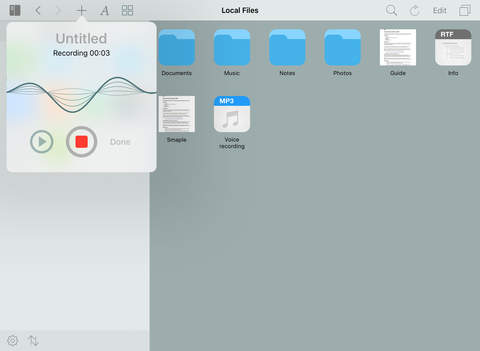
* VOICE RECORDER - Use iFiles build-in voice recorder to create voice notes
* POPUP MENU - Tap and hold on file to display context popup menu with file operations
* PROPERTIES -View and change folder and files properties: color label, icon, and rename. For services with supported API you can edit: comments, description, tags/keywords, privacy, copy/generate links
* SHARE FILES - Share files with other iOS users of iFiles over Wi-Fi or Bluetooth
* PDF VIEWER - Viewer now supports annotations, full-text search, bookmarks, highlighting, saving directly to a cloud service and more
* SECURE - If cloud services uses username and password they are stored using iOS Keychain, Remote access to your device can be secured with password, and device can be locked using passcode. (Your information is never send to any outside service)
* FILE OPERATIONS - Move, Copy, Rename, Delete, and create New Folders (Operations are supported for all cloud services given that service API supports it)
* ZIP/EXTRACT - Create archive files and unarchive many common archive formats: Zip, RAR, 7-zip, Tar, Gzip, and Bzip2
* TRANSFER MANAGER - Download, upload and transfer files directly between services without required to first download then upload files - Transfers support background mode and will resume if application is closed
* EASY UPLOAD - If your creating voice recording, importing photos or creating a text file, iFiles will automatically upload to the current location no matter if its local or remote
* CLIPBOARD PASTE - Paste text and photos/images directly to current folder
* OPEN IN - Open files in apps that support those file types
* PRINT - Print files using AirPrint
* TEXT FILES - Create and edit plain text files. (Locally or directly in the cloud)
* PHOTO IMPORT - Take Photos, record movies or import from your Photo Library - (Multiple selection support is coming in next update)
* MEDIA PLAYER - Playback audio and video files
* THUMBNAILS - Thumbnails are generated for local files: photos, videos and pdf files, thumbnails are displayed for cloud service if its supported
File Formats:
* iWorks (Pages, Numbers, Keynote) '08 and '09 (with or without Preview)
* Microsoft Office (Word, Excel, PowerPoint)
* HTML web pages and Web archives (web pages downloaded by Safari)
* PDF Documents
* RTF (Rich Text Format) and RTFD
* Plain text with auto-detection of character encoding. Text files can also be edited
* Movies (supported file formats by iPhone: MP4, MOV, MPV, 3GP, M4V)
* Audio (WAV, MP3, M4A, CAF, AIF, AIFF, ACC)
* Images (JPG, PNG, GIF, BMP, TIF, TIFF, ICO, CUR, XBM)
Device Requirements:
* iPhone, iPad, and iPod touch
* Requires iOS 9.0 or later
* 48.8 MB
Pricing and Availability:
iFiles 2.0.0 is $4.99 USD (or equivalent amount in other currencies) and available worldwide exclusively through the App Store in the Productivity category.
iFiles 2.0.0: http://www.ifilesapp.com
Purchase and Download: https://itunes.apple.com/app/ifiles-2/id1104795347
Screenshot 1: http://a1.mzstatic.com/us/r30/Purple30/v4/9f/6f/c4/9f6fc4b3-fe53-a1f8-5759-96ef80653dd9/screen480x480.jpeg
Screenshot 2: http://a2.mzstatic.com/us/r30/Purple18/v4/3c/3b/39/3c3b393f-45ae-d77a-aa15-1935993fd565/screen480x480.jpeg
App Icon: http://a4.mzstatic.com/us/r30/Purple18/v4/39/d4/fb/39d4fb9a-02fe-8189-5d40-d0f41514b63f/icon175x175.png
Located in located in Chicago., Illinois, Imagam is a small software development studio established by founder and CEO Tom Biel in 2009. Imagam specializes in creating fun, useful, and beautiful apps for the iPhone, including the incredible iFiles app. Please visit the Imagam website for more information. Copyright (C) 2009-2016 Imagam, Inc. All Rights Reserved. Apple, the Apple logo, iPhone, iPod and iPad are registered trademarks of Apple Inc. in the U.S. and/or other countries.
*******
Link To Article: http://prmac.com/release-id-79850.htm
*******
---------------------------------------------------------------------------------
Note that you can alter delivered distributions at any time.
Login to your account on prMac to alter your channel selection, or to opt-out at any time.
iFiles 2 File Manager for iOS released - Published on 07/12/16
Imagam, Inc. today announces iFiles 2.0.0, an important update to its popular productivity app for iOS. iFiles enables iPhone & iPad users to do all the file management functions that they've been used to on a desktop computer. Download, upload and transfer files directly between services without required to first download then upload files. Version 2.0 has many new features like: SMB/CIFS support, synchronization support, tabs, redesigned interface, extension support, iPad split view support.
Chicago, Illinois - Imagam, Inc. Today is proud to announce the release of iFiles 2, a new version of popular iFiles app for iOS devices. iFiles 2 has many new features, including SMB/CIFS client and server support, synchronization support, tabs (Multiple services can be opened; like Dropbox, Web Browser), new redesigned Interface, Document Provider Extension support, support for iPad split view as well as a redesigned interface.
iFiles 2 now support accessing files on the device using SMB/CIFS protocol (Access using Web Browser or WebDav is no longer needed or supported). When iFiles is running you can use Finder on Mac or Explorer on Windows to manager your local device files.
Supported Online Cloud Services and Protocols:
Dropbox, Google Drive, iCloud, Box.net, OneDrive, SMB/CIFS, SugarSync, AFP (Mac Shares), FTP/FTPS, SFTP, Flickr, Picasa, Facebook, Rackspace CloudFiles, CloudApp, PogoPlug, WebDav, Amazon S3, ownCloud, 4Shared, also using Amazon S3: DreamObjects and UltiCloud.
Key Features:
* TABS - Multiple tabs can be opened at the same time
* WEB DOWNLOADER - Download files from the web using the build in Web Browser or Safari using iFiles Bookmarks. (HTML5 Videos are now supported)
* EMAIL - Send documents as email attachments directly from iFiles using iPhones email accounts or links to files stored in the cloud. (given service supports this feature)
* VOICE RECORDER - Use iFiles build-in voice recorder to create voice notes
* POPUP MENU - Tap and hold on file to display context popup menu with file operations
* PROPERTIES -View and change folder and files properties: color label, icon, and rename. For services with supported API you can edit: comments, description, tags/keywords, privacy, copy/generate links
* SHARE FILES - Share files with other iOS users of iFiles over Wi-Fi or Bluetooth
* PDF VIEWER - Viewer now supports annotations, full-text search, bookmarks, highlighting, saving directly to a cloud service and more
* SECURE - If cloud services uses username and password they are stored using iOS Keychain, Remote access to your device can be secured with password, and device can be locked using passcode. (Your information is never send to any outside service)
* FILE OPERATIONS - Move, Copy, Rename, Delete, and create New Folders (Operations are supported for all cloud services given that service API supports it)
* ZIP/EXTRACT - Create archive files and unarchive many common archive formats: Zip, RAR, 7-zip, Tar, Gzip, and Bzip2
* TRANSFER MANAGER - Download, upload and transfer files directly between services without required to first download then upload files - Transfers support background mode and will resume if application is closed
* EASY UPLOAD - If your creating voice recording, importing photos or creating a text file, iFiles will automatically upload to the current location no matter if its local or remote
* CLIPBOARD PASTE - Paste text and photos/images directly to current folder
* OPEN IN - Open files in apps that support those file types
* PRINT - Print files using AirPrint
* TEXT FILES - Create and edit plain text files. (Locally or directly in the cloud)
* PHOTO IMPORT - Take Photos, record movies or import from your Photo Library - (Multiple selection support is coming in next update)
* MEDIA PLAYER - Playback audio and video files
* THUMBNAILS - Thumbnails are generated for local files: photos, videos and pdf files, thumbnails are displayed for cloud service if its supported
File Formats:
* iWorks (Pages, Numbers, Keynote) '08 and '09 (with or without Preview)
* Microsoft Office (Word, Excel, PowerPoint)
* HTML web pages and Web archives (web pages downloaded by Safari)
* PDF Documents
* RTF (Rich Text Format) and RTFD
* Plain text with auto-detection of character encoding. Text files can also be edited
* Movies (supported file formats by iPhone: MP4, MOV, MPV, 3GP, M4V)
* Audio (WAV, MP3, M4A, CAF, AIF, AIFF, ACC)
* Images (JPG, PNG, GIF, BMP, TIF, TIFF, ICO, CUR, XBM)
Device Requirements:
* iPhone, iPad, and iPod touch
* Requires iOS 9.0 or later
* 48.8 MB
Pricing and Availability:
iFiles 2.0.0 is $4.99 USD (or equivalent amount in other currencies) and available worldwide exclusively through the App Store in the Productivity category.
iFiles 2.0.0: http://www.ifilesapp.com
Purchase and Download: https://itunes.apple.com/app/ifiles-2/id1104795347
Screenshot 1: http://a1.mzstatic.com/us/r30/Purple30/v4/9f/6f/c4/9f6fc4b3-fe53-a1f8-5759-96ef80653dd9/screen480x480.jpeg

Screenshot 2: http://a2.mzstatic.com/us/r30/Purple18/v4/3c/3b/39/3c3b393f-45ae-d77a-aa15-1935993fd565/screen480x480.jpeg
App Icon: http://a4.mzstatic.com/us/r30/Purple18/v4/39/d4/fb/39d4fb9a-02fe-8189-5d40-d0f41514b63f/icon175x175.png

Located in located in Chicago., Illinois, Imagam is a small software development studio established by founder and CEO Tom Biel in 2009. Imagam specializes in creating fun, useful, and beautiful apps for the iPhone, including the incredible iFiles app. Please visit the Imagam website for more information. Copyright (C) 2009-2016 Imagam, Inc. All Rights Reserved. Apple, the Apple logo, iPhone, iPod and iPad are registered trademarks of Apple Inc. in the U.S. and/or other countries.
*******
Link To Article: http://prmac.com/release-id-79850.htm
*******
---------------------------------------------------------------------------------
Note that you can alter delivered distributions at any time.
Login to your account on prMac to alter your channel selection, or to opt-out at any time.
Shippa Releases its Smartphone App for Android and iPhones
A new article has been published at prMac.
Shippa Releases its Smartphone App for Android and iPhones - Published on 07/11/16
Shippa, LLC announces Shippa 1.0.3 for iOS and Android devices. Shippa is a global logistics platform that connects trusted travelers to consumers of international products. Shippa allows travelers to earn as they travel by fulfilling the needs of overseas customers. More than a shopping tool, Shippa represents a social platform for travelers and consumers to discover new products, share shopping insights and build local friendships.
New York, New York - The Shippa app has just launched in the App Store and on Google Play. Shippa is a global logistics platform that connects travelers to consumers around the world. Personal shopping abroad has never been simpler. With payment protection, shoppers can now get hold of exclusive or discounted overseas products safely and reliably.
For travelers, Shippa allows one to earn as you travel by fulfilling the needs of overseas customers. More than a shopping tool, Shippa is also a social platform for travelers and consumers to discover new products, share local insights and build friendships.
The Shippa app allows you to:
* Find a personal shopper for international goods by connecting with trusted travelers.
* Earn money as you travel, by becoming part of the Shippa Crew.
* Submit orders for overseas items by selecting a shipper who is in the geographic area of interest.
* Negotiate the order price, inclusive of the shipping fee, through a conversation in the chat room.
* Discuss a drop-off location in the chat room.
* Make secure, encrypted payment transactions, which are finalized within 7 days of successful delivery through PayPal.
* Upload photos onto the profile page to showcase the types of products you specialise in buying.
Through Shippa, global consumers and travelers can access international markets at greater speed, efficiency and depth. Access the World with Shippa.
Device Requirements:
* iPhone, iPad, and iPod touch
* Requires iOS 8.0 or later
* 22.4 MB
Pricing and Availability:
Shippa 1.0.3 is free, and is available worldwide through the App Store in the Shopping category. An Android version is also available through Google Play.
Shippa 1.0.3: http://www.shippa.co
Download from iTunes: https://itunes.apple.com/app/shippa/id1097771502
Download from Google Play: https://play.google.com/store/apps/details?id=com.shippa
The Shippa app, available for download on Android and iOS devices, is developed by Shippa, LLC. All Material and Software (C) 2016 Shippa, LLC. All Rights Reserved. Apple, the Apple logo, iPhone, iPod and iPad are registered trademarks of Apple Inc. in the U.S. and/or other countries. Other trademarks and registered trademarks may be the property of their respective owners.
*******
Link To Article: http://prmac.com/release-id-79848.htm
*******
---------------------------------------------------------------------------------
Note that you can alter delivered distributions at any time.
Login to your account on prMac to alter your channel selection, or to opt-out at any time.
Shippa Releases its Smartphone App for Android and iPhones - Published on 07/11/16
Shippa, LLC announces Shippa 1.0.3 for iOS and Android devices. Shippa is a global logistics platform that connects trusted travelers to consumers of international products. Shippa allows travelers to earn as they travel by fulfilling the needs of overseas customers. More than a shopping tool, Shippa represents a social platform for travelers and consumers to discover new products, share shopping insights and build local friendships.
New York, New York - The Shippa app has just launched in the App Store and on Google Play. Shippa is a global logistics platform that connects travelers to consumers around the world. Personal shopping abroad has never been simpler. With payment protection, shoppers can now get hold of exclusive or discounted overseas products safely and reliably.
For travelers, Shippa allows one to earn as you travel by fulfilling the needs of overseas customers. More than a shopping tool, Shippa is also a social platform for travelers and consumers to discover new products, share local insights and build friendships.
The Shippa app allows you to:
* Find a personal shopper for international goods by connecting with trusted travelers.
* Earn money as you travel, by becoming part of the Shippa Crew.
* Submit orders for overseas items by selecting a shipper who is in the geographic area of interest.
* Negotiate the order price, inclusive of the shipping fee, through a conversation in the chat room.
* Discuss a drop-off location in the chat room.
* Make secure, encrypted payment transactions, which are finalized within 7 days of successful delivery through PayPal.
* Upload photos onto the profile page to showcase the types of products you specialise in buying.
Through Shippa, global consumers and travelers can access international markets at greater speed, efficiency and depth. Access the World with Shippa.
Device Requirements:
* iPhone, iPad, and iPod touch
* Requires iOS 8.0 or later
* 22.4 MB
Pricing and Availability:
Shippa 1.0.3 is free, and is available worldwide through the App Store in the Shopping category. An Android version is also available through Google Play.
Shippa 1.0.3: http://www.shippa.co
Download from iTunes: https://itunes.apple.com/app/shippa/id1097771502
Download from Google Play: https://play.google.com/store/apps/details?id=com.shippa
The Shippa app, available for download on Android and iOS devices, is developed by Shippa, LLC. All Material and Software (C) 2016 Shippa, LLC. All Rights Reserved. Apple, the Apple logo, iPhone, iPod and iPad are registered trademarks of Apple Inc. in the U.S. and/or other countries. Other trademarks and registered trademarks may be the property of their respective owners.
*******
Link To Article: http://prmac.com/release-id-79848.htm
*******
---------------------------------------------------------------------------------
Note that you can alter delivered distributions at any time.
Login to your account on prMac to alter your channel selection, or to opt-out at any time.
LastThink Releases Online Mauritius TV 4.5 for iOS - Release Info
A new article has been published at prMac.
LastThink Releases Online Mauritius TV 4.5 for iOS - Release Info - Published on 07/11/16
LastThink announces Online Mauritius TV 4.5, their highly customizable TV application for iOS devices. Anyone can directly access their favorite TV channel and watch diverse films, news, programs from their iPad, iPhone and iPod touch anywhere and anytime. Vibes are smart TV and movie playlists. Users can easily record their favorite films, news, talk shows, programs and more. Users can also share what they are watching via Facebook.
Yerevan, Armenia - LastThink is proud to announce the release of Online Mauritius TV 4.5, the update to their highly customizable TV application developed for iPhone, iPad, and iPod touch devices. Users can directly access their favorite TV channel and watch diverse films, news, programs from their iPad, iPhone and iPod touch anywhere and anytime.
Features:
* Navigating album photos by sliding your finger right or left on the screen
* Change the device you are streaming the picture to, by taping on the Play button in the upper right corner of your iPad's screen and selecting a desired device
* Screening and shooting any moment of your preferred TV program or film you like
* Altering the boring parts and moving straight to the best part at once - Filter by HD-only and favorite channels
* Rotating channels easily by a mere touch on your screen
* Organize your favorite TV shows, sport teams, movies, and actors and find where you can watch them - on TV and on demand
* Recording your favorite films, news, Talk Shows, programs and etc.
* Sharing what you're watching via Facebook, Twitter, YouTube, Dropbox, email and more - Vibes are smart TV and movie playlists
* The highest quality even with the lowest Internet and HD quality with the normal Internet - You can watch TV channels in HD level
* Editing and cropping videos into smaller parts. In addition to, you can take videos of your favorite program
* Capturing the funniest and most interesting moments of what you are watching with the trim tool
* Searching the content across streaming and broadcast services
* Discovering more than 100 channels of great entertainment beyond the Mauritius Online TV app right on your device's touchscreen interface
We have selected data from the internet and if any assembly or constitution doesn't want us to show the content of the unit, please recommend us to remove it. We follow TV regulations and adjustments and we select original TV content data without artificial editions. If you however experience any issues, please do not hesitate to contact us if you'd like to share your experience with live TV channels, or provide suggestions on how we could improve the product further. We will be more than happy to get in touch.
Device Requirements:
* iPhone, iPad, and iPod touch
* Optimized for iPhone 5, iPhone 6, and iPhone 6 Plus
* Requires iOS 6.0 or later
* Universal Application
* 35.7 MB
Pricing and Availability:
Online Mauritius TV 4.5 is free and is available worldwide exclusively through the App Store in the Entertainment category.
LastThink: http://lastthink.com/
Online Mauritius Tv 4.5: https://www.facebook.com/Online-Mauritius-TV-Community-216296838710063
Direct Download Link: https://itunes.apple.com/app/online-mauritius-tv/id1074214695
Screenshot: http://a4.mzstatic.com/us/r30/Purple69/v4/30/2c/f2/302cf2d3-f261-a851-f58d-6b1da609406d/screen322x572.jpeg
App Icon: http://a3.mzstatic.com/us/r30/Purple20/v4/e4/a4/fd/e4a4fd47-34be-89d2-2c15-e35c9ed60561/icon175x175.jpeg
LastThink is an IT company with a focus on mobile development. It has extended its list of services since 2012 to offer high-end business process management, system integration, as well as up-to-date communication solutions. LastThink's mission is to deliver maximum business value to its customers by designing, developing, implementing and maintaining efficient and high quality software solutions aligned with their most essential business needs. Their team will always do its best to meet client expectations. Copyright (C) 2016 LastThink LLC. All Rights Reserved. Apple, the Apple logo, iPhone, iPad and iPod are registered trademarks of Apple Inc. in the U.S. and/or other countries.
*******
Link To Article: http://prmac.com/release-id-79847.htm
*******
---------------------------------------------------------------------------------
Note that you can alter delivered distributions at any time.
Login to your account on prMac to alter your channel selection, or to opt-out at any time.
LastThink Releases Online Mauritius TV 4.5 for iOS - Release Info - Published on 07/11/16
LastThink announces Online Mauritius TV 4.5, their highly customizable TV application for iOS devices. Anyone can directly access their favorite TV channel and watch diverse films, news, programs from their iPad, iPhone and iPod touch anywhere and anytime. Vibes are smart TV and movie playlists. Users can easily record their favorite films, news, talk shows, programs and more. Users can also share what they are watching via Facebook.
Yerevan, Armenia - LastThink is proud to announce the release of Online Mauritius TV 4.5, the update to their highly customizable TV application developed for iPhone, iPad, and iPod touch devices. Users can directly access their favorite TV channel and watch diverse films, news, programs from their iPad, iPhone and iPod touch anywhere and anytime.
Features:
* Navigating album photos by sliding your finger right or left on the screen
* Change the device you are streaming the picture to, by taping on the Play button in the upper right corner of your iPad's screen and selecting a desired device
* Screening and shooting any moment of your preferred TV program or film you like
* Altering the boring parts and moving straight to the best part at once - Filter by HD-only and favorite channels
* Rotating channels easily by a mere touch on your screen
* Organize your favorite TV shows, sport teams, movies, and actors and find where you can watch them - on TV and on demand
* Recording your favorite films, news, Talk Shows, programs and etc.
* Sharing what you're watching via Facebook, Twitter, YouTube, Dropbox, email and more - Vibes are smart TV and movie playlists
* The highest quality even with the lowest Internet and HD quality with the normal Internet - You can watch TV channels in HD level
* Editing and cropping videos into smaller parts. In addition to, you can take videos of your favorite program
* Capturing the funniest and most interesting moments of what you are watching with the trim tool
* Searching the content across streaming and broadcast services
* Discovering more than 100 channels of great entertainment beyond the Mauritius Online TV app right on your device's touchscreen interface
We have selected data from the internet and if any assembly or constitution doesn't want us to show the content of the unit, please recommend us to remove it. We follow TV regulations and adjustments and we select original TV content data without artificial editions. If you however experience any issues, please do not hesitate to contact us if you'd like to share your experience with live TV channels, or provide suggestions on how we could improve the product further. We will be more than happy to get in touch.
Device Requirements:
* iPhone, iPad, and iPod touch
* Optimized for iPhone 5, iPhone 6, and iPhone 6 Plus
* Requires iOS 6.0 or later
* Universal Application
* 35.7 MB
Pricing and Availability:
Online Mauritius TV 4.5 is free and is available worldwide exclusively through the App Store in the Entertainment category.
LastThink: http://lastthink.com/
Online Mauritius Tv 4.5: https://www.facebook.com/Online-Mauritius-TV-Community-216296838710063
Direct Download Link: https://itunes.apple.com/app/online-mauritius-tv/id1074214695
Screenshot: http://a4.mzstatic.com/us/r30/Purple69/v4/30/2c/f2/302cf2d3-f261-a851-f58d-6b1da609406d/screen322x572.jpeg

App Icon: http://a3.mzstatic.com/us/r30/Purple20/v4/e4/a4/fd/e4a4fd47-34be-89d2-2c15-e35c9ed60561/icon175x175.jpeg

LastThink is an IT company with a focus on mobile development. It has extended its list of services since 2012 to offer high-end business process management, system integration, as well as up-to-date communication solutions. LastThink's mission is to deliver maximum business value to its customers by designing, developing, implementing and maintaining efficient and high quality software solutions aligned with their most essential business needs. Their team will always do its best to meet client expectations. Copyright (C) 2016 LastThink LLC. All Rights Reserved. Apple, the Apple logo, iPhone, iPad and iPod are registered trademarks of Apple Inc. in the U.S. and/or other countries.
*******
Link To Article: http://prmac.com/release-id-79847.htm
*******
---------------------------------------------------------------------------------
Note that you can alter delivered distributions at any time.
Login to your account on prMac to alter your channel selection, or to opt-out at any time.
Shade's Exile: Half Man, Half Pinball Released for iPhone and iPad
A new article has been published at prMac.
Shade's Exile: Half Man, Half Pinball Released for iPhone and iPad - Published on 07/11/16
Sydney based Shape of Sound Limited today introduces Shade's Exile: In The Beginning 1.0, its brand new platform game developed for iPhone and iPad devices. Shade's Exile is like Sonic on steroids: Shade can bounce around like a pinball and do stunts, or can run about and shoot enemies out the way. There is a rich storyline which is unusually deep for a platform game, and a post-dubstep soundtrack that brings a slightly darker edge to a very retro themed game.
Sydney, Australia - Shape of Sound Limited today is proud to announce the release of Shade's Exile: In The Beginning 1.0, its brand new platform game developed for iPhone and iPad devices. Meet Shade. He's half man, half pinball. Shade begins this journey in a seemingly green and lush paradise; but he is hopelessly bored and decides to cross over the neighbours fence in search of excitement. Before you know it he is bouncing around levels like a pinball, avoiding razor sharp bats and vicious magpies. The game is influenced by Sonic the Hedgehog (TM) and retro Amiga games; whilst also going deeper and offering a chilled and sometimes darker post dubstep soundtrack that accompanies a surprisingly deep plot.
Shade isn't limited at bouncing around, he can shoot sparks, water bombs and fire bursts to knock enemies away from his path. Each weapon can be fired whilst standing; but when rolling the weapon triggers stunts that let Shade bounce higher, further and even slow time. Shade also has access to an array of crystals that can be used to powerup. A red crystal powers up weapons and strength so that shade fires multiple shots at once and can watch enemies bounce off into the distance. A blue crystal powers up speed and stamina, it can be a little uncontrollable at first until you enter stunt mode and then all stunts slow time so that you find yourself becoming significantly more able to get around. A green powerup regenerates health; allowing you to get past those highly dangerous snails and man eating zombies more easily.
Shade isn't your ordinary character though; Shade is altogether far more human than he looks, he thinks, he wants to belong, he aspires to something better. Shade's adventures are not just about getting past enemies; but include all together deeper and darker elements such as a philosophical exploration of social acceptance; belief in God, choice, forgiveness, self loathing and perception.
Device Requirements:
* iPhone, iPad, and iPod touch
* Requires iOS 8.0 or later
* 68.5 MB
Pricing and Availability:
Shade's Exile: In The Beginning 1.0 is Free and available worldwide exclusively through the App Store in the Games category. There are more platforms to follow.
Shape of Sound: http://www.theshapeofsound.com
Shade's Exile: In The Beginning 1.0: http://www.theshapeofsound.com/shades-exile/
Download from iTunes: https://itunes.apple.com/app/shades-exile-in-the-beginning/id1074977218
YouTube Video (Gameplay Trailer): https://www.youtube.com/watch?v=Y-6KG9TakYk
Screenshot: http://a1.mzstatic.com/us/r30/Purple60/v4/4d/1c/f2/4d1cf205-a3ca-0234-6112-548fbd3a5fbe/screen640x640.jpeg
App Icon: http://a3.mzstatic.com/us/r30/Purple18/v4/f4/b7/c8/f4b7c8ed-b662-8e30-f763-c7c8d79a55f1/icon175x175.jpeg
Based in London, United Kingdom, Shape of Sound was founded by Alistair de B Clarkson in 2011. Shape of Sound is an apps provider and consultancy. They make it their mission to push the boundaries of audio/visual interaction in iPhone apps. Copyright (C) 2016 Shape of Sound Limited. All Rights Reserved. Apple, the Apple logo, iPhone, iPod and iPad are registered trademarks of Apple Inc. in the U.S. and/or other countries. Other trademarks and registered trademarks may be the property of their respective owners.
*******
Link To Article: http://prmac.com/release-id-79846.htm
*******
---------------------------------------------------------------------------------
Note that you can alter delivered distributions at any time.
Login to your account on prMac to alter your channel selection, or to opt-out at any time.
Shade's Exile: Half Man, Half Pinball Released for iPhone and iPad - Published on 07/11/16
Sydney based Shape of Sound Limited today introduces Shade's Exile: In The Beginning 1.0, its brand new platform game developed for iPhone and iPad devices. Shade's Exile is like Sonic on steroids: Shade can bounce around like a pinball and do stunts, or can run about and shoot enemies out the way. There is a rich storyline which is unusually deep for a platform game, and a post-dubstep soundtrack that brings a slightly darker edge to a very retro themed game.
Sydney, Australia - Shape of Sound Limited today is proud to announce the release of Shade's Exile: In The Beginning 1.0, its brand new platform game developed for iPhone and iPad devices. Meet Shade. He's half man, half pinball. Shade begins this journey in a seemingly green and lush paradise; but he is hopelessly bored and decides to cross over the neighbours fence in search of excitement. Before you know it he is bouncing around levels like a pinball, avoiding razor sharp bats and vicious magpies. The game is influenced by Sonic the Hedgehog (TM) and retro Amiga games; whilst also going deeper and offering a chilled and sometimes darker post dubstep soundtrack that accompanies a surprisingly deep plot.
Shade isn't limited at bouncing around, he can shoot sparks, water bombs and fire bursts to knock enemies away from his path. Each weapon can be fired whilst standing; but when rolling the weapon triggers stunts that let Shade bounce higher, further and even slow time. Shade also has access to an array of crystals that can be used to powerup. A red crystal powers up weapons and strength so that shade fires multiple shots at once and can watch enemies bounce off into the distance. A blue crystal powers up speed and stamina, it can be a little uncontrollable at first until you enter stunt mode and then all stunts slow time so that you find yourself becoming significantly more able to get around. A green powerup regenerates health; allowing you to get past those highly dangerous snails and man eating zombies more easily.
Shade isn't your ordinary character though; Shade is altogether far more human than he looks, he thinks, he wants to belong, he aspires to something better. Shade's adventures are not just about getting past enemies; but include all together deeper and darker elements such as a philosophical exploration of social acceptance; belief in God, choice, forgiveness, self loathing and perception.
Device Requirements:
* iPhone, iPad, and iPod touch
* Requires iOS 8.0 or later
* 68.5 MB
Pricing and Availability:
Shade's Exile: In The Beginning 1.0 is Free and available worldwide exclusively through the App Store in the Games category. There are more platforms to follow.
Shape of Sound: http://www.theshapeofsound.com
Shade's Exile: In The Beginning 1.0: http://www.theshapeofsound.com/shades-exile/
Download from iTunes: https://itunes.apple.com/app/shades-exile-in-the-beginning/id1074977218
YouTube Video (Gameplay Trailer): https://www.youtube.com/watch?v=Y-6KG9TakYk
Screenshot: http://a1.mzstatic.com/us/r30/Purple60/v4/4d/1c/f2/4d1cf205-a3ca-0234-6112-548fbd3a5fbe/screen640x640.jpeg

App Icon: http://a3.mzstatic.com/us/r30/Purple18/v4/f4/b7/c8/f4b7c8ed-b662-8e30-f763-c7c8d79a55f1/icon175x175.jpeg

Based in London, United Kingdom, Shape of Sound was founded by Alistair de B Clarkson in 2011. Shape of Sound is an apps provider and consultancy. They make it their mission to push the boundaries of audio/visual interaction in iPhone apps. Copyright (C) 2016 Shape of Sound Limited. All Rights Reserved. Apple, the Apple logo, iPhone, iPod and iPad are registered trademarks of Apple Inc. in the U.S. and/or other countries. Other trademarks and registered trademarks may be the property of their respective owners.
*******
Link To Article: http://prmac.com/release-id-79846.htm
*******
---------------------------------------------------------------------------------
Note that you can alter delivered distributions at any time.
Login to your account on prMac to alter your channel selection, or to opt-out at any time.
Reggie Ashworth releases AppDelete 4.2.7 - Uninstall Anything
A new article has been published at prMac.
Reggie Ashworth releases AppDelete 4.2.7 - Uninstall Anything - Published on 07/11/16
Independent software developer, Reggie Ashworth today announces AppDelete 4.2.7, an update to his popular application deletion utility for Mac OS X. With a simple Drag & Drop, AppDelete will uninstall anything along with all of the associated items. Mac users will no longer have to hunt through their system to find and delete these items manually. AppDelete is a must-have utility for beta testers and casual users alike, and the perfect companion to any Mac fanatic's toolbox.
Anaheim, California - Independent software developer, Reggie Ashworth today is proud to announce the release of AppDelete 4.2.7, an update to his very popular application deletion utility for Mac OS X. With a simple Drag & Drop, AppDelete will uninstall anything along with all of the associated items. Mac users will no longer have to hunt through their system to find and delete these items manually.
You can drag any item that can be uninstalled onto AppDelete: Applications, Widgets, Preference Panes, Plugins, Screensavers, etc. You can also activate AppDelete in many ways: dragging items onto main window, onto dock icon, selecting in menu, right-clicking using AppDelete workflow, dragging from Launchpad, and throwing items in the trash. When the preview screen appears you can uncheck any items you would like to exclude.
You also have several choices: delete the items, log only the items, or archive (copy) the items to a .zip file for safekeeping or reinstall at a later date. The items you delete will be moved to the trash and arranged in a folder so that you can see exactly what was deleted and you know exactly where it came from. The items will not be removed from your computer until you empty them from your trash. You can also undo the last delete if you choose.
Version 4 has been 100% redesigned and updated and just one look will show you that this is an entirely new AppDelete. AppDelete Version 4.2.7 will run on Lion, Mountain Lion, Mavericks, Yosemite, and El Capitan, and here are a few of the new features included:
New in Version 4.2:
* Optimized for El Capitan (still backwards compatible with Lion/Mountain Lion/Mavericks/Yosemite)
* New refreshed UI and graphics for El Capitan
* New app icon for all OS versions
* Improved and more efficient search algorithm
* Now possible to copy/paste from log
* Fixed issue where menu bar icon wouldn't appear in dark mode (El Capitan)
* Miscellaneous bug-fixes and optimizations throughout
* And new website...
Feature Highlights:
* Search filters to find items for deletion fast (including old PPC apps)
* Finds associated items that are invisible or hidden
* Trash monitoring so that simply throwing an app in the trash triggers AppDelete
* Archive/Install from Archive feature for safekeeping and transferring items to another Mac
* Password requested only once if needed instead of multiple requests
* Keeps a Log of all activities and has the ability to Undo a deletion
* Moves items into an organized deleted package in your trash
* Force Empty Trash for stubborn to remove items
There are various options to make your AppDelete experience complete: Quick search filters to help choose items for deletion, Force Empty Trash, an Orphans feature to search and delete orphaned files, Install from Archive even for another Mac, various options in Preferences, and more. AppDelete is a must-have utility for software tinkerers, beta testers, casual users, and the perfect companion to any Mac fanatic's toolbox.
AppDelete Version 4.2.7 improves the search algorithm to handle special cases. For full Release Notes see Changelog.
Support Languages:
AppDelete supports language in U.S. English, Chinese, Czech, Danish, Dutch, Finnish, French, German, Italian, Japanese, Korean, Portuguese (Brazilian), Russian, Spanish and Swedish.
System Requirements:
* Mac OS X Version 10.7 Lion or later (El Capitan compatible)
* Intel only
* 13.3 MB Hard Drive space
Pricing and Availability:
AppDelete 4.2.7 is only $7.99 (USD) for a single user license. Upgrades from Version 2/AppDelete Lite are only $3.99 (USD). A full-featured demo is available. Note: Version 3 licenses without a serial number are also eligible for the upgrade.
AppDelete 4.2.7: http://www.reggieashworth.com/appdelete
Changelog: http://www.reggieashworth.com/appdeletenotes
Download AppDelete: http://www.reggieashworth.com/downloads/AppDelete.dmg
YouTube Channel (Tutorials): http://www.youtube.com/user/ReggieAshworth
Screenshot One (Tiff): http://www.reggieashworth.com/img/picOneCropped2.tiff
Screenshot Two (Tiff): http://www.reggieashworth.com/img/picTwoCropped2.tiff
Based in sunny Anaheim, California, Reggie Ashworth is an independent software developer whose passion for the Mac platform is only exceeded by his aim to craft simple, yet useful utilities. He is fanatical about total customer satisfaction. Copyright 2006-2016 Reggie Ashworth. All Rights Reserved. Apple, the Apple logo, and Macintosh are registered trademarks of Apple Computer in the U.S. and/or other countries.
*******
Link To Article: http://prmac.com/release-id-79845.htm
*******
---------------------------------------------------------------------------------
Note that you can alter delivered distributions at any time.
Login to your account on prMac to alter your channel selection, or to opt-out at any time.
Reggie Ashworth releases AppDelete 4.2.7 - Uninstall Anything - Published on 07/11/16
Independent software developer, Reggie Ashworth today announces AppDelete 4.2.7, an update to his popular application deletion utility for Mac OS X. With a simple Drag & Drop, AppDelete will uninstall anything along with all of the associated items. Mac users will no longer have to hunt through their system to find and delete these items manually. AppDelete is a must-have utility for beta testers and casual users alike, and the perfect companion to any Mac fanatic's toolbox.
Anaheim, California - Independent software developer, Reggie Ashworth today is proud to announce the release of AppDelete 4.2.7, an update to his very popular application deletion utility for Mac OS X. With a simple Drag & Drop, AppDelete will uninstall anything along with all of the associated items. Mac users will no longer have to hunt through their system to find and delete these items manually.
You can drag any item that can be uninstalled onto AppDelete: Applications, Widgets, Preference Panes, Plugins, Screensavers, etc. You can also activate AppDelete in many ways: dragging items onto main window, onto dock icon, selecting in menu, right-clicking using AppDelete workflow, dragging from Launchpad, and throwing items in the trash. When the preview screen appears you can uncheck any items you would like to exclude.
You also have several choices: delete the items, log only the items, or archive (copy) the items to a .zip file for safekeeping or reinstall at a later date. The items you delete will be moved to the trash and arranged in a folder so that you can see exactly what was deleted and you know exactly where it came from. The items will not be removed from your computer until you empty them from your trash. You can also undo the last delete if you choose.
Version 4 has been 100% redesigned and updated and just one look will show you that this is an entirely new AppDelete. AppDelete Version 4.2.7 will run on Lion, Mountain Lion, Mavericks, Yosemite, and El Capitan, and here are a few of the new features included:
New in Version 4.2:
* Optimized for El Capitan (still backwards compatible with Lion/Mountain Lion/Mavericks/Yosemite)
* New refreshed UI and graphics for El Capitan
* New app icon for all OS versions
* Improved and more efficient search algorithm
* Now possible to copy/paste from log
* Fixed issue where menu bar icon wouldn't appear in dark mode (El Capitan)
* Miscellaneous bug-fixes and optimizations throughout
* And new website...
Feature Highlights:
* Search filters to find items for deletion fast (including old PPC apps)
* Finds associated items that are invisible or hidden
* Trash monitoring so that simply throwing an app in the trash triggers AppDelete
* Archive/Install from Archive feature for safekeeping and transferring items to another Mac
* Password requested only once if needed instead of multiple requests
* Keeps a Log of all activities and has the ability to Undo a deletion
* Moves items into an organized deleted package in your trash
* Force Empty Trash for stubborn to remove items
There are various options to make your AppDelete experience complete: Quick search filters to help choose items for deletion, Force Empty Trash, an Orphans feature to search and delete orphaned files, Install from Archive even for another Mac, various options in Preferences, and more. AppDelete is a must-have utility for software tinkerers, beta testers, casual users, and the perfect companion to any Mac fanatic's toolbox.
AppDelete Version 4.2.7 improves the search algorithm to handle special cases. For full Release Notes see Changelog.
Support Languages:
AppDelete supports language in U.S. English, Chinese, Czech, Danish, Dutch, Finnish, French, German, Italian, Japanese, Korean, Portuguese (Brazilian), Russian, Spanish and Swedish.
System Requirements:
* Mac OS X Version 10.7 Lion or later (El Capitan compatible)
* Intel only
* 13.3 MB Hard Drive space
Pricing and Availability:
AppDelete 4.2.7 is only $7.99 (USD) for a single user license. Upgrades from Version 2/AppDelete Lite are only $3.99 (USD). A full-featured demo is available. Note: Version 3 licenses without a serial number are also eligible for the upgrade.
AppDelete 4.2.7: http://www.reggieashworth.com/appdelete
Changelog: http://www.reggieashworth.com/appdeletenotes
Download AppDelete: http://www.reggieashworth.com/downloads/AppDelete.dmg
YouTube Channel (Tutorials): http://www.youtube.com/user/ReggieAshworth
Screenshot One (Tiff): http://www.reggieashworth.com/img/picOneCropped2.tiff
Screenshot Two (Tiff): http://www.reggieashworth.com/img/picTwoCropped2.tiff
Based in sunny Anaheim, California, Reggie Ashworth is an independent software developer whose passion for the Mac platform is only exceeded by his aim to craft simple, yet useful utilities. He is fanatical about total customer satisfaction. Copyright 2006-2016 Reggie Ashworth. All Rights Reserved. Apple, the Apple logo, and Macintosh are registered trademarks of Apple Computer in the U.S. and/or other countries.
*******
Link To Article: http://prmac.com/release-id-79845.htm
*******
---------------------------------------------------------------------------------
Note that you can alter delivered distributions at any time.
Login to your account on prMac to alter your channel selection, or to opt-out at any time.
Tomatoes for iPad - The great Pomodoro timer and task manager for iPad
A new article has been published at prMac.
Tomatoes for iPad - The great Pomodoro timer and task manager for iPad - Published on 07/11/16
Dollaropath today announces Tomatoes for iPad 1.0, the tablet companion app to their powerful productivity app for Mac and iPhone. Tomatoes is inspired by the Pomodoro Technique and helps users be more efficient, organized, and productive in managing their tasks. Completely customizable with iCloud synchronization, Apple Reminders compatibility and a user interface made for iOS 9, Tomatoes helps monitor the user's productivity by keeping track of activities.
Milan, Italy - Dollaropath today is pleased to announce the release and immediate availability of Tomatoes for iPad 1.0, the tablet version of their powerful Pomodoro(TM) Timer productivity app for Mac and iPhone. Tomatoes helps users organise their tasks, improve their efficiency, and make their time more productive with a customizable tool that keeps track of activities. Activities in Tomatoes can easily be reorganized and reprioritized with a simple drag and swipe gestures. A blue flag indicates the current activity and a red flag indicates completed ones.
To help the user manage distractions, Tomatoes provides a way for interruptions to be tracked. By selecting the exclamation point (!) icon, users can choose to log whether the interruption is an internal or external one. Awareness of the interruptions can help streamline the user's focus and make them more productivity in the completion of their tasks.
Jorge Rodriguez of App Storm says, "Tomatoes is a beautiful and simple Mac app that helps you get rid of your physical time sheet and kitchen timer, integrating it all in one easy to use interface right there in your computer. It's entirely based on the Pomodoro Technique, so everything's set to work with the method from the get go. It has every single feature that you might need if you stick to the rules of the method, and it even automates everything for you so that work and break timers flow without you having to interact with the app. This break timer is immensely useful so as to avoid distractions that run for longer than they should. Tomatoes presents itself as a very powerful Pomodoro Technique(TM) utility."
Feature Highlights:
* Simple, minimal, and intuitive User Interface
* Fully customizable
* Tracks efficiency and used units
* Utilizes gestures
* Create activities from system reminders
* Supports iCloud synchronization between multiple devices
"Inspired by the Pomodoro Technique(TM), Tomatoes is a powerful, customizable and easy-to-use task manager that will help you improve your efficiency, organize your tasks, and be more productive," says Jacopo Lupi of Dollaropath. "With Tomatoes, you can become more productive and control every aspect of your workflow from the moment you launch the app. And with our new built-in iCloud synchronisation, you can sync Tomatoes across your devices and keep them updated all the time. Be more productive with Tomatoes!"
Device Requirements:
* Compatible with iPad
* Optimized for iPad, iPad Air and iPad Pro
* Requires iOS 9.3 or later
* 2.2 MB
Pricing and Availability:
Tomatoes for iPad 1.0 is $8.99 USD (or equivalent amount in other currencies) and available worldwide exclusively through the App Store in the Productivity category. Review copies are available upon request.
Dollaropath: http://www.dollaropath.com/
Tomatoes for iPad 1.0: http://www.dollaropath.com/tomatoes/ios/
Purchase and Download: https://itunes.apple.com/app/tomatoes-for-ipad/id1131726677
Screenshot: http://a5.mzstatic.com/us/r30/Purple30/v4/64/8b/ab/648bab1c-8959-ef96-174d-6fb77b0efb60/screen480x480.jpeg
App Icon: http://a4.mzstatic.com/us/r30/Purple30/v4/d5/fc/d9/d5fcd9a9-2348-ea87-c4bf-200f0b162012/icon175x175.png
Dollaropath designs and develops iOS and OS X application. Founded in 2010 by Marcello Bertoli and Jacopo Lupi, Dollaropath also provides Apple-related consulting, managing the development process from the user interface design to the final production release. All Material and Software (C) Copyright 2016 Dollaropath Srl. All Rights Reserved. Apple, the Apple logo, Macintosh, iPad, iPhone, iCloud, iOS and Mac OS X are registered trademarks of Apple Inc. in the U.S. and/or other countries. Pomodoro(TM) and Pomodoro Technique(TM) are trademarks of Francesco Cirillo. Dollaropath is not endorsed by or affiliated with Francesco Cirillo in any way. Other trademarks and registered trademarks may be the property of their respective owners.
*******
Link To Article: http://prmac.com/release-id-79844.htm
*******
---------------------------------------------------------------------------------
Note that you can alter delivered distributions at any time.
Login to your account on prMac to alter your channel selection, or to opt-out at any time.
Tomatoes for iPad - The great Pomodoro timer and task manager for iPad - Published on 07/11/16
Dollaropath today announces Tomatoes for iPad 1.0, the tablet companion app to their powerful productivity app for Mac and iPhone. Tomatoes is inspired by the Pomodoro Technique and helps users be more efficient, organized, and productive in managing their tasks. Completely customizable with iCloud synchronization, Apple Reminders compatibility and a user interface made for iOS 9, Tomatoes helps monitor the user's productivity by keeping track of activities.
Milan, Italy - Dollaropath today is pleased to announce the release and immediate availability of Tomatoes for iPad 1.0, the tablet version of their powerful Pomodoro(TM) Timer productivity app for Mac and iPhone. Tomatoes helps users organise their tasks, improve their efficiency, and make their time more productive with a customizable tool that keeps track of activities. Activities in Tomatoes can easily be reorganized and reprioritized with a simple drag and swipe gestures. A blue flag indicates the current activity and a red flag indicates completed ones.
To help the user manage distractions, Tomatoes provides a way for interruptions to be tracked. By selecting the exclamation point (!) icon, users can choose to log whether the interruption is an internal or external one. Awareness of the interruptions can help streamline the user's focus and make them more productivity in the completion of their tasks.
Jorge Rodriguez of App Storm says, "Tomatoes is a beautiful and simple Mac app that helps you get rid of your physical time sheet and kitchen timer, integrating it all in one easy to use interface right there in your computer. It's entirely based on the Pomodoro Technique, so everything's set to work with the method from the get go. It has every single feature that you might need if you stick to the rules of the method, and it even automates everything for you so that work and break timers flow without you having to interact with the app. This break timer is immensely useful so as to avoid distractions that run for longer than they should. Tomatoes presents itself as a very powerful Pomodoro Technique(TM) utility."
Feature Highlights:
* Simple, minimal, and intuitive User Interface
* Fully customizable
* Tracks efficiency and used units
* Utilizes gestures
* Create activities from system reminders
* Supports iCloud synchronization between multiple devices
"Inspired by the Pomodoro Technique(TM), Tomatoes is a powerful, customizable and easy-to-use task manager that will help you improve your efficiency, organize your tasks, and be more productive," says Jacopo Lupi of Dollaropath. "With Tomatoes, you can become more productive and control every aspect of your workflow from the moment you launch the app. And with our new built-in iCloud synchronisation, you can sync Tomatoes across your devices and keep them updated all the time. Be more productive with Tomatoes!"
Device Requirements:
* Compatible with iPad
* Optimized for iPad, iPad Air and iPad Pro
* Requires iOS 9.3 or later
* 2.2 MB
Pricing and Availability:
Tomatoes for iPad 1.0 is $8.99 USD (or equivalent amount in other currencies) and available worldwide exclusively through the App Store in the Productivity category. Review copies are available upon request.
Dollaropath: http://www.dollaropath.com/
Tomatoes for iPad 1.0: http://www.dollaropath.com/tomatoes/ios/
Purchase and Download: https://itunes.apple.com/app/tomatoes-for-ipad/id1131726677
Screenshot: http://a5.mzstatic.com/us/r30/Purple30/v4/64/8b/ab/648bab1c-8959-ef96-174d-6fb77b0efb60/screen480x480.jpeg

App Icon: http://a4.mzstatic.com/us/r30/Purple30/v4/d5/fc/d9/d5fcd9a9-2348-ea87-c4bf-200f0b162012/icon175x175.png

Dollaropath designs and develops iOS and OS X application. Founded in 2010 by Marcello Bertoli and Jacopo Lupi, Dollaropath also provides Apple-related consulting, managing the development process from the user interface design to the final production release. All Material and Software (C) Copyright 2016 Dollaropath Srl. All Rights Reserved. Apple, the Apple logo, Macintosh, iPad, iPhone, iCloud, iOS and Mac OS X are registered trademarks of Apple Inc. in the U.S. and/or other countries. Pomodoro(TM) and Pomodoro Technique(TM) are trademarks of Francesco Cirillo. Dollaropath is not endorsed by or affiliated with Francesco Cirillo in any way. Other trademarks and registered trademarks may be the property of their respective owners.
*******
Link To Article: http://prmac.com/release-id-79844.htm
*******
---------------------------------------------------------------------------------
Note that you can alter delivered distributions at any time.
Login to your account on prMac to alter your channel selection, or to opt-out at any time.
Subscribe to:
Posts (Atom)