A new article has been published at prMac.
inRoute adds Custom Routing by Weather, Elevation, Curves - Published on 07/14/16
Developed by Carob Apps, LLC, the new inRoute 5.1 update adds seven custom route types based on the weather, elevation, or curviness of routes. For example, a family planning their summer road trip can create routes with the lowest temperatures or least precipitation; travelers towing a trailer may favor routes with the least elevation gain for a safer, easier drive; and motorcyclists and car enthusiasts can choose routes with the most curves.
Carnation, Washington - The new inRoute 5.1 update adds seven custom route types based on the weather, elevation, or curviness of routes. For example, a family planning their summer road trip can create routes with the lowest temperatures or least precipitation; travelers towing a trailer may favor routes with the least elevation gain for a safer, easier drive; and motorcyclists and car enthusiasts can choose routes with the most curves. With the ability to mix and match several route types at different stages of a journey according to the user�s specifications, the possibilities are endless.
Previously featured on the TODAY show and by Apple as a Best New App in Navigation, recent updates to inRoute have added a voice navigation system that automatically checks your route for severe weather, the ability to create and optimize routes with up to 100 locations, and more, making it capable of tackling even the most epic road trips.
inRoute Key Features
* Voice guided navigation of up to 100 locations with automatic severe weather alerts (alerts are currently available in US and UK areas)
* Easy reordering of route waypoints, automatically for fastest time or done manually
* Create custom routes based on weather, elevation and curviness, or build your own route from available alternates on each leg of a route
* Interactive charts showing route elevation, curviness, weather (temperature, humidity, precipitation, wind speed/direction, severe weather alerts), and sunrise/sunset times
* Search along a route�the whole route, every x miles/hours, or the next x miles/hours from a place�to find gas, hotels, campgrounds or places to eat close to a route
* Save your favorite routes and places, sync between devices, organize into folders, print via Airprint, and share with family and friends
* Easily add places to the map using a Dropped pin, Search, or Contacts; import addresses from webpages; or import from TXT, CSV, KML or GPX files
* Export to GPS devices and apps compatible with GPX files
* Routes are stored on your device so you can access them even if you lose connection
Pricing and Availability:
inRoute is a free download with two purchase levels available: inRoute Premium for $11.99 (USD) includes all features for routes with up to 25 locations, and inRoute Pro for $2.99 monthly or $24.99 yearly, which includes all features for routes with up to 100 locations. Developed for iPads or iPhones running iOS 8 or iOS 9.
Carob Apps: http://carobapps.com/
inRoute 5.1: http://carobapps.com/products/inroute
Download from App Store: https://itunes.apple.com/app/inroute-route-planner-gps/id703796787
Screenshot: http://carobapps.com/inroute/inRoute51.jpg
Press Kit (zip): http://carobapps.com/inroute/inRoute_Press_Kit.zip
Carob Apps develops innovative navigation and entertainment apps for mobile platforms in beautiful Carnation, WA. Founded by Software Engineer Rob Cohen in 2010, Carob Apps aims to bring the open road to your fingertips; inRoute and BMW Motorcycle Magazine are now available in the App Store. All Material and Software (C) Copyright 2016 Carob Apps, LLC. All Rights Reserved. Apple, the Apple logo, iPhone, iPod and iPad are registered trademarks of Apple Inc. in the U.S. and/or other countries. Other trademarks and registered trademarks may be the property of their respective owners.
*******
Link To Article: http://prmac.com/release-id-79871.htm
*******
---------------------------------------------------------------------------------
Note that you can alter delivered distributions at any time.
Login to your account on prMac to alter your channel selection, or to opt-out at any time.


MailShot Solves The Puzzle of iOS Group Email
A new article has been published at prMac.
MailShot Solves The Puzzle of iOS Group Email - Published on 07/14/16
UK based Soluble Apps today announces MailShot Pro 5.0, the latest update to one of the most popular group email applications for iOS devices. MailShot Pro creates unique group contacts which can be used like a regular contact from other apps. MailShot is still one of very few apps that can help forward an email to a group, retaining all of its attachments and formatting. This update adds the ability to fully synchronise groups between devices.
Newcastle upon Tyne, United Kingdom - Soluble Apps today is proud to announce the release and immediate availability of MailShot Pro 5.0, the latest update to one of the most popular group email applications for iOS devices. Since its launch five years ago, MailShot has consistently been one of the most popular group email apps on iOS. For most of that time, its free and paid versions have occupied two of the top four positions for "group email" in App Store search all over the world, and they still do.
This update adds the most-requested feature from our users since iOS9 was introduced- the ability to fully synchronise groups between devices. (In iOS8 MailShot could share groups through contacts, but iOS9 required many new ways to send email to groups. This update adds the last part of the puzzle.)
MailShot is still one of very few apps that can help forward an email to a group, retaining all of its attachments and formatting.
Language Support:
* English, Spanish, French and Chinese
Device Requirements:
* iPhone, iPad, or iPod touch
* Requires iOS 8.3 or later
* Universal app optimized for display on all iOS devices
* 7.0 MB
Pricing and Availability:
MailShot Pro 5.0 is $3.99 USD (or equivalent amount in other currencies) and available worldwide exclusively through the App Store in the Productivity category. A lite version, called "MailShot" is also available, which can be upgraded with an in-app purchase to the full capabilities of MailShot Pro.
Soluble Apps: http://solubleapps.com
MailShot Pro 5.0: http://solubleapps.com/mailshot/
Purchase and Download: https://itunes.apple.com/app/mailshot-pro-group-email-done/id445996226
YouTube Video (Quickstart Guide): https://www.youtube.com/watch?v=ADexWAqSTy0
Screenshot: http://solubleapps.files.wordpress.com/2011/03/en_i5_contacts.png
App Icon: https://solubleapps.files.wordpress.com/2011/03/mailshot-pro-1024r.png
Soluble Applications is a development studio targeting mobile devices. The studio was founded in Newcastle Upon Tyne in 2010 by Peter Johnson, a seasoned veteran with over 30 years' experience in the videogames industry as programmer, producer and studio head working on console titles for world-leading games publishers including 2K Games, Atari and Ubisoft. Copyright (C) 2011-2016 Soluble Applications. All Rights Reserved. Apple, the Apple logo, iPhone, iPod and iPad are registered trademarks of Apple Inc. in the U.S. and/or other countries.
*******
Link To Article: http://prmac.com/release-id-79870.htm
*******
---------------------------------------------------------------------------------
Note that you can alter delivered distributions at any time.
Login to your account on prMac to alter your channel selection, or to opt-out at any time.
MailShot Solves The Puzzle of iOS Group Email - Published on 07/14/16
UK based Soluble Apps today announces MailShot Pro 5.0, the latest update to one of the most popular group email applications for iOS devices. MailShot Pro creates unique group contacts which can be used like a regular contact from other apps. MailShot is still one of very few apps that can help forward an email to a group, retaining all of its attachments and formatting. This update adds the ability to fully synchronise groups between devices.
Newcastle upon Tyne, United Kingdom - Soluble Apps today is proud to announce the release and immediate availability of MailShot Pro 5.0, the latest update to one of the most popular group email applications for iOS devices. Since its launch five years ago, MailShot has consistently been one of the most popular group email apps on iOS. For most of that time, its free and paid versions have occupied two of the top four positions for "group email" in App Store search all over the world, and they still do.
This update adds the most-requested feature from our users since iOS9 was introduced- the ability to fully synchronise groups between devices. (In iOS8 MailShot could share groups through contacts, but iOS9 required many new ways to send email to groups. This update adds the last part of the puzzle.)
MailShot is still one of very few apps that can help forward an email to a group, retaining all of its attachments and formatting.
Language Support:
* English, Spanish, French and Chinese
Device Requirements:
* iPhone, iPad, or iPod touch
* Requires iOS 8.3 or later
* Universal app optimized for display on all iOS devices
* 7.0 MB
Pricing and Availability:
MailShot Pro 5.0 is $3.99 USD (or equivalent amount in other currencies) and available worldwide exclusively through the App Store in the Productivity category. A lite version, called "MailShot" is also available, which can be upgraded with an in-app purchase to the full capabilities of MailShot Pro.
Soluble Apps: http://solubleapps.com
MailShot Pro 5.0: http://solubleapps.com/mailshot/
Purchase and Download: https://itunes.apple.com/app/mailshot-pro-group-email-done/id445996226
YouTube Video (Quickstart Guide): https://www.youtube.com/watch?v=ADexWAqSTy0
Screenshot: http://solubleapps.files.wordpress.com/2011/03/en_i5_contacts.png

App Icon: https://solubleapps.files.wordpress.com/2011/03/mailshot-pro-1024r.png

Soluble Applications is a development studio targeting mobile devices. The studio was founded in Newcastle Upon Tyne in 2010 by Peter Johnson, a seasoned veteran with over 30 years' experience in the videogames industry as programmer, producer and studio head working on console titles for world-leading games publishers including 2K Games, Atari and Ubisoft. Copyright (C) 2011-2016 Soluble Applications. All Rights Reserved. Apple, the Apple logo, iPhone, iPod and iPad are registered trademarks of Apple Inc. in the U.S. and/or other countries.
*******
Link To Article: http://prmac.com/release-id-79870.htm
*******
---------------------------------------------------------------------------------
Note that you can alter delivered distributions at any time.
Login to your account on prMac to alter your channel selection, or to opt-out at any time.
Pterosaur Design Launches Doppler Ball: A New Action Arcade Game for iOS
A new article has been published at prMac.
Pterosaur Design Launches Doppler Ball: A New Action Arcade Game for iOS - Published on 07/14/16
Pterosaur Design today introduces Doppler Ball 1.0, a new retro-style, action arcade game for iOS devices. A modern interpretation of classic paddle-style games from the 1970s and 80s, Doppler Ball challenges the player to use a humming, hyperactive ball to knock down blocks and clear levels. The game features immersive, 3D sound and visual effects that simulates what a game of squash or racquetball might look like if the game ball were moving at close to the speed of light.
Washington, District Of Columbia - Pterosaur Design today is pleased to announce the release of Doppler Ball 1.0, a new retro-style, action arcade game available exclusively on the iOS platform. A modern interpretation of classic paddle-style games from the 1970s and 80s, Doppler Ball challenges the player to use a humming, hyperactive ball to knock down blocks and clear levels. The game features immersive, 3D sound and visual effects that simulates what a game of squash or racquetball might look like if the game ball were moving at close to the speed of light.
Game play takes place within a series of three-dimensional tunnels of various geometric shapes containing blocks arranged in increasingly complex patterns. By dragging a finger across the screen, the player must position a semi-transparent paddle in order to prevent the game ball from bouncing out of the tunnel. The goal of the game is to eliminate all of the blocks in a level before running out of balls. Most blocks simply explode when hit by the ball, giving the player points, but some blocks confer advantages or disadvantages such as a larger or smaller paddle. Because the direction the ball bounces depends, in part, on the motion of the paddle when it connects with the ball, experienced players can effectively direct the ball toward power-ups and away from penalty blocks.
Doppler Ball gets its name from the "Doppler effect" which describes the fact that the frequency of light or sound emitted from an object depends on the object's velocity relative to an observer. The Doppler effect explains why the pitch of a train whistle grows higher as a speeding train approaches and then drops once the train passes by, Using a sophisticated physics engine and spatial audio processing, Doppler Ball simulates this effect by adjusting the color and pitch of the game ball as it moves towards or away from the player. The result is a highly immersive environment that conveys important visual and audio cues to the player about the position and speed of the ball.
Doppler Ball is distributed using a shareware model. It is free to download from the iOS App Store in all territories. The "Classic" game, which includes four levels and one type of power-up, is fully playable, add free, and should provide players with hours of entertainment. For players interested in an additional challenge, the "Excel" game can be unlocked with a one-time, in-app purchase of $0.99 (or equivalent local currency). The Excel game includes eighteen unique and highly replayable levels and a variety of power-up and penalty blocks that affect the speed of the ball, the size of the paddle, and scoring.
Doppler Ball supports Apple Game Center, allowing players worldwide to compare score rankings, unlock achievements, and challenge one another to accomplish in-game goals.
Coming Soon:
Doppler Ball for Apple TV promises to turn the living room into a virtual racquetball court. Employing the same great physics engine and game mechanics as the iOS game, Doppler Ball for Apple TV will feature head-to-head multiplayer game play using the Siri remote's motion-tracking capabilities.
Device Requirements:
* Excellent user experience on the iPhone 5 and above and all recent-model iPads
* iPhone, iPad, and iPod touch
* Requires iOS 9.0 or later (or 10.0 beta)
* Universal Application
* 13.7 MB
Pricing and Availability:
Doppler Ball 1.0 is Free and available worldwide exclusively through the App Store in the Games category.
Doppler Ball 1.0: https://pterosaurdesign.wordpress.com/doppler-ball/
Download from iTunes: https://itunes.apple.com/app/doppler-ball-break-blocks/id1125811471
Media Assets: https://pterosaurdesign.wordpress.com/doppler-ball/doppler-ball-press-kit/
Pterosaur Design is an independent iOS app development studio in Washington, DC. All Material and Software (C) Copyright 2016 Pterosaur Design. All Rights Reserved. Apple, the Apple logo, iPhone, iPod and iPad are registered trademarks of Apple Inc. in the U.S. and/or other countries. Other trademarks and registered trademarks may be the property of their respective owners.
*******
Link To Article: http://prmac.com/release-id-79869.htm
*******
---------------------------------------------------------------------------------
Note that you can alter delivered distributions at any time.
Login to your account on prMac to alter your channel selection, or to opt-out at any time.
Pterosaur Design Launches Doppler Ball: A New Action Arcade Game for iOS - Published on 07/14/16
Pterosaur Design today introduces Doppler Ball 1.0, a new retro-style, action arcade game for iOS devices. A modern interpretation of classic paddle-style games from the 1970s and 80s, Doppler Ball challenges the player to use a humming, hyperactive ball to knock down blocks and clear levels. The game features immersive, 3D sound and visual effects that simulates what a game of squash or racquetball might look like if the game ball were moving at close to the speed of light.
Washington, District Of Columbia - Pterosaur Design today is pleased to announce the release of Doppler Ball 1.0, a new retro-style, action arcade game available exclusively on the iOS platform. A modern interpretation of classic paddle-style games from the 1970s and 80s, Doppler Ball challenges the player to use a humming, hyperactive ball to knock down blocks and clear levels. The game features immersive, 3D sound and visual effects that simulates what a game of squash or racquetball might look like if the game ball were moving at close to the speed of light.
Game play takes place within a series of three-dimensional tunnels of various geometric shapes containing blocks arranged in increasingly complex patterns. By dragging a finger across the screen, the player must position a semi-transparent paddle in order to prevent the game ball from bouncing out of the tunnel. The goal of the game is to eliminate all of the blocks in a level before running out of balls. Most blocks simply explode when hit by the ball, giving the player points, but some blocks confer advantages or disadvantages such as a larger or smaller paddle. Because the direction the ball bounces depends, in part, on the motion of the paddle when it connects with the ball, experienced players can effectively direct the ball toward power-ups and away from penalty blocks.
Doppler Ball gets its name from the "Doppler effect" which describes the fact that the frequency of light or sound emitted from an object depends on the object's velocity relative to an observer. The Doppler effect explains why the pitch of a train whistle grows higher as a speeding train approaches and then drops once the train passes by, Using a sophisticated physics engine and spatial audio processing, Doppler Ball simulates this effect by adjusting the color and pitch of the game ball as it moves towards or away from the player. The result is a highly immersive environment that conveys important visual and audio cues to the player about the position and speed of the ball.
Doppler Ball is distributed using a shareware model. It is free to download from the iOS App Store in all territories. The "Classic" game, which includes four levels and one type of power-up, is fully playable, add free, and should provide players with hours of entertainment. For players interested in an additional challenge, the "Excel" game can be unlocked with a one-time, in-app purchase of $0.99 (or equivalent local currency). The Excel game includes eighteen unique and highly replayable levels and a variety of power-up and penalty blocks that affect the speed of the ball, the size of the paddle, and scoring.
Doppler Ball supports Apple Game Center, allowing players worldwide to compare score rankings, unlock achievements, and challenge one another to accomplish in-game goals.
Coming Soon:
Doppler Ball for Apple TV promises to turn the living room into a virtual racquetball court. Employing the same great physics engine and game mechanics as the iOS game, Doppler Ball for Apple TV will feature head-to-head multiplayer game play using the Siri remote's motion-tracking capabilities.
Device Requirements:
* Excellent user experience on the iPhone 5 and above and all recent-model iPads
* iPhone, iPad, and iPod touch
* Requires iOS 9.0 or later (or 10.0 beta)
* Universal Application
* 13.7 MB
Pricing and Availability:
Doppler Ball 1.0 is Free and available worldwide exclusively through the App Store in the Games category.
Doppler Ball 1.0: https://pterosaurdesign.wordpress.com/doppler-ball/
Download from iTunes: https://itunes.apple.com/app/doppler-ball-break-blocks/id1125811471
Media Assets: https://pterosaurdesign.wordpress.com/doppler-ball/doppler-ball-press-kit/
Pterosaur Design is an independent iOS app development studio in Washington, DC. All Material and Software (C) Copyright 2016 Pterosaur Design. All Rights Reserved. Apple, the Apple logo, iPhone, iPod and iPad are registered trademarks of Apple Inc. in the U.S. and/or other countries. Other trademarks and registered trademarks may be the property of their respective owners.
*******
Link To Article: http://prmac.com/release-id-79869.htm
*******
---------------------------------------------------------------------------------
Note that you can alter delivered distributions at any time.
Login to your account on prMac to alter your channel selection, or to opt-out at any time.
Mirror Maze Challenge on iOS, Apple TV, Android, Windows 10 Phone and PC
A new article has been published at prMac.
Mirror Maze Challenge on iOS, Apple TV, Android, Windows 10 Phone and PC - Published on 07/14/16
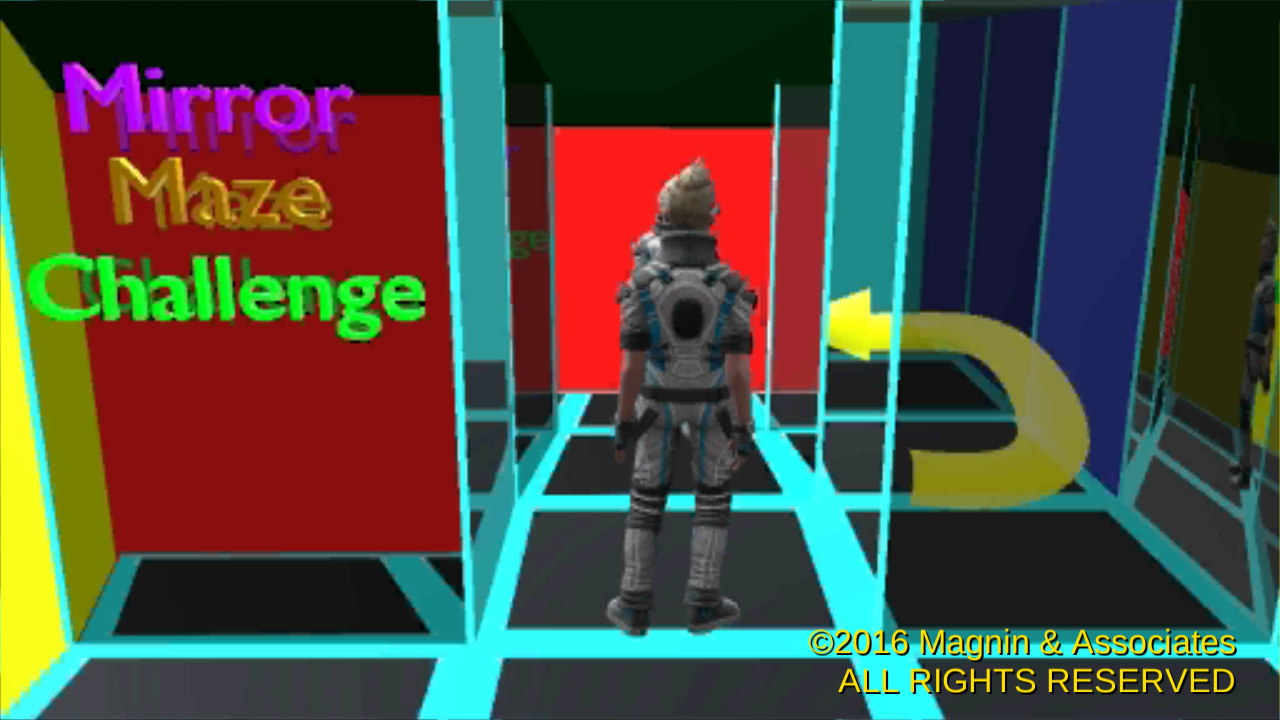
Texas based developer, Magnin & Associates today introduces Mirror Maze Challenge 1.0, their new game title on iOS, Apple TV, Android, and Windows 10 Phone and PC. Mirror Maze Challenge recreates the excitement of a carnival or boardwalk style glass and mirror maze. Find the exit as quickly as possible. Use the on-screen dPad controller to move forward, backward, turn left or right. Instant replay displays a top-down view showing how efficiently you made you were through the maze.
Farmers Branch, Texas - Magnin & Associates today is proud to announce its new Mirror Maze Challenge 1.0 for iOS, Apple TV, Android, and Windows 10 Phone and PC. Enjoy the thrill of running through a carnival or boardwalk style glass and mirror maze on your iPhone or iPad.
* Use the on-screen dPad controller to move forward, backward, turn left or right
* Find the exit as quickly as possible
* Hint Mode can suggest the next move
* Instant replay displays a top-down view showing how efficiently you made you were through the maze
* Seven mazes to challenge all ages
* Optionally shares your accomplishments with Facebook, Twitter, email, or instant messaging (iOS and Android)
The game was produced by Ed Magnin, programmed by Willie Johnson, Jr, additional programming and level design by Greg Austin, Jr, with graphics by Zero Vega. Matt Campana created the music and excellent audio effects. According to Ed Magnin, "This game takes me back to the fun I had as a kid at the POP pier in Santa Monica. It is also our 10th game to be approved for Apple TV!"
The Windows 10 version allows play on everything from a Windows Phone to a variety of PC configurations using mouse, keyboard, or even Xbox One controller.
Note: There are currently no direct links to the Apple TV App Store. The Apple TV App Store is currently only viewable from an Apple TV. To quickly locate the game, just open the App Store on your Apple TV and search for either "Magnin" or "Mirror Maze Challenge".
Device Requirements (iOS):
* Compatible with iPhone, iPad, and iPod touch
* Requires iOS 6.0 or later
* Universal App (supports iPhone, iPod touch, and iPad, including standard, Retina, and iPhone 5 displays)
* 52.2 MB
* Rated 4+
Device Requirements (Apple TV):
* Fourth-generation Apple TV
* Requires tvOS 9.0 or later
* 39.9 MB
* Rated 4+
Pricing and Availability:
Mirror Maze Challenge 1.0 is $1.99 USD (or equivalent amount in other currencies) and available worldwide through the App Store in the Games category. An Android version is available worldwide from both Google Play and Amazon AppStore. A Windows 10 Phone & PC version is available from the Windows Store. The Apple TV version is a Free download to previous purchasers of the iOS version.
Magnin & Associates: http://MagninGames.com
Mirror Maze Challenge 1.0: http://MagninGames.com/mirror
YouTube Video: https://www.youtube.com/watch?v=tCcianwkjJc
Image (Title Screen): http://magningames.com/iphone/mirror/images/Title.png
App Icon: http://MagninGames.com/iphone/mirror/images/Icon_144.png
Ed Magnin has been actively involved in the game industry since 1979. Earlier in his career he worked for some of the top game developers of their day - MicroProse, Cinemaware, Virgin Games, and Park Place Productions. In 1993, he founded Magnin & Associates and has focused on handheld games ever since. For the last 6 years they have created over 20 for games the iOS (with over a million App Store downloads), many of which are also available for Android, and Windows 10 Phone & PC. All Material and Software (C) Copyright 2016 Magnin & Associates. All Rights Reserved. Apple, the Apple logo, iPhone, iPod and iPad are registered trademarks of Apple Inc. in the U.S. and/or other countries. Other trademarks and registered trademarks may be the property of their respective owners.
*******
Link To Article: http://prmac.com/release-id-79868.htm
*******
---------------------------------------------------------------------------------
Note that you can alter delivered distributions at any time.
Login to your account on prMac to alter your channel selection, or to opt-out at any time.
Mirror Maze Challenge on iOS, Apple TV, Android, Windows 10 Phone and PC - Published on 07/14/16
Texas based developer, Magnin & Associates today introduces Mirror Maze Challenge 1.0, their new game title on iOS, Apple TV, Android, and Windows 10 Phone and PC. Mirror Maze Challenge recreates the excitement of a carnival or boardwalk style glass and mirror maze. Find the exit as quickly as possible. Use the on-screen dPad controller to move forward, backward, turn left or right. Instant replay displays a top-down view showing how efficiently you made you were through the maze.
Farmers Branch, Texas - Magnin & Associates today is proud to announce its new Mirror Maze Challenge 1.0 for iOS, Apple TV, Android, and Windows 10 Phone and PC. Enjoy the thrill of running through a carnival or boardwalk style glass and mirror maze on your iPhone or iPad.
* Use the on-screen dPad controller to move forward, backward, turn left or right
* Find the exit as quickly as possible
* Hint Mode can suggest the next move
* Instant replay displays a top-down view showing how efficiently you made you were through the maze
* Seven mazes to challenge all ages
* Optionally shares your accomplishments with Facebook, Twitter, email, or instant messaging (iOS and Android)
The game was produced by Ed Magnin, programmed by Willie Johnson, Jr, additional programming and level design by Greg Austin, Jr, with graphics by Zero Vega. Matt Campana created the music and excellent audio effects. According to Ed Magnin, "This game takes me back to the fun I had as a kid at the POP pier in Santa Monica. It is also our 10th game to be approved for Apple TV!"
The Windows 10 version allows play on everything from a Windows Phone to a variety of PC configurations using mouse, keyboard, or even Xbox One controller.
Note: There are currently no direct links to the Apple TV App Store. The Apple TV App Store is currently only viewable from an Apple TV. To quickly locate the game, just open the App Store on your Apple TV and search for either "Magnin" or "Mirror Maze Challenge".
Device Requirements (iOS):
* Compatible with iPhone, iPad, and iPod touch
* Requires iOS 6.0 or later
* Universal App (supports iPhone, iPod touch, and iPad, including standard, Retina, and iPhone 5 displays)
* 52.2 MB
* Rated 4+
Device Requirements (Apple TV):
* Fourth-generation Apple TV
* Requires tvOS 9.0 or later
* 39.9 MB
* Rated 4+
Pricing and Availability:
Mirror Maze Challenge 1.0 is $1.99 USD (or equivalent amount in other currencies) and available worldwide through the App Store in the Games category. An Android version is available worldwide from both Google Play and Amazon AppStore. A Windows 10 Phone & PC version is available from the Windows Store. The Apple TV version is a Free download to previous purchasers of the iOS version.
Magnin & Associates: http://MagninGames.com
Mirror Maze Challenge 1.0: http://MagninGames.com/mirror
YouTube Video: https://www.youtube.com/watch?v=tCcianwkjJc
Image (Title Screen): http://magningames.com/iphone/mirror/images/Title.png
App Icon: http://MagninGames.com/iphone/mirror/images/Icon_144.png
Ed Magnin has been actively involved in the game industry since 1979. Earlier in his career he worked for some of the top game developers of their day - MicroProse, Cinemaware, Virgin Games, and Park Place Productions. In 1993, he founded Magnin & Associates and has focused on handheld games ever since. For the last 6 years they have created over 20 for games the iOS (with over a million App Store downloads), many of which are also available for Android, and Windows 10 Phone & PC. All Material and Software (C) Copyright 2016 Magnin & Associates. All Rights Reserved. Apple, the Apple logo, iPhone, iPod and iPad are registered trademarks of Apple Inc. in the U.S. and/or other countries. Other trademarks and registered trademarks may be the property of their respective owners.
*******
Link To Article: http://prmac.com/release-id-79868.htm
*******
---------------------------------------------------------------------------------
Note that you can alter delivered distributions at any time.
Login to your account on prMac to alter your channel selection, or to opt-out at any time.
Ancient Jewish Texts Now Accessible in English Talmud App
A new article has been published at prMac.
Ancient Jewish Texts Now Accessible in English Talmud App - Published on 07/14/16
Chicago based Davka Corporation today introduces the Soncino Hebrew-English Talmud for iPhone, iPad, and iPod touch. The Soncino Talmud brings the world of the Talmud to your iOS device. Search the entire Talmud in seconds in Hebrew or English, quickly locate relevant results, and view full texts instantly. View the English text, and then automatically link the Hebrew text to the same page. The text will scroll in order, page by page, backwards and forwards.
Chicago, Illinois - Davka Corporation today is proud to announce the release of the Soncino Hebrew-English Talmud for iPhone, iPad, and iPod touch. The Soncino Talmud presents the Talmud, the central text of Rabbinic Judaism, in Hebrew and English, together with a speedy search engine that allows users to search the text in both languages, quickly locate relevant results, and view full texts instantly.
According to Rabbi Alan Rosenbaum, Vice-President of Davka Corporation, "The Soncino Hebrew-English Talmud makes Talmud study practical for on-the-go usage. It is affordable and easy to use."
In addition to the app's search capabilities, users can browse and study the texts, and mark, copy and email selections for future reference. The Soncino Talmud includes a number of useful features that make it versatile and powerful:
* Talmud can be viewed in Hebrew or English, and linked to the text in the second language
* Text can be searched in Hebrew or English, by general word match or exact word match
* Talmud text can be copied and pasted, or sent via iMessage, or Mail
* Hebrew and English can be viewed in facing windows that synchronize on each page
The Soncino Hebrew-English Talmud also includes the Hebrew commentary of Rashi on the Talmud, and the Hebrew/English texts of the Bible, all of which can be browsed, searched, and viewed. Additional Hebrew texts may be purchased within the app. The Soncino Hebrew-English Talmud is ideal for rabbis, scholars, and students - for anyone that is interested in studying the Talmud in Hebrew and English, and gaining a greater understanding into the world of Jewish law and tradition.
Device Requirements:
* iPhone, iPad, and iPod touch
* Requires iOS 8.0 or higher
* 152 MB
Pricing and Availability:
Soncino Hebrew-English Talmud 1.0 is $5.99 USD (or equivalent amount in other currencies) and available worldwide exclusively through the App Store in the Reference category.
Davka Corporation: http://www.davka.com
Soncino Hebrew-English Talmud 1.0: http://davka.com/index.php?route=product/product&product_id=247
Purchase and Download: https://itunes.apple.com/app/soncino-hebrew-english-talmud/id1122083173
Screenshot: http://a4.mzstatic.com/us/r30/Purple60/v4/fe/8e/b6/fe8eb602-15c8-a00f-266c-e964d6d493fd/screen640x640.jpeg
App Icon: http://a2.mzstatic.com/us/r30/Purple60/v4/a6/00/0b/a6000b46-a3c4-5249-3bcf-c84f4a28b20a/icon175x175.jpeg
Davka Corporation, established in 1982, has pioneered the usage of computers in Jewish education. Today, Davka is the world's largest developer of Judaic and Hebrew software, with innovative titles in the areas of Jewish history, Hebrew language, customs, tradition, and more. Copyright (C) 2016 Davka Corporation. All Rights Reserved. Apple, the Apple logo, iPhone and iPod are registered trademarks of Apple Inc. in the U.S. and/or other countries.
*******
Link To Article: http://prmac.com/release-id-79867.htm
*******
---------------------------------------------------------------------------------
Note that you can alter delivered distributions at any time.
Login to your account on prMac to alter your channel selection, or to opt-out at any time.
Ancient Jewish Texts Now Accessible in English Talmud App - Published on 07/14/16
Chicago based Davka Corporation today introduces the Soncino Hebrew-English Talmud for iPhone, iPad, and iPod touch. The Soncino Talmud brings the world of the Talmud to your iOS device. Search the entire Talmud in seconds in Hebrew or English, quickly locate relevant results, and view full texts instantly. View the English text, and then automatically link the Hebrew text to the same page. The text will scroll in order, page by page, backwards and forwards.
Chicago, Illinois - Davka Corporation today is proud to announce the release of the Soncino Hebrew-English Talmud for iPhone, iPad, and iPod touch. The Soncino Talmud presents the Talmud, the central text of Rabbinic Judaism, in Hebrew and English, together with a speedy search engine that allows users to search the text in both languages, quickly locate relevant results, and view full texts instantly.
According to Rabbi Alan Rosenbaum, Vice-President of Davka Corporation, "The Soncino Hebrew-English Talmud makes Talmud study practical for on-the-go usage. It is affordable and easy to use."
In addition to the app's search capabilities, users can browse and study the texts, and mark, copy and email selections for future reference. The Soncino Talmud includes a number of useful features that make it versatile and powerful:
* Talmud can be viewed in Hebrew or English, and linked to the text in the second language
* Text can be searched in Hebrew or English, by general word match or exact word match
* Talmud text can be copied and pasted, or sent via iMessage, or Mail
* Hebrew and English can be viewed in facing windows that synchronize on each page
The Soncino Hebrew-English Talmud also includes the Hebrew commentary of Rashi on the Talmud, and the Hebrew/English texts of the Bible, all of which can be browsed, searched, and viewed. Additional Hebrew texts may be purchased within the app. The Soncino Hebrew-English Talmud is ideal for rabbis, scholars, and students - for anyone that is interested in studying the Talmud in Hebrew and English, and gaining a greater understanding into the world of Jewish law and tradition.
Device Requirements:
* iPhone, iPad, and iPod touch
* Requires iOS 8.0 or higher
* 152 MB
Pricing and Availability:
Soncino Hebrew-English Talmud 1.0 is $5.99 USD (or equivalent amount in other currencies) and available worldwide exclusively through the App Store in the Reference category.
Davka Corporation: http://www.davka.com
Soncino Hebrew-English Talmud 1.0: http://davka.com/index.php?route=product/product&product_id=247
Purchase and Download: https://itunes.apple.com/app/soncino-hebrew-english-talmud/id1122083173
Screenshot: http://a4.mzstatic.com/us/r30/Purple60/v4/fe/8e/b6/fe8eb602-15c8-a00f-266c-e964d6d493fd/screen640x640.jpeg

App Icon: http://a2.mzstatic.com/us/r30/Purple60/v4/a6/00/0b/a6000b46-a3c4-5249-3bcf-c84f4a28b20a/icon175x175.jpeg

Davka Corporation, established in 1982, has pioneered the usage of computers in Jewish education. Today, Davka is the world's largest developer of Judaic and Hebrew software, with innovative titles in the areas of Jewish history, Hebrew language, customs, tradition, and more. Copyright (C) 2016 Davka Corporation. All Rights Reserved. Apple, the Apple logo, iPhone and iPod are registered trademarks of Apple Inc. in the U.S. and/or other countries.
*******
Link To Article: http://prmac.com/release-id-79867.htm
*******
---------------------------------------------------------------------------------
Note that you can alter delivered distributions at any time.
Login to your account on prMac to alter your channel selection, or to opt-out at any time.
24U releases 24U Phidgets Plug-In 2.0 for FileMaker Pro 15
A new article has been published at prMac.
24U releases 24U Phidgets Plug-In 2.0 for FileMaker Pro 15 - Published on 07/14/16
Prague based developer, 24U Software today releases 24U Phidgets Plug-In version 2.0, an update to their popular hardware integration plug-in for FileMaker development. This plug-in enables FileMaker Pro to interact with various Phidgets boards to let a database solution control physical devices and physical devices to control the solution. The new version brings 64-bit compatibility, the ability to control Phidgets over the network and support for additional boards.
Prague, Czech Republic - 24U Software has released the version 2.0 of 24U Phidgets Plug-In. This plug-in enables FileMaker Pro to interact with various Phidgets boards to let a database solution control physical devices and physical devices to control the solution. The latest version adds 64-bit compatibility with FileMaker Pro 14 and 15, ability to control distant Phidgets over network, ability to write to writable RFID tags, display text on an LCD display, control 8 servo motors concurrently via single controller board, read data from load cells, control analog electronic devices by variable voltage outputs, and more.
24U Phidgets Plug-In allows FileMaker Pro users to:
* Read and write RFID tags to track goods, assets and people
* Capture sensor data to collect environmental data such as temperature or force
* Control servo motors to automate moving parts of robots and machines
* Read digital and analog inputs to control your solution by physical controls
* Set digital outputs to switch lights and other electrical devices
* Display text on an LCD display to create custom user interface such as cashbox
* Set analog outputs to control electronic equipment
Sample uses of 24U Phidgets Plug-In:
Existing customers use 24U Phidgets Plug-in in a wide range of different industries, including compliance testing of electrical equipment, sorting sheep, opening door to gym for customers identified by RFID loyalty card, or robotics prototyping.
"We had a hospital client and we used the 24U Phidgets Plug-In together with an RFID reader for tracking patient charts. The results were quite amazing. Prior to installing this the hospital lost charts on daily basis. When a chart was misplaced it was very difficult to find. The introduction of the chart tracking system meant that everyone knew the location of the chart by looking at the patient screen," said Joe Byrne, CEO of Glanmire Electronics
For Owen Caldwell, technology manager at Cal Poly Pomona Foundation, Inc., 24U Phidgets Plug-In makes it possible to prepare useful projects for electrical engineering major students. At FileMaker DevCon 2014 Owen said: "With Phidgets we've been able to create projects that are not only pertinent to their field but also beneficial to the workplace. We are looking at wiring up the offices to do 3D temperature mapping. With this I am hoping to be able to determine what effect the occupancy of the office has on the overall environment."
What's new in 24U Phidgets Plug-In 2.0:
The new version of 24U Phidgets Plug-In has been improved to provide the following new features and more:
* 64-bit version fully compatible with FileMaker Pro 14 and 15
* Support for network connected Phidgets
* Extended RFID compatibility including writing to writable RFID tags
* TextLCD support
* PhidgetBridge support for load cells reading
* PhidgetAnalog support for controlling analog electronic devices
* Extended support for servo motors
Benefits of the new features:
By being able to connect to Phidgets over network FileMaker solution can now access sensors and control located farther from the computer, such as sensors in a factory or plant field, or door locks in the whole building.
Being able to write information to writable RFID tags makes it easier to integrate FileMaker solutions with other RFID systems or to implement a system that does not rely on a constant online access to a central database of tag IDs.
For a developer designing a FileMaker based point-of-sale or entertainment solution, being able to display text on a small LCD display now allows for creating a fully customized hardware terminal and even control multiple terminals from a single copy of FileMaker Pro.
System Requirements and Compatibility:
24U Phidgets Plug-In 2.0 requires OS X 10.8 Mountain Lion or newer and FileMaker Pro 12 or newer. Recommended is OS X 10.10 and FileMaker Pro 14 Advanced or newer.
Windows 7 and FileMaker Pro 12 are minimum requirements for using the plug-in on the Windows platform. Windows 7 or newer and FileMaker Pro 14 Advanced or newer are recommended.
Pricing and Availability:
24U Phidgets Plug-In 2.0 is immediately available for download free of charge as a fully functional 14-days trial version, which can be activated after purchasing a license code. Licenses for 24U Phidgets Plug-In start at $79 (USD) per user, volume discounts are available for 5 or more users. Existing customers can upgrade to the new version at 50 % off the regular prices if placing order within 14 days upon release, and 30 % off if buying later. Customers who have bought 24U Phidgets Plug-In on or after May 10, 2016 are eligible for free upgrade. Optional Premium Support and Implementation service are available with the purchase of 24U Phidgets Plug-In 2.0.
24U Software: http://www.24usoftware.com/
24U Phidgets Plug-In: http://www.24usoftware.com/Phidgets
Download for Mac: http://www.24usoftware.com/download/24uPhidgetsPlugIn20.dmg
Download for Windows: http://www.24usoftware.com/download/24uPhidgetsPlugIn20.zip
Purchase a license: http://www.24usoftware.com/Phidgets#buy
With a team of full-time testers, web, plug-in, Mac, Windows, Linux, iOS, and Android native app developers, and FileMaker certified developers, led by the FileMaker DevCon 2015 Developer Cup champion, 24U excels in taking care of existing FileMaker solutions, optimizing their performance, identifying and resolving potential issues and liabilities, improving reliability, stability and scalability, integrating them with other systems including various hardware devices, and extending them beyond expectation. We help global businesses around the world to maintain sustainable growth by working with their in-house developers or completely taking care of the maintenance and development of their business solutions. (C) 2016 24U s.r.o. All rights reserved. 24U, 24U Software, and Email OSAX are trademarks of 24U s.r.o. FileMaker is a trademark of FileMaker, Inc., registered in the U.S. and other countries. All other trademarks are the property of their respective owners.
*******
Link To Article: http://prmac.com/release-id-79866.htm
*******
---------------------------------------------------------------------------------
Note that you can alter delivered distributions at any time.
Login to your account on prMac to alter your channel selection, or to opt-out at any time.
24U releases 24U Phidgets Plug-In 2.0 for FileMaker Pro 15 - Published on 07/14/16
Prague based developer, 24U Software today releases 24U Phidgets Plug-In version 2.0, an update to their popular hardware integration plug-in for FileMaker development. This plug-in enables FileMaker Pro to interact with various Phidgets boards to let a database solution control physical devices and physical devices to control the solution. The new version brings 64-bit compatibility, the ability to control Phidgets over the network and support for additional boards.
Prague, Czech Republic - 24U Software has released the version 2.0 of 24U Phidgets Plug-In. This plug-in enables FileMaker Pro to interact with various Phidgets boards to let a database solution control physical devices and physical devices to control the solution. The latest version adds 64-bit compatibility with FileMaker Pro 14 and 15, ability to control distant Phidgets over network, ability to write to writable RFID tags, display text on an LCD display, control 8 servo motors concurrently via single controller board, read data from load cells, control analog electronic devices by variable voltage outputs, and more.
24U Phidgets Plug-In allows FileMaker Pro users to:
* Read and write RFID tags to track goods, assets and people
* Capture sensor data to collect environmental data such as temperature or force
* Control servo motors to automate moving parts of robots and machines
* Read digital and analog inputs to control your solution by physical controls
* Set digital outputs to switch lights and other electrical devices
* Display text on an LCD display to create custom user interface such as cashbox
* Set analog outputs to control electronic equipment
Sample uses of 24U Phidgets Plug-In:
Existing customers use 24U Phidgets Plug-in in a wide range of different industries, including compliance testing of electrical equipment, sorting sheep, opening door to gym for customers identified by RFID loyalty card, or robotics prototyping.
"We had a hospital client and we used the 24U Phidgets Plug-In together with an RFID reader for tracking patient charts. The results were quite amazing. Prior to installing this the hospital lost charts on daily basis. When a chart was misplaced it was very difficult to find. The introduction of the chart tracking system meant that everyone knew the location of the chart by looking at the patient screen," said Joe Byrne, CEO of Glanmire Electronics
For Owen Caldwell, technology manager at Cal Poly Pomona Foundation, Inc., 24U Phidgets Plug-In makes it possible to prepare useful projects for electrical engineering major students. At FileMaker DevCon 2014 Owen said: "With Phidgets we've been able to create projects that are not only pertinent to their field but also beneficial to the workplace. We are looking at wiring up the offices to do 3D temperature mapping. With this I am hoping to be able to determine what effect the occupancy of the office has on the overall environment."
What's new in 24U Phidgets Plug-In 2.0:
The new version of 24U Phidgets Plug-In has been improved to provide the following new features and more:
* 64-bit version fully compatible with FileMaker Pro 14 and 15
* Support for network connected Phidgets
* Extended RFID compatibility including writing to writable RFID tags
* TextLCD support
* PhidgetBridge support for load cells reading
* PhidgetAnalog support for controlling analog electronic devices
* Extended support for servo motors
Benefits of the new features:
By being able to connect to Phidgets over network FileMaker solution can now access sensors and control located farther from the computer, such as sensors in a factory or plant field, or door locks in the whole building.
Being able to write information to writable RFID tags makes it easier to integrate FileMaker solutions with other RFID systems or to implement a system that does not rely on a constant online access to a central database of tag IDs.
For a developer designing a FileMaker based point-of-sale or entertainment solution, being able to display text on a small LCD display now allows for creating a fully customized hardware terminal and even control multiple terminals from a single copy of FileMaker Pro.
System Requirements and Compatibility:
24U Phidgets Plug-In 2.0 requires OS X 10.8 Mountain Lion or newer and FileMaker Pro 12 or newer. Recommended is OS X 10.10 and FileMaker Pro 14 Advanced or newer.
Windows 7 and FileMaker Pro 12 are minimum requirements for using the plug-in on the Windows platform. Windows 7 or newer and FileMaker Pro 14 Advanced or newer are recommended.
Pricing and Availability:
24U Phidgets Plug-In 2.0 is immediately available for download free of charge as a fully functional 14-days trial version, which can be activated after purchasing a license code. Licenses for 24U Phidgets Plug-In start at $79 (USD) per user, volume discounts are available for 5 or more users. Existing customers can upgrade to the new version at 50 % off the regular prices if placing order within 14 days upon release, and 30 % off if buying later. Customers who have bought 24U Phidgets Plug-In on or after May 10, 2016 are eligible for free upgrade. Optional Premium Support and Implementation service are available with the purchase of 24U Phidgets Plug-In 2.0.
24U Software: http://www.24usoftware.com/
24U Phidgets Plug-In: http://www.24usoftware.com/Phidgets
Download for Mac: http://www.24usoftware.com/download/24uPhidgetsPlugIn20.dmg
Download for Windows: http://www.24usoftware.com/download/24uPhidgetsPlugIn20.zip
Purchase a license: http://www.24usoftware.com/Phidgets#buy
With a team of full-time testers, web, plug-in, Mac, Windows, Linux, iOS, and Android native app developers, and FileMaker certified developers, led by the FileMaker DevCon 2015 Developer Cup champion, 24U excels in taking care of existing FileMaker solutions, optimizing their performance, identifying and resolving potential issues and liabilities, improving reliability, stability and scalability, integrating them with other systems including various hardware devices, and extending them beyond expectation. We help global businesses around the world to maintain sustainable growth by working with their in-house developers or completely taking care of the maintenance and development of their business solutions. (C) 2016 24U s.r.o. All rights reserved. 24U, 24U Software, and Email OSAX are trademarks of 24U s.r.o. FileMaker is a trademark of FileMaker, Inc., registered in the U.S. and other countries. All other trademarks are the property of their respective owners.
*******
Link To Article: http://prmac.com/release-id-79866.htm
*******
---------------------------------------------------------------------------------
Note that you can alter delivered distributions at any time.
Login to your account on prMac to alter your channel selection, or to opt-out at any time.
Fast Robo Launches Tip Solver App on the App Store for iPhone and iPad
A new article has been published at prMac.
Fast Robo Launches Tip Solver App on the App Store for iPhone and iPad - Published on 07/13/16
Fast Robo, an app publishing studio from Cupertino, CA, announces the launch of their second productivity app for iOS devices, called Tip Solver - Premier Gratuity Calculator 1.0. This is a handy new app to calculate restaurant tip and total amounts. The innovative interface allows the user to adjust any digit and instantly calculate the tip amount. Additionally, the user can drag to round the tip upwards or downwards to the nearest whole number.
Cupertino, California - Fast Robo, an app publishing studio from Cupertino, CA, announced the launch of their second productivity app for iOS devices, Tip Solver - Premier Gratuity Calculator 1.0. This is a handy new app to calculate restaurant tip and total amounts. The attractive, modern, and innovative interface allows the user to adjust any digit inline and instantly calculate the tip amount. Additionally, the user can drag to round the tip upwards or downwards to the nearest whole number.
Tip Solver offers convenience with a tip calculator that is simple yet powerful to use. Tip Solver integrates native digital pickers to allow the user fine-grained control over the exact amount. A drag gesture allows the user to interact with the panels to drag to the nearest amount. These UI features allow the user to find out how much the user is actually tipping. Tip Solver gives the user confidence that the user is not tipping too little or too much as it shows the actual % of tip (based on the bill amount and total amount).
Tip Solver utilizes a sleek, clean, and advanced UI to make it easy to calculate the tip. Tip Solver also makes it easy to split the total among up to 9 parties. As the user adjusts the tip amounts, the user receives instant feedback on the amount that each party would pay to split the bill.
Tip Solver is customizable and allows the user to set a default tip percentage. As the user comes back to the app, the app will remember and use the user's preferences for the default tip percentage.
Tip Solver is a free app on the app store. Currently, the app works on iOS devices (iPhone & iPad) with iOS 9.3 and above. Users can visit the Fast Robo website for more information.
Features:
* Adjustable total amount
* Adjustable tip percentage and amount
* Adjustable bill amount
* Drag sections up/down to round to the nearest whole number
* Split bill up to 9 ways
* Default tip % option button
Device Requirements:
* iPhone, iPad, and iPod touch
* Requires iOS 9.3 or later
* Universal Application
* 6.9 MB
Pricing and Availability:
Tip Solver - Premier Gratuity Calculator 1.0 is free, and is available worldwide exclusively through the App Store in the Utilities category.
Fast Robo: http://fastrobo.co/
Tip Solver - Premier Gratuity Calculator 1.0: https://itunes.apple.com/app/tip-solver-premier-gratuity/id1130814051
Screenshot: http://a2.mzstatic.com/us/r30/Purple30/v4/6d/b7/8e/6db78e98-cd24-f7b3-3bdd-ff2a27c220cc/screen322x572.jpeg
App Icon: http://a5.mzstatic.com/us/r30/Purple60/v4/bd/7c/27/bd7c27cc-be68-2e11-a501-ca98c9404e5f/icon175x175.jpeg
Located in Cupertino, CA, Fast Robo was founded in 2012 by Rex Feng. Fast Robo is a rapidly growing web and mobile app studio that develops intuitive, useful solutions. With web services, iOS apps, and more, Fast Robo believes in exceeding the expectations of its customers with leading solutions to create the apps of tomorrow, today. Their latest app is a Utilities app, Tip Solver - Premier Gratuity Calculator, for the Apple App Store. All Material and Software (C) 2012-2016 Fast Robo. All Rights Reserved. Apple, the Apple logo, App Store, iOS, iPhone, and iPad, are registered trademarks of Apple Computer in the U.S. and/or other countries.
*******
Link To Article: http://prmac.com/release-id-79865.htm
*******
---------------------------------------------------------------------------------
Note that you can alter delivered distributions at any time.
Login to your account on prMac to alter your channel selection, or to opt-out at any time.
Fast Robo Launches Tip Solver App on the App Store for iPhone and iPad - Published on 07/13/16
Fast Robo, an app publishing studio from Cupertino, CA, announces the launch of their second productivity app for iOS devices, called Tip Solver - Premier Gratuity Calculator 1.0. This is a handy new app to calculate restaurant tip and total amounts. The innovative interface allows the user to adjust any digit and instantly calculate the tip amount. Additionally, the user can drag to round the tip upwards or downwards to the nearest whole number.
Cupertino, California - Fast Robo, an app publishing studio from Cupertino, CA, announced the launch of their second productivity app for iOS devices, Tip Solver - Premier Gratuity Calculator 1.0. This is a handy new app to calculate restaurant tip and total amounts. The attractive, modern, and innovative interface allows the user to adjust any digit inline and instantly calculate the tip amount. Additionally, the user can drag to round the tip upwards or downwards to the nearest whole number.
Tip Solver offers convenience with a tip calculator that is simple yet powerful to use. Tip Solver integrates native digital pickers to allow the user fine-grained control over the exact amount. A drag gesture allows the user to interact with the panels to drag to the nearest amount. These UI features allow the user to find out how much the user is actually tipping. Tip Solver gives the user confidence that the user is not tipping too little or too much as it shows the actual % of tip (based on the bill amount and total amount).
Tip Solver utilizes a sleek, clean, and advanced UI to make it easy to calculate the tip. Tip Solver also makes it easy to split the total among up to 9 parties. As the user adjusts the tip amounts, the user receives instant feedback on the amount that each party would pay to split the bill.
Tip Solver is customizable and allows the user to set a default tip percentage. As the user comes back to the app, the app will remember and use the user's preferences for the default tip percentage.
Tip Solver is a free app on the app store. Currently, the app works on iOS devices (iPhone & iPad) with iOS 9.3 and above. Users can visit the Fast Robo website for more information.
Features:
* Adjustable total amount
* Adjustable tip percentage and amount
* Adjustable bill amount
* Drag sections up/down to round to the nearest whole number
* Split bill up to 9 ways
* Default tip % option button
Device Requirements:
* iPhone, iPad, and iPod touch
* Requires iOS 9.3 or later
* Universal Application
* 6.9 MB
Pricing and Availability:
Tip Solver - Premier Gratuity Calculator 1.0 is free, and is available worldwide exclusively through the App Store in the Utilities category.
Fast Robo: http://fastrobo.co/
Tip Solver - Premier Gratuity Calculator 1.0: https://itunes.apple.com/app/tip-solver-premier-gratuity/id1130814051
Screenshot: http://a2.mzstatic.com/us/r30/Purple30/v4/6d/b7/8e/6db78e98-cd24-f7b3-3bdd-ff2a27c220cc/screen322x572.jpeg

App Icon: http://a5.mzstatic.com/us/r30/Purple60/v4/bd/7c/27/bd7c27cc-be68-2e11-a501-ca98c9404e5f/icon175x175.jpeg

Located in Cupertino, CA, Fast Robo was founded in 2012 by Rex Feng. Fast Robo is a rapidly growing web and mobile app studio that develops intuitive, useful solutions. With web services, iOS apps, and more, Fast Robo believes in exceeding the expectations of its customers with leading solutions to create the apps of tomorrow, today. Their latest app is a Utilities app, Tip Solver - Premier Gratuity Calculator, for the Apple App Store. All Material and Software (C) 2012-2016 Fast Robo. All Rights Reserved. Apple, the Apple logo, App Store, iOS, iPhone, and iPad, are registered trademarks of Apple Computer in the U.S. and/or other countries.
*******
Link To Article: http://prmac.com/release-id-79865.htm
*******
---------------------------------------------------------------------------------
Note that you can alter delivered distributions at any time.
Login to your account on prMac to alter your channel selection, or to opt-out at any time.
Subscribe to:
Posts (Atom)