A new article has been published at prMac.
Waking Up Made Easy With Innovative Wrist Band - Published on 07/19/16
New Startup Luva Tech, trendsetter in Product Design and Innovation, introduces PokMinder, a wearable gadget, trains you to wake up early and helps you to replace bad habits with positive ones. Luva Tech is raising funds via a rewards crowdfunding campaign on Indiegogo to finish the development of their revolutionary wearable technology. The company aims to raise $50,000 on Indiegogo to finish development, and produce the first batch of their latest invention.
Cochin, India, July 15, 2016 � New Startup Luva Tech, trendsetter in Product Design and Innovation, introduces PokMinder, an innovative wrist band that helps to form new habits. Luva Tech announced that it is raising funds via a rewards crowdfunding campaign on Indiegogo to finish the development of their revolutionary wearable technology. The company set out to raise $50,000 on Indiegogo to finish development and produce the first batch of their latest invention that is going to change not only the wearable technology market but also the human lifestyle.
Founder, Hussain M T says waking up early is one of his favorite things. The morning is the perfect time for meditation, exercise and some quiet reading as the world has not begun stirring, he added. Moreover getting off bed early can give you extra time which can be utilized effectively. However, he said, he used to have oversleep habits during his graduation and he had to skip several classes. Later, after his graduation he found himself struggling seriously to get out of the bed for office. He figured out that he was not the only person who was fed up with their terrible wake up styles by pointing out a recent report which says almost 68% of people are neither able to wake up refreshed on time nor organized in their daily life. He started researching a solution, and eventually founded this innovative solution to break any bad habit and unlock one�s potential.
PokMinder wake up alarm works in different modes where one can choose the way they want to be woken up. It has basically three modes; Louder beep sound, even synchronous vibration, and mild electric stimulus. Combination of different modes are also possible. With low energy Bluetooth technology, the user can shock themselves or entrust someone to shock whenever they are induced to perform the same habit they wanted to quit or one can set manually a time to wake up early, form new habits, or break bad habits.
For instance, if a person wants to get rid of smoking or drinking too much alcohol, PokMinder can help them by hitting them with mild electric stimulus. This hitting occurs whenever one tries to break the rules. Eventually, you will get rid of bad habits permanently. Moreover the drive mode incorporated in PokMinder helps people to stay awake during long night drives.
The supportive functions of PokMinder are still more. PokMinder comes with an inbuilt storage, a voice recorder, fitness tracker and a phone finder. Unlike the other wearables in the market, PokMinder is a unique product which can influence the human life in every stage. It helps people utilize their time and energy in a more efficient way and transform their life like never before. PokMinder assures solutions to several problems people face in their daily life.
�Time is everything, but don't let time take control over you, you take control of your time� - Founder Hussain M T.
PokMinder: http://www.pokminder.com
PokMinder Indiegogo Campaign: https://www.indiegogo.com/projects/pokminder-waking-up-made-easy#/
YouTube Videos: https://www.youtube.com/channel/UCJyoNyqvmfh63sr5laoqFNg
Luva Tech, is a startup based in India, comprised of a group of passionate individuals who combine creativity with technology to transform ideas into world class products. Technology is becoming so much a part of our lives that it will now be a part of our bodies too. Since Wearables make technology pervasive by interweaving it into daily life, we have been working on innovative wearable gadgets to make human life more efficient and productive. All Material and Software (C) 2016 Luva Tech. All Rights Reserved. Apple, the Apple logo, iPhone, iPod and iPad are registered trademarks of Apple Inc. in the U.S. and/or other countries. Other trademarks and registered trademarks may be the property of their respective owners.
*******
Link To Article: http://prmac.com/release-id-79903.htm
*******
---------------------------------------------------------------------------------
Note that you can alter delivered distributions at any time.
Login to your account on prMac to alter your channel selection, or to opt-out at any time.

NeoFinder 6.9.1 available with improved Video Contact Sheet
A new article has been published at prMac.
NeoFinder 6.9.1 available with improved Video Contact Sheet - Published on 07/19/16
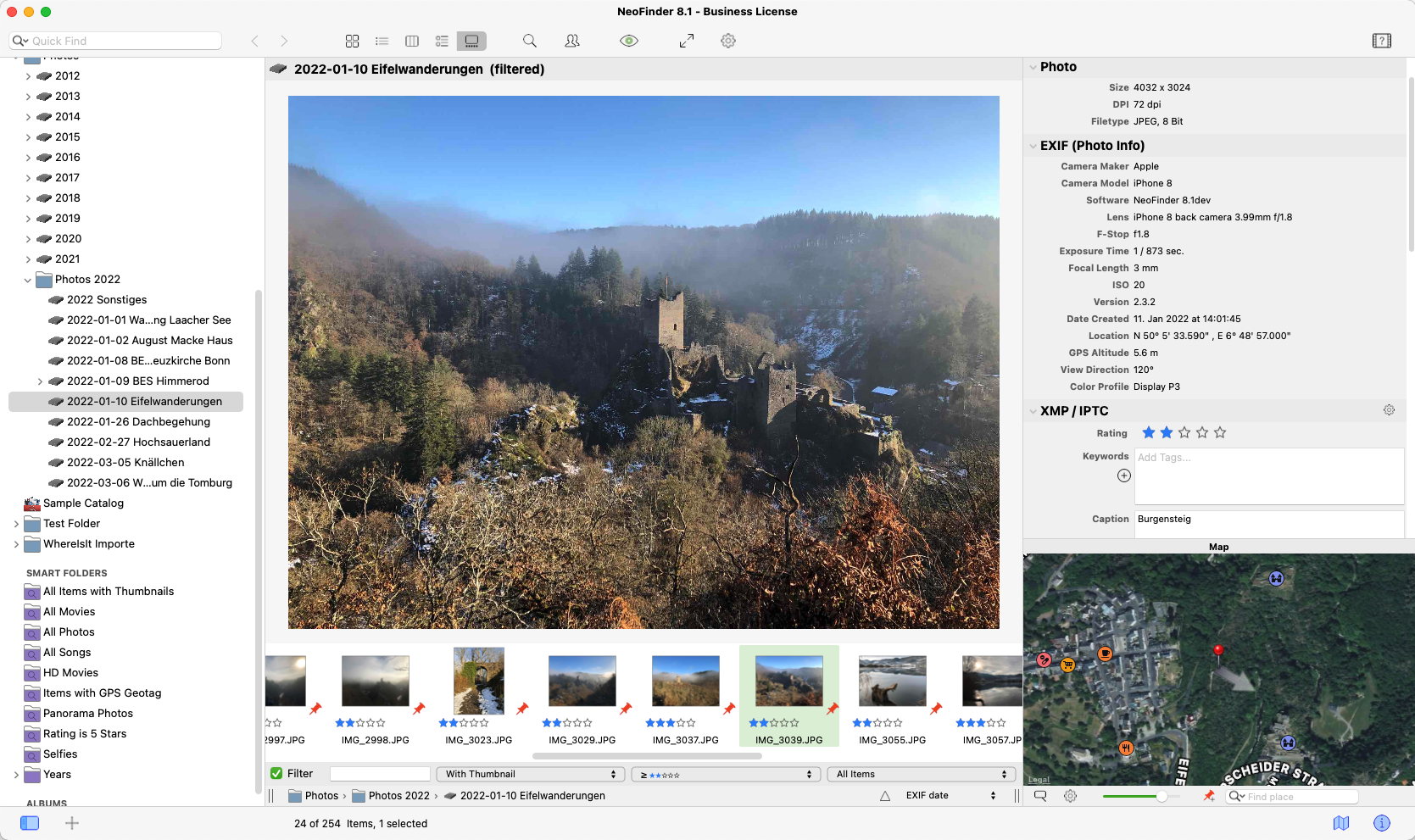
Norbert M. Doerner today announces NeoFinder 6.9.1 for Mac OS X. Keep track of digital files, photos, songs, movies, fonts on hard drives, USB sticks, servers, Blu-ray disks, DVD-ROMs, CDROMs, and any other digital media. NeoFinder generates thumbnails and metadata of files, for powerful search possibilities. The new NeoFinder 6.9.1 offers numerous improvements and bug fixes. Users can now select multiple movies for the Video Contact Sheet, a new Global Find menu bar, and so much more.
Bonn, Germany - Norbert M. Doerner is proud to announce the release of NeoFinder 6.9.1 for Mac OS X, (formerly known as CDFinder). The new version offers an improved video contact sheet, and numerous fixes and improvements.
Features and Improvements of NeoFinder 6.9.1:
* You can now select multiple movies for the Video Contact Sheet, and NeoFinder will generate a cool contact sheet for each of them
* Detection of Alias files is much better now during cataloging; Due to an ever increasing number of bugs in Apples FSRef code in every new Mac OS X release, NeoFinder now uses more reliable standard unix calls to get information about Alias files
* The NeoFinder menu bar Global Find helper app is now properly codesigned
* Finding files based on their EXIF creation date now works properly
* Massively improved behaviour for cataloging certain malformed MPEG files with ffmpeg; NeoFinder no longer hangs there, but times out after 30 seconds, and proceeds with the next file
* Improved DiskCatalogMaker-Importer that works better with newer Export files
* Improved the Extensis Portfolio Importer with localisations; They save their export text file with translated headers, and NeoFinder will now recognise more of those
* Improved cataloging of certain MP3 tags edited by Metadatics.app
* Inserting copied Geotags into Found Items now works properly
* Improved the Cumulus CRE Importer for certain cases
* Improved the cataloging of certain Adobe Illustrator files that were pure EPS with no PDF data
* Improved cataloging of TIFF and JPG files with a very very large color profile
* Fixes a problem when finding certain umlauts, like
* Fixes a problem with "Find by path", where certain folders sometimes weren't found
* Fixes some memory leaks in the separate ThumbnailHelper process when cataloging files with certain Adobe XMP data
* Fixes a possible hang when trying to Update the catalog of a network volume in Mac OS X 10.10 and Mac OS X 10.11
* Fixes a problem when reading file comments during cataloging
NeoFinder Highlights:
Metadata - NeoFinder catalogs metadata of songs, movies, fonts, and photos, including the MP3-Tags of several audio file formats, EXIF, GPS, and IPTC data of photos, and also Adobe XMP data; All these are arranged clearly in the user interface, and can be extensively searched. For numerous photo and video formats, fonts, and text files, NeoFinder generates thumbnails during cataloging, displaying them in all list and icon views.
Integration - Offering a tight connection to major productivity tools, such as Adobe Creative Suite, Microsoft Office, Roxio Toast, FileMaker Pro, Apples Spotlight and Finder, and the extensive support of drag&drop into other applications, NeoFinder can support many workflow scenarios.
Geotagging - Only NeoFinder offers the integrated GeoFinder, which searches for photos taken near a spot, or the KMZ export for coordinates and photo thumbnails as a way to give geolocated photos to friends. NeoFinder can even geotag photos itself, no other software needed. And only NeoFinder displays amazing facts about any geolocation in the unique Wikipedia Inspector.
Networking - Store your catalog database on a server for access from all Macs in the network, and with the sidekick product abeMeda (was CDWinder for Windows) even from Microsoft Windows.
Mobile - Keep your NeoFinder database with you on your iPhone or iPad with the separate NeoFinder for iOS app.
Since the initial release of CDFinder 1.0 in 1995, more than 62,000 customers in 98 countries around the world are using CDFinder and now NeoFinder to organise their digital library, and manage their data archive and backups, including NASA, IKEA, BBC, Mattel, Rand McNally, Pfizer, Random House, Oracle, and Warner Bros.
Language Support:
* German, English, French, Swedish, Italian, Spanish, Dutch, and Japanese
System Requirements:
* Requires Mac OS X v10.6.8 - 10.11 El Capitan
* Previous CDFinder and NeoFinder versions for older Mac OS versions are still available
* Separate app for iOS (iPhone and iPad) is also available
Pricing and Availability:
NeoFinder 6.x is a paid update to licensed users of CDFinder, update price starting at 19 Euros. Cross-grades for users of competing applications (DiskLibrary, FileFinder, CatFinder, Canto Cumulus, Disk Tracker, DiskCatalogMaker, Atomic View, iView Media Pro, and more) are available. A free NeoFinder demo version can be downloaded from the NeoFinder website, the price for new users starts at 29,00 (EUR). Multiple user packs are available for network users. NeoFinder 6.9.1 is a free update to all NeoFinder customers.
NeoFinder 6.9.1: http://www.cdfinder.de/
Direct Download for Mac: https://www.wfs-apps.de/updates/neofinder.6.9.1.zip
Purchase: http://www.cdfinder.de/en/order.html
Screenshot: http://www.cdfinder.de/main-screenshot.jpg
Application Icon: http://www.cdfinder.de/rw_common/images/NeoFinder%20Icon%20128%20px%20Alpha.png
Norbert M. Doerner is a computer scientist with a love for integration and cool products. He develops great Macintosh software since 1991. Popular products include the disk cataloger NeoFinder (was CDFinder), various plugins for the Finder, iPhoto and Aperture, and the audio transcription software F5.app. Copyright (C) 1991-2016 Norbert M. Doerner. Apple, the Apple logo, Mac and Macintosh are registered trademarks of Apple Inc. in the U.S. and/or other countries. Other trademarks and registered trademarks may be the property of their respective owners.
*******
Link To Article: http://prmac.com/release-id-79902.htm
*******
---------------------------------------------------------------------------------
Note that you can alter delivered distributions at any time.
Login to your account on prMac to alter your channel selection, or to opt-out at any time.
NeoFinder 6.9.1 available with improved Video Contact Sheet - Published on 07/19/16
Norbert M. Doerner today announces NeoFinder 6.9.1 for Mac OS X. Keep track of digital files, photos, songs, movies, fonts on hard drives, USB sticks, servers, Blu-ray disks, DVD-ROMs, CDROMs, and any other digital media. NeoFinder generates thumbnails and metadata of files, for powerful search possibilities. The new NeoFinder 6.9.1 offers numerous improvements and bug fixes. Users can now select multiple movies for the Video Contact Sheet, a new Global Find menu bar, and so much more.
Bonn, Germany - Norbert M. Doerner is proud to announce the release of NeoFinder 6.9.1 for Mac OS X, (formerly known as CDFinder). The new version offers an improved video contact sheet, and numerous fixes and improvements.
Features and Improvements of NeoFinder 6.9.1:
* You can now select multiple movies for the Video Contact Sheet, and NeoFinder will generate a cool contact sheet for each of them
* Detection of Alias files is much better now during cataloging; Due to an ever increasing number of bugs in Apples FSRef code in every new Mac OS X release, NeoFinder now uses more reliable standard unix calls to get information about Alias files
* The NeoFinder menu bar Global Find helper app is now properly codesigned
* Finding files based on their EXIF creation date now works properly
* Massively improved behaviour for cataloging certain malformed MPEG files with ffmpeg; NeoFinder no longer hangs there, but times out after 30 seconds, and proceeds with the next file
* Improved DiskCatalogMaker-Importer that works better with newer Export files
* Improved the Extensis Portfolio Importer with localisations; They save their export text file with translated headers, and NeoFinder will now recognise more of those
* Improved cataloging of certain MP3 tags edited by Metadatics.app
* Inserting copied Geotags into Found Items now works properly
* Improved the Cumulus CRE Importer for certain cases
* Improved the cataloging of certain Adobe Illustrator files that were pure EPS with no PDF data
* Improved cataloging of TIFF and JPG files with a very very large color profile
* Fixes a problem when finding certain umlauts, like
* Fixes a problem with "Find by path", where certain folders sometimes weren't found
* Fixes some memory leaks in the separate ThumbnailHelper process when cataloging files with certain Adobe XMP data
* Fixes a possible hang when trying to Update the catalog of a network volume in Mac OS X 10.10 and Mac OS X 10.11
* Fixes a problem when reading file comments during cataloging
NeoFinder Highlights:
Metadata - NeoFinder catalogs metadata of songs, movies, fonts, and photos, including the MP3-Tags of several audio file formats, EXIF, GPS, and IPTC data of photos, and also Adobe XMP data; All these are arranged clearly in the user interface, and can be extensively searched. For numerous photo and video formats, fonts, and text files, NeoFinder generates thumbnails during cataloging, displaying them in all list and icon views.
Integration - Offering a tight connection to major productivity tools, such as Adobe Creative Suite, Microsoft Office, Roxio Toast, FileMaker Pro, Apples Spotlight and Finder, and the extensive support of drag&drop into other applications, NeoFinder can support many workflow scenarios.
Geotagging - Only NeoFinder offers the integrated GeoFinder, which searches for photos taken near a spot, or the KMZ export for coordinates and photo thumbnails as a way to give geolocated photos to friends. NeoFinder can even geotag photos itself, no other software needed. And only NeoFinder displays amazing facts about any geolocation in the unique Wikipedia Inspector.
Networking - Store your catalog database on a server for access from all Macs in the network, and with the sidekick product abeMeda (was CDWinder for Windows) even from Microsoft Windows.
Mobile - Keep your NeoFinder database with you on your iPhone or iPad with the separate NeoFinder for iOS app.
Since the initial release of CDFinder 1.0 in 1995, more than 62,000 customers in 98 countries around the world are using CDFinder and now NeoFinder to organise their digital library, and manage their data archive and backups, including NASA, IKEA, BBC, Mattel, Rand McNally, Pfizer, Random House, Oracle, and Warner Bros.
Language Support:
* German, English, French, Swedish, Italian, Spanish, Dutch, and Japanese
System Requirements:
* Requires Mac OS X v10.6.8 - 10.11 El Capitan
* Previous CDFinder and NeoFinder versions for older Mac OS versions are still available
* Separate app for iOS (iPhone and iPad) is also available
Pricing and Availability:
NeoFinder 6.x is a paid update to licensed users of CDFinder, update price starting at 19 Euros. Cross-grades for users of competing applications (DiskLibrary, FileFinder, CatFinder, Canto Cumulus, Disk Tracker, DiskCatalogMaker, Atomic View, iView Media Pro, and more) are available. A free NeoFinder demo version can be downloaded from the NeoFinder website, the price for new users starts at 29,00 (EUR). Multiple user packs are available for network users. NeoFinder 6.9.1 is a free update to all NeoFinder customers.
NeoFinder 6.9.1: http://www.cdfinder.de/
Direct Download for Mac: https://www.wfs-apps.de/updates/neofinder.6.9.1.zip
Purchase: http://www.cdfinder.de/en/order.html
Screenshot: http://www.cdfinder.de/main-screenshot.jpg
Application Icon: http://www.cdfinder.de/rw_common/images/NeoFinder%20Icon%20128%20px%20Alpha.png

Norbert M. Doerner is a computer scientist with a love for integration and cool products. He develops great Macintosh software since 1991. Popular products include the disk cataloger NeoFinder (was CDFinder), various plugins for the Finder, iPhoto and Aperture, and the audio transcription software F5.app. Copyright (C) 1991-2016 Norbert M. Doerner. Apple, the Apple logo, Mac and Macintosh are registered trademarks of Apple Inc. in the U.S. and/or other countries. Other trademarks and registered trademarks may be the property of their respective owners.
*******
Link To Article: http://prmac.com/release-id-79902.htm
*******
---------------------------------------------------------------------------------
Note that you can alter delivered distributions at any time.
Login to your account on prMac to alter your channel selection, or to opt-out at any time.
Application volume controls and system-wide EQ for Mac
A new article has been published at prMac.
Application volume controls and system-wide EQ for Mac - Published on 07/19/16
Static Z Software today introduces Sound Control for the Mac. Sound Control enables users to easily and quickly change individual app volumes as well as selectively apply a system-wide EQ to each app audio. Implemented as a convenient Menu Bar of your Mac, users can easily tailor the sound of their Mac's audio to their specific taste or to properly calibrate to the frequency response of their speakers. Users can also add software and keyboard control to HDMI and other audio devices.
Rochester, New York - Static Z Software today is proud to announce the release and immediate availability of Sound Control for the Mac. Mac users have long wanted a software volume mixer that users of other platforms have enjoyed. Sound Control makes it possible. Sound Control enables users to easily and quickly change app volumes as well as selectively apply a system-wide EQ to app audio. Sound Control does this by adding a software mixer to the menu bar of your Mac. In addition to the volume mixer, Sound Control also adds a software EQ to your audio output allowing users to easily tailor the sound of their Mac's audio to their specific taste or to properly calibrate to the frequency response of their speakers.
Features:
* Per-app volume control, including mute
* System-wide EQ with 10 or 31 bands
* Easy control via menu bar item or hotkeys
* Add software and keyboard control to HDMI and other audio devices
Compatibilty:
* Mac OS X Mavericks (10.9)
* Mac OS X Yosemite (10.10)
* Mac OS X El Capitan (10.11)
Pricing and Availability:
A demo of Sound Control is available and costs $9 (USD). The demo can be found at Static Z Software online.
Sound Control: http://staticz.com/soundcontrol
Download Sound Control: http://staticz.net/downloads/SoundControlInstaller_Latest.dmg
Purchase: http://staticz.com/soundcontrol/purchase
Screenshot: http://staticz.net/pr/soundcontrol/screenshot.png
Application Icon: http://staticz.net/pr/soundcontrol/icon.png
Located in Rochester, New York, Static Z Software is a software company specializing in the Mac and iOS platforms. With over a decade of experience developing award winning Mac software, Static Z Software strives to create new software that is useful as well as enjoyable. Copyright (C) 2016 Static Z Software. All Rights Reserved. Apple, the Apple logo and Mac OS X are trademarks of Apple Inc. in the U.S. and/or other countries.
*******
Link To Article: http://prmac.com/release-id-79900.htm
*******
---------------------------------------------------------------------------------
Note that you can alter delivered distributions at any time.
Login to your account on prMac to alter your channel selection, or to opt-out at any time.
Application volume controls and system-wide EQ for Mac - Published on 07/19/16
Static Z Software today introduces Sound Control for the Mac. Sound Control enables users to easily and quickly change individual app volumes as well as selectively apply a system-wide EQ to each app audio. Implemented as a convenient Menu Bar of your Mac, users can easily tailor the sound of their Mac's audio to their specific taste or to properly calibrate to the frequency response of their speakers. Users can also add software and keyboard control to HDMI and other audio devices.
Rochester, New York - Static Z Software today is proud to announce the release and immediate availability of Sound Control for the Mac. Mac users have long wanted a software volume mixer that users of other platforms have enjoyed. Sound Control makes it possible. Sound Control enables users to easily and quickly change app volumes as well as selectively apply a system-wide EQ to app audio. Sound Control does this by adding a software mixer to the menu bar of your Mac. In addition to the volume mixer, Sound Control also adds a software EQ to your audio output allowing users to easily tailor the sound of their Mac's audio to their specific taste or to properly calibrate to the frequency response of their speakers.
Features:
* Per-app volume control, including mute
* System-wide EQ with 10 or 31 bands
* Easy control via menu bar item or hotkeys
* Add software and keyboard control to HDMI and other audio devices
Compatibilty:
* Mac OS X Mavericks (10.9)
* Mac OS X Yosemite (10.10)
* Mac OS X El Capitan (10.11)
Pricing and Availability:
A demo of Sound Control is available and costs $9 (USD). The demo can be found at Static Z Software online.
Sound Control: http://staticz.com/soundcontrol
Download Sound Control: http://staticz.net/downloads/SoundControlInstaller_Latest.dmg
Purchase: http://staticz.com/soundcontrol/purchase
Screenshot: http://staticz.net/pr/soundcontrol/screenshot.png

Application Icon: http://staticz.net/pr/soundcontrol/icon.png

Located in Rochester, New York, Static Z Software is a software company specializing in the Mac and iOS platforms. With over a decade of experience developing award winning Mac software, Static Z Software strives to create new software that is useful as well as enjoyable. Copyright (C) 2016 Static Z Software. All Rights Reserved. Apple, the Apple logo and Mac OS X are trademarks of Apple Inc. in the U.S. and/or other countries.
*******
Link To Article: http://prmac.com/release-id-79900.htm
*******
---------------------------------------------------------------------------------
Note that you can alter delivered distributions at any time.
Login to your account on prMac to alter your channel selection, or to opt-out at any time.
Innovative new app for kids from 6: Busy Water - Think Outside the Tank
A new article has been published at prMac.
Innovative new app for kids from 6: Busy Water - Think Outside the Tank - Published on 07/19/16
Edoki Academy today introduces Busy Water 1.1 for iOS, an innovative and fun critical thinking puzzle game based on water physics and gravity. Dive into Busy Water's incredibly realistic aqua world where children from ages 6+ are handed the mission to get Archie the fish back to his tank by solving problems. Players can also design their personalized levels and share them easily; the app generates a code that can be sent to friends. Creativity, logic, reasoning, pre-coding all in one app!
Paris, France - Award winning Edoki Academy today is proud to announce the release of Busy Water 1.1, their new educational app for iPhone, iPad, iPod touch and Apple TV (Soon to be available on Google Play). Perfect for children from the age of 6 and over, Busy Water offers a unique approach to educating children about gravity, states of matter and video game design.
Busy Water serves as a platform where children can practice reacting to tricky game scenarios in a controlled environment. The app also uses the iPad's accelerometer and gyroscope. Water plays a critical role in the Montessori method and that is why the States of H2O were put at the forefront of Busy Water. Children transfer, control and engineer water in every level, ultimately strengthening their agility, sharpening their critical thinking skills and truly learning about the States of Water.
The biggest innovation in Busy Water is its "Build Mode." Designed to unleash creativity, it offers endless possibilities and is truly the first step in game designing. The levels created can easily be exported and imported by friends using a simple code given by the app.
Features:
*Brought to you by the creators of Busy Shapes & Crazy Gears
* 100+ challenging levels with multiple pathways
* A unique "Build Mode" to create an endless possibility of levels to be shared with your friends.
* A dozen accessories to freeze, heat, jetstream water
* Apple Watch and Apple TV extensions that sync with the iOS app
Open the app on your iPad or iPhone for fun critical thinking puzzles including a "Build Mode" where you can design and share your own personalized levels. The fun doesn't stop there! Open Busy Water on your Apple Watch for challenging trivia questions or on your Apple TV to access your virtual pet!
The award-winning prequels to this app, Busy Shapes and Crazy Gears, have over 6M games played. As the third installment of the series, Busy Water gives access to the same editor's platform their game designers use, leaving kids with endless gameplay scenarios. This app is a huge advancement in educational games as it puts children in the driver's seat and provides them the tools to become game designers.
Our mission is simple: make learning fun! We think that Busy Water perfectly embodies this goal through its challenging, amusing and sometimes addicting levels. With a growing team of professional game developers and skilled Montessori teachers, Edoki Academy confidently delivers exciting new content and tools for kids to discover and learn with." explains Marilyne Maugin, CEO at Edoki Academy.
Language Support:
* Busy Water is available in 21 languages
Device Requirements:
* iPhone, iPad, and iPod touch
* Supports Apple Watch and Apple TV
* Requires iOS 8.0 or later
* 72.4 MB
Pricing and Availability:
Busy Water 1.1 is $3.99 USD (or equivalent amount in other currencies) and available worldwide exclusively through the App Store in the Education category. Creativity, logic, reasoning, pre-coding all in one app! Start thinking outside the tank! Please visit our website for more information about Busy Water including screenshots and videos of the app.
Edoki Academy: http://edokiacademy.com
Busy Water 1.1: https://www.edokiacademy.com/en/app-montessori/discovery/busy-water/?fullScreen=1
Busy Water iTunes: https://itunes.apple.com/app/busy-water/id1079974548
YouTube Video (Trailer): https://www.youtube.com/watch?v=uGp43p6hV6whttp://
YouTube Video (Build Mode Examples): https://www.youtube.com/watch?v=1NpGBNOLoEw&list=PLCLuoMpdkL0r6WZDNNzhH1VISAtKPMotk
Vimeo Video (School Instruction): https://vimeo.com/171940104
Founded by Montessori teachers who have had years of classroom experience with hundreds of children, Edoki Academy is determined to offer qualitative educational apps on iPad and iPhone. Their objective is to provide parents and teachers Montessori based apps to use at home or at school. The Montessori Method relies on building autonomy and self-confidence by letting children do by themselves and offering them self-correcting materials to manipulate and respecting their individual rhythm. Edoki Academy, Unique Montessori Apps. Copyright (C) 2016 Edoki Academy. All Rights Reserved. Apple, the Apple logo, iPhone, iPod and iPad are registered trademarks of Apple Inc. in the U.S. and/or other countries.
*******
Link To Article: http://prmac.com/release-id-79896.htm
*******
---------------------------------------------------------------------------------
Note that you can alter delivered distributions at any time.
Login to your account on prMac to alter your channel selection, or to opt-out at any time.
Innovative new app for kids from 6: Busy Water - Think Outside the Tank - Published on 07/19/16
Edoki Academy today introduces Busy Water 1.1 for iOS, an innovative and fun critical thinking puzzle game based on water physics and gravity. Dive into Busy Water's incredibly realistic aqua world where children from ages 6+ are handed the mission to get Archie the fish back to his tank by solving problems. Players can also design their personalized levels and share them easily; the app generates a code that can be sent to friends. Creativity, logic, reasoning, pre-coding all in one app!
Paris, France - Award winning Edoki Academy today is proud to announce the release of Busy Water 1.1, their new educational app for iPhone, iPad, iPod touch and Apple TV (Soon to be available on Google Play). Perfect for children from the age of 6 and over, Busy Water offers a unique approach to educating children about gravity, states of matter and video game design.
Busy Water serves as a platform where children can practice reacting to tricky game scenarios in a controlled environment. The app also uses the iPad's accelerometer and gyroscope. Water plays a critical role in the Montessori method and that is why the States of H2O were put at the forefront of Busy Water. Children transfer, control and engineer water in every level, ultimately strengthening their agility, sharpening their critical thinking skills and truly learning about the States of Water.
The biggest innovation in Busy Water is its "Build Mode." Designed to unleash creativity, it offers endless possibilities and is truly the first step in game designing. The levels created can easily be exported and imported by friends using a simple code given by the app.
Features:
*Brought to you by the creators of Busy Shapes & Crazy Gears
* 100+ challenging levels with multiple pathways
* A unique "Build Mode" to create an endless possibility of levels to be shared with your friends.
* A dozen accessories to freeze, heat, jetstream water
* Apple Watch and Apple TV extensions that sync with the iOS app
Open the app on your iPad or iPhone for fun critical thinking puzzles including a "Build Mode" where you can design and share your own personalized levels. The fun doesn't stop there! Open Busy Water on your Apple Watch for challenging trivia questions or on your Apple TV to access your virtual pet!
The award-winning prequels to this app, Busy Shapes and Crazy Gears, have over 6M games played. As the third installment of the series, Busy Water gives access to the same editor's platform their game designers use, leaving kids with endless gameplay scenarios. This app is a huge advancement in educational games as it puts children in the driver's seat and provides them the tools to become game designers.
Our mission is simple: make learning fun! We think that Busy Water perfectly embodies this goal through its challenging, amusing and sometimes addicting levels. With a growing team of professional game developers and skilled Montessori teachers, Edoki Academy confidently delivers exciting new content and tools for kids to discover and learn with." explains Marilyne Maugin, CEO at Edoki Academy.
Language Support:
* Busy Water is available in 21 languages
Device Requirements:
* iPhone, iPad, and iPod touch
* Supports Apple Watch and Apple TV
* Requires iOS 8.0 or later
* 72.4 MB
Pricing and Availability:
Busy Water 1.1 is $3.99 USD (or equivalent amount in other currencies) and available worldwide exclusively through the App Store in the Education category. Creativity, logic, reasoning, pre-coding all in one app! Start thinking outside the tank! Please visit our website for more information about Busy Water including screenshots and videos of the app.
Edoki Academy: http://edokiacademy.com
Busy Water 1.1: https://www.edokiacademy.com/en/app-montessori/discovery/busy-water/?fullScreen=1
Busy Water iTunes: https://itunes.apple.com/app/busy-water/id1079974548
YouTube Video (Trailer): https://www.youtube.com/watch?v=uGp43p6hV6whttp://
YouTube Video (Build Mode Examples): https://www.youtube.com/watch?v=1NpGBNOLoEw&list=PLCLuoMpdkL0r6WZDNNzhH1VISAtKPMotk
Vimeo Video (School Instruction): https://vimeo.com/171940104
Founded by Montessori teachers who have had years of classroom experience with hundreds of children, Edoki Academy is determined to offer qualitative educational apps on iPad and iPhone. Their objective is to provide parents and teachers Montessori based apps to use at home or at school. The Montessori Method relies on building autonomy and self-confidence by letting children do by themselves and offering them self-correcting materials to manipulate and respecting their individual rhythm. Edoki Academy, Unique Montessori Apps. Copyright (C) 2016 Edoki Academy. All Rights Reserved. Apple, the Apple logo, iPhone, iPod and iPad are registered trademarks of Apple Inc. in the U.S. and/or other countries.
*******
Link To Article: http://prmac.com/release-id-79896.htm
*******
---------------------------------------------------------------------------------
Note that you can alter delivered distributions at any time.
Login to your account on prMac to alter your channel selection, or to opt-out at any time.
Applinga releases Selfielicious for iOS/Android - New Selfie-Sharing app
A new article has been published at prMac.
Applinga releases Selfielicious for iOS/Android - New Selfie-Sharing app - Published on 07/19/16
Applinga (Pty) Ltd introduces Selfielicious 1.01, its exciting new selfie-sharing app for iOS and Android devices. Selfielicious allows users to stream their selfies to others in their social groups. The app has built in promotional functions so that people can judge and favourite the selfies of others in various categories, making it a true sharing and interactive app. Users can sign in with Twitter or Facebook and promote their photos. The app comes with photo-editing features.
Johannesburg, South Africa - Applinga (Pty) Ltd is proud to announce the release of Selfielicious 1.01, its exciting new selfie-sharing app developed for iOS and Android devices. Selfielicious allows users to stream their selfies to others in their social groups.
Who doesn't love a selfie? That's the question Selfielicious is asking. The statistics on selfies are nearly off the charts. According to Google, in 2014 Android users will post 93 million selfies a day. Millenials, at current rates, will post 25,000 selfies in their lifetime. Everyone seems to love taking selfies. From Kim Kardashian to elementary school teachers, people are getting out their phones and taking photos. Selfielicious is a new app that takes selfies to the next level by streaming them.
With Selfielicious, users are able to share their selfie photographs with friends and followers in a photo feed and via the Selfielicious app on social media. Live streaming makes it easier to scroll through photos quickly in order to see the latest selfies posted by the app community. The app comes with photo-editing features. Users can sign in with Twitter or Facebook and promote their photos. Designed with heavy selfie usage in mind, the app allows for unlimited selfies to be uploaded, sharing across social groups, and -soon - the ability to upload video streams.
Selfielicious has built in promotional functions so that people can judge and favourite the selfies of others in various categories, making it a true sharing and interactive app. Selfielicious is running a contest that ends on August 31st. They are challenging the public to contribute their best selfies to the pool and this September, the best 3 selfies will be chosen to win one of 3 XShot selfie sticks.
Features:
* Get more exposure and likes for your selfie by promoting it to the top of the Selfielicious featured category
* You have the ability to sign in with either your Facebook or Twitter accounts
* There is no limit to how many selfies you can upload to the Selfielicious community App
* Get creative with built-in photo editing features with stunning effects, like frames, beautiful overlays and much more
* Selfielicious has been designed to make it easy for you to participate and share your selfies on the Selfielicious App
* Invite your friends to view, like and comment on your selfies by sharing the Selfielicious App, which has built-in sharing capabilities
* In the activity stream you can see who is liking and commenting on your selfies and the people who are following you
"If you think you've got the coolest selfie on the planet we're challenging you to post it on the Selfielicious app," says creator, Wayne Hunter. "We're handing out three awesome XShot selfie sticks to the most creative entries. So wow the Selfielicious community. Blow our hair back. Let's see what you got!"
Device Requirements:
* iPhone, iPad, and iPod touch
* Requires iOS 9.0 or later
* 32.3 MB
Pricing and Availability:
Selfielicious 1.01 is Free and available worldwide exclusively through the App Store in the Photo & Video category. To promote the launch, Selfielicious is running a contest that ends on August 31st. Submit your best selfie and this September, you could be one of three selected to win a XShot selfie stick.
Selfielicious 1.01: http://www.selfielicious.photos
Download from iTunes: https://itunes.apple.com/us/app/selfielicious/id1056130506?mt=8&at=11l65U&ct=prMac
Download from Google Play: http://play.google.com/store/apps/details?id=com.applinga.selfielicious
YouTube Video: https://www.youtube.com/watch?v=8Jh1T3K_Y4g
Screenshots: http://www.selfielicious.photos/app-screenshots/
App Icon: http://www.selfielicious.photos/wp-content/uploads/iTunesArtwork.png
Applinga is a company dedicated to bringing you mobile apps that meet your needs. Born out of a web development company, we have experience in producing online applications for businesses in various fields and understand the importance of keeping up with current technology trends. Thus we bring the mobile app market to our clients and help them reach this growing market. Applinga has a team with varied skills that we can bring to bear on your web or app development project and get it done in a professional manner and delivering a polished product. We have experience including the following: IOS development, Android development, WordPress development, PHP, HTML, MySql, online marketing, graphic design and project management. All Material and Software (C) Copyright 2016 Applinga. All Rights Reserved. Apple, the Apple logo, iPhone, iPod and iPad are registered trademarks of Apple Inc. in the U.S. and/or other countries. Other trademarks and registered trademarks may be the property of
their respective owners.
*******
Link To Article: http://prmac.com/release-id-79897.htm
*******
---------------------------------------------------------------------------------
Note that you can alter delivered distributions at any time.
Login to your account on prMac to alter your channel selection, or to opt-out at any time.
Applinga releases Selfielicious for iOS/Android - New Selfie-Sharing app - Published on 07/19/16
Applinga (Pty) Ltd introduces Selfielicious 1.01, its exciting new selfie-sharing app for iOS and Android devices. Selfielicious allows users to stream their selfies to others in their social groups. The app has built in promotional functions so that people can judge and favourite the selfies of others in various categories, making it a true sharing and interactive app. Users can sign in with Twitter or Facebook and promote their photos. The app comes with photo-editing features.
Johannesburg, South Africa - Applinga (Pty) Ltd is proud to announce the release of Selfielicious 1.01, its exciting new selfie-sharing app developed for iOS and Android devices. Selfielicious allows users to stream their selfies to others in their social groups.
Who doesn't love a selfie? That's the question Selfielicious is asking. The statistics on selfies are nearly off the charts. According to Google, in 2014 Android users will post 93 million selfies a day. Millenials, at current rates, will post 25,000 selfies in their lifetime. Everyone seems to love taking selfies. From Kim Kardashian to elementary school teachers, people are getting out their phones and taking photos. Selfielicious is a new app that takes selfies to the next level by streaming them.
With Selfielicious, users are able to share their selfie photographs with friends and followers in a photo feed and via the Selfielicious app on social media. Live streaming makes it easier to scroll through photos quickly in order to see the latest selfies posted by the app community. The app comes with photo-editing features. Users can sign in with Twitter or Facebook and promote their photos. Designed with heavy selfie usage in mind, the app allows for unlimited selfies to be uploaded, sharing across social groups, and -soon - the ability to upload video streams.
Selfielicious has built in promotional functions so that people can judge and favourite the selfies of others in various categories, making it a true sharing and interactive app. Selfielicious is running a contest that ends on August 31st. They are challenging the public to contribute their best selfies to the pool and this September, the best 3 selfies will be chosen to win one of 3 XShot selfie sticks.
Features:
* Get more exposure and likes for your selfie by promoting it to the top of the Selfielicious featured category
* You have the ability to sign in with either your Facebook or Twitter accounts
* There is no limit to how many selfies you can upload to the Selfielicious community App
* Get creative with built-in photo editing features with stunning effects, like frames, beautiful overlays and much more
* Selfielicious has been designed to make it easy for you to participate and share your selfies on the Selfielicious App
* Invite your friends to view, like and comment on your selfies by sharing the Selfielicious App, which has built-in sharing capabilities
* In the activity stream you can see who is liking and commenting on your selfies and the people who are following you
"If you think you've got the coolest selfie on the planet we're challenging you to post it on the Selfielicious app," says creator, Wayne Hunter. "We're handing out three awesome XShot selfie sticks to the most creative entries. So wow the Selfielicious community. Blow our hair back. Let's see what you got!"
Device Requirements:
* iPhone, iPad, and iPod touch
* Requires iOS 9.0 or later
* 32.3 MB
Pricing and Availability:
Selfielicious 1.01 is Free and available worldwide exclusively through the App Store in the Photo & Video category. To promote the launch, Selfielicious is running a contest that ends on August 31st. Submit your best selfie and this September, you could be one of three selected to win a XShot selfie stick.
Selfielicious 1.01: http://www.selfielicious.photos
Download from iTunes: https://itunes.apple.com/us/app/selfielicious/id1056130506?mt=8&at=11l65U&ct=prMac
Download from Google Play: http://play.google.com/store/apps/details?id=com.applinga.selfielicious
YouTube Video: https://www.youtube.com/watch?v=8Jh1T3K_Y4g
Screenshots: http://www.selfielicious.photos/app-screenshots/
App Icon: http://www.selfielicious.photos/wp-content/uploads/iTunesArtwork.png

Applinga is a company dedicated to bringing you mobile apps that meet your needs. Born out of a web development company, we have experience in producing online applications for businesses in various fields and understand the importance of keeping up with current technology trends. Thus we bring the mobile app market to our clients and help them reach this growing market. Applinga has a team with varied skills that we can bring to bear on your web or app development project and get it done in a professional manner and delivering a polished product. We have experience including the following: IOS development, Android development, WordPress development, PHP, HTML, MySql, online marketing, graphic design and project management. All Material and Software (C) Copyright 2016 Applinga. All Rights Reserved. Apple, the Apple logo, iPhone, iPod and iPad are registered trademarks of Apple Inc. in the U.S. and/or other countries. Other trademarks and registered trademarks may be the property of
their respective owners.
*******
Link To Article: http://prmac.com/release-id-79897.htm
*******
---------------------------------------------------------------------------------
Note that you can alter delivered distributions at any time.
Login to your account on prMac to alter your channel selection, or to opt-out at any time.
Pixelmator 2.3 for iOS Adds Desktop-Class Selection Tools
A new article has been published at prMac.
Pixelmator 2.3 for iOS Adds Desktop-Class Selection Tools - Published on 07/19/16
Pixelmator Team today announces Pixelmator 2.3 for iOS, a major update to its full-featured, powerful, and fast image editor for iPad and iPhone. Pixelmator 2.3 for iOS brings an incredibly smart Quick Selection Tool, a powerful and precise Magnetic Selection Tool, features many improvements to the selection experience on iOS, such as a new, content-aware edge smoothing algorithm for the Color Selection Tool and an Invert Selection feature, and more.
Vilnius, Lithuania - Pixelmator Team today is very pleased to announce the release and immediate availability of Pixelmator 2.3 for iOS, a major update to its full-featured, powerful, and fast image editor for iPad and iPhone. Pixelmator 2.3 for iOS brings an incredibly smart Quick Selection Tool, a powerful and precise Magnetic Selection Tool, features many improvements to the selection experience on iOS, such as a new, content-aware edge smoothing algorithm for the Color Selection Tool and an Invert Selection feature, and more. Pixelmator 2.3 for iOS is available today as a free update from the App Store.
"With the Quick Selection and Magnetic Selection tools, Pixelmator for iOS becomes smarter and more powerful than ever, making it much easier to edit images with incredible precision on iPad and iPhone," said Saulius Dailide, one of the founders of Pixelmator Team. "Pixelmator for Mac users have already been using these two tools and their response has been fantastic, so we're really excited to be bringing them both to the most advanced image editor on a mobile device."
Thanks to its innovative selection algorithm, the Quick Selection Tool makes even the most complex selections intuitive and effortless. The advanced algorithm analyzes both the colors and the textures in an image to find the outline of the object being selected, so all you have to do is swipe over an area to select it. There is also a separate algorithm that ensures a perfect outline for the edges of the selection, so that it looks as natural possible when it is copied to another image or has any effects applied to it.
The Magnetic Selection Tool automatically snaps to the edges you trace and allows you to select detailed objects very precisely by simply guiding the selection using anchor points. To find the best outline for almost any object, the Magnetic Selection Tool uses a sophisticated algorithm based on the A* pathfinding method, which is also used to develop navigation algorithms in video games.
In addition to two new tools, the entire selection experience in Pixelmator for iOS has been refined and now includes an Invert Selection feature, an all-new and much faster marching ants design, a new selection mode and many subtle improvements to the way selections are made, combined, refined, and transformed.
Device Requirements:
* iPhone, iPad, and iPod touch
* Requires iOS 9.1 or later
* 104 MB
Pricing and Availability:
Pixelmator for iOS 2.3 is available exclusively from the App Store for $4.99 (USD). It is a free update to all existing customers who purchased the app from the App Store.
Pixelmator for iOS 2.3: http://www.pixelmator.com/ios
Purchase and Download: https://itunes.apple.com/app/pixelmator/id924695435
Vimeo Video (Quick Selection Tool Tutorial): https://vimeo.com/173893657
Vimeo Video (Magnetic Selection Tool Tutorial): https://vimeo.com/174649605
Screenshot (Quick Selection Tool): http://upload-cdn.pixelmator.com/Quick_selection.png
Press Kit (zip): http://downloads.pixelmator.com/press/Pixelmator-2.3-for-iOS-PressKit.zip
Founded in 2007 by two brothers, Saulius Dailide and Aidas Dailide, the Pixelmator Team develops Pixelmator for Mac - a full-featured image editing app for Mac, and Pixelmator for iOS - the world's most advanced image editing app for iPad and iPhone. Both apps have been honored with numerous awards, such as the Mac App Store App of the Year 2011, the App Store iPad App of the Year 2014, and many more. Pixelmator for iPad was featured in the Apple Special Event in October 2014. All Material and Software (C) Copyright 2007-2016 Pixelmator. All Rights Reserved. Apple, the Apple logo, Macintosh, iPhone, iPad and Mac OS X are registered trademarks of Apple Inc. in the U.S. and/or other countries. Other trademarks and registered trademarks may be the property of their respective owners.
*******
Link To Article: http://prmac.com/release-id-79901.htm
*******
---------------------------------------------------------------------------------
Note that you can alter delivered distributions at any time.
Login to your account on prMac to alter your channel selection, or to opt-out at any time.
Pixelmator 2.3 for iOS Adds Desktop-Class Selection Tools - Published on 07/19/16
Pixelmator Team today announces Pixelmator 2.3 for iOS, a major update to its full-featured, powerful, and fast image editor for iPad and iPhone. Pixelmator 2.3 for iOS brings an incredibly smart Quick Selection Tool, a powerful and precise Magnetic Selection Tool, features many improvements to the selection experience on iOS, such as a new, content-aware edge smoothing algorithm for the Color Selection Tool and an Invert Selection feature, and more.
Vilnius, Lithuania - Pixelmator Team today is very pleased to announce the release and immediate availability of Pixelmator 2.3 for iOS, a major update to its full-featured, powerful, and fast image editor for iPad and iPhone. Pixelmator 2.3 for iOS brings an incredibly smart Quick Selection Tool, a powerful and precise Magnetic Selection Tool, features many improvements to the selection experience on iOS, such as a new, content-aware edge smoothing algorithm for the Color Selection Tool and an Invert Selection feature, and more. Pixelmator 2.3 for iOS is available today as a free update from the App Store.
"With the Quick Selection and Magnetic Selection tools, Pixelmator for iOS becomes smarter and more powerful than ever, making it much easier to edit images with incredible precision on iPad and iPhone," said Saulius Dailide, one of the founders of Pixelmator Team. "Pixelmator for Mac users have already been using these two tools and their response has been fantastic, so we're really excited to be bringing them both to the most advanced image editor on a mobile device."
Thanks to its innovative selection algorithm, the Quick Selection Tool makes even the most complex selections intuitive and effortless. The advanced algorithm analyzes both the colors and the textures in an image to find the outline of the object being selected, so all you have to do is swipe over an area to select it. There is also a separate algorithm that ensures a perfect outline for the edges of the selection, so that it looks as natural possible when it is copied to another image or has any effects applied to it.
The Magnetic Selection Tool automatically snaps to the edges you trace and allows you to select detailed objects very precisely by simply guiding the selection using anchor points. To find the best outline for almost any object, the Magnetic Selection Tool uses a sophisticated algorithm based on the A* pathfinding method, which is also used to develop navigation algorithms in video games.
In addition to two new tools, the entire selection experience in Pixelmator for iOS has been refined and now includes an Invert Selection feature, an all-new and much faster marching ants design, a new selection mode and many subtle improvements to the way selections are made, combined, refined, and transformed.
Device Requirements:
* iPhone, iPad, and iPod touch
* Requires iOS 9.1 or later
* 104 MB
Pricing and Availability:
Pixelmator for iOS 2.3 is available exclusively from the App Store for $4.99 (USD). It is a free update to all existing customers who purchased the app from the App Store.
Pixelmator for iOS 2.3: http://www.pixelmator.com/ios
Purchase and Download: https://itunes.apple.com/app/pixelmator/id924695435
Vimeo Video (Quick Selection Tool Tutorial): https://vimeo.com/173893657
Vimeo Video (Magnetic Selection Tool Tutorial): https://vimeo.com/174649605
Screenshot (Quick Selection Tool): http://upload-cdn.pixelmator.com/Quick_selection.png

Press Kit (zip): http://downloads.pixelmator.com/press/Pixelmator-2.3-for-iOS-PressKit.zip
Founded in 2007 by two brothers, Saulius Dailide and Aidas Dailide, the Pixelmator Team develops Pixelmator for Mac - a full-featured image editing app for Mac, and Pixelmator for iOS - the world's most advanced image editing app for iPad and iPhone. Both apps have been honored with numerous awards, such as the Mac App Store App of the Year 2011, the App Store iPad App of the Year 2014, and many more. Pixelmator for iPad was featured in the Apple Special Event in October 2014. All Material and Software (C) Copyright 2007-2016 Pixelmator. All Rights Reserved. Apple, the Apple logo, Macintosh, iPhone, iPad and Mac OS X are registered trademarks of Apple Inc. in the U.S. and/or other countries. Other trademarks and registered trademarks may be the property of their respective owners.
*******
Link To Article: http://prmac.com/release-id-79901.htm
*******
---------------------------------------------------------------------------------
Note that you can alter delivered distributions at any time.
Login to your account on prMac to alter your channel selection, or to opt-out at any time.
New Appiness iOS app marketing guide could not come at a better time
A new article has been published at prMac.
New Appiness iOS app marketing guide could not come at a better time - Published on 07/19/16
Marketing is what separates the winners from the losers in the App Store. Plenty of free information on app marketing already exists, but the new Appiness guide from Bright Newt has given iOS developers a step-by-step plan for effectively marketing their apps without breaking the bank. With cost-per-acquisition numbers trending upward over the past six months, Appiness couldn't come at a better time. A how-to marketing guide for turning duds into profitable apps.
San Ramon, California - Several different ad and promotion networks publish their cost-per-install (CPI) numbers and have reported an upward trend in recent months. Chartboost, for example, showed an increase from $1.99 per install in March 2015 to $2.21 in March 2016. Fiksu reported a $1.79 CPI in May 2016. These numbers represent a huge problem for iOS developers.
To help address this problem, Bright Newt has released Appiness, an iOS app marketing guide. Appiness could not come at a better time. In June 2016 Distimo reported that an app needs 23,000 downloads per day to rise to the Top 50 Free Overall. This means that app developers face a $35,000 /day spend if they want to achieve any real visibility.
"Most iOS developers simply can't afford the development and ongoing optimization costs required to build a freemium app," said Kyle Hartman, Chief Newt at Bright Newt. "And once they do finish an app, they can't afford to advertise and can't get their revenue-per-install high enough to make back their money. It's a Catch-22."
The Bright Newt team wanted to give iOS developers a hand by providing a how-to marketing guide for turning duds into profitable apps. Plenty of free information on app marketing already exists, but Appiness provides step-by-step instructions for inexpensive tactics, as well as "true tales of appiness" from successful developers.
The Appiness guide comes in three different packages at three price points - Basic Appiness for $38, Extra Appiness for $69, and Total Appiness for $118. Each package comes with an assortment of other tools and resources, such as submission and launch day checklists, comprehensive spreadsheets of app review sites and app-related services, various templates, and interviews with thought leaders in the mobile industry.
The bottom line is this: Scrappy marketing is what separates the winners from the losers in the app business. If iOS developers make a unique, beautiful, and entertaining (or helpful) app, and then execute a smart, inexpensive marketing plan, then their apps will gain visibility, get more downloads, and make more money. Appiness is the winners' new, not-so-secret weapon.
Bright Newt: http://brightnewt.com/
Appiness: http://brightnewguides.com/appiness/
Promotional Image: http://brightnewt.com/wp-content/uploads/2013/12/Appiness_CoverFinal.jpg
Bright Newt is a creative company, headquartered in San Francisco Bay Area, California. Bright Newt represents a confederacy of creative professionals with different, if complimentary, skill sets and a similar way of thinking about branding, business, and relationships. Bright Newt's focus had grown from creative copywriting, marketing strategy, branding, SEO, and social media consulting to include mobile app development. All Material and Software (C) Copyright 2016 Bright Newt. All Rights Reserved. Apple, the Apple logo, iPhone, iPod and iPad are registered trademarks of Apple Inc. in the U.S. and/or other countries. Other trademarks and registered trademarks may be the property of their respective owners.
*******
Link To Article: http://prmac.com/release-id-79898.htm
*******
---------------------------------------------------------------------------------
Note that you can alter delivered distributions at any time.
Login to your account on prMac to alter your channel selection, or to opt-out at any time.
New Appiness iOS app marketing guide could not come at a better time - Published on 07/19/16
Marketing is what separates the winners from the losers in the App Store. Plenty of free information on app marketing already exists, but the new Appiness guide from Bright Newt has given iOS developers a step-by-step plan for effectively marketing their apps without breaking the bank. With cost-per-acquisition numbers trending upward over the past six months, Appiness couldn't come at a better time. A how-to marketing guide for turning duds into profitable apps.
San Ramon, California - Several different ad and promotion networks publish their cost-per-install (CPI) numbers and have reported an upward trend in recent months. Chartboost, for example, showed an increase from $1.99 per install in March 2015 to $2.21 in March 2016. Fiksu reported a $1.79 CPI in May 2016. These numbers represent a huge problem for iOS developers.
To help address this problem, Bright Newt has released Appiness, an iOS app marketing guide. Appiness could not come at a better time. In June 2016 Distimo reported that an app needs 23,000 downloads per day to rise to the Top 50 Free Overall. This means that app developers face a $35,000 /day spend if they want to achieve any real visibility.
"Most iOS developers simply can't afford the development and ongoing optimization costs required to build a freemium app," said Kyle Hartman, Chief Newt at Bright Newt. "And once they do finish an app, they can't afford to advertise and can't get their revenue-per-install high enough to make back their money. It's a Catch-22."
The Bright Newt team wanted to give iOS developers a hand by providing a how-to marketing guide for turning duds into profitable apps. Plenty of free information on app marketing already exists, but Appiness provides step-by-step instructions for inexpensive tactics, as well as "true tales of appiness" from successful developers.
The Appiness guide comes in three different packages at three price points - Basic Appiness for $38, Extra Appiness for $69, and Total Appiness for $118. Each package comes with an assortment of other tools and resources, such as submission and launch day checklists, comprehensive spreadsheets of app review sites and app-related services, various templates, and interviews with thought leaders in the mobile industry.
The bottom line is this: Scrappy marketing is what separates the winners from the losers in the app business. If iOS developers make a unique, beautiful, and entertaining (or helpful) app, and then execute a smart, inexpensive marketing plan, then their apps will gain visibility, get more downloads, and make more money. Appiness is the winners' new, not-so-secret weapon.
Bright Newt: http://brightnewt.com/
Appiness: http://brightnewguides.com/appiness/
Promotional Image: http://brightnewt.com/wp-content/uploads/2013/12/Appiness_CoverFinal.jpg

Bright Newt is a creative company, headquartered in San Francisco Bay Area, California. Bright Newt represents a confederacy of creative professionals with different, if complimentary, skill sets and a similar way of thinking about branding, business, and relationships. Bright Newt's focus had grown from creative copywriting, marketing strategy, branding, SEO, and social media consulting to include mobile app development. All Material and Software (C) Copyright 2016 Bright Newt. All Rights Reserved. Apple, the Apple logo, iPhone, iPod and iPad are registered trademarks of Apple Inc. in the U.S. and/or other countries. Other trademarks and registered trademarks may be the property of their respective owners.
*******
Link To Article: http://prmac.com/release-id-79898.htm
*******
---------------------------------------------------------------------------------
Note that you can alter delivered distributions at any time.
Login to your account on prMac to alter your channel selection, or to opt-out at any time.
Subscribe to:
Posts (Atom)