A new article has been published at prMac.
LastThink Releases Iraq TV Online 4.5 for iOS - Published on 07/31/16
LastThink announces Iraq TV Online 4.5, the update to their highly customizable TV application for iOS devices. Anyone can directly access their favorite TV channel and watch diverse films, news, programs from their iPad, iPhone and iPod touch anywhere and anytime. Vibes are smart TV and movie playlists. Users can easily record their favorite films, news, talk shows, programs and more. Users can also share what they are watching via Facebook.
Yerevan, Armenia - LastThink is proud to announce the release of Iraq TV Online 4.5, the important update to their highly customizable TV application developed for iPhone, iPad, and iPod touch devices. Users can directly access their favorite TV channel and watch diverse films, news, programs from their iPad, iPhone and iPod touch anywhere and anytime.
Features:
* Navigating album photos by sliding your finger right or left on the screen
* Change the device you are streaming the picture to, by taping on the Play button in the upper right corner of your iPad's screen and selecting a desired device
* Screening and shooting any moment of your preferred TV program or film you like
* Altering the boring parts and moving straight to the best part at once - Filter by HD-only and favorite channels
* Rotating channels easily by a mere touch on your screen
* Organize your favorite TV shows, sport teams, movies, and actors and find where you can watch them - on TV and on demand
* Recording your favorite films, news, Talk Shows, programs and etc.
* Sharing what you're watching via Facebook, Twitter, YouTube, Dropbox, email and more - Vibes are smart TV and movie playlists
* The highest quality even with the lowest Internet and HD quality with the normal Internet - You can watch TV channels in HD level
* Editing and cropping videos into smaller parts. In addition to, you can take videos of your favorite program
* Capturing the funniest and most interesting moments of what you are watching with the trim tool
* Searching the content across streaming and broadcast services
* Discovering more than 100 channels of great entertainment beyond the Online Iraqi TV app right on your device's touchscreen interface
We have selected data from the internet and if any assembly or constitution doesn't want us to show the content of the unit, please recommend us to remove it. We follow TV regulations and adjustments and we select original TV content data without artificial editions. If you however experience any issues, please do not hesitate to contact us if you'd like to share your experience with live TV channels, or provide suggestions on how we could improve the product further. We will be more than happy to get in touch.
Device Requirements:
* iPhone, iPad, and iPod touch
* Optimized for iPhone 5, iPhone 6, and iPhone 6 Plus
* Requires iOS 6.0 or later
* Universal Application
* 35.7 MB
Pricing and Availability:
Iraq TV Online 4.5 is free and is available worldwide exclusively through the App Store in the Entertainment category.
LastThink: http://lastthink.com/
Iraq TV Online 4.5: https://www.facebook.com/Iraq-TV-LIve-Community-1012684212139101/
Download from iTunes: https://itunes.apple.com/app/iraq-tv-online/id1102700155
Screenshot: http://a2.mzstatic.com/us/r30/Purple60/v4/c6/91/e3/c691e3cd-42ff-cd88-5b4a-346ac8f52109/screen322x572.jpeg
App Icon: http://a4.mzstatic.com/us/r30/Purple30/v4/05/de/0c/05de0cc7-7354-78a4-583f-5ae7d454fa62/icon175x175.jpeg
LastThink is an IT company with a focus on mobile development. It has extended its list of services since 2012 to offer high-end business process management, system integration, as well as up-to-date communication solutions. LastThink's mission is to deliver maximum business value to its customers by designing, developing, implementing and maintaining efficient and high quality software solutions aligned with their most essential business needs. Their team will always do its best to meet client expectations. All Material and Software Copyright (C) 2016 LastThink LLC. All Rights Reserved. Apple, the Apple logo, iPhone, iPad and iPod are registered trademarks of Apple Inc. in the U.S. and/or other countries.
*******
Link To Article: http://prmac.com/release-id-79953.htm
*******
---------------------------------------------------------------------------------
Note that you can alter delivered distributions at any time.
Login to your account on prMac to alter your channel selection, or to opt-out at any time.


Virtual Task Master And Manager Will Make Sure Your Work is Completed
A new article has been published at prMac.
Virtual Task Master And Manager Will Make Sure Your Work is Completed - Published on 07/30/16
Scala Web Ltd announces the availability of NO.Tify.ME 1.4, their task manager app for iOS and Android devices. NO.TIfy.ME is designed for those people who are looking a full-featured app to manage daily planning life better. It is a super simple to-do list, reminder and task manager application that helps you to get usual stuff on right time. Its available free of cost in the App Store and Google Play.
Romania - Scala Web Ltd is proud to announce the availability of NO.Tify.ME 1.4, their task manager app for iPhone, iPad, iPod touch, and Android devices. NO.Tify.ME is an app that has been designed with the sole purpose of making sure that you don't end up missing a deadline or overlook a task to be completed in the course of your too-bust schedule! As the name suggests, the app will send you notifications and reminders until you complete your work - you're never again going to forget a deadline or a due date.
The app gives you a number of interesting features; as a virtual task manager, it sends you regular alerts and notifications as and when a deadline crops up, so long as you set yourself the reminder! All you must do is set the reminder for the date and the time you need a notification for - you can even choose to receive a push notification if you want to!
for any of those tasks that you must complete on a regular basis, there is the option of picking out a scheduled tasks list - once you set the reminder, the app will send you regular reminders automatically. Let's say, for example, that you have to get your grocery shopping done every Monday. Once you set it as a scheduled task, the app will send you regular reminders over every weekend, instead of you having to set a reminder each week.
Remember, the app is a virtual alarm, which means that like any other alarm, you can also Snooze it! If the alert appears at an inopportune moment, you can go ahead and press the Snooze button - you can Snooze your task from anywhere between just one hour to a whole day! You can also set Multiple Reminders, to make sure you don't forget to get anything done, even if you're a chronic Snoozer.
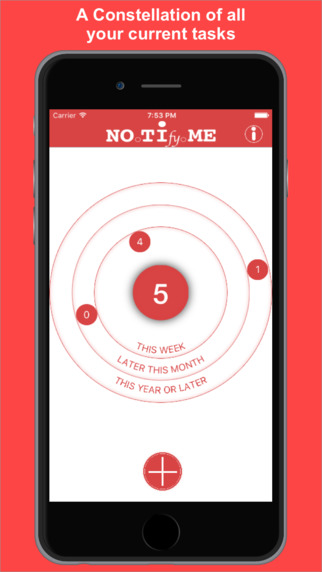
The Constellation of Tasks, with its concentric circles, will allow you to plan out your schedule for not just this week or month, but an entire year. And the best part - you can access your tasks even offline! This means that you can no longer blame your faulty Internet for not meeting a deadline!
When it comes to the design, the look and the feel of NO.Tify.ME have both been made to provide for what the user needs. It is colorful and funky and cool to play with, while at the same time providing a simple user interface that is extremely easy to navigate. You have your tasks, your notes, your schedules and everything at the touch of your fingertip!
As an app that receives regular updates from its creators as per its customers' preferences, NO.Tify.ME is free to download and is available on both Apple and Android stores! So go ahead and download it - if you have a short memory, if you are too busy to remember a deadline or just need a push to get things done, this virtual task master will help you finish all work on time!
Device Requirements:
* iPhone, iPad, and iPod touch
* Requires iOS 9.0 or later
* Universal Application
* 11.0 MB
Pricing and Availability:
NO.Tify.ME 1.4 is free, and is available worldwide through the App Store in the Productivity category. An Android version is also available through Google Play.
NO.TIfy.ME 1.4: http://no.tify.me/
Download from iTunes: https://itunes.apple.com/app/id1072068530
Download from Google Play: https://play.google.com/store/apps/details?id=com.scalaweb.notifyme
Screenshot: http://a2.mzstatic.com/us/r30/Purple18/v4/6b/83/80/6b8380ca-bb1b-16d9-c05a-5c98a6233711/screen322x572.jpeg
App Icon: http://a3.mzstatic.com/us/r30/Purple1/v4/9c/65/88/9c658871-800d-8efa-a78f-24c1547c4e27/icon175x175.png
Scala Web Ltd is based in Romania. Offering creative solutions to make daily life easy. Scala Web produces lifestyle based apps to provide best solutions. Our latest app NO.TIfy.ME is designed for those people who are looking a full-featured app to manage daily planning life better. All Material and Software (C) Copyright 2016 Scala Web Ltd. All Rights Reserved. Apple, the Apple logo, iPhone, iPod and iPad are registered trademarks of Apple Inc. in the U.S. and/or other countries. Other trademarks and registered trademarks may be the property of their respective owners.
*******
Link To Article: http://prmac.com/release-id-79951.htm
*******
---------------------------------------------------------------------------------
Note that you can alter delivered distributions at any time.
Login to your account on prMac to alter your channel selection, or to opt-out at any time.
Virtual Task Master And Manager Will Make Sure Your Work is Completed - Published on 07/30/16
Scala Web Ltd announces the availability of NO.Tify.ME 1.4, their task manager app for iOS and Android devices. NO.TIfy.ME is designed for those people who are looking a full-featured app to manage daily planning life better. It is a super simple to-do list, reminder and task manager application that helps you to get usual stuff on right time. Its available free of cost in the App Store and Google Play.
Romania - Scala Web Ltd is proud to announce the availability of NO.Tify.ME 1.4, their task manager app for iPhone, iPad, iPod touch, and Android devices. NO.Tify.ME is an app that has been designed with the sole purpose of making sure that you don't end up missing a deadline or overlook a task to be completed in the course of your too-bust schedule! As the name suggests, the app will send you notifications and reminders until you complete your work - you're never again going to forget a deadline or a due date.
The app gives you a number of interesting features; as a virtual task manager, it sends you regular alerts and notifications as and when a deadline crops up, so long as you set yourself the reminder! All you must do is set the reminder for the date and the time you need a notification for - you can even choose to receive a push notification if you want to!
for any of those tasks that you must complete on a regular basis, there is the option of picking out a scheduled tasks list - once you set the reminder, the app will send you regular reminders automatically. Let's say, for example, that you have to get your grocery shopping done every Monday. Once you set it as a scheduled task, the app will send you regular reminders over every weekend, instead of you having to set a reminder each week.
Remember, the app is a virtual alarm, which means that like any other alarm, you can also Snooze it! If the alert appears at an inopportune moment, you can go ahead and press the Snooze button - you can Snooze your task from anywhere between just one hour to a whole day! You can also set Multiple Reminders, to make sure you don't forget to get anything done, even if you're a chronic Snoozer.
The Constellation of Tasks, with its concentric circles, will allow you to plan out your schedule for not just this week or month, but an entire year. And the best part - you can access your tasks even offline! This means that you can no longer blame your faulty Internet for not meeting a deadline!
When it comes to the design, the look and the feel of NO.Tify.ME have both been made to provide for what the user needs. It is colorful and funky and cool to play with, while at the same time providing a simple user interface that is extremely easy to navigate. You have your tasks, your notes, your schedules and everything at the touch of your fingertip!
As an app that receives regular updates from its creators as per its customers' preferences, NO.Tify.ME is free to download and is available on both Apple and Android stores! So go ahead and download it - if you have a short memory, if you are too busy to remember a deadline or just need a push to get things done, this virtual task master will help you finish all work on time!
Device Requirements:
* iPhone, iPad, and iPod touch
* Requires iOS 9.0 or later
* Universal Application
* 11.0 MB
Pricing and Availability:
NO.Tify.ME 1.4 is free, and is available worldwide through the App Store in the Productivity category. An Android version is also available through Google Play.
NO.TIfy.ME 1.4: http://no.tify.me/
Download from iTunes: https://itunes.apple.com/app/id1072068530
Download from Google Play: https://play.google.com/store/apps/details?id=com.scalaweb.notifyme
Screenshot: http://a2.mzstatic.com/us/r30/Purple18/v4/6b/83/80/6b8380ca-bb1b-16d9-c05a-5c98a6233711/screen322x572.jpeg
App Icon: http://a3.mzstatic.com/us/r30/Purple1/v4/9c/65/88/9c658871-800d-8efa-a78f-24c1547c4e27/icon175x175.png

Scala Web Ltd is based in Romania. Offering creative solutions to make daily life easy. Scala Web produces lifestyle based apps to provide best solutions. Our latest app NO.TIfy.ME is designed for those people who are looking a full-featured app to manage daily planning life better. All Material and Software (C) Copyright 2016 Scala Web Ltd. All Rights Reserved. Apple, the Apple logo, iPhone, iPod and iPad are registered trademarks of Apple Inc. in the U.S. and/or other countries. Other trademarks and registered trademarks may be the property of their respective owners.
*******
Link To Article: http://prmac.com/release-id-79951.htm
*******
---------------------------------------------------------------------------------
Note that you can alter delivered distributions at any time.
Login to your account on prMac to alter your channel selection, or to opt-out at any time.
Char Menu, Thousands of Characters at the Tip of Your Mouse
A new article has been published at prMac.
Char Menu, Thousands of Characters at the Tip of Your Mouse - Published on 07/30/16
Match Software announces Char Menu for Mac OS X and Windows. Char Menu is an application for Windows and Mac OS X or macOS that stays in the background until summoned with Ctrl-Alt or a click in the corner of the screen. It then shows a window displaying a code page, where a single click will send the character to the current application in front. The app is compatible with all standard applications.
Wilmington, Delaware - Match Software is pleased to announce the release of Char Menu for Mac OS X and Windows. There are more than 300 Unicode pages available in a modern system, which encompass all present and past Foreign languages, a wide variety of semi graphic characters, pictograms, emojis, elaborate accented characters that regular keyboard drivers never access entirely.
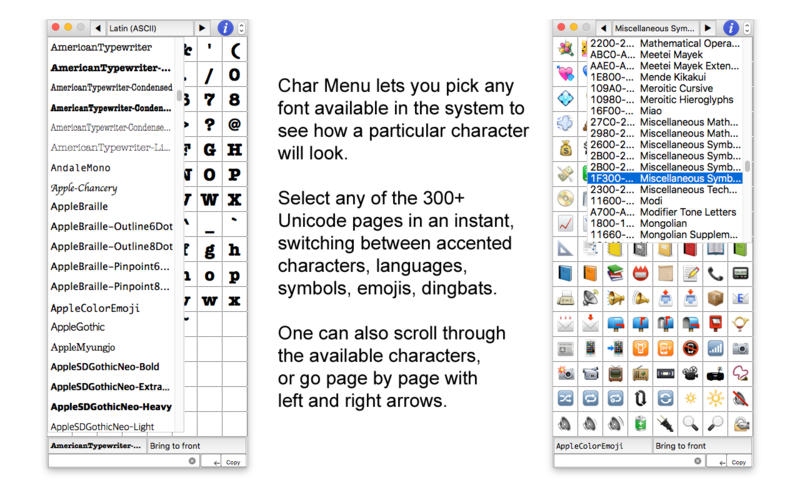
Char Menu offers complete and unlimited access to all the glyphs in all the fonts in the system, organized by Unicode page for rational access. So one can see exactly how a character will look in a particular font, and insert it in the current app with a simple click.
Easily inserting words and sentences in languages not supported by current keyboard drivers is extremely convenient and fast. Display the Unicode page for the language, and click away in Arabic, Greek, Hebrew, Japanese, Russian, you name it. For academical studies, IPA characters or epigraphic symbols, as well as elaborate mathematical notation, are just here.
For people who often need accents and ligatures (double characters), no need for cumbersome keyboard access. Click in French, German, Spanish, Portuguese, Swedish, in an instant.
System Requirements:
* OS X 10.7 or later
* 5.4 MB
Pricing and Availability:
Char Menu is $3.99, and is available worldwide through the Char Menu website. Char Menu Lite, (which does not insert characters, but copies them), is $2.99 and is available worldwide through the Mac App Store in the Graphics and Design category. A Windows version is also available through the Char Menu website.
Char Menu: http://CharMenu.com
Purchase: https://www.paypal.com/cgi-bin/webscr?cmd=_s-xclick&hosted_button_id=9MTR97735ZK8Q
Purchase and Download (MAS): https://itunes.apple.com/app/char-menu-lite/id1135840972
Direct Download: http://charmenu.com/eval/CharMenuTrial.dmg
Screenshot: http://a1.mzstatic.com/us/r30/Purple18/v4/d4/c2/c5/d4c2c5a0-3e79-4267-b6bd-9d97b3c1987e/screen800x500.jpeg
Application Icon: http://a3.mzstatic.com/us/r30/Purple30/v4/21/f2/a2/21f2a289-ae41-768e-9148-1fcd697eaf76/icon256.png
Match Software was founded in 1987 by Michel Bujardet, with the goal of providing fonts and fonts utilities to both PC and Mac users. It is located in Wilmington, Delaware. Match Software offers a collection of exclusive fonts for handwriting, calligraphy, dingbats, decorative, and pure typography. The School Fonts division supplies fine fonts to teach and learn handwriting for D'Nealian and Zaner-Bloser methods. Numerous schools from around the world are using them. Match Software also supplies especially crafted MICR fonts to print magnetic information at the bottom of checks as well as calibration software, and MICR verification and positioning gauges. The MICR E13B and CMC-7 fonts have been selected by national and regional banks throughout the world. All Material and Software (C) Copyright 2016 Match Software. All Rights Reserved. Apple, the Apple logo, macOS and Macintosh are registered trademarks of Apple Inc. in the U.S. and/or other countries. Other trademarks and
registered trademarks may be the property of their respective owners.
*******
Link To Article: http://prmac.com/release-id-79950.htm
*******
---------------------------------------------------------------------------------
Note that you can alter delivered distributions at any time.
Login to your account on prMac to alter your channel selection, or to opt-out at any time.
Char Menu, Thousands of Characters at the Tip of Your Mouse - Published on 07/30/16
Match Software announces Char Menu for Mac OS X and Windows. Char Menu is an application for Windows and Mac OS X or macOS that stays in the background until summoned with Ctrl-Alt or a click in the corner of the screen. It then shows a window displaying a code page, where a single click will send the character to the current application in front. The app is compatible with all standard applications.
Wilmington, Delaware - Match Software is pleased to announce the release of Char Menu for Mac OS X and Windows. There are more than 300 Unicode pages available in a modern system, which encompass all present and past Foreign languages, a wide variety of semi graphic characters, pictograms, emojis, elaborate accented characters that regular keyboard drivers never access entirely.
Char Menu offers complete and unlimited access to all the glyphs in all the fonts in the system, organized by Unicode page for rational access. So one can see exactly how a character will look in a particular font, and insert it in the current app with a simple click.
Easily inserting words and sentences in languages not supported by current keyboard drivers is extremely convenient and fast. Display the Unicode page for the language, and click away in Arabic, Greek, Hebrew, Japanese, Russian, you name it. For academical studies, IPA characters or epigraphic symbols, as well as elaborate mathematical notation, are just here.
For people who often need accents and ligatures (double characters), no need for cumbersome keyboard access. Click in French, German, Spanish, Portuguese, Swedish, in an instant.
System Requirements:
* OS X 10.7 or later
* 5.4 MB
Pricing and Availability:
Char Menu is $3.99, and is available worldwide through the Char Menu website. Char Menu Lite, (which does not insert characters, but copies them), is $2.99 and is available worldwide through the Mac App Store in the Graphics and Design category. A Windows version is also available through the Char Menu website.
Char Menu: http://CharMenu.com
Purchase: https://www.paypal.com/cgi-bin/webscr?cmd=_s-xclick&hosted_button_id=9MTR97735ZK8Q
Purchase and Download (MAS): https://itunes.apple.com/app/char-menu-lite/id1135840972
Direct Download: http://charmenu.com/eval/CharMenuTrial.dmg
Screenshot: http://a1.mzstatic.com/us/r30/Purple18/v4/d4/c2/c5/d4c2c5a0-3e79-4267-b6bd-9d97b3c1987e/screen800x500.jpeg
Application Icon: http://a3.mzstatic.com/us/r30/Purple30/v4/21/f2/a2/21f2a289-ae41-768e-9148-1fcd697eaf76/icon256.png

Match Software was founded in 1987 by Michel Bujardet, with the goal of providing fonts and fonts utilities to both PC and Mac users. It is located in Wilmington, Delaware. Match Software offers a collection of exclusive fonts for handwriting, calligraphy, dingbats, decorative, and pure typography. The School Fonts division supplies fine fonts to teach and learn handwriting for D'Nealian and Zaner-Bloser methods. Numerous schools from around the world are using them. Match Software also supplies especially crafted MICR fonts to print magnetic information at the bottom of checks as well as calibration software, and MICR verification and positioning gauges. The MICR E13B and CMC-7 fonts have been selected by national and regional banks throughout the world. All Material and Software (C) Copyright 2016 Match Software. All Rights Reserved. Apple, the Apple logo, macOS and Macintosh are registered trademarks of Apple Inc. in the U.S. and/or other countries. Other trademarks and
registered trademarks may be the property of their respective owners.
*******
Link To Article: http://prmac.com/release-id-79950.htm
*******
---------------------------------------------------------------------------------
Note that you can alter delivered distributions at any time.
Login to your account on prMac to alter your channel selection, or to opt-out at any time.
LastThink Releases Barbados TV Online 4.5 for iOS
A new article has been published at prMac.
LastThink Releases Barbados TV Online 4.5 for iOS - Published on 07/30/16
LastThink announces Barbados TV Online 4.5, the update to their highly customizable TV application for iOS devices. Anyone can directly access their favorite TV channel and watch diverse films, news, programs from their iPad, iPhone and iPod touch anywhere and anytime. Vibes are smart TV and movie playlists. Users can easily record their favorite films, news, talk shows, programs and more. Users can also share what they are watching via Facebook.
Yerevan, Armenia - LastThink is proud to announce the release of Barbados TV Online 4.5, the important update to their highly customizable TV application developed for iPhone, iPad, and iPod touch devices. Users can directly access their favorite TV channel and watch diverse films, news, programs from their iPad, iPhone and iPod touch anywhere and anytime.
Features:
* Navigating album photos by sliding your finger right or left on the screen
* Change the device you are streaming the picture to, by taping on the Play button in the upper right corner of your iPad's screen and selecting a desired device
* Screening and shooting any moment of your preferred TV program or film you like
* Altering the boring parts and moving straight to the best part at once - Filter by HD-only and favorite channels
* Rotating channels easily by a mere touch on your screen
* Organize your favorite TV shows, sport teams, movies, and actors and find where you can watch them - on TV and on demand
* Recording your favorite films, news, Talk Shows, programs and etc.
* Sharing what you're watching via Facebook, Twitter, YouTube, Dropbox, email and more - Vibes are smart TV and movie playlists
* The highest quality even with the lowest Internet and HD quality with the normal Internet - You can watch TV channels in HD level
* Editing and cropping videos into smaller parts. In addition to, you can take videos of your favorite program
* Capturing the funniest and most interesting moments of what you are watching with the trim tool
* Searching the content across streaming and broadcast services
* Discovering more than 100 channels of great entertainment beyond the Online Barbados TV app right on your device's touchscreen interface
We have selected data from the internet and if any assembly or constitution doesn't want us to show the content of the unit, please recommend us to remove it. We follow TV regulations and adjustments and we select original TV content data without artificial editions. If you however experience any issues, please do not hesitate to contact us if you'd like to share your experience with live TV channels, or provide suggestions on how we could improve the product further. We will be more than happy to get in touch.
Device Requirements:
* iPhone, iPad, and iPod touch
* Optimized for iPhone 5, iPhone 6, and iPhone 6 Plus
* Requires iOS 6.0 or later
* Universal Application
* 35.7 MB
Pricing and Availability:
Barbados TV Online 4.5 is free and is available worldwide exclusively through the App Store in the Entertainment category.
LastThink: http://lastthink.com/
Barbados TV Online 4.5: https://www.facebook.com/Barbados-TV-Live-263086810713058
Direct Download Link: https://itunes.apple.com/app/barbados-tv-online/id1115104616
Screenshot: http://a4.mzstatic.com/us/r30/Purple20/v4/66/b7/47/66b74741-9982-22cc-729a-d90d991bb82a/screen322x572.jpeg
App Icon: http://a1.mzstatic.com/us/r30/Purple20/v4/6e/6e/5c/6e6e5c58-ce72-94d0-6fde-4746caffbe03/icon175x175.jpeg
LastThink is an IT company with a focus on mobile development. It has extended its list of services since 2012 to offer high-end business process management, system integration, as well as up-to-date communication solutions. LastThink's mission is to deliver maximum business value to its customers by designing, developing, implementing and maintaining efficient and high quality software solutions aligned with their most essential business needs. Their team will always do its best to meet client expectations. All Material and Software Copyright (C) 2016 LastThink LLC. All Rights Reserved. Apple, the Apple logo, iPhone, iPad and iPod are registered trademarks of Apple Inc. in the U.S. and/or other countries.
*******
Link To Article: http://prmac.com/release-id-79949.htm
*******
---------------------------------------------------------------------------------
Note that you can alter delivered distributions at any time.
Login to your account on prMac to alter your channel selection, or to opt-out at any time.
LastThink Releases Barbados TV Online 4.5 for iOS - Published on 07/30/16
LastThink announces Barbados TV Online 4.5, the update to their highly customizable TV application for iOS devices. Anyone can directly access their favorite TV channel and watch diverse films, news, programs from their iPad, iPhone and iPod touch anywhere and anytime. Vibes are smart TV and movie playlists. Users can easily record their favorite films, news, talk shows, programs and more. Users can also share what they are watching via Facebook.
Yerevan, Armenia - LastThink is proud to announce the release of Barbados TV Online 4.5, the important update to their highly customizable TV application developed for iPhone, iPad, and iPod touch devices. Users can directly access their favorite TV channel and watch diverse films, news, programs from their iPad, iPhone and iPod touch anywhere and anytime.
Features:
* Navigating album photos by sliding your finger right or left on the screen
* Change the device you are streaming the picture to, by taping on the Play button in the upper right corner of your iPad's screen and selecting a desired device
* Screening and shooting any moment of your preferred TV program or film you like
* Altering the boring parts and moving straight to the best part at once - Filter by HD-only and favorite channels
* Rotating channels easily by a mere touch on your screen
* Organize your favorite TV shows, sport teams, movies, and actors and find where you can watch them - on TV and on demand
* Recording your favorite films, news, Talk Shows, programs and etc.
* Sharing what you're watching via Facebook, Twitter, YouTube, Dropbox, email and more - Vibes are smart TV and movie playlists
* The highest quality even with the lowest Internet and HD quality with the normal Internet - You can watch TV channels in HD level
* Editing and cropping videos into smaller parts. In addition to, you can take videos of your favorite program
* Capturing the funniest and most interesting moments of what you are watching with the trim tool
* Searching the content across streaming and broadcast services
* Discovering more than 100 channels of great entertainment beyond the Online Barbados TV app right on your device's touchscreen interface
We have selected data from the internet and if any assembly or constitution doesn't want us to show the content of the unit, please recommend us to remove it. We follow TV regulations and adjustments and we select original TV content data without artificial editions. If you however experience any issues, please do not hesitate to contact us if you'd like to share your experience with live TV channels, or provide suggestions on how we could improve the product further. We will be more than happy to get in touch.
Device Requirements:
* iPhone, iPad, and iPod touch
* Optimized for iPhone 5, iPhone 6, and iPhone 6 Plus
* Requires iOS 6.0 or later
* Universal Application
* 35.7 MB
Pricing and Availability:
Barbados TV Online 4.5 is free and is available worldwide exclusively through the App Store in the Entertainment category.
LastThink: http://lastthink.com/
Barbados TV Online 4.5: https://www.facebook.com/Barbados-TV-Live-263086810713058
Direct Download Link: https://itunes.apple.com/app/barbados-tv-online/id1115104616
Screenshot: http://a4.mzstatic.com/us/r30/Purple20/v4/66/b7/47/66b74741-9982-22cc-729a-d90d991bb82a/screen322x572.jpeg

App Icon: http://a1.mzstatic.com/us/r30/Purple20/v4/6e/6e/5c/6e6e5c58-ce72-94d0-6fde-4746caffbe03/icon175x175.jpeg

LastThink is an IT company with a focus on mobile development. It has extended its list of services since 2012 to offer high-end business process management, system integration, as well as up-to-date communication solutions. LastThink's mission is to deliver maximum business value to its customers by designing, developing, implementing and maintaining efficient and high quality software solutions aligned with their most essential business needs. Their team will always do its best to meet client expectations. All Material and Software Copyright (C) 2016 LastThink LLC. All Rights Reserved. Apple, the Apple logo, iPhone, iPad and iPod are registered trademarks of Apple Inc. in the U.S. and/or other countries.
*******
Link To Article: http://prmac.com/release-id-79949.htm
*******
---------------------------------------------------------------------------------
Note that you can alter delivered distributions at any time.
Login to your account on prMac to alter your channel selection, or to opt-out at any time.
LastThink Releases Online Tunisia TV 4.5 for iOS
A new article has been published at prMac.
LastThink Releases Online Tunisia TV 4.5 for iOS - Published on 07/29/16
LastThink announces Online Tunisia TV 4.5, the important update to their highly customizable TV application for iOS devices. Anyone can directly access their favorite TV channel and watch diverse films, news, programs from their iPad, iPhone and iPod touch anywhere and anytime. Vibes are smart TV and movie playlists. Users can easily record their favorite films, news, talk shows, programs and more. Users can also share what they are watching via Facebook. Version 4.5 brings bug fixes.
Yerevan, Armenia - LastThink is proud to announce the release of Online Tunisia TV 4.5, the important update to their highly customizable TV application developed for iPhone, iPad, and iPod touch devices. Users can directly access their favorite TV channel and watch diverse films, news, programs from their iPad, iPhone and iPod touch anywhere and anytime.
Features:
* Navigating album photos by sliding your finger right or left on the screen
* Change the device you are streaming the picture to, by taping on the Play button in the upper right corner of your iPad's screen and selecting a desired device
* Screening and shooting any moment of your preferred TV program or film you like
* Altering the boring parts and moving straight to the best part at once - Filter by HD-only and favorite channels
* Rotating channels easily by a mere touch on your screen
* Organize your favorite TV shows, sport teams, movies, and actors and find where you can watch them - on TV and on demand
* Recording your favorite films, news, Talk Shows, programs and etc.
* Sharing what you're watching via Facebook, Twitter, YouTube, Dropbox, email and more - Vibes are smart TV and movie playlists
* The highest quality even with the lowest Internet and HD quality with the normal Internet - You can watch TV channels in HD level
* Editing and cropping videos into smaller parts. In addition to, you can take videos of your favorite program
* Capturing the funniest and most interesting moments of what you are watching with the trim tool
* Searching the content across streaming and broadcast services
* Discovering more than 100 channels of great entertainment beyond the Online TunisiaTV app right on your device's touchscreen interface
We have selected data from the internet and if any assembly or constitution doesn't want us to show the content of the unit, please recommend us to remove it. We follow TV regulations and adjustments and we select original TV content data without artificial editions. If you however experience any issues, please do not hesitate to contact us if you'd like to share your experience with live TV channels, or provide suggestions on how we could improve the product further. We will be more than happy to get in touch.
Device Requirements:
* iPhone, iPad, and iPod touch
* Optimized for iPhone 5, iPhone 6, and iPhone 6 Plus
* Requires iOS 6.0 or later
* Universal Application
* 35.7 MB
Pricing and Availability:
Online Tunisia TV 4.5 is free and is available worldwide exclusively through the App Store in the Entertainment category.
LastThink: http://lastthink.com/
Online Tunisia TV 4.5: https://www.facebook.com/Online-Tunisia-TV-Community-168383660194911
Download from iTunes: https://itunes.apple.com/app/online-tunisia-tv/id1074214193
Screenshot: http://a4.mzstatic.com/us/r30/Purple49/v4/80/0a/cb/800acb46-0527-40c9-227d-574abc440415/screen322x572.jpeg
App Icon: http://a5.mzstatic.com/us/r30/Purple20/v4/86/63/df/8663df17-cd42-feba-9e05-1a2203fe485f/icon175x175.png
LastThink is an IT company with a focus on mobile development. It has extended its list of services since 2012 to offer high-end business process management, system integration, as well as up-to-date communication solutions. LastThink's mission is to deliver maximum business value to its customers by designing, developing, implementing and maintaining efficient and high quality software solutions aligned with their most essential business needs. Their team will always do its best to meet client expectations. All Material and Software Copyright (C) 2016 LastThink LLC. All Rights Reserved. Apple, the Apple logo, iPhone, iPad and iPod are registered trademarks of Apple Inc. in the U.S. and/or other countries.
*******
Link To Article: http://prmac.com/release-id-79948.htm
*******
---------------------------------------------------------------------------------
Note that you can alter delivered distributions at any time.
Login to your account on prMac to alter your channel selection, or to opt-out at any time.
LastThink Releases Online Tunisia TV 4.5 for iOS - Published on 07/29/16
LastThink announces Online Tunisia TV 4.5, the important update to their highly customizable TV application for iOS devices. Anyone can directly access their favorite TV channel and watch diverse films, news, programs from their iPad, iPhone and iPod touch anywhere and anytime. Vibes are smart TV and movie playlists. Users can easily record their favorite films, news, talk shows, programs and more. Users can also share what they are watching via Facebook. Version 4.5 brings bug fixes.
Yerevan, Armenia - LastThink is proud to announce the release of Online Tunisia TV 4.5, the important update to their highly customizable TV application developed for iPhone, iPad, and iPod touch devices. Users can directly access their favorite TV channel and watch diverse films, news, programs from their iPad, iPhone and iPod touch anywhere and anytime.
Features:
* Navigating album photos by sliding your finger right or left on the screen
* Change the device you are streaming the picture to, by taping on the Play button in the upper right corner of your iPad's screen and selecting a desired device
* Screening and shooting any moment of your preferred TV program or film you like
* Altering the boring parts and moving straight to the best part at once - Filter by HD-only and favorite channels
* Rotating channels easily by a mere touch on your screen
* Organize your favorite TV shows, sport teams, movies, and actors and find where you can watch them - on TV and on demand
* Recording your favorite films, news, Talk Shows, programs and etc.
* Sharing what you're watching via Facebook, Twitter, YouTube, Dropbox, email and more - Vibes are smart TV and movie playlists
* The highest quality even with the lowest Internet and HD quality with the normal Internet - You can watch TV channels in HD level
* Editing and cropping videos into smaller parts. In addition to, you can take videos of your favorite program
* Capturing the funniest and most interesting moments of what you are watching with the trim tool
* Searching the content across streaming and broadcast services
* Discovering more than 100 channels of great entertainment beyond the Online TunisiaTV app right on your device's touchscreen interface
We have selected data from the internet and if any assembly or constitution doesn't want us to show the content of the unit, please recommend us to remove it. We follow TV regulations and adjustments and we select original TV content data without artificial editions. If you however experience any issues, please do not hesitate to contact us if you'd like to share your experience with live TV channels, or provide suggestions on how we could improve the product further. We will be more than happy to get in touch.
Device Requirements:
* iPhone, iPad, and iPod touch
* Optimized for iPhone 5, iPhone 6, and iPhone 6 Plus
* Requires iOS 6.0 or later
* Universal Application
* 35.7 MB
Pricing and Availability:
Online Tunisia TV 4.5 is free and is available worldwide exclusively through the App Store in the Entertainment category.
LastThink: http://lastthink.com/
Online Tunisia TV 4.5: https://www.facebook.com/Online-Tunisia-TV-Community-168383660194911
Download from iTunes: https://itunes.apple.com/app/online-tunisia-tv/id1074214193
Screenshot: http://a4.mzstatic.com/us/r30/Purple49/v4/80/0a/cb/800acb46-0527-40c9-227d-574abc440415/screen322x572.jpeg

App Icon: http://a5.mzstatic.com/us/r30/Purple20/v4/86/63/df/8663df17-cd42-feba-9e05-1a2203fe485f/icon175x175.png

LastThink is an IT company with a focus on mobile development. It has extended its list of services since 2012 to offer high-end business process management, system integration, as well as up-to-date communication solutions. LastThink's mission is to deliver maximum business value to its customers by designing, developing, implementing and maintaining efficient and high quality software solutions aligned with their most essential business needs. Their team will always do its best to meet client expectations. All Material and Software Copyright (C) 2016 LastThink LLC. All Rights Reserved. Apple, the Apple logo, iPhone, iPad and iPod are registered trademarks of Apple Inc. in the U.S. and/or other countries.
*******
Link To Article: http://prmac.com/release-id-79948.htm
*******
---------------------------------------------------------------------------------
Note that you can alter delivered distributions at any time.
Login to your account on prMac to alter your channel selection, or to opt-out at any time.
Powerful Children's App Review Database (CTREX) Gets Upgrade
A new article has been published at prMac.
Powerful Children's App Review Database (CTREX) Gets Upgrade - Published on 07/29/16
Children's Technology Review has released CTREX 3.0, the third of four planned versions of Children's Technology Review Exchange. Children's Technology Review is the most up-to-date online repository of reviews of education software and hardware. Besides better speed, there are themed hubs for teachers, parents & librarians plus a publisher directory, as set of rubrics for rating products and the ability to export review lists. CTREX is an attempt to bring measurement science to media curation.
Flemington, New Jersey - Children's Technology Review has released CTREX 3.0, the third of four planned versions of CTREX (Children's Technology Review Exchange). Designed to help teachers, parents and librarians choose interactive media products for children aged birth-to 15-years, CTREX is currently the largest, most comprehensive online database of educational reviews of children's interactive media (apps, toys, video games and web sites). CTREX works with any mainstream browser, and is available by subscription, for $30 per year (using the promo code "summer"). Note, the regular subscription price is $60, that's 6 months free.
New Features:
* Flex Rubrics: Powerful tools for evaluating diverse types of interactive media products, using an adaptable set of criteria. CTR has created an array of rubrics comprised of custom-picked Quality Attributes designed to fit various genres. CTR Subscribers can evaluate products with the Flex Rubric on CTREX to generate ratings to accompany their comments about a particular product. In this way, they become part of the exchange.
* Publisher Profiles: Useful information on who is behind each product, along with a listing of products the publisher makes. Unlike other review services you are free to jump directly to the publishers website for even more source information.
* Hubs and Bookmarking: Lets different categories of visitors quickly find areas of interest. The new hubs include hand picked resources for Families, Libraries, Schools, ECE (Early Childhood Education) and Publishers which makes finding what you need faster and easier. Reviews can now be bookmarked and saved for exporting or for future reference.
An Updated Server gives CTREX more speed and bandwidth, to handle more searches during peak hours.
To Start A Subscription:
Save 50% off the "Pro" Subscription by entering "summer" on the subscription form.
CTREX database: http://ctrex.us
CTREX Librarians hub: http://reviews.childrenstech.com/ctr/libraries.php?category=Library+Apps&quickfind=Library+Apps&page=1
Apps for a road trip for kids: http://reviews.childrenstech.com/ctr/home.php?search=&age=&subject=&platform=&category=Road+Trip&sort=new&order=desc&company=&issue=&weekly=&page=
Select apps and toys to help children learn to code: http://reviews.childrenstech.com/ctr/home.php?search=&age=&subject=&platform=&category=Coding&sort=new&order=desc&company=&issue=&weekly=&page=
Start a subscription: http://www.childrenstech.com/subscribe
July issue of CTR (free sample, in PDF): http://childrenstech.com/files/2016/07/CTR196-Jul16.pdf
Children's Technology Review Exchange is published by Active Learning Associates, Inc. 120 Main Street, Flemington NJ 08822. Started by teachers in 1993, Active Learning Associates helps parents, teachers and publishers leverage the power of interactive media for children. All Material and Software (C) Copyright 2016 Children's Technology Review. All Rights Reserved. Apple, the Apple logo, iPhone, iPod and iPad are registered trademarks of Apple Inc. in the U.S. and/or other countries. Other trademarks and registered trademarks may be the property of their respective owners.
*******
Link To Article: http://prmac.com/release-id-79947.htm
*******
---------------------------------------------------------------------------------
Note that you can alter delivered distributions at any time.
Login to your account on prMac to alter your channel selection, or to opt-out at any time.
Powerful Children's App Review Database (CTREX) Gets Upgrade - Published on 07/29/16
Children's Technology Review has released CTREX 3.0, the third of four planned versions of Children's Technology Review Exchange. Children's Technology Review is the most up-to-date online repository of reviews of education software and hardware. Besides better speed, there are themed hubs for teachers, parents & librarians plus a publisher directory, as set of rubrics for rating products and the ability to export review lists. CTREX is an attempt to bring measurement science to media curation.
Flemington, New Jersey - Children's Technology Review has released CTREX 3.0, the third of four planned versions of CTREX (Children's Technology Review Exchange). Designed to help teachers, parents and librarians choose interactive media products for children aged birth-to 15-years, CTREX is currently the largest, most comprehensive online database of educational reviews of children's interactive media (apps, toys, video games and web sites). CTREX works with any mainstream browser, and is available by subscription, for $30 per year (using the promo code "summer"). Note, the regular subscription price is $60, that's 6 months free.
New Features:
* Flex Rubrics: Powerful tools for evaluating diverse types of interactive media products, using an adaptable set of criteria. CTR has created an array of rubrics comprised of custom-picked Quality Attributes designed to fit various genres. CTR Subscribers can evaluate products with the Flex Rubric on CTREX to generate ratings to accompany their comments about a particular product. In this way, they become part of the exchange.
* Publisher Profiles: Useful information on who is behind each product, along with a listing of products the publisher makes. Unlike other review services you are free to jump directly to the publishers website for even more source information.
* Hubs and Bookmarking: Lets different categories of visitors quickly find areas of interest. The new hubs include hand picked resources for Families, Libraries, Schools, ECE (Early Childhood Education) and Publishers which makes finding what you need faster and easier. Reviews can now be bookmarked and saved for exporting or for future reference.
An Updated Server gives CTREX more speed and bandwidth, to handle more searches during peak hours.
To Start A Subscription:
Save 50% off the "Pro" Subscription by entering "summer" on the subscription form.
CTREX database: http://ctrex.us
CTREX Librarians hub: http://reviews.childrenstech.com/ctr/libraries.php?category=Library+Apps&quickfind=Library+Apps&page=1
Apps for a road trip for kids: http://reviews.childrenstech.com/ctr/home.php?search=&age=&subject=&platform=&category=Road+Trip&sort=new&order=desc&company=&issue=&weekly=&page=
Select apps and toys to help children learn to code: http://reviews.childrenstech.com/ctr/home.php?search=&age=&subject=&platform=&category=Coding&sort=new&order=desc&company=&issue=&weekly=&page=
Start a subscription: http://www.childrenstech.com/subscribe
July issue of CTR (free sample, in PDF): http://childrenstech.com/files/2016/07/CTR196-Jul16.pdf
Children's Technology Review Exchange is published by Active Learning Associates, Inc. 120 Main Street, Flemington NJ 08822. Started by teachers in 1993, Active Learning Associates helps parents, teachers and publishers leverage the power of interactive media for children. All Material and Software (C) Copyright 2016 Children's Technology Review. All Rights Reserved. Apple, the Apple logo, iPhone, iPod and iPad are registered trademarks of Apple Inc. in the U.S. and/or other countries. Other trademarks and registered trademarks may be the property of their respective owners.
*******
Link To Article: http://prmac.com/release-id-79947.htm
*******
---------------------------------------------------------------------------------
Note that you can alter delivered distributions at any time.
Login to your account on prMac to alter your channel selection, or to opt-out at any time.
QuickerTek Offers 20% Off of Solar Panel Chargers
A new article has been published at prMac.
QuickerTek Offers 20% Off of Solar Panel Chargers - Published on 07/29/16
QuickerTek offers 20% off on their 62 Watt Solar Juicz Solar Panel for MacBooks and iDevices and their 30 Watt Type-C MacBook Solar Panel for 2015-2016 Type-C MacBooks from August 1st-31st. The 62 Watt Solar Juicz Solar Panel packs an impressive improvement in efficiency of more than 39% over the previous Solar Juicz model. The 30 Watt Type-C MacBook Solar Panel is the only in the world to feature the USB 3.1 adaptor cable which powers and charges the 2015-2016 Apple 12-inch MacBook.
Wichita, Kansas - QuickerTek, the technology leader in mobile power and wireless networking products for Apple computers, is pleased to offer 20% off of their 62 Watt Solar Juicz and 30 Watt 2015-2016 Type-C MacBook solar power chargers.
The 62 Watt Solar Juicz Solar Panel packs an impressive improvement in efficiency of more than 39% over the previous Solar Juicz model as a direct result of using new technology, Copper Indium Gallium (CIGS). Faster charge time is provided by higher wattage (62 Watts vs 55 Watts of previous model). Of course, users can charge the laptop battery while using the Solar Juicz at the same time - something not possible using other solar products. This product comes ready to use right out of the box, including an Apple MagSafe 1 or 2 power cable, allowing it to charge a wide variety of mobile devices from Apple as well as your MacBook.
The 30 Watt Type-C MacBook Solar Panel is the only in the world to feature the USB 3.1 adaptor cable which powers and charges the 2015-2016 Apple 12-inch MacBook. New MacBook users are no longer limited where they choose to enjoy their computer, and, gain the satisfaction of protecting the environment. This new solar product powers the MacBook battery for use even while charging the internal battery. Other photovoltaic products can't offer this same advanced capability. The Type-C MacBook Solar Panel is made with thin film photovoltaic creating a lightweight, foldable design. At only a hair over 11 inches x 6.5 inches folded, and at only 1.3 pounds, it is light and mobile user ready. It is also powerful enough to charge the MacBook as quickly as an Apple AC charger, minimizing downtime.
From August 1st to 31st, QuickerTek is offering 20% off of these products, shaving $240 off of the cost of the 62 Watt Solar Juicz Solar Panel and $60 off of the cost of the 30 Watt 2015-2016 Type-C Solar Panel.
QuickerTek: http://www.quickertek.com/
62 Watt Solar Juicz Solar Panel: http://www.quickertek.com/products/solarJuicz.html
30 Watt Type-C MacBook Solar Panel: http://www.quickertek.com/products/cjuicz.html
QuickerTek has been a recognized leading innovator of power/solar products, antennas and RF products for the Apple community. QuickerTek products can be purchased online and from authorized resellers. Copyright (C) 2009-2016 QuickerTek. All Rights Reserved. Apple, and the Apple logo, and MacBook Pro are registered trademarks of Apple Computer Inc. in the U.S. and/or other countries.
*******
Link To Article: http://prmac.com/release-id-79946.htm
*******
---------------------------------------------------------------------------------
Note that you can alter delivered distributions at any time.
Login to your account on prMac to alter your channel selection, or to opt-out at any time.
QuickerTek Offers 20% Off of Solar Panel Chargers - Published on 07/29/16
QuickerTek offers 20% off on their 62 Watt Solar Juicz Solar Panel for MacBooks and iDevices and their 30 Watt Type-C MacBook Solar Panel for 2015-2016 Type-C MacBooks from August 1st-31st. The 62 Watt Solar Juicz Solar Panel packs an impressive improvement in efficiency of more than 39% over the previous Solar Juicz model. The 30 Watt Type-C MacBook Solar Panel is the only in the world to feature the USB 3.1 adaptor cable which powers and charges the 2015-2016 Apple 12-inch MacBook.
Wichita, Kansas - QuickerTek, the technology leader in mobile power and wireless networking products for Apple computers, is pleased to offer 20% off of their 62 Watt Solar Juicz and 30 Watt 2015-2016 Type-C MacBook solar power chargers.
The 62 Watt Solar Juicz Solar Panel packs an impressive improvement in efficiency of more than 39% over the previous Solar Juicz model as a direct result of using new technology, Copper Indium Gallium (CIGS). Faster charge time is provided by higher wattage (62 Watts vs 55 Watts of previous model). Of course, users can charge the laptop battery while using the Solar Juicz at the same time - something not possible using other solar products. This product comes ready to use right out of the box, including an Apple MagSafe 1 or 2 power cable, allowing it to charge a wide variety of mobile devices from Apple as well as your MacBook.
The 30 Watt Type-C MacBook Solar Panel is the only in the world to feature the USB 3.1 adaptor cable which powers and charges the 2015-2016 Apple 12-inch MacBook. New MacBook users are no longer limited where they choose to enjoy their computer, and, gain the satisfaction of protecting the environment. This new solar product powers the MacBook battery for use even while charging the internal battery. Other photovoltaic products can't offer this same advanced capability. The Type-C MacBook Solar Panel is made with thin film photovoltaic creating a lightweight, foldable design. At only a hair over 11 inches x 6.5 inches folded, and at only 1.3 pounds, it is light and mobile user ready. It is also powerful enough to charge the MacBook as quickly as an Apple AC charger, minimizing downtime.
From August 1st to 31st, QuickerTek is offering 20% off of these products, shaving $240 off of the cost of the 62 Watt Solar Juicz Solar Panel and $60 off of the cost of the 30 Watt 2015-2016 Type-C Solar Panel.
QuickerTek: http://www.quickertek.com/
62 Watt Solar Juicz Solar Panel: http://www.quickertek.com/products/solarJuicz.html
30 Watt Type-C MacBook Solar Panel: http://www.quickertek.com/products/cjuicz.html
QuickerTek has been a recognized leading innovator of power/solar products, antennas and RF products for the Apple community. QuickerTek products can be purchased online and from authorized resellers. Copyright (C) 2009-2016 QuickerTek. All Rights Reserved. Apple, and the Apple logo, and MacBook Pro are registered trademarks of Apple Computer Inc. in the U.S. and/or other countries.
*******
Link To Article: http://prmac.com/release-id-79946.htm
*******
---------------------------------------------------------------------------------
Note that you can alter delivered distributions at any time.
Login to your account on prMac to alter your channel selection, or to opt-out at any time.
Subscribe to:
Posts (Atom)