A new article has been published at prMac.
Taxi Sim 2016 Puts Users Behind the Wheel in Cities Around the World - Published on 08/23/16
Ovilex Soft today announces Taxi Sim 2016, an update to their ultra-realistic 3D driving simulator app for iOS and Android devices. Taxi Sim 2016 transforms users into taxi drivers, who must safely transport their passengers to various destinations. The app features a variety of famous taxis, richly detailed interiors, tilt & touch steering, dashboard buttons and turn signals,realistic engine sounds & weather conditions, three game modes, and more. Version 1.2.0 adds a new map and a new vehicle.
Cluj-napoca, Romania - When Ovilex Soft launches a new 3D driving simulation app, it is literally a global event - just ask the company's nearly 450,000 Facebook fans who've come to expect something impressive with each release. Well, their high expectations certainly won't be disappointed when they get behind the virtual wheel of Taxi Sim 2016.
Taxi Sim 2016 transforms users into taxi drivers, who must safely transport their passengers to various destinations. Users start by choosing from a variety of famous taxis, such as a yellow New York City cab, a black London cab, a premium German Mercedes or BMW, and several more. As they scroll through available options, users can see each vehicle's horsepower, torque, traction and weight. Next, users select where they want to spin their wheels, such as New York City, London, Frankfurt and Moscow. As expected, the level of detail is exceptional and includes famous landmarks and familiar intersections.
Once the game starts, the renowned Ovilex Soft magic takes over as users are treated to richly detailed interiors that feature tilt and touch steering, dashboard buttons and turn signals, and realistic engine sounds. There's also an incredibly lifelike manual transmission (6 gears plus reverse), and slider pedals for improved control. And while the goal is obviously to have a safe and trouble-free ride, users who veer too close to a curb or another car on the road won't be spared the wrath of the game's realistic damage system.
In terms of game play, users have three options: free ride, career and multi-player. In the free ride mode, users enjoy the experience of transporting passengers and driving through cities. In the career mode, users see if they have what it takes to earn a living. In the multi-player mode, users see how their cabbie skills stack up against others.
Other Taxi Sim 2016 special features that have already helped generate hundreds of 5-star reviews just days after hitting the App Store and Google Play include:
* Realistic weather conditions
* Realistic day/night driving
* Online leader boards and achievements
* The ability for users to request new maps and vehicles via social media
"We have been working hard on Taxi Sim 2016 for several months, and are really excited to finally launch it for our community of fans around the world," commented Marusac Alexandru of Ovilex Soft. "We have even heard from real taxi drivers who have told us they love the app, and wish it was around back when they were starting their careers!"
Device Requirements:
* iPhone, iPad, and iPod touch
* Requires iOS 8.0 or later
* 140 MB
Pricing and Availability:
Taxi Sim 2016 (v1.2.0) is Free (with in-app purchases) and available worldwide through the App Store in the Games category. There is also an Android version available on Google Play.
Taxi Sim 2016 (v1.2.0): http://www.ovilex.com/app/taxi-sim-2016/
More Info: http://apps.appshout.com/taxi-sim-2016/
Download from iTunes: https://itunes.apple.com/app/taxi-sim-2016/id1126769121
Download from Google Play: https://play.google.com/store/apps/details?id=com.ovilex.taxisim2016
YouTube Video (Demo): https://www.youtube.com/watch?v=5FKVzPq2m-c
Screenshot: http://a4.mzstatic.com/us/r30/Purple20/v4/35/e5/1f/35e51fea-6a68-5057-9fae-baffe79823f7/sc552x414.jpeg
Ovilex Soft is a new games company that focuses on making the best simulators on Google Play and the App Store. With a variety of planned future projects and continuous attention to quality control, the company will became an important developer within the simulator/racing game market. All Material and Software (C) Copyright 2016 Ovilex Soft. All Rights Reserved. Apple, the Apple logo, iPhone, iPod and iPad are registered trademarks of Apple Inc. in the U.S. and/or other countries. Other trademarks and registered trademarks may be the property of their respective owners.
*******
Link To Article: http://prmac.com/release-id-80078.htm
*******
---------------------------------------------------------------------------------
Note that you can alter delivered distributions at any time.
Login to your account on prMac to alter your channel selection, or to opt-out at any time.


BatchOutput for Microsoft PowerPoint Is Now Available on BundleHunt
A new article has been published at prMac.
BatchOutput for Microsoft PowerPoint Is Now Available on BundleHunt - Published on 08/23/16
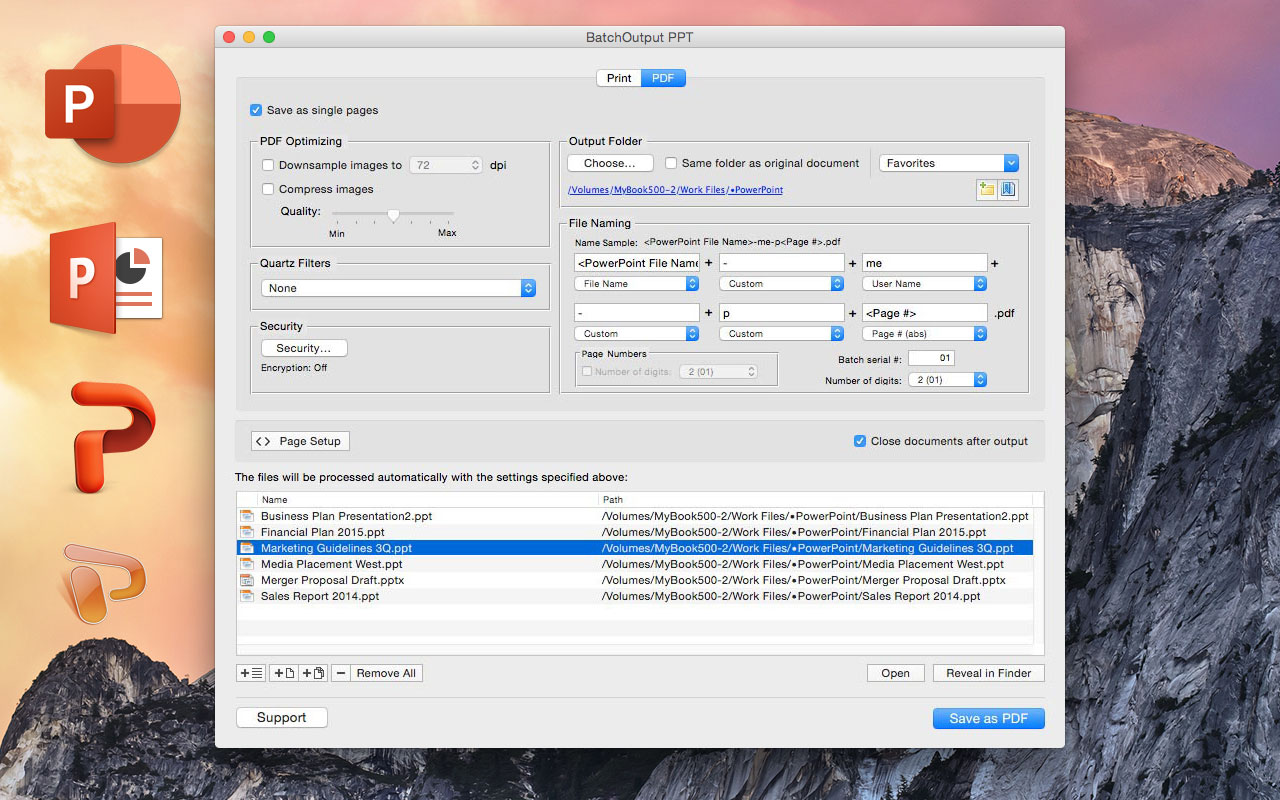
Zevrix Solutions announces that BatchOutput PPT, its output automation solution for Microsoft PowerPoint, is available on software discount site BundleHunt as part of the Summer Bundle. Using the site's unique discount concept, users can purchase BatchOutput PPT as part of a bundle of 7 top rated apps for $17 only. In addition to batch printing, the app lets users carry out automated professional PDF production directly from PowerPoint eliminating the need for time consuming post-processing.
Toronto (ON) Canada - Zevrix Solutions is proud to announce that BatchOutput PPT, its output automation solution for Microsoft PowerPoint, is available on software discount site BundleHunt as part of the Summer Bundle. Using the site's unique discount concept, users can purchase BatchOutput PPT in a bundle of 7 top rated apps for $17 only. BundleHunt is an online store that retails heavily discounted bundles of high quality software, aimed at empowering the creative community. Users can choose from 51 apps to create their own custom bundle.
In addition to batch printing, the software lets users carry out powerful professional PDF production directly from PowerPoint eliminating the need for time consuming post-processing. BatchOutput PPT is the only program on the market that brings advanced PDF and printing options right to the user's fingertips:
* Print batches of PowerPoint files to the selected printer
* Save multiple PowerPoint documents as PDF with a click of a button
* Split PowerPoint documents into single page PDF files
* Variable output file names
* Reduce PDF file size
* Optimize documents for web, print or mobile devices
* Encrypt and password-protect PDF from unauthorized copying, printing and viewing
* Change PDF color tone, brightness and other qualities
BatchOutput PPT is a part of the Zevrix BatchOutput family which also includes output automation solutions for Microsoft Word, Excel, Adobe InDesign and PDF workflows.
Pricing and Availability:
BatchOutput PPT can be purchased on BundleHunt as part of its Summer Bundle of 7 apps for $17. Trial version is also available for download. BatchOutput PPT requires Mac OS X 10.5-10.11 and Microsoft Office 2008, 2011 or 2016.
Zevrix Solutions: http://zevrix.com
BatchOutput PPT: http://bundlehunt.com
Download BatchOutput PPT: http://zevrix.com/BatchOutputOffice.dmg
Screenshot: http://zevrix.com/screenshots/bo-office/MAS/boppt-pdf-mas.jpg
Located in Toronto, Canada, Zevrix Solutions provides automation and productivity solutions for Adobe Creative Cloud and Creative Suite software, PDF workflows, graphic file diagnostics and Microsoft Office output on Mac OS. Zevrix is dedicated to help professionals increase their profits through automating everyday tasks, producing error-free documents, saving disk space and cutting production costs. For more information, visit their website. Copyright (C) 2016 Zevrix Solutions. All Rights Reserved. Other trademarks and registered trademarks may be the property of their respective owners.
*******
Link To Article: http://prmac.com/release-id-80079.htm
*******
---------------------------------------------------------------------------------
Note that you can alter delivered distributions at any time.
Login to your account on prMac to alter your channel selection, or to opt-out at any time.
BatchOutput for Microsoft PowerPoint Is Now Available on BundleHunt - Published on 08/23/16
Zevrix Solutions announces that BatchOutput PPT, its output automation solution for Microsoft PowerPoint, is available on software discount site BundleHunt as part of the Summer Bundle. Using the site's unique discount concept, users can purchase BatchOutput PPT as part of a bundle of 7 top rated apps for $17 only. In addition to batch printing, the app lets users carry out automated professional PDF production directly from PowerPoint eliminating the need for time consuming post-processing.
Toronto (ON) Canada - Zevrix Solutions is proud to announce that BatchOutput PPT, its output automation solution for Microsoft PowerPoint, is available on software discount site BundleHunt as part of the Summer Bundle. Using the site's unique discount concept, users can purchase BatchOutput PPT in a bundle of 7 top rated apps for $17 only. BundleHunt is an online store that retails heavily discounted bundles of high quality software, aimed at empowering the creative community. Users can choose from 51 apps to create their own custom bundle.
In addition to batch printing, the software lets users carry out powerful professional PDF production directly from PowerPoint eliminating the need for time consuming post-processing. BatchOutput PPT is the only program on the market that brings advanced PDF and printing options right to the user's fingertips:
* Print batches of PowerPoint files to the selected printer
* Save multiple PowerPoint documents as PDF with a click of a button
* Split PowerPoint documents into single page PDF files
* Variable output file names
* Reduce PDF file size
* Optimize documents for web, print or mobile devices
* Encrypt and password-protect PDF from unauthorized copying, printing and viewing
* Change PDF color tone, brightness and other qualities
BatchOutput PPT is a part of the Zevrix BatchOutput family which also includes output automation solutions for Microsoft Word, Excel, Adobe InDesign and PDF workflows.
Pricing and Availability:
BatchOutput PPT can be purchased on BundleHunt as part of its Summer Bundle of 7 apps for $17. Trial version is also available for download. BatchOutput PPT requires Mac OS X 10.5-10.11 and Microsoft Office 2008, 2011 or 2016.
Zevrix Solutions: http://zevrix.com
BatchOutput PPT: http://bundlehunt.com
Download BatchOutput PPT: http://zevrix.com/BatchOutputOffice.dmg
Screenshot: http://zevrix.com/screenshots/bo-office/MAS/boppt-pdf-mas.jpg
Located in Toronto, Canada, Zevrix Solutions provides automation and productivity solutions for Adobe Creative Cloud and Creative Suite software, PDF workflows, graphic file diagnostics and Microsoft Office output on Mac OS. Zevrix is dedicated to help professionals increase their profits through automating everyday tasks, producing error-free documents, saving disk space and cutting production costs. For more information, visit their website. Copyright (C) 2016 Zevrix Solutions. All Rights Reserved. Other trademarks and registered trademarks may be the property of their respective owners.
*******
Link To Article: http://prmac.com/release-id-80079.htm
*******
---------------------------------------------------------------------------------
Note that you can alter delivered distributions at any time.
Login to your account on prMac to alter your channel selection, or to opt-out at any time.
Cas Calc 3D released for iOS and tvOS - Powerful Scientific Calculator
A new article has been published at prMac.
Cas Calc 3D released for iOS and tvOS - Powerful Scientific Calculator - Published on 08/23/16
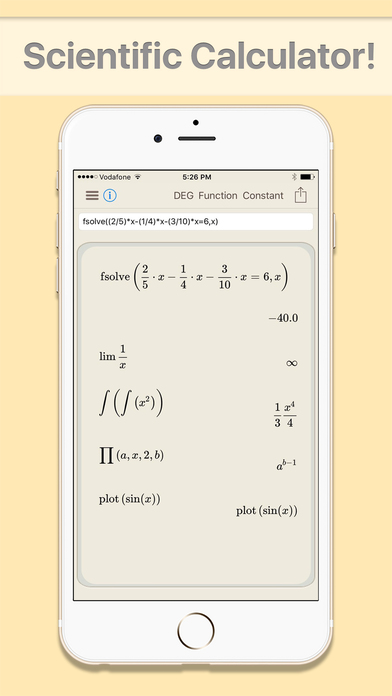
Pilcrow AG announces Cas Calc 3D 2.0.2, an update to their powerful scientific calculator for iOS and tvOS. Cas Calc 3D was designed specifically for scientists, mathematicians, students and generally people who need precise and reliable calculations in a timely manner. It features 3D graphing capabilities and comes with more than 1,400 ready to use functions. Version 2.0.2 introduces an all new kernel based on 64bit architecture, LATEX Parser and script interface, GNU Plot library and more.
Pfaeffikon, Switzerland - Pilcrow AG is proud to announce the release of Cas Calc 3D 2.0.2, an update to their powerful scientific calculator developed for iOS and tvOS. Cas Calc 3D was designed specifically for scientists, mathematicians, students and generally people who need precise and reliable calculations in a timely manner. It features 3D graphing capabilities and comes with more than 1,400 ready to use functions.
The latest 2.0.2 update introduces an all new kernel based on 64bit architecture, making Cas Calc 3D faster while adding a few extra digits for better accuracy. Additionally Cas Calc 3D is now compatible with the GNU Plot Library and supports GNU script. Furthermore the UI has received some tweaking to match the screen of the iPad Pro and especially the presentation on Apple TV.
"It's a while since we released the last major update for Cas Calc 3D, and usually you don't change a running system. All the same we found it was about time to take advantage of the 64bit Kernel. We also noticed that Cas Calc 3D is meanwhile widespread in many classrooms all around the world, therefore we thought it would be nice to have it run on Apple TV as well." explains Christian Schaffner, General Manager of Pilcrow AG, and continues: "Due to its popularity the integration of GNU plot and GNU script was also an appropriate step that was long overdue. We believe now that with this release Cas Calc 3D has become the quickest and most versatile CAS graphing calculator app for iOS and Apple TV."
Device Requirements:
* iPhone, iPad, and iPod touch
* Compatible with Apple TV
* Requires iOS 7.0 or later
* 84.2 MB
Pricing and Availability:
Cas Calc 3D 2.0.2 is $11.99 USD (or equivalent amount in other currencies) and available worldwide exclusively through the App Store in the Education category. For more info, please contact Christian Schaffner.
Pilcrow: http://www.pilcrow.ch
Cas Calc 3D 2.0.2: http://www.pilcrow.ch/product/cas-calc-3d-scientific-3d-calculator-math-science/
Purchase and Download: https://itunes.apple.com/app/cas-calc-3d-scientific-3d/id553442273
Screenshot 1: http://a5.mzstatic.com/us/r30/Purple19/v4/d8/14/01/d81401cb-77c3-1725-dad2-13bb3f4bbceb/screen696x696.jpeg
Screenshot 2: http://a1.mzstatic.com/us/r30/Purple71/v4/08/a0/44/08a04431-3eda-d0dc-e054-b1d94d3807c9/screen696x696.jpeg
App Icon: http://a5.mzstatic.com/us/r30/Purple42/v4/b1/20/fb/b120fb3a-7985-e00f-d07a-57ff5aa842bb/icon175x175.jpeg
Based in Pfaeffikon, Switzerland, Pilcrow AG is an independent company founded in 2010 by Christian Schaffner. Pilcrows main focus is developing powerful, versatile applications for the Mac, iOS and AppleTV platforms. Copyright (C) 2010-2016 Pilcrow AG. All Rights Reserved. Apple, the Apple logo, Mac, iPhone, iPod, iPad and AppleTV are registered trademarks of Apple Inc. in the U.S. and/or other countries. Other trademarks and registered trademarks may be the property of their respective owners.
*******
Link To Article: http://prmac.com/release-id-80077.htm
*******
---------------------------------------------------------------------------------
Note that you can alter delivered distributions at any time.
Login to your account on prMac to alter your channel selection, or to opt-out at any time.
Cas Calc 3D released for iOS and tvOS - Powerful Scientific Calculator - Published on 08/23/16
Pilcrow AG announces Cas Calc 3D 2.0.2, an update to their powerful scientific calculator for iOS and tvOS. Cas Calc 3D was designed specifically for scientists, mathematicians, students and generally people who need precise and reliable calculations in a timely manner. It features 3D graphing capabilities and comes with more than 1,400 ready to use functions. Version 2.0.2 introduces an all new kernel based on 64bit architecture, LATEX Parser and script interface, GNU Plot library and more.
Pfaeffikon, Switzerland - Pilcrow AG is proud to announce the release of Cas Calc 3D 2.0.2, an update to their powerful scientific calculator developed for iOS and tvOS. Cas Calc 3D was designed specifically for scientists, mathematicians, students and generally people who need precise and reliable calculations in a timely manner. It features 3D graphing capabilities and comes with more than 1,400 ready to use functions.
The latest 2.0.2 update introduces an all new kernel based on 64bit architecture, making Cas Calc 3D faster while adding a few extra digits for better accuracy. Additionally Cas Calc 3D is now compatible with the GNU Plot Library and supports GNU script. Furthermore the UI has received some tweaking to match the screen of the iPad Pro and especially the presentation on Apple TV.
"It's a while since we released the last major update for Cas Calc 3D, and usually you don't change a running system. All the same we found it was about time to take advantage of the 64bit Kernel. We also noticed that Cas Calc 3D is meanwhile widespread in many classrooms all around the world, therefore we thought it would be nice to have it run on Apple TV as well." explains Christian Schaffner, General Manager of Pilcrow AG, and continues: "Due to its popularity the integration of GNU plot and GNU script was also an appropriate step that was long overdue. We believe now that with this release Cas Calc 3D has become the quickest and most versatile CAS graphing calculator app for iOS and Apple TV."
Device Requirements:
* iPhone, iPad, and iPod touch
* Compatible with Apple TV
* Requires iOS 7.0 or later
* 84.2 MB
Pricing and Availability:
Cas Calc 3D 2.0.2 is $11.99 USD (or equivalent amount in other currencies) and available worldwide exclusively through the App Store in the Education category. For more info, please contact Christian Schaffner.
Pilcrow: http://www.pilcrow.ch
Cas Calc 3D 2.0.2: http://www.pilcrow.ch/product/cas-calc-3d-scientific-3d-calculator-math-science/
Purchase and Download: https://itunes.apple.com/app/cas-calc-3d-scientific-3d/id553442273
Screenshot 1: http://a5.mzstatic.com/us/r30/Purple19/v4/d8/14/01/d81401cb-77c3-1725-dad2-13bb3f4bbceb/screen696x696.jpeg
Screenshot 2: http://a1.mzstatic.com/us/r30/Purple71/v4/08/a0/44/08a04431-3eda-d0dc-e054-b1d94d3807c9/screen696x696.jpeg

App Icon: http://a5.mzstatic.com/us/r30/Purple42/v4/b1/20/fb/b120fb3a-7985-e00f-d07a-57ff5aa842bb/icon175x175.jpeg

Based in Pfaeffikon, Switzerland, Pilcrow AG is an independent company founded in 2010 by Christian Schaffner. Pilcrows main focus is developing powerful, versatile applications for the Mac, iOS and AppleTV platforms. Copyright (C) 2010-2016 Pilcrow AG. All Rights Reserved. Apple, the Apple logo, Mac, iPhone, iPod, iPad and AppleTV are registered trademarks of Apple Inc. in the U.S. and/or other countries. Other trademarks and registered trademarks may be the property of their respective owners.
*******
Link To Article: http://prmac.com/release-id-80077.htm
*******
---------------------------------------------------------------------------------
Note that you can alter delivered distributions at any time.
Login to your account on prMac to alter your channel selection, or to opt-out at any time.
Record Audio in One-Click with Recordam for Mac
A new article has been published at prMac.
Record Audio in One-Click with Recordam for Mac - Published on 08/22/16
Aperio Lux announces Recordam 1.1 for Mac, the powerful audio recorder application that allows users to create an unlimited amount of high-quality audio recordings. Users may store all previously recorded audio recordings in one place with built-in Library and share them with friends or colleagues via Mail, Message or AirDrop. The integration with Finder Tags helps users organize their recordings and then find them with just one click.
Kiev, Ukraine - Aperio Lux today is pleased to announce the release of Recordam 1.1, their brand-new application for creating audio recordings, designed especially for Mac OS X. Users may create as many recordings as they wish without any recording time limit. Modern user-friendly interface allows users to see everything at a glance including a current input device and an input volume level so they can start recording straight away. Create a three-hour recording as easily as a five-minute recording.
Feature Highlights:
* Easily switch between audio input devices
* Change an input volume level
* Pause / Resume recording
* Playback
* Move backward or forward within an audio recording
* Import an audio file in M4A or MP3 formats
* Share an audio recording via Mail, Message or AirDrop
* Export an audio recording to disk in M4A format or send it to iTunes
* Import / Export a Recordam document
* Available 34 localizations
Recordam brings up to a new level user's judgement of how user can create, store and share audio recordings.
First, lets user easily switch between different audio input devices. User can use a built-in microphone or an external audio input device (including USB microphone).
Second, the built-in Library lets users not only access all previously recorded audio recordings, but also easily share them via Mail, Messages, or AirDrop.
Third, the integration with Finder Tags helps users organize their audio recordings. Tags added using the built-in Inspector will automatically appear in the Finder, so user can easily find the desired audio recording and play it in Recordam.
Fourth, Recordam supports all languages available in the OS X: English, Arabic, Catalan, Chinese Traditional, Chinese Simplified, Croatian, Czech, Danish, Dutch, Finnish, French, German, Greek, Hebrew, Hungarian, Indonesian, Italian, Japanese, Korean, Malay, Norwegian Bokm�l, Polish, Portuguese Portugal, Portuguese Brasil, Romanian, Russian, Slovak, Spanish Spain, Spanish Mexico, Swedish, Thai, Turkish, Ukrainian, Vietnamese. This helps to improve the interaction between the user and the application, because there is nothing better than working with the application in the native language.
System Requirements:
* OS X 10.11 or later
* Intel 64-bit processor
* 3.1 MB
Pricing/Availability:
Recordam is only $3.99 USD (or an equivalent amount in other currencies), and is available worldwide in the Mac App Store (except Russia) in the Productivity category. Promo codes are available on the request.
Recordam 1.1: http://beta.aperio-lux.com/Recordam/
Purchase and Download (MAS): https://itunes.apple.com/app/recordam/id1137954881
Press Kit (ZIP): http://beta.aperio-lux.com/MediaKitArchives/Recordam_Media_Kit.zip
Aperio Lux is an independent team of enthusiasts and innovators from Ukraine. The Aperio Lux team develops ergonomic and user-friendly software for OS X and iOS. All Material and Software (C) Copyright 2016 Alexey Nikitin and Alexandr Bondar. All Rights Reserved. Apple, the Apple logo, Macintosh and Mac OS X are registered trademarks of Apple Inc. in the U.S. and/or other countries. Other trademarks and registered trademarks may be the property of their respective owners.
*******
Link To Article: http://prmac.com/release-id-80076.htm
*******
---------------------------------------------------------------------------------
Note that you can alter delivered distributions at any time.
Login to your account on prMac to alter your channel selection, or to opt-out at any time.
Record Audio in One-Click with Recordam for Mac - Published on 08/22/16
Aperio Lux announces Recordam 1.1 for Mac, the powerful audio recorder application that allows users to create an unlimited amount of high-quality audio recordings. Users may store all previously recorded audio recordings in one place with built-in Library and share them with friends or colleagues via Mail, Message or AirDrop. The integration with Finder Tags helps users organize their recordings and then find them with just one click.
Kiev, Ukraine - Aperio Lux today is pleased to announce the release of Recordam 1.1, their brand-new application for creating audio recordings, designed especially for Mac OS X. Users may create as many recordings as they wish without any recording time limit. Modern user-friendly interface allows users to see everything at a glance including a current input device and an input volume level so they can start recording straight away. Create a three-hour recording as easily as a five-minute recording.
Feature Highlights:
* Easily switch between audio input devices
* Change an input volume level
* Pause / Resume recording
* Playback
* Move backward or forward within an audio recording
* Import an audio file in M4A or MP3 formats
* Share an audio recording via Mail, Message or AirDrop
* Export an audio recording to disk in M4A format or send it to iTunes
* Import / Export a Recordam document
* Available 34 localizations
Recordam brings up to a new level user's judgement of how user can create, store and share audio recordings.
First, lets user easily switch between different audio input devices. User can use a built-in microphone or an external audio input device (including USB microphone).
Second, the built-in Library lets users not only access all previously recorded audio recordings, but also easily share them via Mail, Messages, or AirDrop.
Third, the integration with Finder Tags helps users organize their audio recordings. Tags added using the built-in Inspector will automatically appear in the Finder, so user can easily find the desired audio recording and play it in Recordam.
Fourth, Recordam supports all languages available in the OS X: English, Arabic, Catalan, Chinese Traditional, Chinese Simplified, Croatian, Czech, Danish, Dutch, Finnish, French, German, Greek, Hebrew, Hungarian, Indonesian, Italian, Japanese, Korean, Malay, Norwegian Bokm�l, Polish, Portuguese Portugal, Portuguese Brasil, Romanian, Russian, Slovak, Spanish Spain, Spanish Mexico, Swedish, Thai, Turkish, Ukrainian, Vietnamese. This helps to improve the interaction between the user and the application, because there is nothing better than working with the application in the native language.
System Requirements:
* OS X 10.11 or later
* Intel 64-bit processor
* 3.1 MB
Pricing/Availability:
Recordam is only $3.99 USD (or an equivalent amount in other currencies), and is available worldwide in the Mac App Store (except Russia) in the Productivity category. Promo codes are available on the request.
Recordam 1.1: http://beta.aperio-lux.com/Recordam/
Purchase and Download (MAS): https://itunes.apple.com/app/recordam/id1137954881
Press Kit (ZIP): http://beta.aperio-lux.com/MediaKitArchives/Recordam_Media_Kit.zip
Aperio Lux is an independent team of enthusiasts and innovators from Ukraine. The Aperio Lux team develops ergonomic and user-friendly software for OS X and iOS. All Material and Software (C) Copyright 2016 Alexey Nikitin and Alexandr Bondar. All Rights Reserved. Apple, the Apple logo, Macintosh and Mac OS X are registered trademarks of Apple Inc. in the U.S. and/or other countries. Other trademarks and registered trademarks may be the property of their respective owners.
*******
Link To Article: http://prmac.com/release-id-80076.htm
*******
---------------------------------------------------------------------------------
Note that you can alter delivered distributions at any time.
Login to your account on prMac to alter your channel selection, or to opt-out at any time.
Now Available: mocha Pro 5 OFX Plug-in for Nuke & Fusion
A new article has been published at prMac.
Now Available: mocha Pro 5 OFX Plug-in for Nuke & Fusion - Published on 08/22/16
Boris FX and Imagineer Systems announce mocha Pro 5 plug�in for OFX. mocha Pro's highly regarded visual effects software has been used on countless high profile film and television projects including Game of Thrones, Star Wars:Episode IV and The Walking Dead. The new OFX plug�in capability now gives artists running The Foundry's Nuke and Blackmagic Design's Fusion Studio the added capability to launch mocha Pro directly from the host application for an efficient visual effects workflow.
Guildford, U.K. - Boris FX & Imagineer Systems announce mocha Pro 5 plug-�in for OFX. mocha Pro's highly regarded visual effects software has been used on countless high profile film and television projects including Game of Thrones, Star Wars:Episode IV and The Walking Dead.
The new OFX plug-in capability now gives artists running The Foundry's Nuke and Blackmagic Design's Fusion Studio the added capability to launch mocha Pro directly from the host application for an efficient visual effects workflow. mocha Pro 5 plug-in for OFX is available on Windows, OS X and Linux operating systems.
"Compositors are loving the improvements found in the new mocha Pro plug�in," says Ross Shain, CMO of Boris FX and Imagineer Systems. "We've updated the planar tracking algorithm to take advantage of OpenCL video processing and speed increases on high resolution projects are tremendous." Shain continues, "While mocha has played a role in VFX projects for years, the ability to now launch directly as an OFX host plug-in helps artists quickly access tools for advanced tracking, roto, object removal and image stabilization without the added hassle of managing multiple applications and projects. Jumping back and forth between mocha and Nuke or Fusion has never been easier." Imagineer's partners and customers are also appreciating the new OFX plug�in.
"mocha Pro is well regarded in the visual effects & finishing community as a complementary tool for NUKE users," says Sean Brice, NUKE product manager at The Foundry. "Imagineer's new OFX plug-in integration gives NUKE artists the option to work with mocha within a
 NUKE project, streamlining the mocha and NUKE workflow.
According to Brigitte Bourque, Digital Effects Supervisor at award�winning studio FuseFX, "mocha Pro is an essential tool in our NUKE pipeline. The compositor is the steward of the work we are entrusted with. That means getting the work out on time and on budget. Every one of our compositors uses mocha Pro to help make that happen."
"Imagineer's new mocha Pro plug-in works with Fusion's OFX support to create a seamless workflow for our VFX customers," said Dan May, President, Blackmagic Design. "With the plug-in, VFX artists can use mocha without ever having to leave their projects in Fusion, ultimately saving them time and allowing them to focus on the project at hand rather than workflow headaches."
New in mocha Pro 5
New Plug-in for OFX. mocha Pro 5 is now available as a plug-in option for OFX capable host editing and effects applications. This new capability adds unique tools for planar tracking, masking, and object removal and makes them fully accessible in The Foundry's Nuke and Blackmagic Design's Fusion Studio. (Support for other OFX hosts coming soon)
Open CL GPU tracking performance: mocha planar tracking has been updated to take advantage of supported video card hardware for significantly faster motion tracking on high resolution sources.
Improved online licensing mechanism allows users to easily activate/deactivate a license and run mocha Pro on their computer of choice.
Improvements & bug fixes: including improved layouts, faster project saving, and much more.
New pricing: With a list price of $695 and upgrades starting at $395, the mocha Pro 5 plug-in option is the most affordably priced release to date.
Price List: (USD) mocha Pro 5 Plug-in Option:
Plug-in Option: OFX (Full) $695
Plug-�in Option: OFX (Upgrade from mocha Pro 4) $395
Plug-in Option: Multi-Host (Avid, Adobe, OFX) (Full) $995
mocha Pro 5 Standalone Application: $1,495
Cross Platform, floating licenses for enterprise customers are available by request.
Annual Subscription Option: 1 Year Subscription includes: Standalone Application, Multi�Host Plug-ins $595
Imagineer Systems: http://www.imagineersystems.com
What is mocha?: http://www.imagineersystems.com/products/what-is-mocha/
Direct Download Link: http://www.imagineersystems.com/download/current-version-downloads/
Purchase Link: http://www.imagineersystems.com/store/mocha-pro-5.html
Screenshot - NUKE: http://dybx6hfa2gbvd.cloudfront.net/wp-content/uploads/2016/08/mochaPro5_Nuke.jpg
Screenshot - Fusion: http://dybx6hfa2gbvd.cloudfront.net/wp-content/uploads/2016/08/mochaPro5_Fusion.jpg
UK based Imagineer Systems is the Academy Award-winning developer of mocha: Planar Tracking based visual effects solutions for film and video post production. Imagineer has made its mark on major feature films including: Star Wars: Episode VII, The Hobbit, and the Harry Potter series. In 2015, Imagineer Systems was acquired by Boris FX, a leading developer of effects, titling, and workflow plug-ins for broadcast, post-production, and film professionals. Together the newly merged Boris FX / Imagineer Systems company group services millions of editing and visual effects professionals worldwide. All Material and Software (C) Copyright 2016 Imagineer Systems. All Rights Reserved. Apple, the Apple logo, Macintosh and Mac OS X are registered trademarks of Apple Inc. in the U.S. and/or other countries. Other trademarks and registered trademarks may be the property of their respective owners.
*******
Link To Article: http://prmac.com/release-id-80075.htm
*******
---------------------------------------------------------------------------------
Note that you can alter delivered distributions at any time.
Login to your account on prMac to alter your channel selection, or to opt-out at any time.
Now Available: mocha Pro 5 OFX Plug-in for Nuke & Fusion - Published on 08/22/16
Boris FX and Imagineer Systems announce mocha Pro 5 plug�in for OFX. mocha Pro's highly regarded visual effects software has been used on countless high profile film and television projects including Game of Thrones, Star Wars:Episode IV and The Walking Dead. The new OFX plug�in capability now gives artists running The Foundry's Nuke and Blackmagic Design's Fusion Studio the added capability to launch mocha Pro directly from the host application for an efficient visual effects workflow.
Guildford, U.K. - Boris FX & Imagineer Systems announce mocha Pro 5 plug-�in for OFX. mocha Pro's highly regarded visual effects software has been used on countless high profile film and television projects including Game of Thrones, Star Wars:Episode IV and The Walking Dead.
The new OFX plug-in capability now gives artists running The Foundry's Nuke and Blackmagic Design's Fusion Studio the added capability to launch mocha Pro directly from the host application for an efficient visual effects workflow. mocha Pro 5 plug-in for OFX is available on Windows, OS X and Linux operating systems.
"Compositors are loving the improvements found in the new mocha Pro plug�in," says Ross Shain, CMO of Boris FX and Imagineer Systems. "We've updated the planar tracking algorithm to take advantage of OpenCL video processing and speed increases on high resolution projects are tremendous." Shain continues, "While mocha has played a role in VFX projects for years, the ability to now launch directly as an OFX host plug-in helps artists quickly access tools for advanced tracking, roto, object removal and image stabilization without the added hassle of managing multiple applications and projects. Jumping back and forth between mocha and Nuke or Fusion has never been easier." Imagineer's partners and customers are also appreciating the new OFX plug�in.
"mocha Pro is well regarded in the visual effects & finishing community as a complementary tool for NUKE users," says Sean Brice, NUKE product manager at The Foundry. "Imagineer's new OFX plug-in integration gives NUKE artists the option to work with mocha within a
 NUKE project, streamlining the mocha and NUKE workflow.
According to Brigitte Bourque, Digital Effects Supervisor at award�winning studio FuseFX, "mocha Pro is an essential tool in our NUKE pipeline. The compositor is the steward of the work we are entrusted with. That means getting the work out on time and on budget. Every one of our compositors uses mocha Pro to help make that happen."
"Imagineer's new mocha Pro plug-in works with Fusion's OFX support to create a seamless workflow for our VFX customers," said Dan May, President, Blackmagic Design. "With the plug-in, VFX artists can use mocha without ever having to leave their projects in Fusion, ultimately saving them time and allowing them to focus on the project at hand rather than workflow headaches."
New in mocha Pro 5
New Plug-in for OFX. mocha Pro 5 is now available as a plug-in option for OFX capable host editing and effects applications. This new capability adds unique tools for planar tracking, masking, and object removal and makes them fully accessible in The Foundry's Nuke and Blackmagic Design's Fusion Studio. (Support for other OFX hosts coming soon)
Open CL GPU tracking performance: mocha planar tracking has been updated to take advantage of supported video card hardware for significantly faster motion tracking on high resolution sources.
Improved online licensing mechanism allows users to easily activate/deactivate a license and run mocha Pro on their computer of choice.
Improvements & bug fixes: including improved layouts, faster project saving, and much more.
New pricing: With a list price of $695 and upgrades starting at $395, the mocha Pro 5 plug-in option is the most affordably priced release to date.
Price List: (USD) mocha Pro 5 Plug-in Option:
Plug-in Option: OFX (Full) $695
Plug-�in Option: OFX (Upgrade from mocha Pro 4) $395
Plug-in Option: Multi-Host (Avid, Adobe, OFX) (Full) $995
mocha Pro 5 Standalone Application: $1,495
Cross Platform, floating licenses for enterprise customers are available by request.
Annual Subscription Option: 1 Year Subscription includes: Standalone Application, Multi�Host Plug-ins $595
Imagineer Systems: http://www.imagineersystems.com
What is mocha?: http://www.imagineersystems.com/products/what-is-mocha/
Direct Download Link: http://www.imagineersystems.com/download/current-version-downloads/
Purchase Link: http://www.imagineersystems.com/store/mocha-pro-5.html
Screenshot - NUKE: http://dybx6hfa2gbvd.cloudfront.net/wp-content/uploads/2016/08/mochaPro5_Nuke.jpg

Screenshot - Fusion: http://dybx6hfa2gbvd.cloudfront.net/wp-content/uploads/2016/08/mochaPro5_Fusion.jpg

UK based Imagineer Systems is the Academy Award-winning developer of mocha: Planar Tracking based visual effects solutions for film and video post production. Imagineer has made its mark on major feature films including: Star Wars: Episode VII, The Hobbit, and the Harry Potter series. In 2015, Imagineer Systems was acquired by Boris FX, a leading developer of effects, titling, and workflow plug-ins for broadcast, post-production, and film professionals. Together the newly merged Boris FX / Imagineer Systems company group services millions of editing and visual effects professionals worldwide. All Material and Software (C) Copyright 2016 Imagineer Systems. All Rights Reserved. Apple, the Apple logo, Macintosh and Mac OS X are registered trademarks of Apple Inc. in the U.S. and/or other countries. Other trademarks and registered trademarks may be the property of their respective owners.
*******
Link To Article: http://prmac.com/release-id-80075.htm
*******
---------------------------------------------------------------------------------
Note that you can alter delivered distributions at any time.
Login to your account on prMac to alter your channel selection, or to opt-out at any time.
High-Schooler Sells Title Rights To Game, Re-releases App Under New Name
A new article has been published at prMac.
High-Schooler Sells Title Rights To Game, Re-releases App Under New Name - Published on 08/22/16
Zach DeStefano, senior at Malvern Prep and Founder of Z-Licious Games, LLC sold the title rights to his mobile game, Tiny Miner, to Serbian design and development studio, Qube 3D, in a combination cash and advertising partnership deal. Tiny Miner, originally released by Z-Licious Games in 2014, has been downloaded over 50,000 times worldwide across Android and iOS platforms. It has now been re-released as Retro Miner and is available in the Apple and Google Play App Stores.
Exton, Pennsylvania - Zach DeStefano, a senior at Malvern Prep in Malvern, Pennsylvania and Founder of Z-Licious Games, LLC recently sold the title rights to his mobile game, Tiny Miner, to Serbian design and development studio, Qube 3D. The deal is a combination cash and advertising partnership and is the first of its kind for Z-Licious Games. Tiny Miner was originally created and released by DeStefano in 2014 and was his first experience incorporating in-app purchases and advertising into mobile games. Since its release, Tiny Miner and has been downloaded over 50,000 times in more than 100 countries across Android and iOS platforms.
The game has now been re-released as Retro Miner and is available in the Apple and Google Play App Stores. Retro Miner is a scrolling, ore-mining game with touch controls featuring multiple modes of play and an in-game currency system of Miner Dollars for purchasing ship upgrades including shields, turbo boosts, and mining magnets. The iOS version also features Leaderboards and Game Center achievements to compete against friends. Current users of Tiny Miner who upgrade their app to Retro Miner will keep their in-game currency, ship upgrades, high scores and unlocked achievements.
"I am surprised that Tiny Miner is still receiving so many downloads after 2 years, and I never imagined an established company like Qube 3D would be interested in buying the title rights. It has been both a technical and entrepreneurial learning experience, and I hope that Retro Miner and my future games continue this trend," said DeStefano.
Device Requirements:
* iPhone, iPad, and iPod touch
* Requires iOS 6 or later
* Universal Application
* 19.7 MB
Pricing and Availability:
Retro Miner 1.2 is free, and is available worldwide through the App Store in the Games category. An Android version is also available through Google Play. In-app purchases to obtain Miner Dollars are available for $0.99, $4.99, $9.99, and $19.99 USD (or equivalent amounts in other currencies).
Z-Licious Games: http://www.z-liciousgames.com
Retro Miner 1.2: http://www.z-liciousgames.com/retro-miner
Download from iTunes: https://itunes.apple.com/us/app/tiny-miner/id910377316
Download from Google Play: https://play.google.com/store/apps/details?id=com.zliciousgames.tinyminer
YouTube Gameplay Video: https://www.youtube.com/watch?v=zCTBBbZzdGI
Screenshot: http://www.z-liciousgames.com/_/rsrc/1468885130106/tiny-miner/tiny1.png?height=300&width=400
Z-Licious Games, LLC was founded in 2013 by Zach DeStefano, a Malvern Prep high school freshman at the time, with a focuses on producing games that mesh retro arcade styling with modern technology for iOS and Android mobile platforms. The company's products include 8-Bit Beatdown, a pixelated platform-based game using phone and tablet motion controls; Duality, a simple monochrome game requiring players to manipulate two objects at once; and Retro Miner (formerly Tiny Miner), a scrolling ore-mining game featuring in-app purchases where players can manage their budgets and upgrade their ships. All games are available in both the Apple and Google Play stores, having received more than 80,000 downloads from over 150 countries. Z-Licious Games, LLC is based in Exton, Pennsylvania. All Material and Software Copyright (C) 2016 Z-Licious Games, LLC. All Rights Reserved. Apple, the Apple logo, iPhone, iPad and iPod are registered trademarks of Apple Inc. in the U.S. and/or other countries.
*******
Link To Article: http://prmac.com/release-id-80073.htm
*******
---------------------------------------------------------------------------------
Note that you can alter delivered distributions at any time.
Login to your account on prMac to alter your channel selection, or to opt-out at any time.
High-Schooler Sells Title Rights To Game, Re-releases App Under New Name - Published on 08/22/16
Zach DeStefano, senior at Malvern Prep and Founder of Z-Licious Games, LLC sold the title rights to his mobile game, Tiny Miner, to Serbian design and development studio, Qube 3D, in a combination cash and advertising partnership deal. Tiny Miner, originally released by Z-Licious Games in 2014, has been downloaded over 50,000 times worldwide across Android and iOS platforms. It has now been re-released as Retro Miner and is available in the Apple and Google Play App Stores.
Exton, Pennsylvania - Zach DeStefano, a senior at Malvern Prep in Malvern, Pennsylvania and Founder of Z-Licious Games, LLC recently sold the title rights to his mobile game, Tiny Miner, to Serbian design and development studio, Qube 3D. The deal is a combination cash and advertising partnership and is the first of its kind for Z-Licious Games. Tiny Miner was originally created and released by DeStefano in 2014 and was his first experience incorporating in-app purchases and advertising into mobile games. Since its release, Tiny Miner and has been downloaded over 50,000 times in more than 100 countries across Android and iOS platforms.
The game has now been re-released as Retro Miner and is available in the Apple and Google Play App Stores. Retro Miner is a scrolling, ore-mining game with touch controls featuring multiple modes of play and an in-game currency system of Miner Dollars for purchasing ship upgrades including shields, turbo boosts, and mining magnets. The iOS version also features Leaderboards and Game Center achievements to compete against friends. Current users of Tiny Miner who upgrade their app to Retro Miner will keep their in-game currency, ship upgrades, high scores and unlocked achievements.
"I am surprised that Tiny Miner is still receiving so many downloads after 2 years, and I never imagined an established company like Qube 3D would be interested in buying the title rights. It has been both a technical and entrepreneurial learning experience, and I hope that Retro Miner and my future games continue this trend," said DeStefano.
Device Requirements:
* iPhone, iPad, and iPod touch
* Requires iOS 6 or later
* Universal Application
* 19.7 MB
Pricing and Availability:
Retro Miner 1.2 is free, and is available worldwide through the App Store in the Games category. An Android version is also available through Google Play. In-app purchases to obtain Miner Dollars are available for $0.99, $4.99, $9.99, and $19.99 USD (or equivalent amounts in other currencies).
Z-Licious Games: http://www.z-liciousgames.com
Retro Miner 1.2: http://www.z-liciousgames.com/retro-miner
Download from iTunes: https://itunes.apple.com/us/app/tiny-miner/id910377316
Download from Google Play: https://play.google.com/store/apps/details?id=com.zliciousgames.tinyminer
YouTube Gameplay Video: https://www.youtube.com/watch?v=zCTBBbZzdGI
Screenshot: http://www.z-liciousgames.com/_/rsrc/1468885130106/tiny-miner/tiny1.png?height=300&width=400

Z-Licious Games, LLC was founded in 2013 by Zach DeStefano, a Malvern Prep high school freshman at the time, with a focuses on producing games that mesh retro arcade styling with modern technology for iOS and Android mobile platforms. The company's products include 8-Bit Beatdown, a pixelated platform-based game using phone and tablet motion controls; Duality, a simple monochrome game requiring players to manipulate two objects at once; and Retro Miner (formerly Tiny Miner), a scrolling ore-mining game featuring in-app purchases where players can manage their budgets and upgrade their ships. All games are available in both the Apple and Google Play stores, having received more than 80,000 downloads from over 150 countries. Z-Licious Games, LLC is based in Exton, Pennsylvania. All Material and Software Copyright (C) 2016 Z-Licious Games, LLC. All Rights Reserved. Apple, the Apple logo, iPhone, iPad and iPod are registered trademarks of Apple Inc. in the U.S. and/or other countries.
*******
Link To Article: http://prmac.com/release-id-80073.htm
*******
---------------------------------------------------------------------------------
Note that you can alter delivered distributions at any time.
Login to your account on prMac to alter your channel selection, or to opt-out at any time.
Keto pH for iOS - Learn to Take Control of Your Urine Ketones and pH
A new article has been published at prMac.
Keto pH for iOS - Learn to Take Control of Your Urine Ketones and pH - Published on 08/22/16
Dr. Anna Cabeca announce Keto pH 1.1.2 for iOS touch devices, an app which helps you record your urine Ketones and pH to become Keto Alkaline! This will give you an easy interface to record your daily Ketones and pH level. It provides easy to understand line graphs that help taking appropriate measures to become Keto Alkaline. There is more to being keto alkaline then what we eat so the checklist is designed to keep you accountable to a healthy lifestyle.
New York, USA - Dr. Anna Cabeca is proud to announce the release of Keto pH 1.1.2 for iPhone, iPad, and iPod touch devices, an app which helps you record your urine Ketones and pH to become Keto Alkaline! This will give you an easy interface to record your daily Ketones and pH level. It provides easy to understand line graphs that help taking appropriate measures to become Keto Alkaline.
Checking it daily would be best. Often we don't know if the healthy diet and lifestyle we are living is actually healthy! So checking ketones to get in fat burning mode and checking pH to get into an alkaline state is ideal. But there is more to being keto alkaline then what we eat so the checklist is designed to keep you accountable to a healthy lifestyle.
Acid or alkaline and why should you care?
Your body's urine and salivary pH can change due to different inputs, such as with the different foods you eat. This can tell us a lot about our cellular health. Interestingly, the net effect of different foods acting on your body can increase or reduce your body's overall alkalinity. The pH of human blood is about 7.4 and really doesn't change (unless you are extremely ill or near dying). The body, in particular the lungs and kidneys, works diligently, automatically, to keep the pH of the blood tightly controlled. Blood contains built in "buffering" mechanisms, with the kidneys sending in mineral buffers such as calcium carbonate and calcium phosphate, when needed to keep your blood pH at a health 7.4.
Alkalinity is about more than what we eat. Checking our urine pH clues in to our cellular health, mineral status and lifestyle consequences. This is key to discovery!
This app will help you reclaim your energy to connect, renew your health and get reconnected in life and the important people in it!
Device Requirements:
* iPhone, iPad, and iPod touch
* Requires iOS 9.0 or later
* Universal Application
* 10.2 MB
Pricing and Availability:
Kept pH 1.1.2 is free, and is available worldwide exclusively through the App Store in the Health & Fitness category.
Keto pH 1.1.7: http://drannacabeca.com/
Download from iTunes: https://itunes.apple.com/app/keto-ph/id1118675646
Screenshot 1: http://a3.mzstatic.com/eu/r30/Purple30/v4/b9/86/4d/b9864d7a-a7d0-ea89-d168-873d040012f7/screen696x696.jpeg
Screenshot 2: http://a3.mzstatic.com/eu/r30/Purple20/v4/21/2c/41/212c41e7-c2fe-5cd3-8692-6672b30f6d3e/screen696x696.jpeg
Screenshot 3: http://a1.mzstatic.com/eu/r30/Purple20/v4/71/12/58/711258b1-7524-fb1c-d596-770456549134/screen696x696.jpeg
App Icon: http://a4.mzstatic.com/eu/r30/Purple62/v4/2c/dc/a8/2cdca811-9b54-e1a8-770f-8923b4446727/icon175x175.png
Dr. Cabeca is an inspiration as a doctor, mother and advocate for women's health. All Material and Software Copyright (C) 2016 Dr. Cabeca. All Rights Reserved. Apple, the Apple logo, iPhone, iPad and iPod are registered trademarks of Apple Inc. in the U.S. and/or other countries.
*******
Link To Article: http://prmac.com/release-id-80074.htm
*******
---------------------------------------------------------------------------------
Note that you can alter delivered distributions at any time.
Login to your account on prMac to alter your channel selection, or to opt-out at any time.
Keto pH for iOS - Learn to Take Control of Your Urine Ketones and pH - Published on 08/22/16
Dr. Anna Cabeca announce Keto pH 1.1.2 for iOS touch devices, an app which helps you record your urine Ketones and pH to become Keto Alkaline! This will give you an easy interface to record your daily Ketones and pH level. It provides easy to understand line graphs that help taking appropriate measures to become Keto Alkaline. There is more to being keto alkaline then what we eat so the checklist is designed to keep you accountable to a healthy lifestyle.
New York, USA - Dr. Anna Cabeca is proud to announce the release of Keto pH 1.1.2 for iPhone, iPad, and iPod touch devices, an app which helps you record your urine Ketones and pH to become Keto Alkaline! This will give you an easy interface to record your daily Ketones and pH level. It provides easy to understand line graphs that help taking appropriate measures to become Keto Alkaline.
Checking it daily would be best. Often we don't know if the healthy diet and lifestyle we are living is actually healthy! So checking ketones to get in fat burning mode and checking pH to get into an alkaline state is ideal. But there is more to being keto alkaline then what we eat so the checklist is designed to keep you accountable to a healthy lifestyle.
Acid or alkaline and why should you care?
Your body's urine and salivary pH can change due to different inputs, such as with the different foods you eat. This can tell us a lot about our cellular health. Interestingly, the net effect of different foods acting on your body can increase or reduce your body's overall alkalinity. The pH of human blood is about 7.4 and really doesn't change (unless you are extremely ill or near dying). The body, in particular the lungs and kidneys, works diligently, automatically, to keep the pH of the blood tightly controlled. Blood contains built in "buffering" mechanisms, with the kidneys sending in mineral buffers such as calcium carbonate and calcium phosphate, when needed to keep your blood pH at a health 7.4.
Alkalinity is about more than what we eat. Checking our urine pH clues in to our cellular health, mineral status and lifestyle consequences. This is key to discovery!
This app will help you reclaim your energy to connect, renew your health and get reconnected in life and the important people in it!
Device Requirements:
* iPhone, iPad, and iPod touch
* Requires iOS 9.0 or later
* Universal Application
* 10.2 MB
Pricing and Availability:
Kept pH 1.1.2 is free, and is available worldwide exclusively through the App Store in the Health & Fitness category.
Keto pH 1.1.7: http://drannacabeca.com/
Download from iTunes: https://itunes.apple.com/app/keto-ph/id1118675646
Screenshot 1: http://a3.mzstatic.com/eu/r30/Purple30/v4/b9/86/4d/b9864d7a-a7d0-ea89-d168-873d040012f7/screen696x696.jpeg

Screenshot 2: http://a3.mzstatic.com/eu/r30/Purple20/v4/21/2c/41/212c41e7-c2fe-5cd3-8692-6672b30f6d3e/screen696x696.jpeg

Screenshot 3: http://a1.mzstatic.com/eu/r30/Purple20/v4/71/12/58/711258b1-7524-fb1c-d596-770456549134/screen696x696.jpeg

App Icon: http://a4.mzstatic.com/eu/r30/Purple62/v4/2c/dc/a8/2cdca811-9b54-e1a8-770f-8923b4446727/icon175x175.png

Dr. Cabeca is an inspiration as a doctor, mother and advocate for women's health. All Material and Software Copyright (C) 2016 Dr. Cabeca. All Rights Reserved. Apple, the Apple logo, iPhone, iPad and iPod are registered trademarks of Apple Inc. in the U.S. and/or other countries.
*******
Link To Article: http://prmac.com/release-id-80074.htm
*******
---------------------------------------------------------------------------------
Note that you can alter delivered distributions at any time.
Login to your account on prMac to alter your channel selection, or to opt-out at any time.
Subscribe to:
Posts (Atom)