A new article has been published at prMac.
SuperTab brings Voice Control to the Mac - 50%-Off Sale - Published on 08/23/16
SuperTab for Mac has gained the powerful new capability of Voice Control. This let users simply use their voice to launch Applications, open files, take screen shots, type commonly-used phrases and more! Best yet, users do not need to upgrade to macOS Sierra to get Voice Control; SuperTab 2.2 brings Voice Control to Mac OS X Yosemite (10.10) and El Capitan (10.11). And, of course, SuperTab's Voice Control will work seamlessly alongside Siri in macOS Sierra.
San Diego, California - SpriTec Software today is proud to announce the release of SuperTab for Mac version 2.2. SuperTab 2.2 has added the power and simplicity of Voice Control to its Macintosh utility application that greatly enhances and extends the Mac's built-in Command-Tab Application Switcher.
"The App that does what Apple should have Done!"
SuperTab allows users to fully customize the Mac's built-in Command-Tab App Switcher to provide them with instant access to much more than just their Active Apps. For example, SuperTab extends the Mac's App Switcher to let users quickly access their:
* Active Apps
* Recent Apps
* Recent Documents
* Dock Contents
* Dropbox Contents
* Folder Contents
* Application Windows
* Any Files, Folders or Apps
* Clipboard History
* Web Site Bookmarks
* Screen Shots
* Multiple Clipboards
* Saved Spotlight Searches
* Display Configurations
* Tagged Items
* Finder Sidebar Items
And now this new version 2.2 of SuperTab allows users to fully access all their items within SuperTab simply by using their voice.
Voice Control:
SuperTab allows users to open any item within SuperTab simply by activating Voice Control and saying "Open" followed by the item's name. This allows users to:
* Open Files & Folders
* Run or Quit Applications
* Open Web Sites
* Take Screen Shots
* Copy or Paste from a SuperTab Clipboard
* Type commonly-used phrases
* Hide Background Applications
* Open System Preference Panels
* Run AppleScripts
* Perform Saved Spotlight Searches
* Set their Mac's Display Configuration
Users can see firsthand the power of Voice Control by watching the Voice Control Intro Video (link below) available on the SuperTab web site.
Bonus Feature:
SuperTab 2.2 has also added one of the most user-requested features: a way to label their folders in SuperTab to more easily see which folder is which. "We are very excited to be giving our users exactly what they've been wanting!"
SuperTab 2.2 is compatible with the following versions of macOS:
* "El Capitan" (10.11)
* "Yosemite" (10.10)
* "Mavericks" (10.9)
* "Mountain Lion" (10.8)
Pricing and Availability:
SuperTab 2.2 is free to download and install and is fully-functional for 30 days. After 30 days, it remains fully-functional but will occasionally ask users to register. Users can take advantage of a special 50%-off sale price of only $10, which is good now through October 1, 2016. SuperTab 2.2 is a free upgrade for SuperTab 2.x users. Users of earlier 1.x versions of SuperTab can upgrade to 2.2 for $2.99 (USD).
SuperTab 2.2: http://www.supertab.me/SuperTab.html
Release Info: http://www.supertab.me/TwoPointTwoRelease.html
Download SuperTab: http://www.supertab.me/Download.html
Purchase SuperTab: http://www.supertab.me/Register.html
Upgrade SuperTab: http://www.supertab.me/UpgradeFork.html
Voice Control Intro Video: http://www.supertab.me/VoiceControlVideo.html
Located in San Diego, California, SpriTec Software creates apps for the macOS platform. SpriTec Software is helmed by Ando Sonenblick, an Apple/GoPro/Adobe/DivX veteran with over 30 years of development experience. Copyright (C) 2016 SpriTec Software. All Rights Reserved. Apple, the Apple logo, Mac OS X, macOS, and Macintosh are registered trademarks of Apple Inc. in the U.S. and/or other countries. All other trademarks and trade names are the property of their respective owners.
*******
Link To Article: http://prmac.com/release-id-80084.htm
*******
---------------------------------------------------------------------------------
Note that you can alter delivered distributions at any time.
Login to your account on prMac to alter your channel selection, or to opt-out at any time.

DVDFab Back to School 2016 - Students and Faculties Get 30% Discount
A new article has been published at prMac.
DVDFab Back to School 2016 - Students and Faculties Get 30% Discount - Published on 08/23/16
Fengtao Software today launches its Back to School Deals for 2016, offering all students and faculty members a 30% discount on any DVDFab product they order during the promotion time period. This covers the DVD & Blu-ray copy software, ripper software, converter software and authoring software, the DVD & Blu-ray decrypting software, the media player software and the data care software. This promotion lasts to Sept. 5, alongside with another storewide 25% off coupon for general customers.
Beijing, China - Fengtao Software, the industry leader in the field of DVD, Blu-ray and video backup solutions, has today launched its Back to School Deals for 2016, offering all students and faculty members a 30% discount on any DVDFab product they order during the promotion time period which lasts to Sept. 5, alongside with another storewide 25% off coupon for general customers.
Storewide 30% Discount Offered to All the Students and Faculties:
Every year around this time, the summer break shall soon come to the end, and all the students and teachers are busy preparing for the new term ahead. To live up to this theme, it is the practice of many stores to provide special deals exclusively to those who are waving goodbye to their families and getting back to school, and DVDFab is no different. This time, the multimedia solution vendor offers a stunning storewide 30% discount on all of its products, covering the DVD & Blu-ray copy software, ripper software, converter software and authoring software, the DVD & Blu-ray decrypting software, the media player software and the data care software.
All that asked is a simple picture indicating the buyer's identity as a student or a school faculty member, an image of a Student ID Card, a Teacher Certificate, or even a picture with students and teachers in class shall do the trick. After uploading that image, the purchaser shall be redirected to special page where the 30% discount can be used. Bear in mind, the Back to School Deal lasts before Sept. 6, don't watch it slip through your fingers.
25% off Coupon All the General Customers:
Although the main theme of this deal is about the students and faculties returning for new school term, those who are neither students nor teachers are not left behind. During the Back to School promotion time, all the average customers are offered the great convenience to buy any wanted DVDFab single product or bundled package with 25% off, including the bestseller of all time, DVDFab All-In-One Lifetime Package which covers almost all the paid products, with the exception to the Passkey software, media player software and the data care series.
For the accuracy's sake, that versatile lifetime combo consists of the lifetime versions of DVD Copy, DVD Ripper, Blu-ray Copy, Blu-ray Ripper, Blu-ray to DVD Converter, DVD to Blu-ray Converter, DVD Creator, CinaviaRemoval HD, Blu-ray Creator, Video Converter, and File Transfer, along with a $20 dollar Amazon Gift Card as the free gift. If you are interested, head for the special deal as soon as you can before the 25% off offer closes at the end of Sept. 5.
DVDFab Software: http://dvdfab.cn/
DVDFab Software Promotion: http://www.dvdfab.cn/promotion.htm
DVD ripper for Mac: http://www.dvdfab.cn/dvd_ripper-for-mac.htm
DVD Creator software: http://www.dvdfab.cn/dvd-creator-for-mac.htm
Media Player: http://www.dvdfab.cn/mac-blu-ray-player.htm
Download DVDFab Software: http://www.dvdfab.cn/download.htm
Fengtao Software Inc., a professional multimedia software provider, has been dedicated to working on DVD cloner, DVD copy, Blu-ray copy, DVD ripper, DVD/Blu-ray conversion, video converter, DVD creator, Blu-ray creator, Blu-ray media player, etc. for more than 11 years with its well known DVDFab software. It has more than 50 million global users. All Material and Software (C) Copyright 2016 Fengtao Software Inc. All Rights Reserved. Apple, the Apple logo, Mac OS X, iPhone, iPad, iPod and Macintosh are registered trademarks of Apple Inc. in the U.S. and/or other countries. Other trademarks and registered trademarks may be the property of their respective owners.
*******
Link To Article: http://prmac.com/release-id-80085.htm
*******
---------------------------------------------------------------------------------
Note that you can alter delivered distributions at any time.
Login to your account on prMac to alter your channel selection, or to opt-out at any time.
DVDFab Back to School 2016 - Students and Faculties Get 30% Discount - Published on 08/23/16
Fengtao Software today launches its Back to School Deals for 2016, offering all students and faculty members a 30% discount on any DVDFab product they order during the promotion time period. This covers the DVD & Blu-ray copy software, ripper software, converter software and authoring software, the DVD & Blu-ray decrypting software, the media player software and the data care software. This promotion lasts to Sept. 5, alongside with another storewide 25% off coupon for general customers.
Beijing, China - Fengtao Software, the industry leader in the field of DVD, Blu-ray and video backup solutions, has today launched its Back to School Deals for 2016, offering all students and faculty members a 30% discount on any DVDFab product they order during the promotion time period which lasts to Sept. 5, alongside with another storewide 25% off coupon for general customers.
Storewide 30% Discount Offered to All the Students and Faculties:
Every year around this time, the summer break shall soon come to the end, and all the students and teachers are busy preparing for the new term ahead. To live up to this theme, it is the practice of many stores to provide special deals exclusively to those who are waving goodbye to their families and getting back to school, and DVDFab is no different. This time, the multimedia solution vendor offers a stunning storewide 30% discount on all of its products, covering the DVD & Blu-ray copy software, ripper software, converter software and authoring software, the DVD & Blu-ray decrypting software, the media player software and the data care software.
All that asked is a simple picture indicating the buyer's identity as a student or a school faculty member, an image of a Student ID Card, a Teacher Certificate, or even a picture with students and teachers in class shall do the trick. After uploading that image, the purchaser shall be redirected to special page where the 30% discount can be used. Bear in mind, the Back to School Deal lasts before Sept. 6, don't watch it slip through your fingers.
25% off Coupon All the General Customers:
Although the main theme of this deal is about the students and faculties returning for new school term, those who are neither students nor teachers are not left behind. During the Back to School promotion time, all the average customers are offered the great convenience to buy any wanted DVDFab single product or bundled package with 25% off, including the bestseller of all time, DVDFab All-In-One Lifetime Package which covers almost all the paid products, with the exception to the Passkey software, media player software and the data care series.
For the accuracy's sake, that versatile lifetime combo consists of the lifetime versions of DVD Copy, DVD Ripper, Blu-ray Copy, Blu-ray Ripper, Blu-ray to DVD Converter, DVD to Blu-ray Converter, DVD Creator, CinaviaRemoval HD, Blu-ray Creator, Video Converter, and File Transfer, along with a $20 dollar Amazon Gift Card as the free gift. If you are interested, head for the special deal as soon as you can before the 25% off offer closes at the end of Sept. 5.
DVDFab Software: http://dvdfab.cn/
DVDFab Software Promotion: http://www.dvdfab.cn/promotion.htm
DVD ripper for Mac: http://www.dvdfab.cn/dvd_ripper-for-mac.htm
DVD Creator software: http://www.dvdfab.cn/dvd-creator-for-mac.htm
Media Player: http://www.dvdfab.cn/mac-blu-ray-player.htm
Download DVDFab Software: http://www.dvdfab.cn/download.htm
Fengtao Software Inc., a professional multimedia software provider, has been dedicated to working on DVD cloner, DVD copy, Blu-ray copy, DVD ripper, DVD/Blu-ray conversion, video converter, DVD creator, Blu-ray creator, Blu-ray media player, etc. for more than 11 years with its well known DVDFab software. It has more than 50 million global users. All Material and Software (C) Copyright 2016 Fengtao Software Inc. All Rights Reserved. Apple, the Apple logo, Mac OS X, iPhone, iPad, iPod and Macintosh are registered trademarks of Apple Inc. in the U.S. and/or other countries. Other trademarks and registered trademarks may be the property of their respective owners.
*******
Link To Article: http://prmac.com/release-id-80085.htm
*******
---------------------------------------------------------------------------------
Note that you can alter delivered distributions at any time.
Login to your account on prMac to alter your channel selection, or to opt-out at any time.
Dreamr Launch New Addictive Mobile Game Word Planet for iOS and Android
A new article has been published at prMac.
Dreamr Launch New Addictive Mobile Game Word Planet for iOS and Android - Published on 08/23/16
Dreamr today announces Word Planet 1.1.2, an update to their additive and enjoyable word game for iOS and Android devices. Word Planet is a fun and challenging game for all ages. Players fight against the falling letters as they journey far beyond stars. Letters tumble down the players screen against creatively designed backdrops of imaginary planets, and must be to be made into prescribed words as they play. Version 1.1.2 offers many new improvements with minor bug fixes.
Manchester, United Kingdom - Dreamr today is pleased to announce the release of Word Planet 1.1.2, an update to their additive and enjoyable word game for iOS and Android devices. A refreshingly simple idea, Word Planet is one of those games which can be played one-handed whilst eating lunch, leaning out of the shower, or on the train into work. It's no less an addiction than the current Pokemon Go phenomenon but it's a deceptively gentle addiction - more like a soothing cup of tea than a can of energy drink.
Letters tumble down the players screen against creatively designed backdrops of imaginary planets, and must be to be made into prescribed words as you play, and so is useful for those who want to keep their brains active without being too challenging, as well as being fun for anybody who wants to zone out of their day and while away a few minutes - or hours.
Zain Khan and app development and design agency Dreamr collaborated closely, to build on a great initial concept to create Word Planet, an app for iOS and Android in Unity, because of of its multi-platform capabilities. It's the industry-leading game engine which allows you to create 2D, 3D and Virtual Reality games and deploy them to a range of platforms with just one click. The future of Word Planet is assured. Further planets - and therefore more worlds and words to explore will be made available in the next release.
Device Requirements:
* iPhone, iPad and iPod touch
* Requires iOS 8.0 or later
* 35.1 MB
Pricing and Availability:
Word Planet 1.1.2 is Free (with optional in-app purchases) and available worldwide through the App Store in the Games category. A dedicated version for Android devices is also available via Google Play.
Word Planet 1.1.2: http://www.wordplanet.net
More Info: http://apps.appshout.com/word-planet/
Download from iTunes: https://itunes.apple.com/app/word-planet-game/id1092632998
Download from Google Play: https://play.google.com/store/apps/details?id=uk.dreamr.wordplanet&hl=en_GB
YouTube Video (Demo): https://www.youtube.com/watch?v=3HEdymcapbI
App Icon: http://apps.appshout.com/word-planet/images/icon.png
Dreamr is an award-winning design and development agency that creates immersive experiences for Phone, TV, Watch and Web. The company works with brands to design and develop iPhone and Android apps for the Phone, TV, and Watch along with bespoke websites. Their team of designers and developers in Manchester push the boundaries of what's possible because we believe in the value of positive change to challenge, inspire and deliver dreams. Headed up by Mylo Kaye and Jack Mason, the company has expanded since 2014 to now having 16 staff and creating immersive app development and design projects for clients across the globe. All Material and Software (C) Copyright 2016 Dreamr. All Rights Reserved. Apple, the Apple logo, iPhone, iPod and iPad are registered trademarks of Apple Inc. in the U.S. and/or other countries. Other trademarks and registered trademarks may be the property of their respective owners.
*******
Link To Article: http://prmac.com/release-id-80082.htm
*******
---------------------------------------------------------------------------------
Note that you can alter delivered distributions at any time.
Login to your account on prMac to alter your channel selection, or to opt-out at any time.
Dreamr Launch New Addictive Mobile Game Word Planet for iOS and Android - Published on 08/23/16
Dreamr today announces Word Planet 1.1.2, an update to their additive and enjoyable word game for iOS and Android devices. Word Planet is a fun and challenging game for all ages. Players fight against the falling letters as they journey far beyond stars. Letters tumble down the players screen against creatively designed backdrops of imaginary planets, and must be to be made into prescribed words as they play. Version 1.1.2 offers many new improvements with minor bug fixes.
Manchester, United Kingdom - Dreamr today is pleased to announce the release of Word Planet 1.1.2, an update to their additive and enjoyable word game for iOS and Android devices. A refreshingly simple idea, Word Planet is one of those games which can be played one-handed whilst eating lunch, leaning out of the shower, or on the train into work. It's no less an addiction than the current Pokemon Go phenomenon but it's a deceptively gentle addiction - more like a soothing cup of tea than a can of energy drink.
Letters tumble down the players screen against creatively designed backdrops of imaginary planets, and must be to be made into prescribed words as you play, and so is useful for those who want to keep their brains active without being too challenging, as well as being fun for anybody who wants to zone out of their day and while away a few minutes - or hours.
Zain Khan and app development and design agency Dreamr collaborated closely, to build on a great initial concept to create Word Planet, an app for iOS and Android in Unity, because of of its multi-platform capabilities. It's the industry-leading game engine which allows you to create 2D, 3D and Virtual Reality games and deploy them to a range of platforms with just one click. The future of Word Planet is assured. Further planets - and therefore more worlds and words to explore will be made available in the next release.
Device Requirements:
* iPhone, iPad and iPod touch
* Requires iOS 8.0 or later
* 35.1 MB
Pricing and Availability:
Word Planet 1.1.2 is Free (with optional in-app purchases) and available worldwide through the App Store in the Games category. A dedicated version for Android devices is also available via Google Play.
Word Planet 1.1.2: http://www.wordplanet.net
More Info: http://apps.appshout.com/word-planet/
Download from iTunes: https://itunes.apple.com/app/word-planet-game/id1092632998
Download from Google Play: https://play.google.com/store/apps/details?id=uk.dreamr.wordplanet&hl=en_GB
YouTube Video (Demo): https://www.youtube.com/watch?v=3HEdymcapbI
App Icon: http://apps.appshout.com/word-planet/images/icon.png

Dreamr is an award-winning design and development agency that creates immersive experiences for Phone, TV, Watch and Web. The company works with brands to design and develop iPhone and Android apps for the Phone, TV, and Watch along with bespoke websites. Their team of designers and developers in Manchester push the boundaries of what's possible because we believe in the value of positive change to challenge, inspire and deliver dreams. Headed up by Mylo Kaye and Jack Mason, the company has expanded since 2014 to now having 16 staff and creating immersive app development and design projects for clients across the globe. All Material and Software (C) Copyright 2016 Dreamr. All Rights Reserved. Apple, the Apple logo, iPhone, iPod and iPad are registered trademarks of Apple Inc. in the U.S. and/or other countries. Other trademarks and registered trademarks may be the property of their respective owners.
*******
Link To Article: http://prmac.com/release-id-80082.htm
*******
---------------------------------------------------------------------------------
Note that you can alter delivered distributions at any time.
Login to your account on prMac to alter your channel selection, or to opt-out at any time.
FoodSpect Launches to Share Restaurant Health and Safety Inspection Data
A new article has been published at prMac.
FoodSpect Launches to Share Restaurant Health and Safety Inspection Data - Published on 08/23/16
FoodSpect Technologies Incorporated today announces FoodSpect 1.0.5, an update to their popular lifestyle app for iOS devices. FoodSpect is an easy-to-use app that will help consumers vote with their feet when it comes to choosing a restaurant that's right for them. It provides up-to-date inspection data right from the health inspectors and into the hands of the consumers where it belongs. Version 1.0.5 adds support for special characters within the search field and minor bugs.
British Columbia, Canada - FoodSpect Technologies Incorporated is the foremost up and coming data democratization company in North America, and are very proud to announce the recent launch of their latest app, FoodSpect 1.0.5. Available for iOS and Android platforms, it's an easy-to-use app that will help consumers vote with their feet when it comes to choosing a restaurant that's right for them. FoodSpect has been in steady development since 2015, and was only just recently launched.
FoodSpect is an easy to use application that brings restaurant inspection data directly to mobile devices. Now anyone can finally enjoy a restaurant without the worry of food borne illness or unsatisfactory restaurant conditions. FoodSpect takes the worry away from eating out. Diners place a lot trust in the hands of restaurants when eating out, FoodSpect simply helps everyone make the right decision before it is too late. Among many features, FoodSpect can reveal:
* Are employees washing their hands?
* Is food stored off the floor?
* Does a restaurant have a pest problem they aren't telling diners about?
* Does the dishwasher get things clean?
* Is food stored at safe temperatures?
"We have just been amazed at the media attention we have been receiving, but it demonstrates a climate that is ready for this kind of app. No longer do people have to worry whether their servers are washing their hands regularly, or if food is stored off the floor," says co-founder and CEO of FoodSpect Technologies Incorporated, Earl Buchan.
Device Requirements:
* iPhone, iPad, and iPod touch
* Requires iOS 6.0 or later
* 3.2 MB
Pricing and Availability:
FoodSpect 1.0.5 is only $0.99 USD (or equivalent amount in other currencies) and available in Canada through the App Store in the Food & Drink category. FoodSpect currently services the area of British Columbia and Alberta (Calgary & Area only), Canada. New areas will be released with future updates including all of the best foodie spots in Canada and the United States. A dedicated version for Android devices is also available via Google Play.
FoodSpect 1.0.5: http://www.foodspect.com
More Info: http://apps.appshout.com/foodspect/
Purchase and Download: https://itunes.apple.com/app/foodspect/id1131203082
Screenshot: http://a1.mzstatic.com/us/r30/Purple32/v4/d4/97/68/d4976871-b2ad-f4c7-bfa2-5ba3263b9cf1/screen696x696.jpeg
App Icon: http://apps.appshout.com/foodspect/images/icon.png
Based in British Columbia, Canada, and founded in 2014, FoodSpect Technologies Incorporated is focussed on bringing transparency to food safety information. With a core philosophy to ensure that food inspection data is easily accessible to all, FoodSpect Technologies Incorporated aims to bring this data to the masses and allow diners to make informed choices about the restaurants they visit. All Material and Software (C) Copyright 2016 FoodSpect Technologies Incorporated. All Rights Reserved. Apple, the Apple logo, iPhone, iPod and iPad are registered trademarks of Apple Inc. in the U.S. and/or other countries. Other trademarks and registered trademarks may be the property of their respective owners.
*******
Link To Article: http://prmac.com/release-id-80081.htm
*******
---------------------------------------------------------------------------------
Note that you can alter delivered distributions at any time.
Login to your account on prMac to alter your channel selection, or to opt-out at any time.
FoodSpect Launches to Share Restaurant Health and Safety Inspection Data - Published on 08/23/16
FoodSpect Technologies Incorporated today announces FoodSpect 1.0.5, an update to their popular lifestyle app for iOS devices. FoodSpect is an easy-to-use app that will help consumers vote with their feet when it comes to choosing a restaurant that's right for them. It provides up-to-date inspection data right from the health inspectors and into the hands of the consumers where it belongs. Version 1.0.5 adds support for special characters within the search field and minor bugs.
British Columbia, Canada - FoodSpect Technologies Incorporated is the foremost up and coming data democratization company in North America, and are very proud to announce the recent launch of their latest app, FoodSpect 1.0.5. Available for iOS and Android platforms, it's an easy-to-use app that will help consumers vote with their feet when it comes to choosing a restaurant that's right for them. FoodSpect has been in steady development since 2015, and was only just recently launched.
FoodSpect is an easy to use application that brings restaurant inspection data directly to mobile devices. Now anyone can finally enjoy a restaurant without the worry of food borne illness or unsatisfactory restaurant conditions. FoodSpect takes the worry away from eating out. Diners place a lot trust in the hands of restaurants when eating out, FoodSpect simply helps everyone make the right decision before it is too late. Among many features, FoodSpect can reveal:
* Are employees washing their hands?
* Is food stored off the floor?
* Does a restaurant have a pest problem they aren't telling diners about?
* Does the dishwasher get things clean?
* Is food stored at safe temperatures?
"We have just been amazed at the media attention we have been receiving, but it demonstrates a climate that is ready for this kind of app. No longer do people have to worry whether their servers are washing their hands regularly, or if food is stored off the floor," says co-founder and CEO of FoodSpect Technologies Incorporated, Earl Buchan.
Device Requirements:
* iPhone, iPad, and iPod touch
* Requires iOS 6.0 or later
* 3.2 MB
Pricing and Availability:
FoodSpect 1.0.5 is only $0.99 USD (or equivalent amount in other currencies) and available in Canada through the App Store in the Food & Drink category. FoodSpect currently services the area of British Columbia and Alberta (Calgary & Area only), Canada. New areas will be released with future updates including all of the best foodie spots in Canada and the United States. A dedicated version for Android devices is also available via Google Play.
FoodSpect 1.0.5: http://www.foodspect.com
More Info: http://apps.appshout.com/foodspect/
Purchase and Download: https://itunes.apple.com/app/foodspect/id1131203082
Screenshot: http://a1.mzstatic.com/us/r30/Purple32/v4/d4/97/68/d4976871-b2ad-f4c7-bfa2-5ba3263b9cf1/screen696x696.jpeg

App Icon: http://apps.appshout.com/foodspect/images/icon.png

Based in British Columbia, Canada, and founded in 2014, FoodSpect Technologies Incorporated is focussed on bringing transparency to food safety information. With a core philosophy to ensure that food inspection data is easily accessible to all, FoodSpect Technologies Incorporated aims to bring this data to the masses and allow diners to make informed choices about the restaurants they visit. All Material and Software (C) Copyright 2016 FoodSpect Technologies Incorporated. All Rights Reserved. Apple, the Apple logo, iPhone, iPod and iPad are registered trademarks of Apple Inc. in the U.S. and/or other countries. Other trademarks and registered trademarks may be the property of their respective owners.
*******
Link To Article: http://prmac.com/release-id-80081.htm
*******
---------------------------------------------------------------------------------
Note that you can alter delivered distributions at any time.
Login to your account on prMac to alter your channel selection, or to opt-out at any time.
Typinator 6.10 comes with 50 improvements - Gearing up for Typinator 7
A new article has been published at prMac.
Typinator 6.10 comes with 50 improvements - Gearing up for Typinator 7 - Published on 08/23/16
Ergonis Software today announced the release of Typinator 6.10, a new version of their popular text expander. Typinator 6.10 comes with 50 improvements, including new features, compatibility enhancements, as well as fixes and workarounds for known issues. The major upgrade to Typinator 7.0 is expected to be released later this year, but all Typinator purchases (new and upgrades alike) made now already include the major upgrade to Typinator 7.0 and all subsequent 7.x upgrades.
Perg, Austria - Ergonis Software today is proud to announce the release of Typinator 6.10, a new version of their popular text expander. Typinator 6.10 comes with 50 improvements, including new features, compatibility enhancements, as well as fixes and workarounds for known issues. Among the new features are highlighting of markers in expansions, a built-in Case function for selecting different text fragments depending on an input value, support for logical values in calculations, new and extended arithmetic functions like min, max, round, and more.
The new version furthermore offers keyboard shortcuts for cursor position and clipboard markers and improves compatibility with several third-party applications like MS Word, Nisus, and LaunchBar.
Ergonis Software is also already preparing for the next major version, Typinator 7. Don't get fooled by the huge number of enhancements delivered by Typinator 6.10 - Ergonis still calls Typinator 6.10 a "minor" upgrade. The "major" upgrade to Typinator 7.0 is expected to be released later this year. But there's no reason to wait with your purchase. All Typinator purchases (new and upgrades alike) made in or after April 2016 also include the major upgrade to Typinator 7.0 and all subsequent 7.x upgrades.
Typinator is a powerful, yet elegantly simple solution that boosts your productivity by automating the process of inserting frequently used text and auto-correcting typing errors. Across all applications, it detects specific sequences of typed characters and automatically replaces them with text snippets, graphics, URLs, dates and special characters.
System Requirements:
Typinator 6.10 requires Mac OS X 10.6 or newer and is fully compatible with OS X El Capitan (10.11).
Availability and Ordering:
Typinator can be purchased securely on the Ergonis Software website. The upgrade to Typinator 6.10 is free for anyone who owns a valid license for Typinator 6. Upgrade paths are available for owners of older licenses. All Typinator purchases made in or after April 2016 also include the major upgrade to Typinator 7.0 and all subsequent 7.x upgrades. For information about purchases, including enterprise licenses, volume discounts, and upgrade pricing offers, see the company's web site.
Ergonis Software: http://www.ergonis.com/
Typinator 6.10: http://www.ergonis.com/products/typinator
Download Typinator: http://www.ergonis.com/downloads/typinator-install.dmg
Switching from TextExpander: http://www.ergonis.com/products/tips/switching-from-textexpander-to-typinator.php
Purchase Typinator: https://store.ergonis.com/products/typinator
Screenshot: http://www.ergonis.com/images/products/typi/external/typinator-screen.png
Headquartered in Perg, Austria, Ergonis Software Gmbh is a privately held software development company founded in 2002. With a focus on innovation, Ergonis develops ergonomic and intuitive software that boosts the productivity of Mac and PC users alike. Copyright 2002-2016 Ergonis Software Gmbh. All Rights Reserved. Ergonis products are either registered trademarks or trademarks of Ergonis Software GmbH. Other company and product names may be trademarks of their respective owners.
*******
Link To Article: http://prmac.com/release-id-80080.htm
*******
---------------------------------------------------------------------------------
Note that you can alter delivered distributions at any time.
Login to your account on prMac to alter your channel selection, or to opt-out at any time.
Typinator 6.10 comes with 50 improvements - Gearing up for Typinator 7 - Published on 08/23/16
Ergonis Software today announced the release of Typinator 6.10, a new version of their popular text expander. Typinator 6.10 comes with 50 improvements, including new features, compatibility enhancements, as well as fixes and workarounds for known issues. The major upgrade to Typinator 7.0 is expected to be released later this year, but all Typinator purchases (new and upgrades alike) made now already include the major upgrade to Typinator 7.0 and all subsequent 7.x upgrades.
Perg, Austria - Ergonis Software today is proud to announce the release of Typinator 6.10, a new version of their popular text expander. Typinator 6.10 comes with 50 improvements, including new features, compatibility enhancements, as well as fixes and workarounds for known issues. Among the new features are highlighting of markers in expansions, a built-in Case function for selecting different text fragments depending on an input value, support for logical values in calculations, new and extended arithmetic functions like min, max, round, and more.
The new version furthermore offers keyboard shortcuts for cursor position and clipboard markers and improves compatibility with several third-party applications like MS Word, Nisus, and LaunchBar.
Ergonis Software is also already preparing for the next major version, Typinator 7. Don't get fooled by the huge number of enhancements delivered by Typinator 6.10 - Ergonis still calls Typinator 6.10 a "minor" upgrade. The "major" upgrade to Typinator 7.0 is expected to be released later this year. But there's no reason to wait with your purchase. All Typinator purchases (new and upgrades alike) made in or after April 2016 also include the major upgrade to Typinator 7.0 and all subsequent 7.x upgrades.
Typinator is a powerful, yet elegantly simple solution that boosts your productivity by automating the process of inserting frequently used text and auto-correcting typing errors. Across all applications, it detects specific sequences of typed characters and automatically replaces them with text snippets, graphics, URLs, dates and special characters.
System Requirements:
Typinator 6.10 requires Mac OS X 10.6 or newer and is fully compatible with OS X El Capitan (10.11).
Availability and Ordering:
Typinator can be purchased securely on the Ergonis Software website. The upgrade to Typinator 6.10 is free for anyone who owns a valid license for Typinator 6. Upgrade paths are available for owners of older licenses. All Typinator purchases made in or after April 2016 also include the major upgrade to Typinator 7.0 and all subsequent 7.x upgrades. For information about purchases, including enterprise licenses, volume discounts, and upgrade pricing offers, see the company's web site.
Ergonis Software: http://www.ergonis.com/
Typinator 6.10: http://www.ergonis.com/products/typinator
Download Typinator: http://www.ergonis.com/downloads/typinator-install.dmg
Switching from TextExpander: http://www.ergonis.com/products/tips/switching-from-textexpander-to-typinator.php
Purchase Typinator: https://store.ergonis.com/products/typinator
Screenshot: http://www.ergonis.com/images/products/typi/external/typinator-screen.png

Headquartered in Perg, Austria, Ergonis Software Gmbh is a privately held software development company founded in 2002. With a focus on innovation, Ergonis develops ergonomic and intuitive software that boosts the productivity of Mac and PC users alike. Copyright 2002-2016 Ergonis Software Gmbh. All Rights Reserved. Ergonis products are either registered trademarks or trademarks of Ergonis Software GmbH. Other company and product names may be trademarks of their respective owners.
*******
Link To Article: http://prmac.com/release-id-80080.htm
*******
---------------------------------------------------------------------------------
Note that you can alter delivered distributions at any time.
Login to your account on prMac to alter your channel selection, or to opt-out at any time.
Taxi Sim 2016 Puts Users Behind the Wheel in Cities Around the World
A new article has been published at prMac.
Taxi Sim 2016 Puts Users Behind the Wheel in Cities Around the World - Published on 08/23/16
Ovilex Soft today announces Taxi Sim 2016, an update to their ultra-realistic 3D driving simulator app for iOS and Android devices. Taxi Sim 2016 transforms users into taxi drivers, who must safely transport their passengers to various destinations. The app features a variety of famous taxis, richly detailed interiors, tilt & touch steering, dashboard buttons and turn signals,realistic engine sounds & weather conditions, three game modes, and more. Version 1.2.0 adds a new map and a new vehicle.
Cluj-napoca, Romania - When Ovilex Soft launches a new 3D driving simulation app, it is literally a global event - just ask the company's nearly 450,000 Facebook fans who've come to expect something impressive with each release. Well, their high expectations certainly won't be disappointed when they get behind the virtual wheel of Taxi Sim 2016.
Taxi Sim 2016 transforms users into taxi drivers, who must safely transport their passengers to various destinations. Users start by choosing from a variety of famous taxis, such as a yellow New York City cab, a black London cab, a premium German Mercedes or BMW, and several more. As they scroll through available options, users can see each vehicle's horsepower, torque, traction and weight. Next, users select where they want to spin their wheels, such as New York City, London, Frankfurt and Moscow. As expected, the level of detail is exceptional and includes famous landmarks and familiar intersections.
Once the game starts, the renowned Ovilex Soft magic takes over as users are treated to richly detailed interiors that feature tilt and touch steering, dashboard buttons and turn signals, and realistic engine sounds. There's also an incredibly lifelike manual transmission (6 gears plus reverse), and slider pedals for improved control. And while the goal is obviously to have a safe and trouble-free ride, users who veer too close to a curb or another car on the road won't be spared the wrath of the game's realistic damage system.
In terms of game play, users have three options: free ride, career and multi-player. In the free ride mode, users enjoy the experience of transporting passengers and driving through cities. In the career mode, users see if they have what it takes to earn a living. In the multi-player mode, users see how their cabbie skills stack up against others.
Other Taxi Sim 2016 special features that have already helped generate hundreds of 5-star reviews just days after hitting the App Store and Google Play include:
* Realistic weather conditions
* Realistic day/night driving
* Online leader boards and achievements
* The ability for users to request new maps and vehicles via social media
"We have been working hard on Taxi Sim 2016 for several months, and are really excited to finally launch it for our community of fans around the world," commented Marusac Alexandru of Ovilex Soft. "We have even heard from real taxi drivers who have told us they love the app, and wish it was around back when they were starting their careers!"
Device Requirements:
* iPhone, iPad, and iPod touch
* Requires iOS 8.0 or later
* 140 MB
Pricing and Availability:
Taxi Sim 2016 (v1.2.0) is Free (with in-app purchases) and available worldwide through the App Store in the Games category. There is also an Android version available on Google Play.
Taxi Sim 2016 (v1.2.0): http://www.ovilex.com/app/taxi-sim-2016/
More Info: http://apps.appshout.com/taxi-sim-2016/
Download from iTunes: https://itunes.apple.com/app/taxi-sim-2016/id1126769121
Download from Google Play: https://play.google.com/store/apps/details?id=com.ovilex.taxisim2016
YouTube Video (Demo): https://www.youtube.com/watch?v=5FKVzPq2m-c
Screenshot: http://a4.mzstatic.com/us/r30/Purple20/v4/35/e5/1f/35e51fea-6a68-5057-9fae-baffe79823f7/sc552x414.jpeg
Ovilex Soft is a new games company that focuses on making the best simulators on Google Play and the App Store. With a variety of planned future projects and continuous attention to quality control, the company will became an important developer within the simulator/racing game market. All Material and Software (C) Copyright 2016 Ovilex Soft. All Rights Reserved. Apple, the Apple logo, iPhone, iPod and iPad are registered trademarks of Apple Inc. in the U.S. and/or other countries. Other trademarks and registered trademarks may be the property of their respective owners.
*******
Link To Article: http://prmac.com/release-id-80078.htm
*******
---------------------------------------------------------------------------------
Note that you can alter delivered distributions at any time.
Login to your account on prMac to alter your channel selection, or to opt-out at any time.
Taxi Sim 2016 Puts Users Behind the Wheel in Cities Around the World - Published on 08/23/16
Ovilex Soft today announces Taxi Sim 2016, an update to their ultra-realistic 3D driving simulator app for iOS and Android devices. Taxi Sim 2016 transforms users into taxi drivers, who must safely transport their passengers to various destinations. The app features a variety of famous taxis, richly detailed interiors, tilt & touch steering, dashboard buttons and turn signals,realistic engine sounds & weather conditions, three game modes, and more. Version 1.2.0 adds a new map and a new vehicle.
Cluj-napoca, Romania - When Ovilex Soft launches a new 3D driving simulation app, it is literally a global event - just ask the company's nearly 450,000 Facebook fans who've come to expect something impressive with each release. Well, their high expectations certainly won't be disappointed when they get behind the virtual wheel of Taxi Sim 2016.
Taxi Sim 2016 transforms users into taxi drivers, who must safely transport their passengers to various destinations. Users start by choosing from a variety of famous taxis, such as a yellow New York City cab, a black London cab, a premium German Mercedes or BMW, and several more. As they scroll through available options, users can see each vehicle's horsepower, torque, traction and weight. Next, users select where they want to spin their wheels, such as New York City, London, Frankfurt and Moscow. As expected, the level of detail is exceptional and includes famous landmarks and familiar intersections.
Once the game starts, the renowned Ovilex Soft magic takes over as users are treated to richly detailed interiors that feature tilt and touch steering, dashboard buttons and turn signals, and realistic engine sounds. There's also an incredibly lifelike manual transmission (6 gears plus reverse), and slider pedals for improved control. And while the goal is obviously to have a safe and trouble-free ride, users who veer too close to a curb or another car on the road won't be spared the wrath of the game's realistic damage system.
In terms of game play, users have three options: free ride, career and multi-player. In the free ride mode, users enjoy the experience of transporting passengers and driving through cities. In the career mode, users see if they have what it takes to earn a living. In the multi-player mode, users see how their cabbie skills stack up against others.
Other Taxi Sim 2016 special features that have already helped generate hundreds of 5-star reviews just days after hitting the App Store and Google Play include:
* Realistic weather conditions
* Realistic day/night driving
* Online leader boards and achievements
* The ability for users to request new maps and vehicles via social media
"We have been working hard on Taxi Sim 2016 for several months, and are really excited to finally launch it for our community of fans around the world," commented Marusac Alexandru of Ovilex Soft. "We have even heard from real taxi drivers who have told us they love the app, and wish it was around back when they were starting their careers!"
Device Requirements:
* iPhone, iPad, and iPod touch
* Requires iOS 8.0 or later
* 140 MB
Pricing and Availability:
Taxi Sim 2016 (v1.2.0) is Free (with in-app purchases) and available worldwide through the App Store in the Games category. There is also an Android version available on Google Play.
Taxi Sim 2016 (v1.2.0): http://www.ovilex.com/app/taxi-sim-2016/
More Info: http://apps.appshout.com/taxi-sim-2016/
Download from iTunes: https://itunes.apple.com/app/taxi-sim-2016/id1126769121
Download from Google Play: https://play.google.com/store/apps/details?id=com.ovilex.taxisim2016
YouTube Video (Demo): https://www.youtube.com/watch?v=5FKVzPq2m-c
Screenshot: http://a4.mzstatic.com/us/r30/Purple20/v4/35/e5/1f/35e51fea-6a68-5057-9fae-baffe79823f7/sc552x414.jpeg

Ovilex Soft is a new games company that focuses on making the best simulators on Google Play and the App Store. With a variety of planned future projects and continuous attention to quality control, the company will became an important developer within the simulator/racing game market. All Material and Software (C) Copyright 2016 Ovilex Soft. All Rights Reserved. Apple, the Apple logo, iPhone, iPod and iPad are registered trademarks of Apple Inc. in the U.S. and/or other countries. Other trademarks and registered trademarks may be the property of their respective owners.
*******
Link To Article: http://prmac.com/release-id-80078.htm
*******
---------------------------------------------------------------------------------
Note that you can alter delivered distributions at any time.
Login to your account on prMac to alter your channel selection, or to opt-out at any time.
BatchOutput for Microsoft PowerPoint Is Now Available on BundleHunt
A new article has been published at prMac.
BatchOutput for Microsoft PowerPoint Is Now Available on BundleHunt - Published on 08/23/16
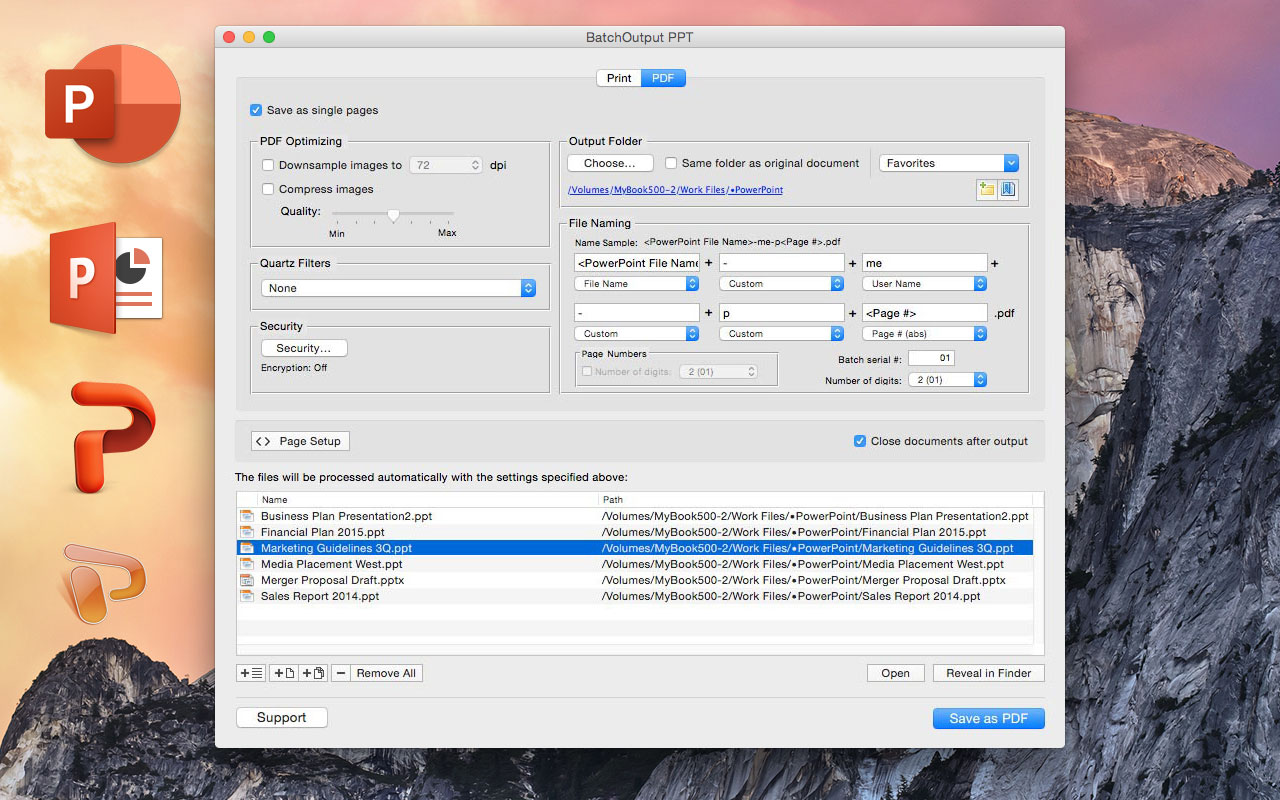
Zevrix Solutions announces that BatchOutput PPT, its output automation solution for Microsoft PowerPoint, is available on software discount site BundleHunt as part of the Summer Bundle. Using the site's unique discount concept, users can purchase BatchOutput PPT as part of a bundle of 7 top rated apps for $17 only. In addition to batch printing, the app lets users carry out automated professional PDF production directly from PowerPoint eliminating the need for time consuming post-processing.
Toronto (ON) Canada - Zevrix Solutions is proud to announce that BatchOutput PPT, its output automation solution for Microsoft PowerPoint, is available on software discount site BundleHunt as part of the Summer Bundle. Using the site's unique discount concept, users can purchase BatchOutput PPT in a bundle of 7 top rated apps for $17 only. BundleHunt is an online store that retails heavily discounted bundles of high quality software, aimed at empowering the creative community. Users can choose from 51 apps to create their own custom bundle.
In addition to batch printing, the software lets users carry out powerful professional PDF production directly from PowerPoint eliminating the need for time consuming post-processing. BatchOutput PPT is the only program on the market that brings advanced PDF and printing options right to the user's fingertips:
* Print batches of PowerPoint files to the selected printer
* Save multiple PowerPoint documents as PDF with a click of a button
* Split PowerPoint documents into single page PDF files
* Variable output file names
* Reduce PDF file size
* Optimize documents for web, print or mobile devices
* Encrypt and password-protect PDF from unauthorized copying, printing and viewing
* Change PDF color tone, brightness and other qualities
BatchOutput PPT is a part of the Zevrix BatchOutput family which also includes output automation solutions for Microsoft Word, Excel, Adobe InDesign and PDF workflows.
Pricing and Availability:
BatchOutput PPT can be purchased on BundleHunt as part of its Summer Bundle of 7 apps for $17. Trial version is also available for download. BatchOutput PPT requires Mac OS X 10.5-10.11 and Microsoft Office 2008, 2011 or 2016.
Zevrix Solutions: http://zevrix.com
BatchOutput PPT: http://bundlehunt.com
Download BatchOutput PPT: http://zevrix.com/BatchOutputOffice.dmg
Screenshot: http://zevrix.com/screenshots/bo-office/MAS/boppt-pdf-mas.jpg
Located in Toronto, Canada, Zevrix Solutions provides automation and productivity solutions for Adobe Creative Cloud and Creative Suite software, PDF workflows, graphic file diagnostics and Microsoft Office output on Mac OS. Zevrix is dedicated to help professionals increase their profits through automating everyday tasks, producing error-free documents, saving disk space and cutting production costs. For more information, visit their website. Copyright (C) 2016 Zevrix Solutions. All Rights Reserved. Other trademarks and registered trademarks may be the property of their respective owners.
*******
Link To Article: http://prmac.com/release-id-80079.htm
*******
---------------------------------------------------------------------------------
Note that you can alter delivered distributions at any time.
Login to your account on prMac to alter your channel selection, or to opt-out at any time.
BatchOutput for Microsoft PowerPoint Is Now Available on BundleHunt - Published on 08/23/16
Zevrix Solutions announces that BatchOutput PPT, its output automation solution for Microsoft PowerPoint, is available on software discount site BundleHunt as part of the Summer Bundle. Using the site's unique discount concept, users can purchase BatchOutput PPT as part of a bundle of 7 top rated apps for $17 only. In addition to batch printing, the app lets users carry out automated professional PDF production directly from PowerPoint eliminating the need for time consuming post-processing.
Toronto (ON) Canada - Zevrix Solutions is proud to announce that BatchOutput PPT, its output automation solution for Microsoft PowerPoint, is available on software discount site BundleHunt as part of the Summer Bundle. Using the site's unique discount concept, users can purchase BatchOutput PPT in a bundle of 7 top rated apps for $17 only. BundleHunt is an online store that retails heavily discounted bundles of high quality software, aimed at empowering the creative community. Users can choose from 51 apps to create their own custom bundle.
In addition to batch printing, the software lets users carry out powerful professional PDF production directly from PowerPoint eliminating the need for time consuming post-processing. BatchOutput PPT is the only program on the market that brings advanced PDF and printing options right to the user's fingertips:
* Print batches of PowerPoint files to the selected printer
* Save multiple PowerPoint documents as PDF with a click of a button
* Split PowerPoint documents into single page PDF files
* Variable output file names
* Reduce PDF file size
* Optimize documents for web, print or mobile devices
* Encrypt and password-protect PDF from unauthorized copying, printing and viewing
* Change PDF color tone, brightness and other qualities
BatchOutput PPT is a part of the Zevrix BatchOutput family which also includes output automation solutions for Microsoft Word, Excel, Adobe InDesign and PDF workflows.
Pricing and Availability:
BatchOutput PPT can be purchased on BundleHunt as part of its Summer Bundle of 7 apps for $17. Trial version is also available for download. BatchOutput PPT requires Mac OS X 10.5-10.11 and Microsoft Office 2008, 2011 or 2016.
Zevrix Solutions: http://zevrix.com
BatchOutput PPT: http://bundlehunt.com
Download BatchOutput PPT: http://zevrix.com/BatchOutputOffice.dmg
Screenshot: http://zevrix.com/screenshots/bo-office/MAS/boppt-pdf-mas.jpg
Located in Toronto, Canada, Zevrix Solutions provides automation and productivity solutions for Adobe Creative Cloud and Creative Suite software, PDF workflows, graphic file diagnostics and Microsoft Office output on Mac OS. Zevrix is dedicated to help professionals increase their profits through automating everyday tasks, producing error-free documents, saving disk space and cutting production costs. For more information, visit their website. Copyright (C) 2016 Zevrix Solutions. All Rights Reserved. Other trademarks and registered trademarks may be the property of their respective owners.
*******
Link To Article: http://prmac.com/release-id-80079.htm
*******
---------------------------------------------------------------------------------
Note that you can alter delivered distributions at any time.
Login to your account on prMac to alter your channel selection, or to opt-out at any time.
Subscribe to:
Posts (Atom)