A new article has been published at prMac.
Pitch Clock Adds Teleprompter-Style Feature For Apple TV - Published on 08/29/16
Skunk Tank announces Pitch Clock - The Entrepreneur's Wingman 1.3, a new update for their iOS app that provides the option to practice a pitch with an Apple TV-equipped HDTV. Pitch Clock helps you craft the perfect pitch whether you have twenty seconds for a quick intro, one minute at Startup Weekend, or two minutes thirty seconds on stage at Demo Day to impress investors. If you have an Apple TV, you can use AirPlay to practice teleprompter-style as your pitch scrolls up the big screen.
Grand Rapids, Michigan - Skunk Tank is pleased to announce the release of Pitch Clock - The Entrepreneur's Wingman 1.3 for iPhone, iPad, and iPod touch devices, a new update that provides the option to practice a pitch with an Apple TV-equipped HDTV. To use this feature, swipe up from the bottom of your screen for the Control Panel, tap AirPlay, select your Apple TV and switch on Mirroring to practice teleprompter-style as your pitch scrolls up your HDTV screen.
Smart founders quickly learn that to be successful they need an arsenal of pitches tailored and ready for different situations and different audiences. Pitch Clock helps you craft the perfect pitch whether you have twenty seconds for a quick intro, one minute at Startup Weekend, or two minutes thirty seconds on stage at Demo Day to impress investors.
Pitch Clock is extraordinarily simple. First, select your spoken words per minute. Don't worry, you can always change it later if you find your natural pace is faster or slower. As your pitch comes to life, your delivery time is calculated automatically. Once you've perfected your pitch, save it to iCloud and practice your delivery (out loud) with your text while the clock counts down. If you have an Apple TV-equipped HDTV, you can use AirPlay to practice teleprompter-style as your pitch scrolls up the big screen. Feeling confident? Good. Now rotate to landscape and it's just you against the clock, (you can even round it up a little first, if you'd like).
Pitch Clock was created with entrepreneurs in mind, but this killer app will help you prep for all kinds of public speaking opportunities. Pitch Clock is ideal for student presentations, Toastmasters, open mic night, even preparing for Sunday service.
Device Requirements:
* iPhone, iPad, and iPod touch
* Requires iOS 9.3 or later
* Universal Application
* 12.7 MB
Pricing and Availability:
Pitch Clock - The Entrepreneur's Wingman 1.3 is free, and is available worldwide exclusively through the App Store in the Business category.
Pitch Clock 1.3: http://pitchclockapp.com
Download from iTunes: https://itunes.apple.com/app/pitch-clock-entrepreneurs/id1103940864
Screenshot: http://a1.mzstatic.com/us/r30/Purple71/v4/ce/18/f4/ce18f44a-c9a3-271f-1a2e-7ce3af7a7397/screen696x696.jpeg
App Icon: http://a5.mzstatic.com/us/r30/Purple71/v4/ae/b7/c9/aeb7c929-e0cb-3419-ccbd-490669f684ec/icon175x175.png
Press Kit (ZIP): http://www.pitchclockapp.com/resources/Pitch-Clock-PressKit.zip
Skunk Tank was founded by Kyle Hilla as a side project company to design products, both physical and digital. Skunk Tank's mission is to make a stink. All Material and Software Copyright (C) 2016 Skunk Tank. All Rights Reserved. Apple, the Apple logo, iPhone, iPad and iPod are registered trademarks of Apple Inc. in the U.S. and/or other countries.
*******
Link To Article: http://prmac.com/release-id-80126.htm
*******
---------------------------------------------------------------------------------
Note that you can alter delivered distributions at any time.
Login to your account on prMac to alter your channel selection, or to opt-out at any time.


Virtual Pet App Combines English Learning and Fun
A new article has been published at prMac.
Virtual Pet App Combines English Learning and Fun - Published on 08/29/16
�1 Digital announces English learning for children with Shine On - Megabyte 1.0.1 for iOS devices, which uses game mechanics to assist in the learning process of the English language for kids. Megabyte is a virtual pet created by language specialists to combine English language learning and fun. It uses game mechanics to develop curiosity and the will for learning in kids. The app will be distributed in several countries.
Sao Paulo, Brazil - Shine On, a series of books for English language teaching for kids (for Elementary School), recently launched in our country by Oxford University Press, has found a powerful ally in the new app for smartphones and tablets, created and published by the Brazilian company �1 Digital. Megabyte is a virtual pet created by language specialists to combine English language learning and fun. It uses game mechanics to develop curiosity and the will for learning in kids.
Following the same procedures as the old Tamagochis, kids have to feed, care, and play with the virtual pet Megabyte by means of activities and funny and challenging mini-games which stimulate the frequent practice of the English language. Besides the game mechanics, the app uses speech recognition technology in order to help kids improve their pronunciation. Parents can also monitor their kids' improvement through daily reports in the app.
"We matched Oxford's quality and content with unique technologies and gamified concepts so that kids can learn by playing", said Roberto Icizuca, marketing director of �1 Digital.
FEATURES
* Feed, care and play with Megabyte while developing your English skills
* Designed by teachers and language learning specialists
* Made for preschoolers and young children (4 to 10 years old)
* Content by Oxford University Press - Global leader in English teaching
* Unique voice recognition technology to help children improve their pronunciation
* More than 120 words to learn
* Dozens of activities and mini games with amusing animations
* Keep up with the children's development with periodic reports
* Safe, ad-free environment
* Buy once and access on iPad, iPhone and iPod touch
Device Requirements:
* iPhone, iPad, and iPod touch
* Requires iOS 9.0 or later
* Universal Application
* 97.9 MB
Pricing and Availability:
English learning for children with Shine On - Megabyte 1.0.1 is free, and is available worldwide exclusively through the App Store in the Education category.
01 Digital: http://www.zeroum.com.br
English learning for children with Shine On - Megabyte 1.0.1: https://itunes.apple.com/app/id1103413344
Screenshot: http://a1.mzstatic.com/us/r30/Purple71/v4/8d/bc/b6/8dbcb677-c3b3-2cf4-8cde-82101fc1535f/screen696x696.jpeg
App Icon: http://a4.mzstatic.com/us/r30/Purple22/v4/0c/71/0b/0c710b51-db62-6276-295e-6de84b91763c/icon175x175.jpeg
Created in 1997 as a virtual services agency, as producer of CD-ROMs, creator of websites, and other Internet solutions, �1 Digital is today one of the biggest Brazilian app publishers and developers for iOS, Android, and Windows Phone. With more than 40 million downloads and constant presence among the most profitable apps, �1 Digital stands out in the market with educational and kids' apps, such as Lottie Dottie Chicken, Masha and the Bear, El Reino Infantil and many others. All Material and Software Copyright (C) 2016 �1 Digital. All Rights Reserved. Apple, the Apple logo, iPhone, iPad and iPod are registered trademarks of Apple Inc. in the U.S. and/or other countries.
*******
Link To Article: http://prmac.com/release-id-80127.htm
*******
---------------------------------------------------------------------------------
Note that you can alter delivered distributions at any time.
Login to your account on prMac to alter your channel selection, or to opt-out at any time.
Virtual Pet App Combines English Learning and Fun - Published on 08/29/16
�1 Digital announces English learning for children with Shine On - Megabyte 1.0.1 for iOS devices, which uses game mechanics to assist in the learning process of the English language for kids. Megabyte is a virtual pet created by language specialists to combine English language learning and fun. It uses game mechanics to develop curiosity and the will for learning in kids. The app will be distributed in several countries.
Sao Paulo, Brazil - Shine On, a series of books for English language teaching for kids (for Elementary School), recently launched in our country by Oxford University Press, has found a powerful ally in the new app for smartphones and tablets, created and published by the Brazilian company �1 Digital. Megabyte is a virtual pet created by language specialists to combine English language learning and fun. It uses game mechanics to develop curiosity and the will for learning in kids.
Following the same procedures as the old Tamagochis, kids have to feed, care, and play with the virtual pet Megabyte by means of activities and funny and challenging mini-games which stimulate the frequent practice of the English language. Besides the game mechanics, the app uses speech recognition technology in order to help kids improve their pronunciation. Parents can also monitor their kids' improvement through daily reports in the app.
"We matched Oxford's quality and content with unique technologies and gamified concepts so that kids can learn by playing", said Roberto Icizuca, marketing director of �1 Digital.
FEATURES
* Feed, care and play with Megabyte while developing your English skills
* Designed by teachers and language learning specialists
* Made for preschoolers and young children (4 to 10 years old)
* Content by Oxford University Press - Global leader in English teaching
* Unique voice recognition technology to help children improve their pronunciation
* More than 120 words to learn
* Dozens of activities and mini games with amusing animations
* Keep up with the children's development with periodic reports
* Safe, ad-free environment
* Buy once and access on iPad, iPhone and iPod touch
Device Requirements:
* iPhone, iPad, and iPod touch
* Requires iOS 9.0 or later
* Universal Application
* 97.9 MB
Pricing and Availability:
English learning for children with Shine On - Megabyte 1.0.1 is free, and is available worldwide exclusively through the App Store in the Education category.
01 Digital: http://www.zeroum.com.br
English learning for children with Shine On - Megabyte 1.0.1: https://itunes.apple.com/app/id1103413344
Screenshot: http://a1.mzstatic.com/us/r30/Purple71/v4/8d/bc/b6/8dbcb677-c3b3-2cf4-8cde-82101fc1535f/screen696x696.jpeg

App Icon: http://a4.mzstatic.com/us/r30/Purple22/v4/0c/71/0b/0c710b51-db62-6276-295e-6de84b91763c/icon175x175.jpeg

Created in 1997 as a virtual services agency, as producer of CD-ROMs, creator of websites, and other Internet solutions, �1 Digital is today one of the biggest Brazilian app publishers and developers for iOS, Android, and Windows Phone. With more than 40 million downloads and constant presence among the most profitable apps, �1 Digital stands out in the market with educational and kids' apps, such as Lottie Dottie Chicken, Masha and the Bear, El Reino Infantil and many others. All Material and Software Copyright (C) 2016 �1 Digital. All Rights Reserved. Apple, the Apple logo, iPhone, iPad and iPod are registered trademarks of Apple Inc. in the U.S. and/or other countries.
*******
Link To Article: http://prmac.com/release-id-80127.htm
*******
---------------------------------------------------------------------------------
Note that you can alter delivered distributions at any time.
Login to your account on prMac to alter your channel selection, or to opt-out at any time.
LastThink Releases Kenya Tv Live 4.5 for iOS
A new article has been published at prMac.
LastThink Releases Kenya Tv Live 4.5 for iOS - Published on 08/29/16
LastThink announces Kenya Tv Live 4.5, the update to their highly customizable TV application for iOS devices. Anyone can directly access their favorite TV channel and watch diverse films, news, programs from their iPad, iPhone and iPod touch anywhere and anytime. Vibes are smart TV and movie playlists. Users can easily record their favorite films, news, talk shows, programs and more. Users can also share what they are watching via Facebook.
Yerevan, Armenia - LastThink is proud to announce the release of Kenya Tv Live 4.5, the important update to their highly customizable TV application developed for iPhone, iPad, and iPod touch devices. Users can directly access their favorite TV channel and watch diverse films, news, programs from their iPad, iPhone and iPod touch anywhere and anytime.
Features:
* Navigating album photos by sliding your finger right or left on the screen
* Change the device you are streaming the picture to, by taping on the Play button in the upper right corner of your iPad's screen and selecting a desired device
* Screening and shooting any moment of your preferred TV program or film you like
* Altering the boring parts and moving straight to the best part at once - Filter by HD-only and favorite channels
* Rotating channels easily by a mere touch on your screen
* Organize your favorite TV shows, sport teams, movies, and actors and find where you can watch them - on TV and on demand
* Recording your favorite films, news, Talk Shows, programs and etc.
* Sharing what you're watching via Facebook, Twitter, YouTube, Dropbox, email and more - Vibes are smart TV and movie playlists
* The highest quality even with the lowest Internet and HD quality with the normal Internet - You can watch TV channels in HD level
* Editing and cropping videos into smaller parts. In addition to, you can take videos of your favorite program
* Capturing the funniest and most interesting moments of what you are watching with the trim tool
* Searching the content across streaming and broadcast services
* Discovering more than 100 channels of great entertainment beyond the Kenya Tv Live app right on your device's touchscreen interface
We have selected data from the internet and if any assembly or constitution doesn't want us to show the content of the unit, please recommend us to remove it. We follow TV regulations and adjustments and we select original TV content data without artificial editions. If you however experience any issues, please do not hesitate to contact us if you'd like to share your experience with live TV channels, or provide suggestions on how we could improve the product further. We will be more than happy to get in touch.
Device Requirements:
* iPhone, iPad, and iPod touch
* Optimized for iPhone 5, iPhone 6, and iPhone 6 Plus
* Requires iOS 6.0 or later
* Universal Application
* 35.7 MB
Pricing and Availability:
Kenya Tv Live 4.5 is free and is available worldwide exclusively through the App Store in the Entertainment category.
LastThink: http://lastthink.com/
Kenya Tv Live 4.5: https://www.facebook.com/Online-Kenya-TV-Community-1673940796158320
Download from iTunes: https://itunes.apple.com/app/kenya-tv-live/id1074217398
Screenshot: http://a1.mzstatic.com/us/r30/Purple49/v4/b6/58/ba/b658baeb-ec49-aee2-ae30-e8e2ddb82df5/screen322x572.jpeg
App Icon: http://a3.mzstatic.com/us/r30/Purple18/v4/19/51/64/19516453-6286-0be4-a162-4d0c028037d9/icon175x175.jpeg
LastThink is an IT company with a focus on mobile development. It has extended its list of services since 2012 to offer high-end business process management, system integration, as well as up-to-date communication solutions. LastThink's mission is to deliver maximum business value to its customers by designing, developing, implementing and maintaining efficient and high quality software solutions aligned with their most essential business needs. Their team will always do its best to meet client expectations. All Material and Software Copyright (C) 2016 LastThink LLC. All Rights Reserved. Apple, the Apple logo, iPhone, iPad and iPod are registered trademarks of Apple Inc. in the U.S. and/or other countries.
*******
Link To Article: http://prmac.com/release-id-80125.htm
*******
---------------------------------------------------------------------------------
Note that you can alter delivered distributions at any time.
Login to your account on prMac to alter your channel selection, or to opt-out at any time.
LastThink Releases Kenya Tv Live 4.5 for iOS - Published on 08/29/16
LastThink announces Kenya Tv Live 4.5, the update to their highly customizable TV application for iOS devices. Anyone can directly access their favorite TV channel and watch diverse films, news, programs from their iPad, iPhone and iPod touch anywhere and anytime. Vibes are smart TV and movie playlists. Users can easily record their favorite films, news, talk shows, programs and more. Users can also share what they are watching via Facebook.
Yerevan, Armenia - LastThink is proud to announce the release of Kenya Tv Live 4.5, the important update to their highly customizable TV application developed for iPhone, iPad, and iPod touch devices. Users can directly access their favorite TV channel and watch diverse films, news, programs from their iPad, iPhone and iPod touch anywhere and anytime.
Features:
* Navigating album photos by sliding your finger right or left on the screen
* Change the device you are streaming the picture to, by taping on the Play button in the upper right corner of your iPad's screen and selecting a desired device
* Screening and shooting any moment of your preferred TV program or film you like
* Altering the boring parts and moving straight to the best part at once - Filter by HD-only and favorite channels
* Rotating channels easily by a mere touch on your screen
* Organize your favorite TV shows, sport teams, movies, and actors and find where you can watch them - on TV and on demand
* Recording your favorite films, news, Talk Shows, programs and etc.
* Sharing what you're watching via Facebook, Twitter, YouTube, Dropbox, email and more - Vibes are smart TV and movie playlists
* The highest quality even with the lowest Internet and HD quality with the normal Internet - You can watch TV channels in HD level
* Editing and cropping videos into smaller parts. In addition to, you can take videos of your favorite program
* Capturing the funniest and most interesting moments of what you are watching with the trim tool
* Searching the content across streaming and broadcast services
* Discovering more than 100 channels of great entertainment beyond the Kenya Tv Live app right on your device's touchscreen interface
We have selected data from the internet and if any assembly or constitution doesn't want us to show the content of the unit, please recommend us to remove it. We follow TV regulations and adjustments and we select original TV content data without artificial editions. If you however experience any issues, please do not hesitate to contact us if you'd like to share your experience with live TV channels, or provide suggestions on how we could improve the product further. We will be more than happy to get in touch.
Device Requirements:
* iPhone, iPad, and iPod touch
* Optimized for iPhone 5, iPhone 6, and iPhone 6 Plus
* Requires iOS 6.0 or later
* Universal Application
* 35.7 MB
Pricing and Availability:
Kenya Tv Live 4.5 is free and is available worldwide exclusively through the App Store in the Entertainment category.
LastThink: http://lastthink.com/
Kenya Tv Live 4.5: https://www.facebook.com/Online-Kenya-TV-Community-1673940796158320
Download from iTunes: https://itunes.apple.com/app/kenya-tv-live/id1074217398
Screenshot: http://a1.mzstatic.com/us/r30/Purple49/v4/b6/58/ba/b658baeb-ec49-aee2-ae30-e8e2ddb82df5/screen322x572.jpeg

App Icon: http://a3.mzstatic.com/us/r30/Purple18/v4/19/51/64/19516453-6286-0be4-a162-4d0c028037d9/icon175x175.jpeg

LastThink is an IT company with a focus on mobile development. It has extended its list of services since 2012 to offer high-end business process management, system integration, as well as up-to-date communication solutions. LastThink's mission is to deliver maximum business value to its customers by designing, developing, implementing and maintaining efficient and high quality software solutions aligned with their most essential business needs. Their team will always do its best to meet client expectations. All Material and Software Copyright (C) 2016 LastThink LLC. All Rights Reserved. Apple, the Apple logo, iPhone, iPad and iPod are registered trademarks of Apple Inc. in the U.S. and/or other countries.
*******
Link To Article: http://prmac.com/release-id-80125.htm
*******
---------------------------------------------------------------------------------
Note that you can alter delivered distributions at any time.
Login to your account on prMac to alter your channel selection, or to opt-out at any time.
WITLS Releases Xtreme Hover for iOS and Android Devices
A new article has been published at prMac.
WITLS Releases Xtreme Hover for iOS and Android Devices - Published on 08/29/16
Witls announces Xtreme Hover 1.1 for iOS and Android devices. Xtreme Hover offers players the best thrilling experience of riding futuristic hover bikes. Players will feel the excitement and pleasure of speed. It has futuristic hovercrafts, simple controls, adventures ways and lots of obstacles to challenge you. Everyone will get chances to score the highest and beat their friends. It's an endless game of fun in an unreal world. Race at insane speeds through an infinite randomly generated world.
Kolkata, India - Witls is pleased to announce the release of Xtreme Hover 1.1 for iPhone, iPad, iPod touch, and Android devices. Xtreme Hover will give players the best thrilling experience of riding futuristic hover bikes. Players will feel the excitement and pleasure of speed. It has futuristic hovercrafts, simple controls, adventures ways and lots of obstacles to challenge you.
Everyone will get chances to score the highest and beat their friends. It's an endless game of fun in an unreal world. Race at insane speeds through an infinite randomly generated world.
Game Features:
* Futuristic Hovercrafts
* VR Ready
* Easy and smooth game controls
* Thrilling sound effects and background score
The goal is to get the highest score by racing into an endless world, avoiding obstacles and enemies and collecting speed boosts and other power-ups to help along the way. It offers a number of futuristic hovercrafts having different engine and speed limits. Players can change and take a new hover bike along the way by crashing into special tokens, which are floating in the mid air.
The game ends when a player hits an obstacle, if they can make it that far! The game environment and the obstacles are designed very carefully, so that it may look simple but difficult to dodge. Xtreme Hover is full of excitement and speed. So players will love the thrilling experience, try it now. Hurry!
Device Requirements:
* iPhone, iPad, and iPod touch
* Requires iOS 7.0 or later
* Universal Application
* 148 MB
Pricing and Availability:
Xtreme Hover 1.1 is free, and is available worldwide through the App Store in the Games category. An Android version is also available through the Google Play Store.
Witls: http://www.witls.com
Xtreme Hover 1.1: http://www.witls.com/xtremehover
Download from iTunes: https://itunes.apple.com/app/xtreme-hover/id1116064724
Download from Google Play: https://play.google.com/store/apps/dev?id=6608500510099817979
Screenshot: http://a3.mzstatic.com/us/r30/Purple22/v4/c0/bb/f9/c0bbf97b-b090-8284-260c-d1335c6b6d62/screen520x924.jpeg
App Icon: http://a2.mzstatic.com/us/r30/Purple62/v4/b3/1a/fe/b31afe54-4165-543d-b310-fcaa1dc40ae7/icon175x175.png
Witls Games is a Mobile Game development studio that develops games for Android, Mac, iPhone, iPad, and Windows. They recently have published a few mobile games in Tizen store. They have published many popular games on various App Stores across different mobile and desktop platforms. All Material and Software (C) Copyright 2016 Witls Games. All Rights Reserved. Apple, the Apple logo, Macintosh and Mac OS X are registered trademarks of Apple Inc. in the U.S. and/or other countries. Other trademarks and registered trademarks may be the property of their respective owners.
*******
Link To Article: http://prmac.com/release-id-80124.htm
*******
---------------------------------------------------------------------------------
Note that you can alter delivered distributions at any time.
Login to your account on prMac to alter your channel selection, or to opt-out at any time.
WITLS Releases Xtreme Hover for iOS and Android Devices - Published on 08/29/16
Witls announces Xtreme Hover 1.1 for iOS and Android devices. Xtreme Hover offers players the best thrilling experience of riding futuristic hover bikes. Players will feel the excitement and pleasure of speed. It has futuristic hovercrafts, simple controls, adventures ways and lots of obstacles to challenge you. Everyone will get chances to score the highest and beat their friends. It's an endless game of fun in an unreal world. Race at insane speeds through an infinite randomly generated world.
Kolkata, India - Witls is pleased to announce the release of Xtreme Hover 1.1 for iPhone, iPad, iPod touch, and Android devices. Xtreme Hover will give players the best thrilling experience of riding futuristic hover bikes. Players will feel the excitement and pleasure of speed. It has futuristic hovercrafts, simple controls, adventures ways and lots of obstacles to challenge you.
Everyone will get chances to score the highest and beat their friends. It's an endless game of fun in an unreal world. Race at insane speeds through an infinite randomly generated world.
Game Features:
* Futuristic Hovercrafts
* VR Ready
* Easy and smooth game controls
* Thrilling sound effects and background score
The goal is to get the highest score by racing into an endless world, avoiding obstacles and enemies and collecting speed boosts and other power-ups to help along the way. It offers a number of futuristic hovercrafts having different engine and speed limits. Players can change and take a new hover bike along the way by crashing into special tokens, which are floating in the mid air.
The game ends when a player hits an obstacle, if they can make it that far! The game environment and the obstacles are designed very carefully, so that it may look simple but difficult to dodge. Xtreme Hover is full of excitement and speed. So players will love the thrilling experience, try it now. Hurry!
Device Requirements:
* iPhone, iPad, and iPod touch
* Requires iOS 7.0 or later
* Universal Application
* 148 MB
Pricing and Availability:
Xtreme Hover 1.1 is free, and is available worldwide through the App Store in the Games category. An Android version is also available through the Google Play Store.
Witls: http://www.witls.com
Xtreme Hover 1.1: http://www.witls.com/xtremehover
Download from iTunes: https://itunes.apple.com/app/xtreme-hover/id1116064724
Download from Google Play: https://play.google.com/store/apps/dev?id=6608500510099817979
Screenshot: http://a3.mzstatic.com/us/r30/Purple22/v4/c0/bb/f9/c0bbf97b-b090-8284-260c-d1335c6b6d62/screen520x924.jpeg

App Icon: http://a2.mzstatic.com/us/r30/Purple62/v4/b3/1a/fe/b31afe54-4165-543d-b310-fcaa1dc40ae7/icon175x175.png

Witls Games is a Mobile Game development studio that develops games for Android, Mac, iPhone, iPad, and Windows. They recently have published a few mobile games in Tizen store. They have published many popular games on various App Stores across different mobile and desktop platforms. All Material and Software (C) Copyright 2016 Witls Games. All Rights Reserved. Apple, the Apple logo, Macintosh and Mac OS X are registered trademarks of Apple Inc. in the U.S. and/or other countries. Other trademarks and registered trademarks may be the property of their respective owners.
*******
Link To Article: http://prmac.com/release-id-80124.htm
*******
---------------------------------------------------------------------------------
Note that you can alter delivered distributions at any time.
Login to your account on prMac to alter your channel selection, or to opt-out at any time.
New M4V Converter Plus for Mac Supports macOS Sierra 10.12 Beta
A new article has been published at prMac.
New M4V Converter Plus for Mac Supports macOS Sierra 10.12 Beta - Published on 08/29/16
MCP Inc. announce version 4.2.1 of their popular iTunes movies Converter, M4V Converter Plus for Mac. Users already rely on its ease in converting DRM-ed M4V to unprotected video formats supported by many popular iOS and Android devices. The new version supports AD track kept with interface errors fixed, and also supports Apple's newest macOS Sierra 10.12 Beta. It retains compatibility with Mac OS X 10.8, 10.9, 10.10, and 10.11.
Cortaro, Arizona - As one of the best software developers, MCP Inc. is dedicated to providing iTunes DRM removal solutions to their worldwide customers. MCP Inc. is proud to announce the release and immediate availability of version 4.2.1 of their popular iTunes movies Converter - M4V Converter Plus for Mac. Users already rely on its ease in converting DRM-ed M4V to unprotected video formats supported by many popular iOS and Android devices.
Now, new version 4.2.1 of M4V Converter Plus for Mac is now available for download along with three new features. It supports AD track kept with interface errors fixed and also supports Apple's newest macOS Sierra 10.12 Beta.
M4V Converter Plus for Mac Overview
M4V Converter Plus for Mac can convert any iTunes M4V videos with Apple copyright protection to all popular video formats such as MP4, MOV, AVI, FLV, 3GP and WMV for your iPad, iPhone, QuickTime etc. or share them on YouTube, Facebook, DailyMotion, Flicker and more. Besides, you can finish the conversion in 30X faster speed without quality loss using the program. It is compatible with Mac OS X 10.8, 10.9, 10.10, and 10.11. And now, the new version can work well on Apple's recently released macOS Sierra 10.12 Beta.
Pricing and Availability
M4V Converter Plus for Mac 4.2.1 is currently available for $44.95 from the MCP Inc. official website.
Version 4.2.1 is free upgrade to current users. A free trial version is available for users to download and use before they purchase. To learn more or download M4V Converter Plus for Mac, please visit the M4V Converter Plus for Mac website.
M4V Converter Plus for Mac: http://m4vconverterplus.com/
Direct Download Link: http://m4vconverterplus.com/M4VConverterPlus.dmg
Order Link : http://m4vconverterplus.com/order.html
M4V Converter Plus Inc. is a software company that offers iTunes M4V video conversion solutions. With expertise and experience in iTunes video converter tools, its mainly products M4V converter software do well in converting m4v video you purchased or rent to QuickTime MOV, iPod, iPhone format with high speed and great quality. All Material and Software (C) Copyright 2016 M4V Converter Plus Inc. All Rights Reserved. Apple, the Apple logo, Macintosh and Mac OS X are registered trademarks of Apple Inc. in the U.S. and/or other countries. Other trademarks and registered trademarks may be the property of their respective owners.
*******
Link To Article: http://prmac.com/release-id-80123.htm
*******
---------------------------------------------------------------------------------
Note that you can alter delivered distributions at any time.
Login to your account on prMac to alter your channel selection, or to opt-out at any time.
New M4V Converter Plus for Mac Supports macOS Sierra 10.12 Beta - Published on 08/29/16
MCP Inc. announce version 4.2.1 of their popular iTunes movies Converter, M4V Converter Plus for Mac. Users already rely on its ease in converting DRM-ed M4V to unprotected video formats supported by many popular iOS and Android devices. The new version supports AD track kept with interface errors fixed, and also supports Apple's newest macOS Sierra 10.12 Beta. It retains compatibility with Mac OS X 10.8, 10.9, 10.10, and 10.11.
Cortaro, Arizona - As one of the best software developers, MCP Inc. is dedicated to providing iTunes DRM removal solutions to their worldwide customers. MCP Inc. is proud to announce the release and immediate availability of version 4.2.1 of their popular iTunes movies Converter - M4V Converter Plus for Mac. Users already rely on its ease in converting DRM-ed M4V to unprotected video formats supported by many popular iOS and Android devices.
Now, new version 4.2.1 of M4V Converter Plus for Mac is now available for download along with three new features. It supports AD track kept with interface errors fixed and also supports Apple's newest macOS Sierra 10.12 Beta.
M4V Converter Plus for Mac Overview
M4V Converter Plus for Mac can convert any iTunes M4V videos with Apple copyright protection to all popular video formats such as MP4, MOV, AVI, FLV, 3GP and WMV for your iPad, iPhone, QuickTime etc. or share them on YouTube, Facebook, DailyMotion, Flicker and more. Besides, you can finish the conversion in 30X faster speed without quality loss using the program. It is compatible with Mac OS X 10.8, 10.9, 10.10, and 10.11. And now, the new version can work well on Apple's recently released macOS Sierra 10.12 Beta.
Pricing and Availability
M4V Converter Plus for Mac 4.2.1 is currently available for $44.95 from the MCP Inc. official website.
Version 4.2.1 is free upgrade to current users. A free trial version is available for users to download and use before they purchase. To learn more or download M4V Converter Plus for Mac, please visit the M4V Converter Plus for Mac website.
M4V Converter Plus for Mac: http://m4vconverterplus.com/
Direct Download Link: http://m4vconverterplus.com/M4VConverterPlus.dmg
Order Link : http://m4vconverterplus.com/order.html
M4V Converter Plus Inc. is a software company that offers iTunes M4V video conversion solutions. With expertise and experience in iTunes video converter tools, its mainly products M4V converter software do well in converting m4v video you purchased or rent to QuickTime MOV, iPod, iPhone format with high speed and great quality. All Material and Software (C) Copyright 2016 M4V Converter Plus Inc. All Rights Reserved. Apple, the Apple logo, Macintosh and Mac OS X are registered trademarks of Apple Inc. in the U.S. and/or other countries. Other trademarks and registered trademarks may be the property of their respective owners.
*******
Link To Article: http://prmac.com/release-id-80123.htm
*******
---------------------------------------------------------------------------------
Note that you can alter delivered distributions at any time.
Login to your account on prMac to alter your channel selection, or to opt-out at any time.
DrumCore 4 AAX/VST3/AU Plug-in for Mac and Windows is Now Shipping
A new article has been published at prMac.
DrumCore 4 AAX/VST3/AU Plug-in for Mac and Windows is Now Shipping - Published on 08/29/16
Sonoma Wire Works has released DrumCore 4, the highly anticipated AAX/VST3/AU plug-in for Mac OS and Windows. An upgrade to the award-winning DrumCore 3 and KitCore 2 plug-in drum instruments, DrumCore 4 now works with most popular 64-bit recording software, and includes 24-bit audio loops, MIDI loops, multi-velocity sampled drum kits, groove browser, song timeline, mixer, effects and more. Includes royalty-free, tempo-adjustable recordings of celebrity drummers in many styles.
Los Altos, California - Sonoma Wire Works, makers of RiffWorks(TM) recording software, the FourTrack(TM) iOS recording app, and the GuitarJack Stage(TM) and StudioJack Mini(TM) audio interfaces for desktop and mobile, has released DrumCore 4(R), the highly anticipated AAX/VST3/AU plug-in for Mac OS(R) and Windows(R).
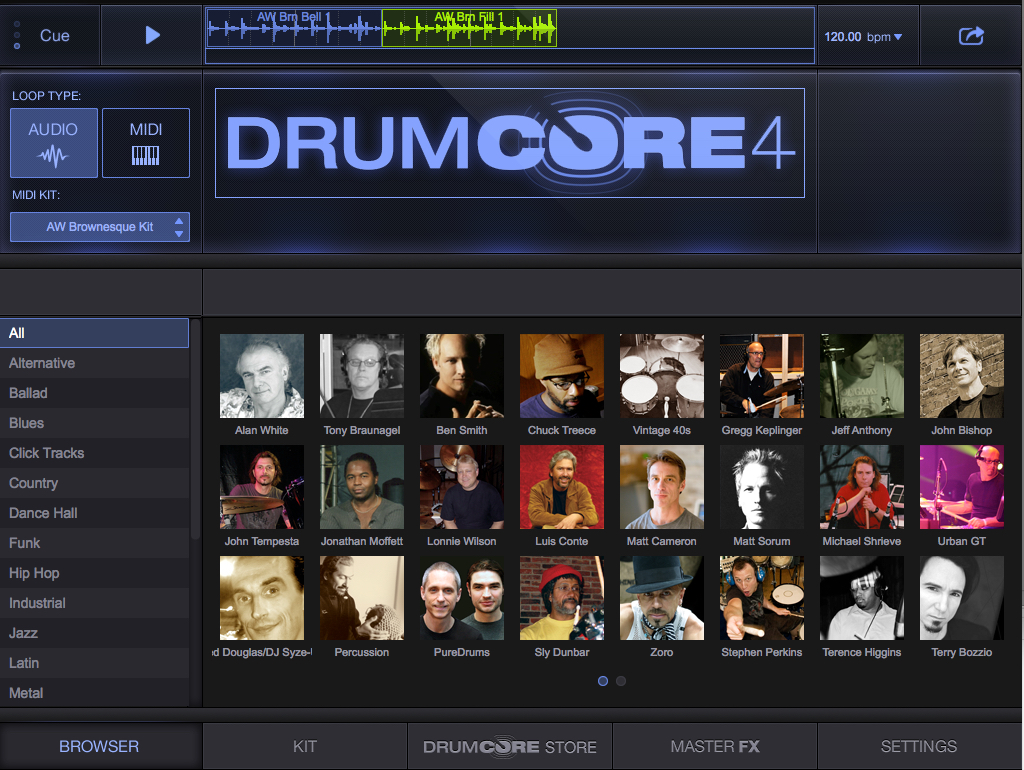
An upgrade to the award-winning DrumCore 3 and KitCore 2 plug-in drum instruments, DrumCore 4 now works with most popular 64-bit recording software, and includes 24-bit audio loops, MIDI loops, multi-velocity sampled drum kits, groove browser, song timeline, mixer, effects and more. Royalty free recordings of celebrity drummers are provided as tempo-adjustable GrooveSets in a wide variety of styles. Users can create their own grooves using the included drum kits, which are MIDI-mapped and customizable, making DrumCore easy to use with external controllers.
DrumCore 4 Editions and Drummers:
DrumCore 4 is available in three editions that contain the same plug-in. The differences are how it is delivered to you (download, USB Flash drive, or Solid State drive) and how much content is included by famous drummers who have played with the bands listed below. All editions can be expanded on the fly with content by more than 25 drummers in DrumCore 4's new built-in online store.
* DrumCore 4 Lite contains 4 GB of content, including 24 GrooveSets (1,400 audio loops and 800 MIDI loops) by 13 celebrity drummers, and 11 multi-velocity sampled kits. DrumCore 4 Lite is available as a download.
Lite includes content by 13 drummers: Alan White (Yes, Lennon), Ben Smith (Heart), Jeff Anthony (Sheryl Crow), John Bishop (Bobby McFerrin), Lonnie Wilson (Brooks & Dunn), Luis Conte (Sergio Mendes), Matt Sorum (Velvet Revolver), Michael Shrieve (Santana), Ned Douglas (Dave Stewart), Sly Dunbar (Bob Marley), Terry Bozzio (Missing Persons), Tony Braunagel (Bonnie Raitt), and Zoro (Lenny Kravitz).
* DrumCore 4 Prime contains 20 GB of content, including 160 GrooveSets (11,000 audio loops and 2,000 MIDI loops) by 17 drummers, and 100 multi-velocity sampled kits. Prime Link is available as a download, and Prime Flash is delivered on a high quality 32 GB USB flash drive for quick installation and easy portability.
Prime includes all of the DC4 Lite content (more from many of them), plus 4 more drummers: Gregg Keplinger (Herb Ellis, Carter Jefferson), John Tempesta (The Cult, Testament), Matt Cameron (Sound Garden, Pearl Jam), and Stephen Perkins (Janes Addiction, Porno for Pyros, Nine Inch Nails).
* DrumCore 4 Ultra contains 50 GB of content, including 265 GrooveSets (21,000 audio loops and 3,000 MIDI loops) by 18 drummers, and 139 multi-velocity sampled kits. Ultra's 50 GB content library comes preloaded on a silent and fast 120 GB USB3 Solid State Drive with space to add more content from DrumCore 4's online store. Ultra's external hard drive provides instant access to your DrumCore 4 library whenever and wherever you need it.
Ultra includes all of the DC4 Lite and Prime drum content (with much more content by many of them), plus an additional drummer: Terence Higgins (Dirty Dozen Brass Band, Norah Jones, The Black Crowes).
New Features in DrumCore 4:
* Improved interface
* 64-bit compatibility
* Updated plug-in formats (AAX/VST3/AU)
* Mixer view with insert effects
* Song timeline for assembling loops
* Integrated online store
Sonoma Wire Works acquired the DrumCore product line from Submersible Music in 2009, and has continued to support thousands of professional musicians and producers who rely on DrumCore for their songs, commercials, videos, and performances. Rebuilt from the ground up to be more lightweight, powerful and modern, DrumCore 4 marks the first update by the Sonoma Wire Works team.
Douglas Wright, the president of Sonoma Wire Works, had this to say about DrumCore 4, "DrumCore is an amazing product with many fans in the music industry. For DrumCore 4, we've done our best to keep many features that made DrumCore great while adding powerful new tools that give the user even more options for their sound."
Availability:
DrumCore 4 is available from Sonoma Wire Works' online store and select dealers and distributors worldwide. ILIO is now the exclusive North American distributor for DrumCore 4.
Sonoma Wire Works: http://www.sonomawireworks.com
DrumCore 4: http://www.sonomawireworks.com/drumcore
DrumCore Dealers and Distributors: http://www.sonomawireworks.com/drumcore/dealers/
ILIO (Exclusive North American distributor for DrumCore 4): http://www.ilio.com/products/sonoma-instruments
Screenshot: http://www.sonomawireworks.com/img/drumcore/DrumCore-4-Plug-In-Screenshot.jpg
Application Icon: http://www.sonomawireworks.com/news/pressimages/dc4200px.png
Incorporated in 2003 and headquartered in Los Altos, California, Sonoma Wire Works develops products and services that help musicians enjoy playing, recording and sharing music. Sonoma Wire Works' flagship product is RiffWorks(TM) guitar recording software which has received multiple awards for performance and innovation, including a NAMM Best in Show Trendsetter Award. FourTrack(TM), StudioTrack(TM) and GuitarTone(TM) iOS apps are also developed by Sonoma. Drum products by Sonoma include the DrumCore(R) plug-in and content library and the Discrete Drums content library. (C) 2016 Sonoma Wire Works. All rights reserved. DrumCore is a registered trademark of Sonoma Wire Works. RiffWorks, GuitarJack, StudioJack and Discrete Drums are trademarks of Sonoma Wire Works. Mac OS is a registered trademark of Apple Inc., registered in the U.S. and other countries. Windows is a registered trademark of Microsoft Corporation in the United States and/or other countries. VST is a registered
trademark of Steinberg Media Technologies GmbH. All other trademarks are property of their respective owners.
*******
Link To Article: http://prmac.com/release-id-80122.htm
*******
---------------------------------------------------------------------------------
Note that you can alter delivered distributions at any time.
Login to your account on prMac to alter your channel selection, or to opt-out at any time.
DrumCore 4 AAX/VST3/AU Plug-in for Mac and Windows is Now Shipping - Published on 08/29/16
Sonoma Wire Works has released DrumCore 4, the highly anticipated AAX/VST3/AU plug-in for Mac OS and Windows. An upgrade to the award-winning DrumCore 3 and KitCore 2 plug-in drum instruments, DrumCore 4 now works with most popular 64-bit recording software, and includes 24-bit audio loops, MIDI loops, multi-velocity sampled drum kits, groove browser, song timeline, mixer, effects and more. Includes royalty-free, tempo-adjustable recordings of celebrity drummers in many styles.
Los Altos, California - Sonoma Wire Works, makers of RiffWorks(TM) recording software, the FourTrack(TM) iOS recording app, and the GuitarJack Stage(TM) and StudioJack Mini(TM) audio interfaces for desktop and mobile, has released DrumCore 4(R), the highly anticipated AAX/VST3/AU plug-in for Mac OS(R) and Windows(R).
An upgrade to the award-winning DrumCore 3 and KitCore 2 plug-in drum instruments, DrumCore 4 now works with most popular 64-bit recording software, and includes 24-bit audio loops, MIDI loops, multi-velocity sampled drum kits, groove browser, song timeline, mixer, effects and more. Royalty free recordings of celebrity drummers are provided as tempo-adjustable GrooveSets in a wide variety of styles. Users can create their own grooves using the included drum kits, which are MIDI-mapped and customizable, making DrumCore easy to use with external controllers.
DrumCore 4 Editions and Drummers:
DrumCore 4 is available in three editions that contain the same plug-in. The differences are how it is delivered to you (download, USB Flash drive, or Solid State drive) and how much content is included by famous drummers who have played with the bands listed below. All editions can be expanded on the fly with content by more than 25 drummers in DrumCore 4's new built-in online store.
* DrumCore 4 Lite contains 4 GB of content, including 24 GrooveSets (1,400 audio loops and 800 MIDI loops) by 13 celebrity drummers, and 11 multi-velocity sampled kits. DrumCore 4 Lite is available as a download.
Lite includes content by 13 drummers: Alan White (Yes, Lennon), Ben Smith (Heart), Jeff Anthony (Sheryl Crow), John Bishop (Bobby McFerrin), Lonnie Wilson (Brooks & Dunn), Luis Conte (Sergio Mendes), Matt Sorum (Velvet Revolver), Michael Shrieve (Santana), Ned Douglas (Dave Stewart), Sly Dunbar (Bob Marley), Terry Bozzio (Missing Persons), Tony Braunagel (Bonnie Raitt), and Zoro (Lenny Kravitz).
* DrumCore 4 Prime contains 20 GB of content, including 160 GrooveSets (11,000 audio loops and 2,000 MIDI loops) by 17 drummers, and 100 multi-velocity sampled kits. Prime Link is available as a download, and Prime Flash is delivered on a high quality 32 GB USB flash drive for quick installation and easy portability.
Prime includes all of the DC4 Lite content (more from many of them), plus 4 more drummers: Gregg Keplinger (Herb Ellis, Carter Jefferson), John Tempesta (The Cult, Testament), Matt Cameron (Sound Garden, Pearl Jam), and Stephen Perkins (Janes Addiction, Porno for Pyros, Nine Inch Nails).
* DrumCore 4 Ultra contains 50 GB of content, including 265 GrooveSets (21,000 audio loops and 3,000 MIDI loops) by 18 drummers, and 139 multi-velocity sampled kits. Ultra's 50 GB content library comes preloaded on a silent and fast 120 GB USB3 Solid State Drive with space to add more content from DrumCore 4's online store. Ultra's external hard drive provides instant access to your DrumCore 4 library whenever and wherever you need it.
Ultra includes all of the DC4 Lite and Prime drum content (with much more content by many of them), plus an additional drummer: Terence Higgins (Dirty Dozen Brass Band, Norah Jones, The Black Crowes).
New Features in DrumCore 4:
* Improved interface
* 64-bit compatibility
* Updated plug-in formats (AAX/VST3/AU)
* Mixer view with insert effects
* Song timeline for assembling loops
* Integrated online store
Sonoma Wire Works acquired the DrumCore product line from Submersible Music in 2009, and has continued to support thousands of professional musicians and producers who rely on DrumCore for their songs, commercials, videos, and performances. Rebuilt from the ground up to be more lightweight, powerful and modern, DrumCore 4 marks the first update by the Sonoma Wire Works team.
Douglas Wright, the president of Sonoma Wire Works, had this to say about DrumCore 4, "DrumCore is an amazing product with many fans in the music industry. For DrumCore 4, we've done our best to keep many features that made DrumCore great while adding powerful new tools that give the user even more options for their sound."
Availability:
DrumCore 4 is available from Sonoma Wire Works' online store and select dealers and distributors worldwide. ILIO is now the exclusive North American distributor for DrumCore 4.
Sonoma Wire Works: http://www.sonomawireworks.com
DrumCore 4: http://www.sonomawireworks.com/drumcore
DrumCore Dealers and Distributors: http://www.sonomawireworks.com/drumcore/dealers/
ILIO (Exclusive North American distributor for DrumCore 4): http://www.ilio.com/products/sonoma-instruments
Screenshot: http://www.sonomawireworks.com/img/drumcore/DrumCore-4-Plug-In-Screenshot.jpg
Application Icon: http://www.sonomawireworks.com/news/pressimages/dc4200px.png

Incorporated in 2003 and headquartered in Los Altos, California, Sonoma Wire Works develops products and services that help musicians enjoy playing, recording and sharing music. Sonoma Wire Works' flagship product is RiffWorks(TM) guitar recording software which has received multiple awards for performance and innovation, including a NAMM Best in Show Trendsetter Award. FourTrack(TM), StudioTrack(TM) and GuitarTone(TM) iOS apps are also developed by Sonoma. Drum products by Sonoma include the DrumCore(R) plug-in and content library and the Discrete Drums content library. (C) 2016 Sonoma Wire Works. All rights reserved. DrumCore is a registered trademark of Sonoma Wire Works. RiffWorks, GuitarJack, StudioJack and Discrete Drums are trademarks of Sonoma Wire Works. Mac OS is a registered trademark of Apple Inc., registered in the U.S. and other countries. Windows is a registered trademark of Microsoft Corporation in the United States and/or other countries. VST is a registered
trademark of Steinberg Media Technologies GmbH. All other trademarks are property of their respective owners.
*******
Link To Article: http://prmac.com/release-id-80122.htm
*******
---------------------------------------------------------------------------------
Note that you can alter delivered distributions at any time.
Login to your account on prMac to alter your channel selection, or to opt-out at any time.
iNutrients: New Entire USDA National Nutrient DB: Calories to Vitamin K
A new article has been published at prMac.
iNutrients: New Entire USDA National Nutrient DB: Calories to Vitamin K - Published on 08/29/16
Indie developer, James Hollender has announced new version 3.0 of his iNutrients app with the entire USDA National Nutrient Database for: Calories, Carbohydrates, Dietary Cholesterol, Fiber, Potassium, Proteins, Saturated Fat, Sodium, Sugars and Vitamin K. The database now includes 8,789 different foods and 15,438 food servings. The database has been updated to the latest available from USDA. Even with this large quantity it may still not be enough so users can add their own Custom Foods.
Revere, Massachusetts - Indie developer James Hollender has announced new version 3.0 of his iNutrients app with the entire USDA National Nutrient Database for: Calories, Carbohydrates, Dietary Cholesterol, Fiber, Potassium, Proteins, Saturated Fat, Sodium, Sugars & Vitamin K. The database now includes 8,789 different foods and 15,438 food servings. The database has been updated to the latest available from USDA, SR28.
Despite the enormous number of foods and food servings in the USDA National Nutrient Database, there are still many which aren't included, especially most name brands. Having the capability of defining Custom Foods that are missing fills this gap, which then makes keeping track of daily nutritional intake more complete.
It's extremely slick to be able to input the information from a packaged food's nutrition label and moments later see color codings for all ten nutrients indicating the ranking of their concentration. As an example the developer talks about a popular brand name frozen dinner. Once the data from the nutrition label is input and saved, the color rankings show up for the Custom Food indicating Carbohydrates are Extremely High (Black); Sodium is Very High (Dark Red); Calories are High (Red); Potassium, Saturated Fat & Sugars are Moderately High (Orange); Proteins are Moderate (Yellow); Cholesterol & Fiber are Moderately Low (Light Green); and Vitamin K is Unknown (Gray) because data wasn't available. This immediately points out that maybe this small meal, eaten frequently, isn't as nutritionally good as originally thought.
Each Custom Food Definition has one main Serving Size and an allowance to add up to three additional ones. Nutrient data is extrapolated for each of the additional Serving Sizes based on their weight compared to the main Serving Size. There is nothing that prevents the user from collecting nutritional information for a complete meal and then creating a single Custom Food for that meal. This provides the capability to speed input of the same meal eaten frequently.
All Custom Food Definitions are automatically included in searches of the entire USDA database.
If for some reason the user doesn't agree with the developer's default Color Scales for the ten nutrients covered, each individual scale can be customized. Making a change will be reflected for all previously recorded data when next presented.
The iNutrients app provides information based on the USDA National Nutrient Database for Standard Reference concerning ten key nutrients:
* Calories - Great for anyone concerned about weight management
* Carbohydrates - Used to make glucose which is the fuel that gives you energy; very helpful to diabetics needing to restrict their carbohydrate intake
* Cholesterol - Dietary Cholesterol - Aids in the production of Vitamin D
* Fiber - Essential for cardiovascular health; prevents constipation; improves control of diabetes
* Potassium - Helps with anxiety and stress; blood pressure; brain function; cramps, and more
* Proteins - Important for Bodybuilders, Vegetarians or Vegans
* Saturated Fat - Eat only moderate amounts to keep healthy; helpful to those with heart conditions on restricted diets
* Sodium - Would you believe there's sodium in water
* Sugars - Help keep your sugar intake under control
* Vitamin K - Vitamins K1, K1D & K2 - Extremely important for anyone taking blood thinning medications like Coumadin or Warfarin
These nutrients are listed and presented throughout the app in alphabetical order. Icons used to help easily identify the nutrients are from other apps by the developer, each covering a single nutrient corresponding to the nutrients in this app are used throughout.
iNutrients utilizes information taken from 100% of the USDA National Nutrient Database for each of these ten nutrients, unlike the individual apps which only cover less than 10% of what's available. Users will find the Search functionality lightning fast as all needed infromation from the USDA database is local to the app - no internet connectivity is required.
From the Search functionality the user can save information for the foods they eat each day. They are able to pick a serving size and then either record a multiple of 0.1 - 9.9 servings; or optionally create a custom serving size from 1 to 500 grams. As they change the serving size they can graphically see the the effect on the various nutrients via color coding ranging from white to black:
* Black - Extremely High
* Dark Red - Very High
* Red - High
* Orange - Moderately High
* Yellow - Moderate
* Light Green - Moderately Low
* Green - Low
* Light Blue - Very Low
* White - Extremely Low
* Gray - data not available
The My Data section allows users to access up to a full year's worth of Food Serving Intake Items stored in their Personal iNutrients Database. Select any Intake Item to get the complete information available. From the display users can tap the Action button in the upper right corner to:
* Delete - Delete the current Food Serving
* Change Number of Servings - Change the number of Servings for the current Food Intake Item
* Change the Intake Date - Move the current Food Serving to another day. - This is extremely useful if the user wasn't able to enter what they've eaten on the day it occurred; just simply enter it and then use this function to change to the date needed
* Copy the Intake Item to Today - This allows the user to copy an individual Food Intake Item from any day, making a copy for the current day
Also available is an allowance to copy all the Food Intake Items from a single day to the current day. This is extremely handy for people who eat the same foods on a regular basis. The Customize section provides a means for users to create their own Custom Color Scale for each nutrient if desired in addition to the new feature of creating or updating Custom Food Definitions.
This universal app shows rotating images occasionally on the right, when run on an iPad, that are representative of the 25 different Food Groups designated by the USDA. Versions of these images will typically be seen whenever a food group is identified on iPad, iPhone or iPod touch. More features are planned for upcoming future releases, especially in the areas of customization and reporting.
James Hollender is also the creator of the Life Inventory apps which allow users to discover more about themselves than they ever thought possible, and at just a small fraction the cost of a single visit to a therapist. There are Life Inventory App Bundles available that include the iNutrients app to give you extra savings.
Device Requirements:
* iPhone, iPad or iPod touch
* iOS 6.0 or later
* Universal Application
* 40.9 MB
Pricing and Availability:
iNutrients 3.0 is $4.99 (USD) and available worldwide exclusively through the iTunes App Store in the Health & Fitness and Medical categories. For the price of 2 individual nutrient apps, users can get all 10 nutrients in a single app. Review copies are available on request to qualified organizations.
James Hollender: http://www.hollender.com
iNutrients 3.0: https://itunes.apple.com/app/inutrients-calories-carbohydrates/id580660547
YouTube Video (Promo): http://www.youtube.com/watch?v=iHpa9hmy8IA
Life Inventory for iPad + iNutrients App Bundle: https://itunes.apple.com/us/app-bundle/life-inventory-for-ipad-plus/id917511236
Life Inventory (for iPhone) + iNutrients App Bundle: https://itunes.apple.com/us/app-bundle/life-inventory-+-inutrients/id917511270
App Icon: http://www.hollender.com/images/iNutrients256.png
Based in Revere, Massachusetts, Indie developer James Hollender is a well seasoned Information Technology professional who has been familiar with Apple products since the days of the first Macintosh computer and has been involved with object oriented programming since the introduction of Java, culminating most recently in writing apps in Objective C for the iPhone, iPod touch and iPad. His innovative ideas have resulted in numerous suggestions and other awards including a commendation from The President of the United States. James Hollender has been involved writing iPad apps with Foliage, Kronos, Olympus, Agero and now Valmarc. Copyright (C) 2010-2016 James Hollender. All Rights Reserved. Apple, the Apple logo, iPhone, and iPod are registered trademarks of Apple Inc. in the U.S. and/or other countries. Other trademarks and registered trademarks may be the property of their respective owners.
*******
Link To Article: http://prmac.com/release-id-80120.htm
*******
---------------------------------------------------------------------------------
Note that you can alter delivered distributions at any time.
Login to your account on prMac to alter your channel selection, or to opt-out at any time.
iNutrients: New Entire USDA National Nutrient DB: Calories to Vitamin K - Published on 08/29/16
Indie developer, James Hollender has announced new version 3.0 of his iNutrients app with the entire USDA National Nutrient Database for: Calories, Carbohydrates, Dietary Cholesterol, Fiber, Potassium, Proteins, Saturated Fat, Sodium, Sugars and Vitamin K. The database now includes 8,789 different foods and 15,438 food servings. The database has been updated to the latest available from USDA. Even with this large quantity it may still not be enough so users can add their own Custom Foods.
Revere, Massachusetts - Indie developer James Hollender has announced new version 3.0 of his iNutrients app with the entire USDA National Nutrient Database for: Calories, Carbohydrates, Dietary Cholesterol, Fiber, Potassium, Proteins, Saturated Fat, Sodium, Sugars & Vitamin K. The database now includes 8,789 different foods and 15,438 food servings. The database has been updated to the latest available from USDA, SR28.
Despite the enormous number of foods and food servings in the USDA National Nutrient Database, there are still many which aren't included, especially most name brands. Having the capability of defining Custom Foods that are missing fills this gap, which then makes keeping track of daily nutritional intake more complete.
It's extremely slick to be able to input the information from a packaged food's nutrition label and moments later see color codings for all ten nutrients indicating the ranking of their concentration. As an example the developer talks about a popular brand name frozen dinner. Once the data from the nutrition label is input and saved, the color rankings show up for the Custom Food indicating Carbohydrates are Extremely High (Black); Sodium is Very High (Dark Red); Calories are High (Red); Potassium, Saturated Fat & Sugars are Moderately High (Orange); Proteins are Moderate (Yellow); Cholesterol & Fiber are Moderately Low (Light Green); and Vitamin K is Unknown (Gray) because data wasn't available. This immediately points out that maybe this small meal, eaten frequently, isn't as nutritionally good as originally thought.
Each Custom Food Definition has one main Serving Size and an allowance to add up to three additional ones. Nutrient data is extrapolated for each of the additional Serving Sizes based on their weight compared to the main Serving Size. There is nothing that prevents the user from collecting nutritional information for a complete meal and then creating a single Custom Food for that meal. This provides the capability to speed input of the same meal eaten frequently.
All Custom Food Definitions are automatically included in searches of the entire USDA database.
If for some reason the user doesn't agree with the developer's default Color Scales for the ten nutrients covered, each individual scale can be customized. Making a change will be reflected for all previously recorded data when next presented.
The iNutrients app provides information based on the USDA National Nutrient Database for Standard Reference concerning ten key nutrients:
* Calories - Great for anyone concerned about weight management
* Carbohydrates - Used to make glucose which is the fuel that gives you energy; very helpful to diabetics needing to restrict their carbohydrate intake
* Cholesterol - Dietary Cholesterol - Aids in the production of Vitamin D
* Fiber - Essential for cardiovascular health; prevents constipation; improves control of diabetes
* Potassium - Helps with anxiety and stress; blood pressure; brain function; cramps, and more
* Proteins - Important for Bodybuilders, Vegetarians or Vegans
* Saturated Fat - Eat only moderate amounts to keep healthy; helpful to those with heart conditions on restricted diets
* Sodium - Would you believe there's sodium in water
* Sugars - Help keep your sugar intake under control
* Vitamin K - Vitamins K1, K1D & K2 - Extremely important for anyone taking blood thinning medications like Coumadin or Warfarin
These nutrients are listed and presented throughout the app in alphabetical order. Icons used to help easily identify the nutrients are from other apps by the developer, each covering a single nutrient corresponding to the nutrients in this app are used throughout.
iNutrients utilizes information taken from 100% of the USDA National Nutrient Database for each of these ten nutrients, unlike the individual apps which only cover less than 10% of what's available. Users will find the Search functionality lightning fast as all needed infromation from the USDA database is local to the app - no internet connectivity is required.
From the Search functionality the user can save information for the foods they eat each day. They are able to pick a serving size and then either record a multiple of 0.1 - 9.9 servings; or optionally create a custom serving size from 1 to 500 grams. As they change the serving size they can graphically see the the effect on the various nutrients via color coding ranging from white to black:
* Black - Extremely High
* Dark Red - Very High
* Red - High
* Orange - Moderately High
* Yellow - Moderate
* Light Green - Moderately Low
* Green - Low
* Light Blue - Very Low
* White - Extremely Low
* Gray - data not available
The My Data section allows users to access up to a full year's worth of Food Serving Intake Items stored in their Personal iNutrients Database. Select any Intake Item to get the complete information available. From the display users can tap the Action button in the upper right corner to:
* Delete - Delete the current Food Serving
* Change Number of Servings - Change the number of Servings for the current Food Intake Item
* Change the Intake Date - Move the current Food Serving to another day. - This is extremely useful if the user wasn't able to enter what they've eaten on the day it occurred; just simply enter it and then use this function to change to the date needed
* Copy the Intake Item to Today - This allows the user to copy an individual Food Intake Item from any day, making a copy for the current day
Also available is an allowance to copy all the Food Intake Items from a single day to the current day. This is extremely handy for people who eat the same foods on a regular basis. The Customize section provides a means for users to create their own Custom Color Scale for each nutrient if desired in addition to the new feature of creating or updating Custom Food Definitions.
This universal app shows rotating images occasionally on the right, when run on an iPad, that are representative of the 25 different Food Groups designated by the USDA. Versions of these images will typically be seen whenever a food group is identified on iPad, iPhone or iPod touch. More features are planned for upcoming future releases, especially in the areas of customization and reporting.
James Hollender is also the creator of the Life Inventory apps which allow users to discover more about themselves than they ever thought possible, and at just a small fraction the cost of a single visit to a therapist. There are Life Inventory App Bundles available that include the iNutrients app to give you extra savings.
Device Requirements:
* iPhone, iPad or iPod touch
* iOS 6.0 or later
* Universal Application
* 40.9 MB
Pricing and Availability:
iNutrients 3.0 is $4.99 (USD) and available worldwide exclusively through the iTunes App Store in the Health & Fitness and Medical categories. For the price of 2 individual nutrient apps, users can get all 10 nutrients in a single app. Review copies are available on request to qualified organizations.
James Hollender: http://www.hollender.com
iNutrients 3.0: https://itunes.apple.com/app/inutrients-calories-carbohydrates/id580660547
YouTube Video (Promo): http://www.youtube.com/watch?v=iHpa9hmy8IA
Life Inventory for iPad + iNutrients App Bundle: https://itunes.apple.com/us/app-bundle/life-inventory-for-ipad-plus/id917511236
Life Inventory (for iPhone) + iNutrients App Bundle: https://itunes.apple.com/us/app-bundle/life-inventory-+-inutrients/id917511270
App Icon: http://www.hollender.com/images/iNutrients256.png

Based in Revere, Massachusetts, Indie developer James Hollender is a well seasoned Information Technology professional who has been familiar with Apple products since the days of the first Macintosh computer and has been involved with object oriented programming since the introduction of Java, culminating most recently in writing apps in Objective C for the iPhone, iPod touch and iPad. His innovative ideas have resulted in numerous suggestions and other awards including a commendation from The President of the United States. James Hollender has been involved writing iPad apps with Foliage, Kronos, Olympus, Agero and now Valmarc. Copyright (C) 2010-2016 James Hollender. All Rights Reserved. Apple, the Apple logo, iPhone, and iPod are registered trademarks of Apple Inc. in the U.S. and/or other countries. Other trademarks and registered trademarks may be the property of their respective owners.
*******
Link To Article: http://prmac.com/release-id-80120.htm
*******
---------------------------------------------------------------------------------
Note that you can alter delivered distributions at any time.
Login to your account on prMac to alter your channel selection, or to opt-out at any time.
Subscribe to:
Posts (Atom)