A new article has been published at prMac.
App Tamer 2.2 makes Macs cooler, quieter and more power efficient - Published on 08/31/16
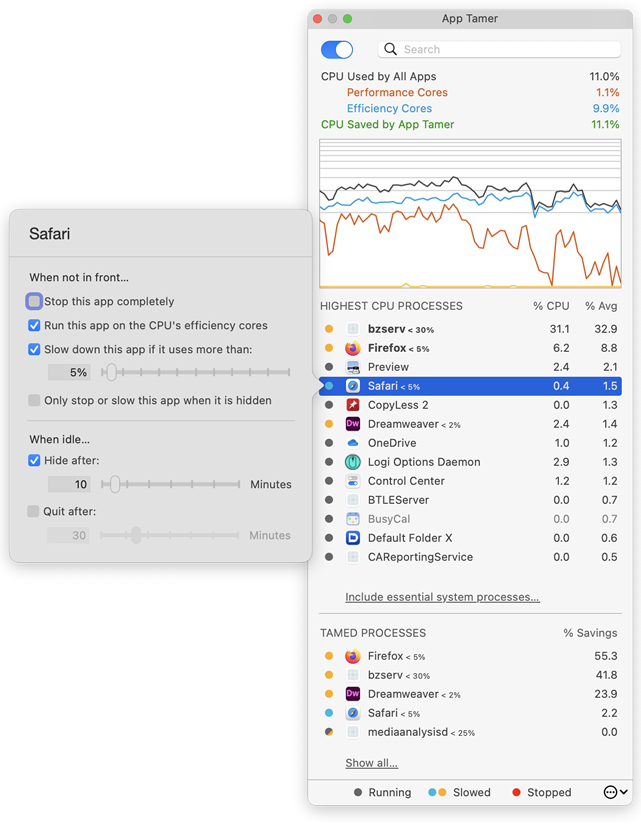
St. Clair Software delivers an update today for App Tamer, its Macintosh utility that manages applications to deliver more efficient CPU usage, increased battery life and quieter operation. App Tamer's unique AutoStop capability automatically slows down or pauses applications when you switch away from them, and then restarts them when you click back to them. This version delivers compatibility with Sierra and improves App Tamer's performance.
Denver, Colorado - St. Clair Software today is pleased to announce the availability of a free update to its App Tamer utility for macOS. App Tamer 2.2 delivers compatibility with macOS 10.12 Sierra and improves App Tamer's efficiency and intelligence. Changes include:
* Compatible with macOS 10.12 Sierra
* Improved efficiency when managing lots of processes
* Much more intelligent stopping and starting of helper processes such as Safari Web Content, Safari Networking, Google Chrome Helper, etc.
* App Tamer's contextual menus work more consistently
More about App Tamer:
Some Mac applications, especially web browsers, continue running tasks or animations even when they're supposed to be idle in the background. This can consume valuable processing power, reducing battery life and producing heat that increases fan noise. App Tamer's unique AutoStop capability automatically slows down or pauses these applications when you switch away from them, and then restarts them when you click back to them. This frees your CPU and reduces power consumption.
App Tamer comes pre-configured to automatically manage Safari, Firefox, Chrome, Spotlight, Time Machine, Word and many other apps when they're in the background. And customizing it for other applications is just a mouse click away.
Pricing and Availability:
App Tamer will operate on any Macintosh running macOS 10.7 or higher, and is free to try for 15 days. A license to continue using it after the trial period is $14.95 (USD). This update is free for users who purchased App Tamer 2.x or bought App Tamer 1.x after July 1, 2013. For those that purchased a license before that date, the upgrade is $7.95 (USD).
St. Clair Software: http://www.stclairsoft.com/
App Tamer 2.2: http://www.stclairsoft.com/AppTamer/
Download App Tamer: http://www.stclairsoft.com/cgi-bin/dl.cgi?AT
Purchase: http://stclairsoft.com/store
Screenshot: http://www.stclairsoft.com/AppTamer/images/MainPanelWithSettingsTall.png
Application Icon: http://www.stclairsoft.com/AppTamer/images/AppTamerIcon.png
Based in Denver, Colorado, St. Clair Software is a privately held company that has been specializing in utilities and custom software solutions for the Macintosh since 1988. St. Clair Software can be contacted at: St. Clair Software, 271 S. Emerson Street, Denver, CO, USA 80209. Copyright (C) 1988-2016 St. Clair Software. All Rights Reserved. Apple, the Apple logo, and Macintosh are registered trademarks of Apple Inc. in the U.S. and/or other countries.
*******
Link To Article: http://prmac.com/release-id-80138.htm
*******
---------------------------------------------------------------------------------
Note that you can alter delivered distributions at any time.
Login to your account on prMac to alter your channel selection, or to opt-out at any time.


LastThink Releases Online Mauritius TV 4.5 for iOS
A new article has been published at prMac.
LastThink Releases Online Mauritius TV 4.5 for iOS - Published on 08/31/16
LastThink announces Online Mauritius TV 4.5, the update to their highly customizable TV application for iOS devices. Anyone can directly access their favorite TV channel and watch diverse films, news, programs from their iPad, iPhone and iPod touch anywhere and anytime. Vibes are smart TV and movie playlists. Users can easily record their favorite films, news, talk shows, programs and more. Users can also share what they are watching via Facebook.
Yerevan, Armenia - LastThink is proud to announce the release of Online Mauritius TV 4.5, the important update to their highly customizable TV application developed for iPhone, iPad, and iPod touch devices. Users can directly access their favorite TV channel and watch diverse films, news, programs from their iPad, iPhone and iPod touch anywhere and anytime.
Features:
* Navigating album photos by sliding your finger right or left on the screen
* Change the device you are streaming the picture to, by taping on the Play button in the upper right corner of your iPad's screen and selecting a desired device
* Screening and shooting any moment of your preferred TV program or film you like
* Altering the boring parts and moving straight to the best part at once - Filter by HD-only and favorite channels
* Rotating channels easily by a mere touch on your screen
* Organize your favorite TV shows, sport teams, movies, and actors and find where you can watch them - on TV and on demand
* Recording your favorite films, news, Talk Shows, programs and etc.
* Sharing what you're watching via Facebook, Twitter, YouTube, Dropbox, email and more - Vibes are smart TV and movie playlists
* The highest quality even with the lowest Internet and HD quality with the normal Internet - You can watch TV channels in HD level
* Editing and cropping videos into smaller parts. In addition to, you can take videos of your favorite program
* Capturing the funniest and most interesting moments of what you are watching with the trim tool
* Searching the content across streaming and broadcast services
* Discovering more than 100 channels of great entertainment beyond the Online Mauritius TV app right on your device's touchscreen interface
We have selected data from the internet and if any assembly or constitution doesn't want us to show the content of the unit, please recommend us to remove it. We follow TV regulations and adjustments and we select original TV content data without artificial editions. If you however experience any issues, please do not hesitate to contact us if you'd like to share your experience with live TV channels, or provide suggestions on how we could improve the product further. We will be more than happy to get in touch.
Device Requirements:
* iPhone, iPad, and iPod touch
* Optimized for iPhone 5, iPhone 6, and iPhone 6 Plus
* Requires iOS 6.0 or later
* Universal Application
* 35.7 MB
Pricing and Availability:
Online Mauritius TV 4.5 is free and is available worldwide exclusively through the App Store in the Entertainment category.
LastThink: http://lastthink.com/
Online Mauritius Tv 4.5: https://www.facebook.com/Online-Mauritius-TV-Community-216296838710063
Download from iTunes: https://itunes.apple.com/app/online-mauritius-tv/id1074214695
Screenshot: http://a4.mzstatic.com/us/r30/Purple69/v4/30/2c/f2/302cf2d3-f261-a851-f58d-6b1da609406d/screen322x572.jpeg
App Icon: http://a3.mzstatic.com/us/r30/Purple20/v4/e4/a4/fd/e4a4fd47-34be-89d2-2c15-e35c9ed60561/icon175x175.jpeg
LastThink is an IT company with a focus on mobile development. It has extended its list of services since 2012 to offer high-end business process management, system integration, as well as up-to-date communication solutions. LastThink's mission is to deliver maximum business value to its customers by designing, developing, implementing and maintaining efficient and high quality software solutions aligned with their most essential business needs. Their team will always do its best to meet client expectations. All Material and Software Copyright (C) 2016 LastThink LLC. All Rights Reserved. Apple, the Apple logo, iPhone, iPad and iPod are registered trademarks of Apple Inc. in the U.S. and/or other countries.
*******
Link To Article: http://prmac.com/release-id-80136.htm
*******
---------------------------------------------------------------------------------
Note that you can alter delivered distributions at any time.
Login to your account on prMac to alter your channel selection, or to opt-out at any time.
LastThink Releases Online Mauritius TV 4.5 for iOS - Published on 08/31/16
LastThink announces Online Mauritius TV 4.5, the update to their highly customizable TV application for iOS devices. Anyone can directly access their favorite TV channel and watch diverse films, news, programs from their iPad, iPhone and iPod touch anywhere and anytime. Vibes are smart TV and movie playlists. Users can easily record their favorite films, news, talk shows, programs and more. Users can also share what they are watching via Facebook.
Yerevan, Armenia - LastThink is proud to announce the release of Online Mauritius TV 4.5, the important update to their highly customizable TV application developed for iPhone, iPad, and iPod touch devices. Users can directly access their favorite TV channel and watch diverse films, news, programs from their iPad, iPhone and iPod touch anywhere and anytime.
Features:
* Navigating album photos by sliding your finger right or left on the screen
* Change the device you are streaming the picture to, by taping on the Play button in the upper right corner of your iPad's screen and selecting a desired device
* Screening and shooting any moment of your preferred TV program or film you like
* Altering the boring parts and moving straight to the best part at once - Filter by HD-only and favorite channels
* Rotating channels easily by a mere touch on your screen
* Organize your favorite TV shows, sport teams, movies, and actors and find where you can watch them - on TV and on demand
* Recording your favorite films, news, Talk Shows, programs and etc.
* Sharing what you're watching via Facebook, Twitter, YouTube, Dropbox, email and more - Vibes are smart TV and movie playlists
* The highest quality even with the lowest Internet and HD quality with the normal Internet - You can watch TV channels in HD level
* Editing and cropping videos into smaller parts. In addition to, you can take videos of your favorite program
* Capturing the funniest and most interesting moments of what you are watching with the trim tool
* Searching the content across streaming and broadcast services
* Discovering more than 100 channels of great entertainment beyond the Online Mauritius TV app right on your device's touchscreen interface
We have selected data from the internet and if any assembly or constitution doesn't want us to show the content of the unit, please recommend us to remove it. We follow TV regulations and adjustments and we select original TV content data without artificial editions. If you however experience any issues, please do not hesitate to contact us if you'd like to share your experience with live TV channels, or provide suggestions on how we could improve the product further. We will be more than happy to get in touch.
Device Requirements:
* iPhone, iPad, and iPod touch
* Optimized for iPhone 5, iPhone 6, and iPhone 6 Plus
* Requires iOS 6.0 or later
* Universal Application
* 35.7 MB
Pricing and Availability:
Online Mauritius TV 4.5 is free and is available worldwide exclusively through the App Store in the Entertainment category.
LastThink: http://lastthink.com/
Online Mauritius Tv 4.5: https://www.facebook.com/Online-Mauritius-TV-Community-216296838710063
Download from iTunes: https://itunes.apple.com/app/online-mauritius-tv/id1074214695
Screenshot: http://a4.mzstatic.com/us/r30/Purple69/v4/30/2c/f2/302cf2d3-f261-a851-f58d-6b1da609406d/screen322x572.jpeg

App Icon: http://a3.mzstatic.com/us/r30/Purple20/v4/e4/a4/fd/e4a4fd47-34be-89d2-2c15-e35c9ed60561/icon175x175.jpeg

LastThink is an IT company with a focus on mobile development. It has extended its list of services since 2012 to offer high-end business process management, system integration, as well as up-to-date communication solutions. LastThink's mission is to deliver maximum business value to its customers by designing, developing, implementing and maintaining efficient and high quality software solutions aligned with their most essential business needs. Their team will always do its best to meet client expectations. All Material and Software Copyright (C) 2016 LastThink LLC. All Rights Reserved. Apple, the Apple logo, iPhone, iPad and iPod are registered trademarks of Apple Inc. in the U.S. and/or other countries.
*******
Link To Article: http://prmac.com/release-id-80136.htm
*******
---------------------------------------------------------------------------------
Note that you can alter delivered distributions at any time.
Login to your account on prMac to alter your channel selection, or to opt-out at any time.
LanGo for iOS - New App for Learning Japanese with Smart Flashcards
A new article has been published at prMac.
LanGo for iOS - New App for Learning Japanese with Smart Flashcards - Published on 08/31/16
Simply Learn Solutions today introduces Learn Japanese with LanGo 1.0.0, the company's new travel phrasebook developed for iPhone, iPad and iPod touch. LanGo features over 1000 phrases recorded by native speakers. Users can effectively memorize all the Japanese phrases using smart flashcards that are based on the spaced repetition technology. The flashcards are fully customizable and make sure that vocabulary is constantly kept in memory using a minimal daily time investment.
Chiang Mai, Thailand - Simply Learn Solutions, the creator of LanGo the popular language learn app series, today is proud to announce the release and immediate availability of Learn Japanese with LanGo 1.0.0, the company's new travel phrasebook developed for iPhone, iPad and iPod touch. LanGo features over 1000 phrases recorded by native speakers. Users can effectively memorize all the Japanese phrases using smart flashcards that are based on the spaced repetition technology.
The flashcards are fully customizable and make sure that vocabulary is constantly kept in memory using a minimal daily time investment. Experienced users can freely choose areas they want to improve on. The Japanese quiz is a fun way to quickly test the user's language skills on the go. All phrases are presented in the original Japanese writing as well as in romanization.
LanGo is available and fully localized in 16 languages. It not only covers major languages such as Japanese, English, Spanish, German and Chinese, but also less well-known ones such as Burmese, Thai, Vietnamese, Khmer and Tagalog.
"Traveling to a foreign country and communicating with locals is the single most effective way to learn a language", says Kanyarat Nuchangpuek, Co-Founder of LanGo. With hundreds of useful phrases conveniently sorted in categories, the app makes traveling and living in Japan a deeper and more enjoyable experience.
LanGo has been featured earlier this year as mobile app of the day on Product Hunt and has got thousands of 5 star reviews in its Android version, known there as Simply Learn Languages. The LanGo series for Android already has over 200k downloads.
Device Requirements:
* iPhone, iPad, and iPod touch
* Requires iOS 9.0 or later
* 79.3 MB
Pricing and Availability:
Learn Japanese with LanGo 1.0.0 is Free and available worldwide through the App Store in the Education category. There is also an Android version available on Google Play. For more information about LanGo, or Simply Learn Solutions, please contact Simon Bacher.
Learn Japanese with LanGo 1.0.0: http://simplylearnlanguages.com/japanese
Download from iTunes: https://itunes.apple.com/us/app/learn-japanese-lango-travel/id1108849082
Download from Google Play: https://play.google.com/store/apps/details?id=simply.learn.japanese
Product Hunt Feature App: https://www.producthunt.com/tech/lango
YouTube Video (App Preview): https://www.youtube.com/watch?v=Oywn2CoHEyk
Screenshot: http://a3.mzstatic.com/us/r30/Purple71/v4/d2/b6/d2/d2b6d260-131a-35ce-17ee-893e0ced599f/screen696x696.jpeg
Simply Learn Solutions is a mobile app development company passionate about language learning and technology. The company's aim is to make language learning a simple and enjoyable experience. Their apps has been downloaded by hundreds of thousands of users from all over the world. All Material and Software (C) Copyright 2016 Simply Learn Solutions. All Rights Reserved. Apple, the Apple logo, iPhone, iPod and iPad are registered trademarks of Apple Inc. in the U.S. and/or other countries. Other trademarks and registered trademarks may be the property of their respective owners.
*******
Link To Article: http://prmac.com/release-id-80140.htm
*******
---------------------------------------------------------------------------------
Note that you can alter delivered distributions at any time.
Login to your account on prMac to alter your channel selection, or to opt-out at any time.
LanGo for iOS - New App for Learning Japanese with Smart Flashcards - Published on 08/31/16
Simply Learn Solutions today introduces Learn Japanese with LanGo 1.0.0, the company's new travel phrasebook developed for iPhone, iPad and iPod touch. LanGo features over 1000 phrases recorded by native speakers. Users can effectively memorize all the Japanese phrases using smart flashcards that are based on the spaced repetition technology. The flashcards are fully customizable and make sure that vocabulary is constantly kept in memory using a minimal daily time investment.
Chiang Mai, Thailand - Simply Learn Solutions, the creator of LanGo the popular language learn app series, today is proud to announce the release and immediate availability of Learn Japanese with LanGo 1.0.0, the company's new travel phrasebook developed for iPhone, iPad and iPod touch. LanGo features over 1000 phrases recorded by native speakers. Users can effectively memorize all the Japanese phrases using smart flashcards that are based on the spaced repetition technology.
The flashcards are fully customizable and make sure that vocabulary is constantly kept in memory using a minimal daily time investment. Experienced users can freely choose areas they want to improve on. The Japanese quiz is a fun way to quickly test the user's language skills on the go. All phrases are presented in the original Japanese writing as well as in romanization.
LanGo is available and fully localized in 16 languages. It not only covers major languages such as Japanese, English, Spanish, German and Chinese, but also less well-known ones such as Burmese, Thai, Vietnamese, Khmer and Tagalog.
"Traveling to a foreign country and communicating with locals is the single most effective way to learn a language", says Kanyarat Nuchangpuek, Co-Founder of LanGo. With hundreds of useful phrases conveniently sorted in categories, the app makes traveling and living in Japan a deeper and more enjoyable experience.
LanGo has been featured earlier this year as mobile app of the day on Product Hunt and has got thousands of 5 star reviews in its Android version, known there as Simply Learn Languages. The LanGo series for Android already has over 200k downloads.
Device Requirements:
* iPhone, iPad, and iPod touch
* Requires iOS 9.0 or later
* 79.3 MB
Pricing and Availability:
Learn Japanese with LanGo 1.0.0 is Free and available worldwide through the App Store in the Education category. There is also an Android version available on Google Play. For more information about LanGo, or Simply Learn Solutions, please contact Simon Bacher.
Learn Japanese with LanGo 1.0.0: http://simplylearnlanguages.com/japanese
Download from iTunes: https://itunes.apple.com/us/app/learn-japanese-lango-travel/id1108849082
Download from Google Play: https://play.google.com/store/apps/details?id=simply.learn.japanese
Product Hunt Feature App: https://www.producthunt.com/tech/lango
YouTube Video (App Preview): https://www.youtube.com/watch?v=Oywn2CoHEyk
Screenshot: http://a3.mzstatic.com/us/r30/Purple71/v4/d2/b6/d2/d2b6d260-131a-35ce-17ee-893e0ced599f/screen696x696.jpeg

Simply Learn Solutions is a mobile app development company passionate about language learning and technology. The company's aim is to make language learning a simple and enjoyable experience. Their apps has been downloaded by hundreds of thousands of users from all over the world. All Material and Software (C) Copyright 2016 Simply Learn Solutions. All Rights Reserved. Apple, the Apple logo, iPhone, iPod and iPad are registered trademarks of Apple Inc. in the U.S. and/or other countries. Other trademarks and registered trademarks may be the property of their respective owners.
*******
Link To Article: http://prmac.com/release-id-80140.htm
*******
---------------------------------------------------------------------------------
Note that you can alter delivered distributions at any time.
Login to your account on prMac to alter your channel selection, or to opt-out at any time.
Tippy Train - Crazy Addictive New Runaway Train Game for iPhone
A new article has been published at prMac.
Tippy Train - Crazy Addictive New Runaway Train Game for iPhone - Published on 08/31/16
UK based The Gamester Limited today introduces Tippy Train, their unique new 'keep-the-cargo' game for iPhone. Ever wanted to drive a train? A train full of cargo? Well now you can! Tippy Train is a runaway train that's out of control. You can't slow it down, all you can do is keep the cargo in the train for as long as possible. Featuring realistic physics and gorgeous 8-bit models, Tippy Train is a game that players of all ages can get hooked on. Choo Choo!
London, United Kingdom - Indie developer, The Gamester is pleased to announce the release and immediate availability of Tippy Train 1.0.0, their unique new 'keep-the-cargo' game for iPhone. Ever wanted to drive a train? A train full of cargo? A train that explodes if you lose all your cargo? Well now you can!
Tippy Train is a runaway train that's out of control. You can't slow it down, all you can do is keep the cargo in the train for as long as possible. Tip the train to nail perfect landings and keep the cargo on board. Survive for long enough to reach cargo reload stations to extend your run.
Tippy Train is suitable for players of all ages and is crazy addictive. Drive the train far enough to unlock the truck - it holds more cargo than the train but is more unstable!
Features:
* Unique gameplay - it's all about soft landings and keeping the cargo
* Fast, realistic physics based action
* Gorgeous, 8-bit models
* Beat your daily and all time best scores and challenge friends through Game Centre
* No in-app purchases
Controls: Easy to use on screen tilt controls.
Device requirements:
* Compatible with iPhone
* Requires iOS 9 or later
* 18.1 MB
Pricing and availability:
Tippy Train 1.0.0 is Free and available worldwide exclusively through the App Store in the Games category.
The Gamester: http://thegamester.co.uk
Tippy Train 1.0.0: http://www.gamesterapps.co.uk/tippytrain
Download from iTunes: http://itunes.apple.com/app/tippy-train/id1136169256
YouTube Video (Preview): http://www.youtube.com/watch?v=F09iqoJa0JE
Media Assets: http://www.gamesterapps.co.uk/press
The Gamester is an indie studio based in London, UK that was formed in 2014 to make awesome mobile games. Tippy Train is our first release. Copyright (C) 2016 The Gamester Limited. All Rights Reserved. Apple, the Apple logo, iPhone, iPod and iPad are registered trademarks of Apple Inc. in the U.S. and/or other countries.
*******
Link To Article: http://prmac.com/release-id-80139.htm
*******
---------------------------------------------------------------------------------
Note that you can alter delivered distributions at any time.
Login to your account on prMac to alter your channel selection, or to opt-out at any time.
Tippy Train - Crazy Addictive New Runaway Train Game for iPhone - Published on 08/31/16
UK based The Gamester Limited today introduces Tippy Train, their unique new 'keep-the-cargo' game for iPhone. Ever wanted to drive a train? A train full of cargo? Well now you can! Tippy Train is a runaway train that's out of control. You can't slow it down, all you can do is keep the cargo in the train for as long as possible. Featuring realistic physics and gorgeous 8-bit models, Tippy Train is a game that players of all ages can get hooked on. Choo Choo!
London, United Kingdom - Indie developer, The Gamester is pleased to announce the release and immediate availability of Tippy Train 1.0.0, their unique new 'keep-the-cargo' game for iPhone. Ever wanted to drive a train? A train full of cargo? A train that explodes if you lose all your cargo? Well now you can!
Tippy Train is a runaway train that's out of control. You can't slow it down, all you can do is keep the cargo in the train for as long as possible. Tip the train to nail perfect landings and keep the cargo on board. Survive for long enough to reach cargo reload stations to extend your run.
Tippy Train is suitable for players of all ages and is crazy addictive. Drive the train far enough to unlock the truck - it holds more cargo than the train but is more unstable!
Features:
* Unique gameplay - it's all about soft landings and keeping the cargo
* Fast, realistic physics based action
* Gorgeous, 8-bit models
* Beat your daily and all time best scores and challenge friends through Game Centre
* No in-app purchases
Controls: Easy to use on screen tilt controls.
Device requirements:
* Compatible with iPhone
* Requires iOS 9 or later
* 18.1 MB
Pricing and availability:
Tippy Train 1.0.0 is Free and available worldwide exclusively through the App Store in the Games category.
The Gamester: http://thegamester.co.uk
Tippy Train 1.0.0: http://www.gamesterapps.co.uk/tippytrain
Download from iTunes: http://itunes.apple.com/app/tippy-train/id1136169256
YouTube Video (Preview): http://www.youtube.com/watch?v=F09iqoJa0JE
Media Assets: http://www.gamesterapps.co.uk/press
The Gamester is an indie studio based in London, UK that was formed in 2014 to make awesome mobile games. Tippy Train is our first release. Copyright (C) 2016 The Gamester Limited. All Rights Reserved. Apple, the Apple logo, iPhone, iPod and iPad are registered trademarks of Apple Inc. in the U.S. and/or other countries.
*******
Link To Article: http://prmac.com/release-id-80139.htm
*******
---------------------------------------------------------------------------------
Note that you can alter delivered distributions at any time.
Login to your account on prMac to alter your channel selection, or to opt-out at any time.
eBook Familiarizes iOS and Mac Developers with Nepenthes Sub-Middleware
A new article has been published at prMac.
eBook Familiarizes iOS and Mac Developers with Nepenthes Sub-Middleware - Published on 08/31/16
UK based Everdow Ltd. today announces the release of Nepenthes - iOS & macOS Enterprise App Development Solution 1.1, their eBook for iOS and Amazon Kindle devices. Nepenthes is a sub-middleware for iOS and macOS app development, which sets the standards for Java back-end and Objective-C front-end development. The Nepenthes eBook walks developers through setting up the Nepenthes development environment, as well as creating both iOS and Mac clients to be used in the Nepenthes environment.
London, United Kingdom - United Kingdom-based Everdow Ltd. today is proud to announce the release of Nepenthes - iOS & macOS Enterprise App Development Solution 1.1, their eBook for iPhone, iPad, iPod touch, and Amazon Kindle devices. The eBook walks developers through setting up the proper environment for Nepenthes development. Nepenthes is a sub-middleware for iOS & macOS App development, which sets the standards for Java back-end and Objective-C front-end development.
As iOS and Mac development has grown in popularity, enterprise-class applications are coming to both platforms in ever-growing numbers. While traditional server applications for the web are traditionally written in Java, iOS and Mac apps are traditionally developed with Objective-C. The two languages communicate with each other via JSON. This adds unnecessary layers of complexity to the development of enterprise-class iOS and Mac apps, especially for those developers who are used to object oriented design and coding.
Nepenthes helps resolve the difficulties in designing and developing apps, reducing the complexity of designing and coding those apps. It also allows for the development of robust and efficient applications, all without dealing with the usual server/client encoding and decoding issues. Nepenthes offers the ability to reduce coding and debugging time considerably, offering many abstract functions and methods for extending relative classes. This allows a development team to concentrate on the underlying business logic for their apps.
The Nepenthes development environment requires: macOS (10.11.6 or higher), JDK (1.8.0), Xcode (7.3.1), NetBeans (8.0.2), MySQL (5.6.24), and Tomcat (7.0.55). The Nepenthes - iOS & macOS Enterprise App Development Solution eBook walks developers through setting up the Nepenthes development environment, aiding them in setting up the required apps and servers to allow developing with Nepenthes.
"While Nepenthes may seem very abstract at first, the eBook walks the developer through setting up the proper development environment," says Everdow developer Milton Li. "In addition, it will also offer them a look at how to develop both iOS and Mac apps using Objective-C to create a Nepenthes-based client for both operating systems."
Nepenthes offers solutions for both front-end and back-end (server & client) development, integrating development with Objective-C on the front-end, and Java development on the back-end. Developer Li strongly suggests that developers interested in getting started with using Nepenthes for development download the free Nepenthes app from the Mac App Store, as all the required software, libraries, and frameworks are all included in the Nepenthes App.
Everdow used Nepenthes to develop the EverdowPSI (Procurement, Sales and Inventory System), their cloud-based inventory management software solution for the Mac. EverdowPSI is designed to offer small-to-medium sized enterprises access to their real-time inventory, sales revenue, and purchasing information, which allows businesses to quickly adapt to market fluctuations. The free-to-download app (available in the Mac App Store), was written using the Nepenthes environment.
Developers will find that Nepenthes allows them to easily develop front-end and back-end solutions, while reducing development time and keeping projects under budget. The Nepenthes - iOS & macOS Enterprise App Development Solution eBook will offer those same developers an informative look at the system, while aiding them in the setup of their development environment. The eBook/app combo will allow them to quickly get started developing robust iOS and Mac clients for their customers.
Device Requirements:
* iOS 4.3.3 or later with iBooks 1.5 or later
* Mac OS X 10.9 or later with iBooks 1.0
* Print Length: 18 Pages
Pricing and Availability:
Nepenthes - iOS & macOS Enterprise App Development Solution EBook 1.1 is free, and is available worldwide through the iBooks Store in the Programming category. An Amazon Kindle version is also available through the Amazon Kindle Bookstore.
Nepenthes - iOS & macOS Enterprise App Development Solution eBook 1.1: http://www.everdow.org
Download from iBookstore: http://itunes.apple.com/book/id1146178703
Download from Kindle Store: https://www.amazon.com/dp/B01KSDB32M#nav-subnav
Nepenthes 3.2 on the Mac App Store: https://itunes.apple.com/app/nepenthes/id764623073
Book Icon: http://a1.mzstatic.com/us/r30/Publication71/v4/f2/84/58/f28458fb-08d1-220a-098d-836ff556ac8d/cover225x225.jpeg
United Kingdom-based Everdow Ltd. was founded in 2010, by Milton Li. The company focuses on the development of Mac OS X Applications and iOS apps, specializing in the development of enterprise-class business management software that is accessible to the smaller and medium-sized business. Copyright (C) 2016 Everdow Ltd. All Rights Reserved. Apple, the Apple logo and Mac OS X platforms are trademarks of Apple Inc. in the U.S. and/or other countries.
*******
Link To Article: http://prmac.com/release-id-80137.htm
*******
---------------------------------------------------------------------------------
Note that you can alter delivered distributions at any time.
Login to your account on prMac to alter your channel selection, or to opt-out at any time.
eBook Familiarizes iOS and Mac Developers with Nepenthes Sub-Middleware - Published on 08/31/16
UK based Everdow Ltd. today announces the release of Nepenthes - iOS & macOS Enterprise App Development Solution 1.1, their eBook for iOS and Amazon Kindle devices. Nepenthes is a sub-middleware for iOS and macOS app development, which sets the standards for Java back-end and Objective-C front-end development. The Nepenthes eBook walks developers through setting up the Nepenthes development environment, as well as creating both iOS and Mac clients to be used in the Nepenthes environment.
London, United Kingdom - United Kingdom-based Everdow Ltd. today is proud to announce the release of Nepenthes - iOS & macOS Enterprise App Development Solution 1.1, their eBook for iPhone, iPad, iPod touch, and Amazon Kindle devices. The eBook walks developers through setting up the proper environment for Nepenthes development. Nepenthes is a sub-middleware for iOS & macOS App development, which sets the standards for Java back-end and Objective-C front-end development.
As iOS and Mac development has grown in popularity, enterprise-class applications are coming to both platforms in ever-growing numbers. While traditional server applications for the web are traditionally written in Java, iOS and Mac apps are traditionally developed with Objective-C. The two languages communicate with each other via JSON. This adds unnecessary layers of complexity to the development of enterprise-class iOS and Mac apps, especially for those developers who are used to object oriented design and coding.
Nepenthes helps resolve the difficulties in designing and developing apps, reducing the complexity of designing and coding those apps. It also allows for the development of robust and efficient applications, all without dealing with the usual server/client encoding and decoding issues. Nepenthes offers the ability to reduce coding and debugging time considerably, offering many abstract functions and methods for extending relative classes. This allows a development team to concentrate on the underlying business logic for their apps.
The Nepenthes development environment requires: macOS (10.11.6 or higher), JDK (1.8.0), Xcode (7.3.1), NetBeans (8.0.2), MySQL (5.6.24), and Tomcat (7.0.55). The Nepenthes - iOS & macOS Enterprise App Development Solution eBook walks developers through setting up the Nepenthes development environment, aiding them in setting up the required apps and servers to allow developing with Nepenthes.
"While Nepenthes may seem very abstract at first, the eBook walks the developer through setting up the proper development environment," says Everdow developer Milton Li. "In addition, it will also offer them a look at how to develop both iOS and Mac apps using Objective-C to create a Nepenthes-based client for both operating systems."
Nepenthes offers solutions for both front-end and back-end (server & client) development, integrating development with Objective-C on the front-end, and Java development on the back-end. Developer Li strongly suggests that developers interested in getting started with using Nepenthes for development download the free Nepenthes app from the Mac App Store, as all the required software, libraries, and frameworks are all included in the Nepenthes App.
Everdow used Nepenthes to develop the EverdowPSI (Procurement, Sales and Inventory System), their cloud-based inventory management software solution for the Mac. EverdowPSI is designed to offer small-to-medium sized enterprises access to their real-time inventory, sales revenue, and purchasing information, which allows businesses to quickly adapt to market fluctuations. The free-to-download app (available in the Mac App Store), was written using the Nepenthes environment.
Developers will find that Nepenthes allows them to easily develop front-end and back-end solutions, while reducing development time and keeping projects under budget. The Nepenthes - iOS & macOS Enterprise App Development Solution eBook will offer those same developers an informative look at the system, while aiding them in the setup of their development environment. The eBook/app combo will allow them to quickly get started developing robust iOS and Mac clients for their customers.
Device Requirements:
* iOS 4.3.3 or later with iBooks 1.5 or later
* Mac OS X 10.9 or later with iBooks 1.0
* Print Length: 18 Pages
Pricing and Availability:
Nepenthes - iOS & macOS Enterprise App Development Solution EBook 1.1 is free, and is available worldwide through the iBooks Store in the Programming category. An Amazon Kindle version is also available through the Amazon Kindle Bookstore.
Nepenthes - iOS & macOS Enterprise App Development Solution eBook 1.1: http://www.everdow.org
Download from iBookstore: http://itunes.apple.com/book/id1146178703
Download from Kindle Store: https://www.amazon.com/dp/B01KSDB32M#nav-subnav
Nepenthes 3.2 on the Mac App Store: https://itunes.apple.com/app/nepenthes/id764623073
Book Icon: http://a1.mzstatic.com/us/r30/Publication71/v4/f2/84/58/f28458fb-08d1-220a-098d-836ff556ac8d/cover225x225.jpeg

United Kingdom-based Everdow Ltd. was founded in 2010, by Milton Li. The company focuses on the development of Mac OS X Applications and iOS apps, specializing in the development of enterprise-class business management software that is accessible to the smaller and medium-sized business. Copyright (C) 2016 Everdow Ltd. All Rights Reserved. Apple, the Apple logo and Mac OS X platforms are trademarks of Apple Inc. in the U.S. and/or other countries.
*******
Link To Article: http://prmac.com/release-id-80137.htm
*******
---------------------------------------------------------------------------------
Note that you can alter delivered distributions at any time.
Login to your account on prMac to alter your channel selection, or to opt-out at any time.
LastThink Releases Morocco Tv Live 4.5 for iOS
A new article has been published at prMac.
LastThink Releases Morocco Tv Live 4.5 for iOS - Published on 08/30/16
LastThink announces Morocco Tv Live 4.5, the update to their highly customizable TV application for iOS devices. Anyone can directly access their favorite TV channel and watch diverse films, news, programs from their iPad, iPhone and iPod touch anywhere and anytime. Vibes are smart TV and movie playlists. Users can easily record their favorite films, news, talk shows, programs and more. Users can also share what they are watching via Facebook.
Yerevan, Armenia - LastThink is proud to announce the release of Morocco Tv Live 4.5, the important update to their highly customizable TV application developed for iPhone, iPad, and iPod touch devices. Users can directly access their favorite TV channel and watch diverse films, news, programs from their iPad, iPhone and iPod touch anywhere and anytime.
Features:
* Navigating album photos by sliding your finger right or left on the screen
* Change the device you are streaming the picture to, by taping on the Play button in the upper right corner of your iPad's screen and selecting a desired device
* Screening and shooting any moment of your preferred TV program or film you like
* Altering the boring parts and moving straight to the best part at once - Filter by HD-only and favorite channels
* Rotating channels easily by a mere touch on your screen
* Organize your favorite TV shows, sport teams, movies, and actors and find where you can watch them - on TV and on demand
* Recording your favorite films, news, Talk Shows, programs and etc.
* Sharing what you're watching via Facebook, Twitter, YouTube, Dropbox, email and more - Vibes are smart TV and movie playlists
* The highest quality even with the lowest Internet and HD quality with the normal Internet - You can watch TV channels in HD level
* Editing and cropping videos into smaller parts. In addition to, you can take videos of your favorite program
* Capturing the funniest and most interesting moments of what you are watching with the trim tool
* Searching the content across streaming and broadcast services
* Discovering more than 100 channels of great entertainment beyond the Morocco Tv Live app right on your device's touchscreen interface
We have selected data from the internet and if any assembly or constitution doesn't want us to show the content of the unit, please recommend us to remove it. We follow TV regulations and adjustments and we select original TV content data without artificial editions. If you however experience any issues, please do not hesitate to contact us if you'd like to share your experience with live TV channels, or provide suggestions on how we could improve the product further. We will be more than happy to get in touch.
Device Requirements:
* iPhone, iPad, and iPod touch
* Optimized for iPhone 5, iPhone 6, and iPhone 6 Plus
* Requires iOS 6.0 or later
* Universal Application
* 35.8 MB
Pricing and Availability:
Morocco Tv Live 4.5 is free and is available worldwide exclusively through the App Store in the Entertainment category.
LastThink: http://lastthink.com/
Morocco Tv Live 4.5: https://www.facebook.com/Online-Morocco-TV-Community-1527934444173966
Download from iTunes: https://itunes.apple.com/app/morocco-tv-live/id1074215513
Screenshot: http://a3.mzstatic.com/us/r30/Purple69/v4/2d/b5/8a/2db58ad3-7035-5d81-0ba6-2d9dfb22cf7d/screen322x572.jpeg
App Icon: http://a3.mzstatic.com/us/r30/Purple20/v4/76/cc/40/76cc4069-9f66-abf7-a44d-ce1be3f46a4f/icon175x175.jpeg
LastThink is an IT company with a focus on mobile development. It has extended its list of services since 2012 to offer high-end business process management, system integration, as well as up-to-date communication solutions. LastThink's mission is to deliver maximum business value to its customers by designing, developing, implementing and maintaining efficient and high quality software solutions aligned with their most essential business needs. Their team will always do its best to meet client expectations. All Material and Software Copyright (C) 2016 LastThink LLC. All Rights Reserved. Apple, the Apple logo, iPhone, iPad and iPod are registered trademarks of Apple Inc. in the U.S. and/or other countries.
*******
Link To Article: http://prmac.com/release-id-80134.htm
*******
---------------------------------------------------------------------------------
Note that you can alter delivered distributions at any time.
Login to your account on prMac to alter your channel selection, or to opt-out at any time.
LastThink Releases Morocco Tv Live 4.5 for iOS - Published on 08/30/16
LastThink announces Morocco Tv Live 4.5, the update to their highly customizable TV application for iOS devices. Anyone can directly access their favorite TV channel and watch diverse films, news, programs from their iPad, iPhone and iPod touch anywhere and anytime. Vibes are smart TV and movie playlists. Users can easily record their favorite films, news, talk shows, programs and more. Users can also share what they are watching via Facebook.
Yerevan, Armenia - LastThink is proud to announce the release of Morocco Tv Live 4.5, the important update to their highly customizable TV application developed for iPhone, iPad, and iPod touch devices. Users can directly access their favorite TV channel and watch diverse films, news, programs from their iPad, iPhone and iPod touch anywhere and anytime.
Features:
* Navigating album photos by sliding your finger right or left on the screen
* Change the device you are streaming the picture to, by taping on the Play button in the upper right corner of your iPad's screen and selecting a desired device
* Screening and shooting any moment of your preferred TV program or film you like
* Altering the boring parts and moving straight to the best part at once - Filter by HD-only and favorite channels
* Rotating channels easily by a mere touch on your screen
* Organize your favorite TV shows, sport teams, movies, and actors and find where you can watch them - on TV and on demand
* Recording your favorite films, news, Talk Shows, programs and etc.
* Sharing what you're watching via Facebook, Twitter, YouTube, Dropbox, email and more - Vibes are smart TV and movie playlists
* The highest quality even with the lowest Internet and HD quality with the normal Internet - You can watch TV channels in HD level
* Editing and cropping videos into smaller parts. In addition to, you can take videos of your favorite program
* Capturing the funniest and most interesting moments of what you are watching with the trim tool
* Searching the content across streaming and broadcast services
* Discovering more than 100 channels of great entertainment beyond the Morocco Tv Live app right on your device's touchscreen interface
We have selected data from the internet and if any assembly or constitution doesn't want us to show the content of the unit, please recommend us to remove it. We follow TV regulations and adjustments and we select original TV content data without artificial editions. If you however experience any issues, please do not hesitate to contact us if you'd like to share your experience with live TV channels, or provide suggestions on how we could improve the product further. We will be more than happy to get in touch.
Device Requirements:
* iPhone, iPad, and iPod touch
* Optimized for iPhone 5, iPhone 6, and iPhone 6 Plus
* Requires iOS 6.0 or later
* Universal Application
* 35.8 MB
Pricing and Availability:
Morocco Tv Live 4.5 is free and is available worldwide exclusively through the App Store in the Entertainment category.
LastThink: http://lastthink.com/
Morocco Tv Live 4.5: https://www.facebook.com/Online-Morocco-TV-Community-1527934444173966
Download from iTunes: https://itunes.apple.com/app/morocco-tv-live/id1074215513
Screenshot: http://a3.mzstatic.com/us/r30/Purple69/v4/2d/b5/8a/2db58ad3-7035-5d81-0ba6-2d9dfb22cf7d/screen322x572.jpeg

App Icon: http://a3.mzstatic.com/us/r30/Purple20/v4/76/cc/40/76cc4069-9f66-abf7-a44d-ce1be3f46a4f/icon175x175.jpeg

LastThink is an IT company with a focus on mobile development. It has extended its list of services since 2012 to offer high-end business process management, system integration, as well as up-to-date communication solutions. LastThink's mission is to deliver maximum business value to its customers by designing, developing, implementing and maintaining efficient and high quality software solutions aligned with their most essential business needs. Their team will always do its best to meet client expectations. All Material and Software Copyright (C) 2016 LastThink LLC. All Rights Reserved. Apple, the Apple logo, iPhone, iPad and iPod are registered trademarks of Apple Inc. in the U.S. and/or other countries.
*******
Link To Article: http://prmac.com/release-id-80134.htm
*******
---------------------------------------------------------------------------------
Note that you can alter delivered distributions at any time.
Login to your account on prMac to alter your channel selection, or to opt-out at any time.
Desktop Bible Will Now Be Called The Bible 3.0 Followed by a Huge Update
A new article has been published at prMac.
Desktop Bible Will Now Be Called The Bible 3.0 Followed by a Huge Update - Published on 08/30/16
Inspiring-Life Technologies is excited to announce the latest of update of Desktop Bible for Mac OS X, which will now be called The Bible 3.0 . This update has made several changes in the app and improved the overall user experience to a great extent. The Bible is an offline Bible Application with a smart and intuitive UI. Users can select a topic and easily find all the related Bible verse in one place. The app is currently available for the download in the Mac App Store.
Kolkata, India - Inspiring-Life Technologies is happy to announce the release of a new update of Desktop Bible for Mac OS X, which will now be called The Bible 3.0. The latest update, The Bible 3.0, has made several improvements on top of the old app. The design has been completely revamped and a host of new features have been added.
The Bible is an offline Bible Application with a smart and intuitive UI. This is one of the most easy-to-use Bible Application available in the Mac App Store, till date.
A brand new feature, Bible Concordance, has been added to The Bible 3.0, as requested by the users. It has an exhaustive list of all the biblical words sorted into alphabets. Users can select a topic and easily find all the related Bible verse in one place.
Now users can record sermon with notes and save them in the app in a well categorized way. The recorded sermon can also be played or shared directly from the app.
What's new in The Bible 3.0:
* Completely revamped the design
* Now you can search Books
* Decrease or increase font size
* Choose from Eight different types of backgrounds for reading Bible
* Change background color of Presentation View
* Hide left pane which consists of the Book List
* Now search The Bible with book name, chapter and verse number
* Find highlighted verses sorted into different colors
* Choose from 12 font styles to read Bible
* Increase or decrease the speed of speech
* Now save journals into different folders
* Add sermons: Take notes with voice recording
* Bible Concordance is added
* More than 50 new Bible versions have been added on top of the previous ones
Other key features of The Bible:
* Easy-to-navigate smart UI
* Add more than 100 Bible Versions/Translations into the App Library
* Write Journals or take notes and save them for future reference
* Share Journals via all the available sharing options
* Search Verse: Search the entire Bible with Keywords and get to a specific Chapter or Book
* Parallel Reading: Open two different Bible Translations side by side and cross refer
* Option to scroll both Translations together or separately
* Mark Bible Verses as Favorite and browse all of them in one place
* Highlight Bible Verses with Color and browse all of them in one place
* Copy Bible Verse from the app and paste anywhere
* Daily Verse: Get inspirational Bible quotes daily on a small pop up
* Speak Mode: The Bible reads out Bible Verses for you
* Presentation Mode: Show scriptures from Bible to a projector screen or a secondary monitor in full screen
It is expected that, The Bible will be loved by all the existing users after they update the app.
Device Requirement:
* OS X 10.10 or later
* 64-bit processor
* 170 MB
Pricing and Availability:
The Bible 3.0 is only $7.99 USD (or equivalent amount in other currencies), and is available exclusively through the Mac App Store in the Reference category. For more information please contact Inspiring-Life Technologies.
The Bible 3.0: http://www.inspiringlife.co/the-bible/
Purchase and Download from Mac App Store: https://itunes.apple.com/app/desktop-bible/id917664748
YouTube Video Demo: https://www.youtube.com/watch?v=sgoBU3Qd4P4
Screenshot 1: http://a1.mzstatic.com/us/r30/Purple62/v4/bc/d8/c3/bcd8c332-d629-03c0-9d65-700a4d6b2ffa/screen800x500.jpeg
Screenshot 2: http://a4.mzstatic.com/us/r30/Purple71/v4/d2/dc/30/d2dc3046-280f-632f-4a2f-4f1fae0ec2f4/screen800x500.jpeg
App Icon: http://a3.mzstatic.com/us/r30/Purple71/v4/d5/a7/85/d5a7851c-6623-756d-b6df-88b605f306f6/icon128-2x.png
Inspiring-Life Technologies Pvt. Ltd is an app development studio, specialized in creating quality iOS and Mac apps for the users to make life easier. We are a bunch of passionate developer that thrives for excellence. We always try to shape our inventory of ideas through our apps. We develop apps that simplify as well as inspire your life. Our dedicated team is really committed in making quality apps. We ensure we achieve our goals in the highly competitive app space. We have several apps in the app store with good ratings and got featured in a number of top charts. All Material and Software (C) Copyright 2016 Inspiring-Life Technologies Pvt. Ltd. All Rights Reserved. Apple, the Apple logo, Macintosh and Mac OS X are registered trademarks of Apple Inc. in the U.S. and/or other countries. Other trademarks and registered trademarks may be the property of their respective owners.
*******
Link To Article: http://prmac.com/release-id-80135.htm
*******
---------------------------------------------------------------------------------
Note that you can alter delivered distributions at any time.
Login to your account on prMac to alter your channel selection, or to opt-out at any time.
Desktop Bible Will Now Be Called The Bible 3.0 Followed by a Huge Update - Published on 08/30/16
Inspiring-Life Technologies is excited to announce the latest of update of Desktop Bible for Mac OS X, which will now be called The Bible 3.0 . This update has made several changes in the app and improved the overall user experience to a great extent. The Bible is an offline Bible Application with a smart and intuitive UI. Users can select a topic and easily find all the related Bible verse in one place. The app is currently available for the download in the Mac App Store.
Kolkata, India - Inspiring-Life Technologies is happy to announce the release of a new update of Desktop Bible for Mac OS X, which will now be called The Bible 3.0. The latest update, The Bible 3.0, has made several improvements on top of the old app. The design has been completely revamped and a host of new features have been added.
The Bible is an offline Bible Application with a smart and intuitive UI. This is one of the most easy-to-use Bible Application available in the Mac App Store, till date.
A brand new feature, Bible Concordance, has been added to The Bible 3.0, as requested by the users. It has an exhaustive list of all the biblical words sorted into alphabets. Users can select a topic and easily find all the related Bible verse in one place.
Now users can record sermon with notes and save them in the app in a well categorized way. The recorded sermon can also be played or shared directly from the app.
What's new in The Bible 3.0:
* Completely revamped the design
* Now you can search Books
* Decrease or increase font size
* Choose from Eight different types of backgrounds for reading Bible
* Change background color of Presentation View
* Hide left pane which consists of the Book List
* Now search The Bible with book name, chapter and verse number
* Find highlighted verses sorted into different colors
* Choose from 12 font styles to read Bible
* Increase or decrease the speed of speech
* Now save journals into different folders
* Add sermons: Take notes with voice recording
* Bible Concordance is added
* More than 50 new Bible versions have been added on top of the previous ones
Other key features of The Bible:
* Easy-to-navigate smart UI
* Add more than 100 Bible Versions/Translations into the App Library
* Write Journals or take notes and save them for future reference
* Share Journals via all the available sharing options
* Search Verse: Search the entire Bible with Keywords and get to a specific Chapter or Book
* Parallel Reading: Open two different Bible Translations side by side and cross refer
* Option to scroll both Translations together or separately
* Mark Bible Verses as Favorite and browse all of them in one place
* Highlight Bible Verses with Color and browse all of them in one place
* Copy Bible Verse from the app and paste anywhere
* Daily Verse: Get inspirational Bible quotes daily on a small pop up
* Speak Mode: The Bible reads out Bible Verses for you
* Presentation Mode: Show scriptures from Bible to a projector screen or a secondary monitor in full screen
It is expected that, The Bible will be loved by all the existing users after they update the app.
Device Requirement:
* OS X 10.10 or later
* 64-bit processor
* 170 MB
Pricing and Availability:
The Bible 3.0 is only $7.99 USD (or equivalent amount in other currencies), and is available exclusively through the Mac App Store in the Reference category. For more information please contact Inspiring-Life Technologies.
The Bible 3.0: http://www.inspiringlife.co/the-bible/
Purchase and Download from Mac App Store: https://itunes.apple.com/app/desktop-bible/id917664748
YouTube Video Demo: https://www.youtube.com/watch?v=sgoBU3Qd4P4
Screenshot 1: http://a1.mzstatic.com/us/r30/Purple62/v4/bc/d8/c3/bcd8c332-d629-03c0-9d65-700a4d6b2ffa/screen800x500.jpeg

Screenshot 2: http://a4.mzstatic.com/us/r30/Purple71/v4/d2/dc/30/d2dc3046-280f-632f-4a2f-4f1fae0ec2f4/screen800x500.jpeg

App Icon: http://a3.mzstatic.com/us/r30/Purple71/v4/d5/a7/85/d5a7851c-6623-756d-b6df-88b605f306f6/icon128-2x.png

Inspiring-Life Technologies Pvt. Ltd is an app development studio, specialized in creating quality iOS and Mac apps for the users to make life easier. We are a bunch of passionate developer that thrives for excellence. We always try to shape our inventory of ideas through our apps. We develop apps that simplify as well as inspire your life. Our dedicated team is really committed in making quality apps. We ensure we achieve our goals in the highly competitive app space. We have several apps in the app store with good ratings and got featured in a number of top charts. All Material and Software (C) Copyright 2016 Inspiring-Life Technologies Pvt. Ltd. All Rights Reserved. Apple, the Apple logo, Macintosh and Mac OS X are registered trademarks of Apple Inc. in the U.S. and/or other countries. Other trademarks and registered trademarks may be the property of their respective owners.
*******
Link To Article: http://prmac.com/release-id-80135.htm
*******
---------------------------------------------------------------------------------
Note that you can alter delivered distributions at any time.
Login to your account on prMac to alter your channel selection, or to opt-out at any time.
Subscribe to:
Posts (Atom)