A new article has been published at prMac.
XEZI: Story Mode for iOS and Apple Watch will launch on September 22 - Published on 09/01/16
Independent developers, Firat and Yusuf Turk are excited to announce the up-and-coming release of XEZI: Story Mode, a new text adventure developed for iOS devices. Inspired by classic choose-your-own adventure books, XEZI: Story Mode is a text adventure spin-off from XEZI: A Silk Road Adventure, featuring a remastered and extended story with new characters, more branches and brand new endings. XEZI: Story Mode will launch on September 22 for Apple Watch and iOS.
Istanbul, Turkey - Inspired by classic choose-your-own adventure books, creators of XEZI: A Silk Road Adventure, brothers Firat and Yusuf Turk are excited to announce a new text adventure, XEZI: Story Mode that will launch on September 22 for Apple Watch and iOS.
XEZI: Story Mode is a text adventure spin-off from XEZI: A Silk Road Adventure, featuring an remastered and extended story with new characters, more branches and brand new endings. You play as a Silk Road merchant on a journey to stop a mysterious incoming plague, and to save the world or save yourself, depending on your choices. Only clue our hero has is the word 'XEZI'.
XEZI: Story Mode is a game that brings seldom explored era of ancient Silk Road to life. An extensive research has been done while developing the game to keep things like cities, traded goods, and daily life of people as historically accurate as possible. Story reflects different cultures like Chinese, Sogdian, Roman, and their different norms.
Features:
* Shape your character, choose your past and future
* Make long reaching, though moral choices and face serious consequences
* You can save the world or ruin everything irreversibly
* A branching story with five unique endings
* A story filled with dark humor (if you look for it)
* Meet unreliable characters with personal agendas
* Immersive, historically accurate 9th Century Silk Road based on extensive research
Technical Details:
* Native Apple Watch support, so you can play it without pairing it with your iPhone
* Slide Over and Split View support on iPad Air 2 and iPad Pro
* Use 3D Touch on character portraits to see their descriptions
* You can change text size for your reading pleasure
* Continue from an another device with iCloud support
Language Support:
* English
Device Requirements:
* iPhone, iPad, and iPod touch
* Requires iOS 8.0 or later
* Apple Watch app requires watchOS 2
XEZI: Story Mode will launch on September 22, 2016 for Apple Watch and iOS. For more information, please contact Yusuf Turk.
XEZI: Story Mode: http://xezigame.com/story
YouTube Video (Trailer): https://www.youtube.com/watch?v=HMq7w7uJfns
YouTube Video (Apple Watch Gameplay): https://www.youtube.com/watch?v=FBtX7akM7zI
Screenshot (iPhone(: http://static1.squarespace.com/static/55e60a38e4b09fb565b32c50/t/57c14af6b8a79b45b4185c1d/1472285438484/0_img1.png
Apple Watch Screenshot: http://static1.squarespace.com/static/55e60a38e4b09fb565b32c50/t/57c148a837c58130bc526b5c/1472284848263/watch.png
Press Kit (zip): http://xezigame.com/s/pressForXEZIstoryMode.zip
XEZI: Story Mode is developed by two brothers Yusuf and Firat Turk from southeast Turkey. Firat has been writing short stories and poems for the last decade. He writes regularly for several underground fanzines in Istanbul. Yusuf has been coding for over ten years. A developer and a writer team, worked on independent games for over two years. Previously worked on the XEZI: A Silk Road Adventure, a game where ancient Silk Road is simulated in detail with an interactive story, they decided to focus on text adventures. Currently, the team is working on an another text adventure for Apple Watch. All Material and Software (C) Copyright 2016 Yusuf and Firat Turk. All Rights Reserved. Apple, the Apple logo, iPhone, iPod and iPad are registered trademarks of Apple Inc. in the U.S. and/or other countries. Other trademarks and registered trademarks may be the property of their respective owners.
*******
Link To Article: http://prmac.com/release-id-80148.htm
*******
---------------------------------------------------------------------------------
Note that you can alter delivered distributions at any time.
Login to your account on prMac to alter your channel selection, or to opt-out at any time.


All-new Disk Drill 3 for Mac: iPhone, Android Recovery, macOS Sierra
A new article has been published at prMac.
All-new Disk Drill 3 for Mac: iPhone, Android Recovery, macOS Sierra - Published on 09/01/16
Atlanta based CleverFiles today announces Disk Drill 3, its full-featured data recovery solution for Mac. Disk Drill boasts a robust set of file recovery tools that can undelete files from almost any device, offering iPhone and Android Recovery, macOS Sierra support, free features and more. In addition to well-known recovery and protection algorithms, the release of version 3 is powered by new highly efficient data retrieval methods helping anyone get their deleted data back.
Atlanta, Georgia - After 8 years in software business and delivering millions of copies of their software, CleverFiles is presenting its best data recovery app ever - Disk Drill 3 for Mac. In addition to well-known recovery and protection algorithms, the release of version 3 is powered by new highly efficient data retrieval methods helping anyone get their deleted data back.
Missing files on your smartphone or tablet? Disk Drill for Mac has also been enhanced with all-new iOS and Android recovery modules to recover your lost photos, videos, contacts, notes and more. The upcoming new version of iOS 10 is already supported.
For classic disk recovery, meet the innovative HFS Extraction, improved speedy HFS Catalog Rebuild, new lost partitions recovery that tolerantly reads system areas of the drives, and native support of ExFAT and EXT4 file systems. Deep Scan has been enriched with multiple new file signatures for data reconstruction.
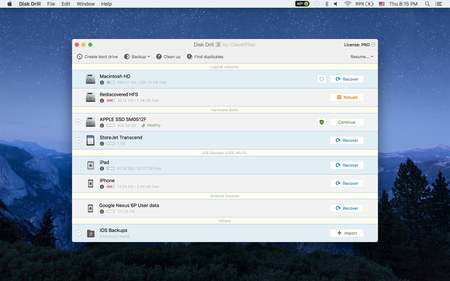
Data recovery is no small task, and for many it sounds hard and near to impossible. That's why all Disk Drill's data restoration options are conveniently lined up in a single "Recover" button no one can miss. That's how the CleverFiles team envisions making complex technical tasks available to regular computer user.
"Our goal has always been maximizing the recovery chances by implementing the top-notch intelligent algorithms written by the best industry experts into a well-tested simple user interface, so that anyone could recover their data after an accidental loss. Now we can truly say Disk Drill can recover lost data from all your devices" said JR Belden, the project designer of Disk Drill. "Always staying on top of the leading technologies in this field, and listening carefully to hundreds of thousands of our individual and corporate users, we are genuinely happy to unveil our newest data recovery product, Disk Drill 3."
Now Disk Drill 3 supports the all-new Apple's macOS Sierra, 10.12. It also lets anyone quickly create their own Mac OS X emergency boot drives for data recovery. Disk Drill 3 can search for unneeded duplicate files on their hard drives and cloud storage accounts and effectively reclaim free disk space. All in a handy multi-functional app officially available completely free directly from CleverFiles online. Disk Drill premium editions are also available.
CleverFiles: http://www.cleverfiles.com/
Disk Drill 3 for Mac: http://www.cleverfiles.com/mac-data-recovery.html
Download Disk Drill : http://dl.cleverfiles.com/diskdrill.dmg
Upgrade to PRO: http://www.cleverfiles.com/pro.html
YouTube Video: https://www.youtube.com/watch?v=CPl46jdPgkw
Screenshot: http://www.cleverfiles.com/images/press/screenshots/1-Disk-Drill-Mac-List.jpg
CleverFiles, the Atlanta-based tech company operating as a brand of 508 Software, LLC, is a social enterprise with proven knowledge of data management and operations, and versatile connections in non-profit world. Empowering thousands of users with unified data recovery and protection technologies, CleverFiles is also sponsoring various non-IT charity events in the area. Copyright (C) 2001-2016 Cleverfiles Software. All Rights Reserved. Apple, the Apple logo, Mac OS X and macOS are registered trademarks of Apple Inc. in the U.S. and/or other countries.
*******
Link To Article: http://prmac.com/release-id-80141.htm
*******
---------------------------------------------------------------------------------
Note that you can alter delivered distributions at any time.
Login to your account on prMac to alter your channel selection, or to opt-out at any time.
All-new Disk Drill 3 for Mac: iPhone, Android Recovery, macOS Sierra - Published on 09/01/16
Atlanta based CleverFiles today announces Disk Drill 3, its full-featured data recovery solution for Mac. Disk Drill boasts a robust set of file recovery tools that can undelete files from almost any device, offering iPhone and Android Recovery, macOS Sierra support, free features and more. In addition to well-known recovery and protection algorithms, the release of version 3 is powered by new highly efficient data retrieval methods helping anyone get their deleted data back.
Atlanta, Georgia - After 8 years in software business and delivering millions of copies of their software, CleverFiles is presenting its best data recovery app ever - Disk Drill 3 for Mac. In addition to well-known recovery and protection algorithms, the release of version 3 is powered by new highly efficient data retrieval methods helping anyone get their deleted data back.
Missing files on your smartphone or tablet? Disk Drill for Mac has also been enhanced with all-new iOS and Android recovery modules to recover your lost photos, videos, contacts, notes and more. The upcoming new version of iOS 10 is already supported.
For classic disk recovery, meet the innovative HFS Extraction, improved speedy HFS Catalog Rebuild, new lost partitions recovery that tolerantly reads system areas of the drives, and native support of ExFAT and EXT4 file systems. Deep Scan has been enriched with multiple new file signatures for data reconstruction.
Data recovery is no small task, and for many it sounds hard and near to impossible. That's why all Disk Drill's data restoration options are conveniently lined up in a single "Recover" button no one can miss. That's how the CleverFiles team envisions making complex technical tasks available to regular computer user.
"Our goal has always been maximizing the recovery chances by implementing the top-notch intelligent algorithms written by the best industry experts into a well-tested simple user interface, so that anyone could recover their data after an accidental loss. Now we can truly say Disk Drill can recover lost data from all your devices" said JR Belden, the project designer of Disk Drill. "Always staying on top of the leading technologies in this field, and listening carefully to hundreds of thousands of our individual and corporate users, we are genuinely happy to unveil our newest data recovery product, Disk Drill 3."
Now Disk Drill 3 supports the all-new Apple's macOS Sierra, 10.12. It also lets anyone quickly create their own Mac OS X emergency boot drives for data recovery. Disk Drill 3 can search for unneeded duplicate files on their hard drives and cloud storage accounts and effectively reclaim free disk space. All in a handy multi-functional app officially available completely free directly from CleverFiles online. Disk Drill premium editions are also available.
CleverFiles: http://www.cleverfiles.com/
Disk Drill 3 for Mac: http://www.cleverfiles.com/mac-data-recovery.html
Download Disk Drill : http://dl.cleverfiles.com/diskdrill.dmg
Upgrade to PRO: http://www.cleverfiles.com/pro.html
YouTube Video: https://www.youtube.com/watch?v=CPl46jdPgkw
Screenshot: http://www.cleverfiles.com/images/press/screenshots/1-Disk-Drill-Mac-List.jpg
CleverFiles, the Atlanta-based tech company operating as a brand of 508 Software, LLC, is a social enterprise with proven knowledge of data management and operations, and versatile connections in non-profit world. Empowering thousands of users with unified data recovery and protection technologies, CleverFiles is also sponsoring various non-IT charity events in the area. Copyright (C) 2001-2016 Cleverfiles Software. All Rights Reserved. Apple, the Apple logo, Mac OS X and macOS are registered trademarks of Apple Inc. in the U.S. and/or other countries.
*******
Link To Article: http://prmac.com/release-id-80141.htm
*******
---------------------------------------------------------------------------------
Note that you can alter delivered distributions at any time.
Login to your account on prMac to alter your channel selection, or to opt-out at any time.
Productivity Apple Mail Add-On MailButler Offers New Tracking Options
A new article has been published at prMac.
Productivity Apple Mail Add-On MailButler Offers New Tracking Options - Published on 09/01/16
Berlin-based productivity software developer, Feingeist Software GmbH, is thrilled to announce the new update to the Email Tracking feature of their Apple Mail Add-On MailButler. The users of MailButler 6417 will not only see if the recipient has opened their message, but also know the exact date and time when this message has been viewed for the first time. With its impressive array of tools, MailButler simplifies, optimizes and streamlines working with Apple Mail in one's daily life.
Berlin, Germany - Feingeist Software GmbH is thrilled to announce the new update to the Email Tracking feature of their Apple Mail Add-On MailButler. The users of MailButler 6417 will not only see if the recipient has opened their message, but also know the exact date and time when this message has been viewed for the first time.
Email Tracking feature provides MailButler users with the necessary information to plan their next step in email communication. In private email conversations, tracking garuantees security from unnecessary repeats and reminders. In businesses, this feature turns into a strong analytical tool and becomes an absolute must-have for everybody doing sales, CRM or customer support.
The Email Tracking feature is part of an impressive array of tools MailButler offers to Apple Mail users. The plugin offers the ability to schedule, undo, and track emails, convert emails to notes, upload email attachments regardless of size, create beautiful signatures, and more.
MailButler features include:
* Snooze - Allows users to temporarily make an email disappear from their inbox
* Follow-Up - Get a follow-up reminder when there isn't a response to a selected email
* Scheduling - Schedule emails to be sent at a particular date and time
* Cloud Upload - Send attachments of any size, attachment sizes are not restrained by mail provider limits
* Unsubscribe - Unsubscribe from unwished newsletters with just one click
* Signatures - Create beautiful email signatures by selecting from MailButler's various templates
* Undo Send - MailButler keeps an email in the outbox for a user specified safety period of time before sending
* Attachment Reminder - Intelligently reminds you about possibly omitted email attachments
* Notes - MailButler allows users to easily convert emails from Apple's Mail application into convenient notes
* Emoji, and more
The developers at Feingeist Software promise that more new features are planned and will be added to MailButler in future.
Pricing and Availability:
MailButler (v6407) is free, and is available worldwide exclusively through the Feingeist Software website. Two service plans are offered. The Free Plan allows access to all features for one user, 30 Actions per month, and 1 email avatar. The Professional Plan is $8.95 (USD) per month, allowing access to all features for one user, unlimited Actions, and 3 email avatars. (An "action" is defined as whenever a user makes use of one of MailButler's convenient features.) For more information, visit the Feingeist Software website.
Feingeist Software: https://www.feingeist.io/
MailButler 6417: https://www.feingeist.io/mailbutler
Download MailButler: https://feingeist.io/files/MailButler.zip
Screenshot : https://www.feingeist.io/wp-content/uploads/2016/01/MailButler_Screenshot.png
Application Icon: https://www.feingeist.io/wp-content/uploads/2016/01/MailButler_Logo_256x256.png
Based in Berlin, Germany, Feingeist develops useful software for Mac OS X. The company was founded with the vision to make the life of Mac users easier, and help them complete their daily tasks in the most convenient and elegant way. The developers perceive security, privacy and productivity as the most important modern problems with their main products particularly target these problems. Their software includes an Apple Mail assistant MailButler, and a VPN client Shimo. They have one target: to simplify life and optimize one's daily productivity. All Material and Software (C) Copyright 2016 Feingeist Software GmbH. All Rights Reserved. Apple, the Apple logo, Macintosh and Mac OS X are registered trademarks of Apple Inc. in the U.S. and/or other countries.
*******
Link To Article: http://prmac.com/release-id-80144.htm
*******
---------------------------------------------------------------------------------
Note that you can alter delivered distributions at any time.
Login to your account on prMac to alter your channel selection, or to opt-out at any time.
Productivity Apple Mail Add-On MailButler Offers New Tracking Options - Published on 09/01/16
Berlin-based productivity software developer, Feingeist Software GmbH, is thrilled to announce the new update to the Email Tracking feature of their Apple Mail Add-On MailButler. The users of MailButler 6417 will not only see if the recipient has opened their message, but also know the exact date and time when this message has been viewed for the first time. With its impressive array of tools, MailButler simplifies, optimizes and streamlines working with Apple Mail in one's daily life.
Berlin, Germany - Feingeist Software GmbH is thrilled to announce the new update to the Email Tracking feature of their Apple Mail Add-On MailButler. The users of MailButler 6417 will not only see if the recipient has opened their message, but also know the exact date and time when this message has been viewed for the first time.
Email Tracking feature provides MailButler users with the necessary information to plan their next step in email communication. In private email conversations, tracking garuantees security from unnecessary repeats and reminders. In businesses, this feature turns into a strong analytical tool and becomes an absolute must-have for everybody doing sales, CRM or customer support.
The Email Tracking feature is part of an impressive array of tools MailButler offers to Apple Mail users. The plugin offers the ability to schedule, undo, and track emails, convert emails to notes, upload email attachments regardless of size, create beautiful signatures, and more.
MailButler features include:
* Snooze - Allows users to temporarily make an email disappear from their inbox
* Follow-Up - Get a follow-up reminder when there isn't a response to a selected email
* Scheduling - Schedule emails to be sent at a particular date and time
* Cloud Upload - Send attachments of any size, attachment sizes are not restrained by mail provider limits
* Unsubscribe - Unsubscribe from unwished newsletters with just one click
* Signatures - Create beautiful email signatures by selecting from MailButler's various templates
* Undo Send - MailButler keeps an email in the outbox for a user specified safety period of time before sending
* Attachment Reminder - Intelligently reminds you about possibly omitted email attachments
* Notes - MailButler allows users to easily convert emails from Apple's Mail application into convenient notes
* Emoji, and more
The developers at Feingeist Software promise that more new features are planned and will be added to MailButler in future.
Pricing and Availability:
MailButler (v6407) is free, and is available worldwide exclusively through the Feingeist Software website. Two service plans are offered. The Free Plan allows access to all features for one user, 30 Actions per month, and 1 email avatar. The Professional Plan is $8.95 (USD) per month, allowing access to all features for one user, unlimited Actions, and 3 email avatars. (An "action" is defined as whenever a user makes use of one of MailButler's convenient features.) For more information, visit the Feingeist Software website.
Feingeist Software: https://www.feingeist.io/
MailButler 6417: https://www.feingeist.io/mailbutler
Download MailButler: https://feingeist.io/files/MailButler.zip
Screenshot : https://www.feingeist.io/wp-content/uploads/2016/01/MailButler_Screenshot.png

Application Icon: https://www.feingeist.io/wp-content/uploads/2016/01/MailButler_Logo_256x256.png

Based in Berlin, Germany, Feingeist develops useful software for Mac OS X. The company was founded with the vision to make the life of Mac users easier, and help them complete their daily tasks in the most convenient and elegant way. The developers perceive security, privacy and productivity as the most important modern problems with their main products particularly target these problems. Their software includes an Apple Mail assistant MailButler, and a VPN client Shimo. They have one target: to simplify life and optimize one's daily productivity. All Material and Software (C) Copyright 2016 Feingeist Software GmbH. All Rights Reserved. Apple, the Apple logo, Macintosh and Mac OS X are registered trademarks of Apple Inc. in the U.S. and/or other countries.
*******
Link To Article: http://prmac.com/release-id-80144.htm
*******
---------------------------------------------------------------------------------
Note that you can alter delivered distributions at any time.
Login to your account on prMac to alter your channel selection, or to opt-out at any time.
Astronomy App Luminos Introduces Advanced Features and Visuals
A new article has been published at prMac.
Astronomy App Luminos Introduces Advanced Features and Visuals - Published on 09/01/16
California-based Wobbleworks LLC today releases Luminos 9.1, the most recent free feature update to its award-winning astronomy app for iOS devices. Whether you want to admire ancient constellations, watch satellites soaring overhead, find out what that brilliant dot is on the horizon, or recreate eclipses, Luminos has what you need. Luminos now supports translucent 3D terrain, orientation modes, a 3D view of recently explored Comet 67P, and a hypothetical model of the undiscovered Planet Nine.
San Jose, California - Wobbleworks LLC has released the latest version of its flagship astronomy app Luminos, bringing visual improvements and stargazing additions to existing customers. Luminos 9.1 expands on the application features with new visuals such as Comet 67P and the theoretical Planet Nine, and new settings such as orientation modes. Luminos 9.1 is a free update for current iOS device and Apple Watch owners.
Users of Luminos will now see translucent versions of the terrain at their current location, as determined by their device sensors. Translucent terrain allows quicker identification of celestial objects below the horizon, and these objects can be tracked even when they are obscured by the ground. The translucent terrain is an addition to the Luminos dynamic terrain engine, which downloads 3D representations of hills and valleys based on current GPS coordinates.
To support more advanced users, Luminos has added orientation modes that allow the user to change the view from the default "horizontal" system to "ecliptic", "equatorial", or "galactic" orientations. While the traditional horizontal view appears as though the user is standing on a planet surface, the new options re-orient the screen interaction along a different baseline. For example, the ecliptic option adjusts the view along the plane of the Solar System planet orbits. Orientation modes provide easier tracking for many celestial objects.
The Luminos app now calls out variable stars with magnitude changes over time. Users can also sort star categories to find the largest, fastest changing, or closest stars with single taps.
The ESA Rosetta mission recently mapped the structure of Comet 67P/Churyumov-Gerasimenko during its closeup study of that object, and Luminos has utilized the data from the Rosetta mission to include a 3D representation of the comet nucleus which users can rotate and explore.
The theoretical Planet Nine, a body as yet unseen but proposed by noted astronomers is now modeled in Luminos 9.1 using the best-known calculations of its hypothetical position. Planet Nine is thought to exist in the outer reaches of the Solar System due to observed fluctuations on known bodies that would be caused by the gravitational pull of another large body. While scientists search for proof of the planet, users of the Luminos app can simulate orbiting Planet Nine and observing the rest of the Solar System from its remote location.
Luminos is the recent recipient of a 2015 PC Magazine Editor's Choice award. Previous versions of Luminos added the largest star catalog available on mobile, the most comprehensive built-in deep space image library, live sky charts for Apple Watch, and 3D meteor shower simulations.
App Highlights:
* Now in its sixth year of free feature updates
* Realistic sky visualizations
* Largest astronomy database on mobile, up to 113 million stars
* Smooth animations and 3D flight to any destination in the solar system
* Thousands of years of simulated solar and lunar eclipses
* Satellite, comet, meteor, and asteroid tracking
* Telescope control
Device Requirements:
* iPad, iPhone, or iPod touch
* Optional Apple Watch app included
* iOS version 9.0 or later
* 700 MB device space
Pricing and Availability:
Luminos version 9.1 is available exclusively through the App Store in the Reference category for $19.99 USD (or equivalent) with no in-app purchases.
Wobbleworks: https://wobbleworks.com
Luminos 9.1: https://wobbleworks.com/luminos/9.1.html
Purchase and Download: https://itunes.apple.com/app/luminos/id404664336
YouTube Video (Release 9.1 Preview) : https://www.youtube.com/watch?v=Js3YRSsLi7M
Screenshot: https://wobbleworks.com/luminos/img/9.1/luminos9.1.jpg
Media Assets: https://wobbleworks.com/luminos/mediaKit.html
Wobbleworks LLC is the family business of John Stephen and Brian Albers. Together they have more than 50 years of hardware and software experience, from small startups to large enterprises such as Apple, Microsoft, and Oracle. Now they are focusing their passion on crafting astronomy software that will delight you. Copyright (C) 2016 Wobbleworks LLC. Apple, the Apple logo, iPhone, iPod, iPad, and Apple Watch are registered trademarks of Apple Inc. in the U.S. and/or other countries. Other trademarks and registered trademarks may be the property of their respective owners.
*******
Link To Article: http://prmac.com/release-id-80145.htm
*******
---------------------------------------------------------------------------------
Note that you can alter delivered distributions at any time.
Login to your account on prMac to alter your channel selection, or to opt-out at any time.
Astronomy App Luminos Introduces Advanced Features and Visuals - Published on 09/01/16
California-based Wobbleworks LLC today releases Luminos 9.1, the most recent free feature update to its award-winning astronomy app for iOS devices. Whether you want to admire ancient constellations, watch satellites soaring overhead, find out what that brilliant dot is on the horizon, or recreate eclipses, Luminos has what you need. Luminos now supports translucent 3D terrain, orientation modes, a 3D view of recently explored Comet 67P, and a hypothetical model of the undiscovered Planet Nine.
San Jose, California - Wobbleworks LLC has released the latest version of its flagship astronomy app Luminos, bringing visual improvements and stargazing additions to existing customers. Luminos 9.1 expands on the application features with new visuals such as Comet 67P and the theoretical Planet Nine, and new settings such as orientation modes. Luminos 9.1 is a free update for current iOS device and Apple Watch owners.
Users of Luminos will now see translucent versions of the terrain at their current location, as determined by their device sensors. Translucent terrain allows quicker identification of celestial objects below the horizon, and these objects can be tracked even when they are obscured by the ground. The translucent terrain is an addition to the Luminos dynamic terrain engine, which downloads 3D representations of hills and valleys based on current GPS coordinates.
To support more advanced users, Luminos has added orientation modes that allow the user to change the view from the default "horizontal" system to "ecliptic", "equatorial", or "galactic" orientations. While the traditional horizontal view appears as though the user is standing on a planet surface, the new options re-orient the screen interaction along a different baseline. For example, the ecliptic option adjusts the view along the plane of the Solar System planet orbits. Orientation modes provide easier tracking for many celestial objects.
The Luminos app now calls out variable stars with magnitude changes over time. Users can also sort star categories to find the largest, fastest changing, or closest stars with single taps.
The ESA Rosetta mission recently mapped the structure of Comet 67P/Churyumov-Gerasimenko during its closeup study of that object, and Luminos has utilized the data from the Rosetta mission to include a 3D representation of the comet nucleus which users can rotate and explore.
The theoretical Planet Nine, a body as yet unseen but proposed by noted astronomers is now modeled in Luminos 9.1 using the best-known calculations of its hypothetical position. Planet Nine is thought to exist in the outer reaches of the Solar System due to observed fluctuations on known bodies that would be caused by the gravitational pull of another large body. While scientists search for proof of the planet, users of the Luminos app can simulate orbiting Planet Nine and observing the rest of the Solar System from its remote location.
Luminos is the recent recipient of a 2015 PC Magazine Editor's Choice award. Previous versions of Luminos added the largest star catalog available on mobile, the most comprehensive built-in deep space image library, live sky charts for Apple Watch, and 3D meteor shower simulations.
App Highlights:
* Now in its sixth year of free feature updates
* Realistic sky visualizations
* Largest astronomy database on mobile, up to 113 million stars
* Smooth animations and 3D flight to any destination in the solar system
* Thousands of years of simulated solar and lunar eclipses
* Satellite, comet, meteor, and asteroid tracking
* Telescope control
Device Requirements:
* iPad, iPhone, or iPod touch
* Optional Apple Watch app included
* iOS version 9.0 or later
* 700 MB device space
Pricing and Availability:
Luminos version 9.1 is available exclusively through the App Store in the Reference category for $19.99 USD (or equivalent) with no in-app purchases.
Wobbleworks: https://wobbleworks.com
Luminos 9.1: https://wobbleworks.com/luminos/9.1.html
Purchase and Download: https://itunes.apple.com/app/luminos/id404664336
YouTube Video (Release 9.1 Preview) : https://www.youtube.com/watch?v=Js3YRSsLi7M
Screenshot: https://wobbleworks.com/luminos/img/9.1/luminos9.1.jpg

Media Assets: https://wobbleworks.com/luminos/mediaKit.html
Wobbleworks LLC is the family business of John Stephen and Brian Albers. Together they have more than 50 years of hardware and software experience, from small startups to large enterprises such as Apple, Microsoft, and Oracle. Now they are focusing their passion on crafting astronomy software that will delight you. Copyright (C) 2016 Wobbleworks LLC. Apple, the Apple logo, iPhone, iPod, iPad, and Apple Watch are registered trademarks of Apple Inc. in the U.S. and/or other countries. Other trademarks and registered trademarks may be the property of their respective owners.
*******
Link To Article: http://prmac.com/release-id-80145.htm
*******
---------------------------------------------------------------------------------
Note that you can alter delivered distributions at any time.
Login to your account on prMac to alter your channel selection, or to opt-out at any time.
ABADUST 1.0 released for iOS and Android - Retro-Styled Arcade Shooter
A new article has been published at prMac.
ABADUST 1.0 released for iOS and Android - Retro-Styled Arcade Shooter - Published on 09/01/16
Left Foot Games Inc. today introduces ABADUST 1.0, its second game title for iOS and Android devices. As the newest member of an elite squad, use the abacus to turn each and every UFO to space dust. Match the abacus with the number in the UFO to blast them out of the sky. ABADUST is a retro-styled arcade shooter that features attack and endless modes, time-slowing clock and cannon, as well as Game Center support with leader-board for all three play-styles.
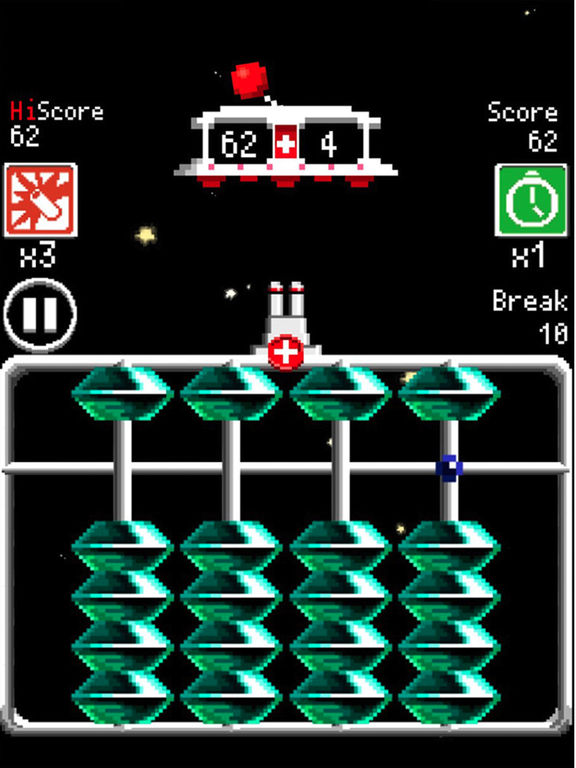
Okinawa City, Japan - Left Foot Games Inc. today is very proud to announce the release of ABADUST 1.0, its second game title for iOS and Android devices. As the newest member of an elite squad, use the abacus - the Laser Cannon - to turn each and every UFO to space dust. Match the abacus with the number in the UFO to blast them out of the sky.
Play in attack mode or endless mode. In attack mode, start with thirty seconds. The goal is to get as high a score as possible by shooting down UFOs, which gains back lost time. Endless mode comes in easy and hard: easy is simply matching the abacus with the number in the UFO; hard also consists of addition and subtraction. There is a leader-board for all three play-styles, allowing everyone around the world to challenge each other for elite squad bragging rights.
ABADUST also features two items for when in a pinch: time-slowing clock and cannon. The time-slowing clock slows time for a brief period, allowing more time for thought before firing. The cannon is the end-all be-all of weaponry: Without inputting anything into the abacus, simply fire this weapon to turn the enemy UFO to dust.
Features:
* Three Games Modes
* Three Items (two for better game-play)
* Leaderboard for Each Game Mode
Device Requirements:
* iPhone, iPad and iPod touch
* Requires iOS 8.0 or later
* Requires Android 4.0 or later
* 44 MB Hard Drive space
Pricing and Availability:
ABADUST 1.0 is Free and available worldwide through the App Store in the Games category. There is also an Android version available on Google Play. For more information about ABADUST, please contact Matthew Kuhr.
Left Foot Games: http://www.leftfootgames.com/
ABADUST 1.0: https://itunes.apple.com/app/abadust/id1143443518
Download from Google Play: https://play.google.com/store/apps/details?id=com.LeftFootGames.Abadust&hl=en
YouTube Video (App Promo): https://www.youtube.com/watch?v=aMIQ4agLQlI
Screenshot: http://a2.mzstatic.com/us/r30/Purple62/v4/65/58/81/65588171-6321-a09b-384c-15a6ba72c461/sc1024x768.jpeg
App Icon: http://a3.mzstatic.com/us/r30/Purple22/v4/fb/f9/48/fbf948dc-f0b7-bf9d-ff08-82bcfce4c174/icon175x175.jpeg
Left Foot Games is an Okinawa-based mobile gaming company founded in 2016. Using the game engine Unity, our mission here at Left Foot Games is to provide games, and therefore enjoyment, for all. Several other projects from various gaming genres are currently under development with Unity 5. All Material and Software (C) Copyright 2016 Left Foot Games Inc. All Rights Reserved. Apple, the Apple logo, iPhone, iPod and iPad are registered trademarks of Apple Inc. in the U.S. and/or other countries. Other trademarks and registered trademarks may be the property of their respective owners.
*******
Link To Article: http://prmac.com/release-id-80146.htm
*******
---------------------------------------------------------------------------------
Note that you can alter delivered distributions at any time.
Login to your account on prMac to alter your channel selection, or to opt-out at any time.
ABADUST 1.0 released for iOS and Android - Retro-Styled Arcade Shooter - Published on 09/01/16
Left Foot Games Inc. today introduces ABADUST 1.0, its second game title for iOS and Android devices. As the newest member of an elite squad, use the abacus to turn each and every UFO to space dust. Match the abacus with the number in the UFO to blast them out of the sky. ABADUST is a retro-styled arcade shooter that features attack and endless modes, time-slowing clock and cannon, as well as Game Center support with leader-board for all three play-styles.
Okinawa City, Japan - Left Foot Games Inc. today is very proud to announce the release of ABADUST 1.0, its second game title for iOS and Android devices. As the newest member of an elite squad, use the abacus - the Laser Cannon - to turn each and every UFO to space dust. Match the abacus with the number in the UFO to blast them out of the sky.
Play in attack mode or endless mode. In attack mode, start with thirty seconds. The goal is to get as high a score as possible by shooting down UFOs, which gains back lost time. Endless mode comes in easy and hard: easy is simply matching the abacus with the number in the UFO; hard also consists of addition and subtraction. There is a leader-board for all three play-styles, allowing everyone around the world to challenge each other for elite squad bragging rights.
ABADUST also features two items for when in a pinch: time-slowing clock and cannon. The time-slowing clock slows time for a brief period, allowing more time for thought before firing. The cannon is the end-all be-all of weaponry: Without inputting anything into the abacus, simply fire this weapon to turn the enemy UFO to dust.
Features:
* Three Games Modes
* Three Items (two for better game-play)
* Leaderboard for Each Game Mode
Device Requirements:
* iPhone, iPad and iPod touch
* Requires iOS 8.0 or later
* Requires Android 4.0 or later
* 44 MB Hard Drive space
Pricing and Availability:
ABADUST 1.0 is Free and available worldwide through the App Store in the Games category. There is also an Android version available on Google Play. For more information about ABADUST, please contact Matthew Kuhr.
Left Foot Games: http://www.leftfootgames.com/
ABADUST 1.0: https://itunes.apple.com/app/abadust/id1143443518
Download from Google Play: https://play.google.com/store/apps/details?id=com.LeftFootGames.Abadust&hl=en
YouTube Video (App Promo): https://www.youtube.com/watch?v=aMIQ4agLQlI
Screenshot: http://a2.mzstatic.com/us/r30/Purple62/v4/65/58/81/65588171-6321-a09b-384c-15a6ba72c461/sc1024x768.jpeg
App Icon: http://a3.mzstatic.com/us/r30/Purple22/v4/fb/f9/48/fbf948dc-f0b7-bf9d-ff08-82bcfce4c174/icon175x175.jpeg

Left Foot Games is an Okinawa-based mobile gaming company founded in 2016. Using the game engine Unity, our mission here at Left Foot Games is to provide games, and therefore enjoyment, for all. Several other projects from various gaming genres are currently under development with Unity 5. All Material and Software (C) Copyright 2016 Left Foot Games Inc. All Rights Reserved. Apple, the Apple logo, iPhone, iPod and iPad are registered trademarks of Apple Inc. in the U.S. and/or other countries. Other trademarks and registered trademarks may be the property of their respective owners.
*******
Link To Article: http://prmac.com/release-id-80146.htm
*******
---------------------------------------------------------------------------------
Note that you can alter delivered distributions at any time.
Login to your account on prMac to alter your channel selection, or to opt-out at any time.
Nisus Software, Inc. Releases Nisus Writer Pro 2.1.5
A new article has been published at prMac.
Nisus Software, Inc. Releases Nisus Writer Pro 2.1.5 - Published on 08/31/16
California based Nisus Software has announced the release of Nisus Writer Pro 2.1.5, the latest release of their powerful word processor for OS X. With an easy-to-use style system, multipart selections and collaboration tools, this update contains a number of fixes found since the release of version 2.1.4. The enhancements add to an already rich feature set that include an intuitive interface, multilingual text support, powerful find and replace, easy to use style system, and so much more.
Solana Beach, California - Nisus Software is proud to announce the release of Nisus Writer Pro 2.1.5. This update contains a number of fixes found since the release of Nisus Writer Pro 2.1.4. This new version fixes some problems with conversion of .doc, .docx, and .odt files, an issue with Word documents sometimes opening with incorrect or duplicated list item bullets, a problem with autosaving duplicate backups, and resolves an issue with copy-paste from Apple's Photos app.
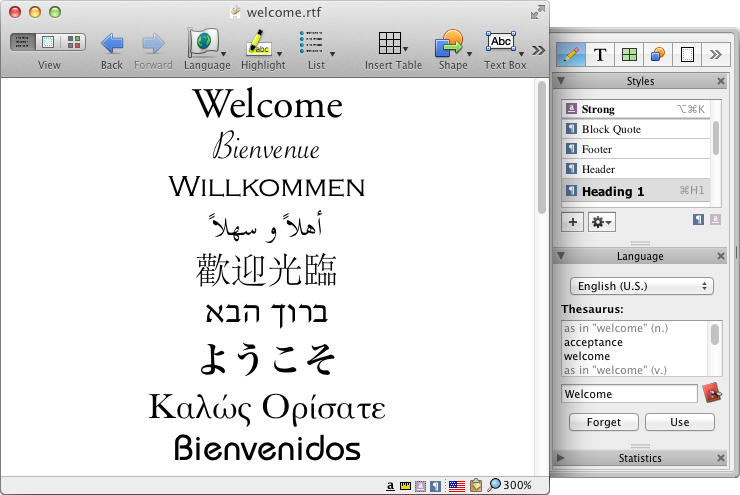
These fixes and enhancements add to an already rich feature set that includes an intuitive interface, multilingual text support, powerful find and replace, easy to use style system, multipart selections, collaboration tools (comments and track changes), support for Microsoft Word file formats (.doc and .docx), and a native file format (RTF) that almost any word processor can read.
System Requirements:
Nisus Writer Pro 2.1.5 requires OS X 10.8.5 or above
Pricing and Availability:
Nisus Writer Pro 2.1.5 is available now from the Nisus website and and from the Mac App Store. Nisus Writer Pro is only $79 (USD). An upgrade from Pro 1.x is $49. A three license Family Pack is available for $99. An academic version is also available. This is a free update for users of any version of Nisus Writer Pro 2.x.
Nisus Software: http://www.nisus.com
Nisus Writer Pro 2.1.5: https://nisus.com/pro
Download Nisus Writer Pro: https://nisus.com/pro/download.php
Purchase: https://nisus.com/store
Screenshot: https://nisus.com/pro/images/screenshots/interface.png
Press Kit (zip): https://nisus.com/pr/files/NWP-nisusman.tiff.zip
For over 25 years, Nisus Software, Inc. has developed award winning text and productivity tools for the Macintosh, such as Nisus Writer Pro, Nisus Writer Express, InfoClick, and Nisus Thesaurus. Copyright (C) 2016 Nisus Software, Inc. All Rights Reserved. Microsoft Word is a registered trademark of Microsoft Corporation in the United States and/or other countries. Apple, the Apple logo, and Macintosh are registered trademarks of Apple Inc. in the U.S. and/or other countries.
*******
Link To Article: http://prmac.com/release-id-80143.htm
*******
---------------------------------------------------------------------------------
Note that you can alter delivered distributions at any time.
Login to your account on prMac to alter your channel selection, or to opt-out at any time.
Nisus Software, Inc. Releases Nisus Writer Pro 2.1.5 - Published on 08/31/16
California based Nisus Software has announced the release of Nisus Writer Pro 2.1.5, the latest release of their powerful word processor for OS X. With an easy-to-use style system, multipart selections and collaboration tools, this update contains a number of fixes found since the release of version 2.1.4. The enhancements add to an already rich feature set that include an intuitive interface, multilingual text support, powerful find and replace, easy to use style system, and so much more.
Solana Beach, California - Nisus Software is proud to announce the release of Nisus Writer Pro 2.1.5. This update contains a number of fixes found since the release of Nisus Writer Pro 2.1.4. This new version fixes some problems with conversion of .doc, .docx, and .odt files, an issue with Word documents sometimes opening with incorrect or duplicated list item bullets, a problem with autosaving duplicate backups, and resolves an issue with copy-paste from Apple's Photos app.
These fixes and enhancements add to an already rich feature set that includes an intuitive interface, multilingual text support, powerful find and replace, easy to use style system, multipart selections, collaboration tools (comments and track changes), support for Microsoft Word file formats (.doc and .docx), and a native file format (RTF) that almost any word processor can read.
System Requirements:
Nisus Writer Pro 2.1.5 requires OS X 10.8.5 or above
Pricing and Availability:
Nisus Writer Pro 2.1.5 is available now from the Nisus website and and from the Mac App Store. Nisus Writer Pro is only $79 (USD). An upgrade from Pro 1.x is $49. A three license Family Pack is available for $99. An academic version is also available. This is a free update for users of any version of Nisus Writer Pro 2.x.
Nisus Software: http://www.nisus.com
Nisus Writer Pro 2.1.5: https://nisus.com/pro
Download Nisus Writer Pro: https://nisus.com/pro/download.php
Purchase: https://nisus.com/store
Screenshot: https://nisus.com/pro/images/screenshots/interface.png
Press Kit (zip): https://nisus.com/pr/files/NWP-nisusman.tiff.zip
For over 25 years, Nisus Software, Inc. has developed award winning text and productivity tools for the Macintosh, such as Nisus Writer Pro, Nisus Writer Express, InfoClick, and Nisus Thesaurus. Copyright (C) 2016 Nisus Software, Inc. All Rights Reserved. Microsoft Word is a registered trademark of Microsoft Corporation in the United States and/or other countries. Apple, the Apple logo, and Macintosh are registered trademarks of Apple Inc. in the U.S. and/or other countries.
*******
Link To Article: http://prmac.com/release-id-80143.htm
*******
---------------------------------------------------------------------------------
Note that you can alter delivered distributions at any time.
Login to your account on prMac to alter your channel selection, or to opt-out at any time.
Avoid speeding tickets and camera traps with Live Speed Limit Alerts
A new article has been published at prMac.
Avoid speeding tickets and camera traps with Live Speed Limit Alerts - Published on 08/31/16
Boston based InchWest today introduces Live Speed Limit Alerts 2.42, an iPhone and iPad app to help avoid expensive speeding tickets and camera traps. Live Speed offers voice based alert notifications when the speed limit on a route changes, or when the speed limit is exceeded. The app helps in avoiding traffic violations and caters to a large segment of the driving population, including teen drivers, long commuters and vacationers. Version 2.42 includes minor bug fixes.
Boston, Massachusetts - Indie developer, InchWest today is proud to release Live Speed Limit Alerts 2.42, an app to avoid police traps and speeding tickets. This app for iPhone and iPad provides real time voice alerts based on "actual" speed limits. Unlike similar apps, speed limits are automatically updated based on the current location.
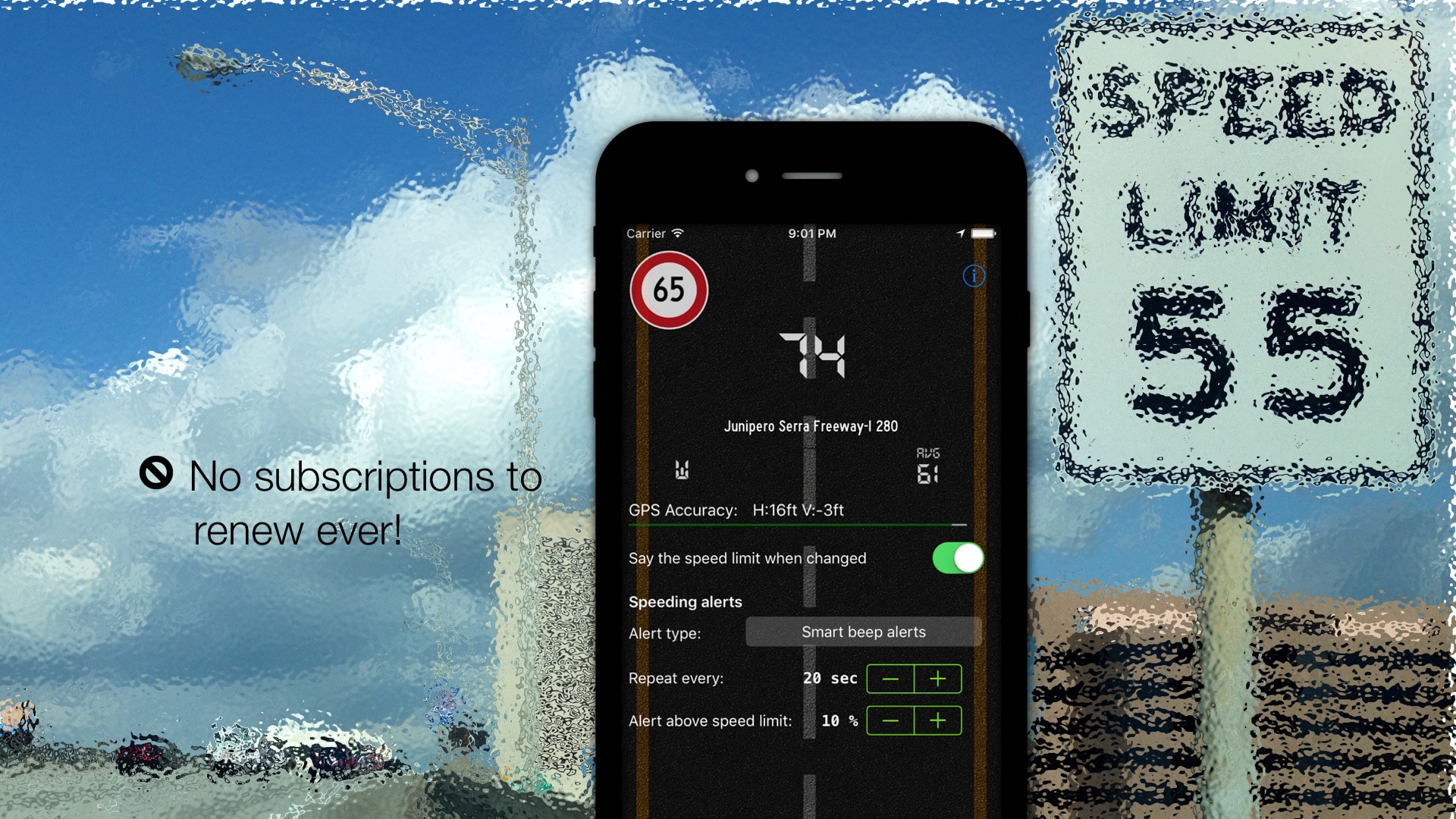
Live Speed Limit Alerts issues voice-based alert notifications when the speed limit on a route changes. If the speed limit is exceeded, the app notifies its user with audible beeps (or spoken speed notifications). Police traps, cop cars and cameras are everywhere these days - Live Speed helps in avoiding expensive speeding tickets and traffic violations.
"The app is meant to offer peace of mind for drivers by allowing them to enjoy their drive without worrying about mistakenly going over the speed limit and getting pulled over by cops. No one enjoys that." explained Praneeth Veerepalli, Head of Product at InchWest. Live Speed Limit Alert caters to a large segment of the driving population, including teen drivers, long commuters and vacationers.
Insurance company, esurance says "The total cost of the average speeding ticket is $150, but maximum fines for speeding vary by more than $2,400 between states." Live Speed Limit Alert helps in avoiding expensive speeding tickets and traffic violations especially on long drives and in unfamiliar roads.
The app is designed to run in the background (talking and audible alerts) so that it can be used alongside other navigation or music apps in the foreground.
Device Requirements:
* iPhone, iPad, and iPod touch
* Requires iOS 8.0 or later
* 13.0 MB
Pricing and Availability:
Live Speed Limit Alerts 2.42 is 5.99 USD (or equivalent amount in other currencies) and available worldwide exclusively through the App Store in the Navigation category. For more information on Live Speed Limit Alerts or InchWest, please contact Praneeth Veerepalli.
Live Speed Limit Alerts 2.42: https://inchwest.com/livespeed
Purchase and Download: https://itunes.apple.com/app/live-speed-limit-alerts-real/id1071875261
Preview Video: https://inchwest.com/livespeed/images/preview.mp4
Screenshot 1: https://inchwest.com/livespeed/images/screen1.jpg
Screenshot 2: https://inchwest.com/livespeed/images/screen2.jpg
App Icon: https://inchwest.com/livespeed/images/livespeedico.png
Located in Boston, Massachusetts, InchWest is an indie developer creating beautiful, unique and useful products for iOS, macOS and Windows devices. Their products are built to improve productivity and lifestyle by utilizing cutting edge technology. All Material and Software (C) 2016 InchWest / All Rights Reserved. Apple, the Apple logo, iPhone, iPod and iPad are registered trademarks of Apple Inc. in the U.S. and/or other countries. Other trademarks and registered trademarks may be the property of their respective owners.
*******
Link To Article: http://prmac.com/release-id-80142.htm
*******
---------------------------------------------------------------------------------
Note that you can alter delivered distributions at any time.
Login to your account on prMac to alter your channel selection, or to opt-out at any time.
Avoid speeding tickets and camera traps with Live Speed Limit Alerts - Published on 08/31/16
Boston based InchWest today introduces Live Speed Limit Alerts 2.42, an iPhone and iPad app to help avoid expensive speeding tickets and camera traps. Live Speed offers voice based alert notifications when the speed limit on a route changes, or when the speed limit is exceeded. The app helps in avoiding traffic violations and caters to a large segment of the driving population, including teen drivers, long commuters and vacationers. Version 2.42 includes minor bug fixes.
Boston, Massachusetts - Indie developer, InchWest today is proud to release Live Speed Limit Alerts 2.42, an app to avoid police traps and speeding tickets. This app for iPhone and iPad provides real time voice alerts based on "actual" speed limits. Unlike similar apps, speed limits are automatically updated based on the current location.
Live Speed Limit Alerts issues voice-based alert notifications when the speed limit on a route changes. If the speed limit is exceeded, the app notifies its user with audible beeps (or spoken speed notifications). Police traps, cop cars and cameras are everywhere these days - Live Speed helps in avoiding expensive speeding tickets and traffic violations.
"The app is meant to offer peace of mind for drivers by allowing them to enjoy their drive without worrying about mistakenly going over the speed limit and getting pulled over by cops. No one enjoys that." explained Praneeth Veerepalli, Head of Product at InchWest. Live Speed Limit Alert caters to a large segment of the driving population, including teen drivers, long commuters and vacationers.
Insurance company, esurance says "The total cost of the average speeding ticket is $150, but maximum fines for speeding vary by more than $2,400 between states." Live Speed Limit Alert helps in avoiding expensive speeding tickets and traffic violations especially on long drives and in unfamiliar roads.
The app is designed to run in the background (talking and audible alerts) so that it can be used alongside other navigation or music apps in the foreground.
Device Requirements:
* iPhone, iPad, and iPod touch
* Requires iOS 8.0 or later
* 13.0 MB
Pricing and Availability:
Live Speed Limit Alerts 2.42 is 5.99 USD (or equivalent amount in other currencies) and available worldwide exclusively through the App Store in the Navigation category. For more information on Live Speed Limit Alerts or InchWest, please contact Praneeth Veerepalli.
Live Speed Limit Alerts 2.42: https://inchwest.com/livespeed
Purchase and Download: https://itunes.apple.com/app/live-speed-limit-alerts-real/id1071875261
Preview Video: https://inchwest.com/livespeed/images/preview.mp4
Screenshot 1: https://inchwest.com/livespeed/images/screen1.jpg

Screenshot 2: https://inchwest.com/livespeed/images/screen2.jpg
App Icon: https://inchwest.com/livespeed/images/livespeedico.png

Located in Boston, Massachusetts, InchWest is an indie developer creating beautiful, unique and useful products for iOS, macOS and Windows devices. Their products are built to improve productivity and lifestyle by utilizing cutting edge technology. All Material and Software (C) 2016 InchWest / All Rights Reserved. Apple, the Apple logo, iPhone, iPod and iPad are registered trademarks of Apple Inc. in the U.S. and/or other countries. Other trademarks and registered trademarks may be the property of their respective owners.
*******
Link To Article: http://prmac.com/release-id-80142.htm
*******
---------------------------------------------------------------------------------
Note that you can alter delivered distributions at any time.
Login to your account on prMac to alter your channel selection, or to opt-out at any time.
Subscribe to:
Posts (Atom)