A new article has been published at prMac.
KeyCue 8.2 integrates with PopChar X to insert special characters - Published on 09/14/16
Ergonis Software today releases KeyCue 8.2, a important update to its highly acclaimed keyboard shortcut cheat sheet. KeyCue displays an instant overview of the currently available keyboard shortcuts; application-specific menu shortcuts as well as system-wide hotkeys and user-defined shortcut descriptions. Version 8.2 now closely integrates with PopChar X, allowing you to quickly show recently used and favorite characters from PopChar in KeyCue's head-up display and insert them with a click.
Perg, Austria - Ergonis Software today released KeyCue 8.2, a new version of the company's highly acclaimed keyboard shortcut cheat sheet. KeyCue 8 introduced a new way to define a wide variety of triggers, which can be used to perform different actions, taking KeyCue to a whole new level. Based on this technique, KeyCue 8.2 now closely integrates with PopChar X, the company's award-winning tool for finding and inserting special characters and exploring fonts. The integration allows PopChar users to quickly show recently used and favorite characters from PopChar in KeyCue's head-up display and insert them with a click.
"We are excited about this integration of KeyCue and PopChar X. Our products now jointly boost our customers' productivity to a new level." said Christoph Reichenberger, founder and CEO of Ergonis Software. "To celebrate this new liaison between KeyCue and PopChar X, we are offering a 30% discount on both products, to make it easier for our customers to get the missing link." Any new order for KeyCue and PopChar X placed on Ergonis Software's online store before September 30th 2016 will receive a 30% discount with coupon code "KCandPCX". The discount cannot be applied to upgrade orders.
The new version also contains performance improvements; it launches faster and significantly reduces the space occupied by KeyCue's internal cache. Furthermore, KeyCue 8.2 includes some functional improvements and maintenance fixes to user-reported issues. Visit Ergonis Software's website to learn more about the changes in this release and to download and try the new version.
The productivity paradox of keyboard shortcuts is that shortcuts were designed to increase productivity. However, productivity actually decreases when applications provide large numbers of shortcuts, in particular when the shortcuts are defined inconsistently across applications. KeyCue's elegantly simple solution is to display an instant overview of currently available keyboard shortcuts - application-specific menu shortcuts as well as system-wide hotkeys and user-defined shortcut descriptions. Over time, KeyCue users will automatically remember frequently used shortcuts and start working more efficiently.
KeyCue has already received many awards, including a 4.5-Mice award from MacWorld magazine.
System Requirements:
* KeyCue 8.2 requires Mac OS X 10.6 or newer and is fully compatible with OS X El Capitan (10.11)
* Integration of KeyCue and PopChar X requires KeyCue 8.2 or newer and PopChar 7.5 or newer
Availability and Ordering:
The upgrade to KeyCue 8.2 is free for anyone who owns a license for KeyCue 8 or purchased a license for KeyCue 7 on or after March 1st 2015. Upgrade paths are available for owners of older licenses. For information about purchases, including enterprise licenses, volume discounts, and upgrade pricing offers, see the company's web site.
Ergonis Software: http://www.ergonis.com
KeyCue 8.2: http://www.ergonis.com/products/keycue
Download KeyCue: http://www.ergonis.com/downloads/keycue-install.dmg
Purchase: https://store.ergonis.com/products/keycue
Image (Insert PopChar's recent and favorite characters via KeyCue): http://www.ergonis.com/press/2016/20160914/keycue-popcharintegration.png
Media Assets: http://www.ergonis.com/press
Headquartered in Perg, Austria, Ergonis Software Gmbh is a privately held software development company founded in 2002. With a focus on innovation, Ergonis develops ergonomic and intuitive software that boosts the productivity of Mac and PC users alike. Copyright 2002-2016 Ergonis Software Gmbh. All Rights Reserved. Ergonis products are either registered trademarks or trademarks of Ergonis Software GmbH. Other company and product names may be trademarks of their respective owners.
*******
Link To Article: http://prmac.com/release-id-80222.htm
*******
---------------------------------------------------------------------------------
Note that you can alter delivered distributions at any time.
Login to your account on prMac to alter your channel selection, or to opt-out at any time.


Neoappz Introduces Message Translator 1.0 for iOS 10
A new article has been published at prMac.
Neoappz Introduces Message Translator 1.0 for iOS 10 - Published on 09/14/16
Mobile application development company, Neoappz today introduces Message Translator 1.0, their new app for iOS 10 devices. Message Translator is an user-friendly iMessage application which allows users to send messages in over 90 languages. It is a useful communication tool, which breaks language barriers and allows users to communicate with people from around the world. Easily message in any foreign language, as well as translate any language into your native language.
Colombo, Sri Lanka - Neoappz, a mobile application development company, today is proud to announce the release and immediate availability of Message Translator 1.0 for iOS 10 devices. Message Translator is a user-friendly iMessage application which allows users to communicate with people who do not speak their language. The app supports over 90 languages and is a helpful tool for communicating with clients and friends around the world.
Message translator is designed for iOS 10 and it can be used with Apple Messages. It allows users to send messages in foreign languages. It is also useful for understanding messages that are received in foreign languages. The app can instantly translate any text copied to the clipboard to a language of choice. It is a user-friendly tool which is extremely easy-to-use. It is useful for businessmen, travelers, students and anyone who wants to communicate with people who don't speak their language.
Device Requirements:
* Compatible with iPhone, iPad and iPod touch.
* Requires iOS 10.0 or later
* 2.69 MB
Pricing and Availability:
Message Translator 1.0 is available for Free exclusively on the App Store in the Business category. Message Translator Pro 1.0 is available for $1.99 USD (or equivalent amount in other currencies) exclusively on the App Store in the Reference category.
Message Translator 1.0: http://www.neoappz.com/message-translator.html
Download from iTunes: https://itunes.apple.com/app/message-translator/id1149288232
Purchase and Download: https://itunes.apple.com/app/message-translator-pro/id1150864963
Screenshot: http://neoappz.com/external_images/message_translator_screenshot.png
App Icon: http://neoappz.com/external_images/message_translator_icon.png
Based in Sri Lanka, Neoappz is a mobile application development company which specializes in developing applications for the iPhone and iPad mobile platforms. Copyright (C) 2016 Shrae Attanayake. All Rights Reserved. Apple, the Apple logo, iPhone, iPod and iPad are registered trademarks of Apple Inc. in the U.S. and/or other countries.
*******
Link To Article: http://prmac.com/release-id-80220.htm
*******
---------------------------------------------------------------------------------
Note that you can alter delivered distributions at any time.
Login to your account on prMac to alter your channel selection, or to opt-out at any time.
Neoappz Introduces Message Translator 1.0 for iOS 10 - Published on 09/14/16
Mobile application development company, Neoappz today introduces Message Translator 1.0, their new app for iOS 10 devices. Message Translator is an user-friendly iMessage application which allows users to send messages in over 90 languages. It is a useful communication tool, which breaks language barriers and allows users to communicate with people from around the world. Easily message in any foreign language, as well as translate any language into your native language.
Colombo, Sri Lanka - Neoappz, a mobile application development company, today is proud to announce the release and immediate availability of Message Translator 1.0 for iOS 10 devices. Message Translator is a user-friendly iMessage application which allows users to communicate with people who do not speak their language. The app supports over 90 languages and is a helpful tool for communicating with clients and friends around the world.
Message translator is designed for iOS 10 and it can be used with Apple Messages. It allows users to send messages in foreign languages. It is also useful for understanding messages that are received in foreign languages. The app can instantly translate any text copied to the clipboard to a language of choice. It is a user-friendly tool which is extremely easy-to-use. It is useful for businessmen, travelers, students and anyone who wants to communicate with people who don't speak their language.
Device Requirements:
* Compatible with iPhone, iPad and iPod touch.
* Requires iOS 10.0 or later
* 2.69 MB
Pricing and Availability:
Message Translator 1.0 is available for Free exclusively on the App Store in the Business category. Message Translator Pro 1.0 is available for $1.99 USD (or equivalent amount in other currencies) exclusively on the App Store in the Reference category.
Message Translator 1.0: http://www.neoappz.com/message-translator.html
Download from iTunes: https://itunes.apple.com/app/message-translator/id1149288232
Purchase and Download: https://itunes.apple.com/app/message-translator-pro/id1150864963
Screenshot: http://neoappz.com/external_images/message_translator_screenshot.png

App Icon: http://neoappz.com/external_images/message_translator_icon.png

Based in Sri Lanka, Neoappz is a mobile application development company which specializes in developing applications for the iPhone and iPad mobile platforms. Copyright (C) 2016 Shrae Attanayake. All Rights Reserved. Apple, the Apple logo, iPhone, iPod and iPad are registered trademarks of Apple Inc. in the U.S. and/or other countries.
*******
Link To Article: http://prmac.com/release-id-80220.htm
*******
---------------------------------------------------------------------------------
Note that you can alter delivered distributions at any time.
Login to your account on prMac to alter your channel selection, or to opt-out at any time.
Where To? 10 is Available Including Where To? for iMessage
A new article has been published at prMac.
Where To? 10 is Available Including Where To? for iMessage - Published on 09/14/16
FutureTap GmbH today announces Where To? 10.0, an important update to their popular local search app for iOS and Apple Watch devices. Where To? finds nearby restaurants, shops, and other services. Version 10.0 includes a new module for iOS 10 users: Where To? for iMessage allows to include local search results in the ongoing chat conversation without leaving the Messages app, as well as adds emoji search for even quicker access to search categories.
Seefeld, Germany - Where To?, the popular GPS based local search app, is now available in version 10. For several years, Where To? has been the handy travel assistant aware of the user's surrounding. No matter what the user is looking for, Where To? finds the best nearby restaurant, pharmacy, gas station, shoe store or pediatrician. More than 700 categories are available. Where To? provides detailed information, including business hours, menus, and reviews by users who already visited the place. Even tourist attractions and transit stops are listed in the app.
The data including favorite places can also be accessed from Apple Watch allowing the user to be guided to the destination while on the go. The watch shows a map with the remaining distance and heading to the selected restaurant or other venue.
Where To? for iMessage: More information in the chat conversation:
iMessage is used by millions of iPhone owners to chat with friends, family, and colleagues. The new Where To? for iMessage takes advantage of the new iOS 10 capabilities and inserts local search results directly in the conversation without ever leaving the Messages app.
The Where To? extension can access favorite and recently viewed places from the main app. A direct search for nearby locations is also available in the iMessage app. Simply tapping on one of the nearby places inserts the local search result into the conversation.
For instance, users can easily send their friends the name, address, and location information of the restaurant for a lunch meeting. Or when some relatives ask for hotel recommendations prior to a visit, the favorite hotel can be inserted in the chat.
The sent location messages can be opened by tapping and show detailed information within the Where To? app if installed on the recipient's phone. If not, a download for Where To? is offered.
Where To? for iMessage also can send contacts with privacy in mind. When a contact is searched and selected, only the map area with the name and address is sent. All further contact details such as email, phone numbers, birthday and notes remain private and are not shared.
The main app also learns something new: The new version 10 shows recently viewed places in the history allowing to quickly access the detailed information again.
Consistent with the messaging focus of the release, Where To? now understands emoji. "Searching by emoji is a great new way to quickly find the wanted category," says Ortwin Gentz, FutureTap CEO. "For instance, typing the popcorn emoji in the search field shows the category with nearby movie theaters. Supporting more than 300 emoji, search by the popular symbols is not only a quick, fun way to surface nearby venues, it also aids the surprisingly large number of illiterate people in finding their way around cities." Emoji search is available in the main app, in the iMessage app, and in iOS Spotlight.
Where To? doesn't simply offer searching of local restaurants, banks, health cubs, bars, and other businesses, it also offers reviews from other users, to help iPhone owners make an informed decision as to whether an attraction or business is worth a visit. Once a great place to spend some time at is found, directions to the destination can be requested with the builtin navigation system, Apple Maps, Google Maps, or one of more than 50 supported apps. Even car navigation systems by Audi, BMW and Mercedes-Benz are supported.
"Where To?" has been honored to be selected by Apple as an iPhone App of the Week, and has also been the winner of the "Best App Ever Awards" in the category "Best Travel App" for several years in a row. Apple also selected the app as one of the five best navigation apps in iTunes Rewind 2011.
Device Requirements:
* iPhone, iPad or iPod touch
* Apple Watch and Pebble smartwatch supported
* Requires iOS 8.2 or later
* 57.7 MB
Pricing and Availability:
Where To? 10.0 is $2.99 USD (or equivalent amount in other currencies) and available worldwide exclusively through the App Store in the Navigation category. Where To? for iMessage and Where To? for Apple Watch are included in the iPhone app. Users of the 9.x version get the update free of charge. Users of older versions are eligible for a discount by completing an upgrade bundle.
Where To? 10.0: http://www.futuretap.com/whereto
Purchase and Download: https://itunes.apple.com/app/where-to-find-best-places/id903955898
Media Assets: http://www.futuretap.com/press/whereto
Based in Seefeld, Germany. FutureTap was founded in 2008 by Ortwin Gentz with the mission to create innovative and easy-to-use apps that fully leverage the iPhone user interface concept. FutureTap is known for "Where To?", the leading points of interest finder app, acquired from tap tap tap. Copyright (C) 2016 FutureTap GmbH. All Rights Reserved. Apple, the Apple logo, iPhone, iPod and iPad are registered trademarks of Apple Inc. in the U.S. and/or other countries.
*******
Link To Article: http://prmac.com/release-id-80221.htm
*******
---------------------------------------------------------------------------------
Note that you can alter delivered distributions at any time.
Login to your account on prMac to alter your channel selection, or to opt-out at any time.
Where To? 10 is Available Including Where To? for iMessage - Published on 09/14/16
FutureTap GmbH today announces Where To? 10.0, an important update to their popular local search app for iOS and Apple Watch devices. Where To? finds nearby restaurants, shops, and other services. Version 10.0 includes a new module for iOS 10 users: Where To? for iMessage allows to include local search results in the ongoing chat conversation without leaving the Messages app, as well as adds emoji search for even quicker access to search categories.
Seefeld, Germany - Where To?, the popular GPS based local search app, is now available in version 10. For several years, Where To? has been the handy travel assistant aware of the user's surrounding. No matter what the user is looking for, Where To? finds the best nearby restaurant, pharmacy, gas station, shoe store or pediatrician. More than 700 categories are available. Where To? provides detailed information, including business hours, menus, and reviews by users who already visited the place. Even tourist attractions and transit stops are listed in the app.
The data including favorite places can also be accessed from Apple Watch allowing the user to be guided to the destination while on the go. The watch shows a map with the remaining distance and heading to the selected restaurant or other venue.
Where To? for iMessage: More information in the chat conversation:
iMessage is used by millions of iPhone owners to chat with friends, family, and colleagues. The new Where To? for iMessage takes advantage of the new iOS 10 capabilities and inserts local search results directly in the conversation without ever leaving the Messages app.
The Where To? extension can access favorite and recently viewed places from the main app. A direct search for nearby locations is also available in the iMessage app. Simply tapping on one of the nearby places inserts the local search result into the conversation.
For instance, users can easily send their friends the name, address, and location information of the restaurant for a lunch meeting. Or when some relatives ask for hotel recommendations prior to a visit, the favorite hotel can be inserted in the chat.
The sent location messages can be opened by tapping and show detailed information within the Where To? app if installed on the recipient's phone. If not, a download for Where To? is offered.
Where To? for iMessage also can send contacts with privacy in mind. When a contact is searched and selected, only the map area with the name and address is sent. All further contact details such as email, phone numbers, birthday and notes remain private and are not shared.
The main app also learns something new: The new version 10 shows recently viewed places in the history allowing to quickly access the detailed information again.
Consistent with the messaging focus of the release, Where To? now understands emoji. "Searching by emoji is a great new way to quickly find the wanted category," says Ortwin Gentz, FutureTap CEO. "For instance, typing the popcorn emoji in the search field shows the category with nearby movie theaters. Supporting more than 300 emoji, search by the popular symbols is not only a quick, fun way to surface nearby venues, it also aids the surprisingly large number of illiterate people in finding their way around cities." Emoji search is available in the main app, in the iMessage app, and in iOS Spotlight.
Where To? doesn't simply offer searching of local restaurants, banks, health cubs, bars, and other businesses, it also offers reviews from other users, to help iPhone owners make an informed decision as to whether an attraction or business is worth a visit. Once a great place to spend some time at is found, directions to the destination can be requested with the builtin navigation system, Apple Maps, Google Maps, or one of more than 50 supported apps. Even car navigation systems by Audi, BMW and Mercedes-Benz are supported.
"Where To?" has been honored to be selected by Apple as an iPhone App of the Week, and has also been the winner of the "Best App Ever Awards" in the category "Best Travel App" for several years in a row. Apple also selected the app as one of the five best navigation apps in iTunes Rewind 2011.
Device Requirements:
* iPhone, iPad or iPod touch
* Apple Watch and Pebble smartwatch supported
* Requires iOS 8.2 or later
* 57.7 MB
Pricing and Availability:
Where To? 10.0 is $2.99 USD (or equivalent amount in other currencies) and available worldwide exclusively through the App Store in the Navigation category. Where To? for iMessage and Where To? for Apple Watch are included in the iPhone app. Users of the 9.x version get the update free of charge. Users of older versions are eligible for a discount by completing an upgrade bundle.
Where To? 10.0: http://www.futuretap.com/whereto
Purchase and Download: https://itunes.apple.com/app/where-to-find-best-places/id903955898
Media Assets: http://www.futuretap.com/press/whereto
Based in Seefeld, Germany. FutureTap was founded in 2008 by Ortwin Gentz with the mission to create innovative and easy-to-use apps that fully leverage the iPhone user interface concept. FutureTap is known for "Where To?", the leading points of interest finder app, acquired from tap tap tap. Copyright (C) 2016 FutureTap GmbH. All Rights Reserved. Apple, the Apple logo, iPhone, iPod and iPad are registered trademarks of Apple Inc. in the U.S. and/or other countries.
*******
Link To Article: http://prmac.com/release-id-80221.htm
*******
---------------------------------------------------------------------------------
Note that you can alter delivered distributions at any time.
Login to your account on prMac to alter your channel selection, or to opt-out at any time.
Git client Tower adds powerful new features
A new article has been published at prMac.
Git client Tower adds powerful new features - Published on 09/13/16
Berlin based software company, fournova today announces Tower 2.5, an important update to the company's popular Git client for Mac. Tower provides the user with a beautiful and powerful interface that combines all the important features that Git has to offer. With its biggest update since the launch of version 2, the team introduces new features as well as 100 improvements. The new version ships as a free update for all existing Tower 2 users.
Berlin, Germany - Today, fournova announces the release of Tower 2.5. With its biggest update since the launch of version 2, the team introduces new features as well as 100 improvements to its popular Git client for Mac. The new version ships as a free update for all existing Tower 2 users.
Revealing the new version, fournova's CEO Tobias Gunther notes: "With today's release we have improved every aspect of Tower while always having our primary goal in mind: making our users more productive. We have been working on this update for most of 2016 and are incredibly excited to ship it today as a free update to our existing users."
New features include:
* Tab support: in addition to its support for multiple windows Tower 2.5 now offers tabs for users who use Apple's latest operating system macOS Sierra.
* Clone dialog: Tower's clone dialog now automatically searches on GitHub.com, lets users choose their preferred cloning protocol, and visually displays the cloning progress.
* Open quickly: the popular Open Quickly dialog has been completely rewritten. It's now much faster, more responsive, and more clever.
* Drag and Drop: Tower's widely used drag and drop feature now offers more functionalities for repository folders.
* Search: bookmarks and services can now be searched.
* Custom service accounts: users can now add accounts for their selfmanaged server. This makes authentication for your own servers as easy as for the supported code hosting platforms like GitHub.
The full list of new features, improvements, and fixes is available at fournova's website.
Pricing and Availability:
Tower 2.5 comes as a free upgrade for Tower 2 users. New licenses are available for $79 (USD). fournova also recently announced that Tower will be coming to Windows. Interested users can now sign up for the beta at fournova online.
Tower 2.5: https://www.git-tower.com
Tower for Windows Beta: https://www.git-tower.com/p/windows-beta
Download Tower: https://www.git-tower.com/download/mac
Purchase: https://www.git-tower.com/mac/buy
Media Assets: https://www.git-tower.com/about/press
fournova is an independent software company from Germany. Founded in 2010 fournova develops Mac and Windows apps such as the popular Git client Tower, which helps over 70,000 customers from startups to Fortune 100 companies to easily and productively work with the Git version control system.
*******
Link To Article: http://prmac.com/release-id-80216.htm
*******
---------------------------------------------------------------------------------
Note that you can alter delivered distributions at any time.
Login to your account on prMac to alter your channel selection, or to opt-out at any time.
Git client Tower adds powerful new features - Published on 09/13/16
Berlin based software company, fournova today announces Tower 2.5, an important update to the company's popular Git client for Mac. Tower provides the user with a beautiful and powerful interface that combines all the important features that Git has to offer. With its biggest update since the launch of version 2, the team introduces new features as well as 100 improvements. The new version ships as a free update for all existing Tower 2 users.
Berlin, Germany - Today, fournova announces the release of Tower 2.5. With its biggest update since the launch of version 2, the team introduces new features as well as 100 improvements to its popular Git client for Mac. The new version ships as a free update for all existing Tower 2 users.
Revealing the new version, fournova's CEO Tobias Gunther notes: "With today's release we have improved every aspect of Tower while always having our primary goal in mind: making our users more productive. We have been working on this update for most of 2016 and are incredibly excited to ship it today as a free update to our existing users."
New features include:
* Tab support: in addition to its support for multiple windows Tower 2.5 now offers tabs for users who use Apple's latest operating system macOS Sierra.
* Clone dialog: Tower's clone dialog now automatically searches on GitHub.com, lets users choose their preferred cloning protocol, and visually displays the cloning progress.
* Open quickly: the popular Open Quickly dialog has been completely rewritten. It's now much faster, more responsive, and more clever.
* Drag and Drop: Tower's widely used drag and drop feature now offers more functionalities for repository folders.
* Search: bookmarks and services can now be searched.
* Custom service accounts: users can now add accounts for their selfmanaged server. This makes authentication for your own servers as easy as for the supported code hosting platforms like GitHub.
The full list of new features, improvements, and fixes is available at fournova's website.
Pricing and Availability:
Tower 2.5 comes as a free upgrade for Tower 2 users. New licenses are available for $79 (USD). fournova also recently announced that Tower will be coming to Windows. Interested users can now sign up for the beta at fournova online.
Tower 2.5: https://www.git-tower.com
Tower for Windows Beta: https://www.git-tower.com/p/windows-beta
Download Tower: https://www.git-tower.com/download/mac
Purchase: https://www.git-tower.com/mac/buy
Media Assets: https://www.git-tower.com/about/press
fournova is an independent software company from Germany. Founded in 2010 fournova develops Mac and Windows apps such as the popular Git client Tower, which helps over 70,000 customers from startups to Fortune 100 companies to easily and productively work with the Git version control system.
*******
Link To Article: http://prmac.com/release-id-80216.htm
*******
---------------------------------------------------------------------------------
Note that you can alter delivered distributions at any time.
Login to your account on prMac to alter your channel selection, or to opt-out at any time.
Image Smith 2.3 Released on Mac App Store
A new article has been published at prMac.
Image Smith 2.3 Released on Mac App Store - Published on 09/13/16
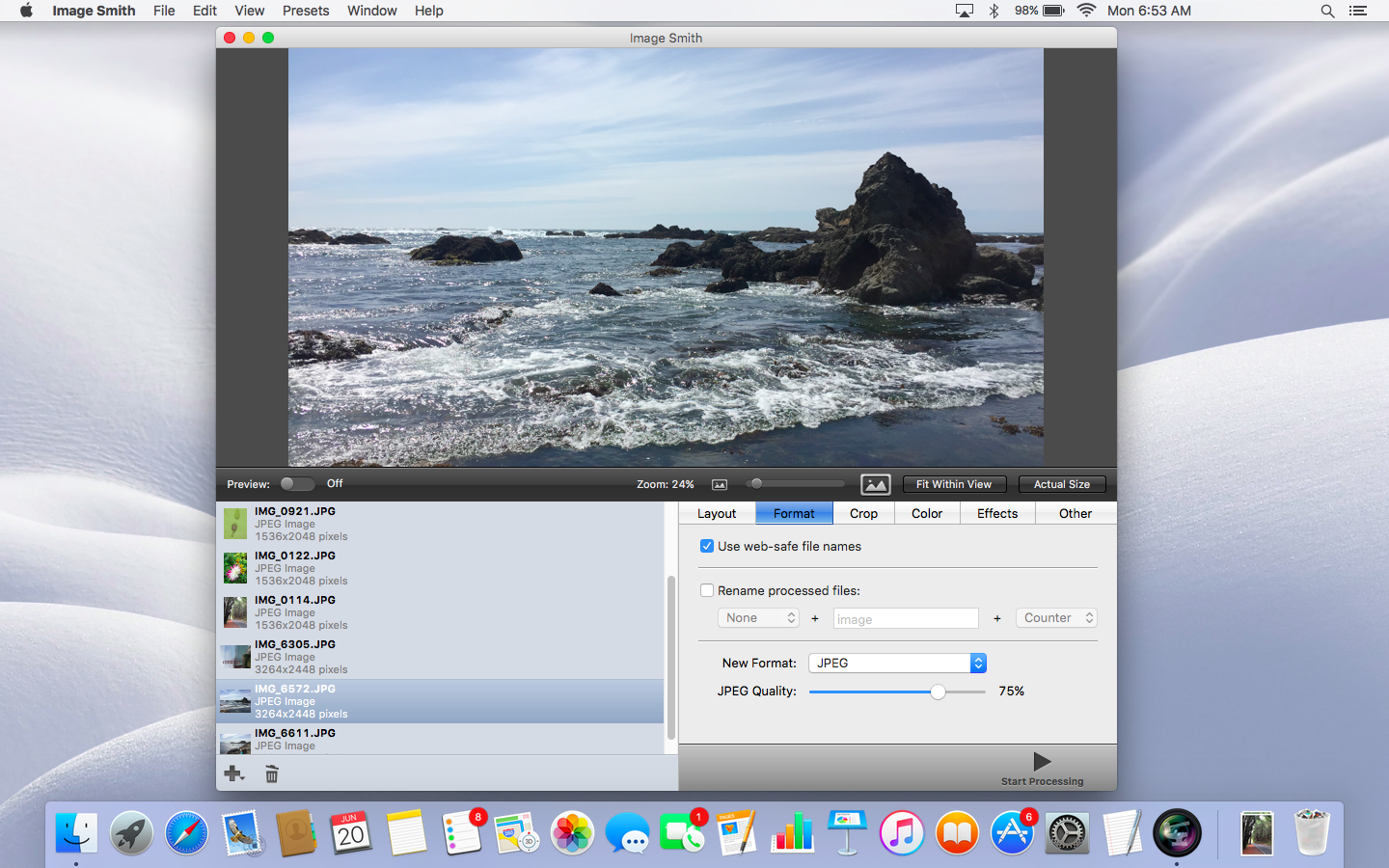
128bit Technologies today announces Image Smith 2.3 on the Mac App Store. This sleek image app allows you to process a ton of photos all at once. You can quickly apply name changes, image enhancements, cropping, image format changes, and more to a large batch of images. Use the pre-defined presets to scale or stretch images down to formats suitable for web banners, e-mailing photos, creating backups, and more. Image Smith 2.3 is now available on the Mac App Store and the MacAppware website.
San Francisco, California - 128bit Technologies announced today the release of Image Smith 2.3, a handy batch processing app for images that can quickly process a single image, or a huge number of images. This saves a massive amount of time when working on large image projects!
Process a ton of images all at once! Tired of wasting countless hours converting and editing your pictures? Editing a large number of images is a time consuming, mind numbing repetitive process if you don't have an application like Image Smith to do it for you - in a fraction of the time!
Batch format and convert images:
Use Image Smith as a powerful batch image processing tool. With a variety of features you can easily scale, re-orient, re-colorize, convert, and flatten images. Image Smith can open most picture file types, and output in common industry standard formats like JPEG, GIF, PSD, TIFF, PNG, BMP, and more.
Create smaller, web-friendly copies:
Use the pre-defined presets in Image Smith to scale or stretch images down to formats suitable for web banners, e-mailing photos, creating backups, and more! This is ideal for taking large photos from your camera (which are typically greater than five megabytes each these days!) and scaling and converting them down to a manageable size of only a few hundred kilobytes for easy image management.
Professional image manipulation:
Many power-user features are also included: changing the color levels, applying a sepia effect, inverting, changing the contrast, auto-leveling, extracting image masks, and rotating by angle. You can also instantly preview the effect of each setting before processing the entire set.
Image Smith Features:
* Over 30 image size presets
* Scale image widths and/or heights
* Stretch image widths and/or heights
* Output as JPEG, PNG, GIF, PSD, TIFF, and a variety of other formats
* Preserve GIF animation
* Change JPEG output quality
* Rotate by 360 degrees
* Flip image horizontally
* Flip image vertically
* Invert image
* Change image hue, saturation, and brightness levels
* Modify image contrast
* Apply a Sepia effect
* Automatic Leveling
* Preview effect settings before processing
* Strip or keep image transparency
* Export image without mask
* Export mask only
System Requirements:
* OS X 10.7 or later
* 64-bit processor
* 15.6 MB
Pricing and Availability:
Image Smith 2.3 is now available on the Mac App Store, or on the MacAppware website for only $14.99 (USD).
MacAppware: http://www.macappware.com
Image Smith 2.3: http://macappware.com/software/image-smith/
Purchase and Download (MAS): https://itunes.apple.com/us/app/image-smith-2/id1125930743
14-Day Trial Version: https://s3.amazonaws.com/128bittech/trial/image_smith2.2.dmg
Screenshot: http://macappware.com/images/image-smith/image-smith-1.png
Application Icon: http://macappware.com/images/image-smith/imagesmith-256.png
MacAppware is a division of 128bit Technologies and a dedicated Mac software developer currently offering design, image editing and disk utility applications; unique commercial use font collections; and a carefully curated rotation of bundles and deals. Copyright (C) 2016 128bit Technologies. All Rights Reserved. Apple, the Apple logo, Mac OS X, and Macintosh are registered trademarks of Apple Inc. in the U.S. and/or other countries. All other trademarks are the property of their respective owners.
*******
Link To Article: http://prmac.com/release-id-80214.htm
*******
---------------------------------------------------------------------------------
Note that you can alter delivered distributions at any time.
Login to your account on prMac to alter your channel selection, or to opt-out at any time.
Image Smith 2.3 Released on Mac App Store - Published on 09/13/16
128bit Technologies today announces Image Smith 2.3 on the Mac App Store. This sleek image app allows you to process a ton of photos all at once. You can quickly apply name changes, image enhancements, cropping, image format changes, and more to a large batch of images. Use the pre-defined presets to scale or stretch images down to formats suitable for web banners, e-mailing photos, creating backups, and more. Image Smith 2.3 is now available on the Mac App Store and the MacAppware website.
San Francisco, California - 128bit Technologies announced today the release of Image Smith 2.3, a handy batch processing app for images that can quickly process a single image, or a huge number of images. This saves a massive amount of time when working on large image projects!
Process a ton of images all at once! Tired of wasting countless hours converting and editing your pictures? Editing a large number of images is a time consuming, mind numbing repetitive process if you don't have an application like Image Smith to do it for you - in a fraction of the time!
Batch format and convert images:
Use Image Smith as a powerful batch image processing tool. With a variety of features you can easily scale, re-orient, re-colorize, convert, and flatten images. Image Smith can open most picture file types, and output in common industry standard formats like JPEG, GIF, PSD, TIFF, PNG, BMP, and more.
Create smaller, web-friendly copies:
Use the pre-defined presets in Image Smith to scale or stretch images down to formats suitable for web banners, e-mailing photos, creating backups, and more! This is ideal for taking large photos from your camera (which are typically greater than five megabytes each these days!) and scaling and converting them down to a manageable size of only a few hundred kilobytes for easy image management.
Professional image manipulation:
Many power-user features are also included: changing the color levels, applying a sepia effect, inverting, changing the contrast, auto-leveling, extracting image masks, and rotating by angle. You can also instantly preview the effect of each setting before processing the entire set.
Image Smith Features:
* Over 30 image size presets
* Scale image widths and/or heights
* Stretch image widths and/or heights
* Output as JPEG, PNG, GIF, PSD, TIFF, and a variety of other formats
* Preserve GIF animation
* Change JPEG output quality
* Rotate by 360 degrees
* Flip image horizontally
* Flip image vertically
* Invert image
* Change image hue, saturation, and brightness levels
* Modify image contrast
* Apply a Sepia effect
* Automatic Leveling
* Preview effect settings before processing
* Strip or keep image transparency
* Export image without mask
* Export mask only
System Requirements:
* OS X 10.7 or later
* 64-bit processor
* 15.6 MB
Pricing and Availability:
Image Smith 2.3 is now available on the Mac App Store, or on the MacAppware website for only $14.99 (USD).
MacAppware: http://www.macappware.com
Image Smith 2.3: http://macappware.com/software/image-smith/
Purchase and Download (MAS): https://itunes.apple.com/us/app/image-smith-2/id1125930743
14-Day Trial Version: https://s3.amazonaws.com/128bittech/trial/image_smith2.2.dmg
Screenshot: http://macappware.com/images/image-smith/image-smith-1.png
Application Icon: http://macappware.com/images/image-smith/imagesmith-256.png

MacAppware is a division of 128bit Technologies and a dedicated Mac software developer currently offering design, image editing and disk utility applications; unique commercial use font collections; and a carefully curated rotation of bundles and deals. Copyright (C) 2016 128bit Technologies. All Rights Reserved. Apple, the Apple logo, Mac OS X, and Macintosh are registered trademarks of Apple Inc. in the U.S. and/or other countries. All other trademarks are the property of their respective owners.
*******
Link To Article: http://prmac.com/release-id-80214.htm
*******
---------------------------------------------------------------------------------
Note that you can alter delivered distributions at any time.
Login to your account on prMac to alter your channel selection, or to opt-out at any time.
Disk Drill for Mac App Store is down to $1.99, Sept 13 only
A new article has been published at prMac.
Disk Drill for Mac App Store is down to $1.99, Sept 13 only - Published on 09/13/16
Atlanta based CleverFiles announces the special price on Disk Drill Media Recovery 2.6 for single day only: get it for unbelievable $1.99 as part of 2-dollar Tuesday promotion on September 13th. Disk Drill supports recovery of all types of data and file formats, is a great solution for photo, video and document recovery, runs on any file system and even on formatted drives. Disk Drill Media Recovery is a separate MAS-dedicated edition of an award-winning Disk Drill data recovery suite.
Atlanta, Georgia - CleverFiles updates the only true data recovery app on the Mac App Store, Disk Drill Media Recovery, to version 2.6 with a number of usability improvements. CleverFiles also announces the special price on Disk Drill Media Recovery 2.6 for single day only: get it for unbelievable $1.99 as part of 2-dollar Tuesday promotion on September 13th only!
Disk Drill Media Recovery is a separate MAS-dedicated edition of an award-winning Disk Drill data recovery suite from a well-known developer, CleverFiles (a brand of 508 Software social enterprise). The regular price for this app is $39.99, and it is going to be 95% cheaper for only one day, September 13th, 2016. Head on to Mac App Store and search for Disk Drill Media Recovery to get it at the promo price.
Disk Drill supports recovery of all types of data and file formats, is a great solution for photo, video and document recovery, runs on any file system and even on formatted drives. Disk Drill Media Recovery features several advanced file recovery options that cleverly leverage technical resources available for App Store utilities and provide the only true experience and data recovery solution to Mac users.
The new version comes with much improved disk management feature: i.e. There's no need to create a disk image anymore to start the recovery, all user's internal and external storage drives are readily available once the app is launched. Disk Drill's Deep Scan also learns some new tricks, and now supports reconstruction of various file formats created by AutoDesk, Acronis, Evernote and other software vendors. The total number of supported binary formats reaches 230 and growing.
The backup features and Mac OS X compatibility have also been vastly enhanced. The Disk Drill Media Recovery 2.6 upgrade comes free for all current users on the Mac App Store.
New users may benefit from an amazing promotional price available only September 13, 2016, when Disk Drill Media Recovery is going to be on sale for just $1.99 USD (regularly it's $39.99).
Going forward, CleverFiles has a commitment to maintaining a version of Disk Drill for the Mac App Store, but it may by necessity contain slightly less functionality than the standalone version from their main website. Those interested in getting a full-fledged package of the best data recovery app for Mac, feel free to download a copy of the original Disk Drill.
Disk Drill Media Recovery 2.6.447: http://www.cleverfiles.com
Purchase and Download (Mac App Store): https://itunes.apple.com/app/disk-drill-media-recovery/id431224317
Screenshot: http://a5.mzstatic.com/us/r30/Purple7/v4/14/3e/d1/143ed19e-61d6-d29d-c2c2-59d9ced26265/screen800x500.jpeg
Application Icon: http://a1.mzstatic.com/us/r30/Purple62/v4/ec/97/f9/ec97f9ba-3a04-2ca9-6f31-a102f90b26d8/icon128-2x.png
CleverFiles, the Atlanta-based tech company operating as a brand of 508 Software, LLC, is a social enterprise with proven knowledge of data management and operations, and versatile connections in non-profit world. Empowering thousands of users with unified data recovery and protection technologies, CleverFiles is also sponsoring various non-IT charity events in the area. Copyright (C) 2001-2016 Cleverfiles Software. All Rights Reserved. Apple, the Apple logo, Mac OS X and macOS are registered trademarks of Apple Inc. in the U.S. and/or other countries.
*******
Link To Article: http://prmac.com/release-id-80215.htm
*******
---------------------------------------------------------------------------------
Note that you can alter delivered distributions at any time.
Login to your account on prMac to alter your channel selection, or to opt-out at any time.
Disk Drill for Mac App Store is down to $1.99, Sept 13 only - Published on 09/13/16
Atlanta based CleverFiles announces the special price on Disk Drill Media Recovery 2.6 for single day only: get it for unbelievable $1.99 as part of 2-dollar Tuesday promotion on September 13th. Disk Drill supports recovery of all types of data and file formats, is a great solution for photo, video and document recovery, runs on any file system and even on formatted drives. Disk Drill Media Recovery is a separate MAS-dedicated edition of an award-winning Disk Drill data recovery suite.
Atlanta, Georgia - CleverFiles updates the only true data recovery app on the Mac App Store, Disk Drill Media Recovery, to version 2.6 with a number of usability improvements. CleverFiles also announces the special price on Disk Drill Media Recovery 2.6 for single day only: get it for unbelievable $1.99 as part of 2-dollar Tuesday promotion on September 13th only!
Disk Drill Media Recovery is a separate MAS-dedicated edition of an award-winning Disk Drill data recovery suite from a well-known developer, CleverFiles (a brand of 508 Software social enterprise). The regular price for this app is $39.99, and it is going to be 95% cheaper for only one day, September 13th, 2016. Head on to Mac App Store and search for Disk Drill Media Recovery to get it at the promo price.
Disk Drill supports recovery of all types of data and file formats, is a great solution for photo, video and document recovery, runs on any file system and even on formatted drives. Disk Drill Media Recovery features several advanced file recovery options that cleverly leverage technical resources available for App Store utilities and provide the only true experience and data recovery solution to Mac users.
The new version comes with much improved disk management feature: i.e. There's no need to create a disk image anymore to start the recovery, all user's internal and external storage drives are readily available once the app is launched. Disk Drill's Deep Scan also learns some new tricks, and now supports reconstruction of various file formats created by AutoDesk, Acronis, Evernote and other software vendors. The total number of supported binary formats reaches 230 and growing.
The backup features and Mac OS X compatibility have also been vastly enhanced. The Disk Drill Media Recovery 2.6 upgrade comes free for all current users on the Mac App Store.
New users may benefit from an amazing promotional price available only September 13, 2016, when Disk Drill Media Recovery is going to be on sale for just $1.99 USD (regularly it's $39.99).
Going forward, CleverFiles has a commitment to maintaining a version of Disk Drill for the Mac App Store, but it may by necessity contain slightly less functionality than the standalone version from their main website. Those interested in getting a full-fledged package of the best data recovery app for Mac, feel free to download a copy of the original Disk Drill.
Disk Drill Media Recovery 2.6.447: http://www.cleverfiles.com
Purchase and Download (Mac App Store): https://itunes.apple.com/app/disk-drill-media-recovery/id431224317
Screenshot: http://a5.mzstatic.com/us/r30/Purple7/v4/14/3e/d1/143ed19e-61d6-d29d-c2c2-59d9ced26265/screen800x500.jpeg

Application Icon: http://a1.mzstatic.com/us/r30/Purple62/v4/ec/97/f9/ec97f9ba-3a04-2ca9-6f31-a102f90b26d8/icon128-2x.png

CleverFiles, the Atlanta-based tech company operating as a brand of 508 Software, LLC, is a social enterprise with proven knowledge of data management and operations, and versatile connections in non-profit world. Empowering thousands of users with unified data recovery and protection technologies, CleverFiles is also sponsoring various non-IT charity events in the area. Copyright (C) 2001-2016 Cleverfiles Software. All Rights Reserved. Apple, the Apple logo, Mac OS X and macOS are registered trademarks of Apple Inc. in the U.S. and/or other countries.
*******
Link To Article: http://prmac.com/release-id-80215.htm
*******
---------------------------------------------------------------------------------
Note that you can alter delivered distributions at any time.
Login to your account on prMac to alter your channel selection, or to opt-out at any time.
Xojo 2016 Release 3 Available
A new article has been published at prMac.
Xojo 2016 Release 3 Available - Published on 09/13/16
Austin based Xojo, Inc. today announces Xojo 2016 Release 3, the popular rapid application development tool for making apps for OS X, Windows and Linux, web, iOS, and Raspberry Pi. With built-in support for graphics, database servers, internet protocols and more, anyone can build just about anything they can imagine with Xojo. The latest release adds compiler optimization options and refactoring features for the IDE and Code Editor, along with more than 90 total improvements and 11 new features.
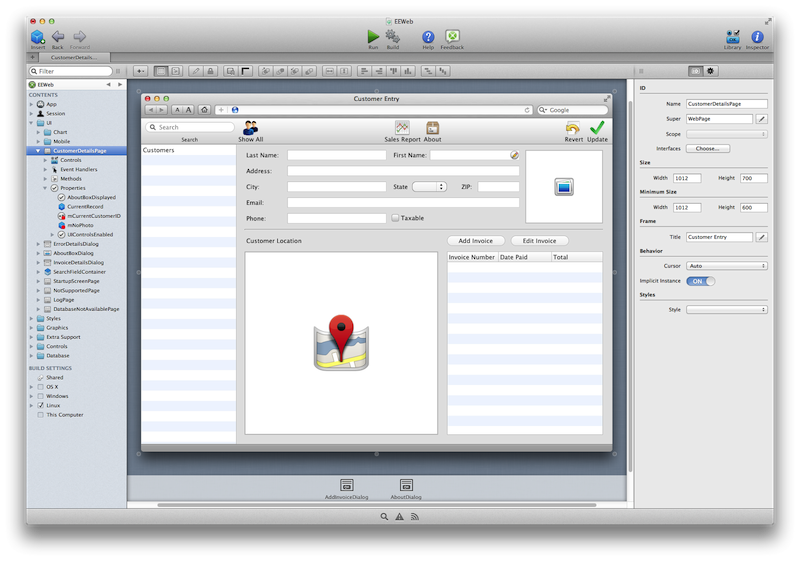
Austin, Texas - Xojo, Inc., the company that has enabled over 300,000 developers to build native cross-platform applications, today announced the availability of Xojo 2016 Release 3. Xojo is a rapid application development tool for making apps for the desktop (OS X, Windows and Linux), web, iOS, and Raspberry Pi. The latest release adds compiler optimization options and refactoring features for the IDE and Code Editor, along with more than 90 total improvements and 11 new features.
"While Xojo has always produced native code, we continue to evolve," commented Geoff Perlman, Xojo Founder and CEO. "Now, when building 64-bit apps you have control over Xojo's compiler optimization to build faster apps than ever before."
Xojo 2016 Release 3 features include:
* Added Moderate and Aggressive compilation for 64-bit and ARM builds
* SQLiteDatabase upgraded to v3.14.1 and now supports FTS5 for full-text searching
* Additions to refactoring features of the IDE and Code Editor
* Save Code Editor color schemes to easily share and re-use
* ICU library included with Linux builds for improved compatibility
* Easily convert Pictures in projects to Image Sets
"This release provides the ability to adjust the level of compiler optimization, and the highest level, which is Aggressive, generates applications that are significantly faster for math intensive operations, which I do a lot of," commented Robert Birge, Distinguished Professor of Chemistry at the University of Connecticut. "A long-requested capability is now available - fast compilation for debugging and slower, but highly optimized, compilation for the final application."
Xojo is available to try in a free, time-unlimited trial.
Xojo Release 3: http://www.xojo.com
Download Xojo: http://www.xojo.com/download
Xojo Store: http://www.xojo.com/store
Screenshot: http://www.xojo.com/images/ide.png
Application Icon: http://www.xojo.com/images/ide_icon_256.png
Xojo, Inc. was founded with the idea that software development should be accessible to anyone. With traditional tools, creating software applications can be a very complicated process, but using Xojo anyone can learn to create high quality, native apps for the desktop, web, mobile and Raspberry Pi. With users all over the world, Xojo apps can be found in every conceivable category - from commercial software applications to use in governments, universities, businesses, and the Fortune 500. All Material and Software (C) Copyright 2016 Xojo, Inc. All Rights Reserved. Apple, the Apple logo, iPhone, iPod, iPad and macOS are registered trademarks of Apple Inc. in the U.S. and/or other countries. Other trademarks and registered trademarks may be the property of their respective owners.
*******
Link To Article: http://prmac.com/release-id-80217.htm
*******
---------------------------------------------------------------------------------
Note that you can alter delivered distributions at any time.
Login to your account on prMac to alter your channel selection, or to opt-out at any time.
Xojo 2016 Release 3 Available - Published on 09/13/16
Austin based Xojo, Inc. today announces Xojo 2016 Release 3, the popular rapid application development tool for making apps for OS X, Windows and Linux, web, iOS, and Raspberry Pi. With built-in support for graphics, database servers, internet protocols and more, anyone can build just about anything they can imagine with Xojo. The latest release adds compiler optimization options and refactoring features for the IDE and Code Editor, along with more than 90 total improvements and 11 new features.
Austin, Texas - Xojo, Inc., the company that has enabled over 300,000 developers to build native cross-platform applications, today announced the availability of Xojo 2016 Release 3. Xojo is a rapid application development tool for making apps for the desktop (OS X, Windows and Linux), web, iOS, and Raspberry Pi. The latest release adds compiler optimization options and refactoring features for the IDE and Code Editor, along with more than 90 total improvements and 11 new features.
"While Xojo has always produced native code, we continue to evolve," commented Geoff Perlman, Xojo Founder and CEO. "Now, when building 64-bit apps you have control over Xojo's compiler optimization to build faster apps than ever before."
Xojo 2016 Release 3 features include:
* Added Moderate and Aggressive compilation for 64-bit and ARM builds
* SQLiteDatabase upgraded to v3.14.1 and now supports FTS5 for full-text searching
* Additions to refactoring features of the IDE and Code Editor
* Save Code Editor color schemes to easily share and re-use
* ICU library included with Linux builds for improved compatibility
* Easily convert Pictures in projects to Image Sets
"This release provides the ability to adjust the level of compiler optimization, and the highest level, which is Aggressive, generates applications that are significantly faster for math intensive operations, which I do a lot of," commented Robert Birge, Distinguished Professor of Chemistry at the University of Connecticut. "A long-requested capability is now available - fast compilation for debugging and slower, but highly optimized, compilation for the final application."
Xojo is available to try in a free, time-unlimited trial.
Xojo Release 3: http://www.xojo.com
Download Xojo: http://www.xojo.com/download
Xojo Store: http://www.xojo.com/store
Screenshot: http://www.xojo.com/images/ide.png
Application Icon: http://www.xojo.com/images/ide_icon_256.png

Xojo, Inc. was founded with the idea that software development should be accessible to anyone. With traditional tools, creating software applications can be a very complicated process, but using Xojo anyone can learn to create high quality, native apps for the desktop, web, mobile and Raspberry Pi. With users all over the world, Xojo apps can be found in every conceivable category - from commercial software applications to use in governments, universities, businesses, and the Fortune 500. All Material and Software (C) Copyright 2016 Xojo, Inc. All Rights Reserved. Apple, the Apple logo, iPhone, iPod, iPad and macOS are registered trademarks of Apple Inc. in the U.S. and/or other countries. Other trademarks and registered trademarks may be the property of their respective owners.
*******
Link To Article: http://prmac.com/release-id-80217.htm
*******
---------------------------------------------------------------------------------
Note that you can alter delivered distributions at any time.
Login to your account on prMac to alter your channel selection, or to opt-out at any time.
Subscribe to:
Posts (Atom)