A new article has been published at prMac.
Take That Pill 1.2.1 introduced for iOS - New Medical and Health App - Published on 09/14/16
Indie developer, Mykola Golyash today introduces Take That Pill 1.2.1, his new medical and health app for iOS devices. Take That Pill is an easy-to-use, yet powerful pills manager. Just a couple of steps are all that are needed to create and then manage different medicine intakes or procedures. The user adds their daily supplement or medicine to the list, sets the date and defines notifications based on different parameters. Easily control virtually every aspect of your medical activity.
Mykolaiv, Ukraine - Independent developer, Mykola Golyash today is delighted to announce the release of Take That Pill 1.2.1, his new medical and health app developed exclusively for iPhone, iPad and iPod touch devices. Take That Pill is an easy-to-use, yet powerful pills manager. Just a couple of steps are needed to create and then manage different medicine intakes or procedures. The user adds their daily supplement or medicine to the list, sets the date and defines notifications based on different parameters. This allows anyone to easily control almost every aspect of their medical activity and automatically notifies them when it is time to take a pill:
* Short progress info is displayed on the main screen for every item in the list
* Item details screen for more precision control and edits
* Notifications screen that reminds about all missed medicines
* Archive screen that shows all the history
This application will be useful for parents, athletes, people on a diet and all of those who needs to take pills on schedule. Whatever if it's just a vitamin or a vital drug, you will always know the exact time for taking it with the help of notifications system.
Device Requirements:
* iPhone, iPad, and iPod touch
* Requires iOS 8.0 or later
* 4.4 MB of free space
Pricing and Availability:
Take That Pill 1.2.1 is now available on the App Store for $1.99 in the US and is priced accordingly in other regions. The app is available worldwide on the Apple App Store (Category: Medical).
Mykola Golyash: http://golyash.com
Take That Pill 1.2.1: https://itunes.apple.com/app/id1142241012
Screenshot 1: http://a4.mzstatic.com/us/r30/Purple71/v4/7a/96/46/7a964672-53f5-cba3-ae54-3b57f30be0d0/screen696x696.jpeg
Screenshot 2: http://a3.mzstatic.com/us/r30/Purple71/v4/e6/a2/9a/e6a29af5-1439-0bd5-f11a-a6e89cc64fb3/screen696x696.jpeg
App Icon: http://golyash.com/images/ttp.png
Based in Mykolaiv, Ukraine, Mykola Golyash is an individual entrepreneur and developer since 2009. Mykola has developed and released more than 40 successful applications to the App Store. All Material and Software (C) Copyright 2016 Mykola Golyash. All Rights Reserved. Apple, the Apple logo, iPhone, iPod and iPad are registered trademarks of Apple Inc. in the U.S. and/or other countries. Other trademarks and registered trademarks may be the property of their respective owners.
*******
Link To Article: http://prmac.com/release-id-80230.htm
*******
---------------------------------------------------------------------------------
Note that you can alter delivered distributions at any time.
Login to your account on prMac to alter your channel selection, or to opt-out at any time.


MacFlite Software Releases Tube Saver 1.0.4 for Mac OS X
A new article has been published at prMac.
MacFlite Software Releases Tube Saver 1.0.4 for Mac OS X - Published on 09/14/16
Independent software company, MacFlite Software announces Tube Saver 1.0.4, their new app for Mac OS X designed to make downloading YouTube videos simple and easy. Developed from the ground up, and utilizing the latest Cocoa technologies, Tube Saver focuses on ease-of-use and sports a beautiful, yet simple user interface. Tube Saver also includes its own native media player to play videos directly from the download list fully supporting full screen and Apple AirPlay.
Boynton Beach, Florida - Independent software company, MacFlite Software is proud to announce the release of Tube Saver 1.0.4 for Mac OS X. Tube Saver offers a simple and easy-to-use interface that makes easy work of downloading your favorite YouTube video for offline viewing. Simply copy and paste the YouTube URL or drag and drop it from your browser and choosing the download quality that suits your needs from HD quality with larger file sizes to lower quality for mobile devices. Tube Saver comes with a simple installer that can place a Safari Extension into your Safari browser that makes moving URLs to Tube Saver a one-click process.
Tube Saver also includes its own native media player to play videos directly from the download list, fully supporting full screen and Apple AirPlay. Downloading and watching YouTube videos has never been easier. Watch your favorite movies over and over again, without worrying about bandwidth limitations or transfer them to mobile devices to watch anytime.
Feature Highlights:
* Downloads your favorite YouTube videos for offline viewing
* No dependency on your network speed
* Pause and resume downloads
* Drag links directly from YouTube
* Safari Browser extension
* Watch Videos without Ads
* Built in Media Player
System Requirements:
* Mac OS X Version 10.10
* 6.0 MB Hard Drive space
* Internet Connection required for automatic updates
Pricing and Availability:
Tube Saver 1.0.4 is available now for $9.99 USD (or an equivalent amount in other currencies) through the MacFlite website. All application updates are free.
Tube Saver 1.0.4: http://www.macflite.com
Direct Download : https://dl.devmate.com/com.macflite.Tube-Saver/1.0.4/1472007057/TubeSaver-1.0.4.zip
Purchase: http://sites.fastspring.com/macflite/product/tubesaver?option=show_contents&coupon=STARTUPOFFER
Screenshot: http://www.macflite.com/wp-content/uploads/2016/08/Screen-Shot-2016-08-23-at-4.24.28-PM.png
Application Icon: http://www.macflite.com/wp-content/uploads/2016/08/ts_icon_512_2.png
Located in sunny Boynton Beach, Florida, MacFlite Software is a growing independent software company founded in 2009 by Steve McFerrin. Leveraging his longtime programing experience, Steve is dedicated to bringing the highest quality software to the Macintosh, iPhone, iPad and iPod touch platforms with a major emphasis on total customer satisfaction. Steve McFerrin brings MacFlite over 20 years of aviation experience, ATP rated with more than 7000 hours. Steve has been flying corporate aircraft for most of his aviation career. Copyright (C) 2016 MacFlite Software. All Rights Reserved. Apple, the Apple logo, Mac OS X and Macintosh are registered trademarks of Apple Inc. in the U.S. and/or other countries.
*******
Link To Article: http://prmac.com/release-id-80229.htm
*******
---------------------------------------------------------------------------------
Note that you can alter delivered distributions at any time.
Login to your account on prMac to alter your channel selection, or to opt-out at any time.
MacFlite Software Releases Tube Saver 1.0.4 for Mac OS X - Published on 09/14/16
Independent software company, MacFlite Software announces Tube Saver 1.0.4, their new app for Mac OS X designed to make downloading YouTube videos simple and easy. Developed from the ground up, and utilizing the latest Cocoa technologies, Tube Saver focuses on ease-of-use and sports a beautiful, yet simple user interface. Tube Saver also includes its own native media player to play videos directly from the download list fully supporting full screen and Apple AirPlay.
Boynton Beach, Florida - Independent software company, MacFlite Software is proud to announce the release of Tube Saver 1.0.4 for Mac OS X. Tube Saver offers a simple and easy-to-use interface that makes easy work of downloading your favorite YouTube video for offline viewing. Simply copy and paste the YouTube URL or drag and drop it from your browser and choosing the download quality that suits your needs from HD quality with larger file sizes to lower quality for mobile devices. Tube Saver comes with a simple installer that can place a Safari Extension into your Safari browser that makes moving URLs to Tube Saver a one-click process.
Tube Saver also includes its own native media player to play videos directly from the download list, fully supporting full screen and Apple AirPlay. Downloading and watching YouTube videos has never been easier. Watch your favorite movies over and over again, without worrying about bandwidth limitations or transfer them to mobile devices to watch anytime.
Feature Highlights:
* Downloads your favorite YouTube videos for offline viewing
* No dependency on your network speed
* Pause and resume downloads
* Drag links directly from YouTube
* Safari Browser extension
* Watch Videos without Ads
* Built in Media Player
System Requirements:
* Mac OS X Version 10.10
* 6.0 MB Hard Drive space
* Internet Connection required for automatic updates
Pricing and Availability:
Tube Saver 1.0.4 is available now for $9.99 USD (or an equivalent amount in other currencies) through the MacFlite website. All application updates are free.
Tube Saver 1.0.4: http://www.macflite.com
Direct Download : https://dl.devmate.com/com.macflite.Tube-Saver/1.0.4/1472007057/TubeSaver-1.0.4.zip
Purchase: http://sites.fastspring.com/macflite/product/tubesaver?option=show_contents&coupon=STARTUPOFFER
Screenshot: http://www.macflite.com/wp-content/uploads/2016/08/Screen-Shot-2016-08-23-at-4.24.28-PM.png

Application Icon: http://www.macflite.com/wp-content/uploads/2016/08/ts_icon_512_2.png

Located in sunny Boynton Beach, Florida, MacFlite Software is a growing independent software company founded in 2009 by Steve McFerrin. Leveraging his longtime programing experience, Steve is dedicated to bringing the highest quality software to the Macintosh, iPhone, iPad and iPod touch platforms with a major emphasis on total customer satisfaction. Steve McFerrin brings MacFlite over 20 years of aviation experience, ATP rated with more than 7000 hours. Steve has been flying corporate aircraft for most of his aviation career. Copyright (C) 2016 MacFlite Software. All Rights Reserved. Apple, the Apple logo, Mac OS X and Macintosh are registered trademarks of Apple Inc. in the U.S. and/or other countries.
*******
Link To Article: http://prmac.com/release-id-80229.htm
*******
---------------------------------------------------------------------------------
Note that you can alter delivered distributions at any time.
Login to your account on prMac to alter your channel selection, or to opt-out at any time.
A Better Finder Attributes 6 adds JPEG EXIF meta-data editing
A new article has been published at prMac.
A Better Finder Attributes 6 adds JPEG EXIF meta-data editing - Published on 09/14/16
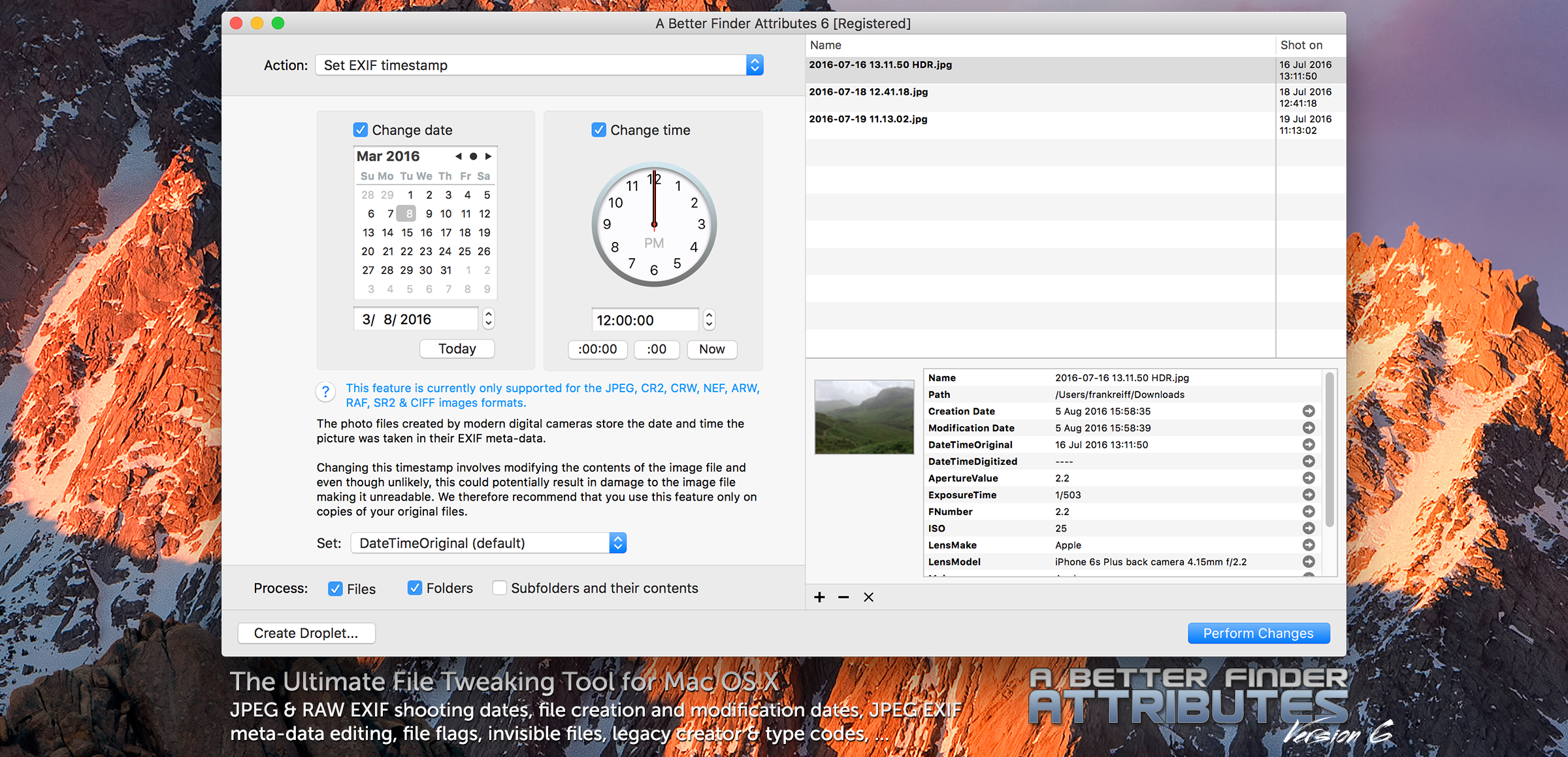
publicspace.net has announced A Better Finder Attributes 6.0 for macOS. The product is used by many professional and hobby photographers for correcting photo shooting date information and has long been known to post-production and digital media producers for its ability to change Finder attributes, such as file creation and modification dates, hidden flags, labels and more. The new version adds JPEG EXIF meta-data editing, meta-data and image preview and a redesigned user experience.
Luxembourg City, Luxembourg - publicspace.net has announced the release of A Better Finder Attributes 6.0. The new version for the first time allows JPEG EXIF meta-data, such as exposure, camera & lens, as well as copyright information to be edited. It also features a new preview pane, which presents document & image previews along with all the meta-data attributes that the tool can manipulate.
A Better Finder Attributes has long been known to post-production and digital media producers for its ability to change Finder attributes, such as file creation and modification dates, hidden flags, labels and legacy creator and type codes. Its ability of visualizing and removing hidden files has also been much appreciated by practitioners in those domains.
Recent releases have brought it to a larger audience of digital photography amateurs and professionals by adding the ability to batch adjust the Exchangeable Image File (EXIF) time and date that JPEG pictures were shot to compensate for time zone errors or incorrectly set camera clocks.
Digital photographers also frequently leverage its ability to set the creation and modification dates of digital photo files to their actual shooting date to obtain proper chronological sorting in the Finder. Furthermore, professional photographers who use multiple cameras to cover the same event use A Better Finder Attributes to compensate for discrepancies in the internal clocks of their cameras.
A Better Finder Attributes can be used as a stand-alone application or straight from the Finder using either the contextual menu or a hot key. It can be integrated into existing workflows by creating droplets which automatically apply their stored settings. A Better Finder Attributes supports reading time stamps from a wide range of RAW camera formats (including Canon, Nikon, Olympus, DNG and many others) and can write EXIF timestamps in JPEG, CR2, NEF, ARF, RAF, SR2, CRW & CIFF image files.
System Requirements:
* Mac OS X 10.7 Lion or later
Pricing and Availability:
A Better Finder Attributes remains priced at $14.95 (USD). Family, Business and Enterprise Licensing is available.
publicspace: http://www.publicspace.net/
A Better Finder Attributes 6.00: http://www.publicspace.net/ABetterFinderAttributes/
Direct Download (dmg): http://www.publicspace.net/download/ABFAX6.dmg
Purchase: http://www.publicspace.net/ABetterFinderAttributes/order.html
Screenshot: http://www.publicspace.net/images/abfa6/screenshot.png
publicspace was founded by Frank Reiff in 1996 with the aim of producing affordable best-of-breed software for the Macintosh. In the past decade, our A Better Finder series of file utilities and our MacBreakZ personal ergonomic assistant have become familiar fixtures of the Macintosh community. publicspace is also produces "The Big Mean Folder Machine" and Vitamin-R. Copyright (C) 1996-2016 publicspace. All Rights Reserved. Apple, the Apple logo and Mac are registered trademarks of Apple Inc. in the U.S. and/or other countries.
*******
Link To Article: http://prmac.com/release-id-80227.htm
*******
---------------------------------------------------------------------------------
Note that you can alter delivered distributions at any time.
Login to your account on prMac to alter your channel selection, or to opt-out at any time.
A Better Finder Attributes 6 adds JPEG EXIF meta-data editing - Published on 09/14/16
publicspace.net has announced A Better Finder Attributes 6.0 for macOS. The product is used by many professional and hobby photographers for correcting photo shooting date information and has long been known to post-production and digital media producers for its ability to change Finder attributes, such as file creation and modification dates, hidden flags, labels and more. The new version adds JPEG EXIF meta-data editing, meta-data and image preview and a redesigned user experience.
Luxembourg City, Luxembourg - publicspace.net has announced the release of A Better Finder Attributes 6.0. The new version for the first time allows JPEG EXIF meta-data, such as exposure, camera & lens, as well as copyright information to be edited. It also features a new preview pane, which presents document & image previews along with all the meta-data attributes that the tool can manipulate.
A Better Finder Attributes has long been known to post-production and digital media producers for its ability to change Finder attributes, such as file creation and modification dates, hidden flags, labels and legacy creator and type codes. Its ability of visualizing and removing hidden files has also been much appreciated by practitioners in those domains.
Recent releases have brought it to a larger audience of digital photography amateurs and professionals by adding the ability to batch adjust the Exchangeable Image File (EXIF) time and date that JPEG pictures were shot to compensate for time zone errors or incorrectly set camera clocks.
Digital photographers also frequently leverage its ability to set the creation and modification dates of digital photo files to their actual shooting date to obtain proper chronological sorting in the Finder. Furthermore, professional photographers who use multiple cameras to cover the same event use A Better Finder Attributes to compensate for discrepancies in the internal clocks of their cameras.
A Better Finder Attributes can be used as a stand-alone application or straight from the Finder using either the contextual menu or a hot key. It can be integrated into existing workflows by creating droplets which automatically apply their stored settings. A Better Finder Attributes supports reading time stamps from a wide range of RAW camera formats (including Canon, Nikon, Olympus, DNG and many others) and can write EXIF timestamps in JPEG, CR2, NEF, ARF, RAF, SR2, CRW & CIFF image files.
System Requirements:
* Mac OS X 10.7 Lion or later
Pricing and Availability:
A Better Finder Attributes remains priced at $14.95 (USD). Family, Business and Enterprise Licensing is available.
publicspace: http://www.publicspace.net/
A Better Finder Attributes 6.00: http://www.publicspace.net/ABetterFinderAttributes/
Direct Download (dmg): http://www.publicspace.net/download/ABFAX6.dmg
Purchase: http://www.publicspace.net/ABetterFinderAttributes/order.html
Screenshot: http://www.publicspace.net/images/abfa6/screenshot.png
publicspace was founded by Frank Reiff in 1996 with the aim of producing affordable best-of-breed software for the Macintosh. In the past decade, our A Better Finder series of file utilities and our MacBreakZ personal ergonomic assistant have become familiar fixtures of the Macintosh community. publicspace is also produces "The Big Mean Folder Machine" and Vitamin-R. Copyright (C) 1996-2016 publicspace. All Rights Reserved. Apple, the Apple logo and Mac are registered trademarks of Apple Inc. in the U.S. and/or other countries.
*******
Link To Article: http://prmac.com/release-id-80227.htm
*******
---------------------------------------------------------------------------------
Note that you can alter delivered distributions at any time.
Login to your account on prMac to alter your channel selection, or to opt-out at any time.
MacX MediaTrans V3.0 Gets Same-Day Revolutionary Update with iOS 10
A new article has been published at prMac.
MacX MediaTrans V3.0 Gets Same-Day Revolutionary Update with iOS 10 - Published on 09/14/16
MacXDVD announced overnight its same-day upgrade to MacX MediaTrans V3.0 to make it the most comprehensive data transfer for iOS 10. This significant upgrade introduces a slew of breakthrough features, extending the leading iPhone media transfer solution to advanced iPhone ringtone transferring & making and one-click management for iBook, VoiceMemo, iTunes U, Podcast and more. Now MacXDVD brings the most extensive data transfer between computer and iDevices on all iOS versions-including iOS 10.
Chengdu, China - Immediately following the arrival of iOS 10, MacXDVD Software, an acknowledged leading multimedia solution provider, today announced a major upgrade in MacX MediaTrans V3.0. MacX MediTrans users already have the easiest iPhone data transfer solution, now MacXDVD is adding support for five more contents: iPhone ringtone, iBook, VoiceMemo, iTunes U, Podcast. With the upgraded V3.0, the industry-leading iPhone manager will let users of iOS 10 or earlier versions manage & transfer data with maximum freedom, and make iDevices more agile, responsible and efficient.
MacX MediaTrans V3.0 is fully compatible with iPhone 7/Plus and iOS 10 and is being updated constantly. Users of any iDevices can create and edit ringtone, and backup & transfer books, voice, music, videos, photos and more in one click with the latest version of MacX MediaTrans.
"With the improved Continuity in iOS 10 and Sierra, Apple continues to emphasis on the interaction between iOS devices and Mac computers. While it transfers text, images or videos and uploads files to iCloud, we would like to expand this functionality even further," said Jack Han, CEO of MacXDVD, "In MacX MediaTrans V3.0, we have added industry-leading iPhone ringtone management and massive support for a range of new contents."
What's new in MacX MediaTrans v3.0?
Say Hello to world's advanced iPhone ringtone maker. The newly-landed iPhone ringtone management will sync songs from iPhone or computer as iPhone ringtone in one click: create iPhone ringtones by waveform cropping & editing and automatically convert music into iPhone ringtone files.
Manage music on iPhone iPad in just one click:
The boosted music manager transfers any songs to iPhone, iPad and iPod, automatically converting music with incompatible audio formats into Apple supported MP3 and AAC losslessly.
Overall iPhone iPad audio management:
Support now extends to iPhone ringtone, Voicememeo, iTunes U, Podcast to import, export, remove and auto convert those voices freely, making MacX MediaTrans V3.0 an overall solution to manage all audio on iDevices.
Full control over iPhone/iPad books:
MacX MediaTrans V3.0 makes it simple to stay iBook library arranged: directly add or remove books in Epub, PDF and Audiobook; export books to computers and auto convert Epub into PDF, Html and TXT in one click.
Other highlights in MacX MediaTrans V3.0:
* Totally fresh design
* Feedback log added to report any failure or error
"MacXDVD keeps upgrading with iOS 10 updates to give users the most timely solutions. To achieve this, we have run hundreds of tests against the Beta versions," Jack Han continued, "With MacX MediaTrans V3.0, we believe we have executed the world' fastest and the most comprehensive data transfer solution to make the experience on iOS 10 or earlier even better."
Pricing and Availability:
MacX MediaTrans fully supports iPhone 7/Plus/6S/SE/6/5S, iPad Pro/Air 2/mini 4, iPod touch and earlier models. The full version is priced at $39.95 (USD) for a single users license and various of flexible license options are available at steep discount. To celebrate the arrival of iOS 10, MacXDVD is now giving away this leading iPhone manager. Any iOS users can get a free copy before September 25 at MacX MediaTrans Giveaway page.
MacX MediaTrans v3.0: https://www.macxdvd.com/mediatrans/?pr
MacX MediaTrans Giveaway: https://www.macxdvd.com/giveaway/mediatrans-giveaway.htm?pr
MacXDVD Software is a division of Digiarty Software Company, owns a professional multimedia software development team, providing a range of products for Macintosh Computer users, including MacX Video Converter, MacX DVD Ripper, DVD Author, DVD backup tools, etc, series of apps for Apple video player, and iPhone, iPad 2D and 3D video games. Copyright (C) 2016 MacXDVD Software. All Rights Reserved. Apple, the Apple logo and Macintosh are registered trademarks of Apple Inc. in the U.S. and/or other countries.
*******
Link To Article: http://prmac.com/release-id-80228.htm
*******
---------------------------------------------------------------------------------
Note that you can alter delivered distributions at any time.
Login to your account on prMac to alter your channel selection, or to opt-out at any time.
MacX MediaTrans V3.0 Gets Same-Day Revolutionary Update with iOS 10 - Published on 09/14/16
MacXDVD announced overnight its same-day upgrade to MacX MediaTrans V3.0 to make it the most comprehensive data transfer for iOS 10. This significant upgrade introduces a slew of breakthrough features, extending the leading iPhone media transfer solution to advanced iPhone ringtone transferring & making and one-click management for iBook, VoiceMemo, iTunes U, Podcast and more. Now MacXDVD brings the most extensive data transfer between computer and iDevices on all iOS versions-including iOS 10.
Chengdu, China - Immediately following the arrival of iOS 10, MacXDVD Software, an acknowledged leading multimedia solution provider, today announced a major upgrade in MacX MediaTrans V3.0. MacX MediTrans users already have the easiest iPhone data transfer solution, now MacXDVD is adding support for five more contents: iPhone ringtone, iBook, VoiceMemo, iTunes U, Podcast. With the upgraded V3.0, the industry-leading iPhone manager will let users of iOS 10 or earlier versions manage & transfer data with maximum freedom, and make iDevices more agile, responsible and efficient.
MacX MediaTrans V3.0 is fully compatible with iPhone 7/Plus and iOS 10 and is being updated constantly. Users of any iDevices can create and edit ringtone, and backup & transfer books, voice, music, videos, photos and more in one click with the latest version of MacX MediaTrans.
"With the improved Continuity in iOS 10 and Sierra, Apple continues to emphasis on the interaction between iOS devices and Mac computers. While it transfers text, images or videos and uploads files to iCloud, we would like to expand this functionality even further," said Jack Han, CEO of MacXDVD, "In MacX MediaTrans V3.0, we have added industry-leading iPhone ringtone management and massive support for a range of new contents."
What's new in MacX MediaTrans v3.0?
Say Hello to world's advanced iPhone ringtone maker. The newly-landed iPhone ringtone management will sync songs from iPhone or computer as iPhone ringtone in one click: create iPhone ringtones by waveform cropping & editing and automatically convert music into iPhone ringtone files.
Manage music on iPhone iPad in just one click:
The boosted music manager transfers any songs to iPhone, iPad and iPod, automatically converting music with incompatible audio formats into Apple supported MP3 and AAC losslessly.
Overall iPhone iPad audio management:
Support now extends to iPhone ringtone, Voicememeo, iTunes U, Podcast to import, export, remove and auto convert those voices freely, making MacX MediaTrans V3.0 an overall solution to manage all audio on iDevices.
Full control over iPhone/iPad books:
MacX MediaTrans V3.0 makes it simple to stay iBook library arranged: directly add or remove books in Epub, PDF and Audiobook; export books to computers and auto convert Epub into PDF, Html and TXT in one click.
Other highlights in MacX MediaTrans V3.0:
* Totally fresh design
* Feedback log added to report any failure or error
"MacXDVD keeps upgrading with iOS 10 updates to give users the most timely solutions. To achieve this, we have run hundreds of tests against the Beta versions," Jack Han continued, "With MacX MediaTrans V3.0, we believe we have executed the world' fastest and the most comprehensive data transfer solution to make the experience on iOS 10 or earlier even better."
Pricing and Availability:
MacX MediaTrans fully supports iPhone 7/Plus/6S/SE/6/5S, iPad Pro/Air 2/mini 4, iPod touch and earlier models. The full version is priced at $39.95 (USD) for a single users license and various of flexible license options are available at steep discount. To celebrate the arrival of iOS 10, MacXDVD is now giving away this leading iPhone manager. Any iOS users can get a free copy before September 25 at MacX MediaTrans Giveaway page.
MacX MediaTrans v3.0: https://www.macxdvd.com/mediatrans/?pr
MacX MediaTrans Giveaway: https://www.macxdvd.com/giveaway/mediatrans-giveaway.htm?pr
MacXDVD Software is a division of Digiarty Software Company, owns a professional multimedia software development team, providing a range of products for Macintosh Computer users, including MacX Video Converter, MacX DVD Ripper, DVD Author, DVD backup tools, etc, series of apps for Apple video player, and iPhone, iPad 2D and 3D video games. Copyright (C) 2016 MacXDVD Software. All Rights Reserved. Apple, the Apple logo and Macintosh are registered trademarks of Apple Inc. in the U.S. and/or other countries.
*******
Link To Article: http://prmac.com/release-id-80228.htm
*******
---------------------------------------------------------------------------------
Note that you can alter delivered distributions at any time.
Login to your account on prMac to alter your channel selection, or to opt-out at any time.
Textkraft Pocket 4.1 released - Write and publish on your iPhone
A new article has been published at prMac.
Textkraft Pocket 4.1 released - Write and publish on your iPhone - Published on 09/14/16
infovole GmbH today announces Textkraft Pocket 4.1, a major update to their popular text editor developed for iOS devices and Apple Watch. Textkraft is a series of professional writing apps especially developed for authors, editors, translators and other prolific writers. Version 4.1 makes all premium functions available that were previously only available for the iPad. The extended dictionary with synonyms has been greatly improved. Texts can be saved as an EPUB formatted e-book.
Neuss, Germany - infovole GmbH today is very pleased to announce the release and immediate availability of Textkraft Pocket 4.1, a major update to their popular text editor developed for iOS devices and Apple Watch. Textkraft is a series of professional writing apps for iOS devices, especially developed for authors, editors, translators and other prolific writers. The apps for iPad, iPhone and Apple Watch were downloaded more than 5 million times since 2011. The new update 4.1 of Textkraft Pocket makes all premium functions available that were previously only available for the iPad.
Texts can be saved as an EPUB formatted e-book. The exporter gathers all required and usefull meta data for the publication, such as the name of the author and the publisher, the cover image, and a table of contents, automatically generated from heading styles. E-books can be shared as an attachment, saved locally or on a cloud, or can be directly imported into Apple's iBook app.
Textkraft can also open EPUB e-books for reading or import the text of an e-book including all supported text styles for editing. This way you can also read the book on your Apple Watch.
The extended dictionary with synonyms has been greatly improved. Unknown words can be learned temporarily, so that they are only valid for the current project. A prediction and correction menu can be shown directly in the text. It only replaces words when the user taps on a suggestion. The system uses a newly developped text corpus, which learns the favourite words and subjects of the writer to make better suggestions.
Non-breaking spaces and hyphens are now available for writing and visble on screen. Regular expressions can be used for searching. For instance "grep:t" searches tabs and "grep:[0-9] " finds numbers of any size.
More improvements:
* Supports iPhone 7 and iOS 10
* Important functions are available as key shortcuts on external keyboards
* Improved import of complex HTML & RTF files
* Fixed problems with WebDAV, ownCloud and BOX connections
* Updated the ownCloud connection to work with ownCloud 9 servers
* Fixed problems with tabs, Touch ID, fonts and Share Extension
* Better stability and improved behavior in low memory conditions
* Fixed the Korean Wikipedia
* Less memory consumption
* Several UI improvements
* Improved reading of large documents on the Apple Watch
Device Requirements:
* iPhone, iPad, and iPod touch
* Optimized for all devices
* Apple Watch support
* Requires iOS�7.1 or later (supports iOS 10)
* 67.2 MB
Pricing and Availability:
Textkraft Pocket 4.1 is $3.99 USD (or equivalent amount in other currencies) and available worldwide exclusively through the App Store in the Productivity category.
infovole: https://www.infovole.de/en/
Textkraft Pocket 4.1: https://www.infovole.de/en/textkraft-pocket/
Purchase and Download: https://itunes.apple.com/app/textkraft-pocket/id909848112
Promotional Image: https://www.infovole.de/wp-content/uploads/2016/09/justPublishedTextkraft_EN.jpg
Screenshot: http://a4.mzstatic.com/us/r30/Purple49/v4/36/9d/5f/369d5fe8-c994-270c-f7fd-cff4964e965e/screen696x696.jpeg
App Icon: http://a2.mzstatic.com/us/r30/Purple71/v4/7b/a5/70/7ba570d6-1492-b60a-9d0c-5d92bccd89c1/icon175x175.jpeg
infovole GmbH, based in Germany, focuses on the development and marketing of mobile applications and server infrastructures. Consulting, conception, design, development, App Store distribution, ASO and marketing; the service line portfolio of infovole covers the entire production and conversion chain of a mobile app. The smart text editor Textkraft for iPad, iPhone and Apple Watch, with more than 5 million downloads, is the most known app of infovole. All Material and Software (C) Copyright 2016 infovole GmbH. All Rights Reserved. Apple, the Apple logo, iPhone, iPod and iPad are registered trademarks of Apple Inc. in the U.S. and/or other countries. Other trademarks and registered trademarks may be the property of their respective owners.
*******
Link To Article: http://prmac.com/release-id-80226.htm
*******
---------------------------------------------------------------------------------
Note that you can alter delivered distributions at any time.
Login to your account on prMac to alter your channel selection, or to opt-out at any time.
Textkraft Pocket 4.1 released - Write and publish on your iPhone - Published on 09/14/16
infovole GmbH today announces Textkraft Pocket 4.1, a major update to their popular text editor developed for iOS devices and Apple Watch. Textkraft is a series of professional writing apps especially developed for authors, editors, translators and other prolific writers. Version 4.1 makes all premium functions available that were previously only available for the iPad. The extended dictionary with synonyms has been greatly improved. Texts can be saved as an EPUB formatted e-book.
Neuss, Germany - infovole GmbH today is very pleased to announce the release and immediate availability of Textkraft Pocket 4.1, a major update to their popular text editor developed for iOS devices and Apple Watch. Textkraft is a series of professional writing apps for iOS devices, especially developed for authors, editors, translators and other prolific writers. The apps for iPad, iPhone and Apple Watch were downloaded more than 5 million times since 2011. The new update 4.1 of Textkraft Pocket makes all premium functions available that were previously only available for the iPad.
Texts can be saved as an EPUB formatted e-book. The exporter gathers all required and usefull meta data for the publication, such as the name of the author and the publisher, the cover image, and a table of contents, automatically generated from heading styles. E-books can be shared as an attachment, saved locally or on a cloud, or can be directly imported into Apple's iBook app.
Textkraft can also open EPUB e-books for reading or import the text of an e-book including all supported text styles for editing. This way you can also read the book on your Apple Watch.
The extended dictionary with synonyms has been greatly improved. Unknown words can be learned temporarily, so that they are only valid for the current project. A prediction and correction menu can be shown directly in the text. It only replaces words when the user taps on a suggestion. The system uses a newly developped text corpus, which learns the favourite words and subjects of the writer to make better suggestions.
Non-breaking spaces and hyphens are now available for writing and visble on screen. Regular expressions can be used for searching. For instance "grep:t" searches tabs and "grep:[0-9] " finds numbers of any size.
More improvements:
* Supports iPhone 7 and iOS 10
* Important functions are available as key shortcuts on external keyboards
* Improved import of complex HTML & RTF files
* Fixed problems with WebDAV, ownCloud and BOX connections
* Updated the ownCloud connection to work with ownCloud 9 servers
* Fixed problems with tabs, Touch ID, fonts and Share Extension
* Better stability and improved behavior in low memory conditions
* Fixed the Korean Wikipedia
* Less memory consumption
* Several UI improvements
* Improved reading of large documents on the Apple Watch
Device Requirements:
* iPhone, iPad, and iPod touch
* Optimized for all devices
* Apple Watch support
* Requires iOS�7.1 or later (supports iOS 10)
* 67.2 MB
Pricing and Availability:
Textkraft Pocket 4.1 is $3.99 USD (or equivalent amount in other currencies) and available worldwide exclusively through the App Store in the Productivity category.
infovole: https://www.infovole.de/en/
Textkraft Pocket 4.1: https://www.infovole.de/en/textkraft-pocket/
Purchase and Download: https://itunes.apple.com/app/textkraft-pocket/id909848112
Promotional Image: https://www.infovole.de/wp-content/uploads/2016/09/justPublishedTextkraft_EN.jpg

Screenshot: http://a4.mzstatic.com/us/r30/Purple49/v4/36/9d/5f/369d5fe8-c994-270c-f7fd-cff4964e965e/screen696x696.jpeg

App Icon: http://a2.mzstatic.com/us/r30/Purple71/v4/7b/a5/70/7ba570d6-1492-b60a-9d0c-5d92bccd89c1/icon175x175.jpeg

infovole GmbH, based in Germany, focuses on the development and marketing of mobile applications and server infrastructures. Consulting, conception, design, development, App Store distribution, ASO and marketing; the service line portfolio of infovole covers the entire production and conversion chain of a mobile app. The smart text editor Textkraft for iPad, iPhone and Apple Watch, with more than 5 million downloads, is the most known app of infovole. All Material and Software (C) Copyright 2016 infovole GmbH. All Rights Reserved. Apple, the Apple logo, iPhone, iPod and iPad are registered trademarks of Apple Inc. in the U.S. and/or other countries. Other trademarks and registered trademarks may be the property of their respective owners.
*******
Link To Article: http://prmac.com/release-id-80226.htm
*******
---------------------------------------------------------------------------------
Note that you can alter delivered distributions at any time.
Login to your account on prMac to alter your channel selection, or to opt-out at any time.
LastThink Releases Lebanon Tv Live 4.5 for iOS
A new article has been published at prMac.
LastThink Releases Lebanon Tv Live 4.5 for iOS - Published on 09/14/16
LastThink announces Lebanon Tv Live 4.5, the update to their highly customizable TV application for iOS devices. Anyone can directly access their favorite TV channel and watch diverse films, news, programs from their iPad, iPhone and iPod touch anywhere and anytime. Vibes are smart TV and movie playlists. Users can easily record their favorite films, news, talk shows, programs and more. Users can also share what they are watching via Facebook.
Yerevan, Armenia - LastThink is proud to announce the release of Lebanon Tv Live 4.5, the important update to their highly customizable TV application developed for iPhone, iPad, and iPod touch devices. Users can directly access their favorite TV channel and watch diverse films, news, programs from their iPad, iPhone and iPod touch anywhere and anytime.
Features:
* Navigating album photos by sliding your finger right or left on the screen
* Change the device you are streaming the picture to, by taping on the Play button in the upper right corner of your iPad's screen and selecting a desired device
* Screening and shooting any moment of your preferred TV program or film you like
* Altering the boring parts and moving straight to the best part at once - Filter by HD-only and favorite channels
* Rotating channels easily by a mere touch on your screen
* Organize your favorite TV shows, sport teams, movies, and actors and find where you can watch them - on TV and on demand
* Recording your favorite films, news, Talk Shows, programs and etc.
* Sharing what you're watching via Facebook, Twitter, YouTube, Dropbox, email and more - Vibes are smart TV and movie playlists
* The highest quality even with the lowest Internet and HD quality with the normal Internet - You can watch TV channels in HD level
* Editing and cropping videos into smaller parts. In addition to, you can take videos of your favorite program
* Capturing the funniest and most interesting moments of what you are watching with the trim tool
* Searching the content across streaming and broadcast services
* Discovering more than 100 channels of great entertainment beyond the Online Lebabon TV app right on your device's touchscreen interface
We have selected data from the internet and if any assembly or constitution doesn't want us to show the content of the unit, please recommend us to remove it. We follow TV regulations and adjustments and we select original TV content data without artificial editions. If you however experience any issues, please do not hesitate to contact us if you'd like to share your experience with live TV channels, or provide suggestions on how we could improve the product further. We will be more than happy to get in touch.
Device Requirements:
* iPhone, iPad, and iPod touch
* Optimized for iPhone 5, iPhone 6, and iPhone 6 Plus
* Requires iOS 6.0 or later
* Universal Application
* 43.9 MB
Pricing and Availability:
Lebanon Tv Live 4.5 is free and is available worldwide exclusively through the App Store in the Entertainment category.
LastThink: http://lastthink.com/
Lebanon Tv Live 4.5: https://www.facebook.com/Online-Lebanon-TV-Community-1761648334063127/
Download from iTunes: https://itunes.apple.com/app/lebanon-tv-live/id1074208384
Screenshot: http://a1.mzstatic.com/us/r30/Purple69/v4/0b/16/99/0b16997b-c257-38d3-f592-95034947a728/screen322x572.jpeg
App Icon: http://a5.mzstatic.com/us/r30/Purple60/v4/b8/61/81/b861811b-1e3e-96e9-c354-1c981bb1d843/icon175x175.jpeg
LastThink is an IT company with a focus on mobile development. It has extended its list of services since 2012 to offer high-end business process management, system integration, as well as up-to-date communication solutions. LastThink's mission is to deliver maximum business value to its customers by designing, developing, implementing and maintaining efficient and high quality software solutions aligned with their most essential business needs. Their team will always do its best to meet client expectations. All Material and Software Copyright (C) 2016 LastThink LLC. All Rights Reserved. Apple, the Apple logo, iPhone, iPad and iPod are registered trademarks of Apple Inc. in the U.S. and/or other countries.
*******
Link To Article: http://prmac.com/release-id-80218.htm
*******
---------------------------------------------------------------------------------
Note that you can alter delivered distributions at any time.
Login to your account on prMac to alter your channel selection, or to opt-out at any time.
LastThink Releases Lebanon Tv Live 4.5 for iOS - Published on 09/14/16
LastThink announces Lebanon Tv Live 4.5, the update to their highly customizable TV application for iOS devices. Anyone can directly access their favorite TV channel and watch diverse films, news, programs from their iPad, iPhone and iPod touch anywhere and anytime. Vibes are smart TV and movie playlists. Users can easily record their favorite films, news, talk shows, programs and more. Users can also share what they are watching via Facebook.
Yerevan, Armenia - LastThink is proud to announce the release of Lebanon Tv Live 4.5, the important update to their highly customizable TV application developed for iPhone, iPad, and iPod touch devices. Users can directly access their favorite TV channel and watch diverse films, news, programs from their iPad, iPhone and iPod touch anywhere and anytime.
Features:
* Navigating album photos by sliding your finger right or left on the screen
* Change the device you are streaming the picture to, by taping on the Play button in the upper right corner of your iPad's screen and selecting a desired device
* Screening and shooting any moment of your preferred TV program or film you like
* Altering the boring parts and moving straight to the best part at once - Filter by HD-only and favorite channels
* Rotating channels easily by a mere touch on your screen
* Organize your favorite TV shows, sport teams, movies, and actors and find where you can watch them - on TV and on demand
* Recording your favorite films, news, Talk Shows, programs and etc.
* Sharing what you're watching via Facebook, Twitter, YouTube, Dropbox, email and more - Vibes are smart TV and movie playlists
* The highest quality even with the lowest Internet and HD quality with the normal Internet - You can watch TV channels in HD level
* Editing and cropping videos into smaller parts. In addition to, you can take videos of your favorite program
* Capturing the funniest and most interesting moments of what you are watching with the trim tool
* Searching the content across streaming and broadcast services
* Discovering more than 100 channels of great entertainment beyond the Online Lebabon TV app right on your device's touchscreen interface
We have selected data from the internet and if any assembly or constitution doesn't want us to show the content of the unit, please recommend us to remove it. We follow TV regulations and adjustments and we select original TV content data without artificial editions. If you however experience any issues, please do not hesitate to contact us if you'd like to share your experience with live TV channels, or provide suggestions on how we could improve the product further. We will be more than happy to get in touch.
Device Requirements:
* iPhone, iPad, and iPod touch
* Optimized for iPhone 5, iPhone 6, and iPhone 6 Plus
* Requires iOS 6.0 or later
* Universal Application
* 43.9 MB
Pricing and Availability:
Lebanon Tv Live 4.5 is free and is available worldwide exclusively through the App Store in the Entertainment category.
LastThink: http://lastthink.com/
Lebanon Tv Live 4.5: https://www.facebook.com/Online-Lebanon-TV-Community-1761648334063127/
Download from iTunes: https://itunes.apple.com/app/lebanon-tv-live/id1074208384
Screenshot: http://a1.mzstatic.com/us/r30/Purple69/v4/0b/16/99/0b16997b-c257-38d3-f592-95034947a728/screen322x572.jpeg

App Icon: http://a5.mzstatic.com/us/r30/Purple60/v4/b8/61/81/b861811b-1e3e-96e9-c354-1c981bb1d843/icon175x175.jpeg

LastThink is an IT company with a focus on mobile development. It has extended its list of services since 2012 to offer high-end business process management, system integration, as well as up-to-date communication solutions. LastThink's mission is to deliver maximum business value to its customers by designing, developing, implementing and maintaining efficient and high quality software solutions aligned with their most essential business needs. Their team will always do its best to meet client expectations. All Material and Software Copyright (C) 2016 LastThink LLC. All Rights Reserved. Apple, the Apple logo, iPhone, iPad and iPod are registered trademarks of Apple Inc. in the U.S. and/or other countries.
*******
Link To Article: http://prmac.com/release-id-80218.htm
*******
---------------------------------------------------------------------------------
Note that you can alter delivered distributions at any time.
Login to your account on prMac to alter your channel selection, or to opt-out at any time.
ChibiStudio for iMessage lets users create cute characters with friends
A new article has been published at prMac.
ChibiStudio for iMessage lets users create cute characters with friends - Published on 09/14/16
Independent developer, Guilherme Rambo today introduces ChibiStudio 1.0.13, his new social networking app exclusively for iOS devices. ChibiStudio lets users create cute little characters in collaboration with friends, inside iMessage. The app offers more than 500 items including all sorts of eyes, hair, mouth, clothing, shoes and other categories. The characters created by the user or with the help of the user's friends are saved and can be used later as stickers on any iMessage conversation.
Sao Sebastiao do Cai, Brazil - Guilherme Rambo, an independent Mac developer, today is pleased to announce the release and immediate availability of ChibiStudio 1.0.13, his new social networking app developed exclusively for iPhone, iPad and iPod touch devices. ChibiStudio lets users create chibis (cute little characters) in collaboration with friends, inside iMessage. The app offers more than 500 items including all sorts of eyes, hair, mouth, clothing, shoes and other categories. The characters created by the user or with the help of the user's friends are saved and can be used later as stickers on any iMessage conversation.
While there are many sticker packs available on the App Store for iMessage, ChibiStudio is one of the few that allows the user to actually create their own, with a wide range of options for customization.
ChibiStudio's main features:
* Create chibis by choosing from more than 500 elements, almost half of which are free
* Customize the item's colors for an even more unique character
* Have fun by creating characters in collaboration with friends on iMessage
* Chibis created with the app or iMessage extension can be used as stickers inside iMessage or shared on other apps using the ChibiStudio app sharing feature
* The characters created are available on all of the user's devices through iCloud
Device Requirements:
* iPhone, iPad, and iPod touch
* Requires iOS�10.0 or later
* 42.6 MB
Pricing and Availability:
ChibiStudio 1.0.13 is Free (with in-app purchases) and available worldwide exclusively through the App Store in the Social Networking category. The app is available in English, Spanish, Brazilian Portuguese, French, Italian, Japanese and Simplified Chinese. The app is currently offering 6 premium item packs as in-app purchases to enhance the user's ability to customize their characters:
* Extras pack: special items not included on the free pack
* Animals pack: cute animal pajamas and accessories
* Anime pack: anime-inspired expressions
* Fantasy pack: magical fantasy items
* Gala pack: items to dress chibis for special occasions
* K-Pop pack: items inspired by the Korean Pop Music culture
There's also a seventh pack called "lifetime" which unlocks all premium packs currently available and all premium packs released in the future.
ChibiStudio 1.0.13: https://getchibistudio.com
Download from iTunes: https://itunes.apple.com/app/chibistudio/id1135307199?app=messages
Media Assets: https://getchibistudio.com/presskit/
Guilherme Rambo is an independent software developer based in Rio Grande do Sul / Brazil, known for the creation of the open source WWDC app for OS X which is widely used by Mac and iOS developers. Ewerton Lima is an illustrator based in Rio Grande do Sul / Brazil. All Material and Software (C) 2016 Guilherme Rambo / All Rights Reserved. Apple, the Apple logo, iOS, iPhone, iPad, iPod are registered trademarks of Apple in the U.S. and/or other countries.
*******
Link To Article: http://prmac.com/release-id-80224.htm
*******
---------------------------------------------------------------------------------
Note that you can alter delivered distributions at any time.
Login to your account on prMac to alter your channel selection, or to opt-out at any time.
ChibiStudio for iMessage lets users create cute characters with friends - Published on 09/14/16
Independent developer, Guilherme Rambo today introduces ChibiStudio 1.0.13, his new social networking app exclusively for iOS devices. ChibiStudio lets users create cute little characters in collaboration with friends, inside iMessage. The app offers more than 500 items including all sorts of eyes, hair, mouth, clothing, shoes and other categories. The characters created by the user or with the help of the user's friends are saved and can be used later as stickers on any iMessage conversation.
Sao Sebastiao do Cai, Brazil - Guilherme Rambo, an independent Mac developer, today is pleased to announce the release and immediate availability of ChibiStudio 1.0.13, his new social networking app developed exclusively for iPhone, iPad and iPod touch devices. ChibiStudio lets users create chibis (cute little characters) in collaboration with friends, inside iMessage. The app offers more than 500 items including all sorts of eyes, hair, mouth, clothing, shoes and other categories. The characters created by the user or with the help of the user's friends are saved and can be used later as stickers on any iMessage conversation.
While there are many sticker packs available on the App Store for iMessage, ChibiStudio is one of the few that allows the user to actually create their own, with a wide range of options for customization.
ChibiStudio's main features:
* Create chibis by choosing from more than 500 elements, almost half of which are free
* Customize the item's colors for an even more unique character
* Have fun by creating characters in collaboration with friends on iMessage
* Chibis created with the app or iMessage extension can be used as stickers inside iMessage or shared on other apps using the ChibiStudio app sharing feature
* The characters created are available on all of the user's devices through iCloud
Device Requirements:
* iPhone, iPad, and iPod touch
* Requires iOS�10.0 or later
* 42.6 MB
Pricing and Availability:
ChibiStudio 1.0.13 is Free (with in-app purchases) and available worldwide exclusively through the App Store in the Social Networking category. The app is available in English, Spanish, Brazilian Portuguese, French, Italian, Japanese and Simplified Chinese. The app is currently offering 6 premium item packs as in-app purchases to enhance the user's ability to customize their characters:
* Extras pack: special items not included on the free pack
* Animals pack: cute animal pajamas and accessories
* Anime pack: anime-inspired expressions
* Fantasy pack: magical fantasy items
* Gala pack: items to dress chibis for special occasions
* K-Pop pack: items inspired by the Korean Pop Music culture
There's also a seventh pack called "lifetime" which unlocks all premium packs currently available and all premium packs released in the future.
ChibiStudio 1.0.13: https://getchibistudio.com
Download from iTunes: https://itunes.apple.com/app/chibistudio/id1135307199?app=messages
Media Assets: https://getchibistudio.com/presskit/
Guilherme Rambo is an independent software developer based in Rio Grande do Sul / Brazil, known for the creation of the open source WWDC app for OS X which is widely used by Mac and iOS developers. Ewerton Lima is an illustrator based in Rio Grande do Sul / Brazil. All Material and Software (C) 2016 Guilherme Rambo / All Rights Reserved. Apple, the Apple logo, iOS, iPhone, iPad, iPod are registered trademarks of Apple in the U.S. and/or other countries.
*******
Link To Article: http://prmac.com/release-id-80224.htm
*******
---------------------------------------------------------------------------------
Note that you can alter delivered distributions at any time.
Login to your account on prMac to alter your channel selection, or to opt-out at any time.
Subscribe to:
Posts (Atom)