A new article has been published at prMac.
CAZE announces ThinEdge slim bumper case for iPhone 7/7 Plus (Jet Black) - Published on 09/19/16
The leader in ultra thin case design, CAZE announces its new ThinEdge bumper for iPhone 7/ 7 Plus, measuring just 0.8mm. Constructed of lightweight, hard-shell plastic, the ThinEdge frame case offers sleek and stylish protection for the iPhone 7/ 7 Plus and comes with two different colored fasteners for you to personalize your iPhone. ThinEdge black bumper has a similar color tone as the new black iPhone 7, so it is a perfect match to the shiny Jet Black and the matte Black iPhone 7.
Hong Kong - CAZE, the leader in ultra thin case, has announced its new ThinEdge bumper for iPhone 7/ 7 Plus, one of the world's slimmest frame case, measuring just 0.8mm. Constructed of lightweight, hard-shell plastic, ThinEdge frame case offers sleek and stylish protection for the iPhone 7/ 7 Plus and comes with two different colored fasteners for you to personalize your iPhone.
Besides balancing between case-minimalism and protection, CAZE chose a new black color to match with the shiny Jet Black and matte Black of iPhone 7. Also, its fully transparent edition would let your iPhone 7 be seen clearly without obscuring the sleek profile and beauty finish of Apple's design.
ThineEdge adds less than a millimeter in thickness to the sides of the iPhone 7/ 7 Plus. It fits tightly around the edges of the iPhone 7/ 7 Plus and protects its screen and back by protruding slightly above the front screen glass & aluminum back. The result leaves the back and front of the iPhone 5 fully exposed visually, but shielded against scratches and the rear camera(s) would not be in touch with the flat surface.
ThinEdge is made of GRILAMID(R) TR-90 so it is lightweight, tough, flexible, shatterproof and resistant to UV damage. Each frame case comes with two different colored fasteners for personalizing the iPhone 7/ 7 Plus.
The weight of ThinEdge is just 5 grams so you can barely notice the change of the thickness and weight after putting on such as a slim case on your iPhone 7/ 7 Plus. ThineEdge is easy to install. Its anti-slip property gives the iPhone 7/ 7 Plus more grip on surfaces. Easy access to all phone functions without having to remove the case. It has complete access to all the main ports and buttons of the device. Charging has also never been easy since you do not have to remove the case.
To ensure all-around protection, the ThinEdge comes with a free screen protection kit (front & back film) for added shield. Colors obtainable for now are Black, Silver and Clear. Aside from the ultra slim bumper, you will get a set of front & back crystal clear screen protectors, a microfiber cloth and a wallet size iPhone stand.
iPhoneCAZE: http://www.iphonecaze.com
ThinEdge Matte Bumper for iPhone 7: http://www.iphonecaze.com/iphone7/iphone7-thinedge-frame-bumper.html
ThinEdge Matte Bumper for iPhone 7 Plus: http://www.iphonecaze.com/iphone7/iphone7-plus-thinedge-frame-bumper.html
Wallet Size iPhone Stand: http://www.iphonecaze.com/iphone-protection-screen/wallet-size-iphone-stand.html
iPhone CAZE started its business at a small shop with handmade products at the beginning and proudly released its first iPhone case in 2007. Due to the spread of word and increasing demand of overseas orders, iPhone CAZE began to take orders on its website in 2009. iPhone CAZE admires fashion, using leather, fabric, metal, polymer and swarovski crystal, to bring something luxury and special on iPhone for any occasion. Copyright 2007-2016 iPhone CAZE. All Rights Reserved. Apple, the Apple logo, iPhone and iPod are registered trademarks of Apple Computer Inc. in the U.S. and/or other countries.
*******
Link To Article: http://prmac.com/release-id-80257.htm
*******
---------------------------------------------------------------------------------
Note that you can alter delivered distributions at any time.
Login to your account on prMac to alter your channel selection, or to opt-out at any time.

Haypi Co., Ltd releases Mush War for iOS - MOE-Style Tower Defense Game
A new article has been published at prMac.
Haypi Co., Ltd releases Mush War for iOS - MOE-Style Tower Defense Game - Published on 09/19/16
Haypi Co., Ltd. has released Mush War 1.0.0, their new MOE-style Tower Defense game developed for iOS devices. Mush War offers absolutely thrilling game play with different challenges and themes. The mushroom prince has started his adventure to find the legendary Castle of Dreams in the Clouds. Endless magic has been bestowed upon the Royal Guard, so they can defend the Prince and lead him to the Enchanted Land. Haypi's Mush War offers a wide variety of game modes, hidden levels and more.
Shanghai, China - Haypi Co., Ltd. has just released Mush War 1.0.0, their new MOE-style Tower Defense game developed for iOS devices. Mush War offers absolutely thrilling game play with different challenges and themes. In the Mush War Universe, the world is dangerous and overflowing with hungry monsters. The mushroom prince has started his adventure to find the legendary Castle of Dreams in the Clouds. Endless magic has been bestowed upon the Royal Guard, so they can defend the Prince and lead him to the Enchanted Land. But wicked creatures travel in large groups, flying, running and playing many tricks. They are vicious and cannot stop eating.
Haypi's Mush War offers a wide variety of game modes, such as the Venture Mode, Time Mode, Destroy Mode, Blind Mode and Quest Mode. The Royal Guard of the Mushroom prince need to protect the nobleman during the Adventure Mode. Waves of monsters of different kinds and abilities are flowing towards Mogo. The Guard should protect the prince on any cost. The Time Mode checks the skills of the Royal Guard. To cover the requirements for joining the team, they must be able to destroy a certain number of monsters for a short period of time.
The Destroy Mode requires the Royal Guard to complete the mission to demise the large flying saucer on the map, while protecting the safety of the prince. The Challenge Mode requires the Royal Guard to go lead the prince through this level with a limited amount of gold, with no prospect of getting new income by destroying building. So the Royal Guard must also be able to budget. In the Blind Mode players build Towers with a limited field of view, and only in a circle around the fort and can only build new Towers.
The amazing game Mush War also offers some Hidden levels for the most excellent member of the Royal Guard. Players, who enjoy a real challenge, now have their chance to show it! To unlock Hidden Levels the Guardians need a certain amount of Collectibles which can be acquired only by earning points in regular levels. The difficulty level of the Hidden Levels is very high. They can be found in golden mushroom after the players has completed a whole section.
Exciting thrill, aesthetic pleasure, and a sense of achievement are awaiting the players who are brave enough to join the Royal Guard of the Mushroom Prince! Mush War brings players to join the Royal Guard of the Mushroom prince Mogo. The Mush War gameplay awaits some very brave and daring heroes. As members of the Guard, the players must protect the noble prince during his endeavor. This tough job requires various skills. The developer Haypi Co., Ltd has made another masterpiece of the gaming world!
Device Requirements:
* iPhone, iPad, and iPod touch
* Requires iOS�9.0 or later
* 75.6 MB
Pricing and Availability:
Mush War 1.0.0 is Free and available worldwide exclusively through the App Store in the Games category.
Mush War 1.0.0: http://www.haypi.com/mushwar/indexen.html
Download from iTunes: https://itunes.apple.com/app/mush-war-free-strategy-tower/id1116576581
YouTube Video: https://www.youtube.com/watch?v=sQtCmlanv54
Screenshot (AppleWatch): http://a1.mzstatic.com/us/r30/Purple62/v4/4a/38/2b/4a382b48-d4b7-d582-7725-0fecd6870532/screen390x390.jpeg
Screenshot 1: http://a4.mzstatic.com/us/r30/Purple20/v4/1f/72/69/1f726979-64f4-48b8-d9ec-a43173fe8fb3/screen520x924.jpeg
Screenshot 2: http://a5.mzstatic.com/us/r30/Purple30/v4/e7/2e/3a/e72e3a58-5b36-4232-9cbc-ac879a9a02e0/screen520x924.jpeg
Haypi Co., Ltd. is a private company founded in 2008 and based in China. Haypi is the creator of many iOS games, including Haypi Kingdom, Haypi Dragon, Haypi Monster, Haypi Monster: the Lost Tower, Haypi Pirates, Haypi Adventure: Kingdom of Glory, Haypi Kingdom: The Return of the King. All Haypi games have been downloaded million times by players from around the world. Copyright (C) 2016 Haypi Inc. All Rights Reserved. Apple, the Apple logo, iPhone, iPod and iPad are registered trademarks of Apple Inc. in the U.S. and/or other countries.
*******
Link To Article: http://prmac.com/release-id-80256.htm
*******
---------------------------------------------------------------------------------
Note that you can alter delivered distributions at any time.
Login to your account on prMac to alter your channel selection, or to opt-out at any time.
Haypi Co., Ltd releases Mush War for iOS - MOE-Style Tower Defense Game - Published on 09/19/16
Haypi Co., Ltd. has released Mush War 1.0.0, their new MOE-style Tower Defense game developed for iOS devices. Mush War offers absolutely thrilling game play with different challenges and themes. The mushroom prince has started his adventure to find the legendary Castle of Dreams in the Clouds. Endless magic has been bestowed upon the Royal Guard, so they can defend the Prince and lead him to the Enchanted Land. Haypi's Mush War offers a wide variety of game modes, hidden levels and more.
Shanghai, China - Haypi Co., Ltd. has just released Mush War 1.0.0, their new MOE-style Tower Defense game developed for iOS devices. Mush War offers absolutely thrilling game play with different challenges and themes. In the Mush War Universe, the world is dangerous and overflowing with hungry monsters. The mushroom prince has started his adventure to find the legendary Castle of Dreams in the Clouds. Endless magic has been bestowed upon the Royal Guard, so they can defend the Prince and lead him to the Enchanted Land. But wicked creatures travel in large groups, flying, running and playing many tricks. They are vicious and cannot stop eating.
Haypi's Mush War offers a wide variety of game modes, such as the Venture Mode, Time Mode, Destroy Mode, Blind Mode and Quest Mode. The Royal Guard of the Mushroom prince need to protect the nobleman during the Adventure Mode. Waves of monsters of different kinds and abilities are flowing towards Mogo. The Guard should protect the prince on any cost. The Time Mode checks the skills of the Royal Guard. To cover the requirements for joining the team, they must be able to destroy a certain number of monsters for a short period of time.
The Destroy Mode requires the Royal Guard to complete the mission to demise the large flying saucer on the map, while protecting the safety of the prince. The Challenge Mode requires the Royal Guard to go lead the prince through this level with a limited amount of gold, with no prospect of getting new income by destroying building. So the Royal Guard must also be able to budget. In the Blind Mode players build Towers with a limited field of view, and only in a circle around the fort and can only build new Towers.
The amazing game Mush War also offers some Hidden levels for the most excellent member of the Royal Guard. Players, who enjoy a real challenge, now have their chance to show it! To unlock Hidden Levels the Guardians need a certain amount of Collectibles which can be acquired only by earning points in regular levels. The difficulty level of the Hidden Levels is very high. They can be found in golden mushroom after the players has completed a whole section.
Exciting thrill, aesthetic pleasure, and a sense of achievement are awaiting the players who are brave enough to join the Royal Guard of the Mushroom Prince! Mush War brings players to join the Royal Guard of the Mushroom prince Mogo. The Mush War gameplay awaits some very brave and daring heroes. As members of the Guard, the players must protect the noble prince during his endeavor. This tough job requires various skills. The developer Haypi Co., Ltd has made another masterpiece of the gaming world!
Device Requirements:
* iPhone, iPad, and iPod touch
* Requires iOS�9.0 or later
* 75.6 MB
Pricing and Availability:
Mush War 1.0.0 is Free and available worldwide exclusively through the App Store in the Games category.
Mush War 1.0.0: http://www.haypi.com/mushwar/indexen.html
Download from iTunes: https://itunes.apple.com/app/mush-war-free-strategy-tower/id1116576581
YouTube Video: https://www.youtube.com/watch?v=sQtCmlanv54
Screenshot (AppleWatch): http://a1.mzstatic.com/us/r30/Purple62/v4/4a/38/2b/4a382b48-d4b7-d582-7725-0fecd6870532/screen390x390.jpeg

Screenshot 1: http://a4.mzstatic.com/us/r30/Purple20/v4/1f/72/69/1f726979-64f4-48b8-d9ec-a43173fe8fb3/screen520x924.jpeg

Screenshot 2: http://a5.mzstatic.com/us/r30/Purple30/v4/e7/2e/3a/e72e3a58-5b36-4232-9cbc-ac879a9a02e0/screen520x924.jpeg

Haypi Co., Ltd. is a private company founded in 2008 and based in China. Haypi is the creator of many iOS games, including Haypi Kingdom, Haypi Dragon, Haypi Monster, Haypi Monster: the Lost Tower, Haypi Pirates, Haypi Adventure: Kingdom of Glory, Haypi Kingdom: The Return of the King. All Haypi games have been downloaded million times by players from around the world. Copyright (C) 2016 Haypi Inc. All Rights Reserved. Apple, the Apple logo, iPhone, iPod and iPad are registered trademarks of Apple Inc. in the U.S. and/or other countries.
*******
Link To Article: http://prmac.com/release-id-80256.htm
*******
---------------------------------------------------------------------------------
Note that you can alter delivered distributions at any time.
Login to your account on prMac to alter your channel selection, or to opt-out at any time.
RunX Fit Empowers All Runners to Train Smarter and Run Faster
A new article has been published at prMac.
RunX Fit Empowers All Runners to Train Smarter and Run Faster - Published on 09/19/16
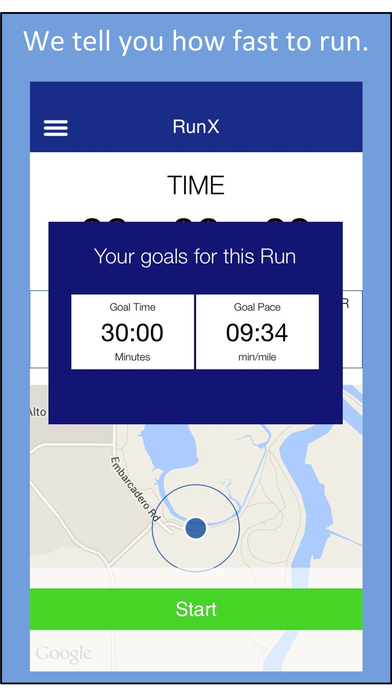
California based RunX, LLC introduces RunX Fit 1.0, their new no-cost iOS app that empowers runners of all skill levels with pace coaching and heart rate fitness tracking. RunX Fit features training tools to help users improve their fitness and run faster. Users are given a goal pace to run at based on their current fitness level. RunX Fit measures and tracks the users' fitness improvement with patented, run-specific heart rate based fitness tracking tools.
Palo Alto, California - New app RunX Fit from RunX, LLC features training tools to help users improve their fitness and run faster. Users are given a goal pace to run at based on their current fitness level which is updated as the users' fitness improves. RunX Fit measures and tracks the users' fitness improvement with patented, run-specific heart rate based fitness tracking tools. Great training tools make great runners and behind its patented technology (US Patent 8,784,115), RunX Fit is a powerful app any runner can use.
Everyone aspiring to become a better runner can now be empowered to take their training to a whole new level by downloading the new iPhone app RunX Fit from Palo Alto-based development firm RunX, LLC. And to make sure as many users benefit as possible, RunX Fit is being offered at no cost for a limited time. RunX Fit is designed to be used standalone or together with other popular running apps, wearables, and professional training plans.
RunX Fit sought feedback from professional runners and coaches and spent countless hours testing the tools. Allowing users to see their run-specific fitness improve and themselves get faster, it's a level of run-specific fitness tracking that is unprecedented in the app world.
Users are given a goal pace to run at based on their current fitness level which is updated as fitness improves. If a user gets injured, RunX Fit tells the user exactly how much fitness has been lost and where to resume training. RunX Fit is also ideal before a race to predict how fast they can run.
In addition, RunX Fit' interface is sensibly functional, and makes it quick and easy for anyone to view, select and perform key workouts. RunX Fit offers an environment that makes people want to run - because specific pace goals are given and the runner is coached during the run, users are provided with extra motivation and focus. In addition, RunX Fit is surprisingly versatile and suits a variety of needs - from beginner runners looking to get started to advanced runners seeking to improve their race times. Users can also look up training paces based on race time using the included pace calculator.
Device Requirements:
* iPhone, iPad, and iPod touch
* Requires iOS�7.1 or later
* 23.7 MB
Pricing and Availability:
RunX Fit 1.0 is Free and available worldwide exclusively through the App Store in the Health & Fitness category.
RunX Fit 1.0: http://runxfit.com
More Info: http://apps.appshout.com/runx-fit/
Download from iTunes: https://itunes.apple.com/app/runx-fit-gps-running-heart/id1089605118
Screenshot: http://a3.mzstatic.com/us/r30/Purple18/v4/ef/d1/12/efd1121b-d62c-e987-ca47-32cde2842702/screen696x696.jpeg
App Icon: http://apps.appshout.com/runx-fit/images/icon.png
Palo Alto based RunX, LLC brings powerful technology to the mobile running community courtesy of its proprietary training tools. The company believes in emphasizing results over gimmicks, and focuses on proven tools to help runners. With multiple patents to date and more to come, RunX, LLC aims to take the science of running to the next level. All Material and Software (C) Copyright 2016 RunX, LLC. All Rights Reserved. Apple, the Apple logo, iPhone, iPod and iPad are registered trademarks of Apple Inc. in the U.S. and/or other countries. Other trademarks and registered trademarks may be the property of their respective owners.
*******
Link To Article: http://prmac.com/release-id-80254.htm
*******
---------------------------------------------------------------------------------
Note that you can alter delivered distributions at any time.
Login to your account on prMac to alter your channel selection, or to opt-out at any time.
RunX Fit Empowers All Runners to Train Smarter and Run Faster - Published on 09/19/16
California based RunX, LLC introduces RunX Fit 1.0, their new no-cost iOS app that empowers runners of all skill levels with pace coaching and heart rate fitness tracking. RunX Fit features training tools to help users improve their fitness and run faster. Users are given a goal pace to run at based on their current fitness level. RunX Fit measures and tracks the users' fitness improvement with patented, run-specific heart rate based fitness tracking tools.
Palo Alto, California - New app RunX Fit from RunX, LLC features training tools to help users improve their fitness and run faster. Users are given a goal pace to run at based on their current fitness level which is updated as the users' fitness improves. RunX Fit measures and tracks the users' fitness improvement with patented, run-specific heart rate based fitness tracking tools. Great training tools make great runners and behind its patented technology (US Patent 8,784,115), RunX Fit is a powerful app any runner can use.
Everyone aspiring to become a better runner can now be empowered to take their training to a whole new level by downloading the new iPhone app RunX Fit from Palo Alto-based development firm RunX, LLC. And to make sure as many users benefit as possible, RunX Fit is being offered at no cost for a limited time. RunX Fit is designed to be used standalone or together with other popular running apps, wearables, and professional training plans.
RunX Fit sought feedback from professional runners and coaches and spent countless hours testing the tools. Allowing users to see their run-specific fitness improve and themselves get faster, it's a level of run-specific fitness tracking that is unprecedented in the app world.
Users are given a goal pace to run at based on their current fitness level which is updated as fitness improves. If a user gets injured, RunX Fit tells the user exactly how much fitness has been lost and where to resume training. RunX Fit is also ideal before a race to predict how fast they can run.
In addition, RunX Fit' interface is sensibly functional, and makes it quick and easy for anyone to view, select and perform key workouts. RunX Fit offers an environment that makes people want to run - because specific pace goals are given and the runner is coached during the run, users are provided with extra motivation and focus. In addition, RunX Fit is surprisingly versatile and suits a variety of needs - from beginner runners looking to get started to advanced runners seeking to improve their race times. Users can also look up training paces based on race time using the included pace calculator.
Device Requirements:
* iPhone, iPad, and iPod touch
* Requires iOS�7.1 or later
* 23.7 MB
Pricing and Availability:
RunX Fit 1.0 is Free and available worldwide exclusively through the App Store in the Health & Fitness category.
RunX Fit 1.0: http://runxfit.com
More Info: http://apps.appshout.com/runx-fit/
Download from iTunes: https://itunes.apple.com/app/runx-fit-gps-running-heart/id1089605118
Screenshot: http://a3.mzstatic.com/us/r30/Purple18/v4/ef/d1/12/efd1121b-d62c-e987-ca47-32cde2842702/screen696x696.jpeg
App Icon: http://apps.appshout.com/runx-fit/images/icon.png

Palo Alto based RunX, LLC brings powerful technology to the mobile running community courtesy of its proprietary training tools. The company believes in emphasizing results over gimmicks, and focuses on proven tools to help runners. With multiple patents to date and more to come, RunX, LLC aims to take the science of running to the next level. All Material and Software (C) Copyright 2016 RunX, LLC. All Rights Reserved. Apple, the Apple logo, iPhone, iPod and iPad are registered trademarks of Apple Inc. in the U.S. and/or other countries. Other trademarks and registered trademarks may be the property of their respective owners.
*******
Link To Article: http://prmac.com/release-id-80254.htm
*******
---------------------------------------------------------------------------------
Note that you can alter delivered distributions at any time.
Login to your account on prMac to alter your channel selection, or to opt-out at any time.
New Snowden film underscores the need for Camera Guard for macOS
A new article has been published at prMac.
New Snowden film underscores the need for Camera Guard for macOS - Published on 09/19/16
ProtectStar today announces the release of Camera Guard 2016 for Mac, the free version of their comprehensive anti-spyware application for macOS. The application prevents access to any Mac iSight camera, or connected webcam by any outside parties. This protects Mac users from being spied on by hackers, spyware, or malware. As seen in the recently released Oliver Stone film, "Snowden," not only do citizens need to protect themselves from criminals, but also from their own government's agencies.
Miami, Florida - ProtectStar is proud to announce the release of Camera Guard for Mac 2016, the free to download version of their anti-spyware utility for MacOS computers. Camera Guard protects any Mac's built-in iSight camera, or webcam from access by hackers, spyware or malware. The app sits quietly in the background monitoring and blocking any applications or processes that might attempt to access the camera on any Mac computer.
The new Oliver Stone film, "Snowden," offers the spine-tingling story of National Security Council (NSA) whistleblower Edward Snowden, who revealed how the United States government is illegally spying on its own citizens. By accessing their personal files, email, cloud storage, and even their computer's webcam and microphone, the government not only monitored activities of the bad guys, but also that of innocent citizens. The release of the film underscores the need for Mac users to protect their privacy via invaluable security utilities such as ProtectStar's Camera Guard for Mac 2016.
Camera Guard for Mac 2016 offers Mac users the ability to control access to their Mac's iSight camera, or connected webcam, while being alerted if any app, or outside process attempts to access the camera at any time. The app immediately shuts down access, while also alerting the user to the attempt. A record of all access attempts and warnings are kept in a convenient log file, and the app's intelligent Deep Detective feature can even detect previously unknown attacks.
"Who knows who is observing you at this very moment? After the NSA documents from the archive of whistleblower Edward Snowden became public, one thing became clear: Not only are data thieves and computer scammers interested in invading the privacy of computer users, the United States government itself actively spies on its own citizens," says Chris Bohn, CEO of ProtectStar. "The government is using every tool at their disposal to illegally access this information. They even go so far as to monitor millions of people via their own personal computers and their built-in cameras and microphones."
Camera Guard for Mac is an ideal addition to any other security tool users might already have in place. The app works great alongside firewalls as well as virus scanners, adding an extra layer of protection for any user's privacy requirements. The app carries a small system footprint, so users don't need to worry about it taking up too much disk space, or stealing precious RAM or processor cycles.
Features:
* Web camera protection
* Pop-Up notifications regarding security breaches
* Logfile protocol
* Microphone protection (Professional Only)
* Deep Detective(TM) (Professional Only)
* Protection against known and unknown attack attempts (Professional Only)
* Passcode protection (Professional Only)
* 24/7 Support by e-Mail (Professional Only)
ProtectStar also offers a Professional version of Camera Guard. In addition to monitoring a Mac's webcam, it also offers monitoring and blocking of the Mac's microphone, as well as offering the ability to use a Personal Identification Number (PIN) to secure the settings in the app. Thus ensuring that no one can change the protection level of the application except for authorized users.
The pro version of Camera Guard also offers Deep Detective, which monitors for attacks by known malware, such as the "Backdoor.MAC.Eleanor" strain which can take control of a Mac's webcam. Deep Detective can also recognize attacks by previously unknown malware, using its modern heuristic methods.
"The Oliver Stone film, 'Snowden,' released this past week, offers the true tale of Edward Snowden, who exposed the National Security Council's illegal spying on U.S. citizens,' continues Chris. "The NSA, under the guise of 'homeland security,' covertly spied on innocent Americans, accessing their home computers and personal files, as well as monitoring them via their computer's webcams and microphones. Snowden's revelations underscore the need for security tools such as Camera Guard for Mac 2016."
Device Requirements:
* Internet connection for activation and updates
* Mac OS X 10.11 or higher (Supports macOS Sierra)
* 64-bit processor
* 30 MB
Pricing and Availability:
Camera Guard 2016 is free, and is available for download from the Camera Guard for Mac 2016 website. A Professional version is also available, which also offers monitoring and protection of the webcam and microphone, "Deep Detective" protection against both well-known and unknown access attempts, a protocol in a log file, password protection, and 24/7 support via email. The Professional version is priced at $29.90 USD (or an equivalent amount in other currencies).
ProtectStar: https://www.protectstar.com
Camera Guard for Mac 2016: https://www.protectstar.com/en/camera-guard
Download Free Version: https://www.protectstar.com/en/camera-guard
Snowden Theatrical Trailer: http://trailers.apple.com/trailers/independent/snowden
Screenshots (ZIP): https://www.protectstar.com/download/pressDownload/camera_guard_screenshot.zip
Application Icon (ZIP): https://www.protectstar.com/download/pressDownload/camera_icon.zip
Founded in 2004 by Chris Bohn, Miami, Florida-based ProtectStar Inc. was established with the single intent of offering innovative security solutions for individuals and corporations alike. The company offers a number of security-enhancing solutions for Mac, iOS, Android, and Windows users. The firm currently serves over 1,000,000 satisfied customers worldwide. All Material and Software (C) Copyright 2016 ProtectStar Inc. All Rights Reserved. Apple, the Apple logo, Macintosh, Mac OS X, and macOS are registered trademarks of Apple Inc. in the U.S. and/or other countries. Other trademarks and registered trademarks may be the property of their respective owners.
*******
Link To Article: http://prmac.com/release-id-80253.htm
*******
---------------------------------------------------------------------------------
Note that you can alter delivered distributions at any time.
Login to your account on prMac to alter your channel selection, or to opt-out at any time.
New Snowden film underscores the need for Camera Guard for macOS - Published on 09/19/16
ProtectStar today announces the release of Camera Guard 2016 for Mac, the free version of their comprehensive anti-spyware application for macOS. The application prevents access to any Mac iSight camera, or connected webcam by any outside parties. This protects Mac users from being spied on by hackers, spyware, or malware. As seen in the recently released Oliver Stone film, "Snowden," not only do citizens need to protect themselves from criminals, but also from their own government's agencies.
Miami, Florida - ProtectStar is proud to announce the release of Camera Guard for Mac 2016, the free to download version of their anti-spyware utility for MacOS computers. Camera Guard protects any Mac's built-in iSight camera, or webcam from access by hackers, spyware or malware. The app sits quietly in the background monitoring and blocking any applications or processes that might attempt to access the camera on any Mac computer.
The new Oliver Stone film, "Snowden," offers the spine-tingling story of National Security Council (NSA) whistleblower Edward Snowden, who revealed how the United States government is illegally spying on its own citizens. By accessing their personal files, email, cloud storage, and even their computer's webcam and microphone, the government not only monitored activities of the bad guys, but also that of innocent citizens. The release of the film underscores the need for Mac users to protect their privacy via invaluable security utilities such as ProtectStar's Camera Guard for Mac 2016.
Camera Guard for Mac 2016 offers Mac users the ability to control access to their Mac's iSight camera, or connected webcam, while being alerted if any app, or outside process attempts to access the camera at any time. The app immediately shuts down access, while also alerting the user to the attempt. A record of all access attempts and warnings are kept in a convenient log file, and the app's intelligent Deep Detective feature can even detect previously unknown attacks.
"Who knows who is observing you at this very moment? After the NSA documents from the archive of whistleblower Edward Snowden became public, one thing became clear: Not only are data thieves and computer scammers interested in invading the privacy of computer users, the United States government itself actively spies on its own citizens," says Chris Bohn, CEO of ProtectStar. "The government is using every tool at their disposal to illegally access this information. They even go so far as to monitor millions of people via their own personal computers and their built-in cameras and microphones."
Camera Guard for Mac is an ideal addition to any other security tool users might already have in place. The app works great alongside firewalls as well as virus scanners, adding an extra layer of protection for any user's privacy requirements. The app carries a small system footprint, so users don't need to worry about it taking up too much disk space, or stealing precious RAM or processor cycles.
Features:
* Web camera protection
* Pop-Up notifications regarding security breaches
* Logfile protocol
* Microphone protection (Professional Only)
* Deep Detective(TM) (Professional Only)
* Protection against known and unknown attack attempts (Professional Only)
* Passcode protection (Professional Only)
* 24/7 Support by e-Mail (Professional Only)
ProtectStar also offers a Professional version of Camera Guard. In addition to monitoring a Mac's webcam, it also offers monitoring and blocking of the Mac's microphone, as well as offering the ability to use a Personal Identification Number (PIN) to secure the settings in the app. Thus ensuring that no one can change the protection level of the application except for authorized users.
The pro version of Camera Guard also offers Deep Detective, which monitors for attacks by known malware, such as the "Backdoor.MAC.Eleanor" strain which can take control of a Mac's webcam. Deep Detective can also recognize attacks by previously unknown malware, using its modern heuristic methods.
"The Oliver Stone film, 'Snowden,' released this past week, offers the true tale of Edward Snowden, who exposed the National Security Council's illegal spying on U.S. citizens,' continues Chris. "The NSA, under the guise of 'homeland security,' covertly spied on innocent Americans, accessing their home computers and personal files, as well as monitoring them via their computer's webcams and microphones. Snowden's revelations underscore the need for security tools such as Camera Guard for Mac 2016."
Device Requirements:
* Internet connection for activation and updates
* Mac OS X 10.11 or higher (Supports macOS Sierra)
* 64-bit processor
* 30 MB
Pricing and Availability:
Camera Guard 2016 is free, and is available for download from the Camera Guard for Mac 2016 website. A Professional version is also available, which also offers monitoring and protection of the webcam and microphone, "Deep Detective" protection against both well-known and unknown access attempts, a protocol in a log file, password protection, and 24/7 support via email. The Professional version is priced at $29.90 USD (or an equivalent amount in other currencies).
ProtectStar: https://www.protectstar.com
Camera Guard for Mac 2016: https://www.protectstar.com/en/camera-guard
Download Free Version: https://www.protectstar.com/en/camera-guard
Snowden Theatrical Trailer: http://trailers.apple.com/trailers/independent/snowden
Screenshots (ZIP): https://www.protectstar.com/download/pressDownload/camera_guard_screenshot.zip
Application Icon (ZIP): https://www.protectstar.com/download/pressDownload/camera_icon.zip
Founded in 2004 by Chris Bohn, Miami, Florida-based ProtectStar Inc. was established with the single intent of offering innovative security solutions for individuals and corporations alike. The company offers a number of security-enhancing solutions for Mac, iOS, Android, and Windows users. The firm currently serves over 1,000,000 satisfied customers worldwide. All Material and Software (C) Copyright 2016 ProtectStar Inc. All Rights Reserved. Apple, the Apple logo, Macintosh, Mac OS X, and macOS are registered trademarks of Apple Inc. in the U.S. and/or other countries. Other trademarks and registered trademarks may be the property of their respective owners.
*******
Link To Article: http://prmac.com/release-id-80253.htm
*******
---------------------------------------------------------------------------------
Note that you can alter delivered distributions at any time.
Login to your account on prMac to alter your channel selection, or to opt-out at any time.
Deframe 2.0.1 is now available in the Mac App Store
A new article has been published at prMac.
Deframe 2.0.1 is now available in the Mac App Store - Published on 09/19/16
Charlotte based einstein's legacy v2.0, LLC today announces Deframe 2.0.1, a major update to their video post-production utility for OS X. Deframe gives users an easy way to extract and repurpose the images and segments from their video assets. Those extractions can be used by other application or shared via internet-based applications like Facebook, Twitter and Vimeo. The 2.0.1 Update introduces an enhanced user interface, new data types and a simplified extraction workflow.
Charlotte, North Carolina - einstein's legacy v2.0, LLC today announces the release of Deframe 2.0.1, a video post-production utility that gives you an easy way to extract and repurpose the images and segments within your video assets. The 2.0.1 Update is a major update that introduces a new user interface, new data types and a new workflow.
"We have added lots of new features to Deframe to make it a more effective tool for videographers, editorial production staff and corporate media professionals," says einstein's legacy Chief Product Officer Douglas A. Welton. "With this release, we concentrated on simplifying the most frequent task associated with each type of extraction. We reworked the user interface, using a dark theme to make long "deframing" sessions more comfortable. And, we've introduced new types of extractions and beefed up interoperability making it easier to share data between Deframe and other applications."
Deframe 2.0.1 includes the following key features:
* Multiple Extraction Types
Extract parts of your movie as either an image or a video clip; or organized as extractions on a contact sheet or as a segment summary.
* Interoperability
Drag'n drop (or copy) high-resolution images directly from Deframe to your application.
* Summaries
Create a single picture that captures the range of images within a movie segment.
* Contact Sheets
Make a PDF document with a collection of images from your movie's timeline.
* Exporting
Create new movie clips in a variety of formats for a range of devices and playback situations.
* Printing
High-resolution source material may be printed as a single image, on a contact sheet or as image slices.
* Slide Shows
Create an interactive presentation from your movies using images, contact sheets and summaries.
* Sharing
Share images, segments, contact sheets and summaries using Vimeo, Facebook and other popular internet services
System Requirements:
* OS X 10.11 (El Capitan)
* 64-bit processor
* 0.6 MB
Pricing and Availability:
Deframe 2.0.1 is available for $19.99 USD (or equivalent amount in other currencies) and is available worldwide from the Mac App Store in the Video category.
einstein's legacy: http://www.einsteinslegacy.com
Deframe 2.0.1: http://www.einsteinslegacy.com/products/deframe.html
Purchase and Download (MAS): https://itunes.apple.com/app/deframe/id579049220
Download Demo: http://www.einsteinslegacy.com/downloads/deframeDemo.zip
Screenshot: http://www.einsteinslegacy.com/images/pressReleases/screens/deframe.png
Application Icon: http://www.einsteinslegacy.com/images/pressReleases/icons/deframe.png
At einstein's legacy, we make cool Macintosh Applications for video, images and quartz compositions for creative professionals. einstein's legacy v2.0, LLC is located in Charlotte, NC. Copyright (C) 2011-2016 einstein's legacy. All Rights Reserved. Apple, the Apple logo, Macintosh, iPhone, iPod, iPad and Mac OS X are registered trademarks of Apple Inc. in the U.S. and/or other countries. Other trademarks and registered trademarks may be the property of their respective owners.
*******
Link To Article: http://prmac.com/release-id-80252.htm
*******
---------------------------------------------------------------------------------
Note that you can alter delivered distributions at any time.
Login to your account on prMac to alter your channel selection, or to opt-out at any time.
Deframe 2.0.1 is now available in the Mac App Store - Published on 09/19/16
Charlotte based einstein's legacy v2.0, LLC today announces Deframe 2.0.1, a major update to their video post-production utility for OS X. Deframe gives users an easy way to extract and repurpose the images and segments from their video assets. Those extractions can be used by other application or shared via internet-based applications like Facebook, Twitter and Vimeo. The 2.0.1 Update introduces an enhanced user interface, new data types and a simplified extraction workflow.
Charlotte, North Carolina - einstein's legacy v2.0, LLC today announces the release of Deframe 2.0.1, a video post-production utility that gives you an easy way to extract and repurpose the images and segments within your video assets. The 2.0.1 Update is a major update that introduces a new user interface, new data types and a new workflow.
"We have added lots of new features to Deframe to make it a more effective tool for videographers, editorial production staff and corporate media professionals," says einstein's legacy Chief Product Officer Douglas A. Welton. "With this release, we concentrated on simplifying the most frequent task associated with each type of extraction. We reworked the user interface, using a dark theme to make long "deframing" sessions more comfortable. And, we've introduced new types of extractions and beefed up interoperability making it easier to share data between Deframe and other applications."
Deframe 2.0.1 includes the following key features:
* Multiple Extraction Types
Extract parts of your movie as either an image or a video clip; or organized as extractions on a contact sheet or as a segment summary.
* Interoperability
Drag'n drop (or copy) high-resolution images directly from Deframe to your application.
* Summaries
Create a single picture that captures the range of images within a movie segment.
* Contact Sheets
Make a PDF document with a collection of images from your movie's timeline.
* Exporting
Create new movie clips in a variety of formats for a range of devices and playback situations.
* Printing
High-resolution source material may be printed as a single image, on a contact sheet or as image slices.
* Slide Shows
Create an interactive presentation from your movies using images, contact sheets and summaries.
* Sharing
Share images, segments, contact sheets and summaries using Vimeo, Facebook and other popular internet services
System Requirements:
* OS X 10.11 (El Capitan)
* 64-bit processor
* 0.6 MB
Pricing and Availability:
Deframe 2.0.1 is available for $19.99 USD (or equivalent amount in other currencies) and is available worldwide from the Mac App Store in the Video category.
einstein's legacy: http://www.einsteinslegacy.com
Deframe 2.0.1: http://www.einsteinslegacy.com/products/deframe.html
Purchase and Download (MAS): https://itunes.apple.com/app/deframe/id579049220
Download Demo: http://www.einsteinslegacy.com/downloads/deframeDemo.zip
Screenshot: http://www.einsteinslegacy.com/images/pressReleases/screens/deframe.png

Application Icon: http://www.einsteinslegacy.com/images/pressReleases/icons/deframe.png

At einstein's legacy, we make cool Macintosh Applications for video, images and quartz compositions for creative professionals. einstein's legacy v2.0, LLC is located in Charlotte, NC. Copyright (C) 2011-2016 einstein's legacy. All Rights Reserved. Apple, the Apple logo, Macintosh, iPhone, iPod, iPad and Mac OS X are registered trademarks of Apple Inc. in the U.S. and/or other countries. Other trademarks and registered trademarks may be the property of their respective owners.
*******
Link To Article: http://prmac.com/release-id-80252.htm
*******
---------------------------------------------------------------------------------
Note that you can alter delivered distributions at any time.
Login to your account on prMac to alter your channel selection, or to opt-out at any time.
LastThink Releases Philippines Tv Online 4.5 for iOS
A new article has been published at prMac.
LastThink Releases Philippines Tv Online 4.5 for iOS - Published on 09/18/16
LastThink announces Philippines Tv Online 4.5, the update to their highly customizable TV application for iOS devices. Anyone can directly access their favorite TV channel and watch diverse films, news, programs from their iPad, iPhone and iPod touch anywhere and anytime. Vibes are smart TV and movie playlists. Users can easily record their favorite films, news, talk shows, programs and more. Users can also share what they are watching via Facebook.
Yerevan, Armenia - LastThink is proud to announce the release of Philippines Tv Online 4.5, the important update to their highly customizable TV application developed for iPhone, iPad, and iPod touch devices. Users can directly access their favorite TV channel and watch diverse films, news, programs from their iPad, iPhone and iPod touch anywhere and anytime.
Features:
* Navigating album photos by sliding your finger right or left on the screen
* Change the device you are streaming the picture to, by taping on the Play button in the upper right corner of your iPad's screen and selecting a desired device
* Screening and shooting any moment of your preferred TV program or film you like
* Altering the boring parts and moving straight to the best part at once - Filter by HD-only and favorite channels
* Rotating channels easily by a mere touch on your screen
* Organize your favorite TV shows, sport teams, movies, and actors and find where you can watch them - on TV and on demand
* Recording your favorite films, news, Talk Shows, programs and etc.
* Sharing what you're watching via Facebook, Twitter, YouTube, Dropbox, email and more - Vibes are smart TV and movie playlists
* The highest quality even with the lowest Internet and HD quality with the normal Internet - You can watch TV channels in HD level
* Editing and cropping videos into smaller parts. In addition to, you can take videos of your favorite program
* Capturing the funniest and most interesting moments of what you are watching with the trim tool
* Searching the content across streaming and broadcast services
* Discovering more than 100 channels of great entertainment beyond the Philippines Tv Online app right on your device's touchscreen interface
We have selected data from the internet and if any assembly or constitution doesn't want us to show the content of the unit, please recommend us to remove it. We follow TV regulations and adjustments and we select original TV content data without artificial editions. If you however experience any issues, please do not hesitate to contact us if you'd like to share your experience with live TV channels, or provide suggestions on how we could improve the product further. We will be more than happy to get in touch.
Device Requirements:
* iPhone, iPad, and iPod touch
* Optimized for iPhone 5, iPhone 6, and iPhone 6 Plus
* Requires iOS 6.0 or later
* Universal Application
* 43.9 MB
Pricing and Availability:
Philippines Tv Online 4.5 is free and is available worldwide exclusively through the App Store in the Entertainment category.
LastThink: http://lastthink.com/
Philippines Tv Online 4.5: https://www.facebook.com/Online-Philippines-TV-Community-1759207207646773/
Download from iTunes: https://itunes.apple.com/app/philippines-tv-online/id1074210340
Screenshot: http://a4.mzstatic.com/us/r30/Purple49/v4/b0/46/04/b0460433-5541-8cd8-94dd-22f5ba997ef6/screen322x572.jpeg
App Icon: http://a2.mzstatic.com/us/r30/Purple30/v4/5c/d1/ee/5cd1ee5f-e575-268d-1e8a-f1fa05f5774a/icon175x175.png
LastThink is an IT company with a focus on mobile development. It has extended its list of services since 2012 to offer high-end business process management, system integration, as well as up-to-date communication solutions. LastThink's mission is to deliver maximum business value to its customers by designing, developing, implementing and maintaining efficient and high quality software solutions aligned with their most essential business needs. Their team will always do its best to meet client expectations. All Material and Software Copyright (C) 2016 LastThink LLC. All Rights Reserved. Apple, the Apple logo, iPhone, iPad and iPod are registered trademarks of Apple Inc. in the U.S. and/or other countries.
*******
Link To Article: http://prmac.com/release-id-80249.htm
*******
---------------------------------------------------------------------------------
Note that you can alter delivered distributions at any time.
Login to your account on prMac to alter your channel selection, or to opt-out at any time.
LastThink Releases Philippines Tv Online 4.5 for iOS - Published on 09/18/16
LastThink announces Philippines Tv Online 4.5, the update to their highly customizable TV application for iOS devices. Anyone can directly access their favorite TV channel and watch diverse films, news, programs from their iPad, iPhone and iPod touch anywhere and anytime. Vibes are smart TV and movie playlists. Users can easily record their favorite films, news, talk shows, programs and more. Users can also share what they are watching via Facebook.
Yerevan, Armenia - LastThink is proud to announce the release of Philippines Tv Online 4.5, the important update to their highly customizable TV application developed for iPhone, iPad, and iPod touch devices. Users can directly access their favorite TV channel and watch diverse films, news, programs from their iPad, iPhone and iPod touch anywhere and anytime.
Features:
* Navigating album photos by sliding your finger right or left on the screen
* Change the device you are streaming the picture to, by taping on the Play button in the upper right corner of your iPad's screen and selecting a desired device
* Screening and shooting any moment of your preferred TV program or film you like
* Altering the boring parts and moving straight to the best part at once - Filter by HD-only and favorite channels
* Rotating channels easily by a mere touch on your screen
* Organize your favorite TV shows, sport teams, movies, and actors and find where you can watch them - on TV and on demand
* Recording your favorite films, news, Talk Shows, programs and etc.
* Sharing what you're watching via Facebook, Twitter, YouTube, Dropbox, email and more - Vibes are smart TV and movie playlists
* The highest quality even with the lowest Internet and HD quality with the normal Internet - You can watch TV channels in HD level
* Editing and cropping videos into smaller parts. In addition to, you can take videos of your favorite program
* Capturing the funniest and most interesting moments of what you are watching with the trim tool
* Searching the content across streaming and broadcast services
* Discovering more than 100 channels of great entertainment beyond the Philippines Tv Online app right on your device's touchscreen interface
We have selected data from the internet and if any assembly or constitution doesn't want us to show the content of the unit, please recommend us to remove it. We follow TV regulations and adjustments and we select original TV content data without artificial editions. If you however experience any issues, please do not hesitate to contact us if you'd like to share your experience with live TV channels, or provide suggestions on how we could improve the product further. We will be more than happy to get in touch.
Device Requirements:
* iPhone, iPad, and iPod touch
* Optimized for iPhone 5, iPhone 6, and iPhone 6 Plus
* Requires iOS 6.0 or later
* Universal Application
* 43.9 MB
Pricing and Availability:
Philippines Tv Online 4.5 is free and is available worldwide exclusively through the App Store in the Entertainment category.
LastThink: http://lastthink.com/
Philippines Tv Online 4.5: https://www.facebook.com/Online-Philippines-TV-Community-1759207207646773/
Download from iTunes: https://itunes.apple.com/app/philippines-tv-online/id1074210340
Screenshot: http://a4.mzstatic.com/us/r30/Purple49/v4/b0/46/04/b0460433-5541-8cd8-94dd-22f5ba997ef6/screen322x572.jpeg

App Icon: http://a2.mzstatic.com/us/r30/Purple30/v4/5c/d1/ee/5cd1ee5f-e575-268d-1e8a-f1fa05f5774a/icon175x175.png

LastThink is an IT company with a focus on mobile development. It has extended its list of services since 2012 to offer high-end business process management, system integration, as well as up-to-date communication solutions. LastThink's mission is to deliver maximum business value to its customers by designing, developing, implementing and maintaining efficient and high quality software solutions aligned with their most essential business needs. Their team will always do its best to meet client expectations. All Material and Software Copyright (C) 2016 LastThink LLC. All Rights Reserved. Apple, the Apple logo, iPhone, iPad and iPod are registered trademarks of Apple Inc. in the U.S. and/or other countries.
*******
Link To Article: http://prmac.com/release-id-80249.htm
*******
---------------------------------------------------------------------------------
Note that you can alter delivered distributions at any time.
Login to your account on prMac to alter your channel selection, or to opt-out at any time.
LaunchTime for iOS is Available on the Apple App Store
A new article has been published at prMac.
LaunchTime for iOS is Available on the Apple App Store - Published on 09/18/16
Independent developer, Daniel Spindelbauer announces LaunchTime - Rocket Launch Schedule 0.8 for iOS, and Apple Watch devices. LaunchTime shows all available rocket launches and their details, including the mission, location, type of rocket and a link to the live stream. It will send a notification before the launch. The app shows users everything they need to know about the launches, including live streams, location of the launchpads, details of the missions, and information about rockets.
Guildford, United Kingdom - Independent developer, Daniel Spindelbauer is proud to announce the release of LaunchTime - Rocket Launch Schedule 0.8 for iPhone, iPad, iPod touch, and Apple Watch devices. Available today, LaunchTime shows all available rocket launches and their details, including the mission, location, type of rocket and a link to the live stream. It will send a notification before the launch, as a reminder.
LaunchTime shows users everything that they need to know about the launches, including the live streams, location of the launchpads, details of the missions, and information about rockets. Browse future launches and get their detailed information. Always have the latest information available on your phone, so you can watch each liftoff live. It will even notify you so you won't miss the next one.
Features:
* Dedicated view to the next launch with countdown
* List of upcoming launches
* Live broadcasts of launches when available
* Details about the launches, including mission description, rocket type, launch location
* View the location of the launch site
* Notification before the next liftoff
* Today widget with the essential information of the next launch
* Dark theme
* Apple Watch support
LaunchTime is now available for free for a limited time. After the introductory price, it will be $0.99 in the US and priced accordingly in other regions. The app is available worldwide on the Apple App Store. iPad and improved Apple Watch support are planned for a future release. Please visit the website for more information on LaunchTime.
Device Requirements:
* iPhone, iPad, iPod touch, and Apple Watch
* Requires iOS 9.0 or later
* 32.1 MB
Pricing and Availability:
LaunchTime - Rocket Launch Schedule 0.8 is free for a limited time, and is available worldwide exclusively through the App Store in the News category.
LaunchTime - Rocket Launch Schedule 0.8: http://launchtimeapp.space
Download from iTunes: https://geo.itunes.apple.com/us/app/launchtime-rocket-launch-schedule/id1150882739?at=1010lqoC&ct=prmac&ls=1&pt=87037734&mt=8
LaunchTime Press Page: http://launchtimeapp.space/press
Screenshot - iPhone: http://a1.mzstatic.com/us/r30/Purple62/v4/71/e1/da/71e1dabf-37c4-9a86-b29d-0677c3a63ab0/screen696x696.jpeg
Screenshot - Apple Watch: http://a2.mzstatic.com/us/r30/Purple71/v4/7f/36/78/7f367839-c358-bb72-5eeb-db4d8e67a6b9/screen390x390.jpeg
App Icon: http://a4.mzstatic.com/us/r30/Purple71/v4/5f/c3/90/5fc3909a-b7db-c602-6eec-85ebe635d772/icon175x175.png
Daniel Spindelbauer, is a Computer Science student at the University of Surrey, interested in space exploration. All Material and Software Copyright (C) 2016 Daniel Spindelbauer. All Rights Reserved. Apple, the Apple logo, iPhone, iPad and iPod are registered trademarks of Apple Inc. in the U.S. and/or other countries.
*******
Link To Article: http://prmac.com/release-id-80251.htm
*******
---------------------------------------------------------------------------------
Note that you can alter delivered distributions at any time.
Login to your account on prMac to alter your channel selection, or to opt-out at any time.
LaunchTime for iOS is Available on the Apple App Store - Published on 09/18/16
Independent developer, Daniel Spindelbauer announces LaunchTime - Rocket Launch Schedule 0.8 for iOS, and Apple Watch devices. LaunchTime shows all available rocket launches and their details, including the mission, location, type of rocket and a link to the live stream. It will send a notification before the launch. The app shows users everything they need to know about the launches, including live streams, location of the launchpads, details of the missions, and information about rockets.
Guildford, United Kingdom - Independent developer, Daniel Spindelbauer is proud to announce the release of LaunchTime - Rocket Launch Schedule 0.8 for iPhone, iPad, iPod touch, and Apple Watch devices. Available today, LaunchTime shows all available rocket launches and their details, including the mission, location, type of rocket and a link to the live stream. It will send a notification before the launch, as a reminder.
LaunchTime shows users everything that they need to know about the launches, including the live streams, location of the launchpads, details of the missions, and information about rockets. Browse future launches and get their detailed information. Always have the latest information available on your phone, so you can watch each liftoff live. It will even notify you so you won't miss the next one.
Features:
* Dedicated view to the next launch with countdown
* List of upcoming launches
* Live broadcasts of launches when available
* Details about the launches, including mission description, rocket type, launch location
* View the location of the launch site
* Notification before the next liftoff
* Today widget with the essential information of the next launch
* Dark theme
* Apple Watch support
LaunchTime is now available for free for a limited time. After the introductory price, it will be $0.99 in the US and priced accordingly in other regions. The app is available worldwide on the Apple App Store. iPad and improved Apple Watch support are planned for a future release. Please visit the website for more information on LaunchTime.
Device Requirements:
* iPhone, iPad, iPod touch, and Apple Watch
* Requires iOS 9.0 or later
* 32.1 MB
Pricing and Availability:
LaunchTime - Rocket Launch Schedule 0.8 is free for a limited time, and is available worldwide exclusively through the App Store in the News category.
LaunchTime - Rocket Launch Schedule 0.8: http://launchtimeapp.space
Download from iTunes: https://geo.itunes.apple.com/us/app/launchtime-rocket-launch-schedule/id1150882739?at=1010lqoC&ct=prmac&ls=1&pt=87037734&mt=8
LaunchTime Press Page: http://launchtimeapp.space/press
Screenshot - iPhone: http://a1.mzstatic.com/us/r30/Purple62/v4/71/e1/da/71e1dabf-37c4-9a86-b29d-0677c3a63ab0/screen696x696.jpeg

Screenshot - Apple Watch: http://a2.mzstatic.com/us/r30/Purple71/v4/7f/36/78/7f367839-c358-bb72-5eeb-db4d8e67a6b9/screen390x390.jpeg

App Icon: http://a4.mzstatic.com/us/r30/Purple71/v4/5f/c3/90/5fc3909a-b7db-c602-6eec-85ebe635d772/icon175x175.png

Daniel Spindelbauer, is a Computer Science student at the University of Surrey, interested in space exploration. All Material and Software Copyright (C) 2016 Daniel Spindelbauer. All Rights Reserved. Apple, the Apple logo, iPhone, iPad and iPod are registered trademarks of Apple Inc. in the U.S. and/or other countries.
*******
Link To Article: http://prmac.com/release-id-80251.htm
*******
---------------------------------------------------------------------------------
Note that you can alter delivered distributions at any time.
Login to your account on prMac to alter your channel selection, or to opt-out at any time.
Subscribe to:
Posts (Atom)