A new article has been published at prMac.
Dark Comedy Game 60 Seconds! Atomic Adventure Now Available for iOS - Published on 09/22/16
Robot Gentleman announces 60 Seconds! Atomic Adventure 1.2, their dark comedy game for iOS devices. iPad and iPhone owners will finally be able to find out what it's like to survive a nuclear apocalypse in just one minute. The player's main goal will be to stay alive in their fallout shelter. To do so, they'll be forced to make difficult decisions, ration food, and hunt mutant cockroaches. Maybe they'll survive and maybe they won't. The game is available for only $2.99, until October 6th.
Poznan, Poland - After months of hard work and development effort, the talented Robot Gentleman team is finally ready to share the big news with the world. Their 60 Seconds! Atomic Adventure 1.2 for iPhone, iPad, and iPod touch devices, has debuted in the App Store. iPad and iPhone owners will finally be able to find out what it's like to survive a nuclear apocalypse in just one minute. Impossible? Well, the brand new announcement trailer will prove you wrong.
Make no mistake, the fact that it's doable doesn't mean it's easy. On the contrary, in this dark comedy atomic adventure of scavenging and survival, players will need to collect supplies and rescue their family before the nuke hits. The player's main goal will be to stay alive in their fallout shelter. To do so, they'll be forced to make difficult decisions, ration food, and hunt mutant cockroaches. Maybe they'll survive and maybe they won't. The life of Ted and his family will be in the player's hands. Quite literally, if you consider the mobile device they'll be playing 60 Seconds! on.
60 Seconds! Atomic Adventure will Offer Players the chance to:
Experience the suburban nightmare of a nuke dropping on their neighborhood in this dark atomic comedy set in the 1950s.
Scavenge any supplies they will need in order to survive, and save family members in a 60-second rush through their procedurally generated house.
Prepare for the worst. Don't just grab random items, plan for survival and follow helpful tips from the emergency broadcasts!
Survive in a fallout shelter with whatever they bring with them. How many days will they last? Will everyone make it out alive?
Decide what to do when the post-apocalyptic world pushes them into a corner. Will they risk going outside? Who is not eating dinner when barely any food is left? How do they deal with a mutant cockroach infestation?
A 25% launch discount promo will start today, and will last until October 6th. During that time, the game will be available for only $2.99. To learn more, visit the official 60 Seconds! Atomic Adventure website, and the Robot Gentleman Facebook and Twitter pages.
Device Requirements:
* iPhone, iPad, and iPod touch
* Requires iOS 6.0 or later
* Universal Application
* 345 MB
Pricing and Availability:
60 Seconds! Atomic Adventure 1.2 is just $2.99 USD (or an equivalent amount in other languages), until October 6th, at which time it will return to its regular price. The game is available worldwide exclusively through the App Store in the Games category.
60 Seconds! Atomic Adventure 1.2: http://www.60secondsgame.com
Purchase and Download from iTunes: http://itunes.apple.com/app/id1072395467
60 Seconds! Announcement YouTube Trailer: https://www.youtube.com/watch?v=wuvoNWuKP8M
Screenshot 1: http://a5.mzstatic.com/us/r30/Purple71/v4/1e/81/df/1e81dfd9-f58c-5413-3230-a75cf169e1db/screen520x924.jpeg
Screenshot 2: http://a4.mzstatic.com/us/r30/Purple71/v4/8f/56/f5/8f56f566-137b-c8ad-04b7-63c6b5c9c978/screen520x924.jpeg
App Icon: http://a1.mzstatic.com/us/r30/Purple71/v4/99/3a/a2/993aa25f-855c-7f6d-2479-ca2b1312c7df/icon175x175.jpeg
Robot Gentleman is an independent Polish games developer. They are a creative team composed of veterans of the game and film industries, with experience working on such games as the award winning Fable and Witcher series, and renowned films including Lars von Trier's Melancholia and the European Space Agency's Ambition. Their debut title, the dark atomic comedy adventure 60 Seconds!, was released in 2015 to positive player reception. This is only the beginning of their journey. They are inspired to create captivating games with unconventional stories. They want to create games for the rest of their lives. All Material and Software Copyright (C) 2016 Robot Gentleman. All Rights Reserved. Apple, the Apple logo, iPhone, iPad and iPod are registered trademarks of Apple Inc. in the U.S. and/or other countries.
*******
Link To Article: http://prmac.com/release-id-80290.htm
*******
---------------------------------------------------------------------------------
Note that you can alter delivered distributions at any time.
Login to your account on prMac to alter your channel selection, or to opt-out at any time.


Business Cards Info Allows Everyone to Store and Search Business Cards
A new article has been published at prMac.
Business Cards Info Allows Everyone to Store and Search Business Cards - Published on 09/22/16
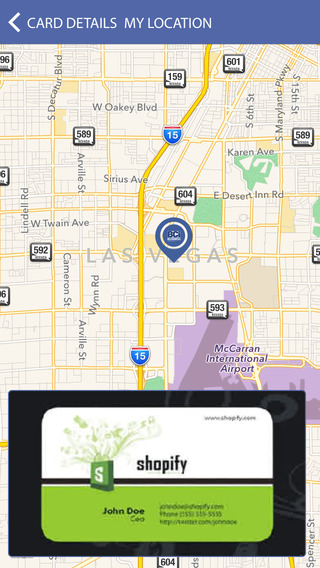
Developed by Investor Guide Est, Business Cards Info 3.6 helps anyone accelerate their business by saving catalogue of contacts business cards that can quickly be retrieved or searched at anytime. Info is stored in both the searchable database and a "cards wallet" which can be accessed at anytime. The interactive maps features offers great benefit to traveling sales representatives, who can see which business contacts are nearby at-a-glance and arrange impromptu meetings based on location.
Riyadh, Saudi Arabia - Developed by Investor Guide Est, Business Cards Info 3.6 helps anyone accelerate their business by saving catalogue of contacts business cards that can quickly be retrieved or searched at anytime. In a world of freelancers, independent contractors, and job seekers, business cards and details are swapped more often than ever before; at happy hour, meetings and out in the field. For regular networkers this leads to a clutter of cards crammed into an already too full wallet or bag, where they will stay until they are lost or damaged. Business Cards Info allows users to quickly-and-easily save this data within a convenient app, and avoid the need to store physical cards.
Convenient features of Business Cards Info include:
* Post your own business card online for easy sharing
* Save unlimited business cards
* Search for business cards (both saved within the app and online)
* Search using interactive maps
The interactive maps features offers great benefit to traveling sales representatives, who can see which business contacts are nearby at-a-glance and arrange impromptu meetings based on location.
To add a new business card, users simply fill out the provided fields, such as first name, last name, e-mail, job title, company, etc. The application then generates a business card based on the provided information, at which point it is stored in both the searchable database and a "cards wallet" which can be accessed at anytime. In addition to fields, a photograph of the card can also be stored along with the business card data.
Device Requirements:
* iPhone, iPad, and iPod touch
* Requires iOS�6.1 or later
* 7.2 MB
Pricing and Availability:
Business Cards Info 3.6 is Free and available worldwide through the App Store in the Entertainment category. There are also versions available for Android, Blackberry and Windows.
Business Cards Info 3.6: http://businesscardsinfo.net/os.htm
More Info: http://apps.appshout.com/business-cards-info/
Download from iTunes: https://itunes.apple.com/app/business-cards-info-bci/id527932468
Screenshot: http://a4.mzstatic.com/us/r30/Purple5/v4/58/c3/d7/58c3d768-06d5-881a-40e3-0db0d43906b9/screen568x568.jpeg
App Icon: http://apps.appshout.com/business-cards-info/images/icon.png
Located in Saudi Arabia, Investor Guide Set is an online channel for business advice and guidance. All Material and Software (C) Copyright 2016 Investor Guide Set. All Rights Reserved. Apple, the Apple logo, iPhone, iPod and iPad are registered trademarks of Apple Inc. in the U.S. and/or other countries. Other trademarks and registered trademarks may be the property of their respective owners.
*******
Link To Article: http://prmac.com/release-id-80289.htm
*******
---------------------------------------------------------------------------------
Note that you can alter delivered distributions at any time.
Login to your account on prMac to alter your channel selection, or to opt-out at any time.
Business Cards Info Allows Everyone to Store and Search Business Cards - Published on 09/22/16
Developed by Investor Guide Est, Business Cards Info 3.6 helps anyone accelerate their business by saving catalogue of contacts business cards that can quickly be retrieved or searched at anytime. Info is stored in both the searchable database and a "cards wallet" which can be accessed at anytime. The interactive maps features offers great benefit to traveling sales representatives, who can see which business contacts are nearby at-a-glance and arrange impromptu meetings based on location.
Riyadh, Saudi Arabia - Developed by Investor Guide Est, Business Cards Info 3.6 helps anyone accelerate their business by saving catalogue of contacts business cards that can quickly be retrieved or searched at anytime. In a world of freelancers, independent contractors, and job seekers, business cards and details are swapped more often than ever before; at happy hour, meetings and out in the field. For regular networkers this leads to a clutter of cards crammed into an already too full wallet or bag, where they will stay until they are lost or damaged. Business Cards Info allows users to quickly-and-easily save this data within a convenient app, and avoid the need to store physical cards.
Convenient features of Business Cards Info include:
* Post your own business card online for easy sharing
* Save unlimited business cards
* Search for business cards (both saved within the app and online)
* Search using interactive maps
The interactive maps features offers great benefit to traveling sales representatives, who can see which business contacts are nearby at-a-glance and arrange impromptu meetings based on location.
To add a new business card, users simply fill out the provided fields, such as first name, last name, e-mail, job title, company, etc. The application then generates a business card based on the provided information, at which point it is stored in both the searchable database and a "cards wallet" which can be accessed at anytime. In addition to fields, a photograph of the card can also be stored along with the business card data.
Device Requirements:
* iPhone, iPad, and iPod touch
* Requires iOS�6.1 or later
* 7.2 MB
Pricing and Availability:
Business Cards Info 3.6 is Free and available worldwide through the App Store in the Entertainment category. There are also versions available for Android, Blackberry and Windows.
Business Cards Info 3.6: http://businesscardsinfo.net/os.htm
More Info: http://apps.appshout.com/business-cards-info/
Download from iTunes: https://itunes.apple.com/app/business-cards-info-bci/id527932468
Screenshot: http://a4.mzstatic.com/us/r30/Purple5/v4/58/c3/d7/58c3d768-06d5-881a-40e3-0db0d43906b9/screen568x568.jpeg
App Icon: http://apps.appshout.com/business-cards-info/images/icon.png

Located in Saudi Arabia, Investor Guide Set is an online channel for business advice and guidance. All Material and Software (C) Copyright 2016 Investor Guide Set. All Rights Reserved. Apple, the Apple logo, iPhone, iPod and iPad are registered trademarks of Apple Inc. in the U.S. and/or other countries. Other trademarks and registered trademarks may be the property of their respective owners.
*******
Link To Article: http://prmac.com/release-id-80289.htm
*******
---------------------------------------------------------------------------------
Note that you can alter delivered distributions at any time.
Login to your account on prMac to alter your channel selection, or to opt-out at any time.
Full Fat releases Blocky Hockey - Arcade Ice Runner for iOS and Android
A new article has been published at prMac.
Full Fat releases Blocky Hockey - Arcade Ice Runner for iOS and Android - Published on 09/22/16
UK based Full Fat today introduces Blocky Hockey v1.1, a new game title on the Apple App Store, Google Play Store and Amazon AppStore. The latest game in the �Blocky Sports� brand brings retro-arcade gameplay to Ice Hockey with new game mechanics designed specifically for the sport. Expanding on dodge and shoot gameplay, a new power-up lane sets the player �on fire�, slamming opponents out of the rink. Stay on fire for long enough to start brutal enforcer brawls with big rewards!
Warwick, United Kingdom - Full Fat, a leading games developer for mobile devices, today is pleased to announce the worldwide release of Blocky Hockey, a flick sports game for iOS and Android.
Grab your puck and skate like mad in a fresh, fun hockey runner! The most fun you can have with a puck, combining realistic physics and humorous gameplay.
Hit the ice and light the lamp with body checks and fighting. How high can you score?
The latest game in the �Blocky Sports� brand brings retro-arcade gameplay to Ice Hockey with new game mechanics designed specifically for the sport. Expanding on dodge and shoot gameplay, a new power-up lane sets the player �on fire�, slamming opponents out of the rink. Stay on fire for long enough to start brutal enforcer brawls with big rewards!
Features:
* Easy to play hockey fun
* Retro style blocky graphics
* Lots of characters
* Different rink surfaces
* Compete with friends
* Free gifts
Blocky Hockey is a game in a series of free to play, retro blocky sports games. Fun for kids and everyone else, easy to play with endless hopper, arcade running gameplay. Full Fat's previous Blocky Sports hits include Blocky Football, Blocky Soccer and Blocky Rugby.
iOS Device Requirements:
* Apple iPhone, iPad or iPod touch
* iOS 8.0 or later
* 37MB download size
Android Device Requirements:
* Android mobile devices and tablets
* Android OS 4.0.3
* OpenGL ES 3.0
* 34MB download size
Pricing and Availability:
Blocky Hockey 1.1 is free to play, available worldwide on the App Store in the both Games and Arcade categories, on the Play Store in the Sports Games category, and on the Amazon AppStore in the Games, Sports category.
Blocky Hockey 1.1: http://www.fullfat.com/games/blocky-hockey-arcade-ice-runner/
Download from iTunes: https://itunes.apple.com/app/blocky-hockey-arcade-ice-runner/id1069787152
Download from Google Play: https://play.google.com/store/apps/details?id=com.fullfat.blockyhockey
Download from Amazon AppStore: http://www.amazon.com/gp/mas/dl/android?p=com.fullfat.blockyhockey.underground
Screenshot: http://a5.mzstatic.com/us/r30/Purple62/v4/e1/56/56/e1565664-3a3d-8bb6-8bc5-3677aa130de4/sc1024x768.jpeg
App Icon: http://a5.mzstatic.com/us/r30/Purple71/v4/4c/53/b3/4c53b3da-5ac4-7471-d3a5-8782afb1a727/icon175x175.png
Founded in 1996, Full Fat is an independent company making world-class games to surprise and entertain players. Creating over 120 games across all formats with the world's biggest franchises including; Harry Potter, Sim City, The Sims, Spore, Sid Meier's Pirates and EA Sports PGA Golf. Since 2010, the company has focused on original IP, achieving global Apple features, chart-topping success and critical acclaim. Over 70 million people have downloaded Full Fat mobile games, reaching #1 in the All Apps chart repeatedly and in multiple territories with hits including; Agent Dash, Flick Soccer, NFL Quarterback and Flick Golf. All material and software (C) Copyright 2016 Full Fat Productions Ltd. All Rights Reserved. Apple, the Apple logo, iPhone, iPod and iPad are registered trademarks of Apple Inc. in the U.S. and/or other countries.
*******
Link To Article: http://prmac.com/release-id-80281.htm
*******
---------------------------------------------------------------------------------
Note that you can alter delivered distributions at any time.
Login to your account on prMac to alter your channel selection, or to opt-out at any time.
Full Fat releases Blocky Hockey - Arcade Ice Runner for iOS and Android - Published on 09/22/16
UK based Full Fat today introduces Blocky Hockey v1.1, a new game title on the Apple App Store, Google Play Store and Amazon AppStore. The latest game in the �Blocky Sports� brand brings retro-arcade gameplay to Ice Hockey with new game mechanics designed specifically for the sport. Expanding on dodge and shoot gameplay, a new power-up lane sets the player �on fire�, slamming opponents out of the rink. Stay on fire for long enough to start brutal enforcer brawls with big rewards!
Warwick, United Kingdom - Full Fat, a leading games developer for mobile devices, today is pleased to announce the worldwide release of Blocky Hockey, a flick sports game for iOS and Android.
Grab your puck and skate like mad in a fresh, fun hockey runner! The most fun you can have with a puck, combining realistic physics and humorous gameplay.
Hit the ice and light the lamp with body checks and fighting. How high can you score?
The latest game in the �Blocky Sports� brand brings retro-arcade gameplay to Ice Hockey with new game mechanics designed specifically for the sport. Expanding on dodge and shoot gameplay, a new power-up lane sets the player �on fire�, slamming opponents out of the rink. Stay on fire for long enough to start brutal enforcer brawls with big rewards!
Features:
* Easy to play hockey fun
* Retro style blocky graphics
* Lots of characters
* Different rink surfaces
* Compete with friends
* Free gifts
Blocky Hockey is a game in a series of free to play, retro blocky sports games. Fun for kids and everyone else, easy to play with endless hopper, arcade running gameplay. Full Fat's previous Blocky Sports hits include Blocky Football, Blocky Soccer and Blocky Rugby.
iOS Device Requirements:
* Apple iPhone, iPad or iPod touch
* iOS 8.0 or later
* 37MB download size
Android Device Requirements:
* Android mobile devices and tablets
* Android OS 4.0.3
* OpenGL ES 3.0
* 34MB download size
Pricing and Availability:
Blocky Hockey 1.1 is free to play, available worldwide on the App Store in the both Games and Arcade categories, on the Play Store in the Sports Games category, and on the Amazon AppStore in the Games, Sports category.
Blocky Hockey 1.1: http://www.fullfat.com/games/blocky-hockey-arcade-ice-runner/
Download from iTunes: https://itunes.apple.com/app/blocky-hockey-arcade-ice-runner/id1069787152
Download from Google Play: https://play.google.com/store/apps/details?id=com.fullfat.blockyhockey
Download from Amazon AppStore: http://www.amazon.com/gp/mas/dl/android?p=com.fullfat.blockyhockey.underground
Screenshot: http://a5.mzstatic.com/us/r30/Purple62/v4/e1/56/56/e1565664-3a3d-8bb6-8bc5-3677aa130de4/sc1024x768.jpeg

App Icon: http://a5.mzstatic.com/us/r30/Purple71/v4/4c/53/b3/4c53b3da-5ac4-7471-d3a5-8782afb1a727/icon175x175.png

Founded in 1996, Full Fat is an independent company making world-class games to surprise and entertain players. Creating over 120 games across all formats with the world's biggest franchises including; Harry Potter, Sim City, The Sims, Spore, Sid Meier's Pirates and EA Sports PGA Golf. Since 2010, the company has focused on original IP, achieving global Apple features, chart-topping success and critical acclaim. Over 70 million people have downloaded Full Fat mobile games, reaching #1 in the All Apps chart repeatedly and in multiple territories with hits including; Agent Dash, Flick Soccer, NFL Quarterback and Flick Golf. All material and software (C) Copyright 2016 Full Fat Productions Ltd. All Rights Reserved. Apple, the Apple logo, iPhone, iPod and iPad are registered trademarks of Apple Inc. in the U.S. and/or other countries.
*******
Link To Article: http://prmac.com/release-id-80281.htm
*******
---------------------------------------------------------------------------------
Note that you can alter delivered distributions at any time.
Login to your account on prMac to alter your channel selection, or to opt-out at any time.
Winclone, Boot Runner and SD Clone are MacOS Sierra-Ready
A new article has been published at prMac.
Winclone, Boot Runner and SD Clone are MacOS Sierra-Ready - Published on 09/22/16
Twocanoes Software announces MacOS Sierra support for Winclone, Boot Runner and SD Clone. Winclone is an essential solution for cloning and migrating Boot Camp on the Mac. Winclone Pro features stand-alone package installation for mass deployment of Boot Camp in enterprise environments. Boot Runner is a full-featured dual-boot startup control and boot management utility for enterprise Macs. SD Clone is the quickest and easiest way to clone SD and other media cards on the Mac.
Naperville, Illinois - Twocanoes Software announces MacOS Sierra compatibility for Winclone 5, Boot Runner 2 and SD Clone 2. Winclone is the essential solution for cloning and migrating Boot Camp on the Mac. Winclone Pro features stand-alone package installation for mass deployment of Boot Camp in enterprise environments. Boot Runner is a full-featured dual-boot startup control and boot management utility for enterprise Macs. SD Clone is the quickest and easiest way to clone SD and other media cards on the Mac.
"We are pleased to support MacOS Sierra with our groundbreaking Mac apps", said Twocanoes managing director Russell Scheil, "Winclone, Boot Runner and SD Clone are MacOS Sierra-ready for Mac users worldwide."
Winclone 5 is MacOS Sierra-Ready:
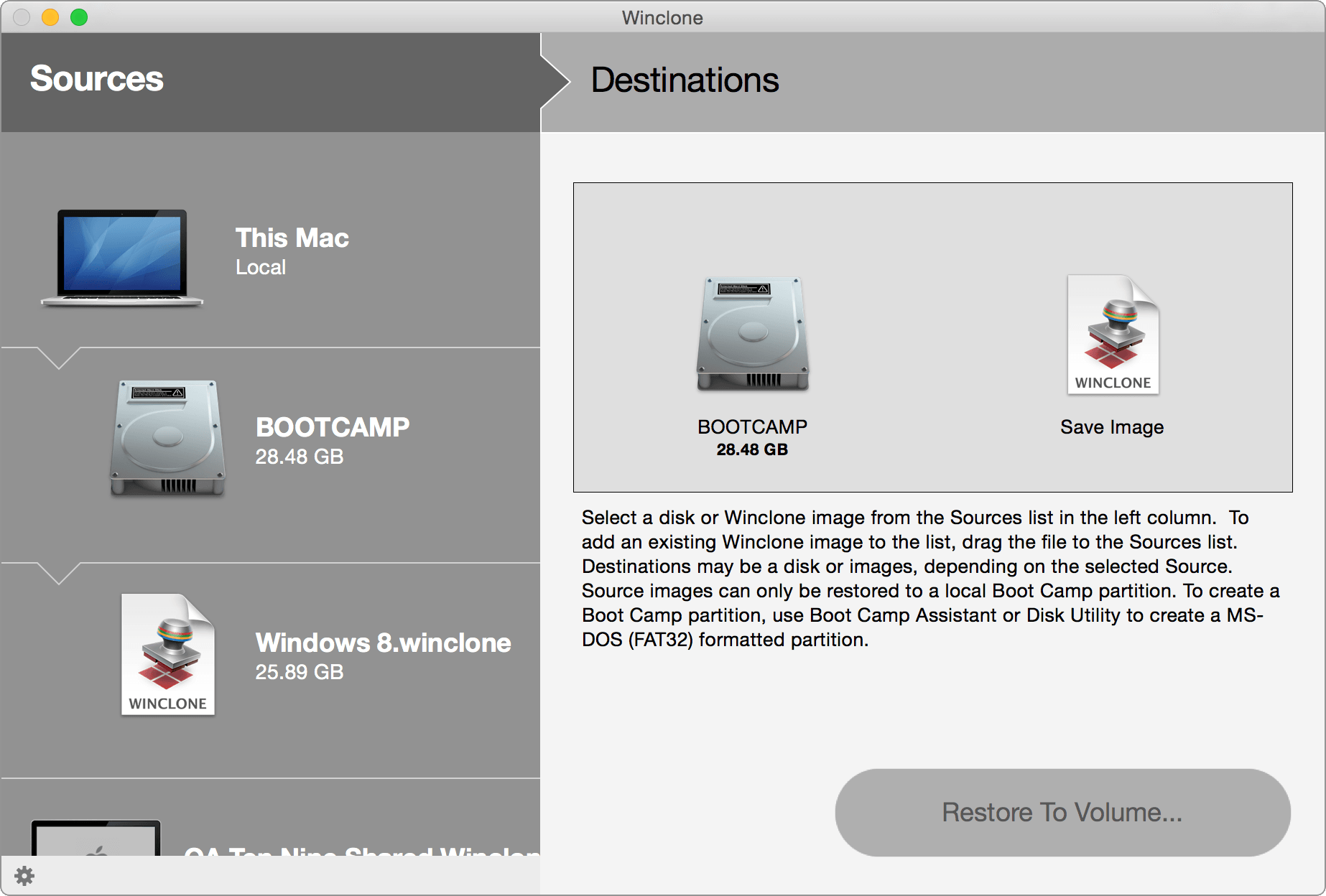
Winclone 5 for Mac creates an exact clone of the Boot Camp partition for backup or migrating Boot Camp to a new Mac. If data gets lost or stolen, use Winclone to restore Boot Camp from a Winclone image. Included free in all editions is Winclone Backup, a file-based backup utility that automatically backs up Windows user files from OS X. Winclone Backup ensures that your Windows files are backed up on a regular interval.
Winclone 5 is available in three editions:
* Winclone Basic for simple Boot Camp cloning and restoring on a Mac
* Winclone Standard for migration between Macs and cloning other drives
* Winclone Pro for enterprise deployment of Boot Camp
Winclone 5 Feature Highlights:
* Support for OS X 10.9 or higher, including MacOS Sierra
* Support for Windows 10, Windows 8 & Windows 7 (64-bit)
* Clone entire Boot Camp partition to an image file
* Restore a Winclone image to a bootable Windows Boot Camp
* Winclone Backup "Set and forget" incremental backup of Windows user files
* Support for OS X Core Storage volumes
* Restore Winclone images to smaller or larger Boot Camp partitions
* Clone from mounted Windows PC drive
* Disk-to-disk cloning
* Restore image to secondary and external drives
* Share and restore Winclone images over the network
* Create standalone package installer for mass deployment of Boot Camp (Pro only)
Winclone System Requirements:
* Mac OS X 10.9 or higher, including MacOS Sierra
* Windows 10, Windows 8.1, Windows 7 (64-bit)
* Boot Camp partition
Winclone 5.7 is available now at the Twocanoes online store and is a free upgrade for current Winclone 5 customers and customers with active Maintenance Contracts. Volume & Educational pricing is available.
Boot Runner 2 is MacOS Sierra-Ready:
Boot Runner is the go-to startup solution for dual-boot Macs in classrooms, labs and enterprise workspaces. Boot Runner 2.5 makes it easy to automate startup control to ensure that Mac-based Windows systems are ready when critical security patches arrive. Boot Runner 2.5 includes detection of and notification for Apple System Integrity Protection. Boot Runner includes a user-friendly startup selection screen to assist users in choosing the Mac, Windows or virtual environment they need to get work done.
Boot Runner is the ideal solution for managing startup control of one or thousands of Macs running multiple operating systems, including virtual machines. Boot Runner's deep set of controls are available to administrators for remote startup of groups of machines for specific uses or to perform maintenance. A scheduling features enables administrators to ensure that Windows or other operating systems are available during scheduled maintenance windows.
Boot Runner 2 Disk Features:
* Support for OS X 10.9 or higher including MacOS Sierra
* Support for Boot Camp partitions including Windows 10, Windows 8.1 and Windows 7
* Support for virtual machine startup (Parallels, VMWare Fusion or VirtualBox)
* Support for Chrome OS and Linux-based operating systems
Boot Runner 2 Administration Features:
* Schedule startup into specific OS for scheduled maintenance or group usage
* Remote management of boot selection
* Remote management of selection screen
* Display or hide restart button
* Display or hide shutdown button
Boot Runner 2 Login Features:
* Menu bar boot selector
* Custom login options
* Auto-login to OS X account
* Auto-launch of virtual machine host
* Auto-logout and return to Boot Runner selection screen
* Control virtual machine shutdown and logout
Boot Runner 2 Startup Selection Features:
* Custom boot volume icons
* New screen customization options
* Customize selection screen popover text
* Customize marquee text formatting
Boot Runner 2 System Requirements:
* Mac OS X 10.9 or higher including MacOS Sierra
Boot Runner 2 Virtual Machine Support:
A Boot Camp partition and/or virtual machine operating system with a supported installed OS such as Windows 10, Windows 8.1, Windows 7, Chrome OS and Linux.
Boot Runner 2.5 is is available now at the Twocanoes online store and is a free update for Boot Runner 2 customers with active Maintenance Contracts. Volume & Educational pricing is available. Visit Twocanoes Software online to download the free trial of Boot Runner 2.
SD Clone 2 is MacOS Sierra-Ready:
SD Clone 2 is the easiest way to clone SD and other flash media on the Mac, is blazing fast and duplicates up to 8 SD cards simultaneously. SD Clone also shrinks and expands SD images so images can be cloned to any size SD card. SD Clone supports Raspberry Pi, Arduino, Linux variants and many other operating systems. SD Clone also supports all flash memory cards and formats, including SD and micro SD cards.
Cloning with SD Clone is simple and fast. SD Clone writes to cards of all sizes, eliminating the need to match card capacities.
SD Clone 2 is an essential backup utility for flash media applications and an ideal solution for mass duplication of SD cards. Reliably clone flash media as backup or for microprocessor-based mass production in a variety of areas including:
* Digital signs and kiosks
* Classrooms and labs
* Robots in schools and manufacturing
* Internet of Things (IoT) devices
* Distribution of photos, movies, audio or software on SD cards
* And much more!
SD Clone 2 Feature Highlights:
* Support for OS X 10.9 or higher, including MacOS Sierra
* Fastest, easiest and most reliable way to clone SD cards
* Supports up to 8 concurrent SD card cloning operations at blazing speed
* Shrink and expand source data when restoring to larger or smaller cards
* Supercharged Raspberry Pi Mode for blazing fast cloning of Raspbian systems
* Clone from many sources: SD card, disk image, compressed disk image
* Clone data to any combination of card capacities and types
* Backup SD cards to an image file for safe keeping or archival purposes
SD Clone 2 System Requirements:
* Mac OS X 10.9 or higher including MacOS Sierra
* SD card or other flash memory media
* SD card reader or adapter
SD Clone 2.2 for Mac is available now on the Twocanoes website for trial or purchase. A 14-day free trial of SD Clone is available at Twocanoes Software online. All editions of SD Clone include one year of maintenance and technical support. Visit Twocanoes Software online to download the free trial of SD Clone.
Twocanoes Software: http://twocanoes.com/?utm_source=prmac&utm_medium=pr&utm_campaign=sierra
Winclone 5: http://twocanoes.com/products/mac/winclone?utm_source=prmac&utm_medium=pr&utm_campaign=sierra
Purchase Winclone: http://twocanoes.com/products/mac/winclone/pricing?utm_source=prmac&utm_medium=pr&utm_campaign=sierra
Screenshot: http://tc-static.s3.amazonaws.com/images/winclone_screen_shot.png?utm_source=prmac&utm_medium=pr&utm_campaign=sierra
Application Icon: http://tc-static.s3.amazonaws.com/images/winclone4.png?utm_source=prmac&utm_medium=pr&utm_campaign=sierra
Based in Naperville, Illinois, Twocanoes Software was founded by Timothy Perfitt in 2012. Focusing on iOS and OS X exclusively, Twocanoes provides customers with software to perform complex IT tasks with minimum effort. Copyright (C) 2016 Twocanoes Software, Inc. All Rights Reserved. Apple, the Apple logo, iPhone, and iPod are registered trademarks of Apple Inc. in the U.S. and/or other countries. Other trademarks and registered trademarks may be the property of their respective owners.
*******
Link To Article: http://prmac.com/release-id-80285.htm
*******
---------------------------------------------------------------------------------
Note that you can alter delivered distributions at any time.
Login to your account on prMac to alter your channel selection, or to opt-out at any time.
Winclone, Boot Runner and SD Clone are MacOS Sierra-Ready - Published on 09/22/16
Twocanoes Software announces MacOS Sierra support for Winclone, Boot Runner and SD Clone. Winclone is an essential solution for cloning and migrating Boot Camp on the Mac. Winclone Pro features stand-alone package installation for mass deployment of Boot Camp in enterprise environments. Boot Runner is a full-featured dual-boot startup control and boot management utility for enterprise Macs. SD Clone is the quickest and easiest way to clone SD and other media cards on the Mac.
Naperville, Illinois - Twocanoes Software announces MacOS Sierra compatibility for Winclone 5, Boot Runner 2 and SD Clone 2. Winclone is the essential solution for cloning and migrating Boot Camp on the Mac. Winclone Pro features stand-alone package installation for mass deployment of Boot Camp in enterprise environments. Boot Runner is a full-featured dual-boot startup control and boot management utility for enterprise Macs. SD Clone is the quickest and easiest way to clone SD and other media cards on the Mac.
"We are pleased to support MacOS Sierra with our groundbreaking Mac apps", said Twocanoes managing director Russell Scheil, "Winclone, Boot Runner and SD Clone are MacOS Sierra-ready for Mac users worldwide."
Winclone 5 is MacOS Sierra-Ready:
Winclone 5 for Mac creates an exact clone of the Boot Camp partition for backup or migrating Boot Camp to a new Mac. If data gets lost or stolen, use Winclone to restore Boot Camp from a Winclone image. Included free in all editions is Winclone Backup, a file-based backup utility that automatically backs up Windows user files from OS X. Winclone Backup ensures that your Windows files are backed up on a regular interval.
Winclone 5 is available in three editions:
* Winclone Basic for simple Boot Camp cloning and restoring on a Mac
* Winclone Standard for migration between Macs and cloning other drives
* Winclone Pro for enterprise deployment of Boot Camp
Winclone 5 Feature Highlights:
* Support for OS X 10.9 or higher, including MacOS Sierra
* Support for Windows 10, Windows 8 & Windows 7 (64-bit)
* Clone entire Boot Camp partition to an image file
* Restore a Winclone image to a bootable Windows Boot Camp
* Winclone Backup "Set and forget" incremental backup of Windows user files
* Support for OS X Core Storage volumes
* Restore Winclone images to smaller or larger Boot Camp partitions
* Clone from mounted Windows PC drive
* Disk-to-disk cloning
* Restore image to secondary and external drives
* Share and restore Winclone images over the network
* Create standalone package installer for mass deployment of Boot Camp (Pro only)
Winclone System Requirements:
* Mac OS X 10.9 or higher, including MacOS Sierra
* Windows 10, Windows 8.1, Windows 7 (64-bit)
* Boot Camp partition
Winclone 5.7 is available now at the Twocanoes online store and is a free upgrade for current Winclone 5 customers and customers with active Maintenance Contracts. Volume & Educational pricing is available.
Boot Runner 2 is MacOS Sierra-Ready:
Boot Runner is the go-to startup solution for dual-boot Macs in classrooms, labs and enterprise workspaces. Boot Runner 2.5 makes it easy to automate startup control to ensure that Mac-based Windows systems are ready when critical security patches arrive. Boot Runner 2.5 includes detection of and notification for Apple System Integrity Protection. Boot Runner includes a user-friendly startup selection screen to assist users in choosing the Mac, Windows or virtual environment they need to get work done.
Boot Runner is the ideal solution for managing startup control of one or thousands of Macs running multiple operating systems, including virtual machines. Boot Runner's deep set of controls are available to administrators for remote startup of groups of machines for specific uses or to perform maintenance. A scheduling features enables administrators to ensure that Windows or other operating systems are available during scheduled maintenance windows.
Boot Runner 2 Disk Features:
* Support for OS X 10.9 or higher including MacOS Sierra
* Support for Boot Camp partitions including Windows 10, Windows 8.1 and Windows 7
* Support for virtual machine startup (Parallels, VMWare Fusion or VirtualBox)
* Support for Chrome OS and Linux-based operating systems
Boot Runner 2 Administration Features:
* Schedule startup into specific OS for scheduled maintenance or group usage
* Remote management of boot selection
* Remote management of selection screen
* Display or hide restart button
* Display or hide shutdown button
Boot Runner 2 Login Features:
* Menu bar boot selector
* Custom login options
* Auto-login to OS X account
* Auto-launch of virtual machine host
* Auto-logout and return to Boot Runner selection screen
* Control virtual machine shutdown and logout
Boot Runner 2 Startup Selection Features:
* Custom boot volume icons
* New screen customization options
* Customize selection screen popover text
* Customize marquee text formatting
Boot Runner 2 System Requirements:
* Mac OS X 10.9 or higher including MacOS Sierra
Boot Runner 2 Virtual Machine Support:
A Boot Camp partition and/or virtual machine operating system with a supported installed OS such as Windows 10, Windows 8.1, Windows 7, Chrome OS and Linux.
Boot Runner 2.5 is is available now at the Twocanoes online store and is a free update for Boot Runner 2 customers with active Maintenance Contracts. Volume & Educational pricing is available. Visit Twocanoes Software online to download the free trial of Boot Runner 2.
SD Clone 2 is MacOS Sierra-Ready:
SD Clone 2 is the easiest way to clone SD and other flash media on the Mac, is blazing fast and duplicates up to 8 SD cards simultaneously. SD Clone also shrinks and expands SD images so images can be cloned to any size SD card. SD Clone supports Raspberry Pi, Arduino, Linux variants and many other operating systems. SD Clone also supports all flash memory cards and formats, including SD and micro SD cards.
Cloning with SD Clone is simple and fast. SD Clone writes to cards of all sizes, eliminating the need to match card capacities.
SD Clone 2 is an essential backup utility for flash media applications and an ideal solution for mass duplication of SD cards. Reliably clone flash media as backup or for microprocessor-based mass production in a variety of areas including:
* Digital signs and kiosks
* Classrooms and labs
* Robots in schools and manufacturing
* Internet of Things (IoT) devices
* Distribution of photos, movies, audio or software on SD cards
* And much more!
SD Clone 2 Feature Highlights:
* Support for OS X 10.9 or higher, including MacOS Sierra
* Fastest, easiest and most reliable way to clone SD cards
* Supports up to 8 concurrent SD card cloning operations at blazing speed
* Shrink and expand source data when restoring to larger or smaller cards
* Supercharged Raspberry Pi Mode for blazing fast cloning of Raspbian systems
* Clone from many sources: SD card, disk image, compressed disk image
* Clone data to any combination of card capacities and types
* Backup SD cards to an image file for safe keeping or archival purposes
SD Clone 2 System Requirements:
* Mac OS X 10.9 or higher including MacOS Sierra
* SD card or other flash memory media
* SD card reader or adapter
SD Clone 2.2 for Mac is available now on the Twocanoes website for trial or purchase. A 14-day free trial of SD Clone is available at Twocanoes Software online. All editions of SD Clone include one year of maintenance and technical support. Visit Twocanoes Software online to download the free trial of SD Clone.
Twocanoes Software: http://twocanoes.com/?utm_source=prmac&utm_medium=pr&utm_campaign=sierra
Winclone 5: http://twocanoes.com/products/mac/winclone?utm_source=prmac&utm_medium=pr&utm_campaign=sierra
Purchase Winclone: http://twocanoes.com/products/mac/winclone/pricing?utm_source=prmac&utm_medium=pr&utm_campaign=sierra
Screenshot: http://tc-static.s3.amazonaws.com/images/winclone_screen_shot.png?utm_source=prmac&utm_medium=pr&utm_campaign=sierra
Application Icon: http://tc-static.s3.amazonaws.com/images/winclone4.png?utm_source=prmac&utm_medium=pr&utm_campaign=sierra

Based in Naperville, Illinois, Twocanoes Software was founded by Timothy Perfitt in 2012. Focusing on iOS and OS X exclusively, Twocanoes provides customers with software to perform complex IT tasks with minimum effort. Copyright (C) 2016 Twocanoes Software, Inc. All Rights Reserved. Apple, the Apple logo, iPhone, and iPod are registered trademarks of Apple Inc. in the U.S. and/or other countries. Other trademarks and registered trademarks may be the property of their respective owners.
*******
Link To Article: http://prmac.com/release-id-80285.htm
*******
---------------------------------------------------------------------------------
Note that you can alter delivered distributions at any time.
Login to your account on prMac to alter your channel selection, or to opt-out at any time.
HoudahGeo 5.1: Geotagging for Apple Photos 2.0 on macOS Sierra
A new article has been published at prMac.
HoudahGeo 5.1: Geotagging for Apple Photos 2.0 on macOS Sierra - Published on 09/22/16
Houdah Software today announces HoudahGeo 5.1, a major upgrade to the photo geotagging tool for Mac. HoudahGeo tags photos with location coordinates and names. Standard EXIF, XMP and IPTC geotags allow photo cataloging tools to organize and later find photos by location. HoudahGeo integrates with Apple Photos, iPhoto, Aperture and Adobe Lightroom. Version 5.1 now adds locations to photos in the Apple Photos library on macOS Sierra, as well as offers Apple Maps in addition to MapBox maps.
Luxembourg City, Luxembourg - Houdah Software today is proud to announce the release of HoudahGeo 5.1, a major upgrade to the photo geotagging tool for Mac. HoudahGeo tags photos with location coordinates and names. Standard EXIF, XMP and IPTC geotags allow photo cataloging tools to organize and later find photos by location. HoudahGeo integrates with Apple Photos, iPhoto, Aperture and Adobe Lightroom.
HoudahGeo 5.1 gains the ability to add locations to photos managed by Apple Photos 2.0 on macOS Sierra. HoudahGeo can find and geotag original image files within the Photos library. HoudahGeo can notify Apple Photos of changes made to location information. This puts photos on a map in Apple Photos' new Places feature. The integration between HoudahGeo and Apple Photos gives Photos users access to the many photo geocoding options HoudahGeo has to offer:
* Automatic geocoding using GPS track logs
* Geocoding using reference photos taken using iPhone, a smartphone, or a GPS-enabled camera
* Geocoding without a GPS. Use the built-in map to double-check, adjust, or assign locations to your photos
The map in HoudahGeo makes geocoding large batches of photos surprisingly easy. One just needs to make incremental adjustments between photos to account for the distance travelled. It takes but a nudge to the map and a click for each photo.
How is geotagging different from assigning locations in Apple Photos?
Geotagging writes location information to metadata tags within the original image files. This creates a permanent bond between a photo and the location where it was taken. HoudahGeo writes the same industry standard EXIF and XMP as used by GPS-enabled cameras. Such geotags can be used by Apple Photos as well as other photo cataloging, editing or publishing tools.
Location information added in Apple Photos exists only within the library database. The original images remain unaltered. Only exported versions of the photo can be set to include geotags.
HoudahGeo Feature Highlights:
* Supports many methods of geotagging: GPS track logs, built-in maps, Google Earth, etc.
* Writes GPS data, location names, title, description and keywords to EXIF, XMP and IPTC tags
* Works with JPEG as well as a large number of RAW file formats. It also supports XMP sidecar files
* Notifies Apple Photos, iPhoto and Aperture of changes made to photo location information
New in HoudahGeo 5.1:
* Apple Photos: HoudahGeo can now add locations to photos in the Apple Photos library. Requires Photos 2.0 on macOS Sierra
* Apple Maps: On macOS Sierra, HoudahGeo now offers Apple Maps in addition to MapBox maps
New in HoudahGeo 5.0:
* Places: Quickly assign photos to favorite places and apply coordinates and location names
* Drag-and-drop geocoding: Drag images to the built-in map and drop them at the location where they were taken
* Reverse geocoding: Look up location names in English, German, Spanish and French
* Camera import: Download photos from your camera. Geotag photos before importing them into your photo library
* Lightroom integration: HoudahGeo reads location metadata directly from the Lightroom catalog
* Keywords editor: The new keywords editor makes it easy to assign keywords in bulk
* Map search: No GPS? No problem! Search for landmarks, cities, as well as your favorite places
* Publish KML to Dropbox: Upload photos and track logs to Dropbox. View in Google Earth and Google My Maps
System Requirements:
* OS X Version 10.10 or later
* Some features require macOS 10.12 Sierra
* Digital camera
* Optional GPS track logger
* Optional iPhone, smartphone, or GPS-enabled camera
* 49 MB of disk space
Pricing and Availability:
HoudahGeo 5.1 is priced at $39 USD (+ tax) for a single-user license. A full-featured demo version is available. Licenses are available from the Houdah Software store. Upgrades from HoudahGeo 4 start at $19. Upgrades are available through in-app purchases. HoudahGeo licenses purchased on or after December 1, 2015 remain valid for HoudahGeo 5.
HoudahGeo 5.1: https://www.houdah.com/houdahGeo/
Geotagging Tips & Tricks: https://blog.houdah.com/category/houdahgeo/
Download HoudahGeo: https://www.houdah.com/houdahGeo/download.html
Screenshot: https://www.houdah.com/houdahGeo/assets/HoudahGeo-800x600@2x.jpg
Application Icon: https://www.houdah.com/houdahGeo/assets/HoudahGeo-Icon.png
Press Kit (zip): https://www.houdah.com/houdahGeo/assets/HoudahGeo-Press-Kit.zip
Founded in 2005 by Pierre Bernard, Houdah Software s.a r.l is a small company based in Luxembourg, Europe. Houdah Software specializes in quality software for Mac, iPhone and Apple iPad. Our mission is to pair quality products with excellent customer support. All material and software copyright (C) 2005-2016 Houdah Software s.a r.l. All rights reserved. Apple, macOS, Mac, OS X, iPhone, iPod and iPad are registered trademarks of Apple Inc. in the U.S. and/or other countries. Other trademarks and registered trademarks may be the property of their respective owners.
*******
Link To Article: http://prmac.com/release-id-80286.htm
*******
---------------------------------------------------------------------------------
Note that you can alter delivered distributions at any time.
Login to your account on prMac to alter your channel selection, or to opt-out at any time.
HoudahGeo 5.1: Geotagging for Apple Photos 2.0 on macOS Sierra - Published on 09/22/16
Houdah Software today announces HoudahGeo 5.1, a major upgrade to the photo geotagging tool for Mac. HoudahGeo tags photos with location coordinates and names. Standard EXIF, XMP and IPTC geotags allow photo cataloging tools to organize and later find photos by location. HoudahGeo integrates with Apple Photos, iPhoto, Aperture and Adobe Lightroom. Version 5.1 now adds locations to photos in the Apple Photos library on macOS Sierra, as well as offers Apple Maps in addition to MapBox maps.
Luxembourg City, Luxembourg - Houdah Software today is proud to announce the release of HoudahGeo 5.1, a major upgrade to the photo geotagging tool for Mac. HoudahGeo tags photos with location coordinates and names. Standard EXIF, XMP and IPTC geotags allow photo cataloging tools to organize and later find photos by location. HoudahGeo integrates with Apple Photos, iPhoto, Aperture and Adobe Lightroom.
HoudahGeo 5.1 gains the ability to add locations to photos managed by Apple Photos 2.0 on macOS Sierra. HoudahGeo can find and geotag original image files within the Photos library. HoudahGeo can notify Apple Photos of changes made to location information. This puts photos on a map in Apple Photos' new Places feature. The integration between HoudahGeo and Apple Photos gives Photos users access to the many photo geocoding options HoudahGeo has to offer:
* Automatic geocoding using GPS track logs
* Geocoding using reference photos taken using iPhone, a smartphone, or a GPS-enabled camera
* Geocoding without a GPS. Use the built-in map to double-check, adjust, or assign locations to your photos
The map in HoudahGeo makes geocoding large batches of photos surprisingly easy. One just needs to make incremental adjustments between photos to account for the distance travelled. It takes but a nudge to the map and a click for each photo.
How is geotagging different from assigning locations in Apple Photos?
Geotagging writes location information to metadata tags within the original image files. This creates a permanent bond between a photo and the location where it was taken. HoudahGeo writes the same industry standard EXIF and XMP as used by GPS-enabled cameras. Such geotags can be used by Apple Photos as well as other photo cataloging, editing or publishing tools.
Location information added in Apple Photos exists only within the library database. The original images remain unaltered. Only exported versions of the photo can be set to include geotags.
HoudahGeo Feature Highlights:
* Supports many methods of geotagging: GPS track logs, built-in maps, Google Earth, etc.
* Writes GPS data, location names, title, description and keywords to EXIF, XMP and IPTC tags
* Works with JPEG as well as a large number of RAW file formats. It also supports XMP sidecar files
* Notifies Apple Photos, iPhoto and Aperture of changes made to photo location information
New in HoudahGeo 5.1:
* Apple Photos: HoudahGeo can now add locations to photos in the Apple Photos library. Requires Photos 2.0 on macOS Sierra
* Apple Maps: On macOS Sierra, HoudahGeo now offers Apple Maps in addition to MapBox maps
New in HoudahGeo 5.0:
* Places: Quickly assign photos to favorite places and apply coordinates and location names
* Drag-and-drop geocoding: Drag images to the built-in map and drop them at the location where they were taken
* Reverse geocoding: Look up location names in English, German, Spanish and French
* Camera import: Download photos from your camera. Geotag photos before importing them into your photo library
* Lightroom integration: HoudahGeo reads location metadata directly from the Lightroom catalog
* Keywords editor: The new keywords editor makes it easy to assign keywords in bulk
* Map search: No GPS? No problem! Search for landmarks, cities, as well as your favorite places
* Publish KML to Dropbox: Upload photos and track logs to Dropbox. View in Google Earth and Google My Maps
System Requirements:
* OS X Version 10.10 or later
* Some features require macOS 10.12 Sierra
* Digital camera
* Optional GPS track logger
* Optional iPhone, smartphone, or GPS-enabled camera
* 49 MB of disk space
Pricing and Availability:
HoudahGeo 5.1 is priced at $39 USD (+ tax) for a single-user license. A full-featured demo version is available. Licenses are available from the Houdah Software store. Upgrades from HoudahGeo 4 start at $19. Upgrades are available through in-app purchases. HoudahGeo licenses purchased on or after December 1, 2015 remain valid for HoudahGeo 5.
HoudahGeo 5.1: https://www.houdah.com/houdahGeo/
Geotagging Tips & Tricks: https://blog.houdah.com/category/houdahgeo/
Download HoudahGeo: https://www.houdah.com/houdahGeo/download.html
Screenshot: https://www.houdah.com/houdahGeo/assets/HoudahGeo-800x600@2x.jpg

Application Icon: https://www.houdah.com/houdahGeo/assets/HoudahGeo-Icon.png

Press Kit (zip): https://www.houdah.com/houdahGeo/assets/HoudahGeo-Press-Kit.zip
Founded in 2005 by Pierre Bernard, Houdah Software s.a r.l is a small company based in Luxembourg, Europe. Houdah Software specializes in quality software for Mac, iPhone and Apple iPad. Our mission is to pair quality products with excellent customer support. All material and software copyright (C) 2005-2016 Houdah Software s.a r.l. All rights reserved. Apple, macOS, Mac, OS X, iPhone, iPod and iPad are registered trademarks of Apple Inc. in the U.S. and/or other countries. Other trademarks and registered trademarks may be the property of their respective owners.
*******
Link To Article: http://prmac.com/release-id-80286.htm
*******
---------------------------------------------------------------------------------
Note that you can alter delivered distributions at any time.
Login to your account on prMac to alter your channel selection, or to opt-out at any time.
Step On Gregg gets massive 2.0 update for iOS and tvOS 10 release
A new article has been published at prMac.
Step On Gregg gets massive 2.0 update for iOS and tvOS 10 release - Published on 09/22/16
French indie game dev-team, Usual Makers celebrates iOS and tvOS 10 today by announcing the 2.0 update of Step On Gregg, their Apple featured puzzle/platform game for iPhone, iPad, iPod touch and Apple TV. This new version adds 80 levels in a new Mirror World (160 levels in total), a Gif sharing feature and 3D Touch Quick Actions to all players. The update also includes exclusive content for iOS & tvOS 10 players: live broadcasting via ReplayKit and iMessages hand-animated stickers.
Lyon, France - Usual Makers (Yannick Berthier & Sylvain Ramousse) today is proud to announce the release of Step On Gregg's 2.0 version, a huge release which more than doubles the content of this Apple featured puzzle/platform game for iPhone, iPad, iPod touch and Apple TV. In this update all players can experience the new "Mirror World" game mode, which adds 80 tricky levels (160 in total). You can also record and share Gifs of your best and worst moments, or use 3D Touch Quick Actions that allows quick access to the game's content.
Exclusive iOS and tvOS 10 content is also brought by this update: now you can live broadcast to your favorite streaming services with ReplayKit, and have fun with the new free animated iMessage Stickers. And last but not least, there are new Game Center achievements and leaderboards!
"We want to thank all our beta-testers and also everyone at Giphy and Mobcrush" said Yannick Berthier, Co-Founder at Usual Makers. "Thanks to their incredible dev-teams, Step On Gregg players can now share those crazy Gifs, and stream their passionate gameplays to the mobile gaming community!"
Update 2.0 is also the first version fully compatible with the new iPhone 7 and iPhone 7 Plus, it also brings stability improvements.
iOS Device Requirements:
* iPhone, iPad, and iPod touch
* Requires iOS 9.0 or later
* 54.7 MB
tvOS Device Requirements:
* Apple TV 4th Gen
* Requires tvOS 9.0 or later
* 31 MB
Pricing and Availability:
Step On Gregg 2.0 is Free and available worldwide exclusively through the App Store in the Games category. It includes In-App Purchases and ads; both are optional.
Usual Makers: http://www.usualmakers.com
Step On Gregg 2.0: http://geo.itunes.apple.com/us/app/step-on-gregg/id1093773408?mt=8&at=1010lcjW
YouTube (Game Update Trailer): https://www.youtube.com/watch?v=tEAuGQI9mjM
Media Assets: http://www.usualmakers.com/press/sog/
Media Assets (Usual Makers: http://www.usualmakers.com/press/
Press Kit (zip): http://www.usualmakers.com/press/sog/StepOnGregg_PressKit.zip
Located in Lyon, France, Usual Makers S.A.S. is a new indie game dev-team founded by Yannick Berthier and Sylvain Ramousse. The team is passionate about bringing the best games to the mobile platforms (or at least trying hard). Yannick Berthier has been developing games since 1999. He was previously team leader at Eden Games, and a solo indie game-dev for six years (published by BANDAI NAMCO Games). Sylvain Ramousse is a heated digital entrepreneur. After working in IT for 10 years, he formerly co-founded the successful companies AppGratis and Batch. All Material and Software (C) Copyright 2016 Usual Makers S.A.S. All Rights Reserved. Apple, the Apple logo, iPhone, iPod and iPad are registered trademarks of Apple Inc. in the U.S. and/or other countries. Other trademarks and registered trademarks may be the property of their respective owners.
*******
Link To Article: http://prmac.com/release-id-80280.htm
*******
---------------------------------------------------------------------------------
Note that you can alter delivered distributions at any time.
Login to your account on prMac to alter your channel selection, or to opt-out at any time.
Step On Gregg gets massive 2.0 update for iOS and tvOS 10 release - Published on 09/22/16
French indie game dev-team, Usual Makers celebrates iOS and tvOS 10 today by announcing the 2.0 update of Step On Gregg, their Apple featured puzzle/platform game for iPhone, iPad, iPod touch and Apple TV. This new version adds 80 levels in a new Mirror World (160 levels in total), a Gif sharing feature and 3D Touch Quick Actions to all players. The update also includes exclusive content for iOS & tvOS 10 players: live broadcasting via ReplayKit and iMessages hand-animated stickers.
Lyon, France - Usual Makers (Yannick Berthier & Sylvain Ramousse) today is proud to announce the release of Step On Gregg's 2.0 version, a huge release which more than doubles the content of this Apple featured puzzle/platform game for iPhone, iPad, iPod touch and Apple TV. In this update all players can experience the new "Mirror World" game mode, which adds 80 tricky levels (160 in total). You can also record and share Gifs of your best and worst moments, or use 3D Touch Quick Actions that allows quick access to the game's content.
Exclusive iOS and tvOS 10 content is also brought by this update: now you can live broadcast to your favorite streaming services with ReplayKit, and have fun with the new free animated iMessage Stickers. And last but not least, there are new Game Center achievements and leaderboards!
"We want to thank all our beta-testers and also everyone at Giphy and Mobcrush" said Yannick Berthier, Co-Founder at Usual Makers. "Thanks to their incredible dev-teams, Step On Gregg players can now share those crazy Gifs, and stream their passionate gameplays to the mobile gaming community!"
Update 2.0 is also the first version fully compatible with the new iPhone 7 and iPhone 7 Plus, it also brings stability improvements.
iOS Device Requirements:
* iPhone, iPad, and iPod touch
* Requires iOS 9.0 or later
* 54.7 MB
tvOS Device Requirements:
* Apple TV 4th Gen
* Requires tvOS 9.0 or later
* 31 MB
Pricing and Availability:
Step On Gregg 2.0 is Free and available worldwide exclusively through the App Store in the Games category. It includes In-App Purchases and ads; both are optional.
Usual Makers: http://www.usualmakers.com
Step On Gregg 2.0: http://geo.itunes.apple.com/us/app/step-on-gregg/id1093773408?mt=8&at=1010lcjW
YouTube (Game Update Trailer): https://www.youtube.com/watch?v=tEAuGQI9mjM
Media Assets: http://www.usualmakers.com/press/sog/
Media Assets (Usual Makers: http://www.usualmakers.com/press/
Press Kit (zip): http://www.usualmakers.com/press/sog/StepOnGregg_PressKit.zip
Located in Lyon, France, Usual Makers S.A.S. is a new indie game dev-team founded by Yannick Berthier and Sylvain Ramousse. The team is passionate about bringing the best games to the mobile platforms (or at least trying hard). Yannick Berthier has been developing games since 1999. He was previously team leader at Eden Games, and a solo indie game-dev for six years (published by BANDAI NAMCO Games). Sylvain Ramousse is a heated digital entrepreneur. After working in IT for 10 years, he formerly co-founded the successful companies AppGratis and Batch. All Material and Software (C) Copyright 2016 Usual Makers S.A.S. All Rights Reserved. Apple, the Apple logo, iPhone, iPod and iPad are registered trademarks of Apple Inc. in the U.S. and/or other countries. Other trademarks and registered trademarks may be the property of their respective owners.
*******
Link To Article: http://prmac.com/release-id-80280.htm
*******
---------------------------------------------------------------------------------
Note that you can alter delivered distributions at any time.
Login to your account on prMac to alter your channel selection, or to opt-out at any time.
Filled with heroic adventures & hails of ammunition it's Tons of Bullets
A new article has been published at prMac.
Filled with heroic adventures & hails of ammunition it's Tons of Bullets - Published on 09/22/16
FredBear Games Ltd and PlayPlayFun LLP together introduce Tons of Bullets! 1.0, their new retro 2D mobile platformer for iOS and Apple TV. Players must control Kenji as he fights his way from mission to mission in a bid to rescue his girlfriend from the claws of her kidnapper, his arch-nemesis Dr Mad. Developed with the venerable classics Metroid and Castlevania in mind, this game's growing fanbase often refers to it as MetroidVania. It fuses beautiful, 2D pixel art graphics with modern effects.
Birmingham, United Kingdom - Promoted by FredBear Games Ltd and PlayPlayFun LLP, Tons of Bullets! 1.0 is an action platformer experience released on iOS and Apple TV on 22nd September 2016 and later to be followed Android, PC, Max and Xbox in the near future. For more announcements, please head to the Tons of Bullets Facebook page.
�We are eager to finally be able to share with the public this exciting action platformer game that we have vastly enjoyed for the past months during internal testing. The release date of September 22, 2016 cannot come soon enough!� said a spokesperson from the jointly publishing venture, FredBear Games Ltd and PlayPlayFun LLP. "Following the launch, Tons of Bullets will also soon be available on Android, PC, Mac and many others."
The game fuses beautiful, 2D pixel art graphics with modern effects such as fluids, god rays, soft shadows and much more to create a visually stunning spectacle for players of all ages taking inspiration from many platformers of yesteryear including Super Mario Bros.
Such pixel art scenes are on show throughout the game's various missions and scenarios, including the snow fields, lava plains and submerged caves that Kenji must navigate in order to chase Dr Mad and his henchmen.
Players can carry, push, jump, teleport, swing and jetpack their way through hidden rooms to uncover new weapons to use against their evil nemesis' creatures. They can employ a range of stealth mechanics, rideable vehicles and a varied inventory of weapons to propel them through the levels. Night vision mode is also a handy tool that is available at their disposal.
To excel and win, players are to make use of all the skills, tools and weapons available to defend against various obstacles, monsters and huge bosses. Scripted cut scenes offer a movie-like experience, as players are kept updated with the narration of each stage. With great touch control capabilities and a gamepad support system that works on MFI and iCade for iOS and Android official gamepads, the game is designed to be as convenient as possible for all prospective fans.
Device Requirements:
* Requires iOS 8 or later
* 72.5 MB
Pricing and Availability:
Tons of Bullets is produced with multilingual features, supporting more than 10 languages. Tons of Bullets v1.0 is priced at $1.99 (USD) and it will be a �Pay once & Play� game with no in-app purchases or advertisements and is available globally, exclusively through the App Store in the Games category.
Tons of Bullets! 1.0: https://www.facebook.com/2dpixel/
Purchase and Download: https://itunes.apple.com/app/tons-of-bullets!/id1135304604
YouTube Video (Announcement Trailer): https://www.youtube.com/watch?v=40_rEEmlzJU
Promotional Image: http://i1288.photobucket.com/albums/b485/evilc666/TOB%20ILLUST%201C_zpsipeutos5.png
App Icon: http://i1288.photobucket.com/albums/b485/evilc666/Tons%20of%20Bullets%20icon%20512x512_zpshx6ni8du.png
Media Assets: http://www.fredbeargames.com/tons-of-bullets.html
Located in Sutton Coldfield, United Kingdom, FredBear Games Ltd is a mobile games publisher, marketer and developer of in house games for both the iOS and Android mobile platforms and PC platform. Founded by the current CEO, Clive Bennett in 2013. All Material and Software (C) Copyright 2016 FredBear Games Ltd. All Rights Reserved. Apple, the Apple logo, iPhone, iPod and iPad are registered trademarks of Apple Inc. in the U.S. and/or other countries. Other trademarks and registered trademarks may be the property of their respective owners.
*******
Link To Article: http://prmac.com/release-id-80279.htm
*******
---------------------------------------------------------------------------------
Note that you can alter delivered distributions at any time.
Login to your account on prMac to alter your channel selection, or to opt-out at any time.
Filled with heroic adventures & hails of ammunition it's Tons of Bullets - Published on 09/22/16
FredBear Games Ltd and PlayPlayFun LLP together introduce Tons of Bullets! 1.0, their new retro 2D mobile platformer for iOS and Apple TV. Players must control Kenji as he fights his way from mission to mission in a bid to rescue his girlfriend from the claws of her kidnapper, his arch-nemesis Dr Mad. Developed with the venerable classics Metroid and Castlevania in mind, this game's growing fanbase often refers to it as MetroidVania. It fuses beautiful, 2D pixel art graphics with modern effects.
Birmingham, United Kingdom - Promoted by FredBear Games Ltd and PlayPlayFun LLP, Tons of Bullets! 1.0 is an action platformer experience released on iOS and Apple TV on 22nd September 2016 and later to be followed Android, PC, Max and Xbox in the near future. For more announcements, please head to the Tons of Bullets Facebook page.
�We are eager to finally be able to share with the public this exciting action platformer game that we have vastly enjoyed for the past months during internal testing. The release date of September 22, 2016 cannot come soon enough!� said a spokesperson from the jointly publishing venture, FredBear Games Ltd and PlayPlayFun LLP. "Following the launch, Tons of Bullets will also soon be available on Android, PC, Mac and many others."
The game fuses beautiful, 2D pixel art graphics with modern effects such as fluids, god rays, soft shadows and much more to create a visually stunning spectacle for players of all ages taking inspiration from many platformers of yesteryear including Super Mario Bros.
Such pixel art scenes are on show throughout the game's various missions and scenarios, including the snow fields, lava plains and submerged caves that Kenji must navigate in order to chase Dr Mad and his henchmen.
Players can carry, push, jump, teleport, swing and jetpack their way through hidden rooms to uncover new weapons to use against their evil nemesis' creatures. They can employ a range of stealth mechanics, rideable vehicles and a varied inventory of weapons to propel them through the levels. Night vision mode is also a handy tool that is available at their disposal.
To excel and win, players are to make use of all the skills, tools and weapons available to defend against various obstacles, monsters and huge bosses. Scripted cut scenes offer a movie-like experience, as players are kept updated with the narration of each stage. With great touch control capabilities and a gamepad support system that works on MFI and iCade for iOS and Android official gamepads, the game is designed to be as convenient as possible for all prospective fans.
Device Requirements:
* Requires iOS 8 or later
* 72.5 MB
Pricing and Availability:
Tons of Bullets is produced with multilingual features, supporting more than 10 languages. Tons of Bullets v1.0 is priced at $1.99 (USD) and it will be a �Pay once & Play� game with no in-app purchases or advertisements and is available globally, exclusively through the App Store in the Games category.
Tons of Bullets! 1.0: https://www.facebook.com/2dpixel/
Purchase and Download: https://itunes.apple.com/app/tons-of-bullets!/id1135304604
YouTube Video (Announcement Trailer): https://www.youtube.com/watch?v=40_rEEmlzJU
Promotional Image: http://i1288.photobucket.com/albums/b485/evilc666/TOB%20ILLUST%201C_zpsipeutos5.png

App Icon: http://i1288.photobucket.com/albums/b485/evilc666/Tons%20of%20Bullets%20icon%20512x512_zpshx6ni8du.png

Media Assets: http://www.fredbeargames.com/tons-of-bullets.html
Located in Sutton Coldfield, United Kingdom, FredBear Games Ltd is a mobile games publisher, marketer and developer of in house games for both the iOS and Android mobile platforms and PC platform. Founded by the current CEO, Clive Bennett in 2013. All Material and Software (C) Copyright 2016 FredBear Games Ltd. All Rights Reserved. Apple, the Apple logo, iPhone, iPod and iPad are registered trademarks of Apple Inc. in the U.S. and/or other countries. Other trademarks and registered trademarks may be the property of their respective owners.
*******
Link To Article: http://prmac.com/release-id-80279.htm
*******
---------------------------------------------------------------------------------
Note that you can alter delivered distributions at any time.
Login to your account on prMac to alter your channel selection, or to opt-out at any time.
Subscribe to:
Posts (Atom)