A new article has been published at prMac.
New FontAgent Release Supports Sierra and QuarkXPress 2016 - Published on 09/28/16
California based developer, Insider Software today announces FontAgent 7.1.2, an update to its professional font manager for Macintosh. Featuring a modern, highly informative UI, FontAgent integrates diagnostics, repair, font selection, font book creation, and design tools in a single powerful, yet simple application for creative professionals. The new release includes support for macOS 10.12 Sierra and a new auto-activation XTension for QuarkXPress 2016.
San Jose, California - Insider Software today is pleased to announce the release of FontAgent 7.1.2 for Macintosh, an update to its professional font manager. The new release includes support for macOS 10.12 Sierra and a new auto-activation XTension for QuarkXPress 2016.
Continued Support for Pro Design Tools:
Version 7.1.2 of FontAgent and FontAgent Sync for Mac continues Insider Software's leadership in professional font management with more ways to search, preview and organize your fonts than any other font manager. Organizational and font management features include:
* The Table View exposes detailed font data that you can sort, search and print
* The List View shows fonts in their native typefaces with metadata about each font
* The Player View displays your fonts in custom text and colors and offers one-click creation of font books
* The Compare View lists multiple fonts in custom text and colors
* The Glyph View lets you view individual character glyphs and drag them into your documents
* The Sets Sidebar helps you organize your fonts by sources and projects
* The Properties Sidebar displays more details than ever about your fonts
About FontAgent:
FontAgent provides a complete font management system that integrates diagnostics, repair, font selection, font book creation, and design tools in a single powerful, yet simple application for creative professionals. FontAgent 7 is available in a Standard Edition for standalone users and a Sync Edition that features simple, one-click sharing of fonts with others in your workgroup and auto-syncing of fonts across your Mac devices.
Pricing, Availability and Upgrades:
FontAgent 7.1.2 for Mac is free to all licensed users of FontAgent 7. FontAgent Pro 6 Standard Edition users can upgrade in the Insider online store for $59 (USD). Other users can purchase the new release for $99 (USD). Quantity discounts and crossgrades from competitive products are available. The new release runs on macOS Sierra, El Capitan and Yosemite and is available for immediate download from the Insider website. It is also available from resellers worldwide including PC Mall, PC Connection, Zones, SHI and Insight. To learn more, visit Insider Software online or contact Insider at 866-366-8778 or +1-408-871-9933.
Insider Software: http://insidersoftware.com
FontAgent 7.1.2: https://www.insidersoftware.com/font-managers/fontagent-mac/
FontAgent Sync: https://www.insidersoftware.com/font-managers/fontagent-sync/
Download Trial: https://www.insidersoftware.com/fontagent7-trial/
Screenshot: https://www.insidersoftware.com/wp-content/uploads/FA7MainWeb-900x642.png
Founded in 1994, Insider Software makes products that streamline the creative process. With the most extensive array of font management utilities on the market, Insider has the ideal solution for every font management scenario. All Material and Software (C) Copyright 1994-2016 Insider Software, Inc. FontAgent is a registered trademark, and FontAgent Pro, Insider, and the Insider logo are trademarks of Insider Software. Other products mentioned are trademarks of their respective owners.
*******
Link To Article: http://prmac.com/release-id-80332.htm
*******
---------------------------------------------------------------------------------
Note that you can alter delivered distributions at any time.
Login to your account on prMac to alter your channel selection, or to opt-out at any time.


ChapterWork 1.5.1 is now available in the Mac App Store
A new article has been published at prMac.
ChapterWork 1.5.1 is now available in the Mac App Store - Published on 09/28/16
Charlotte based developer, einstein's legacy v2.0, LLC today announces the release of ChapterWork 1.5.1, a modern utility for working with chapter tracks. ChapterWork replaces labor-intensive text-based tools with simple, effective methods for creating, updating and internationalizing your movie's chapter tracks. The 1.5.1 Update introduces expanded undo support, swipe-to-delete for chapter and marker entries, and other user interface enhancements.
Charlotte, North Carolina - einstein's legacy v2.0, LLC today is pleased to announces the release and immediate availability of ChapterWork 1.5.1, a modern utility for working with chapter tracks. ChapterWork replaces labor-intensive text-based tools with simple, effective methods for creating, updating and internationalizing your movie's chapter tracks. The 1.5.1 Update introduces expanded undo support, swipe-to-delete for chapter and marker entries, and other user interface enhancements.
"We've continued to refine the experience for professionals and amateurs who use ChapterWork to set random-access markers within their video assets." says einstein's legacy Chief Product Officer Douglas A. Welton. "From a user interface perspective, we have upgraded undo support to make using the software more forgiving and we have incorporated swipe-to-delete for chapter and marker items to provide a more modern feel when working with tables."
ChapterWork 1.5.1 includes the following key features:
Unlimited Chapters:
Create and position an unlimited number of markers within any chapter track.
Multiple Tracks:
Create any number of chapter tracks to handle a variety of playback situations.
Track Thinning:
Limit the output movie to include only the video and audio tracks from each segment.
Marker Preview:
Display a collection of thumbnail images representing the markers for a chapter track.
Modern Codecs:
Create new movies in a variety of formats for a range of devices and playback situations.
Background Exports:
New movies are created in the background, enabling you to continue working without waiting.
Internationalization:
Select from almost 40 languages to assign as the default when displaying your new chapter tracks.
Sharing:
Share your output directly to Vimeo, Facebook, Twitter and other popular internet services.
System Requirements:
* OS X 10.11 (El Capitan) or later
* 64-bit processor
* 0.7 MB
Pricing and Availability:
ChapterWork 1.5.1 is available for $19.99 USD (or equivalent amount in other currencies) and is available worldwide from the Mac App Store in the Video category.
einstein's legacy: http://www.einsteinslegacy.com
ChapterWork 1.5.1: http://www.einsteinslegacy.com/products/chapterWork.html
Purchase and Download (MAS): https://itunes.apple.com/app/chapterwork/id543740554
Download Demo: http://www.einsteinslegacy.com/downloads/chapterWorkDemo.zip
Screenshot: http://www.einsteinslegacy.com/images/pressReleases/screens/chapterWork.png
Application Icon: http://www.einsteinslegacy.com/images/pressReleases/icons/chapterwork.png
At einstein's legacy, we make cool Macintosh Applications for video, images and quartz compositions for creative professionals. einstein's legacy v2.0, LLC is located in Charlotte, NC. Copyright (C) 2011-2016 einstein's legacy. All Rights Reserved. Apple, the Apple logo, Macintosh, iPhone, iPod, iPad and Mac OS X are registered trademarks of Apple Inc. in the U.S. and/or other countries. Other trademarks and registered trademarks may be the property of their respective owners.
*******
Link To Article: http://prmac.com/release-id-80331.htm
*******
---------------------------------------------------------------------------------
Note that you can alter delivered distributions at any time.
Login to your account on prMac to alter your channel selection, or to opt-out at any time.
ChapterWork 1.5.1 is now available in the Mac App Store - Published on 09/28/16
Charlotte based developer, einstein's legacy v2.0, LLC today announces the release of ChapterWork 1.5.1, a modern utility for working with chapter tracks. ChapterWork replaces labor-intensive text-based tools with simple, effective methods for creating, updating and internationalizing your movie's chapter tracks. The 1.5.1 Update introduces expanded undo support, swipe-to-delete for chapter and marker entries, and other user interface enhancements.
Charlotte, North Carolina - einstein's legacy v2.0, LLC today is pleased to announces the release and immediate availability of ChapterWork 1.5.1, a modern utility for working with chapter tracks. ChapterWork replaces labor-intensive text-based tools with simple, effective methods for creating, updating and internationalizing your movie's chapter tracks. The 1.5.1 Update introduces expanded undo support, swipe-to-delete for chapter and marker entries, and other user interface enhancements.
"We've continued to refine the experience for professionals and amateurs who use ChapterWork to set random-access markers within their video assets." says einstein's legacy Chief Product Officer Douglas A. Welton. "From a user interface perspective, we have upgraded undo support to make using the software more forgiving and we have incorporated swipe-to-delete for chapter and marker items to provide a more modern feel when working with tables."
ChapterWork 1.5.1 includes the following key features:
Unlimited Chapters:
Create and position an unlimited number of markers within any chapter track.
Multiple Tracks:
Create any number of chapter tracks to handle a variety of playback situations.
Track Thinning:
Limit the output movie to include only the video and audio tracks from each segment.
Marker Preview:
Display a collection of thumbnail images representing the markers for a chapter track.
Modern Codecs:
Create new movies in a variety of formats for a range of devices and playback situations.
Background Exports:
New movies are created in the background, enabling you to continue working without waiting.
Internationalization:
Select from almost 40 languages to assign as the default when displaying your new chapter tracks.
Sharing:
Share your output directly to Vimeo, Facebook, Twitter and other popular internet services.
System Requirements:
* OS X 10.11 (El Capitan) or later
* 64-bit processor
* 0.7 MB
Pricing and Availability:
ChapterWork 1.5.1 is available for $19.99 USD (or equivalent amount in other currencies) and is available worldwide from the Mac App Store in the Video category.
einstein's legacy: http://www.einsteinslegacy.com
ChapterWork 1.5.1: http://www.einsteinslegacy.com/products/chapterWork.html
Purchase and Download (MAS): https://itunes.apple.com/app/chapterwork/id543740554
Download Demo: http://www.einsteinslegacy.com/downloads/chapterWorkDemo.zip
Screenshot: http://www.einsteinslegacy.com/images/pressReleases/screens/chapterWork.png

Application Icon: http://www.einsteinslegacy.com/images/pressReleases/icons/chapterwork.png

At einstein's legacy, we make cool Macintosh Applications for video, images and quartz compositions for creative professionals. einstein's legacy v2.0, LLC is located in Charlotte, NC. Copyright (C) 2011-2016 einstein's legacy. All Rights Reserved. Apple, the Apple logo, Macintosh, iPhone, iPod, iPad and Mac OS X are registered trademarks of Apple Inc. in the U.S. and/or other countries. Other trademarks and registered trademarks may be the property of their respective owners.
*******
Link To Article: http://prmac.com/release-id-80331.htm
*******
---------------------------------------------------------------------------------
Note that you can alter delivered distributions at any time.
Login to your account on prMac to alter your channel selection, or to opt-out at any time.
New Business Process Model and Notation Solution for ConceptDraw PRO
A new article has been published at prMac.
New Business Process Model and Notation Solution for ConceptDraw PRO - Published on 09/27/16
CS Odessa today releases its Business Process Modeling Notation Solution v2.0 in ConceptDraw Solution Park. This solution utilizes Object Management Group's Business Process Modeling Notation to graphically describe the steps of a business processes. The updated product extension expands ConceptDraw PRO's drawing features, allowing users to create business process diagrams quickly, and is available for download at no charge to owners of ConceptDraw PRO v10.
San Jose, California - CS Odessa announces today the availability of its new Business Process Modeling Notation Solution (BPMN 2.0) for ConceptDraw PRO on Mac and PC in the Business Productivity Area of the ConceptDraw Solution Park. This updated product extension expands ConceptDraw PRO's drawing features, allowing users to create business process diagrams quickly, and is available for download at no charge to owners of ConceptDraw PRO v10.
The new solution utilizes Object Management Group's Business Process Modeling Notation (BPMN 2.0) to graphically describe the steps of a business processes. Like everything in the business world, processes change rapidly to meet new challenges as they arise. Managing complex interactions between large numbers of participants both inside and outside an organization requires high-level understanding and clear communication to ensure smooth delivery. BPMN is the first standardized visual modeling technique that addresses this level of complexity in modeling of processes. BPMN's process-oriented approach differs from the object-oriented UML (Universal Modeling Language) approach.
ConceptDraw PRO and the ever-growing collection of product extensions in the ConceptDraw Solution Park provide ultimate flexibility and user-friendliness in a robust, full-featured diagramming package.
ConceptDraw PRO is well-known for its ability to exchange documents with Microsoft Visio - the de facto standard in business graphics documents. ConceptDraw PRO can open and save documents that can be used by Visio users.
ConceptDraw PRO is compatible with Apple OS X and Microsoft Windows. It is supported by the powerful business solutions located in ConceptDraw Solution Park, and retails for only US$199 per end user license. ConceptDraw PRO v10 is included in ConceptDraw Office v3 which retails for $499 (USD).
ConceptDraw Office v3: http://www.conceptdraw.com/products/office
ConceptDraw PRO v10: http://www.conceptdraw.com/products/drawing-tool
ConceptDraw Business Process Model and Notation Solution: http://www.conceptdraw.com/solution-park/business-process-model-notation
Founded in 1993, Computer Systems Odessa supplies cross-platform productivity tools and graphic technologies to professional and corporate users around the world. With headquarters in Odessa, Ukraine, and an U.S. office in San Jose, California, CS Odessa sells products internationally through resellers in over 150 countries. The ConceptDraw line of products has won numerous awards and is used by hundreds of thousands of people all over the world. ConceptDraw is a registered trademark, and ConceptDraw Office, ConceptDraw Solution Park, ConceptDraw PRO, ConceptDraw MINDMAP, ConceptDraw PROJECT, and ConceptDraw Solution Browser are trademarks of CS Odessa. All other trademarks and registered trademarks are the properties of their respective owners.
*******
Link To Article: http://prmac.com/release-id-80330.htm
*******
---------------------------------------------------------------------------------
Note that you can alter delivered distributions at any time.
Login to your account on prMac to alter your channel selection, or to opt-out at any time.
New Business Process Model and Notation Solution for ConceptDraw PRO - Published on 09/27/16
CS Odessa today releases its Business Process Modeling Notation Solution v2.0 in ConceptDraw Solution Park. This solution utilizes Object Management Group's Business Process Modeling Notation to graphically describe the steps of a business processes. The updated product extension expands ConceptDraw PRO's drawing features, allowing users to create business process diagrams quickly, and is available for download at no charge to owners of ConceptDraw PRO v10.
San Jose, California - CS Odessa announces today the availability of its new Business Process Modeling Notation Solution (BPMN 2.0) for ConceptDraw PRO on Mac and PC in the Business Productivity Area of the ConceptDraw Solution Park. This updated product extension expands ConceptDraw PRO's drawing features, allowing users to create business process diagrams quickly, and is available for download at no charge to owners of ConceptDraw PRO v10.
The new solution utilizes Object Management Group's Business Process Modeling Notation (BPMN 2.0) to graphically describe the steps of a business processes. Like everything in the business world, processes change rapidly to meet new challenges as they arise. Managing complex interactions between large numbers of participants both inside and outside an organization requires high-level understanding and clear communication to ensure smooth delivery. BPMN is the first standardized visual modeling technique that addresses this level of complexity in modeling of processes. BPMN's process-oriented approach differs from the object-oriented UML (Universal Modeling Language) approach.
ConceptDraw PRO and the ever-growing collection of product extensions in the ConceptDraw Solution Park provide ultimate flexibility and user-friendliness in a robust, full-featured diagramming package.
ConceptDraw PRO is well-known for its ability to exchange documents with Microsoft Visio - the de facto standard in business graphics documents. ConceptDraw PRO can open and save documents that can be used by Visio users.
ConceptDraw PRO is compatible with Apple OS X and Microsoft Windows. It is supported by the powerful business solutions located in ConceptDraw Solution Park, and retails for only US$199 per end user license. ConceptDraw PRO v10 is included in ConceptDraw Office v3 which retails for $499 (USD).
ConceptDraw Office v3: http://www.conceptdraw.com/products/office
ConceptDraw PRO v10: http://www.conceptdraw.com/products/drawing-tool
ConceptDraw Business Process Model and Notation Solution: http://www.conceptdraw.com/solution-park/business-process-model-notation
Founded in 1993, Computer Systems Odessa supplies cross-platform productivity tools and graphic technologies to professional and corporate users around the world. With headquarters in Odessa, Ukraine, and an U.S. office in San Jose, California, CS Odessa sells products internationally through resellers in over 150 countries. The ConceptDraw line of products has won numerous awards and is used by hundreds of thousands of people all over the world. ConceptDraw is a registered trademark, and ConceptDraw Office, ConceptDraw Solution Park, ConceptDraw PRO, ConceptDraw MINDMAP, ConceptDraw PROJECT, and ConceptDraw Solution Browser are trademarks of CS Odessa. All other trademarks and registered trademarks are the properties of their respective owners.
*******
Link To Article: http://prmac.com/release-id-80330.htm
*******
---------------------------------------------------------------------------------
Note that you can alter delivered distributions at any time.
Login to your account on prMac to alter your channel selection, or to opt-out at any time.
XEZI: Story Mode for iOS and Apple Watch will launch on September 29
A new article has been published at prMac.
XEZI: Story Mode for iOS and Apple Watch will launch on September 29 - Published on 09/27/16
XEZI Studios is excited to announce the up-and-coming release of XEZI: Story Mode, a new text adventure developed for iOS devices and Apple Watch. Inspired by classic choose-your-own adventure books, XEZI: Story Mode is a text adventure spin-off from XEZI: A Silk Road Adventure, featuring a remastered and extended story with new characters, more branches and brand new endings. XEZI: Story Mode will launch on September 29 for Apple Watch and iOS.
Istanbul, Turkey - Inspired by classic choose-your-own-adventure books, creators of XEZI: A Silk Road Adventure, XEZI Studios is excited to announce a new text adventure for iOS and Apple Watch on September 29.
XEZI: Story Mode is a text adventure spin-off from XEZI: A Silk Road Adventure, featuring an remastered and extended story with new characters, more branches and brand new endings. You play as a Silk Road merchant on a journey to stop a mysterious incoming plague, and to save the world or save yourself, depending on your choices. Only clue our hero has is the word 'XEZI'.
XEZI: Story Mode is a game that brings seldom explored era of ancient Silk Road to life. An extensive research has been done while developing the game to keep things like cities, traded goods, and daily life of people as historically accurate as possible. Story reflects different cultures like Chinese, Sogdian, Roman, and their different norms.
Features:
* Shape your character, choose your past and future
* Make long reaching, though moral choices and face serious consequences
* You can save the world or ruin everything irreversibly
* A branching story with five unique endings
* A story filled with dark humor (if you look for it)
* Meet unreliable characters with personal agendas
* Immersive, historically accurate 9th Century Silk Road based on extensive research
Technical Details:
* Native Apple Watch support, so you can play it without pairing it with your iPhone
* Slide Over and Split View support on iPad Air 2 and iPad Pro
* Use 3D Touch on character portraits to see their descriptions
* You can change text size for your reading pleasure
* Continue from an another device with iCloud support
Language Support:
* English
Device Requirements:
* iPhone, iPad, and iPod touch
* Requires iOS 8.0 or later
* Apple Watch app requires watchOS 2.2 or later
XEZI: Story Mode will launch on September 29, 2016 for Apple Watch and iOS.
XEZI: Story Mode: http://xezigame.com/story
YouTube Video (Trailer): https://www.youtube.com/watch?v=HMq7w7uJfns
YouTube Video (Apple Watch Gameplay): https://www.youtube.com/watch?v=FBtX7akM7zI
Screenshot ( Apple Watch ): http://static1.squarespace.com/static/55e60a38e4b09fb565b32c50/t/57c148a837c58130bc526b5c/1472284848263/watch.png
Press Kit (zip): http://xezigame.com/s/pressForXEZIstoryMode.zip
XEZI: Story Mode is developed by XEZI Studios in Istanbul. Previously worked on the XEZI: A Silk Road Adventure, a game where ancient Silk Road is simulated in detail with an interactive story, the studio decided to focus on text adventures. Currently, the team is working on an another text adventure for Apple Watch. All Material and Software (C) Copyright 2016 Yusuf and Firat Turk. All Rights Reserved. Apple, the Apple logo, iPhone, iPod and iPad are registered trademarks of Apple Inc. in the U.S. and/or other countries. Other trademarks and registered trademarks may be the property of their respective owners.
*******
Link To Article: http://prmac.com/release-id-80329.htm
*******
---------------------------------------------------------------------------------
Note that you can alter delivered distributions at any time.
Login to your account on prMac to alter your channel selection, or to opt-out at any time.
XEZI: Story Mode for iOS and Apple Watch will launch on September 29 - Published on 09/27/16
XEZI Studios is excited to announce the up-and-coming release of XEZI: Story Mode, a new text adventure developed for iOS devices and Apple Watch. Inspired by classic choose-your-own adventure books, XEZI: Story Mode is a text adventure spin-off from XEZI: A Silk Road Adventure, featuring a remastered and extended story with new characters, more branches and brand new endings. XEZI: Story Mode will launch on September 29 for Apple Watch and iOS.
Istanbul, Turkey - Inspired by classic choose-your-own-adventure books, creators of XEZI: A Silk Road Adventure, XEZI Studios is excited to announce a new text adventure for iOS and Apple Watch on September 29.
XEZI: Story Mode is a text adventure spin-off from XEZI: A Silk Road Adventure, featuring an remastered and extended story with new characters, more branches and brand new endings. You play as a Silk Road merchant on a journey to stop a mysterious incoming plague, and to save the world or save yourself, depending on your choices. Only clue our hero has is the word 'XEZI'.
XEZI: Story Mode is a game that brings seldom explored era of ancient Silk Road to life. An extensive research has been done while developing the game to keep things like cities, traded goods, and daily life of people as historically accurate as possible. Story reflects different cultures like Chinese, Sogdian, Roman, and their different norms.
Features:
* Shape your character, choose your past and future
* Make long reaching, though moral choices and face serious consequences
* You can save the world or ruin everything irreversibly
* A branching story with five unique endings
* A story filled with dark humor (if you look for it)
* Meet unreliable characters with personal agendas
* Immersive, historically accurate 9th Century Silk Road based on extensive research
Technical Details:
* Native Apple Watch support, so you can play it without pairing it with your iPhone
* Slide Over and Split View support on iPad Air 2 and iPad Pro
* Use 3D Touch on character portraits to see their descriptions
* You can change text size for your reading pleasure
* Continue from an another device with iCloud support
Language Support:
* English
Device Requirements:
* iPhone, iPad, and iPod touch
* Requires iOS 8.0 or later
* Apple Watch app requires watchOS 2.2 or later
XEZI: Story Mode will launch on September 29, 2016 for Apple Watch and iOS.
XEZI: Story Mode: http://xezigame.com/story
YouTube Video (Trailer): https://www.youtube.com/watch?v=HMq7w7uJfns
YouTube Video (Apple Watch Gameplay): https://www.youtube.com/watch?v=FBtX7akM7zI
Screenshot ( Apple Watch ): http://static1.squarespace.com/static/55e60a38e4b09fb565b32c50/t/57c148a837c58130bc526b5c/1472284848263/watch.png

Press Kit (zip): http://xezigame.com/s/pressForXEZIstoryMode.zip
XEZI: Story Mode is developed by XEZI Studios in Istanbul. Previously worked on the XEZI: A Silk Road Adventure, a game where ancient Silk Road is simulated in detail with an interactive story, the studio decided to focus on text adventures. Currently, the team is working on an another text adventure for Apple Watch. All Material and Software (C) Copyright 2016 Yusuf and Firat Turk. All Rights Reserved. Apple, the Apple logo, iPhone, iPod and iPad are registered trademarks of Apple Inc. in the U.S. and/or other countries. Other trademarks and registered trademarks may be the property of their respective owners.
*******
Link To Article: http://prmac.com/release-id-80329.htm
*******
---------------------------------------------------------------------------------
Note that you can alter delivered distributions at any time.
Login to your account on prMac to alter your channel selection, or to opt-out at any time.
New Webfonts Added to 1000 OpenType Fonts
A new article has been published at prMac.
New Webfonts Added to 1000 OpenType Fonts - Published on 09/27/16
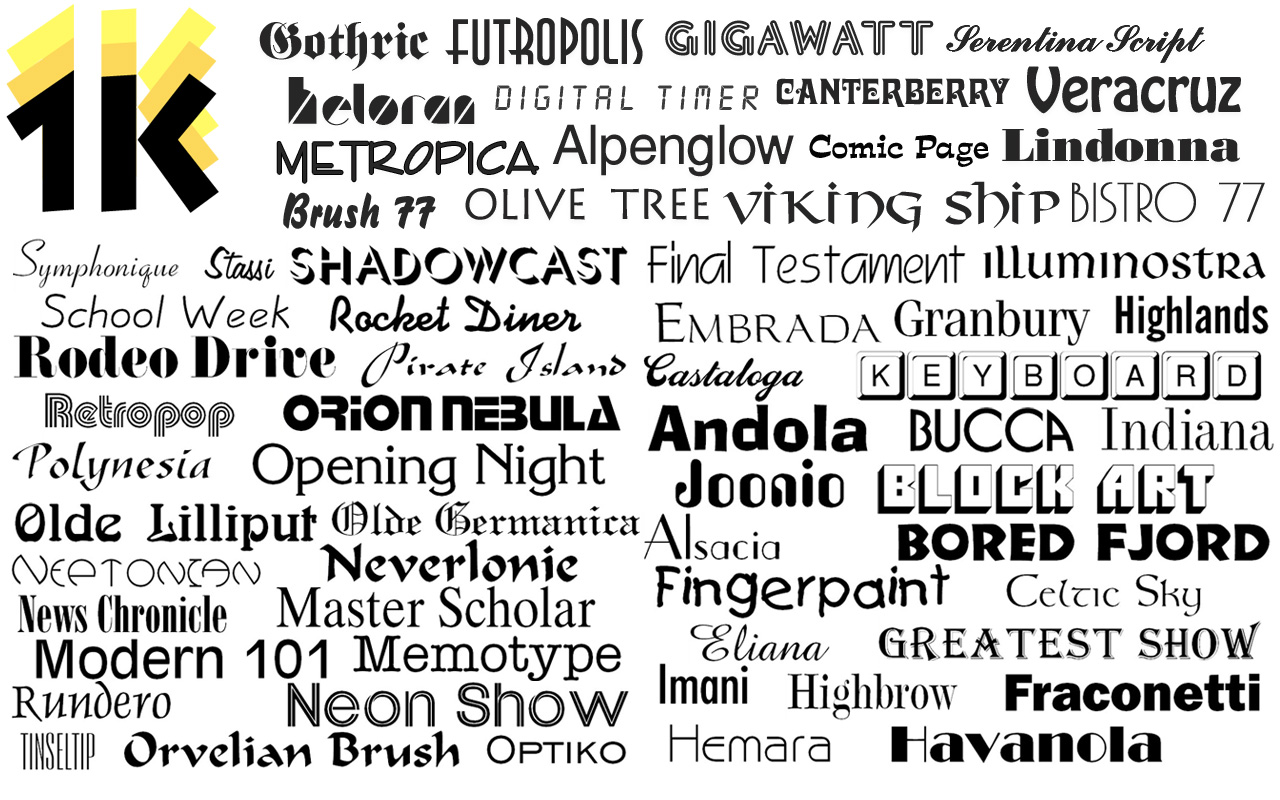
California based 128bit Technologies today announces 1000 OpenType Fonts 4.0 on its MacAppware website and the Mac App Store. This font collection includes 240 unique font family styles, with a total of 1,000 fonts in all. Webfont versions and a PDF sample book of the font families were just added to 1000 OpenType Fonts. For a limited time, save 70% on the brand new Premium Fonts 7.0. Download the newest creative font designs, each with a 10 computer commercial use license for only $29.99.
San Francisco, California - 128bit Technologies is happy to announce the release of 1000 OpenType Fonts, version 4.0 on its MacAppware website and the Mac App Store. The 4.0 release features new Webfont versions to the fonts in the popular 1000 OpenType Fonts collection, as well as something that has had a high volume of requests: a PDF sample book of all the font families so you can quickly reference the fonts you need for a specific project!
Looking to give your font collection a boost? Tired of using the same fonts in all your design projects? Need fonts you can use royalty free on commercial, for-profit projects? Get creative with a new collection of 1000 OpenType fonts for commercial use. The font collection includes 240 unique font family styles, with 1000 total fonts. An excellent addition to any font collector's library for use in graphic and logo design, holiday projects, web design, scrapbooks, presentations, invitations, promotional material, advertisements, and more.
Each font is in OpenType font format and can be used for any personal and business project on both Mac and PC computers. International character support is standard for nearly every font (bar code fonts and wingding fonts do not include international character support).
Each font in this collection is unique, so you will not find them anywhere else. This collection is completely different from the Premium Fonts and Free Fonts collections also offered by 128bit Technologies.
* 240 unique font families
* 1,000 total fonts
* New! Added Webfont versions
* New! Includes PDF font sample book
* All fonts in OpenType font format
* 10 computer, commercial use license
* Cross-platform compatible
* Install and use in all applications that support fonts
* Cursive, creative, classic, headline, poster, gothic and other beautifully crafted styles
* Perfect for presentations, logos, business cards, websites, advertisements, brochures, holidays, weddings, and more
* The custom preview app on the Mac App Store supports English, French, Spanish, German, Italian, and Japanese
Pricing and Availability:
The updated 1000 OpenType Fonts collection is now available on the Mac App Store and the MacAppware website for a limited time discount of $29.99 (USD), a savings of 70% off the full price of $99.
MacAppware: http://www.macappware.com
1000 OpenType Fonts Collection (v4.0): http://macappware.com/software/1000-opentype-fonts/
Font Families: http://128bittech.com/fontfamilies.html
Purchase and Download (MAS): https://itunes.apple.com/us/app/1000-opentype-fonts-commercial/id664501556
Screenshot: http://macappware.com/images/fonts/1kf/1000Fonts_Screen1.jpg
Application Icon: http://macappware.com/images/fonts/1kf/1000FontsAppIcon256.png
MacAppware is a division of 128bit Technologies and a dedicated Mac software developer currently offering Mac software, graphic design bundles and unique commercial use fonts. Copyright (C) 2016 128bit Technologies LLC. All Rights Reserved. Apple, the Apple logo, Mac OS X, and Macintosh are registered trademarks of Apple Inc. in the U.S. and/or other countries. All other trademarks are the property of their respective owners.
*******
Link To Article: http://prmac.com/release-id-80327.htm
*******
---------------------------------------------------------------------------------
Note that you can alter delivered distributions at any time.
Login to your account on prMac to alter your channel selection, or to opt-out at any time.
New Webfonts Added to 1000 OpenType Fonts - Published on 09/27/16
California based 128bit Technologies today announces 1000 OpenType Fonts 4.0 on its MacAppware website and the Mac App Store. This font collection includes 240 unique font family styles, with a total of 1,000 fonts in all. Webfont versions and a PDF sample book of the font families were just added to 1000 OpenType Fonts. For a limited time, save 70% on the brand new Premium Fonts 7.0. Download the newest creative font designs, each with a 10 computer commercial use license for only $29.99.
San Francisco, California - 128bit Technologies is happy to announce the release of 1000 OpenType Fonts, version 4.0 on its MacAppware website and the Mac App Store. The 4.0 release features new Webfont versions to the fonts in the popular 1000 OpenType Fonts collection, as well as something that has had a high volume of requests: a PDF sample book of all the font families so you can quickly reference the fonts you need for a specific project!
Looking to give your font collection a boost? Tired of using the same fonts in all your design projects? Need fonts you can use royalty free on commercial, for-profit projects? Get creative with a new collection of 1000 OpenType fonts for commercial use. The font collection includes 240 unique font family styles, with 1000 total fonts. An excellent addition to any font collector's library for use in graphic and logo design, holiday projects, web design, scrapbooks, presentations, invitations, promotional material, advertisements, and more.
Each font is in OpenType font format and can be used for any personal and business project on both Mac and PC computers. International character support is standard for nearly every font (bar code fonts and wingding fonts do not include international character support).
Each font in this collection is unique, so you will not find them anywhere else. This collection is completely different from the Premium Fonts and Free Fonts collections also offered by 128bit Technologies.
* 240 unique font families
* 1,000 total fonts
* New! Added Webfont versions
* New! Includes PDF font sample book
* All fonts in OpenType font format
* 10 computer, commercial use license
* Cross-platform compatible
* Install and use in all applications that support fonts
* Cursive, creative, classic, headline, poster, gothic and other beautifully crafted styles
* Perfect for presentations, logos, business cards, websites, advertisements, brochures, holidays, weddings, and more
* The custom preview app on the Mac App Store supports English, French, Spanish, German, Italian, and Japanese
Pricing and Availability:
The updated 1000 OpenType Fonts collection is now available on the Mac App Store and the MacAppware website for a limited time discount of $29.99 (USD), a savings of 70% off the full price of $99.
MacAppware: http://www.macappware.com
1000 OpenType Fonts Collection (v4.0): http://macappware.com/software/1000-opentype-fonts/
Font Families: http://128bittech.com/fontfamilies.html
Purchase and Download (MAS): https://itunes.apple.com/us/app/1000-opentype-fonts-commercial/id664501556
Screenshot: http://macappware.com/images/fonts/1kf/1000Fonts_Screen1.jpg
Application Icon: http://macappware.com/images/fonts/1kf/1000FontsAppIcon256.png

MacAppware is a division of 128bit Technologies and a dedicated Mac software developer currently offering Mac software, graphic design bundles and unique commercial use fonts. Copyright (C) 2016 128bit Technologies LLC. All Rights Reserved. Apple, the Apple logo, Mac OS X, and Macintosh are registered trademarks of Apple Inc. in the U.S. and/or other countries. All other trademarks are the property of their respective owners.
*******
Link To Article: http://prmac.com/release-id-80327.htm
*******
---------------------------------------------------------------------------------
Note that you can alter delivered distributions at any time.
Login to your account on prMac to alter your channel selection, or to opt-out at any time.
Swooosh! Control the winds in Henry the Cloud - Out now on iOS & Android
A new article has been published at prMac.
Swooosh! Control the winds in Henry the Cloud - Out now on iOS & Android - Published on 09/27/16
Dual Cortex Gaming today announces Henry the Cloud 1.2.2, its exciting free-to-play mobile indie game developed for iOS and Android devices. in this game, players are challenged to take control of "Henry the Cloud" as they propel him through the sky. It uses a unique gameplay mechanic that requires players to swipe to create wind bursts in order to maneuver Henry around objects and enemies. Players need to collect Droplets to unlock epic characters and items to upgrade stats & boost performance.
Amsterdam, Netherlands - Dual Cortex Gaming today is pleased to announce the release of Henry the Cloud 1.2.2, and challenges you to control the winds in an exciting free-to-play mobile indie game developed for iOS and Android devices. Henry the Cloud is a mobile arcade game that challenges players to take control of "Henry the Cloud" as they propel him through the sky. In this game, a unique gameplay mechanic is used that requires players to swipe to create wind bursts in order to maneuver Henry around objects and enemies.
In Henry the Cloud, players need to collect Droplets to unlock epic characters and items to upgrade stats and boost performance. At the same time, they can earn highscores to compete with Facebook friends or strive for world domination on the global leaderboards.
Features:
* Unique and innovative gameplay mechanic
* Challenging and strategical gameplay
* Short yet intense gaming sessions
* Help cute clouds travel the world and soar through the sky
* Unlock and combine epic characters and items - over 1000 combinations
* Compete with friends on the leaderboards
* Free to play
"We believe that mobile games should allow people to play for short moments but still be challenging in the process. Therefore, at Dual Cortex Gaming, we designed our game to have a broad appeal and require players to think ahead and be equipped with quick reflexes."
Device Requirements:
* iPhone, iPad, and iPod touch
* Requires iOS�7.0 or later
* 56.8 MB
Pricing and Availability:
Henry the Cloud 1.2.2 is Free and available worldwide exclusively through the App Store in the category. There is also an Android version available on Google Play. Get ready to control the winds and swipe into action by downloading Henry the Cloud now!
Henry the Cloud 1.2.2: https://henrythecloud.com/
More Info: https://henrythecloud.com/download.html
Download from iTunes: https://itunes.apple.com/app/henry-the-cloud/id1113077216
Download from Google Play: https://play.google.com/store/apps/details?id=com.dualcortexgaming.henrythecloud
YouTube Video (Gameplay Trailer): https://www.youtube.com/watch?v=hqS-GCpCixc
Media Assets: https://henrythecloud.com/press.html
Dual Cortex Gaming is an Amsterdam-based independent mobile game development studio founded by Nick van der Meulen, Xander Horjus and Brent van der Meulen in 2014. The studio just came out with their first title, "Henry the Cloud". With Henry the Cloud, Dual Cortex Gaming entered TouchArcade's Top 20 Hot Games within 24 hours of release. See you in the clouds! All Material and Software (C) Copyright 2016 Dual Cortex Gaming. All Rights Reserved. Apple, the Apple logo, iPhone, iPod and iPad are registered trademarks of Apple Inc. in the U.S. and/or other countries. Other trademarks and registered trademarks may be the property of their respective owners.
*******
Link To Article: http://prmac.com/release-id-80328.htm
*******
---------------------------------------------------------------------------------
Note that you can alter delivered distributions at any time.
Login to your account on prMac to alter your channel selection, or to opt-out at any time.
Swooosh! Control the winds in Henry the Cloud - Out now on iOS & Android - Published on 09/27/16
Dual Cortex Gaming today announces Henry the Cloud 1.2.2, its exciting free-to-play mobile indie game developed for iOS and Android devices. in this game, players are challenged to take control of "Henry the Cloud" as they propel him through the sky. It uses a unique gameplay mechanic that requires players to swipe to create wind bursts in order to maneuver Henry around objects and enemies. Players need to collect Droplets to unlock epic characters and items to upgrade stats & boost performance.
Amsterdam, Netherlands - Dual Cortex Gaming today is pleased to announce the release of Henry the Cloud 1.2.2, and challenges you to control the winds in an exciting free-to-play mobile indie game developed for iOS and Android devices. Henry the Cloud is a mobile arcade game that challenges players to take control of "Henry the Cloud" as they propel him through the sky. In this game, a unique gameplay mechanic is used that requires players to swipe to create wind bursts in order to maneuver Henry around objects and enemies.
In Henry the Cloud, players need to collect Droplets to unlock epic characters and items to upgrade stats and boost performance. At the same time, they can earn highscores to compete with Facebook friends or strive for world domination on the global leaderboards.
Features:
* Unique and innovative gameplay mechanic
* Challenging and strategical gameplay
* Short yet intense gaming sessions
* Help cute clouds travel the world and soar through the sky
* Unlock and combine epic characters and items - over 1000 combinations
* Compete with friends on the leaderboards
* Free to play
"We believe that mobile games should allow people to play for short moments but still be challenging in the process. Therefore, at Dual Cortex Gaming, we designed our game to have a broad appeal and require players to think ahead and be equipped with quick reflexes."
Device Requirements:
* iPhone, iPad, and iPod touch
* Requires iOS�7.0 or later
* 56.8 MB
Pricing and Availability:
Henry the Cloud 1.2.2 is Free and available worldwide exclusively through the App Store in the category. There is also an Android version available on Google Play. Get ready to control the winds and swipe into action by downloading Henry the Cloud now!
Henry the Cloud 1.2.2: https://henrythecloud.com/
More Info: https://henrythecloud.com/download.html
Download from iTunes: https://itunes.apple.com/app/henry-the-cloud/id1113077216
Download from Google Play: https://play.google.com/store/apps/details?id=com.dualcortexgaming.henrythecloud
YouTube Video (Gameplay Trailer): https://www.youtube.com/watch?v=hqS-GCpCixc
Media Assets: https://henrythecloud.com/press.html
Dual Cortex Gaming is an Amsterdam-based independent mobile game development studio founded by Nick van der Meulen, Xander Horjus and Brent van der Meulen in 2014. The studio just came out with their first title, "Henry the Cloud". With Henry the Cloud, Dual Cortex Gaming entered TouchArcade's Top 20 Hot Games within 24 hours of release. See you in the clouds! All Material and Software (C) Copyright 2016 Dual Cortex Gaming. All Rights Reserved. Apple, the Apple logo, iPhone, iPod and iPad are registered trademarks of Apple Inc. in the U.S. and/or other countries. Other trademarks and registered trademarks may be the property of their respective owners.
*******
Link To Article: http://prmac.com/release-id-80328.htm
*******
---------------------------------------------------------------------------------
Note that you can alter delivered distributions at any time.
Login to your account on prMac to alter your channel selection, or to opt-out at any time.
Retro arcade classic game - Digger launched for iPhone, iPad and Mac
A new article has been published at prMac.
Retro arcade classic game - Digger launched for iPhone, iPad and Mac - Published on 09/27/16
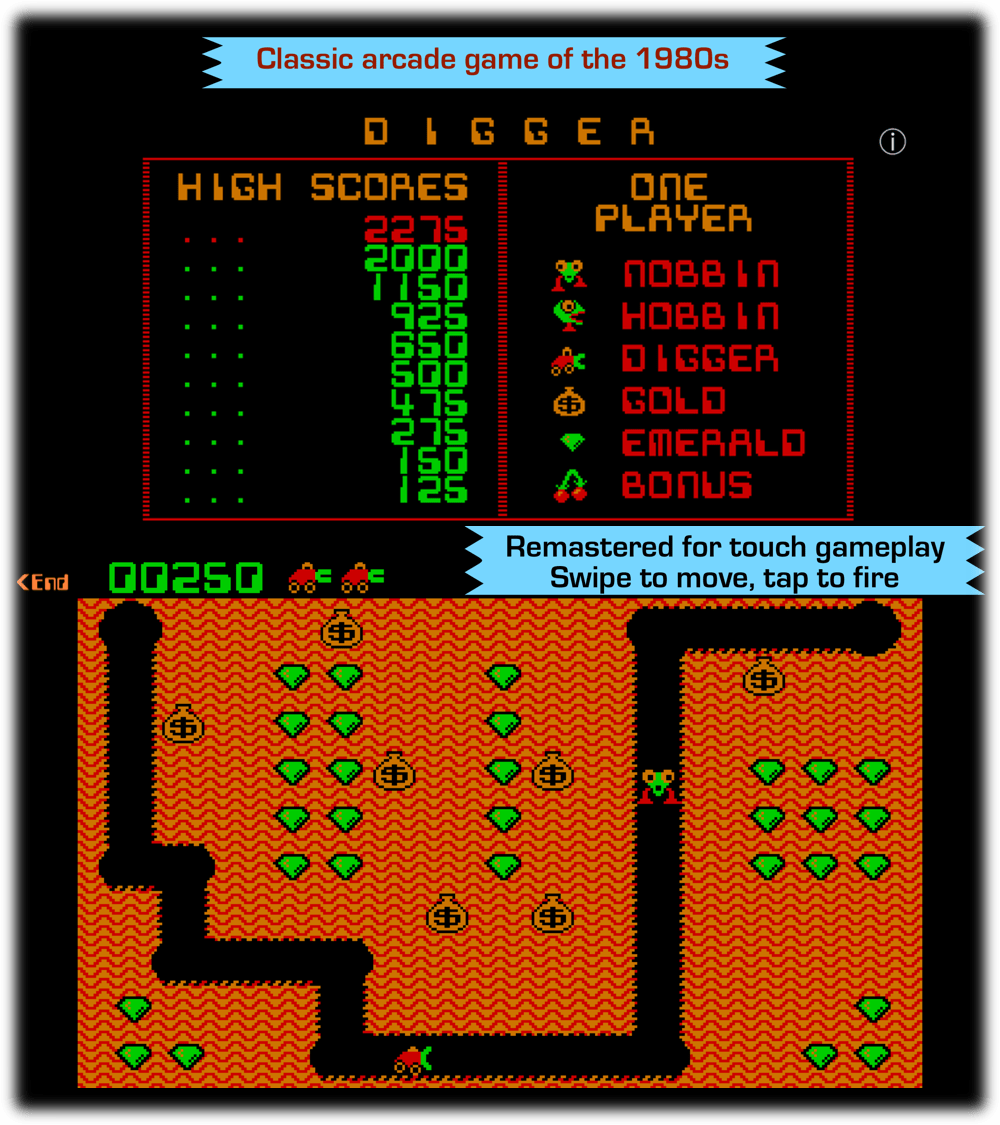
Boston based InchWest releases Digger 1.2, the hit 1980s DOS retro classic game for Apple devices. In Digger, players are placed in an underground maze and must dig horizontal and vertical tunnels through it. At various points on the board are emeralds and bags of gold. This re-mastered classic comes with support for touch input on iPhone and iPad and big screen support on Mac computers while retaining the retro gameplay and graphics.
Shrewsbury, Massachusetts - Indie developer, InchWest is proud to release Digger 1.2, the hit 1980s DOS game for Apple devices. The classic arcade game is re-mastered with for Mac, iPhone and iPad. Digger is similar to the other popular DOS games Mr. Do! and Dig Dug. You are placed in an underground maze and can dig horizontal and vertical tunnels through it. At various points on the board are emeralds and bags of gold.
Monsters (initially in the "nobbin" form) appear at the top right-hand corner. If earth is excavated from under a gold bag, then the bag will wobble for a few seconds and then drop releasing gold. Falling bags will squash monsters, but they will also squash the digger. The digger has a weapon, which fires in a straight line, but takes several seconds to recharge (taking longer as the levels go higher).
When a monster is killed, another will appear at the top right-hand corner of the screen. Once all the monsters for the level have been created, a cherry appears in their place. If the digger collects this, bonus mode is entered, and for about fifteen seconds the digger is able to eat the monsters.
The gameplay and pixel graphics are reminiscence of classic games like Space Invaders, Pacman, Mario and many other arcade hits. Many people would remember this game from their childhood days and this app lets them relish this on their modern devices.
Device Requirements:
* iPhone, iPad, MacBook, iMac
* Requires iOS 9.0 or later
* Requires macOS 10.11 (El Capitan) or later
Pricing and availability:
Digger 1.2 is available worldwide on the iOS and macOS App Store for $1.99 (USD) in the Games category.
Digger 1.2: https://inchwest.com/digger/?trk=prmac
Purchase and Download (iOS): https://itunes.apple.com/app/digger-classic-retro-arcade/id1155712961
Purchase and Download (MAS): https://itunes.apple.com/app/digger-classic-arcade-game/id1155023663
Screenshot: https://inchwest.com/images/dgscreen.png
App Icon: https://inchwest.com/images/dgicon1.png
Located in Boston, Massachusetts, InchWest is an indie developer creating beautiful, unique and useful products for iOS, macOS and Windows devices. Their products are built to improve productivity and lifestyle by utilizing cutting edge technology. All Material and Software (C) 2016 InchWest / All Rights Reserved. Apple, the Apple logo, iPod, the iPod logo, are registered trademarks of Apple Computer in the U.S. and/or other countries.
*******
Link To Article: http://prmac.com/release-id-80325.htm
*******
---------------------------------------------------------------------------------
Note that you can alter delivered distributions at any time.
Login to your account on prMac to alter your channel selection, or to opt-out at any time.
Retro arcade classic game - Digger launched for iPhone, iPad and Mac - Published on 09/27/16
Boston based InchWest releases Digger 1.2, the hit 1980s DOS retro classic game for Apple devices. In Digger, players are placed in an underground maze and must dig horizontal and vertical tunnels through it. At various points on the board are emeralds and bags of gold. This re-mastered classic comes with support for touch input on iPhone and iPad and big screen support on Mac computers while retaining the retro gameplay and graphics.
Shrewsbury, Massachusetts - Indie developer, InchWest is proud to release Digger 1.2, the hit 1980s DOS game for Apple devices. The classic arcade game is re-mastered with for Mac, iPhone and iPad. Digger is similar to the other popular DOS games Mr. Do! and Dig Dug. You are placed in an underground maze and can dig horizontal and vertical tunnels through it. At various points on the board are emeralds and bags of gold.
Monsters (initially in the "nobbin" form) appear at the top right-hand corner. If earth is excavated from under a gold bag, then the bag will wobble for a few seconds and then drop releasing gold. Falling bags will squash monsters, but they will also squash the digger. The digger has a weapon, which fires in a straight line, but takes several seconds to recharge (taking longer as the levels go higher).
When a monster is killed, another will appear at the top right-hand corner of the screen. Once all the monsters for the level have been created, a cherry appears in their place. If the digger collects this, bonus mode is entered, and for about fifteen seconds the digger is able to eat the monsters.
The gameplay and pixel graphics are reminiscence of classic games like Space Invaders, Pacman, Mario and many other arcade hits. Many people would remember this game from their childhood days and this app lets them relish this on their modern devices.
Device Requirements:
* iPhone, iPad, MacBook, iMac
* Requires iOS 9.0 or later
* Requires macOS 10.11 (El Capitan) or later
Pricing and availability:
Digger 1.2 is available worldwide on the iOS and macOS App Store for $1.99 (USD) in the Games category.
Digger 1.2: https://inchwest.com/digger/?trk=prmac
Purchase and Download (iOS): https://itunes.apple.com/app/digger-classic-retro-arcade/id1155712961
Purchase and Download (MAS): https://itunes.apple.com/app/digger-classic-arcade-game/id1155023663
Screenshot: https://inchwest.com/images/dgscreen.png
App Icon: https://inchwest.com/images/dgicon1.png

Located in Boston, Massachusetts, InchWest is an indie developer creating beautiful, unique and useful products for iOS, macOS and Windows devices. Their products are built to improve productivity and lifestyle by utilizing cutting edge technology. All Material and Software (C) 2016 InchWest / All Rights Reserved. Apple, the Apple logo, iPod, the iPod logo, are registered trademarks of Apple Computer in the U.S. and/or other countries.
*******
Link To Article: http://prmac.com/release-id-80325.htm
*******
---------------------------------------------------------------------------------
Note that you can alter delivered distributions at any time.
Login to your account on prMac to alter your channel selection, or to opt-out at any time.
Subscribe to:
Posts (Atom)