A new article has been published at prMac.
CS Odessa Updates ConceptDraw Office v3 to Support macOS Sierra - Published on 09/29/16
CS Odessa today announced that they have updated ConceptDraw PRO v10, ConceptDraw MINDMAP v8, ConceptDraw PROJECT v7 for macOS 10.12 (Sierra); in addition CS Odessa has released 6 free solutions for ConceptDraw PRO. ConceptDraw Office v3 is a dynamic suite of premier software tools that help individuals, teams, and organizations meet their business objectives. ConceptDraw Office consists of a diagramming platform, a mind mapping tool, and a project management tool.
San Jose, California - CS Odessa today is proud to announce that they have updated ConceptDraw PRO v10, ConceptDraw MINDMAP v8, ConceptDraw PROJECT v7 for macOS 10.12 (Sierra); in addition CS Odessa has released 6 free solutions for ConceptDraw PRO. ConceptDraw Office v3, is a dynamic suite of premier software tools that is in use around the world to help individuals, teams, and organizations to meet their business objectives. ConceptDraw Office consists of a diagramming platform, a mind mapping tool, and a project management tool.
These tools are essential to generate business diagrams, mind maps, project plans, dashboards, presentations, schematics, and any other business visualizations. The combination of powerful products and the ever-growing collection of product extensions in the ConceptDraw Solution Park, together with no charge dynamic support and ongoing development, make ConceptDraw a powerful and economic choice to support activities that move businesses ahead. ConceptDraw Office v3 currently retails for $499 USD and are supported for the latest macOS and Windows operating systems.
CS Odessa has also released 6 new free Solutions for ConceptDraw PRO that will help you draw with professional results:
1. Basic Area Charts
2. Basic Bar Graphs
3. Basic Divided Bar Diagrams
4. Basic Histograms
5. Basic Line Graphs
6. Basic Picture Graphs
These professional solutions being added to ConceptDraw Solution Park will extend the online collection of visual solutions for knowledge workers designed to provide productivity increasing solutions for all ConceptDraw products.
ConceptDraw Office v3: http://www.conceptdraw.com/products/office
ConceptDraw PRO v10: http://www.conceptdraw.com/products/drawing-tool
ConceptDraw MINDMAP v8: http://www.conceptdraw.com/products/mind-map
ConceptDraw PROJECT v7: http://www.conceptdraw.com/products/project-management-software
ConceptDraw Solution Park: http://www.conceptdraw.com/solution-park/
Founded in 1993, Computer Systems Odessa supplies cross-platform productivity tools and graphic technologies to professional and corporate users around the world. With headquarters in Odessa, Ukraine, and an U.S. office in San Jose, California, CS Odessa sells products internationally through resellers in over 150 countries. The ConceptDraw line of products has won numerous awards and is used by hundreds of thousands of people all over the world. ConceptDraw is a registered trademark, and ConceptDraw Office, ConceptDraw Solution Park, ConceptDraw PRO, ConceptDraw MINDMAP, ConceptDraw PROJECT, and ConceptDraw Solution Browser are trademarks of CS Odessa. All other trademarks and registered trademarks are the properties of their respective owners.
*******
Link To Article: http://prmac.com/release-id-80347.htm
*******
---------------------------------------------------------------------------------
Note that you can alter delivered distributions at any time.
Login to your account on prMac to alter your channel selection, or to opt-out at any time.

Unleash Your Inner Rock God with FourChords Guitar Karaoke
A new article has been published at prMac.
Unleash Your Inner Rock God with FourChords Guitar Karaoke - Published on 09/29/16
Helsinki based music software development studio, Musopia today announces FourChords Guitar Karaoke, the company's popular interactive songbook now on Steam for Mac and Windows. Play alongside renowned online guitar instructor Justin Sandercoe using Musopia's beginner-friendly teaching method, Instant Play. Just grab your guitar, pick your favorite song, and see the chords and lyrics flow smoothly in front of you while the virtual backing band plays the other instruments.
Helsinki, Finland - Musopia today is proud to announce the launch of FourChords Guitar Karaoke, the company's popular interactive songbook now on Steam for Mac and Windows. Just grab your guitar, pick your favorite song, and see the chords and lyrics flow smoothly in front of you while the virtual backing band plays the other instruments. Enjoy the fun karaoke-style play without the need to connect your guitar to the game itself.
Play alongside renowned online guitar instructor Justin Sandercoe (a.k.a., JustinGuitar) using Musopia's beginner-friendly teaching method, Instant Play. Don't worry about tabs or sheet music: Most songs include tutorial videos and chord demos that make learning easy and often ridiculously fun. In fact, the entire songbook in FourChords Guitar Karaoke can be played using only 11 chords and features an easy-to-use interface, including adjustable backing tracks ... and lyrics!
FourChords Guitar Karaoke launched on Steam Early Access in July and has been regularly updated with new music, gameplay enhancements, and bug fixes. After a successful stint on Steam Early Access, FourChords Guitar Karaoke now includes two advanced features, "Pro Chords" and "Strum Instructor." Pro Chords goes beyond the root chord - adding and subtracting notes for more advanced playing techniques. Strum Instructor teaches you how to strum in time with songs and when to utilize up and down strokes.
Key Features:
* Enjoy 150 hit songs from the get-go with the included Starter Pack (100 individual songs within the game itself plus 5 free DLC song packs)
* Expand your repertoire with several hundred additional songs available as downloadable content
* Track your progress with experience points (XP awarded after you play each song)
* With FourChords' Instant Play Method, you don't need to know anything about tabs or sheet music
* Most songs include tutorial videos and chord demos
* Simplified chords are arranged by professional guitarists: The whole songbook can be played with 11 chords and individual songs can be played with four simple chords
* Tempo and transposition adjustments can be made to each song
* Backing tracks and lyrics can also be adjusted
* Karaoke-style display makes it easy to sing along
* Training available through chord tutorials by the world's best guitar teacher, JustinGuitar
* Strum Instructor shows a suitable strumming pattern for each song
"We learned a lot from Steam Early Access and took the community's feedback to heart," says Topi Lopponen, CEO of Musopia Oy. "The addition of Pro Chords and Strum Instructor supports both beginners and more experienced players - allowing everyone who once dreamed of playing guitar to experience the joy of leading a sing-along with friends and family."
Starter Package Content (includes 100 free songs and 5 free DLC song packs):
* Pop - Taylor Swift, Katy Perry, Adele, Justin Bieber, One Direction, and more
* Rock - Imagine Dragons, Green Day, Fall Out Boy, The Black Keys, Shinedown, and more
* Classic Rock - REO Speedwagon, Oasis, ZZ Top, Journey, Pearl Jam, and more
* Country - Carrie Underwood, Thomas Rhett, Blake Shelton, Tim McGraw, Kelsea Ballerini, and more
Pricing and Availability:
FourChords Guitar Karaoke is now available on Steam (Windows and Mac). At launch, the game is discounted to only $14.99 (25% off the $19.99 retail price) with 150 hit songs included in the Starter Pack. The additional DLC is priced as 3-song pack: $2.99, a 5-song pack: $4.99 as well as a 10-song pack for $7.99 (USD). FourChords is also available on iTunes App Store and Google Play Store. For more information visit Musopia online.
FourChords: http://www.fourchords.com/
Download from Steam: http://store.steampowered.com/app/476930
Download from iTunes: https://itunes.apple.com/app/fourchords-guitar-karaoke/id537151075
Download from Google Play: https://play.google.com/store/apps/details?id=net.musopia.fourchordsandroidpro&hl=en
YouTube Video (Trailer): https://www.youtube.com/watch?v=k3afHZXv9Jc
Media Assets: http://imgur.com/a/kksXv
Based in Helsinki Finland, Musopia Oy is a music software development studio with one purpose; to create innovative and engaging new solutions to help beginning and intermediate guitar players learn to love and play guitar. All Material and Software (C) Copyright 2015 Musopia Oy. All Rights Reserved. Apple, the Apple logo, OS X, iPhone, iPod, iPad and macOS are registered trademarks of Apple Inc. in the U.S. and/or other countries. Other trademarks and registered trademarks may be the property of their respective owners.
*******
Link To Article: http://prmac.com/release-id-80345.htm
*******
---------------------------------------------------------------------------------
Note that you can alter delivered distributions at any time.
Login to your account on prMac to alter your channel selection, or to opt-out at any time.
Unleash Your Inner Rock God with FourChords Guitar Karaoke - Published on 09/29/16
Helsinki based music software development studio, Musopia today announces FourChords Guitar Karaoke, the company's popular interactive songbook now on Steam for Mac and Windows. Play alongside renowned online guitar instructor Justin Sandercoe using Musopia's beginner-friendly teaching method, Instant Play. Just grab your guitar, pick your favorite song, and see the chords and lyrics flow smoothly in front of you while the virtual backing band plays the other instruments.
Helsinki, Finland - Musopia today is proud to announce the launch of FourChords Guitar Karaoke, the company's popular interactive songbook now on Steam for Mac and Windows. Just grab your guitar, pick your favorite song, and see the chords and lyrics flow smoothly in front of you while the virtual backing band plays the other instruments. Enjoy the fun karaoke-style play without the need to connect your guitar to the game itself.
Play alongside renowned online guitar instructor Justin Sandercoe (a.k.a., JustinGuitar) using Musopia's beginner-friendly teaching method, Instant Play. Don't worry about tabs or sheet music: Most songs include tutorial videos and chord demos that make learning easy and often ridiculously fun. In fact, the entire songbook in FourChords Guitar Karaoke can be played using only 11 chords and features an easy-to-use interface, including adjustable backing tracks ... and lyrics!
FourChords Guitar Karaoke launched on Steam Early Access in July and has been regularly updated with new music, gameplay enhancements, and bug fixes. After a successful stint on Steam Early Access, FourChords Guitar Karaoke now includes two advanced features, "Pro Chords" and "Strum Instructor." Pro Chords goes beyond the root chord - adding and subtracting notes for more advanced playing techniques. Strum Instructor teaches you how to strum in time with songs and when to utilize up and down strokes.
Key Features:
* Enjoy 150 hit songs from the get-go with the included Starter Pack (100 individual songs within the game itself plus 5 free DLC song packs)
* Expand your repertoire with several hundred additional songs available as downloadable content
* Track your progress with experience points (XP awarded after you play each song)
* With FourChords' Instant Play Method, you don't need to know anything about tabs or sheet music
* Most songs include tutorial videos and chord demos
* Simplified chords are arranged by professional guitarists: The whole songbook can be played with 11 chords and individual songs can be played with four simple chords
* Tempo and transposition adjustments can be made to each song
* Backing tracks and lyrics can also be adjusted
* Karaoke-style display makes it easy to sing along
* Training available through chord tutorials by the world's best guitar teacher, JustinGuitar
* Strum Instructor shows a suitable strumming pattern for each song
"We learned a lot from Steam Early Access and took the community's feedback to heart," says Topi Lopponen, CEO of Musopia Oy. "The addition of Pro Chords and Strum Instructor supports both beginners and more experienced players - allowing everyone who once dreamed of playing guitar to experience the joy of leading a sing-along with friends and family."
Starter Package Content (includes 100 free songs and 5 free DLC song packs):
* Pop - Taylor Swift, Katy Perry, Adele, Justin Bieber, One Direction, and more
* Rock - Imagine Dragons, Green Day, Fall Out Boy, The Black Keys, Shinedown, and more
* Classic Rock - REO Speedwagon, Oasis, ZZ Top, Journey, Pearl Jam, and more
* Country - Carrie Underwood, Thomas Rhett, Blake Shelton, Tim McGraw, Kelsea Ballerini, and more
Pricing and Availability:
FourChords Guitar Karaoke is now available on Steam (Windows and Mac). At launch, the game is discounted to only $14.99 (25% off the $19.99 retail price) with 150 hit songs included in the Starter Pack. The additional DLC is priced as 3-song pack: $2.99, a 5-song pack: $4.99 as well as a 10-song pack for $7.99 (USD). FourChords is also available on iTunes App Store and Google Play Store. For more information visit Musopia online.
FourChords: http://www.fourchords.com/
Download from Steam: http://store.steampowered.com/app/476930
Download from iTunes: https://itunes.apple.com/app/fourchords-guitar-karaoke/id537151075
Download from Google Play: https://play.google.com/store/apps/details?id=net.musopia.fourchordsandroidpro&hl=en
YouTube Video (Trailer): https://www.youtube.com/watch?v=k3afHZXv9Jc
Media Assets: http://imgur.com/a/kksXv
Based in Helsinki Finland, Musopia Oy is a music software development studio with one purpose; to create innovative and engaging new solutions to help beginning and intermediate guitar players learn to love and play guitar. All Material and Software (C) Copyright 2015 Musopia Oy. All Rights Reserved. Apple, the Apple logo, OS X, iPhone, iPod, iPad and macOS are registered trademarks of Apple Inc. in the U.S. and/or other countries. Other trademarks and registered trademarks may be the property of their respective owners.
*******
Link To Article: http://prmac.com/release-id-80345.htm
*******
---------------------------------------------------------------------------------
Note that you can alter delivered distributions at any time.
Login to your account on prMac to alter your channel selection, or to opt-out at any time.
5F - New Social Fitness App Released for iOS 10
A new article has been published at prMac.
5F - New Social Fitness App Released for iOS 10 - Published on 09/29/16
Sporty Buddy Inc. in cooperation with Kermode Industries Ltd. announces 5F 1.1, their fitness/social networking app for iOS devices. Want to get back in shape and live a healthy life? Looking for a sport buddy? Moved to a new town and no friends? 5F is the answer. 5F offers over 100 different activities to choose from and more coming. It also offers 4 different skill levels to encourage anybody to be more active. Discover new people based on age, gender, sport and location.
Vancouver, Canada - Sporty Buddy Inc. in cooperation with Kermode Industries Ltd. launches 5F 1.1 for iPhone, iPad, and iPod touch devices. Want to get back in shape and live a healthy life? Looking for a sport buddy? Moved to a new town and don't have any friends? 5F is the answer. The app provides a quick and easy way to find other active people in your city, connect and motivate each other to stay active. Match with others based on your favorite activities. Once two users mutually opt-in, they can message each other within the app.
Features:
* Over 100 different activities to choose from and more coming
* 4 different skill levels including "Want to try" beside "Beginner", "Intermediate" and "Expert" to encourage anybody to be more active
* Discover new people based on age, gender, sport and location
* Chat with your connections from within the app
* Block and report inappropriate users
Urs Camenisch, Founder of 5F about the idea behind it: "I came up with the idea while working as an Air Ambulance Pilot. I transported too many patients with non life-threatening illnesses that could have been prevented with some regular exercise. I am hoping to make a small difference with this app. 5F is for you even if you have never done a particular activity. That's why we included the 4th skill level "Want to try" beside "Beginner", "Intermediate" and "Expert". Our mission is to encourage everyone to use this app and get more active."
5F is available on iOS, for free. We are planning an Android version as well and already work on more features to add in the near future. For more information, feel free to contact us by email or on Twitter.
Device Requirements:
* iPhone, iPad, and iPod touch
* Requires iOS 8.1 or later
* Universal Application
* 76.1 MB
Pricing and Availability:
5F - Find Fit Friends. For Free. 1.1 is free and is available worldwide exclusively through the App Store in the Health and Fitness category.
5F � Find Fit Friends. For Free. 1.1: http://app5f.com
Download from iTunes: https://itunes.apple.com/app/id1133200910
Screenshot: http://app5f.com/wp-content/uploads/2016/05/5F-Find-Fit-Friends-For-Free-background-5s-1.jpg
Screenshot/App Icon: http://app5f.com/wp-content/uploads/2016/05/cropped-iTunesArtwork@2x.png
Sporty Buddy Inc. specializes in mobile fitness app development. Founded in April 2016, its first app to enter the market is 5F. All Material and Software Copyright (C) 2016 Sporty Buddy Inc. All Rights Reserved. Apple, the Apple logo, iPhone, iPad and iPod are registered trademarks of Apple Inc. in the U.S. and/or other countries.
*******
Link To Article: http://prmac.com/release-id-80344.htm
*******
---------------------------------------------------------------------------------
Note that you can alter delivered distributions at any time.
Login to your account on prMac to alter your channel selection, or to opt-out at any time.
5F - New Social Fitness App Released for iOS 10 - Published on 09/29/16
Sporty Buddy Inc. in cooperation with Kermode Industries Ltd. announces 5F 1.1, their fitness/social networking app for iOS devices. Want to get back in shape and live a healthy life? Looking for a sport buddy? Moved to a new town and no friends? 5F is the answer. 5F offers over 100 different activities to choose from and more coming. It also offers 4 different skill levels to encourage anybody to be more active. Discover new people based on age, gender, sport and location.
Vancouver, Canada - Sporty Buddy Inc. in cooperation with Kermode Industries Ltd. launches 5F 1.1 for iPhone, iPad, and iPod touch devices. Want to get back in shape and live a healthy life? Looking for a sport buddy? Moved to a new town and don't have any friends? 5F is the answer. The app provides a quick and easy way to find other active people in your city, connect and motivate each other to stay active. Match with others based on your favorite activities. Once two users mutually opt-in, they can message each other within the app.
Features:
* Over 100 different activities to choose from and more coming
* 4 different skill levels including "Want to try" beside "Beginner", "Intermediate" and "Expert" to encourage anybody to be more active
* Discover new people based on age, gender, sport and location
* Chat with your connections from within the app
* Block and report inappropriate users
Urs Camenisch, Founder of 5F about the idea behind it: "I came up with the idea while working as an Air Ambulance Pilot. I transported too many patients with non life-threatening illnesses that could have been prevented with some regular exercise. I am hoping to make a small difference with this app. 5F is for you even if you have never done a particular activity. That's why we included the 4th skill level "Want to try" beside "Beginner", "Intermediate" and "Expert". Our mission is to encourage everyone to use this app and get more active."
5F is available on iOS, for free. We are planning an Android version as well and already work on more features to add in the near future. For more information, feel free to contact us by email or on Twitter.
Device Requirements:
* iPhone, iPad, and iPod touch
* Requires iOS 8.1 or later
* Universal Application
* 76.1 MB
Pricing and Availability:
5F - Find Fit Friends. For Free. 1.1 is free and is available worldwide exclusively through the App Store in the Health and Fitness category.
5F � Find Fit Friends. For Free. 1.1: http://app5f.com
Download from iTunes: https://itunes.apple.com/app/id1133200910
Screenshot: http://app5f.com/wp-content/uploads/2016/05/5F-Find-Fit-Friends-For-Free-background-5s-1.jpg

Screenshot/App Icon: http://app5f.com/wp-content/uploads/2016/05/cropped-iTunesArtwork@2x.png

Sporty Buddy Inc. specializes in mobile fitness app development. Founded in April 2016, its first app to enter the market is 5F. All Material and Software Copyright (C) 2016 Sporty Buddy Inc. All Rights Reserved. Apple, the Apple logo, iPhone, iPad and iPod are registered trademarks of Apple Inc. in the U.S. and/or other countries.
*******
Link To Article: http://prmac.com/release-id-80344.htm
*******
---------------------------------------------------------------------------------
Note that you can alter delivered distributions at any time.
Login to your account on prMac to alter your channel selection, or to opt-out at any time.
Xojo Identified As Top Cross-Platform Development Tool
A new article has been published at prMac.
Xojo Identified As Top Cross-Platform Development Tool - Published on 09/29/16
Xojo, Inc. today announced that Clutch, a B2B ratings and reviews firm based in Washington, DC, has identified Xojo as a top cross-platform development tool. Great for commercial software developers, citizen developers and hobbyists alike, Xojo is a cross-platform development tool for building apps for the desktop, web, iOS, and Raspberry Pi. Clutch's research findings were based on a number of factors, including breadth of platform features, ease of use, client reviews and market presence.
Austin, Texas - Xojo, Inc., the company that has enabled over 300,000 developers to build native cross-platform applications, today announced that Clutch, a B2B ratings and reviews firm based in Washington, DC, has identified Xojo as a top cross-platform development tool. Their research findings were based on a number of factors, including breadth of platform features, ease of use, client reviews and market presence.
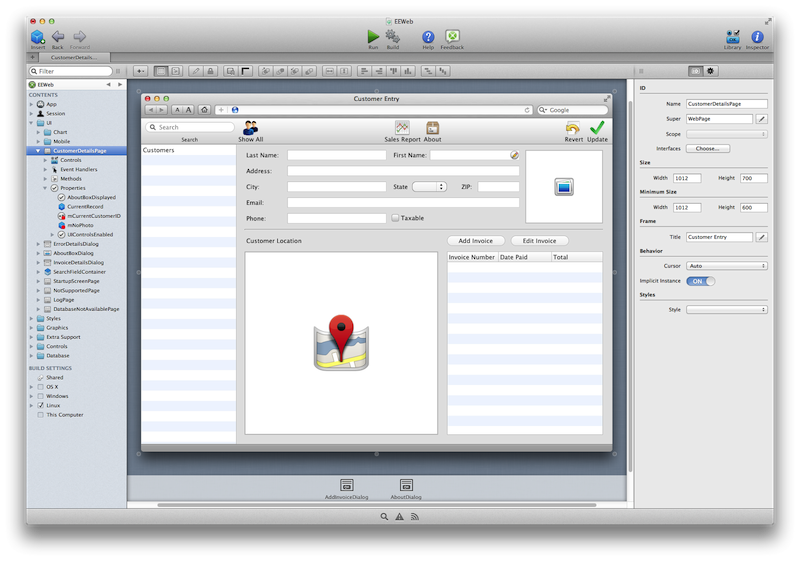
Xojo is a cross-platform development tool for building apps for the desktop, web, iOS, and Raspberry Pi. Xojo apps are created by using a drag and drop user interface builder and a single, object-oriented programming language. Xojo is great for commercial software developers, citizen developers and hobbyists alike, and Xojo apps can be found in every conceivable category from commercial apps to use in governments, universities, and more.
"People have always wanted faster ways to build software and that's why we created Xojo," commented Geoff Perlman, Founder and CEO of Xojo, Inc. "Our philosophy has always been to make development faster by offering native, cross-platform solutions. Xojo enables anyone to build for the platforms that are important to them by abstracting them from having to learn several languages."
"In the course of our research on the leading app development software products, we saw there was a real need for tools that could do more than simple app-builders, but weren't as complex as full-scale enterprise platforms," explained Chandler Dunklin, Research Analyst at Clutch. "We thought Xojo was a prime example of this kind of tool. This was confirmed by the client reviews we completed for Xojo that rated the platform a perfect 5 stars."
Xojo is available to try in a time-unlimited trial.
Xojo: http://www.xojo.com
Download Xojo: http://www.xojo.com/download
Purchase Xojo: http://www.xojo.com/store
Screenshot: http://www.xojo.com/images/ide.png
Application Icon: http://www.xojo.com/images/ide_icon_256.png
Xojo, Inc. was founded with the idea that software development should be accessible to anyone. With traditional tools, creating software applications can be a very complicated process, but using Xojo anyone can learn to create high quality, native apps for the desktop, web, mobile and Raspberry Pi. With users all over the world, Xojo apps can be found in every conceivable category - from commercial software applications to use in governments, universities, businesses, and the Fortune 500. All Material and Software (C) Copyright 2016 Xojo, Inc. All Rights Reserved. Apple, the Apple logo, iPhone, iPod, iPad and macOS are registered trademarks of Apple Inc. in the U.S. and/or other countries. Other trademarks and registered trademarks may be the property of their respective owners.
*******
Link To Article: http://prmac.com/release-id-80343.htm
*******
---------------------------------------------------------------------------------
Note that you can alter delivered distributions at any time.
Login to your account on prMac to alter your channel selection, or to opt-out at any time.
Xojo Identified As Top Cross-Platform Development Tool - Published on 09/29/16
Xojo, Inc. today announced that Clutch, a B2B ratings and reviews firm based in Washington, DC, has identified Xojo as a top cross-platform development tool. Great for commercial software developers, citizen developers and hobbyists alike, Xojo is a cross-platform development tool for building apps for the desktop, web, iOS, and Raspberry Pi. Clutch's research findings were based on a number of factors, including breadth of platform features, ease of use, client reviews and market presence.
Austin, Texas - Xojo, Inc., the company that has enabled over 300,000 developers to build native cross-platform applications, today announced that Clutch, a B2B ratings and reviews firm based in Washington, DC, has identified Xojo as a top cross-platform development tool. Their research findings were based on a number of factors, including breadth of platform features, ease of use, client reviews and market presence.
Xojo is a cross-platform development tool for building apps for the desktop, web, iOS, and Raspberry Pi. Xojo apps are created by using a drag and drop user interface builder and a single, object-oriented programming language. Xojo is great for commercial software developers, citizen developers and hobbyists alike, and Xojo apps can be found in every conceivable category from commercial apps to use in governments, universities, and more.
"People have always wanted faster ways to build software and that's why we created Xojo," commented Geoff Perlman, Founder and CEO of Xojo, Inc. "Our philosophy has always been to make development faster by offering native, cross-platform solutions. Xojo enables anyone to build for the platforms that are important to them by abstracting them from having to learn several languages."
"In the course of our research on the leading app development software products, we saw there was a real need for tools that could do more than simple app-builders, but weren't as complex as full-scale enterprise platforms," explained Chandler Dunklin, Research Analyst at Clutch. "We thought Xojo was a prime example of this kind of tool. This was confirmed by the client reviews we completed for Xojo that rated the platform a perfect 5 stars."
Xojo is available to try in a time-unlimited trial.
Xojo: http://www.xojo.com
Download Xojo: http://www.xojo.com/download
Purchase Xojo: http://www.xojo.com/store
Screenshot: http://www.xojo.com/images/ide.png
Application Icon: http://www.xojo.com/images/ide_icon_256.png

Xojo, Inc. was founded with the idea that software development should be accessible to anyone. With traditional tools, creating software applications can be a very complicated process, but using Xojo anyone can learn to create high quality, native apps for the desktop, web, mobile and Raspberry Pi. With users all over the world, Xojo apps can be found in every conceivable category - from commercial software applications to use in governments, universities, businesses, and the Fortune 500. All Material and Software (C) Copyright 2016 Xojo, Inc. All Rights Reserved. Apple, the Apple logo, iPhone, iPod, iPad and macOS are registered trademarks of Apple Inc. in the U.S. and/or other countries. Other trademarks and registered trademarks may be the property of their respective owners.
*******
Link To Article: http://prmac.com/release-id-80343.htm
*******
---------------------------------------------------------------------------------
Note that you can alter delivered distributions at any time.
Login to your account on prMac to alter your channel selection, or to opt-out at any time.
Default Folder X 5.0.7 corrects issues with Sierra
A new article has been published at prMac.
Default Folder X 5.0.7 corrects issues with Sierra - Published on 09/29/16
Today Denver-based St. Clair Software is happy to release Default Folder X 5.0.7, an update to their award-winning utility for Mac OS X. Default Folder X enhances the file dialogs in all Mac OS X applications. It provides fast navigation to your files, convenient previews, integrated Spotlight tagging, and more. Default Folder X's custom keyboard shortcuts put your favorite and recent folders at your fingertips. This release provides several compatibility fixes for macOS 10.12 Sierra.
Denver, Colorado - St. Clair Software is happy to announce today's release of Default Folder X 5.0.7. Default Folder X's custom keyboard shortcuts put your favorite and recent folders at your fingertips. Pop-up menus let you quickly navigate your folders and open Finder windows. Previews, file information, Spotlight tagging and comments are there when you need them. Open, save, and get back to work: Default Folder X is workflow for the rest of us.
This version of Default Folder X fixes a few compatibility issues with macOS 10.12 Sierra, and brings resizable windows to its preferences to make it easier for users to manage their favorite and default folders. Anyone using Default Folder X 5 should update to version 5.0.7.
What's New in Default Folder X 5.0.7:
* Fixes a crash that occasionally occurs at startup under macOS 10.12 Sierra.
* Corrects problems handling minimized Save dialogs. This was causing Default Folder X not to appear in Save dialogs when it should.
* Addresses problems detecting the current folder when running on systems for which Default Folder X isn't localized.
* Fixes a bug that could cause an inoperative file dialog to be left on-screen.
* The Folder, Shortcut and Options windows in the preferences are now resizable.
System Requirements:
* macOS 10.10 through 10.12
Pricing and Availability:
Default Folder X 5.0.7 is a free update for existing version 5 users. New licenses are $34.95 (USD) and upgrades from version 4 and prior are $14.95. Please see the St. Clair Software web site for screencasts, screenshots, a full change log, and additional feature information. St. Clair Software strongly recommends that anyone using Default Folder X on El Capitan or Sierra install this update.
Default Folder X 5.0.7: http://www.stclairsoft.com/DefaultFolderX/index.html
Detailed Change History: http://www.stclairsoft.com/DefaultFolderX/release.html
Download Default Folder X: http://www.stclairsoft.com/cgi-bin/dl.cgi?DX
Purchase Default Folder X: http://www.stclairsoft.com/store/
Based in Denver, Colorado, St. Clair Software is a privately held company that has been specializing in utilities and custom software solutions for the Macintosh since 1988. St. Clair Software can be contacted at: St. Clair Software, 271 S. Emerson Street, Denver, CO, USA 80209. Copyright (C) 1988-2016 St. Clair Software. All Rights Reserved. Apple, the Apple logo, and Macintosh are registered trademarks of Apple Inc. in the U.S. and/or other countries.
*******
Link To Article: http://prmac.com/release-id-80342.htm
*******
---------------------------------------------------------------------------------
Note that you can alter delivered distributions at any time.
Login to your account on prMac to alter your channel selection, or to opt-out at any time.
Default Folder X 5.0.7 corrects issues with Sierra - Published on 09/29/16
Today Denver-based St. Clair Software is happy to release Default Folder X 5.0.7, an update to their award-winning utility for Mac OS X. Default Folder X enhances the file dialogs in all Mac OS X applications. It provides fast navigation to your files, convenient previews, integrated Spotlight tagging, and more. Default Folder X's custom keyboard shortcuts put your favorite and recent folders at your fingertips. This release provides several compatibility fixes for macOS 10.12 Sierra.
Denver, Colorado - St. Clair Software is happy to announce today's release of Default Folder X 5.0.7. Default Folder X's custom keyboard shortcuts put your favorite and recent folders at your fingertips. Pop-up menus let you quickly navigate your folders and open Finder windows. Previews, file information, Spotlight tagging and comments are there when you need them. Open, save, and get back to work: Default Folder X is workflow for the rest of us.
This version of Default Folder X fixes a few compatibility issues with macOS 10.12 Sierra, and brings resizable windows to its preferences to make it easier for users to manage their favorite and default folders. Anyone using Default Folder X 5 should update to version 5.0.7.
What's New in Default Folder X 5.0.7:
* Fixes a crash that occasionally occurs at startup under macOS 10.12 Sierra.
* Corrects problems handling minimized Save dialogs. This was causing Default Folder X not to appear in Save dialogs when it should.
* Addresses problems detecting the current folder when running on systems for which Default Folder X isn't localized.
* Fixes a bug that could cause an inoperative file dialog to be left on-screen.
* The Folder, Shortcut and Options windows in the preferences are now resizable.
System Requirements:
* macOS 10.10 through 10.12
Pricing and Availability:
Default Folder X 5.0.7 is a free update for existing version 5 users. New licenses are $34.95 (USD) and upgrades from version 4 and prior are $14.95. Please see the St. Clair Software web site for screencasts, screenshots, a full change log, and additional feature information. St. Clair Software strongly recommends that anyone using Default Folder X on El Capitan or Sierra install this update.
Default Folder X 5.0.7: http://www.stclairsoft.com/DefaultFolderX/index.html
Detailed Change History: http://www.stclairsoft.com/DefaultFolderX/release.html
Download Default Folder X: http://www.stclairsoft.com/cgi-bin/dl.cgi?DX
Purchase Default Folder X: http://www.stclairsoft.com/store/
Based in Denver, Colorado, St. Clair Software is a privately held company that has been specializing in utilities and custom software solutions for the Macintosh since 1988. St. Clair Software can be contacted at: St. Clair Software, 271 S. Emerson Street, Denver, CO, USA 80209. Copyright (C) 1988-2016 St. Clair Software. All Rights Reserved. Apple, the Apple logo, and Macintosh are registered trademarks of Apple Inc. in the U.S. and/or other countries.
*******
Link To Article: http://prmac.com/release-id-80342.htm
*******
---------------------------------------------------------------------------------
Note that you can alter delivered distributions at any time.
Login to your account on prMac to alter your channel selection, or to opt-out at any time.
Chop Commute - See Traffic and Drive Times on Mac Menu Bar
A new article has been published at prMac.
Chop Commute - See Traffic and Drive Times on Mac Menu Bar - Published on 09/29/16
Massachusetts based InchWest releases Chop Commute 1.61, a Mac app that takes the guess work out of daily commute by showing real-time traffic and drive times right on the Mac menu bar. Beat the traffic. Save time and money by leaving for work or home at the right time. No need to manually check the traffic on your phone to figure out the best time to get out of work. Long commutes or heavy traffic can easily be avoided by being strategic about when you leave to or from work.
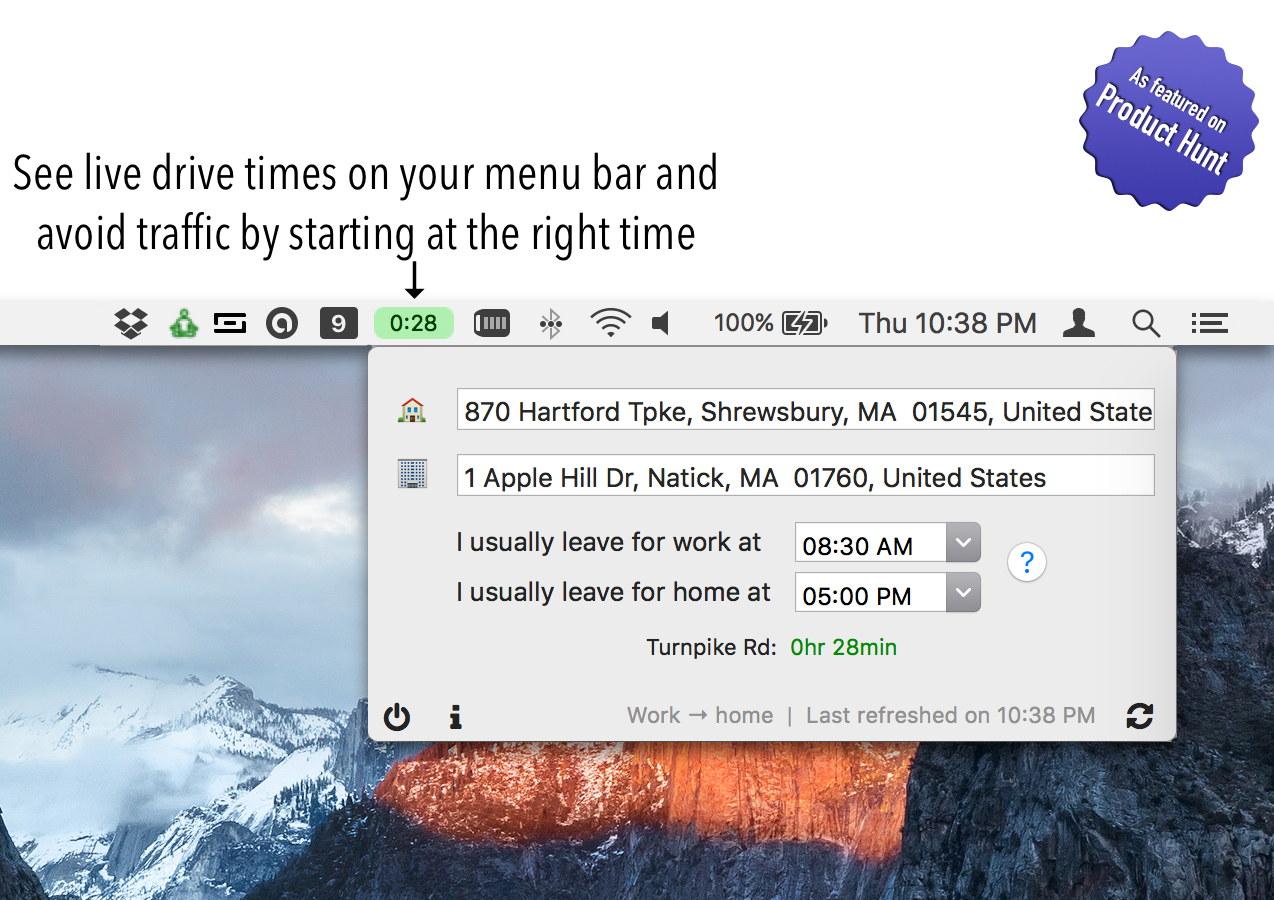
Shrewsbury, Massachusetts - Indie developer, InchWest is proud to release Chop Commute 1.61, a Mac app that takes the guess work out of daily commute by showing real-time traffic and drive times right on the Mac menu bar as a tray icon. Beat the traffic - save time and money by leaving for work or home at the right time.
No need to manually check the traffic on your phone to figure out the best time to get out of work - Chop commute does the work for you and always shows you the best time right on the OS X menu bar. Chop commute is like Google Now for OS X, only better since it is designed specifically to help you get home quicker. Long commutes or heavy traffic can easily be avoided by being strategic about when you leave to or from work.
Key features of Chop Commute include:
* Live traffic information for almost all countries (using traffic data from Google Maps)
* Status icon displaying color coded commute information
* Save time and money by leaving at the right time
The app is useful for daily commuters (whether to work or school), but currently works only on Mac computers (Windows version is in the works).
System Requirements:
* OS X 10.10 (El Capitan) or later
* 64-bit processor
* 2.8 MB
Pricing and Availability:
Chop Commute 1.61 is $4.99 USD (or equivalent amount in other currencies) and available worldwide through the Mac App Store in the Travel category. For more information about Chop Commute or InchWest, please contact Praneeth Veerepalli.
Chop Commute 1.61: https://inchwest.com/chopcommute/
Purchase and Download (MAS): https://itunes.apple.com/app/chop-commute-see-current-drive/id1122857018
Screenshot: https://inchwest.com/images/ccscreen2.png
Application Icon: https://inchwest.com/images/ccicon.png
Located in Boston, Massachusetts, InchWest is an indie developer creating beautiful, unique and useful products for iOS, macOS and Windows devices. Their products are built to improve productivity and lifestyle by utilizing cutting edge technology. All Material and Software (C) 2016 InchWest / All Rights Reserved. Apple, the Apple logo, iPod, the iPod logo, are registered trademarks of Apple Computer in the U.S. and/or other countries.
*******
Link To Article: http://prmac.com/release-id-80341.htm
*******
---------------------------------------------------------------------------------
Note that you can alter delivered distributions at any time.
Login to your account on prMac to alter your channel selection, or to opt-out at any time.
Chop Commute - See Traffic and Drive Times on Mac Menu Bar - Published on 09/29/16
Massachusetts based InchWest releases Chop Commute 1.61, a Mac app that takes the guess work out of daily commute by showing real-time traffic and drive times right on the Mac menu bar. Beat the traffic. Save time and money by leaving for work or home at the right time. No need to manually check the traffic on your phone to figure out the best time to get out of work. Long commutes or heavy traffic can easily be avoided by being strategic about when you leave to or from work.
Shrewsbury, Massachusetts - Indie developer, InchWest is proud to release Chop Commute 1.61, a Mac app that takes the guess work out of daily commute by showing real-time traffic and drive times right on the Mac menu bar as a tray icon. Beat the traffic - save time and money by leaving for work or home at the right time.
No need to manually check the traffic on your phone to figure out the best time to get out of work - Chop commute does the work for you and always shows you the best time right on the OS X menu bar. Chop commute is like Google Now for OS X, only better since it is designed specifically to help you get home quicker. Long commutes or heavy traffic can easily be avoided by being strategic about when you leave to or from work.
Key features of Chop Commute include:
* Live traffic information for almost all countries (using traffic data from Google Maps)
* Status icon displaying color coded commute information
* Save time and money by leaving at the right time
The app is useful for daily commuters (whether to work or school), but currently works only on Mac computers (Windows version is in the works).
System Requirements:
* OS X 10.10 (El Capitan) or later
* 64-bit processor
* 2.8 MB
Pricing and Availability:
Chop Commute 1.61 is $4.99 USD (or equivalent amount in other currencies) and available worldwide through the Mac App Store in the Travel category. For more information about Chop Commute or InchWest, please contact Praneeth Veerepalli.
Chop Commute 1.61: https://inchwest.com/chopcommute/
Purchase and Download (MAS): https://itunes.apple.com/app/chop-commute-see-current-drive/id1122857018
Screenshot: https://inchwest.com/images/ccscreen2.png
Application Icon: https://inchwest.com/images/ccicon.png

Located in Boston, Massachusetts, InchWest is an indie developer creating beautiful, unique and useful products for iOS, macOS and Windows devices. Their products are built to improve productivity and lifestyle by utilizing cutting edge technology. All Material and Software (C) 2016 InchWest / All Rights Reserved. Apple, the Apple logo, iPod, the iPod logo, are registered trademarks of Apple Computer in the U.S. and/or other countries.
*******
Link To Article: http://prmac.com/release-id-80341.htm
*******
---------------------------------------------------------------------------------
Note that you can alter delivered distributions at any time.
Login to your account on prMac to alter your channel selection, or to opt-out at any time.
Beetlejuice of the Howard Stern Show releases Beetmoji for iOS
A new article has been published at prMac.
Beetlejuice of the Howard Stern Show releases Beetmoji for iOS - Published on 09/29/16
California based Flight Systems LLC today announces BeetMoji 1.0.1, their hilarious new emoji app developed exclusively for iPhone, iPad and iPod touch devices. Beetlejuice is undeniably the #1 Wack Packer on the Howard Stern Show. Beetmoji is Bad as Can. Now you can send hilarious Beetmoji's to your friends and family. The app will be updated weekly to include new emojis relevant to the show. Over 85 crazy and absurd Beetlejuice Emojis and Bitmoji with more added weekly.
Los Angeles, California - Flight Systems LLC today is proud to announce the release of BeetMoji 1.0.1, their hilarious new emoji app developed exclusively for iPhone, iPad and iPod touch devices. Beetlejuice is undeniably the #1 Wack Packer on the Howard Stern Show. Beetmoji is Bad as Can. Now you can send hilarious Beetmoji's to your friends and family. The app will be updated weekly to include new emojis relevant to the show. Over 85 crazy and absurd Beetlejuice Emojis and Bitmoji with more added weekly!
The app features emojis such as:
* Hit em with the Hein, Bas as Can, and Woop Woop Emojis
* Trump Beet
* Heff Beet
* Nasa Beet
* Super Beet
* Football Beet
* Boxing Beet
* Howard Beet
* Zika Beet
* Smoking Beet
* Happy Beet
* Love Beet
* Sick Beet
* Friendly Beet
* Mad Beet
* Drunk Beet
* Fighting Beet
* Snapchat Beet
* Laughing Beet
* Angry Beet
* Confused Beet
* Champaign Popping Beet
* Cigar Smoking Beet
* Wide Eyed Beeet
* Drinking Beet
* Unicorn Onesie Beet
* And so much more
Device Requirements:
* iPhone, iPad, and iPod touch
* Requires iOS 8.1.1 or later
* 6mb
Pricing and Availability:
BeetMoji 1.0.1 is only $0.99 (USD) and available worldwide exclusively through the App Store in the Entertainment category. Please contact Todd Schram for free review copies of the app.
BeetMoji 1.0.1: https://itunes.apple.com/app/beetmoji/id1150132840
Screenshot : http://s14.postimg.org/yeamsedlt/Beet_Moji.jpg
App Icon : http://s14.postimg.org/6zymqbxkx/app_icon.png
Located in Los Angeles, Flight Systems LLC was founded in 2011. Copyright (C) 2011-2016 Flight Systems LLC. All Rights Reserved. Apple, the Apple logo, iPhone and iPod are registered trademarks of Apple Inc. in the U.S. and/or other countries.
*******
Link To Article: http://prmac.com/release-id-80340.htm
*******
---------------------------------------------------------------------------------
Note that you can alter delivered distributions at any time.
Login to your account on prMac to alter your channel selection, or to opt-out at any time.
Beetlejuice of the Howard Stern Show releases Beetmoji for iOS - Published on 09/29/16
California based Flight Systems LLC today announces BeetMoji 1.0.1, their hilarious new emoji app developed exclusively for iPhone, iPad and iPod touch devices. Beetlejuice is undeniably the #1 Wack Packer on the Howard Stern Show. Beetmoji is Bad as Can. Now you can send hilarious Beetmoji's to your friends and family. The app will be updated weekly to include new emojis relevant to the show. Over 85 crazy and absurd Beetlejuice Emojis and Bitmoji with more added weekly.
Los Angeles, California - Flight Systems LLC today is proud to announce the release of BeetMoji 1.0.1, their hilarious new emoji app developed exclusively for iPhone, iPad and iPod touch devices. Beetlejuice is undeniably the #1 Wack Packer on the Howard Stern Show. Beetmoji is Bad as Can. Now you can send hilarious Beetmoji's to your friends and family. The app will be updated weekly to include new emojis relevant to the show. Over 85 crazy and absurd Beetlejuice Emojis and Bitmoji with more added weekly!
The app features emojis such as:
* Hit em with the Hein, Bas as Can, and Woop Woop Emojis
* Trump Beet
* Heff Beet
* Nasa Beet
* Super Beet
* Football Beet
* Boxing Beet
* Howard Beet
* Zika Beet
* Smoking Beet
* Happy Beet
* Love Beet
* Sick Beet
* Friendly Beet
* Mad Beet
* Drunk Beet
* Fighting Beet
* Snapchat Beet
* Laughing Beet
* Angry Beet
* Confused Beet
* Champaign Popping Beet
* Cigar Smoking Beet
* Wide Eyed Beeet
* Drinking Beet
* Unicorn Onesie Beet
* And so much more
Device Requirements:
* iPhone, iPad, and iPod touch
* Requires iOS 8.1.1 or later
* 6mb
Pricing and Availability:
BeetMoji 1.0.1 is only $0.99 (USD) and available worldwide exclusively through the App Store in the Entertainment category. Please contact Todd Schram for free review copies of the app.
BeetMoji 1.0.1: https://itunes.apple.com/app/beetmoji/id1150132840
Screenshot : http://s14.postimg.org/yeamsedlt/Beet_Moji.jpg

App Icon : http://s14.postimg.org/6zymqbxkx/app_icon.png

Located in Los Angeles, Flight Systems LLC was founded in 2011. Copyright (C) 2011-2016 Flight Systems LLC. All Rights Reserved. Apple, the Apple logo, iPhone and iPod are registered trademarks of Apple Inc. in the U.S. and/or other countries.
*******
Link To Article: http://prmac.com/release-id-80340.htm
*******
---------------------------------------------------------------------------------
Note that you can alter delivered distributions at any time.
Login to your account on prMac to alter your channel selection, or to opt-out at any time.
Subscribe to:
Posts (Atom)