A new article has been published at prMac.
eFloristApp: Send Fresh Flowers and Virtual Gifts from any iOS Device - Published on 10/12/16
Wineflowers Group today announces eFloristApp 1.1, an important update to their easy-to-use floral ordering and virtual gifts app for iOS devices. eFloristApp makes it simple to order floral creations for delivery in over 120 countries worldwide. The app also allows anyone to create and share entertaining virtual gift creations with friends and family. Version 1.1 brings the ability for users to add their own photos to the app's virtual gifts, and share them via email, SMS, and social networks.
Alliste, Italy - Wineflowers Group today is pleased to announce the release of eFloristApp 1.1, an important update of their convenient floral ordering and delivery app for iPhone, iPad, and iPod touch users. eFloristApp offers anyone an easy-to-use method of ordering beautiful floral arrangements for quick delivery anywhere in over 120 countries. In addition, the app also offers users the ability to create funny virtual gifts, which can be shared with friends and family via email, text messaging, or popular social networks.
Effortlessly send beautiful floral arrangements in just a few easy steps. Simply enter the delivery address, and select from any of the over sixty gorgeous floral arrangements. Then select the size of the arrangement, enter a message, and the recipient's delivery information. Once the order is paid for, it's on its way!
If a customer simply wants to make a loved one smile, eFloristApp allows them to quickly create a customized virtual gift, which can include a photo from the user's photo album, or a new photo taken with the device's camera. These can be integrated with the app's built-in library of virtual gifts and graphics. This makes it simple to create a greeting, and share it via email, text messaging, or popular social networks, including Facebook, Twitter, WhatsApp, and LinkedIn.
"In today's fast world, folks simply don't have the time to sit down and place an order with a traditional florist. It's time-consuming, and you can't really see exactly what you're ordering," says Wineflowers Group CEO Vito Santoro. "With eFloristApp, anyone can take a few moments out of their busy day, and pick the perfect floral or virtual gift to let their loved one know they're thinking of them."
Features:
* The app's simple design makes it easy to order arrangements
* Products are grouped by category, making it easy to select the perfect gift
* Fresh flowers, plants, and gifts can be delivered to over 120 countries
* Creating a custom virtual gift takes only a few minutes
* Virtual gifts can be shared via email, text message, or popular social networks
* Customer assistance is available 7 days a week
eFloristApp's Flowers Catalog includes a number of cut flowers and living plants, in categories that make it easy to decide exactly what type of floral gift to send. Customers can select from Bouquets, Roses, Flower Arrangements, Green Plants, Flowering Plants, Funeral Arrangements, and Funny Gifts.
What's New in Version 1.1:
* Mix photos from a Photo Library or camera, with virtual flowers and funny items like balloons or teddy bears
* Share virtual gifts with friends and family via email, SMS, and popular social networks
* Minor bug fixes
eFloristApp also offers contextual help built into the app, offering information about the current app screen, with just a tap of the handy question mark. In addition, customer assistance personnel are available to answer questions 7 days a week, via the convenient "Contact Us" function, which available with the tap of a finger from anywhere in the app.
"Ordering beautiful floral gifts doesn't have to be a frustrating process," continues Vito. "Our app makes it a matter of simply picking up your iOS device, loading our app, and in a matter of minutes having a beautiful floral gift on its way to a loved one, no matter where they live!"
Device Requirements:
* iPhone, iPad, and iPod touch
* Requires iOS 8.0 or later
* Universal Application
* 18.2 MB
Pricing and Availability:
eFloristApp 1.1 is free and is available worldwide exclusively through the App Store in the Shopping category.
eFloristApp 1.1: http://www.efloristapp.com/
Download from iTunes: https://itunes.apple.com/app/efloristapp/id1133170163
Screenshot 1: http://a4.mzstatic.com/us/r30/Purple62/v4/8e/10/e2/8e10e23e-2422-0b9d-9048-e176b1816b0d/screen696x696.jpeg
Screenshot 2: http://a4.mzstatic.com/us/r30/Purple71/v4/67/cb/27/67cb2733-734a-e8f5-cdad-054808b47634/screen696x696.jpeg
App Icon: http://a1.mzstatic.com/us/r30/Purple62/v4/3a/1e/cf/3a1ecf16-e7c8-8d53-9fb5-5e3caa548f83/icon175x175.jpeg
Wineflowers Group is an Italian company that specializes in online gift delivery in more than 120 countries worldwide. The company is the e-commerce portal leader in sending and delivering flowers, plants and floral arrangements for any type of occasion, directly to homes in Italy and around the world. All Material and Software Copyright (C) 2016 Wineflowers Group. All Rights Reserved. Apple, the Apple logo, iPhone, iPad and iPod are registered trademarks of Apple Inc. in the U.S. and/or other countries.
*******
Link To Article: http://prmac.com/release-id-80420.htm
*******
---------------------------------------------------------------------------------
Note that you can alter delivered distributions at any time.
Login to your account on prMac to alter your channel selection, or to opt-out at any time.


Rain Design mStand new series for iPad/iPad Air/iPad Pro
A new article has been published at prMac.
Rain Design mStand new series for iPad/iPad Air/iPad Pro - Published on 10/12/16
California based Rain Design Inc. today announced that their best-selling mStand series now includes stands for the iPad. Available as the mStand tablet, mStand tablet plus and mStand tablet pro, Rain Design mStand tablet stands support your iPad and free your hand, so you can work comfortably with touching, swiping, typing or simply enjoy a relaxing video chat. The mStand tablet plus comes with the additional feature of adjustable viewing angle of 10 to 50 degrees for optimal viewing comfort.
Berkeley, California - Rain Design Inc. today announced that their best-selling mStand series now includes stands for the iPad. Available as the mStand tablet, mStand tablet plus and mStand tablet pro, Rain Design mStand tablet stands support your iPad and free your hand, so you can work comfortably with touching, swiping, typing or simply enjoy a relaxing video chat. The mStand tablet plus comes with the additional feature of adjustable viewing angle of 10 to 50 degrees for optimal viewing comfort.
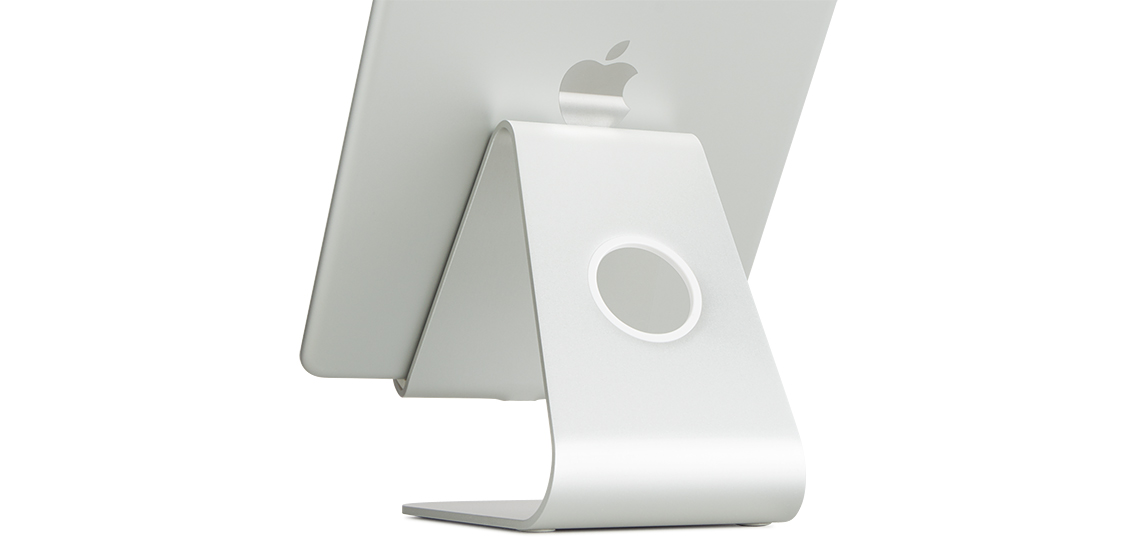
Made of a single solid piece of aluminum with matching iPad sand-blasted and anodized finish, mStand tablet pro transforms your iPad Pro into a stylish and stable desktop, making complex work with touching, swiping or writing with a pencil easy. The mStand tablet pro features adjustable viewing angle (0 to 45 degrees) and height (2.5" to 5.5") with a simple slide 'n' lock mechanism for personalized comfort and flexibility. It can also be used as a second display when using a Macbook with a mStand laptop stand.
Rain Design mStand tablet stands hold iPad in landscape or portrait modes, and are available in silver, gold or space gray. Fits iPad/iPad Air/iPad Pro with or without Smart Cover/Case. The mStand iPad series is shipping now. For more information, please visit Rain Design online, or contact Alethea Tan for a media kit or product review.
Rain Design: http://www.raindesigninc.com/
mStand: http://www.raindesigninc.com/products.html
Screenshot: http://www.raindesigninc.com/images/mstandtablet_silver_main.jpg
Rain Design was founded in San Francisco by friends from different backgrounds with the same vision of creating cool, original and user-friendly products. In Jan 2003, Rain dazzled the world with the award-winning iGo desk for the Apple iMac. Today, Rain continues to design and manufacture exciting products for the personal computer and digital media market. Ideas that will hopefully make you smile. All Material and Software (C) Copyright 2003-2016 Rain Design Inc. All Rights Reserved. Apple, the Apple logo, OS X, iPhone, iPod and iPad are registered trademarks of Apple Inc. in the U.S. and/or other countries. Other trademarks and registered trademarks may be the property of their respective owners.
*******
Link To Article: http://prmac.com/release-id-80421.htm
*******
---------------------------------------------------------------------------------
Note that you can alter delivered distributions at any time.
Login to your account on prMac to alter your channel selection, or to opt-out at any time.
Rain Design mStand new series for iPad/iPad Air/iPad Pro - Published on 10/12/16
California based Rain Design Inc. today announced that their best-selling mStand series now includes stands for the iPad. Available as the mStand tablet, mStand tablet plus and mStand tablet pro, Rain Design mStand tablet stands support your iPad and free your hand, so you can work comfortably with touching, swiping, typing or simply enjoy a relaxing video chat. The mStand tablet plus comes with the additional feature of adjustable viewing angle of 10 to 50 degrees for optimal viewing comfort.
Berkeley, California - Rain Design Inc. today announced that their best-selling mStand series now includes stands for the iPad. Available as the mStand tablet, mStand tablet plus and mStand tablet pro, Rain Design mStand tablet stands support your iPad and free your hand, so you can work comfortably with touching, swiping, typing or simply enjoy a relaxing video chat. The mStand tablet plus comes with the additional feature of adjustable viewing angle of 10 to 50 degrees for optimal viewing comfort.
Made of a single solid piece of aluminum with matching iPad sand-blasted and anodized finish, mStand tablet pro transforms your iPad Pro into a stylish and stable desktop, making complex work with touching, swiping or writing with a pencil easy. The mStand tablet pro features adjustable viewing angle (0 to 45 degrees) and height (2.5" to 5.5") with a simple slide 'n' lock mechanism for personalized comfort and flexibility. It can also be used as a second display when using a Macbook with a mStand laptop stand.
Rain Design mStand tablet stands hold iPad in landscape or portrait modes, and are available in silver, gold or space gray. Fits iPad/iPad Air/iPad Pro with or without Smart Cover/Case. The mStand iPad series is shipping now. For more information, please visit Rain Design online, or contact Alethea Tan for a media kit or product review.
Rain Design: http://www.raindesigninc.com/
mStand: http://www.raindesigninc.com/products.html
Screenshot: http://www.raindesigninc.com/images/mstandtablet_silver_main.jpg
Rain Design was founded in San Francisco by friends from different backgrounds with the same vision of creating cool, original and user-friendly products. In Jan 2003, Rain dazzled the world with the award-winning iGo desk for the Apple iMac. Today, Rain continues to design and manufacture exciting products for the personal computer and digital media market. Ideas that will hopefully make you smile. All Material and Software (C) Copyright 2003-2016 Rain Design Inc. All Rights Reserved. Apple, the Apple logo, OS X, iPhone, iPod and iPad are registered trademarks of Apple Inc. in the U.S. and/or other countries. Other trademarks and registered trademarks may be the property of their respective owners.
*******
Link To Article: http://prmac.com/release-id-80421.htm
*******
---------------------------------------------------------------------------------
Note that you can alter delivered distributions at any time.
Login to your account on prMac to alter your channel selection, or to opt-out at any time.
Oman Radio Live ( Online Radio ) 1.1 for iOS - Release Info
A new article has been published at prMac.
Oman Radio Live ( Online Radio ) 1.1 for iOS - Release Info - Published on 10/11/16
LastThink announces the release of Oman Radio Live ( Online Radio ) 1.1, their highly customizable Radio app for iOS devices. Users can Listen to the most popular Oman Music, Talk Shows and News on your iPhone, iPad, iPod touch with our Oman Live Radio, which is definitely the best one among Free Radio Station. The app offers event channels, news and media channels, events and music channels, weather programs, daily news, latest hits and also contemporary commercials.
Yerevan, Armenia - LastThink is proud to announce the release of Oman Radio Live ( Online Radio ) 1.1, their highly customizable Radio application developed for iPhone, iPad, and iPod touch devices. From now on you don't have to tune to the right station you want, as finding your favorite station is simply a click away.
Features:
* You have any doubts concerning the quality and the effectiveness of our Oman Radio Live ( Online Radio )? Believe us all our Radio stations work properly. Moreover, they are always tested by our highly qualified professionals.
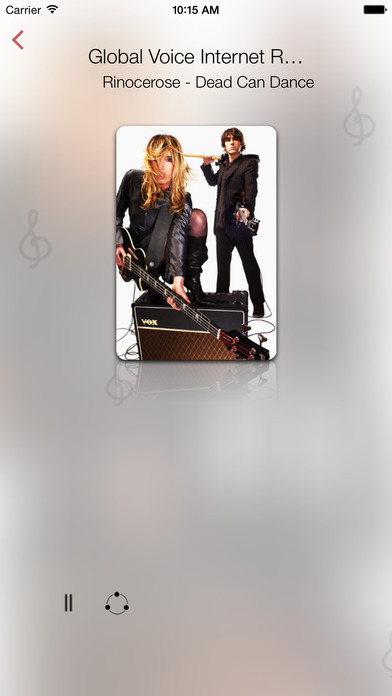
* You discover a new song, but you don't know the name of it? This application solves that problem and provides you the adequate information about the song you are listening to.
* You want to share your preferable songs or whatever you listen to with your friends or relatives? That's not a matter of concern as long as you are with us. Our innovative application will grant you an opportunity of sharing anything you like right from the app on your Facebook, Twitter or any other web-page.
* You are easily bored by the same radio stations? Our frequent updates, new features and diverse stations will not let you get disappointed.
We grant you a chance of enjoying event channels, news and media channels, events and music channels, which provide its listeners with weather programs, daily news, latest hits and also contemporary commercials.
If you however experience any issues, please do not hesitate to contact us if you'd like to share your experience with Online Radio Stations, or provide suggestions on how we could improve the product further. We will be more than happy to get in touch.
NOTE: We have selected data from the internet and if any assembly or constitution doesn't want us to show the content of the unit, please recommend us to remove it.
Device Requirements:
* iPhone, iPad, and iPod touch
* Requires iOS 7.0 or later
* Universal Application
* 27.6 MB
Pricing and Availability:
Oman Radio Live ( Online Radio ) 1.1 is free and available worldwide exclusively through the App Store in the Music category.
LastThink: http://lastthink.com/
Oman Radio Live ( Online Radio ) 1.1: https://www.facebook.com/IphoneRegion
Download from iTunes: https://itunes.apple.com/app/oman-radio-live-online-radio/id983967828
Screenshot: http://a3.mzstatic.com/us/r30/Purple5/v4/42/82/94/428294dc-2357-0bcd-9fd2-9e18dd44fe29/screen696x696.jpeg
App Icon: http://a1.mzstatic.com/us/r30/Purple5/v4/63/c8/e3/63c8e3da-c8af-3622-5d84-6104cfb30510/icon175x175.jpeg
LastThink is an IT company with a focus on mobile development. It has extended its list of services since 2012 to offer high-end business process management, system integration, as well as up-to-date communication solutions. LastThink's mission is to deliver maximum business value to its customers by designing, developing, implementing and maintaining efficient and high quality software solutions aligned with their most essential business needs. Their team will always do its best to meet client expectations. All Material and Software Copyright (C) 2016 LastThink LLC. All Rights Reserved. Apple, the Apple logo, iPhone, iPad and iPod are registered trademarks of Apple Inc. in the U.S. and/or other countries.
*******
Link To Article: http://prmac.com/release-id-80419.htm
*******
---------------------------------------------------------------------------------
Note that you can alter delivered distributions at any time.
Login to your account on prMac to alter your channel selection, or to opt-out at any time.
Oman Radio Live ( Online Radio ) 1.1 for iOS - Release Info - Published on 10/11/16
LastThink announces the release of Oman Radio Live ( Online Radio ) 1.1, their highly customizable Radio app for iOS devices. Users can Listen to the most popular Oman Music, Talk Shows and News on your iPhone, iPad, iPod touch with our Oman Live Radio, which is definitely the best one among Free Radio Station. The app offers event channels, news and media channels, events and music channels, weather programs, daily news, latest hits and also contemporary commercials.
Yerevan, Armenia - LastThink is proud to announce the release of Oman Radio Live ( Online Radio ) 1.1, their highly customizable Radio application developed for iPhone, iPad, and iPod touch devices. From now on you don't have to tune to the right station you want, as finding your favorite station is simply a click away.
Features:
* You have any doubts concerning the quality and the effectiveness of our Oman Radio Live ( Online Radio )? Believe us all our Radio stations work properly. Moreover, they are always tested by our highly qualified professionals.
* You discover a new song, but you don't know the name of it? This application solves that problem and provides you the adequate information about the song you are listening to.
* You want to share your preferable songs or whatever you listen to with your friends or relatives? That's not a matter of concern as long as you are with us. Our innovative application will grant you an opportunity of sharing anything you like right from the app on your Facebook, Twitter or any other web-page.
* You are easily bored by the same radio stations? Our frequent updates, new features and diverse stations will not let you get disappointed.
We grant you a chance of enjoying event channels, news and media channels, events and music channels, which provide its listeners with weather programs, daily news, latest hits and also contemporary commercials.
If you however experience any issues, please do not hesitate to contact us if you'd like to share your experience with Online Radio Stations, or provide suggestions on how we could improve the product further. We will be more than happy to get in touch.
NOTE: We have selected data from the internet and if any assembly or constitution doesn't want us to show the content of the unit, please recommend us to remove it.
Device Requirements:
* iPhone, iPad, and iPod touch
* Requires iOS 7.0 or later
* Universal Application
* 27.6 MB
Pricing and Availability:
Oman Radio Live ( Online Radio ) 1.1 is free and available worldwide exclusively through the App Store in the Music category.
LastThink: http://lastthink.com/
Oman Radio Live ( Online Radio ) 1.1: https://www.facebook.com/IphoneRegion
Download from iTunes: https://itunes.apple.com/app/oman-radio-live-online-radio/id983967828
Screenshot: http://a3.mzstatic.com/us/r30/Purple5/v4/42/82/94/428294dc-2357-0bcd-9fd2-9e18dd44fe29/screen696x696.jpeg
App Icon: http://a1.mzstatic.com/us/r30/Purple5/v4/63/c8/e3/63c8e3da-c8af-3622-5d84-6104cfb30510/icon175x175.jpeg

LastThink is an IT company with a focus on mobile development. It has extended its list of services since 2012 to offer high-end business process management, system integration, as well as up-to-date communication solutions. LastThink's mission is to deliver maximum business value to its customers by designing, developing, implementing and maintaining efficient and high quality software solutions aligned with their most essential business needs. Their team will always do its best to meet client expectations. All Material and Software Copyright (C) 2016 LastThink LLC. All Rights Reserved. Apple, the Apple logo, iPhone, iPad and iPod are registered trademarks of Apple Inc. in the U.S. and/or other countries.
*******
Link To Article: http://prmac.com/release-id-80419.htm
*******
---------------------------------------------------------------------------------
Note that you can alter delivered distributions at any time.
Login to your account on prMac to alter your channel selection, or to opt-out at any time.
Green - Budget Forecasting app release for iOS to help people spend safe
A new article has been published at prMac.
Green - Budget Forecasting app release for iOS to help people spend safe - Published on 10/11/16
CoopToons today introduces Green - Budget Forecasting 1.0, their new personal budgeting app developed exclusively for iOS devices. Simple-to-use and beautifully designed, Green shows users the three most important balances they need to know. With Green, users will know their lowest anticipated balance within the next year, today's predicted balance after current pending transactions and the balance that should be sitting in their bank account right now.
Indianapolis, Indiana - CoopToons today is proud to announce the initial release and immediate availability of Green - Budget Forecasting 1.0 for iOS. Green is a personal budgeting app that is simple to use, beautifully designed and shows you the three most important balances you need to know. With Green, users will know their lowest anticipated balance within the next year, today's predicted balance after current pending transactions and the balance that should be sitting in their bank account right now.
When users know their bottom line they can manage their money more effectively and spend safer. With some help from Green, users can answer questions like, "How much more can I pay on that credit card to get out of debt earlier?" or "Where do I need to cut back to buy a new car?" Now they will know with Green - Budget Forecasting.
Users can enter day-to-day expenses on the stylish user-friendly interface, use built-in expense categories, quickly enter in an amount and be on their way. But users can also add notes, add new categories and recurring income/expenses. Recurring transactions can be setup up as Daily, Weekly, Bi-Weekly, Monthly, Annual, Semi-Annual and Quarterly.
People don't live in the past so their budget should be focused on the future and with Green it is.
Feature Highlights:
* Track multiple accounts
* Setup recurring transactions
* Forecast your balance up to a year
* Quickly track spending as it happens
* See the three most important balances
* Reconcile your transactions with your bank
* Add your own income and expense categories
* Visualize your income, expenses and spending trends
* Protect your sensitive data with a password code and/or touch ID
* Never provide bank or bill info for your peace of mind and security
Device Requirements:
* iPhone and iPod touch
* Requires iOS 8.0 or later
* iOS Application
* 8.65 MB
Pricing and Availability:
Green - Budget Forecasting 1.0 is available at a price of $1.99 (USD) and available worldwide exclusively through the App Store in the Finance category. Review copies are available on request.
Green - Budget Forecasting 1.0: http://cooptoons.wixsite.com/green
Purchase and Download: https://itunes.apple.com/app/green-budget-forecasting/id1108694180
Screenshot 1: https://scontent.ford1-1.fna.fbcdn.net/t31.0-8/14543947_722671081219052_1524462554553791716_o.png
Screenshot 2: https://scontent.ford1-1.fna.fbcdn.net/t31.0-8/14543771_722671077885719_6198220904506952411_o.png
Screenshot 3: https://scontent.ford1-1.fna.fbcdn.net/t31.0-8/14566222_722671074552386_884639028839429207_o.png
App Icon: https://scontent.ford1-1.fna.fbcdn.net/v/t1.0-9/13442306_664514860368008_6072337257351660254_n.png?oh=2d1895c199030fc12822843ecd5b32e8&oe=58AB511B
CoopToons is an independent software company started by Gary Cooper and his kids that focus on iOS application development. Our mission is to create apps we want to use that solve problems or are just plain fun. We hope others will find value in our creations and will follow us along this journey. All Material and Software (C) Copyright 2016 CoopToons. All Rights Reserved. Apple, the Apple logo, iPhone, iPod and iPad are registered trademarks of Apple Inc. in the U.S. and/or other countries. Other trademarks and registered trademarks may be the property of their respective owners.
*******
Link To Article: http://prmac.com/release-id-80418.htm
*******
---------------------------------------------------------------------------------
Note that you can alter delivered distributions at any time.
Login to your account on prMac to alter your channel selection, or to opt-out at any time.
Green - Budget Forecasting app release for iOS to help people spend safe - Published on 10/11/16
CoopToons today introduces Green - Budget Forecasting 1.0, their new personal budgeting app developed exclusively for iOS devices. Simple-to-use and beautifully designed, Green shows users the three most important balances they need to know. With Green, users will know their lowest anticipated balance within the next year, today's predicted balance after current pending transactions and the balance that should be sitting in their bank account right now.
Indianapolis, Indiana - CoopToons today is proud to announce the initial release and immediate availability of Green - Budget Forecasting 1.0 for iOS. Green is a personal budgeting app that is simple to use, beautifully designed and shows you the three most important balances you need to know. With Green, users will know their lowest anticipated balance within the next year, today's predicted balance after current pending transactions and the balance that should be sitting in their bank account right now.
When users know their bottom line they can manage their money more effectively and spend safer. With some help from Green, users can answer questions like, "How much more can I pay on that credit card to get out of debt earlier?" or "Where do I need to cut back to buy a new car?" Now they will know with Green - Budget Forecasting.
Users can enter day-to-day expenses on the stylish user-friendly interface, use built-in expense categories, quickly enter in an amount and be on their way. But users can also add notes, add new categories and recurring income/expenses. Recurring transactions can be setup up as Daily, Weekly, Bi-Weekly, Monthly, Annual, Semi-Annual and Quarterly.
People don't live in the past so their budget should be focused on the future and with Green it is.
Feature Highlights:
* Track multiple accounts
* Setup recurring transactions
* Forecast your balance up to a year
* Quickly track spending as it happens
* See the three most important balances
* Reconcile your transactions with your bank
* Add your own income and expense categories
* Visualize your income, expenses and spending trends
* Protect your sensitive data with a password code and/or touch ID
* Never provide bank or bill info for your peace of mind and security
Device Requirements:
* iPhone and iPod touch
* Requires iOS 8.0 or later
* iOS Application
* 8.65 MB
Pricing and Availability:
Green - Budget Forecasting 1.0 is available at a price of $1.99 (USD) and available worldwide exclusively through the App Store in the Finance category. Review copies are available on request.
Green - Budget Forecasting 1.0: http://cooptoons.wixsite.com/green
Purchase and Download: https://itunes.apple.com/app/green-budget-forecasting/id1108694180
Screenshot 1: https://scontent.ford1-1.fna.fbcdn.net/t31.0-8/14543947_722671081219052_1524462554553791716_o.png

Screenshot 2: https://scontent.ford1-1.fna.fbcdn.net/t31.0-8/14543771_722671077885719_6198220904506952411_o.png

Screenshot 3: https://scontent.ford1-1.fna.fbcdn.net/t31.0-8/14566222_722671074552386_884639028839429207_o.png

App Icon: https://scontent.ford1-1.fna.fbcdn.net/v/t1.0-9/13442306_664514860368008_6072337257351660254_n.png?oh=2d1895c199030fc12822843ecd5b32e8&oe=58AB511B

CoopToons is an independent software company started by Gary Cooper and his kids that focus on iOS application development. Our mission is to create apps we want to use that solve problems or are just plain fun. We hope others will find value in our creations and will follow us along this journey. All Material and Software (C) Copyright 2016 CoopToons. All Rights Reserved. Apple, the Apple logo, iPhone, iPod and iPad are registered trademarks of Apple Inc. in the U.S. and/or other countries. Other trademarks and registered trademarks may be the property of their respective owners.
*******
Link To Article: http://prmac.com/release-id-80418.htm
*******
---------------------------------------------------------------------------------
Note that you can alter delivered distributions at any time.
Login to your account on prMac to alter your channel selection, or to opt-out at any time.
New Addition to Graphs and Charts Area in ConceptDraw Solutions
A new article has been published at prMac.
New Addition to Graphs and Charts Area in ConceptDraw Solutions - Published on 10/11/16
California based CS Odessa today releases its free Basic Pie Charts Solution in ConceptDraw Solution Park. The Basic Pie Charts solution contains helpful templates, varied samples, and a library of vector stencils for simple drawing of Pie Charts, Donut Chart, and Pie Graph Worksheets. The new addition introduces a new set of graphic tools that provide a full range of basic pie chart types to support documentation and graphics that deal with statics and data.
San Jose, California - CS Odessa is pleased to announce, Basic Pie Charts, a new ConceptDraw Solution addition for ConceptDraw PRO v10 and greater. CS Odessa is introducing a new set of graphic tools that provide a full range of basic pie chart types to support documentation and graphics that deal with statics and data. The new addition to ConceptDraw Solution Park is a free item for current users of ConceptDraw PRO.
The Graphs and Charts Area of ConceptDraw Solution Park now includes a basic collection of tools that supports many professional ways to show data comparison at a glance. The Basic Pie Charts solution contains helpful template, varied samples, and a library of vector stencils for simple drawing of Pie Charts, Donut Chart, and Pie Graph Worksheets. The new solution help make short work of presenting the visual comparison of data in statistic, business management and marketing.
ConceptDraw PRO and the ever-growing collection of product extensions in the ConceptDraw Solution Park provide ultimate flexibility and user-friendliness in a robust, full-featured diagramming package. ConceptDraw PRO is well-known for its ability to exchange documents with Microsoft Visio - the de facto standard in business graphics documents. ConceptDraw PRO can open and save documents that can be used by Visio users.
Pricing and Availability:
ConceptDraw PRO is compatible with macOS and Windows. It is supported by the powerful business solutions located in ConceptDraw Solution Park, and retails for only $199 (USD) per end user license. ConceptDraw PRO v10 is included in ConceptDraw Office v3 which retails for $499 (USD).
ConceptDraw Office v3: http://www.conceptdraw.com/products/office
ConceptDraw PRO v10: http://www.conceptdraw.com/products/drawing-tool
ConceptDraw Basic Pie Charts Solution: http://www.conceptdraw.com/solution-park/graphs-charts-basic-pie-charts
Founded in 1993, Computer Systems Odessa supplies cross-platform productivity tools and graphic technologies to professional and corporate users around the world. With headquarters in Odessa, Ukraine, and an U.S. office in San Jose, California, CS Odessa sells products internationally through resellers in over 150 countries. The ConceptDraw line of products has won numerous awards and is used by hundreds of thousands of people all over the world. ConceptDraw is a registered trademark, and ConceptDraw Office, ConceptDraw Solution Park, ConceptDraw PRO, ConceptDraw MINDMAP, ConceptDraw PROJECT, and ConceptDraw Solution Browser are trademarks of CS Odessa. All other trademarks and registered trademarks are the properties of their respective owners.
*******
Link To Article: http://prmac.com/release-id-80417.htm
*******
---------------------------------------------------------------------------------
Note that you can alter delivered distributions at any time.
Login to your account on prMac to alter your channel selection, or to opt-out at any time.
New Addition to Graphs and Charts Area in ConceptDraw Solutions - Published on 10/11/16
California based CS Odessa today releases its free Basic Pie Charts Solution in ConceptDraw Solution Park. The Basic Pie Charts solution contains helpful templates, varied samples, and a library of vector stencils for simple drawing of Pie Charts, Donut Chart, and Pie Graph Worksheets. The new addition introduces a new set of graphic tools that provide a full range of basic pie chart types to support documentation and graphics that deal with statics and data.
San Jose, California - CS Odessa is pleased to announce, Basic Pie Charts, a new ConceptDraw Solution addition for ConceptDraw PRO v10 and greater. CS Odessa is introducing a new set of graphic tools that provide a full range of basic pie chart types to support documentation and graphics that deal with statics and data. The new addition to ConceptDraw Solution Park is a free item for current users of ConceptDraw PRO.
The Graphs and Charts Area of ConceptDraw Solution Park now includes a basic collection of tools that supports many professional ways to show data comparison at a glance. The Basic Pie Charts solution contains helpful template, varied samples, and a library of vector stencils for simple drawing of Pie Charts, Donut Chart, and Pie Graph Worksheets. The new solution help make short work of presenting the visual comparison of data in statistic, business management and marketing.
ConceptDraw PRO and the ever-growing collection of product extensions in the ConceptDraw Solution Park provide ultimate flexibility and user-friendliness in a robust, full-featured diagramming package. ConceptDraw PRO is well-known for its ability to exchange documents with Microsoft Visio - the de facto standard in business graphics documents. ConceptDraw PRO can open and save documents that can be used by Visio users.
Pricing and Availability:
ConceptDraw PRO is compatible with macOS and Windows. It is supported by the powerful business solutions located in ConceptDraw Solution Park, and retails for only $199 (USD) per end user license. ConceptDraw PRO v10 is included in ConceptDraw Office v3 which retails for $499 (USD).
ConceptDraw Office v3: http://www.conceptdraw.com/products/office
ConceptDraw PRO v10: http://www.conceptdraw.com/products/drawing-tool
ConceptDraw Basic Pie Charts Solution: http://www.conceptdraw.com/solution-park/graphs-charts-basic-pie-charts
Founded in 1993, Computer Systems Odessa supplies cross-platform productivity tools and graphic technologies to professional and corporate users around the world. With headquarters in Odessa, Ukraine, and an U.S. office in San Jose, California, CS Odessa sells products internationally through resellers in over 150 countries. The ConceptDraw line of products has won numerous awards and is used by hundreds of thousands of people all over the world. ConceptDraw is a registered trademark, and ConceptDraw Office, ConceptDraw Solution Park, ConceptDraw PRO, ConceptDraw MINDMAP, ConceptDraw PROJECT, and ConceptDraw Solution Browser are trademarks of CS Odessa. All other trademarks and registered trademarks are the properties of their respective owners.
*******
Link To Article: http://prmac.com/release-id-80417.htm
*******
---------------------------------------------------------------------------------
Note that you can alter delivered distributions at any time.
Login to your account on prMac to alter your channel selection, or to opt-out at any time.
Appease a Frog's Hunger in Francesco's Fly Frenzy on iOS and Android
A new article has been published at prMac.
Appease a Frog's Hunger in Francesco's Fly Frenzy on iOS and Android - Published on 10/11/16
Indie game studio, Newtronium today introduces Francesco's Fly Frenzy 1.0, a fast and colorful mobile arcade game for iOS and Android devices. Featuring beautiful fly-definition graphics and animations, players must control the tongue of insatiable frog Francesco, aiming to devour as many flies as possible while simultaneously avoiding yucky wasps at all costs. Quick reflexes are key, since achieving high scores requires accurately timed taps and allows no slip-ups.
Oberhausen, Germany - Indie game studio, Newtronium today is proud to announce the release and immediate availability of Francesco's Fly Frenzy 1.0. In this fast and colorful mobile arcade game for iOS and Android the player controls the tongue of insatiable frog Francesco, aiming to devour as many flies as possible while simultaneously avoiding yucky wasps at all costs. Quick reflexes are key, since achieving high scores requires accurately timed taps and allows no slip-ups.
Francesco's Fly Frenzy is a challenging but fun game that builds up over time by rewarding continuous playing. Catching stars raises Francesco's level, unlocking permanent bonuses like score multipliers or increased amounts of flies. Caught coins can be spent on additions to Francesco's ever-expanding collection of headgear and hairstyles. An extensive stats screen allows players to track their progress and all of their achievements. Everyplay integration enables players to record, edit and share gameplay videos of their most awesome rounds.
Features:
* Fluid fly eating gameplay featuring split second decision-making
* Beautiful fly-definition graphics and animations
* Choose from a wide array of unique hats to style up Francesco
* Level up to unlock a variety of boosting bonuses
* Beat your friends on the global leaderboard and earn over 25 achievements
* No forced ads! If you don't want to you don't have to watch a single ad
* Save your progress with cloud save
8 Share videos of your coolest moves via Everyplay (iOS only)
Device Requirements:
* iPhone, iPad or iPod touch
* iOS Universal, optimized for all iOS mobile devices
* Requires iOS 6.0 or later
* Android Universal, optimized for all Android mobile devices
* Requires Android 4.03 or later
Pricing and Availability:
Francesco's Fly Frenzy 1.0 is free featuring optional ads and is available worldwide through the App Store in the Games category. An Android version is available on Google Play. While not necessary to complete the game, in-app purchases are available for cosmetic customization only.
Francesco's Fly Frenzy 1.0: http://www.newtronium.com/#/press/1
Download from iTunes: https://itunes.apple.com/app/francescos-fly-frenzy/id1076536553
Download from Google Play: https://play.google.com/store/apps/details?id=com.newtronium.francesco
YouTube Video (Trailer): https://www.youtube.com/watch?v=DKcrA3okAXs
Screenshot: http://www.newtronium.com/img/games/screenshots/1/1.png
App Icon: http://www.newtronium.com/img/games/logos/1/1.png
Located in Oberhausen, Germany, independant game development studio Newtronium was founded in 2013. Their focus is on developing mobile games, with Francesco's Fly Frenzy being their second finished game after SkillShot (2015). All Material and Software Copyright (C) 2016 Newtronium GmbH. All Rights Reserved. Apple, the Apple logo, iPhone, iPod and iPad are registered trademarks of Apple Inc. in the U.S. and/or other countries. Other trademarks and registered trademarks may be the property of their respective owners.
*******
Link To Article: http://prmac.com/release-id-80416.htm
*******
---------------------------------------------------------------------------------
Note that you can alter delivered distributions at any time.
Login to your account on prMac to alter your channel selection, or to opt-out at any time.
Appease a Frog's Hunger in Francesco's Fly Frenzy on iOS and Android - Published on 10/11/16
Indie game studio, Newtronium today introduces Francesco's Fly Frenzy 1.0, a fast and colorful mobile arcade game for iOS and Android devices. Featuring beautiful fly-definition graphics and animations, players must control the tongue of insatiable frog Francesco, aiming to devour as many flies as possible while simultaneously avoiding yucky wasps at all costs. Quick reflexes are key, since achieving high scores requires accurately timed taps and allows no slip-ups.
Oberhausen, Germany - Indie game studio, Newtronium today is proud to announce the release and immediate availability of Francesco's Fly Frenzy 1.0. In this fast and colorful mobile arcade game for iOS and Android the player controls the tongue of insatiable frog Francesco, aiming to devour as many flies as possible while simultaneously avoiding yucky wasps at all costs. Quick reflexes are key, since achieving high scores requires accurately timed taps and allows no slip-ups.
Francesco's Fly Frenzy is a challenging but fun game that builds up over time by rewarding continuous playing. Catching stars raises Francesco's level, unlocking permanent bonuses like score multipliers or increased amounts of flies. Caught coins can be spent on additions to Francesco's ever-expanding collection of headgear and hairstyles. An extensive stats screen allows players to track their progress and all of their achievements. Everyplay integration enables players to record, edit and share gameplay videos of their most awesome rounds.
Features:
* Fluid fly eating gameplay featuring split second decision-making
* Beautiful fly-definition graphics and animations
* Choose from a wide array of unique hats to style up Francesco
* Level up to unlock a variety of boosting bonuses
* Beat your friends on the global leaderboard and earn over 25 achievements
* No forced ads! If you don't want to you don't have to watch a single ad
* Save your progress with cloud save
8 Share videos of your coolest moves via Everyplay (iOS only)
Device Requirements:
* iPhone, iPad or iPod touch
* iOS Universal, optimized for all iOS mobile devices
* Requires iOS 6.0 or later
* Android Universal, optimized for all Android mobile devices
* Requires Android 4.03 or later
Pricing and Availability:
Francesco's Fly Frenzy 1.0 is free featuring optional ads and is available worldwide through the App Store in the Games category. An Android version is available on Google Play. While not necessary to complete the game, in-app purchases are available for cosmetic customization only.
Francesco's Fly Frenzy 1.0: http://www.newtronium.com/#/press/1
Download from iTunes: https://itunes.apple.com/app/francescos-fly-frenzy/id1076536553
Download from Google Play: https://play.google.com/store/apps/details?id=com.newtronium.francesco
YouTube Video (Trailer): https://www.youtube.com/watch?v=DKcrA3okAXs
Screenshot: http://www.newtronium.com/img/games/screenshots/1/1.png

App Icon: http://www.newtronium.com/img/games/logos/1/1.png

Located in Oberhausen, Germany, independant game development studio Newtronium was founded in 2013. Their focus is on developing mobile games, with Francesco's Fly Frenzy being their second finished game after SkillShot (2015). All Material and Software Copyright (C) 2016 Newtronium GmbH. All Rights Reserved. Apple, the Apple logo, iPhone, iPod and iPad are registered trademarks of Apple Inc. in the U.S. and/or other countries. Other trademarks and registered trademarks may be the property of their respective owners.
*******
Link To Article: http://prmac.com/release-id-80416.htm
*******
---------------------------------------------------------------------------------
Note that you can alter delivered distributions at any time.
Login to your account on prMac to alter your channel selection, or to opt-out at any time.
Free Fonts Passes 400,000 Downloads on the Mac App Store
A new article has been published at prMac.
Free Fonts Passes 400,000 Downloads on the Mac App Store - Published on 10/11/16
Free Fonts: 500 Commercial Use OpenType Fonts on the Mac App Store has reached a new milestone of over 400,000 downloads. Don't settle for the same looking fonts everyone else uses for their writing, presentations, reports and designs. Change up your text style with a creative collection of over 500 free fonts, and the only font collection that gets updated with new fonts. All fonts are in OpenType font format and include a commercial use license to use in any home or business design project.
San Francisco, California - MacAppware, a division of 128bit Technologies, announces its Free Fonts collection has been downloaded on the Mac App Store over 400,000 times. The popular Free Fonts collection is the only free commercial use font collection to receive regular updates of brand new fonts, bringing it from its original total of 45 fonts to over 500 fonts today. Font collectors who download off the Mac App Store can also get a bonus of 150 additional fonts simply by subscribing to receive future updates of new fonts from MacAppware.
Need to change the way your text looks in a presentation, print project or a graphic design project? Download a new collection of inspiring font designs. This collection now includes over 500 original fonts in OpenType font format, and can be used for any personal and business project. International character support is NOT standard for every font but is available for many of them.
These fonts are different from other font collections you may have purchased or downloaded from MacAppware/128bit Technologies (we never overlap or duplicate our fonts in any of our free or paid collections: Premium Fonts, 1000 OpenType Fonts, Halloween Fonts, Free Fonts - Christmas Collection) and are an excellent addition to any font collector's library for use in graphic and logo design, web design, scrapbooks, presentations, invitations, promotional material, application development, advertisements, and more.
The new fonts were licensed from top font designers in the industry, who agreed to offer their fonts through MacAppware absolutely free, including a commercial use license for each font! This growing font collection promises even more font updates in the future, absolutely free.
* 500 total free fonts, with more added regularly
* All free fonts in OpenType font format
* Commercial use license
* Cross-platform compatible
* Install and use in all applications that support fonts
* Cursive, creative, classic, gothic, display, block, handwritten and other beautifully crafted styles
* Perfect for presentations, logos, business cards, websites, advertisements, brochures, holidays, weddings, and more
* Bonus: The Mac App Store version includes a custom font preview app to see how the fonts look when applied to text, before you save and install them
System Requirements:
* OS X 10.6 or later
* 64-bit processor
* 16.8 MB
The Free Fonts version on the Mac App Store supports Mac OS X 10.6 (64bit) and later, and is now available for download on the Mac App Store. Once the fonts are saved to your Mac they can be used on any computer running Mac OS X 10.1 or later, or Windows XP and later. The Free Fonts version on the MacAppware website supports both Mac and Windows computers, and are delivered in a zipped folder of the fonts.
MacAppware: http://www.macappware.com
Free Fonts: 500 Commercial Use OpenType Fonts 6.0: https://itunes.apple.com/app/free-fonts-commercial-use/id647697434
Free Fonts from MacAppware: http://macappware.com/software/free-fonts/
Screenshot 1: http://www.macappware.com/images/fonts/FreeFonts_New3_1.jpg
Screenshot 2: http://www.macappware.com/images/fonts/FreeFonts_New3_2.jpg
Application Icon: http://www.macappware.com/images/FreeFontsIcon_256.jpg
MacAppware is a division of 128bit Technologies and a dedicated Mac software developer currently offering graphic design, image editing and disk utility applications; unique commercial use font collections; and a carefully curated rotation of bundles and deals. Copyright (C) 2016 128bit Technologies. All Rights Reserved. Apple, the Apple logo, Mac OS X, and Macintosh are registered trademarks of Apple Inc. in the U.S. and/or other countries. All other trademarks are the property of their respective owners.
*******
Link To Article: http://prmac.com/release-id-80415.htm
*******
---------------------------------------------------------------------------------
Note that you can alter delivered distributions at any time.
Login to your account on prMac to alter your channel selection, or to opt-out at any time.
Free Fonts Passes 400,000 Downloads on the Mac App Store - Published on 10/11/16
Free Fonts: 500 Commercial Use OpenType Fonts on the Mac App Store has reached a new milestone of over 400,000 downloads. Don't settle for the same looking fonts everyone else uses for their writing, presentations, reports and designs. Change up your text style with a creative collection of over 500 free fonts, and the only font collection that gets updated with new fonts. All fonts are in OpenType font format and include a commercial use license to use in any home or business design project.
San Francisco, California - MacAppware, a division of 128bit Technologies, announces its Free Fonts collection has been downloaded on the Mac App Store over 400,000 times. The popular Free Fonts collection is the only free commercial use font collection to receive regular updates of brand new fonts, bringing it from its original total of 45 fonts to over 500 fonts today. Font collectors who download off the Mac App Store can also get a bonus of 150 additional fonts simply by subscribing to receive future updates of new fonts from MacAppware.
Need to change the way your text looks in a presentation, print project or a graphic design project? Download a new collection of inspiring font designs. This collection now includes over 500 original fonts in OpenType font format, and can be used for any personal and business project. International character support is NOT standard for every font but is available for many of them.
These fonts are different from other font collections you may have purchased or downloaded from MacAppware/128bit Technologies (we never overlap or duplicate our fonts in any of our free or paid collections: Premium Fonts, 1000 OpenType Fonts, Halloween Fonts, Free Fonts - Christmas Collection) and are an excellent addition to any font collector's library for use in graphic and logo design, web design, scrapbooks, presentations, invitations, promotional material, application development, advertisements, and more.
The new fonts were licensed from top font designers in the industry, who agreed to offer their fonts through MacAppware absolutely free, including a commercial use license for each font! This growing font collection promises even more font updates in the future, absolutely free.
* 500 total free fonts, with more added regularly
* All free fonts in OpenType font format
* Commercial use license
* Cross-platform compatible
* Install and use in all applications that support fonts
* Cursive, creative, classic, gothic, display, block, handwritten and other beautifully crafted styles
* Perfect for presentations, logos, business cards, websites, advertisements, brochures, holidays, weddings, and more
* Bonus: The Mac App Store version includes a custom font preview app to see how the fonts look when applied to text, before you save and install them
System Requirements:
* OS X 10.6 or later
* 64-bit processor
* 16.8 MB
The Free Fonts version on the Mac App Store supports Mac OS X 10.6 (64bit) and later, and is now available for download on the Mac App Store. Once the fonts are saved to your Mac they can be used on any computer running Mac OS X 10.1 or later, or Windows XP and later. The Free Fonts version on the MacAppware website supports both Mac and Windows computers, and are delivered in a zipped folder of the fonts.
MacAppware: http://www.macappware.com
Free Fonts: 500 Commercial Use OpenType Fonts 6.0: https://itunes.apple.com/app/free-fonts-commercial-use/id647697434
Free Fonts from MacAppware: http://macappware.com/software/free-fonts/
Screenshot 1: http://www.macappware.com/images/fonts/FreeFonts_New3_1.jpg

Screenshot 2: http://www.macappware.com/images/fonts/FreeFonts_New3_2.jpg

Application Icon: http://www.macappware.com/images/FreeFontsIcon_256.jpg

MacAppware is a division of 128bit Technologies and a dedicated Mac software developer currently offering graphic design, image editing and disk utility applications; unique commercial use font collections; and a carefully curated rotation of bundles and deals. Copyright (C) 2016 128bit Technologies. All Rights Reserved. Apple, the Apple logo, Mac OS X, and Macintosh are registered trademarks of Apple Inc. in the U.S. and/or other countries. All other trademarks are the property of their respective owners.
*******
Link To Article: http://prmac.com/release-id-80415.htm
*******
---------------------------------------------------------------------------------
Note that you can alter delivered distributions at any time.
Login to your account on prMac to alter your channel selection, or to opt-out at any time.
Subscribe to:
Posts (Atom)