A new article has been published at prMac.
DEVONagent 3.9.5: Updated for macOS Sierra, supports Qwant - Published on 10/20/16
DEVONtechnologies today announces updates to all editions of DEVONagent, its popular Internet search and research tool for OS X. Available in three editions, DEVONagent queries search engines and crawls web sites. It then filters the results again and presents the results in a multitude of ways. The new version brings compatibility changes for macOS Sierra, updated plugins, and workflow enhancements. The updates are free and recommended for all users.
Coeur d'Alene, Idaho - DEVONtechnologies today is pleased to announce updates to all editions of its Internet search and research tool DEVONagent. The new version brings compatibility changes for macOS Sierra, updated plugins, and workflow enhancements. The updates are free and recommended for all users.
The updates for all editions of DEVONagent 3.9.5 improve compatibility to macOS Sierra. They also add support for the Qwant search engine and update the Google Scholar plugin.
DEVONthink Pro and Express 3.9.5 filter ads more accurately and are more compatible to RSS 1.0. Both applications better recognize dates not specified by the server or the HTML metadata. Searching sites with general-purpose search engines like Google and Bing is easier too.
Finally, DEVONagent Pro allows to exclude domains and links on the search set level. Users can now omit HTML pages when searching e.g. for PDFs or Office documents. Version 3.9.5 updates also almost all scanner plugins. Scanners filter content for criteria like 'is thumbnail gallery' or 'contains linked video files'. Alerts dismissed before can now be brought back and results dragged to Safari arrive as bookmarks. DEVONagent Pro now also strips search syntax from queries so that search terms can be often immediately reused.
Of course, all editions receive bug fixes and reliability improvements.
DEVONagent is a smart internet search agent. It queries search engines and crawls web sites. It then filters the results again and presents the results in a multitude of ways. DEVONagent is available in three editions from Pro for serious research to Lite for the casual search from the menu bar.
Pricing and Availability:
All editions of DEVONagent require an Intel-based Mac and OS X 10.8.5 or later. They can be downloaded from www.devontechnologies.com and be test-driven for free before they need to be properly licensed. All editions of DEVONagent are also available in the App Store; DEVONagent Pro and Express can be bought as part of attractive bundles together with DEVONthink in DEVONtechnologies' online shop.
* DEVONagent Pro: US $49.95 (App Store: $49.99)
* DEVONagent Express: US $4.95 (App Store: $4.99)
* DEVONagent Lite: free
More Information:
Customers find more information about our apps on the DEVONtechnologies website. Eric Bohnisch-Volkmann also posts news, opinions, previews, and public betas in his blog Devonian Times.
DEVONtechnologies: http://www.devontechnologies.com
DEVONagent 3.9.5: http://www.devontechnologies.com/redirect.php?id=product-da
Download DEVONagent: http://www.devontechnologies.com/redirect.php?id=download
Screenshot: http://www.devontechnologies.com/fileadmin/user_upload/news/2016/20161020_DEVONagent.jpg
Devonian Blog: http://www.devontechnologies.com/redirect.php?id=blog
DEVONtechnologies LLC creates end-user and server applications for the Mac and iOS platforms that enhance productivity, organization, and user experience with unique artificial intelligence technology. All applications are focused on both ease of use and satisfying the needs of even the most savvy users. The underlying DEVONtechnology is a flexible and versatile foundation that can be used for a large range of purposes from databases, data mining, and information retrieval to human-computer interfaces. DEVONtechnologies LLC was founded 2002 and incorporated 2004, and is today headquartered in Coeur d'Alene, Idaho, USA. All Material and Software (C) Copyright 2016 DEVONtechnologies LLC. All Rights Reserved. Apple, the Apple logo, Macintosh and Mac OS X are registered trademarks of Apple Inc. in the U.S. and/or other countries. Other trademarks and registered trademarks may be the property of their respective owners.
*******
Link To Article: http://prmac.com/release-id-80478.htm
*******
---------------------------------------------------------------------------------
Note that you can alter delivered distributions at any time.
Login to your account on prMac to alter your channel selection, or to opt-out at any time.


Counter Assault Forces Takes First-Person Shooter Games to New Levels
A new article has been published at prMac.
Counter Assault Forces Takes First-Person Shooter Games to New Levels - Published on 10/20/16
Ovilex Soft today announces Counter Assault Forces 1.1.0, an update to their popular adrenaline-pumping first person shooter game for iOS and Android devices. Counter Assault Forces lets you experience real shooting adrenaline. This game offers spectacularly-detailed graphics, incredibly smooth animation, outstanding sound effects, and highly responsive touch controls that are easy to use. Become the best soldier in the world! Version 1.1.0 adds new weapons.
Cluj-Napoca, Romania - For several years, Ovilex Soft has ruled the 3D driving simulation app world, with titles like Bus Simulator 3D, Truck Driver 3D, Train Driver 3D, Taxi Sim, and several others generating tens of millions of downloads, and earning the company over 500,000 Facebook fans. Now, these legions of loyal followers - along with a massive surge of new ones - can feast their senses on Counter Assault Forces: a groundbreaking first-person shooter game available at no cost for iOS and Android devices.
Counter Assault Forces taps into everything that has made Ovilex Soft's portfolio of apps insanely popular: spectacularly-detailed graphics, incredibly smooth animation, outstanding sound effects, and highly responsive touch controls that are easy to use. Except that this time, instead of journeying across the roads or rails, users face an altogether more adrenaline-pumping challenge: they must use a variety of ultra-realistic weapons to defeat the bad guys, save hostages, and emerge as a triumphant hero.
Other Counter Assault Forces special features include:
* 10 unique combat locations - both interior and exterior
* Plenty of achievements and new weapons to unlock
* Two exciting game modes: single player or defend the area
* Online leaderboards to compete with friends and other players worldwide
"Our users have been asking us to create a first-person shooter game for years, and so it's always been in the back of our mind," commented Marusac Alexandru of Ovilex Soft. "And so we spent the last several months crafting Counter Assault Forces, and obsessing over every tiny detail - right down to the angles of the shadows, and capturing the signature sound of each weapon. And based on the overwhelmingly positive response so far, all of our hard work and testing is paying off. We're already thinking about what fun and exciting new things we can introduce with the next update!"
Device Requirements:
* iPhone, iPad, and iPod touch
* Requires iOS�8.0 or later
* 395 MB
Pricing and Availability:
Counter Assault Forces 1.1.0 is Free (with in-app purchases) and available worldwide through the App Store in the Entertainment category. There is an Android version available on Google Play.
Counter Assault Forces 1.1.0: http://www.ovilex.com/app/counter-assault-forces/
More Info: http://apps.appshout.com/counter-assault-forces/
Download from iTunes: https://itunes.apple.com/app/counter-assault-forces/id1155020025
Download from Google Play: https://play.google.com/store/apps/details?id=com.ovilex.counterassaultforces
YouTube Video (Demo): https://www.youtube.com/watch?v=x5bKu5HFR1U
App Icon: http://apps.appshout.com/counter-assault-forces/images/icon.png
Ovilex Soft is a new games company that focuses on making the best simulators on Google Play and the App Store. With a variety of planned future projects and continuous attention to quality control, the company will became an important developer within the simulator/racing game market. All Material and Software (C) Copyright 2016 Ovilex Soft. All Rights Reserved. Apple, the Apple logo, iPhone, iPod and iPad are registered trademarks of Apple Inc. in the U.S. and/or other countries. Other trademarks and registered trademarks may be the property of their respective owners.
*******
Link To Article: http://prmac.com/release-id-80474.htm
*******
---------------------------------------------------------------------------------
Note that you can alter delivered distributions at any time.
Login to your account on prMac to alter your channel selection, or to opt-out at any time.
Counter Assault Forces Takes First-Person Shooter Games to New Levels - Published on 10/20/16
Ovilex Soft today announces Counter Assault Forces 1.1.0, an update to their popular adrenaline-pumping first person shooter game for iOS and Android devices. Counter Assault Forces lets you experience real shooting adrenaline. This game offers spectacularly-detailed graphics, incredibly smooth animation, outstanding sound effects, and highly responsive touch controls that are easy to use. Become the best soldier in the world! Version 1.1.0 adds new weapons.
Cluj-Napoca, Romania - For several years, Ovilex Soft has ruled the 3D driving simulation app world, with titles like Bus Simulator 3D, Truck Driver 3D, Train Driver 3D, Taxi Sim, and several others generating tens of millions of downloads, and earning the company over 500,000 Facebook fans. Now, these legions of loyal followers - along with a massive surge of new ones - can feast their senses on Counter Assault Forces: a groundbreaking first-person shooter game available at no cost for iOS and Android devices.
Counter Assault Forces taps into everything that has made Ovilex Soft's portfolio of apps insanely popular: spectacularly-detailed graphics, incredibly smooth animation, outstanding sound effects, and highly responsive touch controls that are easy to use. Except that this time, instead of journeying across the roads or rails, users face an altogether more adrenaline-pumping challenge: they must use a variety of ultra-realistic weapons to defeat the bad guys, save hostages, and emerge as a triumphant hero.
Other Counter Assault Forces special features include:
* 10 unique combat locations - both interior and exterior
* Plenty of achievements and new weapons to unlock
* Two exciting game modes: single player or defend the area
* Online leaderboards to compete with friends and other players worldwide
"Our users have been asking us to create a first-person shooter game for years, and so it's always been in the back of our mind," commented Marusac Alexandru of Ovilex Soft. "And so we spent the last several months crafting Counter Assault Forces, and obsessing over every tiny detail - right down to the angles of the shadows, and capturing the signature sound of each weapon. And based on the overwhelmingly positive response so far, all of our hard work and testing is paying off. We're already thinking about what fun and exciting new things we can introduce with the next update!"
Device Requirements:
* iPhone, iPad, and iPod touch
* Requires iOS�8.0 or later
* 395 MB
Pricing and Availability:
Counter Assault Forces 1.1.0 is Free (with in-app purchases) and available worldwide through the App Store in the Entertainment category. There is an Android version available on Google Play.
Counter Assault Forces 1.1.0: http://www.ovilex.com/app/counter-assault-forces/
More Info: http://apps.appshout.com/counter-assault-forces/
Download from iTunes: https://itunes.apple.com/app/counter-assault-forces/id1155020025
Download from Google Play: https://play.google.com/store/apps/details?id=com.ovilex.counterassaultforces
YouTube Video (Demo): https://www.youtube.com/watch?v=x5bKu5HFR1U
App Icon: http://apps.appshout.com/counter-assault-forces/images/icon.png

Ovilex Soft is a new games company that focuses on making the best simulators on Google Play and the App Store. With a variety of planned future projects and continuous attention to quality control, the company will became an important developer within the simulator/racing game market. All Material and Software (C) Copyright 2016 Ovilex Soft. All Rights Reserved. Apple, the Apple logo, iPhone, iPod and iPad are registered trademarks of Apple Inc. in the U.S. and/or other countries. Other trademarks and registered trademarks may be the property of their respective owners.
*******
Link To Article: http://prmac.com/release-id-80474.htm
*******
---------------------------------------------------------------------------------
Note that you can alter delivered distributions at any time.
Login to your account on prMac to alter your channel selection, or to opt-out at any time.
LinkOptimizer for Adobe InDesign Now Supports macOS Sierra
A new article has been published at prMac.
LinkOptimizer for Adobe InDesign Now Supports macOS Sierra - Published on 10/20/16
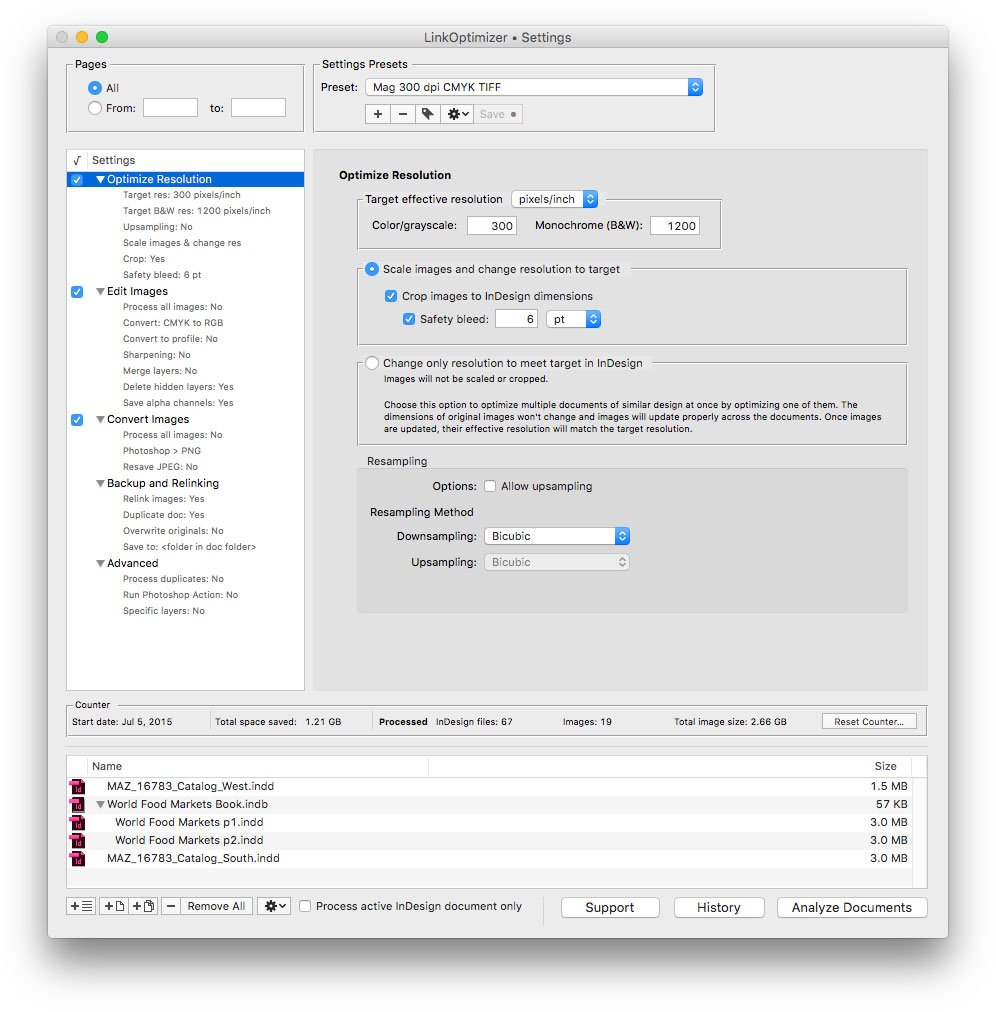
Zevrix Solutions announces LinkOptimizer 5.0.9, a compatibility update to its workflow automation solution for Adobe InDesign. Awarded 4 out of 5 stars by Computer Arts magazine, LinkOptimizer solves the problem of resizing InDesign links to their final dimensions at a target resolution automatically. The app also can also convert colors, perform essential image adjustments and convert image formats The new version makes LinkOptimizer compatible with the recently released macOS 10.12 Sierra.
Toronto (ON) Canada - Zevrix Solutions today is proud to announce the release of LinkOptimizer 5.0.9, a compatibility update to its popular workflow automation solution for Adobe InDesign. LinkOptimizer automates complex image manipulation tasks helping InDesign users reduce the size of image links, save processing time and production costs, and repurpose InDesign documents for web and mobile devices.
The new version makes LinkOptimizer compatible with the recently released macOS 10.12 Sierra and is offered as a free update to licensed users. The update also improves handling of monochrome images, fixes some minor UI glitches and offers a better management of duplicate links across multiple InDesign documents.
"LinkOptimizer is the one product no creative studio can live without," says Wayne Guy from Edge Graphics studio in Lake Balboa, California. "It saves hours of time, tediously replacing linked images, resizing, batch processing... If you're a designer or production artist, you need this."
LinkOptimizer works automatically with Adobe Photoshop to eliminate the excess image data of InDesign links, perform essential image adjustments and convert image formats. The software offers the following main features:
* Resize links to match their InDesign dimensions at a target resolution
* Convert colors and apply ICC profile
* Batch process InDesign files
* Merge layers and delete hidden ones
* Convert image formats
* Optimize files for web and mobile devices
* Run a Photoshop Action on each image
As a result, users can save gigabytes of disk space and hours of optimizing images manually, accelerate document output, reduce job turnaround and cut costs through faster processing.
Pricing and Availability:
LinkOptimizer can be purchased from Zevrix website for $259.95 USD (Light version: $179.95) as well as from authorized resellers. Trial is also available for download. The update is free for LinkOptimizer 5.x users and $130 to upgrade from previous versions. LinkOptimizer requires Mac OS X 10.6-10.12 and Adobe InDesign/Photoshop CS5-CC 2015.
Zevrix Solutions: http://zevrix.com
LinkOptimizer 5.0.9: http://zevrix.com/LinkOptimizer.php
Download LinkOptimizer: http://zevrix.com/LinkOptimizer.dmg
Purchase: http://zevrix.com/store.php
Screenshot: http://zevrix.com/screenshots/lo5/res-win.jpg
Located in Toronto, Canada, Zevrix Solutions provides automation and productivity solutions for Adobe Creative Cloud and Creative Suite software, PDF workflows, graphic file diagnostics and Microsoft Office output on Mac OS. Zevrix is dedicated to help professionals increase their profits through automating everyday tasks, producing error-free documents, saving disk space and cutting production costs. For more information, visit their website. Copyright (C) 2016 Zevrix Solutions. All Rights Reserved. Other trademarks and registered trademarks may be the property of their respective owners.
*******
Link To Article: http://prmac.com/release-id-80475.htm
*******
---------------------------------------------------------------------------------
Note that you can alter delivered distributions at any time.
Login to your account on prMac to alter your channel selection, or to opt-out at any time.
LinkOptimizer for Adobe InDesign Now Supports macOS Sierra - Published on 10/20/16
Zevrix Solutions announces LinkOptimizer 5.0.9, a compatibility update to its workflow automation solution for Adobe InDesign. Awarded 4 out of 5 stars by Computer Arts magazine, LinkOptimizer solves the problem of resizing InDesign links to their final dimensions at a target resolution automatically. The app also can also convert colors, perform essential image adjustments and convert image formats The new version makes LinkOptimizer compatible with the recently released macOS 10.12 Sierra.
Toronto (ON) Canada - Zevrix Solutions today is proud to announce the release of LinkOptimizer 5.0.9, a compatibility update to its popular workflow automation solution for Adobe InDesign. LinkOptimizer automates complex image manipulation tasks helping InDesign users reduce the size of image links, save processing time and production costs, and repurpose InDesign documents for web and mobile devices.
The new version makes LinkOptimizer compatible with the recently released macOS 10.12 Sierra and is offered as a free update to licensed users. The update also improves handling of monochrome images, fixes some minor UI glitches and offers a better management of duplicate links across multiple InDesign documents.
"LinkOptimizer is the one product no creative studio can live without," says Wayne Guy from Edge Graphics studio in Lake Balboa, California. "It saves hours of time, tediously replacing linked images, resizing, batch processing... If you're a designer or production artist, you need this."
LinkOptimizer works automatically with Adobe Photoshop to eliminate the excess image data of InDesign links, perform essential image adjustments and convert image formats. The software offers the following main features:
* Resize links to match their InDesign dimensions at a target resolution
* Convert colors and apply ICC profile
* Batch process InDesign files
* Merge layers and delete hidden ones
* Convert image formats
* Optimize files for web and mobile devices
* Run a Photoshop Action on each image
As a result, users can save gigabytes of disk space and hours of optimizing images manually, accelerate document output, reduce job turnaround and cut costs through faster processing.
Pricing and Availability:
LinkOptimizer can be purchased from Zevrix website for $259.95 USD (Light version: $179.95) as well as from authorized resellers. Trial is also available for download. The update is free for LinkOptimizer 5.x users and $130 to upgrade from previous versions. LinkOptimizer requires Mac OS X 10.6-10.12 and Adobe InDesign/Photoshop CS5-CC 2015.
Zevrix Solutions: http://zevrix.com
LinkOptimizer 5.0.9: http://zevrix.com/LinkOptimizer.php
Download LinkOptimizer: http://zevrix.com/LinkOptimizer.dmg
Purchase: http://zevrix.com/store.php
Screenshot: http://zevrix.com/screenshots/lo5/res-win.jpg
Located in Toronto, Canada, Zevrix Solutions provides automation and productivity solutions for Adobe Creative Cloud and Creative Suite software, PDF workflows, graphic file diagnostics and Microsoft Office output on Mac OS. Zevrix is dedicated to help professionals increase their profits through automating everyday tasks, producing error-free documents, saving disk space and cutting production costs. For more information, visit their website. Copyright (C) 2016 Zevrix Solutions. All Rights Reserved. Other trademarks and registered trademarks may be the property of their respective owners.
*******
Link To Article: http://prmac.com/release-id-80475.htm
*******
---------------------------------------------------------------------------------
Note that you can alter delivered distributions at any time.
Login to your account on prMac to alter your channel selection, or to opt-out at any time.
New Alfie Atkins game for kids out today on the App Store
A new article has been published at prMac.
New Alfie Atkins game for kids out today on the App Store - Published on 10/20/16
Good-game-experience studio, Gro Play today introduces Beep, beep, Alfie Atkins 1.0 , their new kids play app for iPhone, iPad and iPod touch devices. Developed for ages 3-9 years, Beep, beep, Alfie Atkins is a city builder game in which children develop a clean world and recycle different materials to build roads, houses, stores, schools, parks and much more. This is a game featuring many hours of fun for both young and old players.
Stockholm, Sweden - Beep, beep! Today the good-game-experience studio, Gro Play today introduces Beep, beep, Alfie Atkins 1.0, their new kids play app for iPhone, iPad and iPod touch devices. Developed for ages 3-9 years, Beep, beep, Alfie Atkins is a city builder game in which children develop a clean world and recycle different materials to build roads, houses, stores, schools, parks and much more. As the community grows, the players and Alfie will help the citiziens with fun things/activities in the city.
Children will be able to recharge electric cars, shop in the store, go to the doctor's, pick fruit, rake leaves, and stop fires with fire hose. In return the players will receive lots of love from the citizens and generous rewards to continue the important work. This is a game featuring many hours of fun for both young and old players.
Features:
* Multi touch - play together simultaneously
* Build, craft, paint, play - explore a child's creativity
* No elements featuring stress or timers
* Kid friendly interface - easy to understand and navigate
* Totally free from 3rd party ads and commercials
Beep, beep, Alfie Atkins is a game specially developed for children aged 3 to 9 years old. There are no elements featuring stress or timers. Children can play the game in the time they need and there's always an opportunity for them to continue playing the game.
The Free Version:
* 5 city blocks with roads and many construction sites where you can build houses, parks and stores/shops
* 9 different mini games
* 5 vehicles to drive
* Totally free to play
* Totally free from 3rd party ads and commercials
The Full Version:
* The full version is purchased through the in app purchase function, this is the only purchase in the game
* The player keeps all progress and can continue to build what they started in the free version
* Total access to the entire world (a world that will continue to grow in future updates)
* 25 vehicles (more to follow in future updates)
* 15 mini games (more to follow in future updates)
Device Requirements:
* iPhone, iPad, and iPod touch
* Requires iOS�7.0 or later
* 236 MB
Pricing and Availability:
Beep, beep, Alfie Atkins 1.0 is Free (with in-app purchase) and available worldwide through the App Store in the Education category. To buy the full version the users can make a one time purchase ($3.99) inside the app. Players will be able to continue building the world they have created in the free version. There is also an Android version available on Google Play. For more information, please contact Kristian Lundquist.
Gro Play: http://www.groplay.com
Beep, beep, Alfie Atkins 1.0: http://www.groplay.com/apps/alfons-aberg-beep-alfie-atkins/
Download from iTunes: https://itunes.apple.com/app/beep-beep-alfie-atkins/id1129281724
Screenshots: http://a1.mzstatic.com/us/r30/Purple62/v4/1b/b7/d1/1bb7d1a9-644b-2a67-d01e-f5bd274836f9/sc552x414.jpeg
App Icon: http://a3.mzstatic.com/us/r30/Purple62/v4/70/71/12/707112bc-930a-b2c5-16aa-a0b2c9dd0415/icon175x175.jpeg
Press Kit (zip): https://dl.dropboxusercontent.com/u/2856682/Beep_beep_Alfie_Atkins_Screenshots.zip
Gro Play is an independent creative studio that makes eco-educational toys, games and content for children. Gro Play creates Good Game experiences in order to entertain and inspire children and their families to learn more about health, wellbeing and sustainable living. We believe that Play is not only the most fun but also the most powerful way of learning. By entertaining and inspiring children and their parents, together we are shaping a healthier and more sustainable future. Gro Play is part of STING - Stockholm Innovation & Growth and Impact Hub Scaling. Gro Play is a proud winner of the Swedish Living Green award. Copyright (C) 2010-2015 Gro Play Digital AB. All Rights Reserved. Apple, the Apple logo, iPhone, iPad, iPad mini, iPod touch, and Mac are registered trademarks of Apple Inc. in the U.S. and/or other countries. Other trademarks and registered trademarks may be the property of their respective owners.
*******
Link To Article: http://prmac.com/release-id-80473.htm
*******
---------------------------------------------------------------------------------
Note that you can alter delivered distributions at any time.
Login to your account on prMac to alter your channel selection, or to opt-out at any time.
New Alfie Atkins game for kids out today on the App Store - Published on 10/20/16
Good-game-experience studio, Gro Play today introduces Beep, beep, Alfie Atkins 1.0 , their new kids play app for iPhone, iPad and iPod touch devices. Developed for ages 3-9 years, Beep, beep, Alfie Atkins is a city builder game in which children develop a clean world and recycle different materials to build roads, houses, stores, schools, parks and much more. This is a game featuring many hours of fun for both young and old players.
Stockholm, Sweden - Beep, beep! Today the good-game-experience studio, Gro Play today introduces Beep, beep, Alfie Atkins 1.0, their new kids play app for iPhone, iPad and iPod touch devices. Developed for ages 3-9 years, Beep, beep, Alfie Atkins is a city builder game in which children develop a clean world and recycle different materials to build roads, houses, stores, schools, parks and much more. As the community grows, the players and Alfie will help the citiziens with fun things/activities in the city.
Children will be able to recharge electric cars, shop in the store, go to the doctor's, pick fruit, rake leaves, and stop fires with fire hose. In return the players will receive lots of love from the citizens and generous rewards to continue the important work. This is a game featuring many hours of fun for both young and old players.
Features:
* Multi touch - play together simultaneously
* Build, craft, paint, play - explore a child's creativity
* No elements featuring stress or timers
* Kid friendly interface - easy to understand and navigate
* Totally free from 3rd party ads and commercials
Beep, beep, Alfie Atkins is a game specially developed for children aged 3 to 9 years old. There are no elements featuring stress or timers. Children can play the game in the time they need and there's always an opportunity for them to continue playing the game.
The Free Version:
* 5 city blocks with roads and many construction sites where you can build houses, parks and stores/shops
* 9 different mini games
* 5 vehicles to drive
* Totally free to play
* Totally free from 3rd party ads and commercials
The Full Version:
* The full version is purchased through the in app purchase function, this is the only purchase in the game
* The player keeps all progress and can continue to build what they started in the free version
* Total access to the entire world (a world that will continue to grow in future updates)
* 25 vehicles (more to follow in future updates)
* 15 mini games (more to follow in future updates)
Device Requirements:
* iPhone, iPad, and iPod touch
* Requires iOS�7.0 or later
* 236 MB
Pricing and Availability:
Beep, beep, Alfie Atkins 1.0 is Free (with in-app purchase) and available worldwide through the App Store in the Education category. To buy the full version the users can make a one time purchase ($3.99) inside the app. Players will be able to continue building the world they have created in the free version. There is also an Android version available on Google Play. For more information, please contact Kristian Lundquist.
Gro Play: http://www.groplay.com
Beep, beep, Alfie Atkins 1.0: http://www.groplay.com/apps/alfons-aberg-beep-alfie-atkins/
Download from iTunes: https://itunes.apple.com/app/beep-beep-alfie-atkins/id1129281724
Screenshots: http://a1.mzstatic.com/us/r30/Purple62/v4/1b/b7/d1/1bb7d1a9-644b-2a67-d01e-f5bd274836f9/sc552x414.jpeg

App Icon: http://a3.mzstatic.com/us/r30/Purple62/v4/70/71/12/707112bc-930a-b2c5-16aa-a0b2c9dd0415/icon175x175.jpeg

Press Kit (zip): https://dl.dropboxusercontent.com/u/2856682/Beep_beep_Alfie_Atkins_Screenshots.zip
Gro Play is an independent creative studio that makes eco-educational toys, games and content for children. Gro Play creates Good Game experiences in order to entertain and inspire children and their families to learn more about health, wellbeing and sustainable living. We believe that Play is not only the most fun but also the most powerful way of learning. By entertaining and inspiring children and their parents, together we are shaping a healthier and more sustainable future. Gro Play is part of STING - Stockholm Innovation & Growth and Impact Hub Scaling. Gro Play is a proud winner of the Swedish Living Green award. Copyright (C) 2010-2015 Gro Play Digital AB. All Rights Reserved. Apple, the Apple logo, iPhone, iPad, iPad mini, iPod touch, and Mac are registered trademarks of Apple Inc. in the U.S. and/or other countries. Other trademarks and registered trademarks may be the property of their respective owners.
*******
Link To Article: http://prmac.com/release-id-80473.htm
*******
---------------------------------------------------------------------------------
Note that you can alter delivered distributions at any time.
Login to your account on prMac to alter your channel selection, or to opt-out at any time.
Rwanda Radio Live 1.0 for iOS - Release Info
A new article has been published at prMac.
Rwanda Radio Live 1.0 for iOS - Release Info - Published on 10/19/16
LastThink announces the release of Rwanda Radio Live 1.0, their highly customizable Radio app for iOS devices. Users can Listen to the most popular Rwanda Music, Talk Shows and News on your iPhone, iPad, iPod touch with our Rwanda Live Radio, which is definitely the best one among Free Radio Station. The app offers event channels, news and media channels, events and music channels, weather programs, daily news, latest hits and also contemporary commercials.
Yerevan, Armenia - LastThink is proud to announce the release of Rwanda Radio Live 1.0 , their highly customizable Radio application developed for iPhone, iPad, and iPod touch devices. From now on you don't have to tune to the right station you want, as finding your favorite station is simply a click away.
Features:
* You have any doubts concerning the quality and the effectiveness of our Rwanda Live Radio? Believe us all our Radio stations work properly. Moreover, they are always tested by our highly qualified professionals.
* You discover a new song, but you don't know the name of it? This application solves that problem and provides you the adequate information about the song you are listening to.
* You want to share your preferable songs or whatever you listen to with your friends or relatives? That's not a matter of concern as long as you are with us. Our innovative application will grant you an opportunity of sharing anything you like right from the app on your Facebook, Twitter or any other web-page.
* You are easily bored by the same radio stations? Our frequent updates, new features and diverse stations will not let you get disappointed.
We grant you a chance of enjoying event channels, news and media channels, events and music channels, which provide its listeners with weather programs, daily news, latest hits and also contemporary commercials.
If you however experience any issues, please do not hesitate to contact us if you'd like to share your experience with Online Radio Stations, or provide suggestions on how we could improve the product further. We will be more than happy to get in touch.
NOTE: We have selected data from the internet and if any assembly or constitution doesn't want us to show the content of the unit, please recommend us to remove it.
Device Requirements:
* iPhone, iPad, and iPod touch
* Requires iOS 7.0 or later
* Universal Application
* 27.4 MB
Pricing and Availability:
Rwanda Radio Live 1.0 is free and available worldwide exclusively through the App Store in the Music category.
LastThink: http://lastthink.com/
Rwanda Radio Live 1.0: https://www.facebook.com/IphoneRegion
Download from iTunes: https://itunes.apple.com/app/rwanda-radio-live/id946006530
Screenshot: http://a4.mzstatic.com/us/r30/Purple3/v4/24/33/4f/24334f44-9998-79eb-0707-cbe7b349284c/screen696x696.jpeg
App Icon: http://a5.mzstatic.com/us/r30/Purple1/v4/55/78/34/557834db-0c7d-4058-824f-a48f2d2d67c0/icon175x175.jpeg
LastThink is an IT company with a focus on mobile development. It has extended its list of services since 2012 to offer high-end business process management, system integration, as well as up-to-date communication solutions. LastThink's mission is to deliver maximum business value to its customers by designing, developing, implementing and maintaining efficient and high quality software solutions aligned with their most essential business needs. Their team will always do its best to meet client expectations. All Material and Software Copyright (C) 2016 LastThink LLC. All Rights Reserved. Apple, the Apple logo, iPhone, iPad and iPod are registered trademarks of Apple Inc. in the U.S. and/or other countries.
*******
Link To Article: http://prmac.com/release-id-80472.htm
*******
---------------------------------------------------------------------------------
Note that you can alter delivered distributions at any time.
Login to your account on prMac to alter your channel selection, or to opt-out at any time.
Rwanda Radio Live 1.0 for iOS - Release Info - Published on 10/19/16
LastThink announces the release of Rwanda Radio Live 1.0, their highly customizable Radio app for iOS devices. Users can Listen to the most popular Rwanda Music, Talk Shows and News on your iPhone, iPad, iPod touch with our Rwanda Live Radio, which is definitely the best one among Free Radio Station. The app offers event channels, news and media channels, events and music channels, weather programs, daily news, latest hits and also contemporary commercials.
Yerevan, Armenia - LastThink is proud to announce the release of Rwanda Radio Live 1.0 , their highly customizable Radio application developed for iPhone, iPad, and iPod touch devices. From now on you don't have to tune to the right station you want, as finding your favorite station is simply a click away.
Features:
* You have any doubts concerning the quality and the effectiveness of our Rwanda Live Radio? Believe us all our Radio stations work properly. Moreover, they are always tested by our highly qualified professionals.
* You discover a new song, but you don't know the name of it? This application solves that problem and provides you the adequate information about the song you are listening to.
* You want to share your preferable songs or whatever you listen to with your friends or relatives? That's not a matter of concern as long as you are with us. Our innovative application will grant you an opportunity of sharing anything you like right from the app on your Facebook, Twitter or any other web-page.
* You are easily bored by the same radio stations? Our frequent updates, new features and diverse stations will not let you get disappointed.
We grant you a chance of enjoying event channels, news and media channels, events and music channels, which provide its listeners with weather programs, daily news, latest hits and also contemporary commercials.
If you however experience any issues, please do not hesitate to contact us if you'd like to share your experience with Online Radio Stations, or provide suggestions on how we could improve the product further. We will be more than happy to get in touch.
NOTE: We have selected data from the internet and if any assembly or constitution doesn't want us to show the content of the unit, please recommend us to remove it.
Device Requirements:
* iPhone, iPad, and iPod touch
* Requires iOS 7.0 or later
* Universal Application
* 27.4 MB
Pricing and Availability:
Rwanda Radio Live 1.0 is free and available worldwide exclusively through the App Store in the Music category.
LastThink: http://lastthink.com/
Rwanda Radio Live 1.0: https://www.facebook.com/IphoneRegion
Download from iTunes: https://itunes.apple.com/app/rwanda-radio-live/id946006530
Screenshot: http://a4.mzstatic.com/us/r30/Purple3/v4/24/33/4f/24334f44-9998-79eb-0707-cbe7b349284c/screen696x696.jpeg

App Icon: http://a5.mzstatic.com/us/r30/Purple1/v4/55/78/34/557834db-0c7d-4058-824f-a48f2d2d67c0/icon175x175.jpeg

LastThink is an IT company with a focus on mobile development. It has extended its list of services since 2012 to offer high-end business process management, system integration, as well as up-to-date communication solutions. LastThink's mission is to deliver maximum business value to its customers by designing, developing, implementing and maintaining efficient and high quality software solutions aligned with their most essential business needs. Their team will always do its best to meet client expectations. All Material and Software Copyright (C) 2016 LastThink LLC. All Rights Reserved. Apple, the Apple logo, iPhone, iPad and iPod are registered trademarks of Apple Inc. in the U.S. and/or other countries.
*******
Link To Article: http://prmac.com/release-id-80472.htm
*******
---------------------------------------------------------------------------------
Note that you can alter delivered distributions at any time.
Login to your account on prMac to alter your channel selection, or to opt-out at any time.
Developer of iOS Ambient App TaoMix Launches Halloween Edition
A new article has been published at prMac.
Developer of iOS Ambient App TaoMix Launches Halloween Edition - Published on 10/19/16
Montreal based inookta studio inc. today introduces TaoMix Halloween 1.0, its new spooky ambient sound app developed exclusively for iPhone and iPad devices. TaoMix Halloween makes it easy for anyone to add a spooky ambience to their home or party for this coming Halloween. The app offers a collection of high-quality sounds that users can choose to include in their ambience: zombies, ghosts, a haunted house, an abandoned hospital, crows, bats, thunder and many more.
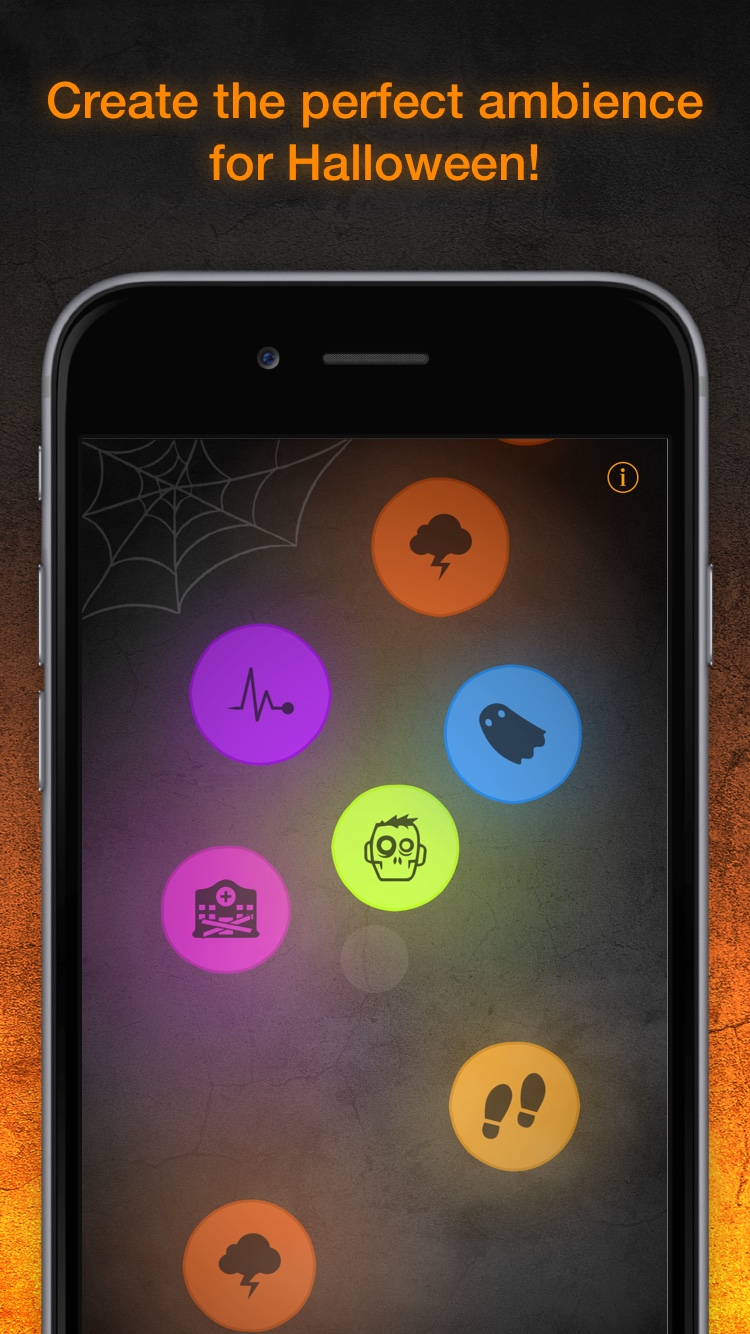
Montreal, Canada - inookta studio inc. today is pleased to announce the release and immediate availability of TaoMix Halloween 1.0, its new spooky ambient sound app developed exclusively for iPhone and iPad devices. TaoMix Halloween makes it easy for anyone to add a spooky ambience to their home or party for the next Halloween. The app offers a collection of high-quality sounds that users can choose to include in their ambience: zombies, ghosts, a haunted house, an abandoned hospital, crows, bats, thunder and many more.
TaoMix Halloween will evolve over time by continuously adding and removing these sounds, changing the mix and generating random spine-chilling audio and visual events, depending on the selected level of scariness. While intuitive and easy-to-use, the TaoMix Halloween app offers great possibilities by letting users record and modify their own sounds to extend the included library. The app is based on the same pseudo random ambience generation algorithm developed by the company and used in the iOS relaxing ambient app TaoMix 2.
Main features of the app:
* Easy to use, minimalist and intuitive
* Select high quality sounds to be included in your mix, and watch it evolve over time
* Control the level of scariness of your ambience
* Record your own sounds and apply filters
* Mix with other audio apps
* Let yourself be surprised with spine-chilling random events
Device Requirements:
* iPhone, iPad, and iPod touch
* Requires iOS�9.0 or later
* 85.5 MB
Pricing and Availability:
TaoMix Halloween 1.0 is $1.99 USD (or equivalent amount in other currencies) and available worldwide exclusively through the App Store in the Entertainment category. For more information, please contact Sebastien Mourey.
inookta studio: http://inookta.com/
TaoMix Halloween 1.0: https://itunes.apple.com/app/id1163405041
Screenshot 1: http://public.inookta.com/taomix-halloween/taomix-halloween-iPhone7-1.jpg
Screenshot 2: http://public.inookta.com/taomix-halloween/taomix-halloween-iPhone7-2.jpg
App Icon: http://public.inookta.com/taomix-halloween/taomix-halloween-icon.png
Press kit (zip): http://public.inookta.com/taomix-halloween/taomix-halloween-presskit.zip
inookta is an indie studio based in Montreal, Canada, whose mission is to develop intuitive digital tools for sound creation and exploration. All Material and Software (C) Copyright 2016 inookta studio inc. All Rights Reserved. Apple, the Apple logo, iPhone, iPod and iPad are registered trademarks of Apple Inc. in the U.S. and/or other countries. Other trademarks and registered trademarks may be the property of their respective owners.
*******
Link To Article: http://prmac.com/release-id-80470.htm
*******
---------------------------------------------------------------------------------
Note that you can alter delivered distributions at any time.
Login to your account on prMac to alter your channel selection, or to opt-out at any time.
Developer of iOS Ambient App TaoMix Launches Halloween Edition - Published on 10/19/16
Montreal based inookta studio inc. today introduces TaoMix Halloween 1.0, its new spooky ambient sound app developed exclusively for iPhone and iPad devices. TaoMix Halloween makes it easy for anyone to add a spooky ambience to their home or party for this coming Halloween. The app offers a collection of high-quality sounds that users can choose to include in their ambience: zombies, ghosts, a haunted house, an abandoned hospital, crows, bats, thunder and many more.
Montreal, Canada - inookta studio inc. today is pleased to announce the release and immediate availability of TaoMix Halloween 1.0, its new spooky ambient sound app developed exclusively for iPhone and iPad devices. TaoMix Halloween makes it easy for anyone to add a spooky ambience to their home or party for the next Halloween. The app offers a collection of high-quality sounds that users can choose to include in their ambience: zombies, ghosts, a haunted house, an abandoned hospital, crows, bats, thunder and many more.
TaoMix Halloween will evolve over time by continuously adding and removing these sounds, changing the mix and generating random spine-chilling audio and visual events, depending on the selected level of scariness. While intuitive and easy-to-use, the TaoMix Halloween app offers great possibilities by letting users record and modify their own sounds to extend the included library. The app is based on the same pseudo random ambience generation algorithm developed by the company and used in the iOS relaxing ambient app TaoMix 2.
Main features of the app:
* Easy to use, minimalist and intuitive
* Select high quality sounds to be included in your mix, and watch it evolve over time
* Control the level of scariness of your ambience
* Record your own sounds and apply filters
* Mix with other audio apps
* Let yourself be surprised with spine-chilling random events
Device Requirements:
* iPhone, iPad, and iPod touch
* Requires iOS�9.0 or later
* 85.5 MB
Pricing and Availability:
TaoMix Halloween 1.0 is $1.99 USD (or equivalent amount in other currencies) and available worldwide exclusively through the App Store in the Entertainment category. For more information, please contact Sebastien Mourey.
inookta studio: http://inookta.com/
TaoMix Halloween 1.0: https://itunes.apple.com/app/id1163405041
Screenshot 1: http://public.inookta.com/taomix-halloween/taomix-halloween-iPhone7-1.jpg
Screenshot 2: http://public.inookta.com/taomix-halloween/taomix-halloween-iPhone7-2.jpg

App Icon: http://public.inookta.com/taomix-halloween/taomix-halloween-icon.png

Press kit (zip): http://public.inookta.com/taomix-halloween/taomix-halloween-presskit.zip
inookta is an indie studio based in Montreal, Canada, whose mission is to develop intuitive digital tools for sound creation and exploration. All Material and Software (C) Copyright 2016 inookta studio inc. All Rights Reserved. Apple, the Apple logo, iPhone, iPod and iPad are registered trademarks of Apple Inc. in the U.S. and/or other countries. Other trademarks and registered trademarks may be the property of their respective owners.
*******
Link To Article: http://prmac.com/release-id-80470.htm
*******
---------------------------------------------------------------------------------
Note that you can alter delivered distributions at any time.
Login to your account on prMac to alter your channel selection, or to opt-out at any time.
Tropical Software releases TopXNotes 1.8.3
A new article has been published at prMac.
Tropical Software releases TopXNotes 1.8.3 - Published on 10/19/16
Florida based Tropical Software today announces TopXNotes 1.8.3, an update to their award-winning, full-featured personal information manager for macOS. Create, view, organize, and instantly access your Mac notes with TopXNotes. Version 1.8.3 is our most stable, easiest-to-use version of TopXNotes, with a few new features, performance enhancements and bug fixes. TopXNotes 1.8.3 keeps your notes synchronized between TopXNotes for Mac and TopXNotes for iOS.
Atlantic Beach, Florida - Tropical Software today is proud to announce that TopXNotes for Mac, an app that allows you to create a note by typing, dragging, or importing, has been updated to version 1.8.3. The upgrade provides performance enhancements, a few new features, and bug fixes. You can now "Email Current Note" (or part of a note). The default toolbar icon set has been completely re-arranged.
According to Tropical Software President, James Lee:
"We have worked hard on these last releases to polish the user interface and add new controls to "Email a Note" and "Search". Plus we made it easier to find encrypted/passworded notes that are now badged using a little lock icon. With these plus other enhancements, upgrades, and fixes we think TopXNotes will be even more useful to get you organized on Mac."
With TopXNotes you drag and drop to create notes from any other text application or drag to import text and/or RTF documents. You can also cut and paste from other applications. Once the information is created, TopXNotes' category system can be used to create categories that meet your needs or file them in folder-like groups. For example, you can have one for home, one for office, and one for school.
The app allows you to build your own categories (with names, icons and colors). The NoteOrganizer feature lets you filter your notes by name, note page number, date created, date modified or category.
TopXNotes' MultiView feature allows you to view more than one note at once in adjacent views. While you work, TopXNotes' sliding Text toolbar automatically hovers right above where you are typing.
Once you have your notes organized, you can prioritize them with TopXNotes' QuickNotes feature, and then use password protection to protect them from prying eyes. Finally, you can use TopXNotes for Mac and its mobile partner, TopXNotes iOS (for iPhone, iPad and iPod) to take your notes with you.
Tired of all those loose bits of information spread all over your hard drive in multiple documents requiring opening multiple apps to see them? Opening many apps sucks up your valuable Mac memory and slows it down. Are you tired of trying to remember which note was written in which application and where you put it? Use TopXNotes to import all your notes and organize them in one place with the option to password protect and encrypt sensitive information.
TopXNotes - Your Personal Information Organizer:
Use TopXNotes advanced drag and drop to create notes from any other text application, or to drag to import text and/or RTF documents. On the other hand, cut and paste from other applications. Once the information is created, use TopXNotes' category system to create categories that meet your needs, or file in folder-like groups. Have one for home, one for office, and one for school, or a car project, or recipes, or anything at all.
TopXNotes - Your Personal Information Organizer:
As a Mac user, the Mac's desktop Finder is familiar to you, so you will find our NoteOrganizer highly intuitive. To improve that experience, we have moved beyond the Finder to allow you to build your own Categories (with names, icons and colors) to customize the experience for your needs. You will use the TopXNotes NoteOrganizer to organize your notes and quickly find things. TopXNotes NoteOrganizer lets you filter your notes by name, note page number, date created, date modified or category. You can also rapidly reverse sort or instantly switch between multiple NoteOrganizer display layouts.
TopXNotes - MultiView Convenience:
Use TopXNotes' unique MultiView feature to view more than one note at once in adjacent views. Think of it like opening a book to multiple pages at a time.
TopXNotes - MultiView Editing:
Using MultiView speeds up note editing by simplifying comparing notes, rearranging information from one note to another, combining notes, separating a long note into 2 or more notes, and other tasks. While you work, TopXNotes sliding Text toolbar automatically hovers right above where you are typing.
TopXNotes - MultiViewing:
In addition to helping edit your notes, TopXNotes MultiView allows you to show multiple notes on a theme at once. For instance, you might have a shopping list, budget and websites in adjacent notes for shopping. Alternatively, you might organize your day by having a list of calls, a list of errands, a project outline, and today's To-Do list side by side by side by side. There is no end to the combinations you will find useful.
TopXNotes - QuickNotes at your fingertips:
Once you have your notes organized, prioritize them with TopXNotes QuickNotes feature. Just click to check the QuickNotes category for your most critical information. Now you will be able to instantly access that note from the QuickNotes menu. Whether you have many windows open or the TopXNotes main window minimized, your QuickNotes are always instantly accessible from the desktop or from the TopXNotes Dock menu for your convenience.
TopXNotes - Security:
Once you have your notes organized be sure to use our password protection to encrypt those notes with sensitive information, or you can set a password to shield all your notes from prying eyes. In this fashion, you have easy access to all your information, including the sensitive items.
TopXNotes Sync - Notes "On the Go":
Use TopXNotes Mac and its mobile partner, TopXNotes touch (for iPhone, iPad and iPod touch) to take those notes with you that you want while you are away including shopping lists, to-do lists, directions, or anything you want.
TopXNotes - Reviews:
TopXNotes was awarded 4 out of 5 mice by Macworld magazine in their "Summer of Mac Gems" series of reviews, by Macworld Australia, and recently by Macworld UK. TopXNotes was rated "9 of 10" by Macsimum News (now part of MacTech), and highly rated by the Macintosh Guild, Macworld, Macworld UK and Mac360. Dennis Sellers recently rated it 10 of 10 for Apple Daily Report. TopXNotes has been critically reviewed with high marks on many occasions and you can find links to all the reviews on our website.
TopXNotes - Macworld Review:
Macworld praised the TopXNotes "clean, single window interface that puts controls for highlighting and marking up your text right at your fingertips," as well as for its "killer" QuickNotes feature.
TopXNotes - Mac User Group Review:
Sue Beal, president of the Upper Keys (Florida) Macintosh Users Group calls TopXNotes "Inexpensive, unobtrusive, and just plain handy."
TopXNotes - Mac360:
Ron Mc Elfresh, of Mac360 stated: "I'm a notes freak. I have notes on everything. From to-do items to code snippets to tasks and projects to article ideas. Here's an understated, unloved, deceptively powerful notes app worthy of some Mac love...it's loaded with user features that set it apart from other note taking apps. TopXNotes is deceptively powerful and flexible, probably because the interface is immediately familiar."
Release Specific Information
TopXNotes 1.8.3 has the following changes:
New Features:
* Mac OS X 10.12 (Sierra) Ready
* The Tropical Store version of the app now requires a minimum MacOS version of 10.6, the same as the Mac Apple Store version requires
* Added "Email Current Note" command to Notes Menu, and to the toolbar
* Encrypted notes now indicated in NoteOrganizer by a lock symbol in the note icon
Changed Features:
* Completely re-arranged default toolbar set
Fixed:
* Fixed crash if a note currently being searched by Find command, is deleted
* Fixed crash after quit if note was password protected or unprotected
* If "Find" or "Email Note" tools existed in current toolbar during session
Pricing and Availability:
Try Tropical's reliable TopXNotes 1.8.3 to "get organized" today! TopXNotes 1.8.3 is available for $39.95 (USD) from the Tropical Software web site, the Apple Mac App store, Amazon, and other select Macintosh software resellers. TopXNotes 1.8.3 is a free update to customers who have already purchased version 1.5 or later. Existing customers with an older version (previous to 1.5) can upgrade to version 1.8.3 for only $19.95 from the company's web site.
TopXNotes 1.8.3: http://www.tropic4.com/topxnotes.html
TopXNotes Anatomy: http://www.tropic4.com/anatomy.html
Download Free Trial (zip): http://www.tropic4.com/download/TopXNotes.zip
Purchase: http://sites.fastspring.com/tropic4/product/TopXNotes
Macworld and Other Reviews: http://www.tropic4.com/products/topxnotes/reviews.html
App Icon: http://www.tropic4.com/images/GetOrganizedNoReflect.png
Tropical Software makes the award-winning TopXNotes, a modern personal note manager with state of the art proprietary encryption technology for the ultimate in securing personal information. Located in Atlantic Beach, Florida, Tropical Software is owned and operated by former Apple employee James Lee, and is dedicated to improving the lives of its customers by offering easy to use productivity software for Macs and Apple touch devices including iPhone, iPod touch and iPad. Copyright (C) 2016 Tropical Software. All Rights Reserved. Apple, the Apple logo, iPhone, iPod, iPad and Macintosh are registered trademarks of Apple Inc. in the U.S. and/or other countries.
*******
Link To Article: http://prmac.com/release-id-80471.htm
*******
---------------------------------------------------------------------------------
Note that you can alter delivered distributions at any time.
Login to your account on prMac to alter your channel selection, or to opt-out at any time.
Tropical Software releases TopXNotes 1.8.3 - Published on 10/19/16
Florida based Tropical Software today announces TopXNotes 1.8.3, an update to their award-winning, full-featured personal information manager for macOS. Create, view, organize, and instantly access your Mac notes with TopXNotes. Version 1.8.3 is our most stable, easiest-to-use version of TopXNotes, with a few new features, performance enhancements and bug fixes. TopXNotes 1.8.3 keeps your notes synchronized between TopXNotes for Mac and TopXNotes for iOS.
Atlantic Beach, Florida - Tropical Software today is proud to announce that TopXNotes for Mac, an app that allows you to create a note by typing, dragging, or importing, has been updated to version 1.8.3. The upgrade provides performance enhancements, a few new features, and bug fixes. You can now "Email Current Note" (or part of a note). The default toolbar icon set has been completely re-arranged.
According to Tropical Software President, James Lee:
"We have worked hard on these last releases to polish the user interface and add new controls to "Email a Note" and "Search". Plus we made it easier to find encrypted/passworded notes that are now badged using a little lock icon. With these plus other enhancements, upgrades, and fixes we think TopXNotes will be even more useful to get you organized on Mac."
With TopXNotes you drag and drop to create notes from any other text application or drag to import text and/or RTF documents. You can also cut and paste from other applications. Once the information is created, TopXNotes' category system can be used to create categories that meet your needs or file them in folder-like groups. For example, you can have one for home, one for office, and one for school.
The app allows you to build your own categories (with names, icons and colors). The NoteOrganizer feature lets you filter your notes by name, note page number, date created, date modified or category.
TopXNotes' MultiView feature allows you to view more than one note at once in adjacent views. While you work, TopXNotes' sliding Text toolbar automatically hovers right above where you are typing.
Once you have your notes organized, you can prioritize them with TopXNotes' QuickNotes feature, and then use password protection to protect them from prying eyes. Finally, you can use TopXNotes for Mac and its mobile partner, TopXNotes iOS (for iPhone, iPad and iPod) to take your notes with you.
Tired of all those loose bits of information spread all over your hard drive in multiple documents requiring opening multiple apps to see them? Opening many apps sucks up your valuable Mac memory and slows it down. Are you tired of trying to remember which note was written in which application and where you put it? Use TopXNotes to import all your notes and organize them in one place with the option to password protect and encrypt sensitive information.
TopXNotes - Your Personal Information Organizer:
Use TopXNotes advanced drag and drop to create notes from any other text application, or to drag to import text and/or RTF documents. On the other hand, cut and paste from other applications. Once the information is created, use TopXNotes' category system to create categories that meet your needs, or file in folder-like groups. Have one for home, one for office, and one for school, or a car project, or recipes, or anything at all.
TopXNotes - Your Personal Information Organizer:
As a Mac user, the Mac's desktop Finder is familiar to you, so you will find our NoteOrganizer highly intuitive. To improve that experience, we have moved beyond the Finder to allow you to build your own Categories (with names, icons and colors) to customize the experience for your needs. You will use the TopXNotes NoteOrganizer to organize your notes and quickly find things. TopXNotes NoteOrganizer lets you filter your notes by name, note page number, date created, date modified or category. You can also rapidly reverse sort or instantly switch between multiple NoteOrganizer display layouts.
TopXNotes - MultiView Convenience:
Use TopXNotes' unique MultiView feature to view more than one note at once in adjacent views. Think of it like opening a book to multiple pages at a time.
TopXNotes - MultiView Editing:
Using MultiView speeds up note editing by simplifying comparing notes, rearranging information from one note to another, combining notes, separating a long note into 2 or more notes, and other tasks. While you work, TopXNotes sliding Text toolbar automatically hovers right above where you are typing.
TopXNotes - MultiViewing:
In addition to helping edit your notes, TopXNotes MultiView allows you to show multiple notes on a theme at once. For instance, you might have a shopping list, budget and websites in adjacent notes for shopping. Alternatively, you might organize your day by having a list of calls, a list of errands, a project outline, and today's To-Do list side by side by side by side. There is no end to the combinations you will find useful.
TopXNotes - QuickNotes at your fingertips:
Once you have your notes organized, prioritize them with TopXNotes QuickNotes feature. Just click to check the QuickNotes category for your most critical information. Now you will be able to instantly access that note from the QuickNotes menu. Whether you have many windows open or the TopXNotes main window minimized, your QuickNotes are always instantly accessible from the desktop or from the TopXNotes Dock menu for your convenience.
TopXNotes - Security:
Once you have your notes organized be sure to use our password protection to encrypt those notes with sensitive information, or you can set a password to shield all your notes from prying eyes. In this fashion, you have easy access to all your information, including the sensitive items.
TopXNotes Sync - Notes "On the Go":
Use TopXNotes Mac and its mobile partner, TopXNotes touch (for iPhone, iPad and iPod touch) to take those notes with you that you want while you are away including shopping lists, to-do lists, directions, or anything you want.
TopXNotes - Reviews:
TopXNotes was awarded 4 out of 5 mice by Macworld magazine in their "Summer of Mac Gems" series of reviews, by Macworld Australia, and recently by Macworld UK. TopXNotes was rated "9 of 10" by Macsimum News (now part of MacTech), and highly rated by the Macintosh Guild, Macworld, Macworld UK and Mac360. Dennis Sellers recently rated it 10 of 10 for Apple Daily Report. TopXNotes has been critically reviewed with high marks on many occasions and you can find links to all the reviews on our website.
TopXNotes - Macworld Review:
Macworld praised the TopXNotes "clean, single window interface that puts controls for highlighting and marking up your text right at your fingertips," as well as for its "killer" QuickNotes feature.
TopXNotes - Mac User Group Review:
Sue Beal, president of the Upper Keys (Florida) Macintosh Users Group calls TopXNotes "Inexpensive, unobtrusive, and just plain handy."
TopXNotes - Mac360:
Ron Mc Elfresh, of Mac360 stated: "I'm a notes freak. I have notes on everything. From to-do items to code snippets to tasks and projects to article ideas. Here's an understated, unloved, deceptively powerful notes app worthy of some Mac love...it's loaded with user features that set it apart from other note taking apps. TopXNotes is deceptively powerful and flexible, probably because the interface is immediately familiar."
Release Specific Information
TopXNotes 1.8.3 has the following changes:
New Features:
* Mac OS X 10.12 (Sierra) Ready
* The Tropical Store version of the app now requires a minimum MacOS version of 10.6, the same as the Mac Apple Store version requires
* Added "Email Current Note" command to Notes Menu, and to the toolbar
* Encrypted notes now indicated in NoteOrganizer by a lock symbol in the note icon
Changed Features:
* Completely re-arranged default toolbar set
Fixed:
* Fixed crash if a note currently being searched by Find command, is deleted
* Fixed crash after quit if note was password protected or unprotected
* If "Find" or "Email Note" tools existed in current toolbar during session
Pricing and Availability:
Try Tropical's reliable TopXNotes 1.8.3 to "get organized" today! TopXNotes 1.8.3 is available for $39.95 (USD) from the Tropical Software web site, the Apple Mac App store, Amazon, and other select Macintosh software resellers. TopXNotes 1.8.3 is a free update to customers who have already purchased version 1.5 or later. Existing customers with an older version (previous to 1.5) can upgrade to version 1.8.3 for only $19.95 from the company's web site.
TopXNotes 1.8.3: http://www.tropic4.com/topxnotes.html
TopXNotes Anatomy: http://www.tropic4.com/anatomy.html
Download Free Trial (zip): http://www.tropic4.com/download/TopXNotes.zip
Purchase: http://sites.fastspring.com/tropic4/product/TopXNotes
Macworld and Other Reviews: http://www.tropic4.com/products/topxnotes/reviews.html
App Icon: http://www.tropic4.com/images/GetOrganizedNoReflect.png
Tropical Software makes the award-winning TopXNotes, a modern personal note manager with state of the art proprietary encryption technology for the ultimate in securing personal information. Located in Atlantic Beach, Florida, Tropical Software is owned and operated by former Apple employee James Lee, and is dedicated to improving the lives of its customers by offering easy to use productivity software for Macs and Apple touch devices including iPhone, iPod touch and iPad. Copyright (C) 2016 Tropical Software. All Rights Reserved. Apple, the Apple logo, iPhone, iPod, iPad and Macintosh are registered trademarks of Apple Inc. in the U.S. and/or other countries.
*******
Link To Article: http://prmac.com/release-id-80471.htm
*******
---------------------------------------------------------------------------------
Note that you can alter delivered distributions at any time.
Login to your account on prMac to alter your channel selection, or to opt-out at any time.
Subscribe to:
Posts (Atom)