A new article has been published at prMac.
For UK house hunting, the Home On app connects you directly to the best - Published on 11/08/16
Goldlit Direction LTD today announces Home On App 1.5, an update to their popular business app developed for iOS and Android devices. Home On App offers a better solution to help seekers buy or let the home they need, and connect directly with property owners who are looking for the perfect match. Home On App cuts out the middleman, and streamlines the housing search process without the time, expense or inconvenience. Version 1.5 now integrates tracking events and enhanced functionality.
London, United Kingdom - Londoners know that in the United Kingdom, quality housing is often pricey enough without having to pay expensive fees to find a home through a broker site. Now, the Home On App offers a better solution to help seekers buy or let the home they need, and connect directly with property owners who are looking for the perfect place for their listings - and the perfect match.
It's simple: Just list the properties you have available, and interested parties can contact you directly via text message or phone call. Home On App cuts out the middleman, and streamlines the housing search process without the time, expense or inconvenience. The app also lists providers of housing-related services and their profiles, so information about services connected to your search is at your fingertips.
"There's no reason to go through a cumbersome and expensive process on an agent or broker website," said Yu Qin, Director for the Home On App. "The mobile app delivers listings with detailed information and images, with easy-to-use filters to help sort by geographic location or the features you most want."
Home On App will help to recommend services as well as properties, with a comprehensive and easy-to-navigate directory of electricians, moves and other housing-related businesses. With a simple tap, a Home On App user can compare services and experience, pay rates per hour and all contact information. For complete details, see the Home On App in iTunes, where it is available in English, or at the GooglePlay store. The basic app is easy to install and free.
Features:
* Comprehensive lists of properties to fit your preferences, timeline and budget
* Easy to use filters for finding the perfect home and comparing your options
* Connect directly with landlords or sellers by text and phone, without the agent expense
* Explore quality service providers for cleaning, carpentry and related housing needs
iOS Device Requirements:
* Phone, iPad, and iPod touch
* Requires iOS 7.1 or later.
* 37.9 MB
Android Device Requirements:
* Requires Android 3.0 and up
Pricing and Availability:
Home On App 1.5 is currently available for Free and available on the App Store and Google Play in the Business category.
Home On App 1.5: https://itunes.apple.com/us/app/id1038035295
Download from Google Play: https://play.google.com/store/apps/details?id=com.fipl.homeonapp
Screenshot : http://a4.mzstatic.com/us/r30/Purple71/v4/0b/0b/4c/0b0b4c4b-0456-1d04-b9f5-e7383b383e63/screen696x696.jpeg
App Icon: http://a3.mzstatic.com/us/r30/Purple71/v4/38/e2/6d/38e26dff-c8b1-c7c6-8ea7-0ffc302f2e09/icon175x175.png
Goldlit Direction focuses on property development, real estate investment and IT platform for property related business. The projects have been spread in the UK from conversion, renovation, the new builds and IT platform etc. The successful business relies on people working together, the talented members form a great team. The company will continue growing as a specialist in real estate investment area. All Material and Software (C) Copyright 2016 Goldlit Direction Ltd. All Rights Reserved. Apple, the Apple logo, iPhone, iPod and iPad are registered trademarks of Apple Inc. in the U.S. and/or other countries. Other trademarks and registered trademarks may be the property of their respective owners.
*******
Link To Article: http://prmac.com/release-id-80576.htm
*******
---------------------------------------------------------------------------------
Note that you can alter delivered distributions at any time.
Login to your account on prMac to alter your channel selection, or to opt-out at any time.


New Logo Pop Now Available on the Mac App Store and MacAppware Website
A new article has been published at prMac.
New Logo Pop Now Available on the Mac App Store and MacAppware Website - Published on 11/08/16
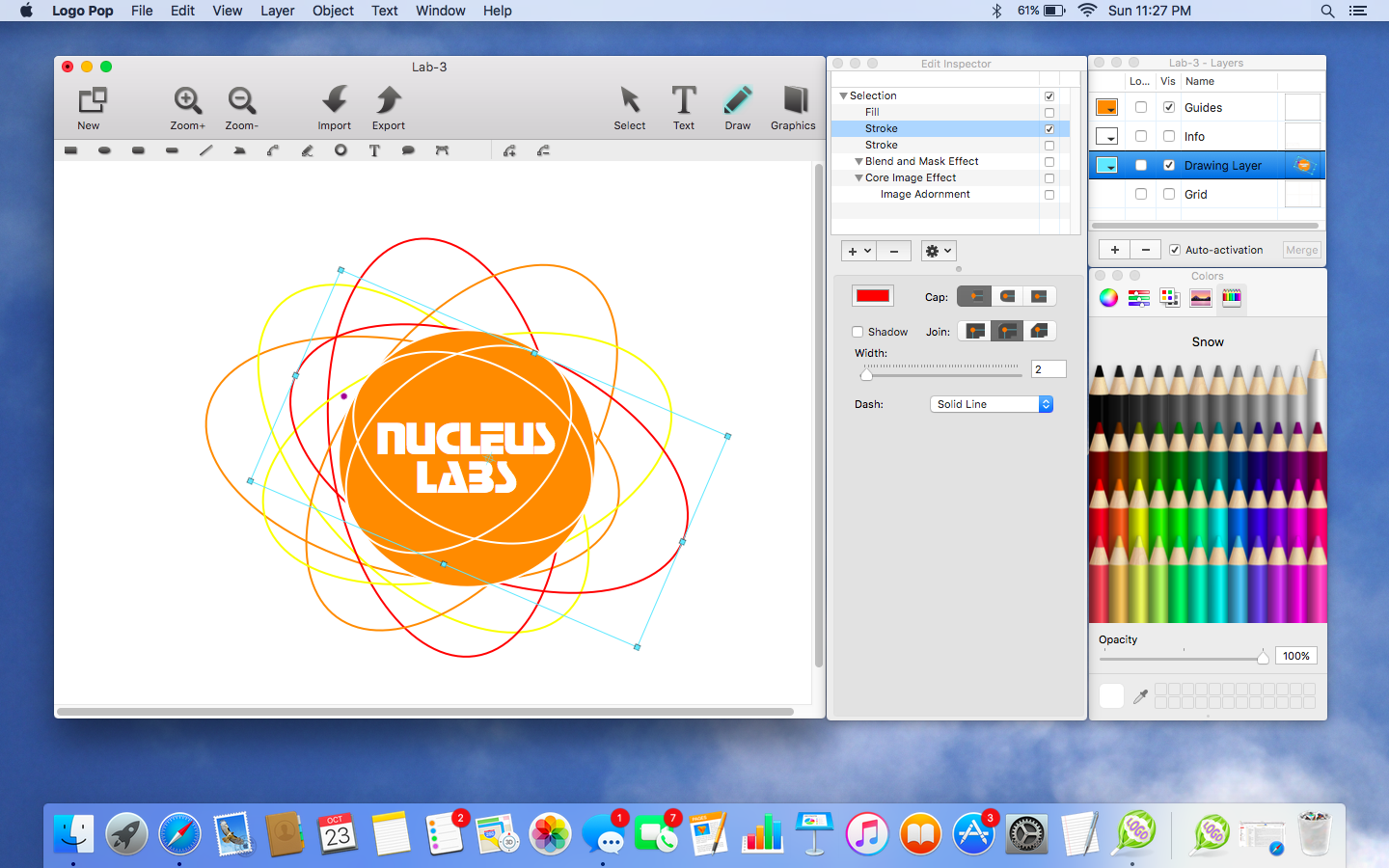
California based 128bit Technologies today introduces Logo Pop, its new vector based logo design app for Mac. Need a new logo to give a memorable first impression for your new business or service? Easily create a professional looking vector based logo, and and then use it online or in print with support for all popular image formats including transparent PNGs, and vector PDF and SVG formats. Logo Pop also includes a library of pre-designed logo templates and editable graphics to get you started.
San Francisco, California - 128bit Technologies announced today the release of Logo Pop for Mac, a vector based logo design app available on the MacAppware website and the Mac App Store for a limited time introductory price of $19.99. The powerful logo design app adds powerful new features and a large library of pre-designed logo templates and editable vector graphics you can use royalty free. From concept to design to using your logo in print or online, Logo Pop is a quick way to create a professional looking logo!
Not sure where to start? No problem! Quickly open and edit any of the 150 pre-designed logo templates with your own text, change colors, add shapes or drawings, and even browse through over 500 included logo graphics to create the look that's right for you.
Save time and money by becoming your own logo creator. Stay away from overpriced design firms and cookie cutter online logo services that don't always understand what you want and charge extra for more concepts. Use Logo Pop to quickly add shapes and text, draw unique illustrations, adjust colors, add strokes, and more in order to make your identity stand out. Then save and export your logo to use on websites, business cards, letterhead, merchandise, social media, product packaging, banners, advertisements, profile pictures, and any other branding or marketing piece.
Logo Pop highlights:
* Includes 500 editable vector logo graphics to use royalty free
* Includes 150 pre-designed logo templates to quickly edit and make your own
* Create unlimited concepts and designs
* Perfect for any industry or interest
* Vector-based drawing tools and graphics keep your design sharp at any size
* You can even sell your logo designs to others because everything in Logo Pop is royalty free
* Draw your own illustrations and graphics
* Draw tools include Rectangle, Oval, Round Rectangle, Round End Rectangle, Line, Polygon, Path, Freehand, Ring, Speech Balloon, and Arc
* Use what you design royalty free
* Convert text to a shape, path, or even a shape group to easily rearrange the characters
* Adjust freehand drawing to create smooth looking paths
* Add strokes (regular, arrowed, rough, zig-zag)
* Add fills (solid, gradient, pattern, zig-zag, hatch)
* Add text on a path
* Create curved and wavy text
* Create Outline text
* Add an image to text
* Boolean operation support to combine shapes
* Blend and mask effects
* Over 130 filters and effects
* Enhance pictures
* Full layer support
* Easily align multiple items on your canvas
* Rulers and guides make it easy to place items in the right location
* Snap to grid, snap to guides, or snap to other objects
* Zoom in or out to get every detail pixel perfect
* Export in fully editable SVG and vector PDF
* Export as an image (JPEG, TIFF, PNG, BMP, GIF)
* Supports transparent backgrounds
* Extensive help file explains Logo Pop's tools in detail
* Video tutorials available on the MacAppware website
* And more
No one knows your business better than you! From concept, to design, to using your logo in print or online, you will not find a better logo design app!
System Requirements:
* macOS 10.7 or newer (including Sierra)
* 64-bit processor
* 20 MB
Pricing and Availability:
Logo Pop 1.0 is available on the MacAppware website, and through the Mac App Store in the Graphics & Design category for the limited time price of $19.99 (USD), a savings of 50% off the normal price of $39.99.
MacAppware: http://www.macappware.com
Logo Pop 1.0: http://macappware.com/software/logo-pop
Purchase and Download (MAS): https://itunes.apple.com/us/app/logo-pop-logo-design-made-easy/id1167995641
Free Logo Fonts: http://macappware.com/software/free-fonts/
Screenshot: http://macappware.com/images/logo/Logo-Pop-mac-logo-design-1.png
Application Icon: http://macappware.com/images/logo/Logo-Pop-app-icon-256.png
MacAppware is a division of 128bit Technologies and a dedicated Mac software developer currently offering graphic design, image editing and disk utility applications; unique commercial use font collections; and a carefully curated rotation of bundles and deals. Copyright (C) 2016 128bit Technologies. All Rights Reserved. Apple, the Apple logo, Mac OS X, and Macintosh are registered trademarks of Apple Inc. in the U.S. and/or other countries. All other trademarks are the property of their respective owners.
*******
Link To Article: http://prmac.com/release-id-80575.htm
*******
---------------------------------------------------------------------------------
Note that you can alter delivered distributions at any time.
Login to your account on prMac to alter your channel selection, or to opt-out at any time.
New Logo Pop Now Available on the Mac App Store and MacAppware Website - Published on 11/08/16
California based 128bit Technologies today introduces Logo Pop, its new vector based logo design app for Mac. Need a new logo to give a memorable first impression for your new business or service? Easily create a professional looking vector based logo, and and then use it online or in print with support for all popular image formats including transparent PNGs, and vector PDF and SVG formats. Logo Pop also includes a library of pre-designed logo templates and editable graphics to get you started.
San Francisco, California - 128bit Technologies announced today the release of Logo Pop for Mac, a vector based logo design app available on the MacAppware website and the Mac App Store for a limited time introductory price of $19.99. The powerful logo design app adds powerful new features and a large library of pre-designed logo templates and editable vector graphics you can use royalty free. From concept to design to using your logo in print or online, Logo Pop is a quick way to create a professional looking logo!
Not sure where to start? No problem! Quickly open and edit any of the 150 pre-designed logo templates with your own text, change colors, add shapes or drawings, and even browse through over 500 included logo graphics to create the look that's right for you.
Save time and money by becoming your own logo creator. Stay away from overpriced design firms and cookie cutter online logo services that don't always understand what you want and charge extra for more concepts. Use Logo Pop to quickly add shapes and text, draw unique illustrations, adjust colors, add strokes, and more in order to make your identity stand out. Then save and export your logo to use on websites, business cards, letterhead, merchandise, social media, product packaging, banners, advertisements, profile pictures, and any other branding or marketing piece.
Logo Pop highlights:
* Includes 500 editable vector logo graphics to use royalty free
* Includes 150 pre-designed logo templates to quickly edit and make your own
* Create unlimited concepts and designs
* Perfect for any industry or interest
* Vector-based drawing tools and graphics keep your design sharp at any size
* You can even sell your logo designs to others because everything in Logo Pop is royalty free
* Draw your own illustrations and graphics
* Draw tools include Rectangle, Oval, Round Rectangle, Round End Rectangle, Line, Polygon, Path, Freehand, Ring, Speech Balloon, and Arc
* Use what you design royalty free
* Convert text to a shape, path, or even a shape group to easily rearrange the characters
* Adjust freehand drawing to create smooth looking paths
* Add strokes (regular, arrowed, rough, zig-zag)
* Add fills (solid, gradient, pattern, zig-zag, hatch)
* Add text on a path
* Create curved and wavy text
* Create Outline text
* Add an image to text
* Boolean operation support to combine shapes
* Blend and mask effects
* Over 130 filters and effects
* Enhance pictures
* Full layer support
* Easily align multiple items on your canvas
* Rulers and guides make it easy to place items in the right location
* Snap to grid, snap to guides, or snap to other objects
* Zoom in or out to get every detail pixel perfect
* Export in fully editable SVG and vector PDF
* Export as an image (JPEG, TIFF, PNG, BMP, GIF)
* Supports transparent backgrounds
* Extensive help file explains Logo Pop's tools in detail
* Video tutorials available on the MacAppware website
* And more
No one knows your business better than you! From concept, to design, to using your logo in print or online, you will not find a better logo design app!
System Requirements:
* macOS 10.7 or newer (including Sierra)
* 64-bit processor
* 20 MB
Pricing and Availability:
Logo Pop 1.0 is available on the MacAppware website, and through the Mac App Store in the Graphics & Design category for the limited time price of $19.99 (USD), a savings of 50% off the normal price of $39.99.
MacAppware: http://www.macappware.com
Logo Pop 1.0: http://macappware.com/software/logo-pop
Purchase and Download (MAS): https://itunes.apple.com/us/app/logo-pop-logo-design-made-easy/id1167995641
Free Logo Fonts: http://macappware.com/software/free-fonts/
Screenshot: http://macappware.com/images/logo/Logo-Pop-mac-logo-design-1.png
Application Icon: http://macappware.com/images/logo/Logo-Pop-app-icon-256.png

MacAppware is a division of 128bit Technologies and a dedicated Mac software developer currently offering graphic design, image editing and disk utility applications; unique commercial use font collections; and a carefully curated rotation of bundles and deals. Copyright (C) 2016 128bit Technologies. All Rights Reserved. Apple, the Apple logo, Mac OS X, and Macintosh are registered trademarks of Apple Inc. in the U.S. and/or other countries. All other trademarks are the property of their respective owners.
*******
Link To Article: http://prmac.com/release-id-80575.htm
*******
---------------------------------------------------------------------------------
Note that you can alter delivered distributions at any time.
Login to your account on prMac to alter your channel selection, or to opt-out at any time.
Reggie Ashworth announces VidConvert 1.7 - Video Conversion made Easy
A new article has been published at prMac.
Reggie Ashworth announces VidConvert 1.7 - Video Conversion made Easy - Published on 11/08/16
Independent software developer, Reggie Ashworth today announces VidConvert 1.7, a significant update to his popular video converter for Mac OS X. VidConvert is a video converter designed to make converting your videos simple and easy. VidConvert will convert just about any type of video into one of the many popular formats of today. Creating videos for your iPhone or iPad, for your Mac or TV, or formats such as DivX and MPEG are just a click away with VidConvert.
Anaheim, California - Independent software developer, Reggie Ashworth today is proud to announce the release of VidConvert 1.7, a significant update to his popular video converter for Mac OS X. VidConvert is a video converter designed to make converting your videos simple and easy. VidConvert will convert just about any type of video into one of the many popular formats of today. Creating videos for your iPhone or iPad, for your Mac or TV, or formats such as DivX and MPEG are just a click away with VidConvert.
You do not need to be an expert to use VidConvert. Simply add a file, select a format and a quality, and click convert. Optionally you can change your save folder from the main window. For advanced users you can select the Advanced panel if you choose to allow such options as custom Frame Rate, Bit Rate, etc. But for most users simply choosing Normal or High quality should be sufficient. After your conversion is finished simply add more files or quit VidConvert and the job is done.
Supported formats include iPhone, iPod, iPad, QuickTime, .mp4, MPEG-1 and 2, DivX, Xvid, and audio only formats such as .mp3 and .m4a. VidConvert can add iTunes compatible videos directly to your iTunes library for convenience and for syncing with your iPhone, iPod, or other iDevice. It's also possible to turn your favorite videos into audio only tracks for playback in your favorite audio device. And VidConvert is not limited to creating videos just for Apple devices, in fact any device that can play one of the supported formats can play a video converted by VidConvert. With VidConvert converting your videos couldn't be easier.
VidConvert Version 1.7 will run on Lion, Mountain Lion, Mavericks, Yosemite, El Capitan, and macOS Sierra, and here are a few of the new features included:
New in Version 1.7:
* Optimized for operation on macOS Sierra (backwards compatible with Lion/Mountain Lion/Mavericks/Yosemite/El Capitan)
* Supported input - Most any type of video or audio format
* Supported output - iPhone, iPad, iPod, Retina, Apple TV, QuickTime, .mp4, .avi, DivX, Xvid, MPEG-1, MPEG-2, DVD (.vob), Windows Media, Flash, Matroska (.mkv), Theora (.ogg), WebM, .m4a, .mp3, .aiff, .wav, .wma, .ac3, ALAC
* Refreshed UI design
* Full 64-bit support for the fastest possible conversion
* Nine languages: English, Chinese, Dutch, French, German, Korean, Portuguese (Brazilian), Russian, and Spanish (with more to come)
* Support for latest FFmpeg releases
* Fully compatible with Retina displays
* All-around code cleanup and optimization including latest Dev tools
* Sparkle updater to always have the latest version (with new localizations)
* And More...
Feature Highlights:
* Expected features such as Preview, Joining or "stitching" files, ability to save settings, and more
* Normal and High quality presets to make video conversion automatic for most users
* Ability to author a DVD for burning
* Info panel to obtain Container, Video, and Audio details for each video
* All Apple Devices format to play on all iDevices or Apple TV
* Crop and Trim and more in the Advanced panel to customize your conversion if needed
* Drag and Drop simplicity even with folders of videos and List reordering once videos have been added
* Easily change Save To folder for each batch
* Progress indicator with time remaining for each file
Language Support:
* U.S. English, Chinese, Dutch, French, German, Korean, Portuguese (Brazilian), Russian, and Spanish
Version 1.7 introduces optimization for macOS Sierra and a number of other fixes, improvements, and new features. For full Release Notes visit their website.
System Requirements:
* Mac OS X Version 10.7 Lion or later (macOS Sierra compatible)
* Intel only
* 21.8 MB Hard Drive space
Pricing and Availability:
VidConvert 1.7 is only $7.99 (USD) for a single user license. A demo which creates 3 minute samples is available. Older versions with pre-Lion support are available via the website. And Mac App Store version also available.
VidConvert 1.7: http://www.reggieashworth.com/vidconvert
Release Notes: http://www.reggieashworth.com/vidconvertnotes
Download VidConvert: http://www.reggieashworth.com/downloads/VidConvert.dmg
YouTube Channel: http://www.youtube.com/user/ReggieAshworth
Screenshot: http://www.reggieashworth.com/img/vidconvertprogressfull.png
Based in sunny Anaheim, California, Reggie Ashworth is an independent software developer whose passion for the Mac platform is only exceeded by his aim to craft simple, yet useful utilities. He is fanatical about total customer satisfaction. Copyright 2006-2016 Reggie Ashworth. All Rights Reserved. Apple, and the Apple logo, are registered trademarks of Apple Computer in the U.S. and/or other countries.
*******
Link To Article: http://prmac.com/release-id-80574.htm
*******
---------------------------------------------------------------------------------
Note that you can alter delivered distributions at any time.
Login to your account on prMac to alter your channel selection, or to opt-out at any time.
Reggie Ashworth announces VidConvert 1.7 - Video Conversion made Easy - Published on 11/08/16
Independent software developer, Reggie Ashworth today announces VidConvert 1.7, a significant update to his popular video converter for Mac OS X. VidConvert is a video converter designed to make converting your videos simple and easy. VidConvert will convert just about any type of video into one of the many popular formats of today. Creating videos for your iPhone or iPad, for your Mac or TV, or formats such as DivX and MPEG are just a click away with VidConvert.
Anaheim, California - Independent software developer, Reggie Ashworth today is proud to announce the release of VidConvert 1.7, a significant update to his popular video converter for Mac OS X. VidConvert is a video converter designed to make converting your videos simple and easy. VidConvert will convert just about any type of video into one of the many popular formats of today. Creating videos for your iPhone or iPad, for your Mac or TV, or formats such as DivX and MPEG are just a click away with VidConvert.
You do not need to be an expert to use VidConvert. Simply add a file, select a format and a quality, and click convert. Optionally you can change your save folder from the main window. For advanced users you can select the Advanced panel if you choose to allow such options as custom Frame Rate, Bit Rate, etc. But for most users simply choosing Normal or High quality should be sufficient. After your conversion is finished simply add more files or quit VidConvert and the job is done.
Supported formats include iPhone, iPod, iPad, QuickTime, .mp4, MPEG-1 and 2, DivX, Xvid, and audio only formats such as .mp3 and .m4a. VidConvert can add iTunes compatible videos directly to your iTunes library for convenience and for syncing with your iPhone, iPod, or other iDevice. It's also possible to turn your favorite videos into audio only tracks for playback in your favorite audio device. And VidConvert is not limited to creating videos just for Apple devices, in fact any device that can play one of the supported formats can play a video converted by VidConvert. With VidConvert converting your videos couldn't be easier.
VidConvert Version 1.7 will run on Lion, Mountain Lion, Mavericks, Yosemite, El Capitan, and macOS Sierra, and here are a few of the new features included:
New in Version 1.7:
* Optimized for operation on macOS Sierra (backwards compatible with Lion/Mountain Lion/Mavericks/Yosemite/El Capitan)
* Supported input - Most any type of video or audio format
* Supported output - iPhone, iPad, iPod, Retina, Apple TV, QuickTime, .mp4, .avi, DivX, Xvid, MPEG-1, MPEG-2, DVD (.vob), Windows Media, Flash, Matroska (.mkv), Theora (.ogg), WebM, .m4a, .mp3, .aiff, .wav, .wma, .ac3, ALAC
* Refreshed UI design
* Full 64-bit support for the fastest possible conversion
* Nine languages: English, Chinese, Dutch, French, German, Korean, Portuguese (Brazilian), Russian, and Spanish (with more to come)
* Support for latest FFmpeg releases
* Fully compatible with Retina displays
* All-around code cleanup and optimization including latest Dev tools
* Sparkle updater to always have the latest version (with new localizations)
* And More...
Feature Highlights:
* Expected features such as Preview, Joining or "stitching" files, ability to save settings, and more
* Normal and High quality presets to make video conversion automatic for most users
* Ability to author a DVD for burning
* Info panel to obtain Container, Video, and Audio details for each video
* All Apple Devices format to play on all iDevices or Apple TV
* Crop and Trim and more in the Advanced panel to customize your conversion if needed
* Drag and Drop simplicity even with folders of videos and List reordering once videos have been added
* Easily change Save To folder for each batch
* Progress indicator with time remaining for each file
Language Support:
* U.S. English, Chinese, Dutch, French, German, Korean, Portuguese (Brazilian), Russian, and Spanish
Version 1.7 introduces optimization for macOS Sierra and a number of other fixes, improvements, and new features. For full Release Notes visit their website.
System Requirements:
* Mac OS X Version 10.7 Lion or later (macOS Sierra compatible)
* Intel only
* 21.8 MB Hard Drive space
Pricing and Availability:
VidConvert 1.7 is only $7.99 (USD) for a single user license. A demo which creates 3 minute samples is available. Older versions with pre-Lion support are available via the website. And Mac App Store version also available.
VidConvert 1.7: http://www.reggieashworth.com/vidconvert
Release Notes: http://www.reggieashworth.com/vidconvertnotes
Download VidConvert: http://www.reggieashworth.com/downloads/VidConvert.dmg
YouTube Channel: http://www.youtube.com/user/ReggieAshworth
Screenshot: http://www.reggieashworth.com/img/vidconvertprogressfull.png

Based in sunny Anaheim, California, Reggie Ashworth is an independent software developer whose passion for the Mac platform is only exceeded by his aim to craft simple, yet useful utilities. He is fanatical about total customer satisfaction. Copyright 2006-2016 Reggie Ashworth. All Rights Reserved. Apple, and the Apple logo, are registered trademarks of Apple Computer in the U.S. and/or other countries.
*******
Link To Article: http://prmac.com/release-id-80574.htm
*******
---------------------------------------------------------------------------------
Note that you can alter delivered distributions at any time.
Login to your account on prMac to alter your channel selection, or to opt-out at any time.
New One Globe Kids Apps Come With FREE Education Toolkits
A new article has been published at prMac.
New One Globe Kids Apps Come With FREE Education Toolkits - Published on 11/07/16
Globe Smart Kids is excited to let you know that the One Globe Kids materials have been updated to meet the needs of even more teachers around the world. Users can now access the Education Toolkits for free and new stories from new children in new countries will be automatically added to the apps. To tailor to the needs of teachers everywhere, Globe Smart Kids has improved the One Globe Kids materials for use in the classroom.
New York City, New York - The One Globe Kids apps are currently available in English, French and Dutch and are used in 57 countries around the world. To tailor to the needs of teachers everywhere, Globe Smart Kids has improved the One Globe Kids materials for use in the classroom.
Two apps and an online platform
In the Apple app store you will now find two apps:
*One Globe Kids - Friends Around the World: free to download, including 1 friend: Valdo in Haiti. More friends available as in-app purchase (IAP) for $1.99 each.
*One Globe Kids - All Friends: purchase for $9.99 including all 9 friends currently available and all future friends will be added for free. Great for schools who can't make IAPs and children who want to visit all friends at once!
Via the website, you can sign up to the One Globe Kids Online Friends platform, access Valdo in Haiti for free and purchase more friends for $1.99 each.
"My kids all loved learning about how Aji plays in Indonesia. I heard some of my kids even played squat tag at recess! We all played pingsut (Indonesian rock-paper-scissors) in class as well." - Hallie R., Global Connections Teacher
FREE Education Toolkits via the website
One Globe Kids Education Toolkits are now available at no cost via the website, complimenting the One Globe Kids stories and interactive features. All you need is a computer, internet and an email address.
The Toolkits include:
* Teacher Guide: in-depth support to integrate One Globe Kids materials and get students moving and thinking about global issues while teaching Language Arts and/or Social Studies (English, History, Geography, Citizenship, Humanities).
* Story Behind the Story: details from our "making-of" adventure in each country.
* Activities: unique activities that give students a global perspective. Each country includes Culture, Math and Writing lessons as well as fun Experience and Taste activities.
* Read, Listen, Speak: questions to help students recall key details from the stories and relate them to their own lives.
* Discussion Themes: global themes that encourage conversation in the classroom and dig deeper into similarities and differences around the world for a specific topic, such as water, transportation, safety and food.
Great tools to bring the world into your classroom and to teach global 21st century skills.
"I found that practically all 3rd grade ELA standards were supported in the lessons. This makes One Globe Kids a great interdisciplinary study that integrates Common Core with other content areas infusing a global perspective to 21st century skills." - Margaret P., 3rd grade teacher
It is easy: go online now and sign up. Five Education Toolkits are ready to use: My Haiti, My Burundi, My Netherlands, My NYC and My Indonesia. My Israel will be added soon.
Device Requirements:
* iPhone, iPad, and iPod touch
* Requires iOS 6.1 or later
* Universal Application
* 18.1 MB
Pricing and Availability:
One Globe Kids - Friends Around the World 1.1.6 is free, and is available worldwide exclusively through the App Store in the Education category.
Globe Smart Kids: http://www.globesmartkids.org
One Globe Kids: http://www.oneglobekids.org
Subscription Link: https://subscription.oneglobekids.com
Download from iTunes: https://itunes.apple.com/app/OneGlobeKids/id477746969
App Icon: One Globe Kids: http://blog.oneglobekids.com/wp-content/uploads/161019-ONEGLOBEKIDS-100x100.png
App Icon: One Globe Kids - All Friends: http://blog.oneglobekids.com/wp-content/uploads/161019-ONEGLOBEKIDSallfriends-100x100.png
Globe Smart Kids is a 501(c)3 non-profit and the maker of One Globe Kids education materials, which are created to make the foreign feel familiar by letting young children explore the world from the safety and comfort of their living/class room. With new technology, One Globe Kids helps them move beyond prejudice towards openness, mutual liking and friendship with those from outside their daily bubble, both near and far. Globe Smart Kids partners with the University of Kent (UK) in a groundbreaking new study about tackling prejudice in young children with the help of technology. All Material and Software Copyright (C) 2016 Globe Smart Kids. All Rights Reserved. Apple, the Apple logo, iPhone, iPad and iPod are registered trademarks of Apple Inc. in the U.S. and/or other countries.
*******
Link To Article: http://prmac.com/release-id-80573.htm
*******
---------------------------------------------------------------------------------
Note that you can alter delivered distributions at any time.
Login to your account on prMac to alter your channel selection, or to opt-out at any time.
New One Globe Kids Apps Come With FREE Education Toolkits - Published on 11/07/16
Globe Smart Kids is excited to let you know that the One Globe Kids materials have been updated to meet the needs of even more teachers around the world. Users can now access the Education Toolkits for free and new stories from new children in new countries will be automatically added to the apps. To tailor to the needs of teachers everywhere, Globe Smart Kids has improved the One Globe Kids materials for use in the classroom.
New York City, New York - The One Globe Kids apps are currently available in English, French and Dutch and are used in 57 countries around the world. To tailor to the needs of teachers everywhere, Globe Smart Kids has improved the One Globe Kids materials for use in the classroom.
Two apps and an online platform
In the Apple app store you will now find two apps:
*One Globe Kids - Friends Around the World: free to download, including 1 friend: Valdo in Haiti. More friends available as in-app purchase (IAP) for $1.99 each.
*One Globe Kids - All Friends: purchase for $9.99 including all 9 friends currently available and all future friends will be added for free. Great for schools who can't make IAPs and children who want to visit all friends at once!
Via the website, you can sign up to the One Globe Kids Online Friends platform, access Valdo in Haiti for free and purchase more friends for $1.99 each.
"My kids all loved learning about how Aji plays in Indonesia. I heard some of my kids even played squat tag at recess! We all played pingsut (Indonesian rock-paper-scissors) in class as well." - Hallie R., Global Connections Teacher
FREE Education Toolkits via the website
One Globe Kids Education Toolkits are now available at no cost via the website, complimenting the One Globe Kids stories and interactive features. All you need is a computer, internet and an email address.
The Toolkits include:
* Teacher Guide: in-depth support to integrate One Globe Kids materials and get students moving and thinking about global issues while teaching Language Arts and/or Social Studies (English, History, Geography, Citizenship, Humanities).
* Story Behind the Story: details from our "making-of" adventure in each country.
* Activities: unique activities that give students a global perspective. Each country includes Culture, Math and Writing lessons as well as fun Experience and Taste activities.
* Read, Listen, Speak: questions to help students recall key details from the stories and relate them to their own lives.
* Discussion Themes: global themes that encourage conversation in the classroom and dig deeper into similarities and differences around the world for a specific topic, such as water, transportation, safety and food.
Great tools to bring the world into your classroom and to teach global 21st century skills.
"I found that practically all 3rd grade ELA standards were supported in the lessons. This makes One Globe Kids a great interdisciplinary study that integrates Common Core with other content areas infusing a global perspective to 21st century skills." - Margaret P., 3rd grade teacher
It is easy: go online now and sign up. Five Education Toolkits are ready to use: My Haiti, My Burundi, My Netherlands, My NYC and My Indonesia. My Israel will be added soon.
Device Requirements:
* iPhone, iPad, and iPod touch
* Requires iOS 6.1 or later
* Universal Application
* 18.1 MB
Pricing and Availability:
One Globe Kids - Friends Around the World 1.1.6 is free, and is available worldwide exclusively through the App Store in the Education category.
Globe Smart Kids: http://www.globesmartkids.org
One Globe Kids: http://www.oneglobekids.org
Subscription Link: https://subscription.oneglobekids.com
Download from iTunes: https://itunes.apple.com/app/OneGlobeKids/id477746969
App Icon: One Globe Kids: http://blog.oneglobekids.com/wp-content/uploads/161019-ONEGLOBEKIDS-100x100.png

App Icon: One Globe Kids - All Friends: http://blog.oneglobekids.com/wp-content/uploads/161019-ONEGLOBEKIDSallfriends-100x100.png

Globe Smart Kids is a 501(c)3 non-profit and the maker of One Globe Kids education materials, which are created to make the foreign feel familiar by letting young children explore the world from the safety and comfort of their living/class room. With new technology, One Globe Kids helps them move beyond prejudice towards openness, mutual liking and friendship with those from outside their daily bubble, both near and far. Globe Smart Kids partners with the University of Kent (UK) in a groundbreaking new study about tackling prejudice in young children with the help of technology. All Material and Software Copyright (C) 2016 Globe Smart Kids. All Rights Reserved. Apple, the Apple logo, iPhone, iPad and iPod are registered trademarks of Apple Inc. in the U.S. and/or other countries.
*******
Link To Article: http://prmac.com/release-id-80573.htm
*******
---------------------------------------------------------------------------------
Note that you can alter delivered distributions at any time.
Login to your account on prMac to alter your channel selection, or to opt-out at any time.
iGetter v2.9.5 for macOS Released
A new article has been published at prMac.
iGetter v2.9.5 for macOS Released - Published on 11/07/16
Bulgaria (EU) based Presenta Ltd. announces iGetter 2.9.5 is ready for macOS 10.12 Sierra. iGetter is a powerful, full featured download manager and accelerator. It can greatly improve the speed of your downloads using segmented downloading. It allows auto resume on broken downloads, queue filtering by various criteria, site explorer, history list, scheduling downloads for low traffic periods, auto redial on broken connection, auto hang-up and shut down on completion, and much more.
Dobrich, Bulgaria - Presenta Ltd. is pleased to announce the new release of iGetter version 2.9.5 for macOS. iGetter is a powerful, full featured download manager and accelerator.
New in version 2.9.5:
* Optimized for Safari 10 on macOS 10.12 Sierra.
* Optimized for Firefox v50 .
* Digitally signed the installation dmg file to meet the new security requirements of macOS 10.12 Sierra, and prevent "AppTranslocation" from Gatekeeper.
* Implemented a workaround for an issue introduced in Safari 10, which causes disappearing of browser extensions on Safari restart. With this update iGetter Extension installs and works properly on Safari 10.
* Reworked iGetter Extension for Firefox (v45 ) to complete the transition to multiprocess versions of Firefox.
* Implemented a workaround for an issue that could lead to a blank page rendered in the integrated eCommerce module, when attempting a purchase in the macOS versions prior El Capitan.
* Reworded the uninstall alert text for better clarity.
* Some fixes and additions to the French, Polish, Japanese and Traditional Chinese localizations.
* Fixed an issue with the integrated eCommerce module asking for permission to access user's contacts.
* Fixed an issue with the "Download selection with iGetter" command in iGetter Extension for Safari 10, which in some very rare cases won't work properly.
The International version of iGetter includes: English, French, German, Spanish, Italian, Turkish, Japanese, Russian, Hungarian, Simplified Chinese, Traditional Chinese, Polish and Portuguese (Brazil) localizations.
System Requirements:
* Requires macOS 10.2.x - 10.12.x
Pricing and Availability:
iGetter 2.9.5 is shareware. iGetter can be evaluated for as long as it's needed to decide if it suits the user's needs. A licensed copy is available for $25.00 (USD). All registered users will get free support by email and free upgrades in the major 2.x versions.
Presenta Ltd.: http://www.presenta.net/
iGetter 2.9.5: http://www.presenta.net/iGetter.html
Direct Download Link: http://www.igetter.net/search/downloads/iGetter2.9.5.dmg
Purchase Link: http://igetter.net/store/
Screenshot: http://www.presenta.net/images/iGetterLion.gif
App Icon: http://www.presenta.net/images/iGetter128x128.jpg
Presenta Ltd. was founded in March 1993 in Bulgaria (Europe). We are a computer company, which deals with software development. Since 1993 the company has been a basic software developer of networking, multimedia and accounting systems for Apple Macintosh computers. All Material and Software (C) Copyright 2016 Presenta Ltd. All Rights Reserved. Apple, the Apple logo, Macintosh and Mac OS X are registered trademarks of Apple Inc. in the U.S. and/or other countries. Other trademarks and registered trademarks may be the property of their respective owners.
*******
Link To Article: http://prmac.com/release-id-80572.htm
*******
---------------------------------------------------------------------------------
Note that you can alter delivered distributions at any time.
Login to your account on prMac to alter your channel selection, or to opt-out at any time.
iGetter v2.9.5 for macOS Released - Published on 11/07/16
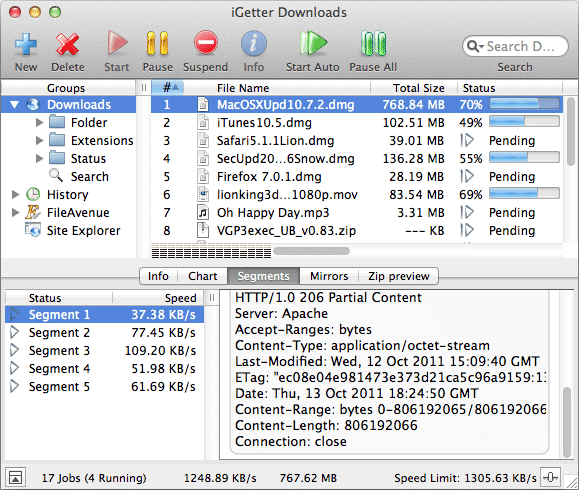
Bulgaria (EU) based Presenta Ltd. announces iGetter 2.9.5 is ready for macOS 10.12 Sierra. iGetter is a powerful, full featured download manager and accelerator. It can greatly improve the speed of your downloads using segmented downloading. It allows auto resume on broken downloads, queue filtering by various criteria, site explorer, history list, scheduling downloads for low traffic periods, auto redial on broken connection, auto hang-up and shut down on completion, and much more.
Dobrich, Bulgaria - Presenta Ltd. is pleased to announce the new release of iGetter version 2.9.5 for macOS. iGetter is a powerful, full featured download manager and accelerator.
New in version 2.9.5:
* Optimized for Safari 10 on macOS 10.12 Sierra.
* Optimized for Firefox v50 .
* Digitally signed the installation dmg file to meet the new security requirements of macOS 10.12 Sierra, and prevent "AppTranslocation" from Gatekeeper.
* Implemented a workaround for an issue introduced in Safari 10, which causes disappearing of browser extensions on Safari restart. With this update iGetter Extension installs and works properly on Safari 10.
* Reworked iGetter Extension for Firefox (v45 ) to complete the transition to multiprocess versions of Firefox.
* Implemented a workaround for an issue that could lead to a blank page rendered in the integrated eCommerce module, when attempting a purchase in the macOS versions prior El Capitan.
* Reworded the uninstall alert text for better clarity.
* Some fixes and additions to the French, Polish, Japanese and Traditional Chinese localizations.
* Fixed an issue with the integrated eCommerce module asking for permission to access user's contacts.
* Fixed an issue with the "Download selection with iGetter" command in iGetter Extension for Safari 10, which in some very rare cases won't work properly.
The International version of iGetter includes: English, French, German, Spanish, Italian, Turkish, Japanese, Russian, Hungarian, Simplified Chinese, Traditional Chinese, Polish and Portuguese (Brazil) localizations.
System Requirements:
* Requires macOS 10.2.x - 10.12.x
Pricing and Availability:
iGetter 2.9.5 is shareware. iGetter can be evaluated for as long as it's needed to decide if it suits the user's needs. A licensed copy is available for $25.00 (USD). All registered users will get free support by email and free upgrades in the major 2.x versions.
Presenta Ltd.: http://www.presenta.net/
iGetter 2.9.5: http://www.presenta.net/iGetter.html
Direct Download Link: http://www.igetter.net/search/downloads/iGetter2.9.5.dmg
Purchase Link: http://igetter.net/store/
Screenshot: http://www.presenta.net/images/iGetterLion.gif
App Icon: http://www.presenta.net/images/iGetter128x128.jpg

Presenta Ltd. was founded in March 1993 in Bulgaria (Europe). We are a computer company, which deals with software development. Since 1993 the company has been a basic software developer of networking, multimedia and accounting systems for Apple Macintosh computers. All Material and Software (C) Copyright 2016 Presenta Ltd. All Rights Reserved. Apple, the Apple logo, Macintosh and Mac OS X are registered trademarks of Apple Inc. in the U.S. and/or other countries. Other trademarks and registered trademarks may be the property of their respective owners.
*******
Link To Article: http://prmac.com/release-id-80572.htm
*******
---------------------------------------------------------------------------------
Note that you can alter delivered distributions at any time.
Login to your account on prMac to alter your channel selection, or to opt-out at any time.
Political Button Machine App Ready to GIF the Election
A new article has been published at prMac.
Political Button Machine App Ready to GIF the Election - Published on 11/07/16
Appikiko, LLC announces Political Button Machine 1.1.2 for iOS devices, just in time for Election 2016. The app allows users to create animated politically themed GIFs to share across social media platforms. Multiple patriotic templates are available to choose from and customization is possible by using personal photographs and typing in personal slogans. Political Button Machine is for our mobile digital age when one's public lapel is now a social media profile.
Excelsior, Minnesota - Creative app maker, appikiko, LLC recently published Political Button Machine 1.1.2 for iPhone, iPad, and iPod touch, which provides a simple way for mobile device users to create a custom digital "campaign pin".
Using the classic circular pin-back button as a format for declaring political sentiments has been popular for well over 100 years. Political Button Machine is for our mobile digital age when one's public lapel is now a social media profile.
With a patriotic palette and graphics, button makers are simply guided through screens to select a button template, use a photo of their choosing, change a graphic and add some text. The end result is a circular animated "button" in GIF form, ready to share with friends and family. The results could be serious or light-hearted. There is even a choice to use a talking head of the candidates to proclaim a sentiment.
"We see Political Button Machine as a tool for empowering the voice of the people in a creative and relevant way," stated Marta Snow, founder and designer at appikiko, LLC. "The mobile world is very visual and full of GIFs. Here is an app that lets anyone add their visual voice to that and be part of the political dialogue."
Political Button Machine GIFs also leverage the recently introduced iMessage Sticker App Extension feature. Once a user has made a "button," it automatically appears in their iMessage App Drawer to be used as any other iMessage sticker. It can be sent directly, or "peel and stick" it onto a previously sent message.
Device Requirements:
* iPhone, iPad, and iPod touch
* Requires iOS 9.0 or later
* Universal Application
* 134 MB
Pricing and Availability:
Political Button Machine 1.1.2 is just $1.99 USD (or an equivalent amount in other currencies) and is available worldwide exclusively through the App Store in the Entertainment category. A limited number of Promo Codes are available to members of the press.
appikiko, LLC: http://appikiko.com
Political Button Machine 1.1.2: http://appikiko.com/button-machine/
Purchase and Download from iTunes: https://itunes.apple.com/app/political-button-machine/id1137456067
Other appikiko, LLC Apps: https://itunes.apple.com/developer/appikiko-llc/id448250802
Screenshots and App Icon: http://appikiko.com/political-button-images
appikiko, LLC of Minnesota got its start in 2011 with the goal of making artistic, effective and engaging mobile device apps. Their portfolio of apps includes sophisticated drawing tools and math practice apps for kids. All apps are created in-house. All Material and Software (C) Copyright 2016 appikiko, LLC. All Rights Reserved. Apple, the Apple logo, iPhone, iPod and iPad are registered trademarks of Apple Inc. in the U.S. and/or other countries. Other trademarks and registered trademarks may be the property of their respective owners.
*******
Link To Article: http://prmac.com/release-id-80571.htm
*******
---------------------------------------------------------------------------------
Note that you can alter delivered distributions at any time.
Login to your account on prMac to alter your channel selection, or to opt-out at any time.
Political Button Machine App Ready to GIF the Election - Published on 11/07/16
Appikiko, LLC announces Political Button Machine 1.1.2 for iOS devices, just in time for Election 2016. The app allows users to create animated politically themed GIFs to share across social media platforms. Multiple patriotic templates are available to choose from and customization is possible by using personal photographs and typing in personal slogans. Political Button Machine is for our mobile digital age when one's public lapel is now a social media profile.
Excelsior, Minnesota - Creative app maker, appikiko, LLC recently published Political Button Machine 1.1.2 for iPhone, iPad, and iPod touch, which provides a simple way for mobile device users to create a custom digital "campaign pin".
Using the classic circular pin-back button as a format for declaring political sentiments has been popular for well over 100 years. Political Button Machine is for our mobile digital age when one's public lapel is now a social media profile.
With a patriotic palette and graphics, button makers are simply guided through screens to select a button template, use a photo of their choosing, change a graphic and add some text. The end result is a circular animated "button" in GIF form, ready to share with friends and family. The results could be serious or light-hearted. There is even a choice to use a talking head of the candidates to proclaim a sentiment.
"We see Political Button Machine as a tool for empowering the voice of the people in a creative and relevant way," stated Marta Snow, founder and designer at appikiko, LLC. "The mobile world is very visual and full of GIFs. Here is an app that lets anyone add their visual voice to that and be part of the political dialogue."
Political Button Machine GIFs also leverage the recently introduced iMessage Sticker App Extension feature. Once a user has made a "button," it automatically appears in their iMessage App Drawer to be used as any other iMessage sticker. It can be sent directly, or "peel and stick" it onto a previously sent message.
Device Requirements:
* iPhone, iPad, and iPod touch
* Requires iOS 9.0 or later
* Universal Application
* 134 MB
Pricing and Availability:
Political Button Machine 1.1.2 is just $1.99 USD (or an equivalent amount in other currencies) and is available worldwide exclusively through the App Store in the Entertainment category. A limited number of Promo Codes are available to members of the press.
appikiko, LLC: http://appikiko.com
Political Button Machine 1.1.2: http://appikiko.com/button-machine/
Purchase and Download from iTunes: https://itunes.apple.com/app/political-button-machine/id1137456067
Other appikiko, LLC Apps: https://itunes.apple.com/developer/appikiko-llc/id448250802
Screenshots and App Icon: http://appikiko.com/political-button-images
appikiko, LLC of Minnesota got its start in 2011 with the goal of making artistic, effective and engaging mobile device apps. Their portfolio of apps includes sophisticated drawing tools and math practice apps for kids. All apps are created in-house. All Material and Software (C) Copyright 2016 appikiko, LLC. All Rights Reserved. Apple, the Apple logo, iPhone, iPod and iPad are registered trademarks of Apple Inc. in the U.S. and/or other countries. Other trademarks and registered trademarks may be the property of their respective owners.
*******
Link To Article: http://prmac.com/release-id-80571.htm
*******
---------------------------------------------------------------------------------
Note that you can alter delivered distributions at any time.
Login to your account on prMac to alter your channel selection, or to opt-out at any time.
Hubert Burda Media Russia chooses Magzter to widen its global presence
A new article has been published at prMac.
Hubert Burda Media Russia chooses Magzter to widen its global presence - Published on 11/07/16
Hubert Burda Media Russia partners with Magzter, the world's largest digital magazine newsstand, to increase its digital reader base. One of the most respected and authoritative publishers, Hubert Burda Media Russia is known for publishing the most acclaimed magazine brands in Russian. Hubert Burda Media Russia publishes more than 80 titles and is a leader in print distribution in the territory and proud to use Magzter as an additional channel for distribution.
New York, New York - Hubert Burda Media Russia, one of the most respected and authoritative publishers from Russia, partners with Magzter, the world's largest digital magazine newsstand, to increase its digital reader base. Hubert Burda Media Russia is known for publishing the most acclaimed magazine brands in Russian and its partnership with Magzter is sure to take its magazines to Russian-speaking readers all over the world. Here is the list of best-selling Russian-language magazines from Hubert Burda Media Russia that can be read on Magzter:
Burda Russia is a high-end fashion magazine, which features the latest trends in the fashion world and exciting style tips. This monthly magazine is priced at RUB 899.66 ($13.99 USD) for an annual subscription on Magzter.
Lisa Russia is the most popular weekly magazine for young women, which features style lessons, great ideas for home, makeup trends and the hottest news in the life of idols. This magazine is priced at RUB 1028.28 ($15.99 USD) for an annual subscription on Magzter.
Playboy Russia is all about the most beautiful women in the world, exclusive pictures of celebrities, fascinating travel stories, prestigious cars and spectacular men's fashion statements. This monthly magazine is priced at RUB 899.66 ($13.99 USD) for an annual subscription on Magzter.
Good Advice Russia is a monthly magazine for women with the main theme of giving the secrets of attraction, wellness, home comfort and harmony in relationships with loved ones. This magazine is priced at RUB 513.82 ($7.99 USD) for an annual subscription on Magzter.
"Hubert Burda Media Russia that publishes more than 80 titles and is a leader in print distribution on the territory is glad to use Magzter as an additional channel for distribution of the digital copies of our magazines. It is essential for us that with Magzter we reach the wide international audience. We wish Magzter the further growth and success." - Olga Alexeenko, Head of Content Distribution, Hubert Burda Media Russia
"With the arrival of Hubert Burda Media Russia's magazines to Magzter, our Russian catalogue has strengthened further. Hubert Burda Media Russia publishes many of the world-renowned magazine titles like Playboy, Lisa and Burda in Russian language, and we're quite confident that we will take these magazines to more Russian-speaking audiences all over the world." - Girish Ramdas, CEO, Magzter Inc.
"We're quite thrilled to welcome Hubert Burda Media Russia to the Magzter family. We've millions of Russian-speaking users across the world, who can now enjoy reading these prestigious Russian-language magazines on the go. Here's wishing Hubert Burda Media Russia to taste great digital success on Magzter." - Vijay Radhakrishnan, President, Magzter Inc.
Device Requirements:
* iPhone, iPad, and iPod touch
* Requires iOS 7.0 or later
* 31.6 MB
Pricing and Availability:
Magzter - Digital Magazine Newsstand 6.9 is free and available worldwide through the App Store in the News category. All the magazines from Hubert Burda Media Russia also come as a treat to Magzter GOLD users, who can enjoy reading them along with 4,000+ other international digital magazines. The Magzter app is also available on the web, Google Play, Amazon App Store, Kindle Fire and is expanding to more platforms soon. Magzter's easy purchase and renewal systems ensure subscriptions are paid on time, eliminating the need for paper checks and postal mail issues. Users can buy their magazines on any of the above devices/platforms and seamlessly port their purchases to any other devices, a feature unique to Magzter.
Magzter - Digital Magazine Newsstand 6.9: http://www.magzter.com
Hubert Burda Media Russia: http://www.magzter.com/publishers/Burda
Download from iTunes: https://itunes.apple.com/in/app/magzter-reading-destination/id412163953
Download from Google Play: https://play.google.com/store/apps/details?id=com.dci.magzter&hl=en
Screenshot: https://cdn.magzter.com/1448890435/1477578485/images/thumb/playboy-russia-2016.jpg
App Icon: http://akcdn.magzter.com/magcom/mailer/common/Icon1024-curved.png
Magzter is the world's largest and fastest growing global digital magazine newsstand with over 30 million digital consumers, more than 8,500 magazines from over 3,500 publishers. Headquartered in New York, Magzter has its local offices in London, Barcelona, Amsterdam, Mexico City, Cape Town, Chennai, Singapore and Tokyo and will soon be expanding to other countries. Founded by global entrepreneurs, Girish Ramdas and Vijay Radhakrishnan in June 2011, Magzter enables magazine publishers around the world to create and deliver digital editions of their titles to global consumers. Powered by its proprietary OREY Click Publishing System(R), Magzter also enables their customers to publish interactive/audio-visual content in the magazine as it supports HTML5. Magzter launched Magzter GOLD subscription service to give digital readers unlimited access to thousands of magazines for a low monthly price. All Material and Software (C) Copyright 2016 Magzter Inc. All Rights Reserved. Apple, the
Apple logo, iPhone, iPod and iPad are registered trademarks of Apple Inc. in the U.S. and/or other countries. Other trademarks and registered trademarks may be the property of their respective owners.
*******
Link To Article: http://prmac.com/release-id-80570.htm
*******
---------------------------------------------------------------------------------
Note that you can alter delivered distributions at any time.
Login to your account on prMac to alter your channel selection, or to opt-out at any time.
Hubert Burda Media Russia chooses Magzter to widen its global presence - Published on 11/07/16
Hubert Burda Media Russia partners with Magzter, the world's largest digital magazine newsstand, to increase its digital reader base. One of the most respected and authoritative publishers, Hubert Burda Media Russia is known for publishing the most acclaimed magazine brands in Russian. Hubert Burda Media Russia publishes more than 80 titles and is a leader in print distribution in the territory and proud to use Magzter as an additional channel for distribution.
New York, New York - Hubert Burda Media Russia, one of the most respected and authoritative publishers from Russia, partners with Magzter, the world's largest digital magazine newsstand, to increase its digital reader base. Hubert Burda Media Russia is known for publishing the most acclaimed magazine brands in Russian and its partnership with Magzter is sure to take its magazines to Russian-speaking readers all over the world. Here is the list of best-selling Russian-language magazines from Hubert Burda Media Russia that can be read on Magzter:
Burda Russia is a high-end fashion magazine, which features the latest trends in the fashion world and exciting style tips. This monthly magazine is priced at RUB 899.66 ($13.99 USD) for an annual subscription on Magzter.
Lisa Russia is the most popular weekly magazine for young women, which features style lessons, great ideas for home, makeup trends and the hottest news in the life of idols. This magazine is priced at RUB 1028.28 ($15.99 USD) for an annual subscription on Magzter.
Playboy Russia is all about the most beautiful women in the world, exclusive pictures of celebrities, fascinating travel stories, prestigious cars and spectacular men's fashion statements. This monthly magazine is priced at RUB 899.66 ($13.99 USD) for an annual subscription on Magzter.
Good Advice Russia is a monthly magazine for women with the main theme of giving the secrets of attraction, wellness, home comfort and harmony in relationships with loved ones. This magazine is priced at RUB 513.82 ($7.99 USD) for an annual subscription on Magzter.
"Hubert Burda Media Russia that publishes more than 80 titles and is a leader in print distribution on the territory is glad to use Magzter as an additional channel for distribution of the digital copies of our magazines. It is essential for us that with Magzter we reach the wide international audience. We wish Magzter the further growth and success." - Olga Alexeenko, Head of Content Distribution, Hubert Burda Media Russia
"With the arrival of Hubert Burda Media Russia's magazines to Magzter, our Russian catalogue has strengthened further. Hubert Burda Media Russia publishes many of the world-renowned magazine titles like Playboy, Lisa and Burda in Russian language, and we're quite confident that we will take these magazines to more Russian-speaking audiences all over the world." - Girish Ramdas, CEO, Magzter Inc.
"We're quite thrilled to welcome Hubert Burda Media Russia to the Magzter family. We've millions of Russian-speaking users across the world, who can now enjoy reading these prestigious Russian-language magazines on the go. Here's wishing Hubert Burda Media Russia to taste great digital success on Magzter." - Vijay Radhakrishnan, President, Magzter Inc.
Device Requirements:
* iPhone, iPad, and iPod touch
* Requires iOS 7.0 or later
* 31.6 MB
Pricing and Availability:
Magzter - Digital Magazine Newsstand 6.9 is free and available worldwide through the App Store in the News category. All the magazines from Hubert Burda Media Russia also come as a treat to Magzter GOLD users, who can enjoy reading them along with 4,000+ other international digital magazines. The Magzter app is also available on the web, Google Play, Amazon App Store, Kindle Fire and is expanding to more platforms soon. Magzter's easy purchase and renewal systems ensure subscriptions are paid on time, eliminating the need for paper checks and postal mail issues. Users can buy their magazines on any of the above devices/platforms and seamlessly port their purchases to any other devices, a feature unique to Magzter.
Magzter - Digital Magazine Newsstand 6.9: http://www.magzter.com
Hubert Burda Media Russia: http://www.magzter.com/publishers/Burda
Download from iTunes: https://itunes.apple.com/in/app/magzter-reading-destination/id412163953
Download from Google Play: https://play.google.com/store/apps/details?id=com.dci.magzter&hl=en
Screenshot: https://cdn.magzter.com/1448890435/1477578485/images/thumb/playboy-russia-2016.jpg

App Icon: http://akcdn.magzter.com/magcom/mailer/common/Icon1024-curved.png

Magzter is the world's largest and fastest growing global digital magazine newsstand with over 30 million digital consumers, more than 8,500 magazines from over 3,500 publishers. Headquartered in New York, Magzter has its local offices in London, Barcelona, Amsterdam, Mexico City, Cape Town, Chennai, Singapore and Tokyo and will soon be expanding to other countries. Founded by global entrepreneurs, Girish Ramdas and Vijay Radhakrishnan in June 2011, Magzter enables magazine publishers around the world to create and deliver digital editions of their titles to global consumers. Powered by its proprietary OREY Click Publishing System(R), Magzter also enables their customers to publish interactive/audio-visual content in the magazine as it supports HTML5. Magzter launched Magzter GOLD subscription service to give digital readers unlimited access to thousands of magazines for a low monthly price. All Material and Software (C) Copyright 2016 Magzter Inc. All Rights Reserved. Apple, the
Apple logo, iPhone, iPod and iPad are registered trademarks of Apple Inc. in the U.S. and/or other countries. Other trademarks and registered trademarks may be the property of their respective owners.
*******
Link To Article: http://prmac.com/release-id-80570.htm
*******
---------------------------------------------------------------------------------
Note that you can alter delivered distributions at any time.
Login to your account on prMac to alter your channel selection, or to opt-out at any time.
Subscribe to:
Posts (Atom)