A new article has been published at prMac.
Bungee Girl - Girls-Only Travel App launches for iOS - Published on 11/09/16
Outerbridge Ventures Inc. today announces Bungee Girl 1.6, an update to their popular girls-only travel app for iOS devices. Bungee Girl allows solo female travelers to connect with locals, find potential travel buddies from their own home city and discover new locations and activities. These connections can help users find accommodations, a hangout buddy, advice on where to go and what to do, safety tips and more. Based on customer feedback and votes, version 1.6 adds 5 new locations.
New York, New York - Outerbridge Ventures Inc. today is pleased to announce the release of Bungee Girl 1.6, an update to their popular social networking app for iOS devices. The Bungee Girl app brings together girls who like to wander. A female-only app, Bungee Girl connects solo female travellers who have an equal interest in visiting each other's city. Bungee Girl also allows users to find potential travel buddies from their own home city. Creating mutually beneficial connections between like-minded female travelers can encourage women to embrace their venturesome spirit.
For women who are plagued by wanderlust and often settle for cliche trips closer to their home, Bungee Girl is a tool to help gain the confidence to fulfill their travel desires. With an equal benefit, women can use the app to help each other out and enhance their trip experience. These connections can help users find: accommodations, a hangout buddy, advice on where to go and what to do, safety tips and other insider pointers.
To provide a comfort level and rid users of the annoyance of being hit on, the Bungee Girl app is exclusive for women only. Venturing off as a woman can be intimidating so the aim of Bungee Girl is to create a network and community of female travelers. To ensure there will always be connections to make, Bungee Girl is available for select cities with new cities being added based on demand.
Researched shows that sites that help travelers find accommodation or locals to crash with, aren't made for women who are much more personable by nature and need to first find a connection with someone before feeling comfortable enough to go visit them. With the Bungee Girl app, women who enjoy solo travel no longer need to hesitant at the idea of venturing off alone.
Here's how the app works:
1. Users can make an awesome profile that displays their best travel experiences and use a tool to discover their travel personality to be able to meet Bungee Girls with similar travel interests and habits.
2. Users can connect with locals abroad that have an equal interest in visiting their city. (or)
3. Find a travel buddy in their own home city. By discovering aspiring travelers in their own city who want to travel to the same locations, users may find a potential travel buddy.
4. Uses can find out who they connect with best and message with their new friends.
Device Requirements:
* iPhone, iPad, and iPod touch
* Requires iOS�8.0 or later
* 26.7 MB
Pricing and Availability:
Bungee Girl 1.6 is Free and available worldwide exclusively through the App Store in the Social Networking category.
Bungee Girl 1.6: http://www.bungeegirl.com
More Info: http://apps.appshout.com/bungee-girl/
Download from iTunes: https://itunes.apple.com/app/bungee-girl/id1148433674
Screenshot: http://a4.mzstatic.com/us/r30/Purple22/v4/df/df/bb/dfdfbb16-dc66-175a-d4f5-9e40c03dfc2a/screen696x696.jpeg
App Icon: http://apps.appshout.com/bungee-girl/images/icon.png
Outerbridge Ventures Inc. is a New York City based company whose primary focus is on the development and ownership of innovative mobile applications that create the ultimate user experience. Outerbridge Ventures' core mission is to not just be a business but a social statement. All Material and Software (C) Copyright 2013 Outerbridge Ventures Inc. All Rights Reserved. Apple, the Apple logo, iPhone, iPod and iPad are registered trademarks of Apple Inc. in the U.S. and/or other countries. Other trademarks and registered trademarks may be the property of their respective owners.
*******
Link To Article: http://prmac.com/release-id-80580.htm
*******
---------------------------------------------------------------------------------
Note that you can alter delivered distributions at any time.
Login to your account on prMac to alter your channel selection, or to opt-out at any time.


BookBuddy 7.9.0 Brings Automatic Sync Across Multiple Devices
A new article has been published at prMac.
BookBuddy 7.9.0 Brings Automatic Sync Across Multiple Devices - Published on 11/09/16
Kimico Ltd. today announces BookBuddy 7.9.0, the eagerly anticipated update of the leading book-management app for iOS devices. BookBuddy allows anyone to quickly find any book in their library, share favorite books and keep track of borrowed ones. The app provides teachers with the info so essential for cataloging and library management. Version 7.9.0 makes it possible to sync the BookBuddy library across multiple iOS devices using either iCloud or Dropbox cloud synchronization.
Herzeliya, Israel - Kimico Ltd., a leading provider of premium quality apps, today is proud to announce the release and immediate availability of BookBuddy 7.9.0, the eagerly anticipated update of the leading book-management app for iOS devices. BookBuddy 7.9.0 now provides the ability to sync BookBuddy library across multiple iOS devices in a seamless way, letting the user choose his or her preferred cloud synchronization service.
BookBuddy 7.9.0 makes it possible to sync the BookBuddy library across multiple iOS devices using either iCloud or Dropbox cloud synchronization. Once the synchronization is enabled, regardless of which sync service has been selected, the changes applied to the BookBuddy library on any of the user's iOS devices will be automatically and transparently replicated to the other iOS devices.
Compatibility with both iCloud and Dropbox sync services should make it possible to target the majority of real-world synchronization cases. Syncing BookBuddy using iCloud would generally target cases where a person who has multiple iOS devices wants to keep them all in sync. Syncing with Dropbox would mostly target cases where multiple users, each with a separate iOS device and his/her own iCloud account, want to keep their devices in sync. A common case for that would be when a family member wants to share her home library with her family, or a teacher who wants to manage a classroom library together with her colleagues.
"The ability to synchronize the entire BookBuddy library across multiple devices is a crucial requirement presented by our users since the day that app was introduced on the App Store," said Mr. Yoash Adato, the founder and president of Kimico, Ltd. "Now, having overcome many obstacles and succeeded in a long development effort, we are thrilled to announce the availability of a powerful synchronization service that, as an exclusive feature, uses both iCloud and Dropbox cloud services."
Device Requirements:
* iPhone, iPad, and iPod touch
* Requires iOS�8.0 or later
* 26.3 MB
Pricing and Availability:
BookBuddy 7.9.0 is Free (with in-app purchases) and available worldwide exclusively through the App Store in the Books category. For more information, please contact Yoash Adato.
Kimico: http://www.kimicoapps.com
BookBuddy 7.9.0: https://itunes.apple.com/app/bookbuddy-book-library-manager/id395150347
Screenshot: http://a2.mzstatic.com/us/r30/Purple62/v4/2a/21/66/2a2166bc-f3c1-5408-fa8f-75caa7200dbe/screen696x696.jpeg
App Icon: https://dl.dropboxusercontent.com/u/23669328/Image%20Hosting/BB_App_Icon_1024X1024.png
Based in Herzeliya, Israel, Yoash Adato founded Kimico in 2010. Kimico is a software development company focused on bringing state-of-the-art applications to iPhone and iPod touch. The company's main goal is to create high-quality applications that will enrich lifestyles and improve productivity while being easy and fun to use. Copyright (C) 2010-2016 Kimico Ltd. All Rights Reserved. Apple, the Apple logo, iPhone, iPad and iPod are registered trademarks of Apple Inc. in the U.S. and/or other countries. Other trademarks and registered trademarks may be the property of their respective owners.
*******
Link To Article: http://prmac.com/release-id-80579.htm
*******
---------------------------------------------------------------------------------
Note that you can alter delivered distributions at any time.
Login to your account on prMac to alter your channel selection, or to opt-out at any time.
BookBuddy 7.9.0 Brings Automatic Sync Across Multiple Devices - Published on 11/09/16
Kimico Ltd. today announces BookBuddy 7.9.0, the eagerly anticipated update of the leading book-management app for iOS devices. BookBuddy allows anyone to quickly find any book in their library, share favorite books and keep track of borrowed ones. The app provides teachers with the info so essential for cataloging and library management. Version 7.9.0 makes it possible to sync the BookBuddy library across multiple iOS devices using either iCloud or Dropbox cloud synchronization.
Herzeliya, Israel - Kimico Ltd., a leading provider of premium quality apps, today is proud to announce the release and immediate availability of BookBuddy 7.9.0, the eagerly anticipated update of the leading book-management app for iOS devices. BookBuddy 7.9.0 now provides the ability to sync BookBuddy library across multiple iOS devices in a seamless way, letting the user choose his or her preferred cloud synchronization service.
BookBuddy 7.9.0 makes it possible to sync the BookBuddy library across multiple iOS devices using either iCloud or Dropbox cloud synchronization. Once the synchronization is enabled, regardless of which sync service has been selected, the changes applied to the BookBuddy library on any of the user's iOS devices will be automatically and transparently replicated to the other iOS devices.
Compatibility with both iCloud and Dropbox sync services should make it possible to target the majority of real-world synchronization cases. Syncing BookBuddy using iCloud would generally target cases where a person who has multiple iOS devices wants to keep them all in sync. Syncing with Dropbox would mostly target cases where multiple users, each with a separate iOS device and his/her own iCloud account, want to keep their devices in sync. A common case for that would be when a family member wants to share her home library with her family, or a teacher who wants to manage a classroom library together with her colleagues.
"The ability to synchronize the entire BookBuddy library across multiple devices is a crucial requirement presented by our users since the day that app was introduced on the App Store," said Mr. Yoash Adato, the founder and president of Kimico, Ltd. "Now, having overcome many obstacles and succeeded in a long development effort, we are thrilled to announce the availability of a powerful synchronization service that, as an exclusive feature, uses both iCloud and Dropbox cloud services."
Device Requirements:
* iPhone, iPad, and iPod touch
* Requires iOS�8.0 or later
* 26.3 MB
Pricing and Availability:
BookBuddy 7.9.0 is Free (with in-app purchases) and available worldwide exclusively through the App Store in the Books category. For more information, please contact Yoash Adato.
Kimico: http://www.kimicoapps.com
BookBuddy 7.9.0: https://itunes.apple.com/app/bookbuddy-book-library-manager/id395150347
Screenshot: http://a2.mzstatic.com/us/r30/Purple62/v4/2a/21/66/2a2166bc-f3c1-5408-fa8f-75caa7200dbe/screen696x696.jpeg

App Icon: https://dl.dropboxusercontent.com/u/23669328/Image%20Hosting/BB_App_Icon_1024X1024.png

Based in Herzeliya, Israel, Yoash Adato founded Kimico in 2010. Kimico is a software development company focused on bringing state-of-the-art applications to iPhone and iPod touch. The company's main goal is to create high-quality applications that will enrich lifestyles and improve productivity while being easy and fun to use. Copyright (C) 2010-2016 Kimico Ltd. All Rights Reserved. Apple, the Apple logo, iPhone, iPad and iPod are registered trademarks of Apple Inc. in the U.S. and/or other countries. Other trademarks and registered trademarks may be the property of their respective owners.
*******
Link To Article: http://prmac.com/release-id-80579.htm
*******
---------------------------------------------------------------------------------
Note that you can alter delivered distributions at any time.
Login to your account on prMac to alter your channel selection, or to opt-out at any time.
Output Factory for Adobe InDesign Now Supports Creative Cloud 2017
A new article has been published at prMac.
Output Factory for Adobe InDesign Now Supports Creative Cloud 2017 - Published on 11/09/16
Zevrix Solutions announces Output Factory 1.5.60, a compatibility update to its output automation solution for Adobe InDesign. Output Factory automates printing, exporting and post-processing from InDesign and offers batch processing, export as single pages, variable file names, layer versioning, preflighting, detailed history and more. The new version makes Output Factory compatible with the the recently released InDesign CC 2017 and improves the reliability of TIFF export on network volumes.
Toronto (ON) Canada - Zevrix Solutions today is proud to announce the release of Output Factory 1.5.60, a compatibility update to its professional solution to automate printing, exporting and preflighting from Adobe InDesign. Output Factory automates and simplifies workflows of printers, prepress bureaus, ad agencies and publishing houses worldwide by offering batch processing with powerful and time-saving output options.
The new version makes Output Factory compatible with the recently released InDesign CC 2017 featured as part of Adobe Creative Cloud. The update is offered free of charge to licensed users. The new version also improves the reliability of exporting InDesign documents as hi-res TIFF images on AFP network volumes.
"When every second counts Output Factory is a life saver!" says Glen Saville of Glen Saville Design studio, Hornchurch, UK. "It's a sublime beast that saves a lot of time. I just drag my files into the job list, set them up as I want and then sit back and watch the computer do its stuff."
Output Factory supports printing as well as exporting to PDF, PostScript, EPS, Flash, INX, IDML, EPUB, INDD and several image formats. It offers the following key features:
* Batch printing and exporting of InDesign files
* Output as single pages
* Create custom workflows for different job targets
* Output files to multiple formats with one click
* Variable output file names
* Layer versioning: output layer combinations as single files
* Preflight InDesign documents and skip the ones with errors
* Split InDesign files into single pages
* Preflight final PDFs
* Keep track of jobs, output files and errors
Pricing and Availability:
Output Factory can be purchased from Zevrix website for $169.95 USD (Light version $119.95), as well as from authorized resellers and Adobe Exchange. Trial is also available for download. BatchOutput users can upgrade to Output Factory for $84.97. Output Factory requires Mac OS X 10.7-10.12 and Adobe InDesign CS3-CC 2017.
Zevrix Solutions: http://zevrix.com
Output Factory 1.5.60: http://zevrix.com/OutputFactory.php
Download Output Factory: http://zevrix.com/OutputFactory.dmg
Purchase: http://zevrix.com/store.php
Screenshot: http://zevrix.com/screenshots/of1/gen-pdf-ysmt.png
Located in Toronto, Canada, Zevrix Solutions provides automation and productivity solutions for Adobe Creative Cloud and Creative Suite software, PDF workflows, graphic file diagnostics and Microsoft Office output on Mac OS. Zevrix is dedicated to help professionals increase their profits through automating everyday tasks, producing error-free documents, saving disk space and cutting production costs. For more information, visit their website. Copyright (C) 2016 Zevrix Solutions. All Rights Reserved. Other trademarks and registered trademarks may be the property of their respective owners.
*******
Link To Article: http://prmac.com/release-id-80578.htm
*******
---------------------------------------------------------------------------------
Note that you can alter delivered distributions at any time.
Login to your account on prMac to alter your channel selection, or to opt-out at any time.
Output Factory for Adobe InDesign Now Supports Creative Cloud 2017 - Published on 11/09/16
Zevrix Solutions announces Output Factory 1.5.60, a compatibility update to its output automation solution for Adobe InDesign. Output Factory automates printing, exporting and post-processing from InDesign and offers batch processing, export as single pages, variable file names, layer versioning, preflighting, detailed history and more. The new version makes Output Factory compatible with the the recently released InDesign CC 2017 and improves the reliability of TIFF export on network volumes.
Toronto (ON) Canada - Zevrix Solutions today is proud to announce the release of Output Factory 1.5.60, a compatibility update to its professional solution to automate printing, exporting and preflighting from Adobe InDesign. Output Factory automates and simplifies workflows of printers, prepress bureaus, ad agencies and publishing houses worldwide by offering batch processing with powerful and time-saving output options.
The new version makes Output Factory compatible with the recently released InDesign CC 2017 featured as part of Adobe Creative Cloud. The update is offered free of charge to licensed users. The new version also improves the reliability of exporting InDesign documents as hi-res TIFF images on AFP network volumes.
"When every second counts Output Factory is a life saver!" says Glen Saville of Glen Saville Design studio, Hornchurch, UK. "It's a sublime beast that saves a lot of time. I just drag my files into the job list, set them up as I want and then sit back and watch the computer do its stuff."
Output Factory supports printing as well as exporting to PDF, PostScript, EPS, Flash, INX, IDML, EPUB, INDD and several image formats. It offers the following key features:
* Batch printing and exporting of InDesign files
* Output as single pages
* Create custom workflows for different job targets
* Output files to multiple formats with one click
* Variable output file names
* Layer versioning: output layer combinations as single files
* Preflight InDesign documents and skip the ones with errors
* Split InDesign files into single pages
* Preflight final PDFs
* Keep track of jobs, output files and errors
Pricing and Availability:
Output Factory can be purchased from Zevrix website for $169.95 USD (Light version $119.95), as well as from authorized resellers and Adobe Exchange. Trial is also available for download. BatchOutput users can upgrade to Output Factory for $84.97. Output Factory requires Mac OS X 10.7-10.12 and Adobe InDesign CS3-CC 2017.
Zevrix Solutions: http://zevrix.com
Output Factory 1.5.60: http://zevrix.com/OutputFactory.php
Download Output Factory: http://zevrix.com/OutputFactory.dmg
Purchase: http://zevrix.com/store.php
Screenshot: http://zevrix.com/screenshots/of1/gen-pdf-ysmt.png

Located in Toronto, Canada, Zevrix Solutions provides automation and productivity solutions for Adobe Creative Cloud and Creative Suite software, PDF workflows, graphic file diagnostics and Microsoft Office output on Mac OS. Zevrix is dedicated to help professionals increase their profits through automating everyday tasks, producing error-free documents, saving disk space and cutting production costs. For more information, visit their website. Copyright (C) 2016 Zevrix Solutions. All Rights Reserved. Other trademarks and registered trademarks may be the property of their respective owners.
*******
Link To Article: http://prmac.com/release-id-80578.htm
*******
---------------------------------------------------------------------------------
Note that you can alter delivered distributions at any time.
Login to your account on prMac to alter your channel selection, or to opt-out at any time.
Nisus Software, Inc. releases Nisus Writer Pro 2.1.6
A new article has been published at prMac.
Nisus Software, Inc. releases Nisus Writer Pro 2.1.6 - Published on 11/08/16
California based Nisus Software today announces Nisus Writer Pro 2.1.6, the latest release of their powerful word processor for the Mac. Nisus Writer feels like home with support for Mac OS X autosave, document versioning, as well as iCloud support. Anyone can customize which palettes are seen and when. Assign any keyboard shortcut to any menu. Add any menu to the toolbar. Version 2.1.6 contains a number of fixes that improve compatibility with macOS Sierra, plus a few general fixes.
Solana Beach, California - Nisus Software today is pleased to announce the release of Nisus Writer Pro 2.1.6, the latest release of their powerful word processor for the Mac. This version contains a number of fixes that improve compatibility with macOS Sierra:
* Fixed a possible crash when using the document version browser (using the menu File > Revert To > Browse All Versions)
* Fixed an issue where Soft Return characters could trigger incorrect spacing, indentation, and drawing
* Fixed a warning about invalid bookmark data after relaunching, if the user quit with Untitled documents open
This release also solves a problem where using the system's Markup feature on an image would incorrectly remove that image, restores LinkBack functionality for OmniGraffle (version 7.1 or later required), and added code to remove any mention of Star Wars: The Phantom Menace until George Lucas apologizes.
These fixes add to an already rich feature set that includes an intuitive interface, multilingual text support, powerful find and replace, easy to use style system, multipart selections, collaboration tools (comments and track changes), support for Microsoft Word file formats (.doc and .docx), and a native file format (RTF) that almost any word processor can read.
System Requirements
* Requires OS X 10.8.5 or above
Pricing and Availability
Nisus Writer Pro 2.1.6 is available now from the Nisus website and and from the Mac App Store. Nisus Writer Pro is only $79 (USD). An upgrade from Pro 1.x is $49. A three license Family Pack is available for $99. An academic version is also available. This is a free update for users of any version of Nisus Writer Pro 2.x.
Nisus Software: http://www.nisus.com
Nisus Writer Pro 2.1.6: https://nisus.com/pro
Download Nisus Writer Pro: https://nisus.com/pro/download.php
Purchase Nisus Writer Pro: https://nisus.com/store
Screenshot: https://nisus.com/pro/images/screenshots/interface.png
App Icon (zip): https://nisus.com/pr/files/NWP-nisusman.tiff.zip
For over 25 years, Nisus Software, Inc. has developed award winning text and productivity tools for the Macintosh, such as Nisus Writer Pro, Nisus Writer Express, and Nisus Thesaurus. Copyright (C) 2016 Nisus Software, Inc. All Rights Reserved. Apple, the Apple logo, and Macintosh are registered trademarks of Apple Inc. in the U.S. and/or other countries.
*******
Link To Article: http://prmac.com/release-id-80577.htm
*******
---------------------------------------------------------------------------------
Note that you can alter delivered distributions at any time.
Login to your account on prMac to alter your channel selection, or to opt-out at any time.
Nisus Software, Inc. releases Nisus Writer Pro 2.1.6 - Published on 11/08/16
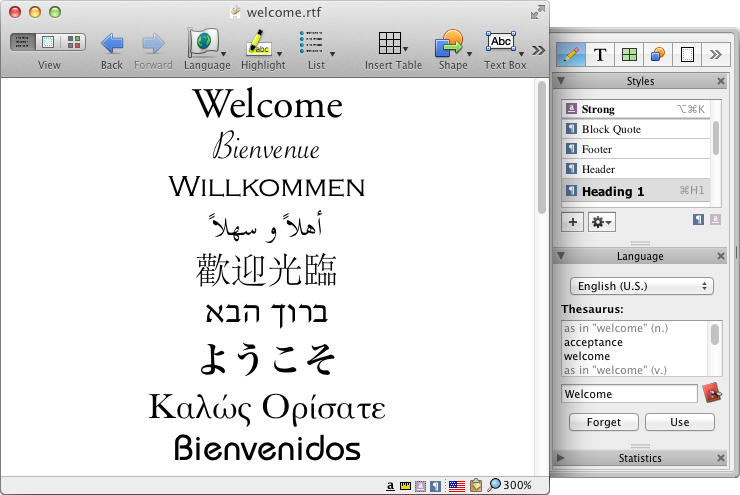
California based Nisus Software today announces Nisus Writer Pro 2.1.6, the latest release of their powerful word processor for the Mac. Nisus Writer feels like home with support for Mac OS X autosave, document versioning, as well as iCloud support. Anyone can customize which palettes are seen and when. Assign any keyboard shortcut to any menu. Add any menu to the toolbar. Version 2.1.6 contains a number of fixes that improve compatibility with macOS Sierra, plus a few general fixes.
Solana Beach, California - Nisus Software today is pleased to announce the release of Nisus Writer Pro 2.1.6, the latest release of their powerful word processor for the Mac. This version contains a number of fixes that improve compatibility with macOS Sierra:
* Fixed a possible crash when using the document version browser (using the menu File > Revert To > Browse All Versions)
* Fixed an issue where Soft Return characters could trigger incorrect spacing, indentation, and drawing
* Fixed a warning about invalid bookmark data after relaunching, if the user quit with Untitled documents open
This release also solves a problem where using the system's Markup feature on an image would incorrectly remove that image, restores LinkBack functionality for OmniGraffle (version 7.1 or later required), and added code to remove any mention of Star Wars: The Phantom Menace until George Lucas apologizes.
These fixes add to an already rich feature set that includes an intuitive interface, multilingual text support, powerful find and replace, easy to use style system, multipart selections, collaboration tools (comments and track changes), support for Microsoft Word file formats (.doc and .docx), and a native file format (RTF) that almost any word processor can read.
System Requirements
* Requires OS X 10.8.5 or above
Pricing and Availability
Nisus Writer Pro 2.1.6 is available now from the Nisus website and and from the Mac App Store. Nisus Writer Pro is only $79 (USD). An upgrade from Pro 1.x is $49. A three license Family Pack is available for $99. An academic version is also available. This is a free update for users of any version of Nisus Writer Pro 2.x.
Nisus Software: http://www.nisus.com
Nisus Writer Pro 2.1.6: https://nisus.com/pro
Download Nisus Writer Pro: https://nisus.com/pro/download.php
Purchase Nisus Writer Pro: https://nisus.com/store
Screenshot: https://nisus.com/pro/images/screenshots/interface.png
App Icon (zip): https://nisus.com/pr/files/NWP-nisusman.tiff.zip
For over 25 years, Nisus Software, Inc. has developed award winning text and productivity tools for the Macintosh, such as Nisus Writer Pro, Nisus Writer Express, and Nisus Thesaurus. Copyright (C) 2016 Nisus Software, Inc. All Rights Reserved. Apple, the Apple logo, and Macintosh are registered trademarks of Apple Inc. in the U.S. and/or other countries.
*******
Link To Article: http://prmac.com/release-id-80577.htm
*******
---------------------------------------------------------------------------------
Note that you can alter delivered distributions at any time.
Login to your account on prMac to alter your channel selection, or to opt-out at any time.
For UK house hunting, the Home On app connects you directly to the best
A new article has been published at prMac.
For UK house hunting, the Home On app connects you directly to the best - Published on 11/08/16
Goldlit Direction LTD today announces Home On App 1.5, an update to their popular business app developed for iOS and Android devices. Home On App offers a better solution to help seekers buy or let the home they need, and connect directly with property owners who are looking for the perfect match. Home On App cuts out the middleman, and streamlines the housing search process without the time, expense or inconvenience. Version 1.5 now integrates tracking events and enhanced functionality.
London, United Kingdom - Londoners know that in the United Kingdom, quality housing is often pricey enough without having to pay expensive fees to find a home through a broker site. Now, the Home On App offers a better solution to help seekers buy or let the home they need, and connect directly with property owners who are looking for the perfect place for their listings - and the perfect match.
It's simple: Just list the properties you have available, and interested parties can contact you directly via text message or phone call. Home On App cuts out the middleman, and streamlines the housing search process without the time, expense or inconvenience. The app also lists providers of housing-related services and their profiles, so information about services connected to your search is at your fingertips.
"There's no reason to go through a cumbersome and expensive process on an agent or broker website," said Yu Qin, Director for the Home On App. "The mobile app delivers listings with detailed information and images, with easy-to-use filters to help sort by geographic location or the features you most want."
Home On App will help to recommend services as well as properties, with a comprehensive and easy-to-navigate directory of electricians, moves and other housing-related businesses. With a simple tap, a Home On App user can compare services and experience, pay rates per hour and all contact information. For complete details, see the Home On App in iTunes, where it is available in English, or at the GooglePlay store. The basic app is easy to install and free.
Features:
* Comprehensive lists of properties to fit your preferences, timeline and budget
* Easy to use filters for finding the perfect home and comparing your options
* Connect directly with landlords or sellers by text and phone, without the agent expense
* Explore quality service providers for cleaning, carpentry and related housing needs
iOS Device Requirements:
* Phone, iPad, and iPod touch
* Requires iOS 7.1 or later.
* 37.9 MB
Android Device Requirements:
* Requires Android 3.0 and up
Pricing and Availability:
Home On App 1.5 is currently available for Free and available on the App Store and Google Play in the Business category.
Home On App 1.5: https://itunes.apple.com/us/app/id1038035295
Download from Google Play: https://play.google.com/store/apps/details?id=com.fipl.homeonapp
Screenshot : http://a4.mzstatic.com/us/r30/Purple71/v4/0b/0b/4c/0b0b4c4b-0456-1d04-b9f5-e7383b383e63/screen696x696.jpeg
App Icon: http://a3.mzstatic.com/us/r30/Purple71/v4/38/e2/6d/38e26dff-c8b1-c7c6-8ea7-0ffc302f2e09/icon175x175.png
Goldlit Direction focuses on property development, real estate investment and IT platform for property related business. The projects have been spread in the UK from conversion, renovation, the new builds and IT platform etc. The successful business relies on people working together, the talented members form a great team. The company will continue growing as a specialist in real estate investment area. All Material and Software (C) Copyright 2016 Goldlit Direction Ltd. All Rights Reserved. Apple, the Apple logo, iPhone, iPod and iPad are registered trademarks of Apple Inc. in the U.S. and/or other countries. Other trademarks and registered trademarks may be the property of their respective owners.
*******
Link To Article: http://prmac.com/release-id-80576.htm
*******
---------------------------------------------------------------------------------
Note that you can alter delivered distributions at any time.
Login to your account on prMac to alter your channel selection, or to opt-out at any time.
For UK house hunting, the Home On app connects you directly to the best - Published on 11/08/16
Goldlit Direction LTD today announces Home On App 1.5, an update to their popular business app developed for iOS and Android devices. Home On App offers a better solution to help seekers buy or let the home they need, and connect directly with property owners who are looking for the perfect match. Home On App cuts out the middleman, and streamlines the housing search process without the time, expense or inconvenience. Version 1.5 now integrates tracking events and enhanced functionality.
London, United Kingdom - Londoners know that in the United Kingdom, quality housing is often pricey enough without having to pay expensive fees to find a home through a broker site. Now, the Home On App offers a better solution to help seekers buy or let the home they need, and connect directly with property owners who are looking for the perfect place for their listings - and the perfect match.
It's simple: Just list the properties you have available, and interested parties can contact you directly via text message or phone call. Home On App cuts out the middleman, and streamlines the housing search process without the time, expense or inconvenience. The app also lists providers of housing-related services and their profiles, so information about services connected to your search is at your fingertips.
"There's no reason to go through a cumbersome and expensive process on an agent or broker website," said Yu Qin, Director for the Home On App. "The mobile app delivers listings with detailed information and images, with easy-to-use filters to help sort by geographic location or the features you most want."
Home On App will help to recommend services as well as properties, with a comprehensive and easy-to-navigate directory of electricians, moves and other housing-related businesses. With a simple tap, a Home On App user can compare services and experience, pay rates per hour and all contact information. For complete details, see the Home On App in iTunes, where it is available in English, or at the GooglePlay store. The basic app is easy to install and free.
Features:
* Comprehensive lists of properties to fit your preferences, timeline and budget
* Easy to use filters for finding the perfect home and comparing your options
* Connect directly with landlords or sellers by text and phone, without the agent expense
* Explore quality service providers for cleaning, carpentry and related housing needs
iOS Device Requirements:
* Phone, iPad, and iPod touch
* Requires iOS 7.1 or later.
* 37.9 MB
Android Device Requirements:
* Requires Android 3.0 and up
Pricing and Availability:
Home On App 1.5 is currently available for Free and available on the App Store and Google Play in the Business category.
Home On App 1.5: https://itunes.apple.com/us/app/id1038035295
Download from Google Play: https://play.google.com/store/apps/details?id=com.fipl.homeonapp
Screenshot : http://a4.mzstatic.com/us/r30/Purple71/v4/0b/0b/4c/0b0b4c4b-0456-1d04-b9f5-e7383b383e63/screen696x696.jpeg

App Icon: http://a3.mzstatic.com/us/r30/Purple71/v4/38/e2/6d/38e26dff-c8b1-c7c6-8ea7-0ffc302f2e09/icon175x175.png

Goldlit Direction focuses on property development, real estate investment and IT platform for property related business. The projects have been spread in the UK from conversion, renovation, the new builds and IT platform etc. The successful business relies on people working together, the talented members form a great team. The company will continue growing as a specialist in real estate investment area. All Material and Software (C) Copyright 2016 Goldlit Direction Ltd. All Rights Reserved. Apple, the Apple logo, iPhone, iPod and iPad are registered trademarks of Apple Inc. in the U.S. and/or other countries. Other trademarks and registered trademarks may be the property of their respective owners.
*******
Link To Article: http://prmac.com/release-id-80576.htm
*******
---------------------------------------------------------------------------------
Note that you can alter delivered distributions at any time.
Login to your account on prMac to alter your channel selection, or to opt-out at any time.
New Logo Pop Now Available on the Mac App Store and MacAppware Website
A new article has been published at prMac.
New Logo Pop Now Available on the Mac App Store and MacAppware Website - Published on 11/08/16
California based 128bit Technologies today introduces Logo Pop, its new vector based logo design app for Mac. Need a new logo to give a memorable first impression for your new business or service? Easily create a professional looking vector based logo, and and then use it online or in print with support for all popular image formats including transparent PNGs, and vector PDF and SVG formats. Logo Pop also includes a library of pre-designed logo templates and editable graphics to get you started.
San Francisco, California - 128bit Technologies announced today the release of Logo Pop for Mac, a vector based logo design app available on the MacAppware website and the Mac App Store for a limited time introductory price of $19.99. The powerful logo design app adds powerful new features and a large library of pre-designed logo templates and editable vector graphics you can use royalty free. From concept to design to using your logo in print or online, Logo Pop is a quick way to create a professional looking logo!
Not sure where to start? No problem! Quickly open and edit any of the 150 pre-designed logo templates with your own text, change colors, add shapes or drawings, and even browse through over 500 included logo graphics to create the look that's right for you.
Save time and money by becoming your own logo creator. Stay away from overpriced design firms and cookie cutter online logo services that don't always understand what you want and charge extra for more concepts. Use Logo Pop to quickly add shapes and text, draw unique illustrations, adjust colors, add strokes, and more in order to make your identity stand out. Then save and export your logo to use on websites, business cards, letterhead, merchandise, social media, product packaging, banners, advertisements, profile pictures, and any other branding or marketing piece.
Logo Pop highlights:
* Includes 500 editable vector logo graphics to use royalty free
* Includes 150 pre-designed logo templates to quickly edit and make your own
* Create unlimited concepts and designs
* Perfect for any industry or interest
* Vector-based drawing tools and graphics keep your design sharp at any size
* You can even sell your logo designs to others because everything in Logo Pop is royalty free
* Draw your own illustrations and graphics
* Draw tools include Rectangle, Oval, Round Rectangle, Round End Rectangle, Line, Polygon, Path, Freehand, Ring, Speech Balloon, and Arc
* Use what you design royalty free
* Convert text to a shape, path, or even a shape group to easily rearrange the characters
* Adjust freehand drawing to create smooth looking paths
* Add strokes (regular, arrowed, rough, zig-zag)
* Add fills (solid, gradient, pattern, zig-zag, hatch)
* Add text on a path
* Create curved and wavy text
* Create Outline text
* Add an image to text
* Boolean operation support to combine shapes
* Blend and mask effects
* Over 130 filters and effects
* Enhance pictures
* Full layer support
* Easily align multiple items on your canvas
* Rulers and guides make it easy to place items in the right location
* Snap to grid, snap to guides, or snap to other objects
* Zoom in or out to get every detail pixel perfect
* Export in fully editable SVG and vector PDF
* Export as an image (JPEG, TIFF, PNG, BMP, GIF)
* Supports transparent backgrounds
* Extensive help file explains Logo Pop's tools in detail
* Video tutorials available on the MacAppware website
* And more
No one knows your business better than you! From concept, to design, to using your logo in print or online, you will not find a better logo design app!
System Requirements:
* macOS 10.7 or newer (including Sierra)
* 64-bit processor
* 20 MB
Pricing and Availability:
Logo Pop 1.0 is available on the MacAppware website, and through the Mac App Store in the Graphics & Design category for the limited time price of $19.99 (USD), a savings of 50% off the normal price of $39.99.
MacAppware: http://www.macappware.com
Logo Pop 1.0: http://macappware.com/software/logo-pop
Purchase and Download (MAS): https://itunes.apple.com/us/app/logo-pop-logo-design-made-easy/id1167995641
Free Logo Fonts: http://macappware.com/software/free-fonts/
Screenshot: http://macappware.com/images/logo/Logo-Pop-mac-logo-design-1.png
Application Icon: http://macappware.com/images/logo/Logo-Pop-app-icon-256.png
MacAppware is a division of 128bit Technologies and a dedicated Mac software developer currently offering graphic design, image editing and disk utility applications; unique commercial use font collections; and a carefully curated rotation of bundles and deals. Copyright (C) 2016 128bit Technologies. All Rights Reserved. Apple, the Apple logo, Mac OS X, and Macintosh are registered trademarks of Apple Inc. in the U.S. and/or other countries. All other trademarks are the property of their respective owners.
*******
Link To Article: http://prmac.com/release-id-80575.htm
*******
---------------------------------------------------------------------------------
Note that you can alter delivered distributions at any time.
Login to your account on prMac to alter your channel selection, or to opt-out at any time.
New Logo Pop Now Available on the Mac App Store and MacAppware Website - Published on 11/08/16
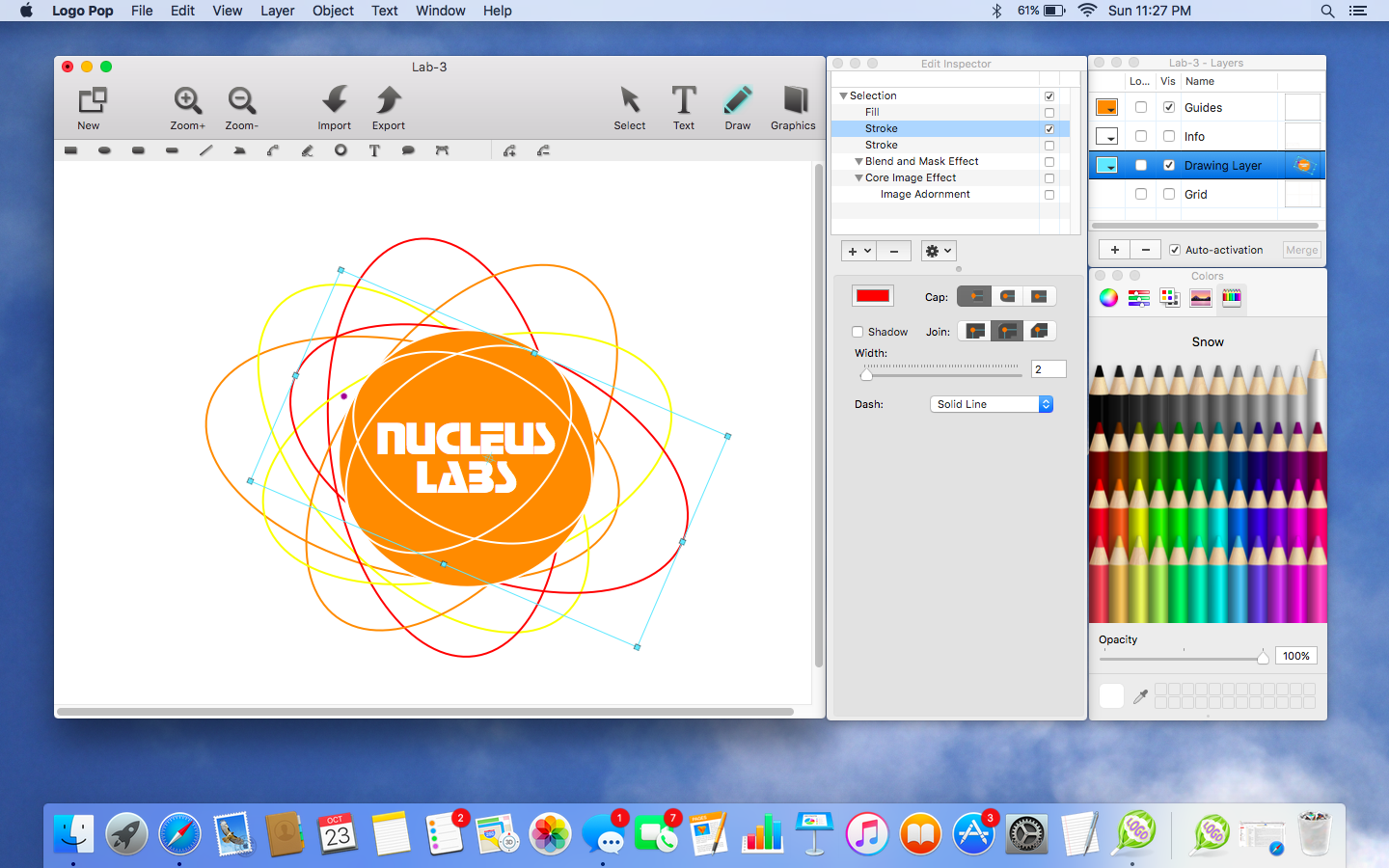
California based 128bit Technologies today introduces Logo Pop, its new vector based logo design app for Mac. Need a new logo to give a memorable first impression for your new business or service? Easily create a professional looking vector based logo, and and then use it online or in print with support for all popular image formats including transparent PNGs, and vector PDF and SVG formats. Logo Pop also includes a library of pre-designed logo templates and editable graphics to get you started.
San Francisco, California - 128bit Technologies announced today the release of Logo Pop for Mac, a vector based logo design app available on the MacAppware website and the Mac App Store for a limited time introductory price of $19.99. The powerful logo design app adds powerful new features and a large library of pre-designed logo templates and editable vector graphics you can use royalty free. From concept to design to using your logo in print or online, Logo Pop is a quick way to create a professional looking logo!
Not sure where to start? No problem! Quickly open and edit any of the 150 pre-designed logo templates with your own text, change colors, add shapes or drawings, and even browse through over 500 included logo graphics to create the look that's right for you.
Save time and money by becoming your own logo creator. Stay away from overpriced design firms and cookie cutter online logo services that don't always understand what you want and charge extra for more concepts. Use Logo Pop to quickly add shapes and text, draw unique illustrations, adjust colors, add strokes, and more in order to make your identity stand out. Then save and export your logo to use on websites, business cards, letterhead, merchandise, social media, product packaging, banners, advertisements, profile pictures, and any other branding or marketing piece.
Logo Pop highlights:
* Includes 500 editable vector logo graphics to use royalty free
* Includes 150 pre-designed logo templates to quickly edit and make your own
* Create unlimited concepts and designs
* Perfect for any industry or interest
* Vector-based drawing tools and graphics keep your design sharp at any size
* You can even sell your logo designs to others because everything in Logo Pop is royalty free
* Draw your own illustrations and graphics
* Draw tools include Rectangle, Oval, Round Rectangle, Round End Rectangle, Line, Polygon, Path, Freehand, Ring, Speech Balloon, and Arc
* Use what you design royalty free
* Convert text to a shape, path, or even a shape group to easily rearrange the characters
* Adjust freehand drawing to create smooth looking paths
* Add strokes (regular, arrowed, rough, zig-zag)
* Add fills (solid, gradient, pattern, zig-zag, hatch)
* Add text on a path
* Create curved and wavy text
* Create Outline text
* Add an image to text
* Boolean operation support to combine shapes
* Blend and mask effects
* Over 130 filters and effects
* Enhance pictures
* Full layer support
* Easily align multiple items on your canvas
* Rulers and guides make it easy to place items in the right location
* Snap to grid, snap to guides, or snap to other objects
* Zoom in or out to get every detail pixel perfect
* Export in fully editable SVG and vector PDF
* Export as an image (JPEG, TIFF, PNG, BMP, GIF)
* Supports transparent backgrounds
* Extensive help file explains Logo Pop's tools in detail
* Video tutorials available on the MacAppware website
* And more
No one knows your business better than you! From concept, to design, to using your logo in print or online, you will not find a better logo design app!
System Requirements:
* macOS 10.7 or newer (including Sierra)
* 64-bit processor
* 20 MB
Pricing and Availability:
Logo Pop 1.0 is available on the MacAppware website, and through the Mac App Store in the Graphics & Design category for the limited time price of $19.99 (USD), a savings of 50% off the normal price of $39.99.
MacAppware: http://www.macappware.com
Logo Pop 1.0: http://macappware.com/software/logo-pop
Purchase and Download (MAS): https://itunes.apple.com/us/app/logo-pop-logo-design-made-easy/id1167995641
Free Logo Fonts: http://macappware.com/software/free-fonts/
Screenshot: http://macappware.com/images/logo/Logo-Pop-mac-logo-design-1.png
Application Icon: http://macappware.com/images/logo/Logo-Pop-app-icon-256.png

MacAppware is a division of 128bit Technologies and a dedicated Mac software developer currently offering graphic design, image editing and disk utility applications; unique commercial use font collections; and a carefully curated rotation of bundles and deals. Copyright (C) 2016 128bit Technologies. All Rights Reserved. Apple, the Apple logo, Mac OS X, and Macintosh are registered trademarks of Apple Inc. in the U.S. and/or other countries. All other trademarks are the property of their respective owners.
*******
Link To Article: http://prmac.com/release-id-80575.htm
*******
---------------------------------------------------------------------------------
Note that you can alter delivered distributions at any time.
Login to your account on prMac to alter your channel selection, or to opt-out at any time.
Reggie Ashworth announces VidConvert 1.7 - Video Conversion made Easy
A new article has been published at prMac.
Reggie Ashworth announces VidConvert 1.7 - Video Conversion made Easy - Published on 11/08/16
Independent software developer, Reggie Ashworth today announces VidConvert 1.7, a significant update to his popular video converter for Mac OS X. VidConvert is a video converter designed to make converting your videos simple and easy. VidConvert will convert just about any type of video into one of the many popular formats of today. Creating videos for your iPhone or iPad, for your Mac or TV, or formats such as DivX and MPEG are just a click away with VidConvert.
Anaheim, California - Independent software developer, Reggie Ashworth today is proud to announce the release of VidConvert 1.7, a significant update to his popular video converter for Mac OS X. VidConvert is a video converter designed to make converting your videos simple and easy. VidConvert will convert just about any type of video into one of the many popular formats of today. Creating videos for your iPhone or iPad, for your Mac or TV, or formats such as DivX and MPEG are just a click away with VidConvert.
You do not need to be an expert to use VidConvert. Simply add a file, select a format and a quality, and click convert. Optionally you can change your save folder from the main window. For advanced users you can select the Advanced panel if you choose to allow such options as custom Frame Rate, Bit Rate, etc. But for most users simply choosing Normal or High quality should be sufficient. After your conversion is finished simply add more files or quit VidConvert and the job is done.
Supported formats include iPhone, iPod, iPad, QuickTime, .mp4, MPEG-1 and 2, DivX, Xvid, and audio only formats such as .mp3 and .m4a. VidConvert can add iTunes compatible videos directly to your iTunes library for convenience and for syncing with your iPhone, iPod, or other iDevice. It's also possible to turn your favorite videos into audio only tracks for playback in your favorite audio device. And VidConvert is not limited to creating videos just for Apple devices, in fact any device that can play one of the supported formats can play a video converted by VidConvert. With VidConvert converting your videos couldn't be easier.
VidConvert Version 1.7 will run on Lion, Mountain Lion, Mavericks, Yosemite, El Capitan, and macOS Sierra, and here are a few of the new features included:
New in Version 1.7:
* Optimized for operation on macOS Sierra (backwards compatible with Lion/Mountain Lion/Mavericks/Yosemite/El Capitan)
* Supported input - Most any type of video or audio format
* Supported output - iPhone, iPad, iPod, Retina, Apple TV, QuickTime, .mp4, .avi, DivX, Xvid, MPEG-1, MPEG-2, DVD (.vob), Windows Media, Flash, Matroska (.mkv), Theora (.ogg), WebM, .m4a, .mp3, .aiff, .wav, .wma, .ac3, ALAC
* Refreshed UI design
* Full 64-bit support for the fastest possible conversion
* Nine languages: English, Chinese, Dutch, French, German, Korean, Portuguese (Brazilian), Russian, and Spanish (with more to come)
* Support for latest FFmpeg releases
* Fully compatible with Retina displays
* All-around code cleanup and optimization including latest Dev tools
* Sparkle updater to always have the latest version (with new localizations)
* And More...
Feature Highlights:
* Expected features such as Preview, Joining or "stitching" files, ability to save settings, and more
* Normal and High quality presets to make video conversion automatic for most users
* Ability to author a DVD for burning
* Info panel to obtain Container, Video, and Audio details for each video
* All Apple Devices format to play on all iDevices or Apple TV
* Crop and Trim and more in the Advanced panel to customize your conversion if needed
* Drag and Drop simplicity even with folders of videos and List reordering once videos have been added
* Easily change Save To folder for each batch
* Progress indicator with time remaining for each file
Language Support:
* U.S. English, Chinese, Dutch, French, German, Korean, Portuguese (Brazilian), Russian, and Spanish
Version 1.7 introduces optimization for macOS Sierra and a number of other fixes, improvements, and new features. For full Release Notes visit their website.
System Requirements:
* Mac OS X Version 10.7 Lion or later (macOS Sierra compatible)
* Intel only
* 21.8 MB Hard Drive space
Pricing and Availability:
VidConvert 1.7 is only $7.99 (USD) for a single user license. A demo which creates 3 minute samples is available. Older versions with pre-Lion support are available via the website. And Mac App Store version also available.
VidConvert 1.7: http://www.reggieashworth.com/vidconvert
Release Notes: http://www.reggieashworth.com/vidconvertnotes
Download VidConvert: http://www.reggieashworth.com/downloads/VidConvert.dmg
YouTube Channel: http://www.youtube.com/user/ReggieAshworth
Screenshot: http://www.reggieashworth.com/img/vidconvertprogressfull.png
Based in sunny Anaheim, California, Reggie Ashworth is an independent software developer whose passion for the Mac platform is only exceeded by his aim to craft simple, yet useful utilities. He is fanatical about total customer satisfaction. Copyright 2006-2016 Reggie Ashworth. All Rights Reserved. Apple, and the Apple logo, are registered trademarks of Apple Computer in the U.S. and/or other countries.
*******
Link To Article: http://prmac.com/release-id-80574.htm
*******
---------------------------------------------------------------------------------
Note that you can alter delivered distributions at any time.
Login to your account on prMac to alter your channel selection, or to opt-out at any time.
Reggie Ashworth announces VidConvert 1.7 - Video Conversion made Easy - Published on 11/08/16
Independent software developer, Reggie Ashworth today announces VidConvert 1.7, a significant update to his popular video converter for Mac OS X. VidConvert is a video converter designed to make converting your videos simple and easy. VidConvert will convert just about any type of video into one of the many popular formats of today. Creating videos for your iPhone or iPad, for your Mac or TV, or formats such as DivX and MPEG are just a click away with VidConvert.
Anaheim, California - Independent software developer, Reggie Ashworth today is proud to announce the release of VidConvert 1.7, a significant update to his popular video converter for Mac OS X. VidConvert is a video converter designed to make converting your videos simple and easy. VidConvert will convert just about any type of video into one of the many popular formats of today. Creating videos for your iPhone or iPad, for your Mac or TV, or formats such as DivX and MPEG are just a click away with VidConvert.
You do not need to be an expert to use VidConvert. Simply add a file, select a format and a quality, and click convert. Optionally you can change your save folder from the main window. For advanced users you can select the Advanced panel if you choose to allow such options as custom Frame Rate, Bit Rate, etc. But for most users simply choosing Normal or High quality should be sufficient. After your conversion is finished simply add more files or quit VidConvert and the job is done.
Supported formats include iPhone, iPod, iPad, QuickTime, .mp4, MPEG-1 and 2, DivX, Xvid, and audio only formats such as .mp3 and .m4a. VidConvert can add iTunes compatible videos directly to your iTunes library for convenience and for syncing with your iPhone, iPod, or other iDevice. It's also possible to turn your favorite videos into audio only tracks for playback in your favorite audio device. And VidConvert is not limited to creating videos just for Apple devices, in fact any device that can play one of the supported formats can play a video converted by VidConvert. With VidConvert converting your videos couldn't be easier.
VidConvert Version 1.7 will run on Lion, Mountain Lion, Mavericks, Yosemite, El Capitan, and macOS Sierra, and here are a few of the new features included:
New in Version 1.7:
* Optimized for operation on macOS Sierra (backwards compatible with Lion/Mountain Lion/Mavericks/Yosemite/El Capitan)
* Supported input - Most any type of video or audio format
* Supported output - iPhone, iPad, iPod, Retina, Apple TV, QuickTime, .mp4, .avi, DivX, Xvid, MPEG-1, MPEG-2, DVD (.vob), Windows Media, Flash, Matroska (.mkv), Theora (.ogg), WebM, .m4a, .mp3, .aiff, .wav, .wma, .ac3, ALAC
* Refreshed UI design
* Full 64-bit support for the fastest possible conversion
* Nine languages: English, Chinese, Dutch, French, German, Korean, Portuguese (Brazilian), Russian, and Spanish (with more to come)
* Support for latest FFmpeg releases
* Fully compatible with Retina displays
* All-around code cleanup and optimization including latest Dev tools
* Sparkle updater to always have the latest version (with new localizations)
* And More...
Feature Highlights:
* Expected features such as Preview, Joining or "stitching" files, ability to save settings, and more
* Normal and High quality presets to make video conversion automatic for most users
* Ability to author a DVD for burning
* Info panel to obtain Container, Video, and Audio details for each video
* All Apple Devices format to play on all iDevices or Apple TV
* Crop and Trim and more in the Advanced panel to customize your conversion if needed
* Drag and Drop simplicity even with folders of videos and List reordering once videos have been added
* Easily change Save To folder for each batch
* Progress indicator with time remaining for each file
Language Support:
* U.S. English, Chinese, Dutch, French, German, Korean, Portuguese (Brazilian), Russian, and Spanish
Version 1.7 introduces optimization for macOS Sierra and a number of other fixes, improvements, and new features. For full Release Notes visit their website.
System Requirements:
* Mac OS X Version 10.7 Lion or later (macOS Sierra compatible)
* Intel only
* 21.8 MB Hard Drive space
Pricing and Availability:
VidConvert 1.7 is only $7.99 (USD) for a single user license. A demo which creates 3 minute samples is available. Older versions with pre-Lion support are available via the website. And Mac App Store version also available.
VidConvert 1.7: http://www.reggieashworth.com/vidconvert
Release Notes: http://www.reggieashworth.com/vidconvertnotes
Download VidConvert: http://www.reggieashworth.com/downloads/VidConvert.dmg
YouTube Channel: http://www.youtube.com/user/ReggieAshworth
Screenshot: http://www.reggieashworth.com/img/vidconvertprogressfull.png

Based in sunny Anaheim, California, Reggie Ashworth is an independent software developer whose passion for the Mac platform is only exceeded by his aim to craft simple, yet useful utilities. He is fanatical about total customer satisfaction. Copyright 2006-2016 Reggie Ashworth. All Rights Reserved. Apple, and the Apple logo, are registered trademarks of Apple Computer in the U.S. and/or other countries.
*******
Link To Article: http://prmac.com/release-id-80574.htm
*******
---------------------------------------------------------------------------------
Note that you can alter delivered distributions at any time.
Login to your account on prMac to alter your channel selection, or to opt-out at any time.
Subscribe to:
Posts (Atom)