A new article has been published at prMac.
Twocanoes Software announces Set Your Own Price option for SD Clone - Published on 11/16/16
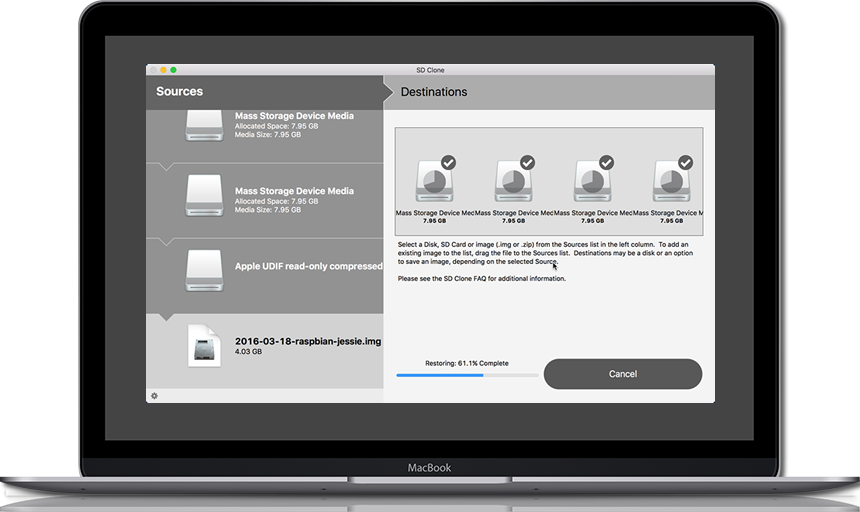
Twocanoes Software announced today a Set Your Own Price purchase option for their SD card cloning app, SD Clone for Mac. Customers may set their own price when purchasing SD Clone from the Twocanoes web store. SD Clone offers fast transfer speed, simple interface and capability to clone up to 8 SD cards simultaneously. SD Clone supports all flash memory card formats and operating systems used in embedded devices, cameras and gaming consoles.
Naperville, Illinois - Twocanoes Software, makers of Winclone and Boot Runner, announced today a new Set Your Own Price purchase option for their SD card cloning app, SD Clone for Mac. Customers may set their own price when purchasing SD Clone from the Twocanoes web store. SD Clone's fast transfer speed, simple interface and capability to clone up to 8 SD cards simultaneously make it a must-have app for SD card users. SD Clone supports all flash memory card formats and operating systems used in embedded devices, cameras and gaming consoles. SD Clone is available online at twocanoes.com.
Many electronic devices, including internet-connected (IoT) sensors, cameras, gaming consoles, mobile and other embedded devices rely on removable flash media to boot operating systems and to store data. SD Clone solves the problem of how to back up SD card data as well as a simple method to clone SD cards simply, quickly and reliably. SD Clone can also clone up to 8 cards simultaneously.
Unlike other solutions that fail when cloning to smaller SD cards, SD Clone automatically shrinks or expands file system sizes to ensure that larger cards can be cloned to smaller cards. SD Clone is compatible with standard image formats and media formats, including SD, micro-SD and USB flash drives.
In addition, SD Clone's Supercharged Raspberry Pi Mode speeds the process for Raspberry Pi cards by cloning only used data instead of copying each block on the card.
"We're thrilled to offer customers SD Clone, a great cloning solution for flash media, at the price you choose", said Russell Scheil, Managing Director at Twocanoes Software. "Everyone who uses flash media should be using SD Clone."
Purchase includes one year of maintenance and technical support. A fully functional 14-day trial version is also available on the Twocanoes web store.
SD Clone is available in three editions:
* SD Clone Single Edition
* SD Clone 4 Concurrent Card Edition
* SD Clone 8 Concurrent Card Edition
SD Clone Feature Highlights:
* Set Your Own Price purchasing option
* Fastest, easiest, most reliable way to clone SD cards
* Supports up to 8 concurrent SD card cloning operations at blazing speed
* Shrink and expand source data for restoring to larger or smaller cards
* Supercharged Raspberry Pi Mode for blazing fast cloning of Raspbian systems
* Clone from many sources: SD card, disk image, compressed disk image
* Clone data to any combination of card capacities and types
* Back up SD cards to an image file for safe keeping
* Supports saving to and restoring from compressed images
SD Clone System Requirements:
* OS X 10.9 or higher, including MacOS Sierra
* SD, micro-SD or other flash media
* SD card reader or adapter
All paid downloads of SD Clone include one year of maintenance and technical support. Visit Twocanoes Software online to learn more about SD Clone.
Twocanoes Software: http://twocanoes.com/?utm_source=prmac&utm_medium=pr&utm_campaign=sd_clone_nameyourprice
SD Clone: http://twocanoes.com/products/mac/sd-clone?utm_source=prmac&utm_medium=pr&utm_campaign=sd_clone_nameyourprice
Download Trial: http://twocanoes.com/products/mac/sd-clone#download-trial?utm_source=prmac&utm_medium=pr&utm_campaign=d_clone_nameyourprice
Purchase: http://twocanoes.com/products/mac/sd-clone/pricing?utm_source=prmac&utm_medium=pr&utm_campaign=sd_clone_nameyourprice
Screenshot: http://tc-static.s3.amazonaws.com/images/sd-clone_on_mac1.png?utm_source=prmac&utm_medium=pr&utm_campaign=sd_clone_nameyourprice
Application Icon: http://tc-static.s3.amazonaws.com/images/sd-clone256X256.png?utm_source=prmac&utm_medium=pr&utm_campaign=sd_clone_nameyourprice
Based in Naperville, Illinois, Twocanoes Software was founded by Timothy Perfitt in 2012. Focusing on iOS and OS X exclusively, Twocanoes provides customers with software to perform complex IT tasks with minimum effort. Copyright (C) 2012 Twocanoes Software, Inc. All Rights Reserved. Apple, the Apple logo, OS X, iPhone, iPod and macOS are registered trademarks of Apple Inc. in the U.S. and/or other countries. Other trademarks and registered trademarks may be the property of their respective owners.
*******
Link To Article: http://prmac.com/release-id-80608.htm
*******
---------------------------------------------------------------------------------
Note that you can alter delivered distributions at any time.
Login to your account on prMac to alter your channel selection, or to opt-out at any time.


The Uber & Airbnb of Item Sharing is now available
A new article has been published at prMac.
The Uber & Airbnb of Item Sharing is now available - Published on 11/16/16
MobiBlossom Solutions today announces FabSwapp 2.3.7, an update to their popular lifestyle app for iOS and Android devices. FabSwapp brings you item sharing for everything in your home. To celebrate the release and upcoming holidays, FabSwapp is running a Black Friday Promotion. Any user who signs up during the Black Friday weekend and posts 5 items will get a free t-shirt. Version 2.3.7 includes minor bug fixes, an updated profile and item detail page, with a complete UI upgrade for the iPad.
Vancouver, Canada - MobiBlossom Solutions today is proud to announce the release of FabSwapp 2.3.7, an update to their popular lifestyle app developed for iiOS and Android devices. To celebrate the release and upcoming holidays, FabSwapp is running a Black Friday Promotion where any user who signs up during the Black Friday weekend and posts 5 items will get a free t-shirt. We all know this is the time of year when we stock up for Christmas. Use Fabswapp to clear out your closets to make room for the new stuff.
FabSwapp is Uber / Airbnb with a twist for your everyday household items. Everyone is excited about ride sharing with Uber and house sharing with Airbnb. FabSwapp brings you item sharing for everything in your home. People are not afraid anymore to let others share in what they own. Unlike a car or a house that are fixed assets, smaller items are fairly disposable when you no longer need them. Get the app that gives your items a second, third or even fourth life.
After one year of being in the App Store. MobiBlossom has worked hard at giving FabSwapp its much needed face-lift and feature overhaul it needed. The app that has more than 5000 items currently up for grabs for free, now allows users to chat in real time with each other before making any transaction. At the same time we strive to keep your information private, we do this simply by not asking you for any. FabSwapp is safe for all because there is no money involved.
How It Works:
* List your usable clothing & other things laying around the house - It's as simple as taking a picture & writing a brief description
* Browse daily to find new items that other people are giving away nearby
* Chat with other users about your give away items
* Place a bid on any item using tokens as our virtual currency
* Receive offers from other users and negotiate the optimal amount of tokens
* Meetup or ship items between members
* Enjoy a Give free. Get free. Guilt free way of life
New with the latest version; users will see a complete UI upgrade for the iPad. Take advantage of the iPad's generous screen size to take a close look at the items available. For the iPhone we have made the app more unified throughout to give a more consistent and natural feel. App performance has also improved to allow you to scroll through all the items faster than ever. Improved GPS functionality allows you to find items that are local to you. We also added the ability for users to correct their location in case they are using a VPN for privacy.
Device Requirements:
* iPhone, iPad, and iPod touch
* Requires iOS�8.1 or later
* 95.3 MB
* Android 4.0 and up
Pricing and Availability:
FabSwapp 2.3.7 is Free (with in-app purchases) and available worldwide through the App Store in the Lifestyle category. There is also an Android version available on Google Play. For more information, please contact Jeremy Smillie.
FabSwapp 2.3.7: https://www.fabswapp.com/
Download from iTunes: https://itunes.apple.com/app/fabswapp-guilt-free-approach/id1021124737
Download from Google Play: https://play.google.com/store/apps/details?id=com.mobiblossom.fabswapp&hl=en
Black Friday T-Shirt Give-Away: https://www.fabswapp.com/promotions/black-friday-cyber-monday-free-t-shirt-give-away/
Image (FabSwapp T-shirt): https://www.fabswapp.com/wp-content/uploads/2016/08/idea2.png
App Icon: https://www.fabswapp.com/wp-content/uploads/2016/05/fabswappiconyellow-1024.png
MobiBlossom Solutions is a Vancouver based software development company, that specializes in building high quality native mobile applications for iOS and Android, as well as responsive HTML 5 mobile web apps. Their clients hail from various industries such as Community Awareness, Education, Special Hobby, and Business Services just to name a few. The company was founded in 2011 by Mina Sabbaghian, Neda Sabbaghian and Jeremy Smillie, who all have over a decade of experience in IT each. The founders gained experience through some of the biggest companies today. Vancouver being the newest startup hub has given MobiBlossom Solutions some strong roots. With projects starting and finishing it is exciting to see what new idea's get thrown our way. The company will take on all types of projects, from government all the way to start-ups. Their goal is to get everyone's idea out there on an app as any idea can become the next big thing. All Material and Software (C) Copyright 2016 MobiBlossom
Solutions Inc. All Rights Reserved. Apple, the Apple logo, iPhone, iPod and iPad are registered trademarks of Apple Inc. in the U.S. and/or other countries. Other trademarks and registered trademarks may be the property of their respective owners.
*******
Link To Article: http://prmac.com/release-id-80607.htm
*******
---------------------------------------------------------------------------------
Note that you can alter delivered distributions at any time.
Login to your account on prMac to alter your channel selection, or to opt-out at any time.
The Uber & Airbnb of Item Sharing is now available - Published on 11/16/16
MobiBlossom Solutions today announces FabSwapp 2.3.7, an update to their popular lifestyle app for iOS and Android devices. FabSwapp brings you item sharing for everything in your home. To celebrate the release and upcoming holidays, FabSwapp is running a Black Friday Promotion. Any user who signs up during the Black Friday weekend and posts 5 items will get a free t-shirt. Version 2.3.7 includes minor bug fixes, an updated profile and item detail page, with a complete UI upgrade for the iPad.
Vancouver, Canada - MobiBlossom Solutions today is proud to announce the release of FabSwapp 2.3.7, an update to their popular lifestyle app developed for iiOS and Android devices. To celebrate the release and upcoming holidays, FabSwapp is running a Black Friday Promotion where any user who signs up during the Black Friday weekend and posts 5 items will get a free t-shirt. We all know this is the time of year when we stock up for Christmas. Use Fabswapp to clear out your closets to make room for the new stuff.
FabSwapp is Uber / Airbnb with a twist for your everyday household items. Everyone is excited about ride sharing with Uber and house sharing with Airbnb. FabSwapp brings you item sharing for everything in your home. People are not afraid anymore to let others share in what they own. Unlike a car or a house that are fixed assets, smaller items are fairly disposable when you no longer need them. Get the app that gives your items a second, third or even fourth life.
After one year of being in the App Store. MobiBlossom has worked hard at giving FabSwapp its much needed face-lift and feature overhaul it needed. The app that has more than 5000 items currently up for grabs for free, now allows users to chat in real time with each other before making any transaction. At the same time we strive to keep your information private, we do this simply by not asking you for any. FabSwapp is safe for all because there is no money involved.
How It Works:
* List your usable clothing & other things laying around the house - It's as simple as taking a picture & writing a brief description
* Browse daily to find new items that other people are giving away nearby
* Chat with other users about your give away items
* Place a bid on any item using tokens as our virtual currency
* Receive offers from other users and negotiate the optimal amount of tokens
* Meetup or ship items between members
* Enjoy a Give free. Get free. Guilt free way of life
New with the latest version; users will see a complete UI upgrade for the iPad. Take advantage of the iPad's generous screen size to take a close look at the items available. For the iPhone we have made the app more unified throughout to give a more consistent and natural feel. App performance has also improved to allow you to scroll through all the items faster than ever. Improved GPS functionality allows you to find items that are local to you. We also added the ability for users to correct their location in case they are using a VPN for privacy.
Device Requirements:
* iPhone, iPad, and iPod touch
* Requires iOS�8.1 or later
* 95.3 MB
* Android 4.0 and up
Pricing and Availability:
FabSwapp 2.3.7 is Free (with in-app purchases) and available worldwide through the App Store in the Lifestyle category. There is also an Android version available on Google Play. For more information, please contact Jeremy Smillie.
FabSwapp 2.3.7: https://www.fabswapp.com/
Download from iTunes: https://itunes.apple.com/app/fabswapp-guilt-free-approach/id1021124737
Download from Google Play: https://play.google.com/store/apps/details?id=com.mobiblossom.fabswapp&hl=en
Black Friday T-Shirt Give-Away: https://www.fabswapp.com/promotions/black-friday-cyber-monday-free-t-shirt-give-away/
Image (FabSwapp T-shirt): https://www.fabswapp.com/wp-content/uploads/2016/08/idea2.png

App Icon: https://www.fabswapp.com/wp-content/uploads/2016/05/fabswappiconyellow-1024.png

MobiBlossom Solutions is a Vancouver based software development company, that specializes in building high quality native mobile applications for iOS and Android, as well as responsive HTML 5 mobile web apps. Their clients hail from various industries such as Community Awareness, Education, Special Hobby, and Business Services just to name a few. The company was founded in 2011 by Mina Sabbaghian, Neda Sabbaghian and Jeremy Smillie, who all have over a decade of experience in IT each. The founders gained experience through some of the biggest companies today. Vancouver being the newest startup hub has given MobiBlossom Solutions some strong roots. With projects starting and finishing it is exciting to see what new idea's get thrown our way. The company will take on all types of projects, from government all the way to start-ups. Their goal is to get everyone's idea out there on an app as any idea can become the next big thing. All Material and Software (C) Copyright 2016 MobiBlossom
Solutions Inc. All Rights Reserved. Apple, the Apple logo, iPhone, iPod and iPad are registered trademarks of Apple Inc. in the U.S. and/or other countries. Other trademarks and registered trademarks may be the property of their respective owners.
*******
Link To Article: http://prmac.com/release-id-80607.htm
*******
---------------------------------------------------------------------------------
Note that you can alter delivered distributions at any time.
Login to your account on prMac to alter your channel selection, or to opt-out at any time.
99Bosses Announces Release of 'Million Mazes' on iOS
A new article has been published at prMac.
99Bosses Announces Release of 'Million Mazes' on iOS - Published on 11/15/16
99Bosses announces Million Mazes 1.2.1 for iOS devices. Ben Sibley, the creator of the new app, discovered the lack of fun maze games in the App Store and set out to design his very own maze app. With Million Mazes, players get to play a new and exciting maze each time they tap the app, thanks to an algorithm that produces more than a centillion maze possibilities. As players try complete mazes in Million Mazes, they collect coins used to unlock new playable characters in the game.
Philadelphia, Pennsylvania - The team at 99Bosses is excited to announce the release of their latest app, Million Mazes 1.2.1 for iPhone, iPad, and iPod touch devices. Ben Sibley, the creator of the new app, discovered the lack of fun maze games in the App Store and set out to design his very own maze app. With Million Mazes, players get to play a new and exciting maze each time they tap the app, thanks to an algorithm that produces more than a centillion maze possibilities.
Million Mazes has been designed for all ages and skill levels, making it fun for mazers of all levels. 99Bosses has also worked to make the app easy to control with swipe controls. Users get to pick from four difficulty levels, giving players the chance to further customize and enjoy their experience. As players try complete mazes in Million Mazes, they collect coins used to unlock new playable characters in the game.
99Bosses enjoys releasing Million Mazes in the App Store. The new game joins the developer's other apps, including Swerve City and Spell Toss. Details can be found at the Million Mazes website. A Press Kit with screenshots and videos is available at the Million Mazes website.
Device Requirements:
* iPhone, iPad, and iPod touch
* Requires iOS 8.2 or later
* Universal Application
* 30.8 MB
Pricing and Availability:
Million Mazes 1.2.1 is just $0.99 USD (or an equivalent amount in other currencies) and is available worldwide exclusively through the App Store in the Games category.
Million Mazes 1.2.1: http://99bosses.com/games/million-mazes/
Purchase and Download from iTunes: https://itunes.apple.com/app/apple-store/id1152505776
Press Kit: http://99bosses.com/press/sheet.php?p=million_mazes
Screenshot: http://a2.mzstatic.com/us/r30/Purple62/v4/10/ad/b0/10adb0b6-5926-1e2a-db21-6f62be02ab6d/screen696x696.jpeg
App Icon: http://a5.mzstatic.com/us/r30/Purple71/v4/94/36/e8/9436e803-3742-58a1-ab1e-b0b8dd559482/icon175x175.png
99Bosses is a premier app developer based in Philadelphia, Pennsylvania, offering leading apps such as Spell Toss, Swerve City, and the newly unveiled Million Mazes. All Material and Software Copyright (C) 2016 99Bosses. All Rights Reserved. Apple, the Apple logo, iPhone, iPad and iPod are registered trademarks of Apple Inc. in the U.S. and/or other countries.
*******
Link To Article: http://prmac.com/release-id-80606.htm
*******
---------------------------------------------------------------------------------
Note that you can alter delivered distributions at any time.
Login to your account on prMac to alter your channel selection, or to opt-out at any time.
99Bosses Announces Release of 'Million Mazes' on iOS - Published on 11/15/16
99Bosses announces Million Mazes 1.2.1 for iOS devices. Ben Sibley, the creator of the new app, discovered the lack of fun maze games in the App Store and set out to design his very own maze app. With Million Mazes, players get to play a new and exciting maze each time they tap the app, thanks to an algorithm that produces more than a centillion maze possibilities. As players try complete mazes in Million Mazes, they collect coins used to unlock new playable characters in the game.
Philadelphia, Pennsylvania - The team at 99Bosses is excited to announce the release of their latest app, Million Mazes 1.2.1 for iPhone, iPad, and iPod touch devices. Ben Sibley, the creator of the new app, discovered the lack of fun maze games in the App Store and set out to design his very own maze app. With Million Mazes, players get to play a new and exciting maze each time they tap the app, thanks to an algorithm that produces more than a centillion maze possibilities.
Million Mazes has been designed for all ages and skill levels, making it fun for mazers of all levels. 99Bosses has also worked to make the app easy to control with swipe controls. Users get to pick from four difficulty levels, giving players the chance to further customize and enjoy their experience. As players try complete mazes in Million Mazes, they collect coins used to unlock new playable characters in the game.
99Bosses enjoys releasing Million Mazes in the App Store. The new game joins the developer's other apps, including Swerve City and Spell Toss. Details can be found at the Million Mazes website. A Press Kit with screenshots and videos is available at the Million Mazes website.
Device Requirements:
* iPhone, iPad, and iPod touch
* Requires iOS 8.2 or later
* Universal Application
* 30.8 MB
Pricing and Availability:
Million Mazes 1.2.1 is just $0.99 USD (or an equivalent amount in other currencies) and is available worldwide exclusively through the App Store in the Games category.
Million Mazes 1.2.1: http://99bosses.com/games/million-mazes/
Purchase and Download from iTunes: https://itunes.apple.com/app/apple-store/id1152505776
Press Kit: http://99bosses.com/press/sheet.php?p=million_mazes
Screenshot: http://a2.mzstatic.com/us/r30/Purple62/v4/10/ad/b0/10adb0b6-5926-1e2a-db21-6f62be02ab6d/screen696x696.jpeg

App Icon: http://a5.mzstatic.com/us/r30/Purple71/v4/94/36/e8/9436e803-3742-58a1-ab1e-b0b8dd559482/icon175x175.png

99Bosses is a premier app developer based in Philadelphia, Pennsylvania, offering leading apps such as Spell Toss, Swerve City, and the newly unveiled Million Mazes. All Material and Software Copyright (C) 2016 99Bosses. All Rights Reserved. Apple, the Apple logo, iPhone, iPad and iPod are registered trademarks of Apple Inc. in the U.S. and/or other countries.
*******
Link To Article: http://prmac.com/release-id-80606.htm
*******
---------------------------------------------------------------------------------
Note that you can alter delivered distributions at any time.
Login to your account on prMac to alter your channel selection, or to opt-out at any time.
Maintain Releases Cocktail 10.1.1 (Sierra Edition)
A new article has been published at prMac.
Maintain Releases Cocktail 10.1.1 (Sierra Edition) - Published on 11/15/16
Maintain today announces Cocktail 10.1.1 (Sierra Edition), the latest maintenance update for users running macOS Sierra 10.12. Cocktail is a general purpose utility for OS X that lets users clean, repair and optimize their Macs. This version adds ability to disable Gatekeeper and fixes compatibility issues with System Integrity Protection and EtreCheck. It also addresses an issue in which Cocktail could unexpectedly quit when run on macOS Sierra 10.12.2 Developer Beta 2.
Ekero, Sweden - Maintain today is pleased to announce the release of Cocktail 10.1.1 (Sierra Edition), the latest maintenance update for users running macOS Sierra 10.12. The update is highly recommended for all users of Cocktail (Sierra Edition).
What's New:
* Added ability to disable Gatekeeper
Gatekeeper is a feature in macOS designed to help protect your Mac from malware and misbehaving apps downloaded from the Internet. Though most Mac users will want to keep Gatekeeper enabled for security purposes, some advanced users find that Gatekeeper is overly zealous in preventing third party apps from being used in macOS.
The Gatekeeper settings can be found in System Preferences > Security & Privacy > General. Gatekeeper offers two settings of increasing security: "App Store" and "App Store and identified developers". The first choice limits users to running apps obtained from the App Store only, the second choice allows users to run apps from the App Store as well as from software developers who have registered with Apple and securely sign their applications. By disabling Gatekeeper you can add third "Anywhere" option that allows users to launch applications from any source.
* Fixed compatibility issues with System Integrity Protection and EtreCheck
* Addresses an issue in which Cocktail could unexpectedly quit when run on macOS Sierra 10.12.2 Developer Beta 2
Cocktail is a general purpose utility for macOS that lets you clean, repair and optimize your Mac. The application serves up a perfect mix of maintenance tools and tweaks, all accessible through a clean and easy to use interface. Cocktail's features are arranged into five categories that helps you manage various aspects of your computer. It also comes with an automatic Pilot mode that allows you to simply press a button and relax, knowing that Cocktail will take care of the rest.
Disk:
* Automatically check S.M.A.R.T. status of disks
* Enable or disable journaling
* Set disk sleep (spindown) time
* Modify standby delay
* Change other disk sleep settings
* Force eject CD/DVD
System:
* Run periodic maintenance scripts
* Purge inactive memory and optimize virtual memory usage
* Manage Spotlight indexing
* Erase Spotlight indexes
* Modify Time Machine settings
* Rebuild Launch Services and Help databases
* Rebuild Mail's Envelope Index
* Update locate and whatis databases
* Force empty the Trash
* Change startup mode or set startup delay
* Disable startup sound
* Disable Gatekeeper
* Disable Notification Center and App Nap
Files:
* Clear system caches
* Clear user caches
* Clear font caches
* Clear virtual memory swap files
* Clear temporary files
* Clear Internet caches
* Clear cookies, download lists, form values and history files
* Clear Adobe Flash Player caches and cookies
* Clear applications caches
* Search for corrupted preference files
* Delete unnecessary localization (language resources) files
* Clear and manage (view, print and save) log files
* Delete invisible DS Store files
* Delete locked or inaccessible items
Network:
* Change speed, duplex and MTU of network cards
* Easily optimize network settings for common connection types
* Modify IP configuration parameters
* Configure File Sharing settings
Interface:
* Customize look and features of Finder, Dock, login window and other system services
* Modify hidden settings of Safari, iTunes and Launchpad
System Requirements:
Cocktail (Sierra Edition) requires macOS Sierra 10.12 to run. Cocktail (El Capitan Edition) for OS X 10.11, Cocktail (Yosemite Edition) for OS X 10.10, Cocktail (Mavericks Edition) for OS X 10.9 are Cocktail (Mountain Lion Edition) for OS X 10.8 are available for download from Maintain website.
Pricing and Availability:
Cocktail is $19.00 (USD) for a single user license and available for purchase from the Maintain website. When unregistered, Cocktail runs in demo mode and will expire after the tenth launch.
Cocktail 10.1.1 (Sierra Edition): http://www.maintain.se/cocktail
Download Cocktail 10.1.1 (Sierra Edition): http://usa.maintain.se/Cocktail10SE.dmg
Vimeo Video: https://vimeo.com/109816714
Screenshot 1: http://www.maintain.se/downloads/screenshots/screenshot1.png
Screenshot 2: http://www.maintain.se/downloads/screenshots/screenshot3.png
App Icon: http://www.maintain.se/downloads/screenshots/icon.png
Maintain develops tailored applications for Mac users. We work towards creating technical solutions which maintain your computer and make it as efficient and easy to use as possible. In addition, we offer comprehensive consultancy and support services which cover everything from operation of existing systems to purchase and implementation of new technical solutions. Among our clients are: Major League Baseball, Puma, The New York Times, Sony Pictures, Ericsson, Fortum, The City Of Calgary, Peak Performance, Loreal, Harvard University, Los Angeles Times, Swedish Film Institute, Weber, ESPN, Business Week, Swedish National Police Board, Norwegian Broadcasting Corporation, Getty Images, University of Texas, South Park Studios, CompUSA, bwin, Lockheed Martin, Defense Intelligence Agency, University of Michigan and hundred of thousands of Mac users around the world. Copyright (C) 2016 Maintain. All Rights Reserved. Apple, the Apple logo and Mac are registered trademarks of Apple Inc. in
the U.S. and/or other countries.
*******
Link To Article: http://prmac.com/release-id-80605.htm
*******
---------------------------------------------------------------------------------
Note that you can alter delivered distributions at any time.
Login to your account on prMac to alter your channel selection, or to opt-out at any time.
Maintain Releases Cocktail 10.1.1 (Sierra Edition) - Published on 11/15/16
Maintain today announces Cocktail 10.1.1 (Sierra Edition), the latest maintenance update for users running macOS Sierra 10.12. Cocktail is a general purpose utility for OS X that lets users clean, repair and optimize their Macs. This version adds ability to disable Gatekeeper and fixes compatibility issues with System Integrity Protection and EtreCheck. It also addresses an issue in which Cocktail could unexpectedly quit when run on macOS Sierra 10.12.2 Developer Beta 2.
Ekero, Sweden - Maintain today is pleased to announce the release of Cocktail 10.1.1 (Sierra Edition), the latest maintenance update for users running macOS Sierra 10.12. The update is highly recommended for all users of Cocktail (Sierra Edition).
What's New:
* Added ability to disable Gatekeeper
Gatekeeper is a feature in macOS designed to help protect your Mac from malware and misbehaving apps downloaded from the Internet. Though most Mac users will want to keep Gatekeeper enabled for security purposes, some advanced users find that Gatekeeper is overly zealous in preventing third party apps from being used in macOS.
The Gatekeeper settings can be found in System Preferences > Security & Privacy > General. Gatekeeper offers two settings of increasing security: "App Store" and "App Store and identified developers". The first choice limits users to running apps obtained from the App Store only, the second choice allows users to run apps from the App Store as well as from software developers who have registered with Apple and securely sign their applications. By disabling Gatekeeper you can add third "Anywhere" option that allows users to launch applications from any source.
* Fixed compatibility issues with System Integrity Protection and EtreCheck
* Addresses an issue in which Cocktail could unexpectedly quit when run on macOS Sierra 10.12.2 Developer Beta 2
Cocktail is a general purpose utility for macOS that lets you clean, repair and optimize your Mac. The application serves up a perfect mix of maintenance tools and tweaks, all accessible through a clean and easy to use interface. Cocktail's features are arranged into five categories that helps you manage various aspects of your computer. It also comes with an automatic Pilot mode that allows you to simply press a button and relax, knowing that Cocktail will take care of the rest.
Disk:
* Automatically check S.M.A.R.T. status of disks
* Enable or disable journaling
* Set disk sleep (spindown) time
* Modify standby delay
* Change other disk sleep settings
* Force eject CD/DVD
System:
* Run periodic maintenance scripts
* Purge inactive memory and optimize virtual memory usage
* Manage Spotlight indexing
* Erase Spotlight indexes
* Modify Time Machine settings
* Rebuild Launch Services and Help databases
* Rebuild Mail's Envelope Index
* Update locate and whatis databases
* Force empty the Trash
* Change startup mode or set startup delay
* Disable startup sound
* Disable Gatekeeper
* Disable Notification Center and App Nap
Files:
* Clear system caches
* Clear user caches
* Clear font caches
* Clear virtual memory swap files
* Clear temporary files
* Clear Internet caches
* Clear cookies, download lists, form values and history files
* Clear Adobe Flash Player caches and cookies
* Clear applications caches
* Search for corrupted preference files
* Delete unnecessary localization (language resources) files
* Clear and manage (view, print and save) log files
* Delete invisible DS Store files
* Delete locked or inaccessible items
Network:
* Change speed, duplex and MTU of network cards
* Easily optimize network settings for common connection types
* Modify IP configuration parameters
* Configure File Sharing settings
Interface:
* Customize look and features of Finder, Dock, login window and other system services
* Modify hidden settings of Safari, iTunes and Launchpad
System Requirements:
Cocktail (Sierra Edition) requires macOS Sierra 10.12 to run. Cocktail (El Capitan Edition) for OS X 10.11, Cocktail (Yosemite Edition) for OS X 10.10, Cocktail (Mavericks Edition) for OS X 10.9 are Cocktail (Mountain Lion Edition) for OS X 10.8 are available for download from Maintain website.
Pricing and Availability:
Cocktail is $19.00 (USD) for a single user license and available for purchase from the Maintain website. When unregistered, Cocktail runs in demo mode and will expire after the tenth launch.
Cocktail 10.1.1 (Sierra Edition): http://www.maintain.se/cocktail
Download Cocktail 10.1.1 (Sierra Edition): http://usa.maintain.se/Cocktail10SE.dmg
Vimeo Video: https://vimeo.com/109816714
Screenshot 1: http://www.maintain.se/downloads/screenshots/screenshot1.png
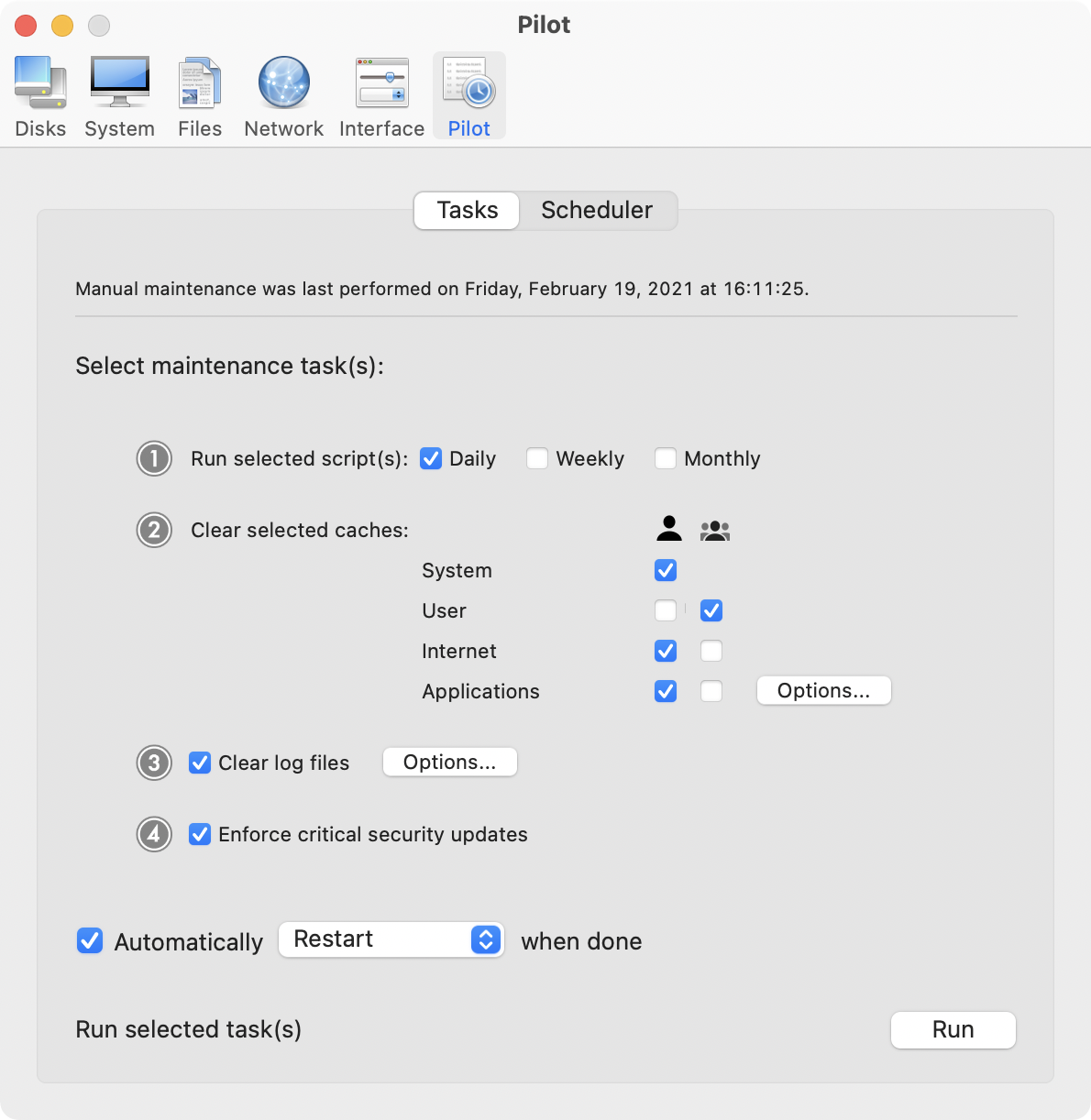
Screenshot 2: http://www.maintain.se/downloads/screenshots/screenshot3.png
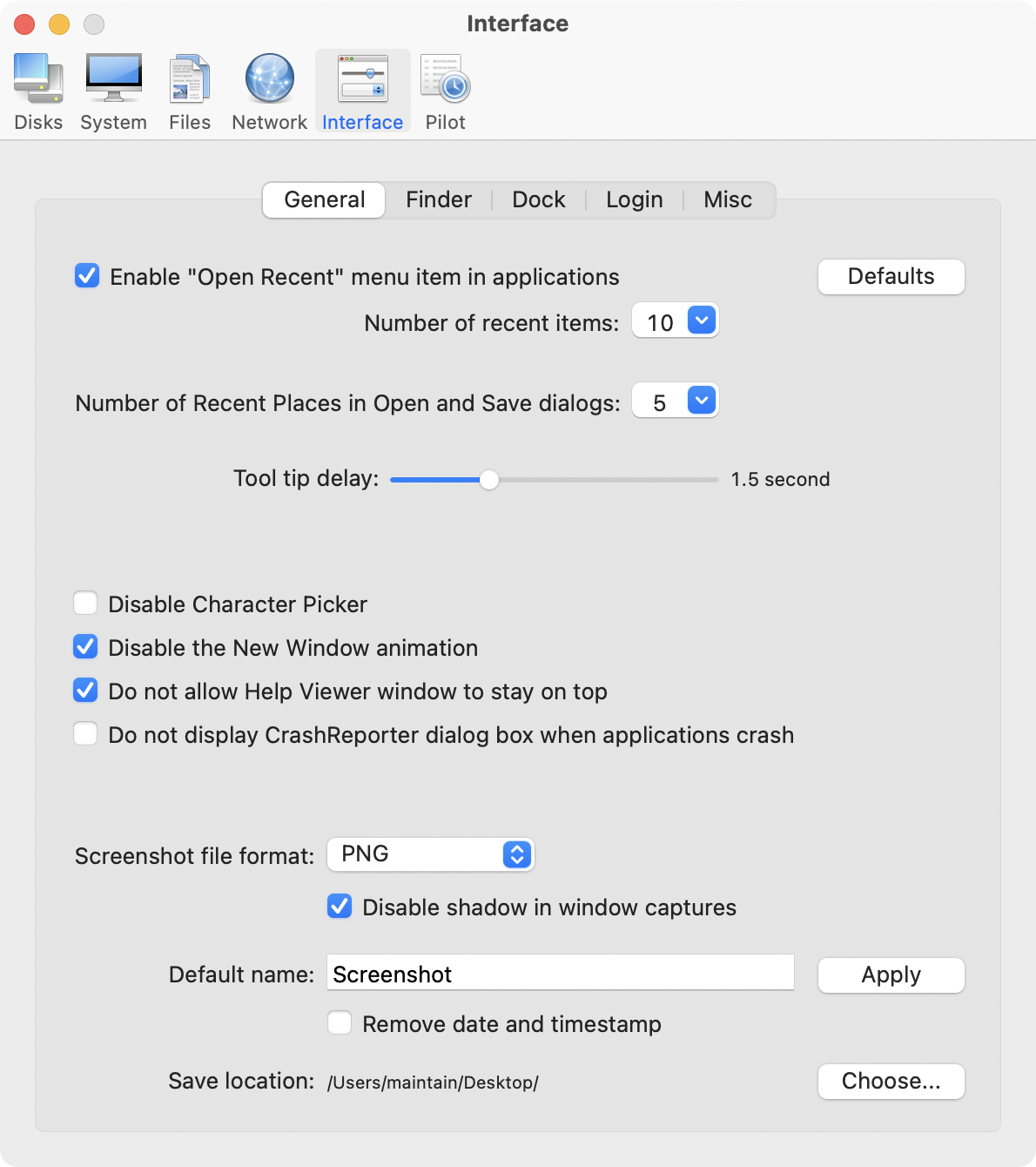
App Icon: http://www.maintain.se/downloads/screenshots/icon.png

Maintain develops tailored applications for Mac users. We work towards creating technical solutions which maintain your computer and make it as efficient and easy to use as possible. In addition, we offer comprehensive consultancy and support services which cover everything from operation of existing systems to purchase and implementation of new technical solutions. Among our clients are: Major League Baseball, Puma, The New York Times, Sony Pictures, Ericsson, Fortum, The City Of Calgary, Peak Performance, Loreal, Harvard University, Los Angeles Times, Swedish Film Institute, Weber, ESPN, Business Week, Swedish National Police Board, Norwegian Broadcasting Corporation, Getty Images, University of Texas, South Park Studios, CompUSA, bwin, Lockheed Martin, Defense Intelligence Agency, University of Michigan and hundred of thousands of Mac users around the world. Copyright (C) 2016 Maintain. All Rights Reserved. Apple, the Apple logo and Mac are registered trademarks of Apple Inc. in
the U.S. and/or other countries.
*******
Link To Article: http://prmac.com/release-id-80605.htm
*******
---------------------------------------------------------------------------------
Note that you can alter delivered distributions at any time.
Login to your account on prMac to alter your channel selection, or to opt-out at any time.
Pixelmator 3.6 Cordillera adds support for macOS Sierra & the Touch Bar
A new article has been published at prMac.
Pixelmator 3.6 Cordillera adds support for macOS Sierra & the Touch Bar - Published on 11/15/16
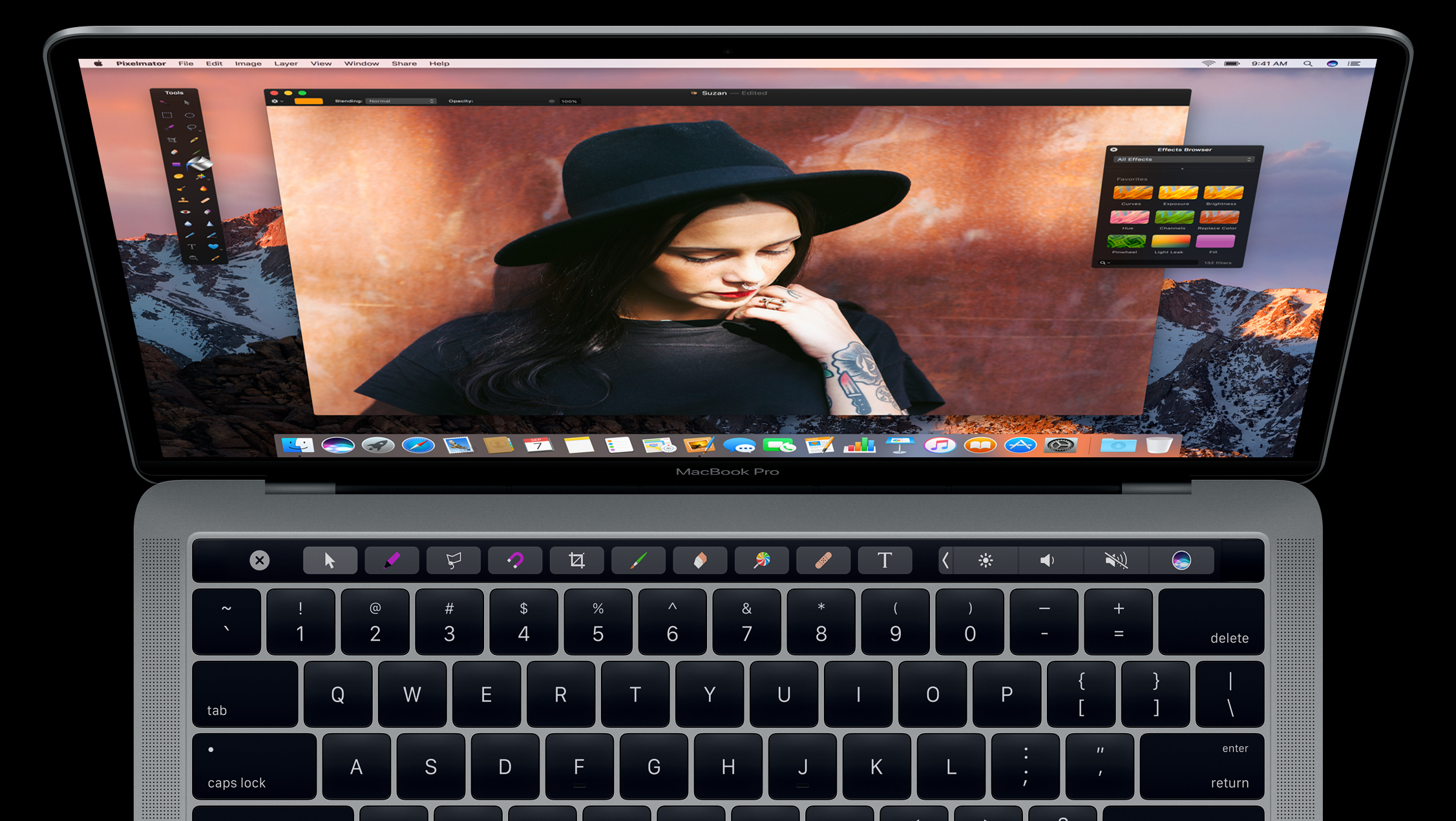
The Pixelmator Team today releases Pixelmator 3.6 Cordillera, a major update to its full-featured, powerful, and fast image editing app for Mac. Pixelmator offers everything you need to create, edit, and enhance your images. Pixelmator 3.6 Cordillera brings full support for macOS Sierra and the revolutionary Touch Bar on the new MacBook Pro. The update also includes Tabs for easier window management, a content-aware Smart Refine feature, Deep Images support, and more.
Vilnius, Lithuania - The Pixelmator Team today releases Pixelmator 3.6 Cordillera, a major update to its full-featured, powerful, and fast image editing app for Mac. Pixelmator 3.6 Cordillera brings full support for macOS Sierra and the revolutionary Touch Bar on the new MacBook Pro. The update also includes Tabs for easier window management, a content-aware Smart Refine feature, Deep Images support, and more.
"We're absolutely thrilled to introduce Pixelmator 3.6 Cordillera, which includes full support for macOS Sierra and the new Touch Bar," said Saulius Dailide, one of the founders of the Pixelmator Team. "The Touch Bar adds a completely new way to interact with Pixelmator and lets you do lots of things a lot faster, from selecting tools and setting tool options, to previewing and applying effects."
The Touch Bar is fully customizable, so you can choose exactly which Pixelmator tools you would like to place in it and keep your favorites always within reach. The Touch Bar also automatically changes based on the task at hand to put the most useful options and settings right at your fingertips, exactly when you need them.
With Tabs, managing your Pixelmator windows becomes incredibly easy. You can now open and edit multiple documents in a single Pixelmator window, making it much easier to keep windows from piling up on your Desktop. And getting the hang of Tabs is really simple because they work just like they do in Apple's native Mac apps, like Safari.
The new Smart Refine features lets you instantly improve selections with stunning accuracy and speed. Using an advanced edge-detection algorithm, Smart Refine locates any objects in the image and precisely snaps the edges of your existing selection to any edges in the image. This makes accurately selecting areas of an image much faster and easier.
In macOS Sierra, Pixelmator 3.6 also adds Deep Images support, which includes full support for P3 color and Wide Color displays. With support for Deep Images, all 16-bit images on the new MacBook Pro, iMac with Retina 4K display, and iMac with Retina 5K display look more vivid and true to life.
In addition, Pixelmator 3.6 Cordillera features support for the Universal Clipboard in macOS Sierra, a faster and more accurate algorithm for the Repair Tool, a live preview for the Quick Selection tool, and other performance improvements and fixes.
System Requirements:
* OS X 10.10 or later
* 64-bit processor
* 57.6 MB
Pricing and Availability:
Pixelmator 3.6 (Cordillera) is $29.99 USD (or equivalent amount in other currencies) and available worldwide through the Mac App Store in the Graphics & Design category.
Pixelmator 3.6 Cordillera: http://www.pixelmator.com
Purchase and Download (Mac App Store): https://itunes.apple.com/app/pixelmator/id407963104
Vimeo Video (Pixelmator and the Touch Bar): https://vimeo.com/189942738/
Vimeo Video (Tabs): https://vimeo.com/183960951
Screenshot (macOS Sierra): http://download.pixelmator.com/press/mac/3.6/Pixelmator-macOS-Sierra-Support.png
Screenshot (Touch Bar): http://download.pixelmator.com/press/mac/3.6/Pixelmator-Touch-Bar.png
Founded in 2007 by two brothers, Saulius Dailide and Aidas Dailide, the Pixelmator Team develops Pixelmator for Mac - a full-featured image editing app for Mac, and Pixelmator for iPad - the world's most advanced image editing app for iPad. Both apps are honored with numerous awards, such as the Mac App Store App of the year 2011, the App Store iPad App of the year 2014, and many more. Pixelmator for iPad was featured in the Apple Special Event in October, 2014. All Material and Software (C) Copyright 2007-2016 Pixelmator. All Rights Reserved. Apple, the Apple logo, Macintosh, iPhone, iPad and macOS are registered trademarks of Apple Inc. in the U.S. and/or other countries. Other trademarks and registered trademarks may be the property of their respective owners.
*******
Link To Article: http://prmac.com/release-id-80604.htm
*******
---------------------------------------------------------------------------------
Note that you can alter delivered distributions at any time.
Login to your account on prMac to alter your channel selection, or to opt-out at any time.
Pixelmator 3.6 Cordillera adds support for macOS Sierra & the Touch Bar - Published on 11/15/16
The Pixelmator Team today releases Pixelmator 3.6 Cordillera, a major update to its full-featured, powerful, and fast image editing app for Mac. Pixelmator offers everything you need to create, edit, and enhance your images. Pixelmator 3.6 Cordillera brings full support for macOS Sierra and the revolutionary Touch Bar on the new MacBook Pro. The update also includes Tabs for easier window management, a content-aware Smart Refine feature, Deep Images support, and more.
Vilnius, Lithuania - The Pixelmator Team today releases Pixelmator 3.6 Cordillera, a major update to its full-featured, powerful, and fast image editing app for Mac. Pixelmator 3.6 Cordillera brings full support for macOS Sierra and the revolutionary Touch Bar on the new MacBook Pro. The update also includes Tabs for easier window management, a content-aware Smart Refine feature, Deep Images support, and more.
"We're absolutely thrilled to introduce Pixelmator 3.6 Cordillera, which includes full support for macOS Sierra and the new Touch Bar," said Saulius Dailide, one of the founders of the Pixelmator Team. "The Touch Bar adds a completely new way to interact with Pixelmator and lets you do lots of things a lot faster, from selecting tools and setting tool options, to previewing and applying effects."
The Touch Bar is fully customizable, so you can choose exactly which Pixelmator tools you would like to place in it and keep your favorites always within reach. The Touch Bar also automatically changes based on the task at hand to put the most useful options and settings right at your fingertips, exactly when you need them.
With Tabs, managing your Pixelmator windows becomes incredibly easy. You can now open and edit multiple documents in a single Pixelmator window, making it much easier to keep windows from piling up on your Desktop. And getting the hang of Tabs is really simple because they work just like they do in Apple's native Mac apps, like Safari.
The new Smart Refine features lets you instantly improve selections with stunning accuracy and speed. Using an advanced edge-detection algorithm, Smart Refine locates any objects in the image and precisely snaps the edges of your existing selection to any edges in the image. This makes accurately selecting areas of an image much faster and easier.
In macOS Sierra, Pixelmator 3.6 also adds Deep Images support, which includes full support for P3 color and Wide Color displays. With support for Deep Images, all 16-bit images on the new MacBook Pro, iMac with Retina 4K display, and iMac with Retina 5K display look more vivid and true to life.
In addition, Pixelmator 3.6 Cordillera features support for the Universal Clipboard in macOS Sierra, a faster and more accurate algorithm for the Repair Tool, a live preview for the Quick Selection tool, and other performance improvements and fixes.
System Requirements:
* OS X 10.10 or later
* 64-bit processor
* 57.6 MB
Pricing and Availability:
Pixelmator 3.6 (Cordillera) is $29.99 USD (or equivalent amount in other currencies) and available worldwide through the Mac App Store in the Graphics & Design category.
Pixelmator 3.6 Cordillera: http://www.pixelmator.com
Purchase and Download (Mac App Store): https://itunes.apple.com/app/pixelmator/id407963104
Vimeo Video (Pixelmator and the Touch Bar): https://vimeo.com/189942738/
Vimeo Video (Tabs): https://vimeo.com/183960951
Screenshot (macOS Sierra): http://download.pixelmator.com/press/mac/3.6/Pixelmator-macOS-Sierra-Support.png
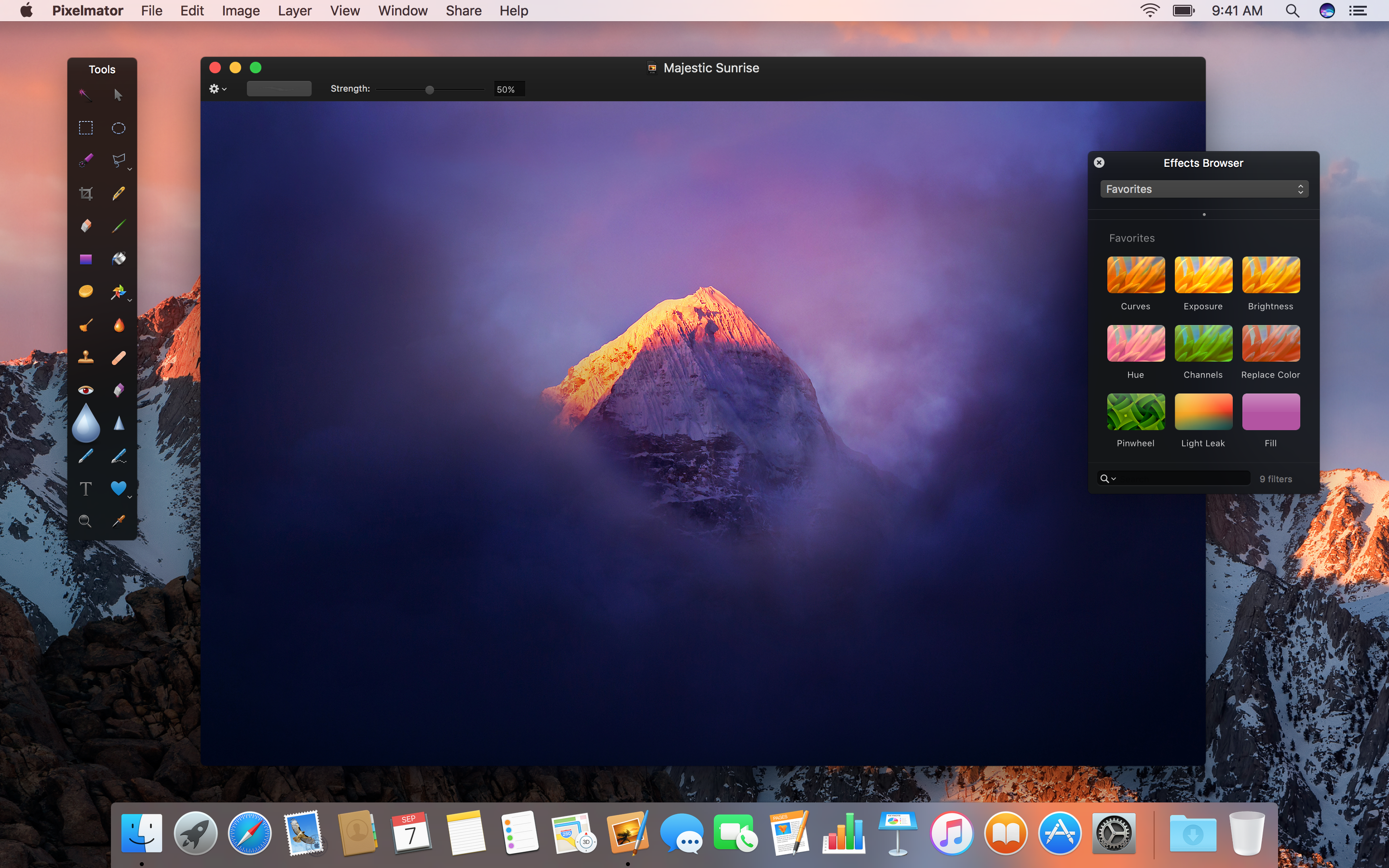
Screenshot (Touch Bar): http://download.pixelmator.com/press/mac/3.6/Pixelmator-Touch-Bar.png
Founded in 2007 by two brothers, Saulius Dailide and Aidas Dailide, the Pixelmator Team develops Pixelmator for Mac - a full-featured image editing app for Mac, and Pixelmator for iPad - the world's most advanced image editing app for iPad. Both apps are honored with numerous awards, such as the Mac App Store App of the year 2011, the App Store iPad App of the year 2014, and many more. Pixelmator for iPad was featured in the Apple Special Event in October, 2014. All Material and Software (C) Copyright 2007-2016 Pixelmator. All Rights Reserved. Apple, the Apple logo, Macintosh, iPhone, iPad and macOS are registered trademarks of Apple Inc. in the U.S. and/or other countries. Other trademarks and registered trademarks may be the property of their respective owners.
*******
Link To Article: http://prmac.com/release-id-80604.htm
*******
---------------------------------------------------------------------------------
Note that you can alter delivered distributions at any time.
Login to your account on prMac to alter your channel selection, or to opt-out at any time.
FanLyfe - Latest Social Media Sports App allows Sports Fans to Connect
A new article has been published at prMac.
FanLyfe - Latest Social Media Sports App allows Sports Fans to Connect - Published on 11/15/16
Miami based FanLyfe LLC today announces FanLyfe 2.1, an update to its video based sharing app developed for iOS, with the official release of FanLyfe 1.0 for Android devices. FanLyfe allows sports fans to post and upload videos directly inside their favorite team's feed on game day, and the opposing team's feed as well. Version 2.1 on iOS includes a new live scoreboard, custom cam, sports talk section, gaming category, explore screen, and bug fixes and optimization.
Miami, Florida - FanLyfe LLC today is proud to announce the release of FanLyfe 2.1, a maintenance update to its popular sports app developed for iOS and the official release of FanLyfe 1.0 for Android devices. With Fan Lyfe, sports fans are able to share their experience and emotions as a fan through live videos on game day. Users just have to choose his or her favorite teams and then record and share videos about their team anytime with fellow fans, right to the chosen team's fan feed via Fan Lyfe's custom camcorder.
FanLyfe will enable sports fans to connect on game day through video feed of their favorite sports team vs Opponent. Version 2.1 on iOS includes a new live scoreboard, custom cam, sports talk section, gaming category, explore screen, and bug fixes and optimization.
Features include:
* Sports Talk - Talk sports all day every day with other sports enthusiasts
* Explore - Check scores, search friends, or search team name for trending fan videos
*Home - Shows list of all videos uploaded by sports fans
"Sports fans never had a dedicated platform to express their true emotions for their favorite teams during pregame or in-game outings. As ardent sports fans ourselves we have always wished for something that can assure a realistic and livelier sense of comradery with same team supporters and same athletes- thus Fan Lyfe was born," stated Fan Lyfe CEO and co-founder Willie Nelson while speaking on the inception of the futuristic app.
iOS Device Requirements:
* iPhone, iPad, and iPod touch
* Requires iOS 7.1 or later
* 33.8 MB
Android Device Requirements:
* Requires Android 4.3 and up
Pricing and Availability:
FanLyfe 2.1 (and 1.0) is a free app and is available worldwide through the App Store and Google Play in the Sports Category.
FanLyfe 2.1: http://www.fanlyfe.com/
Download from iTunes: https://itunes.apple.com/app/fanlyfe-sports-fans-unite/id1039745474
Download from Google Play: https://play.google.com/store/apps/details?id=com.fanlyfe
Screenshot: http://a2.mzstatic.com/us/r30/Purple62/v4/a3/4b/e4/a34be400-5f14-1e01-3738-6e15a0a028ca/screen696x696.jpeg
App Icon: http://a5.mzstatic.com/us/r30/Purple71/v4/91/33/43/9133434e-8d10-a70a-0026-d69f7166647d/icon175x175.png
Located in Miami, Florida, FanLyfe LLC was founded in 2015. The company specializes in development for the mobile platform. All Material and Software (C) Copyright 2016 FanLyfe LLC. All Rights Reserved. Apple, the Apple logo, iPhone, iPod and iPad are registered trademarks of Apple Inc. in the U.S. and/or other countries. Other trademarks and registered trademarks may be the property of their respective owners.
*******
Link To Article: http://prmac.com/release-id-80603.htm
*******
---------------------------------------------------------------------------------
Note that you can alter delivered distributions at any time.
Login to your account on prMac to alter your channel selection, or to opt-out at any time.
FanLyfe - Latest Social Media Sports App allows Sports Fans to Connect - Published on 11/15/16
Miami based FanLyfe LLC today announces FanLyfe 2.1, an update to its video based sharing app developed for iOS, with the official release of FanLyfe 1.0 for Android devices. FanLyfe allows sports fans to post and upload videos directly inside their favorite team's feed on game day, and the opposing team's feed as well. Version 2.1 on iOS includes a new live scoreboard, custom cam, sports talk section, gaming category, explore screen, and bug fixes and optimization.
Miami, Florida - FanLyfe LLC today is proud to announce the release of FanLyfe 2.1, a maintenance update to its popular sports app developed for iOS and the official release of FanLyfe 1.0 for Android devices. With Fan Lyfe, sports fans are able to share their experience and emotions as a fan through live videos on game day. Users just have to choose his or her favorite teams and then record and share videos about their team anytime with fellow fans, right to the chosen team's fan feed via Fan Lyfe's custom camcorder.
FanLyfe will enable sports fans to connect on game day through video feed of their favorite sports team vs Opponent. Version 2.1 on iOS includes a new live scoreboard, custom cam, sports talk section, gaming category, explore screen, and bug fixes and optimization.
Features include:
* Sports Talk - Talk sports all day every day with other sports enthusiasts
* Explore - Check scores, search friends, or search team name for trending fan videos
*Home - Shows list of all videos uploaded by sports fans
"Sports fans never had a dedicated platform to express their true emotions for their favorite teams during pregame or in-game outings. As ardent sports fans ourselves we have always wished for something that can assure a realistic and livelier sense of comradery with same team supporters and same athletes- thus Fan Lyfe was born," stated Fan Lyfe CEO and co-founder Willie Nelson while speaking on the inception of the futuristic app.
iOS Device Requirements:
* iPhone, iPad, and iPod touch
* Requires iOS 7.1 or later
* 33.8 MB
Android Device Requirements:
* Requires Android 4.3 and up
Pricing and Availability:
FanLyfe 2.1 (and 1.0) is a free app and is available worldwide through the App Store and Google Play in the Sports Category.
FanLyfe 2.1: http://www.fanlyfe.com/
Download from iTunes: https://itunes.apple.com/app/fanlyfe-sports-fans-unite/id1039745474
Download from Google Play: https://play.google.com/store/apps/details?id=com.fanlyfe
Screenshot: http://a2.mzstatic.com/us/r30/Purple62/v4/a3/4b/e4/a34be400-5f14-1e01-3738-6e15a0a028ca/screen696x696.jpeg

App Icon: http://a5.mzstatic.com/us/r30/Purple71/v4/91/33/43/9133434e-8d10-a70a-0026-d69f7166647d/icon175x175.png

Located in Miami, Florida, FanLyfe LLC was founded in 2015. The company specializes in development for the mobile platform. All Material and Software (C) Copyright 2016 FanLyfe LLC. All Rights Reserved. Apple, the Apple logo, iPhone, iPod and iPad are registered trademarks of Apple Inc. in the U.S. and/or other countries. Other trademarks and registered trademarks may be the property of their respective owners.
*******
Link To Article: http://prmac.com/release-id-80603.htm
*******
---------------------------------------------------------------------------------
Note that you can alter delivered distributions at any time.
Login to your account on prMac to alter your channel selection, or to opt-out at any time.
ChronoSync 4.7.1 Features Faster Cloud Connections
A new article has been published at prMac.
ChronoSync 4.7.1 Features Faster Cloud Connections - Published on 11/15/16
Florida based Econ Technologies today releases ChronoSync 4.7.1 with improved cloud performance. ChronoSync is the complete sync, backup, and bootable backup app for the Mac. ChronoSync can backup and sync to anything you can connect to a Mac: external drives, thumb drives, NAS drives, remote Macs, PC's and cloud services. Version 4.7.1 includes several fixes, and specifically improves direct cloud connections for Amazon S3 and Google Cloud Storage.
Casselberry, Florida - Econ Technologies today releases ChronoSync 4.7.1 with improved cloud performance. ChronoSync is the complete sync, backup, and bootable backup app for the Mac. ChronoSync can backup and sync to anything you can connect to a Mac: external drives, thumb drives, NAS drives, remote Macs, PC's and cloud services. This update specifically improves direct cloud connections for Amazon S3 and Google Cloud Storage.
ChronoSync 4.7.1 Enhancements:
* Significantly improved performance when syncing with Google Cloud Connections. Depending upon sync contents, up to a 20% improvement can be realized.
* Significantly Improved performance when syncing with Amazon S3 Cloud Connections. Depending upon sync contents, up to a 20% improvement can be realized.
* Improved tracking of DMG volume location to better handle mounting and unmounting DMGs as well as the volumes they reside on.
* Tweaked bandwidth limit calculations to more accurately match desired limits set in Connection Profiles.
Additionally, ChronoSync 4.7.1 includes several fixes. Check out the release notes online for a complete list of all the features and fixes.
Pricing and Availability:
Download and try out the full working demo or purchase ChronoSync for $49.99 (USD). ChronoSync is designed to work on macOS 10.8 and higher. As always, this is a free update for all existing users. Check out our Press Page for artwork and more information about ChronoSync, ChronoAgent, and ChronoMonitor.
Econ Technologies: https://www.econtechnologies.com/index.html
ChronoSync 4.7.1: https://www.econtechnologies.com/chronosync/overview.html
Release Notes: https://www.econtechnologies.com/chronosync/notes.html
Media Assets: https://www.econtechnologies.com/about/media.html
Econ Technologies, Inc has been creating Apple(R) software for over 20 years including ChronoSync(TM) and ChronoAgent(TM) for macOS(R). All Material and Software (C) Copyright 2016 Econ Technologies. All Rights Reserved. Apple, the Apple logo, Macintosh and macOS are registered trademarks of Apple Inc. in the U.S. and/or other countries. Other trademarks and registered trademarks may be the property of their respective owners.
*******
Link To Article: http://prmac.com/release-id-80602.htm
*******
---------------------------------------------------------------------------------
Note that you can alter delivered distributions at any time.
Login to your account on prMac to alter your channel selection, or to opt-out at any time.
ChronoSync 4.7.1 Features Faster Cloud Connections - Published on 11/15/16
Florida based Econ Technologies today releases ChronoSync 4.7.1 with improved cloud performance. ChronoSync is the complete sync, backup, and bootable backup app for the Mac. ChronoSync can backup and sync to anything you can connect to a Mac: external drives, thumb drives, NAS drives, remote Macs, PC's and cloud services. Version 4.7.1 includes several fixes, and specifically improves direct cloud connections for Amazon S3 and Google Cloud Storage.
Casselberry, Florida - Econ Technologies today releases ChronoSync 4.7.1 with improved cloud performance. ChronoSync is the complete sync, backup, and bootable backup app for the Mac. ChronoSync can backup and sync to anything you can connect to a Mac: external drives, thumb drives, NAS drives, remote Macs, PC's and cloud services. This update specifically improves direct cloud connections for Amazon S3 and Google Cloud Storage.
ChronoSync 4.7.1 Enhancements:
* Significantly improved performance when syncing with Google Cloud Connections. Depending upon sync contents, up to a 20% improvement can be realized.
* Significantly Improved performance when syncing with Amazon S3 Cloud Connections. Depending upon sync contents, up to a 20% improvement can be realized.
* Improved tracking of DMG volume location to better handle mounting and unmounting DMGs as well as the volumes they reside on.
* Tweaked bandwidth limit calculations to more accurately match desired limits set in Connection Profiles.
Additionally, ChronoSync 4.7.1 includes several fixes. Check out the release notes online for a complete list of all the features and fixes.
Pricing and Availability:
Download and try out the full working demo or purchase ChronoSync for $49.99 (USD). ChronoSync is designed to work on macOS 10.8 and higher. As always, this is a free update for all existing users. Check out our Press Page for artwork and more information about ChronoSync, ChronoAgent, and ChronoMonitor.
Econ Technologies: https://www.econtechnologies.com/index.html
ChronoSync 4.7.1: https://www.econtechnologies.com/chronosync/overview.html
Release Notes: https://www.econtechnologies.com/chronosync/notes.html
Media Assets: https://www.econtechnologies.com/about/media.html
Econ Technologies, Inc has been creating Apple(R) software for over 20 years including ChronoSync(TM) and ChronoAgent(TM) for macOS(R). All Material and Software (C) Copyright 2016 Econ Technologies. All Rights Reserved. Apple, the Apple logo, Macintosh and macOS are registered trademarks of Apple Inc. in the U.S. and/or other countries. Other trademarks and registered trademarks may be the property of their respective owners.
*******
Link To Article: http://prmac.com/release-id-80602.htm
*******
---------------------------------------------------------------------------------
Note that you can alter delivered distributions at any time.
Login to your account on prMac to alter your channel selection, or to opt-out at any time.
Subscribe to:
Posts (Atom)