A new article has been published at prMac.
Ben Software releases new CCTV iPhone, iPad and Apple TV app - Published on 11/18/16
UK based Ben Software today introduces SecuritySpy 1.0, its own iOS and tvOS app for viewing and managing SecuritySpy CCTV systems. SecuritySpy is a video surveillance solution for macOS that turns any Mac into a CCTV recording station. With the new app, users can use their iPhone, iPad or Apple TV to view live video and audio, playback captured footage, Pan, Tilt, Zoom and set camera recording modes, all from over a local network or over the Internet.
London, United Kingdom - Ben Software today announced the release of its own iOS and tvOS app for viewing and managing SecuritySpy CCTV systems. SecuritySpy is a video surveillance solution for macOS that turns any Mac into a CCTV recording station. With the new app, users can easily monitor their CCTV systems from wherever they are.
Customers can use their iPhone, iPad or Apple TV to view live video and audio, playback captured footage, control PTZ (Pan, Tilt, Zoom) and set camera recording modes, all from over a local network or over the Internet.
The main features of the new SecuritySpy iOS and tvOS app are as follows:
* View live video and audio from all your cameras
* Control PTZ (Pan, Tilt, Zoom) for cameras with these features
* Save or share images from your cameras via email, iMessage, iCloud Photo Sharing and more
* Arm or disarm camera recording modes
* Easy setup with auto-detection of SecuritySpy servers on your network
* View and manage multiple SecuritySpy servers
* Multiplex: cycle through groups of simultaneous live camera views in full screen
* Captures: play back previously-captured footage, including motion-detected clips, image files or whole-day movies
"Many of us are spending increasing amounts of time on mobile devices instead of desktops, and we wanted to ensure that our customers had a seamless experience of SecuritySpy across all their devices" said Ben Bird, the developer of SecuritySpy. "Our new app ensures that users have easy access to their CCTV cameras even when they are on the go."
Device Requirements:
* SecuritySpy 4.0.8 for Mac or later
* Supports Apple TV
* iPhone, iPad, and iPod touch
* Requires iOS�9.0 or later
* 16.6 MB
Pricing and Availability:
SecuritySpy 1.0 for iOS and Apple TV is a free download from the App Store and offers most of its features for free. To access the Multiplex and Playback features, there is an in-app purchase available that costs GBP 4.49 (USD $5.99). This is a one-time payment that covers ALL devices linked to one Apple ID account. Customers will need a Mac running SecuritySpy 4.0.8 to use this app. SecuritySpy itself can be trialed for 30 days before purchase, with no demo limitations whatsoever. Read more, and download the software from their website.
SecuritySpy for Mac: http://www.bensoftware.com/securityspy/
SecuritySpy 1.0 for iOS: http://www.bensoftware.com/securityspy/app.html
Download from iTunes: https://itunes.apple.com/app/securityspy/id1142125928
Screenshot: http://www.bensoftware.com/img/app-screenshots-1.jpg
App Icon: http://bensoftware.com/img/ss-icon-256.png
Ben Software Ltd is an independent software development house focused on providing high-quality video-related software for the Mac platform. Copyright (C) 2016 Ben Software. All Rights Reserved. Apple, the Apple logo, Mac OS X, and Macintosh are registered trademarks of Apple Inc. in the U.S. and/or other countries.
*******
Link To Article: http://prmac.com/release-id-80633.htm
*******
---------------------------------------------------------------------------------
Note that you can alter delivered distributions at any time.
Login to your account on prMac to alter your channel selection, or to opt-out at any time.


Rapid Turtle Games releases Oil, Inc. for iOS - Free Idle/Clicker Game
A new article has been published at prMac.
Rapid Turtle Games releases Oil, Inc. for iOS - Free Idle/Clicker Game - Published on 11/18/16
Rapid Turtle Games today introduces Oil, Inc. 1.0, a free oil industry simulation idle/clicker game for iOS devices. Invest in your first oilfield and start to drill that profitable, stinky oil! Drill hard, build a town for workers, unlock extra oil facilities, establish headquarters, send out geologist and geophysicist to explore new oilfields around the world, deal with crisis, and test your knowledge with our oil and gas quiz. Seek investors to grow into the biggest oil imperium on earth.
Subotica, Serbia - Rapid Turtle Games today is pleased to announce the release and immediate availability of of Oil, Inc. 1.0 an oil industry simulation idle game for iOS devices. The game is available for free on the App Store. Invest in your first oilfield and start to drill that delicious, profitable, stinky oil!
The player has to build and manage facilities for oil drilling from Oil Derrick, Offshore Platform, Refinery, to Storage Tanks, and Petrol Station. They need to drill hard and build a town for the workers to unlock extra oil drilling from Zombies, Aliens, Monsters and a nasty Mega-Robot. There is a science lab where experiments are done with the workers' brain to get more profit out of them. Also, players can invest in engineering, establish headquarters and send out geologist and geophysicist to explore new oilfields around the world.
Game features:
* Build oil facilities to extract valuable crude oil
* Drill with funny humorous workers
* Skill your workers
* Construct a beautiful town
* Unlock special oil drillers: zombies, aliens, monsters...
* Hire managers and investors to grow into the biggest oil imperium on earth
* Deal with industry crisis
* Trade with stocks
* Conquer the world, expand your oil industry
* Complete tons of tasks to become a mighty oil tycoon
* Easy to play for the whole family
* Play with friends
To send oil production sky high, there are 126 managers and more than 50 investors waiting to join the player's team. There are skills to learn, tasks to complete, badges to unlock and a stock market to trade with stocks. To test the player's knowledge about oil and gas there is a quiz with tons of questions and great cash prizes.
To make things even more interesting the player needs to deal with crisis. As in real life so in this game too, things are not going always as expected. Players will need to manage oil spills, pollution, and handle damage after an earthquake, strikes and protests, sharks, yes sharks and many more interesting and unexpected things.
Device Requirements:
* iPhone, iPod touch or iPad
* Requires iOS 7 or later
* Universal Application
* Size: 98 MB
Pricing and Availability:
Oil, Inc. 1.0 is available for iPhone, iPod touch and iPad as a universal application for free worldwide exclusively through the App Store in the Games category.
Oil, Inc. 1.0: http://rapidturtlegames.com/oilinc.html
Download from iTunes: https://itunes.apple.com/app/oil-inc./id1123413069
Screenshot: http://rapidturtlegames.com/press/oilinc_screen01.jpg
App Icon: http://rapidturtlegames.com/press/oilinc_icon.jpg
Press Kit (zip): http://rapidturtlegames.com/press/oilinc_screens.zip
Rapid Turtle Games develops addictive and fun games for the iPhone, iPad, Android, Mac and PC. Copyright (C) 2015 Rapid Turtle Games. All Rights Reserved. Apple, the Apple logo, Mac OS X, iPhone, iPod, iPad and Macintosh are registered trademarks of Apple Inc. in the U.S. and/or other countries.
*******
Link To Article: http://prmac.com/release-id-80632.htm
*******
---------------------------------------------------------------------------------
Note that you can alter delivered distributions at any time.
Login to your account on prMac to alter your channel selection, or to opt-out at any time.
Rapid Turtle Games releases Oil, Inc. for iOS - Free Idle/Clicker Game - Published on 11/18/16
Rapid Turtle Games today introduces Oil, Inc. 1.0, a free oil industry simulation idle/clicker game for iOS devices. Invest in your first oilfield and start to drill that profitable, stinky oil! Drill hard, build a town for workers, unlock extra oil facilities, establish headquarters, send out geologist and geophysicist to explore new oilfields around the world, deal with crisis, and test your knowledge with our oil and gas quiz. Seek investors to grow into the biggest oil imperium on earth.
Subotica, Serbia - Rapid Turtle Games today is pleased to announce the release and immediate availability of of Oil, Inc. 1.0 an oil industry simulation idle game for iOS devices. The game is available for free on the App Store. Invest in your first oilfield and start to drill that delicious, profitable, stinky oil!
The player has to build and manage facilities for oil drilling from Oil Derrick, Offshore Platform, Refinery, to Storage Tanks, and Petrol Station. They need to drill hard and build a town for the workers to unlock extra oil drilling from Zombies, Aliens, Monsters and a nasty Mega-Robot. There is a science lab where experiments are done with the workers' brain to get more profit out of them. Also, players can invest in engineering, establish headquarters and send out geologist and geophysicist to explore new oilfields around the world.
Game features:
* Build oil facilities to extract valuable crude oil
* Drill with funny humorous workers
* Skill your workers
* Construct a beautiful town
* Unlock special oil drillers: zombies, aliens, monsters...
* Hire managers and investors to grow into the biggest oil imperium on earth
* Deal with industry crisis
* Trade with stocks
* Conquer the world, expand your oil industry
* Complete tons of tasks to become a mighty oil tycoon
* Easy to play for the whole family
* Play with friends
To send oil production sky high, there are 126 managers and more than 50 investors waiting to join the player's team. There are skills to learn, tasks to complete, badges to unlock and a stock market to trade with stocks. To test the player's knowledge about oil and gas there is a quiz with tons of questions and great cash prizes.
To make things even more interesting the player needs to deal with crisis. As in real life so in this game too, things are not going always as expected. Players will need to manage oil spills, pollution, and handle damage after an earthquake, strikes and protests, sharks, yes sharks and many more interesting and unexpected things.
Device Requirements:
* iPhone, iPod touch or iPad
* Requires iOS 7 or later
* Universal Application
* Size: 98 MB
Pricing and Availability:
Oil, Inc. 1.0 is available for iPhone, iPod touch and iPad as a universal application for free worldwide exclusively through the App Store in the Games category.
Oil, Inc. 1.0: http://rapidturtlegames.com/oilinc.html
Download from iTunes: https://itunes.apple.com/app/oil-inc./id1123413069
Screenshot: http://rapidturtlegames.com/press/oilinc_screen01.jpg

App Icon: http://rapidturtlegames.com/press/oilinc_icon.jpg

Press Kit (zip): http://rapidturtlegames.com/press/oilinc_screens.zip
Rapid Turtle Games develops addictive and fun games for the iPhone, iPad, Android, Mac and PC. Copyright (C) 2015 Rapid Turtle Games. All Rights Reserved. Apple, the Apple logo, Mac OS X, iPhone, iPod, iPad and Macintosh are registered trademarks of Apple Inc. in the U.S. and/or other countries.
*******
Link To Article: http://prmac.com/release-id-80632.htm
*******
---------------------------------------------------------------------------------
Note that you can alter delivered distributions at any time.
Login to your account on prMac to alter your channel selection, or to opt-out at any time.
Mobile Creators releases The Tea App - Visual Guide for Specialty Tea
A new article has been published at prMac.
Mobile Creators releases The Tea App - Visual Guide for Specialty Tea - Published on 11/18/16
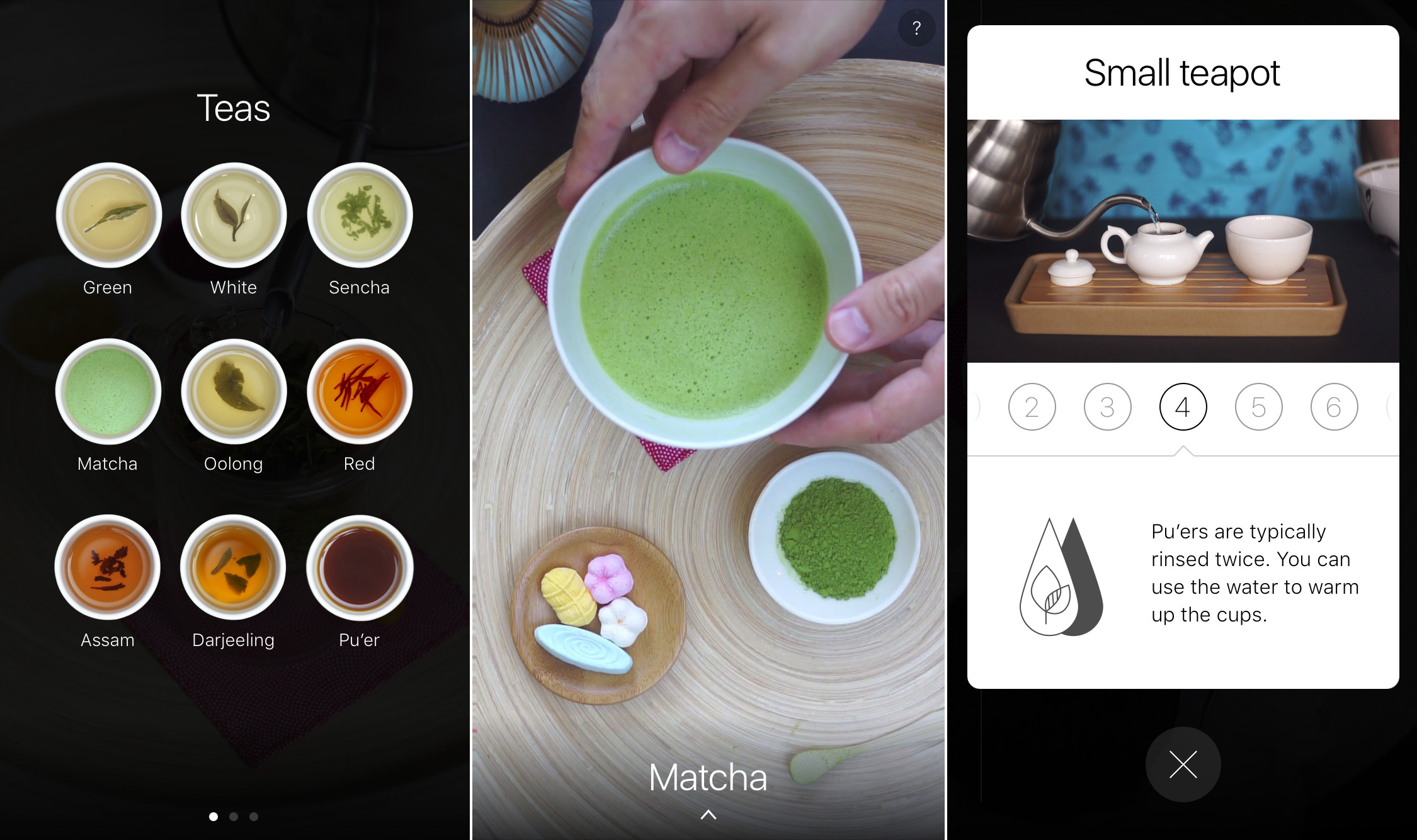
Mobile Creators today releases The Tea App 1.1, an update to their popular lifestyle app for iOS devices. The Tea App is an easy-to-grasp visual guide to the world of specialty tea. The app introduces the user to 9 types of specialty tea and 9 types of brewing equipment and associated brewing techniques. Each type of tea and equipment is further illustrated with a set of step-by-step video recipes. Version 1.1 fixes potential downloading issues with live pictures and video.
Astana, Kazakhstan - Mobile Creators released the 1.1 version of The Tea App and it is available for download in iTunes App Store. This version fixes issues some of the users had with downloading "live pictures" and videos within the app.
As The Great Coffee App before, The Tea App is intended to be an easy to grasp visual guide to the world of specialty tea. The app introduces the user to 9 types of specialty tea and 9 types of brewing equipment and associated brewing techniques. Each type of tea and equipment is further illustrated with a set of step-by-step video recipes.
Tea is the most popular beverage in the world after water. Owing to its incredibly long history and wide popularity, tea is now undergoing a sort of revival. This holds true not only in the "West" where many people discover tea for themselves for the first time but also in the places with traditionally rich tea culture. This app is designed to help the user find their way in the world of tea and help them be more informed when they take first first steps in it. The "live" illustrations and brief descriptions present the general picture, and the step-by-step video recipes guide the user in the brewing process.
The Tea App features these types of teas: green tea, white tea, Japanese sencha and matcha teas, oolong, red tea, Indian Assam and Darjeeling and, finally, Pu'er tea that gained many converts in the recent years. Methods include brewing in a cup, in traditional gaiwan, a more modern gongfu brewer, small "gongfu" teapot, big "European" teapot, kyusu, preparation in matcha bowl, cold brew and the unavoidable teabag.
Supported Languages:
* Localized in English, Russian and Simplified Chinese
Device Requirements:
* iPhone, iPad, and iPod touch
* Requires iOS�10.0 or later
* 56.1 MB
Pricing and Availability:
The Tea App 1.1 is $1.99 USD (or equivalent amount in other currencies) and available worldwide exclusively through the App Store in the Food & Drink category.
The Tea App 1.1: http://mobicreators.com/tea/
Purchase and Download: https://itunes.apple.com/app/the-tea-app/id1131628820
Promotional Image: http://mobicreators.com/tea/press-kit/screenshot.jpg
App icon: http://mobicreators.com/tea/press-kit/icon.png
Press Kit (zip): http://mobicreators.com/tea/press-kit/the-tea-app-press-kit.zip
Mobile Creators is a tiny collective based in Kazakhstan. With focus on making the world better by making highly focused and polished apps, the company finds enthusiastic experts and work with them to build exceptional software. Copyright (C) 2016 Mobile Creators. All Rights Reserved. Apple, the Apple logo, iPhone, iPod and iPad are registered trademarks of Apple Inc. in the U.S. and/or other countries.
*******
Link To Article: http://prmac.com/release-id-80631.htm
*******
---------------------------------------------------------------------------------
Note that you can alter delivered distributions at any time.
Login to your account on prMac to alter your channel selection, or to opt-out at any time.
Mobile Creators releases The Tea App - Visual Guide for Specialty Tea - Published on 11/18/16
Mobile Creators today releases The Tea App 1.1, an update to their popular lifestyle app for iOS devices. The Tea App is an easy-to-grasp visual guide to the world of specialty tea. The app introduces the user to 9 types of specialty tea and 9 types of brewing equipment and associated brewing techniques. Each type of tea and equipment is further illustrated with a set of step-by-step video recipes. Version 1.1 fixes potential downloading issues with live pictures and video.
Astana, Kazakhstan - Mobile Creators released the 1.1 version of The Tea App and it is available for download in iTunes App Store. This version fixes issues some of the users had with downloading "live pictures" and videos within the app.
As The Great Coffee App before, The Tea App is intended to be an easy to grasp visual guide to the world of specialty tea. The app introduces the user to 9 types of specialty tea and 9 types of brewing equipment and associated brewing techniques. Each type of tea and equipment is further illustrated with a set of step-by-step video recipes.
Tea is the most popular beverage in the world after water. Owing to its incredibly long history and wide popularity, tea is now undergoing a sort of revival. This holds true not only in the "West" where many people discover tea for themselves for the first time but also in the places with traditionally rich tea culture. This app is designed to help the user find their way in the world of tea and help them be more informed when they take first first steps in it. The "live" illustrations and brief descriptions present the general picture, and the step-by-step video recipes guide the user in the brewing process.
The Tea App features these types of teas: green tea, white tea, Japanese sencha and matcha teas, oolong, red tea, Indian Assam and Darjeeling and, finally, Pu'er tea that gained many converts in the recent years. Methods include brewing in a cup, in traditional gaiwan, a more modern gongfu brewer, small "gongfu" teapot, big "European" teapot, kyusu, preparation in matcha bowl, cold brew and the unavoidable teabag.
Supported Languages:
* Localized in English, Russian and Simplified Chinese
Device Requirements:
* iPhone, iPad, and iPod touch
* Requires iOS�10.0 or later
* 56.1 MB
Pricing and Availability:
The Tea App 1.1 is $1.99 USD (or equivalent amount in other currencies) and available worldwide exclusively through the App Store in the Food & Drink category.
The Tea App 1.1: http://mobicreators.com/tea/
Purchase and Download: https://itunes.apple.com/app/the-tea-app/id1131628820
Promotional Image: http://mobicreators.com/tea/press-kit/screenshot.jpg
App icon: http://mobicreators.com/tea/press-kit/icon.png

Press Kit (zip): http://mobicreators.com/tea/press-kit/the-tea-app-press-kit.zip
Mobile Creators is a tiny collective based in Kazakhstan. With focus on making the world better by making highly focused and polished apps, the company finds enthusiastic experts and work with them to build exceptional software. Copyright (C) 2016 Mobile Creators. All Rights Reserved. Apple, the Apple logo, iPhone, iPod and iPad are registered trademarks of Apple Inc. in the U.S. and/or other countries.
*******
Link To Article: http://prmac.com/release-id-80631.htm
*******
---------------------------------------------------------------------------------
Note that you can alter delivered distributions at any time.
Login to your account on prMac to alter your channel selection, or to opt-out at any time.
Just Released - Avadon 3: The Warborn HD, Fantasy Adventure for iPad
A new article has been published at prMac.
Just Released - Avadon 3: The Warborn HD, Fantasy Adventure for iPad - Published on 11/18/16
Seattle based Spiderweb Software, Inc. today introduces Avadon 3: The Warborn 1.0 for iPad, the final chapter in the Avadon Trilogy. Avadon 3 is an all-new, indie, retro fantasy role-playing game, full of exciting battles, lands to conquer, and the intricate stories Spiderweb Software is known for. Choose from five different character classes, each with dozens of spells and abilities. Explore cunning dungeons, hunt for hundreds of magical artifacts, and pass judgment on your enemies.
Seattle, Washington - Spiderweb Software, Inc. announced today the release of Avadon 3: The Warborn 1.0, the final chapter in the Avadon Trilogy, for the iPad. Avadon 3 is an all-new, indie, retro fantasy role-playing game, full of exciting battles, lands to conquer, and the intricate stories Spiderweb Software is known for.
You are a Hand of Avadon, the Black Fortress. You are a warrior and spy, judge and executioner, with nearly unlimited power to fight the enemies of your homeland. Your word is Law.
But your lands have been invaded. Your borders have been overrun by barbarians, monsters, and powerful armies. Cities are burning, and your people are desperate for help. Your mad master has discovered a path to ending the war, but your plan will need every scrap of power and resourcefulness to succeed.
The ending to the saga is not set in stone, though. Yes, you can defeat the enemy and save your people. You might also betray your people and bring victory to the invaders. You can even, with cunning and violence, gain great power and wealth for yourself. In the conclusion to the Avadon Saga, the choice will be up to you!
Avadon 3: The Warborn is an epic fantasy role-playing adventure in an enormous and unique world. You can choose from five different character classes, each with dozens of spells and abilities. Explore cunning dungeons, hunt for hundreds of magical artifacts, and pass judgment on your enemies. Avadon 3 features many different endings. Will you save your people or betray them? We leave that decision up to you.
Device Requirements:
* Compatible with iPad
* Requires iOS�8.0 or later
* 186 MB
Pricing and Availability:
Avadon 3: The Warborn 1.0 is $11.99 USD (or equivalent amount in other currencies) and available worldwide through the App Store in the Games category. Avadon 3 is also available for Windows and Macintosh. For more information, please contact Jeff Vogel.
Spiderweb Software: http://www.spiderwebsoftware.com/
Avadon 3: The Warborn 1.0: http://www.spiderwebsoftware.com/avadon3
Purchase and Download: https://itunes.apple.com/app/avadon-3-the-warborn-hd/id1161538963
YouTube Video (Trailer): https://www.youtube.com/watch?v=dI6fwtZL_bM
Screenshots: http://www.spiderwebsoftware.com/avadon3/shots.html
App Icon: http://is2.mzstatic.com/image/thumb/Purple62/v4/ed/81/09/ed81091f-7be3-6072-f1a0-16dfcc7aa08d/source/175x175bb.jpg
Spiderweb Software, Inc., an Indie game company based in Seattle, WA, is fanatically dedicated to creating fun, exciting fantasy role-playing games for Windows, Macintosh, and the iPad. Past titles include the award-winning Exile, Geneforge, Avernum and Avadon series. Copyright (C) 2016 Spiderweb Software, Inc. All Rights Reserved. Apple, the Apple logo, OS X, iPad, iPhone and Macintosh are registered trademarks of Apple Inc. in the U.S. and/or other countries.
*******
Link To Article: http://prmac.com/release-id-80630.htm
*******
---------------------------------------------------------------------------------
Note that you can alter delivered distributions at any time.
Login to your account on prMac to alter your channel selection, or to opt-out at any time.
Just Released - Avadon 3: The Warborn HD, Fantasy Adventure for iPad - Published on 11/18/16
Seattle based Spiderweb Software, Inc. today introduces Avadon 3: The Warborn 1.0 for iPad, the final chapter in the Avadon Trilogy. Avadon 3 is an all-new, indie, retro fantasy role-playing game, full of exciting battles, lands to conquer, and the intricate stories Spiderweb Software is known for. Choose from five different character classes, each with dozens of spells and abilities. Explore cunning dungeons, hunt for hundreds of magical artifacts, and pass judgment on your enemies.
Seattle, Washington - Spiderweb Software, Inc. announced today the release of Avadon 3: The Warborn 1.0, the final chapter in the Avadon Trilogy, for the iPad. Avadon 3 is an all-new, indie, retro fantasy role-playing game, full of exciting battles, lands to conquer, and the intricate stories Spiderweb Software is known for.
You are a Hand of Avadon, the Black Fortress. You are a warrior and spy, judge and executioner, with nearly unlimited power to fight the enemies of your homeland. Your word is Law.
But your lands have been invaded. Your borders have been overrun by barbarians, monsters, and powerful armies. Cities are burning, and your people are desperate for help. Your mad master has discovered a path to ending the war, but your plan will need every scrap of power and resourcefulness to succeed.
The ending to the saga is not set in stone, though. Yes, you can defeat the enemy and save your people. You might also betray your people and bring victory to the invaders. You can even, with cunning and violence, gain great power and wealth for yourself. In the conclusion to the Avadon Saga, the choice will be up to you!
Avadon 3: The Warborn is an epic fantasy role-playing adventure in an enormous and unique world. You can choose from five different character classes, each with dozens of spells and abilities. Explore cunning dungeons, hunt for hundreds of magical artifacts, and pass judgment on your enemies. Avadon 3 features many different endings. Will you save your people or betray them? We leave that decision up to you.
Device Requirements:
* Compatible with iPad
* Requires iOS�8.0 or later
* 186 MB
Pricing and Availability:
Avadon 3: The Warborn 1.0 is $11.99 USD (or equivalent amount in other currencies) and available worldwide through the App Store in the Games category. Avadon 3 is also available for Windows and Macintosh. For more information, please contact Jeff Vogel.
Spiderweb Software: http://www.spiderwebsoftware.com/
Avadon 3: The Warborn 1.0: http://www.spiderwebsoftware.com/avadon3
Purchase and Download: https://itunes.apple.com/app/avadon-3-the-warborn-hd/id1161538963
YouTube Video (Trailer): https://www.youtube.com/watch?v=dI6fwtZL_bM
Screenshots: http://www.spiderwebsoftware.com/avadon3/shots.html
App Icon: http://is2.mzstatic.com/image/thumb/Purple62/v4/ed/81/09/ed81091f-7be3-6072-f1a0-16dfcc7aa08d/source/175x175bb.jpg

Spiderweb Software, Inc., an Indie game company based in Seattle, WA, is fanatically dedicated to creating fun, exciting fantasy role-playing games for Windows, Macintosh, and the iPad. Past titles include the award-winning Exile, Geneforge, Avernum and Avadon series. Copyright (C) 2016 Spiderweb Software, Inc. All Rights Reserved. Apple, the Apple logo, OS X, iPad, iPhone and Macintosh are registered trademarks of Apple Inc. in the U.S. and/or other countries.
*******
Link To Article: http://prmac.com/release-id-80630.htm
*******
---------------------------------------------------------------------------------
Note that you can alter delivered distributions at any time.
Login to your account on prMac to alter your channel selection, or to opt-out at any time.
ID2Office v2.2 ships - Export InDesign CC files to Word, PPT & Keynote
A new article has been published at prMac.
ID2Office v2.2 ships - Export InDesign CC files to Word, PPT & Keynote - Published on 11/17/16
Recosoft Corporation releases ID2Office 2.2, a new version of the InDesign to Word, PowerPoint & Keynote conversion plug-in for InDesign CC 2017. ID2Office v2.2 has been enhanced to support Adobe InDesign CC 2017 for both macOS and Windows. Version 2.2 has been augmented to convert style sheet properties defined in InDesign tables into Word Table style sheets properties. It also improves conversion fidelity in several areas when exporting InDesign files to the Word, PowerPoint and Keynote type.
Osaka, Japan - Recosoft Corporation, the developers of PDF conversion software and PDF to Adobe(R) InDesign(R) converter tools, has released ID2Office v2.2, the newest version of the InDesign to Word, PowerPoint(R) and Keynote conversion plug-in for InDesign CC 2017.
ID2Office v2.2 has been enhanced to support Adobe InDesign CC 2017, the latest version of InDesign for both macOS and Windows. Additionally, ID2Office v2.2 has been augmented to convert style sheet properties defined in InDesign tables into Word Table style sheets properties. ID2Office v2.2 also improves conversion fidelity in several areas when exporting InDesign files to the Word, PowerPoint and Keynote type.
"With every major release of ID2Office, we improve and enhance InDesign to Word, PowerPoint and Keynote format conversion fidelity"- Paramjit Chadha, MD, Recosoft Corporation"
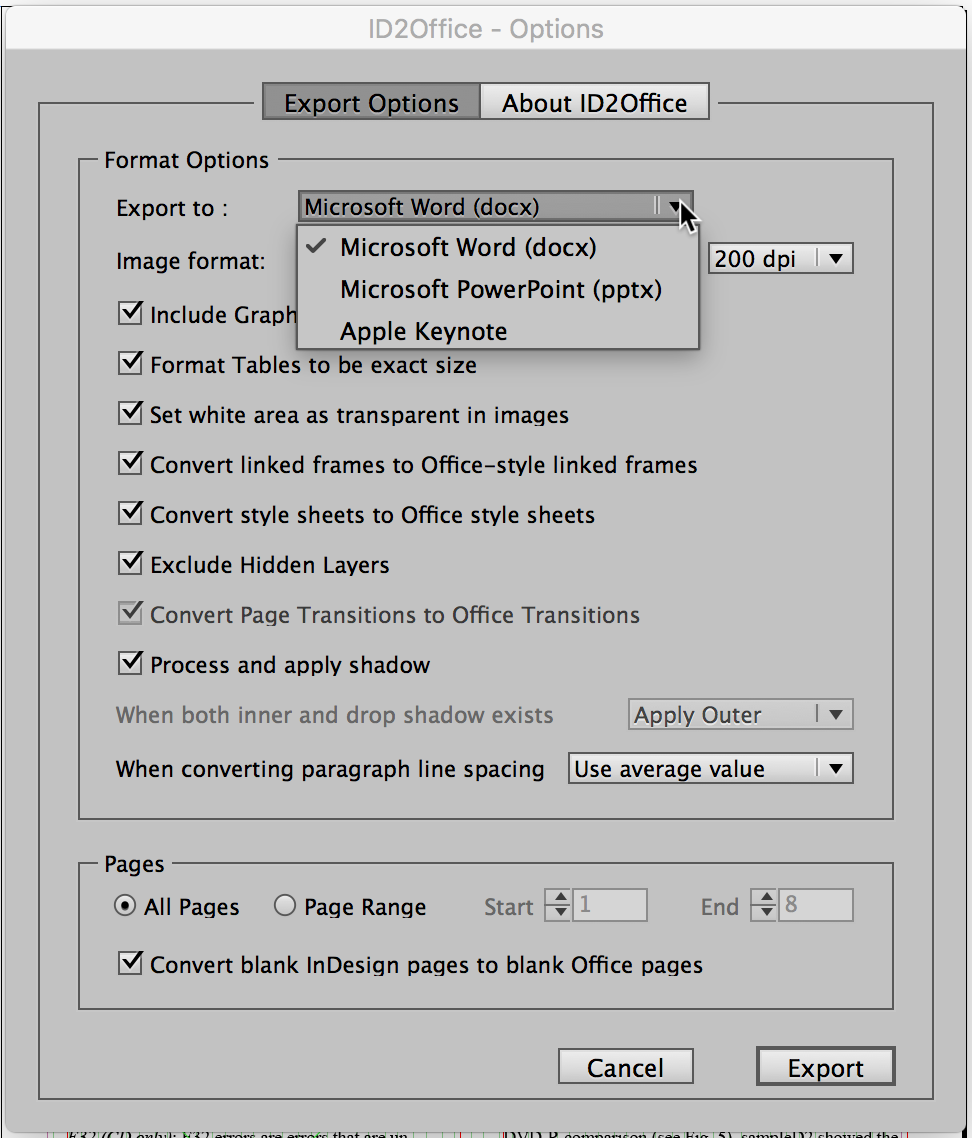
ID2Office converts the text, associated styles, paragraph structure, corresponding property, frames linking, tables, graphics and other InDesign object and document properties to the matching Microsoft Word, Microsoft PowerPoint and Apple Keynote object and file properties; converting every page into an equivalent page in the resulting Word, PowerPoint or Keynote file. ID2Office exports InDesign files to Microsoft Word, Microsoft PowerPoint or Apple Keynote resulting in enhanced workflow automation.
Key New Features:
* Integration with InDesign CC 2017:
ID2Office has been enhanced to operate and function with InDesign CC 2017.
* Character and Paragraph styles in Table cells:
Character and Paragraph styles which are defined in Table cells are now converted to Microsoft Word style sheets and applied appropriately.
* Paragraph Rules:
Paragraph rules are converted to Microsoft Word paragraph borders.
* Enhanced Conversions:
Conversion of InDesign files to Microsoft Word, PowerPoint and Keynote formats have been enhanced in several areas providing even more accurate conversions.
System Requirements
* Mac OS: macOS 10.6.8 or higher
* Hardware: Intel based Mac
* Application: InDesign CS6, CC, CC 2014, CC 2015 or CC 2017
* Windows: Windows XP SP3, Windows Vista, Windows 7, Windows 8 or Windows 10
* Hardware: Minimum Pentium III computer
* Application: InDesign CS6, CC, CC 2014, CC 2015 or CC 2017
ID2Office v2.2 is available immediately in the following configurations from the Recosoft web store (per license):
* ID2Office Standard v2.2 Annual subscription (Mac/Windows) US$199.00
* ID2Office Professional v2.2 Annual subscription (Mac only) US$249.00
For more information on Recosoft PDF converters and InDesign related solutions, visit Recosoft online.
Recosoft: https://www.recosoft.com
ID2Office 2.2: https://www.recosoft.com/products/id2office
Screenshot: http://www.recosoftcorporation.com/ftpenglish2/Export-InDesign-to-Word.png
Recosoft Corporation has pioneered PDF2Office(R), the de-facto PDF-to-Excel, PDF-to-Word, PDF-to-PowerPoint, PDF-to-OmniGraffle conversion utility; PDF2Office(R) for iWork, the only PDF-to-Keynote, PDF-to-Numbers and PDF-to-Pages conversion application; ID2Office, the InDesign-to-Word, InDesign-to-PowerPoint converter; and PDF2ID(R) the de-facto PDF-to-InDesign conversion tool. The company is a leader in designing and delivering PDF converters and InDesign software solutions enhancing workflow automation and productivity. ID2Office, PDF2Office, PDF2ID, PDFtoID are trademarks or registered trademarks of Recosoft Corporation in the US and/or other countries. Microsoft, Excel, PowerPoint, Word and the Office logo are trademarks or registered trademarks of Microsoft Corporation in the US and/or other countries. Adobe and InDesign are either registered trademarks or trademarks of Adobe System Incorporated in the US and/or other countries. Apple, Macintosh, macOS, Mac, Numbers, Keynote,
Pages, iWork, iPod, iPhone, iOS, iPAD are either trademarks or registered trademarks of Apple, Inc. in the US and or other countries.
*******
Link To Article: http://prmac.com/release-id-80629.htm
*******
---------------------------------------------------------------------------------
Note that you can alter delivered distributions at any time.
Login to your account on prMac to alter your channel selection, or to opt-out at any time.
ID2Office v2.2 ships - Export InDesign CC files to Word, PPT & Keynote - Published on 11/17/16
Recosoft Corporation releases ID2Office 2.2, a new version of the InDesign to Word, PowerPoint & Keynote conversion plug-in for InDesign CC 2017. ID2Office v2.2 has been enhanced to support Adobe InDesign CC 2017 for both macOS and Windows. Version 2.2 has been augmented to convert style sheet properties defined in InDesign tables into Word Table style sheets properties. It also improves conversion fidelity in several areas when exporting InDesign files to the Word, PowerPoint and Keynote type.
Osaka, Japan - Recosoft Corporation, the developers of PDF conversion software and PDF to Adobe(R) InDesign(R) converter tools, has released ID2Office v2.2, the newest version of the InDesign to Word, PowerPoint(R) and Keynote conversion plug-in for InDesign CC 2017.
ID2Office v2.2 has been enhanced to support Adobe InDesign CC 2017, the latest version of InDesign for both macOS and Windows. Additionally, ID2Office v2.2 has been augmented to convert style sheet properties defined in InDesign tables into Word Table style sheets properties. ID2Office v2.2 also improves conversion fidelity in several areas when exporting InDesign files to the Word, PowerPoint and Keynote type.
"With every major release of ID2Office, we improve and enhance InDesign to Word, PowerPoint and Keynote format conversion fidelity"- Paramjit Chadha, MD, Recosoft Corporation"
ID2Office converts the text, associated styles, paragraph structure, corresponding property, frames linking, tables, graphics and other InDesign object and document properties to the matching Microsoft Word, Microsoft PowerPoint and Apple Keynote object and file properties; converting every page into an equivalent page in the resulting Word, PowerPoint or Keynote file. ID2Office exports InDesign files to Microsoft Word, Microsoft PowerPoint or Apple Keynote resulting in enhanced workflow automation.
Key New Features:
* Integration with InDesign CC 2017:
ID2Office has been enhanced to operate and function with InDesign CC 2017.
* Character and Paragraph styles in Table cells:
Character and Paragraph styles which are defined in Table cells are now converted to Microsoft Word style sheets and applied appropriately.
* Paragraph Rules:
Paragraph rules are converted to Microsoft Word paragraph borders.
* Enhanced Conversions:
Conversion of InDesign files to Microsoft Word, PowerPoint and Keynote formats have been enhanced in several areas providing even more accurate conversions.
System Requirements
* Mac OS: macOS 10.6.8 or higher
* Hardware: Intel based Mac
* Application: InDesign CS6, CC, CC 2014, CC 2015 or CC 2017
* Windows: Windows XP SP3, Windows Vista, Windows 7, Windows 8 or Windows 10
* Hardware: Minimum Pentium III computer
* Application: InDesign CS6, CC, CC 2014, CC 2015 or CC 2017
ID2Office v2.2 is available immediately in the following configurations from the Recosoft web store (per license):
* ID2Office Standard v2.2 Annual subscription (Mac/Windows) US$199.00
* ID2Office Professional v2.2 Annual subscription (Mac only) US$249.00
For more information on Recosoft PDF converters and InDesign related solutions, visit Recosoft online.
Recosoft: https://www.recosoft.com
ID2Office 2.2: https://www.recosoft.com/products/id2office
Screenshot: http://www.recosoftcorporation.com/ftpenglish2/Export-InDesign-to-Word.png
Recosoft Corporation has pioneered PDF2Office(R), the de-facto PDF-to-Excel, PDF-to-Word, PDF-to-PowerPoint, PDF-to-OmniGraffle conversion utility; PDF2Office(R) for iWork, the only PDF-to-Keynote, PDF-to-Numbers and PDF-to-Pages conversion application; ID2Office, the InDesign-to-Word, InDesign-to-PowerPoint converter; and PDF2ID(R) the de-facto PDF-to-InDesign conversion tool. The company is a leader in designing and delivering PDF converters and InDesign software solutions enhancing workflow automation and productivity. ID2Office, PDF2Office, PDF2ID, PDFtoID are trademarks or registered trademarks of Recosoft Corporation in the US and/or other countries. Microsoft, Excel, PowerPoint, Word and the Office logo are trademarks or registered trademarks of Microsoft Corporation in the US and/or other countries. Adobe and InDesign are either registered trademarks or trademarks of Adobe System Incorporated in the US and/or other countries. Apple, Macintosh, macOS, Mac, Numbers, Keynote,
Pages, iWork, iPod, iPhone, iOS, iPAD are either trademarks or registered trademarks of Apple, Inc. in the US and or other countries.
*******
Link To Article: http://prmac.com/release-id-80629.htm
*******
---------------------------------------------------------------------------------
Note that you can alter delivered distributions at any time.
Login to your account on prMac to alter your channel selection, or to opt-out at any time.
Systweak Introduces New Features for Their iOS App - Right Backup
A new article has been published at prMac.
Systweak Introduces New Features for Their iOS App - Right Backup - Published on 11/17/16
Systweak Software, a well-known utility apps and software development firm, announces an updated version of their Cloud Backup app i.e. Right Backup 1.7 for iOS users. The flagship cloud storage app has been upgraded with 3 new features. The app now comes with a 7-day backup reminder, in-app purchase plans, and exciting offers for users who send 'invites' to others to join the cloud backup bandwagon. Right Backup lets users store tons of data in the cloud under a single account.
Jaipur, India - Systweak Software, a well-known utility apps and software development firm, recently released an updated version of their Cloud Backup app i.e. Right Backup Anywhere 1.7 for iOS users. The app now comes with a 7-day backup reminder, in app purchase plans and exciting offers for users who send 'invites' to others to join the cloud backup bandwagon.
"Right Backup is already a popular cloud storage app for Android users. We wanted to ensure iOS users too are made aware of this secure alternative solution for data backup. We have recently introduced the 'Invite and get Free Storage' offer for our app users. Every time a user invites someone to create a Right Backup account, they will receive 100 MB free storage. The more the invites, the more free storage they can get. The maximum amount of free storage that can be availed by each user via this offer is 20 GB," said Shrishail Rana, CEO, Systweak.
"Our objective was to improve the existing build of the Right Backup App for iOS. It now includes a notification every 7 days to remind users about backing up their data. We have also added in app purchase of monthly and yearly plans so that our users can have uninterrupted backup service once they exhaust their free storage limit. The monthly plan is priced at $14.99 while the yearly plan costs $99.99. Both the plans provide unlimited storage," added Sudhir Sharma, Cloud Product Manager.
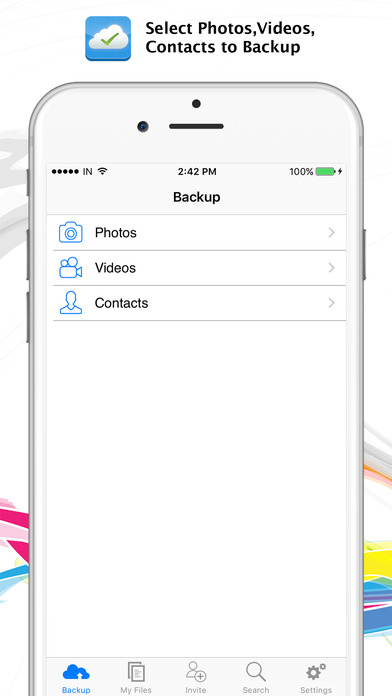
Right backup lets users store tons of data viz. photos, videos and contacts on cloud under a single account. Right Backup is compatible with iOS 7.0 or later. To download Right Backup for iOS, visit the App Store.
Device Requirements:
* iPhone, iPad, and iPod touch
* Requires iOS 7.0 or later
* 9.7 MB
Pricing and Availability:
Right Backup Anywhere 1.7 is free, and is available worldwide through the App Store in the Productivity category.
Systweak Software: http://www.systweak.com
Right Backup Anywhere 1.7: http://www.rightbackup.com/DownloadSetup?for=i
Download from iTunes: https://itunes.apple.com/app/right-backup-anywhere/id871675702
Screenshot: http://a5.mzstatic.com/us/r30/Purple18/v4/b9/12/b5/b912b571-ab75-bb89-6c25-0b4d8f331c67/screen696x696.jpeg
App Icon: http://a2.mzstatic.com/us/r30/Purple71/v4/64/ee/f3/64eef35f-51be-39ac-7602-b0f1a91ba10e/icon175x175.png
Systweak Software has been developing and distributing Windows, Mac, iOS & Android Apps since last 18 years to improve the average user's digital experience. It has recently been featured in "100 Most Promising Microsoft Solution Providers" list by the enterprise solutions magazine, CIO Review. Some of the company's flagship apps have been featured on Newswatch, the Discovery Channel's tech news bulletin. Systweak Software has a large user-base in North America followed by several countries in Europe and Asia. All Material and Software Copyright (C) 2016 Systweak Software. All Rights Reserved. Apple, the Apple logo, iPhone, iPad and iPod are registered trademarks of Apple Inc. in the U.S. and/or other countries.
*******
Link To Article: http://prmac.com/release-id-80628.htm
*******
---------------------------------------------------------------------------------
Note that you can alter delivered distributions at any time.
Login to your account on prMac to alter your channel selection, or to opt-out at any time.
Systweak Introduces New Features for Their iOS App - Right Backup - Published on 11/17/16
Systweak Software, a well-known utility apps and software development firm, announces an updated version of their Cloud Backup app i.e. Right Backup 1.7 for iOS users. The flagship cloud storage app has been upgraded with 3 new features. The app now comes with a 7-day backup reminder, in-app purchase plans, and exciting offers for users who send 'invites' to others to join the cloud backup bandwagon. Right Backup lets users store tons of data in the cloud under a single account.
Jaipur, India - Systweak Software, a well-known utility apps and software development firm, recently released an updated version of their Cloud Backup app i.e. Right Backup Anywhere 1.7 for iOS users. The app now comes with a 7-day backup reminder, in app purchase plans and exciting offers for users who send 'invites' to others to join the cloud backup bandwagon.
"Right Backup is already a popular cloud storage app for Android users. We wanted to ensure iOS users too are made aware of this secure alternative solution for data backup. We have recently introduced the 'Invite and get Free Storage' offer for our app users. Every time a user invites someone to create a Right Backup account, they will receive 100 MB free storage. The more the invites, the more free storage they can get. The maximum amount of free storage that can be availed by each user via this offer is 20 GB," said Shrishail Rana, CEO, Systweak.
"Our objective was to improve the existing build of the Right Backup App for iOS. It now includes a notification every 7 days to remind users about backing up their data. We have also added in app purchase of monthly and yearly plans so that our users can have uninterrupted backup service once they exhaust their free storage limit. The monthly plan is priced at $14.99 while the yearly plan costs $99.99. Both the plans provide unlimited storage," added Sudhir Sharma, Cloud Product Manager.
Right backup lets users store tons of data viz. photos, videos and contacts on cloud under a single account. Right Backup is compatible with iOS 7.0 or later. To download Right Backup for iOS, visit the App Store.
Device Requirements:
* iPhone, iPad, and iPod touch
* Requires iOS 7.0 or later
* 9.7 MB
Pricing and Availability:
Right Backup Anywhere 1.7 is free, and is available worldwide through the App Store in the Productivity category.
Systweak Software: http://www.systweak.com
Right Backup Anywhere 1.7: http://www.rightbackup.com/DownloadSetup?for=i
Download from iTunes: https://itunes.apple.com/app/right-backup-anywhere/id871675702
Screenshot: http://a5.mzstatic.com/us/r30/Purple18/v4/b9/12/b5/b912b571-ab75-bb89-6c25-0b4d8f331c67/screen696x696.jpeg
App Icon: http://a2.mzstatic.com/us/r30/Purple71/v4/64/ee/f3/64eef35f-51be-39ac-7602-b0f1a91ba10e/icon175x175.png

Systweak Software has been developing and distributing Windows, Mac, iOS & Android Apps since last 18 years to improve the average user's digital experience. It has recently been featured in "100 Most Promising Microsoft Solution Providers" list by the enterprise solutions magazine, CIO Review. Some of the company's flagship apps have been featured on Newswatch, the Discovery Channel's tech news bulletin. Systweak Software has a large user-base in North America followed by several countries in Europe and Asia. All Material and Software Copyright (C) 2016 Systweak Software. All Rights Reserved. Apple, the Apple logo, iPhone, iPad and iPod are registered trademarks of Apple Inc. in the U.S. and/or other countries.
*******
Link To Article: http://prmac.com/release-id-80628.htm
*******
---------------------------------------------------------------------------------
Note that you can alter delivered distributions at any time.
Login to your account on prMac to alter your channel selection, or to opt-out at any time.
iLearn Connect Launches a New Mobile Learning Platform
A new article has been published at prMac.
iLearn Connect Launches a New Mobile Learning Platform - Published on 11/17/16
iLearn Connect launches a new mobile learning platform in a move to meet the demands of increasingly digitally-aware employees. iLearn Connect is designed from a need for people to easily access learning content, videos, top tips, questionnaires, checklists, work sheets and more, both online and offline. It offers a bespoke platform that delivers this valuable information, caters for multiple learning styles, and ensures that everyone can quickly access information relevant to their needs.
London, United Kingdom - iLearn Connect, has announced the launch of their new mobile platform designed to give users access to extensive resources including Learning Guides, Video Bites and Top 10 Tips. The learning platform offers over 150 topic areas covering Management & Leadership, Personal Development, Communication Skills, Customer Service & Sales and Business Skills.
iLearn Connect 1.0.5 is designed from a need for people to easily access learning content, videos, top tips, questionnaires, checklists, work sheets and planning tools both online and offline.
With a library packed full of high-quality learning resources and an ever-growing demand for information through technology, iLearn Connect offers a bespoke platform that delivers this valuable information, caters for multiple learning styles, and ensures that everyone can quickly access information relevant to their needs.
The launch of the new platform comes as part of the company's long-term aim to meet the needs of its digitally-focused users by offering a more convenient way to access information on the move using their mobile and tablet devices. Mobile Apps are available on iOS, Android and Windows devices.
As Mark Rose, Managing Director, iLearn Connect explains: "Technology is totally reshaping learning and development. This new platform has been designed to meet the growing demand from busy professionals who want to access the information conveniently and quickly. However, the new platform isn't just about simply shifting traditional paper-based resource onto screens - it's about allowing users to make use of their devices to truly enhance their learning.
iLearn Connect will enable this by giving users the tools, information and techniques for over 150 topics, which they can then easily re-visit at any point in the future using their tablet or smartphone."
Device Requirements:
* iPhone, iPad, and iPod touch
* Requires iOS 8.0 or later
* Universal Application
* 13.7 MB
Pricing and Availability:
iLearn Connect 1.0.5 is free, and is available worldwide through the App Store in the Business category. An Android version is available through Google Play, and a Windows Phone version is available through the Windows Phone Store.
iLearn Connect 1.0.5: http://www.ilearnconnect.com
Purchase Link: http://www.ilearnconnect.com/#App
Download from iTunes: https://itunes.apple.com/app/ilearn-connect/id1112583716
Screenshot: http://a2.mzstatic.com/us/r30/Purple71/v4/d9/b2/d3/d9b2d36a-20d4-7537-5104-fab844e2c2da/screen696x696.jpeg
App Icon: http://is4.mzstatic.com/image/thumb/Purple62/v4/f1/38/e5/f138e501-d238-952a-a7a5-c5e20c682e53/source/175x175bb.jpg
iLearn Connect delivers interactive, informative and thought-provoking content that is instantly accessible to everyone, from any device, anywhere. All Material and Software Copyright (C) 2016 iLearn Connect. All Rights Reserved. Apple, the Apple logo, iPhone, iPad and iPod are registered trademarks of Apple Inc. in the U.S. and/or other countries.
*******
Link To Article: http://prmac.com/release-id-80627.htm
*******
---------------------------------------------------------------------------------
Note that you can alter delivered distributions at any time.
Login to your account on prMac to alter your channel selection, or to opt-out at any time.
iLearn Connect Launches a New Mobile Learning Platform - Published on 11/17/16
iLearn Connect launches a new mobile learning platform in a move to meet the demands of increasingly digitally-aware employees. iLearn Connect is designed from a need for people to easily access learning content, videos, top tips, questionnaires, checklists, work sheets and more, both online and offline. It offers a bespoke platform that delivers this valuable information, caters for multiple learning styles, and ensures that everyone can quickly access information relevant to their needs.
London, United Kingdom - iLearn Connect, has announced the launch of their new mobile platform designed to give users access to extensive resources including Learning Guides, Video Bites and Top 10 Tips. The learning platform offers over 150 topic areas covering Management & Leadership, Personal Development, Communication Skills, Customer Service & Sales and Business Skills.
iLearn Connect 1.0.5 is designed from a need for people to easily access learning content, videos, top tips, questionnaires, checklists, work sheets and planning tools both online and offline.
With a library packed full of high-quality learning resources and an ever-growing demand for information through technology, iLearn Connect offers a bespoke platform that delivers this valuable information, caters for multiple learning styles, and ensures that everyone can quickly access information relevant to their needs.
The launch of the new platform comes as part of the company's long-term aim to meet the needs of its digitally-focused users by offering a more convenient way to access information on the move using their mobile and tablet devices. Mobile Apps are available on iOS, Android and Windows devices.
As Mark Rose, Managing Director, iLearn Connect explains: "Technology is totally reshaping learning and development. This new platform has been designed to meet the growing demand from busy professionals who want to access the information conveniently and quickly. However, the new platform isn't just about simply shifting traditional paper-based resource onto screens - it's about allowing users to make use of their devices to truly enhance their learning.
iLearn Connect will enable this by giving users the tools, information and techniques for over 150 topics, which they can then easily re-visit at any point in the future using their tablet or smartphone."
Device Requirements:
* iPhone, iPad, and iPod touch
* Requires iOS 8.0 or later
* Universal Application
* 13.7 MB
Pricing and Availability:
iLearn Connect 1.0.5 is free, and is available worldwide through the App Store in the Business category. An Android version is available through Google Play, and a Windows Phone version is available through the Windows Phone Store.
iLearn Connect 1.0.5: http://www.ilearnconnect.com
Purchase Link: http://www.ilearnconnect.com/#App
Download from iTunes: https://itunes.apple.com/app/ilearn-connect/id1112583716
Screenshot: http://a2.mzstatic.com/us/r30/Purple71/v4/d9/b2/d3/d9b2d36a-20d4-7537-5104-fab844e2c2da/screen696x696.jpeg

App Icon: http://is4.mzstatic.com/image/thumb/Purple62/v4/f1/38/e5/f138e501-d238-952a-a7a5-c5e20c682e53/source/175x175bb.jpg

iLearn Connect delivers interactive, informative and thought-provoking content that is instantly accessible to everyone, from any device, anywhere. All Material and Software Copyright (C) 2016 iLearn Connect. All Rights Reserved. Apple, the Apple logo, iPhone, iPad and iPod are registered trademarks of Apple Inc. in the U.S. and/or other countries.
*******
Link To Article: http://prmac.com/release-id-80627.htm
*******
---------------------------------------------------------------------------------
Note that you can alter delivered distributions at any time.
Login to your account on prMac to alter your channel selection, or to opt-out at any time.
Subscribe to:
Posts (Atom)