A new article has been published at prMac.
Together 3.7 adds Touch Bar and improves Evernote import - Published on 12/06/16
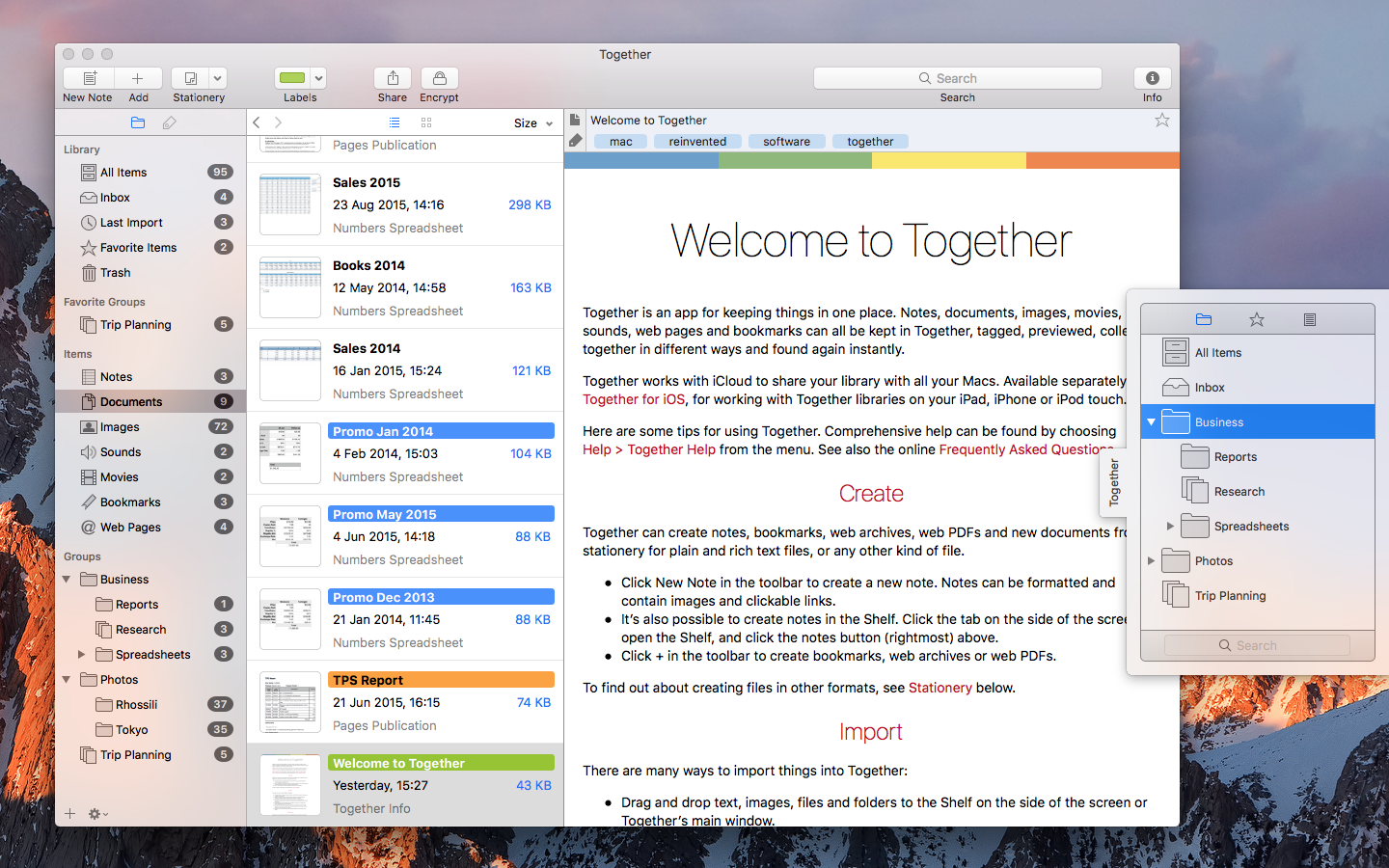
UK based Reinvented Software today announces Together 3.7 for Mac. Together is for collecting, organizing and searching all kinds of files. Just about anything can be added to Together for safe-keeping, tagged, previewed, collected together in different ways and found again instantly. With iCloud, Together libraries can be seamlessly shared with other Macs and iOS devices. Version 3.7 adds comprehensive support for the MacBook Pro Touch Bar and improves Evernote import.
Swansea, United Kingdom - Reinvented Software today is proud to announce the release of Together 3.7 for Mac, which adds comprehensive support for the MacBook Pro Touch Bar and improves Evernote import. Together is for collecting, organizing and searching all kinds of files. Just about anything can be added to Together for safe keeping, tagged, previewed, collected together in different ways and found again instantly. With iCloud, Together libraries can be seamlessly shared with other Macs and iOS devices.
The Touch Bar in the new MacBook Pro works contextually, and Together takes full advantage of that. Across the app you can use the Touch Bar to create new items, import files and search the library. In the sidebar you can switch between Groups and Tags, add groups and folders, quickly view groups such as the Inbox and untagged items. In the item list you can switch between the list and thumbnails views, change how the list is sorted and resize the thumbnails. When editing notes and text documents, you can format the text, and when viewing any item you can tag, label, rate, share, favorite, encrypt and decrypt items with Touch ID.
Together's Evernote Importer is a separate download that automates the process of moving from Evernote to Together. Evernote notes are converted to Together notes, except notes that only contain a single attachment and no text, which are saved as standalone files (e.g. an image or a PDF document), including tags, comments and dates. The new version of the Evernote Importer improves note conversion to handle things like checklists, converts web clippings to web archive files to preserve their layout, imports each notebook into a separate folder, and considerably speeds up import of large notebooks.
Pricing and Availability:
Together 3.7 for Mac costs $49.99 (USD) from Reinvented Software, is a free upgrade for all Together 3 users and requires macOS Sierra. A 15-day trial is available for download from the Reinvented Software web site. Together's Evernote Importer is a free download that works with both the version of Together for Mac from the Reinvented Software site and the Mac App Store version. Together for iPad and iPhone is also available for $9.99 (USD) from the App Store, and requires iOS 10.
Together 3.7: http://reinventedsoftware.com/together/
Purchase and Download (MAS): https://geo.itunes.apple.com/app/together-3/id641534696
Download Demo: http://reinventedsoftware.com/together/downloads/Together.dmg
Screenshot: http://reinventedsoftware.com/together/promo/Together_Mac.png
iOS App: http://reinventedsoftware.com/together/ios/
Evernote Importer (zip): http://reinventedsoftware.com/together/downloads/EvernoteImporter.zip
Reinvented Software was founded in August 2004 by long-time Mac developer Steve Harris who, having wasted 10 years working for other people, decided to dedicate his life to making the best software in the world - software for the Mac. Copyright (C) 2004-2016 Reinvented Software. All Rights Reserved. Apple, iPad, iPhone, iCloud and Mac are trademarks of Apple Inc., registered in the U.S. and other countries. iCloud and App Store is a service mark of Apple Inc. Evernote is a trademark of Evernote Corporation.
*******
Link To Article: http://prmac.com/release-id-80743.htm
*******
---------------------------------------------------------------------------------
Note that you can alter delivered distributions at any time.
Login to your account on prMac to alter your channel selection, or to opt-out at any time.

KeyCue 8.3 improves integration with PopChar X and Typinator
A new article has been published at prMac.
KeyCue 8.3 improves integration with PopChar X and Typinator - Published on 12/06/16
Ergonis Software today releases KeyCue 8.2, a important update to its highly acclaimed keyboard shortcut cheat sheet. KeyCue displays an instant overview of the currently available keyboard shortcuts; application-specific menu shortcuts as well as system-wide hotkeys and user-defined shortcut descriptions. Version 8.3 improves PopChar X and Typinator integration, includes some stability improvements, fixes user-reported issues, and improves compatibility with FileMaker Pro 14 and 15.
Perg, Austria - Ergonis Software today releases KeyCue 8.3, a new version of the company's highly acclaimed keyboard shortcut cheat sheet. KeyCue 8 offers a new way to define a wide variety of triggers, which can be used to perform different actions, taking KeyCue to a whole new level. Based on this technique, recent versions of KeyCue introduced integration with Ergonis' other productivity boosters, PopChar X and Typinator. PopChar customers can use KeyCue to show and insert recently used and favorite characters; Typinator users can show and insert snippets with KeyCue's head-up display.
KeyCue 8.3 improves PopChar X and Typinator integration, includes some stability improvements, fixes user-reported issues, and improves compatibility with FileMaker Pro 14 and 15. Visit Ergonis Software's website to learn more about the changes in this release and to download and try the new version.
The productivity paradox of keyboard shortcuts is that shortcuts were designed to increase productivity. However, productivity actually decreases when applications provide large numbers of shortcuts, in particular when the shortcuts are defined inconsistently across applications.
KeyCue's elegantly simple solution is to display an instant overview of currently available keyboard shortcuts - application-specific menu shortcuts as well as system-wide hotkeys and user-defined shortcut descriptions. Over time, KeyCue users will automatically remember frequently used shortcuts and start working more efficiently. KeyCue has already received many awards, including a 4.5-Mice award from MacWorld magazine.
System Requirements:
KeyCue 8.3 requires Mac OS X 10.6 or newer and is fully compatible with macOS Sierra (10.12).
Availability and Ordering:
The upgrade to KeyCue 8.3 is free for anyone who owns a license for KeyCue 8 or purchased a license for KeyCue 7 on or after March 1st 2015. Upgrade paths are available for owners of older licenses. For information about purchases, including enterprise licenses, volume discounts, and upgrade pricing offers, see the company's web site.
Ergonis Software: http://www.ergonis.com
KeyCue 8.3: http://www.ergonis.com/products/keycue
Download KeyCue: http://www.ergonis.com/downloads/keycue-install.dmg
Purchase: https://store.ergonis.com/products/keycue
Image (view and activate Typinator snippets via KeyCue): http://www.ergonis.com/press/2016/20161206/keycue-typinatorintegration.png
Media Assets: http://www.ergonis.com/press
Headquartered in Perg, Austria, Ergonis Software Gmbh is a privately held software development company founded in 2002. With a focus on innovation, Ergonis develops ergonomic and intuitive software that boosts the productivity of Mac and PC users alike. Copyright 2002-2016 Ergonis Software Gmbh. All Rights Reserved. Ergonis products are either registered trademarks or trademarks of Ergonis Software GmbH. Other company and product names may be trademarks of their respective owners.
*******
Link To Article: http://prmac.com/release-id-80744.htm
*******
---------------------------------------------------------------------------------
Note that you can alter delivered distributions at any time.
Login to your account on prMac to alter your channel selection, or to opt-out at any time.
KeyCue 8.3 improves integration with PopChar X and Typinator - Published on 12/06/16
Ergonis Software today releases KeyCue 8.2, a important update to its highly acclaimed keyboard shortcut cheat sheet. KeyCue displays an instant overview of the currently available keyboard shortcuts; application-specific menu shortcuts as well as system-wide hotkeys and user-defined shortcut descriptions. Version 8.3 improves PopChar X and Typinator integration, includes some stability improvements, fixes user-reported issues, and improves compatibility with FileMaker Pro 14 and 15.
Perg, Austria - Ergonis Software today releases KeyCue 8.3, a new version of the company's highly acclaimed keyboard shortcut cheat sheet. KeyCue 8 offers a new way to define a wide variety of triggers, which can be used to perform different actions, taking KeyCue to a whole new level. Based on this technique, recent versions of KeyCue introduced integration with Ergonis' other productivity boosters, PopChar X and Typinator. PopChar customers can use KeyCue to show and insert recently used and favorite characters; Typinator users can show and insert snippets with KeyCue's head-up display.
KeyCue 8.3 improves PopChar X and Typinator integration, includes some stability improvements, fixes user-reported issues, and improves compatibility with FileMaker Pro 14 and 15. Visit Ergonis Software's website to learn more about the changes in this release and to download and try the new version.
The productivity paradox of keyboard shortcuts is that shortcuts were designed to increase productivity. However, productivity actually decreases when applications provide large numbers of shortcuts, in particular when the shortcuts are defined inconsistently across applications.
KeyCue's elegantly simple solution is to display an instant overview of currently available keyboard shortcuts - application-specific menu shortcuts as well as system-wide hotkeys and user-defined shortcut descriptions. Over time, KeyCue users will automatically remember frequently used shortcuts and start working more efficiently. KeyCue has already received many awards, including a 4.5-Mice award from MacWorld magazine.
System Requirements:
KeyCue 8.3 requires Mac OS X 10.6 or newer and is fully compatible with macOS Sierra (10.12).
Availability and Ordering:
The upgrade to KeyCue 8.3 is free for anyone who owns a license for KeyCue 8 or purchased a license for KeyCue 7 on or after March 1st 2015. Upgrade paths are available for owners of older licenses. For information about purchases, including enterprise licenses, volume discounts, and upgrade pricing offers, see the company's web site.
Ergonis Software: http://www.ergonis.com
KeyCue 8.3: http://www.ergonis.com/products/keycue
Download KeyCue: http://www.ergonis.com/downloads/keycue-install.dmg
Purchase: https://store.ergonis.com/products/keycue
Image (view and activate Typinator snippets via KeyCue): http://www.ergonis.com/press/2016/20161206/keycue-typinatorintegration.png

Media Assets: http://www.ergonis.com/press
Headquartered in Perg, Austria, Ergonis Software Gmbh is a privately held software development company founded in 2002. With a focus on innovation, Ergonis develops ergonomic and intuitive software that boosts the productivity of Mac and PC users alike. Copyright 2002-2016 Ergonis Software Gmbh. All Rights Reserved. Ergonis products are either registered trademarks or trademarks of Ergonis Software GmbH. Other company and product names may be trademarks of their respective owners.
*******
Link To Article: http://prmac.com/release-id-80744.htm
*******
---------------------------------------------------------------------------------
Note that you can alter delivered distributions at any time.
Login to your account on prMac to alter your channel selection, or to opt-out at any time.
Bestselling Epic Fantasy, The Bow of Destiny, Available on iBooks
A new article has been published at prMac.
Bestselling Epic Fantasy, The Bow of Destiny, Available on iBooks - Published on 12/05/16
Bestselling epic fantasy novel, The Bow of Destiny, is now available at reduced price on iBooks where it can be downloaded immediately whether it's given as a holiday gift or purchased with a gift card. Don't miss out on a great read at a great price! Haunted by his past. Hunted in the present. Uncertain what is real. Athson has seen things that aren't there and suffered fits since being tragically orphaned as a child at the hands of trolls and Corgren the wizard.
Birmingham, Alabama, US - About The Bow of Destiny: Haunted by his past. Hunted in the present. Uncertain what is real. Athson has seen things that aren't there and suffered fits since being tragically orphaned as a child at the hands of trolls and Corgren the wizard. When a strange will mentioning a mysterious bow comes into his possession, he's not sure it's real. But the trolls that soon pursue him are all too real and dangerous. And what's worse, these raiders serve Corgren and his master, the hidden dragon, Magdronu, who are responsible for the destruction of his childhood home.
Athson is drawn into a quest for the concealed Bow of Hart by the mystic Withling, Hastra, but Athson isn't always sure what's real and who his enemies are. With Corgren and Magdronu involved, Athson must face not only frequent danger but his grasp on reality and the reasons behind his tragic past.
Review Excerpts for The Bow of Destiny:
"Mister Solomon has moved the ruler by which we believe indie fantasy novels should be judged. He has shown us that it is possible to write a story as great as any published by the big publishing houses" ~ Fantasia Reviews 5 Stars
"It didn't disappoint! Beautifully detailed, and well written this was a fun read! Perfect for fantasy fans, this one grabs you from the start and doesn't let up!" ~ Adventures Through Wonderland ~ 5 Stars
About the Author:
P. H. Solomon lives in the greater Birmingham, AL area where he strongly dislikes yard work and sanding the deck rail. However, he performs these duties to maintain a nice home for his loved ones as well as the family's German Shepherds. In his spare time, P. H. rides herd as a Computer Whisperer on large computers called servers (harmonica not required). Additionally, he enjoys reading, running, most sports and fantasy football. Having a degree in Anthropology, he also has a wide array of more "serious" interests in addition to working regularly to hone his writing. The Bow of Destiny is his first novel-length title with more soon to come.
Contact P. H. Solomon by email for review copies.
Current & Upcoming Titles
Book 1 of The Bow of Hart Saga: The Bow of Destiny can be found online: iBooks.
Book 2 of The Bow of Hart Saga: An Arrow against the Wind due out within a few months (Winter, 2017). It can currently be found for pre-release orders: iBooks.
Book 3 of The Bow of Hart Saga: The White Arrow is due out Fall of 2017 (links pending).
Device Requirements:
* iOS device with iBooks 1.3.1 or later and iOS 4.3.3 or later
* Mac with iBooks 1.0 or later and OS X 10.9 or later
* 381 Pages
Pricing and Availability:
The Bow of Destiny is just $0.99 USD (or an equivalent amount in other currencies) and is available worldwide exclusively through the iBookstore in the Epic category.
Author P. H. Solomon: http://phsolomon.com
The Bow of Destiny: https://itunes.apple.com/book/the-bow-of-destiny/id1013070685
5 Star Review: Fantasia Reviews: https://fantasiareviews.com/2016/09/27/fantasia-reviews-the-bow-of-destiny/
5 Star Review: Adventures Through Wonderland: https://adventuresthruwonderland.blogspot.com/search?q=The+Bow+of+Destiny
The Bow of Destiny Trailer on YouTube : https://youtu.be/U86It1UVD2s
Cover: https://phsolomon.files.wordpress.com/2016/08/bod-final2.jpg
P. H. Solomon lives in the greater Birmingham, AL area where he strongly dislikes yard work and sanding the deck rail. However, he performs these duties to maintain a nice home for his loved ones as well as the family's German Shepherds. In his spare time, P. H. rides herd as a Computer Whisperer on large computers called servers (harmonica not required). Additionally, he enjoys reading, running, most sports and fantasy football. Having a degree in Anthropology, he also has a wide array of more "serious" interests in addition to working regularly to hone his writing. The Bow of Destiny is his first novel-length title with more soon to come. All Material and Software (C) Copyright 2016 P. H. Solomon. All Rights Reserved. Apple, the Apple logo, iPhone, iPod and iPad are registered trademarks of Apple Inc. in the U.S. and/or other countries. Other trademarks and registered trademarks may be the property of their respective owners.
*******
Link To Article: http://prmac.com/release-id-80742.htm
*******
---------------------------------------------------------------------------------
Note that you can alter delivered distributions at any time.
Login to your account on prMac to alter your channel selection, or to opt-out at any time.
Bestselling Epic Fantasy, The Bow of Destiny, Available on iBooks - Published on 12/05/16
Bestselling epic fantasy novel, The Bow of Destiny, is now available at reduced price on iBooks where it can be downloaded immediately whether it's given as a holiday gift or purchased with a gift card. Don't miss out on a great read at a great price! Haunted by his past. Hunted in the present. Uncertain what is real. Athson has seen things that aren't there and suffered fits since being tragically orphaned as a child at the hands of trolls and Corgren the wizard.
Birmingham, Alabama, US - About The Bow of Destiny: Haunted by his past. Hunted in the present. Uncertain what is real. Athson has seen things that aren't there and suffered fits since being tragically orphaned as a child at the hands of trolls and Corgren the wizard. When a strange will mentioning a mysterious bow comes into his possession, he's not sure it's real. But the trolls that soon pursue him are all too real and dangerous. And what's worse, these raiders serve Corgren and his master, the hidden dragon, Magdronu, who are responsible for the destruction of his childhood home.
Athson is drawn into a quest for the concealed Bow of Hart by the mystic Withling, Hastra, but Athson isn't always sure what's real and who his enemies are. With Corgren and Magdronu involved, Athson must face not only frequent danger but his grasp on reality and the reasons behind his tragic past.
Review Excerpts for The Bow of Destiny:
"Mister Solomon has moved the ruler by which we believe indie fantasy novels should be judged. He has shown us that it is possible to write a story as great as any published by the big publishing houses" ~ Fantasia Reviews 5 Stars
"It didn't disappoint! Beautifully detailed, and well written this was a fun read! Perfect for fantasy fans, this one grabs you from the start and doesn't let up!" ~ Adventures Through Wonderland ~ 5 Stars
About the Author:
P. H. Solomon lives in the greater Birmingham, AL area where he strongly dislikes yard work and sanding the deck rail. However, he performs these duties to maintain a nice home for his loved ones as well as the family's German Shepherds. In his spare time, P. H. rides herd as a Computer Whisperer on large computers called servers (harmonica not required). Additionally, he enjoys reading, running, most sports and fantasy football. Having a degree in Anthropology, he also has a wide array of more "serious" interests in addition to working regularly to hone his writing. The Bow of Destiny is his first novel-length title with more soon to come.
Contact P. H. Solomon by email for review copies.
Current & Upcoming Titles
Book 1 of The Bow of Hart Saga: The Bow of Destiny can be found online: iBooks.
Book 2 of The Bow of Hart Saga: An Arrow against the Wind due out within a few months (Winter, 2017). It can currently be found for pre-release orders: iBooks.
Book 3 of The Bow of Hart Saga: The White Arrow is due out Fall of 2017 (links pending).
Device Requirements:
* iOS device with iBooks 1.3.1 or later and iOS 4.3.3 or later
* Mac with iBooks 1.0 or later and OS X 10.9 or later
* 381 Pages
Pricing and Availability:
The Bow of Destiny is just $0.99 USD (or an equivalent amount in other currencies) and is available worldwide exclusively through the iBookstore in the Epic category.
Author P. H. Solomon: http://phsolomon.com
The Bow of Destiny: https://itunes.apple.com/book/the-bow-of-destiny/id1013070685
5 Star Review: Fantasia Reviews: https://fantasiareviews.com/2016/09/27/fantasia-reviews-the-bow-of-destiny/
5 Star Review: Adventures Through Wonderland: https://adventuresthruwonderland.blogspot.com/search?q=The+Bow+of+Destiny
The Bow of Destiny Trailer on YouTube : https://youtu.be/U86It1UVD2s
Cover: https://phsolomon.files.wordpress.com/2016/08/bod-final2.jpg

P. H. Solomon lives in the greater Birmingham, AL area where he strongly dislikes yard work and sanding the deck rail. However, he performs these duties to maintain a nice home for his loved ones as well as the family's German Shepherds. In his spare time, P. H. rides herd as a Computer Whisperer on large computers called servers (harmonica not required). Additionally, he enjoys reading, running, most sports and fantasy football. Having a degree in Anthropology, he also has a wide array of more "serious" interests in addition to working regularly to hone his writing. The Bow of Destiny is his first novel-length title with more soon to come. All Material and Software (C) Copyright 2016 P. H. Solomon. All Rights Reserved. Apple, the Apple logo, iPhone, iPod and iPad are registered trademarks of Apple Inc. in the U.S. and/or other countries. Other trademarks and registered trademarks may be the property of their respective owners.
*******
Link To Article: http://prmac.com/release-id-80742.htm
*******
---------------------------------------------------------------------------------
Note that you can alter delivered distributions at any time.
Login to your account on prMac to alter your channel selection, or to opt-out at any time.
WoofLinks Helps Your Dogs Socialize and Have More Doggy Fun
A new article has been published at prMac.
WoofLinks Helps Your Dogs Socialize and Have More Doggy Fun - Published on 12/05/16
Dog owners would agree how our four legged companions provide us an endless pool of love and joy, asking very little from us in return. Now WoofLinks, a pet loving app by Motomo, provides dog owners a chance to maximize their pets' happiness and health, along with their own, by letting them track and record walks, interact with other dogs, create a dog network and organize play dates for their beloved mutt with only a few taps on their iPhone.
Perth, Western Australia - The WoofLinks app is a socializing app for pets, where dog owners can find friendly canine pals in the vicinity that their dogs can socialize and play with. Users simply need to turn on the woof-radar, WoofDar, to identify dogs in the vicinity, very helpfully categorized according to their size. Thus, pet owners know exactly where to take their playful puppy and where to avoid going by knowing in advance where to find mates their dog's size.
Apart from optimizing walks, WoofLinks offers a health tracker for owners as well by keeping a record of all the walks users enjoy with their furry friends. Users can keep an online track of all the miles clocked while enjoying the company of their most selfless friend on WoofLinks - ensuring physical as well as mental well being because spending time with pets not only provides physical exercises but relaxes the mind as well. Also, users may use WoofDar to find play dates for their dogs as they walk and woof link friendly dogs to build their pet's social network - because social dogs are healthy dogs!
WooflLinks is a perfect social app for pets - it also includes a chat option, aptly called Woofs, where pet owners can talk for their dogs, arranging meet ups, events and beach picnics or day outs on their dogs 'WoofLinks' network.
The app is easy to use and allows owners to create multiple profiles for each dog they own as each pet is different and has different exercise needs and social preferences.
"WoofLinks is a dog loving app created to bring together the dog lovers of this world to keep our dogs healthy, happy and social, collectively. The app focuses on physical, social and mental well being of both pets and owners. Very soon, the app will come up with daycare features, taking care of the biggest worry of dog owners - providing loving care to their canine companion in their absence," says Kirk Mower, Chief Woof Technologist.
Device Requirements:
* iPhone, iPad, and iPod touch
* Requires iOS 8.0 or later
* 36.1 MB
Pricing and Availability:
WoofLinks 1.5 is just $0.99 USD (or an equivalent amount in other currencies) and is available worldwide exclusively through the App Store in the Lifestyle category.
WoofLinks 1.5: http://www.wooflinks.com/
Purchase and Download from iTunes: https://itunes.apple.com/app/wooflinks/id1139539889
Screenshot: http://a5.mzstatic.com/us/r30/Purple22/v4/3a/1b/2f/3a1b2ff4-e187-49a4-cd92-5da3afc88947/screen696x696.jpeg
App Icon: http://is3.mzstatic.com/image/thumb/Purple71/v4/f9/72/85/f9728517-353a-e567-899b-02ddb4f90312/source/175x175bb.jpg
Motomo Pty Ltd, operates the WoofLinks mobile application. All Material and Software (C) Copyright 2016 Motomo Pty Ltd. All Rights Reserved. Apple, the Apple logo, iPhone, iPod and iPad are registered trademarks of Apple Inc. in the U.S. and/or other countries. Other trademarks and registered trademarks may be the property of their respective owners.
*******
Link To Article: http://prmac.com/release-id-80741.htm
*******
---------------------------------------------------------------------------------
Note that you can alter delivered distributions at any time.
Login to your account on prMac to alter your channel selection, or to opt-out at any time.
WoofLinks Helps Your Dogs Socialize and Have More Doggy Fun - Published on 12/05/16
Dog owners would agree how our four legged companions provide us an endless pool of love and joy, asking very little from us in return. Now WoofLinks, a pet loving app by Motomo, provides dog owners a chance to maximize their pets' happiness and health, along with their own, by letting them track and record walks, interact with other dogs, create a dog network and organize play dates for their beloved mutt with only a few taps on their iPhone.
Perth, Western Australia - The WoofLinks app is a socializing app for pets, where dog owners can find friendly canine pals in the vicinity that their dogs can socialize and play with. Users simply need to turn on the woof-radar, WoofDar, to identify dogs in the vicinity, very helpfully categorized according to their size. Thus, pet owners know exactly where to take their playful puppy and where to avoid going by knowing in advance where to find mates their dog's size.
Apart from optimizing walks, WoofLinks offers a health tracker for owners as well by keeping a record of all the walks users enjoy with their furry friends. Users can keep an online track of all the miles clocked while enjoying the company of their most selfless friend on WoofLinks - ensuring physical as well as mental well being because spending time with pets not only provides physical exercises but relaxes the mind as well. Also, users may use WoofDar to find play dates for their dogs as they walk and woof link friendly dogs to build their pet's social network - because social dogs are healthy dogs!
WooflLinks is a perfect social app for pets - it also includes a chat option, aptly called Woofs, where pet owners can talk for their dogs, arranging meet ups, events and beach picnics or day outs on their dogs 'WoofLinks' network.
The app is easy to use and allows owners to create multiple profiles for each dog they own as each pet is different and has different exercise needs and social preferences.
"WoofLinks is a dog loving app created to bring together the dog lovers of this world to keep our dogs healthy, happy and social, collectively. The app focuses on physical, social and mental well being of both pets and owners. Very soon, the app will come up with daycare features, taking care of the biggest worry of dog owners - providing loving care to their canine companion in their absence," says Kirk Mower, Chief Woof Technologist.
Device Requirements:
* iPhone, iPad, and iPod touch
* Requires iOS 8.0 or later
* 36.1 MB
Pricing and Availability:
WoofLinks 1.5 is just $0.99 USD (or an equivalent amount in other currencies) and is available worldwide exclusively through the App Store in the Lifestyle category.
WoofLinks 1.5: http://www.wooflinks.com/
Purchase and Download from iTunes: https://itunes.apple.com/app/wooflinks/id1139539889
Screenshot: http://a5.mzstatic.com/us/r30/Purple22/v4/3a/1b/2f/3a1b2ff4-e187-49a4-cd92-5da3afc88947/screen696x696.jpeg

App Icon: http://is3.mzstatic.com/image/thumb/Purple71/v4/f9/72/85/f9728517-353a-e567-899b-02ddb4f90312/source/175x175bb.jpg

Motomo Pty Ltd, operates the WoofLinks mobile application. All Material and Software (C) Copyright 2016 Motomo Pty Ltd. All Rights Reserved. Apple, the Apple logo, iPhone, iPod and iPad are registered trademarks of Apple Inc. in the U.S. and/or other countries. Other trademarks and registered trademarks may be the property of their respective owners.
*******
Link To Article: http://prmac.com/release-id-80741.htm
*******
---------------------------------------------------------------------------------
Note that you can alter delivered distributions at any time.
Login to your account on prMac to alter your channel selection, or to opt-out at any time.
LinkWords - A new word search game with a difference
A new article has been published at prMac.
LinkWords - A new word search game with a difference - Published on 12/05/16
Mobile games developer, IcySpark today introduces LinkWords 1.01, their free word search game for iOS and Android devices. LinkWords is a fun yet challenging word search game that will test and train your brain. All words on each level are linked together by a common theme. Swipe your finger across each letter: Up, down, left, right or diagonally to form the correct word. Puzzles range from 2x2 grids up to 8x8 grids of sixty four letters. Can you get to the end?
Glasgow, United Kingdom - IcySpark, the creative minds behind Guess that Emoji and Create a Scene, today is thrilled to announce the release of LinkWords 1.01, their new free word search game for iOS and Android devices. LinkWords is a fun yet challenging word search game that will test and train your brain. All words on each level are linked together by a common theme. Swipe your finger across each letter: Up, down, left, right or diagonally to form the correct word. Starts off easy but gets more challenging as you progress through the six hundred themed levels. Puzzles range from 2x2 grids up to 8x8 grids of sixty four letters. Can you get to the end?
Features:
* Create and share your own unique levels online with friends and family
* Earn bonus coins by completing our daily challenges
* Various hints are available including: Reveal letter, reveal word, reveal link and reveal all letters
* Ask for help via Facebook, Twitter and email if you get stuck
* Earn 10x bonus coins for completing every tenth level
* Customise LinkWords to look and sound the way you want it
Customize LinkWords to look and sound the way you want it with sixty un-lockable items, including new color schemes, musical instruments and background effects.
Device Requirements:
* iPhone, iPad, and iPod touch
* Requires iOS�7.0 or later
* 30.1 MB
Pricing and Availability:
LinkWords 1.01 is Free and available worldwide exclusively through the App Store in the Games category. There are also versions available on Google Play and Amazon. For more information, please contact Dean Hodge.
LinkWords 1.01: http://icyspark.com/linkwords
Download from iTunes: https://itunes.apple.com/app/linkwords/id1156525706
YouTube Video (App Preview): https://www.youtube.com/watch?v=yCqK4hZ7c5Y
Screenshot 1: http://icyspark.com/wp-content/uploads/screenshot-750x1334-1.png
Screenshot 2: http://icyspark.com/wp-content/uploads/screenshot-750x1334-3.png
App Icon: http://icyspark.com/wp-content/uploads/icon512rounded.png
Located in Glasgow, United Kingdom, IcySpark was founded in 2012 by Dean Hodge. Our aim is to create unique and interesting games and apps. All Material and Software (C) 2016 IcySpark / All Rights Reserved. Apple, the Apple logo, iPhone, iPod and iPad are registered trademarks of Apple Inc. in the U.S. and/or other countries. Other trademarks and registered trademarks may be the property of their respective owners.
*******
Link To Article: http://prmac.com/release-id-80740.htm
*******
---------------------------------------------------------------------------------
Note that you can alter delivered distributions at any time.
Login to your account on prMac to alter your channel selection, or to opt-out at any time.
LinkWords - A new word search game with a difference - Published on 12/05/16
Mobile games developer, IcySpark today introduces LinkWords 1.01, their free word search game for iOS and Android devices. LinkWords is a fun yet challenging word search game that will test and train your brain. All words on each level are linked together by a common theme. Swipe your finger across each letter: Up, down, left, right or diagonally to form the correct word. Puzzles range from 2x2 grids up to 8x8 grids of sixty four letters. Can you get to the end?
Glasgow, United Kingdom - IcySpark, the creative minds behind Guess that Emoji and Create a Scene, today is thrilled to announce the release of LinkWords 1.01, their new free word search game for iOS and Android devices. LinkWords is a fun yet challenging word search game that will test and train your brain. All words on each level are linked together by a common theme. Swipe your finger across each letter: Up, down, left, right or diagonally to form the correct word. Starts off easy but gets more challenging as you progress through the six hundred themed levels. Puzzles range from 2x2 grids up to 8x8 grids of sixty four letters. Can you get to the end?
Features:
* Create and share your own unique levels online with friends and family
* Earn bonus coins by completing our daily challenges
* Various hints are available including: Reveal letter, reveal word, reveal link and reveal all letters
* Ask for help via Facebook, Twitter and email if you get stuck
* Earn 10x bonus coins for completing every tenth level
* Customise LinkWords to look and sound the way you want it
Customize LinkWords to look and sound the way you want it with sixty un-lockable items, including new color schemes, musical instruments and background effects.
Device Requirements:
* iPhone, iPad, and iPod touch
* Requires iOS�7.0 or later
* 30.1 MB
Pricing and Availability:
LinkWords 1.01 is Free and available worldwide exclusively through the App Store in the Games category. There are also versions available on Google Play and Amazon. For more information, please contact Dean Hodge.
LinkWords 1.01: http://icyspark.com/linkwords
Download from iTunes: https://itunes.apple.com/app/linkwords/id1156525706
YouTube Video (App Preview): https://www.youtube.com/watch?v=yCqK4hZ7c5Y
Screenshot 1: http://icyspark.com/wp-content/uploads/screenshot-750x1334-1.png

Screenshot 2: http://icyspark.com/wp-content/uploads/screenshot-750x1334-3.png

App Icon: http://icyspark.com/wp-content/uploads/icon512rounded.png

Located in Glasgow, United Kingdom, IcySpark was founded in 2012 by Dean Hodge. Our aim is to create unique and interesting games and apps. All Material and Software (C) 2016 IcySpark / All Rights Reserved. Apple, the Apple logo, iPhone, iPod and iPad are registered trademarks of Apple Inc. in the U.S. and/or other countries. Other trademarks and registered trademarks may be the property of their respective owners.
*******
Link To Article: http://prmac.com/release-id-80740.htm
*******
---------------------------------------------------------------------------------
Note that you can alter delivered distributions at any time.
Login to your account on prMac to alter your channel selection, or to opt-out at any time.
Tales of Cosmos - New Open World Adventure Game for Mac and Windows
A new article has been published at prMac.
Tales of Cosmos - New Open World Adventure Game for Mac and Windows - Published on 12/05/16
Red Dwarf Games announce Tales of Cosmos, the company's new point-and-click adventure game for Mac and Windows computers. In Tales of Cosmos, the player assumes the roles of Perseus and Gagayev, animal astronauts who become stranded on an unknown planet, and helps them get to the bottom of a cosmic mystery. The game combines classic point-and-click gameplay with seamless space flight mechanics, and offers charming and humorous characters, hand-drawn environments, ambient music, and more.
Budapest, Hungary - Red Dwarf Games is proud to announce the release of Tales of Cosmos, the company's new point-and-click adventure game for Mac and Windows computers. In Tales of Cosmos, the player assumes the roles of Perseus and Gagayev, animal astronauts who become stranded on an unknown planet, and helps them get to the bottom of a cosmic mystery.
Game Features:
* 2D open world point-and-click adventure game
* Combines classic point-and-click gameplay with seamless space flight mechanics
* Many planets and moons to explore
* Each planet has a large number of interactive objects and characters, as well as many puzzles
* Interstellar puzzles - an item acquired on one planet may be useful on another
* Integrated puzzle hint system
* Charming, humorous characters
* Hand-drawn environments, ambient music, laid-back space mood
* Inspired by 90s point-and-click adventures like Gobliiins and Day of the Tentacle
* Modding tools - level editor included with the game
Language Support:
Tales of Cosmos is available in English, French, Italian, German, Spanish, Brazilian Portuguese, Hungarian, Polish, and Russian languages.
Tales of Cosmos is an open world point-and-click adventure game set on the planet giant Novaclad and its surrounding system of planets and moons. Experience the freedom of unrestricted space exploration, discover new planets, seek the aid of local lifeforms, solve puzzles, and, of course, help yourself to anything that isn't nailed down.
System Requirements:
* Requires Mac OS X v10.6 or higher
* Dual-core 2 GHz processor
* 300 MB HD space
Tales of Cosmos is currently available on the Steam network for Windows and Mac. A mobile version is in development. Review copies and walkthrough guide available on request, please let us know.
Red Dwarf Games: http://www.reddwarfgames.com/
Tales of Cosmos: http://store.steampowered.com/app/350480
YouTube Video (Trailer): https://www.youtube.com/watch?v=wCZfXFJEu1o
Media Assets: http://www.reddwarfgames.com/presskit.html
Red Dwarf Games is a Hungarian indie game studio comprised of brothers Dani and Adam Zsoldos. Our previous release was the successful free-to-play puzzle game, The Old Tree. All Material and Software (C) Copyright 2016 Red Dwarf Games. All Rights Reserved. Apple, the Apple logo, Macintosh and Mac OS X are registered trademarks of Apple Inc. in the U.S. and/or other countries. Other trademarks and registered trademarks may be the property of their respective owners.
*******
Link To Article: http://prmac.com/release-id-80739.htm
*******
---------------------------------------------------------------------------------
Note that you can alter delivered distributions at any time.
Login to your account on prMac to alter your channel selection, or to opt-out at any time.
Tales of Cosmos - New Open World Adventure Game for Mac and Windows - Published on 12/05/16
Red Dwarf Games announce Tales of Cosmos, the company's new point-and-click adventure game for Mac and Windows computers. In Tales of Cosmos, the player assumes the roles of Perseus and Gagayev, animal astronauts who become stranded on an unknown planet, and helps them get to the bottom of a cosmic mystery. The game combines classic point-and-click gameplay with seamless space flight mechanics, and offers charming and humorous characters, hand-drawn environments, ambient music, and more.
Budapest, Hungary - Red Dwarf Games is proud to announce the release of Tales of Cosmos, the company's new point-and-click adventure game for Mac and Windows computers. In Tales of Cosmos, the player assumes the roles of Perseus and Gagayev, animal astronauts who become stranded on an unknown planet, and helps them get to the bottom of a cosmic mystery.
Game Features:
* 2D open world point-and-click adventure game
* Combines classic point-and-click gameplay with seamless space flight mechanics
* Many planets and moons to explore
* Each planet has a large number of interactive objects and characters, as well as many puzzles
* Interstellar puzzles - an item acquired on one planet may be useful on another
* Integrated puzzle hint system
* Charming, humorous characters
* Hand-drawn environments, ambient music, laid-back space mood
* Inspired by 90s point-and-click adventures like Gobliiins and Day of the Tentacle
* Modding tools - level editor included with the game
Language Support:
Tales of Cosmos is available in English, French, Italian, German, Spanish, Brazilian Portuguese, Hungarian, Polish, and Russian languages.
Tales of Cosmos is an open world point-and-click adventure game set on the planet giant Novaclad and its surrounding system of planets and moons. Experience the freedom of unrestricted space exploration, discover new planets, seek the aid of local lifeforms, solve puzzles, and, of course, help yourself to anything that isn't nailed down.
System Requirements:
* Requires Mac OS X v10.6 or higher
* Dual-core 2 GHz processor
* 300 MB HD space
Tales of Cosmos is currently available on the Steam network for Windows and Mac. A mobile version is in development. Review copies and walkthrough guide available on request, please let us know.
Red Dwarf Games: http://www.reddwarfgames.com/
Tales of Cosmos: http://store.steampowered.com/app/350480
YouTube Video (Trailer): https://www.youtube.com/watch?v=wCZfXFJEu1o
Media Assets: http://www.reddwarfgames.com/presskit.html
Red Dwarf Games is a Hungarian indie game studio comprised of brothers Dani and Adam Zsoldos. Our previous release was the successful free-to-play puzzle game, The Old Tree. All Material and Software (C) Copyright 2016 Red Dwarf Games. All Rights Reserved. Apple, the Apple logo, Macintosh and Mac OS X are registered trademarks of Apple Inc. in the U.S. and/or other countries. Other trademarks and registered trademarks may be the property of their respective owners.
*******
Link To Article: http://prmac.com/release-id-80739.htm
*******
---------------------------------------------------------------------------------
Note that you can alter delivered distributions at any time.
Login to your account on prMac to alter your channel selection, or to opt-out at any time.
PDF Checkpoint Now Supports macOS Sierra: PDF Conversion, Preflight Tool
A new article has been published at prMac.
PDF Checkpoint Now Supports macOS Sierra: PDF Conversion, Preflight Tool - Published on 12/05/16
Zevrix Solutions today announces PDF Checkpoint 1.7.17, a compatibility update to company's PDF preflight and conversion solution. Remarkably fast, PDF Checkpoint automatically preflights, exports as images, splits and optimizes Adobe PDF files. The software can also convert the color of PDF documents to specific ICC profile helping users easily prepare their files for print, web and mobile devices. The new version makes PDF Checkpoint compatible with the recently released macOS 10.12 Sierra.
Toronto (ON) Canada - Zevrix Solutions today is proud to announce the release of PDF Checkpoint 1.7.17, a compatibility update to company's PDF preflight and conversion automation tool. Remarkably fast, PDF Checkpoint automatically preflights, exports as images, splits and optimizes multiple Adobe PDF files. PDF Checkpoint is an ideal program for users who need a fast, affordable and easy to use solution to check PDF files for errors and convert them to the desired format and color space.
The new version makes PDF Checkpoint compatible with the recently released macOS 10.12 Sierra and is offered as a free update to the licensed users. The app is available on Mac App Store.
PDF Checkpoint is designed to automate and simplify PDF workflows of publishers, ad agencies, prepress houses, printers and graphic designers:
* Batch preflighting and conversion of PDF files
* Check PDF fonts, colors, images and metadata for specific attributes
* Convert PDF color mode using ICC profiles
* Route files by preflight results into success and error folders
* Split files into single page PDFs
* Export PDF as images with specific resolution, color and page scale
For example, users can preflight a folder of PDF files and convert them to TIFF images at 300 dpi while scaling each page by 50%. Or optimize documents for web and mobile devices while reducing file size dramatically by downsampling images to the screen resolution. Users can also create print-ready PDFs from such apps as Apple Pages and Swift Publisher by converting colors to the recommended CMYK profile.
Pricing and availability:
PDF Checkpoint can be purchased on Mac App Store and Zevrix website for $39.95 (USD), as well as from authorized resellers. The update is free to licensed users. Trial is also available for download. PDF Checkpoint requires macOS 10.7-10.12.
Zevrix Solutions: http://zevrix.com
PDF Checkpoint 1.7.17: http://zevrix.com/PDFCheckpoint.php
Download PDF Checkpoint: http://zevrix.com/PDFCheckpoint.dmg
Purchase: http://zevrix.com/store.php
Screenshot: http://zevrix.com/screenshots/pdfcheckpoint/main-bmw-web.jpg
Located in Toronto, Canada, Zevrix Solutions provides automation and productivity solutions for Adobe Creative Cloud and Creative Suite software, PDF workflows, graphic file diagnostics and Microsoft Office output on Mac OS. Zevrix is dedicated to help professionals increase their profits through automating everyday tasks, producing error-free documents, saving disk space and cutting production costs. For more information, visit their website. Copyright (C) 2016 Zevrix Solutions. All Rights Reserved. Other trademarks and registered trademarks may be the property of their respective owners.
*******
Link To Article: http://prmac.com/release-id-80738.htm
*******
---------------------------------------------------------------------------------
Note that you can alter delivered distributions at any time.
Login to your account on prMac to alter your channel selection, or to opt-out at any time.
PDF Checkpoint Now Supports macOS Sierra: PDF Conversion, Preflight Tool - Published on 12/05/16
Zevrix Solutions today announces PDF Checkpoint 1.7.17, a compatibility update to company's PDF preflight and conversion solution. Remarkably fast, PDF Checkpoint automatically preflights, exports as images, splits and optimizes Adobe PDF files. The software can also convert the color of PDF documents to specific ICC profile helping users easily prepare their files for print, web and mobile devices. The new version makes PDF Checkpoint compatible with the recently released macOS 10.12 Sierra.
Toronto (ON) Canada - Zevrix Solutions today is proud to announce the release of PDF Checkpoint 1.7.17, a compatibility update to company's PDF preflight and conversion automation tool. Remarkably fast, PDF Checkpoint automatically preflights, exports as images, splits and optimizes multiple Adobe PDF files. PDF Checkpoint is an ideal program for users who need a fast, affordable and easy to use solution to check PDF files for errors and convert them to the desired format and color space.
The new version makes PDF Checkpoint compatible with the recently released macOS 10.12 Sierra and is offered as a free update to the licensed users. The app is available on Mac App Store.
PDF Checkpoint is designed to automate and simplify PDF workflows of publishers, ad agencies, prepress houses, printers and graphic designers:
* Batch preflighting and conversion of PDF files
* Check PDF fonts, colors, images and metadata for specific attributes
* Convert PDF color mode using ICC profiles
* Route files by preflight results into success and error folders
* Split files into single page PDFs
* Export PDF as images with specific resolution, color and page scale
For example, users can preflight a folder of PDF files and convert them to TIFF images at 300 dpi while scaling each page by 50%. Or optimize documents for web and mobile devices while reducing file size dramatically by downsampling images to the screen resolution. Users can also create print-ready PDFs from such apps as Apple Pages and Swift Publisher by converting colors to the recommended CMYK profile.
Pricing and availability:
PDF Checkpoint can be purchased on Mac App Store and Zevrix website for $39.95 (USD), as well as from authorized resellers. The update is free to licensed users. Trial is also available for download. PDF Checkpoint requires macOS 10.7-10.12.
Zevrix Solutions: http://zevrix.com
PDF Checkpoint 1.7.17: http://zevrix.com/PDFCheckpoint.php
Download PDF Checkpoint: http://zevrix.com/PDFCheckpoint.dmg
Purchase: http://zevrix.com/store.php
Screenshot: http://zevrix.com/screenshots/pdfcheckpoint/main-bmw-web.jpg

Located in Toronto, Canada, Zevrix Solutions provides automation and productivity solutions for Adobe Creative Cloud and Creative Suite software, PDF workflows, graphic file diagnostics and Microsoft Office output on Mac OS. Zevrix is dedicated to help professionals increase their profits through automating everyday tasks, producing error-free documents, saving disk space and cutting production costs. For more information, visit their website. Copyright (C) 2016 Zevrix Solutions. All Rights Reserved. Other trademarks and registered trademarks may be the property of their respective owners.
*******
Link To Article: http://prmac.com/release-id-80738.htm
*******
---------------------------------------------------------------------------------
Note that you can alter delivered distributions at any time.
Login to your account on prMac to alter your channel selection, or to opt-out at any time.
Subscribe to:
Posts (Atom)