A new article has been published at prMac.
Green - Budget Forecasting now available on iPad - Published on 12/06/16
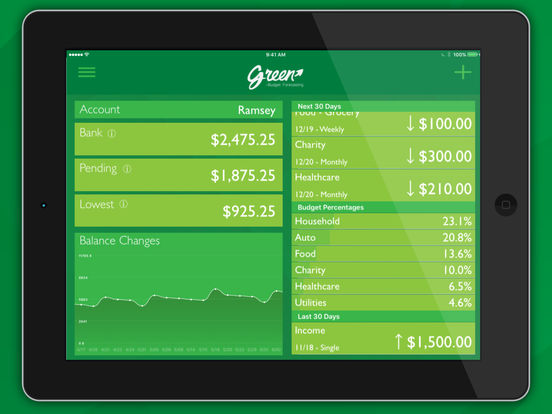
CoopToons today announces Green - Budget Forecasting 1.5, an update to their personal budgeting app developed exclusively for iOS devices. Green lets you keep track of when your lowest balance will occur and how low it will be. Green will forecast your balance changes for the next year showing how much of it you can spend safely. Avoid late fees and over-draft fees. Spend safely with Green! Now available on iPad, version 1.5 includes minor bug fixes and offers an updated UI.
Indianapolis, Indiana - CoopToons today is proud to announce the release of Green - Budget Forecasting 1.5, an update to their personal budgeting app developed exclusively for iOS devices. Green aims to be a "financial fortune teller" to make sure you "spend safe" by showing when you will exceed your bottom line, now or a year from now. The app is geared toward those who want to be financially secure but hate all the work that goes into setting up a budget and sticking to budget categories like Food, Household and Utilities. After quickly entering in your recurring expense and income the app will project changes in your balance during the next year. This will eliminate "budget guessing."
How Green Works:
* Enter your current account balance
* Enter your recurring income and expenses (Weekly, Monthly, Bi-Weekly, etc.)
* Green will show you your balance changes over the next year
* Green will show you how spending today will affect your future balance
* Experiment by adding, removing or adjusting a recurring transaction to see how it will affect your future balance
* Spend safe by knowing your future balance
Easy to Use:
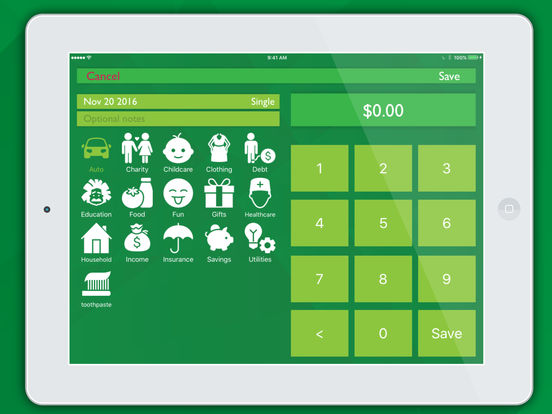
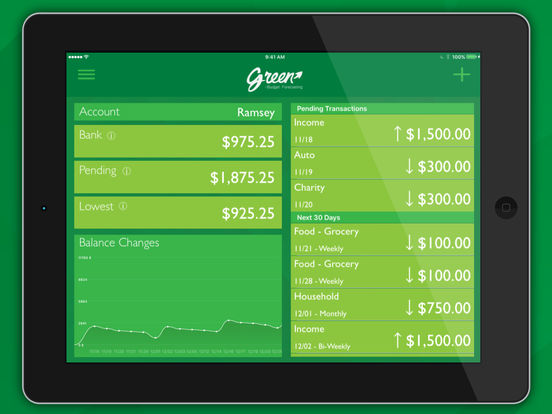
Green - Budget Forecasting allows you to track individual day-to-day expenses in addition to your recurring budget. For day-to-day expenses simply press the "+" button to enter the transaction entry view, enter the amount, select the category and press save. This new transaction will now be in the "Pending" section of your financial feed. When the transaction clears your bank swipe left on the transaction to reveal the "Cleared" option. Press the "Cleared" button, update amount if necessary and press "Confirm." All balances will be updated to reflect the changes.
Recurring expenses and income use the same transaction view for entry. In addition to the amount and category you can also enter a date, recurrence period and notes. Upcoming transaction will appear in "Next 30 Days" section of your financial feed and in the "Budget Elements" of the settings menu. Tapping on a transaction will take you back to the transaction detail view so that you can make change if needed. This gives you the ability to experiment with amounts allowing you to answer questions like, "How much more can I pay on that credit card to get out of debt earlier?" or "Where do I need to cut back to buy that new car?"
With Green you will know:
* Your lowest anticipated balance within the next year
* Today's predicted balance after current pending transactions
* The balance that should be sitting in your bank account right now
Green Security:
Green - Budget Forecasting doesn't require you to create a user name and password since the app doesn't download live transactions from your financial institutions. This is in an effort to maintain your security and privacy. All of the data is manually entered and maintained via Apple's built-in security. But don't think it will be hard to maintain your budget because of this; once you enter your recurring expense and income you only have to enter single transactions (Dining Out, Shopping, Etc.). For your added security you can add a 4 digit pin that will be entered (or use touch ID) to unlock the app.
Why Green?
Gary Cooper from CoopToons tried out many personal finance apps but none of them did what he needed or they were too complicated. "I was looking for a budget app that would tell me when my lowest balance would be in the next year so that I wouldn't overspend" he said. Gary found that all of the apps he tried were complicated and lack providing the information he thought was most important. "I wasn't concerned with what I had spent, I wanted to know what I could spend." Being a designer and developer, Gary thought "If I can't find it, I'll make it and hopefully others will be able to feel more secure with their finances as well."
Feature Highlights:
* Track multiple accounts
* Setup recurring transactions
* Forecast your balance up to a year
* Quickly track spending as it happens
* See the three most important balances
* Reconcile your transactions with your bank
* Add your own income and expense categories
* Visualize your income, expenses and spending trends
* Protect your sensitive data with a password code and/or touch ID
* Never provide bank or bill info for your peace of mind and security
Device Requirements:
* iPhone, iPad and iPod touch
* Requires iOS 8.0 or later
* 17.8 MB
Pricing and Availability:
Green - Budget Forecasting 1.5 is available at a price of $1.99 (USD) and available worldwide exclusively through the App Store in the Finance category. Review copies are available on request.
Green - Budget Forecasting 1.5: http://cooptoons.wixsite.com/green
Download from iTunes: https://itunes.apple.com/app/green-budget-forecasting/id1108694180
Screenshot 1: http://a5.mzstatic.com/us/r30/Purple62/v4/1a/f1/69/1af1695a-4e05-6b6a-04f9-c2d584b7e867/sc552x414.jpeg
Screenshot 2: http://a3.mzstatic.com/us/r30/Purple62/v4/70/d7/46/70d74667-64cc-abd6-3d1a-56f75b5fd03c/sc552x414.jpeg
Screenshot 3: http://a3.mzstatic.com/us/r30/Purple62/v4/76/9f/3d/769f3d49-a7ad-5fc6-01c8-9e39113c70b8/sc552x414.jpeg
App Icon: https://static.wixstatic.com/media/7c560c_28fee98c4ed64a4b94b4f272c0dc9752~mv2.png
CoopToons is an independent software company started by Gary Cooper and his kids that focuses on iOS application development. Our mission is to create apps we think are just plain fun and occasionally they may solve a problem. We hope others will find value in our creations and will follow us along this journey. All Material and Software (C) Copyright 2016 CoopToons. All Rights Reserved. Apple, the Apple logo, iPhone, iPod and iPad are registered trademarks of Apple Inc. in the U.S. and/or other countries. Other trademarks and registered trademarks may be the property of their respective owners.
*******
Link To Article: http://prmac.com/release-id-80747.htm
*******
---------------------------------------------------------------------------------
Note that you can alter delivered distributions at any time.
Login to your account on prMac to alter your channel selection, or to opt-out at any time.


Weather Gods Redefines the Weather App
A new article has been published at prMac.
Weather Gods Redefines the Weather App - Published on 12/06/16
Meyume Ltd announces their new premium Weather app as an iOS10 exclusive called the Weather Gods 1.0 for iOS devices. The Weather Gods looks to redefine the weather app by getting rid of weather icons, and using data visualisations and animated procedural graphics instead of icons, enabling users to literally see the weather. Weather Gods provides rich weather data, including detailed text summaries, 24 hour charts, hourly 7 day forecasts, moon phase, notifications, and more.
London, United Kingdom - Using animated Gods to represent the elements: Fire, Ice, Water, Air & Moon, Weather Gods 1.0.2 for iPhone, iPad, and iPod touch devices provides lots of rich weather data, including detailed text summaries, 24 hour charts, hourly 7 day forecasts, moon phase, notifications, etc. But the star of the show is the weather wheel, an innovative seven day hourly weather view that enables users to spin through forecast time.
Says the app's designer James Engwell about the wheel: "We wanted to make the forecast quick, simple and beautiful. The app store if full of weather apps, but they are all icon based. Decoding icons takes mental energy, you have to unconsciously process what you are seeing in order to create meaning. With the weather wheel, you literally see the weather for each hour, so you see the rain, see the sun plus the level of cloud cover and so on. Its much more intuitive as there is much less for the brain to process. Add to that taptic feedback and sounds, and I think we've created a weather experience unlike anything before"
The Weather Gods also includes nearly one hundred weather sounds which are triggered depending on the conditions being viewed. While this feature in combination with the animated backgrounds makes for a fun experience, it has proved a boon for accessibility, as the app's technical director Scott Wilson-Billing explains; "We wanted to build deep accessibility into the Weather Gods from the ground up, so we recruited a number of blind and low-vision beta testers to help us. We were astonished by their overwhelmingly positive reaction to the weather soundscape feature, and we are really inspired to continue to innovate in this area."
The app also includes a set of smart notifications which have been designed to be simple enough for users to actually want to use, rather than the somewhat complex or confusing notification setups in other apps. Also, as you would expect with a modern premium app, the Weather Gods has a clear homepage widget, 3D touch menus, and taptic engine support.
Features:
* Day & Night summary for 7 Days with animated real-time weather backgrounds
* 7 Day HOURLY Forecast via the amazing 'Weather Wheel'
* Advanced user-friendly weather notifications
* Weather based procedural soundscape
* Detailed 24 hour charts & hourly charting
* Moon phase, rise and fall
* Observational (past) data
* Off-line mode for explorers & professionals
* World clock & international support
* Powerful accessibility support
* Dashboard Widget
* 3D Touch Menu
* Taptic Engine support
* Combining the best global weather data sources available
* Over 1 million weather-accurate locations
* Complimentary 32 x sticker pack
Device Requirements:
* iPhone, iPad, and iPod touch
* iOS 10.0 or later
* Universal Application
* 244 MB
Pricing and Availability:
Weather Gods 1.0.2 is $3.99 USD (or an equivalent amount in other currencies) and is available worldwide exclusively through the App Store in the Weather category.
Weather Gods 1.0.2: https://weathergodsapp.com
Purchase and Download: https://itunes.apple.com/app/weather-gods/id1041512978
Vimeo Video (Promo): https://vimeo.com/189953256
Screenshots 1: https://drive.google.com/open?id=0By8jnoEoZJFPTDdZR0paZEJheDg
Screenshot 2: https://drive.google.com/open?id=0By8jnoEoZJFPbml0UkJGajhCREk
App Icon: http://a1.mzstatic.com/us/r30/Purple71/v4/0f/bf/7b/0fbf7bde-d18a-f7bb-cda1-1084b8be6ad4/icon175x175.jpeg
Weather Gods is a new company based in the UK who specialize in creating beautiful data visualizations of weather data. All Material and Software (C) Copyright 2016 Weather Gods. All Rights Reserved. Apple, the Apple logo, iPhone, iPod and iPad are registered trademarks of Apple Inc. in the U.S. and/or other countries. Other trademarks and registered trademarks may be the property of their respective owners.
*******
Link To Article: http://prmac.com/release-id-80746.htm
*******
---------------------------------------------------------------------------------
Note that you can alter delivered distributions at any time.
Login to your account on prMac to alter your channel selection, or to opt-out at any time.
Weather Gods Redefines the Weather App - Published on 12/06/16
Meyume Ltd announces their new premium Weather app as an iOS10 exclusive called the Weather Gods 1.0 for iOS devices. The Weather Gods looks to redefine the weather app by getting rid of weather icons, and using data visualisations and animated procedural graphics instead of icons, enabling users to literally see the weather. Weather Gods provides rich weather data, including detailed text summaries, 24 hour charts, hourly 7 day forecasts, moon phase, notifications, and more.
London, United Kingdom - Using animated Gods to represent the elements: Fire, Ice, Water, Air & Moon, Weather Gods 1.0.2 for iPhone, iPad, and iPod touch devices provides lots of rich weather data, including detailed text summaries, 24 hour charts, hourly 7 day forecasts, moon phase, notifications, etc. But the star of the show is the weather wheel, an innovative seven day hourly weather view that enables users to spin through forecast time.
Says the app's designer James Engwell about the wheel: "We wanted to make the forecast quick, simple and beautiful. The app store if full of weather apps, but they are all icon based. Decoding icons takes mental energy, you have to unconsciously process what you are seeing in order to create meaning. With the weather wheel, you literally see the weather for each hour, so you see the rain, see the sun plus the level of cloud cover and so on. Its much more intuitive as there is much less for the brain to process. Add to that taptic feedback and sounds, and I think we've created a weather experience unlike anything before"
The Weather Gods also includes nearly one hundred weather sounds which are triggered depending on the conditions being viewed. While this feature in combination with the animated backgrounds makes for a fun experience, it has proved a boon for accessibility, as the app's technical director Scott Wilson-Billing explains; "We wanted to build deep accessibility into the Weather Gods from the ground up, so we recruited a number of blind and low-vision beta testers to help us. We were astonished by their overwhelmingly positive reaction to the weather soundscape feature, and we are really inspired to continue to innovate in this area."
The app also includes a set of smart notifications which have been designed to be simple enough for users to actually want to use, rather than the somewhat complex or confusing notification setups in other apps. Also, as you would expect with a modern premium app, the Weather Gods has a clear homepage widget, 3D touch menus, and taptic engine support.
Features:
* Day & Night summary for 7 Days with animated real-time weather backgrounds
* 7 Day HOURLY Forecast via the amazing 'Weather Wheel'
* Advanced user-friendly weather notifications
* Weather based procedural soundscape
* Detailed 24 hour charts & hourly charting
* Moon phase, rise and fall
* Observational (past) data
* Off-line mode for explorers & professionals
* World clock & international support
* Powerful accessibility support
* Dashboard Widget
* 3D Touch Menu
* Taptic Engine support
* Combining the best global weather data sources available
* Over 1 million weather-accurate locations
* Complimentary 32 x sticker pack
Device Requirements:
* iPhone, iPad, and iPod touch
* iOS 10.0 or later
* Universal Application
* 244 MB
Pricing and Availability:
Weather Gods 1.0.2 is $3.99 USD (or an equivalent amount in other currencies) and is available worldwide exclusively through the App Store in the Weather category.
Weather Gods 1.0.2: https://weathergodsapp.com
Purchase and Download: https://itunes.apple.com/app/weather-gods/id1041512978
Vimeo Video (Promo): https://vimeo.com/189953256
Screenshots 1: https://drive.google.com/open?id=0By8jnoEoZJFPTDdZR0paZEJheDg
Screenshot 2: https://drive.google.com/open?id=0By8jnoEoZJFPbml0UkJGajhCREk
App Icon: http://a1.mzstatic.com/us/r30/Purple71/v4/0f/bf/7b/0fbf7bde-d18a-f7bb-cda1-1084b8be6ad4/icon175x175.jpeg

Weather Gods is a new company based in the UK who specialize in creating beautiful data visualizations of weather data. All Material and Software (C) Copyright 2016 Weather Gods. All Rights Reserved. Apple, the Apple logo, iPhone, iPod and iPad are registered trademarks of Apple Inc. in the U.S. and/or other countries. Other trademarks and registered trademarks may be the property of their respective owners.
*******
Link To Article: http://prmac.com/release-id-80746.htm
*******
---------------------------------------------------------------------------------
Note that you can alter delivered distributions at any time.
Login to your account on prMac to alter your channel selection, or to opt-out at any time.
Nano Sales Manager Offers Comprehensive Customer Management for iOS
A new article has been published at prMac.
Nano Sales Manager Offers Comprehensive Customer Management for iOS - Published on 12/06/16
Kiev-based indie developer, Erziman Asaliyev today announces Nano Sales Manager 2.2, an important update to his sales management automation app for iOS devices. Nano Sales Manager helps walk sales personnel through the process of selling products and services; from the first meeting with a prospect, to the close of the deal and creating a permanent customer. The application demonstrates the importance of the sales funnel. Version 2.2 brings a fix for sorting in the "Bestseller" report.
Kyiv, Ukraine - Independent developer, Erziman Asaliyev is today proud to announce the release of Nano Sales Manager 2.2, an important update to his flexible and comprehensive sales management application for iPhone, iPad, and iPod touch devices. This useful app walks sales personnel through the process of selling products and services; from the first meeting with a prospect to the close of the deal, creating a permanent customer.
Nano Sales Manager demonstrates the efficiency of the sales funnel by helping to automate the process of selling products and services. The app offers all the necessary tools to guide a salesperson through the initial part of a sales cycle, when a new client is interested in purchasing an offered product or service, creation of a sales order, customization of the order, accepting payment, and delivering the product or service, thereby closing the sales order.
"The sales funnel is a diagram in the form of an inverted pyramid, each level of the pyramid is the percentage of the clients remaining at each stage of the sales process," says the app's developer Erziman Asaliyev. "The top level of the pyramid shows the number of clients at the initial 'contact' stage of the process, while the bottom level illustrates the percentage of the clients who have purchased your products and passed all stages. Thus, the sales funnel visually demonstrates the stages where you lose the clients. Nano Sales Manager helps users to both track and better understand the sales process."
Key Features Include:
* Keep the product catalog updated with photos
* Tracing stock on hand takes into account reserves and income estimates
* Estimation products requirements takes into account minimum and maximum provisions, and level of re-order and purchasing rate
* Cluster clients according to credit status, types of prices, types of discounts, ABC-class, and fields of activities
* Controlling the amount of the maximum credit on products for every client
* Trace both debtors and creditors
* Creation of sales orders, printing and sending invoices, and delivery notes to email
* Control the profitability of each transaction and each product
* Work better with suppliers with the help of the "Purchases" module
* Account monetary transactions in terms of invoices, transactions, and categories of incomes & expenditures
* Adjustment of taxes
* Report on sales, purchases, finances and stock
* Import and export data from most electronic tables
* Work with a local database - Continue working even without an Internet connection
Nano Sales Manager stores the complete history of negotiations with clients, and their progress through the stages of the sales and delivery cycles as they develop, in an easy to understand format. Automated by means of the app's "Projects" module, tracking includes all stages of the process, including "Introduction", "Presentation", "Commercial offer", "Contract is signed", and "Sold". All phases are illustrated via the app's convenient visual sales funnel.
What's New in Version 2.2:
* Fixed the sorting in the "Bestseller" report
Device Requirements:
* iPhone, iPad, and iPod touch
* Requires iOS 8.2 or later
* Universal Application
* 9.6 MB
Pricing and Availability:
Nano Sales Manager 2.2 is free, and is available worldwide exclusively through the App Store in the Business category. The free version allows saving up to 3 records. A convenient $2.99 USD in-app purchase is available to unlock unlimited record saving.
Erziman: http://erziman.com/en/homepage
Nano Sales Manager 2.2: http://erziman.com/en/sales-manager
Download from iTunes: https://itunes.apple.com/app/nano-sales-manager/id1128391421
Screenshot 1: http://a3.mzstatic.com/us/r30/Purple30/v4/a5/c2/a0/a5c2a006-03cf-0da7-3ede-0b189f063544/screen696x696.jpeg
Screenshot 2: http://a3.mzstatic.com/us/r30/Purple30/v4/92/8f/56/928f56da-8af9-c9db-d475-e0ca9a2a4844/screen696x696.jpeg
App Icon: http://is5.mzstatic.com/image/thumb/Purple71/v4/57/fc/9d/57fc9d99-d094-6b61-b290-d6a00db36c9c/source/175x175bb.jpg
Headquartered in Kiev, Ukraine, independent developer Erziman Asaliyev has developed numerous apps for use by iOS and Mac OS X users. His years of experience allow Erziman to develop apps for use by businesses of all types and sizes around the globe, offering apps to manage inventory and finances, track employee time, track and control services, and much more. All Material and Software (C) Copyright 2016 Erziman Asaliyev. All Rights Reserved. Apple, the Apple logo, Macintosh and Mac OS X are registered trademarks of Apple Inc. in the U.S. and/or other countries. Other trademarks and registered trademarks may be the property of their respective owners.
*******
Link To Article: http://prmac.com/release-id-80745.htm
*******
---------------------------------------------------------------------------------
Note that you can alter delivered distributions at any time.
Login to your account on prMac to alter your channel selection, or to opt-out at any time.
Nano Sales Manager Offers Comprehensive Customer Management for iOS - Published on 12/06/16
Kiev-based indie developer, Erziman Asaliyev today announces Nano Sales Manager 2.2, an important update to his sales management automation app for iOS devices. Nano Sales Manager helps walk sales personnel through the process of selling products and services; from the first meeting with a prospect, to the close of the deal and creating a permanent customer. The application demonstrates the importance of the sales funnel. Version 2.2 brings a fix for sorting in the "Bestseller" report.
Kyiv, Ukraine - Independent developer, Erziman Asaliyev is today proud to announce the release of Nano Sales Manager 2.2, an important update to his flexible and comprehensive sales management application for iPhone, iPad, and iPod touch devices. This useful app walks sales personnel through the process of selling products and services; from the first meeting with a prospect to the close of the deal, creating a permanent customer.
Nano Sales Manager demonstrates the efficiency of the sales funnel by helping to automate the process of selling products and services. The app offers all the necessary tools to guide a salesperson through the initial part of a sales cycle, when a new client is interested in purchasing an offered product or service, creation of a sales order, customization of the order, accepting payment, and delivering the product or service, thereby closing the sales order.
"The sales funnel is a diagram in the form of an inverted pyramid, each level of the pyramid is the percentage of the clients remaining at each stage of the sales process," says the app's developer Erziman Asaliyev. "The top level of the pyramid shows the number of clients at the initial 'contact' stage of the process, while the bottom level illustrates the percentage of the clients who have purchased your products and passed all stages. Thus, the sales funnel visually demonstrates the stages where you lose the clients. Nano Sales Manager helps users to both track and better understand the sales process."
Key Features Include:
* Keep the product catalog updated with photos
* Tracing stock on hand takes into account reserves and income estimates
* Estimation products requirements takes into account minimum and maximum provisions, and level of re-order and purchasing rate
* Cluster clients according to credit status, types of prices, types of discounts, ABC-class, and fields of activities
* Controlling the amount of the maximum credit on products for every client
* Trace both debtors and creditors
* Creation of sales orders, printing and sending invoices, and delivery notes to email
* Control the profitability of each transaction and each product
* Work better with suppliers with the help of the "Purchases" module
* Account monetary transactions in terms of invoices, transactions, and categories of incomes & expenditures
* Adjustment of taxes
* Report on sales, purchases, finances and stock
* Import and export data from most electronic tables
* Work with a local database - Continue working even without an Internet connection
Nano Sales Manager stores the complete history of negotiations with clients, and their progress through the stages of the sales and delivery cycles as they develop, in an easy to understand format. Automated by means of the app's "Projects" module, tracking includes all stages of the process, including "Introduction", "Presentation", "Commercial offer", "Contract is signed", and "Sold". All phases are illustrated via the app's convenient visual sales funnel.
What's New in Version 2.2:
* Fixed the sorting in the "Bestseller" report
Device Requirements:
* iPhone, iPad, and iPod touch
* Requires iOS 8.2 or later
* Universal Application
* 9.6 MB
Pricing and Availability:
Nano Sales Manager 2.2 is free, and is available worldwide exclusively through the App Store in the Business category. The free version allows saving up to 3 records. A convenient $2.99 USD in-app purchase is available to unlock unlimited record saving.
Erziman: http://erziman.com/en/homepage
Nano Sales Manager 2.2: http://erziman.com/en/sales-manager
Download from iTunes: https://itunes.apple.com/app/nano-sales-manager/id1128391421
Screenshot 1: http://a3.mzstatic.com/us/r30/Purple30/v4/a5/c2/a0/a5c2a006-03cf-0da7-3ede-0b189f063544/screen696x696.jpeg

Screenshot 2: http://a3.mzstatic.com/us/r30/Purple30/v4/92/8f/56/928f56da-8af9-c9db-d475-e0ca9a2a4844/screen696x696.jpeg

App Icon: http://is5.mzstatic.com/image/thumb/Purple71/v4/57/fc/9d/57fc9d99-d094-6b61-b290-d6a00db36c9c/source/175x175bb.jpg

Headquartered in Kiev, Ukraine, independent developer Erziman Asaliyev has developed numerous apps for use by iOS and Mac OS X users. His years of experience allow Erziman to develop apps for use by businesses of all types and sizes around the globe, offering apps to manage inventory and finances, track employee time, track and control services, and much more. All Material and Software (C) Copyright 2016 Erziman Asaliyev. All Rights Reserved. Apple, the Apple logo, Macintosh and Mac OS X are registered trademarks of Apple Inc. in the U.S. and/or other countries. Other trademarks and registered trademarks may be the property of their respective owners.
*******
Link To Article: http://prmac.com/release-id-80745.htm
*******
---------------------------------------------------------------------------------
Note that you can alter delivered distributions at any time.
Login to your account on prMac to alter your channel selection, or to opt-out at any time.
Together 3.7 adds Touch Bar and improves Evernote import
A new article has been published at prMac.
Together 3.7 adds Touch Bar and improves Evernote import - Published on 12/06/16
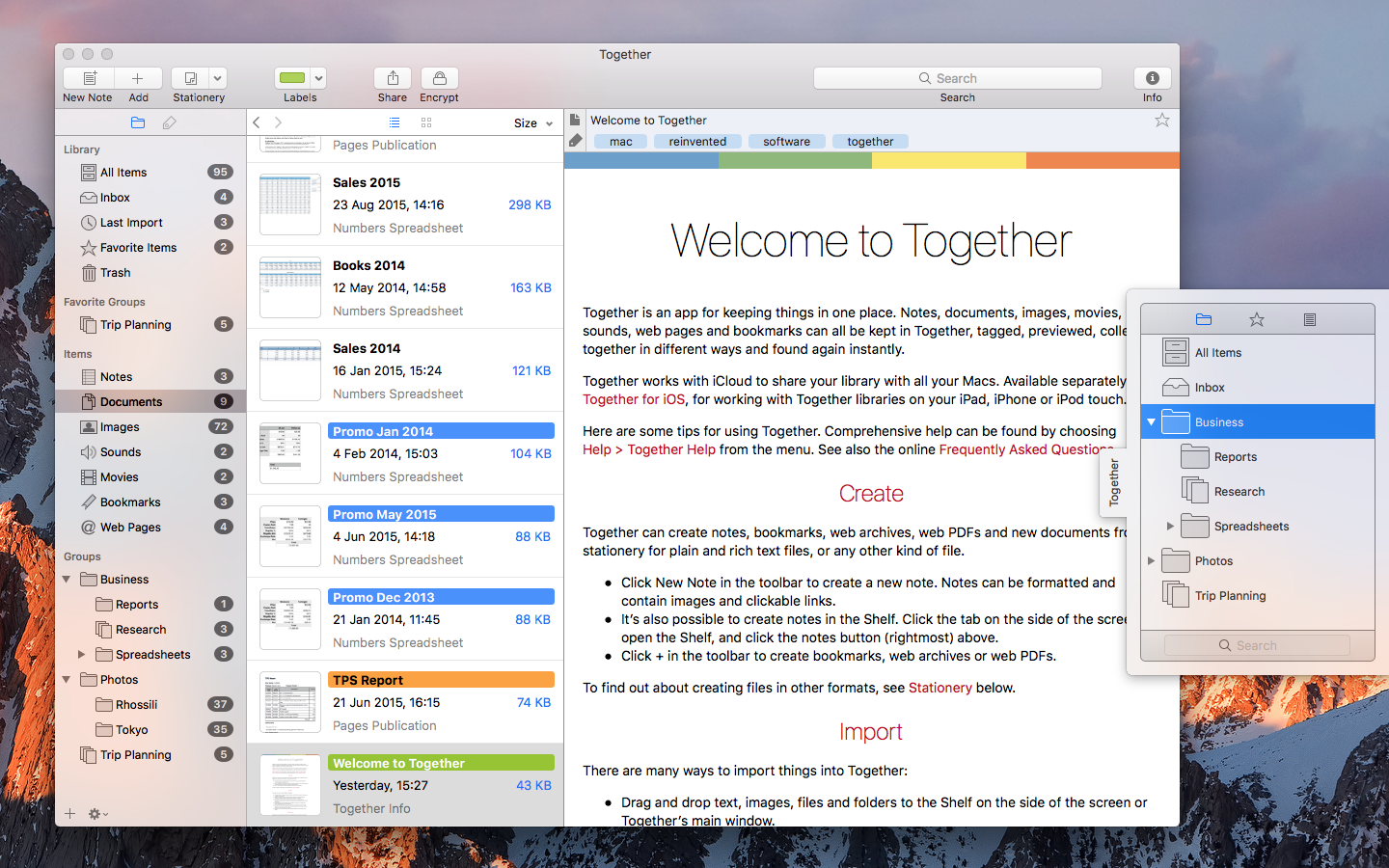
UK based Reinvented Software today announces Together 3.7 for Mac. Together is for collecting, organizing and searching all kinds of files. Just about anything can be added to Together for safe-keeping, tagged, previewed, collected together in different ways and found again instantly. With iCloud, Together libraries can be seamlessly shared with other Macs and iOS devices. Version 3.7 adds comprehensive support for the MacBook Pro Touch Bar and improves Evernote import.
Swansea, United Kingdom - Reinvented Software today is proud to announce the release of Together 3.7 for Mac, which adds comprehensive support for the MacBook Pro Touch Bar and improves Evernote import. Together is for collecting, organizing and searching all kinds of files. Just about anything can be added to Together for safe keeping, tagged, previewed, collected together in different ways and found again instantly. With iCloud, Together libraries can be seamlessly shared with other Macs and iOS devices.
The Touch Bar in the new MacBook Pro works contextually, and Together takes full advantage of that. Across the app you can use the Touch Bar to create new items, import files and search the library. In the sidebar you can switch between Groups and Tags, add groups and folders, quickly view groups such as the Inbox and untagged items. In the item list you can switch between the list and thumbnails views, change how the list is sorted and resize the thumbnails. When editing notes and text documents, you can format the text, and when viewing any item you can tag, label, rate, share, favorite, encrypt and decrypt items with Touch ID.
Together's Evernote Importer is a separate download that automates the process of moving from Evernote to Together. Evernote notes are converted to Together notes, except notes that only contain a single attachment and no text, which are saved as standalone files (e.g. an image or a PDF document), including tags, comments and dates. The new version of the Evernote Importer improves note conversion to handle things like checklists, converts web clippings to web archive files to preserve their layout, imports each notebook into a separate folder, and considerably speeds up import of large notebooks.
Pricing and Availability:
Together 3.7 for Mac costs $49.99 (USD) from Reinvented Software, is a free upgrade for all Together 3 users and requires macOS Sierra. A 15-day trial is available for download from the Reinvented Software web site. Together's Evernote Importer is a free download that works with both the version of Together for Mac from the Reinvented Software site and the Mac App Store version. Together for iPad and iPhone is also available for $9.99 (USD) from the App Store, and requires iOS 10.
Together 3.7: http://reinventedsoftware.com/together/
Purchase and Download (MAS): https://geo.itunes.apple.com/app/together-3/id641534696
Download Demo: http://reinventedsoftware.com/together/downloads/Together.dmg
Screenshot: http://reinventedsoftware.com/together/promo/Together_Mac.png
iOS App: http://reinventedsoftware.com/together/ios/
Evernote Importer (zip): http://reinventedsoftware.com/together/downloads/EvernoteImporter.zip
Reinvented Software was founded in August 2004 by long-time Mac developer Steve Harris who, having wasted 10 years working for other people, decided to dedicate his life to making the best software in the world - software for the Mac. Copyright (C) 2004-2016 Reinvented Software. All Rights Reserved. Apple, iPad, iPhone, iCloud and Mac are trademarks of Apple Inc., registered in the U.S. and other countries. iCloud and App Store is a service mark of Apple Inc. Evernote is a trademark of Evernote Corporation.
*******
Link To Article: http://prmac.com/release-id-80743.htm
*******
---------------------------------------------------------------------------------
Note that you can alter delivered distributions at any time.
Login to your account on prMac to alter your channel selection, or to opt-out at any time.
Together 3.7 adds Touch Bar and improves Evernote import - Published on 12/06/16
UK based Reinvented Software today announces Together 3.7 for Mac. Together is for collecting, organizing and searching all kinds of files. Just about anything can be added to Together for safe-keeping, tagged, previewed, collected together in different ways and found again instantly. With iCloud, Together libraries can be seamlessly shared with other Macs and iOS devices. Version 3.7 adds comprehensive support for the MacBook Pro Touch Bar and improves Evernote import.
Swansea, United Kingdom - Reinvented Software today is proud to announce the release of Together 3.7 for Mac, which adds comprehensive support for the MacBook Pro Touch Bar and improves Evernote import. Together is for collecting, organizing and searching all kinds of files. Just about anything can be added to Together for safe keeping, tagged, previewed, collected together in different ways and found again instantly. With iCloud, Together libraries can be seamlessly shared with other Macs and iOS devices.
The Touch Bar in the new MacBook Pro works contextually, and Together takes full advantage of that. Across the app you can use the Touch Bar to create new items, import files and search the library. In the sidebar you can switch between Groups and Tags, add groups and folders, quickly view groups such as the Inbox and untagged items. In the item list you can switch between the list and thumbnails views, change how the list is sorted and resize the thumbnails. When editing notes and text documents, you can format the text, and when viewing any item you can tag, label, rate, share, favorite, encrypt and decrypt items with Touch ID.
Together's Evernote Importer is a separate download that automates the process of moving from Evernote to Together. Evernote notes are converted to Together notes, except notes that only contain a single attachment and no text, which are saved as standalone files (e.g. an image or a PDF document), including tags, comments and dates. The new version of the Evernote Importer improves note conversion to handle things like checklists, converts web clippings to web archive files to preserve their layout, imports each notebook into a separate folder, and considerably speeds up import of large notebooks.
Pricing and Availability:
Together 3.7 for Mac costs $49.99 (USD) from Reinvented Software, is a free upgrade for all Together 3 users and requires macOS Sierra. A 15-day trial is available for download from the Reinvented Software web site. Together's Evernote Importer is a free download that works with both the version of Together for Mac from the Reinvented Software site and the Mac App Store version. Together for iPad and iPhone is also available for $9.99 (USD) from the App Store, and requires iOS 10.
Together 3.7: http://reinventedsoftware.com/together/
Purchase and Download (MAS): https://geo.itunes.apple.com/app/together-3/id641534696
Download Demo: http://reinventedsoftware.com/together/downloads/Together.dmg
Screenshot: http://reinventedsoftware.com/together/promo/Together_Mac.png
iOS App: http://reinventedsoftware.com/together/ios/
Evernote Importer (zip): http://reinventedsoftware.com/together/downloads/EvernoteImporter.zip
Reinvented Software was founded in August 2004 by long-time Mac developer Steve Harris who, having wasted 10 years working for other people, decided to dedicate his life to making the best software in the world - software for the Mac. Copyright (C) 2004-2016 Reinvented Software. All Rights Reserved. Apple, iPad, iPhone, iCloud and Mac are trademarks of Apple Inc., registered in the U.S. and other countries. iCloud and App Store is a service mark of Apple Inc. Evernote is a trademark of Evernote Corporation.
*******
Link To Article: http://prmac.com/release-id-80743.htm
*******
---------------------------------------------------------------------------------
Note that you can alter delivered distributions at any time.
Login to your account on prMac to alter your channel selection, or to opt-out at any time.
KeyCue 8.3 improves integration with PopChar X and Typinator
A new article has been published at prMac.
KeyCue 8.3 improves integration with PopChar X and Typinator - Published on 12/06/16
Ergonis Software today releases KeyCue 8.2, a important update to its highly acclaimed keyboard shortcut cheat sheet. KeyCue displays an instant overview of the currently available keyboard shortcuts; application-specific menu shortcuts as well as system-wide hotkeys and user-defined shortcut descriptions. Version 8.3 improves PopChar X and Typinator integration, includes some stability improvements, fixes user-reported issues, and improves compatibility with FileMaker Pro 14 and 15.
Perg, Austria - Ergonis Software today releases KeyCue 8.3, a new version of the company's highly acclaimed keyboard shortcut cheat sheet. KeyCue 8 offers a new way to define a wide variety of triggers, which can be used to perform different actions, taking KeyCue to a whole new level. Based on this technique, recent versions of KeyCue introduced integration with Ergonis' other productivity boosters, PopChar X and Typinator. PopChar customers can use KeyCue to show and insert recently used and favorite characters; Typinator users can show and insert snippets with KeyCue's head-up display.
KeyCue 8.3 improves PopChar X and Typinator integration, includes some stability improvements, fixes user-reported issues, and improves compatibility with FileMaker Pro 14 and 15. Visit Ergonis Software's website to learn more about the changes in this release and to download and try the new version.
The productivity paradox of keyboard shortcuts is that shortcuts were designed to increase productivity. However, productivity actually decreases when applications provide large numbers of shortcuts, in particular when the shortcuts are defined inconsistently across applications.
KeyCue's elegantly simple solution is to display an instant overview of currently available keyboard shortcuts - application-specific menu shortcuts as well as system-wide hotkeys and user-defined shortcut descriptions. Over time, KeyCue users will automatically remember frequently used shortcuts and start working more efficiently. KeyCue has already received many awards, including a 4.5-Mice award from MacWorld magazine.
System Requirements:
KeyCue 8.3 requires Mac OS X 10.6 or newer and is fully compatible with macOS Sierra (10.12).
Availability and Ordering:
The upgrade to KeyCue 8.3 is free for anyone who owns a license for KeyCue 8 or purchased a license for KeyCue 7 on or after March 1st 2015. Upgrade paths are available for owners of older licenses. For information about purchases, including enterprise licenses, volume discounts, and upgrade pricing offers, see the company's web site.
Ergonis Software: http://www.ergonis.com
KeyCue 8.3: http://www.ergonis.com/products/keycue
Download KeyCue: http://www.ergonis.com/downloads/keycue-install.dmg
Purchase: https://store.ergonis.com/products/keycue
Image (view and activate Typinator snippets via KeyCue): http://www.ergonis.com/press/2016/20161206/keycue-typinatorintegration.png
Media Assets: http://www.ergonis.com/press
Headquartered in Perg, Austria, Ergonis Software Gmbh is a privately held software development company founded in 2002. With a focus on innovation, Ergonis develops ergonomic and intuitive software that boosts the productivity of Mac and PC users alike. Copyright 2002-2016 Ergonis Software Gmbh. All Rights Reserved. Ergonis products are either registered trademarks or trademarks of Ergonis Software GmbH. Other company and product names may be trademarks of their respective owners.
*******
Link To Article: http://prmac.com/release-id-80744.htm
*******
---------------------------------------------------------------------------------
Note that you can alter delivered distributions at any time.
Login to your account on prMac to alter your channel selection, or to opt-out at any time.
KeyCue 8.3 improves integration with PopChar X and Typinator - Published on 12/06/16
Ergonis Software today releases KeyCue 8.2, a important update to its highly acclaimed keyboard shortcut cheat sheet. KeyCue displays an instant overview of the currently available keyboard shortcuts; application-specific menu shortcuts as well as system-wide hotkeys and user-defined shortcut descriptions. Version 8.3 improves PopChar X and Typinator integration, includes some stability improvements, fixes user-reported issues, and improves compatibility with FileMaker Pro 14 and 15.
Perg, Austria - Ergonis Software today releases KeyCue 8.3, a new version of the company's highly acclaimed keyboard shortcut cheat sheet. KeyCue 8 offers a new way to define a wide variety of triggers, which can be used to perform different actions, taking KeyCue to a whole new level. Based on this technique, recent versions of KeyCue introduced integration with Ergonis' other productivity boosters, PopChar X and Typinator. PopChar customers can use KeyCue to show and insert recently used and favorite characters; Typinator users can show and insert snippets with KeyCue's head-up display.
KeyCue 8.3 improves PopChar X and Typinator integration, includes some stability improvements, fixes user-reported issues, and improves compatibility with FileMaker Pro 14 and 15. Visit Ergonis Software's website to learn more about the changes in this release and to download and try the new version.
The productivity paradox of keyboard shortcuts is that shortcuts were designed to increase productivity. However, productivity actually decreases when applications provide large numbers of shortcuts, in particular when the shortcuts are defined inconsistently across applications.
KeyCue's elegantly simple solution is to display an instant overview of currently available keyboard shortcuts - application-specific menu shortcuts as well as system-wide hotkeys and user-defined shortcut descriptions. Over time, KeyCue users will automatically remember frequently used shortcuts and start working more efficiently. KeyCue has already received many awards, including a 4.5-Mice award from MacWorld magazine.
System Requirements:
KeyCue 8.3 requires Mac OS X 10.6 or newer and is fully compatible with macOS Sierra (10.12).
Availability and Ordering:
The upgrade to KeyCue 8.3 is free for anyone who owns a license for KeyCue 8 or purchased a license for KeyCue 7 on or after March 1st 2015. Upgrade paths are available for owners of older licenses. For information about purchases, including enterprise licenses, volume discounts, and upgrade pricing offers, see the company's web site.
Ergonis Software: http://www.ergonis.com
KeyCue 8.3: http://www.ergonis.com/products/keycue
Download KeyCue: http://www.ergonis.com/downloads/keycue-install.dmg
Purchase: https://store.ergonis.com/products/keycue
Image (view and activate Typinator snippets via KeyCue): http://www.ergonis.com/press/2016/20161206/keycue-typinatorintegration.png

Media Assets: http://www.ergonis.com/press
Headquartered in Perg, Austria, Ergonis Software Gmbh is a privately held software development company founded in 2002. With a focus on innovation, Ergonis develops ergonomic and intuitive software that boosts the productivity of Mac and PC users alike. Copyright 2002-2016 Ergonis Software Gmbh. All Rights Reserved. Ergonis products are either registered trademarks or trademarks of Ergonis Software GmbH. Other company and product names may be trademarks of their respective owners.
*******
Link To Article: http://prmac.com/release-id-80744.htm
*******
---------------------------------------------------------------------------------
Note that you can alter delivered distributions at any time.
Login to your account on prMac to alter your channel selection, or to opt-out at any time.
Bestselling Epic Fantasy, The Bow of Destiny, Available on iBooks
A new article has been published at prMac.
Bestselling Epic Fantasy, The Bow of Destiny, Available on iBooks - Published on 12/05/16
Bestselling epic fantasy novel, The Bow of Destiny, is now available at reduced price on iBooks where it can be downloaded immediately whether it's given as a holiday gift or purchased with a gift card. Don't miss out on a great read at a great price! Haunted by his past. Hunted in the present. Uncertain what is real. Athson has seen things that aren't there and suffered fits since being tragically orphaned as a child at the hands of trolls and Corgren the wizard.
Birmingham, Alabama, US - About The Bow of Destiny: Haunted by his past. Hunted in the present. Uncertain what is real. Athson has seen things that aren't there and suffered fits since being tragically orphaned as a child at the hands of trolls and Corgren the wizard. When a strange will mentioning a mysterious bow comes into his possession, he's not sure it's real. But the trolls that soon pursue him are all too real and dangerous. And what's worse, these raiders serve Corgren and his master, the hidden dragon, Magdronu, who are responsible for the destruction of his childhood home.
Athson is drawn into a quest for the concealed Bow of Hart by the mystic Withling, Hastra, but Athson isn't always sure what's real and who his enemies are. With Corgren and Magdronu involved, Athson must face not only frequent danger but his grasp on reality and the reasons behind his tragic past.
Review Excerpts for The Bow of Destiny:
"Mister Solomon has moved the ruler by which we believe indie fantasy novels should be judged. He has shown us that it is possible to write a story as great as any published by the big publishing houses" ~ Fantasia Reviews 5 Stars
"It didn't disappoint! Beautifully detailed, and well written this was a fun read! Perfect for fantasy fans, this one grabs you from the start and doesn't let up!" ~ Adventures Through Wonderland ~ 5 Stars
About the Author:
P. H. Solomon lives in the greater Birmingham, AL area where he strongly dislikes yard work and sanding the deck rail. However, he performs these duties to maintain a nice home for his loved ones as well as the family's German Shepherds. In his spare time, P. H. rides herd as a Computer Whisperer on large computers called servers (harmonica not required). Additionally, he enjoys reading, running, most sports and fantasy football. Having a degree in Anthropology, he also has a wide array of more "serious" interests in addition to working regularly to hone his writing. The Bow of Destiny is his first novel-length title with more soon to come.
Contact P. H. Solomon by email for review copies.
Current & Upcoming Titles
Book 1 of The Bow of Hart Saga: The Bow of Destiny can be found online: iBooks.
Book 2 of The Bow of Hart Saga: An Arrow against the Wind due out within a few months (Winter, 2017). It can currently be found for pre-release orders: iBooks.
Book 3 of The Bow of Hart Saga: The White Arrow is due out Fall of 2017 (links pending).
Device Requirements:
* iOS device with iBooks 1.3.1 or later and iOS 4.3.3 or later
* Mac with iBooks 1.0 or later and OS X 10.9 or later
* 381 Pages
Pricing and Availability:
The Bow of Destiny is just $0.99 USD (or an equivalent amount in other currencies) and is available worldwide exclusively through the iBookstore in the Epic category.
Author P. H. Solomon: http://phsolomon.com
The Bow of Destiny: https://itunes.apple.com/book/the-bow-of-destiny/id1013070685
5 Star Review: Fantasia Reviews: https://fantasiareviews.com/2016/09/27/fantasia-reviews-the-bow-of-destiny/
5 Star Review: Adventures Through Wonderland: https://adventuresthruwonderland.blogspot.com/search?q=The+Bow+of+Destiny
The Bow of Destiny Trailer on YouTube : https://youtu.be/U86It1UVD2s
Cover: https://phsolomon.files.wordpress.com/2016/08/bod-final2.jpg
P. H. Solomon lives in the greater Birmingham, AL area where he strongly dislikes yard work and sanding the deck rail. However, he performs these duties to maintain a nice home for his loved ones as well as the family's German Shepherds. In his spare time, P. H. rides herd as a Computer Whisperer on large computers called servers (harmonica not required). Additionally, he enjoys reading, running, most sports and fantasy football. Having a degree in Anthropology, he also has a wide array of more "serious" interests in addition to working regularly to hone his writing. The Bow of Destiny is his first novel-length title with more soon to come. All Material and Software (C) Copyright 2016 P. H. Solomon. All Rights Reserved. Apple, the Apple logo, iPhone, iPod and iPad are registered trademarks of Apple Inc. in the U.S. and/or other countries. Other trademarks and registered trademarks may be the property of their respective owners.
*******
Link To Article: http://prmac.com/release-id-80742.htm
*******
---------------------------------------------------------------------------------
Note that you can alter delivered distributions at any time.
Login to your account on prMac to alter your channel selection, or to opt-out at any time.
Bestselling Epic Fantasy, The Bow of Destiny, Available on iBooks - Published on 12/05/16
Bestselling epic fantasy novel, The Bow of Destiny, is now available at reduced price on iBooks where it can be downloaded immediately whether it's given as a holiday gift or purchased with a gift card. Don't miss out on a great read at a great price! Haunted by his past. Hunted in the present. Uncertain what is real. Athson has seen things that aren't there and suffered fits since being tragically orphaned as a child at the hands of trolls and Corgren the wizard.
Birmingham, Alabama, US - About The Bow of Destiny: Haunted by his past. Hunted in the present. Uncertain what is real. Athson has seen things that aren't there and suffered fits since being tragically orphaned as a child at the hands of trolls and Corgren the wizard. When a strange will mentioning a mysterious bow comes into his possession, he's not sure it's real. But the trolls that soon pursue him are all too real and dangerous. And what's worse, these raiders serve Corgren and his master, the hidden dragon, Magdronu, who are responsible for the destruction of his childhood home.
Athson is drawn into a quest for the concealed Bow of Hart by the mystic Withling, Hastra, but Athson isn't always sure what's real and who his enemies are. With Corgren and Magdronu involved, Athson must face not only frequent danger but his grasp on reality and the reasons behind his tragic past.
Review Excerpts for The Bow of Destiny:
"Mister Solomon has moved the ruler by which we believe indie fantasy novels should be judged. He has shown us that it is possible to write a story as great as any published by the big publishing houses" ~ Fantasia Reviews 5 Stars
"It didn't disappoint! Beautifully detailed, and well written this was a fun read! Perfect for fantasy fans, this one grabs you from the start and doesn't let up!" ~ Adventures Through Wonderland ~ 5 Stars
About the Author:
P. H. Solomon lives in the greater Birmingham, AL area where he strongly dislikes yard work and sanding the deck rail. However, he performs these duties to maintain a nice home for his loved ones as well as the family's German Shepherds. In his spare time, P. H. rides herd as a Computer Whisperer on large computers called servers (harmonica not required). Additionally, he enjoys reading, running, most sports and fantasy football. Having a degree in Anthropology, he also has a wide array of more "serious" interests in addition to working regularly to hone his writing. The Bow of Destiny is his first novel-length title with more soon to come.
Contact P. H. Solomon by email for review copies.
Current & Upcoming Titles
Book 1 of The Bow of Hart Saga: The Bow of Destiny can be found online: iBooks.
Book 2 of The Bow of Hart Saga: An Arrow against the Wind due out within a few months (Winter, 2017). It can currently be found for pre-release orders: iBooks.
Book 3 of The Bow of Hart Saga: The White Arrow is due out Fall of 2017 (links pending).
Device Requirements:
* iOS device with iBooks 1.3.1 or later and iOS 4.3.3 or later
* Mac with iBooks 1.0 or later and OS X 10.9 or later
* 381 Pages
Pricing and Availability:
The Bow of Destiny is just $0.99 USD (or an equivalent amount in other currencies) and is available worldwide exclusively through the iBookstore in the Epic category.
Author P. H. Solomon: http://phsolomon.com
The Bow of Destiny: https://itunes.apple.com/book/the-bow-of-destiny/id1013070685
5 Star Review: Fantasia Reviews: https://fantasiareviews.com/2016/09/27/fantasia-reviews-the-bow-of-destiny/
5 Star Review: Adventures Through Wonderland: https://adventuresthruwonderland.blogspot.com/search?q=The+Bow+of+Destiny
The Bow of Destiny Trailer on YouTube : https://youtu.be/U86It1UVD2s
Cover: https://phsolomon.files.wordpress.com/2016/08/bod-final2.jpg

P. H. Solomon lives in the greater Birmingham, AL area where he strongly dislikes yard work and sanding the deck rail. However, he performs these duties to maintain a nice home for his loved ones as well as the family's German Shepherds. In his spare time, P. H. rides herd as a Computer Whisperer on large computers called servers (harmonica not required). Additionally, he enjoys reading, running, most sports and fantasy football. Having a degree in Anthropology, he also has a wide array of more "serious" interests in addition to working regularly to hone his writing. The Bow of Destiny is his first novel-length title with more soon to come. All Material and Software (C) Copyright 2016 P. H. Solomon. All Rights Reserved. Apple, the Apple logo, iPhone, iPod and iPad are registered trademarks of Apple Inc. in the U.S. and/or other countries. Other trademarks and registered trademarks may be the property of their respective owners.
*******
Link To Article: http://prmac.com/release-id-80742.htm
*******
---------------------------------------------------------------------------------
Note that you can alter delivered distributions at any time.
Login to your account on prMac to alter your channel selection, or to opt-out at any time.
WoofLinks Helps Your Dogs Socialize and Have More Doggy Fun
A new article has been published at prMac.
WoofLinks Helps Your Dogs Socialize and Have More Doggy Fun - Published on 12/05/16
Dog owners would agree how our four legged companions provide us an endless pool of love and joy, asking very little from us in return. Now WoofLinks, a pet loving app by Motomo, provides dog owners a chance to maximize their pets' happiness and health, along with their own, by letting them track and record walks, interact with other dogs, create a dog network and organize play dates for their beloved mutt with only a few taps on their iPhone.
Perth, Western Australia - The WoofLinks app is a socializing app for pets, where dog owners can find friendly canine pals in the vicinity that their dogs can socialize and play with. Users simply need to turn on the woof-radar, WoofDar, to identify dogs in the vicinity, very helpfully categorized according to their size. Thus, pet owners know exactly where to take their playful puppy and where to avoid going by knowing in advance where to find mates their dog's size.
Apart from optimizing walks, WoofLinks offers a health tracker for owners as well by keeping a record of all the walks users enjoy with their furry friends. Users can keep an online track of all the miles clocked while enjoying the company of their most selfless friend on WoofLinks - ensuring physical as well as mental well being because spending time with pets not only provides physical exercises but relaxes the mind as well. Also, users may use WoofDar to find play dates for their dogs as they walk and woof link friendly dogs to build their pet's social network - because social dogs are healthy dogs!
WooflLinks is a perfect social app for pets - it also includes a chat option, aptly called Woofs, where pet owners can talk for their dogs, arranging meet ups, events and beach picnics or day outs on their dogs 'WoofLinks' network.
The app is easy to use and allows owners to create multiple profiles for each dog they own as each pet is different and has different exercise needs and social preferences.
"WoofLinks is a dog loving app created to bring together the dog lovers of this world to keep our dogs healthy, happy and social, collectively. The app focuses on physical, social and mental well being of both pets and owners. Very soon, the app will come up with daycare features, taking care of the biggest worry of dog owners - providing loving care to their canine companion in their absence," says Kirk Mower, Chief Woof Technologist.
Device Requirements:
* iPhone, iPad, and iPod touch
* Requires iOS 8.0 or later
* 36.1 MB
Pricing and Availability:
WoofLinks 1.5 is just $0.99 USD (or an equivalent amount in other currencies) and is available worldwide exclusively through the App Store in the Lifestyle category.
WoofLinks 1.5: http://www.wooflinks.com/
Purchase and Download from iTunes: https://itunes.apple.com/app/wooflinks/id1139539889
Screenshot: http://a5.mzstatic.com/us/r30/Purple22/v4/3a/1b/2f/3a1b2ff4-e187-49a4-cd92-5da3afc88947/screen696x696.jpeg
App Icon: http://is3.mzstatic.com/image/thumb/Purple71/v4/f9/72/85/f9728517-353a-e567-899b-02ddb4f90312/source/175x175bb.jpg
Motomo Pty Ltd, operates the WoofLinks mobile application. All Material and Software (C) Copyright 2016 Motomo Pty Ltd. All Rights Reserved. Apple, the Apple logo, iPhone, iPod and iPad are registered trademarks of Apple Inc. in the U.S. and/or other countries. Other trademarks and registered trademarks may be the property of their respective owners.
*******
Link To Article: http://prmac.com/release-id-80741.htm
*******
---------------------------------------------------------------------------------
Note that you can alter delivered distributions at any time.
Login to your account on prMac to alter your channel selection, or to opt-out at any time.
WoofLinks Helps Your Dogs Socialize and Have More Doggy Fun - Published on 12/05/16
Dog owners would agree how our four legged companions provide us an endless pool of love and joy, asking very little from us in return. Now WoofLinks, a pet loving app by Motomo, provides dog owners a chance to maximize their pets' happiness and health, along with their own, by letting them track and record walks, interact with other dogs, create a dog network and organize play dates for their beloved mutt with only a few taps on their iPhone.
Perth, Western Australia - The WoofLinks app is a socializing app for pets, where dog owners can find friendly canine pals in the vicinity that their dogs can socialize and play with. Users simply need to turn on the woof-radar, WoofDar, to identify dogs in the vicinity, very helpfully categorized according to their size. Thus, pet owners know exactly where to take their playful puppy and where to avoid going by knowing in advance where to find mates their dog's size.
Apart from optimizing walks, WoofLinks offers a health tracker for owners as well by keeping a record of all the walks users enjoy with their furry friends. Users can keep an online track of all the miles clocked while enjoying the company of their most selfless friend on WoofLinks - ensuring physical as well as mental well being because spending time with pets not only provides physical exercises but relaxes the mind as well. Also, users may use WoofDar to find play dates for their dogs as they walk and woof link friendly dogs to build their pet's social network - because social dogs are healthy dogs!
WooflLinks is a perfect social app for pets - it also includes a chat option, aptly called Woofs, where pet owners can talk for their dogs, arranging meet ups, events and beach picnics or day outs on their dogs 'WoofLinks' network.
The app is easy to use and allows owners to create multiple profiles for each dog they own as each pet is different and has different exercise needs and social preferences.
"WoofLinks is a dog loving app created to bring together the dog lovers of this world to keep our dogs healthy, happy and social, collectively. The app focuses on physical, social and mental well being of both pets and owners. Very soon, the app will come up with daycare features, taking care of the biggest worry of dog owners - providing loving care to their canine companion in their absence," says Kirk Mower, Chief Woof Technologist.
Device Requirements:
* iPhone, iPad, and iPod touch
* Requires iOS 8.0 or later
* 36.1 MB
Pricing and Availability:
WoofLinks 1.5 is just $0.99 USD (or an equivalent amount in other currencies) and is available worldwide exclusively through the App Store in the Lifestyle category.
WoofLinks 1.5: http://www.wooflinks.com/
Purchase and Download from iTunes: https://itunes.apple.com/app/wooflinks/id1139539889
Screenshot: http://a5.mzstatic.com/us/r30/Purple22/v4/3a/1b/2f/3a1b2ff4-e187-49a4-cd92-5da3afc88947/screen696x696.jpeg

App Icon: http://is3.mzstatic.com/image/thumb/Purple71/v4/f9/72/85/f9728517-353a-e567-899b-02ddb4f90312/source/175x175bb.jpg

Motomo Pty Ltd, operates the WoofLinks mobile application. All Material and Software (C) Copyright 2016 Motomo Pty Ltd. All Rights Reserved. Apple, the Apple logo, iPhone, iPod and iPad are registered trademarks of Apple Inc. in the U.S. and/or other countries. Other trademarks and registered trademarks may be the property of their respective owners.
*******
Link To Article: http://prmac.com/release-id-80741.htm
*******
---------------------------------------------------------------------------------
Note that you can alter delivered distributions at any time.
Login to your account on prMac to alter your channel selection, or to opt-out at any time.
Subscribe to:
Posts (Atom)