A new article has been published at prMac.
Units Currency Calculator + 1.0 Released for iPhone, iPad, Android - Published on 12/07/16
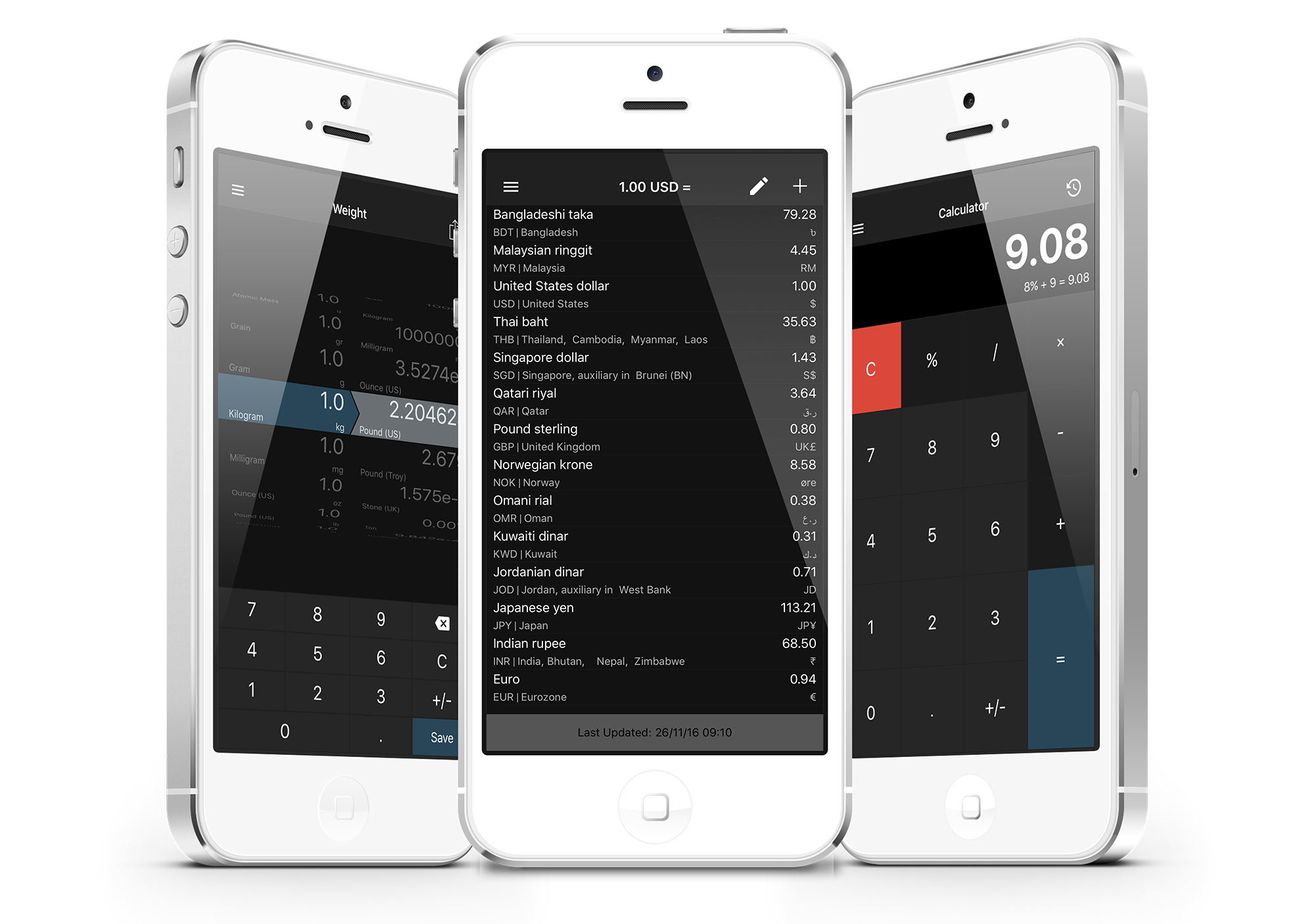
iThinkdiff today introduces Units Currency Calculator + 1.0, their new travel app for iOS and Android devices. Units Currency Calculator + was designed for anyone who need a units converter for daily use. With this easy-to-use calculator and notes writing feature, users can easily convert up to 198 units, or 170 currencies. Hourly updated currencies helps user to keep track of currency fluctuation. A calculator with history helps for quick calculations.
Melaka, Malaysia - iThinkdiff today is proud to announce the release of Units Currency Calculator + application for iPhone, iPad and Android devices. Units Currency Calculator + was designed for anyone who need a units converter for daily use. With this easy-to-use calculator and notes writing feature, users can easily convert up to 198 units, or 170 currencies. Hourly updated currencies helps user to keep track of currency fluctuation. A calculator with history helps for quick calculations. The short notes writing feature helps to keep important related notes in one place.
Key Features
* It can convert 15 categories of 198 units
* It has over 170 currencies and it updated every hour
* it has a simple calculator and each calculation saved as a history
* A short note program integrated to keep currency or units related notes together
Mahmud Ahsan, iThinkdiff's Lead Software Engineer, said, "This app has intuitive interface which helps user to quickly convert any unit, see currency fluctuation, do a quick calculation and keep notes all together. It is a must have traveller tool to quickly access different units and currencies."
Device Requirements:
* iPhone, iPad, and Android
* Optimized for iPhone 5, iPhone 6/6 Plus, iPhone 7/7 Plus, Android Devices
* Requires iOS 9.0 or later and Android 4.1 or later
* 44.1 MB in iOS
* 5.36 MB in Android
Pricing and Availability:
Units Currency Calculator + 1.0 is Free and available worldwide through the App Store in the Travel category. There is also an Android version available on Google Play.
Units Currency Calculator + 1.0: http://ithinkdiff.net/other/units-converter/
Download from iTunes: https://itunes.apple.com/app/units-currency-calculator-+/id1178870090
Download from Google Play: https://play.google.com/store/apps/details?id=net.ithinkdiff.unitsconverter
Screenshot: http://2a2cc343f5995d2fb948-5cc402153e846059e29478934321d3c6.r70.cf1.rackcdn.com/2016/11/units_converter.png
App Icon: http://lh3.googleusercontent.com/VfMrfpCTeJQDdmKJBDEagCBnZgUaoWit5VASIwu3Y67ze7AqjEtZOhGdPdjXLqk3lg=w300
Founded in 2010 by programmer Mahmud Ahsan, iThinkdiff is a leading creator of educational and entertainment apps for iPhones, iPads, and Android devices. With over 10 million total downloads, thousands of five-star reviews, and 15 million monthly ad impressions, iThinkdiff games and translation apps are frequently featured on the Apple iTunes homepage. Copyright (C) 2010-2016 iThinkdiff. All Rights Reserved. Apple, the Apple logo, iPhone, iPad, iPad mini, iPod touch, and Mac are registered trademarks of Apple Inc. in the U.S. and/or other countries. Other trademarks and registered trademarks may be the property of their respective owners.
*******
Link To Article: http://prmac.com/release-id-80751.htm
*******
---------------------------------------------------------------------------------
Note that you can alter delivered distributions at any time.
Login to your account on prMac to alter your channel selection, or to opt-out at any time.

Jasper's Rocket - a fun cat piloted, physics based rocket game launches
A new article has been published at prMac.
Jasper's Rocket - a fun cat piloted, physics based rocket game launches - Published on 12/07/16
Riada launches Jasper's Rocket 1.0 for iOS and tvOS, a physics based game that's a little bit silly, very beautiful, and a whole lot of fun. Jasper the cat flies (or attempts to fly) a rocket. Marooned on a moon where the currency is bananas, Jasper's rocket wasn't designed for paws and is horribly fuel inefficient. Luckily, a chain of service stations operated by monkeys accepts bananas for fuel. But just how far can Jasper get on such an alien moon, while avoiding prowling flying saucers?
Melbourne, Australia - Riada is excited to launch the beautiful Jasper's Rocket, a new game for iOS and tvOS featuring Jasper the cat.
This cat's got problems.
Marooned on a moon where the currency is bananas, Jasper's rocket wasn't designed for paws and is horribly fuel inefficient. Luckily, a chain of service stations operated by monkeys accepts bananas for fuel. But just how far can Jasper get on such an alien moon orbiting a gas giant in a remote binary system, while avoiding prowling flying saucers?
Features:
* Procedurally generated terrain
* 120 progressively challenging goals
* Fluid, physics based flying in either direction
* Dreamy zen gameplay, visuals and original sound track
* Dynamic lighting from multiple suns, a gas giant and shooting stars
* Game Center integration with high score and best distance leaderboards
* Ever changing weather conditions including thunderstorms, snow and rainbows
* Beautiful nighttime flying with twinkling stars and glowing, gently swaying alien plants
* Includes one plucky black cat, monkeys, flying saucers and timid droids in need of a lift
Jasper's Rocket is exclusive to iOS and tvOS, and is a Universal Purchase. Written entirely in Swift with SpriteKit, Jasper's Rocket takes advantage of Game Center, and iCloud for sharing level state across devices. On Apple TV Jasper's Rocket makes full use of game controllers while also feeling natural and intuitive with the Siri Remote (unless you have paws). The iOS version has a gorgeous sticker pack included.
Device Requirements:
* Apple TV, iPhone, iPad, and iPod touch
* Requires iOS 9.0 or later, or tvOS 9.0 or later
* Siri Remote or game controller on Apple TV
Pricing and Availability:
Jasper's Rocket 1.0 is $1.99 (USD) available worldwide exclusively through the App Store in the Games category.
Jasper's Rocket 1.0: http://riada.com/jasper
Purchase and Download: https://itunes.apple.com/app/jaspers-rocket/id1061782658
YouTube Video (Trailer): https://youtu.be/6ZZzcLQ2bG8
Media Assets: http://riada.com/products/jaspers-rocket/jaspers-rocket-press-kit
Founded in 1995, Riada embraces a philosophy that software should be excellent, fun and easy to use. This commitment has ensured Riada products have been used on some of the most recognizable sites on the net. All Material and Software (C) Copyright 2016 Riada International Pty. Ltd. All Rights Reserved. Apple, the Apple logo, Apple TV, iPhone, iPod and iPad are registered trademarks of Apple Inc. in the U.S. and/or other countries. Other trademarks and registered trademarks may be the property of their respective owners.
*******
Link To Article: http://prmac.com/release-id-80750.htm
*******
---------------------------------------------------------------------------------
Note that you can alter delivered distributions at any time.
Login to your account on prMac to alter your channel selection, or to opt-out at any time.
Jasper's Rocket - a fun cat piloted, physics based rocket game launches - Published on 12/07/16
Riada launches Jasper's Rocket 1.0 for iOS and tvOS, a physics based game that's a little bit silly, very beautiful, and a whole lot of fun. Jasper the cat flies (or attempts to fly) a rocket. Marooned on a moon where the currency is bananas, Jasper's rocket wasn't designed for paws and is horribly fuel inefficient. Luckily, a chain of service stations operated by monkeys accepts bananas for fuel. But just how far can Jasper get on such an alien moon, while avoiding prowling flying saucers?
Melbourne, Australia - Riada is excited to launch the beautiful Jasper's Rocket, a new game for iOS and tvOS featuring Jasper the cat.
This cat's got problems.
Marooned on a moon where the currency is bananas, Jasper's rocket wasn't designed for paws and is horribly fuel inefficient. Luckily, a chain of service stations operated by monkeys accepts bananas for fuel. But just how far can Jasper get on such an alien moon orbiting a gas giant in a remote binary system, while avoiding prowling flying saucers?
Features:
* Procedurally generated terrain
* 120 progressively challenging goals
* Fluid, physics based flying in either direction
* Dreamy zen gameplay, visuals and original sound track
* Dynamic lighting from multiple suns, a gas giant and shooting stars
* Game Center integration with high score and best distance leaderboards
* Ever changing weather conditions including thunderstorms, snow and rainbows
* Beautiful nighttime flying with twinkling stars and glowing, gently swaying alien plants
* Includes one plucky black cat, monkeys, flying saucers and timid droids in need of a lift
Jasper's Rocket is exclusive to iOS and tvOS, and is a Universal Purchase. Written entirely in Swift with SpriteKit, Jasper's Rocket takes advantage of Game Center, and iCloud for sharing level state across devices. On Apple TV Jasper's Rocket makes full use of game controllers while also feeling natural and intuitive with the Siri Remote (unless you have paws). The iOS version has a gorgeous sticker pack included.
Device Requirements:
* Apple TV, iPhone, iPad, and iPod touch
* Requires iOS 9.0 or later, or tvOS 9.0 or later
* Siri Remote or game controller on Apple TV
Pricing and Availability:
Jasper's Rocket 1.0 is $1.99 (USD) available worldwide exclusively through the App Store in the Games category.
Jasper's Rocket 1.0: http://riada.com/jasper
Purchase and Download: https://itunes.apple.com/app/jaspers-rocket/id1061782658
YouTube Video (Trailer): https://youtu.be/6ZZzcLQ2bG8
Media Assets: http://riada.com/products/jaspers-rocket/jaspers-rocket-press-kit
Founded in 1995, Riada embraces a philosophy that software should be excellent, fun and easy to use. This commitment has ensured Riada products have been used on some of the most recognizable sites on the net. All Material and Software (C) Copyright 2016 Riada International Pty. Ltd. All Rights Reserved. Apple, the Apple logo, Apple TV, iPhone, iPod and iPad are registered trademarks of Apple Inc. in the U.S. and/or other countries. Other trademarks and registered trademarks may be the property of their respective owners.
*******
Link To Article: http://prmac.com/release-id-80750.htm
*******
---------------------------------------------------------------------------------
Note that you can alter delivered distributions at any time.
Login to your account on prMac to alter your channel selection, or to opt-out at any time.
Landlordy app adds support for appliances and safety/maintenance records
A new article has been published at prMac.
Landlordy app adds support for appliances and safety/maintenance records - Published on 12/06/16
E-protect today announces Landlordy 1.8, an update to property management app for iOS devices. Landlordy was developed specifically for managing rental business financials on the go. New features will help landlords to comply with regulations on appliance safety for rental properties by adding support for maintaining information on appliances, keeping related maintenance records organized and providing reminders for upcoming safety checks/maintenance.
Riga, Latvia - E-protect SIA today is releasing major update (version 1.8) to Landlordy - app for managing rental business financials on the go. Landlordy is iPhone and iPad app designed for self-managing landlords, private let-to-buy investors and residential property managers managing small portfolios of single family homes, apartments or houses in multiple occupation (HMO).
Private and personal, always up-to-date in user's pocket or purse, Landlordy app:
* Tracks leases, rent payments and expenses
* Keeps track of tenant balance and payments history
* Helps to prepare and send rental invoices and payment receipts
* Provides instant financial reports
* Reminds on late payments, upiad expenses, invoices due and upcoming lease renewals
Landlordy version 1.8 brings major improvements:
* Provides support for managing information on appliances and related documents
* Lets keep track of appliance maintenance records, safety checks and repairs
* Provides reminders for upcoming next safety check/maintenance
Designed with carefully-crafted balance of simplicity and power, integrated with iPhone/iPad camera and connectivity features, Landlordy fills the gap between manual/spreadsheet based management of rental business and complex/costly web or desktop based property management solutions targeted for professional property managers. According to "Software Advice:Property Management Software BuyerView 2014" report as much as 57% prospective property management software buyers still use spreadsheets or manual methods to keep track of their rental business.
"We created app for managing rental business that is more convenient than spreadsheets and better fit for the smartphone world." says E-protect founder Jurgis Kirsakmens. "As good as Microsoft Excel or Google Docs are for managing numbers, using them on mobile devices is pain, linking data with photos (like expense receipt) is awkward and sending email or message with payment receipts to tenants is impossible. Landlordy makes it easy, provides you with instant financial reports, keeps data private and allows exporting data for sharing and analyzing with spreadsheets if it is necessary."
Device Requirements:
* iPhone, iPad, and iPod touch
* Optimized for large iPhone screens, supports split screen on iPad/iPad Pro
* Requires iOS 9.3 or later
* 33.8 MB
Pricing and Availability:
Landlordy 1.8.0 is free download and can be used for trying app features by tracking expenses on your own property and managing single property leased to tenant. By purchasing Landlordy Personal Edition - $29.99 (USA App Store), available both as paid-upfront app download or one time (without any monthly/annual subscription fees) in-app purchase within the app users can enable unlimited number of tenants/lease agreements and unlimted rental units/properties, get access to personalization, financial reports data export and backup/restore features. This version of the app is for people managing real estate as regular income. All information in Landlordy app remains private on your mobile device - no sharing with third party websites or online services.
E-protect: http://www.e-protect.lv/index-en.html
Landlordy version 1.8: http://landlordy.com
Download from iTunes: https://itunes.apple.com/app/id975031084
Media Assets: http://landlordyapp.com/contacts.html
Based in Riga, Latvia, E-protect SIA develops mobile applications for iOS and Android platforms. Another app developed by E-protect. - DrinkControl has been featured in ReadWrite, Inc. and nominated by Healthline as one of the Best Alcoholism iPhone & Android Apps of the 2014. Copyright (C) 2016 E-protect. All Rights Reserved. Apple, App Store, iPhone, iPod, and iPad are registered trademarks of Apple Inc. in the U.S. and/or other countries. Other trademarks and registered trademarks may be the property of their respective owners.
*******
Link To Article: http://prmac.com/release-id-80749.htm
*******
---------------------------------------------------------------------------------
Note that you can alter delivered distributions at any time.
Login to your account on prMac to alter your channel selection, or to opt-out at any time.
Landlordy app adds support for appliances and safety/maintenance records - Published on 12/06/16
E-protect today announces Landlordy 1.8, an update to property management app for iOS devices. Landlordy was developed specifically for managing rental business financials on the go. New features will help landlords to comply with regulations on appliance safety for rental properties by adding support for maintaining information on appliances, keeping related maintenance records organized and providing reminders for upcoming safety checks/maintenance.
Riga, Latvia - E-protect SIA today is releasing major update (version 1.8) to Landlordy - app for managing rental business financials on the go. Landlordy is iPhone and iPad app designed for self-managing landlords, private let-to-buy investors and residential property managers managing small portfolios of single family homes, apartments or houses in multiple occupation (HMO).
Private and personal, always up-to-date in user's pocket or purse, Landlordy app:
* Tracks leases, rent payments and expenses
* Keeps track of tenant balance and payments history
* Helps to prepare and send rental invoices and payment receipts
* Provides instant financial reports
* Reminds on late payments, upiad expenses, invoices due and upcoming lease renewals
Landlordy version 1.8 brings major improvements:
* Provides support for managing information on appliances and related documents
* Lets keep track of appliance maintenance records, safety checks and repairs
* Provides reminders for upcoming next safety check/maintenance
Designed with carefully-crafted balance of simplicity and power, integrated with iPhone/iPad camera and connectivity features, Landlordy fills the gap between manual/spreadsheet based management of rental business and complex/costly web or desktop based property management solutions targeted for professional property managers. According to "Software Advice:Property Management Software BuyerView 2014" report as much as 57% prospective property management software buyers still use spreadsheets or manual methods to keep track of their rental business.
"We created app for managing rental business that is more convenient than spreadsheets and better fit for the smartphone world." says E-protect founder Jurgis Kirsakmens. "As good as Microsoft Excel or Google Docs are for managing numbers, using them on mobile devices is pain, linking data with photos (like expense receipt) is awkward and sending email or message with payment receipts to tenants is impossible. Landlordy makes it easy, provides you with instant financial reports, keeps data private and allows exporting data for sharing and analyzing with spreadsheets if it is necessary."
Device Requirements:
* iPhone, iPad, and iPod touch
* Optimized for large iPhone screens, supports split screen on iPad/iPad Pro
* Requires iOS 9.3 or later
* 33.8 MB
Pricing and Availability:
Landlordy 1.8.0 is free download and can be used for trying app features by tracking expenses on your own property and managing single property leased to tenant. By purchasing Landlordy Personal Edition - $29.99 (USA App Store), available both as paid-upfront app download or one time (without any monthly/annual subscription fees) in-app purchase within the app users can enable unlimited number of tenants/lease agreements and unlimted rental units/properties, get access to personalization, financial reports data export and backup/restore features. This version of the app is for people managing real estate as regular income. All information in Landlordy app remains private on your mobile device - no sharing with third party websites or online services.
E-protect: http://www.e-protect.lv/index-en.html
Landlordy version 1.8: http://landlordy.com
Download from iTunes: https://itunes.apple.com/app/id975031084
Media Assets: http://landlordyapp.com/contacts.html
Based in Riga, Latvia, E-protect SIA develops mobile applications for iOS and Android platforms. Another app developed by E-protect. - DrinkControl has been featured in ReadWrite, Inc. and nominated by Healthline as one of the Best Alcoholism iPhone & Android Apps of the 2014. Copyright (C) 2016 E-protect. All Rights Reserved. Apple, App Store, iPhone, iPod, and iPad are registered trademarks of Apple Inc. in the U.S. and/or other countries. Other trademarks and registered trademarks may be the property of their respective owners.
*******
Link To Article: http://prmac.com/release-id-80749.htm
*******
---------------------------------------------------------------------------------
Note that you can alter delivered distributions at any time.
Login to your account on prMac to alter your channel selection, or to opt-out at any time.
Bass Drop - Techno - Sampler, Loop Station and Sound Library
A new article has been published at prMac.
Bass Drop - Techno - Sampler, Loop Station and Sound Library - Published on 12/06/16
Fresh Touch Media today introduces Bass Drop - Techno - Sampler and Sound Library 1.1 for iOS devices. Bass Drop offers a sampler packed with a huge bank of professional quality sounds, letting fans, dj's and producers, rapidly perform beats and bass lines. The techno sound library includes drums, grooves, fx and melodies, specifically designed for straightforward music creation. It's the perfect aid for newbies and professional producers wanting to quickly jam ideas or create techno music.
Leicester, United Kingdom - Techno fans and producers can now rapidly perform bass lines, percussive loops, grooves and soundscapes using Bass Drop - Techno 1.1 from Fresh Touch Media. It's the ideal techno production aid for budding and professional producers wanting to quickly jam ideas, create electronic sounds, perform live or chop sounds into their DJ sets. Speedily pick your drum loops and arrange the sample pads to create an arrangement, perform a leads, pads, bass lines and fx by tapping the pads.
The app incorporates an MPC style drum loop sampler and loop station. It includes a massive range of specially crafted samples allowing the user to create limitless arrangements and soundscapes. The intuitive user interface facilitates multi-layer sound arrangement whilst offering brisk alteration of sample sounds and quick and easy adjustment of the synthesizer.
Each sample pad provides swift adjustment and full customisation of pitch, volume and sample loop durations via the edit menu, as well as a choice of sample sounds including drum loops, percussion, grooves, bass lines, ambiences and special fx. The sound bank can be further expanded via in-app purchase.
Performers can arrange up to 24 touch triggered pads, allowing for extensive combinations of soundscapes and arrangements. Each layout can then be saved in up to 3 different banks. Versatile and easy to use, it is suitable for Dj's who want to sample into sets and play into other fx modules. Producers will value the extensive sample library for re-sampling into Ableton Live, Logic or any other DAW with a record function.
Features:
* 24 fully editable sample pads
* Hundreds of professionally produced samples
* Pitch resample all of the built in samples
* Load and save up to 3 different sound bank layouts
* Shape assigned buttons, for clear and straightforward use
* In app purchase to expand your sound library remove adverts and unlock functions
Sample Library:
* 60 drum loops, grooves, bass lines and risers
* 29 sound FX
* 24 percussion sounds
Device Requirements:
* iPhone 5/6/6 /7
* iPad 2/3/4, iPad air 1st/2nd Gen
* Requires iOS 7.0 or later
* Universal Application
* 61.9 MB
Pricing and Availability:
Bass Drop - Techno - Sampler and Sound Library 1.1 is free to download (with in-app purchases). It is a universal application available worldwide exclusively through the App Store in the Music category.
Bass Drop - Techno 1.1: http://www.freshtouchmedia.com/apps/bass-drop-techno
Download from iTunes: https://itunes.apple.com/us/app/bass-drop-techno-sampler-sound/id1078883362
YouTube Video: https://www.youtube.com/watch?v=IC-E1_i2eiM
YouTube Video (Tutorial) : https://www.youtube.com/watch?v=uMAGjTUdbts
Screenshot: https://s4.postimg.org/41dzjsnjx/IMG_0671.jpg
App Icon: https://s16.postimg.org/4md55jb51/Techno_Largeicon_1024.png
Fresh Touch Media is an app development, graphic and sound design team founded in 2011. Our aim is to create innovative and fun apps bringing life and creativity to music production and video games. We also host a massive sound library for TV series, films and movies. All Material and Software (C) Copyright 2015 Fresh Touch Media. All Rights Reserved. Apple, the Apple logo, iPhone, iPod and iPad are registered trademarks of Apple Inc. in the U.S. and/or other countries. Other trademarks and registered trademarks may be the property of their respective owners.
*******
Link To Article: http://prmac.com/release-id-80748.htm
*******
---------------------------------------------------------------------------------
Note that you can alter delivered distributions at any time.
Login to your account on prMac to alter your channel selection, or to opt-out at any time.
Bass Drop - Techno - Sampler, Loop Station and Sound Library - Published on 12/06/16
Fresh Touch Media today introduces Bass Drop - Techno - Sampler and Sound Library 1.1 for iOS devices. Bass Drop offers a sampler packed with a huge bank of professional quality sounds, letting fans, dj's and producers, rapidly perform beats and bass lines. The techno sound library includes drums, grooves, fx and melodies, specifically designed for straightforward music creation. It's the perfect aid for newbies and professional producers wanting to quickly jam ideas or create techno music.
Leicester, United Kingdom - Techno fans and producers can now rapidly perform bass lines, percussive loops, grooves and soundscapes using Bass Drop - Techno 1.1 from Fresh Touch Media. It's the ideal techno production aid for budding and professional producers wanting to quickly jam ideas, create electronic sounds, perform live or chop sounds into their DJ sets. Speedily pick your drum loops and arrange the sample pads to create an arrangement, perform a leads, pads, bass lines and fx by tapping the pads.
The app incorporates an MPC style drum loop sampler and loop station. It includes a massive range of specially crafted samples allowing the user to create limitless arrangements and soundscapes. The intuitive user interface facilitates multi-layer sound arrangement whilst offering brisk alteration of sample sounds and quick and easy adjustment of the synthesizer.
Each sample pad provides swift adjustment and full customisation of pitch, volume and sample loop durations via the edit menu, as well as a choice of sample sounds including drum loops, percussion, grooves, bass lines, ambiences and special fx. The sound bank can be further expanded via in-app purchase.
Performers can arrange up to 24 touch triggered pads, allowing for extensive combinations of soundscapes and arrangements. Each layout can then be saved in up to 3 different banks. Versatile and easy to use, it is suitable for Dj's who want to sample into sets and play into other fx modules. Producers will value the extensive sample library for re-sampling into Ableton Live, Logic or any other DAW with a record function.
Features:
* 24 fully editable sample pads
* Hundreds of professionally produced samples
* Pitch resample all of the built in samples
* Load and save up to 3 different sound bank layouts
* Shape assigned buttons, for clear and straightforward use
* In app purchase to expand your sound library remove adverts and unlock functions
Sample Library:
* 60 drum loops, grooves, bass lines and risers
* 29 sound FX
* 24 percussion sounds
Device Requirements:
* iPhone 5/6/6 /7
* iPad 2/3/4, iPad air 1st/2nd Gen
* Requires iOS 7.0 or later
* Universal Application
* 61.9 MB
Pricing and Availability:
Bass Drop - Techno - Sampler and Sound Library 1.1 is free to download (with in-app purchases). It is a universal application available worldwide exclusively through the App Store in the Music category.
Bass Drop - Techno 1.1: http://www.freshtouchmedia.com/apps/bass-drop-techno
Download from iTunes: https://itunes.apple.com/us/app/bass-drop-techno-sampler-sound/id1078883362
YouTube Video: https://www.youtube.com/watch?v=IC-E1_i2eiM
YouTube Video (Tutorial) : https://www.youtube.com/watch?v=uMAGjTUdbts
Screenshot: https://s4.postimg.org/41dzjsnjx/IMG_0671.jpg

App Icon: https://s16.postimg.org/4md55jb51/Techno_Largeicon_1024.png

Fresh Touch Media is an app development, graphic and sound design team founded in 2011. Our aim is to create innovative and fun apps bringing life and creativity to music production and video games. We also host a massive sound library for TV series, films and movies. All Material and Software (C) Copyright 2015 Fresh Touch Media. All Rights Reserved. Apple, the Apple logo, iPhone, iPod and iPad are registered trademarks of Apple Inc. in the U.S. and/or other countries. Other trademarks and registered trademarks may be the property of their respective owners.
*******
Link To Article: http://prmac.com/release-id-80748.htm
*******
---------------------------------------------------------------------------------
Note that you can alter delivered distributions at any time.
Login to your account on prMac to alter your channel selection, or to opt-out at any time.
Green - Budget Forecasting now available on iPad
A new article has been published at prMac.
Green - Budget Forecasting now available on iPad - Published on 12/06/16
CoopToons today announces Green - Budget Forecasting 1.5, an update to their personal budgeting app developed exclusively for iOS devices. Green lets you keep track of when your lowest balance will occur and how low it will be. Green will forecast your balance changes for the next year showing how much of it you can spend safely. Avoid late fees and over-draft fees. Spend safely with Green! Now available on iPad, version 1.5 includes minor bug fixes and offers an updated UI.
Indianapolis, Indiana - CoopToons today is proud to announce the release of Green - Budget Forecasting 1.5, an update to their personal budgeting app developed exclusively for iOS devices. Green aims to be a "financial fortune teller" to make sure you "spend safe" by showing when you will exceed your bottom line, now or a year from now. The app is geared toward those who want to be financially secure but hate all the work that goes into setting up a budget and sticking to budget categories like Food, Household and Utilities. After quickly entering in your recurring expense and income the app will project changes in your balance during the next year. This will eliminate "budget guessing."
How Green Works:
* Enter your current account balance
* Enter your recurring income and expenses (Weekly, Monthly, Bi-Weekly, etc.)
* Green will show you your balance changes over the next year
* Green will show you how spending today will affect your future balance
* Experiment by adding, removing or adjusting a recurring transaction to see how it will affect your future balance
* Spend safe by knowing your future balance
Easy to Use:
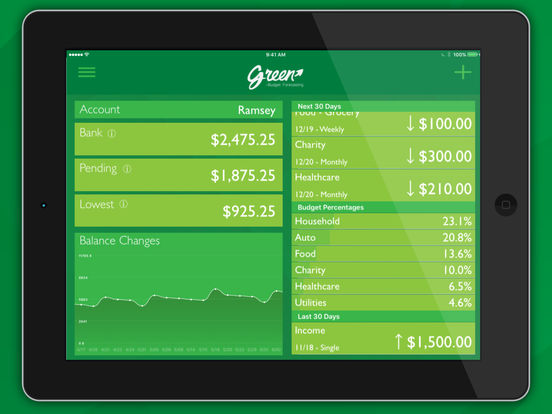
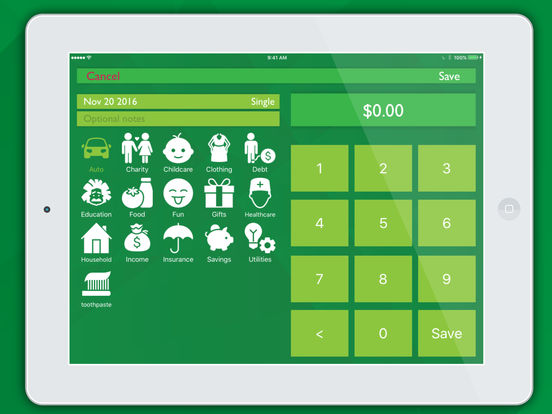
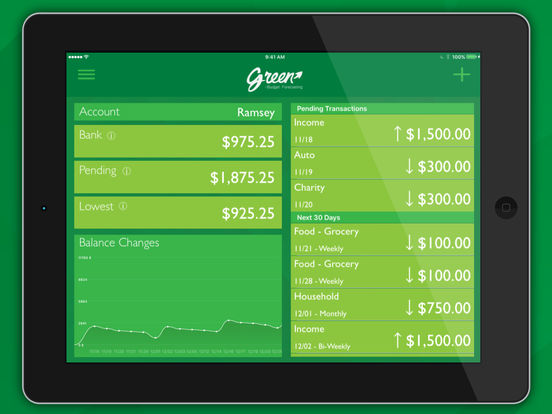
Green - Budget Forecasting allows you to track individual day-to-day expenses in addition to your recurring budget. For day-to-day expenses simply press the "+" button to enter the transaction entry view, enter the amount, select the category and press save. This new transaction will now be in the "Pending" section of your financial feed. When the transaction clears your bank swipe left on the transaction to reveal the "Cleared" option. Press the "Cleared" button, update amount if necessary and press "Confirm." All balances will be updated to reflect the changes.
Recurring expenses and income use the same transaction view for entry. In addition to the amount and category you can also enter a date, recurrence period and notes. Upcoming transaction will appear in "Next 30 Days" section of your financial feed and in the "Budget Elements" of the settings menu. Tapping on a transaction will take you back to the transaction detail view so that you can make change if needed. This gives you the ability to experiment with amounts allowing you to answer questions like, "How much more can I pay on that credit card to get out of debt earlier?" or "Where do I need to cut back to buy that new car?"
With Green you will know:
* Your lowest anticipated balance within the next year
* Today's predicted balance after current pending transactions
* The balance that should be sitting in your bank account right now
Green Security:
Green - Budget Forecasting doesn't require you to create a user name and password since the app doesn't download live transactions from your financial institutions. This is in an effort to maintain your security and privacy. All of the data is manually entered and maintained via Apple's built-in security. But don't think it will be hard to maintain your budget because of this; once you enter your recurring expense and income you only have to enter single transactions (Dining Out, Shopping, Etc.). For your added security you can add a 4 digit pin that will be entered (or use touch ID) to unlock the app.
Why Green?
Gary Cooper from CoopToons tried out many personal finance apps but none of them did what he needed or they were too complicated. "I was looking for a budget app that would tell me when my lowest balance would be in the next year so that I wouldn't overspend" he said. Gary found that all of the apps he tried were complicated and lack providing the information he thought was most important. "I wasn't concerned with what I had spent, I wanted to know what I could spend." Being a designer and developer, Gary thought "If I can't find it, I'll make it and hopefully others will be able to feel more secure with their finances as well."
Feature Highlights:
* Track multiple accounts
* Setup recurring transactions
* Forecast your balance up to a year
* Quickly track spending as it happens
* See the three most important balances
* Reconcile your transactions with your bank
* Add your own income and expense categories
* Visualize your income, expenses and spending trends
* Protect your sensitive data with a password code and/or touch ID
* Never provide bank or bill info for your peace of mind and security
Device Requirements:
* iPhone, iPad and iPod touch
* Requires iOS 8.0 or later
* 17.8 MB
Pricing and Availability:
Green - Budget Forecasting 1.5 is available at a price of $1.99 (USD) and available worldwide exclusively through the App Store in the Finance category. Review copies are available on request.
Green - Budget Forecasting 1.5: http://cooptoons.wixsite.com/green
Download from iTunes: https://itunes.apple.com/app/green-budget-forecasting/id1108694180
Screenshot 1: http://a5.mzstatic.com/us/r30/Purple62/v4/1a/f1/69/1af1695a-4e05-6b6a-04f9-c2d584b7e867/sc552x414.jpeg
Screenshot 2: http://a3.mzstatic.com/us/r30/Purple62/v4/70/d7/46/70d74667-64cc-abd6-3d1a-56f75b5fd03c/sc552x414.jpeg
Screenshot 3: http://a3.mzstatic.com/us/r30/Purple62/v4/76/9f/3d/769f3d49-a7ad-5fc6-01c8-9e39113c70b8/sc552x414.jpeg
App Icon: https://static.wixstatic.com/media/7c560c_28fee98c4ed64a4b94b4f272c0dc9752~mv2.png
CoopToons is an independent software company started by Gary Cooper and his kids that focuses on iOS application development. Our mission is to create apps we think are just plain fun and occasionally they may solve a problem. We hope others will find value in our creations and will follow us along this journey. All Material and Software (C) Copyright 2016 CoopToons. All Rights Reserved. Apple, the Apple logo, iPhone, iPod and iPad are registered trademarks of Apple Inc. in the U.S. and/or other countries. Other trademarks and registered trademarks may be the property of their respective owners.
*******
Link To Article: http://prmac.com/release-id-80747.htm
*******
---------------------------------------------------------------------------------
Note that you can alter delivered distributions at any time.
Login to your account on prMac to alter your channel selection, or to opt-out at any time.
Green - Budget Forecasting now available on iPad - Published on 12/06/16
CoopToons today announces Green - Budget Forecasting 1.5, an update to their personal budgeting app developed exclusively for iOS devices. Green lets you keep track of when your lowest balance will occur and how low it will be. Green will forecast your balance changes for the next year showing how much of it you can spend safely. Avoid late fees and over-draft fees. Spend safely with Green! Now available on iPad, version 1.5 includes minor bug fixes and offers an updated UI.
Indianapolis, Indiana - CoopToons today is proud to announce the release of Green - Budget Forecasting 1.5, an update to their personal budgeting app developed exclusively for iOS devices. Green aims to be a "financial fortune teller" to make sure you "spend safe" by showing when you will exceed your bottom line, now or a year from now. The app is geared toward those who want to be financially secure but hate all the work that goes into setting up a budget and sticking to budget categories like Food, Household and Utilities. After quickly entering in your recurring expense and income the app will project changes in your balance during the next year. This will eliminate "budget guessing."
How Green Works:
* Enter your current account balance
* Enter your recurring income and expenses (Weekly, Monthly, Bi-Weekly, etc.)
* Green will show you your balance changes over the next year
* Green will show you how spending today will affect your future balance
* Experiment by adding, removing or adjusting a recurring transaction to see how it will affect your future balance
* Spend safe by knowing your future balance
Easy to Use:
Green - Budget Forecasting allows you to track individual day-to-day expenses in addition to your recurring budget. For day-to-day expenses simply press the "+" button to enter the transaction entry view, enter the amount, select the category and press save. This new transaction will now be in the "Pending" section of your financial feed. When the transaction clears your bank swipe left on the transaction to reveal the "Cleared" option. Press the "Cleared" button, update amount if necessary and press "Confirm." All balances will be updated to reflect the changes.
Recurring expenses and income use the same transaction view for entry. In addition to the amount and category you can also enter a date, recurrence period and notes. Upcoming transaction will appear in "Next 30 Days" section of your financial feed and in the "Budget Elements" of the settings menu. Tapping on a transaction will take you back to the transaction detail view so that you can make change if needed. This gives you the ability to experiment with amounts allowing you to answer questions like, "How much more can I pay on that credit card to get out of debt earlier?" or "Where do I need to cut back to buy that new car?"
With Green you will know:
* Your lowest anticipated balance within the next year
* Today's predicted balance after current pending transactions
* The balance that should be sitting in your bank account right now
Green Security:
Green - Budget Forecasting doesn't require you to create a user name and password since the app doesn't download live transactions from your financial institutions. This is in an effort to maintain your security and privacy. All of the data is manually entered and maintained via Apple's built-in security. But don't think it will be hard to maintain your budget because of this; once you enter your recurring expense and income you only have to enter single transactions (Dining Out, Shopping, Etc.). For your added security you can add a 4 digit pin that will be entered (or use touch ID) to unlock the app.
Why Green?
Gary Cooper from CoopToons tried out many personal finance apps but none of them did what he needed or they were too complicated. "I was looking for a budget app that would tell me when my lowest balance would be in the next year so that I wouldn't overspend" he said. Gary found that all of the apps he tried were complicated and lack providing the information he thought was most important. "I wasn't concerned with what I had spent, I wanted to know what I could spend." Being a designer and developer, Gary thought "If I can't find it, I'll make it and hopefully others will be able to feel more secure with their finances as well."
Feature Highlights:
* Track multiple accounts
* Setup recurring transactions
* Forecast your balance up to a year
* Quickly track spending as it happens
* See the three most important balances
* Reconcile your transactions with your bank
* Add your own income and expense categories
* Visualize your income, expenses and spending trends
* Protect your sensitive data with a password code and/or touch ID
* Never provide bank or bill info for your peace of mind and security
Device Requirements:
* iPhone, iPad and iPod touch
* Requires iOS 8.0 or later
* 17.8 MB
Pricing and Availability:
Green - Budget Forecasting 1.5 is available at a price of $1.99 (USD) and available worldwide exclusively through the App Store in the Finance category. Review copies are available on request.
Green - Budget Forecasting 1.5: http://cooptoons.wixsite.com/green
Download from iTunes: https://itunes.apple.com/app/green-budget-forecasting/id1108694180
Screenshot 1: http://a5.mzstatic.com/us/r30/Purple62/v4/1a/f1/69/1af1695a-4e05-6b6a-04f9-c2d584b7e867/sc552x414.jpeg
Screenshot 2: http://a3.mzstatic.com/us/r30/Purple62/v4/70/d7/46/70d74667-64cc-abd6-3d1a-56f75b5fd03c/sc552x414.jpeg
Screenshot 3: http://a3.mzstatic.com/us/r30/Purple62/v4/76/9f/3d/769f3d49-a7ad-5fc6-01c8-9e39113c70b8/sc552x414.jpeg
App Icon: https://static.wixstatic.com/media/7c560c_28fee98c4ed64a4b94b4f272c0dc9752~mv2.png

CoopToons is an independent software company started by Gary Cooper and his kids that focuses on iOS application development. Our mission is to create apps we think are just plain fun and occasionally they may solve a problem. We hope others will find value in our creations and will follow us along this journey. All Material and Software (C) Copyright 2016 CoopToons. All Rights Reserved. Apple, the Apple logo, iPhone, iPod and iPad are registered trademarks of Apple Inc. in the U.S. and/or other countries. Other trademarks and registered trademarks may be the property of their respective owners.
*******
Link To Article: http://prmac.com/release-id-80747.htm
*******
---------------------------------------------------------------------------------
Note that you can alter delivered distributions at any time.
Login to your account on prMac to alter your channel selection, or to opt-out at any time.
Weather Gods Redefines the Weather App
A new article has been published at prMac.
Weather Gods Redefines the Weather App - Published on 12/06/16
Meyume Ltd announces their new premium Weather app as an iOS10 exclusive called the Weather Gods 1.0 for iOS devices. The Weather Gods looks to redefine the weather app by getting rid of weather icons, and using data visualisations and animated procedural graphics instead of icons, enabling users to literally see the weather. Weather Gods provides rich weather data, including detailed text summaries, 24 hour charts, hourly 7 day forecasts, moon phase, notifications, and more.
London, United Kingdom - Using animated Gods to represent the elements: Fire, Ice, Water, Air & Moon, Weather Gods 1.0.2 for iPhone, iPad, and iPod touch devices provides lots of rich weather data, including detailed text summaries, 24 hour charts, hourly 7 day forecasts, moon phase, notifications, etc. But the star of the show is the weather wheel, an innovative seven day hourly weather view that enables users to spin through forecast time.
Says the app's designer James Engwell about the wheel: "We wanted to make the forecast quick, simple and beautiful. The app store if full of weather apps, but they are all icon based. Decoding icons takes mental energy, you have to unconsciously process what you are seeing in order to create meaning. With the weather wheel, you literally see the weather for each hour, so you see the rain, see the sun plus the level of cloud cover and so on. Its much more intuitive as there is much less for the brain to process. Add to that taptic feedback and sounds, and I think we've created a weather experience unlike anything before"
The Weather Gods also includes nearly one hundred weather sounds which are triggered depending on the conditions being viewed. While this feature in combination with the animated backgrounds makes for a fun experience, it has proved a boon for accessibility, as the app's technical director Scott Wilson-Billing explains; "We wanted to build deep accessibility into the Weather Gods from the ground up, so we recruited a number of blind and low-vision beta testers to help us. We were astonished by their overwhelmingly positive reaction to the weather soundscape feature, and we are really inspired to continue to innovate in this area."
The app also includes a set of smart notifications which have been designed to be simple enough for users to actually want to use, rather than the somewhat complex or confusing notification setups in other apps. Also, as you would expect with a modern premium app, the Weather Gods has a clear homepage widget, 3D touch menus, and taptic engine support.
Features:
* Day & Night summary for 7 Days with animated real-time weather backgrounds
* 7 Day HOURLY Forecast via the amazing 'Weather Wheel'
* Advanced user-friendly weather notifications
* Weather based procedural soundscape
* Detailed 24 hour charts & hourly charting
* Moon phase, rise and fall
* Observational (past) data
* Off-line mode for explorers & professionals
* World clock & international support
* Powerful accessibility support
* Dashboard Widget
* 3D Touch Menu
* Taptic Engine support
* Combining the best global weather data sources available
* Over 1 million weather-accurate locations
* Complimentary 32 x sticker pack
Device Requirements:
* iPhone, iPad, and iPod touch
* iOS 10.0 or later
* Universal Application
* 244 MB
Pricing and Availability:
Weather Gods 1.0.2 is $3.99 USD (or an equivalent amount in other currencies) and is available worldwide exclusively through the App Store in the Weather category.
Weather Gods 1.0.2: https://weathergodsapp.com
Purchase and Download: https://itunes.apple.com/app/weather-gods/id1041512978
Vimeo Video (Promo): https://vimeo.com/189953256
Screenshots 1: https://drive.google.com/open?id=0By8jnoEoZJFPTDdZR0paZEJheDg
Screenshot 2: https://drive.google.com/open?id=0By8jnoEoZJFPbml0UkJGajhCREk
App Icon: http://a1.mzstatic.com/us/r30/Purple71/v4/0f/bf/7b/0fbf7bde-d18a-f7bb-cda1-1084b8be6ad4/icon175x175.jpeg
Weather Gods is a new company based in the UK who specialize in creating beautiful data visualizations of weather data. All Material and Software (C) Copyright 2016 Weather Gods. All Rights Reserved. Apple, the Apple logo, iPhone, iPod and iPad are registered trademarks of Apple Inc. in the U.S. and/or other countries. Other trademarks and registered trademarks may be the property of their respective owners.
*******
Link To Article: http://prmac.com/release-id-80746.htm
*******
---------------------------------------------------------------------------------
Note that you can alter delivered distributions at any time.
Login to your account on prMac to alter your channel selection, or to opt-out at any time.
Weather Gods Redefines the Weather App - Published on 12/06/16
Meyume Ltd announces their new premium Weather app as an iOS10 exclusive called the Weather Gods 1.0 for iOS devices. The Weather Gods looks to redefine the weather app by getting rid of weather icons, and using data visualisations and animated procedural graphics instead of icons, enabling users to literally see the weather. Weather Gods provides rich weather data, including detailed text summaries, 24 hour charts, hourly 7 day forecasts, moon phase, notifications, and more.
London, United Kingdom - Using animated Gods to represent the elements: Fire, Ice, Water, Air & Moon, Weather Gods 1.0.2 for iPhone, iPad, and iPod touch devices provides lots of rich weather data, including detailed text summaries, 24 hour charts, hourly 7 day forecasts, moon phase, notifications, etc. But the star of the show is the weather wheel, an innovative seven day hourly weather view that enables users to spin through forecast time.
Says the app's designer James Engwell about the wheel: "We wanted to make the forecast quick, simple and beautiful. The app store if full of weather apps, but they are all icon based. Decoding icons takes mental energy, you have to unconsciously process what you are seeing in order to create meaning. With the weather wheel, you literally see the weather for each hour, so you see the rain, see the sun plus the level of cloud cover and so on. Its much more intuitive as there is much less for the brain to process. Add to that taptic feedback and sounds, and I think we've created a weather experience unlike anything before"
The Weather Gods also includes nearly one hundred weather sounds which are triggered depending on the conditions being viewed. While this feature in combination with the animated backgrounds makes for a fun experience, it has proved a boon for accessibility, as the app's technical director Scott Wilson-Billing explains; "We wanted to build deep accessibility into the Weather Gods from the ground up, so we recruited a number of blind and low-vision beta testers to help us. We were astonished by their overwhelmingly positive reaction to the weather soundscape feature, and we are really inspired to continue to innovate in this area."
The app also includes a set of smart notifications which have been designed to be simple enough for users to actually want to use, rather than the somewhat complex or confusing notification setups in other apps. Also, as you would expect with a modern premium app, the Weather Gods has a clear homepage widget, 3D touch menus, and taptic engine support.
Features:
* Day & Night summary for 7 Days with animated real-time weather backgrounds
* 7 Day HOURLY Forecast via the amazing 'Weather Wheel'
* Advanced user-friendly weather notifications
* Weather based procedural soundscape
* Detailed 24 hour charts & hourly charting
* Moon phase, rise and fall
* Observational (past) data
* Off-line mode for explorers & professionals
* World clock & international support
* Powerful accessibility support
* Dashboard Widget
* 3D Touch Menu
* Taptic Engine support
* Combining the best global weather data sources available
* Over 1 million weather-accurate locations
* Complimentary 32 x sticker pack
Device Requirements:
* iPhone, iPad, and iPod touch
* iOS 10.0 or later
* Universal Application
* 244 MB
Pricing and Availability:
Weather Gods 1.0.2 is $3.99 USD (or an equivalent amount in other currencies) and is available worldwide exclusively through the App Store in the Weather category.
Weather Gods 1.0.2: https://weathergodsapp.com
Purchase and Download: https://itunes.apple.com/app/weather-gods/id1041512978
Vimeo Video (Promo): https://vimeo.com/189953256
Screenshots 1: https://drive.google.com/open?id=0By8jnoEoZJFPTDdZR0paZEJheDg
Screenshot 2: https://drive.google.com/open?id=0By8jnoEoZJFPbml0UkJGajhCREk
App Icon: http://a1.mzstatic.com/us/r30/Purple71/v4/0f/bf/7b/0fbf7bde-d18a-f7bb-cda1-1084b8be6ad4/icon175x175.jpeg

Weather Gods is a new company based in the UK who specialize in creating beautiful data visualizations of weather data. All Material and Software (C) Copyright 2016 Weather Gods. All Rights Reserved. Apple, the Apple logo, iPhone, iPod and iPad are registered trademarks of Apple Inc. in the U.S. and/or other countries. Other trademarks and registered trademarks may be the property of their respective owners.
*******
Link To Article: http://prmac.com/release-id-80746.htm
*******
---------------------------------------------------------------------------------
Note that you can alter delivered distributions at any time.
Login to your account on prMac to alter your channel selection, or to opt-out at any time.
Nano Sales Manager Offers Comprehensive Customer Management for iOS
A new article has been published at prMac.
Nano Sales Manager Offers Comprehensive Customer Management for iOS - Published on 12/06/16
Kiev-based indie developer, Erziman Asaliyev today announces Nano Sales Manager 2.2, an important update to his sales management automation app for iOS devices. Nano Sales Manager helps walk sales personnel through the process of selling products and services; from the first meeting with a prospect, to the close of the deal and creating a permanent customer. The application demonstrates the importance of the sales funnel. Version 2.2 brings a fix for sorting in the "Bestseller" report.
Kyiv, Ukraine - Independent developer, Erziman Asaliyev is today proud to announce the release of Nano Sales Manager 2.2, an important update to his flexible and comprehensive sales management application for iPhone, iPad, and iPod touch devices. This useful app walks sales personnel through the process of selling products and services; from the first meeting with a prospect to the close of the deal, creating a permanent customer.
Nano Sales Manager demonstrates the efficiency of the sales funnel by helping to automate the process of selling products and services. The app offers all the necessary tools to guide a salesperson through the initial part of a sales cycle, when a new client is interested in purchasing an offered product or service, creation of a sales order, customization of the order, accepting payment, and delivering the product or service, thereby closing the sales order.
"The sales funnel is a diagram in the form of an inverted pyramid, each level of the pyramid is the percentage of the clients remaining at each stage of the sales process," says the app's developer Erziman Asaliyev. "The top level of the pyramid shows the number of clients at the initial 'contact' stage of the process, while the bottom level illustrates the percentage of the clients who have purchased your products and passed all stages. Thus, the sales funnel visually demonstrates the stages where you lose the clients. Nano Sales Manager helps users to both track and better understand the sales process."
Key Features Include:
* Keep the product catalog updated with photos
* Tracing stock on hand takes into account reserves and income estimates
* Estimation products requirements takes into account minimum and maximum provisions, and level of re-order and purchasing rate
* Cluster clients according to credit status, types of prices, types of discounts, ABC-class, and fields of activities
* Controlling the amount of the maximum credit on products for every client
* Trace both debtors and creditors
* Creation of sales orders, printing and sending invoices, and delivery notes to email
* Control the profitability of each transaction and each product
* Work better with suppliers with the help of the "Purchases" module
* Account monetary transactions in terms of invoices, transactions, and categories of incomes & expenditures
* Adjustment of taxes
* Report on sales, purchases, finances and stock
* Import and export data from most electronic tables
* Work with a local database - Continue working even without an Internet connection
Nano Sales Manager stores the complete history of negotiations with clients, and their progress through the stages of the sales and delivery cycles as they develop, in an easy to understand format. Automated by means of the app's "Projects" module, tracking includes all stages of the process, including "Introduction", "Presentation", "Commercial offer", "Contract is signed", and "Sold". All phases are illustrated via the app's convenient visual sales funnel.
What's New in Version 2.2:
* Fixed the sorting in the "Bestseller" report
Device Requirements:
* iPhone, iPad, and iPod touch
* Requires iOS 8.2 or later
* Universal Application
* 9.6 MB
Pricing and Availability:
Nano Sales Manager 2.2 is free, and is available worldwide exclusively through the App Store in the Business category. The free version allows saving up to 3 records. A convenient $2.99 USD in-app purchase is available to unlock unlimited record saving.
Erziman: http://erziman.com/en/homepage
Nano Sales Manager 2.2: http://erziman.com/en/sales-manager
Download from iTunes: https://itunes.apple.com/app/nano-sales-manager/id1128391421
Screenshot 1: http://a3.mzstatic.com/us/r30/Purple30/v4/a5/c2/a0/a5c2a006-03cf-0da7-3ede-0b189f063544/screen696x696.jpeg
Screenshot 2: http://a3.mzstatic.com/us/r30/Purple30/v4/92/8f/56/928f56da-8af9-c9db-d475-e0ca9a2a4844/screen696x696.jpeg
App Icon: http://is5.mzstatic.com/image/thumb/Purple71/v4/57/fc/9d/57fc9d99-d094-6b61-b290-d6a00db36c9c/source/175x175bb.jpg
Headquartered in Kiev, Ukraine, independent developer Erziman Asaliyev has developed numerous apps for use by iOS and Mac OS X users. His years of experience allow Erziman to develop apps for use by businesses of all types and sizes around the globe, offering apps to manage inventory and finances, track employee time, track and control services, and much more. All Material and Software (C) Copyright 2016 Erziman Asaliyev. All Rights Reserved. Apple, the Apple logo, Macintosh and Mac OS X are registered trademarks of Apple Inc. in the U.S. and/or other countries. Other trademarks and registered trademarks may be the property of their respective owners.
*******
Link To Article: http://prmac.com/release-id-80745.htm
*******
---------------------------------------------------------------------------------
Note that you can alter delivered distributions at any time.
Login to your account on prMac to alter your channel selection, or to opt-out at any time.
Nano Sales Manager Offers Comprehensive Customer Management for iOS - Published on 12/06/16
Kiev-based indie developer, Erziman Asaliyev today announces Nano Sales Manager 2.2, an important update to his sales management automation app for iOS devices. Nano Sales Manager helps walk sales personnel through the process of selling products and services; from the first meeting with a prospect, to the close of the deal and creating a permanent customer. The application demonstrates the importance of the sales funnel. Version 2.2 brings a fix for sorting in the "Bestseller" report.
Kyiv, Ukraine - Independent developer, Erziman Asaliyev is today proud to announce the release of Nano Sales Manager 2.2, an important update to his flexible and comprehensive sales management application for iPhone, iPad, and iPod touch devices. This useful app walks sales personnel through the process of selling products and services; from the first meeting with a prospect to the close of the deal, creating a permanent customer.
Nano Sales Manager demonstrates the efficiency of the sales funnel by helping to automate the process of selling products and services. The app offers all the necessary tools to guide a salesperson through the initial part of a sales cycle, when a new client is interested in purchasing an offered product or service, creation of a sales order, customization of the order, accepting payment, and delivering the product or service, thereby closing the sales order.
"The sales funnel is a diagram in the form of an inverted pyramid, each level of the pyramid is the percentage of the clients remaining at each stage of the sales process," says the app's developer Erziman Asaliyev. "The top level of the pyramid shows the number of clients at the initial 'contact' stage of the process, while the bottom level illustrates the percentage of the clients who have purchased your products and passed all stages. Thus, the sales funnel visually demonstrates the stages where you lose the clients. Nano Sales Manager helps users to both track and better understand the sales process."
Key Features Include:
* Keep the product catalog updated with photos
* Tracing stock on hand takes into account reserves and income estimates
* Estimation products requirements takes into account minimum and maximum provisions, and level of re-order and purchasing rate
* Cluster clients according to credit status, types of prices, types of discounts, ABC-class, and fields of activities
* Controlling the amount of the maximum credit on products for every client
* Trace both debtors and creditors
* Creation of sales orders, printing and sending invoices, and delivery notes to email
* Control the profitability of each transaction and each product
* Work better with suppliers with the help of the "Purchases" module
* Account monetary transactions in terms of invoices, transactions, and categories of incomes & expenditures
* Adjustment of taxes
* Report on sales, purchases, finances and stock
* Import and export data from most electronic tables
* Work with a local database - Continue working even without an Internet connection
Nano Sales Manager stores the complete history of negotiations with clients, and their progress through the stages of the sales and delivery cycles as they develop, in an easy to understand format. Automated by means of the app's "Projects" module, tracking includes all stages of the process, including "Introduction", "Presentation", "Commercial offer", "Contract is signed", and "Sold". All phases are illustrated via the app's convenient visual sales funnel.
What's New in Version 2.2:
* Fixed the sorting in the "Bestseller" report
Device Requirements:
* iPhone, iPad, and iPod touch
* Requires iOS 8.2 or later
* Universal Application
* 9.6 MB
Pricing and Availability:
Nano Sales Manager 2.2 is free, and is available worldwide exclusively through the App Store in the Business category. The free version allows saving up to 3 records. A convenient $2.99 USD in-app purchase is available to unlock unlimited record saving.
Erziman: http://erziman.com/en/homepage
Nano Sales Manager 2.2: http://erziman.com/en/sales-manager
Download from iTunes: https://itunes.apple.com/app/nano-sales-manager/id1128391421
Screenshot 1: http://a3.mzstatic.com/us/r30/Purple30/v4/a5/c2/a0/a5c2a006-03cf-0da7-3ede-0b189f063544/screen696x696.jpeg

Screenshot 2: http://a3.mzstatic.com/us/r30/Purple30/v4/92/8f/56/928f56da-8af9-c9db-d475-e0ca9a2a4844/screen696x696.jpeg

App Icon: http://is5.mzstatic.com/image/thumb/Purple71/v4/57/fc/9d/57fc9d99-d094-6b61-b290-d6a00db36c9c/source/175x175bb.jpg

Headquartered in Kiev, Ukraine, independent developer Erziman Asaliyev has developed numerous apps for use by iOS and Mac OS X users. His years of experience allow Erziman to develop apps for use by businesses of all types and sizes around the globe, offering apps to manage inventory and finances, track employee time, track and control services, and much more. All Material and Software (C) Copyright 2016 Erziman Asaliyev. All Rights Reserved. Apple, the Apple logo, Macintosh and Mac OS X are registered trademarks of Apple Inc. in the U.S. and/or other countries. Other trademarks and registered trademarks may be the property of their respective owners.
*******
Link To Article: http://prmac.com/release-id-80745.htm
*******
---------------------------------------------------------------------------------
Note that you can alter delivered distributions at any time.
Login to your account on prMac to alter your channel selection, or to opt-out at any time.
Subscribe to:
Posts (Atom)