Annual Top 50 Business Apps Edition - Submit your App! - Published on 01/10/18
IMMEDIATE RELEASE
Book today to gain exposure to iBusiness Magazine's largest Issue of the year, the Annual Top 50 B2B Solutions Edition. iBusiness Magazine is now booking for this edition which are their biggest issues of the year. Issue #41 will be featuring their Top 50 B2B Solutions Edition. We have some great packages for you to advertising in this edition. Showcase your App or Product in the Top 50 B2B Solutions List, submit your App or Product Today visit the iBusiness Magazine website.
Cape Coral, Florida - Book today to gain exposure to iBusiness Magazine's largest Issue of the year, the Annual Top 50 B2B Solutions Edition. iBusiness Magazine is now booking for this edition which are their biggest issues of the year. Issue #41 will be featuring their Top 50 B2B Solutions Edition. We have some great packages for you to advertising in this edition. Showcase your App or Product in the Top 50 B2B Solutions List, submit your App or Product Today visit the iBusiness Magazine website.
We are now accepting advertising spots and product reviews. Please contact us if your interested in being featured in this edition. Submit your App today for the Top 50 Business Apps Edition, please email us.
iBusiness will feature the Annual Top 50 B2B Solutions using Apple, Google & Microsoft devices. They are looking for advertisers whose target demographic are leaders in the Business to Business sectors. These issues is targeted for those that have the vision and power to make change happen.
We have the following Advertisement Packages available for this edition:
Front Cover Magazine - Full Exclusive Front Cover of the Magazine, Full Page Advertisement & Full Page Review - $9,500.00 - Regally Sells for $21,000.00
2 Full Page Spread Advertisement, Full Page Product Review & Product Name on Cover of the Magazine for only $6,000.00 - 1 Spots available
Premium - Full Page Advertisement - First Right Hand Side Page #1, Full Product Review, Mention on Front Cover - for only $6,000.00 - Only one Spot available for this bundle
Inside Front Cover Full Page Advertisement, Mention on Front Cover & Full Page Product Review $4,500.00 - Only 1 Spot available for this bundle
Inside Back Cover Full Page Advertisement, Mention on Front Cover & Full Page Product Review $3,000.00 - Only 1 Spot available for this bundle
Full Page Advertisement, Full Page Product Review & Product Name on Cover of the Magazine for only $5,000.00 - 2 Spots available
1/2 Page Advertisement & Full Page Product Review $2,450.00
Full Page Advertisement Only $1,850.00
1/2 Page Advertisement $950.00
With the Magazine Cover Story Exclusive you get the following - Full Exclusive Front Cover of the Magazine, Full Page Advertisement & Full Page Review, Client Success Story or Case Study. You get the whole front cover of the magazine with your product image and logo on it.This is a great opportunity to get HUGE exposure of your App, Product or Service to over 600,000 Business Professionals. If you are interested in the magazine cover opportunity for your company, please email me and I can send you the details. You get the whole front cover of the magazine with your product image and logo on it. Plus you get a Magazine Cover Story, Full Page Product Review, Premium Full Page Advertisement inside the magazine (Located first 4 Pages on the Right hand side)
We are the only B2B Magazine in the market that focuses on Apple, Google & Microsoft solutions for the business professional. We are now in our 8th year of production and growing rapidly and only Magazine in all Apple & Microsoft retail stores in front of the Business Teams. We are very interested in having you as a partner with our magazine. I was very impressed with your products and am strongly convinced that our businesses compliment each other. Our readers are who you want to target; they include but are not limited to corporate IT professionals, entrepreneurs, business people, doctors, lawyers, captains of industry and other high end clientele.
iBusiness Magazine: http://www.ibusinessmag.com
Media Kit: http://www.ibusinessmag.com/mediakit2018.pdf
The team behind iBusiness Magazine have decades of experience in the Business to Business & Education communities. We strive to cover as many vertical markets as possible, which include but are not limited to, Retail, Hospitality, ERP, CAD, Real Estate, Legal, Scientific Computing, Medical/Healthcare, Government, Automotive, Manufacturers, Accounting/Finance, Print & Graphics and Security & Surveillance. Our articles take a solutions-based approach to productivity, workflow management and tips & tricks. The magazine articles come from the industry leaders with years of experience and proven track records. Copyright (C) 2018 i.Business Magazine.
###
Carmine De Santo
Publisher
855-296-2928
United States
publisher@ibusinessmag.com
Facebook Profile: http://www.facebook.com/pages/IBusiness-Magazine/167340356618670
LinkedIn Profile: http://www.linkedin.com/groups/iBusiness-Magazine-Only-Applerelated-Business-3452113?trk=myg_ugrp_ovr
Twitter Profile: http://twitter.com/#!/ibizmag
*******
Trackback URL: https://prmac.com/release-trackback.php?id=82399&ac=
Link To Article: https://prmac.com/release-id-82399.htm
Link To PDF: https://prmac.com/pdf/genpdf.php?id=82399
RSS Feed: https://prmac.com/rss-member-12606.htm
Personal Press Release Page: https://prmac.com/member_releases-id-12606.htm
*******

App Tamer 2.3.4 can quit idle apps, improves control of CPU usage
App Tamer 2.3.4 can quit idle apps, improves control of CPU usage - Published on 01/10/18
IMMEDIATE RELEASE
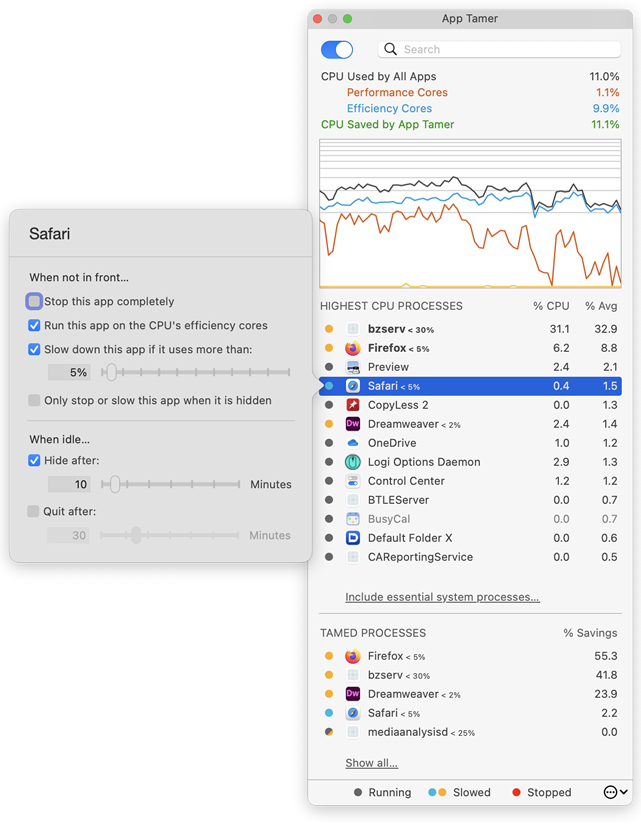
St. Clair Software is happy to deliver an update today for App Tamer, its Macintosh utility that manages applications to yield more efficient CPU usage, increased battery life and quieter operation. App Tamer's unique AutoStop capability automatically slows down or pauses applications when you switch away from them, and then restarts them when you click back to them. Version 2.3.4 offers a new option to quit idle applications and improves its control of applications' CPU usage.
Denver, Colorado - St. Clair Software is pleased to announce the availability of a free update to its App Tamer utility for macOS. App Tamer 2.3.4 features a new option to quit idle applications and improves its control of applications' CPU usage.
The changes in version 2.3.4 include:
* App Tamer can now be set to quit applications after they've been idle in the background for a certain amount of time
* Improved management of CPU usage for apps that have multiple sub-processes, like web browsers and Spotlight
* When you turn on Time Machine Acceleration, App Tamer warns you if you have settings that are at cross purposes
* App Tamer's own CPU usage has been reduced
More about App Tamer:
Some Mac applications, especially web browsers, continue running tasks or animations even when they're supposed to be idle in the background. This can consume valuable processing power, reducing battery life and producing heat that increases fan noise. App Tamer's unique AutoStop capability automatically slows down or pauses these applications when you switch away from them, and then restarts them when you click back to them. This frees your CPU and reduces power consumption.
App Tamer comes pre-configured to automatically manage Safari, Firefox, Chrome, Spotlight, Time Machine, Word and many other apps when they're in the background. And customizing it for other applications is just a mouse click away.
Pricing and Availability:
App Tamer will operate on any Macintosh running macOS 10.8 or higher, and is free to try for 15 days. A license to continue using it after the trial period is $14.95 (USD). This update is free for users who purchased App Tamer 2.x or bought App Tamer 1.x after July 1, 2013. For those that purchased a license before that date, the upgrade is $7.95 (USD).
St. Clair Software: http://www.stclairsoft.com/
App Tamer 2.3.4: http://www.stclairsoft.com/AppTamer/
Download App Tamer: http://www.stclairsoft.com/cgi-bin/dl.cgi?AT
Purchase: http://stclairsoft.com/store
Screenshot: http://www.stclairsoft.com/AppTamer/images/MainPanelWithSettingsTall.png
Application Icon: http://www.stclairsoft.com/AppTamer/images/AppTamerIcon.png
Based in Denver, Colorado, St. Clair Software is a privately held company that has been specializing in utilities and custom software solutions for the Macintosh since 1988. St. Clair Software can be contacted at: St. Clair Software, 271 S. Emerson Street, Denver, CO, USA 80209. Copyright (C) 1988-2018 St. Clair Software. All Rights Reserved. Apple, the Apple logo, and Macintosh are registered trademarks of Apple Inc. in the U.S. and/or other countries.
###
Jon Gotow
President, St. Clair Software
United States
gotow@stclairsoft.com
Facebook Profile: https://www.facebook.com/St-Clair-Software-10150141259380714
Twitter Profile: https://www.twitter.com/stclairsoft
*******
Trackback URL: https://prmac.com/release-trackback.php?id=82400&ac=
Link To Article: https://prmac.com/release-id-82400.htm
Link To PDF: https://prmac.com/pdf/genpdf.php?id=82400
RSS Feed: https://prmac.com/rss-member-324.htm
Personal Press Release Page: https://prmac.com/member_releases-id-324.htm
*******
IMMEDIATE RELEASE
St. Clair Software is happy to deliver an update today for App Tamer, its Macintosh utility that manages applications to yield more efficient CPU usage, increased battery life and quieter operation. App Tamer's unique AutoStop capability automatically slows down or pauses applications when you switch away from them, and then restarts them when you click back to them. Version 2.3.4 offers a new option to quit idle applications and improves its control of applications' CPU usage.
Denver, Colorado - St. Clair Software is pleased to announce the availability of a free update to its App Tamer utility for macOS. App Tamer 2.3.4 features a new option to quit idle applications and improves its control of applications' CPU usage.
The changes in version 2.3.4 include:
* App Tamer can now be set to quit applications after they've been idle in the background for a certain amount of time
* Improved management of CPU usage for apps that have multiple sub-processes, like web browsers and Spotlight
* When you turn on Time Machine Acceleration, App Tamer warns you if you have settings that are at cross purposes
* App Tamer's own CPU usage has been reduced
More about App Tamer:
Some Mac applications, especially web browsers, continue running tasks or animations even when they're supposed to be idle in the background. This can consume valuable processing power, reducing battery life and producing heat that increases fan noise. App Tamer's unique AutoStop capability automatically slows down or pauses these applications when you switch away from them, and then restarts them when you click back to them. This frees your CPU and reduces power consumption.
App Tamer comes pre-configured to automatically manage Safari, Firefox, Chrome, Spotlight, Time Machine, Word and many other apps when they're in the background. And customizing it for other applications is just a mouse click away.
Pricing and Availability:
App Tamer will operate on any Macintosh running macOS 10.8 or higher, and is free to try for 15 days. A license to continue using it after the trial period is $14.95 (USD). This update is free for users who purchased App Tamer 2.x or bought App Tamer 1.x after July 1, 2013. For those that purchased a license before that date, the upgrade is $7.95 (USD).
St. Clair Software: http://www.stclairsoft.com/
App Tamer 2.3.4: http://www.stclairsoft.com/AppTamer/
Download App Tamer: http://www.stclairsoft.com/cgi-bin/dl.cgi?AT
Purchase: http://stclairsoft.com/store
Screenshot: http://www.stclairsoft.com/AppTamer/images/MainPanelWithSettingsTall.png
Application Icon: http://www.stclairsoft.com/AppTamer/images/AppTamerIcon.png

Based in Denver, Colorado, St. Clair Software is a privately held company that has been specializing in utilities and custom software solutions for the Macintosh since 1988. St. Clair Software can be contacted at: St. Clair Software, 271 S. Emerson Street, Denver, CO, USA 80209. Copyright (C) 1988-2018 St. Clair Software. All Rights Reserved. Apple, the Apple logo, and Macintosh are registered trademarks of Apple Inc. in the U.S. and/or other countries.
###
Jon Gotow
President, St. Clair Software
United States
gotow@stclairsoft.com
Facebook Profile: https://www.facebook.com/St-Clair-Software-10150141259380714
Twitter Profile: https://www.twitter.com/stclairsoft
*******
Trackback URL: https://prmac.com/release-trackback.php?id=82400&ac=
Link To Article: https://prmac.com/release-id-82400.htm
Link To PDF: https://prmac.com/pdf/genpdf.php?id=82400
RSS Feed: https://prmac.com/rss-member-324.htm
Personal Press Release Page: https://prmac.com/member_releases-id-324.htm
*******
iOS Business App Awards - 2017 Tabby Awards Recognizes 19 Apps
iOS Business App Awards - 2017 Tabby Awards Recognizes 19 Apps - Published on 01/09/18
IMMEDIATE RELEASE
The Tabby Awards has announced the winners of the 2017 iPad and iPhone Business App Awards competition. 19 iOS business and enterprise apps, 11 for iPads and 8 for iPhones, were recognized for their excellence and leadership. With all iOS business apps eligible and under consideration, winners were selected based on a combination of quantitative metrics and qualitative factors. Winners included apps from Workday, Slack, Salesforce, Zoom, Quickbooks, Square, and Trello.
San Diego, California - The Tabby Awards has announced the winners of the 2017 iPad and iPhone Business App Awards competition. 19 iOS business and enterprise apps - 11 for iPads and 8 for iPhones - were recognized for their excellence and leadership. Winners included apps from Workday, Slack, Salesforce, Zoom, Quickbooks, Square, and Trello.
"With over 300,000 business apps available today on iOS, our iPhone/iPad app award winners are positioned within the top 0.01% of a fiercely competitive marketplace," commented Matt Harney, Executive Producer of the Tabby Awards. "Each year the 'consumerization' of business IT increases. Business users expect the apps they use for their work to deliver the same smooth interfaces and quality design they experience with traditional 'consumer' apps. Against these high expectations, these award-winning business apps were distinguished by their ability to delight users."
With all iOS business apps eligible and under consideration, winners were selected based on a combination of quantitative metrics and qualitative factors. The analytical evaluation component focused on app review scores submitted over the course of 2017 to measure user engagement. The qualitative component - benefiting from the Tabby Awards expertise in judging app awards since 2012 - focused on user interface, design, and innovation. The degree of tablet-optimization was also a key factor in the assessment of iPad apps. The 2017 Business App Award winners are presented below by device type:
iPad Business App Award Category Winners:
* Diligent Boards
* DocuSign
* Fieldwire
* Hotschedules
* PlanGrid
* QuickBooks Accounting
* Smartsheet
* Square Point of Sale
* Trello
* Workday
* Zoom
iPhone Business App Award Category Winners
* Airtable
* Concur
* Freshbooks
* Hours Time Tracking
* Salesforce
* Shapr
* Shyft
* Slack
This list is also published on the Tabby Awards / Business website, where these category-leading apps can also be downloaded. Please refer to TabbyAwards online for additional information regarding our mobile app award events.
Tabby Awards: http://tabbyawards.com/
Tabby Awards for Business: http://tabbyawards.com/business/
The Tabby Awards is the most comprehensive awards program honoring the best apps for tablets and iPads. Since 2012, it has held two separate competitions: one for consumer apps and games and one for business and professional apps. Starting in 2015, the Tabby Awards events expanded to include phone-optimized apps. All Material and Software (C) Copyright 2018 The Tabby Awards. All Rights Reserved. Apple, the Apple logo, iPhone, iPod and iPad are registered trademarks of Apple Inc. in the U.S. and/or other countries. Other trademarks and registered trademarks may be the property of their respective owners.
###
Matt Harney
Communications for TabbyAwards
United States
matt@tabbyawards.com
*******
Trackback URL: https://prmac.com/release-trackback.php?id=82398&ac=
Link To Article: https://prmac.com/release-id-82398.htm
Link To PDF: https://prmac.com/pdf/genpdf.php?id=82398
RSS Feed: https://prmac.com/rss-member-38967.htm
Personal Press Release Page: https://prmac.com/member_releases-id-38967.htm
*******
IMMEDIATE RELEASE
The Tabby Awards has announced the winners of the 2017 iPad and iPhone Business App Awards competition. 19 iOS business and enterprise apps, 11 for iPads and 8 for iPhones, were recognized for their excellence and leadership. With all iOS business apps eligible and under consideration, winners were selected based on a combination of quantitative metrics and qualitative factors. Winners included apps from Workday, Slack, Salesforce, Zoom, Quickbooks, Square, and Trello.
San Diego, California - The Tabby Awards has announced the winners of the 2017 iPad and iPhone Business App Awards competition. 19 iOS business and enterprise apps - 11 for iPads and 8 for iPhones - were recognized for their excellence and leadership. Winners included apps from Workday, Slack, Salesforce, Zoom, Quickbooks, Square, and Trello.
"With over 300,000 business apps available today on iOS, our iPhone/iPad app award winners are positioned within the top 0.01% of a fiercely competitive marketplace," commented Matt Harney, Executive Producer of the Tabby Awards. "Each year the 'consumerization' of business IT increases. Business users expect the apps they use for their work to deliver the same smooth interfaces and quality design they experience with traditional 'consumer' apps. Against these high expectations, these award-winning business apps were distinguished by their ability to delight users."
With all iOS business apps eligible and under consideration, winners were selected based on a combination of quantitative metrics and qualitative factors. The analytical evaluation component focused on app review scores submitted over the course of 2017 to measure user engagement. The qualitative component - benefiting from the Tabby Awards expertise in judging app awards since 2012 - focused on user interface, design, and innovation. The degree of tablet-optimization was also a key factor in the assessment of iPad apps. The 2017 Business App Award winners are presented below by device type:
iPad Business App Award Category Winners:
* Diligent Boards
* DocuSign
* Fieldwire
* Hotschedules
* PlanGrid
* QuickBooks Accounting
* Smartsheet
* Square Point of Sale
* Trello
* Workday
* Zoom
iPhone Business App Award Category Winners
* Airtable
* Concur
* Freshbooks
* Hours Time Tracking
* Salesforce
* Shapr
* Shyft
* Slack
This list is also published on the Tabby Awards / Business website, where these category-leading apps can also be downloaded. Please refer to TabbyAwards online for additional information regarding our mobile app award events.
Tabby Awards: http://tabbyawards.com/
Tabby Awards for Business: http://tabbyawards.com/business/
The Tabby Awards is the most comprehensive awards program honoring the best apps for tablets and iPads. Since 2012, it has held two separate competitions: one for consumer apps and games and one for business and professional apps. Starting in 2015, the Tabby Awards events expanded to include phone-optimized apps. All Material and Software (C) Copyright 2018 The Tabby Awards. All Rights Reserved. Apple, the Apple logo, iPhone, iPod and iPad are registered trademarks of Apple Inc. in the U.S. and/or other countries. Other trademarks and registered trademarks may be the property of their respective owners.
###
Matt Harney
Communications for TabbyAwards
United States
matt@tabbyawards.com
*******
Trackback URL: https://prmac.com/release-trackback.php?id=82398&ac=
Link To Article: https://prmac.com/release-id-82398.htm
Link To PDF: https://prmac.com/pdf/genpdf.php?id=82398
RSS Feed: https://prmac.com/rss-member-38967.htm
Personal Press Release Page: https://prmac.com/member_releases-id-38967.htm
*******
Faber Acoustical Releases SignalScope X for iOS as a Free Download
Faber Acoustical Releases SignalScope X for iOS as a Free Download - Published on 01/09/18
IMMEDIATE RELEASE
Faber Acoustical introduces SignalScope X as its new flagship dynamic signal analysis, data acquisition, and acoustics app for iOS. The culmination of nearly 10 years of iOS development experience, SignalScope X offers in-app subscriptions to replace and exceed the functionality currently found in other apps from Faber Acoustical, including SignalScope, which was available in the iPhone App Store on its opening day in 2008. SignalScope X is now available on the App Store as a free download.
Lehi, Utah - Faber Acoustical's SignalScope X brings powerful new tools for dynamic signal analysis and data acquisition to iOS and replaces all the functionality currently found in SignalScope Pro, SignalSuite, IOScope, and RoomScope with subscription-based tool sets. For the first time ever in an iOS app from Faber Acoustical, SignalScope X may be downloaded for free. The user can then start a 7-day free trial of the Pro Tool Set Subscription. Without a subscription, the user is free to continue to use SignalScope X's multi-channel Oscilloscope tool. SignalScope X is available for download on the App Store, now.
The original SignalScope and SignalSuite for iPhone were available for download on the opening day of the iPhone App Store. Now, after nearly 10 years of iOS development, SignalScope X offers a clearer expression of Faber's vision for the future of acoustics-related signal analysis, data acquisition, and measurement on mobile devices.
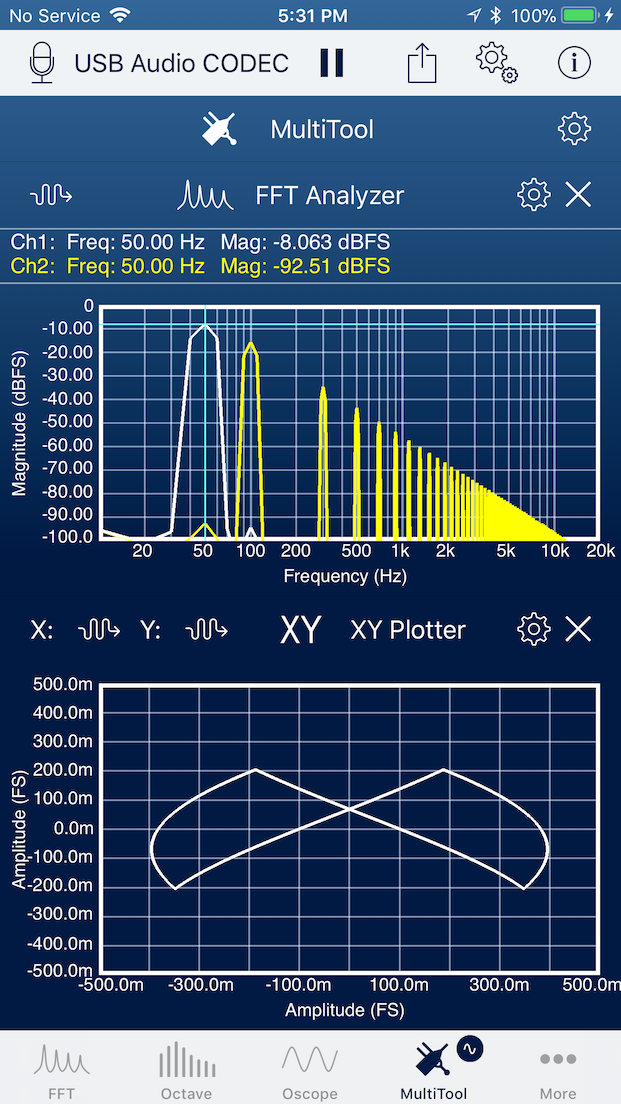
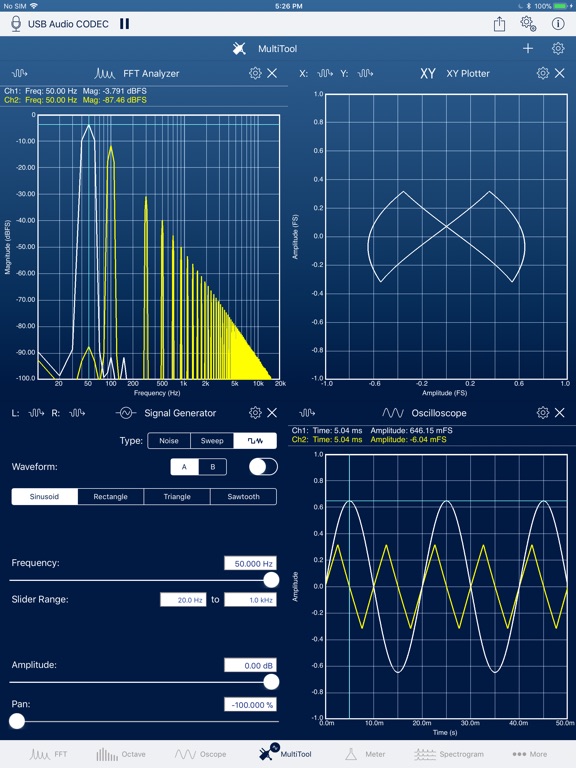
The most powerful addition to SignalScope X is the new MultiTool. SignalScope X's MultiTool acts as a project manager and host for the other tools in SignalScope X. On iPhone, up to 2 other tools (subtools) may be added to the MultiTool at one time. iPad models support up to 4 subtools, except for iPad Pro models with 10.5-inch or larger displays, which support up to 6. Besides the obvious benefit of being able to see and interact with multiple subtools, simultaneously, the MultiTool can save its current subtool configuration under a user-defined name.
Any of the saved configurations can then be selected for immediate application in the MultiTool. This allows for different configurations to be saved for different projects or jobs. For example, one configuration might include an Oscope and FFT Analyzer and another might include an Octave Analyzer and a Data Recorder. On iPad, one configuration might include all 4. Even when using just a single subtool, the MultiTool allows multiple configurations of that tool (e.g. a unique configuration of the Dual FFT Analyzer for each of several different measurement types) to be saved and recalled at will.
SignalScope X's new Data Recorder tool supports real-time continuous streaming of up to 8 channels to an audio file. Along with the audio file, SignalScope X can save an "info" file, which contains metadata including date, time, location (if enabled), input channel details, and sensitivity calibration information. This metadata will also be embedded within the audio file, itself.
The new real-time XY Plotter allows the user to immediately visualize time, frequency, and amplitude relationships between two signals, or even create visually appealing images such as Lissajous curves.
Other significant features new to SignalScope X include optional background operation, independent/simultaneous operation of all tools, and independent input/output channel selection in each tool. It is also now possible to directly analyze the output of the signal generator in any of the real-time analysis tools. SignalScope X also makes it much easier to move data files in and out of the app via Files (iCloud Drive), Dropbox, or other apps on a user's device that can load or export compatible files.
SignalScope X 10.0 offers in-app subscriptions for Basic, Advanced, and Pro tool sets that can automatically renew at monthly or annual intervals. Subscriptions give users access to updates, new features, and new tools within the subscribed tool set. Subscriptions also cover ongoing hardware support, such as periodically updated nominal microphone sensitivities for built-in microphones on Apple devices, updated nominal voltage sensitivities for select audio input devices, and automatic calibration for audio input devices that include built-in sensitivity information.
The Basic Tool Set includes the Oscope, FFT Analyzer, 2D Real-time Spectrogram, and XY Plotter tools. The Advanced Tool Set includes the basic tools as well as the 3D Real-time Spectrogram, Octave Analyzer, Level Meter, Data Recorder, and Stereo Signal Generator tools. The Pro Tool Set includes the basic and advanced tools, plus the Dual-channel System Analyzer (Dual FFT), Room Acoustics Analyzer, and MultiTool.
Device Requirements:
* iPhone, iPad, and iPod touch
* Designed to take full advantage of the iPhone X's 5.8" screen
* Requires iOS 10.0 or later
* 30.5 MB
Pricing and Availability:
SignalScope X 10.0 is Free (with in-app subscriptions) and available worldwide exclusively through the App Store in the Productivity category. For more information, please contact Benjamin Faber. The existing SignalScope, SignalScope Pro, SignalSuite, IOScope, and RoomScope apps will receive maintenance updates and remain available for sale on the App Store for a limited time for the benefit of those who need access to their respective tools on iOS 8 and 9.
Faber Acoustical: https://www.faberacoustical.com
SignalScope X 10.0: https://www.faberacoustical.com/apps/ios/signalscope_x
App Store Link: https://itunes.apple.com/app/signalscope-x/id1304775893
iPhone Screenshot: https://www.faberacoustical.com/screenshots/ios/signalscope_x/IMG_4408.png
iPad Screenshot: http://is1.mzstatic.com/image/thumb/Purple128/v4/9b/48/e4/9b48e484-e8df-0251-7127-e20c8d2c34c0/source/576x768bb.jpg
App Icon: https://www.faberacoustical.com/screenshots/ios/signalscope_x/SSX1024.png
Faber Acoustical, LLC provides affordable solutions for professional acoustical measurements, research, and education. Current products include acoustics and audio apps for iPhone, iPad and Mac. Copyright (C) 2018 Faber Acoustical, LLC. All Rights Reserved. Apple, the Apple logo, iPhone, iPod, iPad and macOS are registered trademarks of Apple Inc. in the U.S. and/or other countries.
###
Benjamin Faber
Manager
801-794-3333
United States
sales@faberacoustical.com
Facebook Profile: https://www.facebook.com/faberacoustical
LinkedIn Profile: https://www.linkedin.com/company/faber-acoustical-llc
Twitter Profile: https://twitter.com/faberast
*******
Trackback URL: https://prmac.com/release-trackback.php?id=82397&ac=
Link To Article: https://prmac.com/release-id-82397.htm
Link To PDF: https://prmac.com/pdf/genpdf.php?id=82397
RSS Feed: https://prmac.com/rss-member-176.htm
Personal Press Release Page: https://prmac.com/member_releases-id-176.htm
*******
IMMEDIATE RELEASE
Faber Acoustical introduces SignalScope X as its new flagship dynamic signal analysis, data acquisition, and acoustics app for iOS. The culmination of nearly 10 years of iOS development experience, SignalScope X offers in-app subscriptions to replace and exceed the functionality currently found in other apps from Faber Acoustical, including SignalScope, which was available in the iPhone App Store on its opening day in 2008. SignalScope X is now available on the App Store as a free download.
Lehi, Utah - Faber Acoustical's SignalScope X brings powerful new tools for dynamic signal analysis and data acquisition to iOS and replaces all the functionality currently found in SignalScope Pro, SignalSuite, IOScope, and RoomScope with subscription-based tool sets. For the first time ever in an iOS app from Faber Acoustical, SignalScope X may be downloaded for free. The user can then start a 7-day free trial of the Pro Tool Set Subscription. Without a subscription, the user is free to continue to use SignalScope X's multi-channel Oscilloscope tool. SignalScope X is available for download on the App Store, now.
The original SignalScope and SignalSuite for iPhone were available for download on the opening day of the iPhone App Store. Now, after nearly 10 years of iOS development, SignalScope X offers a clearer expression of Faber's vision for the future of acoustics-related signal analysis, data acquisition, and measurement on mobile devices.
The most powerful addition to SignalScope X is the new MultiTool. SignalScope X's MultiTool acts as a project manager and host for the other tools in SignalScope X. On iPhone, up to 2 other tools (subtools) may be added to the MultiTool at one time. iPad models support up to 4 subtools, except for iPad Pro models with 10.5-inch or larger displays, which support up to 6. Besides the obvious benefit of being able to see and interact with multiple subtools, simultaneously, the MultiTool can save its current subtool configuration under a user-defined name.
Any of the saved configurations can then be selected for immediate application in the MultiTool. This allows for different configurations to be saved for different projects or jobs. For example, one configuration might include an Oscope and FFT Analyzer and another might include an Octave Analyzer and a Data Recorder. On iPad, one configuration might include all 4. Even when using just a single subtool, the MultiTool allows multiple configurations of that tool (e.g. a unique configuration of the Dual FFT Analyzer for each of several different measurement types) to be saved and recalled at will.
SignalScope X's new Data Recorder tool supports real-time continuous streaming of up to 8 channels to an audio file. Along with the audio file, SignalScope X can save an "info" file, which contains metadata including date, time, location (if enabled), input channel details, and sensitivity calibration information. This metadata will also be embedded within the audio file, itself.
The new real-time XY Plotter allows the user to immediately visualize time, frequency, and amplitude relationships between two signals, or even create visually appealing images such as Lissajous curves.
Other significant features new to SignalScope X include optional background operation, independent/simultaneous operation of all tools, and independent input/output channel selection in each tool. It is also now possible to directly analyze the output of the signal generator in any of the real-time analysis tools. SignalScope X also makes it much easier to move data files in and out of the app via Files (iCloud Drive), Dropbox, or other apps on a user's device that can load or export compatible files.
SignalScope X 10.0 offers in-app subscriptions for Basic, Advanced, and Pro tool sets that can automatically renew at monthly or annual intervals. Subscriptions give users access to updates, new features, and new tools within the subscribed tool set. Subscriptions also cover ongoing hardware support, such as periodically updated nominal microphone sensitivities for built-in microphones on Apple devices, updated nominal voltage sensitivities for select audio input devices, and automatic calibration for audio input devices that include built-in sensitivity information.
The Basic Tool Set includes the Oscope, FFT Analyzer, 2D Real-time Spectrogram, and XY Plotter tools. The Advanced Tool Set includes the basic tools as well as the 3D Real-time Spectrogram, Octave Analyzer, Level Meter, Data Recorder, and Stereo Signal Generator tools. The Pro Tool Set includes the basic and advanced tools, plus the Dual-channel System Analyzer (Dual FFT), Room Acoustics Analyzer, and MultiTool.
Device Requirements:
* iPhone, iPad, and iPod touch
* Designed to take full advantage of the iPhone X's 5.8" screen
* Requires iOS 10.0 or later
* 30.5 MB
Pricing and Availability:
SignalScope X 10.0 is Free (with in-app subscriptions) and available worldwide exclusively through the App Store in the Productivity category. For more information, please contact Benjamin Faber. The existing SignalScope, SignalScope Pro, SignalSuite, IOScope, and RoomScope apps will receive maintenance updates and remain available for sale on the App Store for a limited time for the benefit of those who need access to their respective tools on iOS 8 and 9.
Faber Acoustical: https://www.faberacoustical.com
SignalScope X 10.0: https://www.faberacoustical.com/apps/ios/signalscope_x
App Store Link: https://itunes.apple.com/app/signalscope-x/id1304775893
iPhone Screenshot: https://www.faberacoustical.com/screenshots/ios/signalscope_x/IMG_4408.png
iPad Screenshot: http://is1.mzstatic.com/image/thumb/Purple128/v4/9b/48/e4/9b48e484-e8df-0251-7127-e20c8d2c34c0/source/576x768bb.jpg
App Icon: https://www.faberacoustical.com/screenshots/ios/signalscope_x/SSX1024.png

Faber Acoustical, LLC provides affordable solutions for professional acoustical measurements, research, and education. Current products include acoustics and audio apps for iPhone, iPad and Mac. Copyright (C) 2018 Faber Acoustical, LLC. All Rights Reserved. Apple, the Apple logo, iPhone, iPod, iPad and macOS are registered trademarks of Apple Inc. in the U.S. and/or other countries.
###
Benjamin Faber
Manager
801-794-3333
United States
sales@faberacoustical.com
Facebook Profile: https://www.facebook.com/faberacoustical
LinkedIn Profile: https://www.linkedin.com/company/faber-acoustical-llc
Twitter Profile: https://twitter.com/faberast
*******
Trackback URL: https://prmac.com/release-trackback.php?id=82397&ac=
Link To Article: https://prmac.com/release-id-82397.htm
Link To PDF: https://prmac.com/pdf/genpdf.php?id=82397
RSS Feed: https://prmac.com/rss-member-176.htm
Personal Press Release Page: https://prmac.com/member_releases-id-176.htm
*******
Empowering Community-Based App Officially Launches in iTunes
Empowering Community-Based App Officially Launches in iTunes - Published on 01/09/18
IMMEDIATE RELEASE
Tampa based Wish Alerts, Inc. today officially launches WishAlerts, their m-commerce app in the App Store. WishAlerts uses artificial intelligence to bring communities closer together by geo-alerting users to common interests. The app lets users join or create local interest groups, find or host events, get reviews about local businesses, and make wishes. Version 2.4 gets a speed boost, making it even faster than before, as well as introduces a new Discovery section.
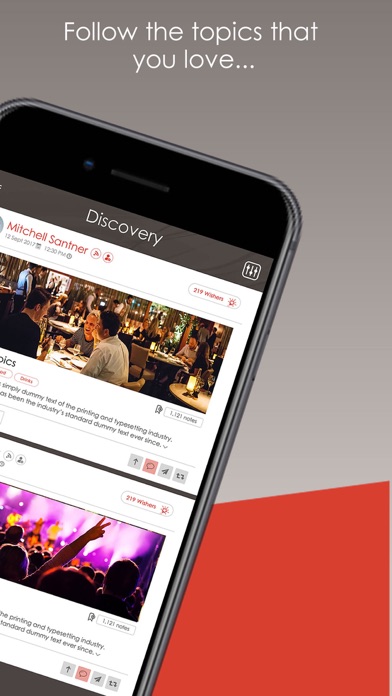
Tampa, Florida - WishAlerts, the m-commerce app that grants "wishes" made by its users, expanded into the US market by officially launching today in the iTunes App store. WishAlerts links communities by allowing users in the same geographical area to connect with others to share information about common interests such as favorite topics, events, groups, or about local businesses.
The app lets users join or create local interest groups, find or host events, get reviews about local businesses, and make wishes. For example, to find a romantic restaurant for an upcoming anniversary, the user enters their wish, and the distance around them that they want information from and, within seconds, users receive unique offers from nearby businesses. Or if a user just needs information about a particular topic of interest, they can post a new question and nearby users will respond.
"Mobile users expect a personalized experience that is location relevant and tailored to their individual needs. Thanks to AI, WishAlerts is able to provide an intuitive, assistive experience that's unique to each user. Users can also be locally-owned businesses, says Founder and CEO Shane Amyx. "This is a great way to reignite the economies of small towns on a community by community basis."
WishAlerts is geo-location based, so it automatically alerts users with personalized, locally-relevant information wherever they go so they'll always be in the know. The more a user makes wishes in the app, the better tailored the suggestions become as WishAlerts' artificial intelligence algorithms learn to provide a personalized mobile experience.
"We believe that the ability to connect users directly with local businesses or with other like-minded people is the key to reconnecting folks with their communities and to creating more meaningful relationships, while at the same time, supporting local artisans and small businesses," said Shane Amyx. "This approach empowers the local community and takes us back to our roots, when life was more simple and people helped one another."
Device Requirements:
* iPhone, iPad, and iPod touch
* Requires iOS 9.1 or later
* 77.9 MB
Pricing and Availability:
WishAlerts 2.4 is Free for users who sign up by 1-31-18, and available worldwide exclusively through the App Store in the Lifestyle category. WishAlerts ships in two versions: One for small businesses and one for consumers. Consumers can add wishes, and businesses can provide them, thereby bridging the gap between local supply and demand.
WishAlerts 2.4: http://www.wishalerts.com
Direct Download Link: https://itunes.apple.com/app/id1059154338
Screenshot: http://is5.mzstatic.com/image/thumb/Purple128/v4/80/a0/b8/80a0b89c-3149-08ca-cd98-f5002efd5049/source/392x696bb.jpg
App Icon: http://is5.mzstatic.com/image/thumb/Purple118/v4/1e/4d/b1/1e4db1bb-0b15-26ec-53b0-0c9df82fe344/source/175x175bb.jpg
Shane Amyx, CEO of Wish Alerts, Inc., founded the company in 2015. He created Wish Alerts to find a way to help society, connect people, encourage artisans, small-business owners and entrepreneurs. All Material and Software (C) Copyright 2018 Wish Alerts, Inc. All Rights Reserved. Apple, the Apple logo, iPhone, iPod and iPad are registered trademarks of Apple Inc. in the U.S. and/or other countries. Other trademarks and registered trademarks may be the property of their respective owners.
###
Rachel Clark
Press Contact
512-657-2553
United States
rachel@appspire.me
*******
Trackback URL: https://prmac.com/release-trackback.php?id=82396&ac=
Link To Article: https://prmac.com/release-id-82396.htm
Link To PDF: https://prmac.com/pdf/genpdf.php?id=82396
RSS Feed: https://prmac.com/rss-member-20506.htm
Personal Press Release Page: https://prmac.com/member_releases-id-20506.htm
*******
IMMEDIATE RELEASE
Tampa based Wish Alerts, Inc. today officially launches WishAlerts, their m-commerce app in the App Store. WishAlerts uses artificial intelligence to bring communities closer together by geo-alerting users to common interests. The app lets users join or create local interest groups, find or host events, get reviews about local businesses, and make wishes. Version 2.4 gets a speed boost, making it even faster than before, as well as introduces a new Discovery section.
Tampa, Florida - WishAlerts, the m-commerce app that grants "wishes" made by its users, expanded into the US market by officially launching today in the iTunes App store. WishAlerts links communities by allowing users in the same geographical area to connect with others to share information about common interests such as favorite topics, events, groups, or about local businesses.
The app lets users join or create local interest groups, find or host events, get reviews about local businesses, and make wishes. For example, to find a romantic restaurant for an upcoming anniversary, the user enters their wish, and the distance around them that they want information from and, within seconds, users receive unique offers from nearby businesses. Or if a user just needs information about a particular topic of interest, they can post a new question and nearby users will respond.
"Mobile users expect a personalized experience that is location relevant and tailored to their individual needs. Thanks to AI, WishAlerts is able to provide an intuitive, assistive experience that's unique to each user. Users can also be locally-owned businesses, says Founder and CEO Shane Amyx. "This is a great way to reignite the economies of small towns on a community by community basis."
WishAlerts is geo-location based, so it automatically alerts users with personalized, locally-relevant information wherever they go so they'll always be in the know. The more a user makes wishes in the app, the better tailored the suggestions become as WishAlerts' artificial intelligence algorithms learn to provide a personalized mobile experience.
"We believe that the ability to connect users directly with local businesses or with other like-minded people is the key to reconnecting folks with their communities and to creating more meaningful relationships, while at the same time, supporting local artisans and small businesses," said Shane Amyx. "This approach empowers the local community and takes us back to our roots, when life was more simple and people helped one another."
Device Requirements:
* iPhone, iPad, and iPod touch
* Requires iOS 9.1 or later
* 77.9 MB
Pricing and Availability:
WishAlerts 2.4 is Free for users who sign up by 1-31-18, and available worldwide exclusively through the App Store in the Lifestyle category. WishAlerts ships in two versions: One for small businesses and one for consumers. Consumers can add wishes, and businesses can provide them, thereby bridging the gap between local supply and demand.
WishAlerts 2.4: http://www.wishalerts.com
Direct Download Link: https://itunes.apple.com/app/id1059154338
Screenshot: http://is5.mzstatic.com/image/thumb/Purple128/v4/80/a0/b8/80a0b89c-3149-08ca-cd98-f5002efd5049/source/392x696bb.jpg
App Icon: http://is5.mzstatic.com/image/thumb/Purple118/v4/1e/4d/b1/1e4db1bb-0b15-26ec-53b0-0c9df82fe344/source/175x175bb.jpg

Shane Amyx, CEO of Wish Alerts, Inc., founded the company in 2015. He created Wish Alerts to find a way to help society, connect people, encourage artisans, small-business owners and entrepreneurs. All Material and Software (C) Copyright 2018 Wish Alerts, Inc. All Rights Reserved. Apple, the Apple logo, iPhone, iPod and iPad are registered trademarks of Apple Inc. in the U.S. and/or other countries. Other trademarks and registered trademarks may be the property of their respective owners.
###
Rachel Clark
Press Contact
512-657-2553
United States
rachel@appspire.me
*******
Trackback URL: https://prmac.com/release-trackback.php?id=82396&ac=
Link To Article: https://prmac.com/release-id-82396.htm
Link To PDF: https://prmac.com/pdf/genpdf.php?id=82396
RSS Feed: https://prmac.com/rss-member-20506.htm
Personal Press Release Page: https://prmac.com/member_releases-id-20506.htm
*******
ExcelRT 1.1 Creates Apps from Excel Workbooks
ExcelRT 1.1 Creates Apps from Excel Workbooks - Published on 01/09/18
IMMEDIATE RELEASE
Excel Software is shipping ExcelRT 1.1 with enhancements for creating standalone desktop and mobile apps from an Excel workbook. Any Microsoft Excel user without programming experience can become an app developer for Mac, Windows, Linux and iOS for iPhone or iPad. ExcelRT 1.1 adds platform specific default sheet, vendor branding, HiDPI support and new website scripting commands for email, upload, file sharing and messaging.
Henderson, Nevada - Excel Software is shipping ExcelRT 1.1 with enhancements for creating standalone desktop and mobile apps from an Excel workbook. With ExcelRT, a Microsoft Excel user without programming experience can become an app developer for Mac, Windows, Linux and iOS for iPhone or iPad.
ExcelRT 1.1 adds a platform specific default sheet that allows the same file to adjust to its screen size and platform. Workbook properties like column and row headers, scrollbars, gridlines and sheet visibility can be assigned to each workbook sheet. Vendor branding text can now be added in the About dialog. ExcelRT is now HiDPI for high-resolution displays.
ExcelRT 1.1 adds a comprehensive suite of scripting commands to generate reports, present custom dialogs, manipulate variables, strings and cell data, add conditional logic, math and subroutines, share data through CSV files, read and write Internet data and manipulate images.
The new ExcelRT Vendor Commands product adds an optional suite of website related commands to the ExcelRT scripting environment. These commands enable an ExcelRT file to send email, upload files, log application data, provide file sharing with other apps or users or send and receive messages between apps and users. These commands use PHP files from Excel Software that run on the vendor website or can be freely distributed to any client website when building a custom solution.
A workbook authored in Microsoft Excel is converted to ExcelRT with the ConvertExcelRT tool. ExcelRT supports multiple sheets, cell data and style formats, entry validation rules, conditional formatting, tables, images, hyperlinks and most formula functions. Files can be distributed and used within the free ExcelRT application running on desktop and mobile platforms. Microsoft Excel is not required to use ExcelRT files.
ExcelRT supports a variety of protection, distribution and licensing models for generated applications that include Trial, Product and Subscription licenses, manual activation, online Serial Number activation, USB dongle activation or floating licenses. The ExcelRT file can be distributed as an unprotected file or protected, licensed and wrapped into a standalone application using the QuickLicense tool.
An ExcelRT developer can optionally apply a licensing and productization process to the ExcelRT file using QuickLicense and related tools before distribution. A license agreement can be presented to the user before activation to a specific computer or device. A custom icon can be applied to the application with an optional splash screen added for vendor branding. The configurable Open Data File interface window allows the user to create, manage and organize many instances of the ExcelRT workbook file for different clients or projects. The end user can sort files by name or creation date, organize files into folders or import and export files to other licensed users.
The ConvertExcelRT tool for Windows and the ExcelRT application for each supported OS is available as a free download. There is no cost to develop and distribute unprotected ExcelRT files. The ConvertExcelRT tool includes sample projects, User Guide and step-by-step tutorials. An online video library provides an introduction to ExcelRT, the conversion process, the scripting language and customer licensing tools and services.
An annual developer subscription for ExcelRT is $295. This allows protected ExcelRT files to be generated for desktop and mobile platforms and includes royalty-free distribution rights to ExcelRT itself. The optional ExcelRT Vendor Commands are available as a monthly or lifetime license starting at $50/month. QuickLicense is a one-time purchase starting at $595.
Excel Software: http://www.excelsoftware.com
ExcelRT 1.1: http://www.excelsoftware.com/news-excelrt-110
Purchase Link: http://www.excelsoftware.com/priceandordering
Screenshot: http://www.excelsoftware.com/image/excelrt-screen.jpg
Established in 1985, Excel Software provides Windows and Mac OS X software products to thousands of users worldwide. Capabilities include system modeling & simulation, requirements management, software design, code generation, reengineering, bug tracking, help authoring, software license management, document protection and internet marketing automation. All Material and Software (C) Copyright 2018 Excel Software. All Rights Reserved. Apple, the Apple logo, Macintosh and Mac OS X are registered trademarks of Apple Inc. in the U.S. and/or other countries. Other trademarks and registered trademarks may be the property of their respective owners.
###
Harold Halbleib
Manager
702-445-7645
United States
info@excelsoftware.com
*******
Trackback URL: https://prmac.com/release-trackback.php?id=82390&ac=
Link To Article: https://prmac.com/release-id-82390.htm
Link To PDF: https://prmac.com/pdf/genpdf.php?id=82390
RSS Feed: https://prmac.com/rss-member-374.htm
Personal Press Release Page: https://prmac.com/member_releases-id-374.htm
*******
IMMEDIATE RELEASE
Excel Software is shipping ExcelRT 1.1 with enhancements for creating standalone desktop and mobile apps from an Excel workbook. Any Microsoft Excel user without programming experience can become an app developer for Mac, Windows, Linux and iOS for iPhone or iPad. ExcelRT 1.1 adds platform specific default sheet, vendor branding, HiDPI support and new website scripting commands for email, upload, file sharing and messaging.
Henderson, Nevada - Excel Software is shipping ExcelRT 1.1 with enhancements for creating standalone desktop and mobile apps from an Excel workbook. With ExcelRT, a Microsoft Excel user without programming experience can become an app developer for Mac, Windows, Linux and iOS for iPhone or iPad.
ExcelRT 1.1 adds a platform specific default sheet that allows the same file to adjust to its screen size and platform. Workbook properties like column and row headers, scrollbars, gridlines and sheet visibility can be assigned to each workbook sheet. Vendor branding text can now be added in the About dialog. ExcelRT is now HiDPI for high-resolution displays.
ExcelRT 1.1 adds a comprehensive suite of scripting commands to generate reports, present custom dialogs, manipulate variables, strings and cell data, add conditional logic, math and subroutines, share data through CSV files, read and write Internet data and manipulate images.
The new ExcelRT Vendor Commands product adds an optional suite of website related commands to the ExcelRT scripting environment. These commands enable an ExcelRT file to send email, upload files, log application data, provide file sharing with other apps or users or send and receive messages between apps and users. These commands use PHP files from Excel Software that run on the vendor website or can be freely distributed to any client website when building a custom solution.
A workbook authored in Microsoft Excel is converted to ExcelRT with the ConvertExcelRT tool. ExcelRT supports multiple sheets, cell data and style formats, entry validation rules, conditional formatting, tables, images, hyperlinks and most formula functions. Files can be distributed and used within the free ExcelRT application running on desktop and mobile platforms. Microsoft Excel is not required to use ExcelRT files.
ExcelRT supports a variety of protection, distribution and licensing models for generated applications that include Trial, Product and Subscription licenses, manual activation, online Serial Number activation, USB dongle activation or floating licenses. The ExcelRT file can be distributed as an unprotected file or protected, licensed and wrapped into a standalone application using the QuickLicense tool.
An ExcelRT developer can optionally apply a licensing and productization process to the ExcelRT file using QuickLicense and related tools before distribution. A license agreement can be presented to the user before activation to a specific computer or device. A custom icon can be applied to the application with an optional splash screen added for vendor branding. The configurable Open Data File interface window allows the user to create, manage and organize many instances of the ExcelRT workbook file for different clients or projects. The end user can sort files by name or creation date, organize files into folders or import and export files to other licensed users.
The ConvertExcelRT tool for Windows and the ExcelRT application for each supported OS is available as a free download. There is no cost to develop and distribute unprotected ExcelRT files. The ConvertExcelRT tool includes sample projects, User Guide and step-by-step tutorials. An online video library provides an introduction to ExcelRT, the conversion process, the scripting language and customer licensing tools and services.
An annual developer subscription for ExcelRT is $295. This allows protected ExcelRT files to be generated for desktop and mobile platforms and includes royalty-free distribution rights to ExcelRT itself. The optional ExcelRT Vendor Commands are available as a monthly or lifetime license starting at $50/month. QuickLicense is a one-time purchase starting at $595.
Excel Software: http://www.excelsoftware.com
ExcelRT 1.1: http://www.excelsoftware.com/news-excelrt-110
Purchase Link: http://www.excelsoftware.com/priceandordering
Screenshot: http://www.excelsoftware.com/image/excelrt-screen.jpg
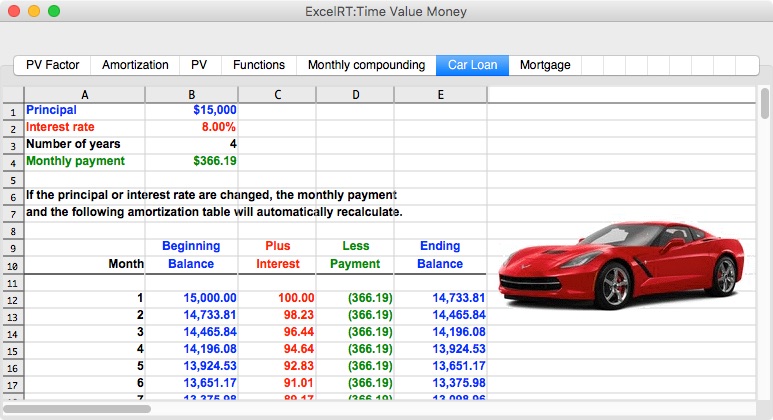
Established in 1985, Excel Software provides Windows and Mac OS X software products to thousands of users worldwide. Capabilities include system modeling & simulation, requirements management, software design, code generation, reengineering, bug tracking, help authoring, software license management, document protection and internet marketing automation. All Material and Software (C) Copyright 2018 Excel Software. All Rights Reserved. Apple, the Apple logo, Macintosh and Mac OS X are registered trademarks of Apple Inc. in the U.S. and/or other countries. Other trademarks and registered trademarks may be the property of their respective owners.
###
Harold Halbleib
Manager
702-445-7645
United States
info@excelsoftware.com
*******
Trackback URL: https://prmac.com/release-trackback.php?id=82390&ac=
Link To Article: https://prmac.com/release-id-82390.htm
Link To PDF: https://prmac.com/pdf/genpdf.php?id=82390
RSS Feed: https://prmac.com/rss-member-374.htm
Personal Press Release Page: https://prmac.com/member_releases-id-374.htm
*******
Blood of Patriots 90s Arcade Fighting Game Reborn With Political Figures
Blood of Patriots 90s Arcade Fighting Game Reborn With Political Figures - Published on 01/09/18
IMMEDIATE RELEASE
California based 12 to 6 Studios LLC introduces Blood of Patriots 1.0 for iOS and Android devices. The classic fighting games of the 1990s have been reborn with an infusion of today's political satire. Choose one of seventeen characters from a mix of presidents, vice presidents, a few senators and 1 judo champion and fight your way through the "Tree of Liberty." An evil force, lurking in the shadows, threatens our democracy. It is up to you to refresh the tree of liberty and save the republic.
Marina Del Rey, California - Driven by nostalgic love of the arcade fighting games of the 1990s, 12 to 6 Studios LLC is proud to announce Blood of Patriots 1.0 for iOS and Android devices. The fighting classics of the 90s have been reborn with an infusion of today's political satire. Choose one of seventeen characters from a mix of presidents, vice presidents, a few senators and 1 judo champion and fight your way through the "Tree of Liberty." An evil force, lurking in the shadows, threatens our democracy. It is up to you to refresh the tree of liberty and save the republic. Are you the last true patriot?
"The tree of liberty must be refreshed from time to time with the blood of patriots and tyrants." - Thomas Jefferson
Features:
* 17 Characters - Hillary Clinton, Donald Trump, Barack Obama, Bernie Sanders, Bill Clinton, Mike Pence, John F Kennedy, John McCain, Jimmy Carter, George Bush, Al Gore, Ronald Reagan, Dick Cheney, Richard Nixon, Abraham Lincoln, Elizabeth Warren, Vladimir Putin
* 4 Levels - White House, Mount Rushmore, Gettysburg, Liberty Bell
* Custom Character Moves - Each character has a unique fighting style with custom sounds and fight moves. All characters have 9 types of punches, 9 kicks, a special move, a throw move, a fireball (hadooken) and custom intro and outro animations.
How to Play:
A user may choose between Story Mode & Versus Mode. In Story Mode, a user may select a character and start the journey. The user will see the "tree of liberty" with the opponents in the tree. In Versus Mode, a user can choose Player vs CPU and choose the 2 characters they would like to battle. Player vs Player is a great way to practice moves on an still opponent. CPU vs CPU is a great way to sit back and let the AI fight.
Helping The Real Patriots:
A portion of Blood of Patriots proceeds will go to charities that are committed to providing homes and care to veterans. These are the real patriots of our country and many of them need our help.
Future Plans:
Blood of Patriots will be available on Steam, Nintendo Switch, XBox One, and Sony Playstation later this year. New characters and levels will be added along with with regular updates improving game-play and user experience.
Device Requirements:
* iPhone, iPad, and iPod touch
* Requires iOS 10.0 or later
* 514 MB
Pricing and Availability:
Blood of Patriots 1.0 is Free (With App Purchases) and available worldwide exclusively through the App Store in the Games category. There is also an Android version available on Google Play. George Bush and Al Gore are included in the free download. All other characters are available for .99 cents each. For more information, please contact Josh Axelman.
Blood of Patriots 1.0: http://bloodofpatriots.us
Download from iTunes: https://itunes.apple.com/app/blood-of-patriots/id1326412487
Download from Google Play: https://play.google.com/store/apps/details?id=com.a12to6studios.bop
YouTube Video (Trailer): https://www.youtube.com/watch?v=CefF3-qMAGc
Media Assets: https://drive.google.com/drive/folders/1OT7cU8unl0wthYGosJJ_-zMR07SQdOUz
12 to 6 Studios LLC is an independent video game company in Marina del Rey California. 12 to 6 Studios LLC mission is building video games everyone loves to play. Blood of Patriots Copyright 2018. All Material and Software (C) Copyright 2018 12 to 6 Studios LLC. All Rights Reserved. Apple, the Apple logo, iPhone, iPod and iPad are registered trademarks of Apple Inc. in the U.S. and/or other countries. Other trademarks and registered trademarks may be the property of their respective owners.
###
Josh Axelman
Media Contact
310-878-9452
United States
josh@12to6studios.com
Facebook Profile: https://www.facebook.com/bloodofpatriotsgame
Twitter Profile: https://twitter.com/bloodofpatriot
*******
Trackback URL: https://prmac.com/release-trackback.php?id=82393&ac=
Link To Article: https://prmac.com/release-id-82393.htm
Link To PDF: https://prmac.com/pdf/genpdf.php?id=82393
RSS Feed: https://prmac.com/rss-member-38965.htm
Personal Press Release Page: https://prmac.com/member_releases-id-38965.htm
*******
IMMEDIATE RELEASE
California based 12 to 6 Studios LLC introduces Blood of Patriots 1.0 for iOS and Android devices. The classic fighting games of the 1990s have been reborn with an infusion of today's political satire. Choose one of seventeen characters from a mix of presidents, vice presidents, a few senators and 1 judo champion and fight your way through the "Tree of Liberty." An evil force, lurking in the shadows, threatens our democracy. It is up to you to refresh the tree of liberty and save the republic.
Marina Del Rey, California - Driven by nostalgic love of the arcade fighting games of the 1990s, 12 to 6 Studios LLC is proud to announce Blood of Patriots 1.0 for iOS and Android devices. The fighting classics of the 90s have been reborn with an infusion of today's political satire. Choose one of seventeen characters from a mix of presidents, vice presidents, a few senators and 1 judo champion and fight your way through the "Tree of Liberty." An evil force, lurking in the shadows, threatens our democracy. It is up to you to refresh the tree of liberty and save the republic. Are you the last true patriot?
"The tree of liberty must be refreshed from time to time with the blood of patriots and tyrants." - Thomas Jefferson
Features:
* 17 Characters - Hillary Clinton, Donald Trump, Barack Obama, Bernie Sanders, Bill Clinton, Mike Pence, John F Kennedy, John McCain, Jimmy Carter, George Bush, Al Gore, Ronald Reagan, Dick Cheney, Richard Nixon, Abraham Lincoln, Elizabeth Warren, Vladimir Putin
* 4 Levels - White House, Mount Rushmore, Gettysburg, Liberty Bell
* Custom Character Moves - Each character has a unique fighting style with custom sounds and fight moves. All characters have 9 types of punches, 9 kicks, a special move, a throw move, a fireball (hadooken) and custom intro and outro animations.
How to Play:
A user may choose between Story Mode & Versus Mode. In Story Mode, a user may select a character and start the journey. The user will see the "tree of liberty" with the opponents in the tree. In Versus Mode, a user can choose Player vs CPU and choose the 2 characters they would like to battle. Player vs Player is a great way to practice moves on an still opponent. CPU vs CPU is a great way to sit back and let the AI fight.
Helping The Real Patriots:
A portion of Blood of Patriots proceeds will go to charities that are committed to providing homes and care to veterans. These are the real patriots of our country and many of them need our help.
Future Plans:
Blood of Patriots will be available on Steam, Nintendo Switch, XBox One, and Sony Playstation later this year. New characters and levels will be added along with with regular updates improving game-play and user experience.
Device Requirements:
* iPhone, iPad, and iPod touch
* Requires iOS 10.0 or later
* 514 MB
Pricing and Availability:
Blood of Patriots 1.0 is Free (With App Purchases) and available worldwide exclusively through the App Store in the Games category. There is also an Android version available on Google Play. George Bush and Al Gore are included in the free download. All other characters are available for .99 cents each. For more information, please contact Josh Axelman.
Blood of Patriots 1.0: http://bloodofpatriots.us
Download from iTunes: https://itunes.apple.com/app/blood-of-patriots/id1326412487
Download from Google Play: https://play.google.com/store/apps/details?id=com.a12to6studios.bop
YouTube Video (Trailer): https://www.youtube.com/watch?v=CefF3-qMAGc
Media Assets: https://drive.google.com/drive/folders/1OT7cU8unl0wthYGosJJ_-zMR07SQdOUz
12 to 6 Studios LLC is an independent video game company in Marina del Rey California. 12 to 6 Studios LLC mission is building video games everyone loves to play. Blood of Patriots Copyright 2018. All Material and Software (C) Copyright 2018 12 to 6 Studios LLC. All Rights Reserved. Apple, the Apple logo, iPhone, iPod and iPad are registered trademarks of Apple Inc. in the U.S. and/or other countries. Other trademarks and registered trademarks may be the property of their respective owners.
###
Josh Axelman
Media Contact
310-878-9452
United States
josh@12to6studios.com
Facebook Profile: https://www.facebook.com/bloodofpatriotsgame
Twitter Profile: https://twitter.com/bloodofpatriot
*******
Trackback URL: https://prmac.com/release-trackback.php?id=82393&ac=
Link To Article: https://prmac.com/release-id-82393.htm
Link To PDF: https://prmac.com/pdf/genpdf.php?id=82393
RSS Feed: https://prmac.com/rss-member-38965.htm
Personal Press Release Page: https://prmac.com/member_releases-id-38965.htm
*******
Subscribe to:
Posts (Atom)