A new article has been published at prMac.
LinkOptimizer for Adobe InDesign Improves Alpha Channels Processing - Published on 02/26/18
Zevrix Solutions announces LinkOptimizer 5.2.5, a maintenance update to company's workflow automation solution for Adobe InDesign. LinkOptimizer lets users automatically scale and crop images to their InDesign dimensions at specified target resolution, convert image formats, adjust colors and more. The new version addresses an issue in which alpha channels in PSD and TIFF files could be deleted during processing. The update also recognizes color profile in additional designated system locations.
Toronto (ON) Canada - Zevrix Solutions today announces LinkOptimizer 5.2.5, a maintenance update to its image processing automation plug-in for Adobe InDesign. Awarded 4 out of 5 stars by Computer Arts magazine, LinkOptimizer automates complex image manipulation tasks and helps users reduce the size of InDesign links, save prepress costs, and easily repurpose InDesign documents for web and mobile devices.
The new version addresses an issue in which alpha channels in PSD and TIFF files could be removed during processing when using settings presets created with earlier versions of LinkOptimizer. The update also ensures that ICC color profiles stored in the Recommended folder of ColorSync settings are available to the user.
"Today LinkOptimizer batched a huge book project and another magazine project in minutes vs. hours. Now I can take the afternoon off and drink beer," says Brian Donahue, owner of Bedesign studio in Minneapolis, Minnesota. "Thanks for freeing up my afternoon, rather than doing production work."
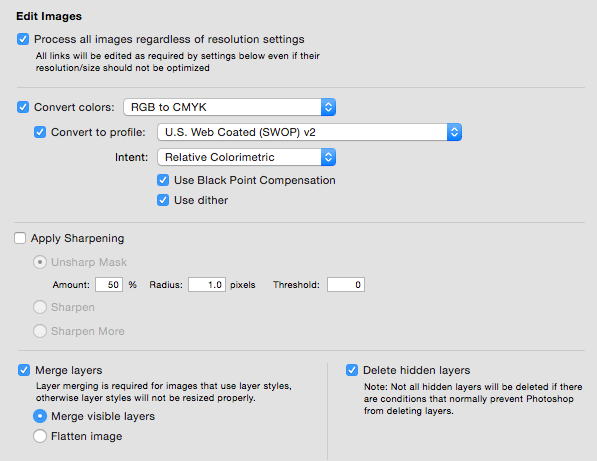
LinkOptimizer works automatically with Photoshop to eliminate the excess image data of InDesign links, perform essential image adjustments and convert image formats. For example, with just a click of a button users can:
* Optimize dozens of InDesign files
* Scale and crop images to match their dimensions in InDesign
* Change their resolution to 300 dpi
* Convert RGB images to CMYK
* Resave JPEGs as TIFF
* Run a Photoshop action on each image
As a result users can save gigabytes of disk space and countless hours of optimizing images manually, accelerate document output, reduce job turnaround and cut costs through faster processing.
Pricing and Availability:
LinkOptimizer can be purchased from Zevrix website for $259.95 USD (Lite version: $179.95) as well as from Adobe Exchange and authorized resellers. Trial is also available for download. The update is free for LinkOptimizer 5.x users and $130 to upgrade from previous versions. LinkOptimizer requires macOS 10.7-10.13 and Adobe InDesign / Photoshop CS5-CC 2018.
Zevrix Solutions: http://zevrix.com
LinkOptimizer 5.2.5: http://zevrix.com/LinkOptimizer.php
Download LinkOptimizer: http://zevrix.com/LinkOptimizer.dmg
Purchase: http://zevrix.com/store.php
Screenshot: http://zevrix.com/screenshots/lo4/edit.gif
Located in Toronto, Canada, Zevrix Solutions provides automation and productivity solutions for Adobe Creative Cloud and Creative Suite software, PDF workflows, graphic file diagnostics and Microsoft Office output on Mac OS. Zevrix is dedicated to help professionals increase their profits through automating everyday tasks, producing error-free documents, saving disk space and cutting production costs. For more information, visit their website. Copyright (C) 2018 Zevrix Solutions. All Rights Reserved. Other trademarks and registered trademarks may be the property of their respective owners.
*******
Link To Article: https://prmac.com/release-id-82514.htm
*******
---------------------------------------------------------------------------------
Note that you can alter delivered distributions at any time.
Login to your account on prMac to alter your channel selection, or to opt-out at any time.

Clappily - Your Party Planner for iOS and Android Devices
A new article has been published at prMac.
Clappily - Your Party Planner for iOS and Android Devices - Published on 02/25/18
Farrago Services Pvt. Ltd. announces Clappily-Your Party Planner 2.0 is a one stop shop for all party planning needs for iOS and Android devices. Clappily puts party organisers in touch with a wide selection of vendors, artists and service providers to fulfil their event's needs. It is a technology enabled app that allows merchants and entertainers to reach a wider mass and boost their business, while making it easier to plan parties for everyone.
Mumbai, Maharashtra - Clappily is a venture of Farrago Services Pvt. Ltd. Clappily-Your Party Planner 2.0 is a one stop shop for all party planning needs for iPhone, iPad, iPod touch, and Android devices. A platform that puts party organisers in touch with a wide selection of vendors, artists and service providers to fulfil their event's needs. It is a technology enabled app that allows merchants and entertainers to reach a wider mass and boost their business, while making it easier to plan parties for everyone. It brings users the hassle free party planning app, Clappily.
You throw parties for many occasions. To celebrate a special day or event with family, friends or loved ones. But quite often, the planning and organizing of the party takes up most of your mental space, leaving you drained even as the visitors start walking in.
The venue has to be conveniently located, with an elevator for elders or enough valet parking for visitors. Then it has to be decorated in keeping with the mood of the event along with some party props and photo booths if needed. Basic lights and sound systems including a DJ to set and maintain the tempo. Maybe an entertainer like a musician, magician, balloon guy, tattoo artist. And of course the show stopper - the cake. Photographers and videographers to capture the moments and those candid memories so they live on forever. And finally the food and drinks, including the servers, utensils, cleaning-up and so on.
Now what if all of this can be taken care of by an app - using cutting edge technology? That's exactly what Clappily does. It gives you options of vendors near your locality, so you can organize your party at the click of a few buttons. No reminders, no follow-ups, no cash transactions - everything handled seamlessly, effectively and conveniently. View product and service providers and order only what you want, based on the images, descriptions, prices and ratings. Don't bother about the arrangements. They're all taken care of.
So download the Clappily app, and experience what it means to organize a truly hassle free party, that's as enjoyable for the host as it is memorable for the visitors. Plan parties in a clap, with Clappily. Now available on the Apple and Android app stores for free.
Device Requirements:
* iPhone, iPad and iPod touch
* Requires iOS 10.0 or later
* 68.5 MB
Pricing and Availability:
Clappily-Your Party Planner 2.0 is free and is available worldwide through the App Store in the Business category. An Android version is available through Google Play.
Clappily-Your Party Planner 2.0: http://www.clappily.com
Download from iTunes: https://itunes.apple.com/in/app/clappily-your-party-planner/id1249159613?mt=8
Download from Google Play: https://play.google.com/store/apps/details?id=com.ikarma.clappilyconsumerapp&hl=sw
Farrago Services Pvt. Ltd. is a Private Company limited by Shares. It is registered with Registrar of Companies, Mumbai on Jan 1, 2016. Current Status of Farrago Services Private Limited is Active. All Material and Software (C) Copyright 2018 Farrago Services Pvt. Ltd.. All Rights Reserved. Apple, the Apple logo, iPhone, iPod and iPad are registered trademarks of Apple Inc. in the U.S. and/or other countries. Other trademarks and registered trademarks may be the property of their respective owners.
*******
Link To Article: https://prmac.com/release-id-82512.htm
*******
---------------------------------------------------------------------------------
Note that you can alter delivered distributions at any time.
Login to your account on prMac to alter your channel selection, or to opt-out at any time.
Clappily - Your Party Planner for iOS and Android Devices - Published on 02/25/18
Farrago Services Pvt. Ltd. announces Clappily-Your Party Planner 2.0 is a one stop shop for all party planning needs for iOS and Android devices. Clappily puts party organisers in touch with a wide selection of vendors, artists and service providers to fulfil their event's needs. It is a technology enabled app that allows merchants and entertainers to reach a wider mass and boost their business, while making it easier to plan parties for everyone.
Mumbai, Maharashtra - Clappily is a venture of Farrago Services Pvt. Ltd. Clappily-Your Party Planner 2.0 is a one stop shop for all party planning needs for iPhone, iPad, iPod touch, and Android devices. A platform that puts party organisers in touch with a wide selection of vendors, artists and service providers to fulfil their event's needs. It is a technology enabled app that allows merchants and entertainers to reach a wider mass and boost their business, while making it easier to plan parties for everyone. It brings users the hassle free party planning app, Clappily.
You throw parties for many occasions. To celebrate a special day or event with family, friends or loved ones. But quite often, the planning and organizing of the party takes up most of your mental space, leaving you drained even as the visitors start walking in.
The venue has to be conveniently located, with an elevator for elders or enough valet parking for visitors. Then it has to be decorated in keeping with the mood of the event along with some party props and photo booths if needed. Basic lights and sound systems including a DJ to set and maintain the tempo. Maybe an entertainer like a musician, magician, balloon guy, tattoo artist. And of course the show stopper - the cake. Photographers and videographers to capture the moments and those candid memories so they live on forever. And finally the food and drinks, including the servers, utensils, cleaning-up and so on.
Now what if all of this can be taken care of by an app - using cutting edge technology? That's exactly what Clappily does. It gives you options of vendors near your locality, so you can organize your party at the click of a few buttons. No reminders, no follow-ups, no cash transactions - everything handled seamlessly, effectively and conveniently. View product and service providers and order only what you want, based on the images, descriptions, prices and ratings. Don't bother about the arrangements. They're all taken care of.
So download the Clappily app, and experience what it means to organize a truly hassle free party, that's as enjoyable for the host as it is memorable for the visitors. Plan parties in a clap, with Clappily. Now available on the Apple and Android app stores for free.
Device Requirements:
* iPhone, iPad and iPod touch
* Requires iOS 10.0 or later
* 68.5 MB
Pricing and Availability:
Clappily-Your Party Planner 2.0 is free and is available worldwide through the App Store in the Business category. An Android version is available through Google Play.
Clappily-Your Party Planner 2.0: http://www.clappily.com
Download from iTunes: https://itunes.apple.com/in/app/clappily-your-party-planner/id1249159613?mt=8
Download from Google Play: https://play.google.com/store/apps/details?id=com.ikarma.clappilyconsumerapp&hl=sw
Farrago Services Pvt. Ltd. is a Private Company limited by Shares. It is registered with Registrar of Companies, Mumbai on Jan 1, 2016. Current Status of Farrago Services Private Limited is Active. All Material and Software (C) Copyright 2018 Farrago Services Pvt. Ltd.. All Rights Reserved. Apple, the Apple logo, iPhone, iPod and iPad are registered trademarks of Apple Inc. in the U.S. and/or other countries. Other trademarks and registered trademarks may be the property of their respective owners.
*******
Link To Article: https://prmac.com/release-id-82512.htm
*******
---------------------------------------------------------------------------------
Note that you can alter delivered distributions at any time.
Login to your account on prMac to alter your channel selection, or to opt-out at any time.
Peter Arnell has excepted to be a judge on Archisketch Drawing Contest
A new article has been published at prMac.
Peter Arnell has excepted to be a judge on Archisketch Drawing Contest - Published on 02/23/18
Open Screen Ltd. today announced that Peter Arnell has accepted to become one of the judges on its Archisketch Drawing Contest. The company is accepting submissions until end of February for its contest, with more than $2,500 in prize monies to be won. Mr. Arnell has helped to instill design-led innovation in major corporations including Samsung, DKNY, PepsiCo, Unilever and many more. The competition is free to enter and it's open to all existing and potential users of Archisketch.
London, United Kingdom - Open Screen Ltd. is proud to announce Peter Arnell has accepted to become one of the judges on its "Archisketch Drawing Contest."
Peter Arnell:
For nearly four decades, Peter Arnell has spearheaded the growth of companies and brands all over the globe increasing their businesses, market-size and revenue through unique and innovative branding, marketing, communications and design. A firm believer that marketing begins with the product, Mr. Arnell has helped to instill design-led innovation in major corporations including Samsung, DKNY, PepsiCo, Unilever and many more. The HomeHero fire extinguisher he designed for The Home Depot won Business Week's Gold IDEA award and the Arnell-designed Peapod NEV for Chrylser was named one the top Green Designs of the year by TIME Magazine.
Archisketch Drawing Contest:
Open Screen Limited is now accepting submissions, until end of February, for its "Archisketch Drawing Contest" with more than $2,500 in prize monies to be won. The competition is free to enter and it's open to all existing and potential users of Archisketch. The competition aims to demonstrate the wide variety of work that can be produced using Archisketch on the iPad. If you are not an Archisketch user, you can still participate in the competition by becoming a beta tester. This not only gives you full access to Archisketch and allows you to submit to the "Archisketch Drawing Contest", but it also lets you use the application's upcoming drawing features in your submissions. To register as a beta tester or for more information on the "Archisketch Drawing Contest" please visit the Archisketch Competition Page.
About Archisketch:
Archisketch is a scale-aware sketching program ideal for Architects, interior and landscape designers, product designers, design students, or anyone working in the construction industry on an iPad. Inspired by the tradition of sketching on a tracing pad, Archisketch brings sketching into the modern era on an iPad. Archisketch helps architects and designers visualise, capture and explore their ideas using layers, symbols, colours, dimension guidelines, 2D grids, isometric and axonometric 3D grids, and even smart one- and two-point perspectives for 3D. When finished, drawings can be printed to scale directly from the iPad up to A1 size, or exported to PDF, which can be included in a CAD application, or uploaded to Adobe Creative Cloud.
Pricing, Availability and Compatibility:
Archisketch 2.9 is available immediately from the App Store as a free download for use with up to 50 shapes in two projects, with an in-app purchase for unlimited shapes and projects for $9.99 (USD). It requires iOS 11 or later on an iPad, iPad Air or iPad Pro. Support for Apple Pencil requires an iPad Pro.
Archisketch 2.9: http://www.archisketch.eu
Archisketch Drawing Competition: http://www.archisketch.eu/competition
Download from iTunes: https://itunes.apple.com/app/id725328455?mt=8
Media Assets: https://www.archisketch.eu/more2_9/press.html
Open Screen Ltd. is a privately held company headquartered in London. Archisketch is a trademark of Open Screen Ltd. Copyright (c) 2018, all rights reserved. All other trademarks or registered trademarks are the property of their respective owners.
*******
Link To Article: https://prmac.com/release-id-82511.htm
*******
---------------------------------------------------------------------------------
Note that you can alter delivered distributions at any time.
Login to your account on prMac to alter your channel selection, or to opt-out at any time.
Peter Arnell has excepted to be a judge on Archisketch Drawing Contest - Published on 02/23/18
Open Screen Ltd. today announced that Peter Arnell has accepted to become one of the judges on its Archisketch Drawing Contest. The company is accepting submissions until end of February for its contest, with more than $2,500 in prize monies to be won. Mr. Arnell has helped to instill design-led innovation in major corporations including Samsung, DKNY, PepsiCo, Unilever and many more. The competition is free to enter and it's open to all existing and potential users of Archisketch.
London, United Kingdom - Open Screen Ltd. is proud to announce Peter Arnell has accepted to become one of the judges on its "Archisketch Drawing Contest."
Peter Arnell:
For nearly four decades, Peter Arnell has spearheaded the growth of companies and brands all over the globe increasing their businesses, market-size and revenue through unique and innovative branding, marketing, communications and design. A firm believer that marketing begins with the product, Mr. Arnell has helped to instill design-led innovation in major corporations including Samsung, DKNY, PepsiCo, Unilever and many more. The HomeHero fire extinguisher he designed for The Home Depot won Business Week's Gold IDEA award and the Arnell-designed Peapod NEV for Chrylser was named one the top Green Designs of the year by TIME Magazine.
Archisketch Drawing Contest:
Open Screen Limited is now accepting submissions, until end of February, for its "Archisketch Drawing Contest" with more than $2,500 in prize monies to be won. The competition is free to enter and it's open to all existing and potential users of Archisketch. The competition aims to demonstrate the wide variety of work that can be produced using Archisketch on the iPad. If you are not an Archisketch user, you can still participate in the competition by becoming a beta tester. This not only gives you full access to Archisketch and allows you to submit to the "Archisketch Drawing Contest", but it also lets you use the application's upcoming drawing features in your submissions. To register as a beta tester or for more information on the "Archisketch Drawing Contest" please visit the Archisketch Competition Page.
About Archisketch:
Archisketch is a scale-aware sketching program ideal for Architects, interior and landscape designers, product designers, design students, or anyone working in the construction industry on an iPad. Inspired by the tradition of sketching on a tracing pad, Archisketch brings sketching into the modern era on an iPad. Archisketch helps architects and designers visualise, capture and explore their ideas using layers, symbols, colours, dimension guidelines, 2D grids, isometric and axonometric 3D grids, and even smart one- and two-point perspectives for 3D. When finished, drawings can be printed to scale directly from the iPad up to A1 size, or exported to PDF, which can be included in a CAD application, or uploaded to Adobe Creative Cloud.
Pricing, Availability and Compatibility:
Archisketch 2.9 is available immediately from the App Store as a free download for use with up to 50 shapes in two projects, with an in-app purchase for unlimited shapes and projects for $9.99 (USD). It requires iOS 11 or later on an iPad, iPad Air or iPad Pro. Support for Apple Pencil requires an iPad Pro.
Archisketch 2.9: http://www.archisketch.eu
Archisketch Drawing Competition: http://www.archisketch.eu/competition
Download from iTunes: https://itunes.apple.com/app/id725328455?mt=8
Media Assets: https://www.archisketch.eu/more2_9/press.html
Open Screen Ltd. is a privately held company headquartered in London. Archisketch is a trademark of Open Screen Ltd. Copyright (c) 2018, all rights reserved. All other trademarks or registered trademarks are the property of their respective owners.
*******
Link To Article: https://prmac.com/release-id-82511.htm
*******
---------------------------------------------------------------------------------
Note that you can alter delivered distributions at any time.
Login to your account on prMac to alter your channel selection, or to opt-out at any time.
FxFactory Releases Rips Plugins for Final Cut Pro X
A new article has been published at prMac.
FxFactory Releases Rips Plugins for Final Cut Pro X - Published on 02/23/18
Boston based FxFactory today releases XEffects Rips, a new set of Final Cut Pro X plugins. Developed by partner Idustrial Revolution, the plugins emulate the ripping of paper, separating the media into two halves with a photorealistic edge. The rip has onscreen controls for direction and rotation and the rip itself can be positioned using X & Y controls and rotated to any angle. Each plugin comes loaded with a choice of 10 different edges which can be adjusted for edge width, colour and offset.
Boston, Massachusetts - FxFactory today released a new set of Final Cut Pro X plugins called XEffects Rips. Developed by partner Idustrial Revolution, the plugins emulate the ripping of paper, separating the media into two halves with a photorealistic edge. The pack consists of effects and titles for single clips and transitions to rip between clips.
"We wanted to develop a plugin that would offer realistic looking rips and tears within Final Cut Pro X. It's a look many graphic designers will be familiar with and we wanted to make that great style available to video editors inside FCPX" said Peter Wiggins, plugin developer at Idustrial Revolution. "We put a lot of effort into our plugins making them easy to use with a couple of clicks. However, we also believe in flexibility, hence we try to publish as many of the custom controls possible so that editors can tweak the look of the plugin to exactly what they want".
The rip has onscreen controls for direction and rotation and the rip itself can be positioned using X & Y controls and rotated to any angle. Each plugin comes loaded with a choice of 10 different edges which can be adjusted for edge width, colour and offset.
Features:
* All Transitions, Effects & Title Plugins work with video or images
* Control tear direction and paper tear angle
* Onscreen controls for paper tear angles
* Position tear anywhere in frame using X and Y controls
* 10 different edges to choose from
* Control depth of edge and edge offset
* Add a drop shadow to outgoing or incoming tear
* Make multiple tears using Compound Clips
* Control speed of tear
* Pin sharp results even in 4K FCPX timelines
Idustrial Revolution's designers and editors have been at the forefront of using Apple technology and software in creating content for broadcasters, corporate users and videographers. They have been successfully producing products for Final Cut Pro for over 11 years.
Pricing and Availability:
XEffects Rips is distributed through FxFactory online. It is being launched at a discounted price of $39 (USD) for one week until the 1st March 2018. Normal price $49 (USD).
XEffects Rips: https://fxfactory.com/info/xeffectsrips/
YouTube Video (Demo): https://www.youtube.com/watch?v=tYwbwTajceY
YouTube Video (Tutorial): https://www.youtube.com/watch?v=dLkPUdxES1o
Poster Image: https://cdn.shopify.com/s/files/1/1987/8457/files/X14-Rips-4K-Youtube_poster.jpg
Banner Image: https://cdn.shopify.com/s/files/1/1987/8457/files/x14-2400x800-banner-clean.jpeg
App Icon: https://cdn.shopify.com/s/files/1/1987/8457/files/x14-icon.png
Established in 2004, Boston, Massachusetts-based Noise Industries is an innovative developer of visual effects tools for the post-production and broadcast community. Their products are integrated with popular non-linear editing and compositing products from Apple and Adobe. Copyright (C) 2018 Noise Industries. All Rights Reserved. Apple, the Apple logo, Mac OS X, and Macintosh are registered trademarks of Apple Inc. in the U.S. and/or other countries. All other trademarks and trade names are the property of their respective owners.
*******
Link To Article: https://prmac.com/release-id-82510.htm
*******
---------------------------------------------------------------------------------
Note that you can alter delivered distributions at any time.
Login to your account on prMac to alter your channel selection, or to opt-out at any time.
FxFactory Releases Rips Plugins for Final Cut Pro X - Published on 02/23/18
Boston based FxFactory today releases XEffects Rips, a new set of Final Cut Pro X plugins. Developed by partner Idustrial Revolution, the plugins emulate the ripping of paper, separating the media into two halves with a photorealistic edge. The rip has onscreen controls for direction and rotation and the rip itself can be positioned using X & Y controls and rotated to any angle. Each plugin comes loaded with a choice of 10 different edges which can be adjusted for edge width, colour and offset.
Boston, Massachusetts - FxFactory today released a new set of Final Cut Pro X plugins called XEffects Rips. Developed by partner Idustrial Revolution, the plugins emulate the ripping of paper, separating the media into two halves with a photorealistic edge. The pack consists of effects and titles for single clips and transitions to rip between clips.
"We wanted to develop a plugin that would offer realistic looking rips and tears within Final Cut Pro X. It's a look many graphic designers will be familiar with and we wanted to make that great style available to video editors inside FCPX" said Peter Wiggins, plugin developer at Idustrial Revolution. "We put a lot of effort into our plugins making them easy to use with a couple of clicks. However, we also believe in flexibility, hence we try to publish as many of the custom controls possible so that editors can tweak the look of the plugin to exactly what they want".
The rip has onscreen controls for direction and rotation and the rip itself can be positioned using X & Y controls and rotated to any angle. Each plugin comes loaded with a choice of 10 different edges which can be adjusted for edge width, colour and offset.
Features:
* All Transitions, Effects & Title Plugins work with video or images
* Control tear direction and paper tear angle
* Onscreen controls for paper tear angles
* Position tear anywhere in frame using X and Y controls
* 10 different edges to choose from
* Control depth of edge and edge offset
* Add a drop shadow to outgoing or incoming tear
* Make multiple tears using Compound Clips
* Control speed of tear
* Pin sharp results even in 4K FCPX timelines
Idustrial Revolution's designers and editors have been at the forefront of using Apple technology and software in creating content for broadcasters, corporate users and videographers. They have been successfully producing products for Final Cut Pro for over 11 years.
Pricing and Availability:
XEffects Rips is distributed through FxFactory online. It is being launched at a discounted price of $39 (USD) for one week until the 1st March 2018. Normal price $49 (USD).
XEffects Rips: https://fxfactory.com/info/xeffectsrips/
YouTube Video (Demo): https://www.youtube.com/watch?v=tYwbwTajceY
YouTube Video (Tutorial): https://www.youtube.com/watch?v=dLkPUdxES1o
Poster Image: https://cdn.shopify.com/s/files/1/1987/8457/files/X14-Rips-4K-Youtube_poster.jpg

Banner Image: https://cdn.shopify.com/s/files/1/1987/8457/files/x14-2400x800-banner-clean.jpeg

App Icon: https://cdn.shopify.com/s/files/1/1987/8457/files/x14-icon.png

Established in 2004, Boston, Massachusetts-based Noise Industries is an innovative developer of visual effects tools for the post-production and broadcast community. Their products are integrated with popular non-linear editing and compositing products from Apple and Adobe. Copyright (C) 2018 Noise Industries. All Rights Reserved. Apple, the Apple logo, Mac OS X, and Macintosh are registered trademarks of Apple Inc. in the U.S. and/or other countries. All other trademarks and trade names are the property of their respective owners.
*******
Link To Article: https://prmac.com/release-id-82510.htm
*******
---------------------------------------------------------------------------------
Note that you can alter delivered distributions at any time.
Login to your account on prMac to alter your channel selection, or to opt-out at any time.
Prizmo Go 2.0 hits the App Store - Instant Text OCR for iPhone and iPad
A new article has been published at prMac.
Prizmo Go 2.0 hits the App Store - Instant Text OCR for iPhone and iPad - Published on 02/22/18
Creaceed today announces Prizmo Go 2.0, a major upgrade to their text capture app for iPhone and iPad. Prizmo Go lets the user take a picture of printed or handwritten text and then recognize it using optical character recognition (OCR) technology. The recognized text can then be selected from the photo by swiping through it. Version 2.0 brings a new, more powerful, built-in neural network-based OCR in more languages, cloud-based handwriting recognition, and translation to 59 languages.
Mons, Belgium - Creaceed announces today the release of Prizmo Go version 2.0, a major upgrade to their text capture app for iPhone and iPad. Prizmo Go 2.0 brings a new, more powerful, built-in neural network-based OCR in more languages, cloud-based handwriting recognition (English only), and translation to 59 languages.
Prizmo Go 2.0 is an innovative app that lets the user take a picture of printed or handwritten text and then recognizes it using optical character recognition (OCR) technology, avoiding the frustration of retyping it on screen. Part of said text can then be selected directly from the photo by swiping through it. Users can then interact with it or just copy/paste it to other apps or to the Mac.
Recognized text can be edited within the application, or read aloud with built-in speech synthesis. Information detected in the text such as website urls, phone numbers, email addresses, QR codes, or physical addresses can be specifically activated. Text translation to 59 languages is also available as a new feature of version 2.0.
Blind and low-vision users can also take full advantage of Prizmo Go 2.0, as not only does it propose extensive support for VoiceOver but it also brings specific features such as pre-shooting instructions, automatic angle correction, and automatic text-to-speech playback.
Prizmo Go 2.0 also introduces a new subscription model, as an addition to pre-existing options that remain valid (see details below).
New features in 2.0:
* Cloud OCR option in 26 languages, including Japanese, Chinese, Korean, and Arabic
* Handwriting recognition (English only)
* Translation to 59 languages
* Robust neural network-based built-in OCR in 23 languages (no internet connection required): Czech, Danish, Dutch, English, Finnish, French, German, Greek, Hungarian, Italian, Korean, Norwegian Bokml, Polish, Portuguese, Romanian, Russian, Serbian (Cyrillic), Serbian (Latin), Slovak, Spanish, Swedish, Turkish, Ukrainian
Other features include:
* Real-time, augmented-reality inspired text highlighting in camera preview
* Accurate text selection by swiping through the picture
* Innovative image stabilization with sharpness tracking
* QR code recognition
* Copy/paste to the Mac with Universal Clipboard
* VoiceOver support, including spoken guidance prior to actual shooting
* Optimized for latest iOS, Drag & Drop, 3D Touch Quick Actions & haptic feedback, iPad Multitasking (Slide Over / Split View)
* Automation: Action extension, Apple Workflow compatibility (callback URL), Open In
Device Requirements:
* iPhone, iPad, and iPod touch
* Requires iOS 10.0 or later
* Localized in 16 languages
* 51.7 MB
Pricing and Availability:
Prizmo Go 2.0 can be freely downloaded on the App Store from the Utilities category. Text recognition can be tried out, but access to result is limited. Text access (copy/paste, interactions) can be unlocked by purchasing the Export Pack for $4.99 as a one-time purchase. 10 tokens will be received to test Cloud OCRs both for printed text and handwriting. Cloud OCR requires units to be operated, units that can be purchased directly within the app: 100-pack is $0.99, 1000-pack is $4.99 (USD).
Premium Plan is a new subscription option introduced with version 2.0 that unlocks all the features of the Export Pack and allows unlimited use of Cloud OCR recognition (print and handwriting) as well as a new cloud-based text translation to 59 languages (exclusive feature). Premium Plan is available as a monthly subscription for $0.99 per month or yearly for $7.99 (USD) per year. Users who previously purchased the Export Pack are offered special introductory pricing on the Premium Plan (60% OFF first year, yearly plan only).
Prizmo Go 2.0: https://creaceed.com/prizmogo
More Information: https://medium.com/@creaceed/lets-talk-ocr-6987ae05c691
Download from iTunes: https://itunes.apple.com/app/id1183367390?mt=8&pt=11162&at=1l3vojn&ct=prlaunch
Vimeo Video (New Features): https://vimeo.com/256786811
Vimeo Video (Original Trailer): https://vimeo.com/214806351
App Icon: https://is2-ssl.mzstatic.com/image/thumb/Purple128/v4/47/5c/42/475c4254-edc6-1d03-82e9-41dacad17f52/AppIcon-1x_U007emarketing-0-0-GLES2_U002c0-512MB-sRGB-0-0-0-85-220-0-0-0-3.png/246x0w.jpg
Creaceed is a Belgian company that has been making apps for 10 years for Apple platforms, focusing on image processing technologies in the fields of document scanning, note taking, photo and video processing. Other apps like Hydra, Carbo, and Prizmo have been awarded by the press and featured by Apple on multiple occasions. Copyright 2008-2018 Creaceed. All Rights Reserved. Apple, the Apple logo, Macintosh, iOS, macOS, iPhone, iPad are registered trademarks of Apple Computer in the U.S. and/or other countries.
*******
Link To Article: https://prmac.com/release-id-82509.htm
*******
---------------------------------------------------------------------------------
Note that you can alter delivered distributions at any time.
Login to your account on prMac to alter your channel selection, or to opt-out at any time.
Prizmo Go 2.0 hits the App Store - Instant Text OCR for iPhone and iPad - Published on 02/22/18
Creaceed today announces Prizmo Go 2.0, a major upgrade to their text capture app for iPhone and iPad. Prizmo Go lets the user take a picture of printed or handwritten text and then recognize it using optical character recognition (OCR) technology. The recognized text can then be selected from the photo by swiping through it. Version 2.0 brings a new, more powerful, built-in neural network-based OCR in more languages, cloud-based handwriting recognition, and translation to 59 languages.
Mons, Belgium - Creaceed announces today the release of Prizmo Go version 2.0, a major upgrade to their text capture app for iPhone and iPad. Prizmo Go 2.0 brings a new, more powerful, built-in neural network-based OCR in more languages, cloud-based handwriting recognition (English only), and translation to 59 languages.
Prizmo Go 2.0 is an innovative app that lets the user take a picture of printed or handwritten text and then recognizes it using optical character recognition (OCR) technology, avoiding the frustration of retyping it on screen. Part of said text can then be selected directly from the photo by swiping through it. Users can then interact with it or just copy/paste it to other apps or to the Mac.
Recognized text can be edited within the application, or read aloud with built-in speech synthesis. Information detected in the text such as website urls, phone numbers, email addresses, QR codes, or physical addresses can be specifically activated. Text translation to 59 languages is also available as a new feature of version 2.0.
Blind and low-vision users can also take full advantage of Prizmo Go 2.0, as not only does it propose extensive support for VoiceOver but it also brings specific features such as pre-shooting instructions, automatic angle correction, and automatic text-to-speech playback.
Prizmo Go 2.0 also introduces a new subscription model, as an addition to pre-existing options that remain valid (see details below).
New features in 2.0:
* Cloud OCR option in 26 languages, including Japanese, Chinese, Korean, and Arabic
* Handwriting recognition (English only)
* Translation to 59 languages
* Robust neural network-based built-in OCR in 23 languages (no internet connection required): Czech, Danish, Dutch, English, Finnish, French, German, Greek, Hungarian, Italian, Korean, Norwegian Bokml, Polish, Portuguese, Romanian, Russian, Serbian (Cyrillic), Serbian (Latin), Slovak, Spanish, Swedish, Turkish, Ukrainian
Other features include:
* Real-time, augmented-reality inspired text highlighting in camera preview
* Accurate text selection by swiping through the picture
* Innovative image stabilization with sharpness tracking
* QR code recognition
* Copy/paste to the Mac with Universal Clipboard
* VoiceOver support, including spoken guidance prior to actual shooting
* Optimized for latest iOS, Drag & Drop, 3D Touch Quick Actions & haptic feedback, iPad Multitasking (Slide Over / Split View)
* Automation: Action extension, Apple Workflow compatibility (callback URL), Open In
Device Requirements:
* iPhone, iPad, and iPod touch
* Requires iOS 10.0 or later
* Localized in 16 languages
* 51.7 MB
Pricing and Availability:
Prizmo Go 2.0 can be freely downloaded on the App Store from the Utilities category. Text recognition can be tried out, but access to result is limited. Text access (copy/paste, interactions) can be unlocked by purchasing the Export Pack for $4.99 as a one-time purchase. 10 tokens will be received to test Cloud OCRs both for printed text and handwriting. Cloud OCR requires units to be operated, units that can be purchased directly within the app: 100-pack is $0.99, 1000-pack is $4.99 (USD).
Premium Plan is a new subscription option introduced with version 2.0 that unlocks all the features of the Export Pack and allows unlimited use of Cloud OCR recognition (print and handwriting) as well as a new cloud-based text translation to 59 languages (exclusive feature). Premium Plan is available as a monthly subscription for $0.99 per month or yearly for $7.99 (USD) per year. Users who previously purchased the Export Pack are offered special introductory pricing on the Premium Plan (60% OFF first year, yearly plan only).
Prizmo Go 2.0: https://creaceed.com/prizmogo
More Information: https://medium.com/@creaceed/lets-talk-ocr-6987ae05c691
Download from iTunes: https://itunes.apple.com/app/id1183367390?mt=8&pt=11162&at=1l3vojn&ct=prlaunch
Vimeo Video (New Features): https://vimeo.com/256786811
Vimeo Video (Original Trailer): https://vimeo.com/214806351
App Icon: https://is2-ssl.mzstatic.com/image/thumb/Purple128/v4/47/5c/42/475c4254-edc6-1d03-82e9-41dacad17f52/AppIcon-1x_U007emarketing-0-0-GLES2_U002c0-512MB-sRGB-0-0-0-85-220-0-0-0-3.png/246x0w.jpg
Creaceed is a Belgian company that has been making apps for 10 years for Apple platforms, focusing on image processing technologies in the fields of document scanning, note taking, photo and video processing. Other apps like Hydra, Carbo, and Prizmo have been awarded by the press and featured by Apple on multiple occasions. Copyright 2008-2018 Creaceed. All Rights Reserved. Apple, the Apple logo, Macintosh, iOS, macOS, iPhone, iPad are registered trademarks of Apple Computer in the U.S. and/or other countries.
*******
Link To Article: https://prmac.com/release-id-82509.htm
*******
---------------------------------------------------------------------------------
Note that you can alter delivered distributions at any time.
Login to your account on prMac to alter your channel selection, or to opt-out at any time.
Kids can play with puppies and dolls in AR on iOS with Anya
A new article has been published at prMac.
Kids can play with puppies and dolls in AR on iOS with Anya - Published on 02/22/18
Sprite Labs today releases Anya Dress Up & Pet Puppies AR 4.4, an important feature update their popular entertainment iOS app. Anya is a cute little doll that any child can bring into their life and interact with. Tickle, dress her and interact with her puppies. She can pet her puppies and play games with them too. Versions 4.4 sports a new AR update which allows kids to interact and play with Anya and puppies in their world, changing their clothes, playing games and dancing along.
Fremont, California - Sprite Labs today is pleased to announce that Anya Dress Up & Pet Puppies got its AR update today which allows kids to interact and play with Anya and puppies in their world (with AR), changing their clothes, playing games and dancing along.
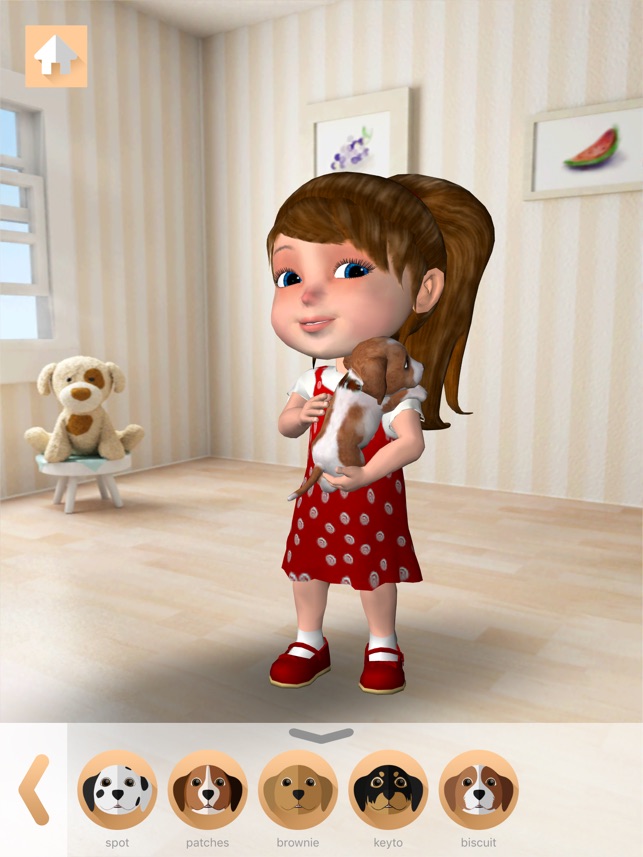
Anya is a unique app. She is a doll that a child can bring into their life and interact with, tickle and dress her and her puppies. She can pet the puppies and play games with them too. With Apple's ARKit, Anya and her puppies come to life in the real world. Anya and her puppies can be in a doll house, on a coffee table in the living room, on the kitchen table, or anywhere a child would like to play with them.
Anya is a cute little girl who dances, sings and plays interactive games like twirling a hula hoop, pop the bubbles and maracas. She repeats what you say. You can even dress her up and tickle her, she makes funny faces too! The puppies do everything a cute puppy does, fetch, sit, roll and dance!
This app uses the accelerometer creatively; a user can make Anya twirl the hoop if the he/she moves the phone in circles, stop and she drops the hoop. This app is loaded with interactive play, she blows the bubbles and the user can pop them with a tap or pop multiple bubble with simultaneous taps, tap her feet and she will dance, tap her nose and she makes a funny face and more. She is quite emotional too, just like all little girls! Making her definitely a fun-to-play-with app.
"Anya Dress Up & Pet Puppies AR is loved by millions of kids worldwide. And now with Augmented Reality, we bring them to life in the real world. This opens a new frontier for us to explore, and we are very excite for what the future holds," explained Nikita Kapoor, Founder at Sprite Labs. "This is a Universal app, so it will work great both on the iPhone and iPad."
Device Requirements:
* iPhone, iPad, iPod touch and Apple TV
* Requires iOS 9.0 or later
* Universal Application
* 127.5 MB
Pricing and Availability:
Anya Dress Up & Pet Puppies AR 4.4 is Free (With In-App Purchase) and available worldwide exclusively through the App Store in the Entertainment category.
Sprite Labs: http://www.spritekids.com/
Anya Dress Up & Pet Puppies AR 4.4: https://itunes.apple.com/app/talking-anya-free/id435890283
Screenshot: https://is2-ssl.mzstatic.com/image/thumb/Purple62/v4/6a/6c/a7/6a6ca7e5-011c-1dfc-bef6-325abc393904/mzl.ddckxkxp.png/643x0w.jpg
App Icon: https://is2-ssl.mzstatic.com/image/thumb/Purple128/v4/dd/79/d2/dd79d269-96bd-eb31-6119-67bcc4f75760/AppIcon-1x_U007emarketing-85-220-0-9.png/246x0w.jpg
Located in Fremont, California, Sprite Labs was founded in 2009 with the vision of creating quality entertainment and educational applications for mobile devices. All Material and Software (C) 2009-2018 Sprite Labs, LLC / All Rights Reserved. Apple, the Apple logo, iPhone, iPod and iPad are registered trademarks of Apple Inc. in the U.S. and/or other countries. Other trademarks and registered trademarks may be the property of their respective owners.
*******
Link To Article: https://prmac.com/release-id-82508.htm
*******
---------------------------------------------------------------------------------
Note that you can alter delivered distributions at any time.
Login to your account on prMac to alter your channel selection, or to opt-out at any time.
Kids can play with puppies and dolls in AR on iOS with Anya - Published on 02/22/18
Sprite Labs today releases Anya Dress Up & Pet Puppies AR 4.4, an important feature update their popular entertainment iOS app. Anya is a cute little doll that any child can bring into their life and interact with. Tickle, dress her and interact with her puppies. She can pet her puppies and play games with them too. Versions 4.4 sports a new AR update which allows kids to interact and play with Anya and puppies in their world, changing their clothes, playing games and dancing along.
Fremont, California - Sprite Labs today is pleased to announce that Anya Dress Up & Pet Puppies got its AR update today which allows kids to interact and play with Anya and puppies in their world (with AR), changing their clothes, playing games and dancing along.
Anya is a unique app. She is a doll that a child can bring into their life and interact with, tickle and dress her and her puppies. She can pet the puppies and play games with them too. With Apple's ARKit, Anya and her puppies come to life in the real world. Anya and her puppies can be in a doll house, on a coffee table in the living room, on the kitchen table, or anywhere a child would like to play with them.
Anya is a cute little girl who dances, sings and plays interactive games like twirling a hula hoop, pop the bubbles and maracas. She repeats what you say. You can even dress her up and tickle her, she makes funny faces too! The puppies do everything a cute puppy does, fetch, sit, roll and dance!
This app uses the accelerometer creatively; a user can make Anya twirl the hoop if the he/she moves the phone in circles, stop and she drops the hoop. This app is loaded with interactive play, she blows the bubbles and the user can pop them with a tap or pop multiple bubble with simultaneous taps, tap her feet and she will dance, tap her nose and she makes a funny face and more. She is quite emotional too, just like all little girls! Making her definitely a fun-to-play-with app.
"Anya Dress Up & Pet Puppies AR is loved by millions of kids worldwide. And now with Augmented Reality, we bring them to life in the real world. This opens a new frontier for us to explore, and we are very excite for what the future holds," explained Nikita Kapoor, Founder at Sprite Labs. "This is a Universal app, so it will work great both on the iPhone and iPad."
Device Requirements:
* iPhone, iPad, iPod touch and Apple TV
* Requires iOS 9.0 or later
* Universal Application
* 127.5 MB
Pricing and Availability:
Anya Dress Up & Pet Puppies AR 4.4 is Free (With In-App Purchase) and available worldwide exclusively through the App Store in the Entertainment category.
Sprite Labs: http://www.spritekids.com/
Anya Dress Up & Pet Puppies AR 4.4: https://itunes.apple.com/app/talking-anya-free/id435890283
Screenshot: https://is2-ssl.mzstatic.com/image/thumb/Purple62/v4/6a/6c/a7/6a6ca7e5-011c-1dfc-bef6-325abc393904/mzl.ddckxkxp.png/643x0w.jpg
App Icon: https://is2-ssl.mzstatic.com/image/thumb/Purple128/v4/dd/79/d2/dd79d269-96bd-eb31-6119-67bcc4f75760/AppIcon-1x_U007emarketing-85-220-0-9.png/246x0w.jpg

Located in Fremont, California, Sprite Labs was founded in 2009 with the vision of creating quality entertainment and educational applications for mobile devices. All Material and Software (C) 2009-2018 Sprite Labs, LLC / All Rights Reserved. Apple, the Apple logo, iPhone, iPod and iPad are registered trademarks of Apple Inc. in the U.S. and/or other countries. Other trademarks and registered trademarks may be the property of their respective owners.
*******
Link To Article: https://prmac.com/release-id-82508.htm
*******
---------------------------------------------------------------------------------
Note that you can alter delivered distributions at any time.
Login to your account on prMac to alter your channel selection, or to opt-out at any time.
Cheetah3D 7.2 released: Adds support for HEVC, ProRes, IES Lights & more
A new article has been published at prMac.
Cheetah3D 7.2 released: Adds support for HEVC, ProRes, IES Lights & more - Published on 02/22/18
MW3D-Solutions today announces Cheetah3D 7.2, an important feature update to its popular 3D modeling solution for Mac OS X. Version 7.2 is now using the AVFoundation framework, which offers much faster and higher quality movie export and support for state of the art movie codecs like HEVC. Professional users will enjoy the added ProRes workflow. The Cheetah3D unbiased render engine Falcon also sees some great additions like support for IES lights, Filmic tone mapping and improved soft shadows.
Tapfheim, Germany - MW3D-Solutions today is happy to announce Cheetah3D 7.2. The biggest change in Cheetah3D 7.2 is probably the complete rewrite of the movie import/export code. Cheetah3D is using the AVFoundation framework now, which offers much faster and better movie export. It also supports new state of the art movie codecs like HEVC. Professional users will enjoy the added ProRes workflow.
Cheetah3D unbiased render engine Falcon also saw some nice additions like support for IES lights, Filmic tone mapping and improved soft shadows.
Major new features in Cheetah3D 7.2:
* Upgraded form QTKit framework to AVFoundation framework
* Added support for HEVC (just on High Sierra), ProRes422 and ProRes4444 video codecs
* Much faster multithreaded movie export
* Added .gif exporter to Render Manager
* Added support for the iMac Pro with up to 18 CPU cores (and 36 threads )
* Added support for IES light profiles
* Added support for filmic tone mapping to Falcon renderer
* Added support for soft shadows to non-physical light sources in Falcon
* And much much more
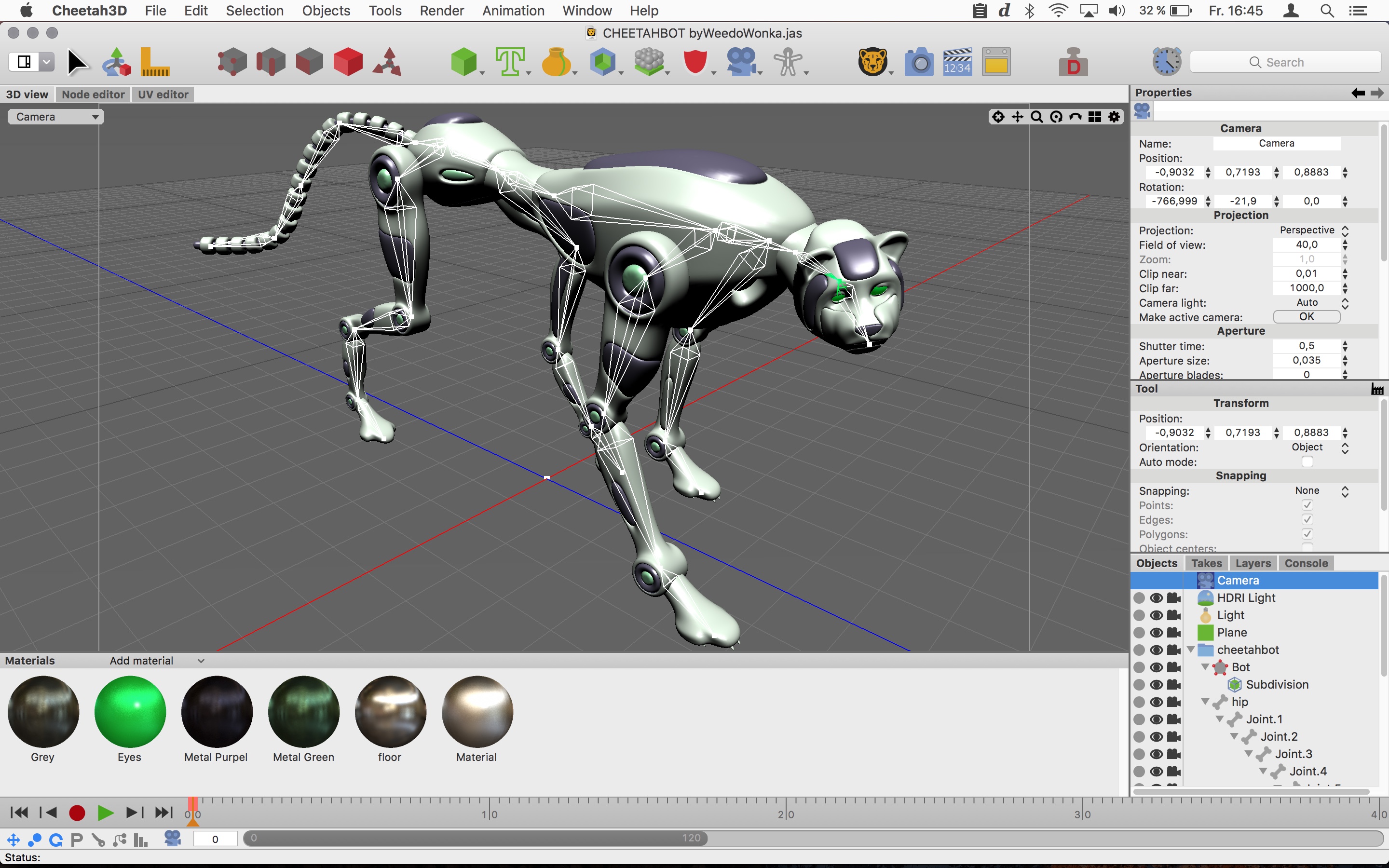
Cheetah3D is perfect for graphic designers, architects and casual users alike, Cheetah3D provides the most useful features needed to get the job done, and organizes them within a beautifully elegant user-interface that is powerful, intuitive and quick to work with. It offers many powerful tools, like subdivision surface modelling, joint based character animation system, UV unwrapping, texture painting, rigid and soft body dynamics, PDF import, global illumination renderer, and much more. The possibility to extend Cheetah3D with JavaScripts and support for many common file formats, like FBX, 3DS or Collada, rounds out its feature set.
Language support:
* U.S. English
System Requirements:
* Mac OS X Version 10.8.5 or better
* Intel 64 Bit
* 45.0 MB Hard Drive space
Pricing and Availability:
Cheetah3D 7.0 is priced at $99.00 (USD) for a single-user license. Customers may upgrade from older version for $59.00 (USD). For customers who purchased Cheetah3D 6.x after April 1st 2015, the Upgrade to v7 is free. For more information, please contact Martin Wengenmayer.
Cheetah3D 7.2: https://www.cheetah3d.com/
Download Cheetah3D: https://www.cheetah3d.com/download/Cheetah3D.dmg
Purchase Cheetah3D: https://www.cheetah3d.com/order.php
Screenshot: https://www.cheetah3d.com/img/screenshots/Cheetah3D_v7_screenshot.jpg
Application Icon: https://cheetah3d.com/download/Screenshots/Cheetah3D_v7_Icon.png
Located in Tapfheim, Germany, MW3D-Solutions is an independent software developer whose main goal is the development of easy-to-use yet powerful 3D software exclusively for Mac OS X with a focus on iterating state-of-the-art 3D modeling, rendering and animation algorithms into a true Mac user experience. Copyright (C) 2004-2018 MW3D-Solutions and Cheetah3D. All Rights Reserved. Apple, the Apple logo, and OS X are registered trademarks of Apple Computer in the U.S. and/or other countries.
*******
Link To Article: https://prmac.com/release-id-82507.htm
*******
---------------------------------------------------------------------------------
Note that you can alter delivered distributions at any time.
Login to your account on prMac to alter your channel selection, or to opt-out at any time.
Cheetah3D 7.2 released: Adds support for HEVC, ProRes, IES Lights & more - Published on 02/22/18
MW3D-Solutions today announces Cheetah3D 7.2, an important feature update to its popular 3D modeling solution for Mac OS X. Version 7.2 is now using the AVFoundation framework, which offers much faster and higher quality movie export and support for state of the art movie codecs like HEVC. Professional users will enjoy the added ProRes workflow. The Cheetah3D unbiased render engine Falcon also sees some great additions like support for IES lights, Filmic tone mapping and improved soft shadows.
Tapfheim, Germany - MW3D-Solutions today is happy to announce Cheetah3D 7.2. The biggest change in Cheetah3D 7.2 is probably the complete rewrite of the movie import/export code. Cheetah3D is using the AVFoundation framework now, which offers much faster and better movie export. It also supports new state of the art movie codecs like HEVC. Professional users will enjoy the added ProRes workflow.
Cheetah3D unbiased render engine Falcon also saw some nice additions like support for IES lights, Filmic tone mapping and improved soft shadows.
Major new features in Cheetah3D 7.2:
* Upgraded form QTKit framework to AVFoundation framework
* Added support for HEVC (just on High Sierra), ProRes422 and ProRes4444 video codecs
* Much faster multithreaded movie export
* Added .gif exporter to Render Manager
* Added support for the iMac Pro with up to 18 CPU cores (and 36 threads )
* Added support for IES light profiles
* Added support for filmic tone mapping to Falcon renderer
* Added support for soft shadows to non-physical light sources in Falcon
* And much much more
Cheetah3D is perfect for graphic designers, architects and casual users alike, Cheetah3D provides the most useful features needed to get the job done, and organizes them within a beautifully elegant user-interface that is powerful, intuitive and quick to work with. It offers many powerful tools, like subdivision surface modelling, joint based character animation system, UV unwrapping, texture painting, rigid and soft body dynamics, PDF import, global illumination renderer, and much more. The possibility to extend Cheetah3D with JavaScripts and support for many common file formats, like FBX, 3DS or Collada, rounds out its feature set.
Language support:
* U.S. English
System Requirements:
* Mac OS X Version 10.8.5 or better
* Intel 64 Bit
* 45.0 MB Hard Drive space
Pricing and Availability:
Cheetah3D 7.0 is priced at $99.00 (USD) for a single-user license. Customers may upgrade from older version for $59.00 (USD). For customers who purchased Cheetah3D 6.x after April 1st 2015, the Upgrade to v7 is free. For more information, please contact Martin Wengenmayer.
Cheetah3D 7.2: https://www.cheetah3d.com/
Download Cheetah3D: https://www.cheetah3d.com/download/Cheetah3D.dmg
Purchase Cheetah3D: https://www.cheetah3d.com/order.php
Screenshot: https://www.cheetah3d.com/img/screenshots/Cheetah3D_v7_screenshot.jpg
Application Icon: https://cheetah3d.com/download/Screenshots/Cheetah3D_v7_Icon.png

Located in Tapfheim, Germany, MW3D-Solutions is an independent software developer whose main goal is the development of easy-to-use yet powerful 3D software exclusively for Mac OS X with a focus on iterating state-of-the-art 3D modeling, rendering and animation algorithms into a true Mac user experience. Copyright (C) 2004-2018 MW3D-Solutions and Cheetah3D. All Rights Reserved. Apple, the Apple logo, and OS X are registered trademarks of Apple Computer in the U.S. and/or other countries.
*******
Link To Article: https://prmac.com/release-id-82507.htm
*******
---------------------------------------------------------------------------------
Note that you can alter delivered distributions at any time.
Login to your account on prMac to alter your channel selection, or to opt-out at any time.
Subscribe to:
Posts (Atom)