A new article has been published at prMac.
Investtech simplifies technical stock analysis for smartphones - Published on 03/01/18
Investtech AS today announces Technical Analysis of Stocks 3.0, an important update to their popular finance app for iOS and Android devices. Technical Analysis of Stocks offers concrete recommendations of stocks that are updated daily. The analysis is based on research, advanced mathematics, user friendliness and consistent results. Users can easily search for any stock among the more than 29,000 available stocks across 10 countries, as well as add stocks to favorites and easily monitor them.
Lysaker, Norway - Investtech AS today is proud to announce the release of Technical Analysis of Stocks v3.0.0, an important update to their popular finance app for iOS and Android devices. Technical Analysis of Stocks is a mobile app that gives concrete recommendations of stocks updated daily. The analysis is based on research, advanced mathematics, user friendliness and consistent results.
Featuring:
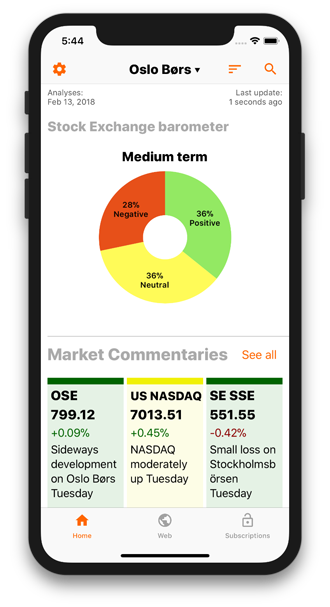
* Personalised home to quickly get analysis you want
* Add stocks to favourites and easily monitor them
* Search for any stock among 29,000+ stocks across 10 countries
* Stock exchange barometer gives the overall sentiment of a stock exchange
* Market commentary is written by Investtech's computers, based on an algorithm that selects the stocks with the most interesting price movements
* Today's signals gives an overview of the stocks that have most recently given positive or negative signals
* Indices analyses gives analysis and recommendations for major indices
* Indices evaluation gives an overview of the indices and their development
* Today's Case gives you a selected stock which is technically positive
* Web login exclusively for our website subscribers
* Multi language support
* Works offline
* Markets analysed - Norway, Sweden, Denmark, Finland, Netherlands, Germany, United Kingdom, Belgium, United States and India
With this new update v3.0.0 of the app, Investtech has introduced:
* A design overhaul for app navigation with a simple tab bar at the bottom of the app with three tabs for Home, Web and Subscriptions
* A redesigned and faster Home which can be personalized
* Technical charts in full screen with a choice of light or dark charts
* An expansive search now covering over 29,000 stocks including crypto currencies
* A one week free trial to unlock all paid features
* Learn technical analysis as an independent free app
Device Requirements:
* iPhone, iPad, and iPod touch
* Requires iOS 10.0 or later
* 30.5 MB
Pricing and Availability:
Technical Analysis of Stocks 3.0.0 is Free (With In-App Purchases) and available worldwide through the App Store in the Finance category. There is also an Android version available on Google Play.
Subscriptions:
Unlock all features: get 1 week free. Top 20 + Advanced charts at a discounted price of $10.99 (USD) after free period.
Top 20: daily updated list of 20 best buy candidates at just $1.99 (USD) per month. The best stocks based on Investtech's quantitative analysis system. These stocks will rise in the next weeks or months, according to investor psychology. Advanced charts & analysis for these candidates for short, medium & long term perspectives.
Advanced charts: medium term analysis across the entire app at just $9.99 (USD) per month. The chart analysis identify important patterns in the price chart and volume which can describe the psychological fluctuations experienced by the investors. The patterns signal what the investors will do next, and the stock is assigned a technical evaluation. The analysis are entirely automatic and updated every day by Investtech's systems.
Technical Analysis of Stocks 3.0.0: https://www.investtech.com/app/
Download from iTunes: https://itunes.apple.com/app/investtech-does-technical/id597391317
Download from Google Play: https://play.google.com/store/apps/details?id=com.investtech.investtechapp
YouTube Video (Screen Charts): https://www.youtube.com/watch?v=ga36jljPy0w
Screenshot: https://www.investtech.com/images/mobile/AppMainBannerHomePage.png
App icon: https://www.investtech.com/images/mobile/MainBannerIcon.png
Investtech does technical analysis of stocks, indices and commodities for you. Established in 1997 at Norway, with offices in Lysaker and Kjeller, and specialize in quantitive analyses supported by the Research council of Norway. Investtech's analyses is objective, user friendly, time saving with good results. All Material and Software (C) Copyright 2018 Investtech. All Rights Reserved. Apple, the Apple logo, iPhone, iPod and iPad are registered trademarks of Apple Inc. in the U.S. and/or other countries. Other trademarks and registered trademarks may be the property of their respective owners.
*******
Link To Article: https://prmac.com/release-id-82524.htm
*******
---------------------------------------------------------------------------------
Note that you can alter delivered distributions at any time.
Login to your account on prMac to alter your channel selection, or to opt-out at any time.


The Must-have App for Musicians Is a Free for the Limited Period
A new article has been published at prMac.
The Must-have App for Musicians Is a Free for the Limited Period - Published on 03/01/18
Melody Composer Squared team has announced that their popular music editor for iPhone and iPad devices, will be available as a free download for a limited period from 1st till 7th March 2018. Melody Composer Squared uses a unique Diagram for transposition of musical notes on a two-dimensional plane. The app is a must-have tool for any musician who wants to better understand music at the same level as the famous composers. Melody CS is also useful for music teachers and students.
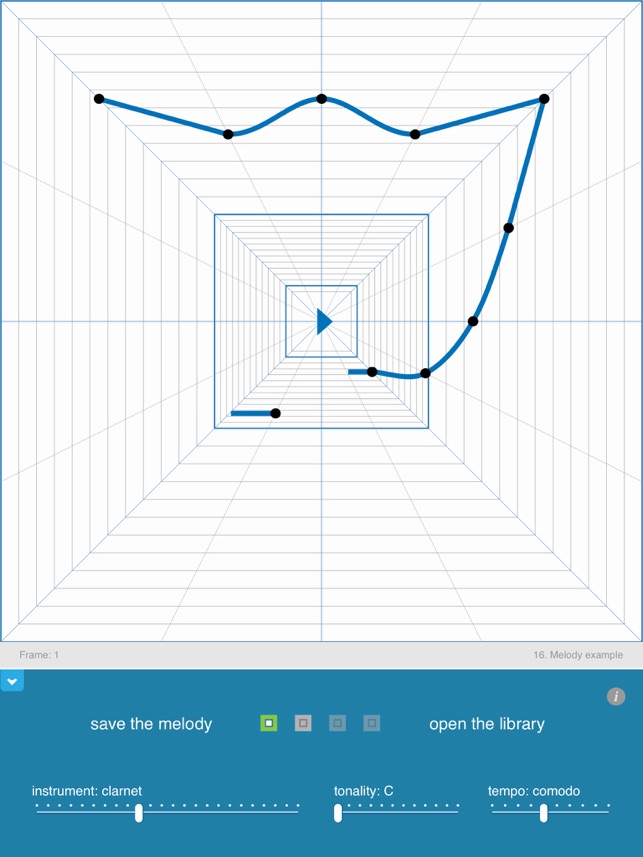
Kyiv, Ukraine - Melody Composer Squared team today is announcing a free download of Melody Composer Squared during the limited period from 1st till 7th March 2018. Melody Composer Squared is a music editor for iPhone and iPad devices. The app uses a unique Diagram for transposition of musical notes on a two-dimensional plane.
Since the Diagram is copyrighted, only Melody Composer Squared is granted to use this innovative method. The app is a must-have tool for any musician who wants understand music the same level as it did the famous composers as Mozart, Beethoven, Bach and other geniuses. Melody CS is also useful for music teachers and students.
At the present time, more than 86,000 users downloaded the app. Users can look at examples in the app library, build their own melody note by note and export the melody via email as the midi format. The midi file can be opened in other standard midi software for future editing. Melody Composer Squared is updated for new iPhone X screen proportions and layouts.
The team also started the Official channel on YouTube for the music lovers who would like to look at results of visualization of the famous melodies. More new features are planned to develop in the future: a color mapping for tonality control, comfortable files exchange, replenishment of the library of tunes, and 3/4 tempo of the musical measure.
Device Requirements:
* iPhone, iPad, and iPod touch
* Requires iOS 8.0 or later
* 21.8 MB
Pricing and Availability:
Melody Composer Squared 1.2.3 is currently free (With In-App Purchases) and available worldwide exclusively through the App Store in the Music category. For more information, please contact Pavel Karnaukhov.
Melody Composer Squared 1.2.3: http://creativelab.org.ua/eng/index_eng.htm
Download from iTunes: https://itunes.apple.com/app/melody-composer-squared/id988457961
YouTube Channel: https://www.youtube.com/channel/UChNKrhxM0r5GX2nuPSVg69g
Screenshot: https://is2-ssl.mzstatic.com/image/thumb/Purple118/v4/51/82/d0/5182d084-c625-d898-c44c-340762786245/mzl.ficzakph.jpg/643x0w.jpg
App Icon: https://drive.google.com/file/d/0B-4q_NU6Ap0RNmdpWC1HMFRCU1k/view?usp=sharing
Press Kit (zip): https://drive.google.com/file/d/1xDbDru3zmMSnkN_7Jg_RHkmYIZCtO1oC/view?usp=sharing
Located in Ukraine, the Melody Composer Squared team consists of Product Developer, Pavlo Karnaukhov, and iOS Developer, Natalia Kursa. All Material and Software (C) 2015-2018 Melody Composer Squared / All Rights Reserved. Apple, the Apple logo, iPhone, iPod and iPad are registered trademarks of Apple Inc. in the U.S. and/or other countries. Other trademarks and registered trademarks may be the property of their respective owners.
*******
Link To Article: https://prmac.com/release-id-82523.htm
*******
---------------------------------------------------------------------------------
Note that you can alter delivered distributions at any time.
Login to your account on prMac to alter your channel selection, or to opt-out at any time.
The Must-have App for Musicians Is a Free for the Limited Period - Published on 03/01/18
Melody Composer Squared team has announced that their popular music editor for iPhone and iPad devices, will be available as a free download for a limited period from 1st till 7th March 2018. Melody Composer Squared uses a unique Diagram for transposition of musical notes on a two-dimensional plane. The app is a must-have tool for any musician who wants to better understand music at the same level as the famous composers. Melody CS is also useful for music teachers and students.
Kyiv, Ukraine - Melody Composer Squared team today is announcing a free download of Melody Composer Squared during the limited period from 1st till 7th March 2018. Melody Composer Squared is a music editor for iPhone and iPad devices. The app uses a unique Diagram for transposition of musical notes on a two-dimensional plane.
Since the Diagram is copyrighted, only Melody Composer Squared is granted to use this innovative method. The app is a must-have tool for any musician who wants understand music the same level as it did the famous composers as Mozart, Beethoven, Bach and other geniuses. Melody CS is also useful for music teachers and students.
At the present time, more than 86,000 users downloaded the app. Users can look at examples in the app library, build their own melody note by note and export the melody via email as the midi format. The midi file can be opened in other standard midi software for future editing. Melody Composer Squared is updated for new iPhone X screen proportions and layouts.
The team also started the Official channel on YouTube for the music lovers who would like to look at results of visualization of the famous melodies. More new features are planned to develop in the future: a color mapping for tonality control, comfortable files exchange, replenishment of the library of tunes, and 3/4 tempo of the musical measure.
Device Requirements:
* iPhone, iPad, and iPod touch
* Requires iOS 8.0 or later
* 21.8 MB
Pricing and Availability:
Melody Composer Squared 1.2.3 is currently free (With In-App Purchases) and available worldwide exclusively through the App Store in the Music category. For more information, please contact Pavel Karnaukhov.
Melody Composer Squared 1.2.3: http://creativelab.org.ua/eng/index_eng.htm
Download from iTunes: https://itunes.apple.com/app/melody-composer-squared/id988457961
YouTube Channel: https://www.youtube.com/channel/UChNKrhxM0r5GX2nuPSVg69g
Screenshot: https://is2-ssl.mzstatic.com/image/thumb/Purple118/v4/51/82/d0/5182d084-c625-d898-c44c-340762786245/mzl.ficzakph.jpg/643x0w.jpg
App Icon: https://drive.google.com/file/d/0B-4q_NU6Ap0RNmdpWC1HMFRCU1k/view?usp=sharing
Press Kit (zip): https://drive.google.com/file/d/1xDbDru3zmMSnkN_7Jg_RHkmYIZCtO1oC/view?usp=sharing
Located in Ukraine, the Melody Composer Squared team consists of Product Developer, Pavlo Karnaukhov, and iOS Developer, Natalia Kursa. All Material and Software (C) 2015-2018 Melody Composer Squared / All Rights Reserved. Apple, the Apple logo, iPhone, iPod and iPad are registered trademarks of Apple Inc. in the U.S. and/or other countries. Other trademarks and registered trademarks may be the property of their respective owners.
*******
Link To Article: https://prmac.com/release-id-82523.htm
*******
---------------------------------------------------------------------------------
Note that you can alter delivered distributions at any time.
Login to your account on prMac to alter your channel selection, or to opt-out at any time.
Burda Singapore adds PIN Prestige to Magzter
A new article has been published at prMac.
Burda Singapore adds PIN Prestige to Magzter - Published on 03/01/18
Burda Singapore has added another title, PIN Prestige to Magzter, the world's largest digital magazine newsstand. PIN Prestige is Asia's foremost Chinese luxury fashion and lifestyle magazine. This is not just about enjoying the high life or being inspired by movers and shakers. It is also about touching one's heart and soul with the best that life has to offer. With exclusive and engaging content that appeals to influential and discerning men and women, PIN Prestige brings a new edge to luxury.
New York, New York - Burda Singapore, which has been tasting success for the last five years on Magzter with best-selling magazines like August Man and Prestige Singapore, has now added one more title - PIN Prestige, to the world's largest digital magazine newsstand.
PIN Prestige, Asia's foremost Chinese luxury fashion and lifestyle magazine, is not just about enjoying the high life or being inspired by movers and shakers. It is also about touching one's heart and soul with the best that life has to offer. With exclusive and engaging content that appeals to influential and discerning men and women, PIN Prestige brings a new edge to luxury.
"Burda Singapore is delighted to further our partnership with Magzter with the addition of PIN Prestige to our portfolio of digital titles. Through Magzter, we are confident in growing our global digital presence and interaction with our online readers." - Jaime Teo, Marketing Director, Burda Singapore
"Firstly, I'd like to congratulate Burda Singapore for their tremendous success on Magzter so far and we're delighted to add their PIN Prestige title to our catalogue. We're quite confident that PIN Prestige, with its authoritative coverage of luxury fashion, will become a best-seller right away on Magzter." - Girish Ramdas, CEO, Magzter Inc.
"Burda Singapore is known for their world-renowned fashion titles and with PIN Prestige, they're all set to impact millions of Chinese-speaking fashionistas all over the globe via Magzter. PIN Prestige caters to the interests of influential men and women who lead a luxurious life, and we firmly believe that the magazine will help our readers set new lifestyle goals." - Vijay Radhakrishnan, President, Magzter Inc.
Device Requirements:
* iPhone, iPad, and iPod touch
* Requires iOS 9.0 or later
* 41.5 MB
Pricing and Availability:
Magzter - Digital Magazine Newsstand 7.0 is free (with in-app purchases) and available worldwide through the App Store in the News category. A monthly magazine published in Simplified Chinese language, PIN Prestige is priced at SGD 26.49 ($19.99 USD) for an annual subscription on Magzter. PIN Prestige also comes as a treat to Magzter GOLD users, who can enjoy reading them along with 5,000+ other international digital magazines. The Magzter app is also available on the web, Google Play and is expanding to more platforms soon. Magzter's easy purchase and renewal systems ensure subscriptions are paid on time, eliminating the need for paper checks and postal mail issues. Users can buy their magazines on any of the above devices/platforms and seamlessly port their purchases to any other devices, a feature unique to Magzter.
Magzter - Digital Magazine Newsstand 7.0: http://www.magzter.com
PIN Prestige: https://www.magzter.com/SG/Burda-Singapore-Pte-Ltd/%E5%93%81-Prestige-(PIN-Prestige)/Fashion
Download from iTunes: https://itunes.apple.com/app/magzter-reading-destination/id412163953
Download from Google Play: https://play.google.com/store/apps/details?id=com.dci.magzter
Screenshot: https://rse.magzter.com/314x408/1517538956/1517539705/images/thumb/390_thumb_1.jpg
App Icon: http://akcdn.magzter.com/magcom/mailer/common/Icon1024-curved.png
Magzter is the world's largest and fastest growing global digital magazine newsstand with over 36.5 million digital consumers, more than 9,900 magazines from over 4,000 publishers. Headquartered in New York, Magzter has its local offices in London, Barcelona, Amsterdam, Mexico City, Cape Town, Chennai, Singapore and Tokyo and will soon be expanding to other countries. Founded by global entrepreneurs, Girish Ramdas and Vijay Radhakrishnan in June 2011, Magzter enables magazine publishers around the world to create and deliver digital editions of their titles to global consumers. Powered by its proprietary OREY Click Publishing System(R), Magzter also enables their customers to publish interactive/audio-visual content in the magazine as it supports HTML5. Magzter launched Magzter GOLD subscription service to give digital readers unlimited access to thousands of magazines for a low monthly price. All Material and Software (C) Copyright 2018 Magzter Inc. All Rights Reserved. Apple, the
Apple logo, iPhone, iPod and iPad are registered trademarks of Apple Inc. in the U.S. and/or other countries. Other trademarks and registered trademarks may be the property of their respective owners.
*******
Link To Article: https://prmac.com/release-id-82522.htm
*******
---------------------------------------------------------------------------------
Note that you can alter delivered distributions at any time.
Login to your account on prMac to alter your channel selection, or to opt-out at any time.
Burda Singapore adds PIN Prestige to Magzter - Published on 03/01/18
Burda Singapore has added another title, PIN Prestige to Magzter, the world's largest digital magazine newsstand. PIN Prestige is Asia's foremost Chinese luxury fashion and lifestyle magazine. This is not just about enjoying the high life or being inspired by movers and shakers. It is also about touching one's heart and soul with the best that life has to offer. With exclusive and engaging content that appeals to influential and discerning men and women, PIN Prestige brings a new edge to luxury.
New York, New York - Burda Singapore, which has been tasting success for the last five years on Magzter with best-selling magazines like August Man and Prestige Singapore, has now added one more title - PIN Prestige, to the world's largest digital magazine newsstand.
PIN Prestige, Asia's foremost Chinese luxury fashion and lifestyle magazine, is not just about enjoying the high life or being inspired by movers and shakers. It is also about touching one's heart and soul with the best that life has to offer. With exclusive and engaging content that appeals to influential and discerning men and women, PIN Prestige brings a new edge to luxury.
"Burda Singapore is delighted to further our partnership with Magzter with the addition of PIN Prestige to our portfolio of digital titles. Through Magzter, we are confident in growing our global digital presence and interaction with our online readers." - Jaime Teo, Marketing Director, Burda Singapore
"Firstly, I'd like to congratulate Burda Singapore for their tremendous success on Magzter so far and we're delighted to add their PIN Prestige title to our catalogue. We're quite confident that PIN Prestige, with its authoritative coverage of luxury fashion, will become a best-seller right away on Magzter." - Girish Ramdas, CEO, Magzter Inc.
"Burda Singapore is known for their world-renowned fashion titles and with PIN Prestige, they're all set to impact millions of Chinese-speaking fashionistas all over the globe via Magzter. PIN Prestige caters to the interests of influential men and women who lead a luxurious life, and we firmly believe that the magazine will help our readers set new lifestyle goals." - Vijay Radhakrishnan, President, Magzter Inc.
Device Requirements:
* iPhone, iPad, and iPod touch
* Requires iOS 9.0 or later
* 41.5 MB
Pricing and Availability:
Magzter - Digital Magazine Newsstand 7.0 is free (with in-app purchases) and available worldwide through the App Store in the News category. A monthly magazine published in Simplified Chinese language, PIN Prestige is priced at SGD 26.49 ($19.99 USD) for an annual subscription on Magzter. PIN Prestige also comes as a treat to Magzter GOLD users, who can enjoy reading them along with 5,000+ other international digital magazines. The Magzter app is also available on the web, Google Play and is expanding to more platforms soon. Magzter's easy purchase and renewal systems ensure subscriptions are paid on time, eliminating the need for paper checks and postal mail issues. Users can buy their magazines on any of the above devices/platforms and seamlessly port their purchases to any other devices, a feature unique to Magzter.
Magzter - Digital Magazine Newsstand 7.0: http://www.magzter.com
PIN Prestige: https://www.magzter.com/SG/Burda-Singapore-Pte-Ltd/%E5%93%81-Prestige-(PIN-Prestige)/Fashion
Download from iTunes: https://itunes.apple.com/app/magzter-reading-destination/id412163953
Download from Google Play: https://play.google.com/store/apps/details?id=com.dci.magzter
Screenshot: https://rse.magzter.com/314x408/1517538956/1517539705/images/thumb/390_thumb_1.jpg

App Icon: http://akcdn.magzter.com/magcom/mailer/common/Icon1024-curved.png

Magzter is the world's largest and fastest growing global digital magazine newsstand with over 36.5 million digital consumers, more than 9,900 magazines from over 4,000 publishers. Headquartered in New York, Magzter has its local offices in London, Barcelona, Amsterdam, Mexico City, Cape Town, Chennai, Singapore and Tokyo and will soon be expanding to other countries. Founded by global entrepreneurs, Girish Ramdas and Vijay Radhakrishnan in June 2011, Magzter enables magazine publishers around the world to create and deliver digital editions of their titles to global consumers. Powered by its proprietary OREY Click Publishing System(R), Magzter also enables their customers to publish interactive/audio-visual content in the magazine as it supports HTML5. Magzter launched Magzter GOLD subscription service to give digital readers unlimited access to thousands of magazines for a low monthly price. All Material and Software (C) Copyright 2018 Magzter Inc. All Rights Reserved. Apple, the
Apple logo, iPhone, iPod and iPad are registered trademarks of Apple Inc. in the U.S. and/or other countries. Other trademarks and registered trademarks may be the property of their respective owners.
*******
Link To Article: https://prmac.com/release-id-82522.htm
*******
---------------------------------------------------------------------------------
Note that you can alter delivered distributions at any time.
Login to your account on prMac to alter your channel selection, or to opt-out at any time.
Jewel Block Puzzler King - New Mobile Game from DM Apps
A new article has been published at prMac.
Jewel Block Puzzler King - New Mobile Game from DM Apps - Published on 02/28/18
Louisville based developer, DM Apps releases Jewel Block Puzzler King, a free game available on the iTunes App Store. Jewel Block Puzzler King is a game that is easy to start, but harder to master. Sporting a simple-to-use interface, the player drops blocks to create and destroy lines of jewels both vertically and horizontally within the game matrix. The overall object of the game is to not have the screen fill up with blocks by strategically dropping blocks on the matrix.
Louisville, Kentucky - DM Apps is proud to announce the release of Jewel Block - The Puzzler King 1.0.1, a free game for iPhone, iPad, and iPod touch devices, available on the iTunes App Store. Jewel Block - The Puzzler King is a game that is easy to start, but harder to master.
Jewel Block - The Puzzler King has a simple-to-use interface where the player drops blocks to create and destroy lines of jewels both vertically and horizontally within the game matrix. The overall object of the game is to not have the screen fill up with blocks by strategically dropping blocks on the matrix. Jewel Block - The Puzzler King is an addictive game where users can challenge family and friends through the included leaderboard. Checkout other user's scores and see the best score to beat.
Features:
* Smooth and simple navigation for dropping blocks on the game play grid
* Leaderboard to track your top score and see other competitors - see how your score ranks globally
* Simple to use interface that is quick and easy to play - very intuitive to play
* Easy to learn but yet harder to master
* Brings back those memories of a historical game that all used to play
* Share Jewel Block Puzzler King via social media links located in the settings menu
Device Requirements:
* iPhone, iPad, and iPod touch
* Requires iOS 8.0 or later
* Universal Application
* 53.2 MB
Pricing and Availability:
Jewel Block - The Puzzler King 1.0.1 is free and is available worldwide exclusively through the App Store in the Games category.
Jewel Block - The Puzzler King 1.0.1: http://dm-apps.com/jewel-block-puzzler-king/
Download from iTunes: https://itunes.apple.com/app/jewel-block-the-puzzler-king/id1341268155
DM Apps is a small group of investors focused on building a portfolio of iOS and Android applications. The group was started in August of 2017 and has 37 applications ranging from games to productivity tools. The development team builds / updates applications in both xCode9 and BuildBox. All Material and Software (C) Copyright 2018 DM Apps. All Rights Reserved. Apple, the Apple logo, iPhone, iPod and iPad are registered trademarks of Apple Inc. in the U.S. and/or other countries. Other trademarks and registered trademarks may be the property of their respective owners.
*******
Link To Article: https://prmac.com/release-id-82521.htm
*******
---------------------------------------------------------------------------------
Note that you can alter delivered distributions at any time.
Login to your account on prMac to alter your channel selection, or to opt-out at any time.
Jewel Block Puzzler King - New Mobile Game from DM Apps - Published on 02/28/18
Louisville based developer, DM Apps releases Jewel Block Puzzler King, a free game available on the iTunes App Store. Jewel Block Puzzler King is a game that is easy to start, but harder to master. Sporting a simple-to-use interface, the player drops blocks to create and destroy lines of jewels both vertically and horizontally within the game matrix. The overall object of the game is to not have the screen fill up with blocks by strategically dropping blocks on the matrix.
Louisville, Kentucky - DM Apps is proud to announce the release of Jewel Block - The Puzzler King 1.0.1, a free game for iPhone, iPad, and iPod touch devices, available on the iTunes App Store. Jewel Block - The Puzzler King is a game that is easy to start, but harder to master.
Jewel Block - The Puzzler King has a simple-to-use interface where the player drops blocks to create and destroy lines of jewels both vertically and horizontally within the game matrix. The overall object of the game is to not have the screen fill up with blocks by strategically dropping blocks on the matrix. Jewel Block - The Puzzler King is an addictive game where users can challenge family and friends through the included leaderboard. Checkout other user's scores and see the best score to beat.
Features:
* Smooth and simple navigation for dropping blocks on the game play grid
* Leaderboard to track your top score and see other competitors - see how your score ranks globally
* Simple to use interface that is quick and easy to play - very intuitive to play
* Easy to learn but yet harder to master
* Brings back those memories of a historical game that all used to play
* Share Jewel Block Puzzler King via social media links located in the settings menu
Device Requirements:
* iPhone, iPad, and iPod touch
* Requires iOS 8.0 or later
* Universal Application
* 53.2 MB
Pricing and Availability:
Jewel Block - The Puzzler King 1.0.1 is free and is available worldwide exclusively through the App Store in the Games category.
Jewel Block - The Puzzler King 1.0.1: http://dm-apps.com/jewel-block-puzzler-king/
Download from iTunes: https://itunes.apple.com/app/jewel-block-the-puzzler-king/id1341268155
DM Apps is a small group of investors focused on building a portfolio of iOS and Android applications. The group was started in August of 2017 and has 37 applications ranging from games to productivity tools. The development team builds / updates applications in both xCode9 and BuildBox. All Material and Software (C) Copyright 2018 DM Apps. All Rights Reserved. Apple, the Apple logo, iPhone, iPod and iPad are registered trademarks of Apple Inc. in the U.S. and/or other countries. Other trademarks and registered trademarks may be the property of their respective owners.
*******
Link To Article: https://prmac.com/release-id-82521.htm
*******
---------------------------------------------------------------------------------
Note that you can alter delivered distributions at any time.
Login to your account on prMac to alter your channel selection, or to opt-out at any time.
First text to speech voices launched for Dutch children
A new article has been published at prMac.
First text to speech voices launched for Dutch children - Published on 02/27/18
Acapela Group, Dutch charity Nederlandse Stichting voor het Gehandicapte Kind (NSGK) and AssistiveWare today launch the first Dutch text to speech children's voices. They will benefit children who cannot speak and rely on Augmentative and Alternative Communication (AAC) systems. From today, the voices will be available to download exclusively in Proloquo2Go. The award-winning iOS app already gives a voice to over 175,000 children, teens and adults around the world.
Amsterdam, Netherlands - Today AssistiveWare, assistive technology pioneer, adds Dutch children's voices to its symbol-based communication app Proloquo2Go. The voices were developed in collaboration with Acapela Group and supported by Nederlandse Stichting voor het Gehandicapte Kind (NSGK). The Dutch voices, named Thijs and Merel were recorded by and for children. They will benefit children who cannot speak and rely on Augmentative and Alternative Communication (AAC) systems.
"Children using AAC have always been limited by adult voices. It's so exciting that technology has made it possible for them to speak in such a fantastic sounding child's voice. This means that they will be able to identify with their AAC more than ever. It will become a part of who they are." says Professor Dr. Hans van Balkom.
An estimate of over 50,000 dutch speaking children are unable to make themselves understood with their own voice. It is vital for them to have access to a means to communicate. For many of these children, high tech AAC is the best opportunity for them to communicate. This ground-breaking project introduces the first ever Dutch Text to Speech children's voices.
Last summer, two children (a boy and a girl) spent days in the studio. They made recordings of all kinds of sentences, sounds and expressions. These formed the basis to make genuine, natural-sounding Text to Speech voices that will allow children to say anything they want.
"AssistiveWare has been our partner since the inception of the children voices. Together we have contributed to change the daily lives of children and their families that are using Acapela voices with AssistiveWare's award-winning solutions. Over 20 voices in different languages are already available, and we look forward to keep continuing offering voices for kids all over the world," says Nicolas Mazars, Business Unit manager of Acapela Inclusive.
A special release:
From today, the voices will be available to download exclusively in Proloquo2Go. The award-winning iOS app already gives a voice to over 175,000 children, teens and adults around the world.
This release is extra special for AssistiveWare, "As a Dutch company we are truly excited to be able to deliver the first ever Dutch Text to Speech children's voices together with our partners Acapela Group and NSGK. Combined with Proloquo2Go, Dutch children who are unable to speak will for the first time be able to say whatever they want in a voice that matches their age and gender." explains founder and CEO of AssistiveWare David Niemeijer.
It is important to all the partners that all Dutch children who need AAC can have access to these voices.
"For NSGK it's vital for children with disabilities to be included at school, sports clubs, in the playground - everywhere. There are thousands of children who are unable to make themselves heard with their own voice, and some with access to only an adult's voice on their AAC system. For these children being able to communicate with a child's voice is so important to be able to express themselves, communicate and be heard. That's why we are supporting this wonderful initiative" says Henk-Willem Laan, NSGK director.
Later this year, they will be made available for other companies to license, allowing even more children to speak with a voice they can identify with.
About Proloquo2Go:
Proloquo2Go is an award-winning symbol-based communication app that gives a voice to those who cannot speak. It is used by people with autism, Down syndrome, cerebral palsy and other diagnoses for everyday communication and language development. The award-winning app has provided a voice to over 175,000 people worldwide who use it in English, Spanish or French. Proloquo2Go is used for iPad, iPhone, iPod touch and Apple Watch.
About NSGK:
De Nederlandse Stichting voor het Gehandicapte Kind (NSGK) helps children and young people with disabilities to enjoy equal opportunities to play, learn, live and work. NSGK supports the children's voices project from it's Technology program. Together with other partners, they improve the lives of children and young people through technology.
About Acapela Group:
Acapela Group, leading player in voice solutions for more than 30 years, is constantly creating new voices to better interact with users, thanks to voices that adapt to the context. Voices that convey meaning, intent and emotions. Acapela Text-to-speech solutions give the say to tiny toys, robots, autonomous vehicles, smartphones, IoT and much more. Acapela creates personalized voices that read, inform, explain, present, guide, educate, tell stories, help to communicate, alarm, notify, entertain. From standard high-quality voices to domain-based applications and custom voices, Acapela's skills cover the full chain of voice needs in 34 languages. Our latest innovations in deep learning and AI opens up new exciting possibilities for voice creation.
Supported Languages:
* English, Dutch, French and Spanish
Device Requirements:
* iPhone, iPad, and iPod touch
* Requires iOS 10.3 or later
* 848.7 MB
Pricing and Availability:
Proloquo2Go 5.5 is $249.99 USD (or equivalent amount in other currencies) and available worldwide exclusively through the App Store in the Education category. For more information, please contact Sophie Lap.
AssistiveWare: http://www.assistiveware.com
Proloquo2Go 5.5: http://www.assistiveware.com/product/proloquo2go
Purchase and Download: https://itunes.apple.com/app/proloquo2go/id308368164
Vimeo Video (Behind the scenes with Merel & Thijs): https://vimeo.com/257524054
Acapela Group : http://www.acapela-group.com/
NSGK : https://www.nsgk.nl/english/
Since 2000, AssistiveWare has established itself as leading assistive technology pioneers. They are committed to empowering people with communication difficulties and make a difference to people's lives. To achieve this goal, they work closely with therapists, parents and adults who use their apps. In 2009, AssistiveWare was the first company to release a full-featured Augmentative and Alternative Communication solution for iOS - the award-winning app, Proloquo2Go. Together with Acapela Group, AssistiveWare was also the first to create genuine children's Text to Speech voices. All Material and Software (C) Copyright 2018 AssistiveWare. All Rights Reserved. Apple, the Apple logo, Mac OS X, iPhone, iPod and iPad are registered trademarks of Apple Inc. in the U.S. and/or other countries. Other trademarks and registered trademarks may be the property of their respective owners.
*******
Link To Article: https://prmac.com/release-id-82520.htm
*******
---------------------------------------------------------------------------------
Note that you can alter delivered distributions at any time.
Login to your account on prMac to alter your channel selection, or to opt-out at any time.
First text to speech voices launched for Dutch children - Published on 02/27/18
Acapela Group, Dutch charity Nederlandse Stichting voor het Gehandicapte Kind (NSGK) and AssistiveWare today launch the first Dutch text to speech children's voices. They will benefit children who cannot speak and rely on Augmentative and Alternative Communication (AAC) systems. From today, the voices will be available to download exclusively in Proloquo2Go. The award-winning iOS app already gives a voice to over 175,000 children, teens and adults around the world.
Amsterdam, Netherlands - Today AssistiveWare, assistive technology pioneer, adds Dutch children's voices to its symbol-based communication app Proloquo2Go. The voices were developed in collaboration with Acapela Group and supported by Nederlandse Stichting voor het Gehandicapte Kind (NSGK). The Dutch voices, named Thijs and Merel were recorded by and for children. They will benefit children who cannot speak and rely on Augmentative and Alternative Communication (AAC) systems.
"Children using AAC have always been limited by adult voices. It's so exciting that technology has made it possible for them to speak in such a fantastic sounding child's voice. This means that they will be able to identify with their AAC more than ever. It will become a part of who they are." says Professor Dr. Hans van Balkom.
An estimate of over 50,000 dutch speaking children are unable to make themselves understood with their own voice. It is vital for them to have access to a means to communicate. For many of these children, high tech AAC is the best opportunity for them to communicate. This ground-breaking project introduces the first ever Dutch Text to Speech children's voices.
Last summer, two children (a boy and a girl) spent days in the studio. They made recordings of all kinds of sentences, sounds and expressions. These formed the basis to make genuine, natural-sounding Text to Speech voices that will allow children to say anything they want.
"AssistiveWare has been our partner since the inception of the children voices. Together we have contributed to change the daily lives of children and their families that are using Acapela voices with AssistiveWare's award-winning solutions. Over 20 voices in different languages are already available, and we look forward to keep continuing offering voices for kids all over the world," says Nicolas Mazars, Business Unit manager of Acapela Inclusive.
A special release:
From today, the voices will be available to download exclusively in Proloquo2Go. The award-winning iOS app already gives a voice to over 175,000 children, teens and adults around the world.
This release is extra special for AssistiveWare, "As a Dutch company we are truly excited to be able to deliver the first ever Dutch Text to Speech children's voices together with our partners Acapela Group and NSGK. Combined with Proloquo2Go, Dutch children who are unable to speak will for the first time be able to say whatever they want in a voice that matches their age and gender." explains founder and CEO of AssistiveWare David Niemeijer.
It is important to all the partners that all Dutch children who need AAC can have access to these voices.
"For NSGK it's vital for children with disabilities to be included at school, sports clubs, in the playground - everywhere. There are thousands of children who are unable to make themselves heard with their own voice, and some with access to only an adult's voice on their AAC system. For these children being able to communicate with a child's voice is so important to be able to express themselves, communicate and be heard. That's why we are supporting this wonderful initiative" says Henk-Willem Laan, NSGK director.
Later this year, they will be made available for other companies to license, allowing even more children to speak with a voice they can identify with.
About Proloquo2Go:
Proloquo2Go is an award-winning symbol-based communication app that gives a voice to those who cannot speak. It is used by people with autism, Down syndrome, cerebral palsy and other diagnoses for everyday communication and language development. The award-winning app has provided a voice to over 175,000 people worldwide who use it in English, Spanish or French. Proloquo2Go is used for iPad, iPhone, iPod touch and Apple Watch.
About NSGK:
De Nederlandse Stichting voor het Gehandicapte Kind (NSGK) helps children and young people with disabilities to enjoy equal opportunities to play, learn, live and work. NSGK supports the children's voices project from it's Technology program. Together with other partners, they improve the lives of children and young people through technology.
About Acapela Group:
Acapela Group, leading player in voice solutions for more than 30 years, is constantly creating new voices to better interact with users, thanks to voices that adapt to the context. Voices that convey meaning, intent and emotions. Acapela Text-to-speech solutions give the say to tiny toys, robots, autonomous vehicles, smartphones, IoT and much more. Acapela creates personalized voices that read, inform, explain, present, guide, educate, tell stories, help to communicate, alarm, notify, entertain. From standard high-quality voices to domain-based applications and custom voices, Acapela's skills cover the full chain of voice needs in 34 languages. Our latest innovations in deep learning and AI opens up new exciting possibilities for voice creation.
Supported Languages:
* English, Dutch, French and Spanish
Device Requirements:
* iPhone, iPad, and iPod touch
* Requires iOS 10.3 or later
* 848.7 MB
Pricing and Availability:
Proloquo2Go 5.5 is $249.99 USD (or equivalent amount in other currencies) and available worldwide exclusively through the App Store in the Education category. For more information, please contact Sophie Lap.
AssistiveWare: http://www.assistiveware.com
Proloquo2Go 5.5: http://www.assistiveware.com/product/proloquo2go
Purchase and Download: https://itunes.apple.com/app/proloquo2go/id308368164
Vimeo Video (Behind the scenes with Merel & Thijs): https://vimeo.com/257524054
Acapela Group : http://www.acapela-group.com/
NSGK : https://www.nsgk.nl/english/
Since 2000, AssistiveWare has established itself as leading assistive technology pioneers. They are committed to empowering people with communication difficulties and make a difference to people's lives. To achieve this goal, they work closely with therapists, parents and adults who use their apps. In 2009, AssistiveWare was the first company to release a full-featured Augmentative and Alternative Communication solution for iOS - the award-winning app, Proloquo2Go. Together with Acapela Group, AssistiveWare was also the first to create genuine children's Text to Speech voices. All Material and Software (C) Copyright 2018 AssistiveWare. All Rights Reserved. Apple, the Apple logo, Mac OS X, iPhone, iPod and iPad are registered trademarks of Apple Inc. in the U.S. and/or other countries. Other trademarks and registered trademarks may be the property of their respective owners.
*******
Link To Article: https://prmac.com/release-id-82520.htm
*******
---------------------------------------------------------------------------------
Note that you can alter delivered distributions at any time.
Login to your account on prMac to alter your channel selection, or to opt-out at any time.
Newly Launched Joyoshare Mac Screen Recorder - Record Anything on macOS
A new article has been published at prMac.
Newly Launched Joyoshare Mac Screen Recorder - Record Anything on macOS - Published on 02/27/18
Multimedia software provider, Joyoshare today announces Screen Recorder for Mac. Joyoshare Screen Recorder for Mac is a complete video capture tool which can record screen videos with audio simultaneously on Mac OS X. With just a few clicks, effortlessly record all screen activities, including desktop videos, audio, streaming music, games, webcams, online chats, video calls, lectures, and more on macOS. Then save recordings in most popular media formats, such as MP4, MOV, WMV, FLV, and more.
Hong Kong - One month later since the release of its Screen Recorder for Windows, Joyoshare, the world-leading multimedia software provider, officially launched the Screen Recorder for Mac today, aiming to help Mac users to losslessly record all screen activities, including desktop videos, audios, streaming music, games, webcams, online chats, video calls, lectures, etc. on macOS with a few clicks only.
Like the PC version, Joyoshare Screen Recorder for Mac is also a complete video capture tool which can record screen videos with audio simultaneously on Mac OSX. It's one of the most advanced all-in-one Mac screen recording software in the market for capturing desktop videos, recording gameplays, making tutorial videos, grabbing streaming music, and so forth.
What makes Joyoshare Screen Recorder for Mac standing out from other competitive recorders is that it can not only record all videos and audios on Mac with ease, but also save the recordings in most popular media formats, such as MP4, MOV, WMV, FLV, MKV, SWF, MP3, WAV, etc. without losing any original quality. In addition, it supports a wide range of preset profiles for mobile devices like Apple iPhone, iPad, Android, Windows phones, etc. so that users can directly export the recorded videos to any device for watching without re-encoding the files repeatedly.
Another fantastic feature of Joyoshare Mac Screen Recorder is its ability to capture audios on Mac while you are recording the screen videos. Apart from a professional video capture, it can also serve as a smart independent audio capture to record computer sound as well as microphone sound in high quality. You can also edit the audio quality, including audio channel, bit rate, etc. according to your own needs.
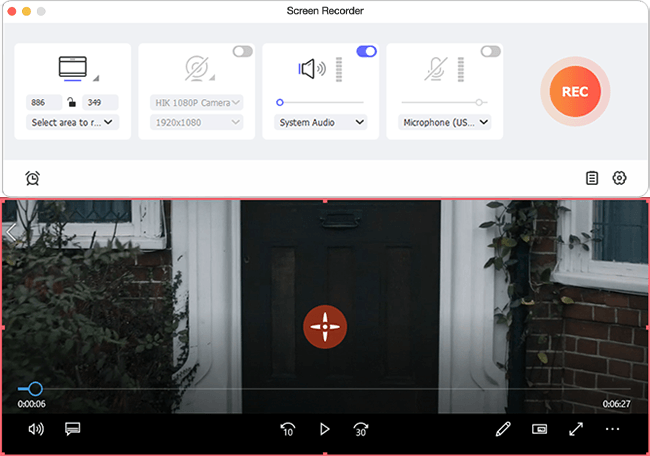
Thanks to the intuitive user interface with clear layouts, Joyoshare Screen Recorder for Mac is well designed for everyone in recording Mac screen. Users are provided with multiple capture modes to record the computer desktop in either full screen or custom size. Besides, it comes with other stunning features, including letting you take screenshots during recording, customizing shortcuts with keyboard for recording, create scheduled recording tasks by setting start and end time, personalize recordings with cursor and click effects, and more.
"The outstanding feature of Joyoshare Screen Recorder for Mac over other similar software is its capability to record anything on macOS with simple clicks and high performance. The whole recording process is lossless and easy to handle for anyone." said Daniel, Joyoshare R&D director. "To make the program even better, we're planning to embed a more powerful video editor into the recorder in the near future so that customers can edit the recordings with more effects all in one place."
Pricing and Availability:
Joyoshare Screen Recorder for Mac is sold with three different license types, including $29.95 (USD) for a single license copy with lifetime free software update, $59.95 for 2-5 PCs with lifetime free update, and $79.95 (USD) for unlimited use. The initial v.1.0.0 is perfectly compatible with the latest macOS High Sierra, Sierra, 10.11, 10.10, 10.9 and 10.8.
Joyoshare: https://www.joyoshare.com
Joyoshare Screen Recorder for Mac 1.0: https://www.joyoshare.com/screen-recorder-for-mac/
Download Trial: https://www.joyoshare.com/download/ScreenRecorder.dmg
Purchase: https://www.joyoshare.com/purchase/buy-screen-recorder-for-mac.html
Screenshot: https://www.joyoshare.com/images/screenshots/select-area-mac.png
Joyoshare is a world-leading multimedia software developer and provider specialized in video field for years. With advanced technologies and professional R&D team, Joyoshare is dedicated in developing the best video and audio solutions, including video converter, video splitter, audio cutter, HEIC image converter, screen recorder, iOS solutions, and more to customers all around the world. With professional and high quality services, Joyoshare has won high reputation from millions of registered users from the past years. All Material and Software (C) Copyright 2018 Joyoshare Studio. All Rights Reserved. Apple, the Apple logo, OS X, macOS and Macintosh are registered trademarks of Apple Inc. in the U.S. and/or other countries. Other trademarks and registered trademarks may be the property of their respective owners.
*******
Link To Article: https://prmac.com/release-id-82518.htm
*******
---------------------------------------------------------------------------------
Note that you can alter delivered distributions at any time.
Login to your account on prMac to alter your channel selection, or to opt-out at any time.
Newly Launched Joyoshare Mac Screen Recorder - Record Anything on macOS - Published on 02/27/18
Multimedia software provider, Joyoshare today announces Screen Recorder for Mac. Joyoshare Screen Recorder for Mac is a complete video capture tool which can record screen videos with audio simultaneously on Mac OS X. With just a few clicks, effortlessly record all screen activities, including desktop videos, audio, streaming music, games, webcams, online chats, video calls, lectures, and more on macOS. Then save recordings in most popular media formats, such as MP4, MOV, WMV, FLV, and more.
Hong Kong - One month later since the release of its Screen Recorder for Windows, Joyoshare, the world-leading multimedia software provider, officially launched the Screen Recorder for Mac today, aiming to help Mac users to losslessly record all screen activities, including desktop videos, audios, streaming music, games, webcams, online chats, video calls, lectures, etc. on macOS with a few clicks only.
Like the PC version, Joyoshare Screen Recorder for Mac is also a complete video capture tool which can record screen videos with audio simultaneously on Mac OSX. It's one of the most advanced all-in-one Mac screen recording software in the market for capturing desktop videos, recording gameplays, making tutorial videos, grabbing streaming music, and so forth.
What makes Joyoshare Screen Recorder for Mac standing out from other competitive recorders is that it can not only record all videos and audios on Mac with ease, but also save the recordings in most popular media formats, such as MP4, MOV, WMV, FLV, MKV, SWF, MP3, WAV, etc. without losing any original quality. In addition, it supports a wide range of preset profiles for mobile devices like Apple iPhone, iPad, Android, Windows phones, etc. so that users can directly export the recorded videos to any device for watching without re-encoding the files repeatedly.
Another fantastic feature of Joyoshare Mac Screen Recorder is its ability to capture audios on Mac while you are recording the screen videos. Apart from a professional video capture, it can also serve as a smart independent audio capture to record computer sound as well as microphone sound in high quality. You can also edit the audio quality, including audio channel, bit rate, etc. according to your own needs.
Thanks to the intuitive user interface with clear layouts, Joyoshare Screen Recorder for Mac is well designed for everyone in recording Mac screen. Users are provided with multiple capture modes to record the computer desktop in either full screen or custom size. Besides, it comes with other stunning features, including letting you take screenshots during recording, customizing shortcuts with keyboard for recording, create scheduled recording tasks by setting start and end time, personalize recordings with cursor and click effects, and more.
"The outstanding feature of Joyoshare Screen Recorder for Mac over other similar software is its capability to record anything on macOS with simple clicks and high performance. The whole recording process is lossless and easy to handle for anyone." said Daniel, Joyoshare R&D director. "To make the program even better, we're planning to embed a more powerful video editor into the recorder in the near future so that customers can edit the recordings with more effects all in one place."
Pricing and Availability:
Joyoshare Screen Recorder for Mac is sold with three different license types, including $29.95 (USD) for a single license copy with lifetime free software update, $59.95 for 2-5 PCs with lifetime free update, and $79.95 (USD) for unlimited use. The initial v.1.0.0 is perfectly compatible with the latest macOS High Sierra, Sierra, 10.11, 10.10, 10.9 and 10.8.
Joyoshare: https://www.joyoshare.com
Joyoshare Screen Recorder for Mac 1.0: https://www.joyoshare.com/screen-recorder-for-mac/
Download Trial: https://www.joyoshare.com/download/ScreenRecorder.dmg
Purchase: https://www.joyoshare.com/purchase/buy-screen-recorder-for-mac.html
Screenshot: https://www.joyoshare.com/images/screenshots/select-area-mac.png
Joyoshare is a world-leading multimedia software developer and provider specialized in video field for years. With advanced technologies and professional R&D team, Joyoshare is dedicated in developing the best video and audio solutions, including video converter, video splitter, audio cutter, HEIC image converter, screen recorder, iOS solutions, and more to customers all around the world. With professional and high quality services, Joyoshare has won high reputation from millions of registered users from the past years. All Material and Software (C) Copyright 2018 Joyoshare Studio. All Rights Reserved. Apple, the Apple logo, OS X, macOS and Macintosh are registered trademarks of Apple Inc. in the U.S. and/or other countries. Other trademarks and registered trademarks may be the property of their respective owners.
*******
Link To Article: https://prmac.com/release-id-82518.htm
*******
---------------------------------------------------------------------------------
Note that you can alter delivered distributions at any time.
Login to your account on prMac to alter your channel selection, or to opt-out at any time.
Create Booklet 2 - The #1 Booklet app now more powerful, yet even easier
A new article has been published at prMac.
Create Booklet 2 - The #1 Booklet app now more powerful, yet even easier - Published on 02/27/18
TheKeptPromise today announces Create Booklet 2, their new Mac application. Create Booklet allows anyone to create a booklet from almost any file from within almost any software. The app can place pages side by side re-sorted for booklet printing, no matter what printer is used. Create Booklet 2's onboarding gets customers up to speed before they run into any surprises. It gives all the information they need to feel comfortable and gives them their first booklet.
Ratingen, Germany - TheKeptPromise today is proud to announce Create Booklet 2 (v2.0.1), their new Mac application. Create Booklet 2 has some big shoes to fill following its 5-star predecessor "Create Booklet." Create Booklet 2 goes beyond what the pro market offered so far, while putting even more emphasis on user-friendliness. The idea behind this software solution is simple: Bringing professional booklet printing to everybody's homes, even grandma's and grandpa's.
"We are very pleased to provide our clients with a tool which fulfills all the needs concerning booklet creation and printing and is yet very simple to use," said Christoph Vogelbusch, CEO of TheKeptPromise. "We have extremely loyal customers, as Create Booklet goes far beyond what competitors offer. Yet we still had feature-requests and customers being overwhelmed with the complex topic of booklet creation. Create Booklet 2 is the answer to all those emails, it satisfies your every booklet need."
To satisfy the pro users, Create Booklet 2 makes use of PDF boxes, allowing custom impositions and much much more. The Team is proud to open Booklet printing to everybody with these 3 key features:
1. Onboarding:
Creating the booklet comes with a few surprises: Pages should be a multiple of 4, the page size should be half of the paper you use and best of all you can write your favorite booklet in any app you love. Create Booklet 2's onboarding gets customers up to speed before they run into any surprises. It gives all the information they need to feel comfortable and gives them their first booklet: The help of Create Booklet 2 itself as a booklet. During this onboarding, the app is also testing the printer to make sure that it's smooth sailing from here on out and even the first booklet is instantly printed perfectly.
2. Presets:
On the quest of making the app as user-friendly as possible, TheKeptPromise introduced presets to Create Booklet 2. It makes even complicated booklets as easy as 1-2-3
1 Load PDf
2 Select a preset
3 Print
"Select a preset by us or create your own. We are sure presets will be loved by all: beginners and pros." said CEO Christoph Vogelbusch. "Since presets make everything easy, Create Booklet 2 even includes a preset for a real book. Print, glue - done!"
3. Automatic warning system:
Create Booklet 2 has an automatic warning system. When you allow this many settings, things can go wrong. As soon as the program senses that something could be off with printing the booklet, it draws the user's attention to the problem - before printing of course. Furthermore, Create Booklet 2 is not just drawing the user's attention to the problem but also suggests ways of solving the problem.
The user-friendly approach is well received by the customers:
* "OMG! This is about the best and most valuable utility I have found in a loooong time. Finally I can create and print booklets from within Quark XPress without having to pay a fortune for their Printcollection XTension. Thank you so much!!!" - Guido Henke
* "Wow. I wish this existed years ago, or that I'd known about it. [...]. Thank YOU. " - Mark
* "THANK YOU for Create Booklet! I have used it several times now to print out playbills for my children's various school plays, and it has been an absolute lifesaver." - William W. Lin
* "I came across this site, and it was almost like a Christmas miracle ;-) Thanks so much for making and sharing Create Booklet. It works perfectly and really helped me out." - Dan
* "This Create Booklet may just save my wedding :)" - Tim
* "Create Booklet is simply amazing. Drop dead simple to use and the results are perfect." - Nate
Features:
* Single click Presets like: Standard Booklet, Mini/Micro Booklet, Music Sheet and Simplified Book
* Advanced Settings: Find anything you need and finetune Create Booklet for your product
* Custom Presets: Create your own Presets for your daily use. You can even mark it as default in the Preferences
* Booklet Factory: Process many booklets automatically. Apply the same presets to all or individual ones to each PDF
* Mini Booklet Imposition: Design complex impositions, based on how your booklets should be on the big sheet of paper (We support fold and cut as well as cutting the full stack of paper)
* Manual Duplex: You don't have a duplex printer? Then this is the App for you
* Booklet Factory: Convenient batch procession built-in.
* Create a booklet from any app: Our PDF Service lets you print directly into Create Booklet
* Export your booklet to a new PDF
* Instantly print from Create Booklet
* Online Help: Included documentation for the most common problems
* Select output print format and orientation
* Autocreate output paper size form the input document
* Decide which PDF boxes are used as media and as crop box
* Scale Pages based on fitting OR the input size
* Fine adjust and layout your PDF to the final output size
* Reverse booklet page order (allows right to left documents usage!)
* Print pages in straight order, necessary in some specific use cases
* Support for auto-rotation of landscape pages
* Add page numbers with positioning and font settings
* Split thick booklets into multiple thin ones or to create a book
* Easily find booklet splits: Create Booklet adds an empty page in between
* Creep compensation! Shift content to the inside so you can cut off the paper stand out
* Easily staple booklets: Create Booklet adds staple marks on the first and last page
* Rasterize complete PDF documents. Can save corrupted PDFs
* Add a PDF crop box
* Print cut marks onto the first sheet of paper or all
* Create your own custom Imposition in our Mini Booklets feature
* Preview your cut guides before you print
Direct PDF editing:
* Add Empty pages
* Add images
* Add complete PDFs
* Reorder pages
* Remove unneeded pages
* Split landscape pages into two portrait ones
* Rotate pages
Supported Languages:
* English, German, French, Italian and Portuguese
System Requirements:
* macOS 10.10 Yosemite or higher
* 64-Bit Processor
* Family Sharing
* Rated 4 +
* 36 MB of disk space
Pricing and Availability:
Create Booklet 2 (v2.0.1) is $19.99 USD (or equivalent amount in other currencies) and available worldwide exclusively through the App Store in the Utilities category. For more information, please contact Christoph Vogelbusch.
TheKeptPromise: https://www.TheKeptPromise.com
Create Booklet 2 (v2.0.1): https://www.thekeptpromise.com/CreateBooklet/
More Information: http://secrets.thekeptpromise.com/pr/
Purchase on Mac App Store: https://itunes.apple.com/app/create-booklet-2/id1350225911
Media Assets: https://www.dropbox.com/sh/8gb37bg3my5ualk/AABc_uQSdf3ea-7h2YA3YsjSa?dl=0
TheKeptPromise, home of apps like MyTeeth (featured by Apple in their "parenthood" TV ad), is an app development company based in Ratingen/Germany and creates software that lives up to its promise. The company develops solutions in areas they feel the customer needs are not met. TheKeptPromise is a start-up of award winning professionals who have published scientific papers, have had photos selected by National Geographic, 1px and more. All Material and Software (C) Copyright 2018 TheKeptPromise. All Rights Reserved. Apple, the Apple logo, Macintosh and Mac OS X are registered trademarks of Apple Inc. in the U.S. and/or other countries. Other trademarks and registered trademarks may be the property of their respective owners.
*******
Link To Article: https://prmac.com/release-id-82517.htm
*******
---------------------------------------------------------------------------------
Note that you can alter delivered distributions at any time.
Login to your account on prMac to alter your channel selection, or to opt-out at any time.
Create Booklet 2 - The #1 Booklet app now more powerful, yet even easier - Published on 02/27/18
TheKeptPromise today announces Create Booklet 2, their new Mac application. Create Booklet allows anyone to create a booklet from almost any file from within almost any software. The app can place pages side by side re-sorted for booklet printing, no matter what printer is used. Create Booklet 2's onboarding gets customers up to speed before they run into any surprises. It gives all the information they need to feel comfortable and gives them their first booklet.
Ratingen, Germany - TheKeptPromise today is proud to announce Create Booklet 2 (v2.0.1), their new Mac application. Create Booklet 2 has some big shoes to fill following its 5-star predecessor "Create Booklet." Create Booklet 2 goes beyond what the pro market offered so far, while putting even more emphasis on user-friendliness. The idea behind this software solution is simple: Bringing professional booklet printing to everybody's homes, even grandma's and grandpa's.
"We are very pleased to provide our clients with a tool which fulfills all the needs concerning booklet creation and printing and is yet very simple to use," said Christoph Vogelbusch, CEO of TheKeptPromise. "We have extremely loyal customers, as Create Booklet goes far beyond what competitors offer. Yet we still had feature-requests and customers being overwhelmed with the complex topic of booklet creation. Create Booklet 2 is the answer to all those emails, it satisfies your every booklet need."
To satisfy the pro users, Create Booklet 2 makes use of PDF boxes, allowing custom impositions and much much more. The Team is proud to open Booklet printing to everybody with these 3 key features:
1. Onboarding:
Creating the booklet comes with a few surprises: Pages should be a multiple of 4, the page size should be half of the paper you use and best of all you can write your favorite booklet in any app you love. Create Booklet 2's onboarding gets customers up to speed before they run into any surprises. It gives all the information they need to feel comfortable and gives them their first booklet: The help of Create Booklet 2 itself as a booklet. During this onboarding, the app is also testing the printer to make sure that it's smooth sailing from here on out and even the first booklet is instantly printed perfectly.
2. Presets:
On the quest of making the app as user-friendly as possible, TheKeptPromise introduced presets to Create Booklet 2. It makes even complicated booklets as easy as 1-2-3
1 Load PDf
2 Select a preset
3 Print
"Select a preset by us or create your own. We are sure presets will be loved by all: beginners and pros." said CEO Christoph Vogelbusch. "Since presets make everything easy, Create Booklet 2 even includes a preset for a real book. Print, glue - done!"
3. Automatic warning system:
Create Booklet 2 has an automatic warning system. When you allow this many settings, things can go wrong. As soon as the program senses that something could be off with printing the booklet, it draws the user's attention to the problem - before printing of course. Furthermore, Create Booklet 2 is not just drawing the user's attention to the problem but also suggests ways of solving the problem.
The user-friendly approach is well received by the customers:
* "OMG! This is about the best and most valuable utility I have found in a loooong time. Finally I can create and print booklets from within Quark XPress without having to pay a fortune for their Printcollection XTension. Thank you so much!!!" - Guido Henke
* "Wow. I wish this existed years ago, or that I'd known about it. [...]. Thank YOU. " - Mark
* "THANK YOU for Create Booklet! I have used it several times now to print out playbills for my children's various school plays, and it has been an absolute lifesaver." - William W. Lin
* "I came across this site, and it was almost like a Christmas miracle ;-) Thanks so much for making and sharing Create Booklet. It works perfectly and really helped me out." - Dan
* "This Create Booklet may just save my wedding :)" - Tim
* "Create Booklet is simply amazing. Drop dead simple to use and the results are perfect." - Nate
Features:
* Single click Presets like: Standard Booklet, Mini/Micro Booklet, Music Sheet and Simplified Book
* Advanced Settings: Find anything you need and finetune Create Booklet for your product
* Custom Presets: Create your own Presets for your daily use. You can even mark it as default in the Preferences
* Booklet Factory: Process many booklets automatically. Apply the same presets to all or individual ones to each PDF
* Mini Booklet Imposition: Design complex impositions, based on how your booklets should be on the big sheet of paper (We support fold and cut as well as cutting the full stack of paper)
* Manual Duplex: You don't have a duplex printer? Then this is the App for you
* Booklet Factory: Convenient batch procession built-in.
* Create a booklet from any app: Our PDF Service lets you print directly into Create Booklet
* Export your booklet to a new PDF
* Instantly print from Create Booklet
* Online Help: Included documentation for the most common problems
* Select output print format and orientation
* Autocreate output paper size form the input document
* Decide which PDF boxes are used as media and as crop box
* Scale Pages based on fitting OR the input size
* Fine adjust and layout your PDF to the final output size
* Reverse booklet page order (allows right to left documents usage!)
* Print pages in straight order, necessary in some specific use cases
* Support for auto-rotation of landscape pages
* Add page numbers with positioning and font settings
* Split thick booklets into multiple thin ones or to create a book
* Easily find booklet splits: Create Booklet adds an empty page in between
* Creep compensation! Shift content to the inside so you can cut off the paper stand out
* Easily staple booklets: Create Booklet adds staple marks on the first and last page
* Rasterize complete PDF documents. Can save corrupted PDFs
* Add a PDF crop box
* Print cut marks onto the first sheet of paper or all
* Create your own custom Imposition in our Mini Booklets feature
* Preview your cut guides before you print
Direct PDF editing:
* Add Empty pages
* Add images
* Add complete PDFs
* Reorder pages
* Remove unneeded pages
* Split landscape pages into two portrait ones
* Rotate pages
Supported Languages:
* English, German, French, Italian and Portuguese
System Requirements:
* macOS 10.10 Yosemite or higher
* 64-Bit Processor
* Family Sharing
* Rated 4 +
* 36 MB of disk space
Pricing and Availability:
Create Booklet 2 (v2.0.1) is $19.99 USD (or equivalent amount in other currencies) and available worldwide exclusively through the App Store in the Utilities category. For more information, please contact Christoph Vogelbusch.
TheKeptPromise: https://www.TheKeptPromise.com
Create Booklet 2 (v2.0.1): https://www.thekeptpromise.com/CreateBooklet/
More Information: http://secrets.thekeptpromise.com/pr/
Purchase on Mac App Store: https://itunes.apple.com/app/create-booklet-2/id1350225911
Media Assets: https://www.dropbox.com/sh/8gb37bg3my5ualk/AABc_uQSdf3ea-7h2YA3YsjSa?dl=0
TheKeptPromise, home of apps like MyTeeth (featured by Apple in their "parenthood" TV ad), is an app development company based in Ratingen/Germany and creates software that lives up to its promise. The company develops solutions in areas they feel the customer needs are not met. TheKeptPromise is a start-up of award winning professionals who have published scientific papers, have had photos selected by National Geographic, 1px and more. All Material and Software (C) Copyright 2018 TheKeptPromise. All Rights Reserved. Apple, the Apple logo, Macintosh and Mac OS X are registered trademarks of Apple Inc. in the U.S. and/or other countries. Other trademarks and registered trademarks may be the property of their respective owners.
*******
Link To Article: https://prmac.com/release-id-82517.htm
*******
---------------------------------------------------------------------------------
Note that you can alter delivered distributions at any time.
Login to your account on prMac to alter your channel selection, or to opt-out at any time.
Subscribe to:
Posts (Atom)