A new article has been published at prMac.
Glyphin Unveils New Visual Text Recognition Software for Mobile - Published on 03/06/18
Glyphin SPRL has launched Text Sniper, a new iPhone application that aims to provide the quickest and easiest way from printed text to digital text. Text Sniper starts recognizing text with the camera when the app is opened, and displays results in real-time. This mode of operation, similar to how barcode scanners function, allows very short interactions. Digitizing an email address, a long number or a complicated code only takes a few seconds, from app launch to app exit.
Wavre, Belgium - Glyphin SPRL has launched Text Sniper, a new iPhone application that aims to provide the quickest and easiest way from printed text to digital text. Unlike most document scanning and Optical Character Recognition (OCR) apps, Text Sniper starts recognizing text immediately when the app is opened, and displays results in real-time.
This mode of operation, similar to how barcode scanners function, allows very short interactions. The user can easily adjust their aim, the scanning distance, or the camera focus when necessary, and leave the app as soon as the text they need has been digitized. Digitizing an email address, a long number or a complicated code only takes a few seconds, from app launch to app exit.
Text Sniper consists of a single screen. All the interface elements are readily available: the live camera feed, the real-time recognition results, and the clipboard with the snippets that the user has selected.
The text recognition technology behind Text Sniper is the result of several years of research and development by Glyphin. The user experience and the machine learning algorithms have jointly been optimized for smartphones. While the user experience stresses speed and flexibility, the algorithms minimize memory usage and leverage the full power of the GPU.
Another feature that sets Glyphin's software apart is that all the image processing occurs locally on the device itself, with several benefits. First, Text Sniper does not require nor uses the Internet connection. Second, the user's privacy is guaranteed because the images and the text never leave their phone. Third, there are no recurring charges for cloud-based text recognition. Finally, on-board processing is the key ingredient that makes the "live" scanning mode so responsive. In addition to text printed on paper or on screen, Text Sniper also recognizes a wide variety of barcode formats.
"I wanted to build the Shazam of text recognition", explains Benoit Maison, Glyphin's founder. "For me the ideal is: one tap and you are all set. That's what this first release is aiming at. I don't believe many people need to scan entire documents with their phones, flatbed scanner style. Instead I am betting that short bits of text are much more useful."
Device Requirements:
* iPhone 5s or later and iPod touch 6th generation
* iPad 5th generation or later
* Requires iOS 9.0 or later
* 6.7 MB
Pricing and Availability:
Text Sniper is available now as a free download, with a one-time in-app purchase of $1.99 (USD) to unlock the copy-to-clipboard feature. It is available worldwide exclusively through the App Store in the Utilities category. For more information, please contact Benoit Maison.
Glyphin: http://www.glyphin.com
Text Sniper: http://www.glyphin.com/text-sniper/
Download from iTunes: https://itunes.apple.com/app/text-sniper-instant-ocr/id1352716745
YouTube Video: https://www.youtube.com/watch?v=qFOaR-nPp8U
Screenshot: http://www.glyphin.com/text-sniper/images/phone.jpg
App Icon: http://www.glyphin.com/text-sniper/images/app-icon-512.png
Located in Wavre, Belgium, Glyphin is a young independent company that develops its own image analysis and text recognition software, with focus on mobile applications. All Material and Software (C) Copyright 2018 Glyphin SPRL. All Rights Reserved. Apple, the Apple logo, iPhone, iPod and iPad are registered trademarks of Apple Inc. in the U.S. and/or other countries. Other trademarks and registered trademarks may be the property of their respective owners.
*******
Link To Article: https://prmac.com/release-id-82532.htm
*******
---------------------------------------------------------------------------------
Note that you can alter delivered distributions at any time.
Login to your account on prMac to alter your channel selection, or to opt-out at any time.


Late Night Software Launches Script Debugger 7
A new article has been published at prMac.
Late Night Software Launches Script Debugger 7 - Published on 03/05/18
Late Night Software Ltd. releases Script Debugger 7, the latest version of its award-winning AppleScript IDE. Script Debugger is an integrated development environment focused entirely on AppleScript. This highly specific focus allows it to deliver a suite of tools that make AppleScript development amazingly productive. The upgrade introduces Script Debugger Lite, several new features and a raft of other tweaks and improvements, making it even easier to take full advantage of AppleScript.
Victoria, Canada - Late Night Software Ltd. has released Script Debugger 7, the latest version of its award-winning AppleScript development software. The upgrade introduces Script Debugger Lite, several new features and a raft of other tweaks and improvements, making it even easier to take full advantage of AppleScript.
Script Debugger is an integrated development environment focused entirely on AppleScript. This highly specific focus allows it to deliver a suite of tools that make AppleScript development amazingly productive. You can use it to write and edit code, analyze target applications, debug scripts, and more.
AppleScript is a venerable and proven scripting language for automating tasks on the Macintosh. It uses terminology that is similar to common English words, and is relatively easy to learn in comparison to other scripting languages. But it is also an object-oriented language that is fully capable of handling complex programming tasks when necessary. AppleScript creates script files that can control your computer and its various applications. It can be used to automate repetitive and error-prone manual tasks, saving both time and money.
The biggest change in Script Developer 7 is the free "lite" mode, which offers all the basic editing, debugging and dictionary functions that you need to write your code. Even without Script Debugger's advanced features, it represents a significant improvement over the Apple's Script Editor which comes with your Macintosh. We see Script Debugger Lite as the best free option available for working with AppleScript.
Other new features in Script Debugger 7 include document version browsing where you can retrieve past versions of scripts, an improved bundle editor providing greater control over script applications, and the enhanced applet shell offering an improved UI and support for automatic software updates via Sparkle when deploying scripts as stand-alone applications.
"I can't imagine using AppleScript all of these years without Script Debugger. In fact, it has spoiled me. Script Debugger has paid for itself many times over. One of the great benefits is having a responsive team of developers at Late Night to help. There are so many features that I'm continually finding new functions to use, saving time and frustration. In short, having an editing environment for a small yet powerful language like AppleScript seems like a miracle for over 20 years now. Wow!" Ray Robertson @scriptsmatter
"If you use AppleScript at all you should download this. Even if all you do is use the free version instead of Script Editor." Jason Snell @jsnell
Script Debugger has a 20+ year history, and during that time has been widely recognized for its excellence as an AppleScript development environment. In 2000, Script Debugger 2.0 was honoured with a MacWorld Editors Choice award for Best Development Software. Script Debugger 3.0 was nominated for the 2002 MacUser Award in the category of Utility and Enabling. Script Debugger has long been the go-to tool for professional and hobbyist AppleScript users alike, and Script Debugger 6 improves upon that heritage.
System Requirements:
* Script Debugger 7 requires macOS 10.11 (El Capitan) or later
Pricing and Availability:
Script Debugger 7 is available now, and retails for $99.99 (USD), with upgrades from Script Debugger 6 for $49.99 (USD). For more information, please contact Mark Alldritt.
Script Debugger 7: http://latenightsw.com
Download Script Debugger: http://latenightsw.com/download
Purchase Script Debugger: http://latenightsw.com/buy-now
Media Assets: http://latenightsw.com/sd7/press-kit
Late Night Software Ltd., established in 1995, is a privately held company that specializes in the development of award-winning Macintosh scripting tools. Copyright 1995-2018 Late Night Software Ltd. All Rights Reserved. Apple, the Apple logo, macOS and AppleScript are registered trademarks of Apple Computer Inc. in the U.S. and/or other countries.
*******
Link To Article: https://prmac.com/release-id-82531.htm
*******
---------------------------------------------------------------------------------
Note that you can alter delivered distributions at any time.
Login to your account on prMac to alter your channel selection, or to opt-out at any time.
Late Night Software Launches Script Debugger 7 - Published on 03/05/18
Late Night Software Ltd. releases Script Debugger 7, the latest version of its award-winning AppleScript IDE. Script Debugger is an integrated development environment focused entirely on AppleScript. This highly specific focus allows it to deliver a suite of tools that make AppleScript development amazingly productive. The upgrade introduces Script Debugger Lite, several new features and a raft of other tweaks and improvements, making it even easier to take full advantage of AppleScript.
Victoria, Canada - Late Night Software Ltd. has released Script Debugger 7, the latest version of its award-winning AppleScript development software. The upgrade introduces Script Debugger Lite, several new features and a raft of other tweaks and improvements, making it even easier to take full advantage of AppleScript.
Script Debugger is an integrated development environment focused entirely on AppleScript. This highly specific focus allows it to deliver a suite of tools that make AppleScript development amazingly productive. You can use it to write and edit code, analyze target applications, debug scripts, and more.
AppleScript is a venerable and proven scripting language for automating tasks on the Macintosh. It uses terminology that is similar to common English words, and is relatively easy to learn in comparison to other scripting languages. But it is also an object-oriented language that is fully capable of handling complex programming tasks when necessary. AppleScript creates script files that can control your computer and its various applications. It can be used to automate repetitive and error-prone manual tasks, saving both time and money.
The biggest change in Script Developer 7 is the free "lite" mode, which offers all the basic editing, debugging and dictionary functions that you need to write your code. Even without Script Debugger's advanced features, it represents a significant improvement over the Apple's Script Editor which comes with your Macintosh. We see Script Debugger Lite as the best free option available for working with AppleScript.
Other new features in Script Debugger 7 include document version browsing where you can retrieve past versions of scripts, an improved bundle editor providing greater control over script applications, and the enhanced applet shell offering an improved UI and support for automatic software updates via Sparkle when deploying scripts as stand-alone applications.
"I can't imagine using AppleScript all of these years without Script Debugger. In fact, it has spoiled me. Script Debugger has paid for itself many times over. One of the great benefits is having a responsive team of developers at Late Night to help. There are so many features that I'm continually finding new functions to use, saving time and frustration. In short, having an editing environment for a small yet powerful language like AppleScript seems like a miracle for over 20 years now. Wow!" Ray Robertson @scriptsmatter
"If you use AppleScript at all you should download this. Even if all you do is use the free version instead of Script Editor." Jason Snell @jsnell
Script Debugger has a 20+ year history, and during that time has been widely recognized for its excellence as an AppleScript development environment. In 2000, Script Debugger 2.0 was honoured with a MacWorld Editors Choice award for Best Development Software. Script Debugger 3.0 was nominated for the 2002 MacUser Award in the category of Utility and Enabling. Script Debugger has long been the go-to tool for professional and hobbyist AppleScript users alike, and Script Debugger 6 improves upon that heritage.
System Requirements:
* Script Debugger 7 requires macOS 10.11 (El Capitan) or later
Pricing and Availability:
Script Debugger 7 is available now, and retails for $99.99 (USD), with upgrades from Script Debugger 6 for $49.99 (USD). For more information, please contact Mark Alldritt.
Script Debugger 7: http://latenightsw.com
Download Script Debugger: http://latenightsw.com/download
Purchase Script Debugger: http://latenightsw.com/buy-now
Media Assets: http://latenightsw.com/sd7/press-kit
Late Night Software Ltd., established in 1995, is a privately held company that specializes in the development of award-winning Macintosh scripting tools. Copyright 1995-2018 Late Night Software Ltd. All Rights Reserved. Apple, the Apple logo, macOS and AppleScript are registered trademarks of Apple Computer Inc. in the U.S. and/or other countries.
*******
Link To Article: https://prmac.com/release-id-82531.htm
*******
---------------------------------------------------------------------------------
Note that you can alter delivered distributions at any time.
Login to your account on prMac to alter your channel selection, or to opt-out at any time.
FmPro Migrator 8.48 Creates FileMaker 16 Custom Apps from Visual FoxPro
A new article has been published at prMac.
FmPro Migrator 8.48 Creates FileMaker 16 Custom Apps from Visual FoxPro - Published on 03/05/18
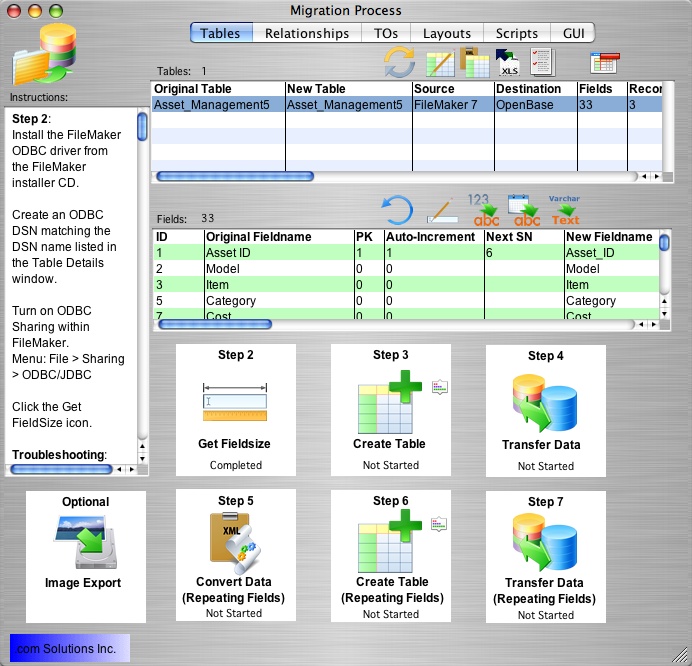
California based .com Solutions Inc. has released FmPro Migrator Platinum Edition 8.48. FmPro Migrator is a stand-alone application which quickly and accurately migrates FileMaker Pro databases to MySQL, Oracle, Access, SQL Server, Sybase, DB2, OpenBase and more. Version 8.48 has been enhanced to perform automated Visual FoxPro to FileMaker 16 conversions. FileMaker database files can be shared using FileMaker Server or FileMaker Cloud with macOS, Windows and IOS devices.
Fremont, California - .com Solutions Inc. has released FmPro Migrator Platinum Edition 8.48 with enhancements supporting the automated conversion from Microsoft Visual FoxPro to FileMaker Pro Advanced 16. This release supports FileMaker Pro Advanced 11 - 16 on macOS and Windows.
The Problem: Visual FoxPro has been discontinued by Microsoft for more than 10 years - and you need to upgrade to a supported custom app development platform.
The Solution: FmPro Migrator Platinum Edition 8.48 has been enhanced to perform automated Visual FoxPro to FileMaker 16 conversions.
FileMaker (an Apple subsidiary) is widely regarded as the leader in low code custom app development - supporting Windows, macOS, IOS and HTML5 deployment platforms. Converting legacy Microsoft Visual FoxPro applications to FileMaker 16 offers many advantages including:
* Cross platform compatibility - FileMaker solutions run directly on macOS, Windows and IOS devices. WebDirect serves FileMaker custom apps via HTML5 to all mobile and desktop platforms running a supported web browser. Visual FoxPro can only run on the Microsoft Windows operating system.
* Easier database sharing - FileMaker database files can be shared using FileMaker Server or FileMaker Cloud with macOS, Windows and IOS devices. WebDirect serves FileMaker database files via HTML5 to any device or platform using any supported web browser. Visual FoxPro can never run directly on this many platforms without major rewriting.
* Greatly enhanced file capacity - FileMaker supports a 7TB filesize compared with the anemic 2GB Visual FoxPro DBF filesize limit. If a DBF file ever exceeds the 2GB file size limit, it will immediately become corrupted.
* FileMaker Cloud Hosting - FileMaker Cloud is a version of FileMaker Server running on the AWS cloud infrastructure. FileMaker Cloud provides secure, reliable access to your custom apps using FileMaker Pro, FileMaker Go, and FileMaker WebDirect - all without the administrative hassle.
* Easier Development - Upgrading to FileMaker Pro 16 also offers developers the opportunity to take advantage of the latest design, development and security features included with FileMaker Pro Advanced 16 and FileMaker Server 16 and FileMaker Cloud 16 - including WebDirect capacity enhancements.
Pricing and Availability:
FmPro Migrator Developer Edition (8.48) is priced at $600 (USD) per developer, and is available immediately. A functional demo version of FmPro Migrator may be downloaded from .com Solutions online.
FmPro Migrator 8.48: http://www.fmpromigrator.com/products/fmpro_migrator/index.html
Visual FoxPro to FileMaker Conversion Feature: http://www.fmpromigrator.com/services/vfp_conversion.html
Download FmPro Migrator: http://www.fmpromigrator.com/downloads/demo_software/index.html#fmpro_migrator_demo
Purchase: https://sites.fastspring.com/fmpromigrator/instant/fmpromigrator_PLAT
Screenshot: http://www.fmpromigrator.com/images/fmpro_migrator/fmig403_MP_Window.jpg
Founded in 1999 by David Simpson in Sunny California, .com Solutions Inc. develops multi-platform graphical applications supporting FileMaker Pro, SQLite, Oracle, MySQL, Access, SQL Server, Sybase, DB2, OpenBase, PostgreSQL, FrontBase, Valentina, VB6, LiveCode and Visual FoxPro developers. FmPro Script Diff, compares and edits FileMaker Pro scripts. SQLite Diff compares SQLite database schema and data. Copyright (C) 1999-2018 .com Solutions Inc. All Rights Reserved. FileMaker is a registered trademark of FileMaker, Inc. - An Apple Subsidiary. Apple, the Apple logo and macOS platforms are trademarks of Apple Inc. in the U.S. and/or other countries.
*******
Link To Article: https://prmac.com/release-id-82530.htm
*******
---------------------------------------------------------------------------------
Note that you can alter delivered distributions at any time.
Login to your account on prMac to alter your channel selection, or to opt-out at any time.
FmPro Migrator 8.48 Creates FileMaker 16 Custom Apps from Visual FoxPro - Published on 03/05/18
California based .com Solutions Inc. has released FmPro Migrator Platinum Edition 8.48. FmPro Migrator is a stand-alone application which quickly and accurately migrates FileMaker Pro databases to MySQL, Oracle, Access, SQL Server, Sybase, DB2, OpenBase and more. Version 8.48 has been enhanced to perform automated Visual FoxPro to FileMaker 16 conversions. FileMaker database files can be shared using FileMaker Server or FileMaker Cloud with macOS, Windows and IOS devices.
Fremont, California - .com Solutions Inc. has released FmPro Migrator Platinum Edition 8.48 with enhancements supporting the automated conversion from Microsoft Visual FoxPro to FileMaker Pro Advanced 16. This release supports FileMaker Pro Advanced 11 - 16 on macOS and Windows.
The Problem: Visual FoxPro has been discontinued by Microsoft for more than 10 years - and you need to upgrade to a supported custom app development platform.
The Solution: FmPro Migrator Platinum Edition 8.48 has been enhanced to perform automated Visual FoxPro to FileMaker 16 conversions.
FileMaker (an Apple subsidiary) is widely regarded as the leader in low code custom app development - supporting Windows, macOS, IOS and HTML5 deployment platforms. Converting legacy Microsoft Visual FoxPro applications to FileMaker 16 offers many advantages including:
* Cross platform compatibility - FileMaker solutions run directly on macOS, Windows and IOS devices. WebDirect serves FileMaker custom apps via HTML5 to all mobile and desktop platforms running a supported web browser. Visual FoxPro can only run on the Microsoft Windows operating system.
* Easier database sharing - FileMaker database files can be shared using FileMaker Server or FileMaker Cloud with macOS, Windows and IOS devices. WebDirect serves FileMaker database files via HTML5 to any device or platform using any supported web browser. Visual FoxPro can never run directly on this many platforms without major rewriting.
* Greatly enhanced file capacity - FileMaker supports a 7TB filesize compared with the anemic 2GB Visual FoxPro DBF filesize limit. If a DBF file ever exceeds the 2GB file size limit, it will immediately become corrupted.
* FileMaker Cloud Hosting - FileMaker Cloud is a version of FileMaker Server running on the AWS cloud infrastructure. FileMaker Cloud provides secure, reliable access to your custom apps using FileMaker Pro, FileMaker Go, and FileMaker WebDirect - all without the administrative hassle.
* Easier Development - Upgrading to FileMaker Pro 16 also offers developers the opportunity to take advantage of the latest design, development and security features included with FileMaker Pro Advanced 16 and FileMaker Server 16 and FileMaker Cloud 16 - including WebDirect capacity enhancements.
Pricing and Availability:
FmPro Migrator Developer Edition (8.48) is priced at $600 (USD) per developer, and is available immediately. A functional demo version of FmPro Migrator may be downloaded from .com Solutions online.
FmPro Migrator 8.48: http://www.fmpromigrator.com/products/fmpro_migrator/index.html
Visual FoxPro to FileMaker Conversion Feature: http://www.fmpromigrator.com/services/vfp_conversion.html
Download FmPro Migrator: http://www.fmpromigrator.com/downloads/demo_software/index.html#fmpro_migrator_demo
Purchase: https://sites.fastspring.com/fmpromigrator/instant/fmpromigrator_PLAT
Screenshot: http://www.fmpromigrator.com/images/fmpro_migrator/fmig403_MP_Window.jpg
Founded in 1999 by David Simpson in Sunny California, .com Solutions Inc. develops multi-platform graphical applications supporting FileMaker Pro, SQLite, Oracle, MySQL, Access, SQL Server, Sybase, DB2, OpenBase, PostgreSQL, FrontBase, Valentina, VB6, LiveCode and Visual FoxPro developers. FmPro Script Diff, compares and edits FileMaker Pro scripts. SQLite Diff compares SQLite database schema and data. Copyright (C) 1999-2018 .com Solutions Inc. All Rights Reserved. FileMaker is a registered trademark of FileMaker, Inc. - An Apple Subsidiary. Apple, the Apple logo and macOS platforms are trademarks of Apple Inc. in the U.S. and/or other countries.
*******
Link To Article: https://prmac.com/release-id-82530.htm
*******
---------------------------------------------------------------------------------
Note that you can alter delivered distributions at any time.
Login to your account on prMac to alter your channel selection, or to opt-out at any time.
Output Factory Server for InDesign Improves Preflight Email Alerts
A new article has been published at prMac.
Output Factory Server for InDesign Improves Preflight Email Alerts - Published on 03/05/18
Zevrix Solutions announces Output Factory Server 2.0.12, a maintenance update to company's output workflow automation tool for Adobe InDesign. Output Factory automates printing and exporting from InDesign by processing files from hot folders. The app can serve unlimited users on a network and offers layer versioning, preflighting, single page export and more. The new version improves handling of email alerts triggered by preflight errors and addresses issues related to corrupted workflow files.
Toronto (ON), Canada - Zevrix Solutions today announces the release of Output Factory Server 2.0.12, a maintenance update to company's output automation software for Adobe InDesign. Output Factory Server automates InDesign production workflow by processing files from watched hot folders. The software offloads printing and exporting from InDesign to a central system leaving operator workstations free from the output process.
The new version improves the app's ability to send email notifications when preflight errors are detected in InDesign documents. The update addresses an issue in which notifications weren't sent if some advanced preflight options were selected. In addition, the new release automatically fixes malformed workflow files and improves import of workflows created with earlier versions of Output Factory Server.
"Output Factory Server is an extremely useful utility for a busy production facility or advertising agency", writes David Creamer in Layers magazine. "The setup process is simple and users experience is very straightforward. It can save lots of time - which equates to money."
Under the Output Factory Server workflow, production artists, prepress operators and designers simply copy InDesign jobs to hot folders that reside on a network. Users can create hot folders for different output targets such as hi-res PDF, large format printing, Flash files and so on. The software offers the following key features:
* Print and export InDesign files automatically from hot folders
* Supports print, PDF, PostScript, TIFF, EPUB and other formats
* Export as single pages
* Automatic email notifications
* Layer versioning
* Run custom scripts
* Variable output file names
* Automatic preflighting
* Output to multiple formats from a single hot folder
Pricing and Availability:
Output Factory Server can be purchased from Zevrix web site for $699.95 (USD), as well as from authorized resellers. Trial is also available for download. The upgrade to version 2 is $350 for the licensed users of Output Factory Server 1.x and BatchOutput Server. Output Factory Server requires macOS 10.7-10.13 and Adobe InDesign CS5-CC 2018.
Zevrix Solutions: http://zevrix.com
Output Factory Server 2.0.12: http://zevrix.com/OutputFactoryServer.php
Download Output Factory Server: http://zevrix.com/OutputFactoryServer.dmg
Purchase: http://zevrix.com/store.php
Screenshot: http://zevrix.com/screenshots/ofs2/ofs-main-pdf.jpg
Located in Toronto, Canada, Zevrix Solutions provides automation and productivity solutions for Adobe Creative Cloud and Creative Suite software, PDF workflows, graphic file diagnostics and Microsoft Office output on Mac OS. Zevrix is dedicated to help professionals increase their profits through automating everyday tasks, producing error-free documents, saving disk space and cutting production costs. For more information, visit their website. Copyright (C) 2018 Zevrix Solutions. All Rights Reserved. Other trademarks and registered trademarks may be the property of their respective owners.
*******
Link To Article: https://prmac.com/release-id-82528.htm
*******
---------------------------------------------------------------------------------
Note that you can alter delivered distributions at any time.
Login to your account on prMac to alter your channel selection, or to opt-out at any time.
Output Factory Server for InDesign Improves Preflight Email Alerts - Published on 03/05/18
Zevrix Solutions announces Output Factory Server 2.0.12, a maintenance update to company's output workflow automation tool for Adobe InDesign. Output Factory automates printing and exporting from InDesign by processing files from hot folders. The app can serve unlimited users on a network and offers layer versioning, preflighting, single page export and more. The new version improves handling of email alerts triggered by preflight errors and addresses issues related to corrupted workflow files.
Toronto (ON), Canada - Zevrix Solutions today announces the release of Output Factory Server 2.0.12, a maintenance update to company's output automation software for Adobe InDesign. Output Factory Server automates InDesign production workflow by processing files from watched hot folders. The software offloads printing and exporting from InDesign to a central system leaving operator workstations free from the output process.
The new version improves the app's ability to send email notifications when preflight errors are detected in InDesign documents. The update addresses an issue in which notifications weren't sent if some advanced preflight options were selected. In addition, the new release automatically fixes malformed workflow files and improves import of workflows created with earlier versions of Output Factory Server.
"Output Factory Server is an extremely useful utility for a busy production facility or advertising agency", writes David Creamer in Layers magazine. "The setup process is simple and users experience is very straightforward. It can save lots of time - which equates to money."
Under the Output Factory Server workflow, production artists, prepress operators and designers simply copy InDesign jobs to hot folders that reside on a network. Users can create hot folders for different output targets such as hi-res PDF, large format printing, Flash files and so on. The software offers the following key features:
* Print and export InDesign files automatically from hot folders
* Supports print, PDF, PostScript, TIFF, EPUB and other formats
* Export as single pages
* Automatic email notifications
* Layer versioning
* Run custom scripts
* Variable output file names
* Automatic preflighting
* Output to multiple formats from a single hot folder
Pricing and Availability:
Output Factory Server can be purchased from Zevrix web site for $699.95 (USD), as well as from authorized resellers. Trial is also available for download. The upgrade to version 2 is $350 for the licensed users of Output Factory Server 1.x and BatchOutput Server. Output Factory Server requires macOS 10.7-10.13 and Adobe InDesign CS5-CC 2018.
Zevrix Solutions: http://zevrix.com
Output Factory Server 2.0.12: http://zevrix.com/OutputFactoryServer.php
Download Output Factory Server: http://zevrix.com/OutputFactoryServer.dmg
Purchase: http://zevrix.com/store.php
Screenshot: http://zevrix.com/screenshots/ofs2/ofs-main-pdf.jpg

Located in Toronto, Canada, Zevrix Solutions provides automation and productivity solutions for Adobe Creative Cloud and Creative Suite software, PDF workflows, graphic file diagnostics and Microsoft Office output on Mac OS. Zevrix is dedicated to help professionals increase their profits through automating everyday tasks, producing error-free documents, saving disk space and cutting production costs. For more information, visit their website. Copyright (C) 2018 Zevrix Solutions. All Rights Reserved. Other trademarks and registered trademarks may be the property of their respective owners.
*******
Link To Article: https://prmac.com/release-id-82528.htm
*******
---------------------------------------------------------------------------------
Note that you can alter delivered distributions at any time.
Login to your account on prMac to alter your channel selection, or to opt-out at any time.
Gemtactix 2.0, a free multiplayer tactical board game for iOS & Android
A new article has been published at prMac.
Gemtactix 2.0, a free multiplayer tactical board game for iOS & Android - Published on 03/02/18
Time Tracer Limited updates Gemtactix (2.0) a free tactical board game for iOS and Android. The player's objective is to win the game by moving their craft around the board to capture enough of the opponents golden gems to stop the opponent capturing their gems. The game ends when a player cannot capture anymore gems: The winner is the one with the most gems and gets to unlock gemstone treasures. Now with realtime multiplayer and in-game chat, challenge friends or the world to a game match.
London, United Kingdom - Time Tracer Limited is proud to announce the release of Gemtactix 2.0, an important feature update to their free tactical strategy board game - made with the Unity(R) game engine software and released for iOS and Android devices.
Gemtactix is an electronic version of a popular social mancala board game that has been played around the world. Gemtactix is a fun, social and tactical board game. The player's objective is to win the game by moving their craft around the board to capture enough of the opponents golden gems to stop the opponent capturing their gems. The game ends when a player cannot capture anymore gems: The winner is the one with the most gems and gets to unlock gemstone treasures. There are 24 gemstone treasures to unlock plus one infinity move gem treasure that only a few will unlock.
Now with realtime multiplayer, players can challenge their friends or the world to a game match. In-game text chat is available during game play. The Gemtactix game is easy to learn as shown in the quick minute and twenty second YouTube demo video.
Player Game Levels:
Play against Galactic Control in three game levels or Play versus others around the world or your Facebook Friends:
L1 - Trainee Level: Player Versus Galactic Control Trainer.
L2 - Expert Level: Player Versus Galactic Control Expert.
L3 - Master Level: Player Versus Galactic Control Master.
Multiplayer - Player Versus World or Facebook Friends - internet connection required (WiFi or 3g+).
Multiplayer - Player Versus Mates in the pub, bar, cafe, restaurant, plane, beach ... use the phone or tablet device just like the traditional board game (no internet connection needed).
Scores are based on the golden gems captured, the time taken and the difficulty level.
Game Graphics, Game Music and Special Effects:
Time Tracer Limited applies special effects, music and graphics to the board game to further enliven it. The theme of the game is space. For example in the Professional Level, background snow falling in space has a surreal effect when playing the game this together with the game play music is of a calming nature helping one to relax and think their way through the game. The game has victory music to accompany the thrill of winning and complementary solace music when a player loses a game. The music, sound effects and special effects can be turned off if desired.
Origins Of The Game:
The Gemtactix game is derived from mancala games originally played across Africa and the Middle East, in particular the variant mancala games played in Eastern and Central Africa. The origin of the games are a mystery: however what is known is that they have been played for many centuries as a social pastime for communities on Earth.
Supported Language:
* English together with pictorial icons that can be understood around the world.
Device Requirements:
* iOS V8.0 (iPhone, iPad & iPod touch).
* Android 4.1 (Phones and Tablets).
Pricing and Availability:
Gemtactix 2.0 is Free and available worldwide through the App Store and the Google Play Store in the Games category.
Gemtactix 2.0: http://www.gemtactix.com
Download from iTunes: https://itunes.apple.com/app/id558836535
Download from Google Play: https://play.google.com/store/apps/details?id=com.gemtactix.Gemtactix
YouTube Video (Gemtactix - How To Play): https://www.youtube.com/watch?v=dOLax81Gto0
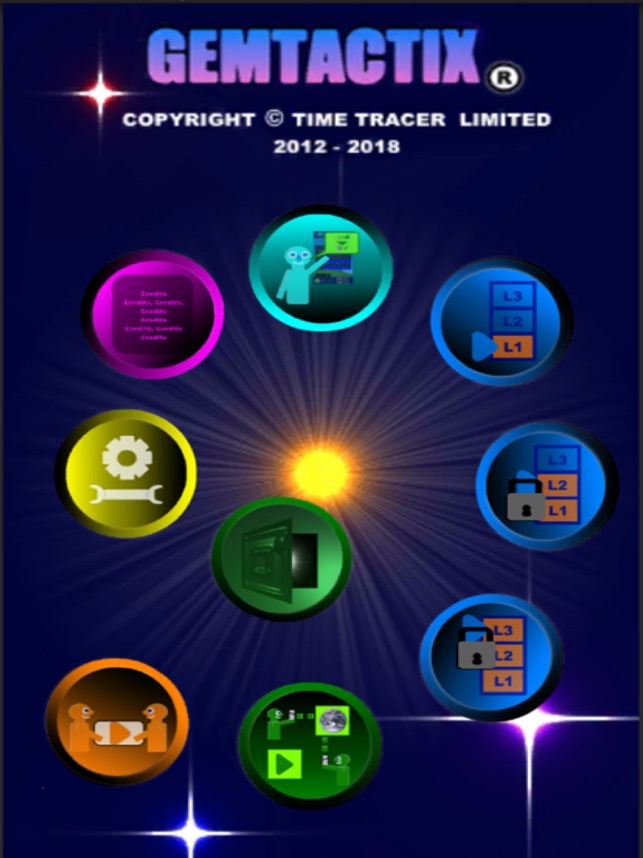
Screenshot: https://is3-ssl.mzstatic.com/image/thumb/Purple118/v4/20/71/b2/2071b214-e4a6-3a1e-e64e-715311914f64/pr_source.png/643x0w.jpg
App Icon: https://is5-ssl.mzstatic.com/image/thumb/Purple128/v4/e0/68/b8/e068b884-3fa6-54ce-cd7f-4133918d158f/AppIcon-1x_U007emarketing-85-220-8.png/246x0w.jpg
Time Tracer Limited registered in England and its main activity is game app production. All Material and Software (C) Copyright 2012 - 2018 Time Tracer Limited. All Rights Reserved. Apple, the Apple logo, iPhone, iPod and iPad are registered trademarks of Apple Inc. in the U.S. and/or other countries. Google Play and the Google Play logo are trademarks of Google LLC. Unity(R) is the trade mark of Unity Technologies. Facebook is the trade mark of Facebook Inc. Other trademarks and registered trademarks may be the property of their respective owners.
*******
Link To Article: https://prmac.com/release-id-82527.htm
*******
---------------------------------------------------------------------------------
Note that you can alter delivered distributions at any time.
Login to your account on prMac to alter your channel selection, or to opt-out at any time.
Gemtactix 2.0, a free multiplayer tactical board game for iOS & Android - Published on 03/02/18
Time Tracer Limited updates Gemtactix (2.0) a free tactical board game for iOS and Android. The player's objective is to win the game by moving their craft around the board to capture enough of the opponents golden gems to stop the opponent capturing their gems. The game ends when a player cannot capture anymore gems: The winner is the one with the most gems and gets to unlock gemstone treasures. Now with realtime multiplayer and in-game chat, challenge friends or the world to a game match.
London, United Kingdom - Time Tracer Limited is proud to announce the release of Gemtactix 2.0, an important feature update to their free tactical strategy board game - made with the Unity(R) game engine software and released for iOS and Android devices.
Gemtactix is an electronic version of a popular social mancala board game that has been played around the world. Gemtactix is a fun, social and tactical board game. The player's objective is to win the game by moving their craft around the board to capture enough of the opponents golden gems to stop the opponent capturing their gems. The game ends when a player cannot capture anymore gems: The winner is the one with the most gems and gets to unlock gemstone treasures. There are 24 gemstone treasures to unlock plus one infinity move gem treasure that only a few will unlock.
Now with realtime multiplayer, players can challenge their friends or the world to a game match. In-game text chat is available during game play. The Gemtactix game is easy to learn as shown in the quick minute and twenty second YouTube demo video.
Player Game Levels:
Play against Galactic Control in three game levels or Play versus others around the world or your Facebook Friends:
L1 - Trainee Level: Player Versus Galactic Control Trainer.
L2 - Expert Level: Player Versus Galactic Control Expert.
L3 - Master Level: Player Versus Galactic Control Master.
Multiplayer - Player Versus World or Facebook Friends - internet connection required (WiFi or 3g+).
Multiplayer - Player Versus Mates in the pub, bar, cafe, restaurant, plane, beach ... use the phone or tablet device just like the traditional board game (no internet connection needed).
Scores are based on the golden gems captured, the time taken and the difficulty level.
Game Graphics, Game Music and Special Effects:
Time Tracer Limited applies special effects, music and graphics to the board game to further enliven it. The theme of the game is space. For example in the Professional Level, background snow falling in space has a surreal effect when playing the game this together with the game play music is of a calming nature helping one to relax and think their way through the game. The game has victory music to accompany the thrill of winning and complementary solace music when a player loses a game. The music, sound effects and special effects can be turned off if desired.
Origins Of The Game:
The Gemtactix game is derived from mancala games originally played across Africa and the Middle East, in particular the variant mancala games played in Eastern and Central Africa. The origin of the games are a mystery: however what is known is that they have been played for many centuries as a social pastime for communities on Earth.
Supported Language:
* English together with pictorial icons that can be understood around the world.
Device Requirements:
* iOS V8.0 (iPhone, iPad & iPod touch).
* Android 4.1 (Phones and Tablets).
Pricing and Availability:
Gemtactix 2.0 is Free and available worldwide through the App Store and the Google Play Store in the Games category.
Gemtactix 2.0: http://www.gemtactix.com
Download from iTunes: https://itunes.apple.com/app/id558836535
Download from Google Play: https://play.google.com/store/apps/details?id=com.gemtactix.Gemtactix
YouTube Video (Gemtactix - How To Play): https://www.youtube.com/watch?v=dOLax81Gto0
Screenshot: https://is3-ssl.mzstatic.com/image/thumb/Purple118/v4/20/71/b2/2071b214-e4a6-3a1e-e64e-715311914f64/pr_source.png/643x0w.jpg
App Icon: https://is5-ssl.mzstatic.com/image/thumb/Purple128/v4/e0/68/b8/e068b884-3fa6-54ce-cd7f-4133918d158f/AppIcon-1x_U007emarketing-85-220-8.png/246x0w.jpg

Time Tracer Limited registered in England and its main activity is game app production. All Material and Software (C) Copyright 2012 - 2018 Time Tracer Limited. All Rights Reserved. Apple, the Apple logo, iPhone, iPod and iPad are registered trademarks of Apple Inc. in the U.S. and/or other countries. Google Play and the Google Play logo are trademarks of Google LLC. Unity(R) is the trade mark of Unity Technologies. Facebook is the trade mark of Facebook Inc. Other trademarks and registered trademarks may be the property of their respective owners.
*******
Link To Article: https://prmac.com/release-id-82527.htm
*******
---------------------------------------------------------------------------------
Note that you can alter delivered distributions at any time.
Login to your account on prMac to alter your channel selection, or to opt-out at any time.
AlphaDigits Top Rated Apps February 2018
A new article has been published at prMac.
AlphaDigits Top Rated Apps February 2018 - Published on 03/01/18
Mobile app review publisher AlphaDigits has named top rated applications for February 2018. MAYU for iMessages takes your text message to new heights. EasyDash app is a simple, yet intuitive reminder app. Edru is a digital simulator which recreates the Ebru marbling paint techniques for smartphones. SpamHound blocks spammers. Learnia teaches kids math and spelling.
Long Island, New York - Mobile app review publisher AlphaDigits has named top rated applications for February 2018. AlphaDigits names five top class mobile apps every month based on the reviews published in the website during the particular month. This website has now released the names of top rated mobile apps for the month of February.
MAYU for iMessages (10/10): MAYU Animate is an app that's an easy download, makes messaging come alive and creates a whole lot of fun to anyone who receives a message crafted by its entertaining enhancements. It costs just $1.99, but comes with an immense variety of clips and videos that take your text message to new heights.
EasyDash (9.5/10): This app is a simple, yet intuitive reminder app, as well as a note taking app. For each meeting you have, or event you need to go to, you can take the important stuff down in this app. The average individual has many things to keep track of, across many different topics, so with this app you can categorize them.
Edru Marbling Paint (9/10): Enter the journey and become an edru artist, where you can create amazing art and add more shapes and patterns to your life. The smart, colorful, and packed with creative possibilities, Edru is a digital simulator which recreates the Ebru marbling paint techniques for smartphones and tablets.
SpamHound (8.5/10): It has the power of what to block and how to block it. For instance, you can blacklist spammers by creating and saving rules that apply to your specific needs. By using keywords that you've noticed in the spam messages, you can prevent the onslaught of messages that include words like "discount," "special deal," and more. From there, you define what part of the message to search, such as "From," "Body," etc.
Learnia (8/10): This is an app that teaches kids math and spelling for three grade levels. Users can purchase what they want; based on the grade level work they want for their kids. Designed for the iPad, it supports a well laid out learning surface, supported by all of the graphic features iPad supports, such as the ability to draw out letter and numbers, and more.
Joe Ellen, an Editor at AlphaDigits said, "Our app marketers can generate downloads with targeted keywords on iOS and Android." Developers can also contact AlphaDigits through the onsite form, mail or the contact form to get their apps reviewed.
AlphaDigits: http://alphadigits.com
Submit App for Review: http://alphadigits.com/submit-app-for-review/
AlphaDigits is a review site run by a few app marketers. Enjoying the support from a handy amount of regular visitors, AlphaDigits provides reviews for iPhone, iPad and Android apps. Copyright (C) 2018 AlphaDigits. All Rights Reserved. Apple, the Apple logo, iPhone, iPod and iPad are registered trademarks of Apple Inc. in the U.S. and/or other countries.
*******
Link To Article: https://prmac.com/release-id-82526.htm
*******
---------------------------------------------------------------------------------
Note that you can alter delivered distributions at any time.
Login to your account on prMac to alter your channel selection, or to opt-out at any time.
AlphaDigits Top Rated Apps February 2018 - Published on 03/01/18
Mobile app review publisher AlphaDigits has named top rated applications for February 2018. MAYU for iMessages takes your text message to new heights. EasyDash app is a simple, yet intuitive reminder app. Edru is a digital simulator which recreates the Ebru marbling paint techniques for smartphones. SpamHound blocks spammers. Learnia teaches kids math and spelling.
Long Island, New York - Mobile app review publisher AlphaDigits has named top rated applications for February 2018. AlphaDigits names five top class mobile apps every month based on the reviews published in the website during the particular month. This website has now released the names of top rated mobile apps for the month of February.
MAYU for iMessages (10/10): MAYU Animate is an app that's an easy download, makes messaging come alive and creates a whole lot of fun to anyone who receives a message crafted by its entertaining enhancements. It costs just $1.99, but comes with an immense variety of clips and videos that take your text message to new heights.
EasyDash (9.5/10): This app is a simple, yet intuitive reminder app, as well as a note taking app. For each meeting you have, or event you need to go to, you can take the important stuff down in this app. The average individual has many things to keep track of, across many different topics, so with this app you can categorize them.
Edru Marbling Paint (9/10): Enter the journey and become an edru artist, where you can create amazing art and add more shapes and patterns to your life. The smart, colorful, and packed with creative possibilities, Edru is a digital simulator which recreates the Ebru marbling paint techniques for smartphones and tablets.
SpamHound (8.5/10): It has the power of what to block and how to block it. For instance, you can blacklist spammers by creating and saving rules that apply to your specific needs. By using keywords that you've noticed in the spam messages, you can prevent the onslaught of messages that include words like "discount," "special deal," and more. From there, you define what part of the message to search, such as "From," "Body," etc.
Learnia (8/10): This is an app that teaches kids math and spelling for three grade levels. Users can purchase what they want; based on the grade level work they want for their kids. Designed for the iPad, it supports a well laid out learning surface, supported by all of the graphic features iPad supports, such as the ability to draw out letter and numbers, and more.
Joe Ellen, an Editor at AlphaDigits said, "Our app marketers can generate downloads with targeted keywords on iOS and Android." Developers can also contact AlphaDigits through the onsite form, mail or the contact form to get their apps reviewed.
AlphaDigits: http://alphadigits.com
Submit App for Review: http://alphadigits.com/submit-app-for-review/
AlphaDigits is a review site run by a few app marketers. Enjoying the support from a handy amount of regular visitors, AlphaDigits provides reviews for iPhone, iPad and Android apps. Copyright (C) 2018 AlphaDigits. All Rights Reserved. Apple, the Apple logo, iPhone, iPod and iPad are registered trademarks of Apple Inc. in the U.S. and/or other countries.
*******
Link To Article: https://prmac.com/release-id-82526.htm
*******
---------------------------------------------------------------------------------
Note that you can alter delivered distributions at any time.
Login to your account on prMac to alter your channel selection, or to opt-out at any time.
8Ball Games releases Black Holes 2.0 for iOS and Android
A new article has been published at prMac.
8Ball Games releases Black Holes 2.0 for iOS and Android - Published on 03/01/18
8Ball Games today announces Black Holes 2.0, an important feature update to their popular game title for iOS and Android devices. Black Holes is an awesome game in which you will have to avoid dropping your ball into the holes that are moving all over the field. Players can compete with the whole world thanks to the integration with the 8ball games community. Version 2.0 includes many game improvements and also introduces compatibility with iPad and Android devices.
Ciro, Italy - 8Ball Games today is proud to announce the release of Black Holes 2.0, an important feature update to their popular game title for iOS and Android devices. Black Holes is an awesome game in which you will have to avoid dropping your ball into the holes that are moving all over the field.
Players can compete with the whole world thanks to the integration with the 8Ball Games community. The community is a platform where gamers can see world ranking of the games produced by 8Ball Games. But not only this, awesome news are coming soon! Version 2.0 includes many game improvements and also introduces compatibility with iPad and Android devices, In this new version there are many new features like:
* New 3D graphics
* New game dynamics
* New Power Up
* New world ranking
* New fun
Device Requirements:
* Internet Connection is required in order to play
* iPhone, iPad, and iPod touch
* Requires iOS 7.0 or later
* 138.2 MB
Pricing and Availability:
Black Holes 2.0 is Free (With In-App Purchases) and available worldwide through the App Store in the Games category. There is also an Android version available on Google Play. In order to play, registration to the 8Ball Games Community platform is required (it will only take a few moments). Players can buy items with real money. This feature can be disabled the in-app purchase in the settings. For more information, please contact Francesco Scala.
8ball Games: http://www.8ball-games.com/
Black Holes 2.0: http://eightballgames.altervista.org/games.php
Download from iTunes: https://itunes.apple.com/app/black-holes/id493800053
Download from Google Play: https://play.google.com/store/apps/details?id=it.Franco7Scala.BlackHoles
Screenshot: http://eightballgames.altervista.org/images/promos/blackholespromo.png
App Icon: http://eightballgames.altervista.org/images/icons/BlackHoles.png
Based in Ciro, Itally, 8Ball Games is a software house that creates, develops and publishes videogames for mobile devices. Despite 8ball games is well known for fun and games, the company takes corporate social responsibility very seriously. By focusing on consumer safety, online privacy protection, human rights, labor rights, and environmental issues in all that we do. We strive to do the good in the world that our customers, and employees, deserve and expect. All Material and Software (C) Copyright 2018 8Ball Games. All Rights Reserved. Apple, the Apple logo, iPhone, iPod and iPad are registered trademarks of Apple Inc. in the U.S. and/or other countries. Other trademarks and registered trademarks may be the property of their respective owners.
*******
Link To Article: https://prmac.com/release-id-82525.htm
*******
---------------------------------------------------------------------------------
Note that you can alter delivered distributions at any time.
Login to your account on prMac to alter your channel selection, or to opt-out at any time.
8Ball Games releases Black Holes 2.0 for iOS and Android - Published on 03/01/18
8Ball Games today announces Black Holes 2.0, an important feature update to their popular game title for iOS and Android devices. Black Holes is an awesome game in which you will have to avoid dropping your ball into the holes that are moving all over the field. Players can compete with the whole world thanks to the integration with the 8ball games community. Version 2.0 includes many game improvements and also introduces compatibility with iPad and Android devices.
Ciro, Italy - 8Ball Games today is proud to announce the release of Black Holes 2.0, an important feature update to their popular game title for iOS and Android devices. Black Holes is an awesome game in which you will have to avoid dropping your ball into the holes that are moving all over the field.
Players can compete with the whole world thanks to the integration with the 8Ball Games community. The community is a platform where gamers can see world ranking of the games produced by 8Ball Games. But not only this, awesome news are coming soon! Version 2.0 includes many game improvements and also introduces compatibility with iPad and Android devices, In this new version there are many new features like:
* New 3D graphics
* New game dynamics
* New Power Up
* New world ranking
* New fun
Device Requirements:
* Internet Connection is required in order to play
* iPhone, iPad, and iPod touch
* Requires iOS 7.0 or later
* 138.2 MB
Pricing and Availability:
Black Holes 2.0 is Free (With In-App Purchases) and available worldwide through the App Store in the Games category. There is also an Android version available on Google Play. In order to play, registration to the 8Ball Games Community platform is required (it will only take a few moments). Players can buy items with real money. This feature can be disabled the in-app purchase in the settings. For more information, please contact Francesco Scala.
8ball Games: http://www.8ball-games.com/
Black Holes 2.0: http://eightballgames.altervista.org/games.php
Download from iTunes: https://itunes.apple.com/app/black-holes/id493800053
Download from Google Play: https://play.google.com/store/apps/details?id=it.Franco7Scala.BlackHoles
Screenshot: http://eightballgames.altervista.org/images/promos/blackholespromo.png

App Icon: http://eightballgames.altervista.org/images/icons/BlackHoles.png

Based in Ciro, Itally, 8Ball Games is a software house that creates, develops and publishes videogames for mobile devices. Despite 8ball games is well known for fun and games, the company takes corporate social responsibility very seriously. By focusing on consumer safety, online privacy protection, human rights, labor rights, and environmental issues in all that we do. We strive to do the good in the world that our customers, and employees, deserve and expect. All Material and Software (C) Copyright 2018 8Ball Games. All Rights Reserved. Apple, the Apple logo, iPhone, iPod and iPad are registered trademarks of Apple Inc. in the U.S. and/or other countries. Other trademarks and registered trademarks may be the property of their respective owners.
*******
Link To Article: https://prmac.com/release-id-82525.htm
*******
---------------------------------------------------------------------------------
Note that you can alter delivered distributions at any time.
Login to your account on prMac to alter your channel selection, or to opt-out at any time.
Subscribe to:
Posts (Atom)