A new article has been published at prMac.
InPreflight Pro for InDesign Is Now Available on the New Adobe Exchange - Published on 04/11/18
Zevrix Solutions announces that InPreflight Pro for Adobe InDesign is now available on Adobe Exchange, is now available on Adobe Exchange, a new and improved Creative Cloud marketplace. InPreflight Pro is a document preparation solution for InDesign, which offers thorough quality control and batch document packaging. Users can now purchase the software directly on Adobe Exchange which makes it easier for customers to discover and install third party plug-ins for Creative Cloud.
Toronto (ON), Canada - Zevrix Solutions today announces that InPreflight Pro is now available on the new and improved Adobe Exchange. InPreflight Pro is a document preparation solution for Adobe InDesign, which offers thorough quality control and batch file packaging.
Adobe Exchange provides a new way to search, discover, and install plug-ins, extensions, and other content for Creative Cloud products. As a unified destination that brings third-party integrations with Creative Cloud, Document Cloud & Experience Cloud under a single umbrella, Adobe Exchange will make it easier for customers to discover and install integrations that expand and enhance what they can achieve on Adobe's Clouds.
"InPreflight is very simple, it provides excellent display of document's elements with full control over preflighting and file collection," says Michael Anikst of Anikst Design in London, UK. "I am designing very big books on art, and InPreflight lets me keep all my documents in perfect order."
InPreflight Pro provides a robust, fast, reliable and easy-to-use solution for printers, service providers, ad agencies and publishing houses and offers the following key features:
Batch-packaging and job delivery:
* Collect multiple InDesign files automatically
* Package all shared files into one folder and save gigabytes of disk space
* Package jobs into separate folders automatically
* Send collected jobs to FTP and other servers with email notifications
Quality control:
* Quickly preflight InDesign documents for common problems
* Reveal hidden issues such image compression and embedded fonts
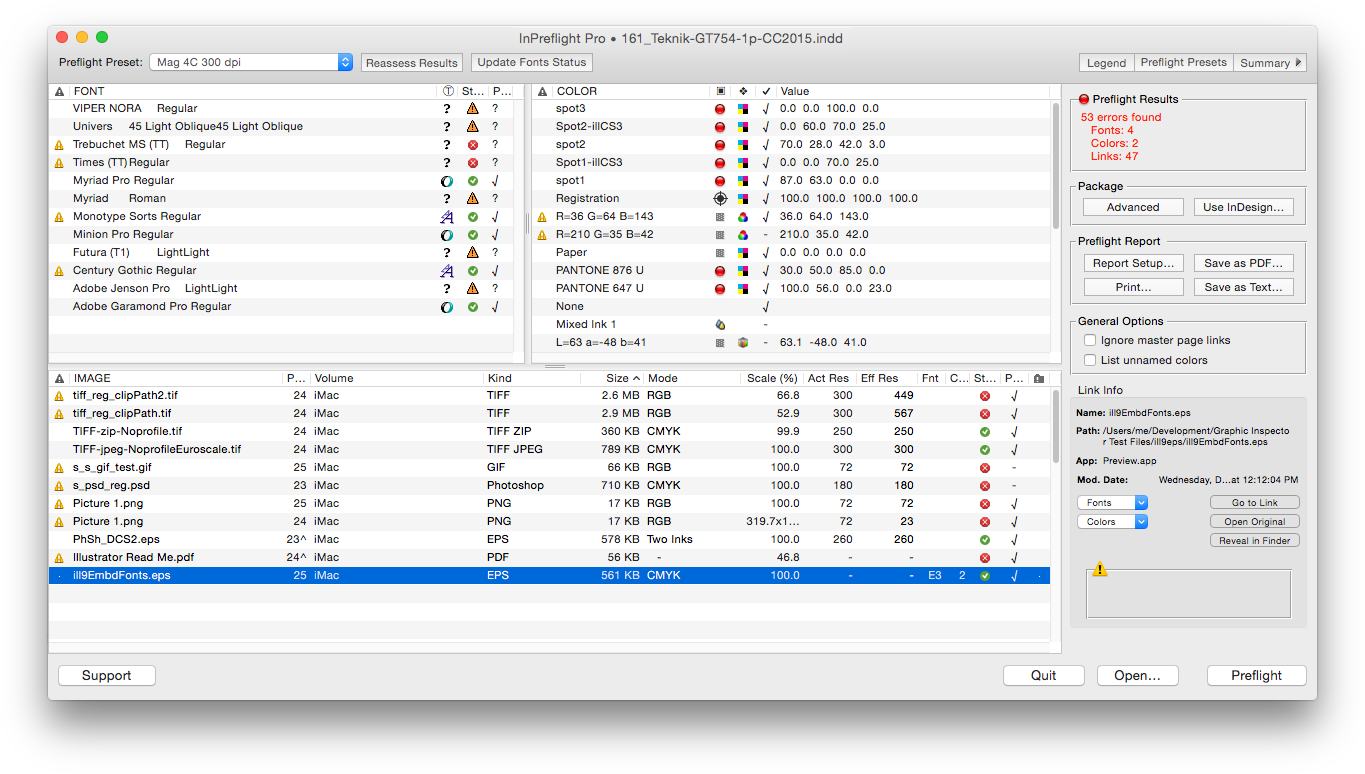
* View info on all fonts, colors and links at a glance
Graphic preflight reports:
* Create graphic preflight reports
* Print and save reports as PDF
* Interactive report setup
* Detailed paragraph styles report for typography professionals
Pricing and Availability:
InPreflight Pro can be purchased from Adobe Exchange for $99.95 (USD), as well as from Zevrix website and authorized resellers. Trial is also available for download. InPreflight requires macOS 10.7-10.13 and Adobe InDesign CS3-CC 2018.
Zevrix Solutions: http://zevrix.com
InPreflight Pro: https://www.adobeexchange.com/creativecloud.details.334.html
Download InPreflight Pro: http://zevrix.com/InPreflight.dmg
Screenshot: http://zevrix.com/screenshots/ipf2/ipf2-main-no-doc.png
Located in Toronto, Canada, Zevrix Solutions provides automation and productivity solutions for Adobe Creative Cloud and Creative Suite software, PDF workflows, graphic file diagnostics and Microsoft Office output on Mac OS. Zevrix is dedicated to help professionals increase their profits through automating everyday tasks, producing error-free documents, saving disk space and cutting production costs. For more information, visit their website. Copyright (C) 2018 Zevrix Solutions. All Rights Reserved. Other trademarks and registered trademarks may be the property of their respective owners.
*******
Link To Article: https://prmac.com/release-id-82615.htm
*******
---------------------------------------------------------------------------------
Note that you can alter delivered distributions at any time.
Login to your account on prMac to alter your channel selection, or to opt-out at any time.

AustinSoft takes Day-n-Night Global
A new article has been published at prMac.
AustinSoft takes Day-n-Night Global - Published on 04/10/18
California based AustinSoft today announces Day-n-Night 7.0 for iOS and tvOS. Day-n-Night is a beautiful, customizable world clock, showing the world as it is between day and night. Easily see the lights show through at dusk and fade away at dawn. Users can also zoom in to the map to get a better view of that area of the map. Version 7.0 adds new machine-assisted translations, performance improvements and resolved minor issues.
Morgan Hill, California - AustinSoft announces the immediate availability of Day-n-Night 7.0 for iOS and tvOS, localized to 24 languages, and supports date layouts from around the world. Not only are dates and times displayed in your regional format, but they are also displayed using your regional digit formats. Hold the beauty of the world in the palm of your hand, or let it light up your room from your AppleTV!
"Day-n-Night displays the entire world," said Glenn L. Austin, CEO of AustinSoft. "It only makes sense to localize the application to even more languages than before, and support virtually every date format available on the iPhone and AppleTV. To that end, we now parse the entire date formatting system available on the iPhone and display the date and time in your preferred format."
Day-n-Night is now fully localized into the following languages:
* Arabic (World)
* Chinese (Simplified)
* Chinese (Traditional)
* Danish
* Dutch (Netherlands)
* English (United States)
* English (Canada)
* English (Great Britain)
* English (Australia)
* English (New Zealand)
* Filipino
* Finnish
* French (Canada)
* French (France)
* German
* Hebrew
* Icelandic
* Italian
* Japanese
* Korean
* Portuguese (Brazil)
* Portuguese (Portugal)
* Russian
* Spanish (Latin America)
* Spanish (Spain)
* Swedish
* Welsh
Device Requirements:
* iPhone, iPad, iPod touch and Apple TV
* Requires iOS 10.0 or later
* 68.1 MB
Pricing and Availability:
Day-n-Night 7.0 is $1.99 USD (or equivalent amount in other currencies) and available worldwide exclusively through the App Store in the Lifestyle category. For more information, please contact Glenn Austin.
AustinSoft: http://www.austinsoft.com/
Day-n-Night 7.0: http://www.austinsoft.com/products/day-n-night.html
Purchase and Download: https://itunes.apple.com/app/day-n-night/id309409371
Screenshot: https://is5-ssl.mzstatic.com/image/thumb/Purple118/v4/33/30/5f/33305fbb-60fd-52c6-cb2a-8e24340d202e/pr_source.png/643x0w.jpg
App Icon: https://is3-ssl.mzstatic.com/image/thumb/Purple128/v4/41/41/5f/41415fdd-bf3d-6366-68d2-636d69a368ba/AppIcon-1x_U007emarketing-0-0-GLES2_U002c0-512MB-sRGB-0-0-0-85-220-0-0-0-6.png/246x0w.jpg
Located in Morgan Hill, California, AustinSoft.com was founded in 1996 by Glenn L. Austin and develops software for Windows, Macintosh, Linux/UNIX and iPhone. AustinSoft is based upon the user-centric approach to software design: designing software that users want, not what a marketing company tells us users want. All Material and Software (C) 1996-2018 AustinSoft.com / All Rights Reserved. Apple, the Apple logo, iPod, the iPod logo, iPhone, the iPhone logo, AppleTV, the AppleTV logo, are registered trademarks of Apple Incorporated in the U.S. and/or other countries. Windows is a registered trademark of Microsoft Corporation in the U.S. and/or other countries.
*******
Link To Article: https://prmac.com/release-id-82614.htm
*******
---------------------------------------------------------------------------------
Note that you can alter delivered distributions at any time.
Login to your account on prMac to alter your channel selection, or to opt-out at any time.
AustinSoft takes Day-n-Night Global - Published on 04/10/18
California based AustinSoft today announces Day-n-Night 7.0 for iOS and tvOS. Day-n-Night is a beautiful, customizable world clock, showing the world as it is between day and night. Easily see the lights show through at dusk and fade away at dawn. Users can also zoom in to the map to get a better view of that area of the map. Version 7.0 adds new machine-assisted translations, performance improvements and resolved minor issues.
Morgan Hill, California - AustinSoft announces the immediate availability of Day-n-Night 7.0 for iOS and tvOS, localized to 24 languages, and supports date layouts from around the world. Not only are dates and times displayed in your regional format, but they are also displayed using your regional digit formats. Hold the beauty of the world in the palm of your hand, or let it light up your room from your AppleTV!
"Day-n-Night displays the entire world," said Glenn L. Austin, CEO of AustinSoft. "It only makes sense to localize the application to even more languages than before, and support virtually every date format available on the iPhone and AppleTV. To that end, we now parse the entire date formatting system available on the iPhone and display the date and time in your preferred format."
Day-n-Night is now fully localized into the following languages:
* Arabic (World)
* Chinese (Simplified)
* Chinese (Traditional)
* Danish
* Dutch (Netherlands)
* English (United States)
* English (Canada)
* English (Great Britain)
* English (Australia)
* English (New Zealand)
* Filipino
* Finnish
* French (Canada)
* French (France)
* German
* Hebrew
* Icelandic
* Italian
* Japanese
* Korean
* Portuguese (Brazil)
* Portuguese (Portugal)
* Russian
* Spanish (Latin America)
* Spanish (Spain)
* Swedish
* Welsh
Device Requirements:
* iPhone, iPad, iPod touch and Apple TV
* Requires iOS 10.0 or later
* 68.1 MB
Pricing and Availability:
Day-n-Night 7.0 is $1.99 USD (or equivalent amount in other currencies) and available worldwide exclusively through the App Store in the Lifestyle category. For more information, please contact Glenn Austin.
AustinSoft: http://www.austinsoft.com/
Day-n-Night 7.0: http://www.austinsoft.com/products/day-n-night.html
Purchase and Download: https://itunes.apple.com/app/day-n-night/id309409371
Screenshot: https://is5-ssl.mzstatic.com/image/thumb/Purple118/v4/33/30/5f/33305fbb-60fd-52c6-cb2a-8e24340d202e/pr_source.png/643x0w.jpg

App Icon: https://is3-ssl.mzstatic.com/image/thumb/Purple128/v4/41/41/5f/41415fdd-bf3d-6366-68d2-636d69a368ba/AppIcon-1x_U007emarketing-0-0-GLES2_U002c0-512MB-sRGB-0-0-0-85-220-0-0-0-6.png/246x0w.jpg

Located in Morgan Hill, California, AustinSoft.com was founded in 1996 by Glenn L. Austin and develops software for Windows, Macintosh, Linux/UNIX and iPhone. AustinSoft is based upon the user-centric approach to software design: designing software that users want, not what a marketing company tells us users want. All Material and Software (C) 1996-2018 AustinSoft.com / All Rights Reserved. Apple, the Apple logo, iPod, the iPod logo, iPhone, the iPhone logo, AppleTV, the AppleTV logo, are registered trademarks of Apple Incorporated in the U.S. and/or other countries. Windows is a registered trademark of Microsoft Corporation in the U.S. and/or other countries.
*******
Link To Article: https://prmac.com/release-id-82614.htm
*******
---------------------------------------------------------------------------------
Note that you can alter delivered distributions at any time.
Login to your account on prMac to alter your channel selection, or to opt-out at any time.
PDFpen 10 Adds Watermarks, Headers & Footers, and Enhanced Selections
A new article has been published at prMac.
PDFpen 10 Adds Watermarks, Headers & Footers, and Enhanced Selections - Published on 04/10/18
California based developer, Smile today releases PDFpen and PDFpenPro 10.0, a major new version of its all-purpose PDF editing tool for Mac. Users can easily add signatures, text, and images, make changes and correct typos, OCR scanned docs, fill out forms and more. Easily mark up documents with highlighting, underscoring and strikethrough. Version 10.0 introduces watermarks, headers & footers, and for Pro users, batch Optical Character Recognition.
San Francisco, California - Smile, the developer of productivity applications for Mac(R), iPhone(R) and iPad(R), launches PDFpen and PDFpenPro 10.0, a new major version of its all-purpose PDF editing tool for Mac. Version 10 introduces watermarks, headers & footers, and for Pro users, batch OCR (Optical Character Recognition).
Add text and image watermarks with opacity and rotation controls, as well as custom page range options. Use watermarks to identify draft or confidential in-house documents, assert copyright, or clarify intended distribution.
Apply header and footer text with options for customizing page position, font, and page range.
PDFpenPro 10 offers batch OCR for turning multiple scans into searchable documents all at once.
The new Precision Edit tool in PDFpen and PDFpenPro 10 adds selection options and supports moving, resizing, and deleting line art and text blocks. This new tool maintains or decreases file size when moving, resizing and deleting images.
PDFpen 10 includes several additional improvements, including a larger view option for Library items, vibrant drawing colors, and more context menu actions.
"It's always exciting to deliver features your customers have asked for," said Philip Goward, Smile founder. "And with version 10 offering watermarks, headers & footers, and batch OCR just to name a few, we have done just that."
PDFpen and PDFpenPro 10 work with PDFpen for iPad & iPhone version 3, allowing seamless editing across devices when used with Dropbox or iCloud.
PDFpen retails for US $74.95, PDFpenPro for $124.95. Family Pack licenses, which cover up to five computers in one household, are $94.95 for PDFpen and $149.95 for PDFpenPro. Office Pack licenses start at $224.95 for PDFpen (5 users) and $349.95 for PDFpenPro (5 users).
Upgrades from earlier single user versions of either application are US $30, and free to users who purchased on or after January 1, 2018. Upgrades from any previous version of PDFpen to PDFpenPro 10 are $50. Upgrade pricing for Family Packs and Office Packs is found in our web store.
PDFpen 10 and PDFpenPro 10 require macOS 10.12 (Sierra) and work great on macOS 10.13 (High Sierra). For macOS 10.11 (El Capitan) and earlier, see our website for compatible PDFpen versions. Demo versions are available at on our site. Full versions of PDFpen and PDFpenPro are also available for purchase on Apple's Mac App Store.
What's New in PDFpen 10:
* Adds watermarks
* Insert Headers & Footers
* OCR multiple documents in batch (PDFpenPro only)
* New Precision Edit tool selects, moves, resizes and deletes line art and text
* Improves move & resize of images
* Enhances page number styling
* Adds larger Library item view
* Prettier drawing colors
* Adds context menu options
* Various improvements and fixes
Features Specific to PDFpenPro:
* Export to Microsoft(R) Excel (.xlsx, .xls), Microsoft(R) PowerPoint (.pptx) and PDF Archive (PDF/A) formats (requires Internet connection for .pptx and PDF/A, must be a licensed user)
* Create cross-platform fillable PDF forms including interactive signature fields and email or web submission buttons
* Create and edit Table of Contents
* Convert websites into PDFs
* OCR multiple documents in batch
* Add and edit document permissions
* Automatic form creation makes existing PDF forms fillable
* Gather submitted form data via backend integration
* Add and delete file attachments and annotations
* Create Portfolio documents, combining related files together
* Correct typos in OCR text layer
* OCR horizontal Chinese, Japanese & Korean
Features:
* Add text, images and signatures to PDFs
* Correct text in original PDF with editable text blocks
* Fill out interactive PDF forms and sign them
* Redact or erase text, including OCR text
* Search and replace, search and redact, and search and highlight text
* Export in Microsoft(R) Word format, TIFF, JPEG, PNG, and flat PDF
* Scan directly from Image Capture or TWAIN scanners
* Perform OCR (Optical Character Recognition) on scanned documents
* View OCR layer for proofing OCR text from scanned pages, or remove OCR layer
* Edit original images, including adjusting resolution, color depth and contrast, skew, and size of an image or scanned document
* Sign PDF forms via drawing, interactive signature fields, or AATL or self-signed certificates
* Insert and remove pages; re-order pages in a PDF with drag & drop; combine PDFs maintaining Table of Contents entries
* Move, resize, copy and delete images in original PDF
* Save PDFs directly to Evernote
* Preview and extract file attachments and annotations
* Record and playback audio annotations
* Copy and paste rich text; retain fonts and formatting when copying from PDFs, including columns
* Context-sensitive popup-menus enable quick edits
* Add notes and comments, print annotation summary with or without the original text
* Mark up documents with highlighting, underscoring and strikethrough
* Save frequently-used images, signatures, objects and text in the Library; sync Library items with PDFpen for iPad & iPhone via iCloud
* Add page numbers, bookmarks, headers and footers, line numbers and watermarks
* Apply business-related and Sign Here stamps via the Library
* Password protect a document with up to 256-bit AES encryption
* Automate PDF manipulations with AppleScript and JavaScript Automation
* Available in English, Japanese, German, French, Italian, and Spanish
Requirements:
* macOS 10.12 (Sierra) and later
PDFpen Pricing:
* $74.95 (USD)
* Family Pack: $94.95 (home use; up to 5 computers in one household)
* Office Pack: starts at $224.95 for 5 users
* Single user upgrade from earlier versions of PDFpen: $30
* Upgrade pricing for Family Packs and Office Packs available.
* (Free upgrades for purchases made on or after January 1, 2018; no free upgrades available on the Mac App Store)
PDFpenPro Pricing:
* $124.95 (USD)
* Family Pack: $149.95 (home use; up to 5 computers in one household)
* Office Pack: starts at $349.95 for 5 users
* Single user upgrade from earlier versions of PDFpenPro: $30
* Upgrade pricing for Family Packs and Office Packs available.
* (Free upgrades for purchases made on or after January 1, 2018; no free upgrades available on the Mac App Store)
Single user upgrade from the previous version of PDFpen to PDFpenPro 10: $50
Site licenses: PDFpen $1249.95, PDFpenPro $1624.95
Site license terms: Single contact for support; single physical address or company with fewer than 1,000 employees. Visit our site license store.
PDFpenPro 10.0: https://smilesoftware.com/PDFpen
Download PDFpenPro: https://smilesoftware.com/PDFpen/download
Purchase PDFpenPro: https://smle.us/store
YouTube Video: https://www.youtube.com/watch?v=feaB5whT1-w
Media Assets: https://smilesoftware.com/PDFpen/presskit
Press Kit (zip): https://smilesoftware.com/static/pr/PDFpen10_PressKit.zip
Headquartered in San Francisco, California, Smile makes productivity software for macOS and iOS devices, including PDFpen, the all-purpose Mac PDF editor; PDFpen for iPad & iPhone, the mobile PDF editor; PDFpen Scan , which brings the power of OCR to your iPad and iPhone; TextExpander, the typing shortcut tool for Mac, Windows, iPhone and iPad. Copyright (C) 2018 SmileOnMyMac, LLC dba Smile. All Rights Reserved. PDFpen, PDFpenPro, TextExpander, and the Smile logo are registered trademarks of SmileOnMyMac, LLC dba Smile. DiscLabel is a trademark of Smile. Apple, the Apple logo, Mac, iPad, iPhone, and iPod touch are trademarks of Apple Inc., registered in the U.S. and other countries. App Store is a service mark of Apple Inc.
*******
Link To Article: https://prmac.com/release-id-82613.htm
*******
---------------------------------------------------------------------------------
Note that you can alter delivered distributions at any time.
Login to your account on prMac to alter your channel selection, or to opt-out at any time.
PDFpen 10 Adds Watermarks, Headers & Footers, and Enhanced Selections - Published on 04/10/18
California based developer, Smile today releases PDFpen and PDFpenPro 10.0, a major new version of its all-purpose PDF editing tool for Mac. Users can easily add signatures, text, and images, make changes and correct typos, OCR scanned docs, fill out forms and more. Easily mark up documents with highlighting, underscoring and strikethrough. Version 10.0 introduces watermarks, headers & footers, and for Pro users, batch Optical Character Recognition.
San Francisco, California - Smile, the developer of productivity applications for Mac(R), iPhone(R) and iPad(R), launches PDFpen and PDFpenPro 10.0, a new major version of its all-purpose PDF editing tool for Mac. Version 10 introduces watermarks, headers & footers, and for Pro users, batch OCR (Optical Character Recognition).
Add text and image watermarks with opacity and rotation controls, as well as custom page range options. Use watermarks to identify draft or confidential in-house documents, assert copyright, or clarify intended distribution.
Apply header and footer text with options for customizing page position, font, and page range.
PDFpenPro 10 offers batch OCR for turning multiple scans into searchable documents all at once.
The new Precision Edit tool in PDFpen and PDFpenPro 10 adds selection options and supports moving, resizing, and deleting line art and text blocks. This new tool maintains or decreases file size when moving, resizing and deleting images.
PDFpen 10 includes several additional improvements, including a larger view option for Library items, vibrant drawing colors, and more context menu actions.
"It's always exciting to deliver features your customers have asked for," said Philip Goward, Smile founder. "And with version 10 offering watermarks, headers & footers, and batch OCR just to name a few, we have done just that."
PDFpen and PDFpenPro 10 work with PDFpen for iPad & iPhone version 3, allowing seamless editing across devices when used with Dropbox or iCloud.
PDFpen retails for US $74.95, PDFpenPro for $124.95. Family Pack licenses, which cover up to five computers in one household, are $94.95 for PDFpen and $149.95 for PDFpenPro. Office Pack licenses start at $224.95 for PDFpen (5 users) and $349.95 for PDFpenPro (5 users).
Upgrades from earlier single user versions of either application are US $30, and free to users who purchased on or after January 1, 2018. Upgrades from any previous version of PDFpen to PDFpenPro 10 are $50. Upgrade pricing for Family Packs and Office Packs is found in our web store.
PDFpen 10 and PDFpenPro 10 require macOS 10.12 (Sierra) and work great on macOS 10.13 (High Sierra). For macOS 10.11 (El Capitan) and earlier, see our website for compatible PDFpen versions. Demo versions are available at on our site. Full versions of PDFpen and PDFpenPro are also available for purchase on Apple's Mac App Store.
What's New in PDFpen 10:
* Adds watermarks
* Insert Headers & Footers
* OCR multiple documents in batch (PDFpenPro only)
* New Precision Edit tool selects, moves, resizes and deletes line art and text
* Improves move & resize of images
* Enhances page number styling
* Adds larger Library item view
* Prettier drawing colors
* Adds context menu options
* Various improvements and fixes
Features Specific to PDFpenPro:
* Export to Microsoft(R) Excel (.xlsx, .xls), Microsoft(R) PowerPoint (.pptx) and PDF Archive (PDF/A) formats (requires Internet connection for .pptx and PDF/A, must be a licensed user)
* Create cross-platform fillable PDF forms including interactive signature fields and email or web submission buttons
* Create and edit Table of Contents
* Convert websites into PDFs
* OCR multiple documents in batch
* Add and edit document permissions
* Automatic form creation makes existing PDF forms fillable
* Gather submitted form data via backend integration
* Add and delete file attachments and annotations
* Create Portfolio documents, combining related files together
* Correct typos in OCR text layer
* OCR horizontal Chinese, Japanese & Korean
Features:
* Add text, images and signatures to PDFs
* Correct text in original PDF with editable text blocks
* Fill out interactive PDF forms and sign them
* Redact or erase text, including OCR text
* Search and replace, search and redact, and search and highlight text
* Export in Microsoft(R) Word format, TIFF, JPEG, PNG, and flat PDF
* Scan directly from Image Capture or TWAIN scanners
* Perform OCR (Optical Character Recognition) on scanned documents
* View OCR layer for proofing OCR text from scanned pages, or remove OCR layer
* Edit original images, including adjusting resolution, color depth and contrast, skew, and size of an image or scanned document
* Sign PDF forms via drawing, interactive signature fields, or AATL or self-signed certificates
* Insert and remove pages; re-order pages in a PDF with drag & drop; combine PDFs maintaining Table of Contents entries
* Move, resize, copy and delete images in original PDF
* Save PDFs directly to Evernote
* Preview and extract file attachments and annotations
* Record and playback audio annotations
* Copy and paste rich text; retain fonts and formatting when copying from PDFs, including columns
* Context-sensitive popup-menus enable quick edits
* Add notes and comments, print annotation summary with or without the original text
* Mark up documents with highlighting, underscoring and strikethrough
* Save frequently-used images, signatures, objects and text in the Library; sync Library items with PDFpen for iPad & iPhone via iCloud
* Add page numbers, bookmarks, headers and footers, line numbers and watermarks
* Apply business-related and Sign Here stamps via the Library
* Password protect a document with up to 256-bit AES encryption
* Automate PDF manipulations with AppleScript and JavaScript Automation
* Available in English, Japanese, German, French, Italian, and Spanish
Requirements:
* macOS 10.12 (Sierra) and later
PDFpen Pricing:
* $74.95 (USD)
* Family Pack: $94.95 (home use; up to 5 computers in one household)
* Office Pack: starts at $224.95 for 5 users
* Single user upgrade from earlier versions of PDFpen: $30
* Upgrade pricing for Family Packs and Office Packs available.
* (Free upgrades for purchases made on or after January 1, 2018; no free upgrades available on the Mac App Store)
PDFpenPro Pricing:
* $124.95 (USD)
* Family Pack: $149.95 (home use; up to 5 computers in one household)
* Office Pack: starts at $349.95 for 5 users
* Single user upgrade from earlier versions of PDFpenPro: $30
* Upgrade pricing for Family Packs and Office Packs available.
* (Free upgrades for purchases made on or after January 1, 2018; no free upgrades available on the Mac App Store)
Single user upgrade from the previous version of PDFpen to PDFpenPro 10: $50
Site licenses: PDFpen $1249.95, PDFpenPro $1624.95
Site license terms: Single contact for support; single physical address or company with fewer than 1,000 employees. Visit our site license store.
PDFpenPro 10.0: https://smilesoftware.com/PDFpen
Download PDFpenPro: https://smilesoftware.com/PDFpen/download
Purchase PDFpenPro: https://smle.us/store
YouTube Video: https://www.youtube.com/watch?v=feaB5whT1-w
Media Assets: https://smilesoftware.com/PDFpen/presskit
Press Kit (zip): https://smilesoftware.com/static/pr/PDFpen10_PressKit.zip
Headquartered in San Francisco, California, Smile makes productivity software for macOS and iOS devices, including PDFpen, the all-purpose Mac PDF editor; PDFpen for iPad & iPhone, the mobile PDF editor; PDFpen Scan , which brings the power of OCR to your iPad and iPhone; TextExpander, the typing shortcut tool for Mac, Windows, iPhone and iPad. Copyright (C) 2018 SmileOnMyMac, LLC dba Smile. All Rights Reserved. PDFpen, PDFpenPro, TextExpander, and the Smile logo are registered trademarks of SmileOnMyMac, LLC dba Smile. DiscLabel is a trademark of Smile. Apple, the Apple logo, Mac, iPad, iPhone, and iPod touch are trademarks of Apple Inc., registered in the U.S. and other countries. App Store is a service mark of Apple Inc.
*******
Link To Article: https://prmac.com/release-id-82613.htm
*******
---------------------------------------------------------------------------------
Note that you can alter delivered distributions at any time.
Login to your account on prMac to alter your channel selection, or to opt-out at any time.
SpeedScriber 2.0 adds five new languages and enhanced captions export
A new article has been published at prMac.
SpeedScriber 2.0 adds five new languages and enhanced captions export - Published on 04/10/18
Digital Heaven today announced the launch of SpeedScriber 2.0 for macOS, a major update to the automated transcription app designed for professional content creators. SpeedScriber provides amazingly accurate transcripts from audio or video files at insanely fast speeds. Version 2.0 adds many new and useful features including support for Dutch, French, German, Italian and Spanish languages as well as export to iTunes Timed Text for creation of captions with the latest version of Final Cut Pro X.
London, United Kingdom - Digital Heaven today announced the launch of SpeedScriber 2.0, a major update to the automated transcription app specifically designed for professional content creators(*).
Version 2.0 introduces a wide range of enhancements, most notably the ability to transcribe media files in Dutch, French, German, Italian and Spanish languages as well as English. As the demand to provide captions becomes ever more widespread, SpeedScriber 2.0 adds two new export options - Avid DS caption format and iTunes Timed Text for use with the closed captioning features in the latest 10.4.1 release of Final Cut Pro X.
Overview:
Many documentary filmmakers, journalists, audio and video producers depend on reliable transcripts of their files, whether it be an interview for editing purposes, a text version of the finished project or for the ever-increasing requirement for delivery of captions. While there are several web-based transcription services on the market, they typically offer delivery times of 24 hours or longer and faster turnaround adds costly surcharges. SpeedScriber delivers affordable and amazingly accurate automated transcripts in minutes.
SpeedScriber includes professional features that are only possible with a native macOS app. MXF files can be imported** and timecode is supported for QuickTime Movie and Broadcast Wave files. Since only the audio from the file is required for the transcription process, media files are converted to a mono audio-only file for upload. Once uploaded, files are processed in parallel on our cloud-based servers and the transcript data is downloaded to the Mac app. A 60 minute file is typically transcribed in less than 10 minutes.
While the accuracy of automated transcription has improved dramatically in recent years, a key innovation of SpeedScriber is its comprehensive editing interface that was designed for making corrections quickly and efficiently. Transcripts can be reviewed with the current word highlighted in real-time as the media file is played. Speaker names can be assigned to sections of the transcript with a choice of nine colours for easy identification. Punctuation changes can be made on the selected words with a single keystroke and every editing command has a keyboard shortcut. Transcripts can be printed and exported to a wide range of file formats.
Digital Heaven has been developing plug-ins and apps for Apple video apps since 2003 so not surprisingly SpeedScriber features deep round-tripping integration with Final Cut Pro X (10.3 or later). Using the power of keyword ranges, audio, video, synchronised, multicam and (new in 2.0) compound clips can be tagged and automatically identified by SpeedScriber for import without any conversion of media. When transcription and editing is complete, the transcript can be attached to clips as searchable keyword ranges, again via a simple drag-and-drop operation. Favourite ranges created in SpeedScriber are transferred seamlessly to Final Cut Pro X. New in SpeedScriber 2.0 is support for export to iTunes Timed Text (.itt) format which can be used to create closed captions in the latest 10.4.1 release of Final Cut Pro X.
The SpeedScriber panel for Adobe Premiere Pro CC (2017.1 or later for macOS or Windows) gives real-time access to the transcripts on the user's account and allows import of transcripts as speech metadata or markers within seconds. Captions can be created in Premiere Pro by exporting to SubRip (.srt) format from SpeedScriber.
Avid has been a pioneer of script-based editing and with the reintroduction of ScriptSync, SpeedScriber is the perfect partner for creating searchable scripts right inside Media Composer. Transcripts can be exported to Avid Script format without the need to do additional reformatting or conversion. For captioning, SpeedScriber 2.0 now supports export to Avid DS Caption format.
Features:
* SpeedScriber combines the speed and scalability of a cloud-based transcription service with the flexibility of a native macOS app to create a solution that cannot be matched by traditional transcription providers.
* Get amazingly accurate timestamped transcripts in minutes rather than hours or days.
* Import audio and video files with support for timecode in QuickTime Movie and Broadcast Wave formats.
* Innovative editing tools enable fast and efficient transcript corrections at the speaker, punctuation and character-level.
* Print or export transcripts to a wide range of file formats.
* Deep integration with Apple Final Cut Pro X (10.3 or later) with drag-and-drop round-tripping of clips via XML.
* SpeedScriber panel for Adobe Premiere Pro CC gives real-time access to transcripts on the user's account and import to clips within seconds.
* Direct export of transcripts to Avid Script format makes SpeedScriber the perfect partner for ScriptSync.
New In Version 2.0
* Transcribe media files in Dutch, French, German, Italian and Spanish in addition to English.
* Custom Words panel allows users to save specialised terms and names and recall them with a single click to significantly speed up transcript editing.
* New captioning export options for Avid DS captions (for use with Avid Media Composer) and iTunes Timed Text (for use with Final Cut Pro X 10.4.1).
* Export to Word file (.docx).
* Support for round-tripping of compound clips with Final Cut Pro X.
* Rewritten word editing engine provides much improved estimated timings on new and corrected words.
* User interface enhancements including resizable panels and font size options.
Pricing and Availability:
SpeedScriber is available now as a free download from the Mac App Store (macOS 10.11.5 or later). A SpeedScriber account is required which can be created in the app and 15 minutes of FREE transcribing time will be added to new accounts. Additional minutes can be purchased and the duration of each imported file is rounded up to the next whole minute then deducted from the account balance when submitted for transcription.
* US$0.50/min for 30 mins/60 mins/120 mins
* US$0.47/min for 300 mins (5 hours with 5% discount on standard rate)
* US$0.45/min for 600 mins (10 hours with 10% discount on standard rate)
* US$0.42/min for 1500 mins (25 hours with 15% discount on standard rate)
* US$0.37/min for 6000 mins (100 hours with 25% discount on standard rate)
* SpeedScriber has been specifically designed for professional content creators who are using it to transcribe clear and well-recorded audio files that would be considered good enough quality for broadcast. It is not a suitable solution for transcribing business meetings or conference calls.
** MXF media files are supported if the Apple Pro Format codecs are installed, which require Compressor, Final Cut Pro or Motion.
SpeedScriber 2.0: https://www.speedscriber.com
Download from the Mac App Store: https://itunes.apple.com/app/speedscriber/id1101502006
Vimeo Video (Promo): https://vimeo.com/234231263
Main Screenshot: http://www.digital-heaven.co.uk/files/images/SpeedScriber-2-Screenshot.png
Screenshot (Export Menu): http://www.digital-heaven.co.uk/files/images/SpeedScriber-2-Export-Menu.png
Application Icon: http://www.digital-heaven.co.uk/files/images/SpeedScriber-Icon.png
Digital Heaven was founded in 2000, initially as a post production facility by former BBC video editor Martin Baker. For six years the company provided broadcast post production facilities for clients such as the BBC, Channel Four and many independent production companies. After the success of their first software products, the company changed its focus to exclusively concentrate on software development. A total of 22 Final Cut Plug-ins, 6 Final Cut Effects, 7 applications and 2 eBooks have been added to the product range. Copyright (C) 2018 Digital Heaven. All Rights Reserved. Apple, the Apple logo, Mac OS X, and Macintosh are registered trademarks of Apple Inc. in the U.S. and/or other countries. All other trademarks and trade names are the property of their respective owners.
*******
Link To Article: https://prmac.com/release-id-82612.htm
*******
---------------------------------------------------------------------------------
Note that you can alter delivered distributions at any time.
Login to your account on prMac to alter your channel selection, or to opt-out at any time.
SpeedScriber 2.0 adds five new languages and enhanced captions export - Published on 04/10/18
Digital Heaven today announced the launch of SpeedScriber 2.0 for macOS, a major update to the automated transcription app designed for professional content creators. SpeedScriber provides amazingly accurate transcripts from audio or video files at insanely fast speeds. Version 2.0 adds many new and useful features including support for Dutch, French, German, Italian and Spanish languages as well as export to iTunes Timed Text for creation of captions with the latest version of Final Cut Pro X.
London, United Kingdom - Digital Heaven today announced the launch of SpeedScriber 2.0, a major update to the automated transcription app specifically designed for professional content creators(*).
Version 2.0 introduces a wide range of enhancements, most notably the ability to transcribe media files in Dutch, French, German, Italian and Spanish languages as well as English. As the demand to provide captions becomes ever more widespread, SpeedScriber 2.0 adds two new export options - Avid DS caption format and iTunes Timed Text for use with the closed captioning features in the latest 10.4.1 release of Final Cut Pro X.
Overview:
Many documentary filmmakers, journalists, audio and video producers depend on reliable transcripts of their files, whether it be an interview for editing purposes, a text version of the finished project or for the ever-increasing requirement for delivery of captions. While there are several web-based transcription services on the market, they typically offer delivery times of 24 hours or longer and faster turnaround adds costly surcharges. SpeedScriber delivers affordable and amazingly accurate automated transcripts in minutes.
SpeedScriber includes professional features that are only possible with a native macOS app. MXF files can be imported** and timecode is supported for QuickTime Movie and Broadcast Wave files. Since only the audio from the file is required for the transcription process, media files are converted to a mono audio-only file for upload. Once uploaded, files are processed in parallel on our cloud-based servers and the transcript data is downloaded to the Mac app. A 60 minute file is typically transcribed in less than 10 minutes.
While the accuracy of automated transcription has improved dramatically in recent years, a key innovation of SpeedScriber is its comprehensive editing interface that was designed for making corrections quickly and efficiently. Transcripts can be reviewed with the current word highlighted in real-time as the media file is played. Speaker names can be assigned to sections of the transcript with a choice of nine colours for easy identification. Punctuation changes can be made on the selected words with a single keystroke and every editing command has a keyboard shortcut. Transcripts can be printed and exported to a wide range of file formats.
Digital Heaven has been developing plug-ins and apps for Apple video apps since 2003 so not surprisingly SpeedScriber features deep round-tripping integration with Final Cut Pro X (10.3 or later). Using the power of keyword ranges, audio, video, synchronised, multicam and (new in 2.0) compound clips can be tagged and automatically identified by SpeedScriber for import without any conversion of media. When transcription and editing is complete, the transcript can be attached to clips as searchable keyword ranges, again via a simple drag-and-drop operation. Favourite ranges created in SpeedScriber are transferred seamlessly to Final Cut Pro X. New in SpeedScriber 2.0 is support for export to iTunes Timed Text (.itt) format which can be used to create closed captions in the latest 10.4.1 release of Final Cut Pro X.
The SpeedScriber panel for Adobe Premiere Pro CC (2017.1 or later for macOS or Windows) gives real-time access to the transcripts on the user's account and allows import of transcripts as speech metadata or markers within seconds. Captions can be created in Premiere Pro by exporting to SubRip (.srt) format from SpeedScriber.
Avid has been a pioneer of script-based editing and with the reintroduction of ScriptSync, SpeedScriber is the perfect partner for creating searchable scripts right inside Media Composer. Transcripts can be exported to Avid Script format without the need to do additional reformatting or conversion. For captioning, SpeedScriber 2.0 now supports export to Avid DS Caption format.
Features:
* SpeedScriber combines the speed and scalability of a cloud-based transcription service with the flexibility of a native macOS app to create a solution that cannot be matched by traditional transcription providers.
* Get amazingly accurate timestamped transcripts in minutes rather than hours or days.
* Import audio and video files with support for timecode in QuickTime Movie and Broadcast Wave formats.
* Innovative editing tools enable fast and efficient transcript corrections at the speaker, punctuation and character-level.
* Print or export transcripts to a wide range of file formats.
* Deep integration with Apple Final Cut Pro X (10.3 or later) with drag-and-drop round-tripping of clips via XML.
* SpeedScriber panel for Adobe Premiere Pro CC gives real-time access to transcripts on the user's account and import to clips within seconds.
* Direct export of transcripts to Avid Script format makes SpeedScriber the perfect partner for ScriptSync.
New In Version 2.0
* Transcribe media files in Dutch, French, German, Italian and Spanish in addition to English.
* Custom Words panel allows users to save specialised terms and names and recall them with a single click to significantly speed up transcript editing.
* New captioning export options for Avid DS captions (for use with Avid Media Composer) and iTunes Timed Text (for use with Final Cut Pro X 10.4.1).
* Export to Word file (.docx).
* Support for round-tripping of compound clips with Final Cut Pro X.
* Rewritten word editing engine provides much improved estimated timings on new and corrected words.
* User interface enhancements including resizable panels and font size options.
Pricing and Availability:
SpeedScriber is available now as a free download from the Mac App Store (macOS 10.11.5 or later). A SpeedScriber account is required which can be created in the app and 15 minutes of FREE transcribing time will be added to new accounts. Additional minutes can be purchased and the duration of each imported file is rounded up to the next whole minute then deducted from the account balance when submitted for transcription.
* US$0.50/min for 30 mins/60 mins/120 mins
* US$0.47/min for 300 mins (5 hours with 5% discount on standard rate)
* US$0.45/min for 600 mins (10 hours with 10% discount on standard rate)
* US$0.42/min for 1500 mins (25 hours with 15% discount on standard rate)
* US$0.37/min for 6000 mins (100 hours with 25% discount on standard rate)
* SpeedScriber has been specifically designed for professional content creators who are using it to transcribe clear and well-recorded audio files that would be considered good enough quality for broadcast. It is not a suitable solution for transcribing business meetings or conference calls.
** MXF media files are supported if the Apple Pro Format codecs are installed, which require Compressor, Final Cut Pro or Motion.
SpeedScriber 2.0: https://www.speedscriber.com
Download from the Mac App Store: https://itunes.apple.com/app/speedscriber/id1101502006
Vimeo Video (Promo): https://vimeo.com/234231263
Main Screenshot: http://www.digital-heaven.co.uk/files/images/SpeedScriber-2-Screenshot.png

Screenshot (Export Menu): http://www.digital-heaven.co.uk/files/images/SpeedScriber-2-Export-Menu.png

Application Icon: http://www.digital-heaven.co.uk/files/images/SpeedScriber-Icon.png

Digital Heaven was founded in 2000, initially as a post production facility by former BBC video editor Martin Baker. For six years the company provided broadcast post production facilities for clients such as the BBC, Channel Four and many independent production companies. After the success of their first software products, the company changed its focus to exclusively concentrate on software development. A total of 22 Final Cut Plug-ins, 6 Final Cut Effects, 7 applications and 2 eBooks have been added to the product range. Copyright (C) 2018 Digital Heaven. All Rights Reserved. Apple, the Apple logo, Mac OS X, and Macintosh are registered trademarks of Apple Inc. in the U.S. and/or other countries. All other trademarks and trade names are the property of their respective owners.
*******
Link To Article: https://prmac.com/release-id-82612.htm
*******
---------------------------------------------------------------------------------
Note that you can alter delivered distributions at any time.
Login to your account on prMac to alter your channel selection, or to opt-out at any time.
Freeware Spring Updates: CalcService, WordService, XMenu
A new article has been published at prMac.
Freeware Spring Updates: CalcService, WordService, XMenu - Published on 04/08/18
DEVONtechnologies updates a number of freeware utilities with enhancements and compatibility fixes. The menubar shortcut app XMenu receives Retina icons, the Services menu extension CalcService accepts numbers with separators, and WordService sorts rich text and correctly sorts numbers. All updates free and recommended to all users.
Coeur d'Alene, Idaho - DEVONtechnologies updates a number of freeware utilities with enhancements and compatibility fixes. The menubar shortcut app XMenu receives Retina icons, the Services menu extension CalcService accepts numbers with separators, and WordService sorts rich text and correctly sorts numbers. All updates free and recommended to all users.
Besides its commercial applications DEVONthink, DEVONagent, and DEVONsphere, DEVONtechnologies publishes a range of freeware utilities. They extend the Services menu, make apps and documents accessible from the menu bar, find files, generate thumbnails from images, or place pictures or web cams on the user's desktop.
* CalcService: Calculates mathematical terms from selected text
* WordService: Manipulates selected text
* EasyFind: Finds files with precision and without relying on Spotlight
* PhotoStickies: Puts photos or web cams on the desktop like sticky notes
* ThumbsUp: Creates thumbnails from images, PDFs, and videos
* XMenu: Adds menus to the menu bar for accessing apps, documents, and more
All DEVONtechnologies freeware utilities are free also for commercial use.
What's new in CalcService, WordService, and XMenu: CalcService 3.5 supports also numbers with separators, e.g., copied from an invoice or account statement. WordService 2.8.2 sorts rich text and correctly sorts numbers. The "Initial caps of sentences" command now capitalizes the first word after paragraph separators or multiple line feeds too. Both Services menu extensions are optimized for and require macOS Yosemite and later.
"Services are still one of the most underrated features of the Mac. They can offer convenient functionality anywhere for selected text or files without keeping a menubar applet running at all times. Our CalcService and WordService safely enhance all applications that work with text, from simple TextEdit to word processors or our own DEVONthink, with powerful commands for everyday use" comments Eric Bohnisch-Volkmann, President of DEVONtechnologies.
XMenu 1.9.9 brings Retina-optimized icons for its menus and uses custom icons of volume aliases. In addition it resolves aliases faster and supports App Transport Security on OS X El Capitan and later. If required, it moves itself into the Applications folder.
Device requirements:
* macOS Yosemite or later.
Availability and Pricing:
CalcService, WordService, and XMenu are available for free from DEVONtechnologies' website.
More information:
Customers find more information about our apps on the DEVONtechnologies website. Eric Bohnisch-Volkmann also posts news, opinions, previews, and public betas in his blog Devonian Times.
DEVONtechnologies: https://www.devontechnologies.com
Freeware Page: https://www.devontechnologies.com/redirect.php?id=freeware
Downloads: http://www.devontechnologies.com/redirect.php?id=download
On the App Store: http://www.devontechnologies.com/redirect.php?id=appstore
Company Blog: http://www.devontechnologies.com/redirect.php?id=blog
DEVONtechnologies LLC creates end-user and server applications for the Mac and iOS platforms that enhance productivity, organization, and user experience with unique artificial intelligence technology. All applications are focused on both ease of use and satisfying the needs of even the most savvy users. The underlying DEVONtechnology is a flexible and versatile foundation that can be used for a large range of purposes from databases, data mining, and information retrieval to human-computer interfaces. DEVONtechnologies LLC was founded 2002 and incorporated 2004, and is today headquartered in Coeur d'Alene, Idaho, USA. All Material and Software (C) Copyright 2018 DEVONtechnologies LLC. All Rights Reserved. Apple, the Apple logo, Macintosh and Mac OS X are registered trademarks of Apple Inc. in the U.S. and/or other countries. Other trademarks and registered trademarks may be the property of their respective owners.
*******
Link To Article: https://prmac.com/release-id-82611.htm
*******
---------------------------------------------------------------------------------
Note that you can alter delivered distributions at any time.
Login to your account on prMac to alter your channel selection, or to opt-out at any time.
Freeware Spring Updates: CalcService, WordService, XMenu - Published on 04/08/18
DEVONtechnologies updates a number of freeware utilities with enhancements and compatibility fixes. The menubar shortcut app XMenu receives Retina icons, the Services menu extension CalcService accepts numbers with separators, and WordService sorts rich text and correctly sorts numbers. All updates free and recommended to all users.
Coeur d'Alene, Idaho - DEVONtechnologies updates a number of freeware utilities with enhancements and compatibility fixes. The menubar shortcut app XMenu receives Retina icons, the Services menu extension CalcService accepts numbers with separators, and WordService sorts rich text and correctly sorts numbers. All updates free and recommended to all users.
Besides its commercial applications DEVONthink, DEVONagent, and DEVONsphere, DEVONtechnologies publishes a range of freeware utilities. They extend the Services menu, make apps and documents accessible from the menu bar, find files, generate thumbnails from images, or place pictures or web cams on the user's desktop.
* CalcService: Calculates mathematical terms from selected text
* WordService: Manipulates selected text
* EasyFind: Finds files with precision and without relying on Spotlight
* PhotoStickies: Puts photos or web cams on the desktop like sticky notes
* ThumbsUp: Creates thumbnails from images, PDFs, and videos
* XMenu: Adds menus to the menu bar for accessing apps, documents, and more
All DEVONtechnologies freeware utilities are free also for commercial use.
What's new in CalcService, WordService, and XMenu: CalcService 3.5 supports also numbers with separators, e.g., copied from an invoice or account statement. WordService 2.8.2 sorts rich text and correctly sorts numbers. The "Initial caps of sentences" command now capitalizes the first word after paragraph separators or multiple line feeds too. Both Services menu extensions are optimized for and require macOS Yosemite and later.
"Services are still one of the most underrated features of the Mac. They can offer convenient functionality anywhere for selected text or files without keeping a menubar applet running at all times. Our CalcService and WordService safely enhance all applications that work with text, from simple TextEdit to word processors or our own DEVONthink, with powerful commands for everyday use" comments Eric Bohnisch-Volkmann, President of DEVONtechnologies.
XMenu 1.9.9 brings Retina-optimized icons for its menus and uses custom icons of volume aliases. In addition it resolves aliases faster and supports App Transport Security on OS X El Capitan and later. If required, it moves itself into the Applications folder.
Device requirements:
* macOS Yosemite or later.
Availability and Pricing:
CalcService, WordService, and XMenu are available for free from DEVONtechnologies' website.
More information:
Customers find more information about our apps on the DEVONtechnologies website. Eric Bohnisch-Volkmann also posts news, opinions, previews, and public betas in his blog Devonian Times.
DEVONtechnologies: https://www.devontechnologies.com
Freeware Page: https://www.devontechnologies.com/redirect.php?id=freeware
Downloads: http://www.devontechnologies.com/redirect.php?id=download
On the App Store: http://www.devontechnologies.com/redirect.php?id=appstore
Company Blog: http://www.devontechnologies.com/redirect.php?id=blog
DEVONtechnologies LLC creates end-user and server applications for the Mac and iOS platforms that enhance productivity, organization, and user experience with unique artificial intelligence technology. All applications are focused on both ease of use and satisfying the needs of even the most savvy users. The underlying DEVONtechnology is a flexible and versatile foundation that can be used for a large range of purposes from databases, data mining, and information retrieval to human-computer interfaces. DEVONtechnologies LLC was founded 2002 and incorporated 2004, and is today headquartered in Coeur d'Alene, Idaho, USA. All Material and Software (C) Copyright 2018 DEVONtechnologies LLC. All Rights Reserved. Apple, the Apple logo, Macintosh and Mac OS X are registered trademarks of Apple Inc. in the U.S. and/or other countries. Other trademarks and registered trademarks may be the property of their respective owners.
*******
Link To Article: https://prmac.com/release-id-82611.htm
*******
---------------------------------------------------------------------------------
Note that you can alter delivered distributions at any time.
Login to your account on prMac to alter your channel selection, or to opt-out at any time.
Symphony Solution Rated Top App Development Company in NJ by GoodFirms
A new article has been published at prMac.
Symphony Solution Rated Top App Development Company in NJ by GoodFirms - Published on 04/07/18
Reputed rating agency GoodFirms have rated Symphony Solution Inc. has one of the top rated mobile app companies in New Jersey. Since its inception, Symphony Solution Inc. has always aimed to raise the bar of mobile app development with crisp design and sophisticated development. With a 90% client retention, the company believes it has been successful in doing so.
Fanwood, New Jersey - Symphony Solution is proud to be a top mobile app development company in New Jersey as ranked by reputed rating agency GoodFirms. It gives us great pleasure knowing that our experience in building mobile applications that have satisfied over 200 clients has been recognized.
Since its inception, Symphony Solution Inc. has always aimed to raise the bar of mobile app development with crisp design and sophisticated development. With a 90% client retention, we believe the company has been successful in doing so.
Excited after seeing the ranking given by GoodFirms, CEO of Symphony Solution Inc., Mr. Anish Desai said, "Being ranked as a top mobile app development company in New Jersey by GoodFirms makes particularly happy because it is a well reputed community of industry experts that recognize well performing app development corporations. With a healthy clientele and firm market presence we now aim to integrate latest technology in app development!"
Symphony Solution Inc. has helped digitally transform businesses in key sectors such as Healthcare, Retail, IT, Hospitality, Food & Beverage with mobile applications that are built to win and set the industry standard. With over 300 apps developed, the company also has expertise in custom-built mobile applications which aim to streamline processes and improve the productivity of the employees.
Sharing his vision for the coming years, Mr. Anish Desai said, "We want to help companies grow their digital presence through B2C applications and improve the work through various B2B enterprise mobile and IT solutions. In the upcoming year we plan to introduce many cutting-edge technologies such as Voice Search in consumer based apps which will tremendously help the businesses."
To know more about us, please visit the Symphony Solution website.
Symphony Solution Inc: https://www.symphony-solution.com/
Symphony Solution Inc. is one of the leading Mobile App development firm based out of New Jersey. Our experts will help you to turn your ideas into beautifully designed and smartly coded Apps. With over 6 Years of experience, we developed around 300+ Apps, 200+ clients served. We helped startups to large enterprises to successfully launch their Apps in the market from Idea to Execution. All Material and Software (C) Copyright 2018 Symphony Solution Inc.. All Rights Reserved. Apple, the Apple logo, iPhone, iPod and iPad are registered trademarks of Apple Inc. in the U.S. and/or other countries. Other trademarks and registered trademarks may be the property of their respective owners.
*******
Link To Article: https://prmac.com/release-id-82610.htm
*******
---------------------------------------------------------------------------------
Note that you can alter delivered distributions at any time.
Login to your account on prMac to alter your channel selection, or to opt-out at any time.
Symphony Solution Rated Top App Development Company in NJ by GoodFirms - Published on 04/07/18
Reputed rating agency GoodFirms have rated Symphony Solution Inc. has one of the top rated mobile app companies in New Jersey. Since its inception, Symphony Solution Inc. has always aimed to raise the bar of mobile app development with crisp design and sophisticated development. With a 90% client retention, the company believes it has been successful in doing so.
Fanwood, New Jersey - Symphony Solution is proud to be a top mobile app development company in New Jersey as ranked by reputed rating agency GoodFirms. It gives us great pleasure knowing that our experience in building mobile applications that have satisfied over 200 clients has been recognized.
Since its inception, Symphony Solution Inc. has always aimed to raise the bar of mobile app development with crisp design and sophisticated development. With a 90% client retention, we believe the company has been successful in doing so.
Excited after seeing the ranking given by GoodFirms, CEO of Symphony Solution Inc., Mr. Anish Desai said, "Being ranked as a top mobile app development company in New Jersey by GoodFirms makes particularly happy because it is a well reputed community of industry experts that recognize well performing app development corporations. With a healthy clientele and firm market presence we now aim to integrate latest technology in app development!"
Symphony Solution Inc. has helped digitally transform businesses in key sectors such as Healthcare, Retail, IT, Hospitality, Food & Beverage with mobile applications that are built to win and set the industry standard. With over 300 apps developed, the company also has expertise in custom-built mobile applications which aim to streamline processes and improve the productivity of the employees.
Sharing his vision for the coming years, Mr. Anish Desai said, "We want to help companies grow their digital presence through B2C applications and improve the work through various B2B enterprise mobile and IT solutions. In the upcoming year we plan to introduce many cutting-edge technologies such as Voice Search in consumer based apps which will tremendously help the businesses."
To know more about us, please visit the Symphony Solution website.
Symphony Solution Inc: https://www.symphony-solution.com/
Symphony Solution Inc. is one of the leading Mobile App development firm based out of New Jersey. Our experts will help you to turn your ideas into beautifully designed and smartly coded Apps. With over 6 Years of experience, we developed around 300+ Apps, 200+ clients served. We helped startups to large enterprises to successfully launch their Apps in the market from Idea to Execution. All Material and Software (C) Copyright 2018 Symphony Solution Inc.. All Rights Reserved. Apple, the Apple logo, iPhone, iPod and iPad are registered trademarks of Apple Inc. in the U.S. and/or other countries. Other trademarks and registered trademarks may be the property of their respective owners.
*******
Link To Article: https://prmac.com/release-id-82610.htm
*******
---------------------------------------------------------------------------------
Note that you can alter delivered distributions at any time.
Login to your account on prMac to alter your channel selection, or to opt-out at any time.
Ustunner Makes London Shine, Driving Expansion to New Markets
A new article has been published at prMac.
Ustunner Makes London Shine, Driving Expansion to New Markets - Published on 04/06/18
Ustunner is an on demand beauty and wellness services app. Our services are provided from skilled experts who have been vetted, thus ensuring customers peace of mind at all times. A complete menu of services that can be ordered on-demand. The menu includes hair, nails, beauty, hair removal, and wellness services. Services are provided by licensed and certified cosmetologists, nail technicians, massage therapists, aestheticians, yoga instructors, and personal trainers.
London - Ustunner, the innovative mobile beauty and wellness services app, is changing the way people practise self-care. Ustunner service professionals have begun beautifying the population of London, and making it a healthier and happier city. Plans are underway to expand into new territories in the coming months.
"Self-care is something that often gets tossed aside for a number of reasons. Ustunner's on-demand, in-home services help to put self-care back at the top of the agenda-making it doable for everyone from busy professionals or mums that can't find the time, to the elderly or disabled, who may struggle with long commutes to traditional salons", said Simerette Bhaker, Co-Founder and CTO of Ustunner.
Ustunner users can log into the app to view a complete menu of services that can be ordered on-demand. The menu includes hair, nails, beauty, hair removal, and wellness services. Services are provided by licensed and certified cosmetologists, nail technicians, massage therapists, aestheticians, yoga instructors, and personal trainers. All Ustunner service providers are vetted to determine licensure and background, in order to deliver high-quality services that make each client feel secure and well-cared for.
Bhaker talked about the company's future: "Ustunner may be young but we're growing fast. We've already begun recruiting service providers in new areas. We'll be servicing five cities by the end of this year, and that's just the beginning".
Ustunner will enter the Birmingham, Manchester, Bristol, and Newcastle markets in the coming months. Ustunner is projected to serve over 15,000 users by the end of 2018. Further expansion plans include entrance into the most populated US cities by 2020.
Email Simerette to learn more.
Device Requirements:
* iPhone, iPad, and iPod touch
* Requires iOS 9.0 or later
* 30 MB
Pricing and Availability:
Ustunner 1.1.4 is free and is available worldwide through the App Store in the Lifestyle category. An Android version is also available.
Ustunner 1.1.4: https://www.ustunner.com/
Ustunner Services: https://www.ustunner.com/services/
Download from iTunes: https://itunes.apple.com/us/app/ustunner-on-demand-beauty-and-wellness-services/id1236794641?mt=8
Ustunner provides on-demand, in-home beauty and wellness services throughout London. The app-based system allows users to order a manicure or a massage in moments, and that's not all. Ustunner's wellness menu includes a versatile list of services, ranging from personal training sessions to yoga classes, catering for both men and women of all ages. It's like carrying a resort-style spa in your pocket Hassle free! All Material and Software (C) Copyright 2018 Ustunner. All Rights Reserved. Apple, the Apple logo, iPhone, iPod and iPad are registered trademarks of Apple Inc. in the U.S. and/or other countries. Other trademarks and registered trademarks may be the property of their respective owners.
*******
Link To Article: https://prmac.com/release-id-82609.htm
*******
---------------------------------------------------------------------------------
Note that you can alter delivered distributions at any time.
Login to your account on prMac to alter your channel selection, or to opt-out at any time.
Ustunner Makes London Shine, Driving Expansion to New Markets - Published on 04/06/18
Ustunner is an on demand beauty and wellness services app. Our services are provided from skilled experts who have been vetted, thus ensuring customers peace of mind at all times. A complete menu of services that can be ordered on-demand. The menu includes hair, nails, beauty, hair removal, and wellness services. Services are provided by licensed and certified cosmetologists, nail technicians, massage therapists, aestheticians, yoga instructors, and personal trainers.
London - Ustunner, the innovative mobile beauty and wellness services app, is changing the way people practise self-care. Ustunner service professionals have begun beautifying the population of London, and making it a healthier and happier city. Plans are underway to expand into new territories in the coming months.
"Self-care is something that often gets tossed aside for a number of reasons. Ustunner's on-demand, in-home services help to put self-care back at the top of the agenda-making it doable for everyone from busy professionals or mums that can't find the time, to the elderly or disabled, who may struggle with long commutes to traditional salons", said Simerette Bhaker, Co-Founder and CTO of Ustunner.
Ustunner users can log into the app to view a complete menu of services that can be ordered on-demand. The menu includes hair, nails, beauty, hair removal, and wellness services. Services are provided by licensed and certified cosmetologists, nail technicians, massage therapists, aestheticians, yoga instructors, and personal trainers. All Ustunner service providers are vetted to determine licensure and background, in order to deliver high-quality services that make each client feel secure and well-cared for.
Bhaker talked about the company's future: "Ustunner may be young but we're growing fast. We've already begun recruiting service providers in new areas. We'll be servicing five cities by the end of this year, and that's just the beginning".
Ustunner will enter the Birmingham, Manchester, Bristol, and Newcastle markets in the coming months. Ustunner is projected to serve over 15,000 users by the end of 2018. Further expansion plans include entrance into the most populated US cities by 2020.
Email Simerette to learn more.
Device Requirements:
* iPhone, iPad, and iPod touch
* Requires iOS 9.0 or later
* 30 MB
Pricing and Availability:
Ustunner 1.1.4 is free and is available worldwide through the App Store in the Lifestyle category. An Android version is also available.
Ustunner 1.1.4: https://www.ustunner.com/
Ustunner Services: https://www.ustunner.com/services/
Download from iTunes: https://itunes.apple.com/us/app/ustunner-on-demand-beauty-and-wellness-services/id1236794641?mt=8
Ustunner provides on-demand, in-home beauty and wellness services throughout London. The app-based system allows users to order a manicure or a massage in moments, and that's not all. Ustunner's wellness menu includes a versatile list of services, ranging from personal training sessions to yoga classes, catering for both men and women of all ages. It's like carrying a resort-style spa in your pocket Hassle free! All Material and Software (C) Copyright 2018 Ustunner. All Rights Reserved. Apple, the Apple logo, iPhone, iPod and iPad are registered trademarks of Apple Inc. in the U.S. and/or other countries. Other trademarks and registered trademarks may be the property of their respective owners.
*******
Link To Article: https://prmac.com/release-id-82609.htm
*******
---------------------------------------------------------------------------------
Note that you can alter delivered distributions at any time.
Login to your account on prMac to alter your channel selection, or to opt-out at any time.
Subscribe to:
Posts (Atom)