A new article has been published at prMac.
Synkmark 2.7 Welcomes Former Xmarks Users - Published on 04/27/18
In time for the shutdown of the Xmarks bookmarking service next week, Sheep Systems has published version 2.7 of its bookmarks managers: BookMacster, Synkmark, Markster and Smarky. These native Mac apps offer additional manual management tools not found in web apps: sorting alphabetically, finding and eliminating duplicates, find, search and replace, removing URL "cruft," changing insecure bookmarks to https://, and, of course, verifying that bookmarks still work.
San Jose, California - In time for what appears to be the final shutdown of Xmarks next week, Sheep Systems has published version 2.7 of BookMacster, Synkmark, Markster and Smarky, its bookmarks management apps. (The four apps are built from the same code and are updated simultaneously with the same version number.)
* Synkmark ($16.95 USD) is the app which most directly replaces Xmarks.
* BookMacster ($22.95 USD) is geared toward power users who don't mind a little more cognitive overhead. For example, it supports bookmarks collections in multiple documents instead of a single "shoebox".
* Smarky ($11.95 USD) is the manager for Safari bookmarks only.
* Markster ($16.95 USD) takes a different approach, providing a central store of bookmarks which is accessed directly, bypassing the built-in bookmarks of web browsers. Markster users can sync with the browsers' bookmarks, but only manually.
"To our knowledge, our four apps are the only non-Apple apps that can properly sync with Safari bookmarks in iCloud," says Sheep Systems' Chief Engineer Jerry Krinock. "And most users nowadays *are* using iCloud for Safari, because iCloud is the only way to sync Safari bookmarks on iOS devices."
Unlike Xmarks, these apps do not sync your bookmarks to a Sheep Systems server. "We work in *tandem* with iCloud, Firefox Sync, *Sign In* to Google and Opera Sync", Krinock explains. "There is no sense duplicating services built into web browsers, which most users are using at least one of anyhow."
Instead of funding its operations by pushing featured websites, Sheep Systems "pays its bills the old-fashioned way, by selling the apps." BookMacster, Synkmark and Smarky get frequent updates due to frequent changes in web browsers, and occasionally Sheep Systems charges for major upgrades. The last such upgrade was in October 2015.
These native Mac apps offer additional manual management tools not found in web apps: sorting alphabetically, finding and eliminating duplicates, find, search and replace, removing URL "cruft", changing insecure bookmarks to https://, and, of course, verifying that bookmarks still work.
The main change in version 2.7 is elimination of the Selection menu, moving its items into the Edit menu, and adding missing actions to it. Krinock continues, "Contextual menus, which are accessed by performing a secondary click (most people hold down the 'control' key) on a target item, should offer the same actions available in the main Edit menu. But many apps challenge users' muscle memory because there are some actions available in the main Edit menu but not in the contextual menu, and others vice versa. Version 2.7 gets that right in our apps. Users get the same actions whether they hit the main Edit menu, or the contextual menu."
New users will be prompted to get an anonymous 3-day Demo license after using one of the apps. A second Demo license may be obtained, providing six total demo days. The apps work in macOS 10.10, 10.11, 10.12 or 10.13.
Bookmarks Manager Selection Guide: http://sheepsystems.com/products/bkmx.html
Xmarks Graduates' FAQ: http://sheepsystems.com/files/support_articles/bkmx/xmarks-faq.html
Synkmark Direct Download: http://sheepsystems.com/synkmark/Synkmark.zip
Synkmark Icon (512x512 with alpha): http://sheepsystems.com/synkmark/Synkmark.png
BookMacster: http://www.sheepsystems.com/products/bookmacster.html
Media Assets: http://www.sheepsystems.com/press/
Located in San Jose, California, Sheep Systems is the solo operation of developer Jerry Krinock. Sheep Systems develops and supports quality Macintosh software, bookmarks managers in particular. Copyright (C) 2018 Sheep Systems. All Rights Reserved. Apple, the Apple logo, macOS and Macintosh are registered trademarks of Apple Inc. in the U.S. and/or other countries.
*******
Link To Article: https://prmac.com/release-id-82650.htm
*******
---------------------------------------------------------------------------------
Note that you can alter delivered distributions at any time.
Login to your account on prMac to alter your channel selection, or to opt-out at any time.


Tropical Software releases TopXNotes 1.8.5
A new article has been published at prMac.
Tropical Software releases TopXNotes 1.8.5 - Published on 04/26/18
Florida based Tropical Software today announces TopXNotes 1.8.5, an update to their award-winning, full-featured personal information manager for macOS. Create, view, organize, and instantly access your Mac notes with TopXNotes. Version 1.8.5 is our most stable, easiest-to-use version of TopXNotes, with a few new features, performance enhancements and bug fixes. TopXNotes 1.8.5 keeps your notes synchronized between TopXNotes for Mac and TopXNotes for iOS.
Atlantic Beach, Florida - Tropical Software today is happy to announce that TopXNotes for Mac, an app that helps you to create a note by typing, dragging, or importing, has been updated to version 1.8.5. The upgrade provides performance enhancements, a few new features, and bug fixes. TopXNotes 1.8.5 keeps your notes synchronized between TopXNotes for Mac and TopXNotes for iOS.
Get Organized with TopXNotes:
Tired of all those loose bits of information spread all over your hard drive in multiple documents requiring opening multiple apps to see them? Opening many apps sucks up your valuable Mac memory and slows it down. Are you tired of trying to remember which note was written in which application and where you put it? Use TopXNotes to import all your notes and organize them in one place with the option to password protect and encrypt sensitive information.
TopXNotes - Your Personal Information Organizer:
Use TopXNotes advanced drag and drop to create notes from any other text application, or to drag to import text and/or RTF documents. Or copy/cut and paste from other applications. Once the information is created, use TopXNotes' category system to create categories that meet your needs, or file in folder-like groups. Have one for home, one for office, and one for school, or a car project, or recipes, or anything at all.
TopXNotes - Your Personal Information Organizer:
As a Mac user, the Mac's desktop Finder is familiar to you, so you will find our NoteOrganizer highly intuitive. To improve that experience, we have moved beyond the Finder to allow you to build your own Categories (with names, icons and colors) to customize the experience for your needs. You will use the TopXNotes NoteOrganizer to organize your notes and quickly find things. TopXNotes NoteOrganizer lets you filter your notes by name, note page number, date created, date modified or category. You can also rapidly reverse sort or instantly switch between multiple NoteOrganizer display layouts.
TopXNotes - MultiView Convenience:
Use TopXNotes' unique MultiView feature to view more than one note at once in adjacent views. Think of it like opening a book to multiple pages at a time.
TopXNotes - MultiView Editing:
Using MultiView speeds up note editing by simplifying comparing notes, rearranging information from one note to another, combining notes, separating a long note into 2 or more notes, and other tasks. While you work, TopXNotes sliding Text toolbar automatically hovers right above where you are typing.
TopXNotes - MultiViewing:
In addition to helping edit your notes, TopXNotes MultiView allows you to show multiple notes on a theme at once. For instance, you might have a shopping list, budget and websites in adjacent notes for shopping. Alternatively, you might organize your day by having a list of calls, a list of errands, a project outline, and today's To-Do list side by side by side by side. There is no end to the combinations you will find useful.
TopXNotes - QuickNotes at your fingertips:
Once you have your notes organized, prioritize them with TopXNotes QuickNotes feature. Just click to check the QuickNotes category for your most critical information. Now you will be able to instantly access that note from the QuickNotes menu. Whether you have many windows open or the TopXNotes main window minimized, your QuickNotes are always instantly accessible from the desktop or from the TopXNotes Dock menu for your convenience.
TopXNotes - Security & Dual-Encryption:
Once you have your notes organized be sure to use our password protection to encrypt those notes with sensitive information, or you can set a password to shield all your notes from prying eyes, or you can do both (our unique "Dual-Encryption"). In this fashion, you have easy access to all your information, including the sensitive items.
TopXNotes Sync - Notes "On the Go":
Use TopXNotes Mac and its mobile partner, TopXNotes for iOS (for iPhone, iPad and iPod touch) to take those notes with you that you want while you are away including shopping lists, to-do lists, directions, or anything you want.
TopXNotes - Reviews:
TopXNotes was awarded 4 out of 5 mice by Macworld magazine in their "Summer of Mac Gems" series of reviews, by Macworld Australia, and later by Macworld UK. TopXNotes was rated "9 of 10" by Macsimum News (now part of MacTech), and highly rated by the Macintosh Guild, Macworld, Macworld UK and Mac360. Dennis Sellers rated it 10 of 10 for Apple Daily Report. TopXNotes has been critically reviewed with high marks on many occasions and you can find links to all the reviews on our website.
TopXNotes - Macworld Review:
Macworld praised the TopXNotes "clean, single window interface that puts controls for highlighting and marking up your text right at your fingertips," as well as for its "killer" QuickNotes feature.
TopXNotes - Mac User Group Review:
Sue Beal, president of the Upper Keys (Florida) Macintosh Users Group called TopXNotes "Inexpensive, unobtrusive, and just plain handy."
TopXNotes - Mac360:
Ron Mc Elfresh, of Mac360 stated: "I'm a notes freak. I have notes on everything. From to-do items to code snippets to tasks and projects to article ideas. Here's an understated, unloved, deceptively powerful notes app worthy of some Mac love...it's loaded with user features that set it apart from other note taking apps. TopXNotes is deceptively powerful and flexible, probably because the interface is immediately familiar."
Release Specific Information
TopXNotes 1.8.5 has the following changes:
New Features:
* Mac OS X 10.13 (High Sierra) Ready
* The Tropical Store version of the app now requires a minimum MacOS version of 10.6, the same as the Mac Apple Store version requires
Changed Features:
* Allow Find to start in NoteOrganizer
* Highlight rectangle after Find "Hit"
Fixed:
* Fix crash on File/Export Note Group... to prevent too long export file names
* Fixed problem of Sync creating empty notes if iOS TopXNotes contained blank, untitled notes
* Fix to insure large data files open reliably
Pricing and Availability:
Try Tropical's reliable TopXNotes 1.8.5 to "get organized" today! TopXNotes 1.8.5 is available for $39.95 (USD) from the Tropical Software web site, the Apple Mac App store, Amazon, and other select Macintosh software resellers. TopXNotes 1.8.5 is a free update to customers who have already purchased version 1.5 or later. Existing customers with an older version (previous to 1.5) can upgrade to version 1.8.5 for only $19.95 from the company's web site.
TopXNotes 1.8.5: http://www.tropic4.com/topxnotes.html
TopXNotes Anatomy: http://www.tropic4.com/anatomy.html
Download Free Trial (zip): http://www.tropic4.com/download/TopXNotes.zip
Purchase: http://sites.fastspring.com/tropic4/product/TopXNotes
Macworld and Other Reviews: http://www.tropic4.com/products/topxnotes/reviews.html
App Icon: http://www.tropic4.com/images/GetOrganizedNoReflect.png
Tropical Software makes the award-winning TopXNotes, a modern personal note manager with state of the art proprietary encryption technology for the ultimate in securing personal information. Located in Atlantic Beach, Florida, Tropical Software is owned and operated by former Apple employee James Lee, and is dedicated to improving the lives of its customers by offering easy to use productivity software for Macs and Apple touch devices including iPhone, iPod touch and iPad. Copyright (C) 2018 Tropical Software. All Rights Reserved. Apple, the Apple logo, iPhone, iPod, iPad and Macintosh are registered trademarks of Apple Inc. in the U.S. and/or other countries.
*******
Link To Article: https://prmac.com/release-id-82648.htm
*******
---------------------------------------------------------------------------------
Note that you can alter delivered distributions at any time.
Login to your account on prMac to alter your channel selection, or to opt-out at any time.
Tropical Software releases TopXNotes 1.8.5 - Published on 04/26/18
Florida based Tropical Software today announces TopXNotes 1.8.5, an update to their award-winning, full-featured personal information manager for macOS. Create, view, organize, and instantly access your Mac notes with TopXNotes. Version 1.8.5 is our most stable, easiest-to-use version of TopXNotes, with a few new features, performance enhancements and bug fixes. TopXNotes 1.8.5 keeps your notes synchronized between TopXNotes for Mac and TopXNotes for iOS.
Atlantic Beach, Florida - Tropical Software today is happy to announce that TopXNotes for Mac, an app that helps you to create a note by typing, dragging, or importing, has been updated to version 1.8.5. The upgrade provides performance enhancements, a few new features, and bug fixes. TopXNotes 1.8.5 keeps your notes synchronized between TopXNotes for Mac and TopXNotes for iOS.
Get Organized with TopXNotes:
Tired of all those loose bits of information spread all over your hard drive in multiple documents requiring opening multiple apps to see them? Opening many apps sucks up your valuable Mac memory and slows it down. Are you tired of trying to remember which note was written in which application and where you put it? Use TopXNotes to import all your notes and organize them in one place with the option to password protect and encrypt sensitive information.
TopXNotes - Your Personal Information Organizer:
Use TopXNotes advanced drag and drop to create notes from any other text application, or to drag to import text and/or RTF documents. Or copy/cut and paste from other applications. Once the information is created, use TopXNotes' category system to create categories that meet your needs, or file in folder-like groups. Have one for home, one for office, and one for school, or a car project, or recipes, or anything at all.
TopXNotes - Your Personal Information Organizer:
As a Mac user, the Mac's desktop Finder is familiar to you, so you will find our NoteOrganizer highly intuitive. To improve that experience, we have moved beyond the Finder to allow you to build your own Categories (with names, icons and colors) to customize the experience for your needs. You will use the TopXNotes NoteOrganizer to organize your notes and quickly find things. TopXNotes NoteOrganizer lets you filter your notes by name, note page number, date created, date modified or category. You can also rapidly reverse sort or instantly switch between multiple NoteOrganizer display layouts.
TopXNotes - MultiView Convenience:
Use TopXNotes' unique MultiView feature to view more than one note at once in adjacent views. Think of it like opening a book to multiple pages at a time.
TopXNotes - MultiView Editing:
Using MultiView speeds up note editing by simplifying comparing notes, rearranging information from one note to another, combining notes, separating a long note into 2 or more notes, and other tasks. While you work, TopXNotes sliding Text toolbar automatically hovers right above where you are typing.
TopXNotes - MultiViewing:
In addition to helping edit your notes, TopXNotes MultiView allows you to show multiple notes on a theme at once. For instance, you might have a shopping list, budget and websites in adjacent notes for shopping. Alternatively, you might organize your day by having a list of calls, a list of errands, a project outline, and today's To-Do list side by side by side by side. There is no end to the combinations you will find useful.
TopXNotes - QuickNotes at your fingertips:
Once you have your notes organized, prioritize them with TopXNotes QuickNotes feature. Just click to check the QuickNotes category for your most critical information. Now you will be able to instantly access that note from the QuickNotes menu. Whether you have many windows open or the TopXNotes main window minimized, your QuickNotes are always instantly accessible from the desktop or from the TopXNotes Dock menu for your convenience.
TopXNotes - Security & Dual-Encryption:
Once you have your notes organized be sure to use our password protection to encrypt those notes with sensitive information, or you can set a password to shield all your notes from prying eyes, or you can do both (our unique "Dual-Encryption"). In this fashion, you have easy access to all your information, including the sensitive items.
TopXNotes Sync - Notes "On the Go":
Use TopXNotes Mac and its mobile partner, TopXNotes for iOS (for iPhone, iPad and iPod touch) to take those notes with you that you want while you are away including shopping lists, to-do lists, directions, or anything you want.
TopXNotes - Reviews:
TopXNotes was awarded 4 out of 5 mice by Macworld magazine in their "Summer of Mac Gems" series of reviews, by Macworld Australia, and later by Macworld UK. TopXNotes was rated "9 of 10" by Macsimum News (now part of MacTech), and highly rated by the Macintosh Guild, Macworld, Macworld UK and Mac360. Dennis Sellers rated it 10 of 10 for Apple Daily Report. TopXNotes has been critically reviewed with high marks on many occasions and you can find links to all the reviews on our website.
TopXNotes - Macworld Review:
Macworld praised the TopXNotes "clean, single window interface that puts controls for highlighting and marking up your text right at your fingertips," as well as for its "killer" QuickNotes feature.
TopXNotes - Mac User Group Review:
Sue Beal, president of the Upper Keys (Florida) Macintosh Users Group called TopXNotes "Inexpensive, unobtrusive, and just plain handy."
TopXNotes - Mac360:
Ron Mc Elfresh, of Mac360 stated: "I'm a notes freak. I have notes on everything. From to-do items to code snippets to tasks and projects to article ideas. Here's an understated, unloved, deceptively powerful notes app worthy of some Mac love...it's loaded with user features that set it apart from other note taking apps. TopXNotes is deceptively powerful and flexible, probably because the interface is immediately familiar."
Release Specific Information
TopXNotes 1.8.5 has the following changes:
New Features:
* Mac OS X 10.13 (High Sierra) Ready
* The Tropical Store version of the app now requires a minimum MacOS version of 10.6, the same as the Mac Apple Store version requires
Changed Features:
* Allow Find to start in NoteOrganizer
* Highlight rectangle after Find "Hit"
Fixed:
* Fix crash on File/Export Note Group... to prevent too long export file names
* Fixed problem of Sync creating empty notes if iOS TopXNotes contained blank, untitled notes
* Fix to insure large data files open reliably
Pricing and Availability:
Try Tropical's reliable TopXNotes 1.8.5 to "get organized" today! TopXNotes 1.8.5 is available for $39.95 (USD) from the Tropical Software web site, the Apple Mac App store, Amazon, and other select Macintosh software resellers. TopXNotes 1.8.5 is a free update to customers who have already purchased version 1.5 or later. Existing customers with an older version (previous to 1.5) can upgrade to version 1.8.5 for only $19.95 from the company's web site.
TopXNotes 1.8.5: http://www.tropic4.com/topxnotes.html
TopXNotes Anatomy: http://www.tropic4.com/anatomy.html
Download Free Trial (zip): http://www.tropic4.com/download/TopXNotes.zip
Purchase: http://sites.fastspring.com/tropic4/product/TopXNotes
Macworld and Other Reviews: http://www.tropic4.com/products/topxnotes/reviews.html
App Icon: http://www.tropic4.com/images/GetOrganizedNoReflect.png
Tropical Software makes the award-winning TopXNotes, a modern personal note manager with state of the art proprietary encryption technology for the ultimate in securing personal information. Located in Atlantic Beach, Florida, Tropical Software is owned and operated by former Apple employee James Lee, and is dedicated to improving the lives of its customers by offering easy to use productivity software for Macs and Apple touch devices including iPhone, iPod touch and iPad. Copyright (C) 2018 Tropical Software. All Rights Reserved. Apple, the Apple logo, iPhone, iPod, iPad and Macintosh are registered trademarks of Apple Inc. in the U.S. and/or other countries.
*******
Link To Article: https://prmac.com/release-id-82648.htm
*******
---------------------------------------------------------------------------------
Note that you can alter delivered distributions at any time.
Login to your account on prMac to alter your channel selection, or to opt-out at any time.
DRmare Officially Released Spotify Converter to Download Song as MP3
A new article has been published at prMac.
DRmare Officially Released Spotify Converter to Download Song as MP3 - Published on 04/26/18
DRmare Studio today officially launches DRmare Spotify Music Converter for Mac, its new streaming music downloader. With DRmare Spotify Music Converter, Spotify users can download songs, playlists and albums from Spotify while converting the DRM-protected OGG tracks to MP3, AAC, etc. for offline playback on any device. Easily extract any Spotify music track and playlist to common MP3, WAV, FLAC, AAC, M4A, and M4B with original ID3 tags and quality preserved.
Shenzhen, Guangdong - Being focused on development of DRM removal tools for many years, DRmare, a top-notch and professional DRM removal software provider, now officially announced the release of DRmare Spotify Music Converter, its new streaming music downloader. DRmare Spotify Music Converter has the ability of downloading all types of Spotify tracks, playlists and albums for offline listening on all popular devices and MP3 players.
With the help of this smart Spotify music downloading tool, any Spotify user, including those using free and premium plans, are able to easily extract any Spotify music track and playlist to common MP3, WAV, FLAC, AAC, M4A, and M4B with original ID3 tags and quality preserved. That's to say, even if you haven't subscribed to Spotify premium account, you can save the ads-free songs offline by using DRmare Spotify Converter. Thanks to this excellent Spotify music converter, you can freely enjoy your favorite Spotify songs on Apple iPod, Zune, Sony Walkman, Samsung, Creatvie Zen, PSP, iRiver, car stereo and more without worrying about the DRM.
"With 70 million paid subscribers, there is no doubt that Spotify is the undisputed king in the field of streaming music service. It's free for new users to enjoy Spotfy music with Internet connection. But 'Available Offline' mode is not available for free Spotify accounts, unless you have updated to a premium subscription. So here, we developed this professional Spotify music convert and downloader for members without subscribing Spotify premium and other paid Spotify users to get Spotify premium for free forever," said Dave, the product manager of Spotify Music Converter.
Main Features and Benefits of DRmare Music Converter for Spotify:
* Support downloading all types of Spotify tracks, like songs, playlists, albums, etc.
* Bypass DRM protection and Play Spotify music on any popular device offline
* Download and convert Spotify DRM songs to plain MP3, FLAC, AAC, and other formats
* Work at up to 5X faster speed while 100% original quality preserved
* Save downloaded Spotify tracks by artist or album automatically
* Customize ID3 tags and other output parameters and manger music library with ease
* Lifetime free update and 60 days refund guaranteed
System Requirements and Price:
DRmare Music Converter for Spotify is available for macOS operating system as well as Windows. On Mac, it's compatible with Mac OS X 10.8 to the latest High Sierra. It also offers the free trial version for customers to test its performance and all features before buying. No matter you are a regular or new customer, you can enter into DRmare official website and buy DRmare Spotify Music Converter for Mac/Windows at $19.95 USD (original total $49.95) with the lifetime upgrade service.
DRmare Studio: https://www.drmare.com
DRmare Spotify Music Converter for Mac: https://www.drmare.com/spotify-music-converter-for-mac/
Buy DRmare Spotify Music Converter: https://www.drmare.com/purchase/buy-spotify-music-converter-mac.html
Screenshot: https://www.drmare.com/images/screenshots/spotify-main-mac.png
DRmare is a creative technology company with couples of talented engineers. They focus on DRM breaking technology and are committed to developed wonderful DRM removal utilities to improve the experience of enjoying digital media files such as iTunes movies, TV shows, Apple Music, Audible audiobooks and more, all have attracted a large amount of satisfied customers all over the world with continuous rapid growth. All Material and Software (C) Copyright 2018 DRmare Software. All Rights Reserved. Apple, the Apple logo, MacOS, OS X and Macintosh are registered trademarks of Apple Inc. in the U.S. and/or other countries. Other trademarks and registered trademarks may be the property of their respective owners.
*******
Link To Article: https://prmac.com/release-id-82649.htm
*******
---------------------------------------------------------------------------------
Note that you can alter delivered distributions at any time.
Login to your account on prMac to alter your channel selection, or to opt-out at any time.
DRmare Officially Released Spotify Converter to Download Song as MP3 - Published on 04/26/18
DRmare Studio today officially launches DRmare Spotify Music Converter for Mac, its new streaming music downloader. With DRmare Spotify Music Converter, Spotify users can download songs, playlists and albums from Spotify while converting the DRM-protected OGG tracks to MP3, AAC, etc. for offline playback on any device. Easily extract any Spotify music track and playlist to common MP3, WAV, FLAC, AAC, M4A, and M4B with original ID3 tags and quality preserved.
Shenzhen, Guangdong - Being focused on development of DRM removal tools for many years, DRmare, a top-notch and professional DRM removal software provider, now officially announced the release of DRmare Spotify Music Converter, its new streaming music downloader. DRmare Spotify Music Converter has the ability of downloading all types of Spotify tracks, playlists and albums for offline listening on all popular devices and MP3 players.
With the help of this smart Spotify music downloading tool, any Spotify user, including those using free and premium plans, are able to easily extract any Spotify music track and playlist to common MP3, WAV, FLAC, AAC, M4A, and M4B with original ID3 tags and quality preserved. That's to say, even if you haven't subscribed to Spotify premium account, you can save the ads-free songs offline by using DRmare Spotify Converter. Thanks to this excellent Spotify music converter, you can freely enjoy your favorite Spotify songs on Apple iPod, Zune, Sony Walkman, Samsung, Creatvie Zen, PSP, iRiver, car stereo and more without worrying about the DRM.
"With 70 million paid subscribers, there is no doubt that Spotify is the undisputed king in the field of streaming music service. It's free for new users to enjoy Spotfy music with Internet connection. But 'Available Offline' mode is not available for free Spotify accounts, unless you have updated to a premium subscription. So here, we developed this professional Spotify music convert and downloader for members without subscribing Spotify premium and other paid Spotify users to get Spotify premium for free forever," said Dave, the product manager of Spotify Music Converter.
Main Features and Benefits of DRmare Music Converter for Spotify:
* Support downloading all types of Spotify tracks, like songs, playlists, albums, etc.
* Bypass DRM protection and Play Spotify music on any popular device offline
* Download and convert Spotify DRM songs to plain MP3, FLAC, AAC, and other formats
* Work at up to 5X faster speed while 100% original quality preserved
* Save downloaded Spotify tracks by artist or album automatically
* Customize ID3 tags and other output parameters and manger music library with ease
* Lifetime free update and 60 days refund guaranteed
System Requirements and Price:
DRmare Music Converter for Spotify is available for macOS operating system as well as Windows. On Mac, it's compatible with Mac OS X 10.8 to the latest High Sierra. It also offers the free trial version for customers to test its performance and all features before buying. No matter you are a regular or new customer, you can enter into DRmare official website and buy DRmare Spotify Music Converter for Mac/Windows at $19.95 USD (original total $49.95) with the lifetime upgrade service.
DRmare Studio: https://www.drmare.com
DRmare Spotify Music Converter for Mac: https://www.drmare.com/spotify-music-converter-for-mac/
Buy DRmare Spotify Music Converter: https://www.drmare.com/purchase/buy-spotify-music-converter-mac.html
Screenshot: https://www.drmare.com/images/screenshots/spotify-main-mac.png
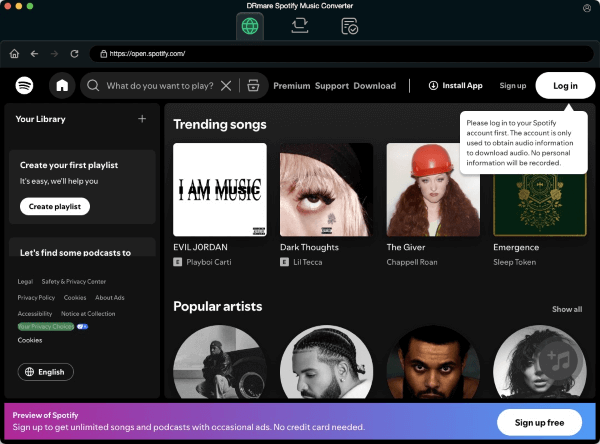
DRmare is a creative technology company with couples of talented engineers. They focus on DRM breaking technology and are committed to developed wonderful DRM removal utilities to improve the experience of enjoying digital media files such as iTunes movies, TV shows, Apple Music, Audible audiobooks and more, all have attracted a large amount of satisfied customers all over the world with continuous rapid growth. All Material and Software (C) Copyright 2018 DRmare Software. All Rights Reserved. Apple, the Apple logo, MacOS, OS X and Macintosh are registered trademarks of Apple Inc. in the U.S. and/or other countries. Other trademarks and registered trademarks may be the property of their respective owners.
*******
Link To Article: https://prmac.com/release-id-82649.htm
*******
---------------------------------------------------------------------------------
Note that you can alter delivered distributions at any time.
Login to your account on prMac to alter your channel selection, or to opt-out at any time.
Output Factory Server for Adobe InDesign Adds New Page Numbering Options
A new article has been published at prMac.
Output Factory Server for Adobe InDesign Adds New Page Numbering Options - Published on 04/26/18
Zevrix Solutions announces Output Factory Server 2.0.18, a feature update to company's output automation solution for Adobe InDesign. Output Factory automates printing and exporting from InDesign by processing files from hot folders, and offers layer versioning, preflighting, and much more. The new version adds an option to keep original page numbers when splitting InDesign files into single pages or spreads, improves background processing and resolves a conflict with a recent InDesign upgrade.
Toronto (ON), Canada - Zevrix Solutions today announces the release of Output Factory Server 2.0.18, a feature update to company's output automation tool for Adobe InDesign. Output Factory Server automates InDesign production workflow by processing files from watched hot folders. The software offloads printing and exporting from InDesign to a central system leaving operator workstations free from the output process.
The new version introduces an option that lets users keep the original page numbers when splitting InDesign files into single page or spreads. All InDesign section and numbering options will be preserved in the output files. The update also solves an issue which could make the app stall when processing large numbers of InDesign files, improves background processing, and resolves a conflict with some new output options in the recent Creative Cloud update.
"Output Factory Server is an extremely useful utility for a busy production facility or advertising agency", writes David Creamer in Layers magazine. "The setup process is simple and users experience is very straightforward. It can save lots of time - which equates to money."
After Output Factory Server is intended to run on a dedicated machine and serve unlimited users on a network via watched hot folders. Users can create hot folders for different output targets such as hi-res PDF, large format printing, Flash files and so on. Output Factory Server offers the following key features:
* Output InDesign files automatically from hot folders
* Supports print, PDF, PostScript, TIFF, EPUB and other formats
* Output to multiple formats from a single hot folder
* Automatic email notifications
* Layer versioning
* Run custom scripts
* Variable output file names
* Automatic preflighting
Pricing and Availability:
Output Factory Server can be purchased from Zevrix web site for $699.95 (USD), as well as from authorized resellers. Trial is also available for download. The upgrade to version 2 is $350 for the licensed users of Output Factory Server 1.x and BatchOutput Server. Output Factory Server requires macOS 10.7-10.13 and Adobe InDesign CS5-CC 2018.
Zevrix Solutions: http://zevrix.com
Output Factory Server 2.0.18: http://zevrix.com/OutputFactoryServer.php
Download Output Factory Server: http://zevrix.com/OutputFactoryServer.dmg
Purchase Output Factory Server: http://zevrix.com/store.php
Screenshot: http://zevrix.com/screenshots/ofs2/ofs-main-pdf.jpg
Located in Toronto, Canada, Zevrix Solutions provides automation and productivity solutions for Adobe Creative Cloud and Creative Suite software, PDF workflows, graphic file diagnostics and Microsoft Office output on Mac OS. Zevrix is dedicated to help professionals increase their profits through automating everyday tasks, producing error-free documents, saving disk space and cutting production costs. For more information, visit their website. Copyright (C) 2018 Zevrix Solutions. All Rights Reserved. Other trademarks and registered trademarks may be the property of their respective owners.
*******
Link To Article: https://prmac.com/release-id-82647.htm
*******
---------------------------------------------------------------------------------
Note that you can alter delivered distributions at any time.
Login to your account on prMac to alter your channel selection, or to opt-out at any time.
Output Factory Server for Adobe InDesign Adds New Page Numbering Options - Published on 04/26/18
Zevrix Solutions announces Output Factory Server 2.0.18, a feature update to company's output automation solution for Adobe InDesign. Output Factory automates printing and exporting from InDesign by processing files from hot folders, and offers layer versioning, preflighting, and much more. The new version adds an option to keep original page numbers when splitting InDesign files into single pages or spreads, improves background processing and resolves a conflict with a recent InDesign upgrade.
Toronto (ON), Canada - Zevrix Solutions today announces the release of Output Factory Server 2.0.18, a feature update to company's output automation tool for Adobe InDesign. Output Factory Server automates InDesign production workflow by processing files from watched hot folders. The software offloads printing and exporting from InDesign to a central system leaving operator workstations free from the output process.
The new version introduces an option that lets users keep the original page numbers when splitting InDesign files into single page or spreads. All InDesign section and numbering options will be preserved in the output files. The update also solves an issue which could make the app stall when processing large numbers of InDesign files, improves background processing, and resolves a conflict with some new output options in the recent Creative Cloud update.
"Output Factory Server is an extremely useful utility for a busy production facility or advertising agency", writes David Creamer in Layers magazine. "The setup process is simple and users experience is very straightforward. It can save lots of time - which equates to money."
After Output Factory Server is intended to run on a dedicated machine and serve unlimited users on a network via watched hot folders. Users can create hot folders for different output targets such as hi-res PDF, large format printing, Flash files and so on. Output Factory Server offers the following key features:
* Output InDesign files automatically from hot folders
* Supports print, PDF, PostScript, TIFF, EPUB and other formats
* Output to multiple formats from a single hot folder
* Automatic email notifications
* Layer versioning
* Run custom scripts
* Variable output file names
* Automatic preflighting
Pricing and Availability:
Output Factory Server can be purchased from Zevrix web site for $699.95 (USD), as well as from authorized resellers. Trial is also available for download. The upgrade to version 2 is $350 for the licensed users of Output Factory Server 1.x and BatchOutput Server. Output Factory Server requires macOS 10.7-10.13 and Adobe InDesign CS5-CC 2018.
Zevrix Solutions: http://zevrix.com
Output Factory Server 2.0.18: http://zevrix.com/OutputFactoryServer.php
Download Output Factory Server: http://zevrix.com/OutputFactoryServer.dmg
Purchase Output Factory Server: http://zevrix.com/store.php
Screenshot: http://zevrix.com/screenshots/ofs2/ofs-main-pdf.jpg

Located in Toronto, Canada, Zevrix Solutions provides automation and productivity solutions for Adobe Creative Cloud and Creative Suite software, PDF workflows, graphic file diagnostics and Microsoft Office output on Mac OS. Zevrix is dedicated to help professionals increase their profits through automating everyday tasks, producing error-free documents, saving disk space and cutting production costs. For more information, visit their website. Copyright (C) 2018 Zevrix Solutions. All Rights Reserved. Other trademarks and registered trademarks may be the property of their respective owners.
*******
Link To Article: https://prmac.com/release-id-82647.htm
*******
---------------------------------------------------------------------------------
Note that you can alter delivered distributions at any time.
Login to your account on prMac to alter your channel selection, or to opt-out at any time.
MacBook Pro Guide - eBook & Paperback for MacBook & High Sierra released
A new article has been published at prMac.
MacBook Pro Guide - eBook & Paperback for MacBook & High Sierra released - Published on 04/25/18
UK based Tap Guides today introduces MacBook Pro Guide, a brand new book available in the Amazon Store that reveals everything you need to know about MacBook Pro and macOS. MacBook Pro Guide is concise and jargon-free, enabling readers to become proficient with features such as the Touch Bar, macOS, built-in apps and the MacBook Pro hardware in next to no time. It's also packed with large color images that help to visually explain tips and tutorials. Available in eBook and paperback formats.
Poole, United Kingdom - Tap Guides is today delighted to announce its latest book: MacBook Pro Guide. Brought to you by the expert team at Tap Guides, and written by best-selling technology author Tom Rudderham, MacBook Pro Guide is packed with top tips and in-depth tutorials. You'll learn about exclusive MacBook Pro features such as the Touch Bar, discover how to use macOS High Sierra and its built-in apps, plus much more. The book is available in both eBook and Paperback formats, exclusively through the Amazon Store.
In many ways, the MacBook Pro is the ultimate Mac. It's powerful, yet small enough to carry comfortably with one hand. It features a Retina display which makes images, video, and the web look pin-sharp. It can be plugged into a 5K monitor and used as a desktop computer. It's also a beautiful device to behold. MacBook Pro Guide is the perfect companion for your new Mac. By the time you've finished reading, you'll be an expert in nearly everything MacBook and macOS related.
Inside you'll discover:
* Everything you need to know about MacBook Pro & High Sierra
* How to set up your Mac
* How to use the Touch Bar and TrackPad
* Detailed app tutorials
* How to edit photos
* Essential settings and configurations
* Troubleshooting tips
Device Requirements:
* Available on iPhone, iPad, iPod touch, Mac, Windows, & Kindle Devices
* eBook Pages: 218 Pages
* Paperback Pages: 184 Pages
Pricing and Availability:
MacBook Pro Guide is $5.99 USD in eBook format, and $11.99 in Paperback (or equivalent amount in other currencies), and available worldwide exclusively through the Amazon Store in the Computers category.
Tap Guides: http://www.tapguides.co.uk/
MacBook Pro Guidee: https://www.amazon.com/dp/B07C6WYCTJ
Cover: http://www.tapguides.co.uk/wp-content/uploads/2018/04/MacBook-Pro-Cover1.jpg
Press Kit (zip): http://www.tapguides.co.uk/wp-content/uploads/2018/04/macbook-pro-guide-press.zip
Launched in 2015, Tap Guides Ltd publishes eBooks and interactive apps that teach users how to use their iOS devices. Tap Guides most notable book to date is the iPad Pro Guidebook. Copyright (C) 2018 Tap Guides Ltd. All Rights Reserved. Apple, the Apple logo, iPhone, iPod and iPad are registered trademarks of Apple Inc. in the U.S. and/or other countries. Other trademarks and registered trademarks may be the property of their respective owners.
*******
Link To Article: https://prmac.com/release-id-82646.htm
*******
---------------------------------------------------------------------------------
Note that you can alter delivered distributions at any time.
Login to your account on prMac to alter your channel selection, or to opt-out at any time.
MacBook Pro Guide - eBook & Paperback for MacBook & High Sierra released - Published on 04/25/18
UK based Tap Guides today introduces MacBook Pro Guide, a brand new book available in the Amazon Store that reveals everything you need to know about MacBook Pro and macOS. MacBook Pro Guide is concise and jargon-free, enabling readers to become proficient with features such as the Touch Bar, macOS, built-in apps and the MacBook Pro hardware in next to no time. It's also packed with large color images that help to visually explain tips and tutorials. Available in eBook and paperback formats.
Poole, United Kingdom - Tap Guides is today delighted to announce its latest book: MacBook Pro Guide. Brought to you by the expert team at Tap Guides, and written by best-selling technology author Tom Rudderham, MacBook Pro Guide is packed with top tips and in-depth tutorials. You'll learn about exclusive MacBook Pro features such as the Touch Bar, discover how to use macOS High Sierra and its built-in apps, plus much more. The book is available in both eBook and Paperback formats, exclusively through the Amazon Store.
In many ways, the MacBook Pro is the ultimate Mac. It's powerful, yet small enough to carry comfortably with one hand. It features a Retina display which makes images, video, and the web look pin-sharp. It can be plugged into a 5K monitor and used as a desktop computer. It's also a beautiful device to behold. MacBook Pro Guide is the perfect companion for your new Mac. By the time you've finished reading, you'll be an expert in nearly everything MacBook and macOS related.
Inside you'll discover:
* Everything you need to know about MacBook Pro & High Sierra
* How to set up your Mac
* How to use the Touch Bar and TrackPad
* Detailed app tutorials
* How to edit photos
* Essential settings and configurations
* Troubleshooting tips
Device Requirements:
* Available on iPhone, iPad, iPod touch, Mac, Windows, & Kindle Devices
* eBook Pages: 218 Pages
* Paperback Pages: 184 Pages
Pricing and Availability:
MacBook Pro Guide is $5.99 USD in eBook format, and $11.99 in Paperback (or equivalent amount in other currencies), and available worldwide exclusively through the Amazon Store in the Computers category.
Tap Guides: http://www.tapguides.co.uk/
MacBook Pro Guidee: https://www.amazon.com/dp/B07C6WYCTJ
Cover: http://www.tapguides.co.uk/wp-content/uploads/2018/04/MacBook-Pro-Cover1.jpg

Press Kit (zip): http://www.tapguides.co.uk/wp-content/uploads/2018/04/macbook-pro-guide-press.zip
Launched in 2015, Tap Guides Ltd publishes eBooks and interactive apps that teach users how to use their iOS devices. Tap Guides most notable book to date is the iPad Pro Guidebook. Copyright (C) 2018 Tap Guides Ltd. All Rights Reserved. Apple, the Apple logo, iPhone, iPod and iPad are registered trademarks of Apple Inc. in the U.S. and/or other countries. Other trademarks and registered trademarks may be the property of their respective owners.
*******
Link To Article: https://prmac.com/release-id-82646.htm
*******
---------------------------------------------------------------------------------
Note that you can alter delivered distributions at any time.
Login to your account on prMac to alter your channel selection, or to opt-out at any time.
Harry and Larry Challenges Gamers As It Leaves Them Laughing
A new article has been published at prMac.
Harry and Larry Challenges Gamers As It Leaves Them Laughing - Published on 04/25/18
Michigan-based indie development team, Rasterzone Entertainment announces Harry and Larry 1.05, their new fast-paced cartoon action game for iOS devices. Guide Harry and Larry through 24 obstacle-filled levels at their local grocery store. Players dodge obstacles such as tires, crates, snowballs, and many other hazards, as they collect tasty treats. Acquire temporary powers that will help complete each level along the way. The animated story line will have players laughing out loud.
Dearborn, Michigan - Independent development team, Rasterzone Entertainment is proud to announce the release and immediate availability of Harry and Larry 1.05, their new cartoon action game for iPhone, iPad, and iPod touch devices. Players will guide twin brothers Harry and Larry through an animated story line and 24 obstacle-filled aisles, dodging obstacles along the way while collecting tasty treats.
Players will guide the game's characters through each level, dodging obstacles such as fish crates, snowballs, tires, and many other hazards along the way. Each of the game's 24 challenging levels features a different kind of tasty treat to collect. Treats include pineapples, strawberries, candy canes, cupcakes, and so much more.
"Harry and Larry is the type of game that you can play no matter where you're at! You can play a level or two while you're in line at the bank, riding the subway, or anywhere else you want to avoid boredom," shares Rasterzone Entertainment founder Alan Scarantino. "No matter where you're at, you can play the game. No internet connection is needed, as all levels are stored on your device!"
Harry and Larry automatically move forward through the store aisles while the player controls their shopping cart with a simple up or down swipe of their finger. Left-handed and right-handed players will both find it equally easy to control the action.
Features Include:
* Fast cartoon-based action
* Animated storyline entertains players between levels
* Guide brothers Harry and Larry through an obstacle-filled grocery store
* One-finger control method is easy for left-handed or right-handed players
* Dodge obstacles strewn through the aisles
* Score points by collecting delicious treats
* Get a perfect record by collecting all the treats on each level
* Gain temporary abilities that help clear each level
* Epic melodies play during each level
* Grab all the treats to unlock Retro Mode
* No ads
* No in-app purchases
Each of the game's 24 entertaining levels are set in one of four sections of the grocery store: boxed goods, the dairy section, the home and garden department, and even the seldom seen "Employees Only" back area of the store. Grab all of the treats in all 24 levels and unlock the special retro mode, featuring entertaining retro music and graphics.
Although the challenge increases with the completion of every level, players will find helpful objects along the way that unlock special abilities that will help them complete each level. Abilities include a one-use shield to protect against hazards, temporary invincibility, bounce bumpers that help grab extra treats, and speed-up and slow-down chambers that change the pace of the action.
"We had almost as much fun creating this game as players will have playing it," exclaims Alan. "Plus, players won't be subjected to any ads or in-app purchases required to play the game. Everything they require comes as part of the initial purchase and download in the App Store!"
Players are encouraged to take a cart for a spin, and Harry and Larry will come along for the ride. Grab some tasty treats for the trip but look out for those crates.
Device Requirements:
* iPhone, iPad, and iPod touch
* Requires iOS 8.0 or later
* Universal Application
* 249.2 MB
Pricing and Availability:
Harry and Larry 1.05 is only $3.99 USD (or an equivalent amount in other currencies) and is available worldwide exclusively through the App Store in the Games category. Redeem codes are available to members of the press upon request.
Rasterzone Entertainment: http://rasterzone.com
Harry and Larry 1.05: http://harryandlarry.com
Purchase and Download: https://itunes.apple.com/app/harry-and-larry/id1295164897
YouTube Channel: https://www.youtube.com/channel/UC8RR223lFzbDKAO1sK0bPag/videos
Media Assets: http://rasterzone.com/press/harry-and-larry-press-kit.html
Rasterzone Entertainment, LLC is an independent game company based in Dearborn, Michigan, USA. Founded in 2015 by Alan Scarantino, Rasterzone focuses on fun and accessible mobile games for players of all skill levels. All Material and Software (C) Copyright 2018 Rasterzone Entertainment, LLC. All Rights Reserved. Apple, the Apple logo, iPhone, iPod and iPad are registered trademarks of Apple Inc. in the U.S. and/or other countries. Other trademarks and registered trademarks may be the property of their respective owners.
*******
Link To Article: https://prmac.com/release-id-82644.htm
*******
---------------------------------------------------------------------------------
Note that you can alter delivered distributions at any time.
Login to your account on prMac to alter your channel selection, or to opt-out at any time.
Harry and Larry Challenges Gamers As It Leaves Them Laughing - Published on 04/25/18
Michigan-based indie development team, Rasterzone Entertainment announces Harry and Larry 1.05, their new fast-paced cartoon action game for iOS devices. Guide Harry and Larry through 24 obstacle-filled levels at their local grocery store. Players dodge obstacles such as tires, crates, snowballs, and many other hazards, as they collect tasty treats. Acquire temporary powers that will help complete each level along the way. The animated story line will have players laughing out loud.
Dearborn, Michigan - Independent development team, Rasterzone Entertainment is proud to announce the release and immediate availability of Harry and Larry 1.05, their new cartoon action game for iPhone, iPad, and iPod touch devices. Players will guide twin brothers Harry and Larry through an animated story line and 24 obstacle-filled aisles, dodging obstacles along the way while collecting tasty treats.
Players will guide the game's characters through each level, dodging obstacles such as fish crates, snowballs, tires, and many other hazards along the way. Each of the game's 24 challenging levels features a different kind of tasty treat to collect. Treats include pineapples, strawberries, candy canes, cupcakes, and so much more.
"Harry and Larry is the type of game that you can play no matter where you're at! You can play a level or two while you're in line at the bank, riding the subway, or anywhere else you want to avoid boredom," shares Rasterzone Entertainment founder Alan Scarantino. "No matter where you're at, you can play the game. No internet connection is needed, as all levels are stored on your device!"
Harry and Larry automatically move forward through the store aisles while the player controls their shopping cart with a simple up or down swipe of their finger. Left-handed and right-handed players will both find it equally easy to control the action.
Features Include:
* Fast cartoon-based action
* Animated storyline entertains players between levels
* Guide brothers Harry and Larry through an obstacle-filled grocery store
* One-finger control method is easy for left-handed or right-handed players
* Dodge obstacles strewn through the aisles
* Score points by collecting delicious treats
* Get a perfect record by collecting all the treats on each level
* Gain temporary abilities that help clear each level
* Epic melodies play during each level
* Grab all the treats to unlock Retro Mode
* No ads
* No in-app purchases
Each of the game's 24 entertaining levels are set in one of four sections of the grocery store: boxed goods, the dairy section, the home and garden department, and even the seldom seen "Employees Only" back area of the store. Grab all of the treats in all 24 levels and unlock the special retro mode, featuring entertaining retro music and graphics.
Although the challenge increases with the completion of every level, players will find helpful objects along the way that unlock special abilities that will help them complete each level. Abilities include a one-use shield to protect against hazards, temporary invincibility, bounce bumpers that help grab extra treats, and speed-up and slow-down chambers that change the pace of the action.
"We had almost as much fun creating this game as players will have playing it," exclaims Alan. "Plus, players won't be subjected to any ads or in-app purchases required to play the game. Everything they require comes as part of the initial purchase and download in the App Store!"
Players are encouraged to take a cart for a spin, and Harry and Larry will come along for the ride. Grab some tasty treats for the trip but look out for those crates.
Device Requirements:
* iPhone, iPad, and iPod touch
* Requires iOS 8.0 or later
* Universal Application
* 249.2 MB
Pricing and Availability:
Harry and Larry 1.05 is only $3.99 USD (or an equivalent amount in other currencies) and is available worldwide exclusively through the App Store in the Games category. Redeem codes are available to members of the press upon request.
Rasterzone Entertainment: http://rasterzone.com
Harry and Larry 1.05: http://harryandlarry.com
Purchase and Download: https://itunes.apple.com/app/harry-and-larry/id1295164897
YouTube Channel: https://www.youtube.com/channel/UC8RR223lFzbDKAO1sK0bPag/videos
Media Assets: http://rasterzone.com/press/harry-and-larry-press-kit.html
Rasterzone Entertainment, LLC is an independent game company based in Dearborn, Michigan, USA. Founded in 2015 by Alan Scarantino, Rasterzone focuses on fun and accessible mobile games for players of all skill levels. All Material and Software (C) Copyright 2018 Rasterzone Entertainment, LLC. All Rights Reserved. Apple, the Apple logo, iPhone, iPod and iPad are registered trademarks of Apple Inc. in the U.S. and/or other countries. Other trademarks and registered trademarks may be the property of their respective owners.
*******
Link To Article: https://prmac.com/release-id-82644.htm
*******
---------------------------------------------------------------------------------
Note that you can alter delivered distributions at any time.
Login to your account on prMac to alter your channel selection, or to opt-out at any time.
HiFutureSelf - Send Me A Reminder When I Get There
A new article has been published at prMac.
HiFutureSelf - Send Me A Reminder When I Get There - Published on 04/25/18
California based dBelement, LLC releases HiFutureSelf 1.8.9, a major update to their top 10 productivity app for iOS devices. HiFutureSelf brings the ease of text messaging to setting up alerts. With the app, users are able to schedule reminders, notes, affirmation, by sending messages to the future. The app is fun and playful by design, but developed to be extremely fast and efficient. In version 1.8.9, you can now send messages and reminders based on your location and much more.
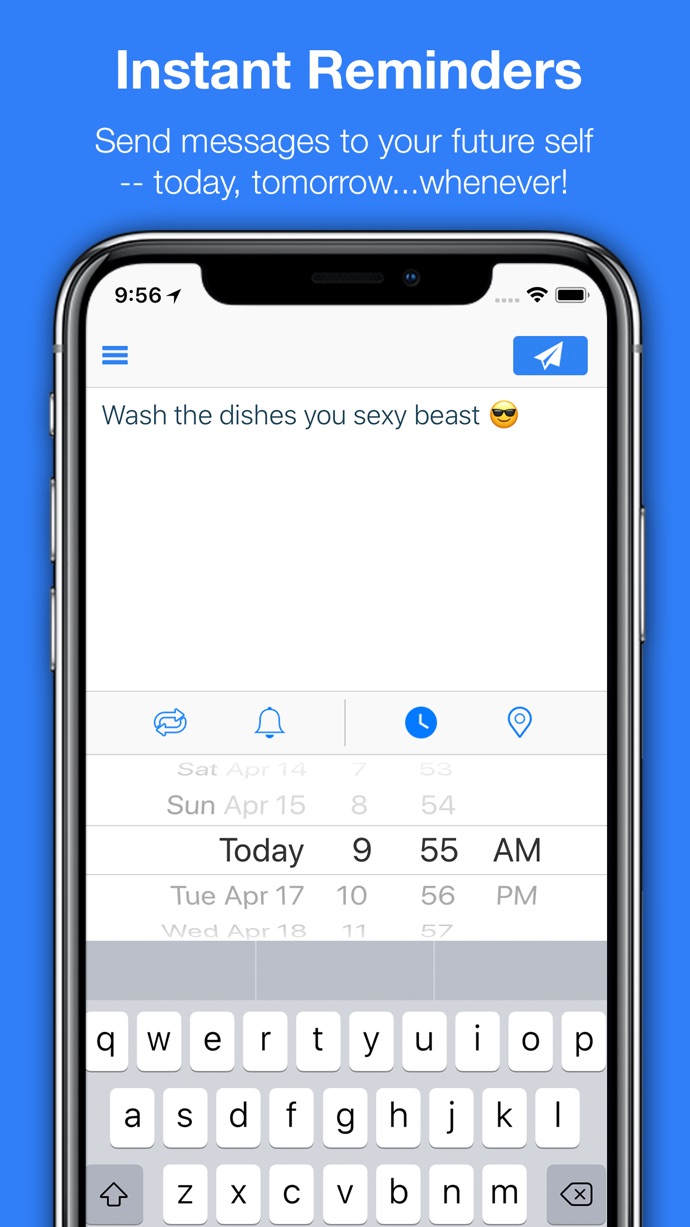
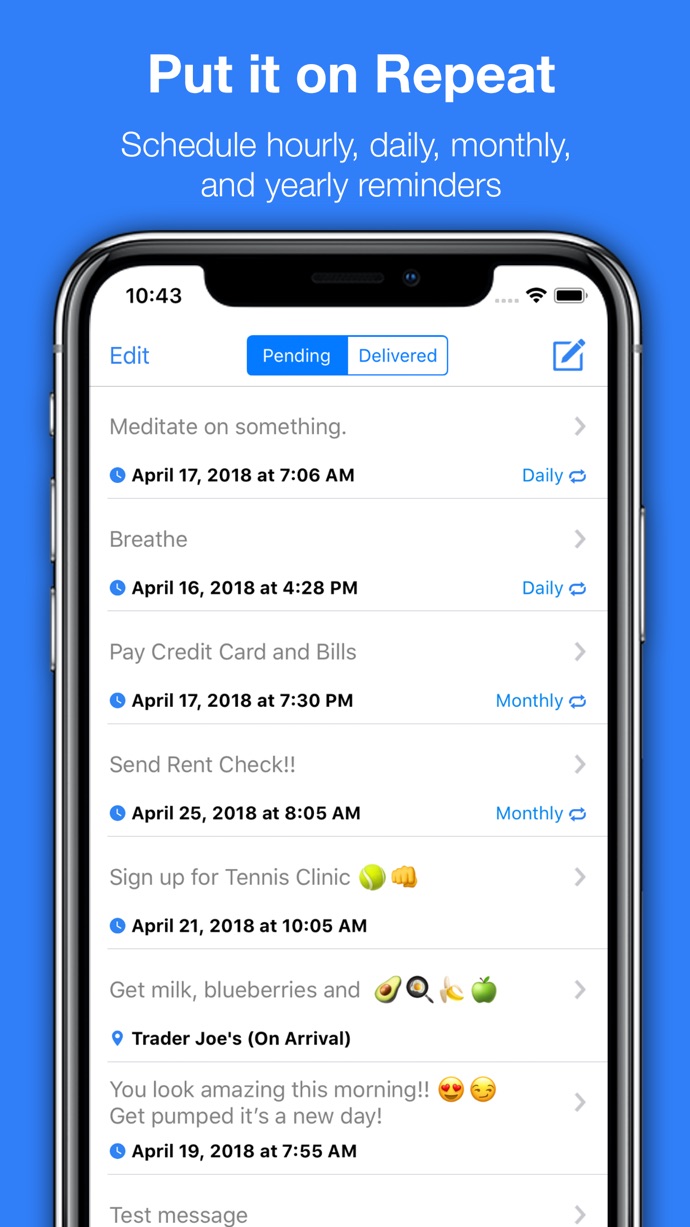
San Francisco, California - dBelement, LLC is pleased to announce HiFutureSelf 1.8.9, a major upgrade to their popular productivity app developed for iPhone, iPad and iPod touch devices. You can now send messages and reminders based on your location. Send motivating messages when you get to work, send a shopping list for the next time you're in a store, or a reminder when you leave a class.
Hailed as "The must-have app," HiFutureSelf helps users declutter their lives. With the app, users are able to schedule reminders, notes, and affirmations, by sending messages to a future time or place. The app is fun and playful by design and developed to be extremely efficient. HiFutureSelf launches instantly, and with one tap can send messages and reminders for a future time or location.
This "Top 10 Productivity" app, brings a new way to create and manage reminders. HiFutureSelf is now available for iPhone, iPod touch, and iPad devices running iOS11 for FREE.
Your Favorite App:
HiFutureSelf will be your most used app. Use it for getting to class on time, calling that cute girl, doing your laundry, sending a grocery list to appear once you arrive at the store and so much more.
"HiFutureSelf brings the ease of text messaging to setting up alerts." - TheNextWeb
"You need to download [HiFutureSelf] now." - 148apps
"5/5" - TheNextWeb
"Grab it!" - TochMyApps
Device Requirements:
* iPhone 5s or later and iPod touch
* iPad 5th generation or later
* Requires iOS 11.0 or later
* 6.6 MB
Pricing and Availability:
HiFutureSelf 1.8.9 is Free and available worldwide exclusively through the App Store in the Productivity category. For more information, please contact David Becker.
HiFutureSelf 1.8.9: http://hifutureself.com
Download from iTunes: https://itunes.apple.com/app/hifutureself-send-quick-messages/id384927725
Screenshot 1: https://is5-ssl.mzstatic.com/image/thumb/Purple128/v4/89/52/52/895252d6-43c2-2484-d1ff-9ad43465f257/pr_source.png/690x0w.jpg
Screenshot 2: https://is3-ssl.mzstatic.com/image/thumb/Purple118/v4/52/d5/48/52d54869-05b5-3524-9419-08736798f0a7/pr_source.png/690x0w.jpg
Screenshot 3: https://is1-ssl.mzstatic.com/image/thumb/Purple128/v4/25/14/cd/2514cdab-e15a-6417-791c-ca40e25245f9/pr_source.png/690x0w.jpg
App Icon: https://is3-ssl.mzstatic.com/image/thumb/Purple118/v4/c9/7a/13/c97a1339-d9a0-4341-473d-46387d5537f8/AppIcon-1x_U007emarketing-0-0-GLES2_U002c0-512MB-sRGB-0-0-0-85-220-0-0-0-6.png/690x0w.jpg
dBelement is committed to providing you with practical apps for your daily life. Copyright (C) 2010-2018 dBelement, LLC. All Rights Reserved. Apple, the Apple logo, iPhone and iPod are registered trademarks of Apple Inc. in the U.S. and/or other countries.
*******
Link To Article: https://prmac.com/release-id-82645.htm
*******
---------------------------------------------------------------------------------
Note that you can alter delivered distributions at any time.
Login to your account on prMac to alter your channel selection, or to opt-out at any time.
HiFutureSelf - Send Me A Reminder When I Get There - Published on 04/25/18
California based dBelement, LLC releases HiFutureSelf 1.8.9, a major update to their top 10 productivity app for iOS devices. HiFutureSelf brings the ease of text messaging to setting up alerts. With the app, users are able to schedule reminders, notes, affirmation, by sending messages to the future. The app is fun and playful by design, but developed to be extremely fast and efficient. In version 1.8.9, you can now send messages and reminders based on your location and much more.
San Francisco, California - dBelement, LLC is pleased to announce HiFutureSelf 1.8.9, a major upgrade to their popular productivity app developed for iPhone, iPad and iPod touch devices. You can now send messages and reminders based on your location. Send motivating messages when you get to work, send a shopping list for the next time you're in a store, or a reminder when you leave a class.
Hailed as "The must-have app," HiFutureSelf helps users declutter their lives. With the app, users are able to schedule reminders, notes, and affirmations, by sending messages to a future time or place. The app is fun and playful by design and developed to be extremely efficient. HiFutureSelf launches instantly, and with one tap can send messages and reminders for a future time or location.
This "Top 10 Productivity" app, brings a new way to create and manage reminders. HiFutureSelf is now available for iPhone, iPod touch, and iPad devices running iOS11 for FREE.
Your Favorite App:
HiFutureSelf will be your most used app. Use it for getting to class on time, calling that cute girl, doing your laundry, sending a grocery list to appear once you arrive at the store and so much more.
"HiFutureSelf brings the ease of text messaging to setting up alerts." - TheNextWeb
"You need to download [HiFutureSelf] now." - 148apps
"5/5" - TheNextWeb
"Grab it!" - TochMyApps
Device Requirements:
* iPhone 5s or later and iPod touch
* iPad 5th generation or later
* Requires iOS 11.0 or later
* 6.6 MB
Pricing and Availability:
HiFutureSelf 1.8.9 is Free and available worldwide exclusively through the App Store in the Productivity category. For more information, please contact David Becker.
HiFutureSelf 1.8.9: http://hifutureself.com
Download from iTunes: https://itunes.apple.com/app/hifutureself-send-quick-messages/id384927725
Screenshot 1: https://is5-ssl.mzstatic.com/image/thumb/Purple128/v4/89/52/52/895252d6-43c2-2484-d1ff-9ad43465f257/pr_source.png/690x0w.jpg
Screenshot 2: https://is3-ssl.mzstatic.com/image/thumb/Purple118/v4/52/d5/48/52d54869-05b5-3524-9419-08736798f0a7/pr_source.png/690x0w.jpg

Screenshot 3: https://is1-ssl.mzstatic.com/image/thumb/Purple128/v4/25/14/cd/2514cdab-e15a-6417-791c-ca40e25245f9/pr_source.png/690x0w.jpg
App Icon: https://is3-ssl.mzstatic.com/image/thumb/Purple118/v4/c9/7a/13/c97a1339-d9a0-4341-473d-46387d5537f8/AppIcon-1x_U007emarketing-0-0-GLES2_U002c0-512MB-sRGB-0-0-0-85-220-0-0-0-6.png/690x0w.jpg

dBelement is committed to providing you with practical apps for your daily life. Copyright (C) 2010-2018 dBelement, LLC. All Rights Reserved. Apple, the Apple logo, iPhone and iPod are registered trademarks of Apple Inc. in the U.S. and/or other countries.
*******
Link To Article: https://prmac.com/release-id-82645.htm
*******
---------------------------------------------------------------------------------
Note that you can alter delivered distributions at any time.
Login to your account on prMac to alter your channel selection, or to opt-out at any time.
Subscribe to:
Posts (Atom)