A new article has been published at prMac.
Package Central for InDesign Is Now Available on New Adobe Exchange - Published on 05/07/18
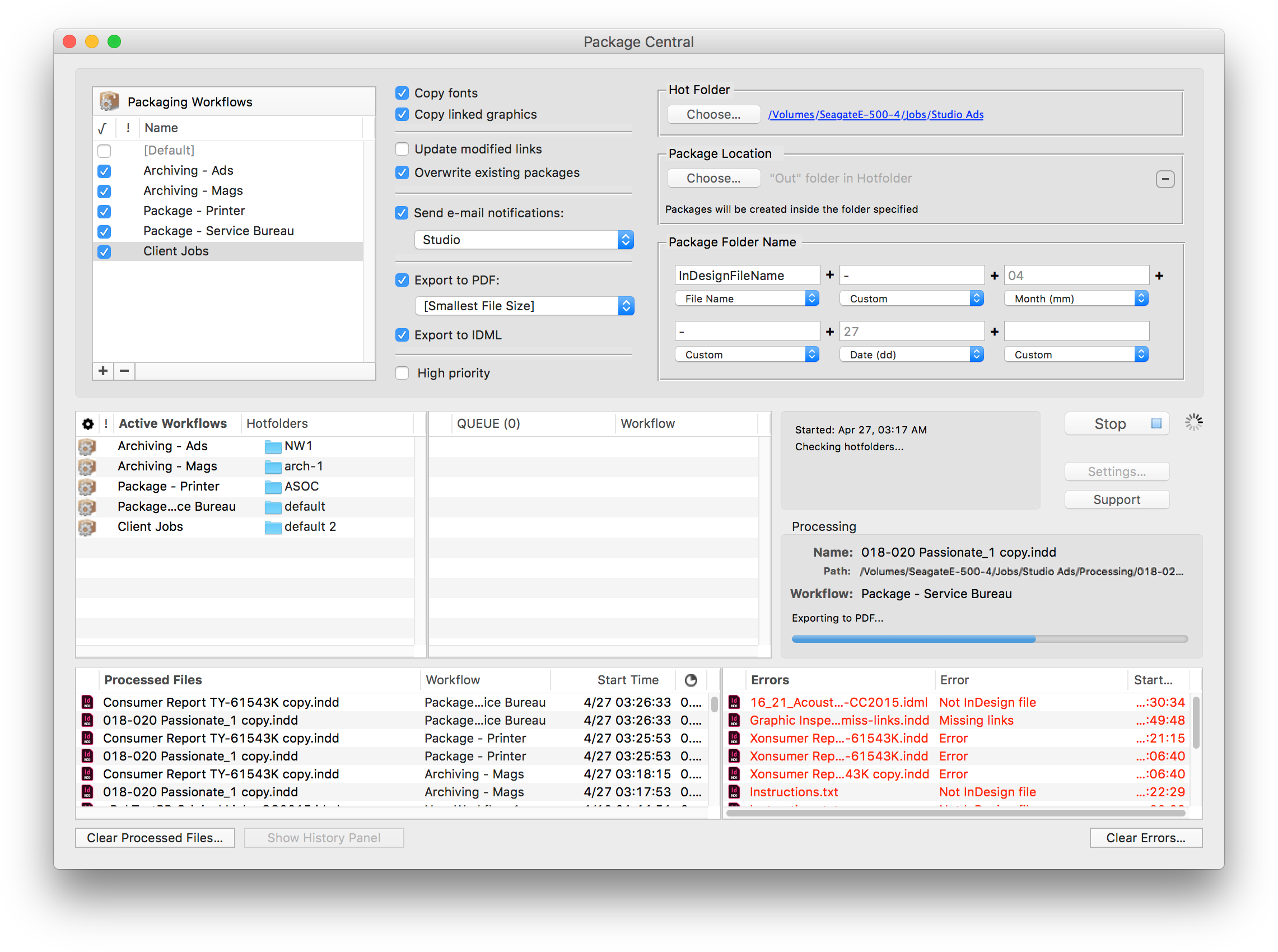
Zevrix Solutions announces that Package Central for Adobe InDesign is now available on Adobe Exchange, a new and improved Creative Cloud marketplace. Package Central automates InDesign packaging by processing files from watched hot folders. The software offers email notifications, variable folder names, PDF/IDML export and more. Users can now purchase Package Central directly on Adobe Exchange which makes it easier for customers to discover and install third party plug-ins for Creative Cloud.
Toronto (ON), Canada - Zevrix Solutions today announces that Package Central for Adobe InDesign is now available on the new and improved Adobe Exchange. Originally developed for a major publisher in the United States, the software automates InDesign packaging by processing files from watched hot folders. Package Central automatically collects InDesign files from hot folders on a central system leaving operator workstations free from the document packaging process.
Adobe Exchange provides a new way to search, discover, and install plug-ins, extensions, and other content for Creative Cloud products. As a unified destination that brings third-party integrations with Creative Cloud, Document Cloud & Experience Cloud under a single umbrella, Adobe Exchange will make it easier for customers to discover and install integrations that expand and enhance what they can achieve on Adobe's Clouds.
Under Package Central workflow, production artists, prepress operators and designers simply submit files to hot folders that reside on a network. The software then automatically collects InDesign files along with their fonts and links using workflow settings assigned to each hot folder. Package Central performs all its tasks automatically on a dedicated Mac workstation and can run absolutely unattended. It offers the following key features:
* Automatically collect InDesign files from watched hot folders
* Create hot folders for various packaging workflows
* Create PDF and IDML files automatically
* Automatic e-mail notifications of process stages and errors
* Variable folder names
* Serves unlimited users on a network
* Update modified links automatically and check for errors
* Detailed processing logs
Pricing and Availability:
Package Central can be purchased from Adobe Exchange for $149.95 (USD) as well as from Zevrix website and authorized resellers. Trial is also available for download. Package Central requires macOS 10.7-10.13 and Adobe InDesign CS5-CC 2018.
Zevrix Solutions: http://zevrix.com
Package Central: https://www.adobeexchange.com/creativecloud.details.1679.html
Download Package Central: http://zevrix.com/PackageCentral.dmg
Screenshot: http://zevrix.com/screenshots/pac/pac-main.png
Located in Toronto, Canada, Zevrix Solutions provides automation and productivity solutions for Adobe Creative Cloud and Creative Suite software, PDF workflows, graphic file diagnostics and Microsoft Office output on Mac OS. Zevrix is dedicated to help professionals increase their profits through automating everyday tasks, producing error-free documents, saving disk space and cutting production costs. For more information, visit their website. Copyright (C) 2018 Zevrix Solutions. All Rights Reserved. Other trademarks and registered trademarks may be the property of their respective owners.
*******
Link To Article: https://prmac.com/release-id-82663.htm
*******
---------------------------------------------------------------------------------
Note that you can alter delivered distributions at any time.
Login to your account on prMac to alter your channel selection, or to opt-out at any time.

Archisketch 3.0 Adds Collaboration, Advanced Colour and Much More
A new article has been published at prMac.
Archisketch 3.0 Adds Collaboration, Advanced Colour and Much More - Published on 05/03/18
Archisketch 3.0 major new upgrade released with features for more granular control for all, plus exciting new infrastructure for "Plus Pack" add-ons that bring advanced colour capabilities in Colour Plus Pack and collaboration in iCloud Plus Pack to scale-aware sketching app on iPad for architects and designers. Free to try with 1 project and 50 shapes; $14.99 for unlimited projects and shapes, or $24.99 unlimited with both plus packs. Customers upgrade free, plus packs extra. Req: iOS 11.
London, UK - London, United Kingdom - Open Screen Ltd. today released Archisketch 3.0, a major upgrade to its scale-aware sketching app on iPad for architects and designers, now empowering collaboration with anyone, anywhere, on site or across the globe. Archsketch 3.0 introduces a new application infrastructure that supports "Plus Pack" add-on modules to expand the possibilities already built into Archisketch. The first two Plus Pack modules - Colour Plus and iCloud Plus - are also available today.
Colour Plus provides professional color handling features such as gradient fills, extended colour palettes, assigning multiple palettes to drawings, global shared colour palettes and the ability to pick up a colour value right from a screen.
iCloud Plus lets Archisketch customers do more with iCloud than saving files to and from iCloud Drive. The iCloud Plus pack actually empowers collaboration, letting multiple people on a team make changes to Archisketch drawings. The iCloud Plus Pack also enables saving Archisketch projects and PDF files to iCloud Drive as an extra backup.
In addition, all Archisketch 3.0 customers can now exercise more granular control than ever before. Now, customers can set specific, custom snap intervals to measuring units, which will remain consistent at all zoom levels for the drawing. The version 3.0 upgrade provides more options for finer adjustments to dimension lines and leader lines. Dot terminators are now available for leader lines.
Customers working with clients can now disable the Draw with Finger feature for a more tactile, interactive client presentation. This lets a presenter continue to draw, edit and make changes using all of the creative expressiveness of working with an Apple Pencil(R), while allowing the client to touch all over the screen and still not impact the drawing.
"Archisketch 3.0 represents a major leap forward in our ability to let designers and architects add capabilities to Archisketch," explained Reza Farhad, founder of Open Screen Ltd. "The game plan is to add universally-desired improvements to the app itself, just like the terrific new features in Archsketch 3.0. Not everyone will want every Plus Pack, thus we can avoid app bloat by offering the related feature sets separately. For those who want to collaborate, or want more colour features, the first two Plus Packs have you covered."
About Archisketch:
Archisketch is a scale-aware sketching program ideal for Architects, interior and landscape designers, product designers, design students, or anyone working with design on an iPad.
Inspired by the tradition of sketching on a tracing pad, Archisketch brings sketching into the modern era on an iPad. Archisketch helps architects and designers visualize, capture and explore their ideas using layers, symbols, colours, dimension guidelines, 2D grids, isometric and axonometric 3D grids, and even smart one- and two-point perspectives for 3D. When finished, drawings can be printed to scale directly from the iPad up to A1 size, or exported to PDF, which can be included in a CAD application, or uploaded to Adobe Creative Cloud.
Pricing, Availability and Compatibility
Archisketch 3.0 requires iOS 11.0 or later, and is a recommended update available free of charge to all Archisketch customers. Archisketch 3.0 is available today from the App Store as a free trial download for use with up to 50 shapes in one project, with an in-app license purchase for unlimited shapes and projects for $14.99 (USD) standalone, and for $24.99 with unlimited shapes and projects with both the Colour Plus and iCloud Plus Packs included. Both Plus Packs are available today for fully licensed customers only. The Colour Plus Pack and iCloud Plus Pack can be purchased together for $9.99 (USD). Individually, the Colour Plus Pack is available for $4.99 and the iCloud Plus Pack is available for $6.99. For more information on Archisketch, visit Archisketch's official website.
Archisketch 3.0: http://www.archisketch.eu
Download from the Mac App Store: https://itunes.apple.com/app/id725328455
Vimeo Video (New iCloud Plus Pack): https://vimeo.com/263657674
Vimeo Video (New Colour Plus Pack): https://vimeo.com/263651568
Vimeo Video (Archisketch in Construction): https://vimeo.com/253795052
Open Screen Ltd. is a privately held company headquartered in London. Archisketch is a trademark of Open Screen Ltd. Copyright (c) 2018, all rights reserved. All other trademarks or registered trademarks are the property of their respective owners.
*******
Link To Article: https://prmac.com/release-id-82662.htm
*******
---------------------------------------------------------------------------------
Note that you can alter delivered distributions at any time.
Login to your account on prMac to alter your channel selection, or to opt-out at any time.
Archisketch 3.0 Adds Collaboration, Advanced Colour and Much More - Published on 05/03/18
Archisketch 3.0 major new upgrade released with features for more granular control for all, plus exciting new infrastructure for "Plus Pack" add-ons that bring advanced colour capabilities in Colour Plus Pack and collaboration in iCloud Plus Pack to scale-aware sketching app on iPad for architects and designers. Free to try with 1 project and 50 shapes; $14.99 for unlimited projects and shapes, or $24.99 unlimited with both plus packs. Customers upgrade free, plus packs extra. Req: iOS 11.
London, UK - London, United Kingdom - Open Screen Ltd. today released Archisketch 3.0, a major upgrade to its scale-aware sketching app on iPad for architects and designers, now empowering collaboration with anyone, anywhere, on site or across the globe. Archsketch 3.0 introduces a new application infrastructure that supports "Plus Pack" add-on modules to expand the possibilities already built into Archisketch. The first two Plus Pack modules - Colour Plus and iCloud Plus - are also available today.
Colour Plus provides professional color handling features such as gradient fills, extended colour palettes, assigning multiple palettes to drawings, global shared colour palettes and the ability to pick up a colour value right from a screen.
iCloud Plus lets Archisketch customers do more with iCloud than saving files to and from iCloud Drive. The iCloud Plus pack actually empowers collaboration, letting multiple people on a team make changes to Archisketch drawings. The iCloud Plus Pack also enables saving Archisketch projects and PDF files to iCloud Drive as an extra backup.
In addition, all Archisketch 3.0 customers can now exercise more granular control than ever before. Now, customers can set specific, custom snap intervals to measuring units, which will remain consistent at all zoom levels for the drawing. The version 3.0 upgrade provides more options for finer adjustments to dimension lines and leader lines. Dot terminators are now available for leader lines.
Customers working with clients can now disable the Draw with Finger feature for a more tactile, interactive client presentation. This lets a presenter continue to draw, edit and make changes using all of the creative expressiveness of working with an Apple Pencil(R), while allowing the client to touch all over the screen and still not impact the drawing.
"Archisketch 3.0 represents a major leap forward in our ability to let designers and architects add capabilities to Archisketch," explained Reza Farhad, founder of Open Screen Ltd. "The game plan is to add universally-desired improvements to the app itself, just like the terrific new features in Archsketch 3.0. Not everyone will want every Plus Pack, thus we can avoid app bloat by offering the related feature sets separately. For those who want to collaborate, or want more colour features, the first two Plus Packs have you covered."
About Archisketch:
Archisketch is a scale-aware sketching program ideal for Architects, interior and landscape designers, product designers, design students, or anyone working with design on an iPad.
Inspired by the tradition of sketching on a tracing pad, Archisketch brings sketching into the modern era on an iPad. Archisketch helps architects and designers visualize, capture and explore their ideas using layers, symbols, colours, dimension guidelines, 2D grids, isometric and axonometric 3D grids, and even smart one- and two-point perspectives for 3D. When finished, drawings can be printed to scale directly from the iPad up to A1 size, or exported to PDF, which can be included in a CAD application, or uploaded to Adobe Creative Cloud.
Pricing, Availability and Compatibility
Archisketch 3.0 requires iOS 11.0 or later, and is a recommended update available free of charge to all Archisketch customers. Archisketch 3.0 is available today from the App Store as a free trial download for use with up to 50 shapes in one project, with an in-app license purchase for unlimited shapes and projects for $14.99 (USD) standalone, and for $24.99 with unlimited shapes and projects with both the Colour Plus and iCloud Plus Packs included. Both Plus Packs are available today for fully licensed customers only. The Colour Plus Pack and iCloud Plus Pack can be purchased together for $9.99 (USD). Individually, the Colour Plus Pack is available for $4.99 and the iCloud Plus Pack is available for $6.99. For more information on Archisketch, visit Archisketch's official website.
Archisketch 3.0: http://www.archisketch.eu
Download from the Mac App Store: https://itunes.apple.com/app/id725328455
Vimeo Video (New iCloud Plus Pack): https://vimeo.com/263657674
Vimeo Video (New Colour Plus Pack): https://vimeo.com/263651568
Vimeo Video (Archisketch in Construction): https://vimeo.com/253795052
Open Screen Ltd. is a privately held company headquartered in London. Archisketch is a trademark of Open Screen Ltd. Copyright (c) 2018, all rights reserved. All other trademarks or registered trademarks are the property of their respective owners.
*******
Link To Article: https://prmac.com/release-id-82662.htm
*******
---------------------------------------------------------------------------------
Note that you can alter delivered distributions at any time.
Login to your account on prMac to alter your channel selection, or to opt-out at any time.
A stylish new iOS game hand drawn by the artist from the hit game Limbo
A new article has been published at prMac.
A stylish new iOS game hand drawn by the artist from the hit game Limbo - Published on 05/03/18
UK based FredBear Games and PlayPlayFun LLP today releases Comic Boy, their super stylish comic book of a game on the iOS platform from the developers StayHeavy Games. Play as Comic Boy, the boy trapped inside the inkful pages of a comic book. Find your way out of the pages and escape the comic book! During your comic book adventure you must beware of the many different traps, challenges and environments which can end your quest too soon. Inspired by the great retro game, Comix Zone by Sega.
Birmingham, United Kingdom - FredBear Games and PlayPlayFun LLP announced today that their super stylish comic book of a game "Comic Boy" has launched worldwide on the iOS platform from the developers StayHeavy Games. Comic Boy is loosely inspired by the great retro game, Comix Zone by Sega and Comic boy has been hand drawn by the artist from the hit game Limbo Stine Sorensen!
During your comic book adventure you must beware of the many different traps, challenges and environments which can end your quest too soon. Are you ready to help Comic Boy and friends escape by using your reflexes and skills they have at their disposal?
A Brief History of Comic Boy:
Previously released in error in 2014 (Known as Escape The Page back then) as it was due to be just a beta test and played by the developers friends and family but it gained traction worldwide and was also featured by Apple but as it wasn't intended to be this way! Not long after the launch in error it was pulled by the developers so they could continue to work on it and bring it to the level where the originally envisaged it to be.
Features:
Jump and dodge your way through danger in this rhythm-based action jumper:
* DASH as fast as you can
* JUMP over snakes, zombies and sharks
* DODGE the oncoming Vultures, Ghosts & Hurricanes
* COLLECT all the different coins
* One finger tap and swipe control - Make your character jump, perform a special actions such as power stomps, saltos, backflips and even flying kicks.
* Play through the pages of the comic book - Starting out in a jungle, your dash adventure to find your way out continues onto the BEACH, DESERT, GOLD MINE and more.
* Unlock the characters - Comic Boy is not the only person trapped in the comic book. Help Parkour Girl, Foxy and Ninjoe dash and escape the page as well.
* Rockin' music by a real rock musician - Awesome rockin' music goes along with your adventure.
Device Requirements:
* iPhone, iPad, and iPod touch
* Requires iOS 8.0 or later
* 482.6 MB
Pricing and Availability:
Comic Boy 1.1 is Free (With In-App Purchases) and available worldwide through the App Store in the Games category. An Android version will be following sometime in the near future and is currently on Open Beta on the Play Store. For more information, please contact Clive Bennett.
FredBear Games: http://www.fredbeargames.com
Comic Boy 1.1: https://www.facebook.com/comicboy/
Download from iTunes: https://itunes.apple.com/app/comic-boy/id1318720839
Download from Google Play (Beta): https://play.google.com/store/apps/details?id=com.fredbeargames.comicboy&hl=en_US
Screenshot 1: https://i.imgur.com/XRQiiou.jpg
Screenshot 2: https://i.imgur.com/Yup8Mrb.jpg
Located in Birmingham, United Kingdom, FredBear Games Ltd is a mobile games publisher, marketer and developer of games for both the iOS and Android mobile platforms. Founded by CEO, Clive Bennett in 2013. All Material and Software (C) Copyright 2918 FredBear Games Ltd. All Rights Reserved. Apple, the Apple logo, iPhone, iPod and iPad are registered trademarks of Apple Inc. in the U.S. and/or other countries. Other trademarks and registered trademarks may be the property of their respective owners.
*******
Link To Article: https://prmac.com/release-id-82661.htm
*******
---------------------------------------------------------------------------------
Note that you can alter delivered distributions at any time.
Login to your account on prMac to alter your channel selection, or to opt-out at any time.
A stylish new iOS game hand drawn by the artist from the hit game Limbo - Published on 05/03/18
UK based FredBear Games and PlayPlayFun LLP today releases Comic Boy, their super stylish comic book of a game on the iOS platform from the developers StayHeavy Games. Play as Comic Boy, the boy trapped inside the inkful pages of a comic book. Find your way out of the pages and escape the comic book! During your comic book adventure you must beware of the many different traps, challenges and environments which can end your quest too soon. Inspired by the great retro game, Comix Zone by Sega.
Birmingham, United Kingdom - FredBear Games and PlayPlayFun LLP announced today that their super stylish comic book of a game "Comic Boy" has launched worldwide on the iOS platform from the developers StayHeavy Games. Comic Boy is loosely inspired by the great retro game, Comix Zone by Sega and Comic boy has been hand drawn by the artist from the hit game Limbo Stine Sorensen!
During your comic book adventure you must beware of the many different traps, challenges and environments which can end your quest too soon. Are you ready to help Comic Boy and friends escape by using your reflexes and skills they have at their disposal?
A Brief History of Comic Boy:
Previously released in error in 2014 (Known as Escape The Page back then) as it was due to be just a beta test and played by the developers friends and family but it gained traction worldwide and was also featured by Apple but as it wasn't intended to be this way! Not long after the launch in error it was pulled by the developers so they could continue to work on it and bring it to the level where the originally envisaged it to be.
Features:
Jump and dodge your way through danger in this rhythm-based action jumper:
* DASH as fast as you can
* JUMP over snakes, zombies and sharks
* DODGE the oncoming Vultures, Ghosts & Hurricanes
* COLLECT all the different coins
* One finger tap and swipe control - Make your character jump, perform a special actions such as power stomps, saltos, backflips and even flying kicks.
* Play through the pages of the comic book - Starting out in a jungle, your dash adventure to find your way out continues onto the BEACH, DESERT, GOLD MINE and more.
* Unlock the characters - Comic Boy is not the only person trapped in the comic book. Help Parkour Girl, Foxy and Ninjoe dash and escape the page as well.
* Rockin' music by a real rock musician - Awesome rockin' music goes along with your adventure.
Device Requirements:
* iPhone, iPad, and iPod touch
* Requires iOS 8.0 or later
* 482.6 MB
Pricing and Availability:
Comic Boy 1.1 is Free (With In-App Purchases) and available worldwide through the App Store in the Games category. An Android version will be following sometime in the near future and is currently on Open Beta on the Play Store. For more information, please contact Clive Bennett.
FredBear Games: http://www.fredbeargames.com
Comic Boy 1.1: https://www.facebook.com/comicboy/
Download from iTunes: https://itunes.apple.com/app/comic-boy/id1318720839
Download from Google Play (Beta): https://play.google.com/store/apps/details?id=com.fredbeargames.comicboy&hl=en_US
Screenshot 1: https://i.imgur.com/XRQiiou.jpg

Screenshot 2: https://i.imgur.com/Yup8Mrb.jpg

Located in Birmingham, United Kingdom, FredBear Games Ltd is a mobile games publisher, marketer and developer of games for both the iOS and Android mobile platforms. Founded by CEO, Clive Bennett in 2013. All Material and Software (C) Copyright 2918 FredBear Games Ltd. All Rights Reserved. Apple, the Apple logo, iPhone, iPod and iPad are registered trademarks of Apple Inc. in the U.S. and/or other countries. Other trademarks and registered trademarks may be the property of their respective owners.
*******
Link To Article: https://prmac.com/release-id-82661.htm
*******
---------------------------------------------------------------------------------
Note that you can alter delivered distributions at any time.
Login to your account on prMac to alter your channel selection, or to opt-out at any time.
Ustunner Makes London Shine, Driving Expansion to New Markets
A new article has been published at prMac.
Ustunner Makes London Shine, Driving Expansion to New Markets - Published on 05/02/18
Ustunner LTD. announces Ustunner 1.1.6, the innovative mobile beauty and wellness services app for iOS and Android devices. Ustunner is an on demand beauty and wellness services app. Our services are provided from skilled experts who have been vetted, thus ensuring customers peace of mind at all times. Ustunner users can log into the app to view a complete menu of services that can be ordered on-demand.
London, England - Ustunner LTD. is proud to announce the release of Ustunner 1.1.6, the innovative mobile beauty and wellness services app for iPhone, iPad, iPod touch, and Android devices. Ustunner is changing the way people practise self-care. Ustunner service professionals have begun beautifying the population of London, and making it a healthier and happier city. Plans are underway to expand into new territories in the coming months.
"Self-care is something that often gets tossed aside for a number of reasons. Ustunner's on-demand, in-home services help to put self-care back at the top of the agenda making it doable for everyone from busy professionals or mums that can't find the time, to the elderly or disabled, who may struggle with long commutes to traditional salons", said Simerette Bhaker, Co-Founder and CTO of Ustunner.
Ustunner users can log into the app to view a complete menu of services that can be ordered on-demand. The menu includes hair, nails, beauty, hair removal, and wellness services. Services are provided by licensed and certified cosmetologists, nail technicians, massage therapists, aestheticians, yoga instructors, and personal trainers. All Ustunner service providers are vetted to determine licensure and background, in order to deliver high-quality services that make each client feel secure and well-cared for.
Bhaker talked about the company's future: "Ustunner may be young but we're growing fast. We've already begun recruiting service providers in new areas. We'll be servicing five cities by the end of this year, and that's just the beginning." continues Simerette.
Ustunner will enter the Birmingham, Manchester, Bristol, and Newcastle markets in the coming months. Ustunner is projected to serve over 15,000 users by the end of 2018. Further expansion plans include entrance into the most populated US cities by 2020.
Email Simerette to learn more, or download the app at the Ustunner website.
Device Requirements:
* iPhone, iPad, and iPod touch
* Requires iOS 8.0 or later
* 30.5 MB
Pricing and Availability:
Ustunner 1.1.6 is free and is available worldwide through the App Store in the Lifestyle category. An Android version is also available through Google Play.
Ustunner - Beauty and Wellness 1.1.6: https://www.ustunner.com/
Mobile Beauty and Wellness Services App: https://www.ustunner.com/services/
Download from App Store: https://itunes.apple.com/app/ustunner-on-demand-beauty-and-wellness-services/id1236794641
Screenshot: https://is4-ssl.mzstatic.com/image/thumb/Purple118/v4/d5/e0/f7/d5e0f72e-b6c9-f393-7569-0160b7a3c544/mzl.gefsftuw.png/300x0w.jpg
App Icon: https://is1-ssl.mzstatic.com/image/thumb/Purple128/v4/ed/ee/4c/edee4c12-b461-64b0-f5aa-ee2c74c3f473/mzl.athxonuj.png/246x0w.jpg
Ustunner provides on-demand, in-home beauty and wellness services throughout London. The app-based system allows users to order a manicure or a massage in moments, and that's not all. Ustunner's wellness menu includes a versatile list of services, ranging from personal training sessions to yoga classes, catering for both men and women of all ages. It's like carrying a resort-style spa in your pocket. Hassle free! All Material and Software (C) Copyright 2018 Ustunner. All Rights Reserved. Apple, the Apple logo, iPhone, iPod and iPad are registered trademarks of Apple Inc. in the U.S. and/or other countries. Other trademarks and registered trademarks may be the property of their respective owners.
*******
Link To Article: https://prmac.com/release-id-82660.htm
*******
---------------------------------------------------------------------------------
Note that you can alter delivered distributions at any time.
Login to your account on prMac to alter your channel selection, or to opt-out at any time.
Ustunner Makes London Shine, Driving Expansion to New Markets - Published on 05/02/18
Ustunner LTD. announces Ustunner 1.1.6, the innovative mobile beauty and wellness services app for iOS and Android devices. Ustunner is an on demand beauty and wellness services app. Our services are provided from skilled experts who have been vetted, thus ensuring customers peace of mind at all times. Ustunner users can log into the app to view a complete menu of services that can be ordered on-demand.
London, England - Ustunner LTD. is proud to announce the release of Ustunner 1.1.6, the innovative mobile beauty and wellness services app for iPhone, iPad, iPod touch, and Android devices. Ustunner is changing the way people practise self-care. Ustunner service professionals have begun beautifying the population of London, and making it a healthier and happier city. Plans are underway to expand into new territories in the coming months.
"Self-care is something that often gets tossed aside for a number of reasons. Ustunner's on-demand, in-home services help to put self-care back at the top of the agenda making it doable for everyone from busy professionals or mums that can't find the time, to the elderly or disabled, who may struggle with long commutes to traditional salons", said Simerette Bhaker, Co-Founder and CTO of Ustunner.
Ustunner users can log into the app to view a complete menu of services that can be ordered on-demand. The menu includes hair, nails, beauty, hair removal, and wellness services. Services are provided by licensed and certified cosmetologists, nail technicians, massage therapists, aestheticians, yoga instructors, and personal trainers. All Ustunner service providers are vetted to determine licensure and background, in order to deliver high-quality services that make each client feel secure and well-cared for.
Bhaker talked about the company's future: "Ustunner may be young but we're growing fast. We've already begun recruiting service providers in new areas. We'll be servicing five cities by the end of this year, and that's just the beginning." continues Simerette.
Ustunner will enter the Birmingham, Manchester, Bristol, and Newcastle markets in the coming months. Ustunner is projected to serve over 15,000 users by the end of 2018. Further expansion plans include entrance into the most populated US cities by 2020.
Email Simerette to learn more, or download the app at the Ustunner website.
Device Requirements:
* iPhone, iPad, and iPod touch
* Requires iOS 8.0 or later
* 30.5 MB
Pricing and Availability:
Ustunner 1.1.6 is free and is available worldwide through the App Store in the Lifestyle category. An Android version is also available through Google Play.
Ustunner - Beauty and Wellness 1.1.6: https://www.ustunner.com/
Mobile Beauty and Wellness Services App: https://www.ustunner.com/services/
Download from App Store: https://itunes.apple.com/app/ustunner-on-demand-beauty-and-wellness-services/id1236794641
Screenshot: https://is4-ssl.mzstatic.com/image/thumb/Purple118/v4/d5/e0/f7/d5e0f72e-b6c9-f393-7569-0160b7a3c544/mzl.gefsftuw.png/300x0w.jpg

App Icon: https://is1-ssl.mzstatic.com/image/thumb/Purple128/v4/ed/ee/4c/edee4c12-b461-64b0-f5aa-ee2c74c3f473/mzl.athxonuj.png/246x0w.jpg

Ustunner provides on-demand, in-home beauty and wellness services throughout London. The app-based system allows users to order a manicure or a massage in moments, and that's not all. Ustunner's wellness menu includes a versatile list of services, ranging from personal training sessions to yoga classes, catering for both men and women of all ages. It's like carrying a resort-style spa in your pocket. Hassle free! All Material and Software (C) Copyright 2018 Ustunner. All Rights Reserved. Apple, the Apple logo, iPhone, iPod and iPad are registered trademarks of Apple Inc. in the U.S. and/or other countries. Other trademarks and registered trademarks may be the property of their respective owners.
*******
Link To Article: https://prmac.com/release-id-82660.htm
*******
---------------------------------------------------------------------------------
Note that you can alter delivered distributions at any time.
Login to your account on prMac to alter your channel selection, or to opt-out at any time.
Output Factory for Adobe InDesign at 50% off until May 5
A new article has been published at prMac.
Output Factory for Adobe InDesign at 50% off until May 5 - Published on 05/02/18
Zevrix Solutions announces that Output Factory for Adobe InDesign is available on sale at 50% off until May 5 only. Awarded 5 out of 5 stars by InDesign Magazine, Output Factory automates printing and exporting from InDesign. The app offers batch output, export as single pages, variable file names, layer versioning, custom scripts integration and more. The software is designed to automate and simplify workflows of printers, prepress bureaus, ad agencies and publishing houses.
Toronto (ON), Canada - Zevrix Solutions is pleased to announce that Output Factory for Adobe InDesign is available on sale at 50% off until May 5 only. Output Factory lets printers, ad agencies and publishing houses worldwide eliminate repetitive tasks, streamline their output workflows, and easily repurpose InDesign files for the web and mobile devices. The offer lets users save $85 on each copy of the software.
"Using Output Factory is straightforward. You determine your settings and sit back while Output Factory does all the heavy lifting. The time savings are huge," writes Jamie McKee in a 5-star review in InDesign Magazine. "If you find yourself repeatedly exporting InDesign files in various formats, you owe it to yourself to install the free trial and see just how much time you'll save using Output Factory."
With Output Factory, users only need to queue the desired InDesign files and select pre-defined output options. The software will then print the files or save them to PDF or other formats with just a click of a button. Output Factory can automate processing of hundreds of documents in the background while freeing users time for other important activities and eliminating repetitive tasks. Output Factory supports printing as well as exporting to PDF, PostScript, EPS, Flash, IDML, EPUB and several image formats. It offers the following key features:
* Batch printing and exporting of InDesign files
* Export as single pages or spreads
* Output to several formats with one click
* Layer versioning: output layer combinations as single files
* Variable output file names
* Run custom scripts
* Preflight InDesign and PDF documents
Pricing and Availability:
Output Factory can be purchased form Zevrix online at 50% off for $85 until May 5 only. Trial is also available for download. Output Factory requires macOS 10.7-10.13 and InDesign CS3-CC 2018.
Zevrix Solutions: http://zevrix.com
Output Factory: http://zevrix.com/OutputFactory.php
Download Output Factory: http://zevrix.com/OutputFactory.dmg
Purchase Output Factory: http://zevrix.com/store.php
Screenshot: http://zevrix.com/screenshots/of2/of2-pdf.jpg
Located in Toronto, Canada, Zevrix Solutions provides automation and productivity solutions for Adobe Creative Cloud and Creative Suite software, PDF workflows, graphic file diagnostics and Microsoft Office output on Mac OS. Zevrix is dedicated to help professionals increase their profits through automating everyday tasks, producing error-free documents, saving disk space and cutting production costs. For more information, visit their website. Copyright (C) 2018 Zevrix Solutions. All Rights Reserved. Other trademarks and registered trademarks may be the property of their respective owners.
*******
Link To Article: https://prmac.com/release-id-82659.htm
*******
---------------------------------------------------------------------------------
Note that you can alter delivered distributions at any time.
Login to your account on prMac to alter your channel selection, or to opt-out at any time.
Output Factory for Adobe InDesign at 50% off until May 5 - Published on 05/02/18
Zevrix Solutions announces that Output Factory for Adobe InDesign is available on sale at 50% off until May 5 only. Awarded 5 out of 5 stars by InDesign Magazine, Output Factory automates printing and exporting from InDesign. The app offers batch output, export as single pages, variable file names, layer versioning, custom scripts integration and more. The software is designed to automate and simplify workflows of printers, prepress bureaus, ad agencies and publishing houses.
Toronto (ON), Canada - Zevrix Solutions is pleased to announce that Output Factory for Adobe InDesign is available on sale at 50% off until May 5 only. Output Factory lets printers, ad agencies and publishing houses worldwide eliminate repetitive tasks, streamline their output workflows, and easily repurpose InDesign files for the web and mobile devices. The offer lets users save $85 on each copy of the software.
"Using Output Factory is straightforward. You determine your settings and sit back while Output Factory does all the heavy lifting. The time savings are huge," writes Jamie McKee in a 5-star review in InDesign Magazine. "If you find yourself repeatedly exporting InDesign files in various formats, you owe it to yourself to install the free trial and see just how much time you'll save using Output Factory."
With Output Factory, users only need to queue the desired InDesign files and select pre-defined output options. The software will then print the files or save them to PDF or other formats with just a click of a button. Output Factory can automate processing of hundreds of documents in the background while freeing users time for other important activities and eliminating repetitive tasks. Output Factory supports printing as well as exporting to PDF, PostScript, EPS, Flash, IDML, EPUB and several image formats. It offers the following key features:
* Batch printing and exporting of InDesign files
* Export as single pages or spreads
* Output to several formats with one click
* Layer versioning: output layer combinations as single files
* Variable output file names
* Run custom scripts
* Preflight InDesign and PDF documents
Pricing and Availability:
Output Factory can be purchased form Zevrix online at 50% off for $85 until May 5 only. Trial is also available for download. Output Factory requires macOS 10.7-10.13 and InDesign CS3-CC 2018.
Zevrix Solutions: http://zevrix.com
Output Factory: http://zevrix.com/OutputFactory.php
Download Output Factory: http://zevrix.com/OutputFactory.dmg
Purchase Output Factory: http://zevrix.com/store.php
Screenshot: http://zevrix.com/screenshots/of2/of2-pdf.jpg

Located in Toronto, Canada, Zevrix Solutions provides automation and productivity solutions for Adobe Creative Cloud and Creative Suite software, PDF workflows, graphic file diagnostics and Microsoft Office output on Mac OS. Zevrix is dedicated to help professionals increase their profits through automating everyday tasks, producing error-free documents, saving disk space and cutting production costs. For more information, visit their website. Copyright (C) 2018 Zevrix Solutions. All Rights Reserved. Other trademarks and registered trademarks may be the property of their respective owners.
*******
Link To Article: https://prmac.com/release-id-82659.htm
*******
---------------------------------------------------------------------------------
Note that you can alter delivered distributions at any time.
Login to your account on prMac to alter your channel selection, or to opt-out at any time.
See What Your Apps Can Do With Sandkorn
A new article has been published at prMac.
See What Your Apps Can Do With Sandkorn - Published on 05/01/18
Peter Borg Apps announces Sandkorn for macOS, a new and easy to use utility that shows you which macOS apps that are sandboxed. It also shows you what entitlements those apps have. Many apps are restricted in a sandbox - all new Mac App Store apps are - but it is hard to know what those restrictions are for each app. Sandkorn helps you with that.
Stockholm, Sweden - Sandkorn from Peter Borg Apps is a new and easy to use utility that shows you which of your macOS apps that are sandboxed. It also shows you what entitlements those apps have.
A sandbox is an access control technology for macOS. Many apps are restricted in a sandbox - all new Mac App Store apps are - but it is hard to know what those restrictions are for each app. And it is even harder to get an overview of all your apps. But Sandkorn helps you with that.
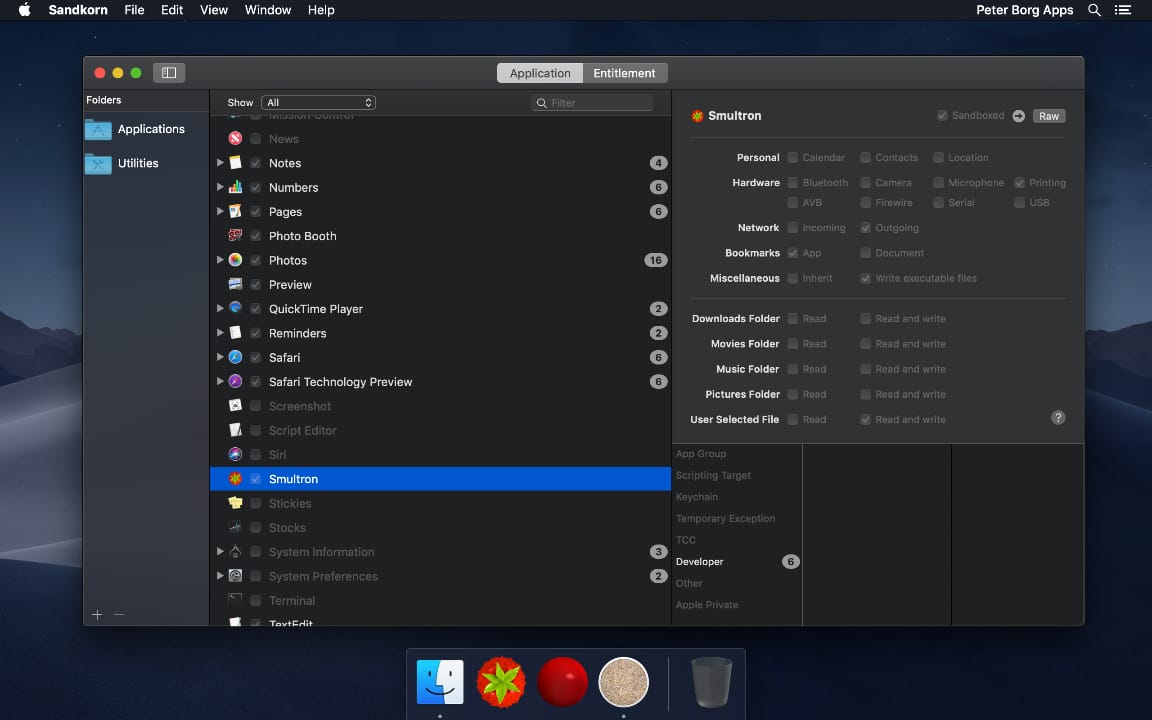
By using Sandkorn you can now in a simple way see what apps have no restrictions at all or, for instance, are limited to accessing your contacts or some particular folder.
Sandkorn checks for apps and executables within each folder in the Folders sidebar, by default it includes the Applications and Utilities folders. It doesn't check subfolders, so you have to add each subfolder that you want to be included by using the plus sign at the bottom or Add Folder in the File menu.
For each app that it finds, Sandkorn tries to find any other executables within that app bundle, for instance plugins and XPC services. And then it looks for all entitlements that those use.
In Sandkorn you can see the information either by listing the apps or by a list of each entitlement used by your apps. In that way you can both check a specific app if you are curious about that and also check a specific entitlement if, for instance, you want to see what apps can use the camera.
Requirements:
* macOS High Sierra 10.13 or later
* 12.3 MB
Pricing and Availability:
Sandkorn is free and is available worldwide exclusively through the Mac App Store in the Utilities category.
Peter Borg Apps: https://www.peterborgapps.com/
Sandkorn: https://www.peterborgapps.com/sandkorn
Download from Mac App Store: https://itunes.apple.com/us/app/sandkorn/id1377973524?ls=1&mt=12&at=1001l3eG
Screenshot: https://www.peterborgapps.com/images/sandkorn-screenshot-1.jpg
App Icon: https://www.peterborgapps.com/images/sandkorn-logo.png
Peter Borg Apps is a small, but great, company that creates apps for macOS, iOS, watchOS and tvOS. We believe in creating easy to use, powerful and elegant apps. All Material and Software (C) Copyright 2018 Peter Borg Apps. All Rights Reserved. Apple, the Apple logo, Macintosh Mac OS X and macOS are registered trademarks of Apple Inc. in the U.S. and/or other countries. Other trademarks and registered trademarks may be the property of their respective owners.
*******
Link To Article: https://prmac.com/release-id-82658.htm
*******
---------------------------------------------------------------------------------
Note that you can alter delivered distributions at any time.
Login to your account on prMac to alter your channel selection, or to opt-out at any time.
See What Your Apps Can Do With Sandkorn - Published on 05/01/18
Peter Borg Apps announces Sandkorn for macOS, a new and easy to use utility that shows you which macOS apps that are sandboxed. It also shows you what entitlements those apps have. Many apps are restricted in a sandbox - all new Mac App Store apps are - but it is hard to know what those restrictions are for each app. Sandkorn helps you with that.
Stockholm, Sweden - Sandkorn from Peter Borg Apps is a new and easy to use utility that shows you which of your macOS apps that are sandboxed. It also shows you what entitlements those apps have.
A sandbox is an access control technology for macOS. Many apps are restricted in a sandbox - all new Mac App Store apps are - but it is hard to know what those restrictions are for each app. And it is even harder to get an overview of all your apps. But Sandkorn helps you with that.
By using Sandkorn you can now in a simple way see what apps have no restrictions at all or, for instance, are limited to accessing your contacts or some particular folder.
Sandkorn checks for apps and executables within each folder in the Folders sidebar, by default it includes the Applications and Utilities folders. It doesn't check subfolders, so you have to add each subfolder that you want to be included by using the plus sign at the bottom or Add Folder in the File menu.
For each app that it finds, Sandkorn tries to find any other executables within that app bundle, for instance plugins and XPC services. And then it looks for all entitlements that those use.
In Sandkorn you can see the information either by listing the apps or by a list of each entitlement used by your apps. In that way you can both check a specific app if you are curious about that and also check a specific entitlement if, for instance, you want to see what apps can use the camera.
Requirements:
* macOS High Sierra 10.13 or later
* 12.3 MB
Pricing and Availability:
Sandkorn is free and is available worldwide exclusively through the Mac App Store in the Utilities category.
Peter Borg Apps: https://www.peterborgapps.com/
Sandkorn: https://www.peterborgapps.com/sandkorn
Download from Mac App Store: https://itunes.apple.com/us/app/sandkorn/id1377973524?ls=1&mt=12&at=1001l3eG
Screenshot: https://www.peterborgapps.com/images/sandkorn-screenshot-1.jpg
App Icon: https://www.peterborgapps.com/images/sandkorn-logo.png
Peter Borg Apps is a small, but great, company that creates apps for macOS, iOS, watchOS and tvOS. We believe in creating easy to use, powerful and elegant apps. All Material and Software (C) Copyright 2018 Peter Borg Apps. All Rights Reserved. Apple, the Apple logo, Macintosh Mac OS X and macOS are registered trademarks of Apple Inc. in the U.S. and/or other countries. Other trademarks and registered trademarks may be the property of their respective owners.
*******
Link To Article: https://prmac.com/release-id-82658.htm
*******
---------------------------------------------------------------------------------
Note that you can alter delivered distributions at any time.
Login to your account on prMac to alter your channel selection, or to opt-out at any time.
SecuritySpy 4.2.4 - Update to macOS CCTV Software
A new article has been published at prMac.
SecuritySpy 4.2.4 - Update to macOS CCTV Software - Published on 05/01/18
Ben Software today announced the release of SecuritySpy 4.2.4, an update to the premier multi-camera video surveillance software for the Mac. With powerful and flexible recording features, motion-activated events, and remote monitoring and configuration, SecuritySpy is designed for demanding video surveillance applications. This version adds many new features and improvements, including improved playback of captured footage, web interface improvements, and bug fixes.
London, United Kingdom - Ben Software today announced the release of SecuritySpy 4.2.4, an update to the premier multi-camera video surveillance software for the Mac. With powerful and flexible recording features, motion-activated events, and remote monitoring and configuration, SecuritySpy is designed for demanding video surveillance applications. This version adds many new features and improvements, including improved playback of captured footage, web interface improvements, and bug fixes.
"This update represents our ongoing commitment to maintain top-quality NVR software and respond to our customers' feedback" said Ben Bird, the developer of SecuritySpy. "We are proud to deliver a host of improvements that make SecuritySpy even more powerful."
The main features of SecuritySpy are as follows:
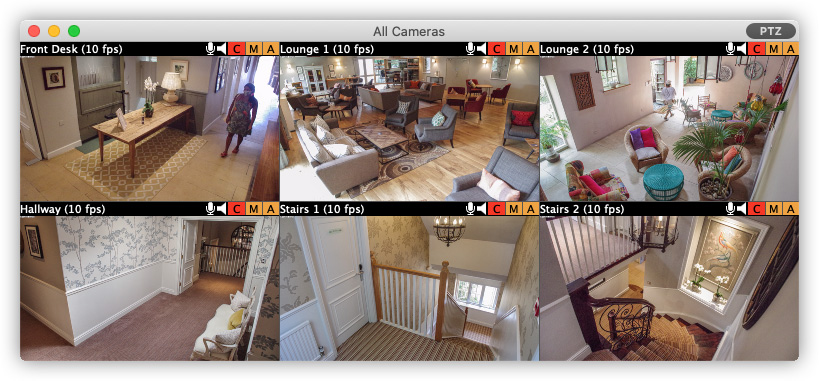
* Displays and records multiple cameras simultaneously
* Powerful capture features, with motion-detection and notifications
* Built-in secure web server for remote monitoring and administration
* Pan/Tilt/Zoom (PTZ) support
* Secure off-site backup of captured footage
* Browser feature for synchronised multi-camera playback of captured footage
* Supports all major brands of IP camera as well as ONVIF-compatible cameras
* Supports all industry-standard media formats (JPEG, MPEG-4, MxPEG, H.264, AAC)
* Extensively threaded and optimised to take full advantage of multi-core Macs
* Hardware-accelerated video compression and decompression
* Purpose-built iOS and tvOS apps for full access on iPhone, iPad and Apple TV
SecuritySpy supports virtually all network cameras on the market, including the popular Axis, Dahua, Canon, Amcrest, Hikvision, Samsung, Vivotek and Zavio ranges. SecuritySpy features advanced motion detection, which can be used to trigger recordings as well as email alerts, audio alarms, iOS push notifications and external devices. The built-in secure web server allows remote monitoring of live streams and captured footage from over the Internet, using a web browser or an iPhone, iPad or Apple TV.
The full list of improvements in this version is as follows:
* Zoom/Pan captured footage during playback in the Browser
* Improved viewing of captured footage via the web interface
* Improved reliability of HTTP Live Streaming via the web interface
* Improved web server performance
* Improved recovery of corrupt recordings due to power outages
* Added local copy as alternative to FTP upload after capture
* Fixed PTZ control issues with Hikvision IP cameras
* Fixed connection issues with FTPS uploads
* Numerous other minor bug fixes and improvements
Pricing is in British Pounds, Euros or US Dollars and depends on the number of cameras used, ranging from GBP 29.90 (approx. USD $40) for a single-camera license, to GBP 649.00 (approx. USD $930) for an unlimited-camera license. SecuritySpy supports any Mac running macOS (Mac OS X) 10.7 "Lion" through 10.13 "High Sierra". SecuritySpy can be tested for 30 days before purchase, with no demo limitations whatsoever.
Ben Software: http://www.bensoftware.com/
SecuritySpy 4.2.4: http://www.bensoftware.com/securityspy/
Download SecuritySpy: http://www.bensoftware.com/securityspy/SecuritySpy.dmg
Purchase SecuritySpy: http://www.bensoftware.com/purchase/
Screenshot: http://www.bensoftware.com/img/allcameras.jpg
Application Icon: https://www.bensoftware.com/securityspy/manual/ss-icon-256.png
Ben Software Ltd is an independent software development house focused on providing high-quality video-related software for the Mac platform. Copyright (C) 2018 Ben Software. All Rights Reserved. Apple, the Apple logo, Mac OS X, and Macintosh are registered trademarks of Apple Inc. in the U.S. and/or other countries.
*******
Link To Article: https://prmac.com/release-id-82657.htm
*******
---------------------------------------------------------------------------------
Note that you can alter delivered distributions at any time.
Login to your account on prMac to alter your channel selection, or to opt-out at any time.
SecuritySpy 4.2.4 - Update to macOS CCTV Software - Published on 05/01/18
Ben Software today announced the release of SecuritySpy 4.2.4, an update to the premier multi-camera video surveillance software for the Mac. With powerful and flexible recording features, motion-activated events, and remote monitoring and configuration, SecuritySpy is designed for demanding video surveillance applications. This version adds many new features and improvements, including improved playback of captured footage, web interface improvements, and bug fixes.
London, United Kingdom - Ben Software today announced the release of SecuritySpy 4.2.4, an update to the premier multi-camera video surveillance software for the Mac. With powerful and flexible recording features, motion-activated events, and remote monitoring and configuration, SecuritySpy is designed for demanding video surveillance applications. This version adds many new features and improvements, including improved playback of captured footage, web interface improvements, and bug fixes.
"This update represents our ongoing commitment to maintain top-quality NVR software and respond to our customers' feedback" said Ben Bird, the developer of SecuritySpy. "We are proud to deliver a host of improvements that make SecuritySpy even more powerful."
The main features of SecuritySpy are as follows:
* Displays and records multiple cameras simultaneously
* Powerful capture features, with motion-detection and notifications
* Built-in secure web server for remote monitoring and administration
* Pan/Tilt/Zoom (PTZ) support
* Secure off-site backup of captured footage
* Browser feature for synchronised multi-camera playback of captured footage
* Supports all major brands of IP camera as well as ONVIF-compatible cameras
* Supports all industry-standard media formats (JPEG, MPEG-4, MxPEG, H.264, AAC)
* Extensively threaded and optimised to take full advantage of multi-core Macs
* Hardware-accelerated video compression and decompression
* Purpose-built iOS and tvOS apps for full access on iPhone, iPad and Apple TV
SecuritySpy supports virtually all network cameras on the market, including the popular Axis, Dahua, Canon, Amcrest, Hikvision, Samsung, Vivotek and Zavio ranges. SecuritySpy features advanced motion detection, which can be used to trigger recordings as well as email alerts, audio alarms, iOS push notifications and external devices. The built-in secure web server allows remote monitoring of live streams and captured footage from over the Internet, using a web browser or an iPhone, iPad or Apple TV.
The full list of improvements in this version is as follows:
* Zoom/Pan captured footage during playback in the Browser
* Improved viewing of captured footage via the web interface
* Improved reliability of HTTP Live Streaming via the web interface
* Improved web server performance
* Improved recovery of corrupt recordings due to power outages
* Added local copy as alternative to FTP upload after capture
* Fixed PTZ control issues with Hikvision IP cameras
* Fixed connection issues with FTPS uploads
* Numerous other minor bug fixes and improvements
Pricing is in British Pounds, Euros or US Dollars and depends on the number of cameras used, ranging from GBP 29.90 (approx. USD $40) for a single-camera license, to GBP 649.00 (approx. USD $930) for an unlimited-camera license. SecuritySpy supports any Mac running macOS (Mac OS X) 10.7 "Lion" through 10.13 "High Sierra". SecuritySpy can be tested for 30 days before purchase, with no demo limitations whatsoever.
Ben Software: http://www.bensoftware.com/
SecuritySpy 4.2.4: http://www.bensoftware.com/securityspy/
Download SecuritySpy: http://www.bensoftware.com/securityspy/SecuritySpy.dmg
Purchase SecuritySpy: http://www.bensoftware.com/purchase/
Screenshot: http://www.bensoftware.com/img/allcameras.jpg
Application Icon: https://www.bensoftware.com/securityspy/manual/ss-icon-256.png

Ben Software Ltd is an independent software development house focused on providing high-quality video-related software for the Mac platform. Copyright (C) 2018 Ben Software. All Rights Reserved. Apple, the Apple logo, Mac OS X, and Macintosh are registered trademarks of Apple Inc. in the U.S. and/or other countries.
*******
Link To Article: https://prmac.com/release-id-82657.htm
*******
---------------------------------------------------------------------------------
Note that you can alter delivered distributions at any time.
Login to your account on prMac to alter your channel selection, or to opt-out at any time.
Subscribe to:
Posts (Atom)