A new article has been published at prMac.
Almost There - A One Finger Hardcore Platformer Is Now Available on iOS - Published on 05/12/18
Durdanto Studio is proud to announces Almost There 1.2, a minimalist platformer for iOS devices with no compromising compared with other Desktop & Console games of the same genre. Players can run, jump, small jump, long jump, wall jump & climb walls with precision. And they can do all these while having full control over all of their action and character. And here is the best part, all of these can be done with just a finger, with the ease of holding the mobile in portrait mode in one hand!
Dhaka, Bangladesh - Durdanto Studio is proud to announce the release of minimalist one finger hardcore platformer game "Almost There" created by Bony Yousuf. The game is now available worldwide on iPhone, iPad, and iPod touch devices.
"Almost There" is a minimalist hardcore platformer for the mobile devices with no compromisation compared with other Desktop & Console games from the same genre. Here player can run, jump, small jump, long jump, wall jump & climb walls with precision. And they can do all these while having full control over all of their action and character. And here is the best part, all of these can be done with just a finger, with the ease of holding the mobile in portrait mode in one hand! Player will guide the game's character through various traps and obstacles to their end goal to complete it's 155 hand crafted levels across 3 different worlds.
Features
* A minimalist hardcore platformer for mobile devices with no compromises.
* One finger innovative control
* 150 Unique handcrafted levels
* 3 Distinctive worlds with it's own theme and hazards
* Dodge and run through spikes, saw blade, lasers, missiles etc to reach your goal
* Easy to learn hard to master levels
* Lower your run time to gain all three stars of a level
* Record your run to share online with your friend or on Every play
Device Requirements:
* iPhone, iPad, and iPod touch
* Requires iOS 9.0 or later
* 259.5 MB
Pricing and Availability:
Almost There 1.2 is Free and available worldwide through the App Store in the Games category. Convenient in-app purchases are available. For more information, please contact Durdanto Studio.
Durdanto Studio: http://durdanto.studio
Almost There: The Platformer 1.2: https://itunes.apple.com/app/almost-there-the-platformer/id1294995340
Screenshot 1: https://imgur.com/a/qUlvBsg
Screenshot 2: https://imgur.com/kIxkp4T
YouTube Trailer: https://www.youtube.com/watch?v=V8Nml_p66wY
Press Kit: https://drive.google.com/open?id=1XB9YpN8NX9vUPPD13kTo8RTIKbkQjw7g
Located in Dhaka, Bangladesh, Durdanto Studio is a founded by Bony Yousuf. All Material and Software (C) Copyright 2018 Durdanto Studio. All Rights Reserved. Apple, the Apple logo, iPhone, iPod and iPad are registered trademarks of Apple Inc. in the U.S. and/or other countries. Other trademarks and registered trademarks may be the property of their respective owners.
*******
Link To Article: https://prmac.com/release-id-82681.htm
*******
---------------------------------------------------------------------------------
Note that you can alter delivered distributions at any time.
Login to your account on prMac to alter your channel selection, or to opt-out at any time.

Escape to the Jungle in Multi-Player 'Tic Tac Toe' Available on iOS
A new article has been published at prMac.
Escape to the Jungle in Multi-Player 'Tic Tac Toe' Available on iOS - Published on 05/12/18
Appcreate, LLC today announce Tic Tac Toe', a mobile tic tac toe game played with bamboo. Players can now download the game globally for free on the Apple App Store for iOS devices. Players can play three versions of Tic Tac Toe, for one or two players.
San Francisco - San Francisco Appcreate, LLC today announced the worldwide release and availability of Tic Tac Toe', a mobile tic tac toe game played with bamboo. Players can now download the game globally for free on the Apple App Store for iPhone, iPad and iPod touch devices.
Tic Tac Toe' includes a host of exciting features, including:
* Bamboos in X and O Shapes
Tic Tac Toe' allows you to play tic-tac-toe in an exciting environment with X and O botched in bamboos.]]
* Panda Vs Bamboo in Two Player Game
In the Two Player Game, you can play as "Panda" and your friend plays as the "Bamboo". If you are able to beat your friend, then you are crowned THE champion!
* 360-Degree Winning Animation
Most tic-tac-toe draw a simple line across the matched three X or O figures to indicate the winner. In Tic Tac Toe' , when you win, the three matched winning X or O figures display an animated 360-degree turn.
"I was thinking about creating an iPhone game when a tic-tac-toe game dawned on me," Sakyi, the CEO of Appcreate, LLC said. "I did some research and realized that all the tic-tac-toe games on the App Store were made of X and O, so we decided to botch a tic-tac-toe game that has X and O carved in bamboos to bring some rich experience to customers."
The game is available at the Apple iTunes store for free and can be downloaded on iPhone and iPad.
Stay tuned for more updates!
Device Requirements:
* iPhone, iPad, and iPod touch
* Requires iOS 6.0 or later
* Universal Application
* 37.2 MB
Pricing and Availability:
Tic Tac Toe' is free and is available worldwide exclusively through the App Store in the Games category.
Tic Tac Toe' : https://www.linkedin.com/pulse/coolest-tic-tac-toe-app-ever-joel-sakyi/
Product URL: https://itunes.apple.com/app/tic-tac-toe/id1357153781
Screenshot: https://is2-ssl.mzstatic.com/image/thumb/Purple128/v4/c9/2c/a4/c92ca4bb-d079-1ba9-5abc-f457206ef064/pr_source.png/300x0w.jpg
App Icon: https://is2-ssl.mzstatic.com/image/thumb/Purple118/v4/25/90/f9/2590f96b-3adb-14a9-2167-110f8cdd2d9f/AppIcon-1x_U007emarketing-0-85-220-0-9.png/246x0w.jpg
Appcreate, LLC is a company botched with the view to creating apps to the delight of consumers. We create apps or games that are sticky and offer rich experiences to the user. This is our dedication and purpose. All Material and Software (C) Copyright 2018 Appcreate, LLC. All Rights Reserved. Apple, the Apple logo, iPhone, iPod and iPad are registered trademarks of Apple Inc. in the U.S. and/or other countries. Other trademarks and registered trademarks may be the property of their respective owners.
*******
Link To Article: https://prmac.com/release-id-82680.htm
*******
---------------------------------------------------------------------------------
Note that you can alter delivered distributions at any time.
Login to your account on prMac to alter your channel selection, or to opt-out at any time.
Escape to the Jungle in Multi-Player 'Tic Tac Toe' Available on iOS - Published on 05/12/18
Appcreate, LLC today announce Tic Tac Toe', a mobile tic tac toe game played with bamboo. Players can now download the game globally for free on the Apple App Store for iOS devices. Players can play three versions of Tic Tac Toe, for one or two players.
San Francisco - San Francisco Appcreate, LLC today announced the worldwide release and availability of Tic Tac Toe', a mobile tic tac toe game played with bamboo. Players can now download the game globally for free on the Apple App Store for iPhone, iPad and iPod touch devices.
Tic Tac Toe' includes a host of exciting features, including:
* Bamboos in X and O Shapes
Tic Tac Toe' allows you to play tic-tac-toe in an exciting environment with X and O botched in bamboos.]]
* Panda Vs Bamboo in Two Player Game
In the Two Player Game, you can play as "Panda" and your friend plays as the "Bamboo". If you are able to beat your friend, then you are crowned THE champion!
* 360-Degree Winning Animation
Most tic-tac-toe draw a simple line across the matched three X or O figures to indicate the winner. In Tic Tac Toe' , when you win, the three matched winning X or O figures display an animated 360-degree turn.
"I was thinking about creating an iPhone game when a tic-tac-toe game dawned on me," Sakyi, the CEO of Appcreate, LLC said. "I did some research and realized that all the tic-tac-toe games on the App Store were made of X and O, so we decided to botch a tic-tac-toe game that has X and O carved in bamboos to bring some rich experience to customers."
The game is available at the Apple iTunes store for free and can be downloaded on iPhone and iPad.
Stay tuned for more updates!
Device Requirements:
* iPhone, iPad, and iPod touch
* Requires iOS 6.0 or later
* Universal Application
* 37.2 MB
Pricing and Availability:
Tic Tac Toe' is free and is available worldwide exclusively through the App Store in the Games category.
Tic Tac Toe' : https://www.linkedin.com/pulse/coolest-tic-tac-toe-app-ever-joel-sakyi/
Product URL: https://itunes.apple.com/app/tic-tac-toe/id1357153781
Screenshot: https://is2-ssl.mzstatic.com/image/thumb/Purple128/v4/c9/2c/a4/c92ca4bb-d079-1ba9-5abc-f457206ef064/pr_source.png/300x0w.jpg

App Icon: https://is2-ssl.mzstatic.com/image/thumb/Purple118/v4/25/90/f9/2590f96b-3adb-14a9-2167-110f8cdd2d9f/AppIcon-1x_U007emarketing-0-85-220-0-9.png/246x0w.jpg

Appcreate, LLC is a company botched with the view to creating apps to the delight of consumers. We create apps or games that are sticky and offer rich experiences to the user. This is our dedication and purpose. All Material and Software (C) Copyright 2018 Appcreate, LLC. All Rights Reserved. Apple, the Apple logo, iPhone, iPod and iPad are registered trademarks of Apple Inc. in the U.S. and/or other countries. Other trademarks and registered trademarks may be the property of their respective owners.
*******
Link To Article: https://prmac.com/release-id-82680.htm
*******
---------------------------------------------------------------------------------
Note that you can alter delivered distributions at any time.
Login to your account on prMac to alter your channel selection, or to opt-out at any time.
Loveit Coverit Reduce Excess Fees for May and June
A new article has been published at prMac.
Loveit Coverit Reduce Excess Fees for May and June - Published on 05/12/18
With summer fast approaching and more and more people heading outside, specialist mobile phone and gadget insurance company, Loveit Coverit, have lowered the excess prices for accidental damage on all new policies during the months of May and June. This limited time offer will apply to all handset models currently available on their recently relaunched website, including the iPhone X, iPhone 8 and 8 Plus, and the Samsung S9 and S9 Plus.
Chelmsford, Essex - With summer fast approaching and more and more people heading outside, specialist mobile phone and gadget insurance company, loveit coverit, have lowered the excess prices for accidental damage on all new policies during the months of May and June. This limited time offer will apply to all handset models currently available on their recently relaunched website, including the iPhone X, iPhone 8 and 8+, and the Samsung S9 and S9+.
The normal excess cost for accidental damage on an iPhone X is £80, which has been reduced to £60 during the promotional period. Similarly, an iPhone 8, 8+, Samsung 9, 9+, 8, 8+, or 7 Edge would cost £60, reduced to £45. All other devices would usually cost £33 in accidental damage excess, however,
with the promotion, is reduced to £25.
Speaking about the promotional reduction in excess charges, loveit coverit Managing Director, Toby Stubbington, said:
"At loveit coverit we understand that the summer is a particularly high-risk period for mobile phones, with the majority of accidental damage claims occurring during this time. That's why we're happy to offer even lower excess charges than normal for May and June, so our customers can go out and enjoy themselves and still have peace of mind."
Mobile Phone Insurance From Loveit Coverit: https://www.loveitcoverit.com/mobile-phone-insurance/
Authorized and regulated by the Financial Conduct Authority, Loveit Coverit is a trading name of Pier Insurance Managed Services. Providing mobile phone and gadget insurance for almost 30 years, the company has insured over 900,000 devices to-date and all claims are handled by their UK based, in-house team. All Material and Software (C) Copyright 2018 Loveit Coverit. All Rights Reserved. Apple, the Apple logo, iPhone, iPod and iPad are registered trademarks of Apple Inc. in the U.S. and/or other countries. Other trademarks and registered trademarks may be the property of their respective owners.
*******
Link To Article: https://prmac.com/release-id-82679.htm
*******
---------------------------------------------------------------------------------
Note that you can alter delivered distributions at any time.
Login to your account on prMac to alter your channel selection, or to opt-out at any time.
Loveit Coverit Reduce Excess Fees for May and June - Published on 05/12/18
With summer fast approaching and more and more people heading outside, specialist mobile phone and gadget insurance company, Loveit Coverit, have lowered the excess prices for accidental damage on all new policies during the months of May and June. This limited time offer will apply to all handset models currently available on their recently relaunched website, including the iPhone X, iPhone 8 and 8 Plus, and the Samsung S9 and S9 Plus.
Chelmsford, Essex - With summer fast approaching and more and more people heading outside, specialist mobile phone and gadget insurance company, loveit coverit, have lowered the excess prices for accidental damage on all new policies during the months of May and June. This limited time offer will apply to all handset models currently available on their recently relaunched website, including the iPhone X, iPhone 8 and 8+, and the Samsung S9 and S9+.
The normal excess cost for accidental damage on an iPhone X is £80, which has been reduced to £60 during the promotional period. Similarly, an iPhone 8, 8+, Samsung 9, 9+, 8, 8+, or 7 Edge would cost £60, reduced to £45. All other devices would usually cost £33 in accidental damage excess, however,
with the promotion, is reduced to £25.
Speaking about the promotional reduction in excess charges, loveit coverit Managing Director, Toby Stubbington, said:
"At loveit coverit we understand that the summer is a particularly high-risk period for mobile phones, with the majority of accidental damage claims occurring during this time. That's why we're happy to offer even lower excess charges than normal for May and June, so our customers can go out and enjoy themselves and still have peace of mind."
Mobile Phone Insurance From Loveit Coverit: https://www.loveitcoverit.com/mobile-phone-insurance/
Authorized and regulated by the Financial Conduct Authority, Loveit Coverit is a trading name of Pier Insurance Managed Services. Providing mobile phone and gadget insurance for almost 30 years, the company has insured over 900,000 devices to-date and all claims are handled by their UK based, in-house team. All Material and Software (C) Copyright 2018 Loveit Coverit. All Rights Reserved. Apple, the Apple logo, iPhone, iPod and iPad are registered trademarks of Apple Inc. in the U.S. and/or other countries. Other trademarks and registered trademarks may be the property of their respective owners.
*******
Link To Article: https://prmac.com/release-id-82679.htm
*******
---------------------------------------------------------------------------------
Note that you can alter delivered distributions at any time.
Login to your account on prMac to alter your channel selection, or to opt-out at any time.
Compositor 1.2 - WYSIWYG LaTeX Mac app adds support for LaTeX 3
A new article has been published at prMac.
Compositor 1.2 - WYSIWYG LaTeX Mac app adds support for LaTeX 3 - Published on 05/11/18
Austrian indie developer, Karl Traunmueller today released Compositor 1.2, an update to the Mac app that brings real-time WYSIWYG capabilities to the LaTeX document preparation system. Compositor delivers the same convenience and productivity of any modern word processor. Zero-turnaround, real-time typesetting. Version 1.2 is now compatible with LaTeX 3, improves resilience of the internal typesetting engine, and updates the bundled LaTeX distribution to TeX Live 2018.
St. Valentin, Austria - Independent developer, Karl Traunmueller today released Compositor 1.2, the next version of the WYSIWYG LaTeX Mac app that brings real-time WYSIWYG capabilities to LaTeX, the document preparation system widely used in academia for preparation of scientific and technical publications.
This release adds compatibility with the LaTeX 3 programming layer, the next generation programming model for authoring LaTeX packages. While development of the LaTeX 3 kernel is an ongoing effort, the programming layer for LaTeX 3 (as provided by the expl3 macro package) is already deemed stable, and thus chosen by many package authors for writing new packages. As such, this newly added compatibility marks an important step in the product's evolution towards broader support for modern LaTeX packages.
Also, version 1.2 increases the internal memory capacity of the underlying typesetting engine, TeX. This is expected to improve overall resilience of the application when exposed to a broad variety of documents.
Lastly, the LaTeX distribution that comes bundled with the app has been updated to the latest TeX Live release, TeX Live 2018.
To rapidly evolve the product into the go-to solution for LaTeX on the Mac, Karl Traunmueller, the developer, plans to ship updates about every 6 weeks throughout the year. The next version, 1.3, is scheduled for release by late June, and will bring improvements to the user interface and usability in general.
Features:
* Zero-turnaround, real-time typesetting
* Modern WYSIWYG interface
* Simple drag & drop installation; no additional software required
* Automatic, on-demand extension package installation
* No proprietary document format, compatible with regular plain text .tex files
* Based on TeX Live, a comprehensive standard LaTeX distribution
Pricing and Availability:
A fully-functional 60-day free trial is available for download from the product's website. Licenses can be purchased from the product's online store at an early-adopter price of $19 (USD). The purchase includes all future updates, including major version updates. There are currently no plans to support Windows or Linux platforms. For more information, please contact Karl Traunmueller.
Karl Traunmueller points out that the app is in many ways still at an early stage of development, and is undergoing further enhancement in the coming months. The product's web site details its current limitations and links to a roadmap of planned improvements and features. This build-up of features is reflected in an early-adopter pricing strategy: all purchases include lifetime updates, but the current entry price of $19 will rise to $29 midway through the year, and to $39 (USD) by end of the year.
Website: http://compositorapp.com/
Direct Download Link: http://compositorapp.com/downloads/Compositor.dmg
Purchase Link: https://sites.fastspring.com/microlarge/instant/compositor
YouTube Video (Teaser): https://www.youtube.com/watch?v=FzeRZ5QG5is
Screenshot: http://compositorapp.com/images/screenshots/Screenshot1.png
App Icon: http://compositorapp.com/images/IconBadged.png
Karl Traunmueller is an independent iOS and Mac developer from Austria. After graduating from Johannes Kepler University, Linz, Austria, with an MSc in Computer Science in 1998, Karl has worked as a software engineer in a variety of fields ranging from embedded systems to enterprise applications. Before writing Compositor, Karl was the first developer to bring the IPython scientific computing environment to the iPad. All Material and Software (C) 2018 Karl Traunmueller / All Rights Reserved. Apple, the Apple logo, macOS, iPhone, iPod and iPad are registered trademarks of Apple Inc. in the U.S. and/or other countries. Other trademarks and registered trademarks may be the property of their respective owners.
*******
Link To Article: https://prmac.com/release-id-82678.htm
*******
---------------------------------------------------------------------------------
Note that you can alter delivered distributions at any time.
Login to your account on prMac to alter your channel selection, or to opt-out at any time.
Compositor 1.2 - WYSIWYG LaTeX Mac app adds support for LaTeX 3 - Published on 05/11/18
Austrian indie developer, Karl Traunmueller today released Compositor 1.2, an update to the Mac app that brings real-time WYSIWYG capabilities to the LaTeX document preparation system. Compositor delivers the same convenience and productivity of any modern word processor. Zero-turnaround, real-time typesetting. Version 1.2 is now compatible with LaTeX 3, improves resilience of the internal typesetting engine, and updates the bundled LaTeX distribution to TeX Live 2018.
St. Valentin, Austria - Independent developer, Karl Traunmueller today released Compositor 1.2, the next version of the WYSIWYG LaTeX Mac app that brings real-time WYSIWYG capabilities to LaTeX, the document preparation system widely used in academia for preparation of scientific and technical publications.
This release adds compatibility with the LaTeX 3 programming layer, the next generation programming model for authoring LaTeX packages. While development of the LaTeX 3 kernel is an ongoing effort, the programming layer for LaTeX 3 (as provided by the expl3 macro package) is already deemed stable, and thus chosen by many package authors for writing new packages. As such, this newly added compatibility marks an important step in the product's evolution towards broader support for modern LaTeX packages.
Also, version 1.2 increases the internal memory capacity of the underlying typesetting engine, TeX. This is expected to improve overall resilience of the application when exposed to a broad variety of documents.
Lastly, the LaTeX distribution that comes bundled with the app has been updated to the latest TeX Live release, TeX Live 2018.
To rapidly evolve the product into the go-to solution for LaTeX on the Mac, Karl Traunmueller, the developer, plans to ship updates about every 6 weeks throughout the year. The next version, 1.3, is scheduled for release by late June, and will bring improvements to the user interface and usability in general.
Features:
* Zero-turnaround, real-time typesetting
* Modern WYSIWYG interface
* Simple drag & drop installation; no additional software required
* Automatic, on-demand extension package installation
* No proprietary document format, compatible with regular plain text .tex files
* Based on TeX Live, a comprehensive standard LaTeX distribution
Pricing and Availability:
A fully-functional 60-day free trial is available for download from the product's website. Licenses can be purchased from the product's online store at an early-adopter price of $19 (USD). The purchase includes all future updates, including major version updates. There are currently no plans to support Windows or Linux platforms. For more information, please contact Karl Traunmueller.
Karl Traunmueller points out that the app is in many ways still at an early stage of development, and is undergoing further enhancement in the coming months. The product's web site details its current limitations and links to a roadmap of planned improvements and features. This build-up of features is reflected in an early-adopter pricing strategy: all purchases include lifetime updates, but the current entry price of $19 will rise to $29 midway through the year, and to $39 (USD) by end of the year.
Website: http://compositorapp.com/
Direct Download Link: http://compositorapp.com/downloads/Compositor.dmg
Purchase Link: https://sites.fastspring.com/microlarge/instant/compositor
YouTube Video (Teaser): https://www.youtube.com/watch?v=FzeRZ5QG5is
Screenshot: http://compositorapp.com/images/screenshots/Screenshot1.png

App Icon: http://compositorapp.com/images/IconBadged.png

Karl Traunmueller is an independent iOS and Mac developer from Austria. After graduating from Johannes Kepler University, Linz, Austria, with an MSc in Computer Science in 1998, Karl has worked as a software engineer in a variety of fields ranging from embedded systems to enterprise applications. Before writing Compositor, Karl was the first developer to bring the IPython scientific computing environment to the iPad. All Material and Software (C) 2018 Karl Traunmueller / All Rights Reserved. Apple, the Apple logo, macOS, iPhone, iPod and iPad are registered trademarks of Apple Inc. in the U.S. and/or other countries. Other trademarks and registered trademarks may be the property of their respective owners.
*******
Link To Article: https://prmac.com/release-id-82678.htm
*******
---------------------------------------------------------------------------------
Note that you can alter delivered distributions at any time.
Login to your account on prMac to alter your channel selection, or to opt-out at any time.
File Cabinet Pro 6.3 Major Update Out - 85% Off for the Month of May
A new article has been published at prMac.
File Cabinet Pro 6.3 Major Update Out - 85% Off for the Month of May - Published on 05/10/18
Florida based Writes for All Inc. today announces File Cabinet Pro 6.3, an important feature update to their powerful file manager for macOS. File Cabinet Pro allows anyone to open, move, rename, tag, trash, copy and paste files, all from a popover window that appears from the menu bar. This useful utility serves as a convenient place for users to store files they access often, as it completely eliminates desktop clutter. Version 6.3 is a significant update, offering several new features.
Coral Springs, Florida - Writes for All Inc. is proud to announce the release of File Cabinet Pro version 6.3. File Cabinet Pro is a powerful file manager for the macOS menu bar. File Cabinet Pro allows users to open, move, rename, tag, trash, copy and paste files, all from a popover window that appears from the menu bar. File Cabinet Pro is a convenient place for users to store files they access often, as it completely eliminates desktop clutter.
File Cabinet Pro version 6.3 is a significant update, offering several new features including:
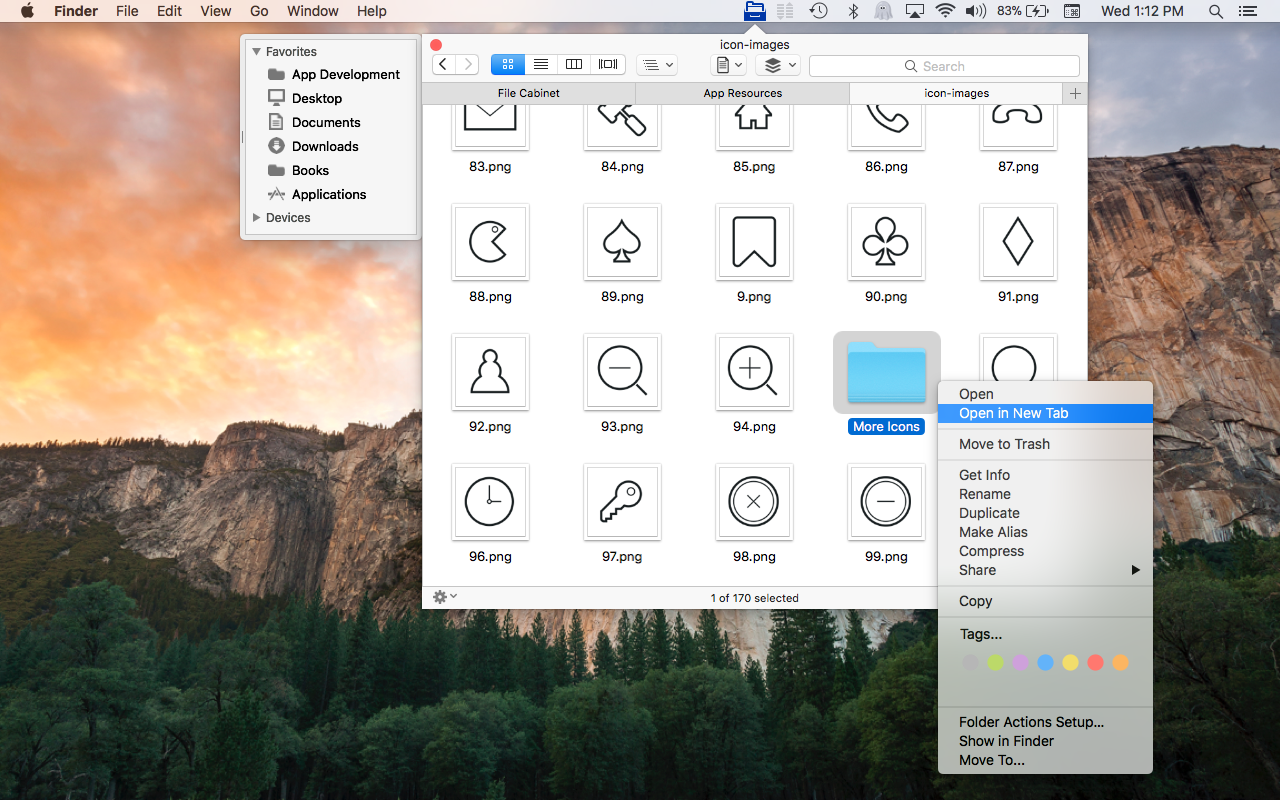
* You can now open directories in new tabs.
* Tabs in File Cabinet Pro's new Tab Bar support spring-loading; you can drag files over a tab to select one.
* File Cabinet Pro now displays the number of selected items and the file count for the current directory at the bottom of the window.
* The size of the Quicklook preview for a selected file in Column view will now resize with the window instead of remaining at a small fixed size.
* File Cabinet Pro started displaying a Services submenu in its context menu in version 4.5. As a result if the "Show In Finder" service on your Mac was enabled you would see two "Show In Finder" menu items in File Cabinet Pro's context menu. File Cabinet Pro no longer displays its own "Show in Finder" menu item in its context menu to fix this problem. You can enable the "Show In Finder" Service in System Preferences on your Mac to continue using this feature.
*A new "Go to Folder..." menu item has been added to File Cabinet Pro's context menu.
File Cabinet Pro offers powerful features. With File Cabinet Pro you can:
* Create subdirectories
* Click into subdirectories and open documents
* Open directories in new tabs
* Tag files easily. Select files in File Cabinet Pro, right click, and then simply add or remove file tags from the control in the context menu
* Show selected files in Finder
* Rename files
* Copy and paste files
* Show hidden files
* Show package contents
* Compress files
* Trash files
* View items as icons, in a list, in columns, or in cover flow view
* Launch the application at login. You can have File Cabinet Pro automatically launch when you login to your Mac (optional feature, disabled by default)
* Create a list of all your favorite directories in the sidebar
* Create and edit txt, rtf, rtfd, and .md files using the built in lightweight text editor
* Create txt, rtf, rtfd, and .md files from text data currently on the clipboard
* Create text documents from Finder using File Cabinet Pro's Document Creator Finder extension (Note: To use this feature, you have to enable the Finder extension in System Preferences under the "Extensions" tab)
* Rotate images, crop images, and apply filters to images using the built in lightweight image editor
* Watch video and play audio files using the built in media player
* View pdf files using the built in pdf viewer
* Revert document versions for supported editable document types
* Set a Global Hotkey for showing and closing the File Cabinet Pro window (optional feature, disabled by default)
* Preview selected files in Quicklook by pressing the spacebar
* Share files in apps that support Sharing extensions like Mail and Messages
* Verify the SHA256, SHA1, or MD5 checksum of files using the "View Checksum in File Cabinet Pro" Service
System Requirements:
* macOS
* 15.4 MB
Pricing and Availability:
To celebrate the release of version 6.3, File Cabinet Pro is on sale for just $4.99 (85% off) for the month of May at the developer's website. It is available worldwide through the Mac App Store in the Utilities category and on App Tyrant online. For more information, please contact Anthony Cruz.
App Tyrant: http://apptyrant.com
File Cabinet Pro 6.3.1: https://apptyrant.com/file-cabinet-pro-help/
Purchase and Download (MAS): https://itunes.apple.com/app/file-cabinet-pro/id1150565778
Purchase from App Tyrant: https://sites.fastspring.com/apptyrant/product/filecabinetpro
Screenshot: https://apptyrant.com/wordpress/wp-content/uploads/2018/03/FCPScreenshotRightClickMenuShowingOpenInNewTab.png
Application Icon: https://i2.wp.com/apptyrant.com/wordpress/wp-content/uploads/2017/05/FileCabinetProMacAppIcon1024x1024.png
Writes for All Inc. owns and operates App Tyrant, a website dedicated to iOS and Mac application development. Links to iOS and Mac applications distributed by Writes for All Inc. can be found on the website. All Material and Software (C) Copyright 2018 Writes for All Inc. All Rights Reserved. Apple, the Apple logo, Mac OS X, iPhone, iPod, iPad and Macintosh are registered trademarks of Apple Inc. in the U.S. and/or other countries. Other trademarks and registered trademarks may be the property of their respective owners.
*******
Link To Article: https://prmac.com/release-id-82677.htm
*******
---------------------------------------------------------------------------------
Note that you can alter delivered distributions at any time.
Login to your account on prMac to alter your channel selection, or to opt-out at any time.
File Cabinet Pro 6.3 Major Update Out - 85% Off for the Month of May - Published on 05/10/18
Florida based Writes for All Inc. today announces File Cabinet Pro 6.3, an important feature update to their powerful file manager for macOS. File Cabinet Pro allows anyone to open, move, rename, tag, trash, copy and paste files, all from a popover window that appears from the menu bar. This useful utility serves as a convenient place for users to store files they access often, as it completely eliminates desktop clutter. Version 6.3 is a significant update, offering several new features.
Coral Springs, Florida - Writes for All Inc. is proud to announce the release of File Cabinet Pro version 6.3. File Cabinet Pro is a powerful file manager for the macOS menu bar. File Cabinet Pro allows users to open, move, rename, tag, trash, copy and paste files, all from a popover window that appears from the menu bar. File Cabinet Pro is a convenient place for users to store files they access often, as it completely eliminates desktop clutter.
File Cabinet Pro version 6.3 is a significant update, offering several new features including:
* You can now open directories in new tabs.
* Tabs in File Cabinet Pro's new Tab Bar support spring-loading; you can drag files over a tab to select one.
* File Cabinet Pro now displays the number of selected items and the file count for the current directory at the bottom of the window.
* The size of the Quicklook preview for a selected file in Column view will now resize with the window instead of remaining at a small fixed size.
* File Cabinet Pro started displaying a Services submenu in its context menu in version 4.5. As a result if the "Show In Finder" service on your Mac was enabled you would see two "Show In Finder" menu items in File Cabinet Pro's context menu. File Cabinet Pro no longer displays its own "Show in Finder" menu item in its context menu to fix this problem. You can enable the "Show In Finder" Service in System Preferences on your Mac to continue using this feature.
*A new "Go to Folder..." menu item has been added to File Cabinet Pro's context menu.
File Cabinet Pro offers powerful features. With File Cabinet Pro you can:
* Create subdirectories
* Click into subdirectories and open documents
* Open directories in new tabs
* Tag files easily. Select files in File Cabinet Pro, right click, and then simply add or remove file tags from the control in the context menu
* Show selected files in Finder
* Rename files
* Copy and paste files
* Show hidden files
* Show package contents
* Compress files
* Trash files
* View items as icons, in a list, in columns, or in cover flow view
* Launch the application at login. You can have File Cabinet Pro automatically launch when you login to your Mac (optional feature, disabled by default)
* Create a list of all your favorite directories in the sidebar
* Create and edit txt, rtf, rtfd, and .md files using the built in lightweight text editor
* Create txt, rtf, rtfd, and .md files from text data currently on the clipboard
* Create text documents from Finder using File Cabinet Pro's Document Creator Finder extension (Note: To use this feature, you have to enable the Finder extension in System Preferences under the "Extensions" tab)
* Rotate images, crop images, and apply filters to images using the built in lightweight image editor
* Watch video and play audio files using the built in media player
* View pdf files using the built in pdf viewer
* Revert document versions for supported editable document types
* Set a Global Hotkey for showing and closing the File Cabinet Pro window (optional feature, disabled by default)
* Preview selected files in Quicklook by pressing the spacebar
* Share files in apps that support Sharing extensions like Mail and Messages
* Verify the SHA256, SHA1, or MD5 checksum of files using the "View Checksum in File Cabinet Pro" Service
System Requirements:
* macOS
* 15.4 MB
Pricing and Availability:
To celebrate the release of version 6.3, File Cabinet Pro is on sale for just $4.99 (85% off) for the month of May at the developer's website. It is available worldwide through the Mac App Store in the Utilities category and on App Tyrant online. For more information, please contact Anthony Cruz.
App Tyrant: http://apptyrant.com
File Cabinet Pro 6.3.1: https://apptyrant.com/file-cabinet-pro-help/
Purchase and Download (MAS): https://itunes.apple.com/app/file-cabinet-pro/id1150565778
Purchase from App Tyrant: https://sites.fastspring.com/apptyrant/product/filecabinetpro
Screenshot: https://apptyrant.com/wordpress/wp-content/uploads/2018/03/FCPScreenshotRightClickMenuShowingOpenInNewTab.png
Application Icon: https://i2.wp.com/apptyrant.com/wordpress/wp-content/uploads/2017/05/FileCabinetProMacAppIcon1024x1024.png

Writes for All Inc. owns and operates App Tyrant, a website dedicated to iOS and Mac application development. Links to iOS and Mac applications distributed by Writes for All Inc. can be found on the website. All Material and Software (C) Copyright 2018 Writes for All Inc. All Rights Reserved. Apple, the Apple logo, Mac OS X, iPhone, iPod, iPad and Macintosh are registered trademarks of Apple Inc. in the U.S. and/or other countries. Other trademarks and registered trademarks may be the property of their respective owners.
*******
Link To Article: https://prmac.com/release-id-82677.htm
*******
---------------------------------------------------------------------------------
Note that you can alter delivered distributions at any time.
Login to your account on prMac to alter your channel selection, or to opt-out at any time.
Screen Saver Collection Brings Screen Saver Fun Back to the Mac
A new article has been published at prMac.
Screen Saver Collection Brings Screen Saver Fun Back to the Mac - Published on 05/09/18
New York based independent development firm, Johansson Design today announces their collection of Screen Savers for Apple's Mac. The collection offers 15 assorted screen saving animations that are designed to be both practical and also serve as a form of self-expression. Designs include eye-catching clocks, color bars, stickers, sport logos, emoji, and many more. This collection brings back a long-neglected piece of the Mac experience to modern users.
New York, New York - Johansson Design today is proud to announce the release and immediate availability of their collection of Screen Savers for macOS. The collection offers a wide variety of animated modern, pop-culture inspired screen savers that are both practical and a fun form of self-expression.
Screen Savers by Johansson Design offer a collection of 15 screen savers, each of which are uniquely designed to provide entertainment, the time of day, or just a pleasing screen-saving design. Designs include eye-catching clocks, color bars, stickers, sport logos, emoji, and many more.
"While screen savers have been a part of macOS since day one, they've been ignored by Apple and I think that's a mistake," says designer Bjorn Johansson. "I believe screen savers have a lot of untapped potential, and I like creating them because they serve as a unique outlet for both my design and coding skills. My screen savers can be used as a form of self-expression which communicates something about the users. Or they can simply be a fun way to set your Mac apart from all of the others, like stickers on a laptop."
Currently, there are 15 different screen savers available:
* MacClock - Features four "squared" recreations of Apple Watch faces
* Grid Systems - A clock inspired by the book, "Grid Systems in Graphic Design"
* Color Circle Clock - A rudimentary color circle turned into a stylish clock
* Points in Time - A digital clock featuring animated halftone digits
* SMPTE Color Bars - Simulates SMPTE color bars television test pattern
* EXIT - Turn your screen into a New York City Building Authority Exit Sign
* Mon Monogram - Features the iconic LV pattern.
* Supreme Monogram - Features the most hyped update to the LV pattern since Murakami.
* Red White Stickers - Barbara Kruger inspired stickers with custom text
* Long Ago Time - Star Wars inspired clock screen saver
* Emoji Matrix - Choose from 8 Emoji categories
* Teams of New York - Logos of all of the famous New York sports teams
* The SF Trilogy - A trilogy of screen savers based on Apple's San Francisco typeface
Bjorn Johansson thinks that if Apple ever does release their much-rumored TV, the screen saver will become a viable medium for artists to offer their works. While there are a few digital art screens currently available on the market, none of them are likely to ever reach mass market adoption, which is why screen savers are much better suited for bringing digital art into potentially millions of people's homes. To stay ahead of the curve in this hopefully burgeoning field, future screen savers by Bjorn will focus on artistic expressions.
"Johansson Design is probably the only company around actively designing and releasing screen savers for the Mac these days. I really hope my work will inspire both developers and artists to start creating more beautiful and interesting screen savers," shares Bjorn.
The Screen Savers collection is just the latest project for Johansson Design. Previous projects include the BIG-ASS MESSAGE website, which has been used to create over 25 million messages so far. The "Him" website is based on the movie "Her," and is possibly the first website users can talk to. More information about those projects, and others, are available at the Johansson Design website.
Device Requirements:
* 10.9 Mavericks or higher (Some require 10.11 El Capitan or higher)
Pricing and Availability:
All of the Screen Savers by Johansson Design are free and are available worldwide exclusively through the Johansson Design website. While all of the screen savers are free to download, users can pay any amount they like if they're feeling generous.
Johansson Design: https://johansson.design
Screen Savers by Johansson Design: https://johansson.design/screensavers
BIG-ASS MESSAGE: https://bigassmessage.com
Media Assets: https://johansson.design/screensavers/press
New York-based Johansson Design is a one man operation founded in 2009 and ran by Bjorn Johansson. Graphic design and product design is always at the heart of the company's products. Bjorn does all of the design and coding for his projects. All Material and Software (C) Copyright 2018 Johansson Design. All Rights Reserved. Apple, the Apple logo, Macintosh Mac OS X and macOS are registered trademarks of Apple Inc. in the U.S. and/or other countries. Other trademarks and registered trademarks may be the property of their respective owners.
*******
Link To Article: https://prmac.com/release-id-82676.htm
*******
---------------------------------------------------------------------------------
Note that you can alter delivered distributions at any time.
Login to your account on prMac to alter your channel selection, or to opt-out at any time.
Screen Saver Collection Brings Screen Saver Fun Back to the Mac - Published on 05/09/18
New York based independent development firm, Johansson Design today announces their collection of Screen Savers for Apple's Mac. The collection offers 15 assorted screen saving animations that are designed to be both practical and also serve as a form of self-expression. Designs include eye-catching clocks, color bars, stickers, sport logos, emoji, and many more. This collection brings back a long-neglected piece of the Mac experience to modern users.
New York, New York - Johansson Design today is proud to announce the release and immediate availability of their collection of Screen Savers for macOS. The collection offers a wide variety of animated modern, pop-culture inspired screen savers that are both practical and a fun form of self-expression.
Screen Savers by Johansson Design offer a collection of 15 screen savers, each of which are uniquely designed to provide entertainment, the time of day, or just a pleasing screen-saving design. Designs include eye-catching clocks, color bars, stickers, sport logos, emoji, and many more.
"While screen savers have been a part of macOS since day one, they've been ignored by Apple and I think that's a mistake," says designer Bjorn Johansson. "I believe screen savers have a lot of untapped potential, and I like creating them because they serve as a unique outlet for both my design and coding skills. My screen savers can be used as a form of self-expression which communicates something about the users. Or they can simply be a fun way to set your Mac apart from all of the others, like stickers on a laptop."
Currently, there are 15 different screen savers available:
* MacClock - Features four "squared" recreations of Apple Watch faces
* Grid Systems - A clock inspired by the book, "Grid Systems in Graphic Design"
* Color Circle Clock - A rudimentary color circle turned into a stylish clock
* Points in Time - A digital clock featuring animated halftone digits
* SMPTE Color Bars - Simulates SMPTE color bars television test pattern
* EXIT - Turn your screen into a New York City Building Authority Exit Sign
* Mon Monogram - Features the iconic LV pattern.
* Supreme Monogram - Features the most hyped update to the LV pattern since Murakami.
* Red White Stickers - Barbara Kruger inspired stickers with custom text
* Long Ago Time - Star Wars inspired clock screen saver
* Emoji Matrix - Choose from 8 Emoji categories
* Teams of New York - Logos of all of the famous New York sports teams
* The SF Trilogy - A trilogy of screen savers based on Apple's San Francisco typeface
Bjorn Johansson thinks that if Apple ever does release their much-rumored TV, the screen saver will become a viable medium for artists to offer their works. While there are a few digital art screens currently available on the market, none of them are likely to ever reach mass market adoption, which is why screen savers are much better suited for bringing digital art into potentially millions of people's homes. To stay ahead of the curve in this hopefully burgeoning field, future screen savers by Bjorn will focus on artistic expressions.
"Johansson Design is probably the only company around actively designing and releasing screen savers for the Mac these days. I really hope my work will inspire both developers and artists to start creating more beautiful and interesting screen savers," shares Bjorn.
The Screen Savers collection is just the latest project for Johansson Design. Previous projects include the BIG-ASS MESSAGE website, which has been used to create over 25 million messages so far. The "Him" website is based on the movie "Her," and is possibly the first website users can talk to. More information about those projects, and others, are available at the Johansson Design website.
Device Requirements:
* 10.9 Mavericks or higher (Some require 10.11 El Capitan or higher)
Pricing and Availability:
All of the Screen Savers by Johansson Design are free and are available worldwide exclusively through the Johansson Design website. While all of the screen savers are free to download, users can pay any amount they like if they're feeling generous.
Johansson Design: https://johansson.design
Screen Savers by Johansson Design: https://johansson.design/screensavers
BIG-ASS MESSAGE: https://bigassmessage.com
Media Assets: https://johansson.design/screensavers/press
New York-based Johansson Design is a one man operation founded in 2009 and ran by Bjorn Johansson. Graphic design and product design is always at the heart of the company's products. Bjorn does all of the design and coding for his projects. All Material and Software (C) Copyright 2018 Johansson Design. All Rights Reserved. Apple, the Apple logo, Macintosh Mac OS X and macOS are registered trademarks of Apple Inc. in the U.S. and/or other countries. Other trademarks and registered trademarks may be the property of their respective owners.
*******
Link To Article: https://prmac.com/release-id-82676.htm
*******
---------------------------------------------------------------------------------
Note that you can alter delivered distributions at any time.
Login to your account on prMac to alter your channel selection, or to opt-out at any time.
WaterField's New Professional Backpack is Ready to Hit the Boardroom
A new article has been published at prMac.
WaterField's New Professional Backpack is Ready to Hit the Boardroom - Published on 05/09/18
As professionals increasingly trade stuffy briefcases for comfortable backpacks, WaterField announces the business-ready Pro Backpack made from rugged ballistic nylon and sumptuous leather for a sophisticated look. Designed collaboratively with customers, the feature-rich Pro Backpack sports a plush MacBook Pro compartment, thoughtfully-placed pockets to maximize convenience, and an optional, removable Executive Folio to carry a laptop and other essentials when dashing off to meetings.
San Francisco, California - WaterField Designs, an innovative leader in Apple laptop sleeves, bags, and cases for tech gear, announces the Pro Backpack, designed in collaboration with customers to address the style and functionality needs of modern executives. A sumptuous, full-grain leather panel adorns the streamlined, black ballistic luxury backpack, lending it a refined look suitable in even the most professional environments. Ergonomic straps ensure comfort and abundant pockets keep work items easily accessible and organized. An optional, removable Executive Folio for a MacBook Pro, pen, files and other small accessories combines convenience and elegance for carrying these essentials to meetings.
"When we set out to design the Pro Backpack with customers, they told us they wanted something highly functional to support them throughout their day, while looking sharp enough for the C-suite," explained company owner Gary Waterfield. "They wanted a lightweight bag that stands upright for easy access to their entire mobile office during meetings and provides carrying options for the train, the office, and airports. The Pro Backpack does all this and more."
Pro Backpack Business- and Commute-friendly Features:
* Suit-worthy design: premium, full-grain leather accent panel in four color choices, a robust ballistic nylon base, and waterproof YKK zippers; streamlined shape and clean lines mask the bag's large capacity; sweat-mesh lining on the padded straps and backside keeps work clothes fresh, even after a long day.
* Multiple carry options: ergonomic straps for carrying backpack-style on the commute, a leather top handle to carry briefcase-style at the office, and a wheeled suitcase pass-through for easing through airports. For a streamlined look, backpack straps can be stashed in the suitcase-handle pass-through.
* Dual main compartments: one area boasts a suspended, protective laptop compartment to fit up to a 15-inch MacBook Pro and a pocket for files or a tablet, and another capacious chamber holds anything from technical gear to an after-work change of clothes.
* Strategically-placed, multi-functional pockets: a top pocket for iPhone and other sensitive items " quickly accessible to the wearer, but out of reach from fellow commuters; a discreet pocket beneath the leather panel designed for convenient access by swinging the bag off one shoulder; two side compartments " with internal pockets and a key fob " to hold tech, personal necessities, and a water bottle or umbrella.
* Optional Executive Folio: black ballistic nylon and premium leather to match the Pro Backpack; lightly-padded internal laptop compartment with pen slots and a softly-lined iPhone pocket on one side; a document pocket on the facing side; exterior zippered pocket for small or flat items; in two sizes for 13- and 15-inch Macbook Pros; TSA friendly.
The Pro Backpack is designed to anticipate professionals' needs throughout the workday while promoting comfort and projecting elegance. The bag joins WaterField's Staad Laptop Backpack and Bolt Backpack to form the WaterField professional backpack collection. The Pro Backpack's first production run sold out within an hour of an early offering to customer design participants, affirming that the product reflected their preferences. WaterField Designs' practice of working with interested customers to crowd-source product designs has resulted in gear that addresses genuine needs. Past collaborations include a collection of cases for the Nintendo Switch and the popular Air Porter Carry-on for travelers.
Availability and Pricing
Pro Backpack: $349. Executive Folio: $89. Backpack and Folio purchased together: $399 (USD).
Colors: Black ballistic nylon with a choice of black, chocolate, crimson or gray premium, full-grain leather.
Dimensions and weight: 16.5 x 13.5 x 7 inches. 2.9 lbs.
Pre-order now. Shipping begins June 8, 2018.
WaterField Designs: http://www.sfbags.com/
The Pro Backpack: https://www.sfbags.com/blogs/news/want-to-help-design-the-next-professional-backpack/
YouTube Video (Pro Backpack Features): https://www.youtube.com/watch?v=nT55HKC1DIc
WaterField Designs is an innovative San Francisco designer and manufacturer of bags and cases for tech-savvy consumers who want to stylishly and responsibly transport their technology. WaterField manufactures custom-fitted, high-quality cases and bags for a full-range of laptop computers, smartphones, tablets, gaming devices and other digital gear. All products are manufactured to exacting standards entirely in San Francisco. More information at "Our Story". Copyright (C) 2018 WaterField Designs. All Rights Reserved. Apple, the Apple logo, MacBook Pro, and iPhone, are registered trademarks of Apple Inc. in the U.S. and/or other countries. Other trademarks and registered trademarks may be the property of their respective owners.
*******
Link To Article: https://prmac.com/release-id-82675.htm
*******
---------------------------------------------------------------------------------
Note that you can alter delivered distributions at any time.
Login to your account on prMac to alter your channel selection, or to opt-out at any time.
WaterField's New Professional Backpack is Ready to Hit the Boardroom - Published on 05/09/18
As professionals increasingly trade stuffy briefcases for comfortable backpacks, WaterField announces the business-ready Pro Backpack made from rugged ballistic nylon and sumptuous leather for a sophisticated look. Designed collaboratively with customers, the feature-rich Pro Backpack sports a plush MacBook Pro compartment, thoughtfully-placed pockets to maximize convenience, and an optional, removable Executive Folio to carry a laptop and other essentials when dashing off to meetings.
San Francisco, California - WaterField Designs, an innovative leader in Apple laptop sleeves, bags, and cases for tech gear, announces the Pro Backpack, designed in collaboration with customers to address the style and functionality needs of modern executives. A sumptuous, full-grain leather panel adorns the streamlined, black ballistic luxury backpack, lending it a refined look suitable in even the most professional environments. Ergonomic straps ensure comfort and abundant pockets keep work items easily accessible and organized. An optional, removable Executive Folio for a MacBook Pro, pen, files and other small accessories combines convenience and elegance for carrying these essentials to meetings.
"When we set out to design the Pro Backpack with customers, they told us they wanted something highly functional to support them throughout their day, while looking sharp enough for the C-suite," explained company owner Gary Waterfield. "They wanted a lightweight bag that stands upright for easy access to their entire mobile office during meetings and provides carrying options for the train, the office, and airports. The Pro Backpack does all this and more."
Pro Backpack Business- and Commute-friendly Features:
* Suit-worthy design: premium, full-grain leather accent panel in four color choices, a robust ballistic nylon base, and waterproof YKK zippers; streamlined shape and clean lines mask the bag's large capacity; sweat-mesh lining on the padded straps and backside keeps work clothes fresh, even after a long day.
* Multiple carry options: ergonomic straps for carrying backpack-style on the commute, a leather top handle to carry briefcase-style at the office, and a wheeled suitcase pass-through for easing through airports. For a streamlined look, backpack straps can be stashed in the suitcase-handle pass-through.
* Dual main compartments: one area boasts a suspended, protective laptop compartment to fit up to a 15-inch MacBook Pro and a pocket for files or a tablet, and another capacious chamber holds anything from technical gear to an after-work change of clothes.
* Strategically-placed, multi-functional pockets: a top pocket for iPhone and other sensitive items " quickly accessible to the wearer, but out of reach from fellow commuters; a discreet pocket beneath the leather panel designed for convenient access by swinging the bag off one shoulder; two side compartments " with internal pockets and a key fob " to hold tech, personal necessities, and a water bottle or umbrella.
* Optional Executive Folio: black ballistic nylon and premium leather to match the Pro Backpack; lightly-padded internal laptop compartment with pen slots and a softly-lined iPhone pocket on one side; a document pocket on the facing side; exterior zippered pocket for small or flat items; in two sizes for 13- and 15-inch Macbook Pros; TSA friendly.
The Pro Backpack is designed to anticipate professionals' needs throughout the workday while promoting comfort and projecting elegance. The bag joins WaterField's Staad Laptop Backpack and Bolt Backpack to form the WaterField professional backpack collection. The Pro Backpack's first production run sold out within an hour of an early offering to customer design participants, affirming that the product reflected their preferences. WaterField Designs' practice of working with interested customers to crowd-source product designs has resulted in gear that addresses genuine needs. Past collaborations include a collection of cases for the Nintendo Switch and the popular Air Porter Carry-on for travelers.
Availability and Pricing
Pro Backpack: $349. Executive Folio: $89. Backpack and Folio purchased together: $399 (USD).
Colors: Black ballistic nylon with a choice of black, chocolate, crimson or gray premium, full-grain leather.
Dimensions and weight: 16.5 x 13.5 x 7 inches. 2.9 lbs.
Pre-order now. Shipping begins June 8, 2018.
WaterField Designs: http://www.sfbags.com/
The Pro Backpack: https://www.sfbags.com/blogs/news/want-to-help-design-the-next-professional-backpack/
YouTube Video (Pro Backpack Features): https://www.youtube.com/watch?v=nT55HKC1DIc
WaterField Designs is an innovative San Francisco designer and manufacturer of bags and cases for tech-savvy consumers who want to stylishly and responsibly transport their technology. WaterField manufactures custom-fitted, high-quality cases and bags for a full-range of laptop computers, smartphones, tablets, gaming devices and other digital gear. All products are manufactured to exacting standards entirely in San Francisco. More information at "Our Story". Copyright (C) 2018 WaterField Designs. All Rights Reserved. Apple, the Apple logo, MacBook Pro, and iPhone, are registered trademarks of Apple Inc. in the U.S. and/or other countries. Other trademarks and registered trademarks may be the property of their respective owners.
*******
Link To Article: https://prmac.com/release-id-82675.htm
*******
---------------------------------------------------------------------------------
Note that you can alter delivered distributions at any time.
Login to your account on prMac to alter your channel selection, or to opt-out at any time.
Subscribe to:
Posts (Atom)