A new article has been published at prMac.
iOS Photography App EXIF Viewer by Fluntro adds BULK Photo EXIF Editing - Published on 05/16/18
Fluntro today announces EXIF Viewer by Fluntro 5.1, an important feature update to their popular photography app for iOS devices. This useful app displays EXIF metadata of any photo on any iOS device, Photo Stream or iCloud, including metadata tags for ISO, shutter speed, focal length, camera model, lens model, lens serial number, time stamp, aperture, shutter count and so much more. Version 5.1 now supports Bulk editing of Photo EXIF Metadata, Location and Date.
Thrissur, Kerala, India - Fluntro today releases a highly awaited feature for their EXIF Viewer App, which now supports Bulk editing of Photo EXIF Metadata, Location and Date. Currently in iOS, it is impossible to view Photo EXIF Metadata without using third party Apps. Fluntro developed EXIF Viewer to make this EXIF viewing and editing experience in seamless way for users. EXIF Viewer by Fluntro App is as simple as possible for users to get information of any Photos EXIF Metadata.
It is easier than ever to find whatever EXIF information photographers are looking for. App has been already featured by Apple on US App Store and is loved by many users worldwide. EXIF Viewer is the most rated EXIF based App on iOS App Store:
"Very excellent Exif app !!! Very cool display options, customizable, shows, etc. even the number of shutter release. Delete location or EXIF data or edit EXIF data. For iPhone and iPad, and there is a LiteVersion - exemplary!" reviewed by leppi25
"Does exif very well. Well written and very handy. Plus updates that don't break things too. What more can you want?" reviewed by Dave 123456
Experience and view EXIF Details like ISO, Shutter Speed, Aperture, Camera Model, Lens Model, whenever those informations are available in
EXIF tags of images. With new EDIT Feature user can edit values of Date, Location, Caption, Title, Focal Length, Copyright, Artist, Camera Model, Lens Model, Comment, Keywords, IPTC Star rating.
If you are person who care about privacy, before sharing images online, you can also remove EXIF informations or Location from batch of images. When you download EXIF Viewer App, you would be getting app extension, recent photos widget that would be shipped along with App for free. Using app extension, you can view EXIF Informations of images directly from Apple's photos app or other third party apps.
Whats in version 5.1:
* New feature - BULK Edit EXIF, Edit Location, Shift Dates, Remove EXIF, Delete photo
* Adds support for keywords in EDIT EXIF
* Fixes issue with Photos extension crashing
* Fixes issue with .ARW - Sony RAW File not loading in full screen
Language Support:
EXIF Viewer by Fluntro supports English, Traditional Chinese, Simplified Chinese, German, Japanese, Spanish, Italian, Dutch, French, Russian languages. Now localised for Malayalam, Hindi, Thai, Korean, Indonesian, Portuguese languages.
Pricing and Availability:
EXIF Viewer by Fluntro Version 5.1 is $2.99 (USD) and available worldwide exclusively through the App Store in the Photo & Video Category.
New features would not be added as In App purchase, so all upcoming updates in app will be Free.
EXIF Viewer by Fluntro 5.1: http://exifviewerapp.com
Purchase and Download (iOS): https://itunes.apple.com/us/app/exif-viewer-by-fluntro/id944118456
YouTube Video (EDIT EXIF): https://www.youtube.com/watch?v=hqwHJfcsCSM
Media Assets: https://www.dropbox.com/sh/9ihzteearbjj47x/AACvDpFxz-CycGUiIDsZzLc5a?dl=0
Located in Thrissur, India, Fluntro creates iOS Apps that our customers love to use. All Material and Software (C) Copyright 2018 Fluntro. All Rights Reserved. Apple, the Apple logo, iPhone, iPod and iPad are registered trademarks of Apple Inc. in the U.S. and/or other countries. Other trademarks and registered trademarks may be the property of their respective owners.
*******
Link To Article: https://prmac.com/release-id-82688.htm
*******
---------------------------------------------------------------------------------
Note that you can alter delivered distributions at any time.
Login to your account on prMac to alter your channel selection, or to opt-out at any time.

WebSonar - Better than FaceBook, no tracking, no ads and privacy
A new article has been published at prMac.
WebSonar - Better than FaceBook, no tracking, no ads and privacy - Published on 05/16/18
NeoNet Corp today announces WebSonar 2.3.2, a macOS web server that dynamically provides a web site presence from content stored on your computer to deliver an elegant, Student Portfolio Solution. WebSonar dynamically creates a web presence from files stored in indexed, WebSonar Libraries, including image, audio, video and pdf documents. Documents can include many thousands of pages. Every Library can serve thousands of documents.
Salmon Arm, British Columbia - NeoNet Corp is proud to announce the release of WebSonar 2.3.2. NeoNet Corp's WebSonar is a macOS application that provides a search engine with a built in web server. WebSonar dynamically creates a web presence from files stored in indexed, WebSonar Libraries, including image, audio, video and pdf documents. WebSonar searches at the page level and indexes every page in a document. Documents can include many thousands of pages. Every Library can serve thousands of documents.
WebSonar Library Benefits:
Standard web browser client, all existing resources can be added and shared, paperless, no additional infrastructure, no additional support staff, internet connection not required, library users can opt in or out at anytime, every participant manages their own files, source documents are not edited, designed for iPads. Every document page has a searchable linked note that can be used for collaboration.
Think of it as rolling Google, FaceBook, Pinterest, YouTube and the Cloud into one simple application, minus the spam and privacy concerns. WebSonar libraries have the potential to have a very positive impact on the way we use the internet to acquire knowledge; particularly on education. This community distributed approach may be what the originators of the Internet initially envisioned. In the nineteen-eighties, the Internet was a small, decentralized collective of computers.
This is not the same Internet we know today. Today most communication flows through a small set of corporations; and thus, falls under the influence of those companies and institutions. Internet users now regularly submit to terms-of-service agreements that give companies license to share their personal data with other institutions, from advertisers to governments.
Now you can publish your own content, hosted on your own computer, located at home, in a Data Center, School or Co-op without trading your privacy. Every library owner can add content to their library from any web browser. Each library can contain PDF, image, audio, and video content. Library access can be set to private or public.
"If you think the internet is not working in its current incarnation, you can't change the system through think-pieces and F.C.C. regulations alone. You need new code," explained Duane Bemister, principal at Salmon Arm-based NeoNet Corp."
Your content can be searched at the page level or by Title. Each page has a searchable note that can be set to read only or editable. The robot search engines cannot index the content of your libraries. WebSonar is scalable and can be used in a closed private network. Adding new content to your library is simple; just drag any file that you want to include into your library folder and then "Index" with WebSonar. That's it. Your library is now just a click away in any web browser.
System Requirements:
* macOS 10.11 (El Capitan) or later
* 64-bit processor
* 164 MB
School Libraries Network, is a free distributed framework that anyone can use to share education resources right down to the personal library level with WebSonar. WebSonar can be used to dynamically publish library databases, course materials (audio, video, images & PDF), and Apple's iBooks.
WebSonar Libraries Network: https://websonarlibraries.net
Sample WebSonar Library: http://websonarlibraries.net:8088/wsl/0036/home.html
Download WebSonar 9: https://itunes.apple.com/us/app/websonar-9/id1193676150
Purchase WebSonar 36: https://itunes.apple.com/us/app/websonar-36/id1193676158
Purchase WebSonar Pro: https://itunes.apple.com/us/app/websonar-pro/id1193316617
School Libraries Network: https://schoollibraries.net
NeoNet Corp was established in Salmon Arm British Columbia in 2017 by Jake Jacobson and Duane Bemister to integrate CREATEit with WebSonar to create an iPad cloud document management platform that is independent, and free from tracking. A safe and practical solution to enable student collaboration and presentation. Copyright (c) 2018 NeoNet Corp. All Rights Reserved. Apple, the Apple logo, macOS, iPhone, iPad and iPod are registered trademarks of Apple Inc. in the U.S. and/or other countries. Other trademarks and registered trademarks may be the property of their respective owners.
*******
Link To Article: https://prmac.com/release-id-82686.htm
*******
---------------------------------------------------------------------------------
Note that you can alter delivered distributions at any time.
Login to your account on prMac to alter your channel selection, or to opt-out at any time.
WebSonar - Better than FaceBook, no tracking, no ads and privacy - Published on 05/16/18
NeoNet Corp today announces WebSonar 2.3.2, a macOS web server that dynamically provides a web site presence from content stored on your computer to deliver an elegant, Student Portfolio Solution. WebSonar dynamically creates a web presence from files stored in indexed, WebSonar Libraries, including image, audio, video and pdf documents. Documents can include many thousands of pages. Every Library can serve thousands of documents.
Salmon Arm, British Columbia - NeoNet Corp is proud to announce the release of WebSonar 2.3.2. NeoNet Corp's WebSonar is a macOS application that provides a search engine with a built in web server. WebSonar dynamically creates a web presence from files stored in indexed, WebSonar Libraries, including image, audio, video and pdf documents. WebSonar searches at the page level and indexes every page in a document. Documents can include many thousands of pages. Every Library can serve thousands of documents.
WebSonar Library Benefits:
Standard web browser client, all existing resources can be added and shared, paperless, no additional infrastructure, no additional support staff, internet connection not required, library users can opt in or out at anytime, every participant manages their own files, source documents are not edited, designed for iPads. Every document page has a searchable linked note that can be used for collaboration.
Think of it as rolling Google, FaceBook, Pinterest, YouTube and the Cloud into one simple application, minus the spam and privacy concerns. WebSonar libraries have the potential to have a very positive impact on the way we use the internet to acquire knowledge; particularly on education. This community distributed approach may be what the originators of the Internet initially envisioned. In the nineteen-eighties, the Internet was a small, decentralized collective of computers.
This is not the same Internet we know today. Today most communication flows through a small set of corporations; and thus, falls under the influence of those companies and institutions. Internet users now regularly submit to terms-of-service agreements that give companies license to share their personal data with other institutions, from advertisers to governments.
Now you can publish your own content, hosted on your own computer, located at home, in a Data Center, School or Co-op without trading your privacy. Every library owner can add content to their library from any web browser. Each library can contain PDF, image, audio, and video content. Library access can be set to private or public.
"If you think the internet is not working in its current incarnation, you can't change the system through think-pieces and F.C.C. regulations alone. You need new code," explained Duane Bemister, principal at Salmon Arm-based NeoNet Corp."
Your content can be searched at the page level or by Title. Each page has a searchable note that can be set to read only or editable. The robot search engines cannot index the content of your libraries. WebSonar is scalable and can be used in a closed private network. Adding new content to your library is simple; just drag any file that you want to include into your library folder and then "Index" with WebSonar. That's it. Your library is now just a click away in any web browser.
System Requirements:
* macOS 10.11 (El Capitan) or later
* 64-bit processor
* 164 MB
School Libraries Network, is a free distributed framework that anyone can use to share education resources right down to the personal library level with WebSonar. WebSonar can be used to dynamically publish library databases, course materials (audio, video, images & PDF), and Apple's iBooks.
WebSonar Libraries Network: https://websonarlibraries.net
Sample WebSonar Library: http://websonarlibraries.net:8088/wsl/0036/home.html
Download WebSonar 9: https://itunes.apple.com/us/app/websonar-9/id1193676150
Purchase WebSonar 36: https://itunes.apple.com/us/app/websonar-36/id1193676158
Purchase WebSonar Pro: https://itunes.apple.com/us/app/websonar-pro/id1193316617
School Libraries Network: https://schoollibraries.net
NeoNet Corp was established in Salmon Arm British Columbia in 2017 by Jake Jacobson and Duane Bemister to integrate CREATEit with WebSonar to create an iPad cloud document management platform that is independent, and free from tracking. A safe and practical solution to enable student collaboration and presentation. Copyright (c) 2018 NeoNet Corp. All Rights Reserved. Apple, the Apple logo, macOS, iPhone, iPad and iPod are registered trademarks of Apple Inc. in the U.S. and/or other countries. Other trademarks and registered trademarks may be the property of their respective owners.
*******
Link To Article: https://prmac.com/release-id-82686.htm
*******
---------------------------------------------------------------------------------
Note that you can alter delivered distributions at any time.
Login to your account on prMac to alter your channel selection, or to opt-out at any time.
TunesKit Released Video Cutter to Cut, Edit, Convert Videos Losslessly
A new article has been published at prMac.
TunesKit Released Video Cutter to Cut, Edit, Convert Videos Losslessly - Published on 05/16/18
TunesKit Software today releases Video Cutter, the pro version of their video editing software for macOS and Windows. With editing features like PIP, voice over, transition, overlay effects, and more, TunesKit Video Cutter aims to make video editing much easier. TunesKit Video Cutter serves as both video splitter and video editor that can not only cut and merge any video (or audio) losslessly, but also edit and convert the media cuts to commonly used formats and devices flexibly.
Shenzhen, Guangdong - One year later since the release of TunesKit Free Video Cutter, the multimedia software provider today announced the official launch of the pro version of its Video Cutter featured to not only cutting videos/audios without losing any quality, but also merging and converting the sections to popular formats with many additional effects applied.
TunesKit Video Cutter: A Lossless Video Trimmer & Joiner:
As a complete video editing solution, TunesKit Video Cutter serves as both video splitter and video editor that can not only cut and merge any video (or audio) losslessly, but also edit and convert the media cuts to commonly used formats and devices flexibly.
Simple Interface, Precise Trimming:
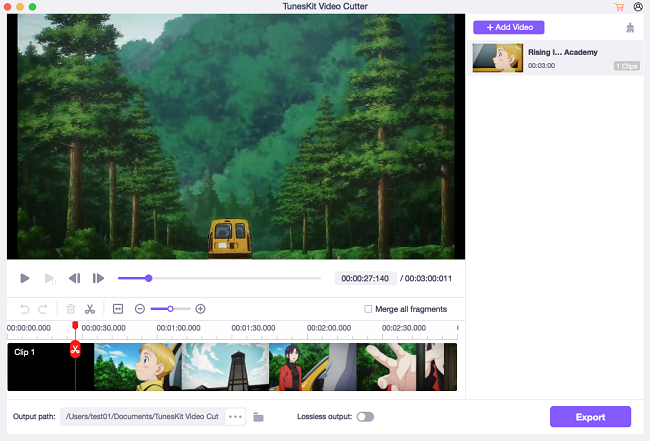
Like TunesKit's other products, the TunesKit Video Cutter for Mac was designed with simple-to-use interface that anyone can handle it without any issue. The whole cutting process takes merely 4 steps, including selecting the section to be trimmed, setting output format, enhancing the cuts with more effects, and cutting. Even beginners can deal with it easily without referring to the user guide.
Besides, in order to make the cutting more accurate, it offers two ways for the users to set the sections that they want to cut from the source file. The first one is moving the slider bar and the other is to set the start time and end time manually. No matter which method you choose, you'll get the most precise cutting down to millisecond.
Built-in Video Editor, Powerful Encoding Mode:
Before cutting, you are allowed to customize the video and audio segments with the built-in video editor of TunesKit Video Cutter. Thanks to that, you can trim the video into smaller fragments, adjust the aspect ratio, brightness, contrast, saturation and hue, personalize the video with special effects and frames, insert both watermarks and subtitles to the video, as well as add audio file and sound effects to the video.
TunesKit Video Cutter offers two modes for you to export the video cuts, including the High-speed Mode and Encoding Mode so that you can choose to save the media files losslessly or convert them to other formats or preset device profiles, such as MP4, AVI, M4V, MPEG, 3GP, MKV, WMV, ASF, H.264, VRO, OGV, PMVB, MP3, M4A, AAC, AC3, OGG, FLAC, WAV, WMA, M4B, M4R, Apple iPhone X, Samsung Galaxy S8, Xbox 360, Samsung TV, and more.
A Glance at TunesKit Video Cutter Key Features:
* Cut any video/audio file with zero quality loss
* Trim media files precisely down to millisecond
* Merge multiple sections being cut from the same source file
* Export and save the segments to popular formats and devices
* Support editing video clips flexibly
* Work at up to 60X faster speed
Pricing and Availability:
TunesKit Video Cutter is available for both Mac and Windows versions. It's perfectly compatible with the most up-to-date computer systems including macOS High Sierra and Windows 10. The price of the software is starting at $29.95 (USD) from single user license to unlimited license all with lifetime free software upgrade and tech support.
TunesKit Video Cutter for Mac: https://www.tuneskit.com/video-cutter-for-mac.html
TunesKit Video Cutter for Windows: https://www.tuneskit.com/video-cutter-for-win.html
Download Mac Free Trial: https://www.tuneskit.com/download/VideoCutter.dmg
Download Windows Free Trial: https://www.tuneskit.com/download/VideoCutter.exe
Purchase Video Cutter: https://www.tuneskit.com/buy/video-cutter-for-mac.html
Screenshot: https://www.tuneskit.com/images/video-cutter/add-video-mac.png
TunesKit Studio is a professional multimedia software developer dedicated to providing the best DRM removal solutions and services, including iTunes DRM Video Converter and DRM Audiobook Converter for Mac and Windows platforms to customers throughout the world based on the personal use only. As a reliable DRM removal solution provider, the company also offers free and prompt online support for all users. Currently TunesKit Studio already have millions of active users who are speaking highly of their DRM removal products. All Material and Software (C) Copyright 2018 TunesKit Studio. All Rights Reserved. Apple, the Apple logo, Mac OS X and Macintosh are registered trademarks of Apple Inc. in the U.S. and/or other countries. Other trademarks and registered trademarks may be the property of their respective owners.
*******
Link To Article: https://prmac.com/release-id-82685.htm
*******
---------------------------------------------------------------------------------
Note that you can alter delivered distributions at any time.
Login to your account on prMac to alter your channel selection, or to opt-out at any time.
TunesKit Released Video Cutter to Cut, Edit, Convert Videos Losslessly - Published on 05/16/18
TunesKit Software today releases Video Cutter, the pro version of their video editing software for macOS and Windows. With editing features like PIP, voice over, transition, overlay effects, and more, TunesKit Video Cutter aims to make video editing much easier. TunesKit Video Cutter serves as both video splitter and video editor that can not only cut and merge any video (or audio) losslessly, but also edit and convert the media cuts to commonly used formats and devices flexibly.
Shenzhen, Guangdong - One year later since the release of TunesKit Free Video Cutter, the multimedia software provider today announced the official launch of the pro version of its Video Cutter featured to not only cutting videos/audios without losing any quality, but also merging and converting the sections to popular formats with many additional effects applied.
TunesKit Video Cutter: A Lossless Video Trimmer & Joiner:
As a complete video editing solution, TunesKit Video Cutter serves as both video splitter and video editor that can not only cut and merge any video (or audio) losslessly, but also edit and convert the media cuts to commonly used formats and devices flexibly.
Simple Interface, Precise Trimming:
Like TunesKit's other products, the TunesKit Video Cutter for Mac was designed with simple-to-use interface that anyone can handle it without any issue. The whole cutting process takes merely 4 steps, including selecting the section to be trimmed, setting output format, enhancing the cuts with more effects, and cutting. Even beginners can deal with it easily without referring to the user guide.
Besides, in order to make the cutting more accurate, it offers two ways for the users to set the sections that they want to cut from the source file. The first one is moving the slider bar and the other is to set the start time and end time manually. No matter which method you choose, you'll get the most precise cutting down to millisecond.
Built-in Video Editor, Powerful Encoding Mode:
Before cutting, you are allowed to customize the video and audio segments with the built-in video editor of TunesKit Video Cutter. Thanks to that, you can trim the video into smaller fragments, adjust the aspect ratio, brightness, contrast, saturation and hue, personalize the video with special effects and frames, insert both watermarks and subtitles to the video, as well as add audio file and sound effects to the video.
TunesKit Video Cutter offers two modes for you to export the video cuts, including the High-speed Mode and Encoding Mode so that you can choose to save the media files losslessly or convert them to other formats or preset device profiles, such as MP4, AVI, M4V, MPEG, 3GP, MKV, WMV, ASF, H.264, VRO, OGV, PMVB, MP3, M4A, AAC, AC3, OGG, FLAC, WAV, WMA, M4B, M4R, Apple iPhone X, Samsung Galaxy S8, Xbox 360, Samsung TV, and more.
A Glance at TunesKit Video Cutter Key Features:
* Cut any video/audio file with zero quality loss
* Trim media files precisely down to millisecond
* Merge multiple sections being cut from the same source file
* Export and save the segments to popular formats and devices
* Support editing video clips flexibly
* Work at up to 60X faster speed
Pricing and Availability:
TunesKit Video Cutter is available for both Mac and Windows versions. It's perfectly compatible with the most up-to-date computer systems including macOS High Sierra and Windows 10. The price of the software is starting at $29.95 (USD) from single user license to unlimited license all with lifetime free software upgrade and tech support.
TunesKit Video Cutter for Mac: https://www.tuneskit.com/video-cutter-for-mac.html
TunesKit Video Cutter for Windows: https://www.tuneskit.com/video-cutter-for-win.html
Download Mac Free Trial: https://www.tuneskit.com/download/VideoCutter.dmg
Download Windows Free Trial: https://www.tuneskit.com/download/VideoCutter.exe
Purchase Video Cutter: https://www.tuneskit.com/buy/video-cutter-for-mac.html
Screenshot: https://www.tuneskit.com/images/video-cutter/add-video-mac.png
TunesKit Studio is a professional multimedia software developer dedicated to providing the best DRM removal solutions and services, including iTunes DRM Video Converter and DRM Audiobook Converter for Mac and Windows platforms to customers throughout the world based on the personal use only. As a reliable DRM removal solution provider, the company also offers free and prompt online support for all users. Currently TunesKit Studio already have millions of active users who are speaking highly of their DRM removal products. All Material and Software (C) Copyright 2018 TunesKit Studio. All Rights Reserved. Apple, the Apple logo, Mac OS X and Macintosh are registered trademarks of Apple Inc. in the U.S. and/or other countries. Other trademarks and registered trademarks may be the property of their respective owners.
*******
Link To Article: https://prmac.com/release-id-82685.htm
*******
---------------------------------------------------------------------------------
Note that you can alter delivered distributions at any time.
Login to your account on prMac to alter your channel selection, or to opt-out at any time.
Merlin Project Pro starts public beta phase now
A new article has been published at prMac.
Merlin Project Pro starts public beta phase now - Published on 05/15/18
ProjectWizards today releases Merlin Project Pro, the successor to its professional project management software for macOS. With the Kanban board, Merlin Project Pro fills the gap to agile project management & supports the Kanban in a clever way. This combines the traditional management of large projects with the ease of the agile approach. Merlin Project Pro makes hybrid project management a reality on the Mac. Merlin Project Pro is initially released as a public beta version for final testing.
Melle, Germany - ProjectWizards today is proud to announce the release of Merlin Project Pro, the successor to its professional project management software for macOS. With the Kanban board, Merlin Project Pro fills the gap to agile project management and supports the Kanban in a clever way. This combines the traditional management of large projects with the ease of the agile approach. Merlin Project Pro makes hybrid project management a reality on the Mac.
An overview of the new functions:
* Kanban board
* Resource pool
* Groupings
* New style editor
* Revised user interface
Thanks to the resource pool, you can monitor the utilization of your resources for all projects. Organize the entire team in one or more central resource pools and enter the working hours, holidays, absences and much more. Groupings give users a deep insight into the project structure. Analyze your project: Which processes are the biggest time-consuming? And which of them are on the critical path?
The well-known style editor has been greatly simplified in Merlin Project Pro. In addition, individual formatting of individual processes is now also possible. Of course, the user continues to create rule-based styles. With the new style editor, all this is easier than ever. But not only under the hood was much changed, also the appearance of Merlin Project Pro has been given a facelift. All surfaces shine in a modern, fresh design.
More details on the fifth generation and the free download of the beta version can be found at ProjectWizards online. The software is initially released as a beta version for final testing. As soon as the manufacturer agrees with the quality, the final version follows.
ProjectWizards: https://www.projectwizards.net
Merlin Project Pro Beta: https://www.projectwizards.net/products/merlin-project/beta
Download Beta: https://www.projectwizards.net/downloads/MerlinProjectPro.zip
Screenshot: https://www.projectwizards.net/content/01-products/01-merlin-project/02-beta/kanban_en.jpg
In addition to their extremely successful Mac project management application, Merlin, ProjectWizards also offers professional project management and related services. ProjectWizards was founded in 2001/2002 by Frank Blome, whose professional project management experience spans more than 15 years and companies of all sizes, from small IT shops to worldwide groups such as Bertelsman. The current ProjectWizards team encompasses professional project managers, software experts, Macintosh enthusiasts, trainers and partners in both Europe and North America. ProjectWizards' global network means that professional and responsive project management solutions can be provided to help any project succeed. Copyright (C) 2018 ProjectWizards GmbH. All Rights Reserved. Apple, the Apple logo, macOS, iPhone, iPod, iPad and Macintosh are registered trademarks of Apple Inc. in the U.S. and/or other countries. Other trademarks and registered trademarks may be the property of their respective owners.
*******
Link To Article: https://prmac.com/release-id-82684.htm
*******
---------------------------------------------------------------------------------
Note that you can alter delivered distributions at any time.
Login to your account on prMac to alter your channel selection, or to opt-out at any time.
Merlin Project Pro starts public beta phase now - Published on 05/15/18
ProjectWizards today releases Merlin Project Pro, the successor to its professional project management software for macOS. With the Kanban board, Merlin Project Pro fills the gap to agile project management & supports the Kanban in a clever way. This combines the traditional management of large projects with the ease of the agile approach. Merlin Project Pro makes hybrid project management a reality on the Mac. Merlin Project Pro is initially released as a public beta version for final testing.
Melle, Germany - ProjectWizards today is proud to announce the release of Merlin Project Pro, the successor to its professional project management software for macOS. With the Kanban board, Merlin Project Pro fills the gap to agile project management and supports the Kanban in a clever way. This combines the traditional management of large projects with the ease of the agile approach. Merlin Project Pro makes hybrid project management a reality on the Mac.
An overview of the new functions:
* Kanban board
* Resource pool
* Groupings
* New style editor
* Revised user interface
Thanks to the resource pool, you can monitor the utilization of your resources for all projects. Organize the entire team in one or more central resource pools and enter the working hours, holidays, absences and much more. Groupings give users a deep insight into the project structure. Analyze your project: Which processes are the biggest time-consuming? And which of them are on the critical path?
The well-known style editor has been greatly simplified in Merlin Project Pro. In addition, individual formatting of individual processes is now also possible. Of course, the user continues to create rule-based styles. With the new style editor, all this is easier than ever. But not only under the hood was much changed, also the appearance of Merlin Project Pro has been given a facelift. All surfaces shine in a modern, fresh design.
More details on the fifth generation and the free download of the beta version can be found at ProjectWizards online. The software is initially released as a beta version for final testing. As soon as the manufacturer agrees with the quality, the final version follows.
ProjectWizards: https://www.projectwizards.net
Merlin Project Pro Beta: https://www.projectwizards.net/products/merlin-project/beta
Download Beta: https://www.projectwizards.net/downloads/MerlinProjectPro.zip
Screenshot: https://www.projectwizards.net/content/01-products/01-merlin-project/02-beta/kanban_en.jpg

In addition to their extremely successful Mac project management application, Merlin, ProjectWizards also offers professional project management and related services. ProjectWizards was founded in 2001/2002 by Frank Blome, whose professional project management experience spans more than 15 years and companies of all sizes, from small IT shops to worldwide groups such as Bertelsman. The current ProjectWizards team encompasses professional project managers, software experts, Macintosh enthusiasts, trainers and partners in both Europe and North America. ProjectWizards' global network means that professional and responsive project management solutions can be provided to help any project succeed. Copyright (C) 2018 ProjectWizards GmbH. All Rights Reserved. Apple, the Apple logo, macOS, iPhone, iPod, iPad and Macintosh are registered trademarks of Apple Inc. in the U.S. and/or other countries. Other trademarks and registered trademarks may be the property of their respective owners.
*******
Link To Article: https://prmac.com/release-id-82684.htm
*******
---------------------------------------------------------------------------------
Note that you can alter delivered distributions at any time.
Login to your account on prMac to alter your channel selection, or to opt-out at any time.
Inko Whiteboard now Offered through Apple's Volume Purchase Program
A new article has been published at prMac.
Inko Whiteboard now Offered through Apple's Volume Purchase Program - Published on 05/14/18
Creaceed today unveils Inko - Group Edition, a new variant to their real-time, peer-to-peer collaborative collaborative whiteboard app for iPad, iPhone and Apple TV. Inko lets users draw collaboratively in real time on the same canvas from multiple devices, offering network-less connectivity, a remarkable drawing experience, as well as live TV mirroring and interaction. Inko can now be purchased through Apple's Volume Purchase Program (VPP) by schools and enterprises.
Mons (Wallonia), Belgium - Creaceed introduces Inko - Group Edition, a new variant to their real-time collaborative whiteboard app for iPad, iPhone and Apple TV, that can now be purchased through Apple's Volume Purchase Program (VPP) by schools and enterprises. Just like its free counterpart, the Group Edition app lets users draw collaboratively in real time on the same canvas, offering network-less connectivity, a remarkable drawing experience, as well as live TV mirroring and interaction. Both app variants are compatible with each other.
Inko's peer-to-peer connectivity makes infrastructure network or internet access superfluous, offering a one-tap setup process that enables easy deployment in most situations. Inko also offers a beautiful pixel-free visualization with vibrant colors on wide color displays (P3).
Ready for Enterprise and Education:
With its nomadic connectivity, Inko - Group Edition is particularly well suited for schools and businesses. Furthermore, the free Apple TV companion app enables live mirroring of contents on large screens, up to 4K, and also offers innovative interaction with the remote used as a laser pointer. Moreover, the support for standard TV sets makes it an affordable alternative to expensive and less flexible interactive whiteboards.
Inko also offers full compatibility with the new & more affordable 6th-gen iPad, introduced by Apple at their education event in Chicago (March 2018), and a remarkable drawing experience through its extensive support for Apple Pencil as well as the Logitech Crayon. And with the availability of the Group Edition variant through Apple's VPP Store, Inko is a great match for schools.
"Inko is our fastest growing app so far, nearing 200.000 downloads after just one month. We believe Inko can be an advantageous alternative to dedicated interactive whiteboards, being more affordable, more easily deployed, and running on off-the-shelf devices (iPad, TV sets) that can serve numerous other purposes." says Raphael Sebbe, Creaceed's Founder.
Feature Highlights:
* Real-time drawing: highly responsive, "appears-as-it-happens" multi-user drawing with no lag
* Improved palm rejection (version 1.0.2) to avoid leaving marks when resting the palm while drawing with the Apple Pencil
* Dynamic trails: participants' labels on drawing trails that show who is currently drawing
* Seamless connectivity with up to 12 devices when using a Wi-Fi access point, or 8 devices without Wi-Fi access point
* Extensive Apple Pencil support with angle, pressure, high-speed & predictive sampling
* Reliable syncing and multi-user undo/redo
* Pen tool with two sizes & one calligraphic variant. Eraser tool with two sizes
* Ephemeral highlighter tool. On Apple TV, motion-driven, laser pointer-like control with the remote.
* Optimized for latest iOS: file sharing, Split View Multitasking on iPad, Drag & Drop, Today Widget, Quick Actions, etc.
* Hi-res PDF export for a productive workflow
* iCloud sync for personal drawings
* Free Apple TV companion app
Live Demonstrations at Vivatech in Paris:
The Creaceed team will be giving live demos of Inko at the Viva Technology (Vivatech) event in Paris from May 24th through 26th. Creaceed booth will be located in Vivatech Hall 1, on the Digital Wallonia pavillon (E44). Vivatech takes place at Paris Expo - Porte de Versailles.
Pricing and Availability:
Inko - Group Edition is available immediately both on the App Store ($19.99) worldwide and on Apple's VPP store ($9.99 for minimum 20 units, see conditions in link below) in 34 countries, and is localized in 12 languages. Inko - Group Edition provides the same features set as Inko with Collaboration Pack. An Apple TV companion app is available as a free download on the App Store, has no limitation, and works with both variants of Inko.
Inko 1.0: https://creaceed.com/inko
Purchase and Download: https://itunes.apple.com/app/id1375458781?mt=8&at=1l3vojn&ct=prmac
Apple Volume Purchase Program Store: https://www.apple.com/business/vpp/
Vimeo Video (Preview): https://vimeo.com/261515744
Vivatech Event (Paris, France): https://vivatechnology.com
Creaceed is a Belgian company that has been making apps for 10 years, focusing on image processing technologies in the fields of document scanning & vision aid, note taking, photo and video processing. Other apps like Hydra, Carbo, Prizmo and Prizmo Go have been awarded & featured by Apple on multiple occasions. Copyright 2008-2018 Creaceed. All Rights Reserved. Apple, the Apple logo, Macintosh, iOS, macOS, iPhone, iPad are registered trademarks of Apple Computer in the U.S. and/or other countries.
*******
Link To Article: https://prmac.com/release-id-82683.htm
*******
---------------------------------------------------------------------------------
Note that you can alter delivered distributions at any time.
Login to your account on prMac to alter your channel selection, or to opt-out at any time.
Inko Whiteboard now Offered through Apple's Volume Purchase Program - Published on 05/14/18
Creaceed today unveils Inko - Group Edition, a new variant to their real-time, peer-to-peer collaborative collaborative whiteboard app for iPad, iPhone and Apple TV. Inko lets users draw collaboratively in real time on the same canvas from multiple devices, offering network-less connectivity, a remarkable drawing experience, as well as live TV mirroring and interaction. Inko can now be purchased through Apple's Volume Purchase Program (VPP) by schools and enterprises.
Mons (Wallonia), Belgium - Creaceed introduces Inko - Group Edition, a new variant to their real-time collaborative whiteboard app for iPad, iPhone and Apple TV, that can now be purchased through Apple's Volume Purchase Program (VPP) by schools and enterprises. Just like its free counterpart, the Group Edition app lets users draw collaboratively in real time on the same canvas, offering network-less connectivity, a remarkable drawing experience, as well as live TV mirroring and interaction. Both app variants are compatible with each other.
Inko's peer-to-peer connectivity makes infrastructure network or internet access superfluous, offering a one-tap setup process that enables easy deployment in most situations. Inko also offers a beautiful pixel-free visualization with vibrant colors on wide color displays (P3).
Ready for Enterprise and Education:
With its nomadic connectivity, Inko - Group Edition is particularly well suited for schools and businesses. Furthermore, the free Apple TV companion app enables live mirroring of contents on large screens, up to 4K, and also offers innovative interaction with the remote used as a laser pointer. Moreover, the support for standard TV sets makes it an affordable alternative to expensive and less flexible interactive whiteboards.
Inko also offers full compatibility with the new & more affordable 6th-gen iPad, introduced by Apple at their education event in Chicago (March 2018), and a remarkable drawing experience through its extensive support for Apple Pencil as well as the Logitech Crayon. And with the availability of the Group Edition variant through Apple's VPP Store, Inko is a great match for schools.
"Inko is our fastest growing app so far, nearing 200.000 downloads after just one month. We believe Inko can be an advantageous alternative to dedicated interactive whiteboards, being more affordable, more easily deployed, and running on off-the-shelf devices (iPad, TV sets) that can serve numerous other purposes." says Raphael Sebbe, Creaceed's Founder.
Feature Highlights:
* Real-time drawing: highly responsive, "appears-as-it-happens" multi-user drawing with no lag
* Improved palm rejection (version 1.0.2) to avoid leaving marks when resting the palm while drawing with the Apple Pencil
* Dynamic trails: participants' labels on drawing trails that show who is currently drawing
* Seamless connectivity with up to 12 devices when using a Wi-Fi access point, or 8 devices without Wi-Fi access point
* Extensive Apple Pencil support with angle, pressure, high-speed & predictive sampling
* Reliable syncing and multi-user undo/redo
* Pen tool with two sizes & one calligraphic variant. Eraser tool with two sizes
* Ephemeral highlighter tool. On Apple TV, motion-driven, laser pointer-like control with the remote.
* Optimized for latest iOS: file sharing, Split View Multitasking on iPad, Drag & Drop, Today Widget, Quick Actions, etc.
* Hi-res PDF export for a productive workflow
* iCloud sync for personal drawings
* Free Apple TV companion app
Live Demonstrations at Vivatech in Paris:
The Creaceed team will be giving live demos of Inko at the Viva Technology (Vivatech) event in Paris from May 24th through 26th. Creaceed booth will be located in Vivatech Hall 1, on the Digital Wallonia pavillon (E44). Vivatech takes place at Paris Expo - Porte de Versailles.
Pricing and Availability:
Inko - Group Edition is available immediately both on the App Store ($19.99) worldwide and on Apple's VPP store ($9.99 for minimum 20 units, see conditions in link below) in 34 countries, and is localized in 12 languages. Inko - Group Edition provides the same features set as Inko with Collaboration Pack. An Apple TV companion app is available as a free download on the App Store, has no limitation, and works with both variants of Inko.
Inko 1.0: https://creaceed.com/inko
Purchase and Download: https://itunes.apple.com/app/id1375458781?mt=8&at=1l3vojn&ct=prmac
Apple Volume Purchase Program Store: https://www.apple.com/business/vpp/
Vimeo Video (Preview): https://vimeo.com/261515744
Vivatech Event (Paris, France): https://vivatechnology.com
Creaceed is a Belgian company that has been making apps for 10 years, focusing on image processing technologies in the fields of document scanning & vision aid, note taking, photo and video processing. Other apps like Hydra, Carbo, Prizmo and Prizmo Go have been awarded & featured by Apple on multiple occasions. Copyright 2008-2018 Creaceed. All Rights Reserved. Apple, the Apple logo, Macintosh, iOS, macOS, iPhone, iPad are registered trademarks of Apple Computer in the U.S. and/or other countries.
*******
Link To Article: https://prmac.com/release-id-82683.htm
*******
---------------------------------------------------------------------------------
Note that you can alter delivered distributions at any time.
Login to your account on prMac to alter your channel selection, or to opt-out at any time.
Output Factory for InDesign Now Can Add Page Size To Output File Names
A new article has been published at prMac.
Output Factory for InDesign Now Can Add Page Size To Output File Names - Published on 05/14/18
Zevrix Solutions announces Output Factory 2.2.15, a feature update to company's output automation solution for Adobe InDesign. Output Factory helps users automate printing and exporting from InDesign by offering batch processing, single page export, layer versioning, custom scripts integration and more. Built-in auto-preflighting helps printers eliminate costly output errors. The new version lets users automatically add InDesign page dimensions to the variable names of exported output files.
Toronto (ON), Canada - Zevrix Solutions today announces the release of Output Factory 2.2.15, a feature update to company's output automation plug-in for Adobe InDesign. Awarded 5 stars by InDesign Magazine, Output Factory automates and simplifies workflows of printers, ad agencies, and publishing houses worldwide. The software helps eliminate repetitive tasks through batch processing with time-saving output options.
The new version lets users add InDesign page dimensions to the variable names of exported output files. The update adds three new tokens: page width, height, and measurement units (such as inches, millimeters and so on), thus giving users the complete flexibility to include the page size in file name in any format they wish. In addition, Output Factory includes tokens for page number, version layer, current date, user name and other variable data.
"Using Output Factory is straightforward. You determine your settings and sit back while Output Factory does all the heavy lifting. The time savings are huge," writes Jamie McKee in a 5-star review in InDesign Magazine. "If you find yourself repeatedly exporting InDesign files in various formats, you owe it to yourself to install the free trial and see just how much time you'll save using Output Factory."
Output Factory supports printing as well as exporting to PDF, PostScript, EPS, Flash, IDML, EPUB and several image formats. It offers the following key features:
* Batch output of InDesign files
* Export each page as a single document
* Output files to multiple formats with one click
* Variable output file names
* Layer versioning: output layer combinations as single files
* Eliminate errors with automatic preflight
* Split InDesign files into single pages
* Send files to FTP and other servers
Zevrix Solutions: http://zevrix.com
Output Factory 2.2.15: http://zevrix.com/OutputFactory.php
Download Output Factory: http://zevrix.com/OutputFactory.dmg
Purchase Output Factory: http://zevrix.com/store.php
Screenshot: http://zevrix.com/screenshots/of2/naming.png
Located in Toronto, Canada, Zevrix Solutions provides automation and productivity solutions for Adobe Creative Cloud and Creative Suite software, PDF workflows, graphic file diagnostics and Microsoft Office output on Mac OS. Zevrix is dedicated to help professionals increase their profits through automating everyday tasks, producing error-free documents, saving disk space and cutting production costs. For more information, visit their website. Copyright (C) 2018 Zevrix Solutions. All Rights Reserved. Other trademarks and registered trademarks may be the property of their respective owners.
*******
Link To Article: https://prmac.com/release-id-82682.htm
*******
---------------------------------------------------------------------------------
Note that you can alter delivered distributions at any time.
Login to your account on prMac to alter your channel selection, or to opt-out at any time.
Output Factory for InDesign Now Can Add Page Size To Output File Names - Published on 05/14/18
Zevrix Solutions announces Output Factory 2.2.15, a feature update to company's output automation solution for Adobe InDesign. Output Factory helps users automate printing and exporting from InDesign by offering batch processing, single page export, layer versioning, custom scripts integration and more. Built-in auto-preflighting helps printers eliminate costly output errors. The new version lets users automatically add InDesign page dimensions to the variable names of exported output files.
Toronto (ON), Canada - Zevrix Solutions today announces the release of Output Factory 2.2.15, a feature update to company's output automation plug-in for Adobe InDesign. Awarded 5 stars by InDesign Magazine, Output Factory automates and simplifies workflows of printers, ad agencies, and publishing houses worldwide. The software helps eliminate repetitive tasks through batch processing with time-saving output options.
The new version lets users add InDesign page dimensions to the variable names of exported output files. The update adds three new tokens: page width, height, and measurement units (such as inches, millimeters and so on), thus giving users the complete flexibility to include the page size in file name in any format they wish. In addition, Output Factory includes tokens for page number, version layer, current date, user name and other variable data.
"Using Output Factory is straightforward. You determine your settings and sit back while Output Factory does all the heavy lifting. The time savings are huge," writes Jamie McKee in a 5-star review in InDesign Magazine. "If you find yourself repeatedly exporting InDesign files in various formats, you owe it to yourself to install the free trial and see just how much time you'll save using Output Factory."
Output Factory supports printing as well as exporting to PDF, PostScript, EPS, Flash, IDML, EPUB and several image formats. It offers the following key features:
* Batch output of InDesign files
* Export each page as a single document
* Output files to multiple formats with one click
* Variable output file names
* Layer versioning: output layer combinations as single files
* Eliminate errors with automatic preflight
* Split InDesign files into single pages
* Send files to FTP and other servers
Zevrix Solutions: http://zevrix.com
Output Factory 2.2.15: http://zevrix.com/OutputFactory.php
Download Output Factory: http://zevrix.com/OutputFactory.dmg
Purchase Output Factory: http://zevrix.com/store.php
Screenshot: http://zevrix.com/screenshots/of2/naming.png

Located in Toronto, Canada, Zevrix Solutions provides automation and productivity solutions for Adobe Creative Cloud and Creative Suite software, PDF workflows, graphic file diagnostics and Microsoft Office output on Mac OS. Zevrix is dedicated to help professionals increase their profits through automating everyday tasks, producing error-free documents, saving disk space and cutting production costs. For more information, visit their website. Copyright (C) 2018 Zevrix Solutions. All Rights Reserved. Other trademarks and registered trademarks may be the property of their respective owners.
*******
Link To Article: https://prmac.com/release-id-82682.htm
*******
---------------------------------------------------------------------------------
Note that you can alter delivered distributions at any time.
Login to your account on prMac to alter your channel selection, or to opt-out at any time.
Almost There - A One Finger Hardcore Platformer Is Now Available on iOS
A new article has been published at prMac.
Almost There - A One Finger Hardcore Platformer Is Now Available on iOS - Published on 05/12/18
Durdanto Studio is proud to announces Almost There 1.2, a minimalist platformer for iOS devices with no compromising compared with other Desktop & Console games of the same genre. Players can run, jump, small jump, long jump, wall jump & climb walls with precision. And they can do all these while having full control over all of their action and character. And here is the best part, all of these can be done with just a finger, with the ease of holding the mobile in portrait mode in one hand!
Dhaka, Bangladesh - Durdanto Studio is proud to announce the release of minimalist one finger hardcore platformer game "Almost There" created by Bony Yousuf. The game is now available worldwide on iPhone, iPad, and iPod touch devices.
"Almost There" is a minimalist hardcore platformer for the mobile devices with no compromisation compared with other Desktop & Console games from the same genre. Here player can run, jump, small jump, long jump, wall jump & climb walls with precision. And they can do all these while having full control over all of their action and character. And here is the best part, all of these can be done with just a finger, with the ease of holding the mobile in portrait mode in one hand! Player will guide the game's character through various traps and obstacles to their end goal to complete it's 155 hand crafted levels across 3 different worlds.
Features
* A minimalist hardcore platformer for mobile devices with no compromises.
* One finger innovative control
* 150 Unique handcrafted levels
* 3 Distinctive worlds with it's own theme and hazards
* Dodge and run through spikes, saw blade, lasers, missiles etc to reach your goal
* Easy to learn hard to master levels
* Lower your run time to gain all three stars of a level
* Record your run to share online with your friend or on Every play
Device Requirements:
* iPhone, iPad, and iPod touch
* Requires iOS 9.0 or later
* 259.5 MB
Pricing and Availability:
Almost There 1.2 is Free and available worldwide through the App Store in the Games category. Convenient in-app purchases are available. For more information, please contact Durdanto Studio.
Durdanto Studio: http://durdanto.studio
Almost There: The Platformer 1.2: https://itunes.apple.com/app/almost-there-the-platformer/id1294995340
Screenshot 1: https://imgur.com/a/qUlvBsg
Screenshot 2: https://imgur.com/kIxkp4T
YouTube Trailer: https://www.youtube.com/watch?v=V8Nml_p66wY
Press Kit: https://drive.google.com/open?id=1XB9YpN8NX9vUPPD13kTo8RTIKbkQjw7g
Located in Dhaka, Bangladesh, Durdanto Studio is a founded by Bony Yousuf. All Material and Software (C) Copyright 2018 Durdanto Studio. All Rights Reserved. Apple, the Apple logo, iPhone, iPod and iPad are registered trademarks of Apple Inc. in the U.S. and/or other countries. Other trademarks and registered trademarks may be the property of their respective owners.
*******
Link To Article: https://prmac.com/release-id-82681.htm
*******
---------------------------------------------------------------------------------
Note that you can alter delivered distributions at any time.
Login to your account on prMac to alter your channel selection, or to opt-out at any time.
Almost There - A One Finger Hardcore Platformer Is Now Available on iOS - Published on 05/12/18
Durdanto Studio is proud to announces Almost There 1.2, a minimalist platformer for iOS devices with no compromising compared with other Desktop & Console games of the same genre. Players can run, jump, small jump, long jump, wall jump & climb walls with precision. And they can do all these while having full control over all of their action and character. And here is the best part, all of these can be done with just a finger, with the ease of holding the mobile in portrait mode in one hand!
Dhaka, Bangladesh - Durdanto Studio is proud to announce the release of minimalist one finger hardcore platformer game "Almost There" created by Bony Yousuf. The game is now available worldwide on iPhone, iPad, and iPod touch devices.
"Almost There" is a minimalist hardcore platformer for the mobile devices with no compromisation compared with other Desktop & Console games from the same genre. Here player can run, jump, small jump, long jump, wall jump & climb walls with precision. And they can do all these while having full control over all of their action and character. And here is the best part, all of these can be done with just a finger, with the ease of holding the mobile in portrait mode in one hand! Player will guide the game's character through various traps and obstacles to their end goal to complete it's 155 hand crafted levels across 3 different worlds.
Features
* A minimalist hardcore platformer for mobile devices with no compromises.
* One finger innovative control
* 150 Unique handcrafted levels
* 3 Distinctive worlds with it's own theme and hazards
* Dodge and run through spikes, saw blade, lasers, missiles etc to reach your goal
* Easy to learn hard to master levels
* Lower your run time to gain all three stars of a level
* Record your run to share online with your friend or on Every play
Device Requirements:
* iPhone, iPad, and iPod touch
* Requires iOS 9.0 or later
* 259.5 MB
Pricing and Availability:
Almost There 1.2 is Free and available worldwide through the App Store in the Games category. Convenient in-app purchases are available. For more information, please contact Durdanto Studio.
Durdanto Studio: http://durdanto.studio
Almost There: The Platformer 1.2: https://itunes.apple.com/app/almost-there-the-platformer/id1294995340
Screenshot 1: https://imgur.com/a/qUlvBsg
Screenshot 2: https://imgur.com/kIxkp4T
YouTube Trailer: https://www.youtube.com/watch?v=V8Nml_p66wY
Press Kit: https://drive.google.com/open?id=1XB9YpN8NX9vUPPD13kTo8RTIKbkQjw7g
Located in Dhaka, Bangladesh, Durdanto Studio is a founded by Bony Yousuf. All Material and Software (C) Copyright 2018 Durdanto Studio. All Rights Reserved. Apple, the Apple logo, iPhone, iPod and iPad are registered trademarks of Apple Inc. in the U.S. and/or other countries. Other trademarks and registered trademarks may be the property of their respective owners.
*******
Link To Article: https://prmac.com/release-id-82681.htm
*******
---------------------------------------------------------------------------------
Note that you can alter delivered distributions at any time.
Login to your account on prMac to alter your channel selection, or to opt-out at any time.
Subscribe to:
Posts (Atom)