A new article has been published at prMac.
Forbes Middle East partners with Magzter for digital expansion - Published on 05/21/18
Magzter adds another exciting edition of Forbes magazine to its catalogue. Magzter, which has been already digitally publishing several editions of Forbes magazine, namely, USA, India, Africa, Indonesia, Thailand, Spain, Asia, Mexico, Centroamerica, Vietnam, Republica Dominicana, Turkiye, Romania and Portugal, has now brought on board Forbes Middle East, which is delightful news for business executives not only in the Middle East, but also across the world.
New York, New York - Magzter, the world's largest digital magazine newsstand, adds another exciting edition of Forbes magazine to its catalogue. Magzter, which has been already digitally publishing several editions of Forbes magazine, namely, USA, India, Africa, Indonesia, Thailand, Spain, Asia, Mexico, Centroamerica, Vietnam, Republica Dominicana, Turkiye, Romania and Portugal, has now brought on board Forbes Middle East, which is a delightful news for business executives not only in the Middle East, but also across the world.
Featuring articles and reports exploring growth, innovation and entrepreneurial spirit, Forbes Middle East is an ideal read for investors looking for new opportunities. Every month, the magazine publishes original and relevant lists and rankings based on neutral scientific research. Through a wide network of experts, Forbes Middle East provides insights, commentary and analysis on the people, companies and industries shaping the economies of the Arab world.
In the latest issue of Forbes Middle East, read how Yogesh Mehta built Petrochem into the Middle East's largest independent distribution company. Also, don't miss the exclusive coverage of top Indian business leaders in the Arab world.
"As we expand into the digital space, a field with no geographic boundaries, we were looking for a strategic partner that will give our most trusted news in the world the visibility and the reach it deserves. For that, Magzter was the right choice and we look forward to tripling our viewership in the next year through this collaboration." - Abbes Seqqat, Chief Digital/Information Officer, Forbes Middle East
"With the Middle East fast becoming a major investment hub, Forbes Middle East acts as a dependable guide to understand the current business climate and make smart investment choices. The magazine also publishes interviews of successful entrepreneurs, which motivate youngsters to chase their dream business ideas. Here's wishing the magazine great digital success on Magzter." - Girish Ramdas, CEO, Magzter Inc.
"Forbes has been one of the best-selling business magazine brands on Magzter and we are delighted to welcome the Middle East arm of Forbes to Magzter. Thanks to its credible reporting and well-researched analyses, Forbes Middle East is also sure to become a best-seller right away, similar to the other editions of Forbes." - Vijay Radhakrishnan, President, Magzter Inc.
Device Requirements:
* iPhone, iPad, and iPod touch
* Requires iOS 9.0 or later
* 48.3 MB
Pricing and Availability:
Magzter - Digital Magazine Newsstand 7.1 is free (with in-app purchases) and available worldwide through the App Store in the News category. Published as two different editions in English and Arabic languages, this monthly magazine is priced at AED 312.19 ($84.99 USD) for an annual subscription on Magzter. Forbes Middle East also comes as a treat to Magzter GOLD users, who can enjoy reading it along with 5,000+ other international digital magazines. The Magzter app is also available on the web, Google Play and is expanding to more platforms soon. Magzter's easy purchase and renewal systems ensure subscriptions are paid on time, eliminating the need for paper checks and postal mail issues. Users can buy their magazines on any of the above devices/platforms and seamlessly port their purchases to any other devices, a feature unique to Magzter.
Magzter - Digital Magazine Newsstand 7.1: http://www.magzter.com
Forbes Middle East: https://www.magzter.com/AE/Forbes-Middle-East/Forbes-Middle-East---English/Business/
Download from iTunes: https://itunes.apple.com/in/app/magzter-reading-destination/id412163953
Download from Google Play: https://play.google.com/store/apps/details?id=com.dci.magzter
Screenshot: https://rse.magzter.com/314x408/1523352681/1525932571/images/thumb/390_thumb_1.jpg
App Icon: http://akcdn.magzter.com/magcom/mailer/common/Icon1024-curved.png
Magzter is the world's largest and fastest growing global digital magazine newsstand with over 36.5 million digital consumers, more than 9,900 magazines from over 4,000 publishers. Headquartered in New York, Magzter has its local offices in London, Barcelona, Amsterdam, Mexico City, Cape Town, Chennai, Singapore and Tokyo and will soon be expanding to other countries. Founded by global entrepreneurs, Girish Ramdas and Vijay Radhakrishnan in June 2011, Magzter enables magazine publishers around the world to create and deliver digital editions of their titles to global consumers. Powered by its proprietary OREY Click Publishing System(R), Magzter also enables their customers to publish interactive/audio-visual content in the magazine as it supports HTML5. Magzter launched Magzter GOLD subscription service to give digital readers unlimited access to thousands of magazines for a low monthly price. All Material and Software (C) Copyright 2018 Magzter Inc. All Rights Reserved. Apple, the
Apple logo, iPhone, iPod and iPad are registered trademarks of Apple Inc. in the U.S. and/or other countries. Other trademarks and registered trademarks may be the property of their respective owners.
*******
Link To Article: https://prmac.com/release-id-82697.htm
*******
---------------------------------------------------------------------------------
Note that you can alter delivered distributions at any time.
Login to your account on prMac to alter your channel selection, or to opt-out at any time.



Have a Messy, Wacky, Crazy Cake Party with kids app Bamba Birthday Cake
A new article has been published at prMac.
Have a Messy, Wacky, Crazy Cake Party with kids app Bamba Birthday Cake - Published on 05/21/18
Mezmedia today releases Bamba Birthday Cake, a wonderfully interactive app for iOS & Android. Kids make a cake with special flavors like the Wriggly Worm, the Dirty Truck Tire or Rotten Green Cheese, along with the 'boring' chocolate and strawberry flavors of course. Then top the cake with their crazy candle of choice; the Flaming Skull, the Fiery Volcano or the Eww Potty! It's one fun celebration where they can choose who to invite, sing a birthday song and open big gifts with surprises inside!
Singapore - Mezmedia is proud to launch their latest app - Bamba Birthday Cake. Kids can make the wackiest, messiest birthday cake and top it off with an awesome flaming candle! Then they can choose their party location, friends to join in and finally sing 'Happy Birthday' in a massive fireworks and confetti finale. And what birthday party is without presents? At the end of every party, a special gift is given with a surprise inside. There's a lot of replay value in Bamba Birthday Cake.
Bamba apps are all about being wacky and gross. So kids can find special flavors like the Wriggly Worm, the Dirty Truck Tire or Rotten Green Cheese, along with the 'boring' chocolate and strawberry flavors. Kids can then decorate the cake with their crazy candle of choice - the Flaming Skull, the Fiery Volcano or the Eww Potty! Prepare for lots of giggles and smiles with Bamba Birthday Cake.
Bamba Birthday Cake will develop your child's imagination and creative abilities through pretend-play. We highly recommend co-play where parents, teachers and caregivers can educate and bond with the child. Bamba apps are designed for learning through play. This app is designed for families and is suitable for children 3 years and above. Also suitable for people in the autism spectrum. This app comes with a parental gate in the form of basic math question.
Bamba Birthday Cake also marks a move away from the 2D interactive environment of their previous apps and into 3D. Having the app in 3D instantly brings up more opportunities for interactivity (e.g. kids can spin the cake) and as developers of the app, more ways to make the experience immersive.
"Kids love birthdays.To sing loud, to blow candles, to eat sweet stuff and to open presents, which child can resist that? We wanted to make the best birthday cake app out there, one that kids will love playing over and over again. I always play Bamba Birthday Cake with my 3-year old girl, and it's a fun way play and learn", said John Ng, co-founder of Mezmedia, the studio behind the Bamba series of education apps for kids.
Supported Languages
* Bamba Birthday Cake is designed to be language free.
Device Requirements:
* iPhone and iPad
* Android devices
* Requires iOS 10.0 or later, Android 6.0 or later
Pricing and Availability:
Free with in-app purchases
Pricing and Availability:
Bamba Birthday Cake (v1.0.1) is Free (With In-App Purchases) and available worldwide through the App Store in the Education category. There is also an Android version available on Google Play. For more information, please contact John Ng.
Bamba Birthday Cake (v1.0.1): http://www.bambatown.com/app/bamba-birthday-cake/
Download from iTunes: https://itunes.apple.com/app/bamba-birthday-cake/id1370285545
Download from Google Play: https://play.google.com/store/apps/details?id=com.mezmedia.bambabirthday
YouTube Video (Trailer): https://www.youtube.com/watch?v=RHaJM4zNwzU
App Icon: http://www.bambatown.com/wp-content/uploads/2018/05/bamba_birthday_cake_1024x1024.png
Press Kit (zip): http://www.bambatown.com/wp-content/uploads/2018/05/screenshot_12.9.zip
Mezmedia is an interactive studio based in Singapore. Under the Bamba brand, we create fun interactive toys for kids. It is our belief that interactive toys offer a new and exciting way to educate young children, learning through play. Our apps are designed to stimulate a child's imagination and creativity. Copyright (C) 2018 Mezmedia Pte Ltd. All Rights Reserved. Apple, the Apple logo, iPhone, iPod and iPad are registered trademarks of Apple Inc. in the U.S. and/or other countries.
*******
Link To Article: https://prmac.com/release-id-82696.htm
*******
---------------------------------------------------------------------------------
Note that you can alter delivered distributions at any time.
Login to your account on prMac to alter your channel selection, or to opt-out at any time.
Have a Messy, Wacky, Crazy Cake Party with kids app Bamba Birthday Cake - Published on 05/21/18
Mezmedia today releases Bamba Birthday Cake, a wonderfully interactive app for iOS & Android. Kids make a cake with special flavors like the Wriggly Worm, the Dirty Truck Tire or Rotten Green Cheese, along with the 'boring' chocolate and strawberry flavors of course. Then top the cake with their crazy candle of choice; the Flaming Skull, the Fiery Volcano or the Eww Potty! It's one fun celebration where they can choose who to invite, sing a birthday song and open big gifts with surprises inside!
Singapore - Mezmedia is proud to launch their latest app - Bamba Birthday Cake. Kids can make the wackiest, messiest birthday cake and top it off with an awesome flaming candle! Then they can choose their party location, friends to join in and finally sing 'Happy Birthday' in a massive fireworks and confetti finale. And what birthday party is without presents? At the end of every party, a special gift is given with a surprise inside. There's a lot of replay value in Bamba Birthday Cake.
Bamba apps are all about being wacky and gross. So kids can find special flavors like the Wriggly Worm, the Dirty Truck Tire or Rotten Green Cheese, along with the 'boring' chocolate and strawberry flavors. Kids can then decorate the cake with their crazy candle of choice - the Flaming Skull, the Fiery Volcano or the Eww Potty! Prepare for lots of giggles and smiles with Bamba Birthday Cake.
Bamba Birthday Cake will develop your child's imagination and creative abilities through pretend-play. We highly recommend co-play where parents, teachers and caregivers can educate and bond with the child. Bamba apps are designed for learning through play. This app is designed for families and is suitable for children 3 years and above. Also suitable for people in the autism spectrum. This app comes with a parental gate in the form of basic math question.
Bamba Birthday Cake also marks a move away from the 2D interactive environment of their previous apps and into 3D. Having the app in 3D instantly brings up more opportunities for interactivity (e.g. kids can spin the cake) and as developers of the app, more ways to make the experience immersive.
"Kids love birthdays.To sing loud, to blow candles, to eat sweet stuff and to open presents, which child can resist that? We wanted to make the best birthday cake app out there, one that kids will love playing over and over again. I always play Bamba Birthday Cake with my 3-year old girl, and it's a fun way play and learn", said John Ng, co-founder of Mezmedia, the studio behind the Bamba series of education apps for kids.
Supported Languages
* Bamba Birthday Cake is designed to be language free.
Device Requirements:
* iPhone and iPad
* Android devices
* Requires iOS 10.0 or later, Android 6.0 or later
Pricing and Availability:
Free with in-app purchases
Pricing and Availability:
Bamba Birthday Cake (v1.0.1) is Free (With In-App Purchases) and available worldwide through the App Store in the Education category. There is also an Android version available on Google Play. For more information, please contact John Ng.
Bamba Birthday Cake (v1.0.1): http://www.bambatown.com/app/bamba-birthday-cake/
Download from iTunes: https://itunes.apple.com/app/bamba-birthday-cake/id1370285545
Download from Google Play: https://play.google.com/store/apps/details?id=com.mezmedia.bambabirthday
YouTube Video (Trailer): https://www.youtube.com/watch?v=RHaJM4zNwzU
App Icon: http://www.bambatown.com/wp-content/uploads/2018/05/bamba_birthday_cake_1024x1024.png

Press Kit (zip): http://www.bambatown.com/wp-content/uploads/2018/05/screenshot_12.9.zip
Mezmedia is an interactive studio based in Singapore. Under the Bamba brand, we create fun interactive toys for kids. It is our belief that interactive toys offer a new and exciting way to educate young children, learning through play. Our apps are designed to stimulate a child's imagination and creativity. Copyright (C) 2018 Mezmedia Pte Ltd. All Rights Reserved. Apple, the Apple logo, iPhone, iPod and iPad are registered trademarks of Apple Inc. in the U.S. and/or other countries.
*******
Link To Article: https://prmac.com/release-id-82696.htm
*******
---------------------------------------------------------------------------------
Note that you can alter delivered distributions at any time.
Login to your account on prMac to alter your channel selection, or to opt-out at any time.
The new version 3 of Clean Text for iOS supports URL Schemes automation
A new article has been published at prMac.
The new version 3 of Clean Text for iOS supports URL Schemes automation - Published on 05/18/18
Apimac today announces Clean Text 3 for iOS, the new release of the popular app to reduce text cleanup and processing time. Clean Text is used by thousands of iPhone and iPad users to automate cleanup and editing text from text files, PDFs, documents from word processors, web pages, emails and other text material. The new version takes advantage of URL Schemes support which let other apps supporting this technology (like Workflow) to launch Clean Text via a link and perform actions.
Padua, Italy - Apimac today announces Clean Text 3 for iOS, the new release of the popular app to reduce text cleanup and processing time. This is the counterpart for iPhone and iPad of the Mac version which is a very popular app among Mac users who have been using it for many years. Users all over the world use this Clean Text for iOS to reduce the time to edit and clean text.
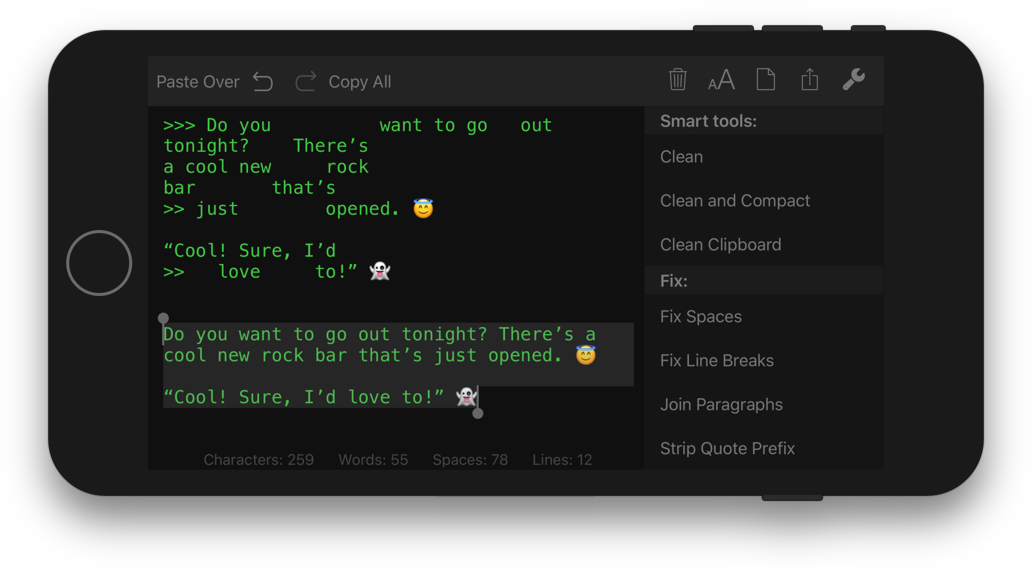
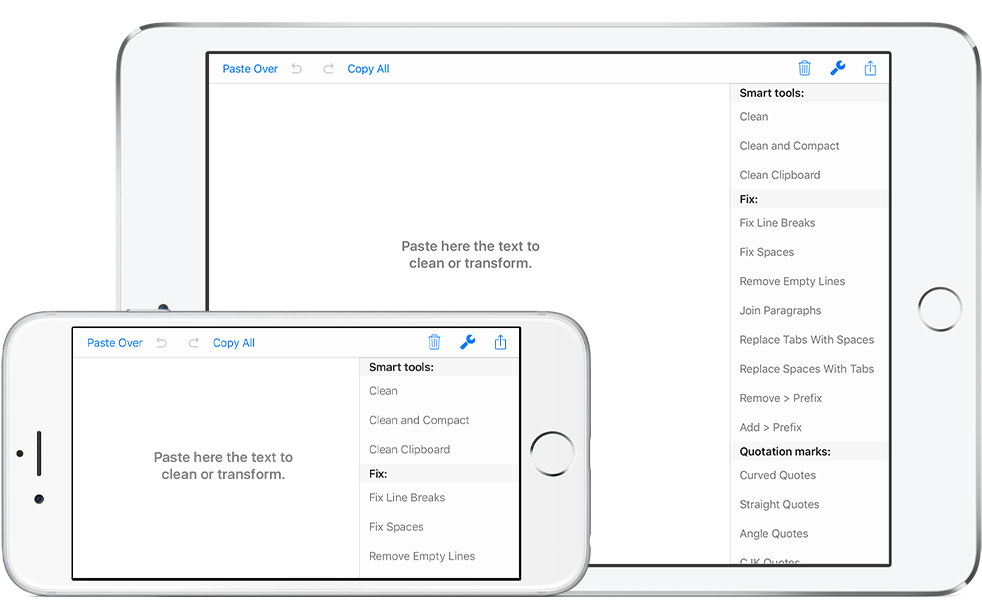
Clean Text quickly performs many essential functions such as removing empty lines, fix line break problems, removing unwanted spaces, converting quotation marks, extract links, convert tabs with spaces and more. The new version takes advantage of URL Schemes support which let other apps supporting this technology (like Workflow) to launch Clean Text via a link and perform actions.
Among the new features are:
* Improvements in the interface of Find, Replace and Regular Expressions (Regex) panels
* Recent Searches functionality
* URL Schemes support to launch and use Clean Text features using other apps that support this technology (like Workflow)
Type on iOS and find the text on your Mac:
With Clean Text Menu, you can write text on your iPhone or iPad and then find it on any iOS device or Mac. You don't have to worry about anything. Thanks to iCloud, you will find in the device that you just picked up and in your Mac, exactly the text that you have just typed on iOS. And vice versa.
Live search:
While you type in the search box all occurrences within the text will be highlighted to give you a complete picture, then with the Select Next and Select Previous buttons you can gradually select instances to edit or change them. Also Match case and Whole words, act immediately on the highlighted text and will allow you to do the replacements with millimeter accuracy. And with infinite undoes, your chance to try, becomes a tool to do a good job.
Accelerate your search and replace work using Regular Expressions
If you are a true expert, there is the powerful Regular Expression panel, which in addition to make available all RegEx capabilities for search and replace, it provides you the RegEx main patterns with a simple tap.
Theme appearance:
Choose from four very accurate theme appearance: Classic, Relax, Dark, Dev, and also chose your preferred size for displayed text. If you work a lot on text, the black background will help you to avoid to stress your eyes.
Clean Text supports major iOS technologies, such as:
* iPad multitasking Slide Over and Split View on iPad Pro
* Home screen quick actions on iPhone 6s and 6s Plus
* Physical keyboard shortcuts on iPad
* iCloud to access the same text from any device
* Keyboard Shortcut Bar on iPad with Cut, Copy and Paste; Arrows Keys; Select and Deselect text
The main features of Clean Text are:
* Smart Clean and Clean and Compact text
* Clean Clipboard content without the need to paste it in the app
* Fix line breaks
* Fix spaces
* Remove empty lines
* Join paragraphs
* Replace tabs with spaces and replace spaces with tabs
* Remove and add email quote prefix
* Convert quotation marks: curved quotes, straight quotes, angle quotes and Chinese quotes
* Convert from single to double and from double to single quotes
* Change case to sentence case, title case, uppercase, lovercase and random case
* Increase and decrease text indent
* Sort lines ascending and descending
* Convert from three periods to ellipsis and from ellipsis to three periods
* ROT13 encode (replaces a letter with the letter 13 letters after it in the alphabet)
* Reverse text
* Convert HTML to plain text
* URL percent encoding
* Remove spaces, returns and duplicate lines
* Trim leading and trailing spaces and returns
* Replace spaces with returns and vice versa
* Add and remove line numbers
* Extract links, email addresses, phone numbers and unique words
* Remove duplicate lines
* Convert emoji and symbols to their description
* Convert to upside down and to mirrored pseudo text
* Show total number of characters, words, spaces and lines in a text
* Find and Replace with live highlighting of matches
* Regular Expression search and substitution with live highlighting of matches and main patterns convenient buttons
* Recent Searches functionality
* URL Schemes support to launch and use Clean Text features using other apps that support this technology (like Workflow)
Compatibility:
Requires iOS 10.0 or later. Compatible with iPhone, iPad, and iPod touch.
Pricing and Availability:
Clean Text for iOS 3 retails at a price of $1.99 USD (or equivalent in different currencies) and is available worldwide through the App Store in Productivity category.
Clean Text for iOS 3.0: https://www.apimac.com/ios/cleantext/
Purchase (App Store): https://itunes.apple.com/app/clean-text/id1039632918
URL Schemes Guide: https://apimac.freshdesk.com/support/solutions/articles/4000121879-how-to-use-the-url-schemes-feature-in-clean-text-for-ios
Screenshot 1: https://www.apimac.com/images/pages/clean_text_ios/Clean-Text-3-for-iOS-Screenshot.jpg
Screenshot 2: https://www.apimac.com/images/pages/clean_text_ios/hero_large.png
Application Icon: https://www.apimac.com/images/pages/clean_text_ios/CleanText-for-iOS-icon@2x.png
Apimac is an app company dedicated to create Mac and iOS only software. People at Apimac aim to put in your hands software which you can use in a way you do things every day. Copyright 2018 Apimac. All Rights Reserved. Apple, the Apple logo, iOS and macOS are registered trademarks of Apple Inc. in the U.S. and other countries. Other trademarks and registered trademarks may be the property of their respective owners.
*******
Link To Article: https://prmac.com/release-id-82695.htm
*******
---------------------------------------------------------------------------------
Note that you can alter delivered distributions at any time.
Login to your account on prMac to alter your channel selection, or to opt-out at any time.
The new version 3 of Clean Text for iOS supports URL Schemes automation - Published on 05/18/18
Apimac today announces Clean Text 3 for iOS, the new release of the popular app to reduce text cleanup and processing time. Clean Text is used by thousands of iPhone and iPad users to automate cleanup and editing text from text files, PDFs, documents from word processors, web pages, emails and other text material. The new version takes advantage of URL Schemes support which let other apps supporting this technology (like Workflow) to launch Clean Text via a link and perform actions.
Padua, Italy - Apimac today announces Clean Text 3 for iOS, the new release of the popular app to reduce text cleanup and processing time. This is the counterpart for iPhone and iPad of the Mac version which is a very popular app among Mac users who have been using it for many years. Users all over the world use this Clean Text for iOS to reduce the time to edit and clean text.
Clean Text quickly performs many essential functions such as removing empty lines, fix line break problems, removing unwanted spaces, converting quotation marks, extract links, convert tabs with spaces and more. The new version takes advantage of URL Schemes support which let other apps supporting this technology (like Workflow) to launch Clean Text via a link and perform actions.
Among the new features are:
* Improvements in the interface of Find, Replace and Regular Expressions (Regex) panels
* Recent Searches functionality
* URL Schemes support to launch and use Clean Text features using other apps that support this technology (like Workflow)
Type on iOS and find the text on your Mac:
With Clean Text Menu, you can write text on your iPhone or iPad and then find it on any iOS device or Mac. You don't have to worry about anything. Thanks to iCloud, you will find in the device that you just picked up and in your Mac, exactly the text that you have just typed on iOS. And vice versa.
Live search:
While you type in the search box all occurrences within the text will be highlighted to give you a complete picture, then with the Select Next and Select Previous buttons you can gradually select instances to edit or change them. Also Match case and Whole words, act immediately on the highlighted text and will allow you to do the replacements with millimeter accuracy. And with infinite undoes, your chance to try, becomes a tool to do a good job.
Accelerate your search and replace work using Regular Expressions
If you are a true expert, there is the powerful Regular Expression panel, which in addition to make available all RegEx capabilities for search and replace, it provides you the RegEx main patterns with a simple tap.
Theme appearance:
Choose from four very accurate theme appearance: Classic, Relax, Dark, Dev, and also chose your preferred size for displayed text. If you work a lot on text, the black background will help you to avoid to stress your eyes.
Clean Text supports major iOS technologies, such as:
* iPad multitasking Slide Over and Split View on iPad Pro
* Home screen quick actions on iPhone 6s and 6s Plus
* Physical keyboard shortcuts on iPad
* iCloud to access the same text from any device
* Keyboard Shortcut Bar on iPad with Cut, Copy and Paste; Arrows Keys; Select and Deselect text
The main features of Clean Text are:
* Smart Clean and Clean and Compact text
* Clean Clipboard content without the need to paste it in the app
* Fix line breaks
* Fix spaces
* Remove empty lines
* Join paragraphs
* Replace tabs with spaces and replace spaces with tabs
* Remove and add email quote prefix
* Convert quotation marks: curved quotes, straight quotes, angle quotes and Chinese quotes
* Convert from single to double and from double to single quotes
* Change case to sentence case, title case, uppercase, lovercase and random case
* Increase and decrease text indent
* Sort lines ascending and descending
* Convert from three periods to ellipsis and from ellipsis to three periods
* ROT13 encode (replaces a letter with the letter 13 letters after it in the alphabet)
* Reverse text
* Convert HTML to plain text
* URL percent encoding
* Remove spaces, returns and duplicate lines
* Trim leading and trailing spaces and returns
* Replace spaces with returns and vice versa
* Add and remove line numbers
* Extract links, email addresses, phone numbers and unique words
* Remove duplicate lines
* Convert emoji and symbols to their description
* Convert to upside down and to mirrored pseudo text
* Show total number of characters, words, spaces and lines in a text
* Find and Replace with live highlighting of matches
* Regular Expression search and substitution with live highlighting of matches and main patterns convenient buttons
* Recent Searches functionality
* URL Schemes support to launch and use Clean Text features using other apps that support this technology (like Workflow)
Compatibility:
Requires iOS 10.0 or later. Compatible with iPhone, iPad, and iPod touch.
Pricing and Availability:
Clean Text for iOS 3 retails at a price of $1.99 USD (or equivalent in different currencies) and is available worldwide through the App Store in Productivity category.
Clean Text for iOS 3.0: https://www.apimac.com/ios/cleantext/
Purchase (App Store): https://itunes.apple.com/app/clean-text/id1039632918
URL Schemes Guide: https://apimac.freshdesk.com/support/solutions/articles/4000121879-how-to-use-the-url-schemes-feature-in-clean-text-for-ios
Screenshot 1: https://www.apimac.com/images/pages/clean_text_ios/Clean-Text-3-for-iOS-Screenshot.jpg
Screenshot 2: https://www.apimac.com/images/pages/clean_text_ios/hero_large.png
Application Icon: https://www.apimac.com/images/pages/clean_text_ios/CleanText-for-iOS-icon@2x.png

Apimac is an app company dedicated to create Mac and iOS only software. People at Apimac aim to put in your hands software which you can use in a way you do things every day. Copyright 2018 Apimac. All Rights Reserved. Apple, the Apple logo, iOS and macOS are registered trademarks of Apple Inc. in the U.S. and other countries. Other trademarks and registered trademarks may be the property of their respective owners.
*******
Link To Article: https://prmac.com/release-id-82695.htm
*******
---------------------------------------------------------------------------------
Note that you can alter delivered distributions at any time.
Login to your account on prMac to alter your channel selection, or to opt-out at any time.
Aero Smash - A cool flight shooting game out on iOS and Android SOON
A new article has been published at prMac.
Aero Smash - A cool flight shooting game out on iOS and Android SOON - Published on 05/17/18
Beijing, China - 15th May 2018 - Global mobile game publisher ZPLAY is proud to announce that Aero Smash, an addictive flight shooting game with simple yet effective control scheme, is now making his debut on both iOS and Android all over the world on 16th May.
Beijing,China - Global mobile game publisher ZPLAY is proud to announce that Aero Smash, an addictive flight shooting game with simple yet effective control scheme, is now making his debut on iPhone, iPad, iPod touch and Android devices all over the world on 16th May.
Aero Smash is easy to start but hard to challenge. Its controls are simple so players will not have any issue running the game.
Drive you plane to guard your territory and shoot down all the enemies! You can collect and own more than 135 kinds of planes. An unknown and thrilling adventure will be started from a random unique map. The world will show up as a huge map. 360-degree free shooting.
Features:
* 135 various planes
* Over 10 random unique maps
* 360-degree free shooting
* Easy steering control
Device Requirements:
* iPhone, iPad, and iPod touch
* Requires iOS 8.0 or later
* Universal Application
* 161.7 MB
Pricing and Availability:
Aero Smash - open fire 1.0 is free and is available worldwide through the App Store in the Games category. An Android version is available through Google Play.
ZPLAY: http://zplay.com/
Download on App Store: http://itunes.apple.com/us/app/aero-smash-open-fire/id1326053638
Download on Google Play: https://play.google.com/store/apps/details?id=com.zplay.aerosmash
YouTube Trailer: https://www.youtube.com/watch?v=Z7sx4yr44cw&feature=youtu.be
Press Kit: https://drive.google.com/drive/folders/1-ZEpVEfRm3BP4z0pBdQDNuorzDkJU5fI?usp=sharing
Founded in 2010, ZPLAY is a fast growing, global, mobile games publisher, having the solid strength of both experience and industry success. To date, ZPLAY has attracted close to half a billion users, and its products cover more than 100 countries and regions. ZPLAY, along with its developer partners, has enjoyed top 10 rankings in all major markets, including Europe, America, Asia, and the Middle East. All Material and Software (C) Copyright 2018 ZPLAY. All Rights Reserved. Apple, the Apple logo, iPhone, iPod and iPad are registered trademarks of Apple Inc. in the U.S. and/or other countries. Other trademarks and registered trademarks may be the property of their respective owners.
*******
Link To Article: https://prmac.com/release-id-82694.htm
*******
---------------------------------------------------------------------------------
Note that you can alter delivered distributions at any time.
Login to your account on prMac to alter your channel selection, or to opt-out at any time.
Aero Smash - A cool flight shooting game out on iOS and Android SOON - Published on 05/17/18
Beijing, China - 15th May 2018 - Global mobile game publisher ZPLAY is proud to announce that Aero Smash, an addictive flight shooting game with simple yet effective control scheme, is now making his debut on both iOS and Android all over the world on 16th May.
Beijing,China - Global mobile game publisher ZPLAY is proud to announce that Aero Smash, an addictive flight shooting game with simple yet effective control scheme, is now making his debut on iPhone, iPad, iPod touch and Android devices all over the world on 16th May.
Aero Smash is easy to start but hard to challenge. Its controls are simple so players will not have any issue running the game.
Drive you plane to guard your territory and shoot down all the enemies! You can collect and own more than 135 kinds of planes. An unknown and thrilling adventure will be started from a random unique map. The world will show up as a huge map. 360-degree free shooting.
Features:
* 135 various planes
* Over 10 random unique maps
* 360-degree free shooting
* Easy steering control
Device Requirements:
* iPhone, iPad, and iPod touch
* Requires iOS 8.0 or later
* Universal Application
* 161.7 MB
Pricing and Availability:
Aero Smash - open fire 1.0 is free and is available worldwide through the App Store in the Games category. An Android version is available through Google Play.
ZPLAY: http://zplay.com/
Download on App Store: http://itunes.apple.com/us/app/aero-smash-open-fire/id1326053638
Download on Google Play: https://play.google.com/store/apps/details?id=com.zplay.aerosmash
YouTube Trailer: https://www.youtube.com/watch?v=Z7sx4yr44cw&feature=youtu.be
Press Kit: https://drive.google.com/drive/folders/1-ZEpVEfRm3BP4z0pBdQDNuorzDkJU5fI?usp=sharing
Founded in 2010, ZPLAY is a fast growing, global, mobile games publisher, having the solid strength of both experience and industry success. To date, ZPLAY has attracted close to half a billion users, and its products cover more than 100 countries and regions. ZPLAY, along with its developer partners, has enjoyed top 10 rankings in all major markets, including Europe, America, Asia, and the Middle East. All Material and Software (C) Copyright 2018 ZPLAY. All Rights Reserved. Apple, the Apple logo, iPhone, iPod and iPad are registered trademarks of Apple Inc. in the U.S. and/or other countries. Other trademarks and registered trademarks may be the property of their respective owners.
*******
Link To Article: https://prmac.com/release-id-82694.htm
*******
---------------------------------------------------------------------------------
Note that you can alter delivered distributions at any time.
Login to your account on prMac to alter your channel selection, or to opt-out at any time.
Best Telegram Alternatives, Alternative Apps for Telegram
A new article has been published at prMac.
Best Telegram Alternatives, Alternative Apps for Telegram - Published on 05/11/18
CoverMe, Inc. accounces CoverMe Private Calls & Texts 2.9.0, an important update to their private texting & calling app for iOS devices. It is one of the best alternatives to Telegram. CoverMe is a secure app with end-to-end encryption supported. Many messaging apps only encrypt messages between you and them, but CoverMe's end-to-end encryption ensures only you and the person you're communicating with can read what is sent, and nobody in between.
San Jose, California - The instant messaging app Telegram, featuring fast, private, easy and secure, is loved by many. It owes its popularity to end-to-end encryption and self-destructing messaging. However, the app sometimes is banned in some countries like Russia and Iran. Moreover, it was said that Telegram logs every pasted message to syslog in macOS, even when you are using secret chats. Fortunately, there are alternatives to Telegram.
CoverMe
Just like WhatsApp, CoverMe is a secure app with end-to-end encryption supported. Many messaging apps only encrypt messages between you and them, but CoverMe's end-to-end encryption ensures only you and the person you're communicating with can read what is sent, and nobody in between. This is because your messages are secured with a lock, and only the recipient and you have the special key needed to unlock and read them.
Like Telegram, it also allows users to send self-destructing messages. Messages will be deleted automatically on the recipient's device in certain time after being read. You will immediately be informed once your message is read. What's more, you can even recall them if they haven't been read, similar to recalling an email that you sent to someone by mistake.
What's worth mentioning is that it gives you the opportunity set customized notifications for your secret messages. For example, if you set notifications of the messages from Jack as "Good morning", when Jack sends you a message, the previews will be "Good morning". It is a really useful way to hide private messages from prying eyes. If someone tries to open the secure app, it will even locate and capture an image of the intruder.
Device Requirements:
* iPhone, iPad, and iPod touch
* Requires iOS 7.0 or later
* 101.3 MB
Pricing and Availability:
CoverMe Private Calls & Texts 2.9.0 is free and is available worldwide exclusively through the App Store in the Social Networking category.
CoverMe Private Text & Call 2.9.0: http://www.coverme.ws/
Download from App Store: https://itunes.apple.com/app/coverme-secure-texting-phone/id593652484
Screenshot 1: http://is3.mzstatic.com/image/thumb/Purple128/v4/fc/75/d5/fc75d5ad-fe22-13d0-6ea5-641f627ac8ef/source/392x696bb.jpg
Screenshot 2: http://is4.mzstatic.com/image/thumb/Purple118/v4/f7/a3/d7/f7a3d797-3e66-8f3f-522c-08caece81482/source/392x696bb.jpg
Screenshot 3: http://is1.mzstatic.com/image/thumb/Purple128/v4/8c/00/2e/8c002e5d-a503-3be3-25a0-43bee4d6a308/source/392x696bb.jpg
App Icon: https://lh4.ggpht.com/VKnd32MspxOQ2y7s4KQziskYCnol5l-ZPAe_X0j2Uri9-ezaBmhYrm_RZZ2EgbXlYxk=w300-rw
Located in San Jose, California, CoverMe is a privately held technology company specializing in private communication. CoverMe allows private texting, private calling, private vault and private sharing. All Material and Software (C) Copyright 2018 CoverMe. All Rights Reserved. Apple, the Apple logo, iPhone, iPod and iPad are registered trademarks of Apple Inc. in the U.S. and/or other countries. Other trademarks and registered trademarks may be the property of their respective owners.
*******
Link To Article: https://prmac.com/release-id-82693.htm
*******
---------------------------------------------------------------------------------
Note that you can alter delivered distributions at any time.
Login to your account on prMac to alter your channel selection, or to opt-out at any time.
Best Telegram Alternatives, Alternative Apps for Telegram - Published on 05/11/18
CoverMe, Inc. accounces CoverMe Private Calls & Texts 2.9.0, an important update to their private texting & calling app for iOS devices. It is one of the best alternatives to Telegram. CoverMe is a secure app with end-to-end encryption supported. Many messaging apps only encrypt messages between you and them, but CoverMe's end-to-end encryption ensures only you and the person you're communicating with can read what is sent, and nobody in between.
San Jose, California - The instant messaging app Telegram, featuring fast, private, easy and secure, is loved by many. It owes its popularity to end-to-end encryption and self-destructing messaging. However, the app sometimes is banned in some countries like Russia and Iran. Moreover, it was said that Telegram logs every pasted message to syslog in macOS, even when you are using secret chats. Fortunately, there are alternatives to Telegram.
CoverMe
Just like WhatsApp, CoverMe is a secure app with end-to-end encryption supported. Many messaging apps only encrypt messages between you and them, but CoverMe's end-to-end encryption ensures only you and the person you're communicating with can read what is sent, and nobody in between. This is because your messages are secured with a lock, and only the recipient and you have the special key needed to unlock and read them.
Like Telegram, it also allows users to send self-destructing messages. Messages will be deleted automatically on the recipient's device in certain time after being read. You will immediately be informed once your message is read. What's more, you can even recall them if they haven't been read, similar to recalling an email that you sent to someone by mistake.
What's worth mentioning is that it gives you the opportunity set customized notifications for your secret messages. For example, if you set notifications of the messages from Jack as "Good morning", when Jack sends you a message, the previews will be "Good morning". It is a really useful way to hide private messages from prying eyes. If someone tries to open the secure app, it will even locate and capture an image of the intruder.
Device Requirements:
* iPhone, iPad, and iPod touch
* Requires iOS 7.0 or later
* 101.3 MB
Pricing and Availability:
CoverMe Private Calls & Texts 2.9.0 is free and is available worldwide exclusively through the App Store in the Social Networking category.
CoverMe Private Text & Call 2.9.0: http://www.coverme.ws/
Download from App Store: https://itunes.apple.com/app/coverme-secure-texting-phone/id593652484
Screenshot 1: http://is3.mzstatic.com/image/thumb/Purple128/v4/fc/75/d5/fc75d5ad-fe22-13d0-6ea5-641f627ac8ef/source/392x696bb.jpg

Screenshot 2: http://is4.mzstatic.com/image/thumb/Purple118/v4/f7/a3/d7/f7a3d797-3e66-8f3f-522c-08caece81482/source/392x696bb.jpg

Screenshot 3: http://is1.mzstatic.com/image/thumb/Purple128/v4/8c/00/2e/8c002e5d-a503-3be3-25a0-43bee4d6a308/source/392x696bb.jpg

App Icon: https://lh4.ggpht.com/VKnd32MspxOQ2y7s4KQziskYCnol5l-ZPAe_X0j2Uri9-ezaBmhYrm_RZZ2EgbXlYxk=w300-rw
Located in San Jose, California, CoverMe is a privately held technology company specializing in private communication. CoverMe allows private texting, private calling, private vault and private sharing. All Material and Software (C) Copyright 2018 CoverMe. All Rights Reserved. Apple, the Apple logo, iPhone, iPod and iPad are registered trademarks of Apple Inc. in the U.S. and/or other countries. Other trademarks and registered trademarks may be the property of their respective owners.
*******
Link To Article: https://prmac.com/release-id-82693.htm
*******
---------------------------------------------------------------------------------
Note that you can alter delivered distributions at any time.
Login to your account on prMac to alter your channel selection, or to opt-out at any time.
Databuzz Releases fmEcommerce Link (WooCommerce Edition) v1.5
A new article has been published at prMac.
Databuzz Releases fmEcommerce Link (WooCommerce Edition) v1.5 - Published on 05/17/18
Databuzz today announced fmEcommerce Link (WooCommerce Edition) v1.5, a major update to their FileMaker solution that integrates the FileMaker platform with the WooCommerce eCommerce platform. fmEcommerce Link (WooCommerce Edition) v1.5 now runs natively on the FileMaker 16 platform, including FileMaker Pro, FileMaker Go and FileMaker Server without requiring a FileMaker plug-in.
Sydney, Australia - Databuzz today announced fmEcommerce Link (WooCommerce Edition), a FileMaker solution that integrates with the WooCommerce eCommerce platform.
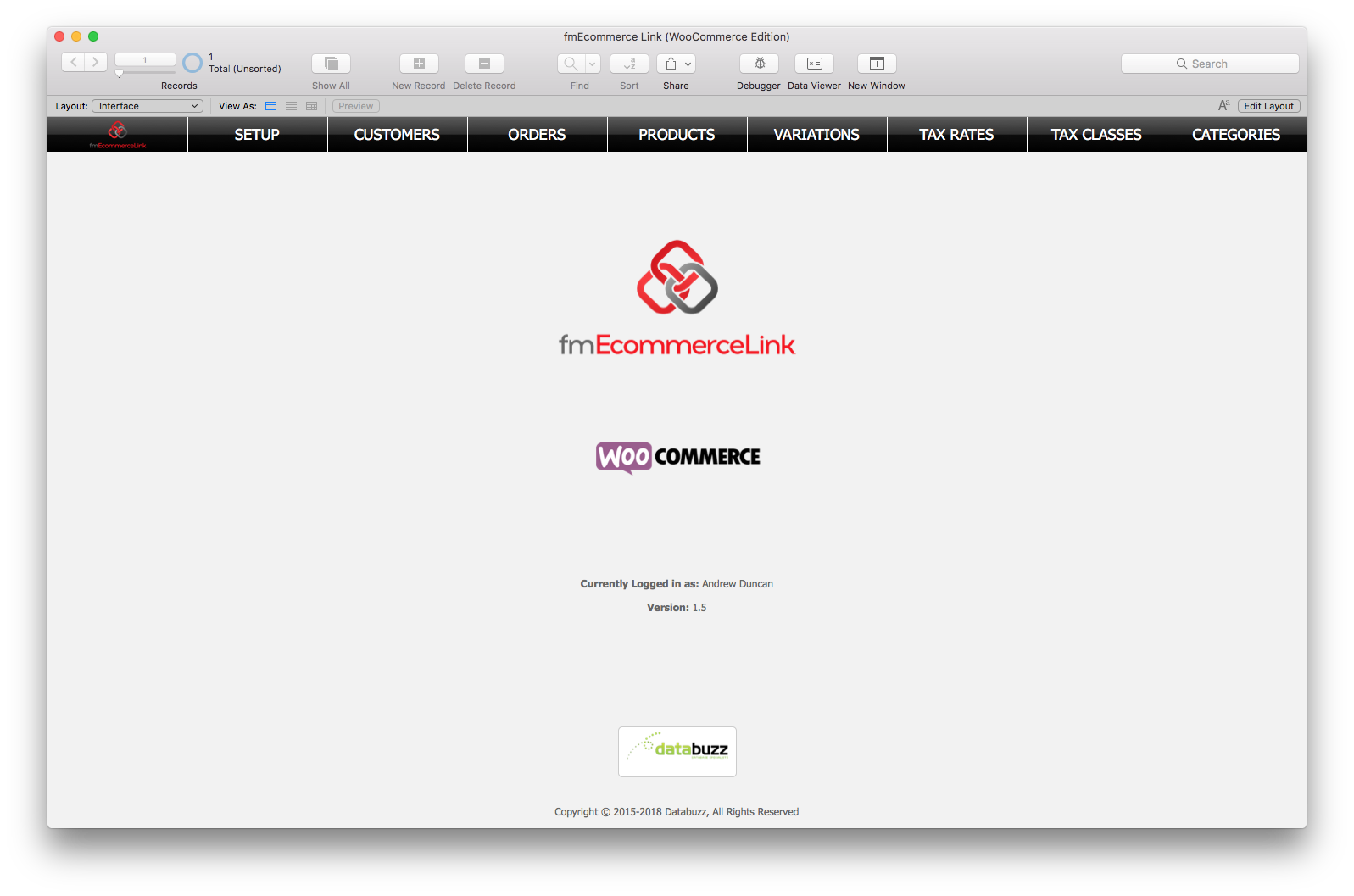
fmEcommerce Link (WooCommerce Edition) allows you to upload and download data between your FileMaker solution and WooCommerce, the most popular eCommerce platform on the web with over 43 million downloads. fmEcommerce Link (WooCommerce Edition) removes double data entry and human errors saving your company significant time, money and hassle by automating the exchange of data between FileMaker and WooCommerce.
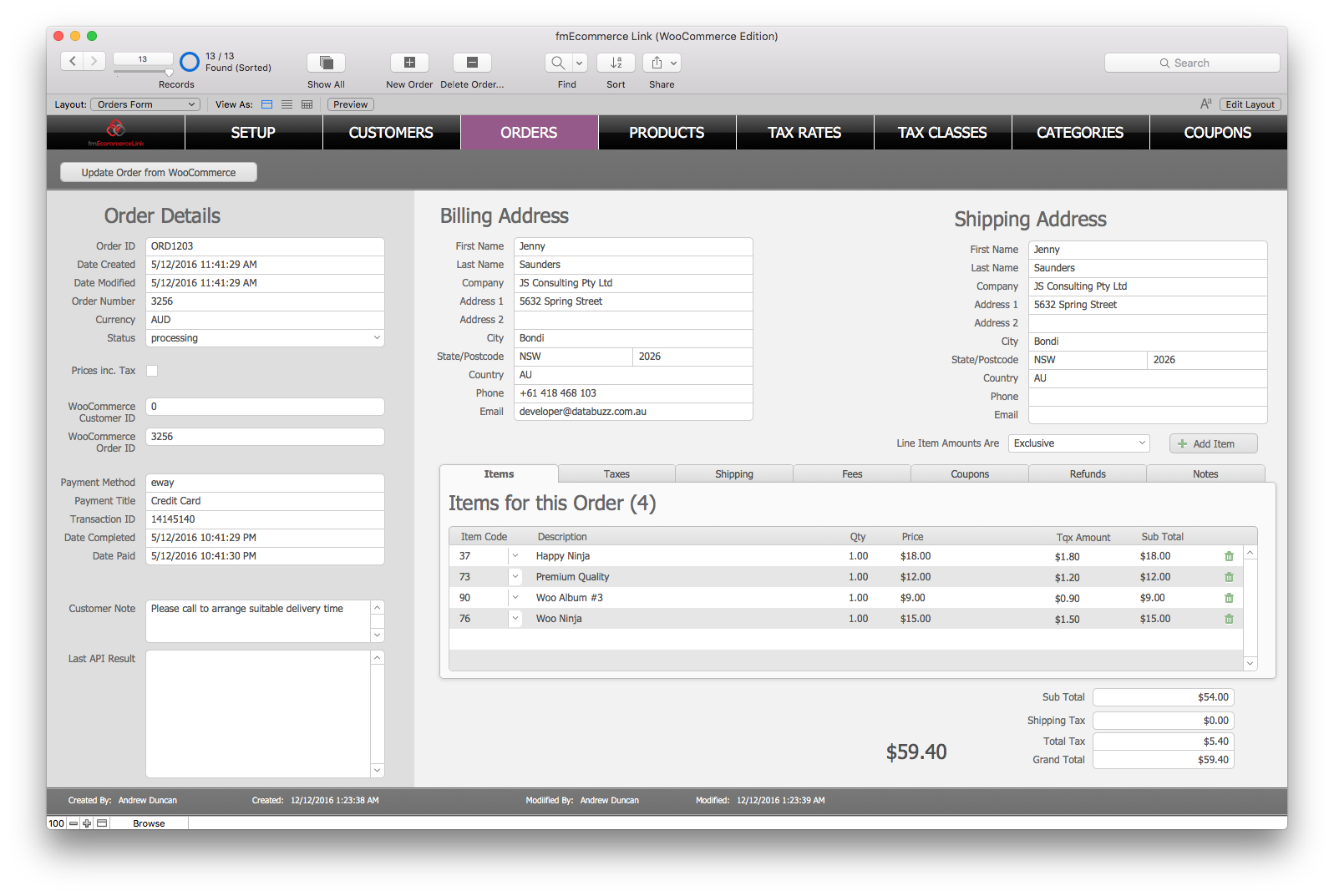
fmEcommerce Link (WooCommerce Edition) is completely unlocked allowing you to integrate it into your FileMaker solution. You can copy and paste examples showing you how to authenticate with the WooCommerce API and download Customers, Orders, Products, Coupons and more at the click of a button.
fmEcommerce Link (WooCommerce Edition) features include:
* works with FileMaker Pro v12, v13, v14, v15 and v16
* works with Macintosh and Windows
* completely unlocked
* can be hosted by FileMaker Pro or FileMaker Server
* Webhooks support (create new Orders automatically from WooCommerce - FileMaker Server required)
* works with WooCommerce v3.0 or later (HTTPS required)
"The FileMaker 16 platform included many new features, including support for working with JSON data and being able to specify cURL options," said Andrew Duncan, CEO of Databuzz. "We've updated fmEcommerce Link (WooCommerce Edition) to use these new features so it now runs natively without requiring a plug-in on the FileMaker 16 platform, including FileMaker Go 16 and FileMaker Server 16."
fmEcommerce Link (WooCommerce Edition) includes examples for the following WooCommerce API endpoints:
* Customers: download and upload Customers
* Products: download and upload Products
* Product Variations: download and upload Product Variations
* Orders: download Orders from WooCommerce (including Order line items)
* Coupons: download and upload Coupons
* Tax Rates: download Tax Rates from WooCommerce
* Tax Classes: download Tax Classes from WooCommerce
* Categories: download Categories from WooCommerce
* Attributes: download Product Attributes from WooCommerce
* Terms: download and upload Attribute Terms from WooCommerce
* Shipping Classes: download Product Shipping Classes from WooCommerce
* Tags: download Product Tags from WooCommerce
* Payment Gateways: download and upload Payment Gateways from WooCommerce
* Shipping Methods: download and upload Shipping Methods from WooCommerce
* Shipping Zones: download and upload Shipping Zones from WooCommerce
* Shipping Zone Locations: download and upload Shipping Zone Locations from WooCommerce
* Shipping Zone Methods: download Shipping Zone Methods Locations from WooCommerce
Availability, Pricing, and Compatibility
fmEcommerce Link (WooCommerce Edition) v1.5 is a free update for all existing customers.
fmEcommerce Link (WooCommerce Edition) is available in a number of licenses: Company, Vertical Solution and Developer. It is available now from the Databuzz website. Company Licenses start at AUD $495.00. fmEcommerce Link (WooCommerce Edition) requires FileMaker Pro v12, v13, v14, v15 or v16 and WooCommerce 3.0 or later using HTTPS.
Databuzz: https://www.databuzz.com.au/
fmEcommerce Link (WooCommerce Edition): https://www.databuzz.com.au/fmecommerce-link-woocommerce-edition/
Purchase Link: https://www.databuzz.com.au/shop/
Screenshot 1: https://www.databuzz.com.au/wp-content/uploads/2018/05/Home_15.png
Screenshot 2: http://www.databuzz.com.au/wp-content/uploads/2016/12/Order-Details.png
Databuzz is a long standing member of the FileMaker Business Alliance. We have been developing and deploying FileMaker solutions for clients in Australia and internationally since 1999. Our clients are individuals, small-medium businesses, government agencies and multi-national corporations. Databuzz was founded by Andrew Duncan, a Certified FileMaker 16 Developer. For more information please visit the Databuzz website. Copyright (C) 2018 Databuzz. All Rights Reserved. FileMaker is a trademark of FileMaker, Inc., registered in the U.S. and other countries. All other trademarks are the property of their respective owners.
*******
Link To Article: https://prmac.com/release-id-82692.htm
*******
---------------------------------------------------------------------------------
Note that you can alter delivered distributions at any time.
Login to your account on prMac to alter your channel selection, or to opt-out at any time.
Databuzz Releases fmEcommerce Link (WooCommerce Edition) v1.5 - Published on 05/17/18
Databuzz today announced fmEcommerce Link (WooCommerce Edition) v1.5, a major update to their FileMaker solution that integrates the FileMaker platform with the WooCommerce eCommerce platform. fmEcommerce Link (WooCommerce Edition) v1.5 now runs natively on the FileMaker 16 platform, including FileMaker Pro, FileMaker Go and FileMaker Server without requiring a FileMaker plug-in.
Sydney, Australia - Databuzz today announced fmEcommerce Link (WooCommerce Edition), a FileMaker solution that integrates with the WooCommerce eCommerce platform.
fmEcommerce Link (WooCommerce Edition) allows you to upload and download data between your FileMaker solution and WooCommerce, the most popular eCommerce platform on the web with over 43 million downloads. fmEcommerce Link (WooCommerce Edition) removes double data entry and human errors saving your company significant time, money and hassle by automating the exchange of data between FileMaker and WooCommerce.
fmEcommerce Link (WooCommerce Edition) is completely unlocked allowing you to integrate it into your FileMaker solution. You can copy and paste examples showing you how to authenticate with the WooCommerce API and download Customers, Orders, Products, Coupons and more at the click of a button.
fmEcommerce Link (WooCommerce Edition) features include:
* works with FileMaker Pro v12, v13, v14, v15 and v16
* works with Macintosh and Windows
* completely unlocked
* can be hosted by FileMaker Pro or FileMaker Server
* Webhooks support (create new Orders automatically from WooCommerce - FileMaker Server required)
* works with WooCommerce v3.0 or later (HTTPS required)
"The FileMaker 16 platform included many new features, including support for working with JSON data and being able to specify cURL options," said Andrew Duncan, CEO of Databuzz. "We've updated fmEcommerce Link (WooCommerce Edition) to use these new features so it now runs natively without requiring a plug-in on the FileMaker 16 platform, including FileMaker Go 16 and FileMaker Server 16."
fmEcommerce Link (WooCommerce Edition) includes examples for the following WooCommerce API endpoints:
* Customers: download and upload Customers
* Products: download and upload Products
* Product Variations: download and upload Product Variations
* Orders: download Orders from WooCommerce (including Order line items)
* Coupons: download and upload Coupons
* Tax Rates: download Tax Rates from WooCommerce
* Tax Classes: download Tax Classes from WooCommerce
* Categories: download Categories from WooCommerce
* Attributes: download Product Attributes from WooCommerce
* Terms: download and upload Attribute Terms from WooCommerce
* Shipping Classes: download Product Shipping Classes from WooCommerce
* Tags: download Product Tags from WooCommerce
* Payment Gateways: download and upload Payment Gateways from WooCommerce
* Shipping Methods: download and upload Shipping Methods from WooCommerce
* Shipping Zones: download and upload Shipping Zones from WooCommerce
* Shipping Zone Locations: download and upload Shipping Zone Locations from WooCommerce
* Shipping Zone Methods: download Shipping Zone Methods Locations from WooCommerce
Availability, Pricing, and Compatibility
fmEcommerce Link (WooCommerce Edition) v1.5 is a free update for all existing customers.
fmEcommerce Link (WooCommerce Edition) is available in a number of licenses: Company, Vertical Solution and Developer. It is available now from the Databuzz website. Company Licenses start at AUD $495.00. fmEcommerce Link (WooCommerce Edition) requires FileMaker Pro v12, v13, v14, v15 or v16 and WooCommerce 3.0 or later using HTTPS.
Databuzz: https://www.databuzz.com.au/
fmEcommerce Link (WooCommerce Edition): https://www.databuzz.com.au/fmecommerce-link-woocommerce-edition/
Purchase Link: https://www.databuzz.com.au/shop/
Screenshot 1: https://www.databuzz.com.au/wp-content/uploads/2018/05/Home_15.png
Screenshot 2: http://www.databuzz.com.au/wp-content/uploads/2016/12/Order-Details.png
Databuzz is a long standing member of the FileMaker Business Alliance. We have been developing and deploying FileMaker solutions for clients in Australia and internationally since 1999. Our clients are individuals, small-medium businesses, government agencies and multi-national corporations. Databuzz was founded by Andrew Duncan, a Certified FileMaker 16 Developer. For more information please visit the Databuzz website. Copyright (C) 2018 Databuzz. All Rights Reserved. FileMaker is a trademark of FileMaker, Inc., registered in the U.S. and other countries. All other trademarks are the property of their respective owners.
*******
Link To Article: https://prmac.com/release-id-82692.htm
*******
---------------------------------------------------------------------------------
Note that you can alter delivered distributions at any time.
Login to your account on prMac to alter your channel selection, or to opt-out at any time.
PDFpen 10.1 Improves Filling Forms, Link Visibility, AppleScript
A new article has been published at prMac.
PDFpen 10.1 Improves Filling Forms, Link Visibility, AppleScript - Published on 05/17/18
California based Smile today releases PDFpen and PDFpenPro 10.1, an update to its all-purpose PDF editing tool for macOS. Users can easily add signatures, text, and images, make changes and correct typos, OCR scanned docs, fill out forms and more. Easily mark up documents with highlighting, underscoring and strikethrough. Version 10.1 offers an improved form filling experience, better link visibility, and control over image opacity, as well as scripting access to some of the features in v10.
San Francisco, California - Smile, the developer of productivity applications for Mac(R), iPhone(R) and iPad(R), has released PDFpen and PDFpenPro 10.1, an update to its all-purpose PDF editing tool for Mac. Version 10.1 offers an improved form filling experience, better link visibility, and control over image opacity, as well as scripting access to some of the features new to v10.
Version 10.1 remembers Form Field & Link Highlighting settings on a per document basis, providing a more consistent experience across multiple sessions editing a document. Checkboxes are now included in Form Field Highlighting.
Link destinations are visible on hover through descriptive tooltips. Image opacity joins other image editing features such as exposure, cropping, deskew, and more. Open documents automatically reflect the most recent saved version of a file open in multiple apps.
AppleScripters have scripting access to three features new in version 10: batch OCR, headers & footers and page numbering.
"We're thrilled PDFpen and PDFpenPro 10 were so well received, with their introduction of watermarks and batch OCR," said Philip Goward, Smile founder. "Now, with PDFpen and PDFpenPro 10.1, we've made several subtle yet powerful improvements to the form filling experience, the ease of using links, and scripting! Now our AppleScripting fans can customize their batch OCR processes as they've been asking for."
PDFpen and PDFpenPro 10 work with PDFpen for iPad & iPhone version 3, allowing seamless editing across devices when used with Dropbox or iCloud.
PDFpen retails for US $74.95, PDFpenPro for $124.95. Family Pack licenses, which cover up to five computers in one household, are $94.95 for PDFpen and $149.95 for PDFpenPro. Office Pack licenses start at $224.95 for PDFpen (5 users) and $349.95 for PDFpenPro (5 users).
Upgrades from earlier single user versions of either application are US $30, and free to users who purchased on or after January 1, 2018. Upgrades from any previous version of PDFpen to PDFpenPro 10 are $50. Upgrade pricing for Family Packs and Office Packs is found in our web store.
PDFpen and PDFpenPro 10 require macOS 10.12 (Sierra) and work great on macOS 10.13 (High Sierra). For macOS 10.11 (El Capitan) and earlier, see our website for compatible PDFpen versions. Demo versions are available. Full versions of PDFpen and PDFpenPro are also available for purchase on Apple's Mac App Store.
What's New in PDFpen 10.1:
* Remembers Form Field & Link Highlighting per document
* Includes checkboxes in Form Field Highlighting
* Displays link destination on hover
* Adds image opacity controls
* Supports AppleScript for: Batch OCR, Headers & Footers and Page numbers
* Updates files based on last save from any app
Features Specific to PDFpenPro:
* Export to Microsoft(R) Excel (.xlsx, .xls), Microsoft(R) PowerPoint (.pptx) and PDF Archive (PDF/A) formats (requires Internet connection for .pptx and PDF/A, must be a licensed user)
* Create cross-platform fillable PDF forms including interactive signature fields and email or web submission buttons
* Create and edit Table of Contents
* Convert websites into PDFs
* OCR multiple documents in batch
* Add and edit document permissions
* Automatic form creation makes existing PDF forms fillable
* Gather submitted form data via backend integration
* Add and delete file attachments and annotations
* Create Portfolio documents, combining related files together
* Correct typos in OCR text layer
* OCR horizontal Chinese, Japanese & Korean
Features:
* Add text, images and signatures to PDFs
* Correct text in original PDF with editable text blocks
* Fill out interactive PDF forms and sign them
* Redact or erase text, including OCR text
* Search and replace, search and redact, and search and highlight text
* Export in Microsoft(R) Word format, TIFF, JPEG, PNG, and flat PDF
* Scan directly from Image Capture or TWAIN scanners
* Perform OCR (Optical Character Recognition) on scanned documents
* View OCR layer for proofing OCR text from scanned pages, or remove OCR layer
* Edit original images, including adjusting resolution, color depth and contrast, skew, and size of an image or scanned document
* Sign PDF forms via drawing, interactive signature fields, or AATL or self-signed certificates
* Insert and remove pages; re-order pages in a PDF with drag & drop; combine PDFs maintaining Table of Contents entries
* Move, resize, copy and delete images in original PDF
* Save PDFs directly to Evernote
* Preview and extract file attachments and annotations
* Record and playback audio annotations
* Copy and paste rich text; retain fonts and formatting when copying from PDFs, including columns
* Context-sensitive popup-menus enable quick edits
* Add notes and comments, print annotation summary with or without the original text
* Mark up documents with highlighting, underscoring and strikethrough
* Save frequently-used images, signatures, objects and text in the Library; sync Library items with PDFpen for iPad & iPhone via iCloud
* Add page numbers, bookmarks, headers and footers, line numbers and watermarks
* Apply business-related and Sign Here stamps via the Library
* Password protect a document with up to 256-bit AES encryption
* Automate PDF manipulations with AppleScript and JavaScript Automation
* Available in English, Japanese, German, French, Italian, and Spanish
System Requirements:
* macOS 10.12 (Sierra) and later
PDFpen Pricing:
* US $74.95
* Family Pack: $94.95 (home use; up to 5 computers in one household)
* Office Pack: starts at $224.95 for 5 users
* Single user upgrade from earlier versions of PDFpen: $30
* Upgrade pricing for Family Packs and Office Packs available.
* (Free upgrades for purchases made on or after January 1, 2018; no free upgrades available on the Mac App Store)
PDFpenPro Pricing:
* US $124.95
* Family Pack: $149.95 (home use; up to 5 computers in one household)
* Office Pack: starts at $349.95 for 5 users
* Single user upgrade from earlier versions of PDFpenPro: $30
* Upgrade pricing for Family Packs and Office Packs available.
* (Free upgrades for purchases made on or after January 1, 2018; no free upgrades available on the Mac App Store)
Single user upgrade from the previous version of PDFpen to PDFpenPro 10: $50 (USD).
Site licenses: PDFpen $1249.95, PDFpenPro $1624.95 (USD). Site license terms: Single contact for support; single physical address or company with fewer than 1,000 employees.
PDFpen 10.1: https://smilesoftware.com/PDFpen
Download Trial: https://smilesoftware.com/PDFpen/download
Purchase: https://smle.us/store
Media Assets: https://smilesoftware.com/PDFpen/presskit
Press Kit (zip): https://smilesoftware.com/static/pr/PDFpen10_PressKit.zip
Smile makes clever software for efficient people, including TextExpander, the typing shortcut tool for Mac, Windows, iPhone and iPad; PDFpen, the all-purpose Mac PDF editor; PDFpen for iPad & iPhone, the mobile PDF editor; and PDFpen Scan , which brings the power of scanning and OCR to your iPad and iPhone. Copyright (C) 2018 SmileOnMyMac, LLC dba Smile. All Rights Reserved. PDFpen, PDFpenPro, TextExpander, and the Smile logo are registered trademarks of SmileOnMyMac, LLC dba Smile. Apple, the Apple logo, Mac, iPad, iPhone, and iPod touch are trademarks of Apple Inc., registered in the U.S. and other countries. App Store is a service mark of Apple Inc.
*******
Link To Article: https://prmac.com/release-id-82691.htm
*******
---------------------------------------------------------------------------------
Note that you can alter delivered distributions at any time.
Login to your account on prMac to alter your channel selection, or to opt-out at any time.
PDFpen 10.1 Improves Filling Forms, Link Visibility, AppleScript - Published on 05/17/18
California based Smile today releases PDFpen and PDFpenPro 10.1, an update to its all-purpose PDF editing tool for macOS. Users can easily add signatures, text, and images, make changes and correct typos, OCR scanned docs, fill out forms and more. Easily mark up documents with highlighting, underscoring and strikethrough. Version 10.1 offers an improved form filling experience, better link visibility, and control over image opacity, as well as scripting access to some of the features in v10.
San Francisco, California - Smile, the developer of productivity applications for Mac(R), iPhone(R) and iPad(R), has released PDFpen and PDFpenPro 10.1, an update to its all-purpose PDF editing tool for Mac. Version 10.1 offers an improved form filling experience, better link visibility, and control over image opacity, as well as scripting access to some of the features new to v10.
Version 10.1 remembers Form Field & Link Highlighting settings on a per document basis, providing a more consistent experience across multiple sessions editing a document. Checkboxes are now included in Form Field Highlighting.
Link destinations are visible on hover through descriptive tooltips. Image opacity joins other image editing features such as exposure, cropping, deskew, and more. Open documents automatically reflect the most recent saved version of a file open in multiple apps.
AppleScripters have scripting access to three features new in version 10: batch OCR, headers & footers and page numbering.
"We're thrilled PDFpen and PDFpenPro 10 were so well received, with their introduction of watermarks and batch OCR," said Philip Goward, Smile founder. "Now, with PDFpen and PDFpenPro 10.1, we've made several subtle yet powerful improvements to the form filling experience, the ease of using links, and scripting! Now our AppleScripting fans can customize their batch OCR processes as they've been asking for."
PDFpen and PDFpenPro 10 work with PDFpen for iPad & iPhone version 3, allowing seamless editing across devices when used with Dropbox or iCloud.
PDFpen retails for US $74.95, PDFpenPro for $124.95. Family Pack licenses, which cover up to five computers in one household, are $94.95 for PDFpen and $149.95 for PDFpenPro. Office Pack licenses start at $224.95 for PDFpen (5 users) and $349.95 for PDFpenPro (5 users).
Upgrades from earlier single user versions of either application are US $30, and free to users who purchased on or after January 1, 2018. Upgrades from any previous version of PDFpen to PDFpenPro 10 are $50. Upgrade pricing for Family Packs and Office Packs is found in our web store.
PDFpen and PDFpenPro 10 require macOS 10.12 (Sierra) and work great on macOS 10.13 (High Sierra). For macOS 10.11 (El Capitan) and earlier, see our website for compatible PDFpen versions. Demo versions are available. Full versions of PDFpen and PDFpenPro are also available for purchase on Apple's Mac App Store.
What's New in PDFpen 10.1:
* Remembers Form Field & Link Highlighting per document
* Includes checkboxes in Form Field Highlighting
* Displays link destination on hover
* Adds image opacity controls
* Supports AppleScript for: Batch OCR, Headers & Footers and Page numbers
* Updates files based on last save from any app
Features Specific to PDFpenPro:
* Export to Microsoft(R) Excel (.xlsx, .xls), Microsoft(R) PowerPoint (.pptx) and PDF Archive (PDF/A) formats (requires Internet connection for .pptx and PDF/A, must be a licensed user)
* Create cross-platform fillable PDF forms including interactive signature fields and email or web submission buttons
* Create and edit Table of Contents
* Convert websites into PDFs
* OCR multiple documents in batch
* Add and edit document permissions
* Automatic form creation makes existing PDF forms fillable
* Gather submitted form data via backend integration
* Add and delete file attachments and annotations
* Create Portfolio documents, combining related files together
* Correct typos in OCR text layer
* OCR horizontal Chinese, Japanese & Korean
Features:
* Add text, images and signatures to PDFs
* Correct text in original PDF with editable text blocks
* Fill out interactive PDF forms and sign them
* Redact or erase text, including OCR text
* Search and replace, search and redact, and search and highlight text
* Export in Microsoft(R) Word format, TIFF, JPEG, PNG, and flat PDF
* Scan directly from Image Capture or TWAIN scanners
* Perform OCR (Optical Character Recognition) on scanned documents
* View OCR layer for proofing OCR text from scanned pages, or remove OCR layer
* Edit original images, including adjusting resolution, color depth and contrast, skew, and size of an image or scanned document
* Sign PDF forms via drawing, interactive signature fields, or AATL or self-signed certificates
* Insert and remove pages; re-order pages in a PDF with drag & drop; combine PDFs maintaining Table of Contents entries
* Move, resize, copy and delete images in original PDF
* Save PDFs directly to Evernote
* Preview and extract file attachments and annotations
* Record and playback audio annotations
* Copy and paste rich text; retain fonts and formatting when copying from PDFs, including columns
* Context-sensitive popup-menus enable quick edits
* Add notes and comments, print annotation summary with or without the original text
* Mark up documents with highlighting, underscoring and strikethrough
* Save frequently-used images, signatures, objects and text in the Library; sync Library items with PDFpen for iPad & iPhone via iCloud
* Add page numbers, bookmarks, headers and footers, line numbers and watermarks
* Apply business-related and Sign Here stamps via the Library
* Password protect a document with up to 256-bit AES encryption
* Automate PDF manipulations with AppleScript and JavaScript Automation
* Available in English, Japanese, German, French, Italian, and Spanish
System Requirements:
* macOS 10.12 (Sierra) and later
PDFpen Pricing:
* US $74.95
* Family Pack: $94.95 (home use; up to 5 computers in one household)
* Office Pack: starts at $224.95 for 5 users
* Single user upgrade from earlier versions of PDFpen: $30
* Upgrade pricing for Family Packs and Office Packs available.
* (Free upgrades for purchases made on or after January 1, 2018; no free upgrades available on the Mac App Store)
PDFpenPro Pricing:
* US $124.95
* Family Pack: $149.95 (home use; up to 5 computers in one household)
* Office Pack: starts at $349.95 for 5 users
* Single user upgrade from earlier versions of PDFpenPro: $30
* Upgrade pricing for Family Packs and Office Packs available.
* (Free upgrades for purchases made on or after January 1, 2018; no free upgrades available on the Mac App Store)
Single user upgrade from the previous version of PDFpen to PDFpenPro 10: $50 (USD).
Site licenses: PDFpen $1249.95, PDFpenPro $1624.95 (USD). Site license terms: Single contact for support; single physical address or company with fewer than 1,000 employees.
PDFpen 10.1: https://smilesoftware.com/PDFpen
Download Trial: https://smilesoftware.com/PDFpen/download
Purchase: https://smle.us/store
Media Assets: https://smilesoftware.com/PDFpen/presskit
Press Kit (zip): https://smilesoftware.com/static/pr/PDFpen10_PressKit.zip
Smile makes clever software for efficient people, including TextExpander, the typing shortcut tool for Mac, Windows, iPhone and iPad; PDFpen, the all-purpose Mac PDF editor; PDFpen for iPad & iPhone, the mobile PDF editor; and PDFpen Scan , which brings the power of scanning and OCR to your iPad and iPhone. Copyright (C) 2018 SmileOnMyMac, LLC dba Smile. All Rights Reserved. PDFpen, PDFpenPro, TextExpander, and the Smile logo are registered trademarks of SmileOnMyMac, LLC dba Smile. Apple, the Apple logo, Mac, iPad, iPhone, and iPod touch are trademarks of Apple Inc., registered in the U.S. and other countries. App Store is a service mark of Apple Inc.
*******
Link To Article: https://prmac.com/release-id-82691.htm
*******
---------------------------------------------------------------------------------
Note that you can alter delivered distributions at any time.
Login to your account on prMac to alter your channel selection, or to opt-out at any time.
Subscribe to:
Posts (Atom)