A new article has been published at prMac.
SkyVPN Released VPN for Mac with Unlimited Traffic - Published on 05/22/18
California based Sentry Secure Communication releases SkyVPN 1.0.5, a maintenance update to their popular private network application service for macOS. Version 1.0.5 improves the user experience with minor bug fixes. SkyVPN allows you to access all content from your Mac with the fastest and most stable VPN Servers. All your information will stay safe and protected because your data will be encrypted and your online activities will remain completely anonymous.
Los Angeles, California - Sentry Secure Communication is pleased to announce the release of SkyVPN 1.0.5, a maintenance update to their popular private network application service for macOS. SkyVPN is known around the world for effectively bypassing emergent firewall blocks. But up until recently, it was only available on Android and iOS. Now, Mac users can get the same VPN service with the newly-released SkyVPN for Mac.
Have multiple devices on different operating systems? No problem. SkyVPN users can use the same VPN account on any device running iOS, Android, PC or Mac, at the same time. Most importantly, there is no limit on traffic consumption.
What's Special About SkyVPN?
The VPN service market has exploded in the past few years and there are now a large number of VPN apps available. But SkyVPN is special. What makes SkyVPN different from all the other VPN apps?
SkyVPN is the only VPN app that provides free Premium service. At sign-up, users can take advantage of two different kinds of service:
1. Basic Service (free, US server only)
2. Premium Service (unlimited session time, global servers, even faster & more stable connection)
Users can easily earn unlimited premium traffic by spending several minutes watching ads and completing simple tasks. The more ads you watch and the more tasks you complete, the more premium traffic you can earn. You can also earn premium traffic simply by checking in every day. There's no better or easier way to get premium VPN service than with SkyVPN for Mac, PC, Android, and iOS.
Whether you choose Basic Service or Premium Service, SkyVPN has the ability to bypass all kinds of firewall blocks. What's more, the developers of SkyVPN are always working hard to improve their services so that users can maintain their internet freedom. Because of this ongoing commitment to improvement, SkyVPN has earned high praise among all its users.
What Users Say About SkyVPN:
"This VPN is best VPN I've ever seen. It unblocks my school WiFi, allows me to access any website, any app in school any time. And this VPN updates quickly. Sometimes it not working due to school firewall update. But it comes back so soon unlike other VPN, ONCE THE SCHOOL FIREWALL UPDATED, IT GONE FOREVER. I thought that I will never write a review, but SkyVPN changed my mind. Thanks to the development team thanks to the free network view" - by anastatua May 3, 2018
SkyVPN for Mac:
Want to access any website or browser on your Mac? It is easy to connect to the VPN server with the new SkyVPN for Mac. SkyVPN for Mac is powerful, fast, and stable...just like the mobile version. But SkyVPN for Mac has several advantages that other VPN services for Mac do not.
Across Multiple Devices:
SkyVPN users can log in on Mac with the same account they use on their mobile device. There's no need to create an additional account for your Mac. In fact, one account can be used on 5 devices at the same time. And all 5 devices will share that account's traffic.
Unlimited And Even Free:
If users already have a SkyVPN unlimited traffic plan on their mobile device(s), they can enjoy that same unlimited VPN service on their Mac for free. They can surf the internet, watch videos, play games, and much more. All with the confidence that SkyVPN offers the most secure VPN service available.
Pricing and Availability:
SkyVPN 1.0.5 is Free and available worldwide exclusively through the Mac App Store in the Productivity category. For more information, please contact Jasper Sun.
SkyVPN 1.0.5: http://www.skyvpn.net/
Download from the Mac App Store: https://itunes.apple.com/app/skyvpn-fast-vpn-proxy-shield/id1322822884
Screenshot: https://is5-ssl.mzstatic.com/image/thumb/Purple118/v4/5a/8b/21/5a8b21b5-acbd-28e1-1d99-bdb35af6528a/pr_source.png/643x0w.png
Application Icon: https://is2-ssl.mzstatic.com/image/thumb/Purple115/v4/fa/e6/39/fae6395d-f31b-c698-4eea-036dc942149e/AppIcon-85-220-0-0-0-0-4-0-0-0-2x-sRGB-0-0-0.png/246x0w.png
Located in San Jose, California, Sentry Secure Communication is a privately held technology company specializing in VPN service. Sentry Secure Communication offers unlimited premium VPN service at no cost for Windows, Android, Mac, and iOS. SkyVPN gives users secure internet connection, anonymous web browsing, and access to any websites and apps. Powered by SkyVPN's robust global VPN servers, users enjoy market-leading smooth connection without spending a penny. All Material and Software (C) Copyright 2018 Dingtone Communications Limited. All Rights Reserved. Apple, the Apple logo, macOS, iPhone, iPod, iPad and Macintosh are registered trademarks of Apple Inc. in the U.S. and/or other countries. Other trademarks and registered trademarks may be the property of their respective owners.
*******
Link To Article: https://prmac.com/release-id-82704.htm
*******
---------------------------------------------------------------------------------
Note that you can alter delivered distributions at any time.
Login to your account on prMac to alter your channel selection, or to opt-out at any time.



Gild Brings Manga, Fantasy, and Sci-Fi Coloring Fun to iOS Devices
A new article has been published at prMac.
Gild Brings Manga, Fantasy, and Sci-Fi Coloring Fun to iOS Devices - Published on 05/22/18
UK-based indie development team, Black Ridge Technologies Ltd. today announces Gild - Colouring For Geeks 1.0.1, their adult coloring app for iOS devices. Gild brings coloring fun to fans of manga, fantasy, and science fiction. The app's easy-to-use coloring and texture tools allow budding artists to customize artwork, save the artwork as wallpaper or lock screen, or even share the artwork with friends and family via email, text, or popular social networks.
Leeds, United Kingdom - Independent development team, Black Ridge Technologies Ltd. is today proud to announce the release and immediate availability of Gild - Colouring For Geeks 1.0.1, their premium adult coloring app for iPhone and iPad devices. The app is aimed at fans of manga, fantasy, and science fiction, and features curated artwork from some of the most talented artists on Deviant Art and Art Station.
In addition to artwork collections that can be colored time and time again, the app also provides a showcase for the work of some of the hottest artists around. In addition to their art, an introduction and a short biography is also available to introduce the artist. All of the information is available via a handy "About the Artists" option in the Options menu. In addition to a short blurb, a convenient link is provided to each artist's website, so more can be learned about the artist.
"When we had the idea for Gild, we knew the market for 'adult coloring books' was huge, but we didn't want to be just another 'me too' coloring book app. That's why we contacted artists we found on Deviant Art and Art Station to work with them to include their artwork in the app," says Black Ridge Technologies Producer, Matthew Prodger. "We know not everyone likes the same genre of content, that's why we offer the user a chance to color in one piece of art from every collection of content from each of the artists, and you can then pay only for the art packs you want to color in."
Features Include:
* Art from manga, fantasy, and science fiction genres
* Works from talented artists on Deviant Art and Art Station
* Free sample drawings from each artist and genre
* Buy only the art packs you want, via convenient in-app purchases
* Select from over 240 preset colors or create custom colors
* In addition to traditional colors, use precious metals, skin tones, and more
* Paint fill tool quickly fills large areas
* Pencil tool to fill in details, shadows, and highlights
* Gild a creation by applying various texture effects
* Use finished artwork for iPhone or iPad wallpaper or lock screen
* Share via email, text, or popular social networks
* Meet the artists in the "About the Artists" section
* More genres including technical drawings, and more artwork, artists, coloring tools, and texture effects are on the way
In addition to the usual coloring tool and color available in apps like this, Gild offers the ability to 'Gild' a creation by adding textures to the artwork. Textures include art paper, parchment, wood, stone, and brick.
The app allows users to color in one piece of art from the various artists and collections, allowing them to try before they buy. When a user finds an art pack they like, they can feel good about supporting the artists whose work they enjoy, as 80% of revenue from each sale of that artwork collection goes directly to the artist, helping them to keep delivering great content in the future.
"Gild provides a great way for users to express themselves, while enjoying the artwork of professional artists from their favorite genres," continues Matthew. "I can't wait to see what our users come up with. If they'd like to share their work with us, they can do so via Twitter or Instagram. Plus, we have some great art packs from more artists on the way, as well as new coloring tools and texture effects."
Device Requirements:
* iPhone and iPad
* Requires iOS 9.0 or later
* 185 MB
Pricing and Availability:
Gild - Colouring For Geeks 1.0.1 is free and is available worldwide exclusively through the App Store in the Entertainment category. Convenient in-app purchases starting from $1.99 USD (or an equivalent amount in other currencies) are available to unlock complete art collections. Customers must be at least 17 years old to download this app.
Black Ridge Technologies: https://www.blackridgetechnologies.com/
Gild - Colouring For Geeks 1.0.1: https://www.gildcolouringapp.com/
Download from App Store: https://itunes.apple.com/app/gild-colouring-for-geeks/id1241357764
Instagram Gallery: https://www.instagram.com/gildcolouringapp/
Screenshot: https://www.dropbox.com/s/d4ixzvcqq7e2kuo/press-release.jpg?dl=0
App Icon: https://is5-ssl.mzstatic.com/image/thumb/Purple118/v4/8a/4c/bd/8a4cbd21-c10e-49cd-4ba9-32839bb20838/AppIcon-1x_U007emarketing-85-220-0-7.png/246x0w.jpg
Headquartered in the United Kingdom, Black Ridge Technologies Ltd. was founded in 2001. The company's programmers and artists have over 30 years of experience in software development, ranging from business apps to games and educational software. The team has worked with companies such as William Hill, the BBC, Sony Computer Entertainment Europe, the National Trust, Royal Armouries, York St. John University, and Blackpool Council. Copyright (C) 2018 Black Ridge Technologies Ltd. All Rights Reserved. Apple, the Apple logo, iPhone and iPod are registered trademarks of Apple Inc. in the U.S. and/or other countries.
*******
Link To Article: https://prmac.com/release-id-82701.htm
*******
---------------------------------------------------------------------------------
Note that you can alter delivered distributions at any time.
Login to your account on prMac to alter your channel selection, or to opt-out at any time.
Gild Brings Manga, Fantasy, and Sci-Fi Coloring Fun to iOS Devices - Published on 05/22/18
UK-based indie development team, Black Ridge Technologies Ltd. today announces Gild - Colouring For Geeks 1.0.1, their adult coloring app for iOS devices. Gild brings coloring fun to fans of manga, fantasy, and science fiction. The app's easy-to-use coloring and texture tools allow budding artists to customize artwork, save the artwork as wallpaper or lock screen, or even share the artwork with friends and family via email, text, or popular social networks.
Leeds, United Kingdom - Independent development team, Black Ridge Technologies Ltd. is today proud to announce the release and immediate availability of Gild - Colouring For Geeks 1.0.1, their premium adult coloring app for iPhone and iPad devices. The app is aimed at fans of manga, fantasy, and science fiction, and features curated artwork from some of the most talented artists on Deviant Art and Art Station.
In addition to artwork collections that can be colored time and time again, the app also provides a showcase for the work of some of the hottest artists around. In addition to their art, an introduction and a short biography is also available to introduce the artist. All of the information is available via a handy "About the Artists" option in the Options menu. In addition to a short blurb, a convenient link is provided to each artist's website, so more can be learned about the artist.
"When we had the idea for Gild, we knew the market for 'adult coloring books' was huge, but we didn't want to be just another 'me too' coloring book app. That's why we contacted artists we found on Deviant Art and Art Station to work with them to include their artwork in the app," says Black Ridge Technologies Producer, Matthew Prodger. "We know not everyone likes the same genre of content, that's why we offer the user a chance to color in one piece of art from every collection of content from each of the artists, and you can then pay only for the art packs you want to color in."
Features Include:
* Art from manga, fantasy, and science fiction genres
* Works from talented artists on Deviant Art and Art Station
* Free sample drawings from each artist and genre
* Buy only the art packs you want, via convenient in-app purchases
* Select from over 240 preset colors or create custom colors
* In addition to traditional colors, use precious metals, skin tones, and more
* Paint fill tool quickly fills large areas
* Pencil tool to fill in details, shadows, and highlights
* Gild a creation by applying various texture effects
* Use finished artwork for iPhone or iPad wallpaper or lock screen
* Share via email, text, or popular social networks
* Meet the artists in the "About the Artists" section
* More genres including technical drawings, and more artwork, artists, coloring tools, and texture effects are on the way
In addition to the usual coloring tool and color available in apps like this, Gild offers the ability to 'Gild' a creation by adding textures to the artwork. Textures include art paper, parchment, wood, stone, and brick.
The app allows users to color in one piece of art from the various artists and collections, allowing them to try before they buy. When a user finds an art pack they like, they can feel good about supporting the artists whose work they enjoy, as 80% of revenue from each sale of that artwork collection goes directly to the artist, helping them to keep delivering great content in the future.
"Gild provides a great way for users to express themselves, while enjoying the artwork of professional artists from their favorite genres," continues Matthew. "I can't wait to see what our users come up with. If they'd like to share their work with us, they can do so via Twitter or Instagram. Plus, we have some great art packs from more artists on the way, as well as new coloring tools and texture effects."
Device Requirements:
* iPhone and iPad
* Requires iOS 9.0 or later
* 185 MB
Pricing and Availability:
Gild - Colouring For Geeks 1.0.1 is free and is available worldwide exclusively through the App Store in the Entertainment category. Convenient in-app purchases starting from $1.99 USD (or an equivalent amount in other currencies) are available to unlock complete art collections. Customers must be at least 17 years old to download this app.
Black Ridge Technologies: https://www.blackridgetechnologies.com/
Gild - Colouring For Geeks 1.0.1: https://www.gildcolouringapp.com/
Download from App Store: https://itunes.apple.com/app/gild-colouring-for-geeks/id1241357764
Instagram Gallery: https://www.instagram.com/gildcolouringapp/
Screenshot: https://www.dropbox.com/s/d4ixzvcqq7e2kuo/press-release.jpg?dl=0

App Icon: https://is5-ssl.mzstatic.com/image/thumb/Purple118/v4/8a/4c/bd/8a4cbd21-c10e-49cd-4ba9-32839bb20838/AppIcon-1x_U007emarketing-85-220-0-7.png/246x0w.jpg

Headquartered in the United Kingdom, Black Ridge Technologies Ltd. was founded in 2001. The company's programmers and artists have over 30 years of experience in software development, ranging from business apps to games and educational software. The team has worked with companies such as William Hill, the BBC, Sony Computer Entertainment Europe, the National Trust, Royal Armouries, York St. John University, and Blackpool Council. Copyright (C) 2018 Black Ridge Technologies Ltd. All Rights Reserved. Apple, the Apple logo, iPhone and iPod are registered trademarks of Apple Inc. in the U.S. and/or other countries.
*******
Link To Article: https://prmac.com/release-id-82701.htm
*******
---------------------------------------------------------------------------------
Note that you can alter delivered distributions at any time.
Login to your account on prMac to alter your channel selection, or to opt-out at any time.
PopChar X 8.3 now with WYSIWYG font names and other UI improvements
A new article has been published at prMac.
PopChar X 8.3 now with WYSIWYG font names and other UI improvements - Published on 05/22/18
Ergonis Software today released PopChar X 8.3, an improved version of the company's award-winning tool for finding and inserting special characters and exploring fonts. PopChar makes typing of unusual characters easy without having to remember keyboard combinations. The new version 8.3 offers a couple of smart user interface improvements, like WYSIWYG font names, the option to remember the selected font for all applications instead of separately per application, and more.
Perg, Austria - Ergonis Software today released PopChar X 8.3, an improved version of the company's award-winning tool for finding and inserting special characters and exploring fonts. The new version 8.3 offers a couple of smart user interface improvements, which make PopChar even more convenient to use. One of these improvements is the option to show font names in their own font. This is sometimes called "WYSIWYG font names" for "what you see is what you get", as the font names themselves act as samples of text in that font. With this option enabled, PopChar's font list now gives a quick glimpse of the general appearance of the available fonts and makes it easier to find desired fonts.
Another feature allows to configure whether PopChar should remember the selected font for all applications instead of separately per application. Also new is the option to disable version checks in full-screen mode to avoid unexpected alerts during a presentation as well as the option to insert HTML characters in hexadecimal notation.
In addition to that, PopChar X 8.3 incorporates metrics adjustments for various fonts and offers fixes and workarounds for user-reported issues. Visit Ergonis Software's website to learn more about the changes in this release and to download the new version.
PopChar solves a problem faced by every technologist and multi-lingual worker. Inserting special characters into application documents can be frustrating and results in a steady loss of productivity. With PopChar, thousands of special characters are only a few clicks away. Just pop up the PopChar window, click the desired character, and the character appears in your current document right away.
System Requirements:
* Mac OS X 10.6 or newer
* Compatible with macOS High Sierra (10.13)
Availability and Ordering:
PopChar X can be purchased securely on the Ergonis Software website. The upgrade to PopChar X 8.3 is free for anyone who purchased a license for PopChar X 8 or for PopChar X 7 on or after September 1st 2016. Upgrade paths are available for owners of older licenses. For information about purchases, including enterprise licenses, volume discounts, and upgrade pricing offers, see the company's web site. Instead of purchasing PopChar separately, customers can save money by ordering the Ergonis Productivity Bundle, which also includes the text expander Typinator and the keyboard shortcut helper KeyCue.
Ergonis Software: http://www.ergonis.com/
PopChar X 8.3: http://www.ergonis.com/products/popcharx
Download PopChar X: http://www.ergonis.com/downloads/popcharx-install.dmg
Purchase PopChar X: https://store.ergonis.com/products/popcharx
Screenshot (Main Window): http://www.ergonis.com/images/products/pcx/external/popcharx-screen.png
Screenshot (WYSIWYG font names): http://www.ergonis.com/press/2018/20180522/popcharx-wysiwygfontlist.png
Ergonis Software develops ergonomic and intuitive software that boosts the productivity of Mac and PC users. Ergonis Software, a privately held company founded in 2002, is headquartered in Perg, Austria. Copyright 2002-2018 Ergonis Software Gmbh. All Rights Reserved. Ergonis products are either registered trademarks or trademarks of Ergonis Software GmbH. Other company and product names may be trademarks of their respective owners.
*******
Link To Article: https://prmac.com/release-id-82703.htm
*******
---------------------------------------------------------------------------------
Note that you can alter delivered distributions at any time.
Login to your account on prMac to alter your channel selection, or to opt-out at any time.
PopChar X 8.3 now with WYSIWYG font names and other UI improvements - Published on 05/22/18
Ergonis Software today released PopChar X 8.3, an improved version of the company's award-winning tool for finding and inserting special characters and exploring fonts. PopChar makes typing of unusual characters easy without having to remember keyboard combinations. The new version 8.3 offers a couple of smart user interface improvements, like WYSIWYG font names, the option to remember the selected font for all applications instead of separately per application, and more.
Perg, Austria - Ergonis Software today released PopChar X 8.3, an improved version of the company's award-winning tool for finding and inserting special characters and exploring fonts. The new version 8.3 offers a couple of smart user interface improvements, which make PopChar even more convenient to use. One of these improvements is the option to show font names in their own font. This is sometimes called "WYSIWYG font names" for "what you see is what you get", as the font names themselves act as samples of text in that font. With this option enabled, PopChar's font list now gives a quick glimpse of the general appearance of the available fonts and makes it easier to find desired fonts.
Another feature allows to configure whether PopChar should remember the selected font for all applications instead of separately per application. Also new is the option to disable version checks in full-screen mode to avoid unexpected alerts during a presentation as well as the option to insert HTML characters in hexadecimal notation.
In addition to that, PopChar X 8.3 incorporates metrics adjustments for various fonts and offers fixes and workarounds for user-reported issues. Visit Ergonis Software's website to learn more about the changes in this release and to download the new version.
PopChar solves a problem faced by every technologist and multi-lingual worker. Inserting special characters into application documents can be frustrating and results in a steady loss of productivity. With PopChar, thousands of special characters are only a few clicks away. Just pop up the PopChar window, click the desired character, and the character appears in your current document right away.
System Requirements:
* Mac OS X 10.6 or newer
* Compatible with macOS High Sierra (10.13)
Availability and Ordering:
PopChar X can be purchased securely on the Ergonis Software website. The upgrade to PopChar X 8.3 is free for anyone who purchased a license for PopChar X 8 or for PopChar X 7 on or after September 1st 2016. Upgrade paths are available for owners of older licenses. For information about purchases, including enterprise licenses, volume discounts, and upgrade pricing offers, see the company's web site. Instead of purchasing PopChar separately, customers can save money by ordering the Ergonis Productivity Bundle, which also includes the text expander Typinator and the keyboard shortcut helper KeyCue.
Ergonis Software: http://www.ergonis.com/
PopChar X 8.3: http://www.ergonis.com/products/popcharx
Download PopChar X: http://www.ergonis.com/downloads/popcharx-install.dmg
Purchase PopChar X: https://store.ergonis.com/products/popcharx
Screenshot (Main Window): http://www.ergonis.com/images/products/pcx/external/popcharx-screen.png

Screenshot (WYSIWYG font names): http://www.ergonis.com/press/2018/20180522/popcharx-wysiwygfontlist.png

Ergonis Software develops ergonomic and intuitive software that boosts the productivity of Mac and PC users. Ergonis Software, a privately held company founded in 2002, is headquartered in Perg, Austria. Copyright 2002-2018 Ergonis Software Gmbh. All Rights Reserved. Ergonis products are either registered trademarks or trademarks of Ergonis Software GmbH. Other company and product names may be trademarks of their respective owners.
*******
Link To Article: https://prmac.com/release-id-82703.htm
*******
---------------------------------------------------------------------------------
Note that you can alter delivered distributions at any time.
Login to your account on prMac to alter your channel selection, or to opt-out at any time.
LinkOptimizer for Adobe InDesign at 50% off on BitsDuJour until May 23
A new article has been published at prMac.
LinkOptimizer for Adobe InDesign at 50% off on BitsDuJour until May 23 - Published on 05/22/18
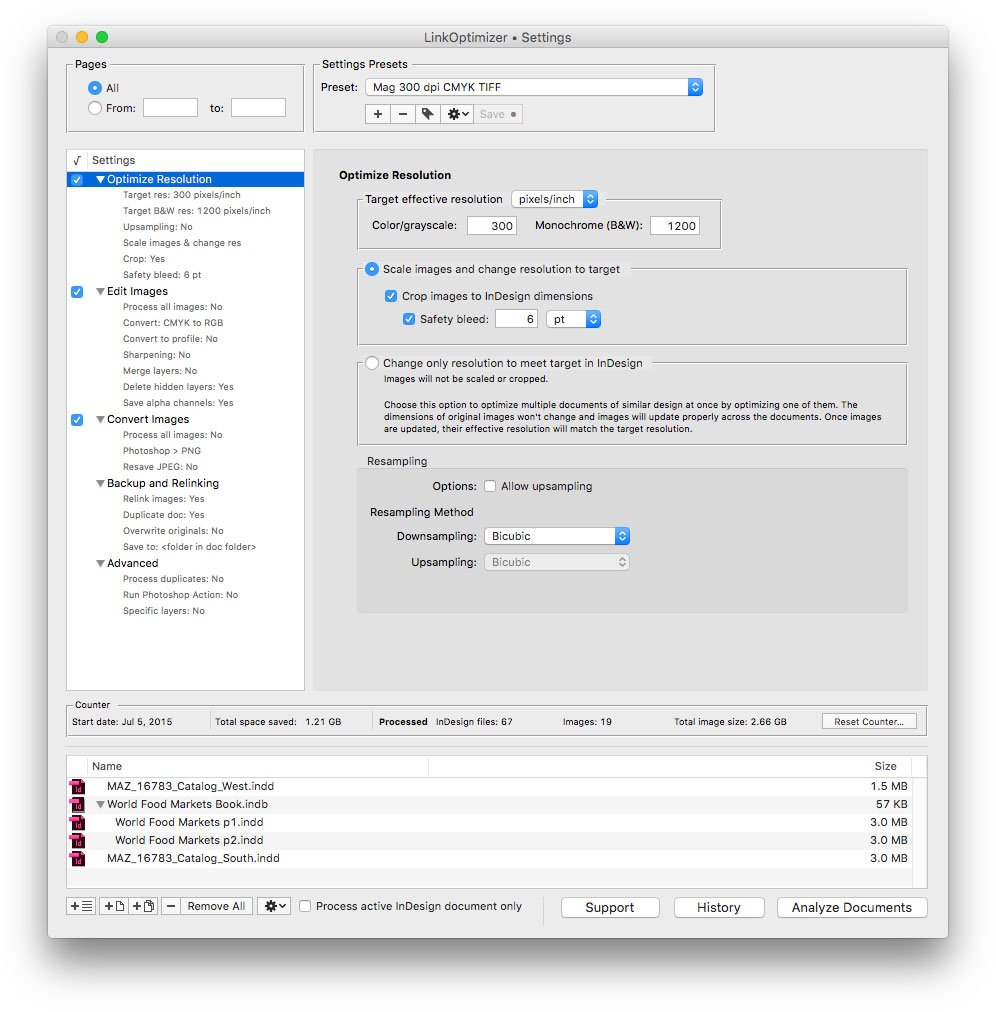
Zevrix Solutions announces that LinkOptimizer, the company's workflow automation solution for Adobe InDesign, is available at 50% off on the discount website BitsDuJour until May 23 only. LinkOptimizer allows users to reduce InDesign link size and speed up processing by eliminating excess image data. The app also converts colors and file formats, performs image adjustments, and more. As a result users can accelerate document output and save gigabytes of disk space and hours of production time.
Toronto (ON), Canada - Zevrix Solutions announces that LinkOptimizer, the company's workflow automation solution for Adobe InDesign, is available at 50% off on the discount website BitsDuJour until May 23 only. Awarded 4 out of 5 starts by Computer Arts magazine, LinkOptimizer automates complex image manipulation tasks allowing to significantly reduce the size of InDesign links, save processing time and reduce production costs. The discount lets users save $130 on each license of LinkOptimizer.
"LinkOptimizer is the one product no creative studio can live without," says Wayne Guy from Edge Graphics studio in Lake Balboa, California. "It saves hours of time, tediously replacing linked images, resizing, batch processing... If you're a designer or production artist, you need this."
LinkOptimizer works automatically with Adobe Photoshop to eliminate the excess image data of InDesign links, perform essential image adjustments and convert image formats. For example, with just a click of a button users can:
* Scale and crop images to match their dimensions in InDesign
* Change their resolution to 300 dpi
* Convert RGB images to CMYK
* Resave JPEG images as TIFF
* Run a Photoshop Action on each image
At the end of processing, LinkOptimizer reimports images to InDesign at 100% in their precise position. In addition, the software can process batches of InDesign files with one click, merge layers and delete hidden ones, and process copies of InDesign documents and images instead of original files. As a result users can save gigabytes of disk space and countless hours of optimizing images manually, accelerate document output, reduce job turnaround and cut costs through faster processing.
Pricing and Availability:
LinkOptimizer can be purchased form BitsDuJour at 50% off for $129.95 (USD) until May 23 only. Trial is also available for download. LinkOptimizer requires macOS 10.7-10.13 and Adobe InDesign/Photoshop CS3-CC 2018.
Zevrix Solutions: http://zevrix.com
LinkOptimizer: http://www.bitsdujour.com/software/linkoptimizer
Download LinkOptimizer: http://zevrix.com/LinkOptimizer.dmg
Screenshot: http://zevrix.com/screenshots/lo5/res-win.jpg
Located in Toronto, Canada, Zevrix Solutions provides automation and productivity solutions for Adobe Creative Cloud and Creative Suite software, PDF workflows, graphic file diagnostics and Microsoft Office output on Mac OS. Zevrix is dedicated to help professionals increase their profits through automating everyday tasks, producing error-free documents, saving disk space and cutting production costs. For more information, visit their website. Copyright (C) 2018 Zevrix Solutions. All Rights Reserved. Other trademarks and registered trademarks may be the property of their respective owners.
*******
Link To Article: https://prmac.com/release-id-82702.htm
*******
---------------------------------------------------------------------------------
Note that you can alter delivered distributions at any time.
Login to your account on prMac to alter your channel selection, or to opt-out at any time.
LinkOptimizer for Adobe InDesign at 50% off on BitsDuJour until May 23 - Published on 05/22/18
Zevrix Solutions announces that LinkOptimizer, the company's workflow automation solution for Adobe InDesign, is available at 50% off on the discount website BitsDuJour until May 23 only. LinkOptimizer allows users to reduce InDesign link size and speed up processing by eliminating excess image data. The app also converts colors and file formats, performs image adjustments, and more. As a result users can accelerate document output and save gigabytes of disk space and hours of production time.
Toronto (ON), Canada - Zevrix Solutions announces that LinkOptimizer, the company's workflow automation solution for Adobe InDesign, is available at 50% off on the discount website BitsDuJour until May 23 only. Awarded 4 out of 5 starts by Computer Arts magazine, LinkOptimizer automates complex image manipulation tasks allowing to significantly reduce the size of InDesign links, save processing time and reduce production costs. The discount lets users save $130 on each license of LinkOptimizer.
"LinkOptimizer is the one product no creative studio can live without," says Wayne Guy from Edge Graphics studio in Lake Balboa, California. "It saves hours of time, tediously replacing linked images, resizing, batch processing... If you're a designer or production artist, you need this."
LinkOptimizer works automatically with Adobe Photoshop to eliminate the excess image data of InDesign links, perform essential image adjustments and convert image formats. For example, with just a click of a button users can:
* Scale and crop images to match their dimensions in InDesign
* Change their resolution to 300 dpi
* Convert RGB images to CMYK
* Resave JPEG images as TIFF
* Run a Photoshop Action on each image
At the end of processing, LinkOptimizer reimports images to InDesign at 100% in their precise position. In addition, the software can process batches of InDesign files with one click, merge layers and delete hidden ones, and process copies of InDesign documents and images instead of original files. As a result users can save gigabytes of disk space and countless hours of optimizing images manually, accelerate document output, reduce job turnaround and cut costs through faster processing.
Pricing and Availability:
LinkOptimizer can be purchased form BitsDuJour at 50% off for $129.95 (USD) until May 23 only. Trial is also available for download. LinkOptimizer requires macOS 10.7-10.13 and Adobe InDesign/Photoshop CS3-CC 2018.
Zevrix Solutions: http://zevrix.com
LinkOptimizer: http://www.bitsdujour.com/software/linkoptimizer
Download LinkOptimizer: http://zevrix.com/LinkOptimizer.dmg
Screenshot: http://zevrix.com/screenshots/lo5/res-win.jpg
Located in Toronto, Canada, Zevrix Solutions provides automation and productivity solutions for Adobe Creative Cloud and Creative Suite software, PDF workflows, graphic file diagnostics and Microsoft Office output on Mac OS. Zevrix is dedicated to help professionals increase their profits through automating everyday tasks, producing error-free documents, saving disk space and cutting production costs. For more information, visit their website. Copyright (C) 2018 Zevrix Solutions. All Rights Reserved. Other trademarks and registered trademarks may be the property of their respective owners.
*******
Link To Article: https://prmac.com/release-id-82702.htm
*******
---------------------------------------------------------------------------------
Note that you can alter delivered distributions at any time.
Login to your account on prMac to alter your channel selection, or to opt-out at any time.
Funter 4.0 is Now Available for Download from the Mac App Store
A new article has been published at prMac.
Funter 4.0 is Now Available for Download from the Mac App Store - Published on 05/21/18
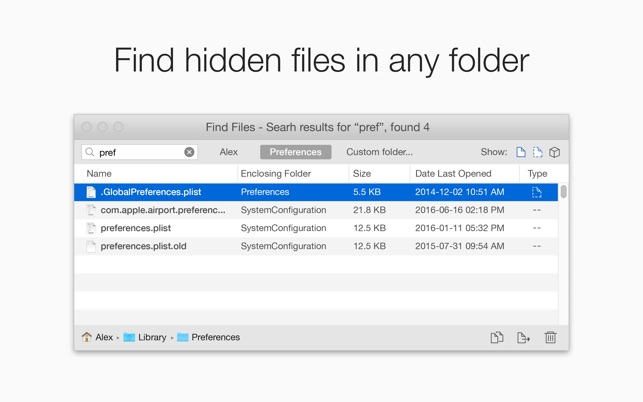
Nektony announced today the official launch of Funter 4.0 in the Mac App Store. Funter is a popular free tool designed specifically to hide and view hidden files and folders on Mac. The app gives anyone the ability to switch a file or folder visibility in one click, making it hidden or unhidden. The app searches for files in system folders and package contents, even where Spotlight never looks. With Funter, Mac users can easily find, move and delete any file, including system and browser caches.
Odessa, Ukraine - Nektony is proud to announce that, from today, Funter 4.0 is available for download from the Mac App Store. For users who prefer the convenience of getting apps through the App Store, this is the perfect time to download Funter - a freeware app addressed at those who are looking for the simplest way to show and find hidden files on Mac. Apps and web browsers on Mac create lots of unneeded files, which are hidden and might utilize significant disk space. Spotlight does not find such invisible and system files. But Funter allows you to find those hidden files, make them visible and easily operate them.
All you need do to find hidden files is just type the name of the file in the finder field. Funter allows you to choose a folder for search, show all/hidden/unhidden files, forward to file location in Finder, preview files from Funter, or copy, move or delete files using the appropriate buttons. Funter makes it possible to switch file visibility with just one click.
Funter is targeted at all Mac users who want to operate hidden files and folders. It makes it easy to find and clear user, system and browser caches.
Best strengths:
* Search hidden files in hidden folders
* Search files in system folders, bundles and packages
* Switch hidden file visibility with one click
* Operate hidden files
Funter implements an easy method of showing hidden files, and finding hidden and useless files in any location on Mac.
System Requirements:
* macOS 10.13
* 64-bit processor
* 5.2 MB
Pricing and Availability:
Funter 4.0 is Free to download and available worldwide through the Mac App Store in the Utilities category. For more information please contact Alex Cormack.
Funter 4.0: http://www.nektony.com/funter
Download from the Mac App Store (macOS 10.13): https://itunes.apple.com/app/funter-show-hidden-files/id1109422934
Download Trial (macOS 10.10-10.12): https://nektony.com/products/funter/download
Screenshot: https://is2-ssl.mzstatic.com/image/thumb/Purple128/v4/7e/9b/4f/7e9b4f5d-bc41-dc56-65a8-3520d03b643c/mzl.hndpntly.png/643x0w.jpg
Application Icon: https://is2-ssl.mzstatic.com/image/thumb/Purple128/v4/5d/01/65/5d0165a5-17e8-4fa7-da9c-3db40eea0318/AppIcon-85-220-0-0-0-0-4-0-0-0-2x-sRGB-0-0-0.png/246x0w.png
Nektony is a software development company with a commitment to release functional, stable and efficient applications for iOS and macOS. Our main focus is to help users to optimize Mac performance and keep the HD clean from junk files. Particular attention is paid to app usability and quality. As a result, our highly skilled team creates the most helpful Mac tools for computer geeks. Copyright (C) 2018 Nektony. All Rights Reserved. Apple, the Apple logo, Macintosh, Mac, iOS and iPad are registered trademarks of Apple Inc. in the U.S. and/or other countries. All other trademarks and registered trademarks mentioned in this press release are the properties of their respective owners.
*******
Link To Article: https://prmac.com/release-id-82700.htm
*******
---------------------------------------------------------------------------------
Note that you can alter delivered distributions at any time.
Login to your account on prMac to alter your channel selection, or to opt-out at any time.
Funter 4.0 is Now Available for Download from the Mac App Store - Published on 05/21/18
Nektony announced today the official launch of Funter 4.0 in the Mac App Store. Funter is a popular free tool designed specifically to hide and view hidden files and folders on Mac. The app gives anyone the ability to switch a file or folder visibility in one click, making it hidden or unhidden. The app searches for files in system folders and package contents, even where Spotlight never looks. With Funter, Mac users can easily find, move and delete any file, including system and browser caches.
Odessa, Ukraine - Nektony is proud to announce that, from today, Funter 4.0 is available for download from the Mac App Store. For users who prefer the convenience of getting apps through the App Store, this is the perfect time to download Funter - a freeware app addressed at those who are looking for the simplest way to show and find hidden files on Mac. Apps and web browsers on Mac create lots of unneeded files, which are hidden and might utilize significant disk space. Spotlight does not find such invisible and system files. But Funter allows you to find those hidden files, make them visible and easily operate them.
All you need do to find hidden files is just type the name of the file in the finder field. Funter allows you to choose a folder for search, show all/hidden/unhidden files, forward to file location in Finder, preview files from Funter, or copy, move or delete files using the appropriate buttons. Funter makes it possible to switch file visibility with just one click.
Funter is targeted at all Mac users who want to operate hidden files and folders. It makes it easy to find and clear user, system and browser caches.
Best strengths:
* Search hidden files in hidden folders
* Search files in system folders, bundles and packages
* Switch hidden file visibility with one click
* Operate hidden files
Funter implements an easy method of showing hidden files, and finding hidden and useless files in any location on Mac.
System Requirements:
* macOS 10.13
* 64-bit processor
* 5.2 MB
Pricing and Availability:
Funter 4.0 is Free to download and available worldwide through the Mac App Store in the Utilities category. For more information please contact Alex Cormack.
Funter 4.0: http://www.nektony.com/funter
Download from the Mac App Store (macOS 10.13): https://itunes.apple.com/app/funter-show-hidden-files/id1109422934
Download Trial (macOS 10.10-10.12): https://nektony.com/products/funter/download
Screenshot: https://is2-ssl.mzstatic.com/image/thumb/Purple128/v4/7e/9b/4f/7e9b4f5d-bc41-dc56-65a8-3520d03b643c/mzl.hndpntly.png/643x0w.jpg
Application Icon: https://is2-ssl.mzstatic.com/image/thumb/Purple128/v4/5d/01/65/5d0165a5-17e8-4fa7-da9c-3db40eea0318/AppIcon-85-220-0-0-0-0-4-0-0-0-2x-sRGB-0-0-0.png/246x0w.png

Nektony is a software development company with a commitment to release functional, stable and efficient applications for iOS and macOS. Our main focus is to help users to optimize Mac performance and keep the HD clean from junk files. Particular attention is paid to app usability and quality. As a result, our highly skilled team creates the most helpful Mac tools for computer geeks. Copyright (C) 2018 Nektony. All Rights Reserved. Apple, the Apple logo, Macintosh, Mac, iOS and iPad are registered trademarks of Apple Inc. in the U.S. and/or other countries. All other trademarks and registered trademarks mentioned in this press release are the properties of their respective owners.
*******
Link To Article: https://prmac.com/release-id-82700.htm
*******
---------------------------------------------------------------------------------
Note that you can alter delivered distributions at any time.
Login to your account on prMac to alter your channel selection, or to opt-out at any time.
Startup Disk Full Fixer - A Free App to Clean Up Mac Startup Disk
A new article has been published at prMac.
Startup Disk Full Fixer - A Free App to Clean Up Mac Startup Disk - Published on 05/21/18
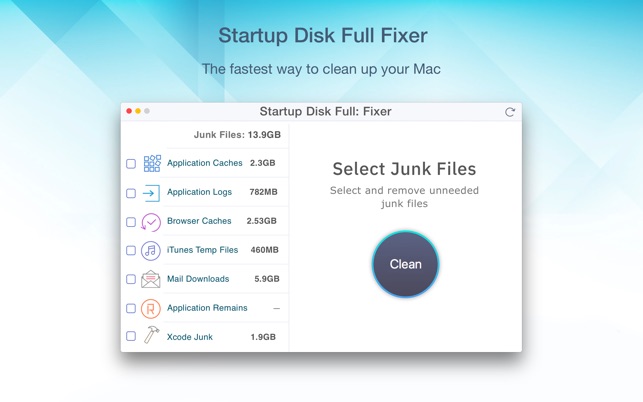
Nektony today introduces Startup Disk Full Fixer, a freeware productivity app for macOS. Startup Disk Full Fixer was specifically designed to quickly find and remove junk files to free up more HD space. Easily remove useless junk files on your Mac, including application caches, application logs, web browser caches, iTunes temporary files, Mail downloads, application remains, Xcode junk files. It takes less than a minute to find and get rid of unnecessary service files.
Odessa, Ukraine - Nektony is proud to announce the release of Startup Disk Full Fixer - a freeware app addressed to those Mac users who suffer from low disk space and regularly get annoying popups that "Startup Disk is almost full." Generally, the first thing most Mac users do is to find and delete the biggest files. In fact, there are dozens of junk files on Mac that you can remove without regret.
Startup Disk Full Fixer allows you to find and remove useless junk files on your Mac: application caches, application logs, web browser caches, iTunes temporary files, Mail downloads, application remains, Xcode junk files.
All you need to free up your disk from junk files is to launch the app, click to Analyze Disk Usage, select the unneeded files, and click to Clean them. Thus, it will take less than a minute to find and get rid of unnecessary service files. The Startup Disk Full app is a small but efficient tool, which helps to free up Startup Disk quickly and safely.
Best strengths
* See what's eating up space on Startup Disk
* Find all junk files on your disk (caches, logs, iTunes temp files, app leftovers)
* Clean up your disk with a few clicks
* Speed up your Mac by getting more free disk space
* Avoid annoying popups about low disk space
System Requirements:
* macOS 10.13 or later
* 64-bit processor
* 4.2 MB
Pricing and Availability:
Startup Disk Full Fixer is Free to download and available worldwide through the Mac App Store in theProductivity category. For more information, please contact Alex Cormack.
Startup Disk Full Fixer 1.0: https://nektony.com/startup-disk-full-fixer
Download from the Mac App Store: https://itunes.apple.com/app/startup-disk-full-fixer/id1346655838
Screenshot: https://is2-ssl.mzstatic.com/image/thumb/Purple128/v4/c0/ab/01/c0ab0127-8b8f-bad0-6cef-3a8cc7130bce/pr_source.png/643x0w.jpg
Application Icon: https://is2-ssl.mzstatic.com/image/thumb/Purple118/v4/d6/0c/2c/d60c2c5b-754b-22d5-c6c0-82ee1aee24c2/AppIcon-85-220-0-0-0-0-4-0-0-0-2x-sRGB-0-0-0.png/246x0w.png
Press Kit (zip): https://nektony.com/download/press/PressKit_Startup_Disk_Full_Fixer_Nektony.zip
Nektony is a software development company with a commitment to release functional, stable and efficient applications for iOS and macOS. Our main focus is to help users to optimize Mac performance and keep the HD clean from junk files. Particular attention is paid to app usability and quality. As a result, our highly skilled team creates the most helpful Mac tools for computer geeks. Copyright (C) 2018 Nektony. All Rights Reserved. Apple, the Apple logo, Macintosh, Mac, iOS and iPad are registered trademarks of Apple Inc. in the U.S. and/or other countries. All other trademarks and registered trademarks mentioned in this press release are the properties of their respective owners.
*******
Link To Article: https://prmac.com/release-id-82699.htm
*******
---------------------------------------------------------------------------------
Note that you can alter delivered distributions at any time.
Login to your account on prMac to alter your channel selection, or to opt-out at any time.
Startup Disk Full Fixer - A Free App to Clean Up Mac Startup Disk - Published on 05/21/18
Nektony today introduces Startup Disk Full Fixer, a freeware productivity app for macOS. Startup Disk Full Fixer was specifically designed to quickly find and remove junk files to free up more HD space. Easily remove useless junk files on your Mac, including application caches, application logs, web browser caches, iTunes temporary files, Mail downloads, application remains, Xcode junk files. It takes less than a minute to find and get rid of unnecessary service files.
Odessa, Ukraine - Nektony is proud to announce the release of Startup Disk Full Fixer - a freeware app addressed to those Mac users who suffer from low disk space and regularly get annoying popups that "Startup Disk is almost full." Generally, the first thing most Mac users do is to find and delete the biggest files. In fact, there are dozens of junk files on Mac that you can remove without regret.
Startup Disk Full Fixer allows you to find and remove useless junk files on your Mac: application caches, application logs, web browser caches, iTunes temporary files, Mail downloads, application remains, Xcode junk files.
All you need to free up your disk from junk files is to launch the app, click to Analyze Disk Usage, select the unneeded files, and click to Clean them. Thus, it will take less than a minute to find and get rid of unnecessary service files. The Startup Disk Full app is a small but efficient tool, which helps to free up Startup Disk quickly and safely.
Best strengths
* See what's eating up space on Startup Disk
* Find all junk files on your disk (caches, logs, iTunes temp files, app leftovers)
* Clean up your disk with a few clicks
* Speed up your Mac by getting more free disk space
* Avoid annoying popups about low disk space
System Requirements:
* macOS 10.13 or later
* 64-bit processor
* 4.2 MB
Pricing and Availability:
Startup Disk Full Fixer is Free to download and available worldwide through the Mac App Store in theProductivity category. For more information, please contact Alex Cormack.
Startup Disk Full Fixer 1.0: https://nektony.com/startup-disk-full-fixer
Download from the Mac App Store: https://itunes.apple.com/app/startup-disk-full-fixer/id1346655838
Screenshot: https://is2-ssl.mzstatic.com/image/thumb/Purple128/v4/c0/ab/01/c0ab0127-8b8f-bad0-6cef-3a8cc7130bce/pr_source.png/643x0w.jpg
Application Icon: https://is2-ssl.mzstatic.com/image/thumb/Purple118/v4/d6/0c/2c/d60c2c5b-754b-22d5-c6c0-82ee1aee24c2/AppIcon-85-220-0-0-0-0-4-0-0-0-2x-sRGB-0-0-0.png/246x0w.png

Press Kit (zip): https://nektony.com/download/press/PressKit_Startup_Disk_Full_Fixer_Nektony.zip
Nektony is a software development company with a commitment to release functional, stable and efficient applications for iOS and macOS. Our main focus is to help users to optimize Mac performance and keep the HD clean from junk files. Particular attention is paid to app usability and quality. As a result, our highly skilled team creates the most helpful Mac tools for computer geeks. Copyright (C) 2018 Nektony. All Rights Reserved. Apple, the Apple logo, Macintosh, Mac, iOS and iPad are registered trademarks of Apple Inc. in the U.S. and/or other countries. All other trademarks and registered trademarks mentioned in this press release are the properties of their respective owners.
*******
Link To Article: https://prmac.com/release-id-82699.htm
*******
---------------------------------------------------------------------------------
Note that you can alter delivered distributions at any time.
Login to your account on prMac to alter your channel selection, or to opt-out at any time.
New Advanced Version of Duplicate File Finder from Nektony
A new article has been published at prMac.
New Advanced Version of Duplicate File Finder from Nektony - Published on 05/21/18
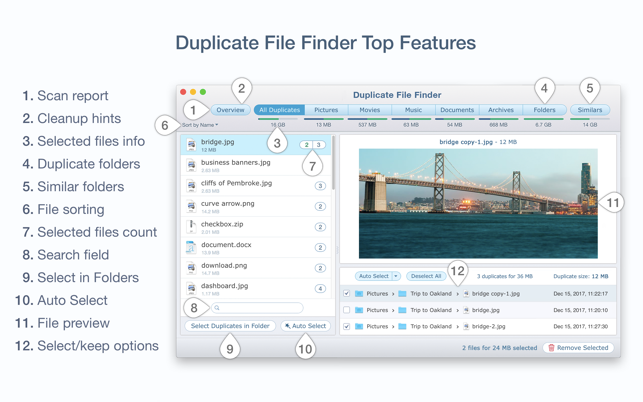
Nektony today releases Duplicate File Finder version 5.3 for macOS. Duplicate Finder can help anyone find and delete all duplicate files en masse. Files are categorized by types for images, videos, music, archives, documents & more. Every found file is displayed in a correspondening category with its location on the hard drive, a quick link to the Finder, as well with file preview. Version 5.3 allows users to easily organize and clean up tons of duplicates on Mac and on any external hard drive.
Odessa, Ukraine - Nektony today is proud to announce the release of Duplicate File Finder version 5.3. The application is addressed to those who are looking for the simplest way to remove duplicate content on macOS. Apart from the main option, the app allows users to compare similar folders and merge them, to view duplicates' removal history and even to select duplicates in bulk.
Usually, computer users may not even guess how many duplicate files exist on their disks and the significant space they take up on hard drives. Manual searching for duplicates is not so easy and takes up so much time. That's why Duplicate File Finder was created and new useful features for quick organizing and removing duplicates were added. Here are some of them:
* Select Duplicates in Folder - quickly select duplicates in bulk in particular folders
* Merge Folders - find similar folders, compare duplicate and unique files in them and merge the content
* View Duplicates' Removal History - restore removed duplicates from Trash
All you need do to find duplicates is to add multiple folders or disks and click to start scanning them. In less than in a minute, the app will provide a visual report of all the duplicates found. Moreover, the app can find hidden duplicate files and similar folders. With a wide set of the app's features, it's super easy and quick to get rid of unneeded duplicates: cleanup hints, file sorting, file previews, smart autoselect, select/keep options and others.
System Requirements:
* OS X 10.9 or later
* 64-bit processor
* 15.5 MB
Pricing and Availability:
Duplicate File Finder 5.3 is Free to download from the Mac App Store and allows the users to remove duplicates files. The Pro version is available with in-App purchase for $4.99 (USD) and allows the users to remove duplicate folders and merge folders. For more information, please contact Alex Cormack.
Duplicate File Finder 5.3: https://nektony.com/duplicate-finder-free
Download from the Mac App Store: https://itunes.apple.com/app/duplicate-file-finder-remover/id1032755628
Screenshot: https://is4-ssl.mzstatic.com/image/thumb/Purple128/v4/18/87/17/18871757-0ee6-9e42-6470-41b38d1586e4/pr_source.png/643x0w.png
Application Icon: https://is5-ssl.mzstatic.com/image/thumb/Purple118/v4/d9/73/ef/d973ef71-fb25-9986-ef76-589ed37ddd74/icons_finder.png/246x0w.png
Press Kit (zip): https://nektony.com/download/press/PressKit_Duplicate_File_Finder_Nektony.zip
Nektony is a software development company with a commitment to release functional, stable and efficient applications for iOS and macOS. Our main focus is to help users to optimize Mac performance and keep the HD clean from junk files. Particular attention is paid to app usability and quality. As a result, our highly skilled team creates the most helpful Mac tools for computer geeks. Copyright (C) 2018 Nektony. All Rights Reserved. Apple, the Apple logo, Macintosh, Mac, iOS and iPad are registered trademarks of Apple Inc. in the U.S. and/or other countries. All other trademarks and registered trademarks mentioned in this press release are the properties of their respective owners.
*******
Link To Article: https://prmac.com/release-id-82698.htm
*******
---------------------------------------------------------------------------------
Note that you can alter delivered distributions at any time.
Login to your account on prMac to alter your channel selection, or to opt-out at any time.
New Advanced Version of Duplicate File Finder from Nektony - Published on 05/21/18
Nektony today releases Duplicate File Finder version 5.3 for macOS. Duplicate Finder can help anyone find and delete all duplicate files en masse. Files are categorized by types for images, videos, music, archives, documents & more. Every found file is displayed in a correspondening category with its location on the hard drive, a quick link to the Finder, as well with file preview. Version 5.3 allows users to easily organize and clean up tons of duplicates on Mac and on any external hard drive.
Odessa, Ukraine - Nektony today is proud to announce the release of Duplicate File Finder version 5.3. The application is addressed to those who are looking for the simplest way to remove duplicate content on macOS. Apart from the main option, the app allows users to compare similar folders and merge them, to view duplicates' removal history and even to select duplicates in bulk.
Usually, computer users may not even guess how many duplicate files exist on their disks and the significant space they take up on hard drives. Manual searching for duplicates is not so easy and takes up so much time. That's why Duplicate File Finder was created and new useful features for quick organizing and removing duplicates were added. Here are some of them:
* Select Duplicates in Folder - quickly select duplicates in bulk in particular folders
* Merge Folders - find similar folders, compare duplicate and unique files in them and merge the content
* View Duplicates' Removal History - restore removed duplicates from Trash
All you need do to find duplicates is to add multiple folders or disks and click to start scanning them. In less than in a minute, the app will provide a visual report of all the duplicates found. Moreover, the app can find hidden duplicate files and similar folders. With a wide set of the app's features, it's super easy and quick to get rid of unneeded duplicates: cleanup hints, file sorting, file previews, smart autoselect, select/keep options and others.
System Requirements:
* OS X 10.9 or later
* 64-bit processor
* 15.5 MB
Pricing and Availability:
Duplicate File Finder 5.3 is Free to download from the Mac App Store and allows the users to remove duplicates files. The Pro version is available with in-App purchase for $4.99 (USD) and allows the users to remove duplicate folders and merge folders. For more information, please contact Alex Cormack.
Duplicate File Finder 5.3: https://nektony.com/duplicate-finder-free
Download from the Mac App Store: https://itunes.apple.com/app/duplicate-file-finder-remover/id1032755628
Screenshot: https://is4-ssl.mzstatic.com/image/thumb/Purple128/v4/18/87/17/18871757-0ee6-9e42-6470-41b38d1586e4/pr_source.png/643x0w.png
Application Icon: https://is5-ssl.mzstatic.com/image/thumb/Purple118/v4/d9/73/ef/d973ef71-fb25-9986-ef76-589ed37ddd74/icons_finder.png/246x0w.png

Press Kit (zip): https://nektony.com/download/press/PressKit_Duplicate_File_Finder_Nektony.zip
Nektony is a software development company with a commitment to release functional, stable and efficient applications for iOS and macOS. Our main focus is to help users to optimize Mac performance and keep the HD clean from junk files. Particular attention is paid to app usability and quality. As a result, our highly skilled team creates the most helpful Mac tools for computer geeks. Copyright (C) 2018 Nektony. All Rights Reserved. Apple, the Apple logo, Macintosh, Mac, iOS and iPad are registered trademarks of Apple Inc. in the U.S. and/or other countries. All other trademarks and registered trademarks mentioned in this press release are the properties of their respective owners.
*******
Link To Article: https://prmac.com/release-id-82698.htm
*******
---------------------------------------------------------------------------------
Note that you can alter delivered distributions at any time.
Login to your account on prMac to alter your channel selection, or to opt-out at any time.
Subscribe to:
Posts (Atom)