A new article has been published at prMac.
Intergalactic shooter Space Pioneer out now on iOS - Published on 05/31/18
Vivid Games today releases Space Pioneer 1.0.1, the company's latest game title for iOS devices. Budding bounty hunters choose choose from a deadly arsenal of shotguns, flamethrowers, laser blasters and grenade launchers and more, each with their own upgrade path for enhanced killing power. The game prides itself on its infinite galaxies of gorgeous yet hostile worlds to explore, populated by swarms of ferocious aliens and complimented by a pulsating sci-fi electro-pop soundtrack.
Bydgoszcz, Poland - Launching today on iOS, Space Pioneer has been developed by the award-winning game publisher and developer Vivid Games, creator of the Real Boxing series. The game prides itself on its infinite galaxies of gorgeous yet hostile worlds to explore, populated by swarms of ferocious aliens and complimented by a pulsating sci-fi electro-pop soundtrack.
Budding bounty hunters who choose to take up arms in the pursuit of fame, riches and the satisfaction of an extermination job will get to choose from a deadly arsenal of shotguns, flamethrowers, laser blasters and grenade launchers and more - each with their own upgrade path for enhanced killing power. Players can also select different support load-outs, including portable gun turrets and an Orbital Strike for when the brown stuff hits the fan. Players overwhelmed by the alien onslaught can rely on their trusty robot sidekick to provide additional cover fire as well as the familiar witty quote or two. As players progress through different worlds, they'll be able to unlock skills to boost their offensive and defensive capabilities including increased firepower and shield enhancements.
From dense jungle planets to dry, canyon-filled landscapes, wannabe alien hunters will get up close and personal with a menagerie of overgrown bugs, flesh-eating plants and giant robots - all with a juicy price on their heads/thoraxes/tentacles. With each planet seemingly conquered, players will come face-to-face with the game's main antagonist Xeldar, a multi-legged behemoth who grows stronger with each encounter.
Space Pioneer also features a vast variety of mission types and objectives from item-recovery to ship repairs. Gamers can also form their own space base to build and upgrade different building types, including the armoury for high-grade armour and the workshop for companion upgrades. Upgrades also provide striking visual changes to characters.
Players annihilating enemies at a rapid pace can further their war efforts by taking part in Horde Mode, a sophisticated wave-based mode in which gamers must do all that they can to survive against a barrage of different enemies to reign supreme.
Vivid Games will be publishing a number of additional titles in 2018 including platform fighter Mayhem Combat(TM) featuring an array of characters, elemental powers and multiplayer modes launching June 2018 and 3D racer Gravity Rider(TM), challenging players to speed through tracks featuring realistic physics-based obstacles coming August 2018.
Supported Languages:
Space Pioneer supports English, Chinese, Danish, Dutch, French, German, Italian, Japanese, Korean, Polish, Portuguese, Russian, Simplified Chinese, Spanish, Swedish, Thai and Traditional Chinese languages.
Device Requirements:
* iPhone, iPad, and iPod touch
* Requires iOS 10.0 or later
* 252.2 MB
Pricing and Availability:
Space Pioneer 1.0.1 is Free (With In-App Purchases) and available worldwide exclusively through the App Store in the Games category.
Vivid Games: http://www.vividgames.com
Space Pioneer 1.0.1: https://www.spacepioneergame.com/
Download from iTunes: https://itunes.apple.com/app/space-pioneer/id1204790625
Media Assets: https://drive.google.com/drive/folders/1ioIlyyPWMbryn17qwge1Do2op9IMoUSr?usp=sharing
Vivid Games with its global reach is one of the leading Polish mobile game developers. For over a decade, the studio has been working on some amazing products including Real Boxing, the world's most successful mobile boxing franchise. Vivid Games has been recognized for its achievements as the "Best Indie Developer", "Best Polish Game of the Year", and with Apple's prestigious "Editors' Choice." The company's world-class titles Real Boxing(TM) and Godfire(TM): Rise of Prometheus have been downloaded over 50M times across a variety of platforms to date. Vivid Games S.A. is also a public company listed on the Warsaw Stock Exchange in Poland, having offices in Bydgoszcz and Warsaw. All Material and Software (C) Copyright 2018 Vivid Games S.A. All Rights Reserved. Apple, the Apple logo, iPhone, iPod and iPad are registered trademarks of Apple Inc. in the U.S. and/or other countries. Other trademarks and registered trademarks may be the property of their respective owners.
*******
Link To Article: https://prmac.com/release-id-82739.htm
*******
---------------------------------------------------------------------------------
Note that you can alter delivered distributions at any time.
Login to your account on prMac to alter your channel selection, or to opt-out at any time.

Visual Thinkers Can Create Modern, GDPR-Compliant Websites Using Sparkle
A new article has been published at prMac.
Visual Thinkers Can Create Modern, GDPR-Compliant Websites Using Sparkle - Published on 05/31/18
Florence-based indy development team, River SRL today announces Sparkle 2.6.1, a significant update to their powerful visual web design application for macOS. Sparkle allows anyone to create modern, beautiful, GDPR-complaint websites in a fully visual way, with no need for knowledge of HTML or technical jargon. In addition to privacy enhancements, version 2.6.1 brings enhanced site generation, contributing to higher performance metrics.
Florence, Italy - Independent development team, River SRL today is proud to announce the release and immediate availability of Sparkle 2.6.1, an important update to their visual web designer for macOS systems. Sparkle allows anyone to easily build beautiful, GDPR-complaint websites with no knowledge of HTML or CSS, and no need to be restrained by canned templates or pre-built layouts.
Sparkle is an easy-to-use site builder that provides an intuitive interface. The app is perfect for creating every type of website, ranging from personal, to fan sites to business and client websites. The app allows users to create pages quickly, providing and excellent way to test design ideas in a fast and efficient way.
"Designing a responsive, attractive GDPR-complaint site can be so complex that many users simply give up on the idea. Or, they opt for a cookie cutter design provided by a WordPress template used by thousands of other websites", says River SRL co-founder Duncan Wilcox. "We designed Sparkle to be used by the visual thinker that wants to publish a GDPR-complaint website without thinking about the technical details."
Features Include:
* A fully freeform canvas that makes the app the perfect choice for visual thinkers
* Drag-and-drop to add images, videos, MP3 music, downloadable files, and more
* Easy access to hundreds of web fonts
* Simple, yet powerful visual contact form creator
* Built-in Google Maps generator
* Design responsive websites for desktop, tablet, and smartphone screens
* Live preview the site on any computer or mobile device
* Ecommerce tools integrate with Shopify, PayPal, and many other payment solutions
* Advanced SEO tools, analytics and tag manager
* Twitter and Facebook sharing capabilities
* Built-in site verification, robots.txt, and sitemap.xml
* Produces fully-optimized code
* Built-in incremental FTP capabilities
* Native macOS interface
* Closely integrated with other Mac apps
* Supports English, German, French, Italian, Dutch, Spanish, Chinese, and Japanese
* Much more
Sparkle's freeform canvas interface is designed to be like a graphic design app instead of a code-based website development app. Sparkle's design makes it easy for users to focus on content and layout, quickly adding galleries, video, audio, maps, social buttons, and downloadable files.
Sparkle 2.6.1 also offers the best in class in privacy compliance, extending the integrated privacy/cookie banner with these features:
* Fonts are now stored only on the local site, not referenced from Google fonts
* All third-party content is blocked until cookies are consented to
* Embedded code is subject to activation after cookie consent by default
* By default, the page address is not leaked when loading third-party content
The new version of Sparkle also provides a significant performance boost over previous versions. Sparkle sites now generally rate a 100/100 score on Google's PageSpeed Insights.
What's new in Sparkle 2.6.1:
* A new publishing engine is faster and offers better compatibility with web hosts
* A new publishing cache, to limit image re-generation
* Per-page language designation, and language variant (hreflang) support, which is picked up by search engines
* Text style for checkboxes and radio buttons
* Option to hide sidebar thumbnails
* New in-app text search window
* New option to make radio buttons required
* 90 new web fonts built-in
* An improved custom font installer
* Deferred loading of resources that can delay page rendering
* Inlining of critical CSS
* Fonts now encoded in the more compact woff and woff2 file formats
* Images are always compressed with a higher compression algorithm.
Users love Sparkle:
"Sparkle has been awesome. A real godsend. Truly fantastic." - Sebastiaan de With, Graphic Designer
"When I discovered Sparkle it just blew my mind and I felt like dancing!" - Peter Bladskog, Photographer
"Sparkle is very much what I was looking for the last 10 years" - Daniel Schoeneck, Design Teacher, Bern University of the Arts
Sparkle Free is a full-featured totally free app, allowing users to publish a single site, with a total of 3 pages. A "Made with Sparkle" banner will be present on the pages in the free version. Sparkle One is available as a one-time $44.99 USD purchase, and allows publishing of a single site, with no page limit or Sparkle branding. Sparkle Pro is available as a one-time $89.99 USD purchase, and allows publishing unlimited sites, and the ability to export sites to disk with no page limit and no branding. Multi-User licenses are also available.
System Requirements:
* macOS 10.9 Mavericks or later
* Optimized for macOS 10.13 High Sierra
* 35.6 MB
Pricing and Availability:
Sparkle 2.6.1 is free and is available worldwide through the Mac App Store in the Graphics and Design category. The app is also available from the Sparkle website. Expanded capabilities are available as one-time purchases. Redeem codes are available to journalists upon request. Contact Duncan Wilcox for more information.
Sparkle 2.6.1: https://sparkleapp.com
More Information: https://sparkleapp.com/blog/introducing-sparkle-2.6.html
Download on the Mac App Store: https://itunes.apple.com/app/sparkle-pro-visual-web-design/id863015334
Media Assets: https://sparkleapp.com/presskit
Based in beautiful Florence, Italy, River SRL is a new privately funded company founded in 2011. With a passion for user interface design and utility, River brings five years of Cocoa development experience to the iPhone platform. Copyright 2011-2014 River SRL. All Rights Reserved. Apple, the Apple logo, iPhone and iPod are registered trademarks of Apple Computer in the U.S. and/or other countries.
*******
Link To Article: https://prmac.com/release-id-82737.htm
*******
---------------------------------------------------------------------------------
Note that you can alter delivered distributions at any time.
Login to your account on prMac to alter your channel selection, or to opt-out at any time.
Visual Thinkers Can Create Modern, GDPR-Compliant Websites Using Sparkle - Published on 05/31/18
Florence-based indy development team, River SRL today announces Sparkle 2.6.1, a significant update to their powerful visual web design application for macOS. Sparkle allows anyone to create modern, beautiful, GDPR-complaint websites in a fully visual way, with no need for knowledge of HTML or technical jargon. In addition to privacy enhancements, version 2.6.1 brings enhanced site generation, contributing to higher performance metrics.
Florence, Italy - Independent development team, River SRL today is proud to announce the release and immediate availability of Sparkle 2.6.1, an important update to their visual web designer for macOS systems. Sparkle allows anyone to easily build beautiful, GDPR-complaint websites with no knowledge of HTML or CSS, and no need to be restrained by canned templates or pre-built layouts.
Sparkle is an easy-to-use site builder that provides an intuitive interface. The app is perfect for creating every type of website, ranging from personal, to fan sites to business and client websites. The app allows users to create pages quickly, providing and excellent way to test design ideas in a fast and efficient way.
"Designing a responsive, attractive GDPR-complaint site can be so complex that many users simply give up on the idea. Or, they opt for a cookie cutter design provided by a WordPress template used by thousands of other websites", says River SRL co-founder Duncan Wilcox. "We designed Sparkle to be used by the visual thinker that wants to publish a GDPR-complaint website without thinking about the technical details."
Features Include:
* A fully freeform canvas that makes the app the perfect choice for visual thinkers
* Drag-and-drop to add images, videos, MP3 music, downloadable files, and more
* Easy access to hundreds of web fonts
* Simple, yet powerful visual contact form creator
* Built-in Google Maps generator
* Design responsive websites for desktop, tablet, and smartphone screens
* Live preview the site on any computer or mobile device
* Ecommerce tools integrate with Shopify, PayPal, and many other payment solutions
* Advanced SEO tools, analytics and tag manager
* Twitter and Facebook sharing capabilities
* Built-in site verification, robots.txt, and sitemap.xml
* Produces fully-optimized code
* Built-in incremental FTP capabilities
* Native macOS interface
* Closely integrated with other Mac apps
* Supports English, German, French, Italian, Dutch, Spanish, Chinese, and Japanese
* Much more
Sparkle's freeform canvas interface is designed to be like a graphic design app instead of a code-based website development app. Sparkle's design makes it easy for users to focus on content and layout, quickly adding galleries, video, audio, maps, social buttons, and downloadable files.
Sparkle 2.6.1 also offers the best in class in privacy compliance, extending the integrated privacy/cookie banner with these features:
* Fonts are now stored only on the local site, not referenced from Google fonts
* All third-party content is blocked until cookies are consented to
* Embedded code is subject to activation after cookie consent by default
* By default, the page address is not leaked when loading third-party content
The new version of Sparkle also provides a significant performance boost over previous versions. Sparkle sites now generally rate a 100/100 score on Google's PageSpeed Insights.
What's new in Sparkle 2.6.1:
* A new publishing engine is faster and offers better compatibility with web hosts
* A new publishing cache, to limit image re-generation
* Per-page language designation, and language variant (hreflang) support, which is picked up by search engines
* Text style for checkboxes and radio buttons
* Option to hide sidebar thumbnails
* New in-app text search window
* New option to make radio buttons required
* 90 new web fonts built-in
* An improved custom font installer
* Deferred loading of resources that can delay page rendering
* Inlining of critical CSS
* Fonts now encoded in the more compact woff and woff2 file formats
* Images are always compressed with a higher compression algorithm.
Users love Sparkle:
"Sparkle has been awesome. A real godsend. Truly fantastic." - Sebastiaan de With, Graphic Designer
"When I discovered Sparkle it just blew my mind and I felt like dancing!" - Peter Bladskog, Photographer
"Sparkle is very much what I was looking for the last 10 years" - Daniel Schoeneck, Design Teacher, Bern University of the Arts
Sparkle Free is a full-featured totally free app, allowing users to publish a single site, with a total of 3 pages. A "Made with Sparkle" banner will be present on the pages in the free version. Sparkle One is available as a one-time $44.99 USD purchase, and allows publishing of a single site, with no page limit or Sparkle branding. Sparkle Pro is available as a one-time $89.99 USD purchase, and allows publishing unlimited sites, and the ability to export sites to disk with no page limit and no branding. Multi-User licenses are also available.
System Requirements:
* macOS 10.9 Mavericks or later
* Optimized for macOS 10.13 High Sierra
* 35.6 MB
Pricing and Availability:
Sparkle 2.6.1 is free and is available worldwide through the Mac App Store in the Graphics and Design category. The app is also available from the Sparkle website. Expanded capabilities are available as one-time purchases. Redeem codes are available to journalists upon request. Contact Duncan Wilcox for more information.
Sparkle 2.6.1: https://sparkleapp.com
More Information: https://sparkleapp.com/blog/introducing-sparkle-2.6.html
Download on the Mac App Store: https://itunes.apple.com/app/sparkle-pro-visual-web-design/id863015334
Media Assets: https://sparkleapp.com/presskit
Based in beautiful Florence, Italy, River SRL is a new privately funded company founded in 2011. With a passion for user interface design and utility, River brings five years of Cocoa development experience to the iPhone platform. Copyright 2011-2014 River SRL. All Rights Reserved. Apple, the Apple logo, iPhone and iPod are registered trademarks of Apple Computer in the U.S. and/or other countries.
*******
Link To Article: https://prmac.com/release-id-82737.htm
*******
---------------------------------------------------------------------------------
Note that you can alter delivered distributions at any time.
Login to your account on prMac to alter your channel selection, or to opt-out at any time.
Rain Design launches new mBar series for laptops
A new article has been published at prMac.
Rain Design launches new mBar series for laptops - Published on 05/30/18
California based Rain Design today launches a new assortment of laptop stands - the mBar, mBar pro and mBar pro+. mBar is a lightweight, minimalist aluminum stand for elevating laptops. mBar pro and mBar pro+ have the added feature of foldability and thus portability, with different elevation heights of 3 inches and 5.5 inches, respectively. The mBar series are shipping now, and are available in both silver and space gray.
Berkeley, California - With 15 years of experience in creating innovative Apple accessories, Rain Design launches a new assortment of laptop stands - the mBar, mBar pro and mBar pro . mBar is a lightweight, minimalist aluminum stand for elevating laptops. mBar pro and mBar pro have the added feature of foldability and thus portability, with different elevation heights of 3 inches and 5.5 inches, respectively.
mBar:
See better. Touch better. mBar raises and tilts your Macbook, makes viewing, typing and swiping on the Touch Bar easier. mBar's minimal design with clean lines and subtle curves complements your Macbook and enhances your workspace.
Features:
* Elevates laptop by 3 inches
* Lightweight: 0.22 pound
* Macbook matching anodized aluminum
* Increases airflow around laptop for better cooling
* Fits most laptops
mBar pro:
Take it easy. Designed to let you work comfortably, on the go. mBar pro raises and tilts your Macbook, makes viewing, typing and swiping on the Touch Bar easier. mBar pro's minimal design complements your Macbook. It's so portable, lightweight and easy to use that you will be happy to bring it with you anywhere.
Features:
* Portable folding stand
* Lightweight and slim: 0.3 pound and 0.5 inch when folded
* Precision aluminum unibody, anodized to match Macbooks
* Elevates laptop by 3 inches
* Includes svelte carrying sleeve
* Increases airflow around laptop for better cooling
* Fits most laptops
mBar pro+:
Take it easy. Designed to let you work comfortably, on the go. mBar pro+ raises and tilts your Macbook, makes viewing, typing and swiping on the Touch Bar easier. mBar pro+'s minimal design complements your Macbook. It's so portable, lightweight and easy to use that you will be happy to bring it with you anywhere.
Features
* Portable folding stand
* Lightweight and slim: 0.45 pound and 0.5 inch when folded
* Precision aluminum unibody, anodized to match Macbooks
* Elevates laptop by 5.5 inches
* Includes svelte carrying sleeve
* Increases airflow around laptop for better cooling
* Fits most laptops
The mBar series are available in both silver and space gray. Shipping now. Patents pending.
Rain Design: https://www.raindesigninc.com/
mBar : https://www.raindesigninc.com/mbar.html
mBar pro: https://www.raindesigninc.com/mbarpro.html
mBar pro+: https://www.raindesigninc.com/mbarpro+.html
Purchase mBar: https://www.raindesigninc.com/buy/mbar.html
Purchase mBar pro: https://www.raindesigninc.com/buy/mbar-pro.html
Rain Design was founded in San Francisco by friends from different backgrounds with the same vision of creating cool, original and user-friendly products. Since 2003, Rain Design has been creating patented, award-winning accessories, designed for Apple iMac/Macbook/iPad/iPhone and compatible with all devices. Rain Design ergonomic stands are No.1 Best Seller worldwide. Rain Design sells through global distribution channels and have office/fulfillment centers in California (USA), Netherlands (Europe) and Singapore (Asia). All Material and Software (C) Copyright 2003-2016 Rain Design Inc. All Rights Reserved. Apple, the Apple logo, OS X, iPhone, iPod, iPad and Macbook are registered trademarks of Apple Inc. in the U.S. and/or other countries. Other trademarks and registered trademarks may be the property of their respective owners.
*******
Link To Article: https://prmac.com/release-id-82736.htm
*******
---------------------------------------------------------------------------------
Note that you can alter delivered distributions at any time.
Login to your account on prMac to alter your channel selection, or to opt-out at any time.
Rain Design launches new mBar series for laptops - Published on 05/30/18
California based Rain Design today launches a new assortment of laptop stands - the mBar, mBar pro and mBar pro+. mBar is a lightweight, minimalist aluminum stand for elevating laptops. mBar pro and mBar pro+ have the added feature of foldability and thus portability, with different elevation heights of 3 inches and 5.5 inches, respectively. The mBar series are shipping now, and are available in both silver and space gray.
Berkeley, California - With 15 years of experience in creating innovative Apple accessories, Rain Design launches a new assortment of laptop stands - the mBar, mBar pro and mBar pro . mBar is a lightweight, minimalist aluminum stand for elevating laptops. mBar pro and mBar pro have the added feature of foldability and thus portability, with different elevation heights of 3 inches and 5.5 inches, respectively.
mBar:
See better. Touch better. mBar raises and tilts your Macbook, makes viewing, typing and swiping on the Touch Bar easier. mBar's minimal design with clean lines and subtle curves complements your Macbook and enhances your workspace.
Features:
* Elevates laptop by 3 inches
* Lightweight: 0.22 pound
* Macbook matching anodized aluminum
* Increases airflow around laptop for better cooling
* Fits most laptops
mBar pro:
Take it easy. Designed to let you work comfortably, on the go. mBar pro raises and tilts your Macbook, makes viewing, typing and swiping on the Touch Bar easier. mBar pro's minimal design complements your Macbook. It's so portable, lightweight and easy to use that you will be happy to bring it with you anywhere.
Features:
* Portable folding stand
* Lightweight and slim: 0.3 pound and 0.5 inch when folded
* Precision aluminum unibody, anodized to match Macbooks
* Elevates laptop by 3 inches
* Includes svelte carrying sleeve
* Increases airflow around laptop for better cooling
* Fits most laptops
mBar pro+:
Take it easy. Designed to let you work comfortably, on the go. mBar pro+ raises and tilts your Macbook, makes viewing, typing and swiping on the Touch Bar easier. mBar pro+'s minimal design complements your Macbook. It's so portable, lightweight and easy to use that you will be happy to bring it with you anywhere.
Features
* Portable folding stand
* Lightweight and slim: 0.45 pound and 0.5 inch when folded
* Precision aluminum unibody, anodized to match Macbooks
* Elevates laptop by 5.5 inches
* Includes svelte carrying sleeve
* Increases airflow around laptop for better cooling
* Fits most laptops
The mBar series are available in both silver and space gray. Shipping now. Patents pending.
Rain Design: https://www.raindesigninc.com/
mBar : https://www.raindesigninc.com/mbar.html
mBar pro: https://www.raindesigninc.com/mbarpro.html
mBar pro+: https://www.raindesigninc.com/mbarpro+.html
Purchase mBar: https://www.raindesigninc.com/buy/mbar.html
Purchase mBar pro: https://www.raindesigninc.com/buy/mbar-pro.html
Rain Design was founded in San Francisco by friends from different backgrounds with the same vision of creating cool, original and user-friendly products. Since 2003, Rain Design has been creating patented, award-winning accessories, designed for Apple iMac/Macbook/iPad/iPhone and compatible with all devices. Rain Design ergonomic stands are No.1 Best Seller worldwide. Rain Design sells through global distribution channels and have office/fulfillment centers in California (USA), Netherlands (Europe) and Singapore (Asia). All Material and Software (C) Copyright 2003-2016 Rain Design Inc. All Rights Reserved. Apple, the Apple logo, OS X, iPhone, iPod, iPad and Macbook are registered trademarks of Apple Inc. in the U.S. and/or other countries. Other trademarks and registered trademarks may be the property of their respective owners.
*******
Link To Article: https://prmac.com/release-id-82736.htm
*******
---------------------------------------------------------------------------------
Note that you can alter delivered distributions at any time.
Login to your account on prMac to alter your channel selection, or to opt-out at any time.
Twocanoes Releases Winclone 7 Boot Camp Imaging App for macOS
A new article has been published at prMac.
Twocanoes Releases Winclone 7 Boot Camp Imaging App for macOS - Published on 05/30/18
Twocanoes Software has released Winclone 7, a major upgrade to its award-winning Boot Camp imaging and migration software for the Mac. Fully compatible with Windows 7, Windows 8, and Windows 10, Winclone makes it easy to clone, migrate, and backup Windows installed on a Mac. Winclone 7 features incremental imaging, a brand new interface, support for Microsoft MDT/SCCM and automatic configuration of Windows during the imaging process.
Naperville, Illinois - Twocanoes Software has released Winclone 7, an upgrade to its award-winning Boot Camp imaging and migration software for the Mac. Winclone 7 features incremental imaging, a brand new interface, support for Microsoft MDT/SCCM and automatic configuration of Windows during the imaging process.
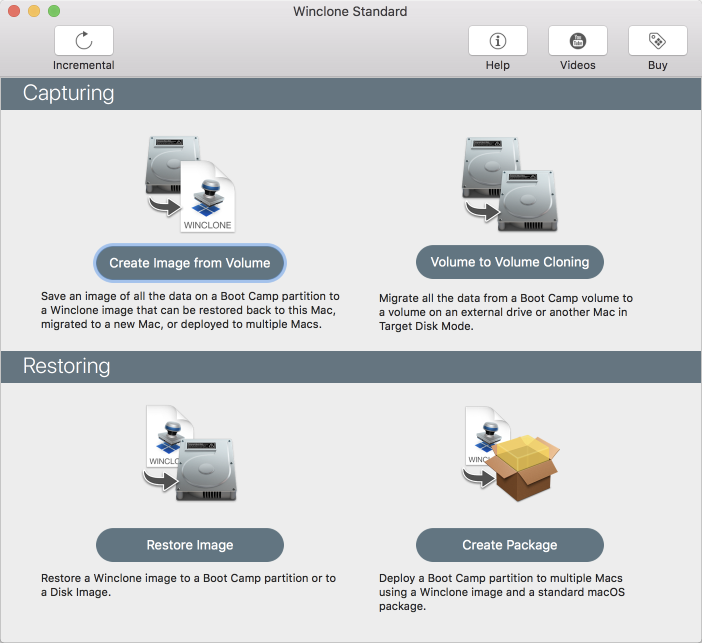
Winclone 7 for macOS creates an exact clone of the Boot Camp partition for use as a backup or to migrate a Boot Camp partition to a new Mac. If disaster strikes, restore Boot Camp from a Winclone image and instantly be back up and running.
Winclone Pro and Winclone Enterprise enables package deployment of Windows on Mac hardware. Using Mac client management suites, deploy Boot Camp partitions as easily as installing a software package.
Winclone Pro Enterprise adds in subscription pricing and support for Microsoft MDT/SCCM deployments. Winclone Pro Enterprise uses your IT organizations' current infrastructure to deploy Windows on Mac hardware.
Winclone 7 is available in three editions:
Winclone Standard:
Protect all the time and energy you spent getting Windows and all your programs installed and set up in Boot Camp. Create a Winclone image of your Boot Camp partition and snap back to that same setup in minutes. Winclone 7 now features incremental cloning for fast updates to existing images.
Winclone Pro:
Winclone Pro saves package installers that create a Boot Camp partition and restore a Winclone image to the new partition. Winclone packages can be deployed using any client management system that can deploy macOS packages. If you can install a package, you can deploy a Boot Camp partition.
Winclone Pro Enterprise:
Winclone Enterprise enables you to use your IT organizations' current infrastructure to deploy Windows on Mac hardware. Run Task Sequences from Microsoft MDT or SCCM to fully image Windows on to the Mac. If your users are remote, Winclone Enterprise supports image customization that will fully configure and setup Windows on the Mac. Winclone Pro Enterprise features the same great software as Winclone Pro and adds Enterprise integration support and subscription pricing.
System Requirements:
* Boot Camp Partition
* Mac OS X 10.12 or later including macOS High Sierra
* Windows 10, Windows 8.1
* Windows 7 (64-bit) on supported Mac hardware
* An Internet connection is required to verify your license key
Pricing and Availability:
Winclone 7 (all editions) is available worldwide today. Winclone Standard is USD $39.99 and includes licenses for 2 Macs. Winclone Pro is USD $499.99 for 50 clients and includes perpetual licensing and standard support. Winclone Pro Enterprise is $5 per Mac per year and features subscription-based licensing and enterprise integration support (minimum 200 clients).
Twocanoes Software: https://twocanoes.com
Winclone 7: https://twocanoes.com/winclone
Screenshot: https://twocanoes-app-resources.s3.amazonaws.com/winclone7/Winclone7-MainWindow.png
Application Icon: https://twocanoes-app-resources.s3.amazonaws.com/winclone7/winclone7icon.png
Based in Naperville, Illinois, Twocanoes Software was founded by Timothy Perfitt in 2012. Focusing on iOS and macOS exclusively, Twocanoes provides customers with software to perform complex IT tasks with minimum effort. Copyright (C) 2012-2018 Twocanoes Software, Inc. All Rights Reserved. Apple, the Apple logo, iPhone, and iPod are registered trademarks of Apple Inc. in the U.S. and/or other countries. Other trademarks and registered trademarks may be the property of their respective owners.
*******
Link To Article: https://prmac.com/release-id-82735.htm
*******
---------------------------------------------------------------------------------
Note that you can alter delivered distributions at any time.
Login to your account on prMac to alter your channel selection, or to opt-out at any time.
Twocanoes Releases Winclone 7 Boot Camp Imaging App for macOS - Published on 05/30/18
Twocanoes Software has released Winclone 7, a major upgrade to its award-winning Boot Camp imaging and migration software for the Mac. Fully compatible with Windows 7, Windows 8, and Windows 10, Winclone makes it easy to clone, migrate, and backup Windows installed on a Mac. Winclone 7 features incremental imaging, a brand new interface, support for Microsoft MDT/SCCM and automatic configuration of Windows during the imaging process.
Naperville, Illinois - Twocanoes Software has released Winclone 7, an upgrade to its award-winning Boot Camp imaging and migration software for the Mac. Winclone 7 features incremental imaging, a brand new interface, support for Microsoft MDT/SCCM and automatic configuration of Windows during the imaging process.
Winclone 7 for macOS creates an exact clone of the Boot Camp partition for use as a backup or to migrate a Boot Camp partition to a new Mac. If disaster strikes, restore Boot Camp from a Winclone image and instantly be back up and running.
Winclone Pro and Winclone Enterprise enables package deployment of Windows on Mac hardware. Using Mac client management suites, deploy Boot Camp partitions as easily as installing a software package.
Winclone Pro Enterprise adds in subscription pricing and support for Microsoft MDT/SCCM deployments. Winclone Pro Enterprise uses your IT organizations' current infrastructure to deploy Windows on Mac hardware.
Winclone 7 is available in three editions:
Winclone Standard:
Protect all the time and energy you spent getting Windows and all your programs installed and set up in Boot Camp. Create a Winclone image of your Boot Camp partition and snap back to that same setup in minutes. Winclone 7 now features incremental cloning for fast updates to existing images.
Winclone Pro:
Winclone Pro saves package installers that create a Boot Camp partition and restore a Winclone image to the new partition. Winclone packages can be deployed using any client management system that can deploy macOS packages. If you can install a package, you can deploy a Boot Camp partition.
Winclone Pro Enterprise:
Winclone Enterprise enables you to use your IT organizations' current infrastructure to deploy Windows on Mac hardware. Run Task Sequences from Microsoft MDT or SCCM to fully image Windows on to the Mac. If your users are remote, Winclone Enterprise supports image customization that will fully configure and setup Windows on the Mac. Winclone Pro Enterprise features the same great software as Winclone Pro and adds Enterprise integration support and subscription pricing.
System Requirements:
* Boot Camp Partition
* Mac OS X 10.12 or later including macOS High Sierra
* Windows 10, Windows 8.1
* Windows 7 (64-bit) on supported Mac hardware
* An Internet connection is required to verify your license key
Pricing and Availability:
Winclone 7 (all editions) is available worldwide today. Winclone Standard is USD $39.99 and includes licenses for 2 Macs. Winclone Pro is USD $499.99 for 50 clients and includes perpetual licensing and standard support. Winclone Pro Enterprise is $5 per Mac per year and features subscription-based licensing and enterprise integration support (minimum 200 clients).
Twocanoes Software: https://twocanoes.com
Winclone 7: https://twocanoes.com/winclone
Screenshot: https://twocanoes-app-resources.s3.amazonaws.com/winclone7/Winclone7-MainWindow.png
Application Icon: https://twocanoes-app-resources.s3.amazonaws.com/winclone7/winclone7icon.png

Based in Naperville, Illinois, Twocanoes Software was founded by Timothy Perfitt in 2012. Focusing on iOS and macOS exclusively, Twocanoes provides customers with software to perform complex IT tasks with minimum effort. Copyright (C) 2012-2018 Twocanoes Software, Inc. All Rights Reserved. Apple, the Apple logo, iPhone, and iPod are registered trademarks of Apple Inc. in the U.S. and/or other countries. Other trademarks and registered trademarks may be the property of their respective owners.
*******
Link To Article: https://prmac.com/release-id-82735.htm
*******
---------------------------------------------------------------------------------
Note that you can alter delivered distributions at any time.
Login to your account on prMac to alter your channel selection, or to opt-out at any time.
Say Hello to Retrobatch, a Powerful Node-Based Batch Image Processor
A new article has been published at prMac.
Say Hello to Retrobatch, a Powerful Node-Based Batch Image Processor - Published on 05/30/18
Washington based Flying Meat Inc. releases Retrobatch 1.0, the company's new batch image processor for macOS. Retrobatch is dramatically different than any batch image processor ever seen, featuring a nodal interface for easily processing single images or thousands of images. Retrobatch includes machine learning and rules for sorting images, metadata editing, and a nonlinear workflow creating a powerful user interface for professional and amateur users alike.
Mukilteo, Washington - Flying Meat Inc. today is proud to announce the release and immediate availability of Retrobatch 1.0. the company's new batch image processor for macOS. Retrobatch is dramatically different than any batch image processor ever seen. Each operation in Retrobatch has a node, and nodes are linked together on a canvas to create a workflow.
But why node based? "Every batch image processor I've come across is linear." says Gus Mueller, founder of Flying Meat Inc. "You put images in one end, and out they come on the other side. But that's so limiting! With Retrobatch it's possible to take a folder of images and then operate on them multiple times within the same workflow. You can reference separate folders to combine images into a single output. Using nodes opens up unlimited possibilities."
In addition to including the great standard features of any batch processor such as changing file type, cropping, and watermarking, Retrobatch raises the bar by offering machine learning and classification models. Use rules to remove or sort images in a workflow based on attributes such as color profile, file format, size, and orientation. Which images in a workflow contain a hotdog? Or not? Retrobatch also includes the ability to install new domain specific models for precise image classifications. With these features, Retrobatch gives users a powerful means of sorting images for further processing.
Feature Highlights:
* Delete all metadata, or just remove GPS
* Set the image DPI, title, author, description, and copyright
* Edit specific metadata such as IPTC, EXIF, PNG, TIFF, and CIFF
* Scriptable: run AppleScript, and shell scripts
* Transform: crop, flip, rotate, scale to resize, trim edges to remove transparency
* Add text or image watermarks with over 20 different blending modes available.
* Use metadata tokens to quickly add metadata values as a watermark or as part of the file name
* Use preloaded templates or create and save customized templates
* Split multilayer and multipage images into individual images
* Combine images to create multipage PDF or multilayer PSD
* PNG compression and optimization
* Change or remove color profiles including RGB, CMYK, grayscale, DP3, and many more
* Color adjustments: saturation, brightness, contrast, exposure, gamma, vibrance, blurs, noise reduction
* Color effects: add a border, drop shadow, matte, sharpening, and over 10 photo filter effects
* Multiscale for web optimization and icon design
* Generate screenshots
* Open RAW file types and any image file supported by macOS
* Read images from the clipboard, Photos library, folders, and subfolders
* Write images to the clipboard, folders, or open in other apps
With its unique and user-friendly interface, Retrobatch easily handles both simple and complex image processing needs. Examples of time saving operations in Retrobatch include:
* Photographers can edit and add metadata to their image files, then apply the metadata as a watermark
* Users can remove GPS and other privacy sensitive and identifying information from images before uploading to social sites
* Web developers can optimize images for retina display by creating one workflow branch to resize images to 50%, and another branch to write out PNG files with the @2x suffix added to the file name
There are two versions of Retrobatch- Regular and Pro. Pro has all the available nodes, including advanced features such as machine learning, changing bit depths and color profiles, processing with AppleScript and shell scripts, rules, and advanced metadata entry. The Regular version features the basics including cropping, resizing, watermarks, and changing image file formats. "Customers appreciate having a choice" says Mueller. "And with a free trial, they can decide which version best meets their needs with the option to upgrade in the future."
Language Support
* English
System Requirements:
* MacOS 10.12 Sierra or later
* Machine Learning and Classification Node requires MacOS 10.13 High Sierra or later
Pricing and Availability:
Retrobatch Pro 1.0 is only $49.99 (USD), and Retrobatch with slimmed down features is available for $29.99. Both are available to be directly purchased online from the Flying Meat Inc website. A free 14 day trial with all features included is available for download.
Flying Meat: http://flyingmeat.com/
Retrobatch 1.0: https://flyingmeat.com/retrobatch/
Download Retrobatch: https://flyingmeat.com/download/Retrobatch.zip
Purchase Retrobatch: https://flyingmeat.com/store/
YouTube Video (Intro): https://www.youtube.com/watch?v=EOQ7RQ7MSbk
Screenshot: https://flyingmeat.com/retrobatch/images/ss1_export.png?-592788768294327
Flying Meat Inc. is a mom and pop software company just north of Seattle, Washington. The company was founded in 2003 by Gus Mueller with a single idea- to make a better Mac application. That idea was first realized with the award winning desktop wiki named VoodooPad, and later on with FlySketch and FlyGesture. In 2007 Flying Meat released Acorn - the Image Editor for Humans. Flying Meat continues to make innovative and unique software with its 2018 release of Retrobatch, a node-based batch image processor. All Material and Software (C) Copyright 2018 Flying Meat Inc. All Rights Reserved. Apple, the Apple logo, and macOS are registered trademarks of Apple Inc. in the U.S. and/or other countries. Other trademarks and registered trademarks may be the property of their respective owners.
*******
Link To Article: https://prmac.com/release-id-82734.htm
*******
---------------------------------------------------------------------------------
Note that you can alter delivered distributions at any time.
Login to your account on prMac to alter your channel selection, or to opt-out at any time.
Say Hello to Retrobatch, a Powerful Node-Based Batch Image Processor - Published on 05/30/18
Washington based Flying Meat Inc. releases Retrobatch 1.0, the company's new batch image processor for macOS. Retrobatch is dramatically different than any batch image processor ever seen, featuring a nodal interface for easily processing single images or thousands of images. Retrobatch includes machine learning and rules for sorting images, metadata editing, and a nonlinear workflow creating a powerful user interface for professional and amateur users alike.
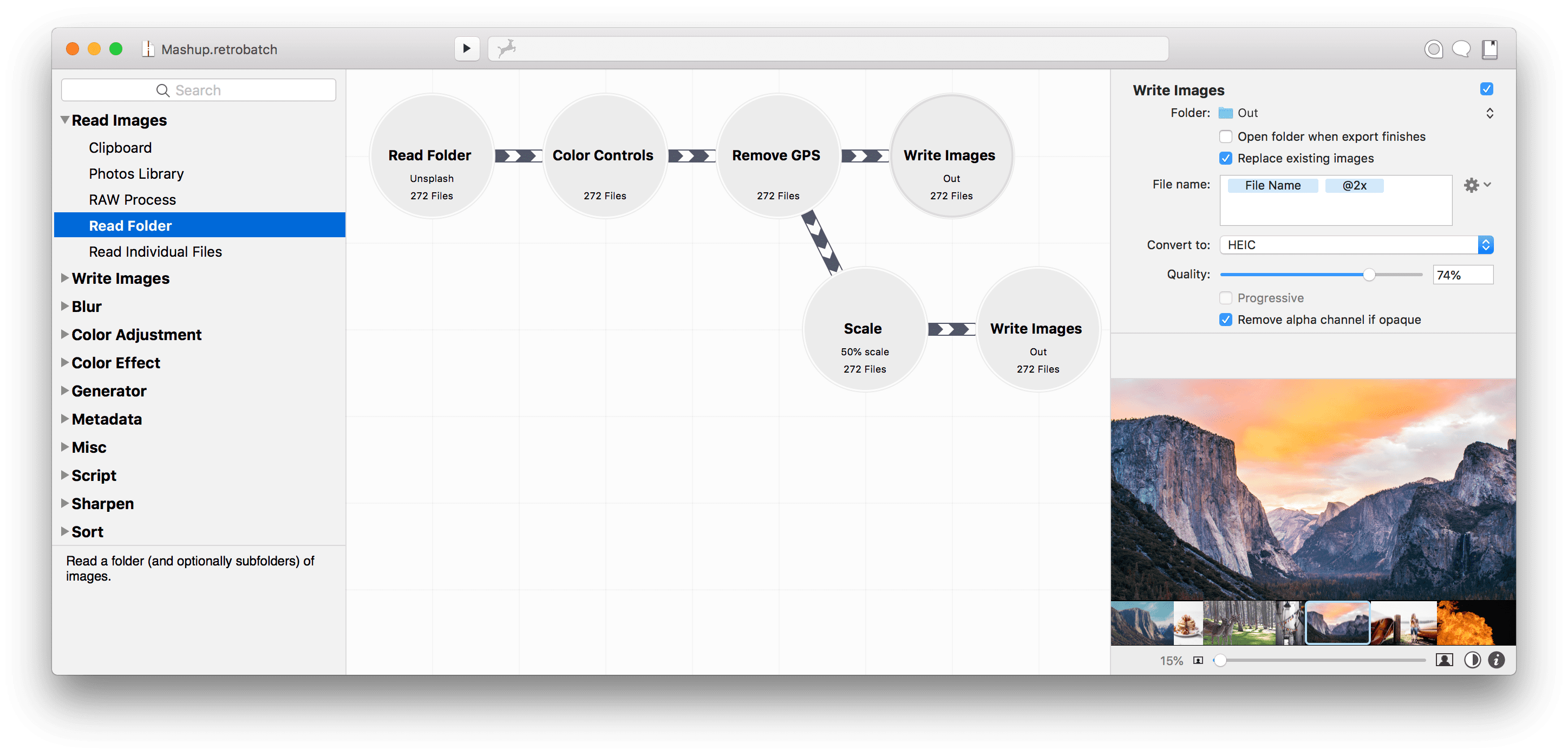
Mukilteo, Washington - Flying Meat Inc. today is proud to announce the release and immediate availability of Retrobatch 1.0. the company's new batch image processor for macOS. Retrobatch is dramatically different than any batch image processor ever seen. Each operation in Retrobatch has a node, and nodes are linked together on a canvas to create a workflow.
But why node based? "Every batch image processor I've come across is linear." says Gus Mueller, founder of Flying Meat Inc. "You put images in one end, and out they come on the other side. But that's so limiting! With Retrobatch it's possible to take a folder of images and then operate on them multiple times within the same workflow. You can reference separate folders to combine images into a single output. Using nodes opens up unlimited possibilities."
In addition to including the great standard features of any batch processor such as changing file type, cropping, and watermarking, Retrobatch raises the bar by offering machine learning and classification models. Use rules to remove or sort images in a workflow based on attributes such as color profile, file format, size, and orientation. Which images in a workflow contain a hotdog? Or not? Retrobatch also includes the ability to install new domain specific models for precise image classifications. With these features, Retrobatch gives users a powerful means of sorting images for further processing.
Feature Highlights:
* Delete all metadata, or just remove GPS
* Set the image DPI, title, author, description, and copyright
* Edit specific metadata such as IPTC, EXIF, PNG, TIFF, and CIFF
* Scriptable: run AppleScript, and shell scripts
* Transform: crop, flip, rotate, scale to resize, trim edges to remove transparency
* Add text or image watermarks with over 20 different blending modes available.
* Use metadata tokens to quickly add metadata values as a watermark or as part of the file name
* Use preloaded templates or create and save customized templates
* Split multilayer and multipage images into individual images
* Combine images to create multipage PDF or multilayer PSD
* PNG compression and optimization
* Change or remove color profiles including RGB, CMYK, grayscale, DP3, and many more
* Color adjustments: saturation, brightness, contrast, exposure, gamma, vibrance, blurs, noise reduction
* Color effects: add a border, drop shadow, matte, sharpening, and over 10 photo filter effects
* Multiscale for web optimization and icon design
* Generate screenshots
* Open RAW file types and any image file supported by macOS
* Read images from the clipboard, Photos library, folders, and subfolders
* Write images to the clipboard, folders, or open in other apps
With its unique and user-friendly interface, Retrobatch easily handles both simple and complex image processing needs. Examples of time saving operations in Retrobatch include:
* Photographers can edit and add metadata to their image files, then apply the metadata as a watermark
* Users can remove GPS and other privacy sensitive and identifying information from images before uploading to social sites
* Web developers can optimize images for retina display by creating one workflow branch to resize images to 50%, and another branch to write out PNG files with the @2x suffix added to the file name
There are two versions of Retrobatch- Regular and Pro. Pro has all the available nodes, including advanced features such as machine learning, changing bit depths and color profiles, processing with AppleScript and shell scripts, rules, and advanced metadata entry. The Regular version features the basics including cropping, resizing, watermarks, and changing image file formats. "Customers appreciate having a choice" says Mueller. "And with a free trial, they can decide which version best meets their needs with the option to upgrade in the future."
Language Support
* English
System Requirements:
* MacOS 10.12 Sierra or later
* Machine Learning and Classification Node requires MacOS 10.13 High Sierra or later
Pricing and Availability:
Retrobatch Pro 1.0 is only $49.99 (USD), and Retrobatch with slimmed down features is available for $29.99. Both are available to be directly purchased online from the Flying Meat Inc website. A free 14 day trial with all features included is available for download.
Flying Meat: http://flyingmeat.com/
Retrobatch 1.0: https://flyingmeat.com/retrobatch/
Download Retrobatch: https://flyingmeat.com/download/Retrobatch.zip
Purchase Retrobatch: https://flyingmeat.com/store/
YouTube Video (Intro): https://www.youtube.com/watch?v=EOQ7RQ7MSbk
Screenshot: https://flyingmeat.com/retrobatch/images/ss1_export.png?-592788768294327
Flying Meat Inc. is a mom and pop software company just north of Seattle, Washington. The company was founded in 2003 by Gus Mueller with a single idea- to make a better Mac application. That idea was first realized with the award winning desktop wiki named VoodooPad, and later on with FlySketch and FlyGesture. In 2007 Flying Meat released Acorn - the Image Editor for Humans. Flying Meat continues to make innovative and unique software with its 2018 release of Retrobatch, a node-based batch image processor. All Material and Software (C) Copyright 2018 Flying Meat Inc. All Rights Reserved. Apple, the Apple logo, and macOS are registered trademarks of Apple Inc. in the U.S. and/or other countries. Other trademarks and registered trademarks may be the property of their respective owners.
*******
Link To Article: https://prmac.com/release-id-82734.htm
*******
---------------------------------------------------------------------------------
Note that you can alter delivered distributions at any time.
Login to your account on prMac to alter your channel selection, or to opt-out at any time.
AppSalesTrends Helps macOS & iOS Developers Analyze App Store Sales
A new article has been published at prMac.
AppSalesTrends Helps macOS & iOS Developers Analyze App Store Sales - Published on 05/30/18
Finnish indie developer, Esa Helttula announces AppSalesTrends 2.30, the update to his iOS and Mac App Store sales tracking application for macOS. The app allows iOS and macOS developers to download and analyze tracking information about their apps. Users can track an unlimited number of apps and bundles, view daily sales reports, sales graphs, and much more. Version 2.30 brings the ability to view the Apple Fiscal Calendar, which includes all Apple payment dates until the end of January 2019.
Espoo, Finland - Independent developer, Esa Helttula is proud to announce the release and immediate availability of AppSalesTrends 2.30 the important update to his App Store sales tracking app for macOS. iOS and macOS developers can download and analyze sales information from the App Store. Developers can view daily sales reports, payment calendars, historical sales, and more.
Developers can track an unlimited number of apps and bundles, in both the iOS and Mac App Stores. AppSalesTrends can download the latest reports automatically and can be instructed to download up to 365 latest daily sales reports. Reports over 365 days old can be manually imported. Daily reports can be downloaded without the developer's Apple ID password, instead using a unique access token that can only be used to download daily reports.
"I originally developed AppSalesTrends for my own use, to analyze my own iOS app sales at my iDevBooks company," says developer Esa Helttula. "My goal was to make a versatile, fast, and native iOS and Mac App Store sales tracking analyzer for the Mac. As the app has progressed, I've added and improved features, creating an excellent app sales tracking tool for iOS and Mac developers."
AppSalesTrends allows users to analyze their app sales by viewing detailed daily sales reports, moving averages, trendlines, and more. Users can also view an Apple payment calendar with estimated payments with support for dozens of currencies. The app also has the ability to view historical sale with constant currencies to eliminate fluctuations.
Custom graphs can be created by developers, showing exactly the data they select. Information can be displayed for apps, devices, countries, trendlines, and more. Users can select any combination of categories, apps, countries, and devices.
Graphs can include the following:
* Total Downloads - Display the volume of total downloads
* Paid Download - Display the volume of paid downloads
* Gift purchases - Display the volume of gift purchases
* Free Downloads - Display the volume of free downloads
* Promo Codes - Display the volume of promo codes
* Refunds - Display the volume of refunds
Developers love AppSalesTrends:
"AppSalesTrends is the only tool that allows me to analyze each kind of sale and download - paid apps, bundles, edu sales, and IAP's - precisely." - Pierre Abel, L'Escapadou
"I use the app every day and for most of my basic check-ins to get a sense of how the day went, it's been my tool of choice for analyzing numbers." - Raul Gutierrez, Tinybop, maker of iPad app of the year 2015
What's New in Version 2.30:
* Apple Fiscal Calendar includes all Apple payment dates through the end of January 2019
* Calendar includes links to monthly sales reports, estimated Apple payment date and amount
Developers can select from 7 main views:
* Launch - Compare launch performance of selected products
* Mix - Product, country, or category mix
* Report - Daily reports and fiscal month reports with estimated Apple payment dates and amounts
* Sales - Bar graphs with colors for each app or category
* Week - Average sales for each weekday
* SMA - Simple moving average
* Compare - Compare compound or moving averages for selected products
AppSalesTrends respects the privacy of their users. No information about app sales is ever shared or transmitted outside of the app. Reports are downloaded directly from Apple. The app includes no ads.
"My app was designed for one reason, to help developers get a handle on what's happening with sales of their iOS and Mac apps in the App Store," continues Esa. I know my fellow developers will benefit from the information the app provides."
Device Requirements:
* Mac OS X 10.10 Yosemite or later
* 64-bit processor
* 5.7 MB
Pricing and Availability:
AppSalesTrends 2.30 is only $19.95 and is available worldwide exclusively from the AppSalesTrends website. A 30-day free trial is available.
AppSalesTrends 2.30: http://appsalestrends.com
Screenshot 1: https://static1.squarespace.com/static/54f07611e4b0d7862a965a58/5a70325824a6940ca87634be/5a7037560d9297dd2e30a5d9/1517304769298/main-1.png?format=2500w
Screenshot 2: https://static1.squarespace.com/static/54f07611e4b0d7862a965a58/5a70325824a6940ca87634be/5a703756085229a821d01823/1517303644597/main-2.png?format=2500w
Screenshot 3: https://static1.squarespace.com/static/54f07611e4b0d7862a965a58/5a70325824a6940ca87634be/5a703759085229a821d018b5/1517303652211/main-3.png?format=2500w
Screenshot 4: https://static1.squarespace.com/static/54f07611e4b0d7862a965a58/5a70325824a6940ca87634be/5a70375e24a6940ca876c8ad/1517303654268/main-4.png?format=2500w
Finnish developer Esa Helttula develops apps for the iOS and macOS platforms. He is the owner of iDevBooks, a published of math apps. Esa received the Annual Finnish Master's Thesis Award from the Finnish Society of Computer Science for his thesis on algorithm visualization in 1988. All Material and Software (C) Copyright 2018 Esa Helttula. All Rights Reserved. Apple, the Apple logo, Macintosh, Mac OS X, and macOS are registered trademarks of Apple Inc. in the U.S. and/or other countries. Other trademarks and registered trademarks may be the property of their respective owners.
*******
Link To Article: https://prmac.com/release-id-82733.htm
*******
---------------------------------------------------------------------------------
Note that you can alter delivered distributions at any time.
Login to your account on prMac to alter your channel selection, or to opt-out at any time.
AppSalesTrends Helps macOS & iOS Developers Analyze App Store Sales - Published on 05/30/18
Finnish indie developer, Esa Helttula announces AppSalesTrends 2.30, the update to his iOS and Mac App Store sales tracking application for macOS. The app allows iOS and macOS developers to download and analyze tracking information about their apps. Users can track an unlimited number of apps and bundles, view daily sales reports, sales graphs, and much more. Version 2.30 brings the ability to view the Apple Fiscal Calendar, which includes all Apple payment dates until the end of January 2019.
Espoo, Finland - Independent developer, Esa Helttula is proud to announce the release and immediate availability of AppSalesTrends 2.30 the important update to his App Store sales tracking app for macOS. iOS and macOS developers can download and analyze sales information from the App Store. Developers can view daily sales reports, payment calendars, historical sales, and more.
Developers can track an unlimited number of apps and bundles, in both the iOS and Mac App Stores. AppSalesTrends can download the latest reports automatically and can be instructed to download up to 365 latest daily sales reports. Reports over 365 days old can be manually imported. Daily reports can be downloaded without the developer's Apple ID password, instead using a unique access token that can only be used to download daily reports.
"I originally developed AppSalesTrends for my own use, to analyze my own iOS app sales at my iDevBooks company," says developer Esa Helttula. "My goal was to make a versatile, fast, and native iOS and Mac App Store sales tracking analyzer for the Mac. As the app has progressed, I've added and improved features, creating an excellent app sales tracking tool for iOS and Mac developers."
AppSalesTrends allows users to analyze their app sales by viewing detailed daily sales reports, moving averages, trendlines, and more. Users can also view an Apple payment calendar with estimated payments with support for dozens of currencies. The app also has the ability to view historical sale with constant currencies to eliminate fluctuations.
Custom graphs can be created by developers, showing exactly the data they select. Information can be displayed for apps, devices, countries, trendlines, and more. Users can select any combination of categories, apps, countries, and devices.
Graphs can include the following:
* Total Downloads - Display the volume of total downloads
* Paid Download - Display the volume of paid downloads
* Gift purchases - Display the volume of gift purchases
* Free Downloads - Display the volume of free downloads
* Promo Codes - Display the volume of promo codes
* Refunds - Display the volume of refunds
Developers love AppSalesTrends:
"AppSalesTrends is the only tool that allows me to analyze each kind of sale and download - paid apps, bundles, edu sales, and IAP's - precisely." - Pierre Abel, L'Escapadou
"I use the app every day and for most of my basic check-ins to get a sense of how the day went, it's been my tool of choice for analyzing numbers." - Raul Gutierrez, Tinybop, maker of iPad app of the year 2015
What's New in Version 2.30:
* Apple Fiscal Calendar includes all Apple payment dates through the end of January 2019
* Calendar includes links to monthly sales reports, estimated Apple payment date and amount
Developers can select from 7 main views:
* Launch - Compare launch performance of selected products
* Mix - Product, country, or category mix
* Report - Daily reports and fiscal month reports with estimated Apple payment dates and amounts
* Sales - Bar graphs with colors for each app or category
* Week - Average sales for each weekday
* SMA - Simple moving average
* Compare - Compare compound or moving averages for selected products
AppSalesTrends respects the privacy of their users. No information about app sales is ever shared or transmitted outside of the app. Reports are downloaded directly from Apple. The app includes no ads.
"My app was designed for one reason, to help developers get a handle on what's happening with sales of their iOS and Mac apps in the App Store," continues Esa. I know my fellow developers will benefit from the information the app provides."
Device Requirements:
* Mac OS X 10.10 Yosemite or later
* 64-bit processor
* 5.7 MB
Pricing and Availability:
AppSalesTrends 2.30 is only $19.95 and is available worldwide exclusively from the AppSalesTrends website. A 30-day free trial is available.
AppSalesTrends 2.30: http://appsalestrends.com
Screenshot 1: https://static1.squarespace.com/static/54f07611e4b0d7862a965a58/5a70325824a6940ca87634be/5a7037560d9297dd2e30a5d9/1517304769298/main-1.png?format=2500w

Screenshot 2: https://static1.squarespace.com/static/54f07611e4b0d7862a965a58/5a70325824a6940ca87634be/5a703756085229a821d01823/1517303644597/main-2.png?format=2500w

Screenshot 3: https://static1.squarespace.com/static/54f07611e4b0d7862a965a58/5a70325824a6940ca87634be/5a703759085229a821d018b5/1517303652211/main-3.png?format=2500w

Screenshot 4: https://static1.squarespace.com/static/54f07611e4b0d7862a965a58/5a70325824a6940ca87634be/5a70375e24a6940ca876c8ad/1517303654268/main-4.png?format=2500w

Finnish developer Esa Helttula develops apps for the iOS and macOS platforms. He is the owner of iDevBooks, a published of math apps. Esa received the Annual Finnish Master's Thesis Award from the Finnish Society of Computer Science for his thesis on algorithm visualization in 1988. All Material and Software (C) Copyright 2018 Esa Helttula. All Rights Reserved. Apple, the Apple logo, Macintosh, Mac OS X, and macOS are registered trademarks of Apple Inc. in the U.S. and/or other countries. Other trademarks and registered trademarks may be the property of their respective owners.
*******
Link To Article: https://prmac.com/release-id-82733.htm
*******
---------------------------------------------------------------------------------
Note that you can alter delivered distributions at any time.
Login to your account on prMac to alter your channel selection, or to opt-out at any time.
The Easiest ChronoSync Express Yet
A new article has been published at prMac.
The Easiest ChronoSync Express Yet - Published on 05/30/18
Econ Technologies, Inc. releases a new generation of ChronoSync Express offering a much simpler user-interface, simpler scheduling, and numerous other tweaks and enhancements. ChronoSync Express is the entry level version of ChronoSync. It provides the basic file synchronization, backup and scheduling capabilities found in ChronoSync but at a more affordable price. Under the hood, ChronoSync Express has received numerous changes and tweaks to improve reliability and efficiency.
Casselberry, Florida - Econ Technologies, Inc. releases a new generation of ChronoSync Express offering a much simpler user-interface, simpler scheduling, and numerous other tweaks and enhancements. Get up and running faster using the vastly simplified ChronoSync Express Setup Assistants. Assistants guide you through the process of configuring a Synchronizer Task to achieve a specific goal such as "Home Folder Backup." Use the step-by-step guided assistant to complete common tasks quickly without being exposed to the optional, advanced settings that power users adore.
Schedule entry and editing is completely new! This new Scheduling interface makes running tasks when needed easier and faster since the simplified screens offer easy-to-understand options that make scheduling tasks a breeze! Under the hood, ChronoSync Express has received numerous changes and tweaks to improve reliability and efficiency.
ChronoSync Express is the entry level version of ChronoSync, the complete synchronization and backup utility for macOS. It is the perfect tool for users who want to synchronize files and folders between two computers. It can also perform local backups to external hard drives, NAS devices and file servers. For high performance file sharing, it is fully compatible with ChronoAgent. It can even exchange files with iOS devices running InterConneX and send completion notifications to your iPhone via ChronoMonitor. Check out the ChronoSync Express page to see all the differences between ChronoSync and ChronoSync Express.
Pricing and Availability:
ChronoSync Express v1.2.0 is available for $24.99 (USD) from the Mac App Store. It is also available as part of the Setapp subscription service. Owners can update for free immediately.
Econ Technologies: https://www.econtechnologies.com/
ChronoSync Express: https://www.econtechnologies.com/chronosync-express/overview.html
Changes and Tweaks: https://www.econtechnologies.com/chronosync-express/notes.html
Differences between ChronoSync and ChronoSync Express: https://www.econtechnologies.com/chronosync-express/feature-compare.html
Purchase from Mac App Store: https://itunes.apple.com/app/chronosync-express/id904801687
Setapp Subscription Service: https://go.setapp.com/stp134?refAppID=217&utm_medium=available_on_setapp_button&utm_source=217&utm_campaign=http://www.econriver.com/content/chronosync-express/overview.html
Econ has produced software that runs on Apple products for over 20 years. Econ Technologies, Inc. was established in Central Florida in 1991. It is named after the Econlockhatchee River, which flows past the site of our original office where all of this began. On October 31, 2001 we introduced our first app, Portraits & Prints, that was developed specifically for macOS. We followed that up with ChronoSync which was first released February 15, 2002. Since that time ChronoSync has gone through numerous updates and we have never charged for a single update. On July 29, 2013 we launched InterConneX for the iPad followed by InterConneX for the iPhone in September. All Material and Software (C) Copyright 2018 Econ Technologies. All Rights Reserved. Apple, the Apple logo, Macintosh and macOS are registered trademarks of Apple Inc. in the U.S. and/or other countries. Other trademarks and registered trademarks may be the property of their respective owners.
*******
Link To Article: https://prmac.com/release-id-82732.htm
*******
---------------------------------------------------------------------------------
Note that you can alter delivered distributions at any time.
Login to your account on prMac to alter your channel selection, or to opt-out at any time.
The Easiest ChronoSync Express Yet - Published on 05/30/18
Econ Technologies, Inc. releases a new generation of ChronoSync Express offering a much simpler user-interface, simpler scheduling, and numerous other tweaks and enhancements. ChronoSync Express is the entry level version of ChronoSync. It provides the basic file synchronization, backup and scheduling capabilities found in ChronoSync but at a more affordable price. Under the hood, ChronoSync Express has received numerous changes and tweaks to improve reliability and efficiency.
Casselberry, Florida - Econ Technologies, Inc. releases a new generation of ChronoSync Express offering a much simpler user-interface, simpler scheduling, and numerous other tweaks and enhancements. Get up and running faster using the vastly simplified ChronoSync Express Setup Assistants. Assistants guide you through the process of configuring a Synchronizer Task to achieve a specific goal such as "Home Folder Backup." Use the step-by-step guided assistant to complete common tasks quickly without being exposed to the optional, advanced settings that power users adore.
Schedule entry and editing is completely new! This new Scheduling interface makes running tasks when needed easier and faster since the simplified screens offer easy-to-understand options that make scheduling tasks a breeze! Under the hood, ChronoSync Express has received numerous changes and tweaks to improve reliability and efficiency.
ChronoSync Express is the entry level version of ChronoSync, the complete synchronization and backup utility for macOS. It is the perfect tool for users who want to synchronize files and folders between two computers. It can also perform local backups to external hard drives, NAS devices and file servers. For high performance file sharing, it is fully compatible with ChronoAgent. It can even exchange files with iOS devices running InterConneX and send completion notifications to your iPhone via ChronoMonitor. Check out the ChronoSync Express page to see all the differences between ChronoSync and ChronoSync Express.
Pricing and Availability:
ChronoSync Express v1.2.0 is available for $24.99 (USD) from the Mac App Store. It is also available as part of the Setapp subscription service. Owners can update for free immediately.
Econ Technologies: https://www.econtechnologies.com/
ChronoSync Express: https://www.econtechnologies.com/chronosync-express/overview.html
Changes and Tweaks: https://www.econtechnologies.com/chronosync-express/notes.html
Differences between ChronoSync and ChronoSync Express: https://www.econtechnologies.com/chronosync-express/feature-compare.html
Purchase from Mac App Store: https://itunes.apple.com/app/chronosync-express/id904801687
Setapp Subscription Service: https://go.setapp.com/stp134?refAppID=217&utm_medium=available_on_setapp_button&utm_source=217&utm_campaign=http://www.econriver.com/content/chronosync-express/overview.html
Econ has produced software that runs on Apple products for over 20 years. Econ Technologies, Inc. was established in Central Florida in 1991. It is named after the Econlockhatchee River, which flows past the site of our original office where all of this began. On October 31, 2001 we introduced our first app, Portraits & Prints, that was developed specifically for macOS. We followed that up with ChronoSync which was first released February 15, 2002. Since that time ChronoSync has gone through numerous updates and we have never charged for a single update. On July 29, 2013 we launched InterConneX for the iPad followed by InterConneX for the iPhone in September. All Material and Software (C) Copyright 2018 Econ Technologies. All Rights Reserved. Apple, the Apple logo, Macintosh and macOS are registered trademarks of Apple Inc. in the U.S. and/or other countries. Other trademarks and registered trademarks may be the property of their respective owners.
*******
Link To Article: https://prmac.com/release-id-82732.htm
*******
---------------------------------------------------------------------------------
Note that you can alter delivered distributions at any time.
Login to your account on prMac to alter your channel selection, or to opt-out at any time.
Subscribe to:
Posts (Atom)